Habits can make or break your life. But building good ones and breaking bad ones isn’t easy. If you’re struggling to stay consistent, you don’t have to rely on willpower alone anymore. Habit tracker apps help you stay mindful, motivated, and accountable every single day.
With features like daily check-ins, smart reminders, progress tracking, and insights, these apps make habit-building simpler and more achievable over time. In this article, we’ll explore the 7 Best Habit Tracker apps that can help you get your life back on track. Let’s dive in.
- What are Habit Tracker Apps?
- 7 Best Habit Tracker Apps (2026)
- 1) Habitica – Best for Gamified Habit Tracking
- 2) Coach.me – Best for Accountability
- 3) Loop Habit Tracker – Best for Android Users
- 4) Way of Life – Best for Color-Coded Tracking
- 5) Habit Tracker App – Best for MacOS
- 6) Awesome Habits – Best for Ease of Use
- Bonus Habit Tracker App
- 7) Forest – Best for Productivity & Focus
- Benefits of Using a Habit Tracker App
- How Did We Test These Habit Tracker Apps?
- Why Should You Trust Me?
- Conclusion
- FAQs
What are Habit Tracker Apps?
Habit Tracker apps are online tools that help you build good habits and break bad ones. They offer a structured way for logging your daily tasks and keep track of your progress through stats and charts. They also let you set reminders, so you can stay consistent every day.
Many habit tracker apps are color-coded, so whenever you mark a habit as completed, it creates a colored visual streak showing consistency. Some apps also sync with other health apps or fitness trackers to automate your health tracking.
Popular examples of habit tracker apps are Habitify, Habitica, Streaks, HabitNow, etc.
7 Best Habit Tracker Apps (2026)
| Tool Name | Key Feature | Accountability | Pricing |
| Habitica | Gamified habit tracking | Teams, parties, shared quests | Free (paid cosmetic upgrades) |
| Coach.me | Community-based habit tracking | Public check-ins, discussions, and partners | Completely free |
| Way of Life | Color-coded tracking + long-term trends | Self-accountability via visual tracking | Free (3 habits), paid upgrade |
| Loop Habit Tracker | Simple yes/no & measurable habits | Streaks & reminders | Completely free |
| Habit Tracker App | Goal & time-based habit tracking | Personal tracking, mood logs | Free (reports are paid) |
| Awesome Habits | Predefined habit categories | Reminders & habit limits | Free (3 habits), paid plans |
| Forest | Focus timer with gamification | Self-discipline via focus sessions | Free + paid version |
1) Habitica – Best for Gamified Habit Tracking
Habitica is a free and open-source habit tracking app. It makes following your habits more fun and rewarding by being gamified. So, you start with it by creating an avatar. Then, you can add your habits, daily tasks, and to-do lists to it.
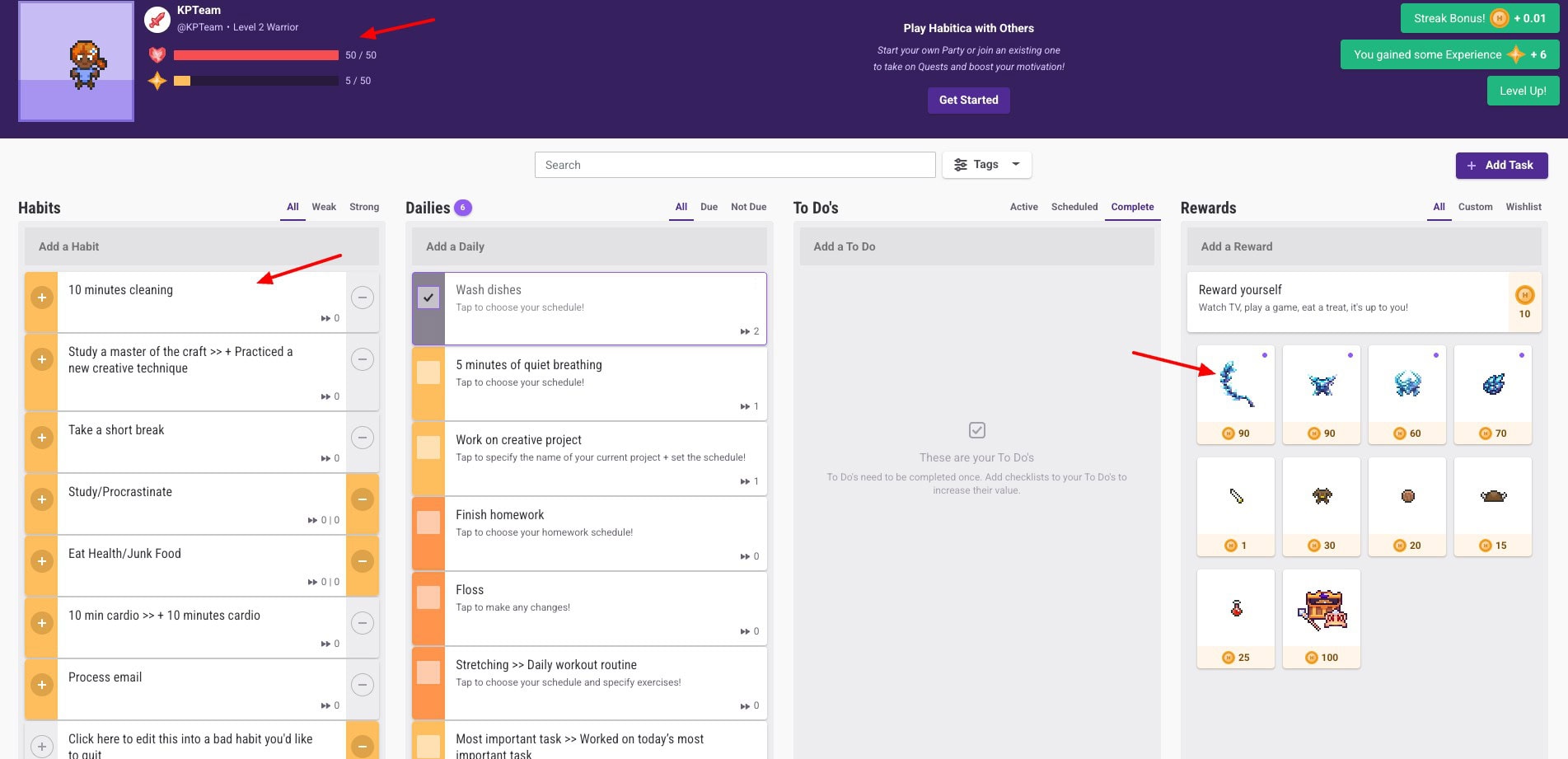
As you keep on completing your tasks, you level up in the game. It also helps you gain XP and gold, using which you can purchase items in the game, like gear, pets, and real-life rewards! But on failing to perform your tasks, you lose health points (HP).
Another interesting feature of Habitica is that you can create a team and join parties with your friends. Here, you can fight monsters together by completing your tasks on time. Overall, this adds accountability while also keeping your tasks interesting, light-hearted, and fun to perform.
It has apps for the web, iOS, Android, and desktop apps for Mac and Windows devices. The free plan offers all its core features. If you need extra cosmetic items and quest options, you can upgrade to its paid tier. If you want a fun and interesting way to perform your daily habits, Habitica is a must-try!
2) Coach.me – Best for Accountability
Coach.me is a habit tracking app for Android, iOS, and the web. It is a simple and user-friendly app that can be used by all levels of users, from beginners to professionals. To start with it, go to the Dashboard and click on the + icon to add a new goal.
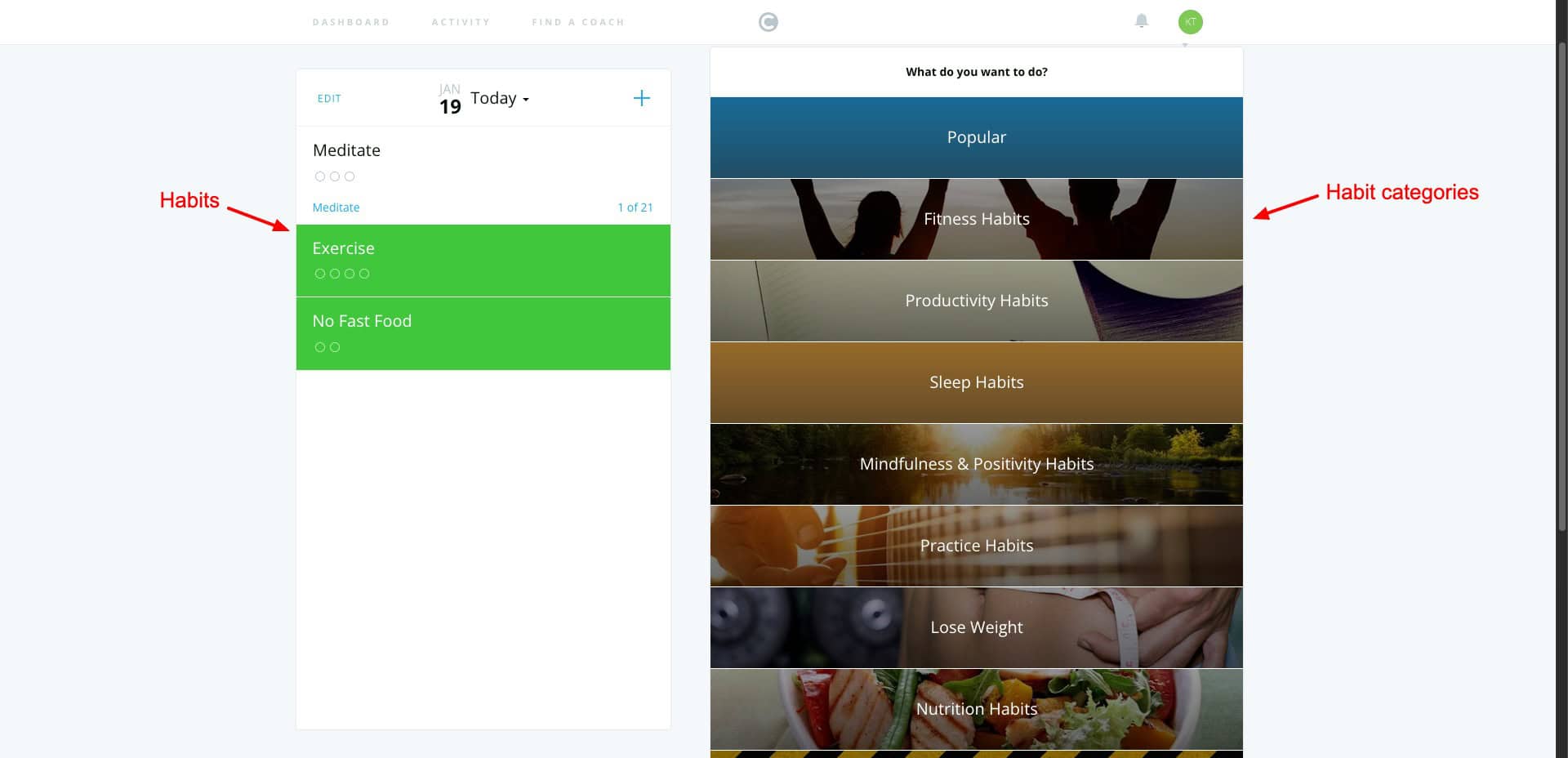
You can choose from its list of different habit categories or create a new one. It has multiple categories of habits, like fitness, productivity, weight loss, sleep, money habits, etc. As you join a habit, it features the number of joiners on it.
I love that there is a discussion tab where you can start discussions with the community and get answers. This is great for staying motivated while practicing daily habits.
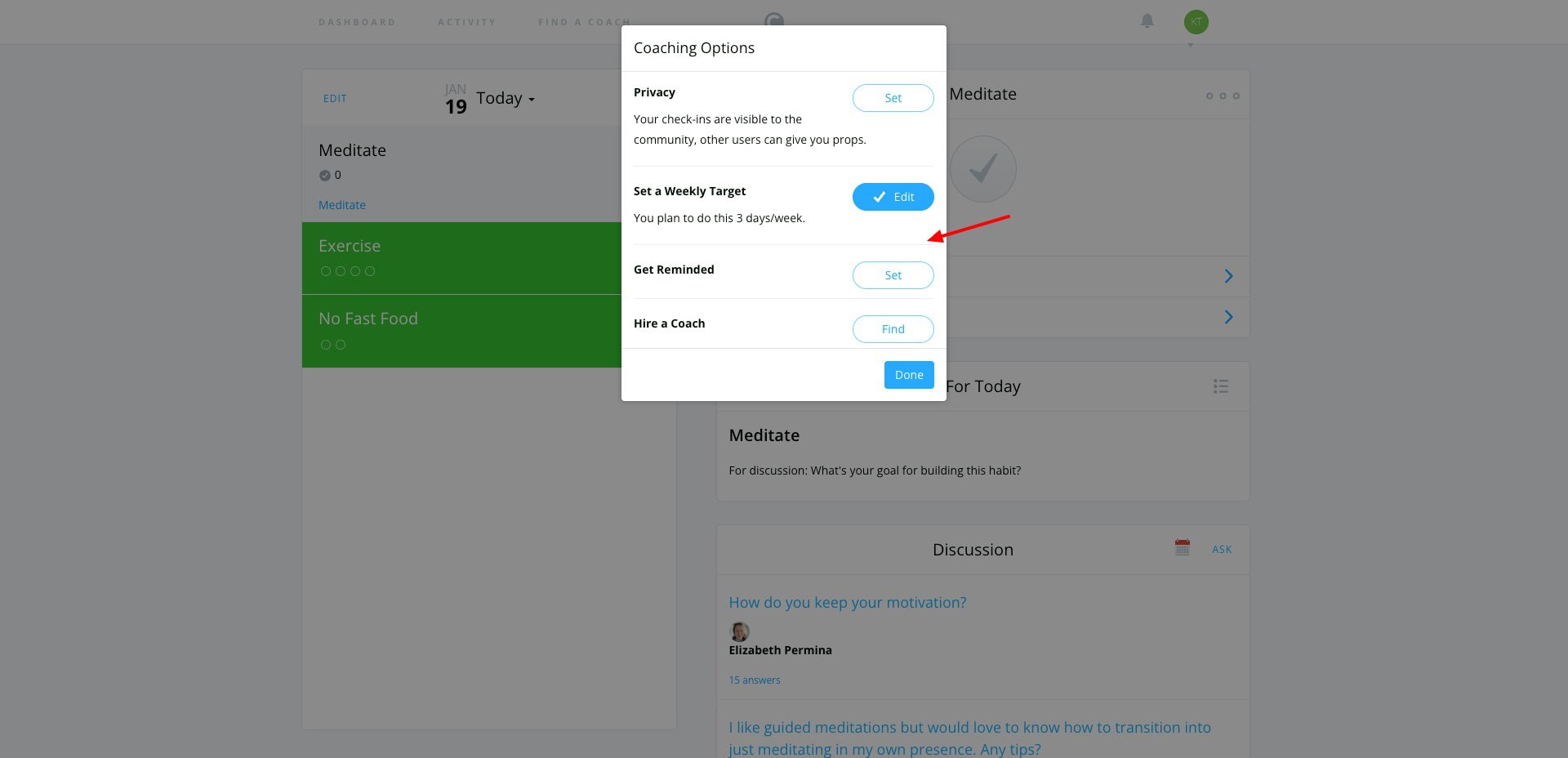
While creating any habit, you can set the privacy to public or private. If you keep it public, the community can see your check-ins. You can also set a weekly target for how many days in a week you wish to perform the habit (or check-in), and set a reminder on specific days & timings.
Overall, Coach.me is useful for those who struggle to stay motivated while performing habits. If you need an app to collaborate, have discussions, and get an accountability partner while working on your habits, try Coach.me. All its features are completely free to use.
3) Loop Habit Tracker – Best for Android Users
Loop Habit Tracker is a completely free and open-source habit-building app with over 50 lakh downloads on the Google PlayStore. You can get started with it by creating a habit. Habits are of 2 types: Yes/no habits and measurable habits.
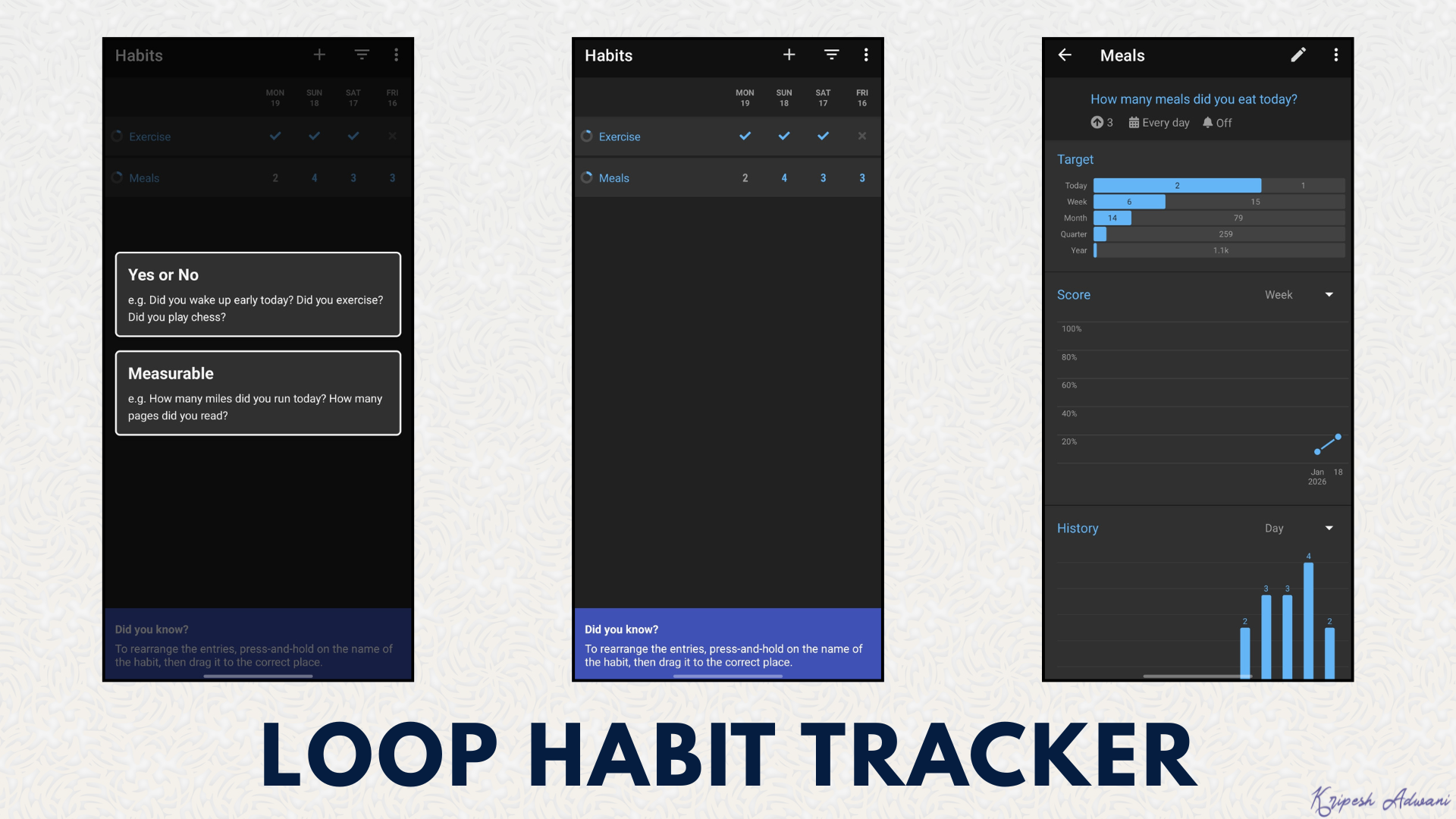
Yes/No habits may be daily habits with a specific frequency, like journaling, meditation, exercising, etc. But if you have some data or progress to log each day, you can create measurable habits, like the number of calories taken, the number of steps walked in a day, etc.
Once you start performing the created habits daily, it will give you detailed insights and graphs for your target score, best streaks, frequency, and more. Overall, if you are looking for straightforward and simple habit tracking for an Android device, Loop Habit Tracker is a great choice.
4) Way of Life – Best for Color-Coded Tracking
Way of Life is a data-focused habit tracker app for Android and iOS devices. It is basically designed for people who want to understand why they succeed or fail at habits. This app helps you build good habits and break bad habits using a simple color-coded system.
Every time you successfully check in to a habit, it is marked in green. Whereas missed days are marked in red. This visual contrast makes it easy to identify where you’re consistent and where you’re lagging.
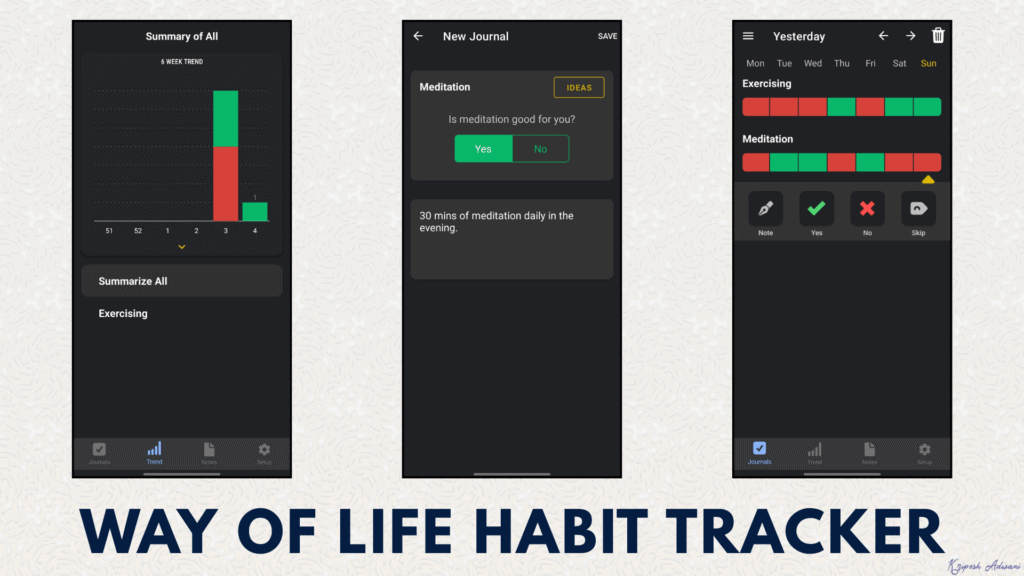
On the free plan, you can track up to 3 habits forever. Once added, your habits appear in the Journal tab, where you can log daily progress and reflect on your behavior. I love how Way of Life stands out with its long-term analytical insights.
Under the Trends section, you can view your habit performance over 6 weeks, 12 weeks, 6 months, 9 months, 1 year, and 2 years. This makes it useful for analyzing patterns over time and tracking consistency.
It also supports notes and journaling, custom reminders with specific times, repeat frequency, and even a personalized message for yourself. However, you may notice a banner prompting you to upgrade, which can feel distracting and spoil the user experience.
Overall, Way of Life is best suited for users who enjoy self-reflection, habit analysis, and journaling.
5) Habit Tracker App – Best for MacOS
Habit Tracker is a goal tracker and ADHD planner app for macOS. It has an impressive 4.8 rating from 133k+ users. You don’t even need to sign up or register to use it. It works without registration as well.
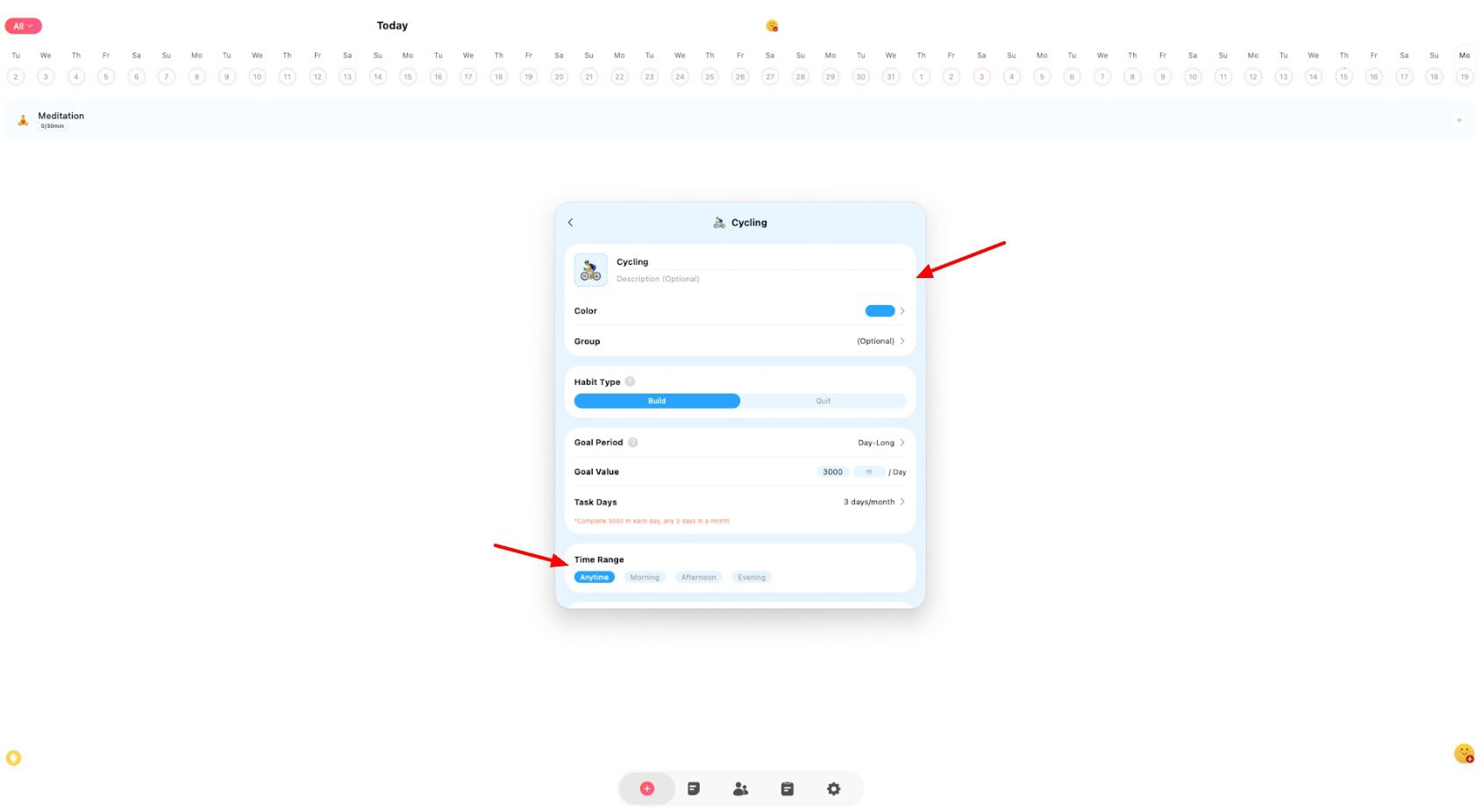
Simply press the + icon to add a new habit. I liked the fact that it the ‘Habit Type’ field lets you specify if you are trying to build habits or quit them. It also has a library of different habit categories you can choose from.
Next, you can pick your preferences for the following settings:
- Goal Period – Day / Week / Month long
- Goal Value – How many minutes or hours per day
- Task Days – Every day or select specific days
- Time Range – Anytime / Morning / Afternoon / Evening
It features a monthly calendar view, where you can check which habits you followed on different days of the month. You can also set moods for each day. However, reports are available on paid plans only.
Additionally, if you have an Apple Watch, you can connect it to Habit Tracker to keep its stress meter data updated. Overall, if you need a habit tracking tool specifically for Mac devices, try Habit Tracker.
6) Awesome Habits – Best for Ease of Use
Awesome Habits is another popular app for Mac devices. It doesn’t require you to create an account to use it. To start, click on the + icon and add a habit. It already has a list of habits under various categories like healthy habits, unhealthy habits, body, mind, happiness, productivity, etc.
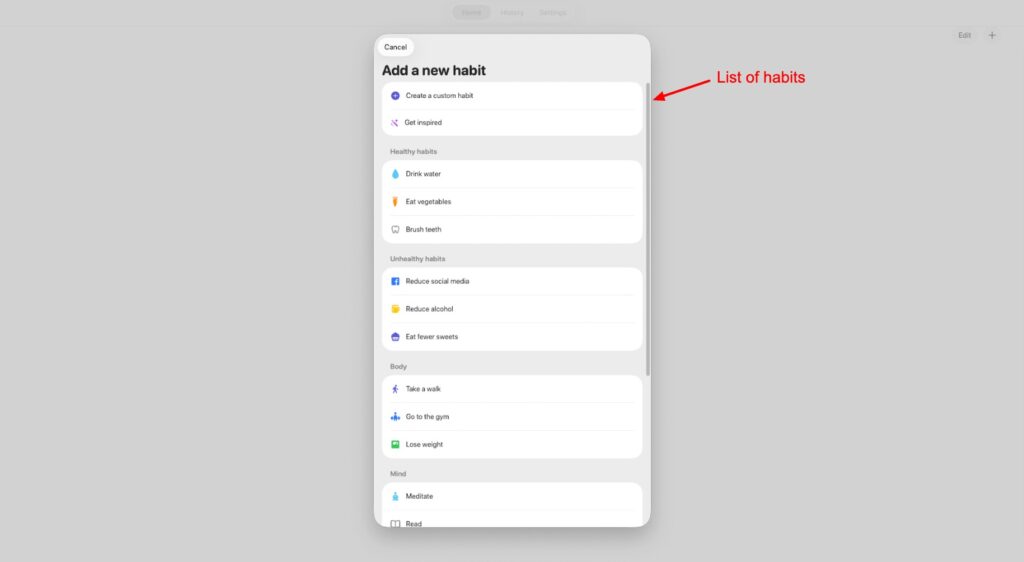
You can also create new custom habits if you want. It also lets you specify if you want to break a bad habit or build a good one. Then you can add details like habit frequency, reminders, daily maximum limits, etc. However, stats are not available on the free plan.
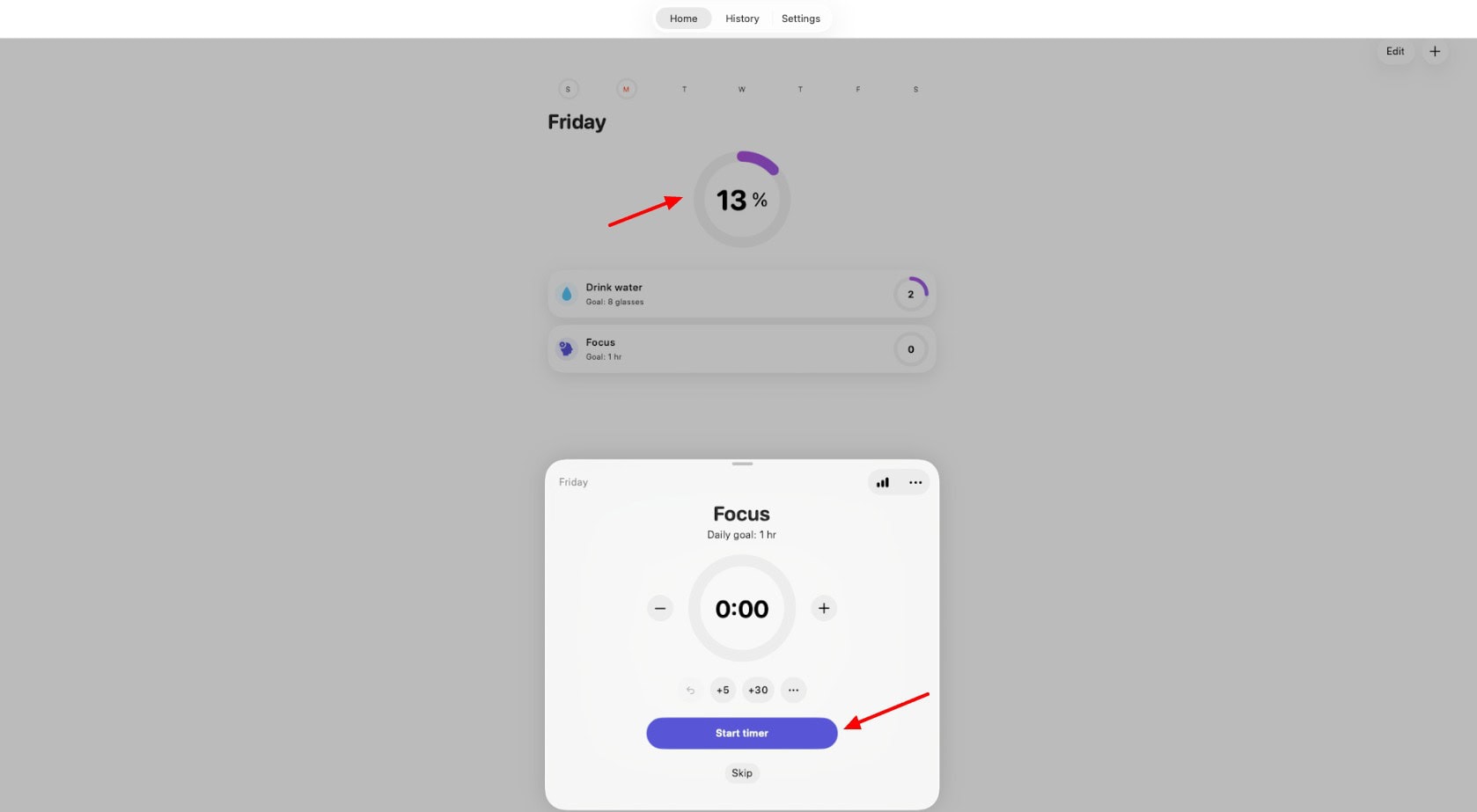
The free plan of Awesome Habits lets you create3 free habits. For unlimited habits, you can upgrade to its paid plan for ₹169/month, ₹1,099 per year, or lifetime for ₹2,299. If you are looking for an easy-to-use habit tracker for macOS, Awesome Habits is a must-try!
Bonus Habit Tracker App
7) Forest – Best for Productivity & Focus
For productivity enthusiasts, I have a bonus addition to the list – Forest. Forest is a very popular productivity application used by over 900k+ users. It’s currently available as an app for Android and iOS devices, and a Chrome extension.
To start with Forest, you just need to begin a new session and get to work. It features a 10-minute timer, and as you keep working, your tree keeps growing. You can also blocklist or allowlist different websites while using Forest.
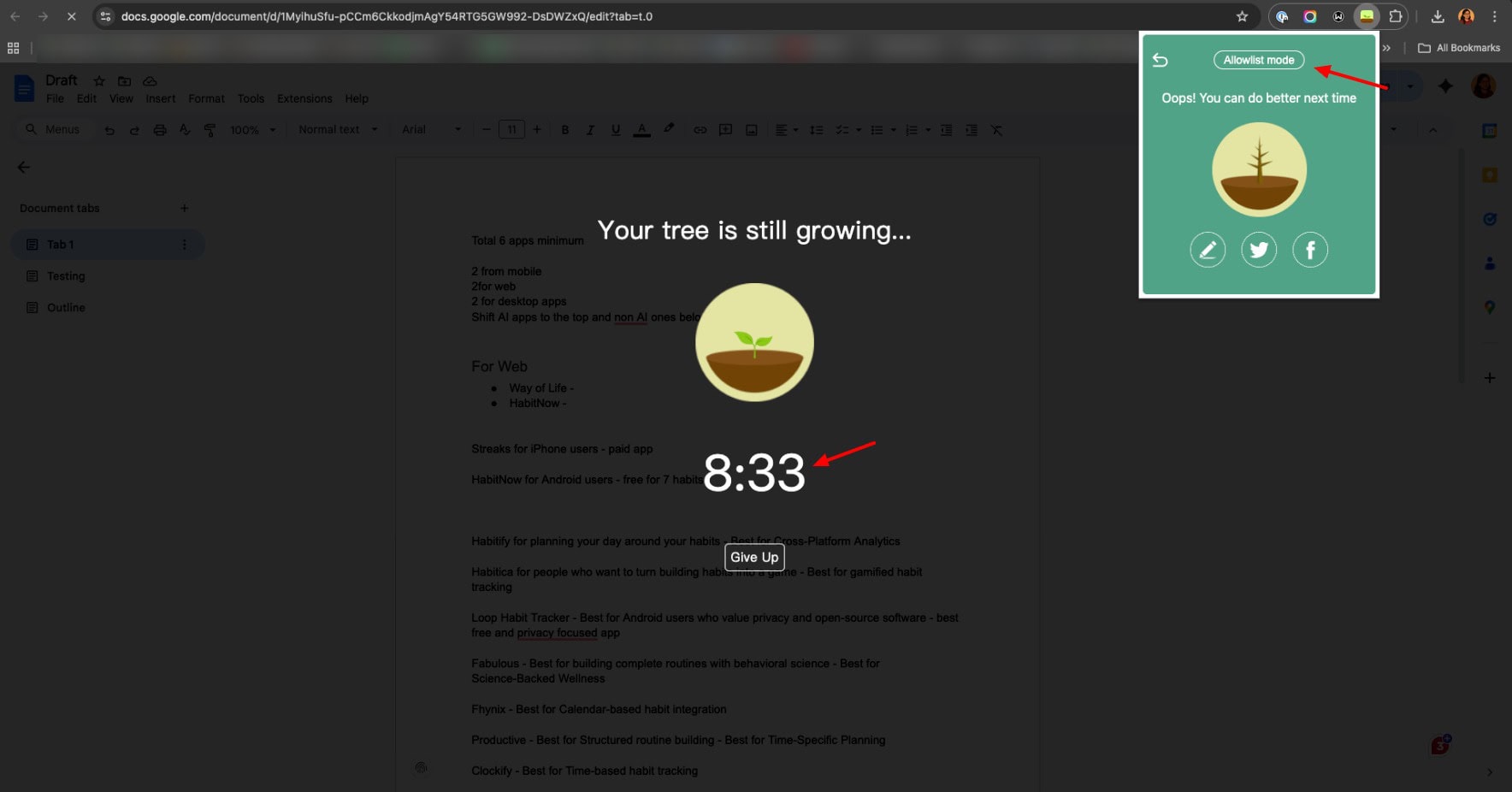
If you leave a task midway, your tree will perish. But as you keep on using Forest, different kinds of trees get unlocked and added to your forest, and you will have a forest of lush green trees!
By focusing on your tasks and growing forests, you can collect virtual coins. You can use these coins to plant real trees. So far, the Forest app has planted over 2.1 million real trees! So, if you want to focus on building good habits while also saving the environment, try the Forest app.
Benefits of Using a Habit Tracker App
There are multiple benefits of using a habit tracker app. Let’s look at the major ones below.
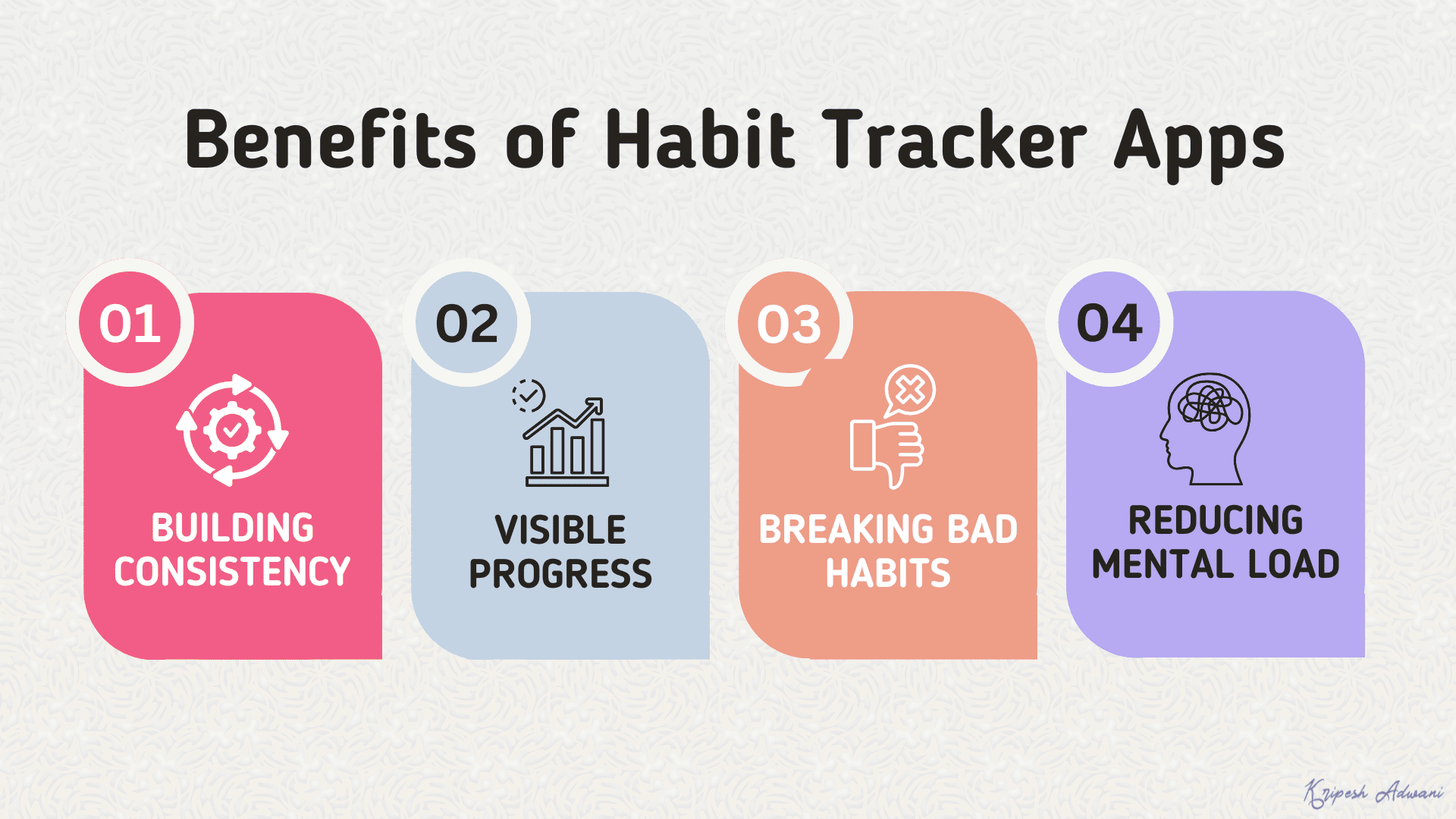
1) Building Consistency
By using habit tracker apps, you shift your focus from larger goals to small daily actions. It becomes easier to invest a small amount of time daily in checking off a habit from your list.
2) Visible Progress
With habit tracker apps, you get visual feedback in the form of color codes, streaks, charts, stats, etc. This shows you proof of effort in habit formation and helps you stay motivated to achieve your goals.
3) Breaking Negative Habits
Many habit trackers, like Awesome Habits and the Habit Tracker app for Mac, let you track habits you wish to quit, like smoking, drinking, snacking on junk food, spending too much time on the phone, etc.
When you miss days on the habit tracker and see red marks, it works as a gentle reminder to get back on track.
4) Reducing Mental Load
With automated reminders within habit trackers, you don’t need to rely on your memory. Once reminders and tracking are automated, you don’t need to rely on memory or willpower.
This frees up mental energy for more important things.
How Did We Test These Habit Tracker Apps?
In order to test these habit tracker apps, we evaluated them on the following factors.
- Habit creation flexibility (Yes/no habits, measurable habits, build vs quit habits)
- Goal customization (daily/weekly/monthly goals, time or frequency-based goals)
- Motivation methods (gamification, streaks, rewards, visual cues)
- Accountability features (community, teams, public check-ins, partners)
- Progress tracking & analytics (streaks, graphs, trends, long-term insights)
- Reminders & notifications (custom time, days, frequency)
- User experience & simplicity (ease of use, distractions, learning curve)
- Free plan value vs paywall limitations (habit limits, locked stats, upgrade prompts)
Based on the performance of the above tools on these factors, I ranked them on my list.
Why Should You Trust Me?
I’ve been working full-time in the digital industry since 2015. Over the years, I have extensively tested, used, and reviewed hundreds of productivity tools, SaaS tools, and AI tools. For this article, I personally explored each habit tracker and used it thoroughly in real-life workflows.
The tools recommended in this article are based on hands-on testing and practical usability. So, if an app added real value to my workflow, I have highlighted it. And if an app has limitations, I have stated them clearly as well. This will help you choose the correct tool that fits your lifestyle.
Conclusion
With habit tracker apps, you can build lasting habits while having visual proof of your progress and efforts. In this article, we looked at the 7 Best Habit Tracker Apps for 2026. In my experience, Habitica is the best habit tracking app. I also use Forest to get my tasks done with focus and motivation.
Anyway, have you used any habit tracking tools? Which one’s your favorite and why? Do share in the comments section below. And if you’re interested, check out these best AI tools for remote work to skyrocket your productivity! This is Kripesh, taking your leave. Cheers and keep learning!
FAQs
Which is the best overall habit tracker app?
Habitica is the best habit tracker app as it gamifies the process of performing daily tasks. This makes habit-building quite fun and engaging.
Which habit tracker app is best for accountability and motivation?
If you want to work with accountability partners or participate in discussion forums, community chats, etc., Coach.me is the best option.
Which habit tracker app is best for Android users?
For Android users, Loop Habit Tracker is the perfect option. It is free, open-source, and offers insightful data like streaks, graphs, and success rates for free.
Which habit tracker app is best for tracking habits with analytics?
Way of Life is best for analytics. It features a color-coded tracking system, long-term trend insights (up to 2 years), and a notes feature for self-reflection.
Which habit tracker app is best for Mac users?
For macOS users, Habit Tracker App and Awesome Habits are both great options. While Habit Tracker is ideal for goal-based and time-based habits, Awesome Habits is better for beginners who need a simple habit-building platform.