Planning for your next vacation in Thailand, but tired of sky-high roaming charges and the hassle of juggling physical SIM cards? Say hello to eSIM! This revolutionary technology offers a seamless and affordable way to stay connected wherever your adventures take you.
In this personalized guide on How To Use eSIM When Traveling, we’ll break down everything you need to know about using eSIMs for travel, from choosing the right provider to checking compatibility and troubleshooting common issues.
Get ready to experience the freedom and flexibility of eSIMs for travel! Let’s dive in.
- What is an eSIM?
- How to Check Device & Carrier Compatibility?
- How to Choose an eSIM Provider?
- How to Install and Activate Your eSIM?
- How to Troubleshoot Common Installation Issues
- How to Use eSIM While Travelling?
- The Future of eSIM and Travel
- Why Should You Trust Me?
- Best eSIM For Travel In 2026
- Conclusion
- FAQs
What is an eSIM?
Embedded SIM or eSIM allows you to make phone calls or send messages through software. In a physical SIM, you need to insert a thumbnail-sized chip into your phone. Through this SIM card, your device connects to the network carrier.
eSIM works similarly to a physical SIM. However, you can remotely program it through software provided by the operator. All you have to do is purchase a plan online, download the app, and activate it upon reaching your destination.
Now the question is: Why do you need an eSIM?
- Convenience: You don’t need to insert a physical chip.
- Flexibility: eSim is easy to use and operate remotely.
- Dual SIM capability: You can use both a physical SIM and an eSIM simultaneously.
- Reduced risk of loss: Prevents the chances of losing your physical SIM.
Last but not least, eSIM offers significant cost savings on roaming charges for international destinations.
How to Check Device & Carrier Compatibility?
Generally, all high-end mobile phones support eSIM. In fact, if your device was launched after 2018, you can expect it to be compatible with embedded SIM. For example, devices like the iPhone, Google Pixel, and Samsung Galaxy series support eSIM.
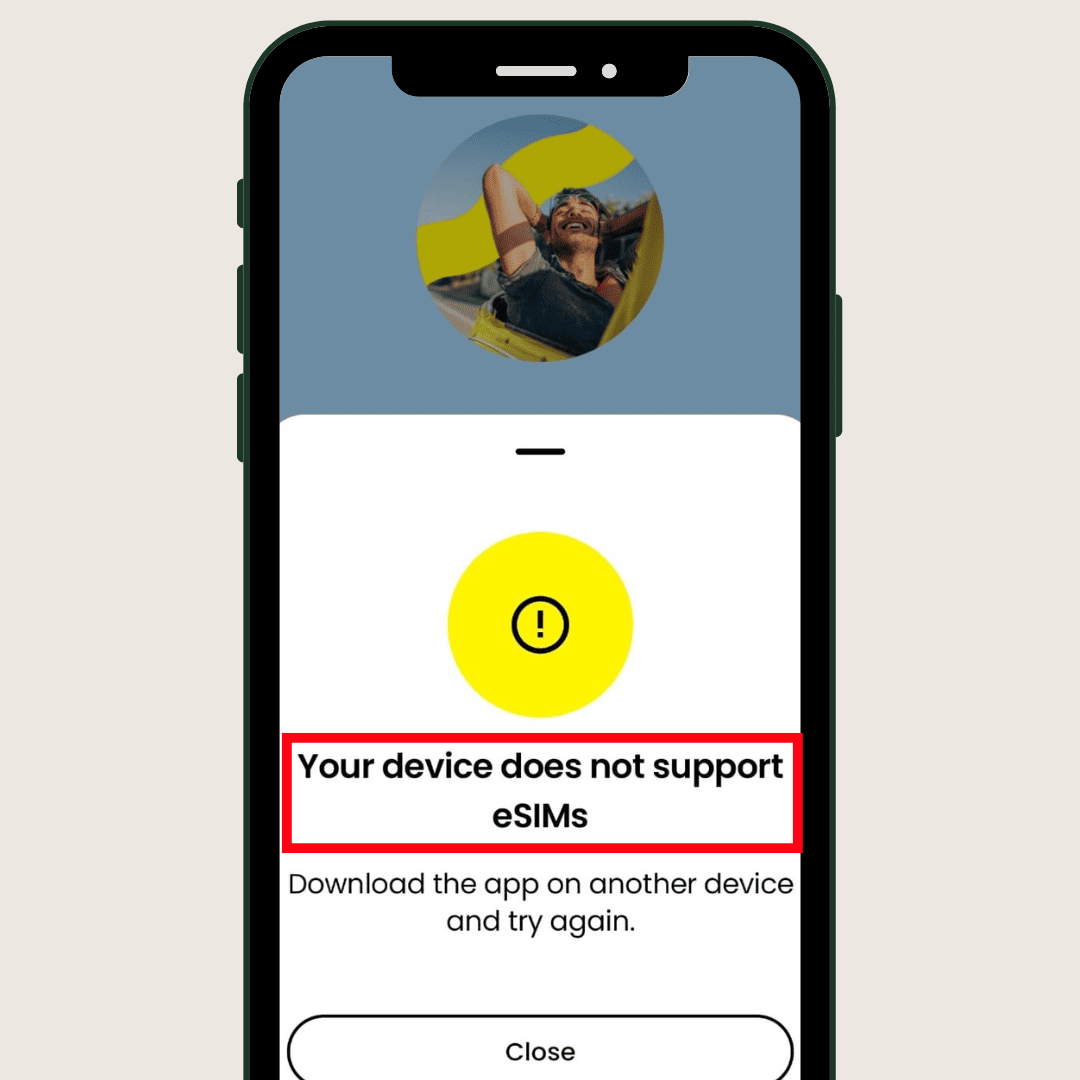
Still, if you’re confused, you can check compatibility with just a few steps. eSIM providers like Saily help users check carrier compatibility through their applications. So, you just need to download the app on your smartphone. If your device doesn’t support eSIM, you’ll get the above notification.
I would also advise you to visit the link and check with your current carrier to know their eSIM policy.
How to Choose an eSIM Provider?
eSIM is gaining popularity day by day. Hence, you’ll find popular Indian mobile operators like Jio or Airtel and International providers like Airalo, Saily, etc. offering electronic SIM. Now, how do you know which eSIM provider is best for you? Let’s know some basic factors you must check:
//How to choose an eSim provider
1) Network Coverage
You want to avoid network disruptions or slow internet speeds. To minimize these risks, start by researching network coverage. Check their coverage maps for the country you’re visiting and investigate their partnerships with local providers.
2) Data Limits
When traveling internationally, whether for leisure or business, consider your data needs. If you plan to share photos, videos, and updates on social media, or require significant data for work, carefully evaluate the data limits offered by your chosen eSIM provider to ensure they align with your usage expectations.
3) Validity Periods
Similar to data packs, the duration for which you require the eSIM is also important. For example, professionals going on a long business trip may require an eSIM with a yearly or high-duration plan. However, if you’re just vacationing, a 5-day or 10-day plan will probably be sufficient.
4) Customer Support
Efficient customer support is crucial for digital SIM card users. If you encounter any problems during the activation process or experience issues with plans and packages, prompt assistance is essential. Ensure your provider offers at least chat, phone, or email support.
5) Price
Now you have multiple choices for eSIM. To save on paying high international roaming fees, compare the prices of different providers. For example, Maya Mobile offers plans starting from $6 for 3GB, whereas Saily offers plans starting from $4.99 for 1 GB.
I have traveled internationally (Thailand, Dubai, Vietnam) multiple times, spending nearly a month in Europe. Based on my experience and considering all the factors mentioned above, my top eSIM providers are:
- Maya Mobile: Best value for money
- Saily: Best for Asian Countries
- Nomad: A good alternative to the above two.
I’ve thoroughly reviewed these three eSIMs, along with three other options. You can check out “6 Best eSIMs for International Travel (2026)” to make an informed decision.
How to Install and Activate Your eSIM?
Before you reach your destination, you’ll need to purchase and install an eSIM from your home country. I’m using India as an example here, but the steps will be the same for other countries. I’ll guide you through the process of installing and activating an eSIM, using Saily as an example (you can choose any provider you prefer).
Step 1: Download and Log in to the Saily App
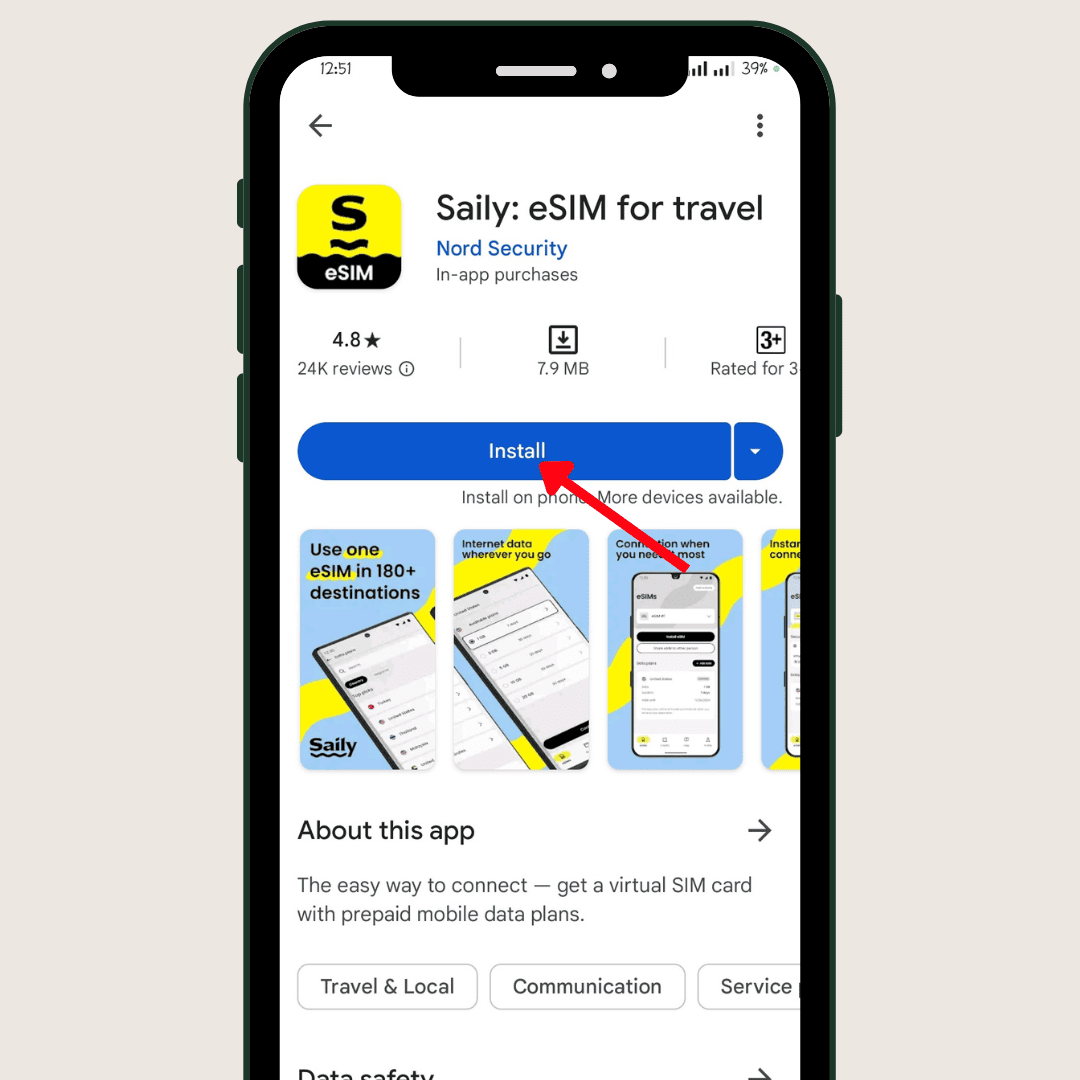
To use a Saily eSIM, you first need to download the Saily app from Google Play Store. You can also check details by visiting its official website. Once installed, log in to the homepage.
Step 2: Select Your Region
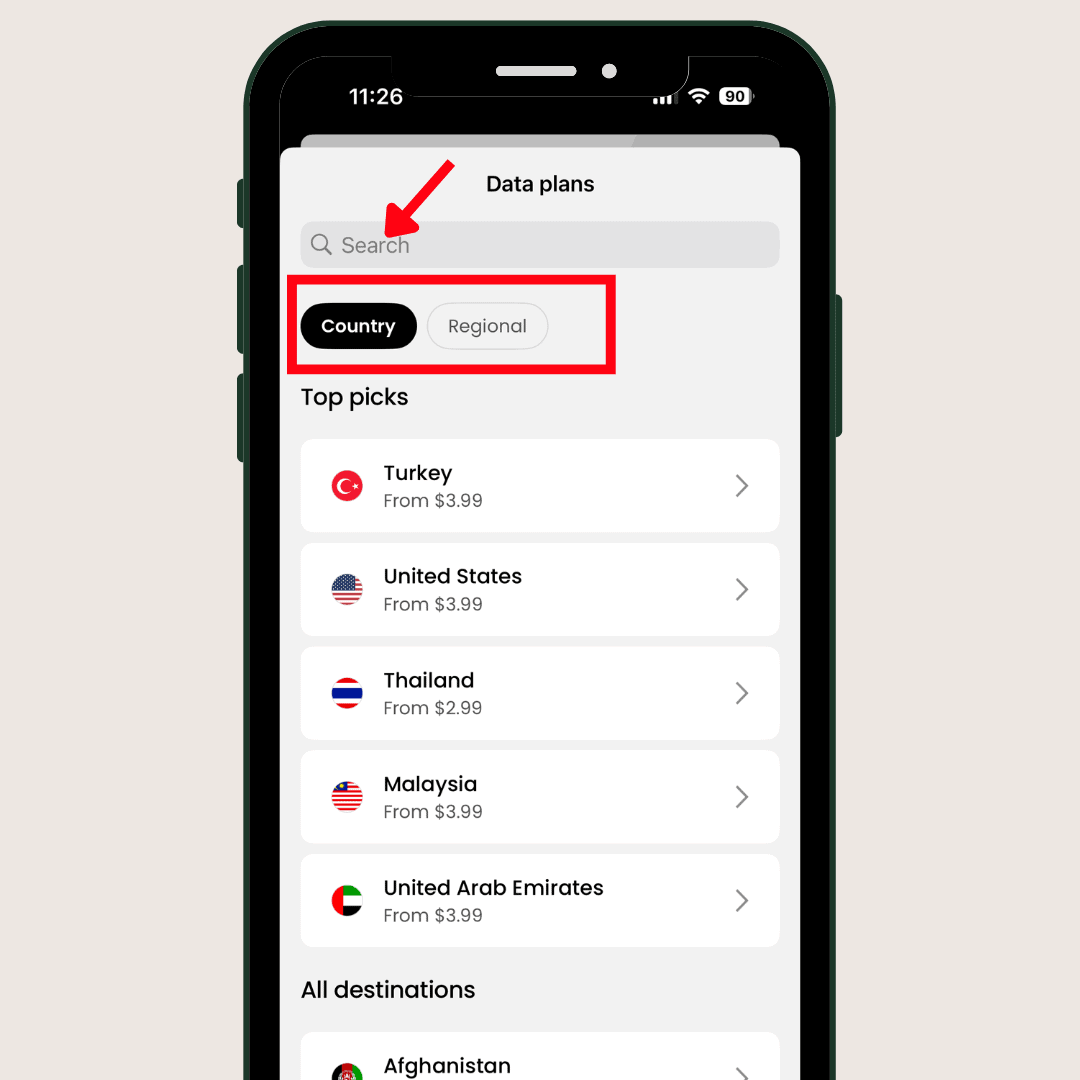
After opening the app, you’ll see the “Get a new eSIM” option. Click on the button, and it will display a list of countries. I’ve selected India here.
Step 3: Select Data Plan
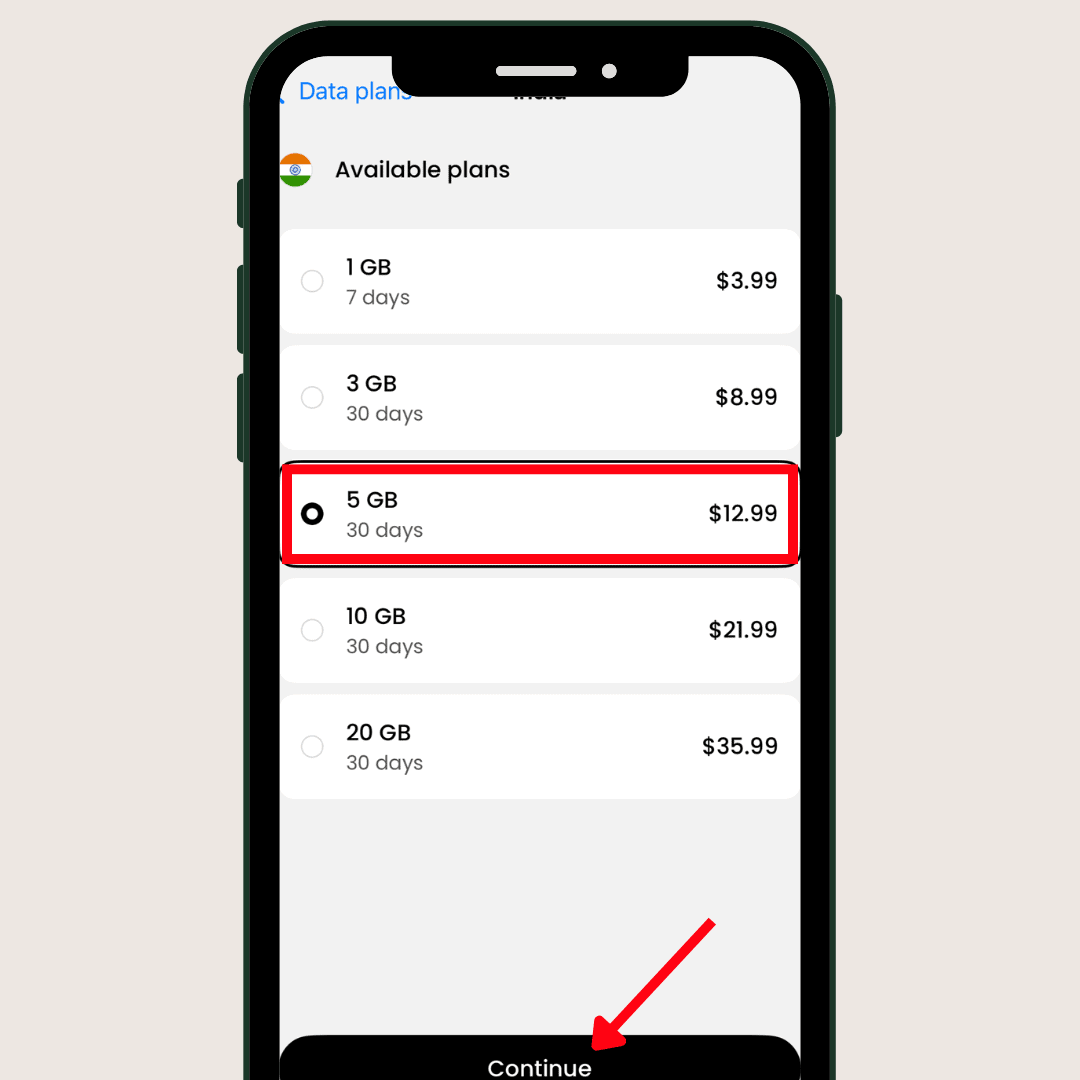
After selecting the country, the Saily app displays different data plans available for that region. So, I’m going with this 5GB eSIM data package for 30 days, which originally costs $12.99.
Step 4: Enter Coupon Code
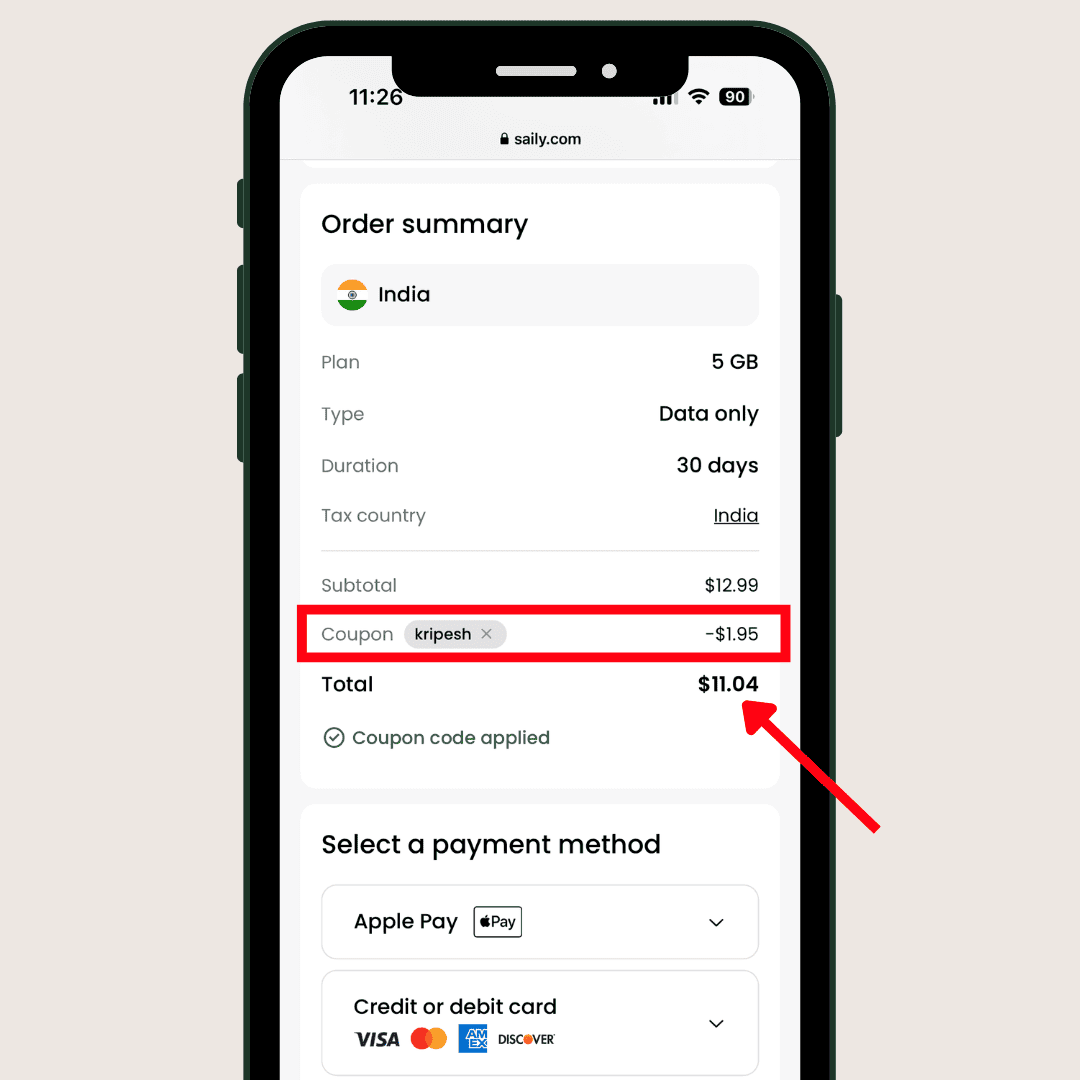
Now, you’ll be redirected to the payment page. Check the plan and prices carefully. Scroll below, you’ll find “Coupon code.” Now enter the coupon code “KRIPESH” to avail of an extra 15% off.
Step 5: Pay and Purchase eSIM
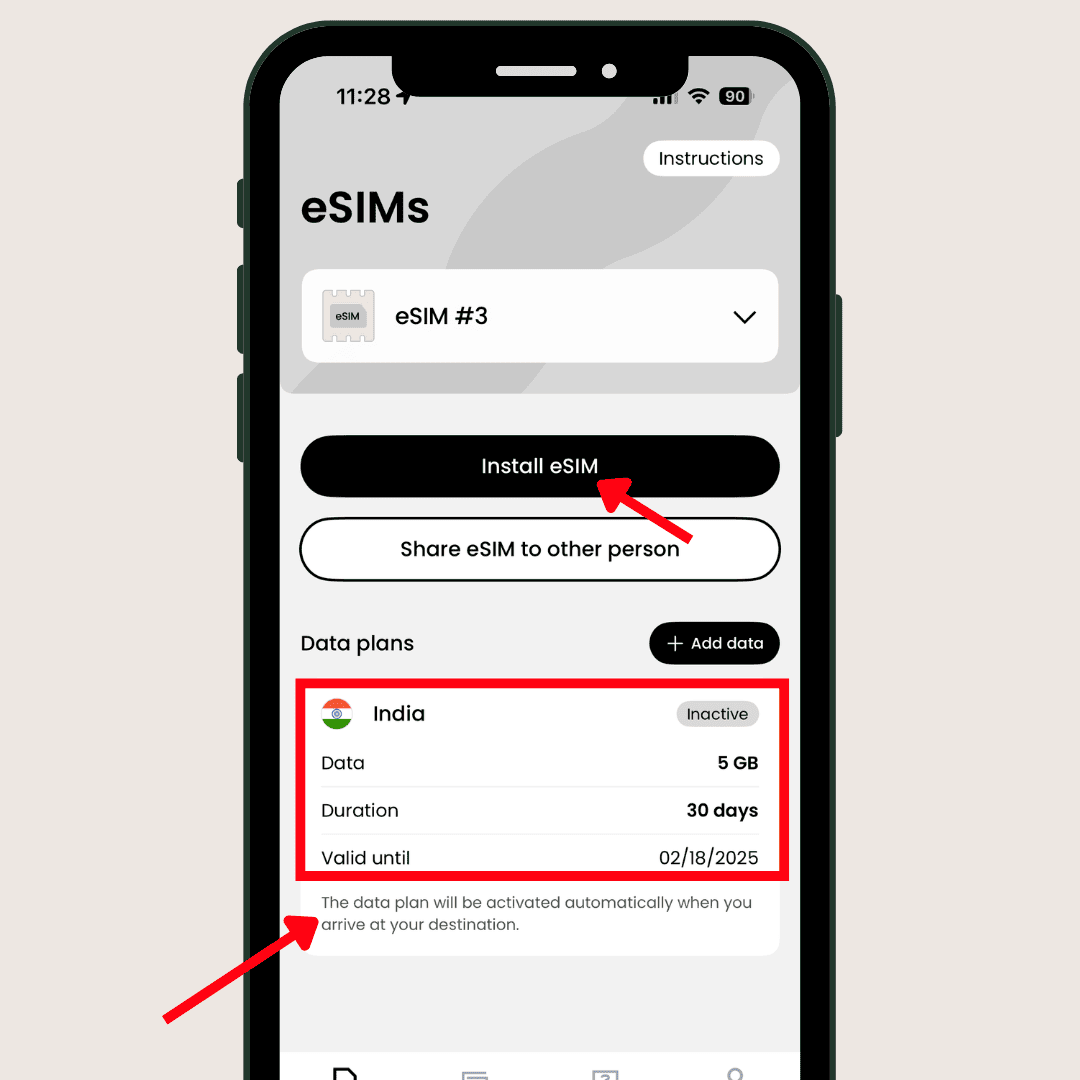
After the discount coupon is applied, the 5GB data cost will be reduced to $11.04. Add your credit/debit card details and purchase the plan. Once payment is done, the app will show the inactive status, like the above image.
Step 6: Install and Activate eSIM
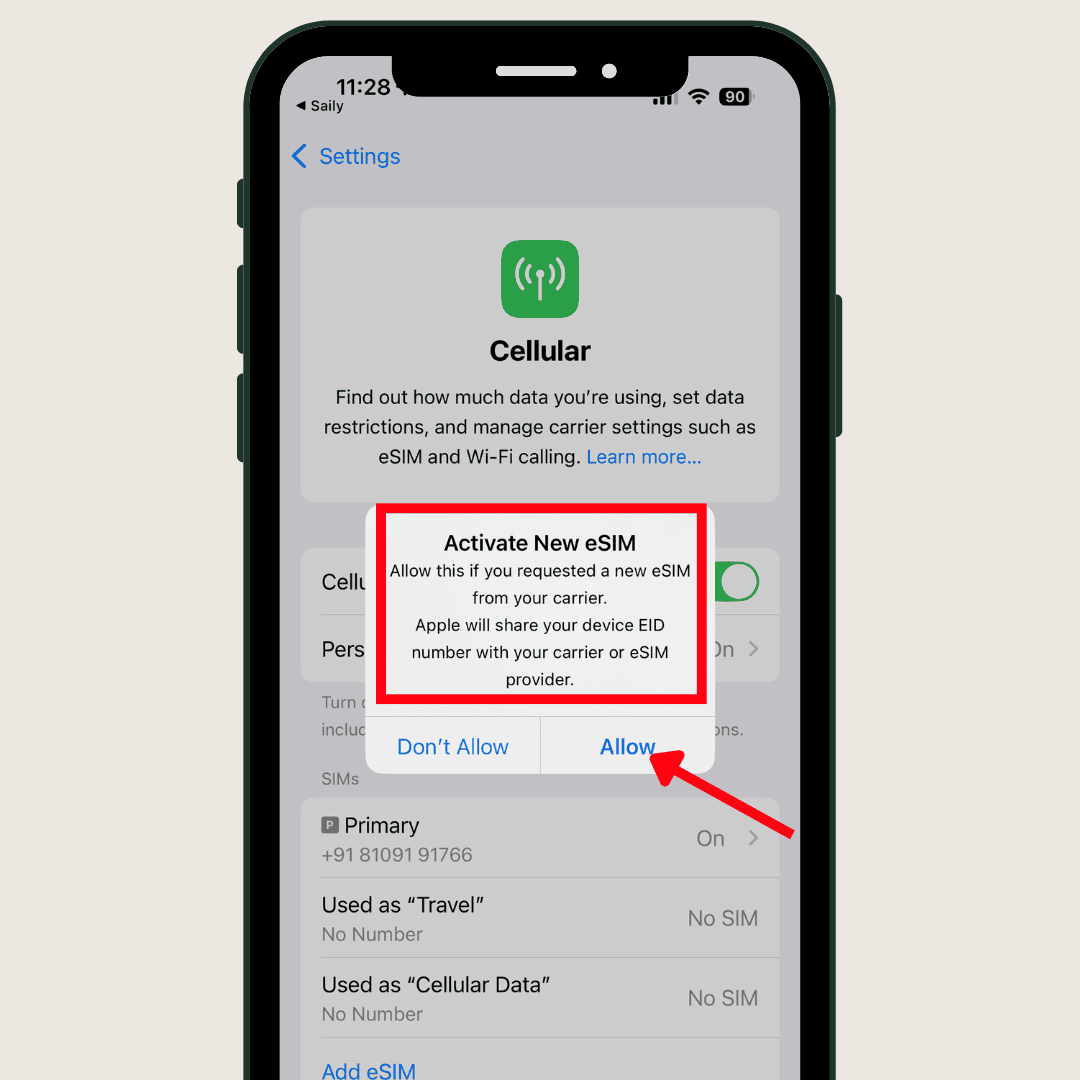
Now, when you land at your destination, open the Saily app again. You’ll see a button “Install eSIM” and click on “Allow” to activate. It will automatically activate the SIM and fetch the best mobile networks available to your location.
Step 7: Set up eSIM
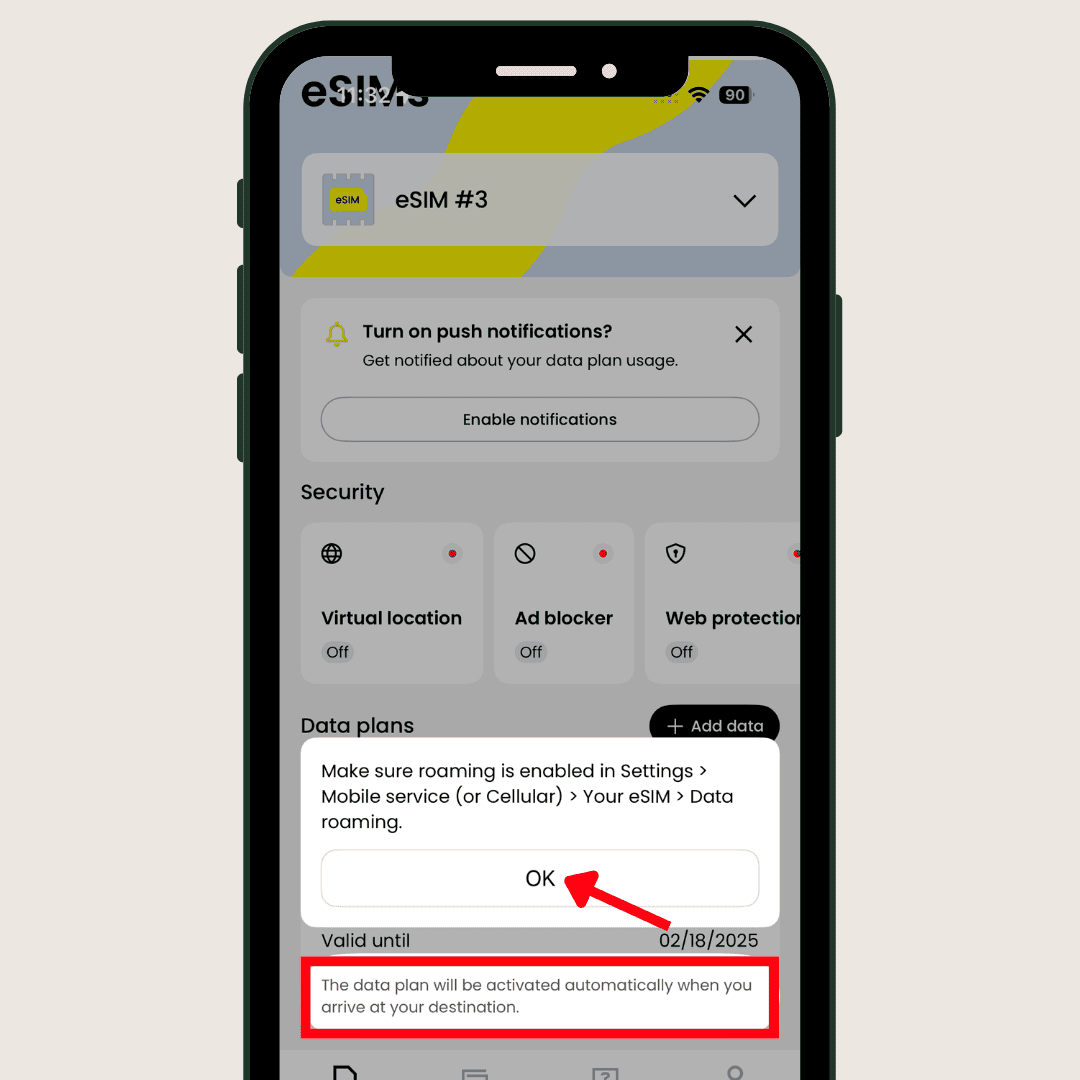
At this stage, you’ll see plan details and other settings on the interface. Now, turn on “Data Roaming.” After that, enable “Airplane mode” to turn off everything (Wi-Fi, data connection) and then disable it after a while. Now your eSIM is ready.
How to Troubleshoot Common Installation Issues
While using an eSIM, you might encounter some common installation problems. You can always get support from your chosen eSIM provider. However, based on my extensive experience, I’ve outlined some solutions that might help you take immediate action:
1. Change Your Network
You may improve your internet connectivity or speed by manually changing the network. For example, during my travels to Vietnam, I was only getting 3G with automatic network selection. However, I achieved 4G speeds by switching it manually.
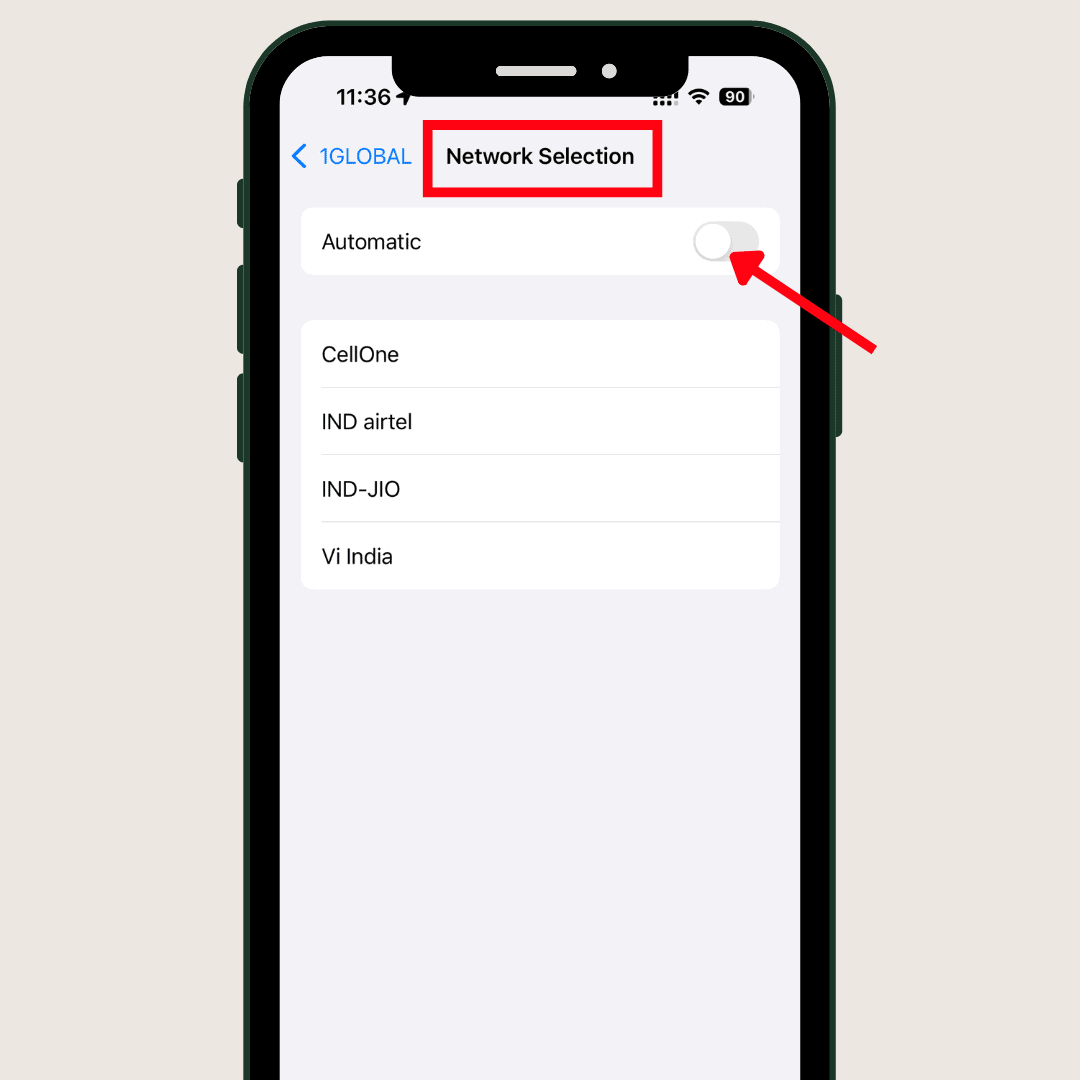
Here’s how:
- Open the “Settings” option on your smartphone.
- Under SIM settings, navigate to “Cellular Data” for your eSIM.
- In this section, you’ll find the “Network selection” option for your eSIM.
- Turn off the “Automatic” network selection.
- You’ll now see a list of local network providers.
- Choose the provider offering the best network for you.
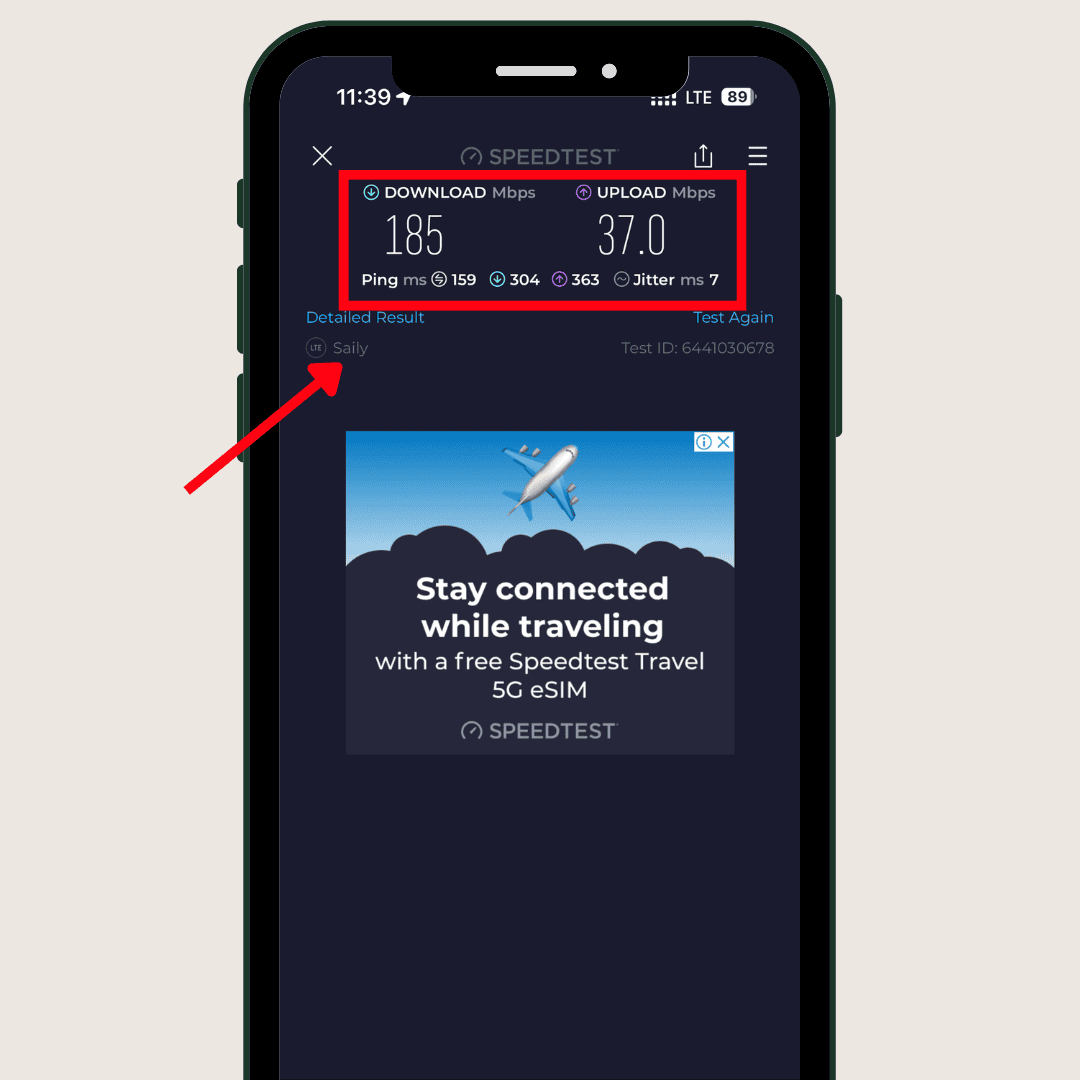
In my case, I got 4G LTE speeds with Vinaphone in Vietnam. I conducted a speed test using speedtest.net, and the results are shown above.
2. Fixing Network Connectivity Issues
Sometimes, even after manually selecting your carrier or toggling Airplane Mode, you might encounter connectivity issues. In that case, you can reset your network.
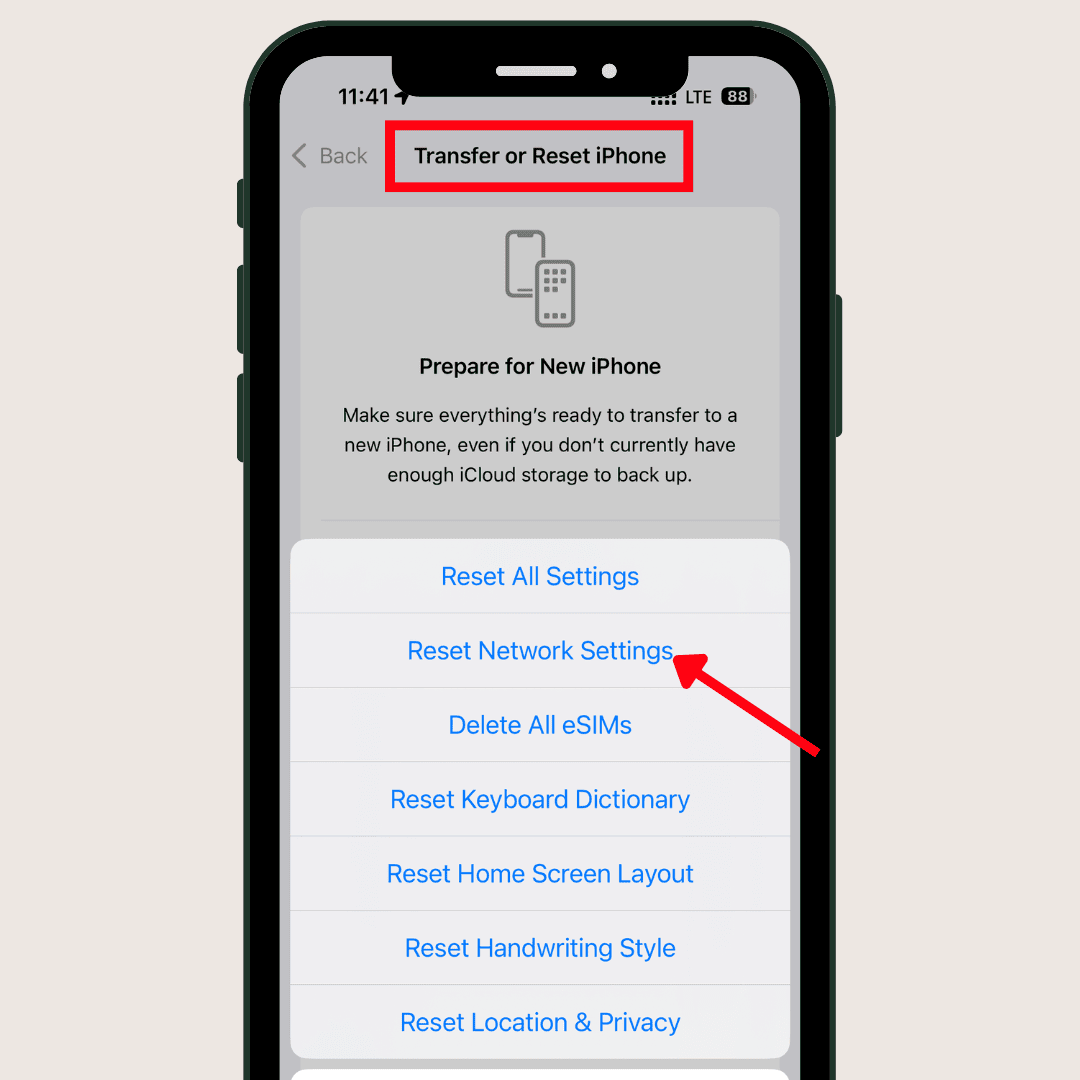
How to Reset Network:
- Open your phone’s settings.
- Under General (for iPhone) or System (for Android), you’ll find the ‘Reset’ option.
- Reset your network settings.
3. QR Scanning Failure
You can activate popular eSIMs like Maya Mobile, Saily, and Nomad through a QR code as well. Once you purchase their plan, the QR code is sent to your email.
However, what if your QR code scanning fails repeatedly?
- Make sure the eSIM app is updated.
- Ensure the QR code isn’t blurry.
- Keep your phone in a steady position while scanning.
- Manually input the activation code sent to your email.
4. Unsupported eSIM Error
Even if your phone supports eSIM, issues can sometimes arise. You might encounter an error while activating your eSIM after arriving at your destination.
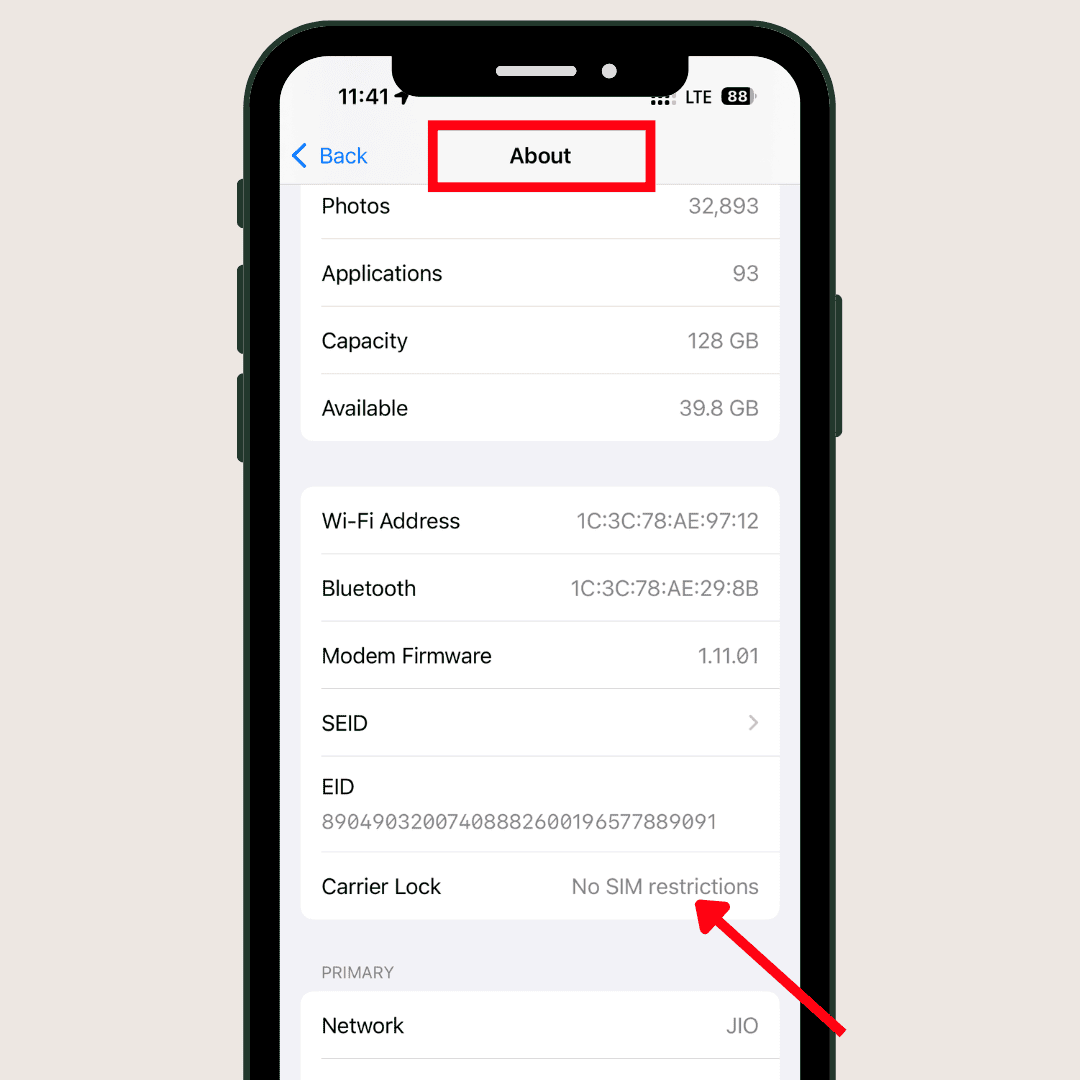
What should you do first? Verify your phone unlock status.
- Go to Settings.
- Under General settings, navigate to the “About” section.
- Scroll down to find “Carrier Lock,” or “Network Provider Lock.”
- Change the status from “SIM lock” to “No SIM Restrictions”.
5. Dual SIM Issues
If you’re using an eSIM with a physical card or activating a new eSIM, you might encounter connectivity issues, such as dropped calls or SMS problems. To resolve these issues, try:
- Set your eSIM as the primary connection for data, calls, or messages in your phone’s settings.
- Activate your new eSIM profile before disabling your old eSIM or removing your physical SIM card.
How to Use eSIM While Travelling?
Embedded SIMs are convenient to use while traveling. You don’t need to carry any physical SIM card, and you can enjoy uninterrupted connectivity as soon as you land at your destination. Here are some practical tips for using an eSIM smoothly:
1) Checking Data Usage
Some eSIM providers, like Saily, display data usage on their apps. However, providers like Maya Mobile don’t have apps and instead send usage notifications via SMS. Alternatively, you can log in to your account online to check your remaining data.
2) Topping Up Your Plan
One limitation of many eSIMs, including Saily, is that they often don’t allow data top-ups. You usually need to purchase a new eSIM with a new data plan and deactivate the old one.
3) Contacting Customer Support
Reputable eSIM providers offer various customer support channels. However, it’s crucial to check the speed and availability of their support before making a purchase. For example, Saily offers quick and convenient support via email and chat, while Maya Mobile may only offer chat support.
4) Controlling Data Usage
If you haven’t purchased an unlimited data plan, it’s essential to track your data usage carefully. This will help you avoid exceeding your data limit, which can lead to connection drops or overage charges.
5) Optimizing Performance
To ensure the best speed and maximum network coverage, optimize your network settings. This may involve adjusting network settings, switching to manual carrier selection, and monitoring network performance.
The Future of eSIM and Travel
eSIM technology is no longer a novelty. People are comfortable with these convenient, software-driven functionalities. The design is compact, and activation/installation can be done remotely.
In fact, ESIMs are not limited to mobile phones. You can use them in drones, wearables, and even connected vehicles for uninterrupted internet connectivity and real-time navigation, thanks to advancements in IoT.
With the recent rollout of 5G connections, the future of eSIMs for travel connectivity looks incredibly promising. They offer hassle-free connectivity and are often more affordable than paying international roaming charges with regular SIM cards.
If you’re a frequent traveler, you can keep your primary number active while using eSIMs.
Why Should You Trust Me?
As a tech-savvy content creator who frequently travels internationally, I’ve explored various destinations. I spent nearly 30 days in Europe, and have visited Thailand, Dubai, Singapore, and other destinations multiple times. Throughout my travels since 2022, I’ve consistently relied on eSIMs for my communication needs.
During my recent trips to Vietnam, I completely avoided using traditional SIM cards and bypassed the need for expensive international roaming plans offered by Indian mobile carriers.
I personally prefer eSIM cards for their convenience and cost-effectiveness. To assist my readers in making informed decisions, I’ve thoroughly researched different eSIM providers. You can find my unbiased reviews on the 6 best international eSIM providers.
Best eSIM For Travel In 2026
Conclusion
Which one should you prefer: eSIM or traditional SIM?
Yes, eSIMs offer several advantages over traditional SIM cards. eSIM plans are often more budget-friendly. You avoid the risk of losing a physical SIM card and incurring associated penalties.
It provides quick access to network connectivity upon arrival at your destination country. eSIMs often offer region-specific access, which can be beneficial for travelers.
If you’re considering a traditional SIM, ensure your device has an available SIM slot. Plus, research options for purchasing local SIM cards outside the airport, as airport purchases, can be more expensive.
I found eSIM plans to be more cost-effective compared with traditional SIM cards in many countries, specifically Asia and Europe. I would highly recommend using eSims with no worry!
Have you ever used an eSIM before? What challenges did you encounter during the initial eSIM setup? Please share your experiences and any doubts you may have. I’ll do my best to address them.
FAQs
Can I use an eSIM and a physical SIM at the same time?
Yes, absolutely! You can typically use an eSIM and a physical SIM simultaneously in most modern smartphones. This allows you to have two separate phone numbers and data plans active on the same device.
Can I use data from an eSIM?
Yes, you can definitely use data from an eSIM. Data-only eSIMs are specifically designed for this purpose. You can use them to browse the internet, send emails, and other online activities after purchasing data packs.