Are you tired of translations that sound robotic, miss the real meaning, or take forever to fix? When you are trying to reach people in different languages, even one wrong word can confuse your audience or ruin the message.
That’s where AI Translation Apps come in. These smart tools translate your content into multiple languages accurately, naturally, and within seconds. If you want your content to be easy to understand for people across regions and nationalities, this is exactly what you need.
In this article, we will look at the 9 Best AI Translation Apps and also discuss their benefits and address common FAQs. So, without further delay, let’s dive right in.
- What are AI Translation Apps?
- 9 Best AI Translation Tools (2026)
- 1) ChatGPT Translate – Best All-Round AI Translator
- 2) Google Translate – Best For Language Support
- 3) DeepL – Best For Natural Outputs
- 4) MachineTranslation.com – Best for Advanced Translations
- 5) Quillbot Translator – Best for Paraphrasing Translations
- 6) Reverso – Best For Text Rephrasing
- 7) Canva Translate – Best for Graphic Translation
- 8) Maestra AI – Best for Live Translation with Captions
- 9) JotMe – Best for Real-Time Translation
- Benefits of AI Translation Apps
- How Did We Test These AI Translation Apps?
- Why Should You Trust Me?
- Conclusion
- FAQs
What are AI Translation Apps?
AI translation apps are platforms that use artificial intelligence and machine learning to translate text, images, documents, voice, etc., from one language into another. Unlike manual translators, these apps understand context, tone, meaning, etc., making the translations sound more natural.
Some tools even offer Live AI Translation, where they integrate with video conferencing apps like Google Meet, Teams, etc. So, when someone speaks, their language automatically gets translated into another language in real-time.
Some popular examples of AI translation apps include Google Translate, DeepL, ChatGPT Translate, and more.
9 Best AI Translation Tools (2026)
| Tool Name | Best For | Key Features | Pricing |
| ChatGPT Translate | Accuracy & Ease of Use | 45+ languages, context-aware translations, tone & style presets, text-to-speech | Free (no file uploads yet) |
| Google Translate | Language Support & Multiple Input Formats | 240+ languages, supports text, images, documents & websites | Free |
| DeepL | Natural Outputs | 110+ languages, file uploads (PDF/DOC/PPT), real-time voice translation (36 languages) | 50k characters/mo, 1 file, 1 saved translation |
| MachineTranslation.com | Advanced Translations | 270+ languages, compares 22+ AI engines, glossary & brand guidelines support | No full free plan; $1.50 per translation or $39/mo |
| Quillbot Translator | Paraphrasing Translations | 50+ languages, built-in paraphrasing | Free (5,000 character limit) |
| Reverso | Synonyms & Usage Examples | 28 languages, sentence rephrasing, file uploads (15+ formats) | 20 sentence rephrases for free |
| Canva Translate | Design & Marketing Visuals | Multi-language design translation, tone control | Limited Translations for free |
| Maestra AI | Live Video Translation With Captions | Live caption translation, media subtitle generation, AI dubbing | Free Chrome extension (live captions); paid plans for voiceovers |
| JotMe | Real-Time Translation | Live meeting translation, transcription & summaries, Google Meet support | 20 minutes/mo for free |
1) ChatGPT Translate – Best All-Round AI Translator
ChatGPT recently launched ChatGPT Translate, an AI platform for translating content from one language to another. Simply paste your content and choose the input language. You can also keep it on ‘Auto Detect’ to let the AI automatically understand the language you’ve pasted.
Next, you can choose an output language from the list. It supports 45+ output languages along with Indian languages like Hindi, Punjabi, Gujarati, Tamil, Bengali, Kannada, Malayalam, Odia, and Telugu.
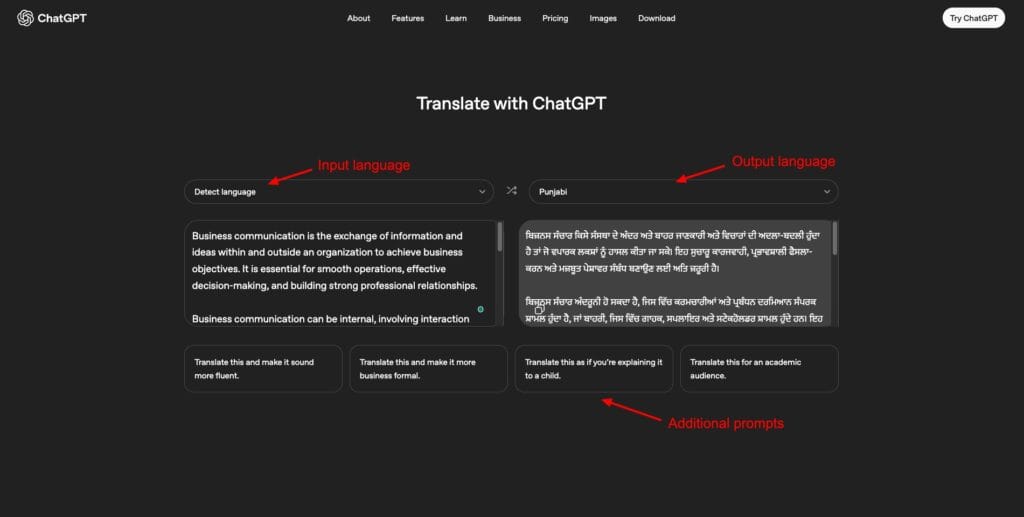
It takes a few seconds to process your text and then returns an accurate translation with an understanding of the context. You also get aspeaker button to hear the whole translated version in an AI voice and a copy button to copy your entire translation.
You can choose additional requirements from the pre-designed prompts below. For instance, you can translate your text to sound more fluent, more business formal, align it for an academic audience, or translate like explaining to a child.
I was impressed with its contextually accurate translations in different languages. However, it doesn’t allow file uploads for translation right now. I hope they add this feature soon. If you need quick and precise translations, you should definitely try ChatGPT Translate!
2) Google Translate – Best For Language Support
Google Translate is a free and AI-powered translation service by Google. It supports 240+ languages for translation. It stands out by supporting multiple content formats, including images, documents, and websites.
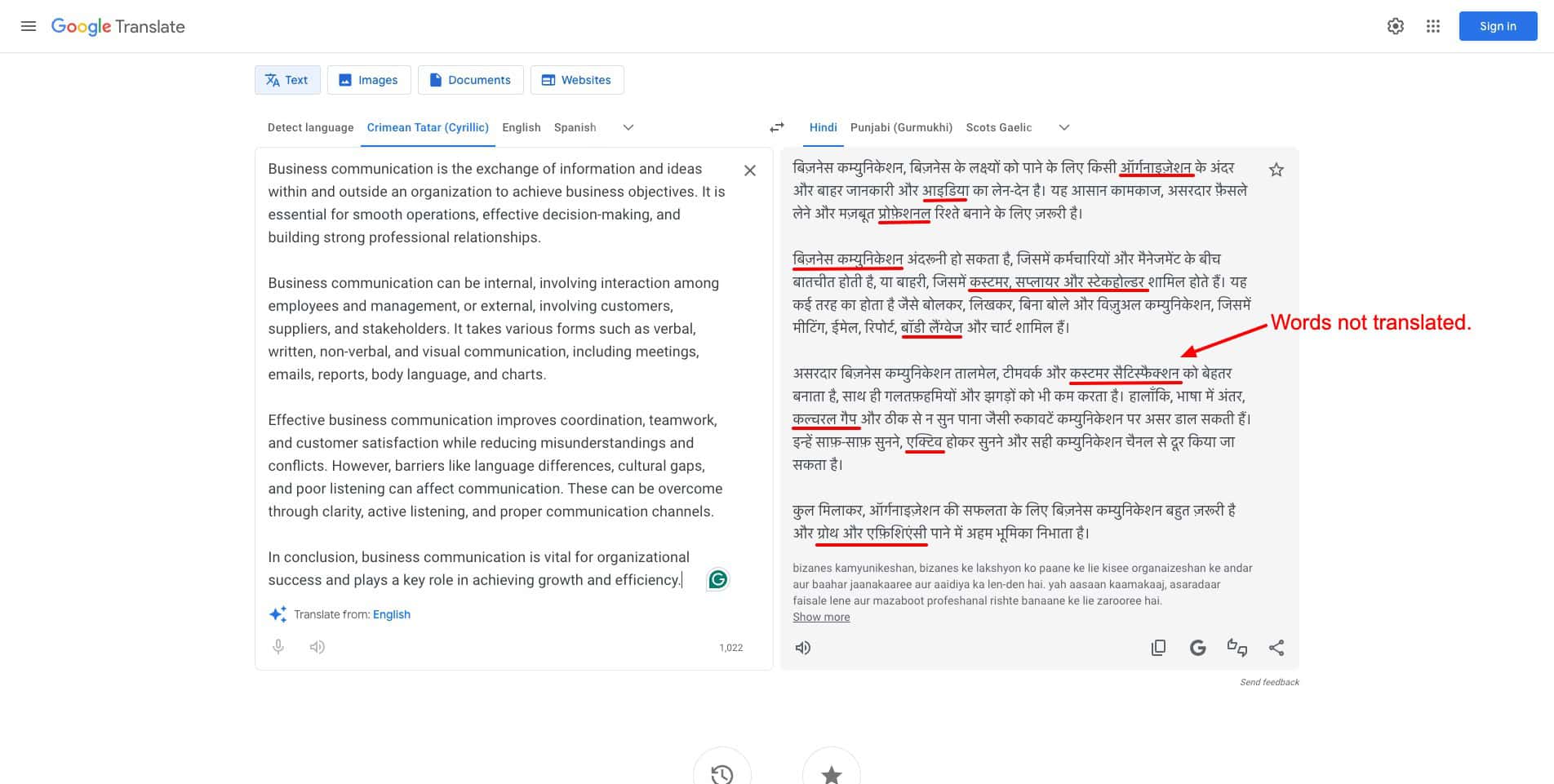
All you need to do is simply paste your content, and it gets translated instantly. It also features an English version of the whole translation. In my experience, the translation was pretty good. But it didn’t translate some words correctly. You can copy the final translation using the copy button.
Overall, Google Translate is an all-rounder tool for quick and versatile translations across a range of languages. However, it may not always offer contextually relevant translations and may require editing.
3) DeepL – Best For Natural Outputs
DeepL is an AI-powered language translation tool. It is known for its human-like translation quality and accuracy. To get started, simply paste your text into the editor and choose an output language. It supports 110+ languages for translation and has a 5000-character limit on the input.
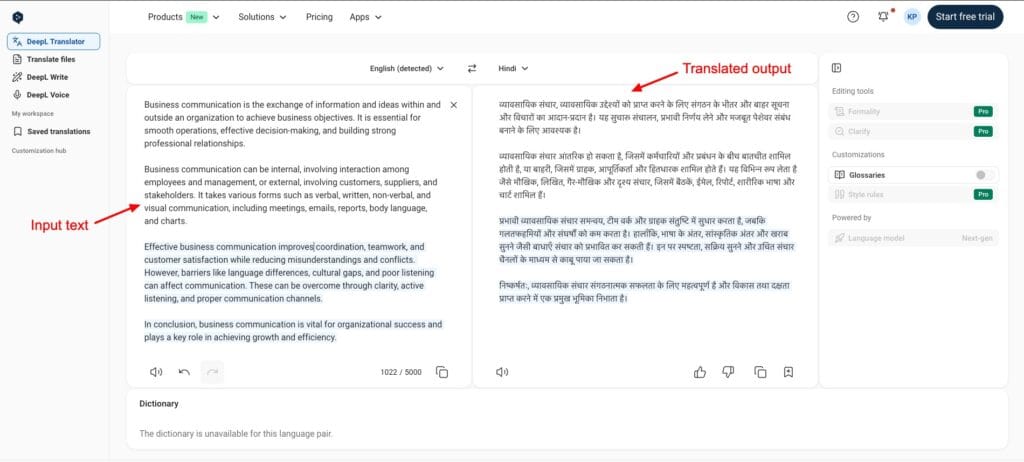
I like how perfectly it translated different words, aligning with the context. Alternatively, you can also upload PDF, PPT, and DOC files for translation. But the translated version is not displayed. It is automatically downloaded as a file.
It features a text-to-speech button to hear the translation in an AI voice. On DeepL’s free plan, you can also create a glossary of specific terms and their translations (in 30+ languages), so the AI remembers to translate them accordingly in the future.
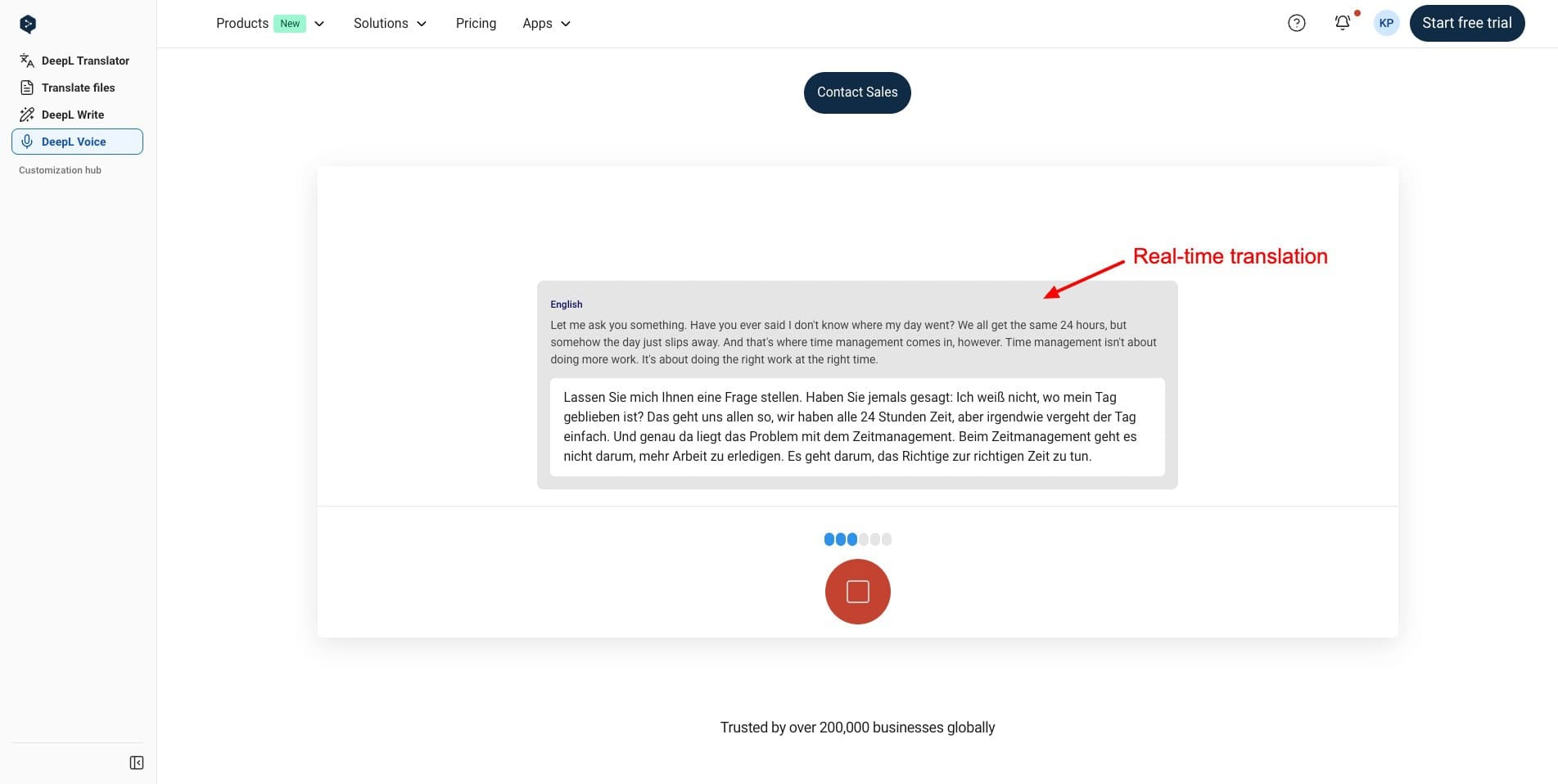
Finally, DeepL’s most amazing feature is its real-time translation. You can access it through the ‘DeepL voice’ tab. It supports 36 languages, which doesn’t include Hindi. I liked how it captured the spoken words precisely and translated them live while I was speaking. Overall, DeepL is super easy to use. Its free plan offers 50k monthly characters, 1 monthly file translation, and 1 saved translation.
4) MachineTranslation.com – Best for Advanced Translations
MachineTranslation.com is an AI-powered aggregator developed by Tomedes. It basically compares the translations offered by over 22 leading AI translation engines and offers the most accurate ones to you.
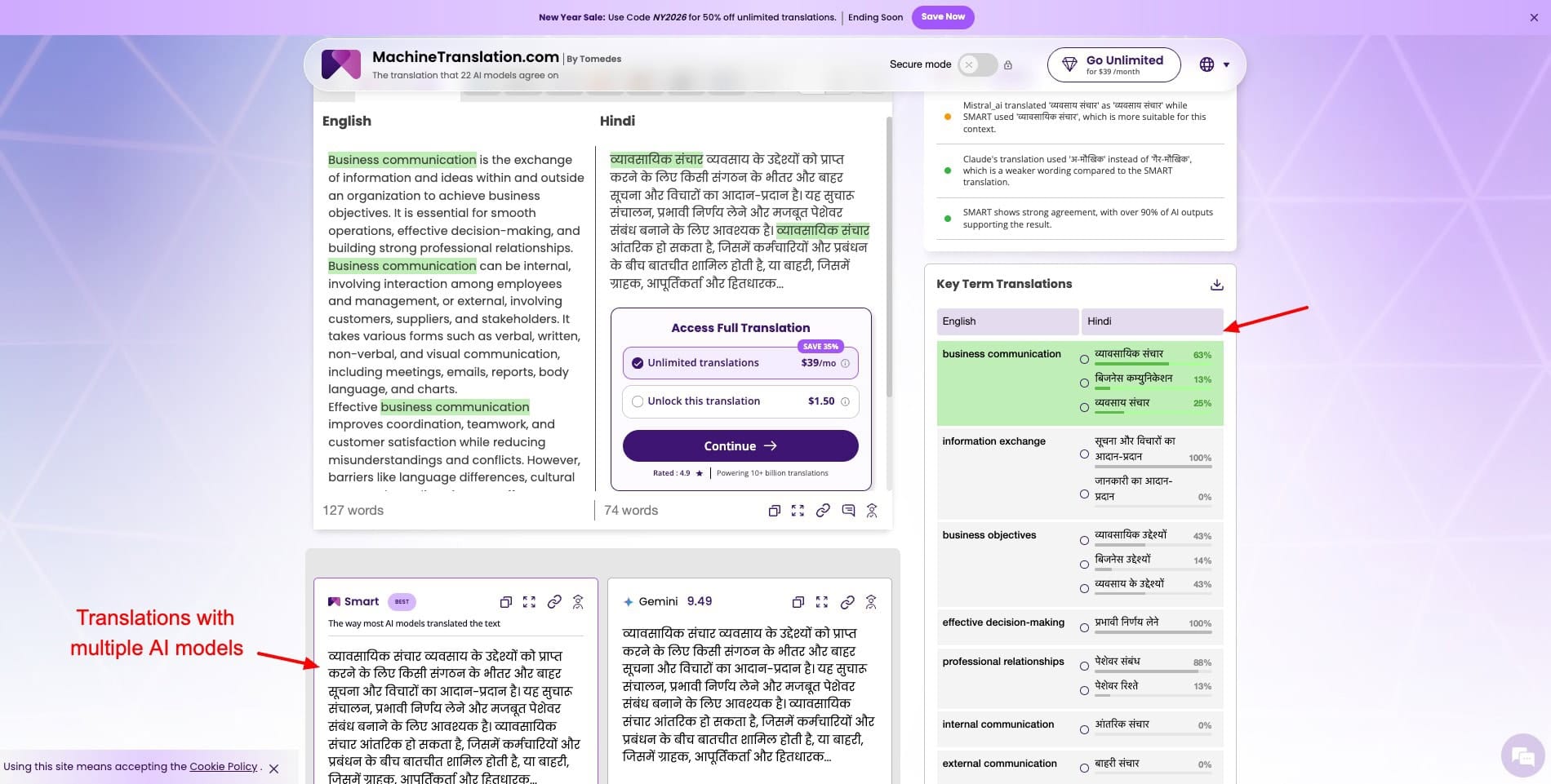
It supports a massive 270+ languages for translation. So, you start by pasting your text or uploading your file (3000-word limit) and choosing an output language. It instantly offers you translated content from multiple AI assistants, including ChatGPT, Gemini, Claude, Mistral, etc.
If you want, you can add more translation sources like Qwen, Llama, Grok, Microsoft, and more. Unfortunately, all the translations are halfway done and locked behind a paywall. To unlock the complete translation, you need to pay $1.50. And unlimited translations cost $39/month.
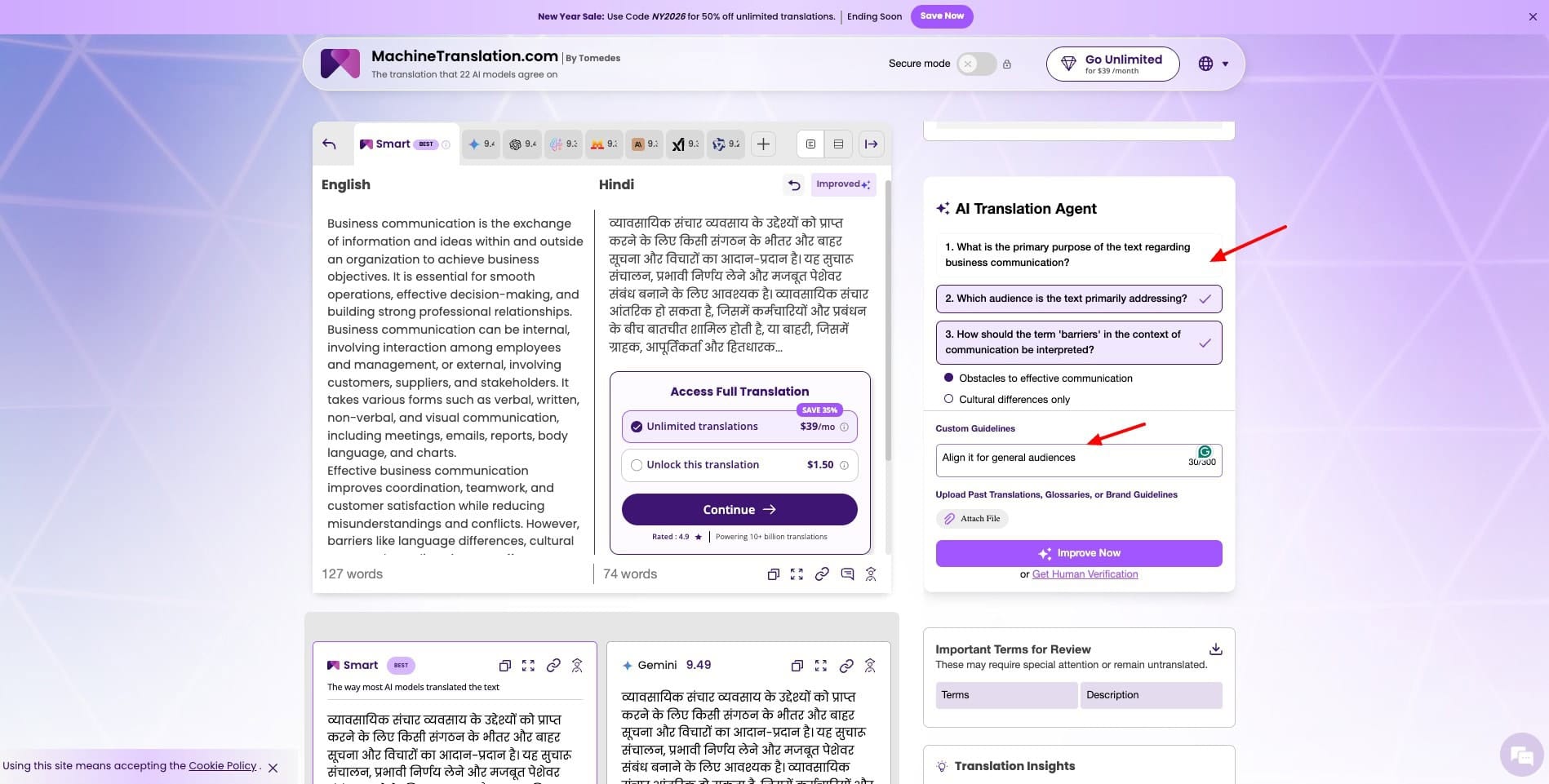
On the right panel, you get key term translations, and hovering over any of them will highlight the term in both the input and translated text. It also has an AI Translation agent, where you can answer questions and give custom guidelines for translation.
Finally, it accepts file uploads for past translations, glossaries, and brand guidelines to align the translations accordingly. You can also get important translation insights. Overall, it looks like an advanced tool. If you need professional-level insights and features while translating content, you should definitely try this app!
5) Quillbot Translator – Best for Paraphrasing Translations
Quillbot is a popular AI-powered writing and paraphrasing tool designed for writers. It also features several AI tools, including a grammar checker, a plagiarism detector, an AI humanizer, an AI translator, and more. It supports 50+ languages and has a 5000 characters input limit.
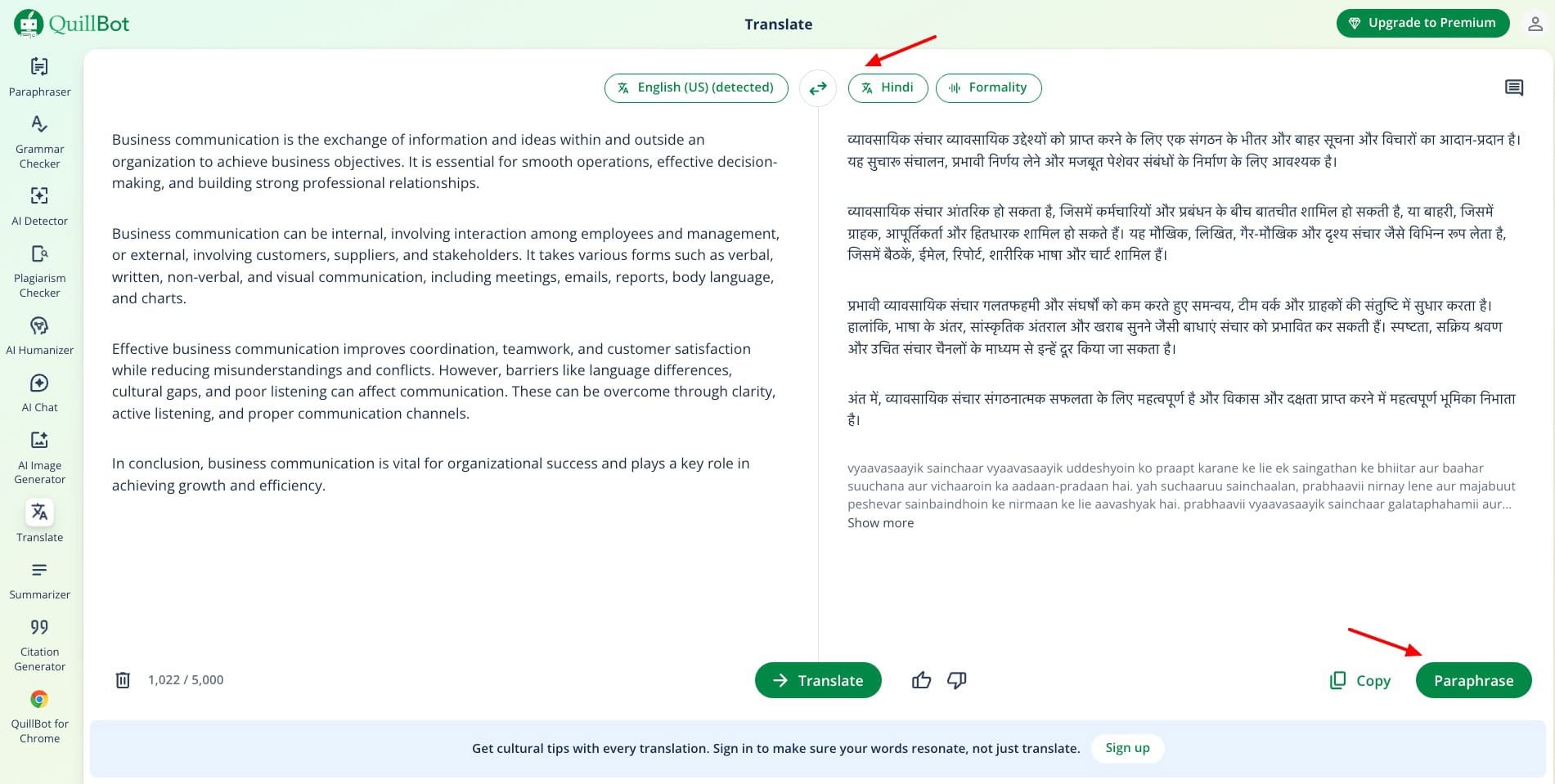
It instantly translates your text into the desired language along with an English version of the same. If you are not happy with the wording, you can hit the ‘Paraphrase’ button to modify the translation. You can copy the final version using the ‘Copy’ button.
Overall, Quillbot is a great tool if you want to paraphrase your translations. But I wish it also had a text-to-speech button to conveniently hear the translations.
6) Reverso – Best For Text Rephrasing
Reverso is an AI-powered language tool that offers free translations, grammar checks, and dictionary features. To start, simply paste your text in the editor window or upload your file. It supports 28 languages and 15+ file formats, including Word files, Excel, PDFs, and more.
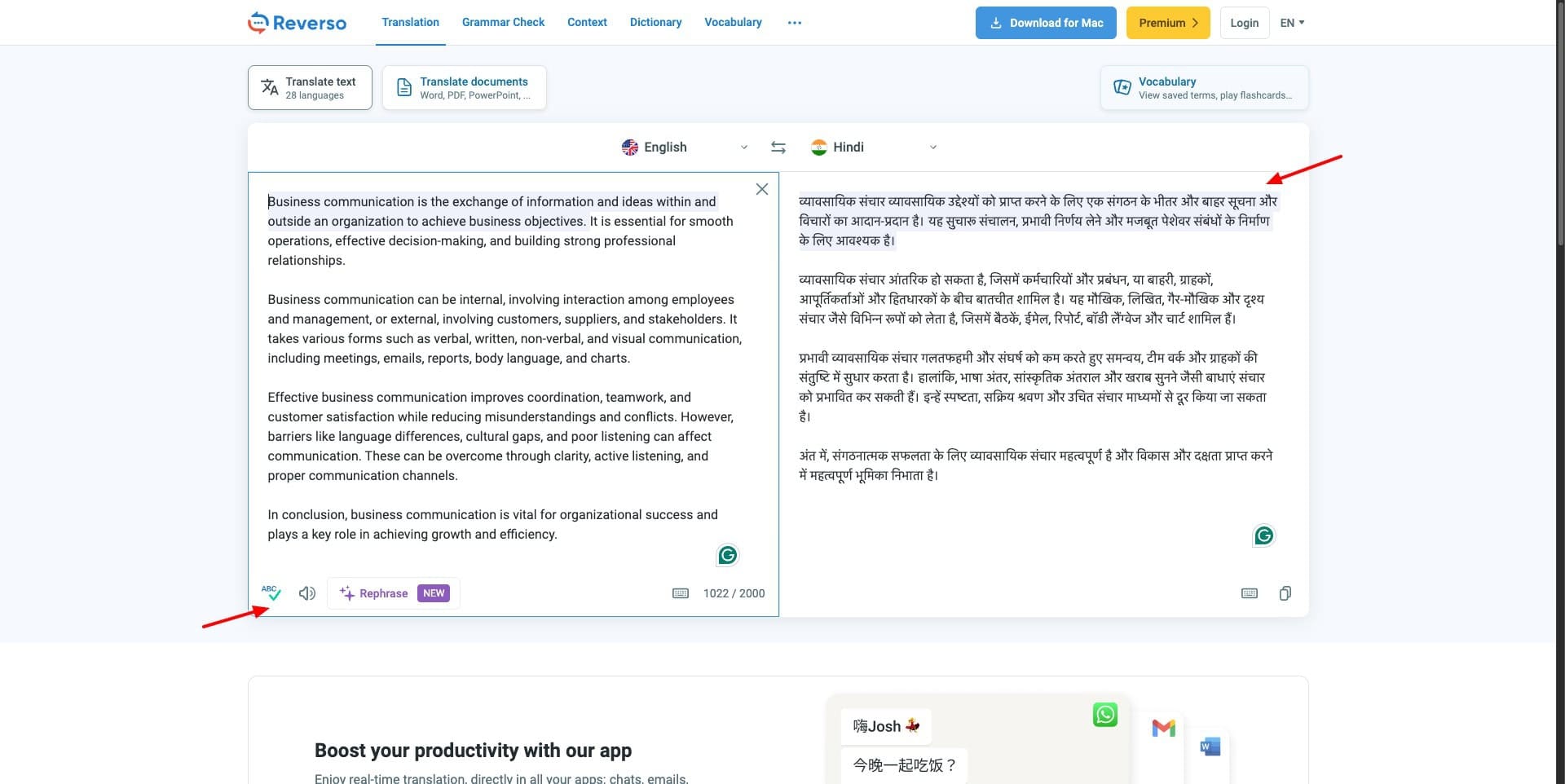
Additionally, it also features a speaker icon for the input text. I wish they also offered AI speech for the generated text translation. Reverso also offers AI rephrasing. When you click on a sentence and hit rephrase, it shows you different variations of it. You can select the one you prefer and then generate the translation accordingly.
On the free plan, Reverso supports 20 sentence rephrases. Overall, if you want a translation tool that offers contextual understanding along with sentence rephrasing, Reverso is a must-try!
7) Canva Translate – Best for Graphic Translation
Canva is one of the most popular AI-powered graphic design platforms with millions of users globally. It also features a Translate tool that allows you to switch your graphics into different languages.
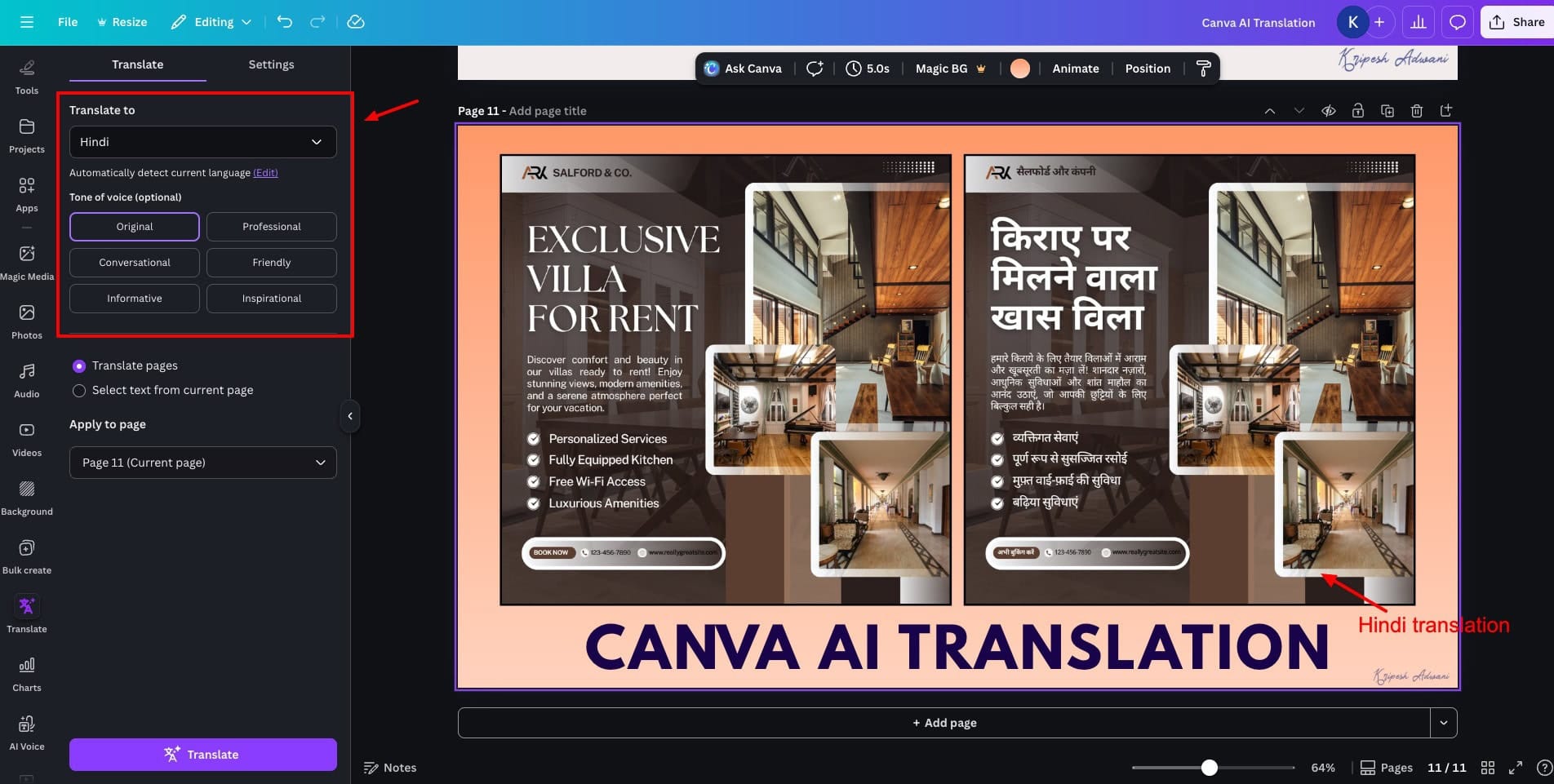
So, when you are done with designing your graphic, simply visit the ‘Translate’ tab from the left panel. Choose an output language and the tone of voice, like professional, friendly, conversational, informative, inspirational, etc.
Then hit the ‘Translate’ button to get an instant translation of the design added as a new page. You can finally download your translated design in multiple formats. Overall, Canva is great for creating multilingual social media graphics that appeal to a wider audience.
8) Maestra AI – Best for Live Translation with Captions
Maestra AI is an AI media translation, subtitle generation, and dubbing platform for creators. Although it’s a paid tool, its Chrome extension offers live AI translation for free. To start, just visit a webpage with media, like YouTube. Then choose a source language and output language.
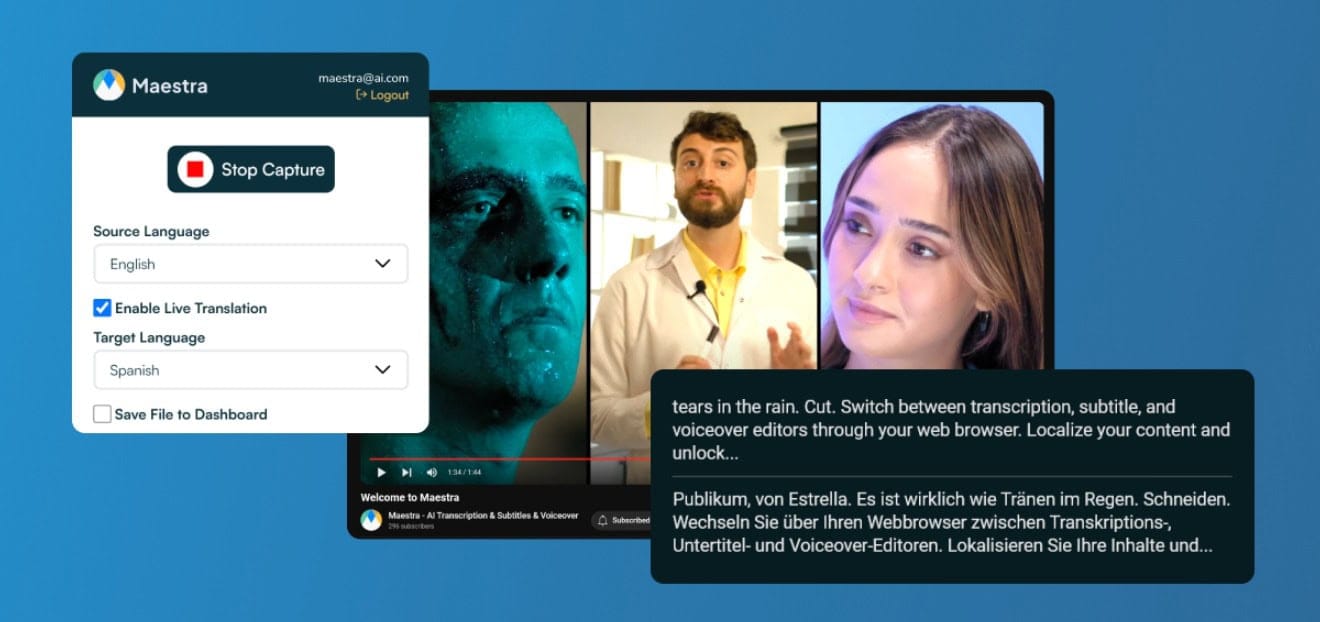
As the video keeps playing, thetranslated captions keep appearing live below the video. If you also need an AI voiceover, you can upgrade to its paid subscription. Overall, if you need translated captions for media files, Maestra AI is the perfect fit!
9) JotMe – Best for Real-Time Translation
JotMe is an AI-powered live translator and AI interpreter app for meetings. It is available as an app for desktop, Mac, Android, and iOS devices, and as a Chrome extension. The Chrome extension only works with Google Meet.
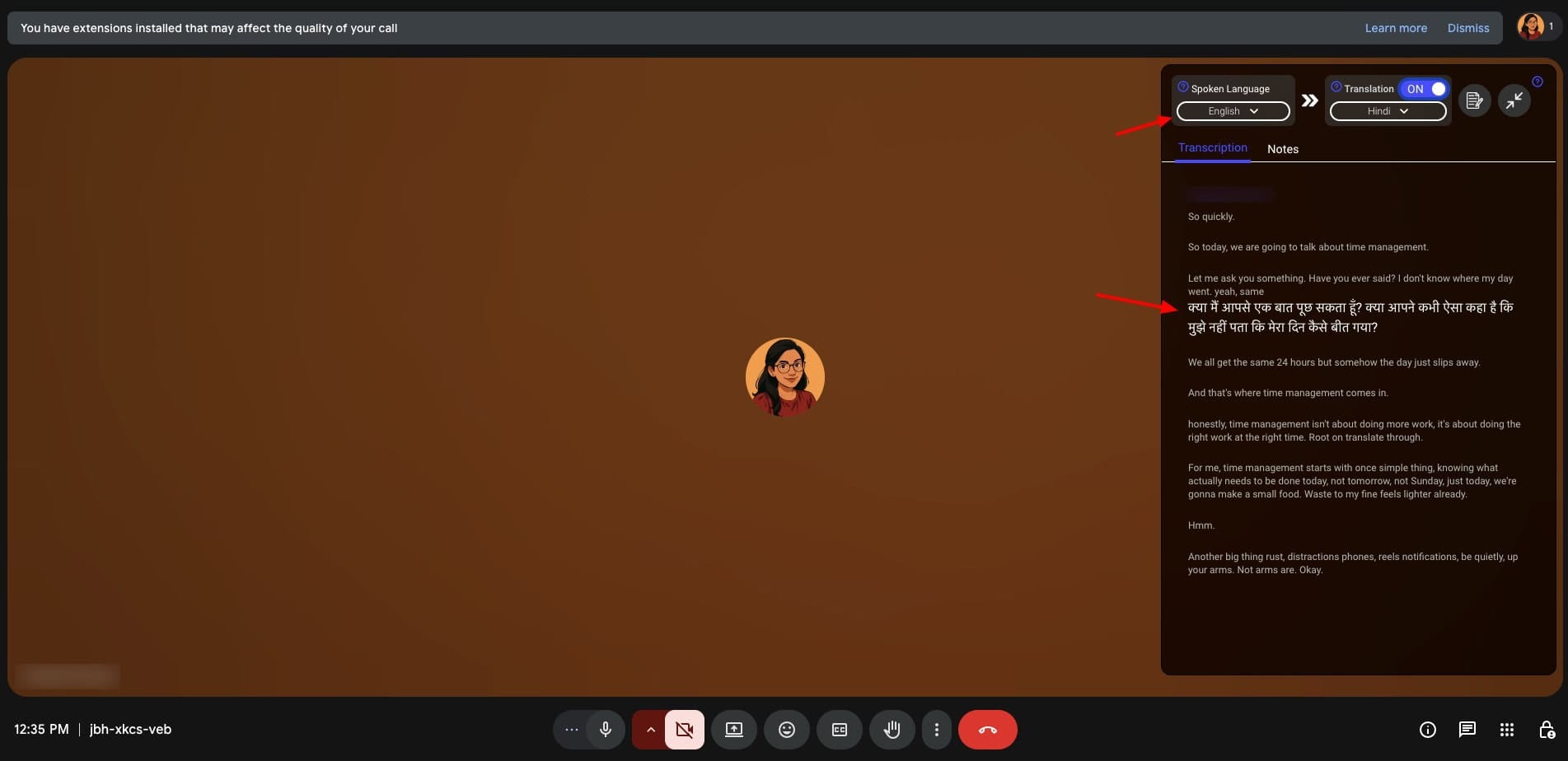
So, to get started, simply join a Google Meet meeting. It will ask you to choose your speaking language and the one for translation. As you keep talking, the transcription, along with the translation, keeps happening live.
However, it doesn’t translate all the spoken sentences. It translates only some of them. Additionally, the English transcription is not accurate either. When you finally leave the meeting, JotMe will present the meeting gist along with the summary for you.
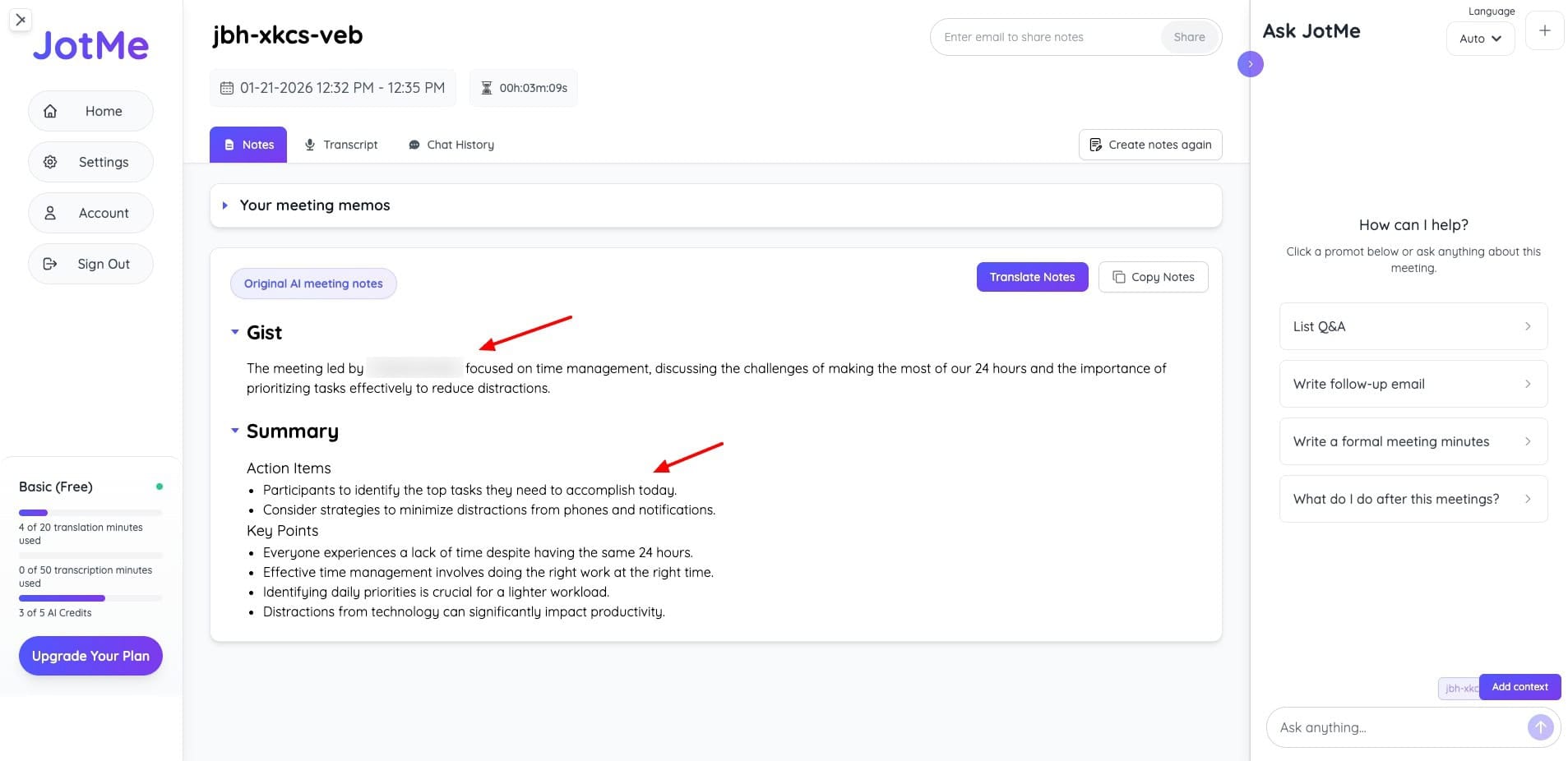
Under the Transcript tab, you will find the actual and the translated speech. Overall, JotMe is a decent tool for live translations. However, they should work on making further improvements for accuracy. Its free plan offers a decent 20 minutes of monthly live translation or real-time summary.
Benefits of AI Translation Apps
AI translation apps can make your communications across languages faster, easier, and more accurate. The following are the key benefits:
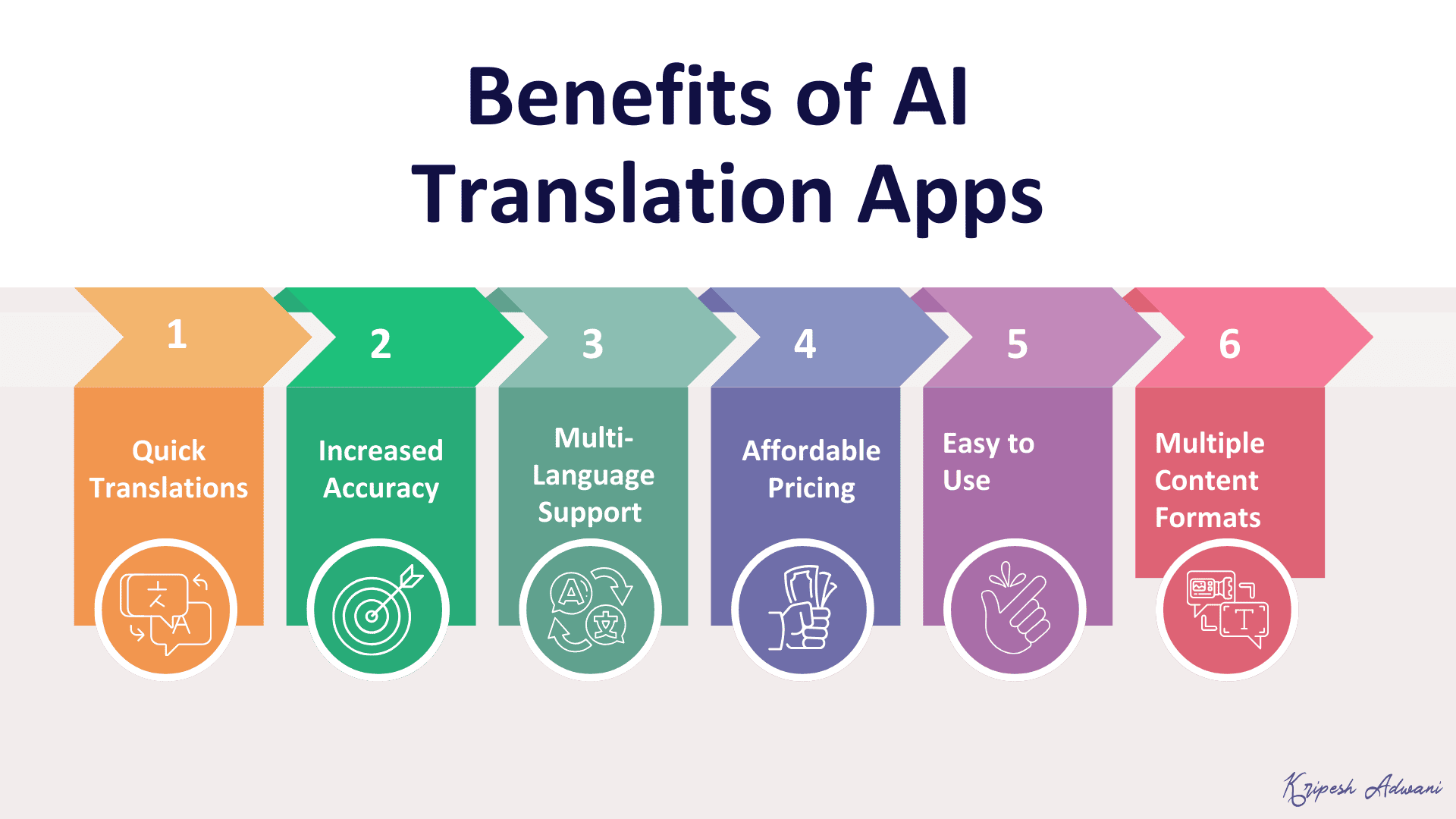
1) Quick Translations
AI-powered translation apps can translate text, voice, and documents within seconds. This saves hours of manual effort.
2) More Accurate
AI tools don’t just translate content word-for-word. They understand the meaning, context, and tone of your text. This results in more natural and readable output.
3) Multi-Language Support
Most AI-powered translation apps support hundreds of languages. This includes many Indian and regional languages, making local translation possible.
4) Affordable
AI translation apps are much more affordable compared to human translators. They are especially useful if you need frequent translations.
5) Easy to Use
AI Translation apps are super easy to use. All you need to do is paste your text, upload your file, or speak. It generates your translation instantly. You don’t need any technical skills to use it.
6) Multiple Content Formats
AI translation apps support multiple formats of content input. You can upload text, documents, PDF files, voice, speech, images, etc and get quick translations.
How Did We Test These AI Translation Apps?
To test these AI-powered translation tools, we evaluated them on the following factors:
- Translation accuracy and quality
- Language & Indian language support
- Ease of use and speed
- File & document upload support
- Live/real-time translation capability
- Customization options (tone, glossary, guidelines)
- Audio/text-to-speech support
- Free plan limits
Based on these factors, we ranked them on our list.
Why Should You Trust Me?
I’ve been working full-time in the digital industry since 2015 and have created hundreds of blog posts and videos over the years. To ensure my content is accessible to audiences worldwide, I regularly use AI-powered translation apps such as ChatGPT Translate, Google Translate, etc.
All the tools mentioned in this article are included based on real hands-on testing and my own observations. I’ve compared them on accuracy, ease of use, language support, and the free vs. paid limitations to give you a fair, practical recommendation.
Conclusion
AI Translation apps help you save a lot of time and effort, and are more affordable than hiring manual translators. This article highlighted the Best AI Translation Apps. My personal favorites are ChatGPT Translate for its ease of use and DeepL for its translation accuracy.
Have you used any AI translation tools before? How was your experience? Do share in the comments below. Anyway, this is Kripesh signing off. I’ll be back with more such interesting articles. Cheers and keep learning! 🙂
FAQs
Which AI translation app is best for human-like translations?
DeepL is the best option for natural and human-like translations. It understands context very well and delivers high-quality output, especially for professional and formal content.
Which AI translation app supports the most languages?
MachineTranslation.com supports the highest number of languages, with 270+ languages. Google Translate also supports 240+ languages.
Which AI translation app is best for quick, everyday translations?
ChatGPT Translate is best for quick translations. It offers context-aware output, tone customization, and supports Indian languages.
Which AI translation tool is best for designers and marketers?
For designers and marketers, Canva Translate is the best choice. It lets you translate designs into multiple languages with tone control.
Which AI translation app is best for live meetings and real-time translation?
JotMe is best for real-time meeting translations. It offers live transcription, translation, and meeting summaries during Google Meet sessions.