Dozens of business cards are only useful if you can find the right contact when you need them.
That’s why business card scanner apps have become so important today. These apps can turn paper business cards into searchable digital contacts within seconds. It saves you from manually typing names, phone numbers, emails, and other details into your phone.
If you attend conferences, networking events, trade shows, or business meetings, the right scanner app can save a lot of time. To help you choose the right option, I’ve compiled a list of the 5 best business card scanner apps in 2026.
I’ve also included three bonus apps at the end for users who only need simple and basic contact scanning features. Let’s organize your contacts without the hassle!
- Best Business Card Scanner Apps [Quick Summary]
- Why Use Online Business Card Scanner Apps?
- 5 Best Business Card Scanner Apps
- How I Evaluated the Best Business Card Scanner Apps?
- Bonus Apps to Scan Business Cards
- Why Should You Trust Me?
- Conclusion
- FAQs
Best Business Card Scanner Apps [Quick Summary]
| Apps | OCR Accuracy | Scanning Speed | Badge scanning for events | Multi-card Batch Scan | AI Features |
| HiHello | 5/5 | 4.5/5 | Yes | No | Contact enrichment |
| Covve | 5/5 | 4.8/5 | Yes | No | Summary, Emails, Research |
| Popl | 4.8/5 | 4.5/5 | Yes | Yes | Contact Enrichment, Lead |
| Haystack | 4/5 | 4/5 | No | Yes | Smart fill |
| Zoho Card Scanner | 3/5 | 3.5/5 | No | No | Card position |
Why Use Online Business Card Scanner Apps?
A business card scanner app is a standard mobile/web-based application that converts physical business cards into digital contacts. It scans the card, reads texts with OCR (optical character recognition), and saves all important details. So, it’s like a digital assistant for networking.
Today, online business card readers are useful because they help us avoid storing paper cards. Plus, it auto-adds details, saves time, reduces manual data input, and avoids losing contacts. Modern card scanners come with AI-assisted OCR, batch contact management, auto sync contacts to CRM, and integration with other platforms.
5 Best Business Card Scanner Apps
1) HiHello – Best Overall for Contact Management
HiHello was launched in 2018 by Dr. Manu Kumar. It’s a popular contact-management cum business card scanner app already used by 2 million professionals worldwide. The platform stands out for its smart address book, digital cards, email signature, card scanner, and team collaboration features.
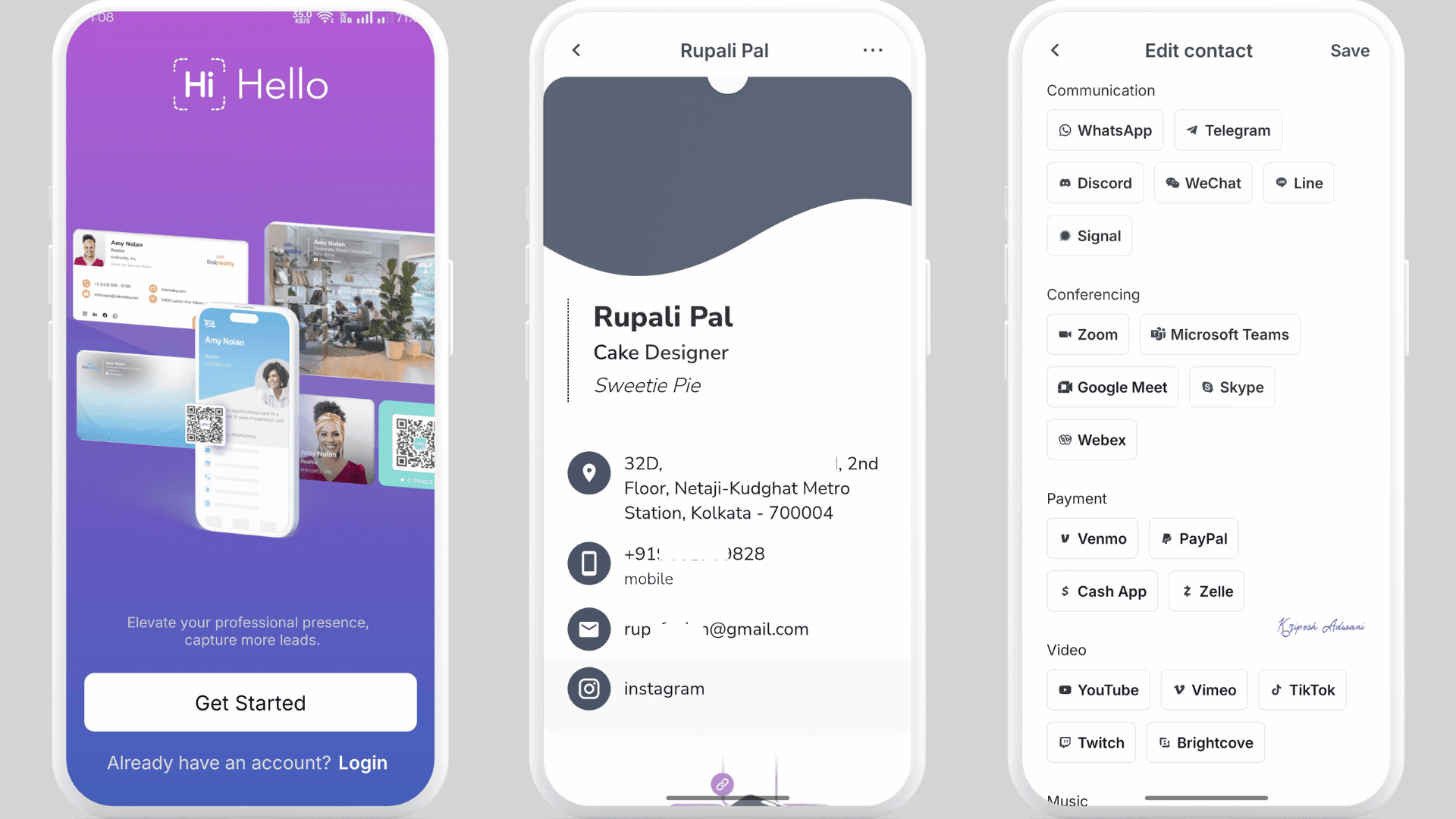
The app is available on both the App Store and Google Play Store. I downloaded the app, and the installation steps are quite easy. Right after signing up, the app gave me a quick guided tour. Then, I can scan a business card with my phone camera or upload the card from my gallery.
One thing that is not common in other apps is that the scanner supports both landscape and portrait formats. HiHello uses AI to transcribe card details in just a few seconds. I didn’t need to manually edit anything. It, in fact, auto-saves new contacts with the country code.
I could also create separate Personal and Work digital business cards. Both offline and online sharing options are available, which include QR, text messages, email, etc. If any details are missing in your business cards, the Contact Enrichment feature in HiHello auto updates CRM-ready data. So, the address book becomes more organized and up to date.
Highlighted Features
- AI-powered transcription with human verification
- Automatic sorting of contacts, notes, and tags
- Multiple customization options like colors, logos, layouts, and social media integration
- Integrations with Zapier, PayPal, Calendly, Salesforce, HubSpot, and Google Contacts
- Email signature support for Google Workspace and Microsoft Outlook
- Analytics for lead generation, card views, shares, and engagement metrics
Pricing
HiHello app lets users create 4 free digital business cards, 5 card scans per month, unlimited card sharing, QR & Widget sharing, Email signature generator, etc.
Its paid plans start at $6/month or $72 yearly for the HiHello Professional Plan. Subscribers can create 16 business digital cards, scan 20 cards per month, and enjoy other advanced features like branding for QR, notes/tags, card analytics, auto tagging, etc.
Ideal Users
Sales professionals for CRM-ready contacts, founders, and teams who want to combine digital business cards with scanning and email signatures.
2) Covve – Best for Accuracy and Follow-Up Features
Covve is another powerful business card and lead capture app that I really liked, especially for its follow-up features. The app is paid, but it offers 14 days of free trial. You can scan even without signing up. But for more advanced use, you’ll need to create an account.
The app has a very modern interface and supports 60+ languages. It captures all details like business name, contact info, and email with the highest accuracy. The app can also scan LinkedIn profiles, QR codes, event badges, apart from paper cards.
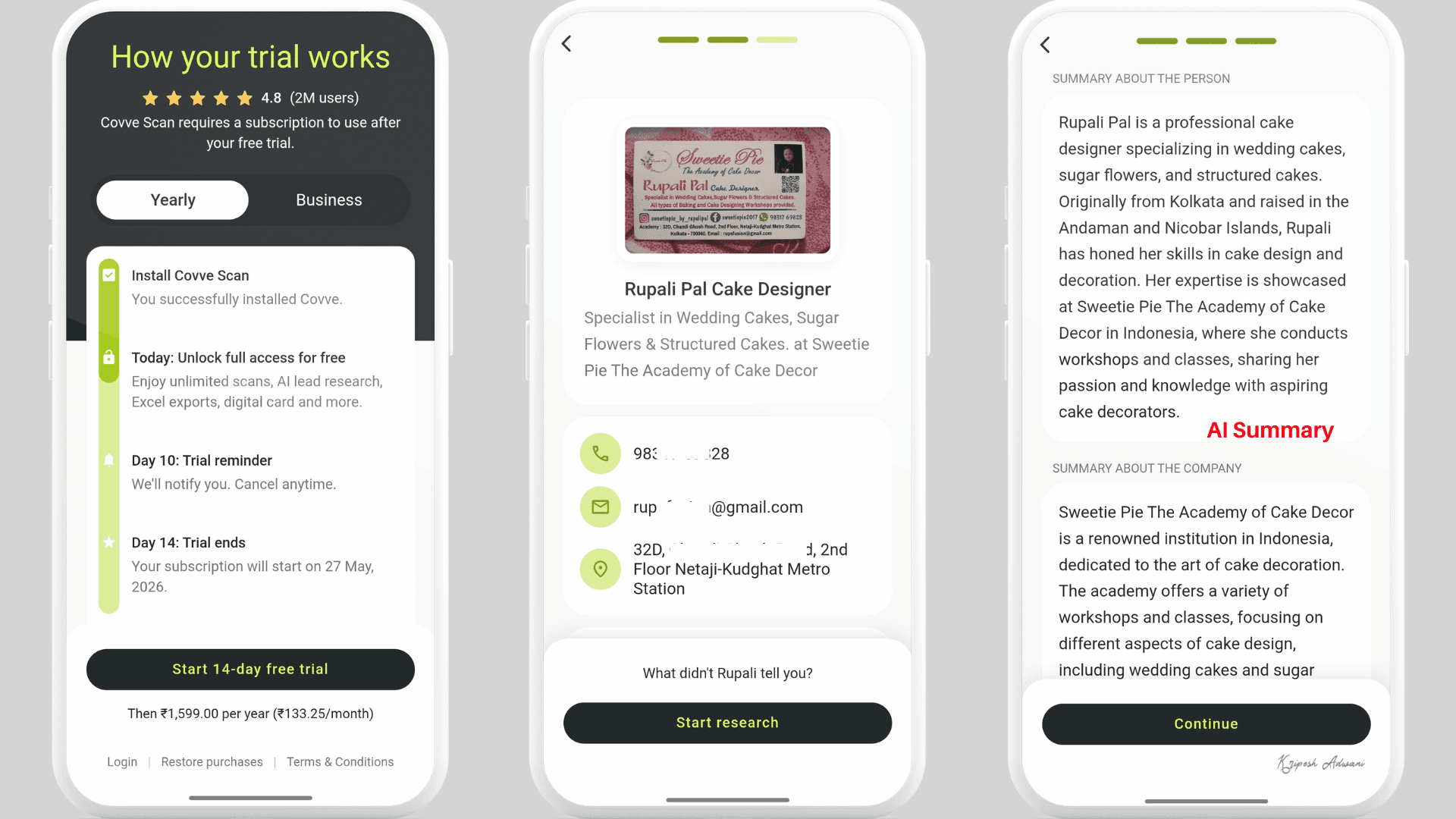
It not only saves contact information but automatically adds professional details about your contacts, like the AI Enrichment feature in HiHello. Covve AI features let you generate summaries and draft emails for follow-ups.
We can also mark people we’ve already contacted. There are options to set weekly or date-wise reminders. Covve is like a lightweight CRM tool that supports notes, grouping, background research with AI, contact history, etc.
Highlighted Features
- Accurately digitizes paper business cards/QR codes in over 60 languages
- Automatically adds LinkedIn profiles, website links, and contact photos
- Let users dictate notes and contact information using voice input
- Offers a fully customizable digital business card that can be shared via QR, NFC, text, or email signature
- Supports export to phone contacts, CSV, Google Contacts, Outlook, Excel, and CRM tools
- Allows companies to create a searchable, company-owned directory with admin controls
- Supports 8,000+ integrations, including Salesforce, HubSpot, Zoho, and Zapier
Pricing
Covve offers three paid plans: Starter, Team, and Business. Starter plan comes with Unlimited scans, Notes and groups, Research leads with AI, Zapier integration, Interface in 16+ languages, etc.
Its Starter plan will cost you ₹3900/seat/year (around $40 yearly). You can get full access to Covve for a 14-day trial period.
Ideal Users
Sales professionals, founders, event teams, and HR recruiters who need intelligent contact management will find Covve really useful.
3) Popl – Best for Events & Lead Capture
Popl markets itself as the Go-To-Market platform for In-person Lead Capture. And I found the app really easy to use and feature-rich for business contact management. The installation and setup process is pretty simple, like the other two apps.
When you open the scanner, Popl provides multiple scanning options like paper cards, event badges, and LinkedIn QR codes. It took 2-3 seconds to scan and fill in business information.
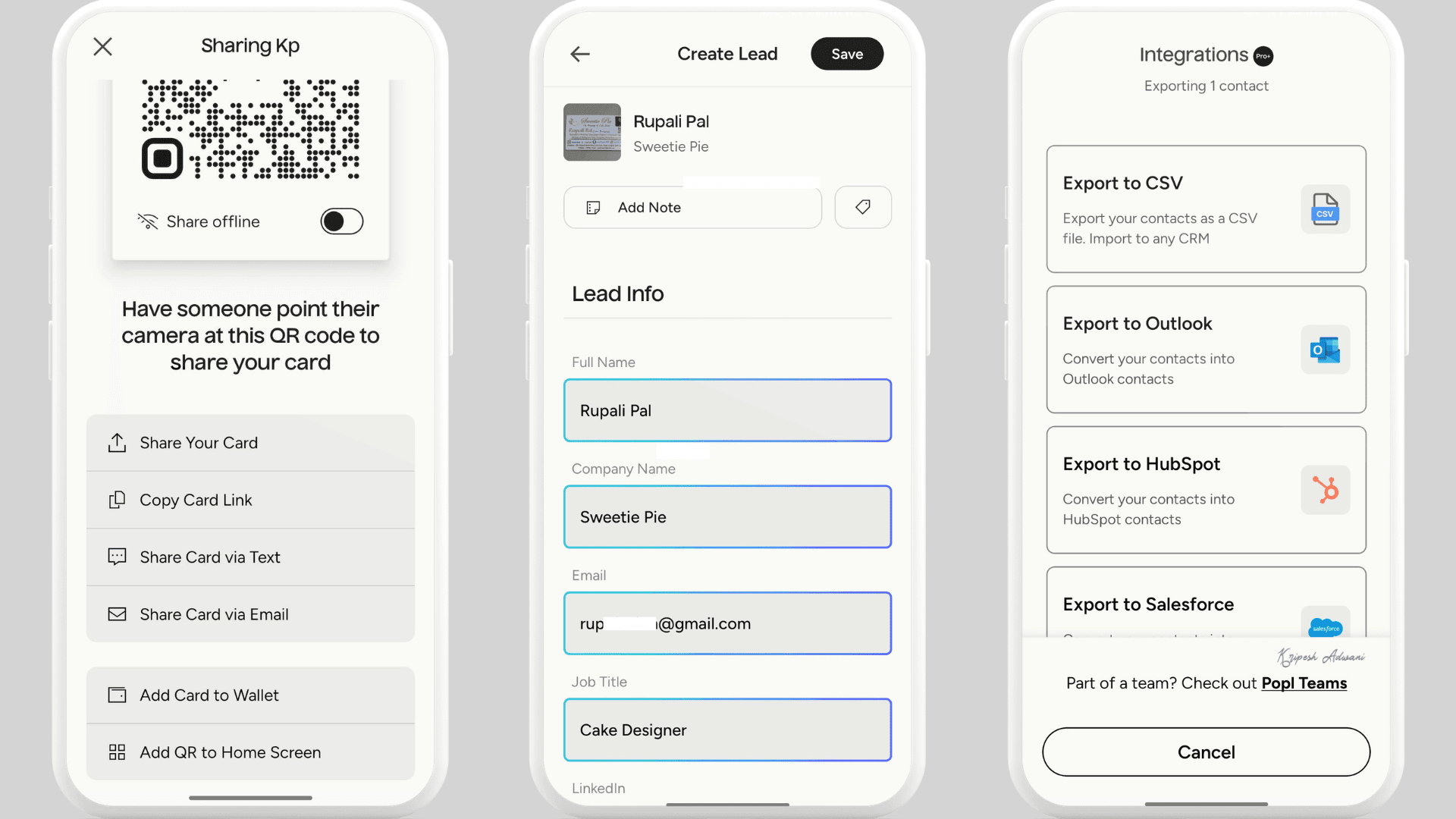
Most of the info was captured accurately, but it missed adding contact information. We can add written/voice notes, which are useful for remembering conversations after networking events. The Badge scanner comes with an AI enrichment feature.
Popl also works in offline mode. It securely stores leads on the device if the Wi-Fi connection drops. When the connection is restored, captured leads get auto-synced in real time to CRM. Also, on desktop, Popl offers an Insights tab to track metrics like leads generated, card views, link taps, and contacts downloaded.
Overall, this platform is more designed for CRM-heavy workflows. So, individuals looking for a simple business card scanner may find it too complex and expensive to use.
Highlighted Features
- AI-powered universal badge scanner that works across conferences, trade shows, and small events
- Automatic tagging, qualifying questions, and custom fields for better lead filtering
- AI Contact Enrichment verifies missing contacts and fills data gaps
- CRM and marketing integrations with Salesforce, HubSpot, and Pipedrive, including custom field mapping
- Follow-up email automation and calendar booking integrations
- Digital business card maker with templates, logos, and customization options
- QR code generator, NFC sharing, digital sharing, and email signature support
Pricing
If you sign up for a free Popl account, you can create one digital business card, add over 50 links for networking, access only the 5 most recent connections, and view basic insights.
Popl’s paid plan for individuals starts at $76.99 per year ($6.41/month). With the Pro plan, users get access to three digital business cards, all link types, an unlimited business card scanner, 5,000+ CRM integrations, and advanced analytics and insights.
Ideal Users
Popl is ideal for event marketers and conference teams that need fast and accurate badge scanning. It is also a brilliant choice for sales teams that focus on lead tracking, analytics, and converting contacts into sales opportunities.
4) Haystack – Best for Unlimited Scanning
If the above apps feel too advanced for your needs, Haystack is one of the simplest business card scanner apps to use. The platform does not require sign-up or account creation to get started.
When I scanned a business card, the app first asked me to confirm the email ID that it automatically detected. Haystack uses AI to scan physical business cards and accurately extract details like name, company, email, phone number, and address.
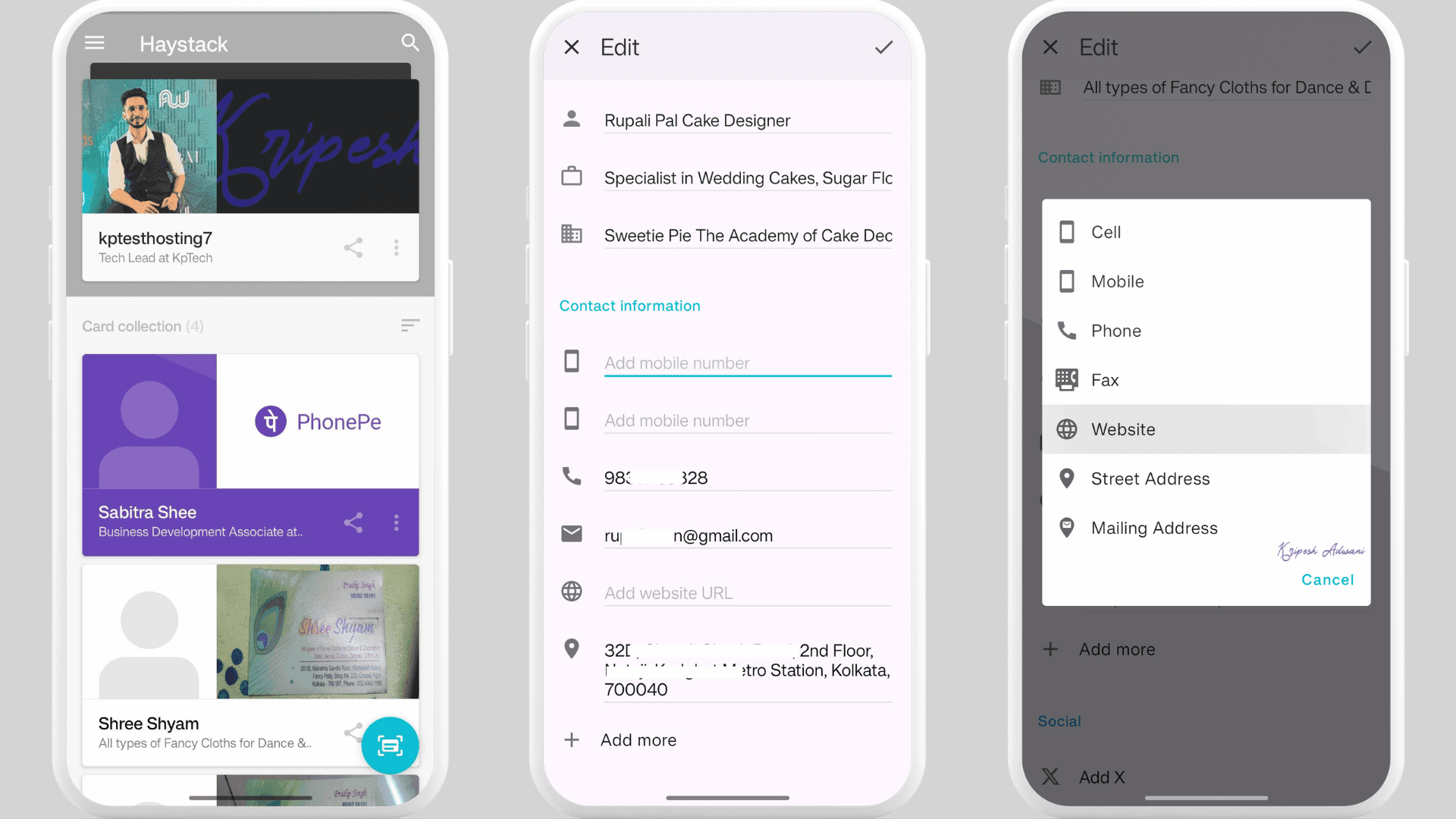
Unlike some other apps, this app didn’t add social media profiles mentioned on my cards. It supported Twitter and Skype links, but not Instagram. Haystack creates digital business cards using the same color scheme as the original physical card, which ultimately looks professional.
Inside the saved contact profile, I could directly tap icons to call, text, send emails, or open the address in Google Maps without leaving the app. Haystack also allows contact sharing through email, text, links, or QR codes.
Another useful feature is contact sync. The app syncs with Google Contacts, iOS Contacts, and Outlook to automatically find and organize professional connections inside the app. You can also save Haystack contacts directly to your phone, and any updates made in the app automatically sync across devices.
Highlighted Features
- Unlimited free business card scans for individual users with no ads
- Built-in AI scanner that saves paper business cards directly to contacts or CRM platforms
- Personalized digital business cards with logos, images, links, and custom fields
- Email signatures linked to Haystack digital business cards
- Integrations with tools like Salesforce, HubSpot, Slack, and marketing platforms
- Team engagement analytics to track usage and contact engagement metrics
Pricing
Haystack’s free account offers unlimited digital card design and scan, unlimited shares, branding with logos and photos, contact sync, and social media integrations.
It offers three paid plans: Pro, Business, and Enterprise. The Pro plan will cost $4.50 per user/month or $54 yearly. Along with free plan features, you can enjoy customized card designs, customized links, CRM integrations, Analytics, and access to other advanced features.
Ideal Users
Haystack is a great choice for freelancers and professionals who attend networking events regularly, and teams that need branded digital business cards with simple centralized contact management.
5) Zoho Card Scanner – Best for Indian SMBs
If you already use Zoho CRM, then Zoho Card Scanner is one of the most practical options to consider. The app is simple to use and is available on both Android and iOS devices. You can start scanning business cards without creating an account.
Unlike other scanner apps, its Scanner works very much like a normal camera app. But it can smartly detect the card position. You can scan either a physical business card or a QR code. The app takes a few seconds to process and fill in the details.
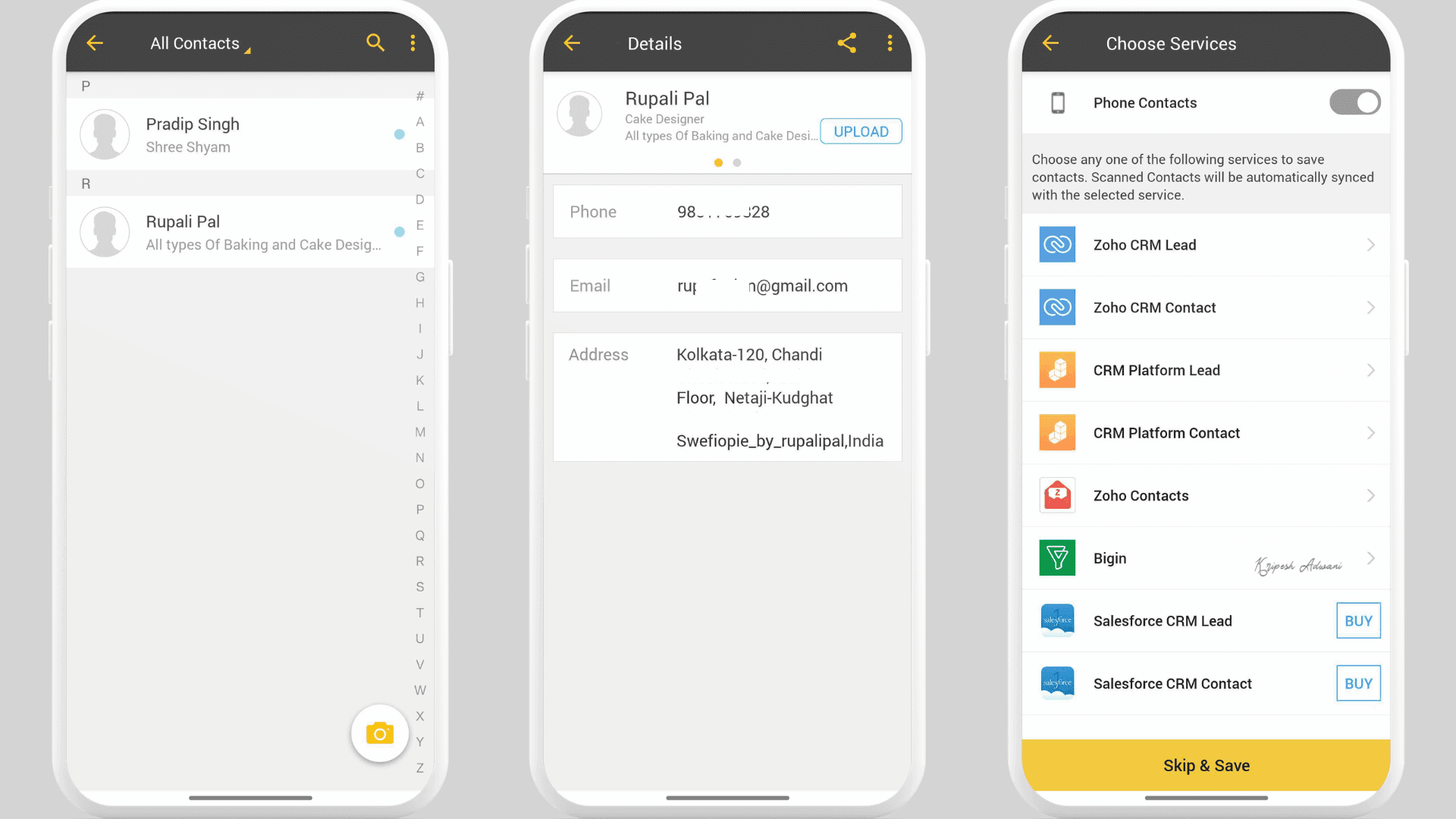
Zoho Card Scanner allows you to capture the front and back sides of a business card separately, which many other apps do not offer. However, during my testing, the accuracy was not always perfect.
A few contact data points were filled incorrectly, so I had to manually edit information such as the company name and address. The mobile app also does not support social media links apart from website URLs. Zoho Card Scanner supports multiple languages, including English, French, German, and Spanish.
All scanned cards can be exported as CSV files or saved directly to your phone contacts. You can also sync contacts with Zoho CRM and other CRM tools. The interface is clean and beginner-friendly.
Highlighted Features
- Saves physical business cards directly into Zoho CRM
- Let users capture and scan both sides of a business card
- Integrates with Zoho CRM, Salesforce, Bigin, and other CRM tools
- Organizes contacts alphabetically for easier contact management
- Highlights areas where data extraction quality is uncertain
Pricing
Zoho Card Scanner is free to use when you sign in with a Zoho account. The company has not clearly mentioned any business card scanning limits for regular users.
However, if you want Salesforce integration, Zoho charges around ₹4,950 per year (around $51 annually).
Ideal Users
Zoho Card Scanner is useful for Indian businesses that already use Zoho CRM and small business owners looking for a free business card scanning solution.
How I Evaluated the Best Business Card Scanner Apps?
I started by searching for all the available business card scanner apps today. I found around 15 to 20 options, so I downloaded each app, created an account, and tested them one by one. For a fair comparison, I used two different business cards, one with a simple layout and another filled with text and detailed information.
After weeks, I finally selected the 5 best business card scanning apps based on the following parameters:
- How accurately the OCR scans and captures details
- Whether the app takes too much time to scan cards
- Ease of use for beginners and first-time users
- Whether batch scanning is supported
- Organization and contact management features
- Free scanning limits
- Integration and sharing options available
- Export options for contacts or CSV files
- Whether the app is modern and actively updated
- AI features and smart automation capabilities
Apart from the above parameters, I also looked for special features like multi-language scanning, QR code scanning, both-side card scanning, company contact management features, and more.
Bonus Apps to Scan Business Cards
A dedicated business card scanner software may not be necessary if you only have a few contacts to save from networking events. In that case, the apps below offer simpler ways to manually save contact information.
1) Google Lens
Google Lens is definitely not a full-featured business card scanner, but it provides a free and easy-to-use option for basic contact management. The app can read text and automatically highlight phone numbers, email addresses, websites, and other details mentioned on a business card.
Just scan the card, tap the highlighted details, and copy or save the information to your contacts manually.
2) Evernote
If you’re looking for simple contact storage without deep CRM automation, Evernote can be a useful option. Download the app and tap the scanning option to capture a business card. Once the image is scanned, Evernote processes the text and extracts the contact details.
You can then review the extracted information, make manual edits if needed, and save it to the contact management system you already use. Evernote also provides templates for customer relationship management and contact organization. Plus, you can set reminders, create internal links, and manage personal networking contacts more efficiently.
3) Microsoft OneNote
Another low-cost and handy way to store business contact information is Microsoft OneNote. You can use Microsoft Lens to take a clear photo of a business card and save it directly into OneNote in notebook format.
Alternatively, you can copy and paste the scanned text and save it to your device’s address book manually. Microsoft tools can also create a VCF attachment to add the contact directly to Outlook.
Why Should You Trust Me?
Since 2015, I’ve been working full-time in the technology and digital industry. Over the past eleven years, I’ve tested and reviewed thousands of SaaS products, AI tools, and cybersecurity solutions. You’ll find my honest opinions and hands-on experiences across my YouTube channel, podcast, and website content.
You can also explore my guides on the best appointment scheduling apps, best free screen recording software, best habit tracker apps, best to-do list apps, best AI scheduling assistants, and more. My goal is to help freelancers and small businesses save time, work faster, and automate repetitive tasks.
Since I regularly attend networking and affiliate events for work, I’ve been using business card scanner apps for years. HiHello, Popl, and Covve are some of my go-to tools for organizing contacts and managing professional connections efficiently.
With this hands-on experience, I finally shared the apps that are genuinely useful, affordable, and practical for real-world use.
Conclusion
Business card scanner apps have become essential for affiliate marketers, sales teams, freelancers, and professionals who regularly attend networking events, conferences, or business meetings. These apps have upgraded from simple OCR tools to complete contact management systems.
The best business card scanner apps help users like you and me scan contact details accurately, save time on manual data entry, sync contacts with CRM platforms, and manage follow-ups after every interaction.
No matter what your priority is, contact management, unlimited scanning, lead capture, or CRM integration, I’ve tried to include apps for every type of user. HiHello is the best choice for overall contact management, Covve stands out for its scanning accuracy and follow-up automation, while Popl is excellent for lead management.
If your needs are basic, apps like Google Lens, Evernote, or Microsoft OneNote are more than enough. The key takeaway is simple: choose the business card scanner app that best fits your networking style and workflow.
That’s all from my side for now. I’ll be back with more helpful blogs and software guides soon. Until then, keep following our newsletter for the latest AI news and tech updates.
FAQs
Is there an app to scan business cards into Outlook?
Yes, Microsoft Lens scans business cards and saves them to Outlook or OneNote. Also, Covve integrates with the Microsoft ecosystem and lets you share scanned contacts to Outlook address books.
Which app is best for free use?
HayStack lets individual users scan unlimited documents for free. For basic use, Google Lens is also useful for manually saving contacts.
Can business card scanner apps store contacts automatically?
Yes, business card scanner apps save the scanned contacts directly in the in-app address book automatically. You can also export the contact to any CRM tool or phone contacts.
Which app is best for sales teams?
For Sales teams, Popl is best if you care most about badge scanning, CRM sync, fast follow-ups, and event lead capture. Covve is also a good choice for more follow-up features, tags, and reminders.