The world of AI is exploding with specialized tools. We rely on AI models like Claude for writing, Kling AI for video, Midjourney for image, ElevenLabs for realistic AI voice, etc. But paying for multiple subscriptions or switching tools to get best-in-class output costs valuable time and money.
An AI tool suite offers a solution by consolidating these capabilities into a single interface. Qolaba is one such multi-model platform that I’m going to review today.
In this Qolaba Review, you’ll get a complete breakdown of its key features, pros and cons, pricing, and free limits. At the end, you’ll have all the information you need to conclude whether Qolaba is the perfect hub for your specific AI workflow.
So, without wasting time, let’s get started.
Qolaba Review
Summary
Qolaba is an all-in-one AI tool launched in September 2022. The platform includes 60 advanced AI models for image generation, video creation, music generation, and chatbots with a no-code Custom AI Agent Builder.
While it offers a beginner-friendly interface and workspaces for teamwork, its downsides include high credit consumption, inconsistent performance, and several tools still in beta. Overall, Qolaba is ideal for freelancers, content creators, marketers, and teams.
Disclaimer : I strongly believe in transparency. If you buy using the links on our site, we may earn a small commission without any extra cost to you. This helps me to keep producing honest reviews. Read More >>
About Qolaba
Qolaba is an AI tool suite that provides a unified workspace for individual creators and businesses. It combines innovative AI models for image generation, video editing, AI music creation, text-to-speech, and more.
The tool was launched in September 2022. Aakash Jain and Prakhar Agarwal, two entrepreneurs, built the platform to help teams avoid subscribing to multiple AI tools. Since its launch, Qolaba has received recognition from Google for Startups and has been featured in CIO Magazine, highlighting its growing impact in the AI productivity space.
How to Use Qolaba
Signing up for Qolaba is extremely easy! Let me guide you step by step.
Step 1: Sign Up and Create Your Account
Visit the official Qolaba website, and you’ll see the Sign Up /Log In button clearly visible at the top of the page. You can register using your email address and password, or sign up with Google, Discord, or other available options.
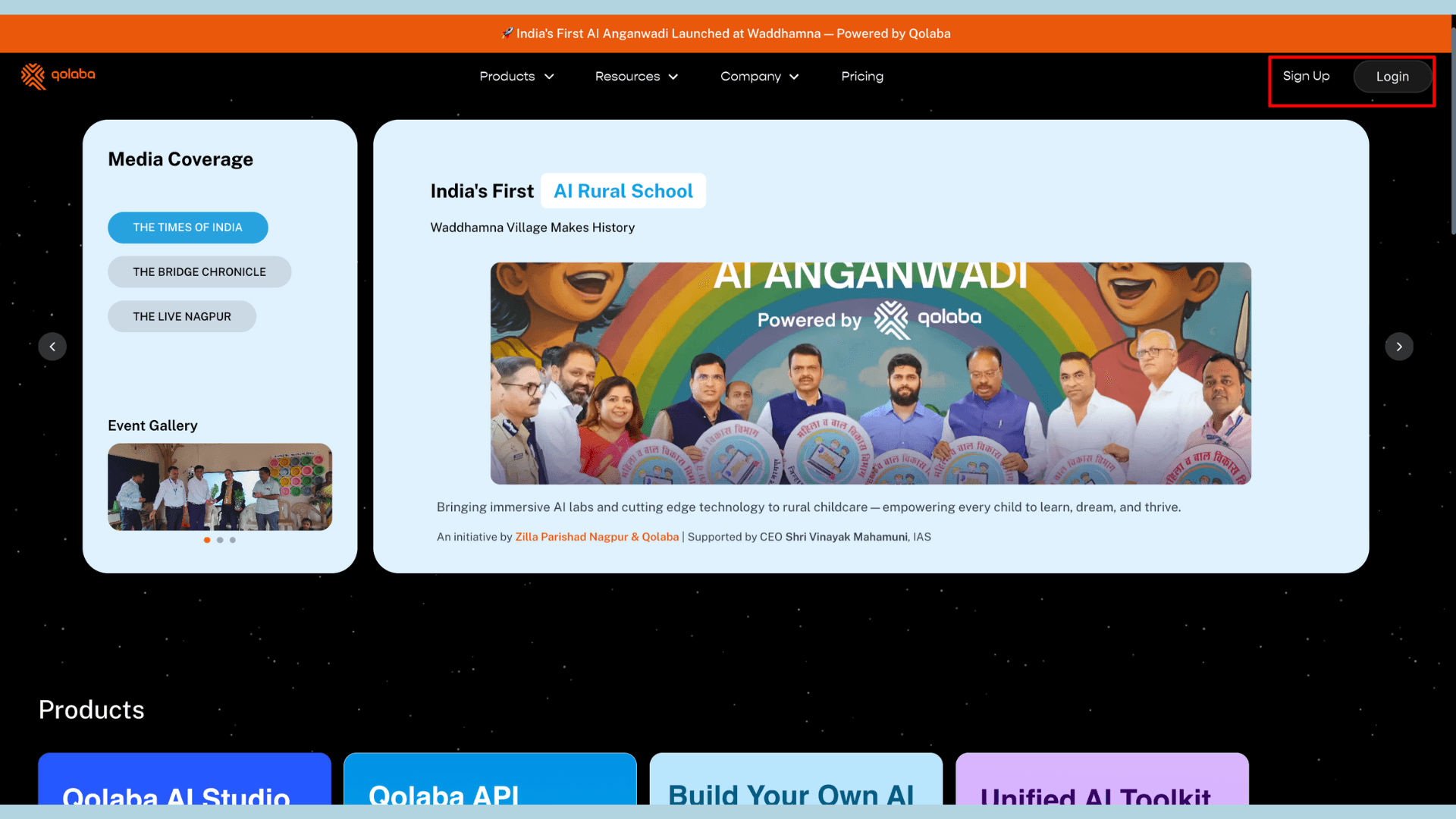
Once you’ve entered your details, click “Continue” to create your free account.
Step 2: Log In to the Dashboard
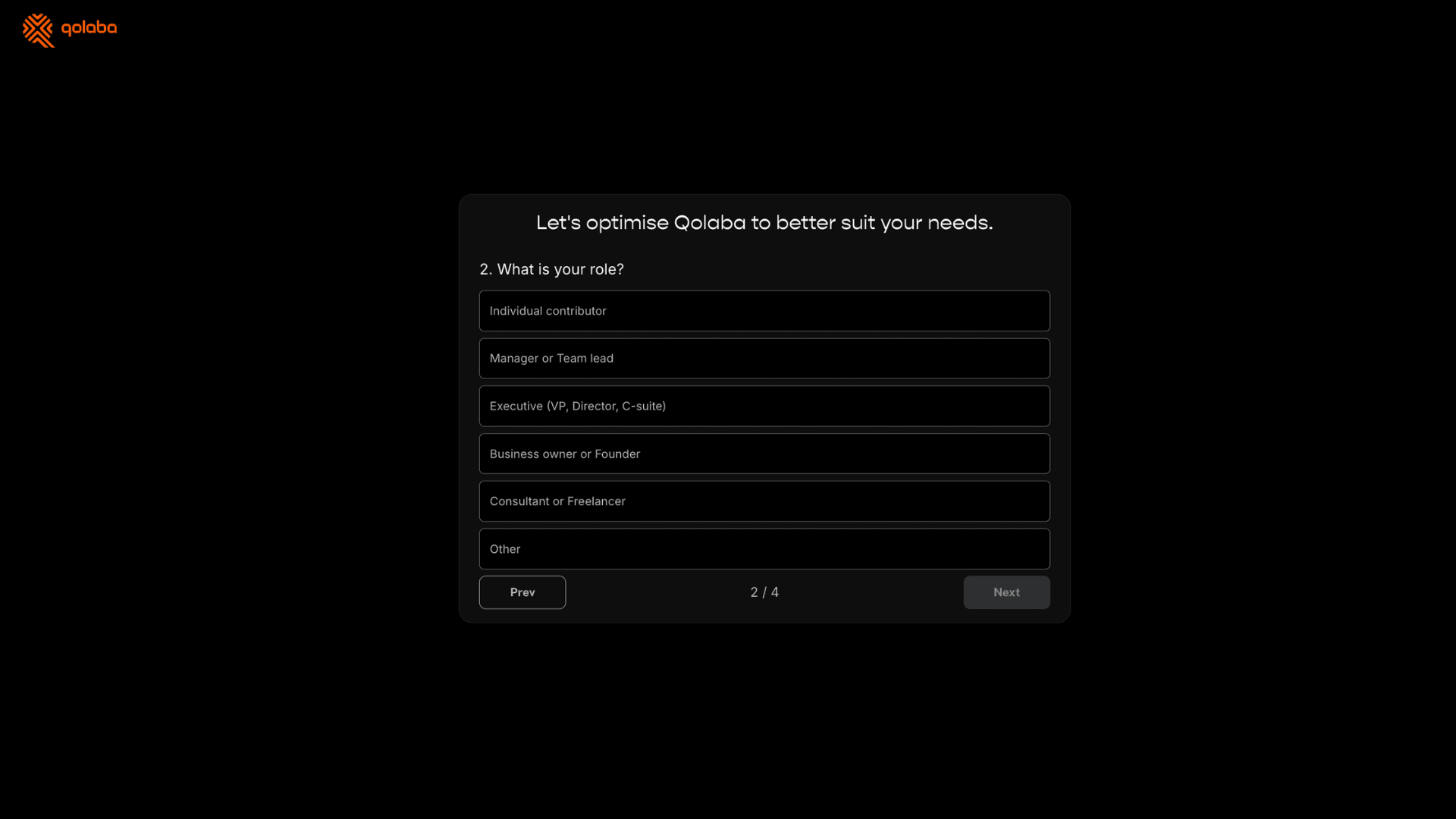
After logging in, Qolaba will ask you a few quick questions, such as “What is your role?” or “How did you hear about Qolaba?” Once completed, you’ll be redirected to your dashboard, where you can view your available free credits.
Well, I purchased the Qolaba Tier 1 License on the AppSumo lifetime deal. So, I logged in directly to access the premium tools and features.
Step 3: Access the AI Tools
From the left-hand sidebar, you’ll see a list of all available AI tools. Click on any tool you’d like to use. Suppose I choose Text to Image.
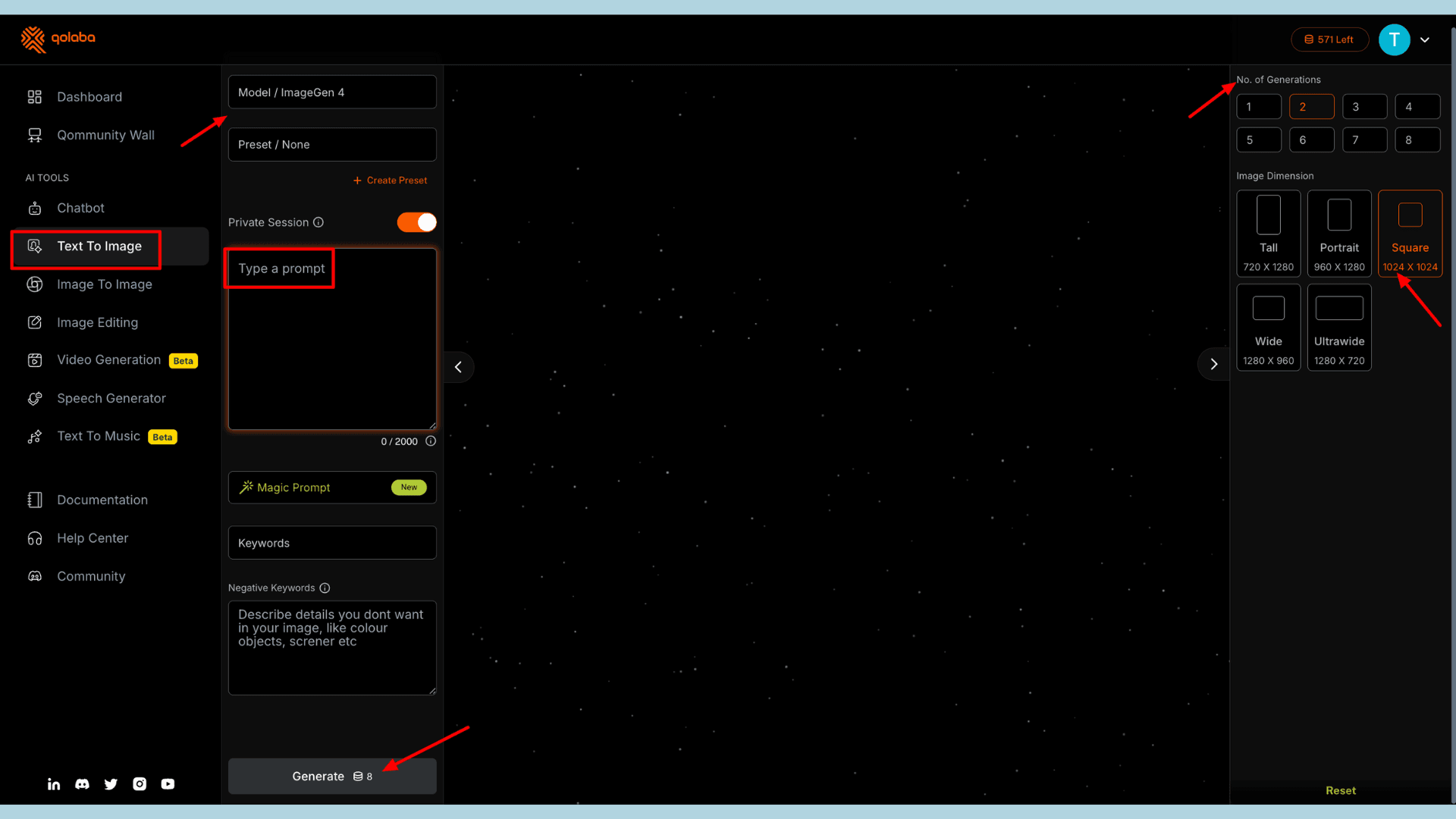
Now, I have to write the prompt, choose an AI model, select a preset, set the number of generations, and image dimensions. Now, click Generate, and within seconds, your output will be ready to view or export!
Qolaba User Interface
When you sign in to the Qolaba platform, you’ll be redirected to the clean and organized dashboard. It displays important details such as your credits, rewards, plan information, and purchase history. On the right side, you can view your credit usage history, showing how your credits have been consumed.
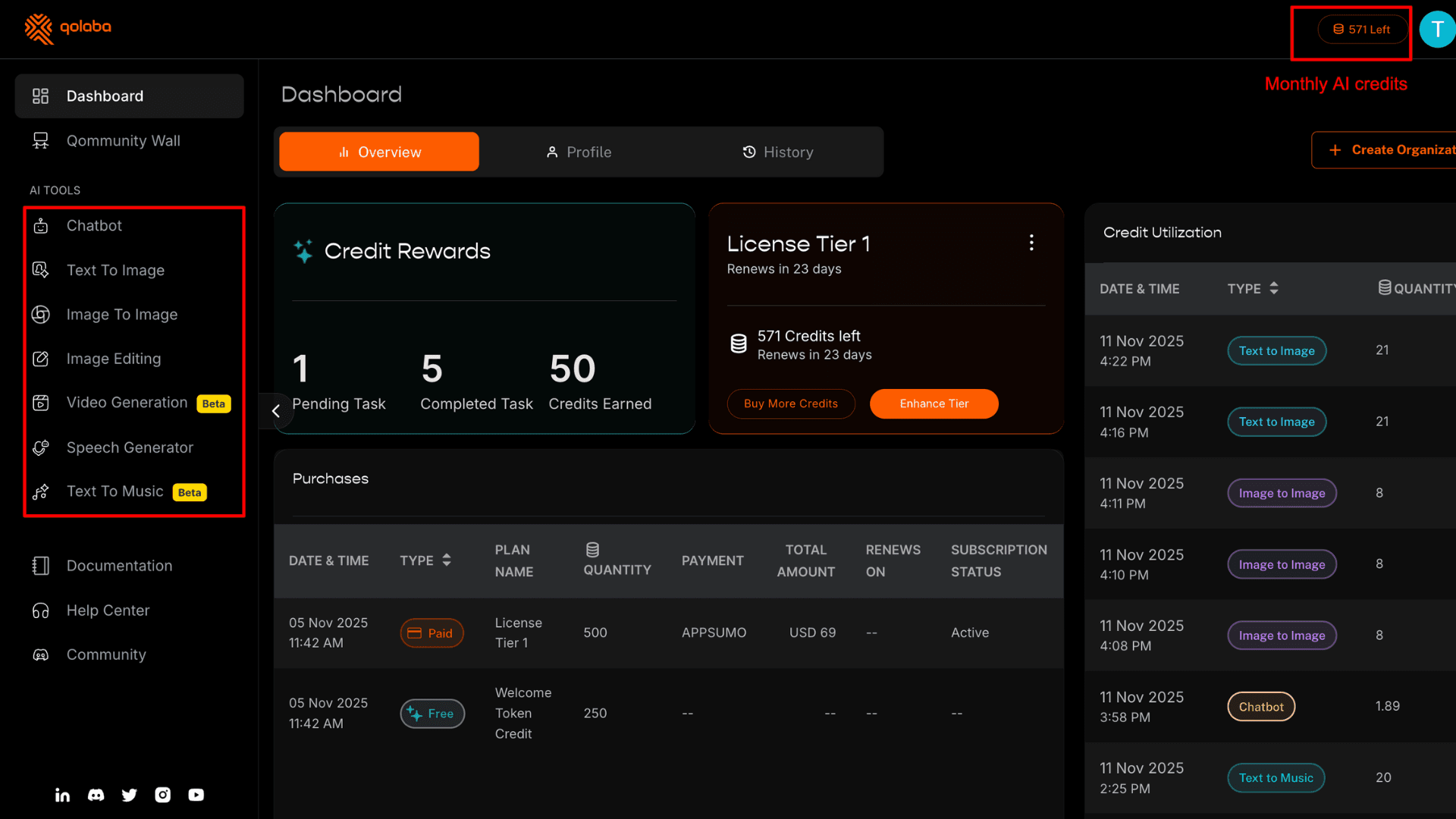
At the top of the dashboard, the remaining credits are displayed next to your profile icon. Accessing AI tools is simple! The left sidebar lists all available tools in one place. At the bottom, you’ll also find social media links, where you can join the Qolaba community.
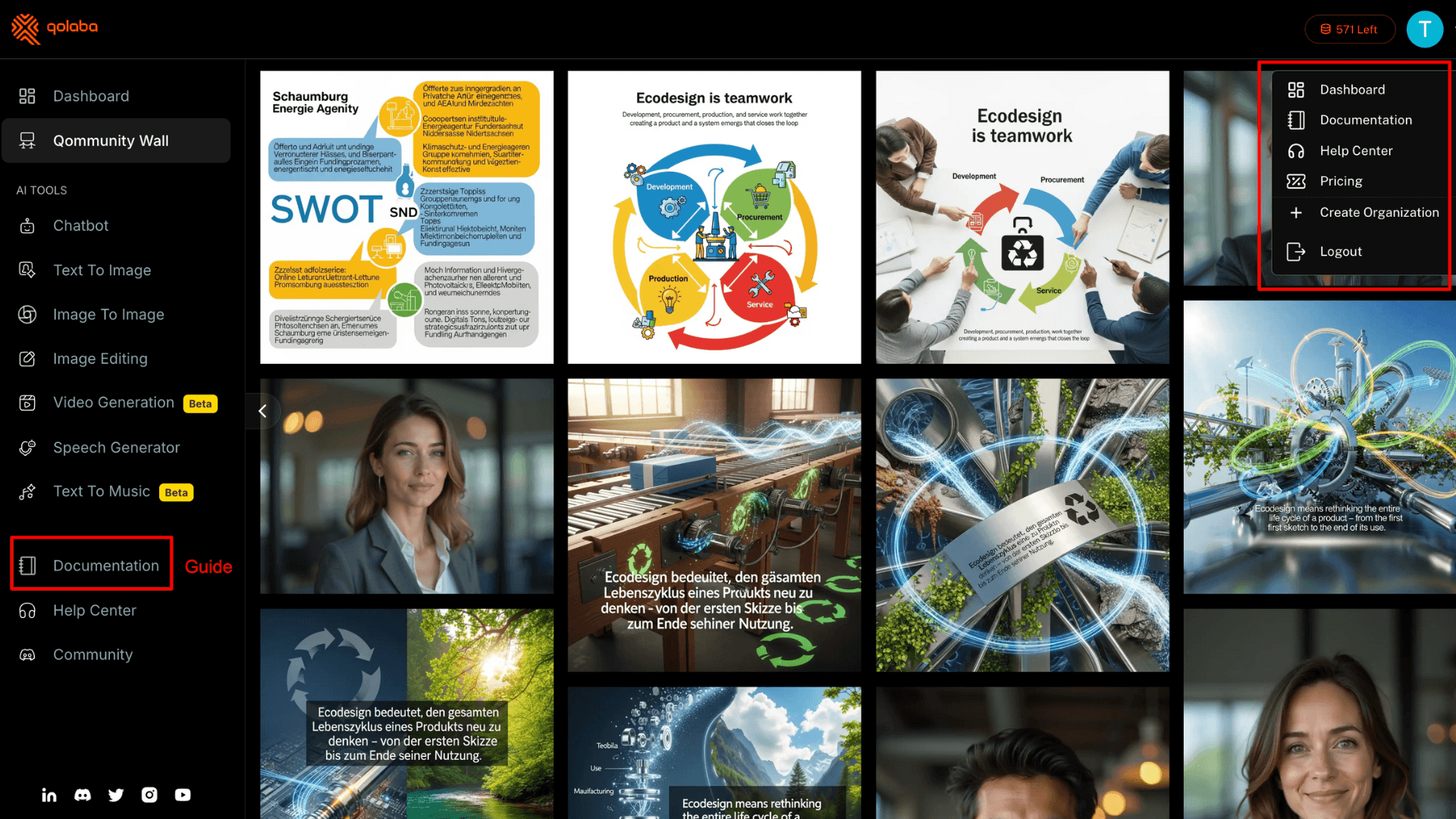
Visually, the Qolaba interface looks modern with a black and orange signature color palette. But some parts of the interface feel a bit incomplete. There is no live chat option available on the web app yet, and the Documentation, Help Center, and Community buttons appear repeated, both in the left sidebar and under the profile section.
Key Features of Qolaba
1) Multiple AI Models
Qolaba bundles 60+ AI models under one unified dashboard. It’s partnered with leading AI providers such as OpenAI, Anthropic, Google, DeepSeek, Perplexity, and others. Below is a list of AI models available for different use cases:
| Use Cases | AI Models |
| Chatbot | ChatGPT, Gemini, Claude, Perplexity, DeepSeek, Grok, etc. |
| Text to Image | Gemini Nano Banana, Seedream, Recraft V3, ImaGen 4, Ideogram V3, Dalle3, etc. |
| Image to Image | Flux Dev, GPT Image, Seedream, Gemini Nano Banana, etc. |
| Video Generation | Runway Gen 4, Veo 3, Sora 2, Kling 2, Qwan V1, etc. |
| Text to Music | Lyria 2 |
I’ve found most of the latest AI models for video and image generation. But in the music generation category, some innovative tools such as Suno AI and MusicGen are currently missing.
AI Image Generation
Qolaba AI Studio offers two AI tools for image generation. You can either create visuals from text prompts or by using a reference image.
a) Text-to-Image
The Text-to-Image Generator lets you create up to eight images per prompt. You can choose from five different aspect ratios (portrait, landscape, ultra-wide, etc.). Depending on your image’s complexity, you can select the most suitable AI model and preset.
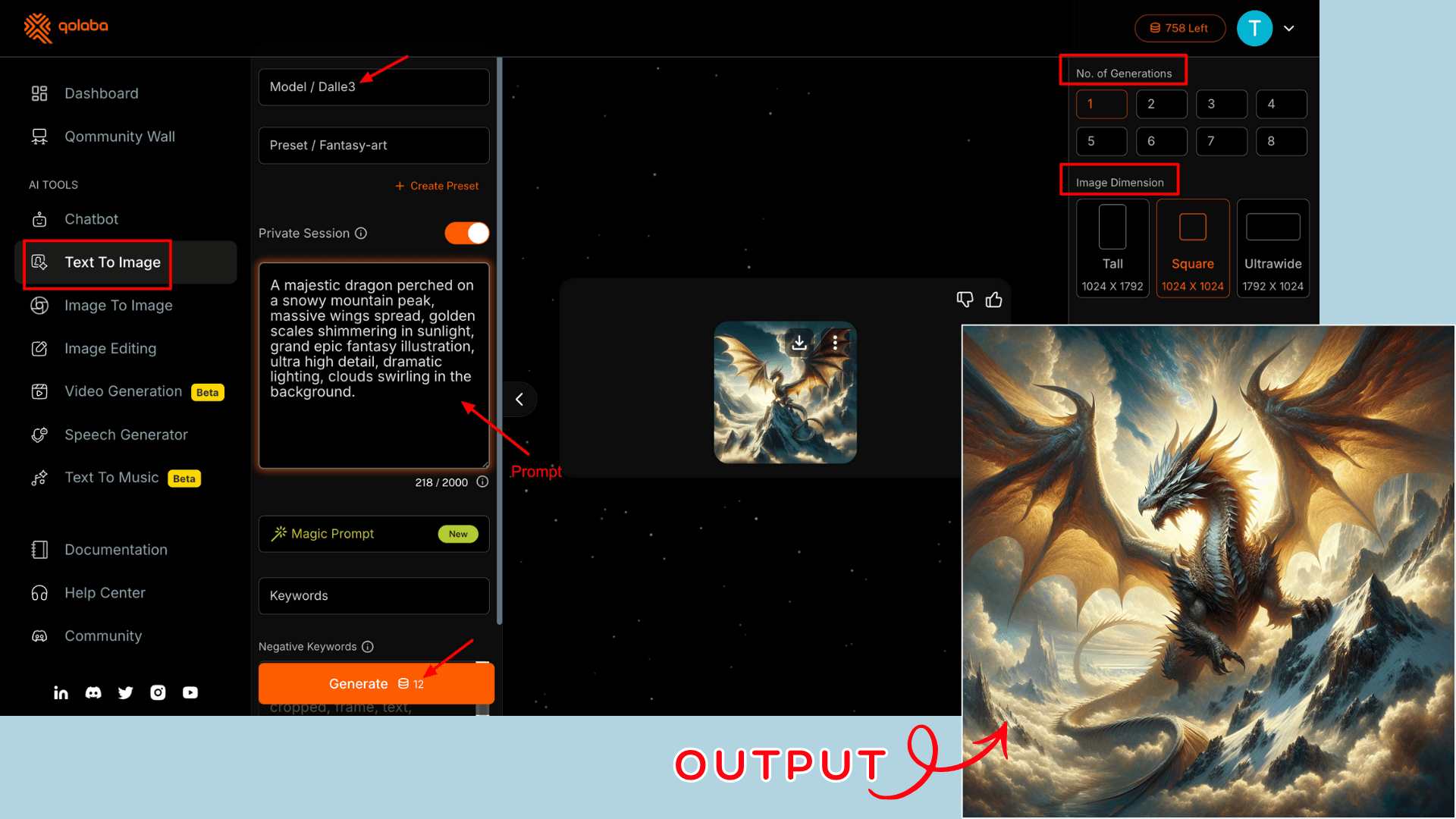
For example, I chose DALL·E 3 for creating fantasy art. It’s best to write a short yet detailed prompt and mention negative prompts(keywords for specific elements you don’t want in your image). Well, the output was fast, consistent, and high-quality.
b) Image-to-Image
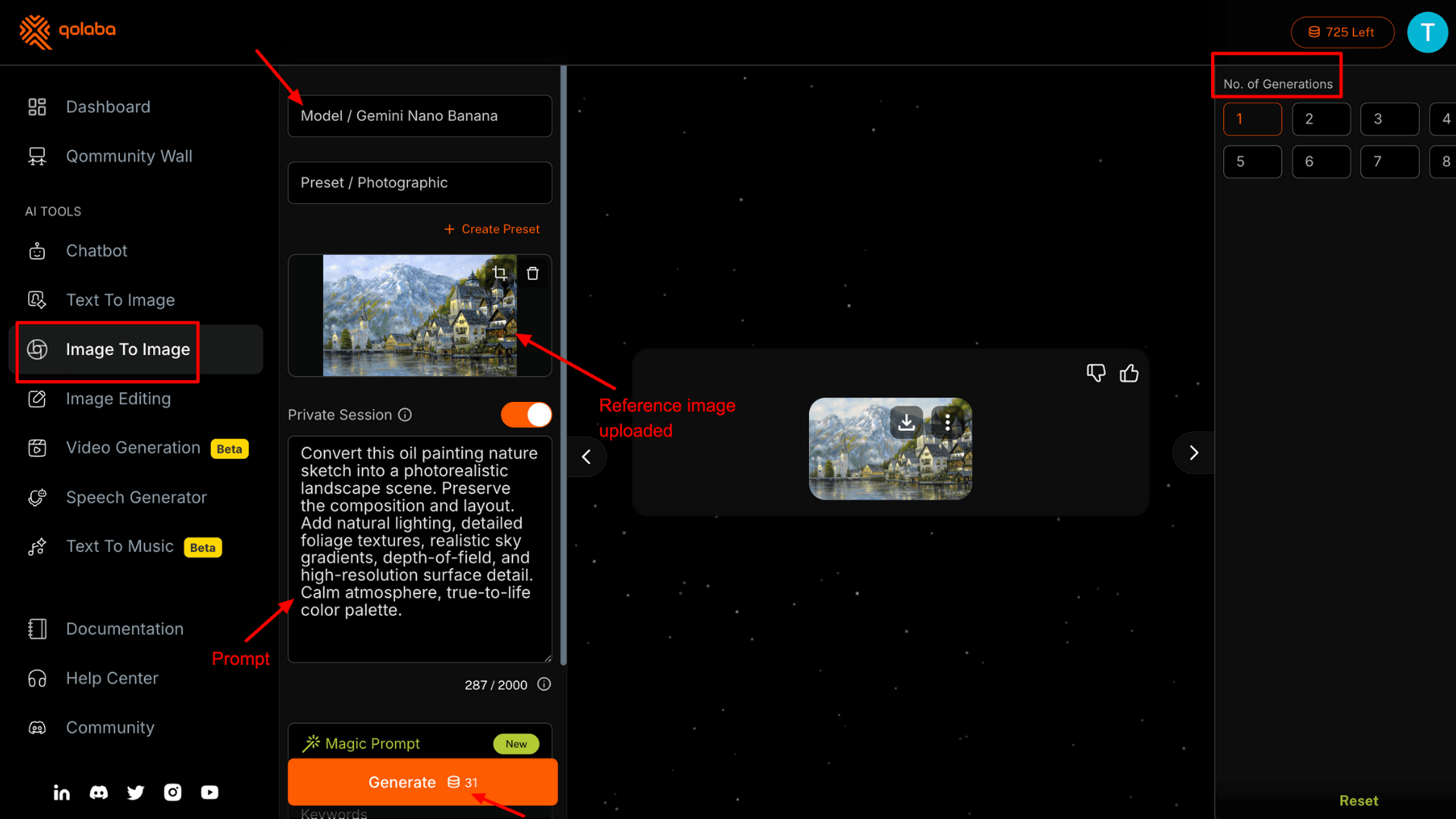
If you want to refine a sketch or redesign existing creatives, the Image-to-Image Generator is incredibly helpful. Its workflow is like to the Text-to-Image tool, but with one additional step: uploading a reference image.
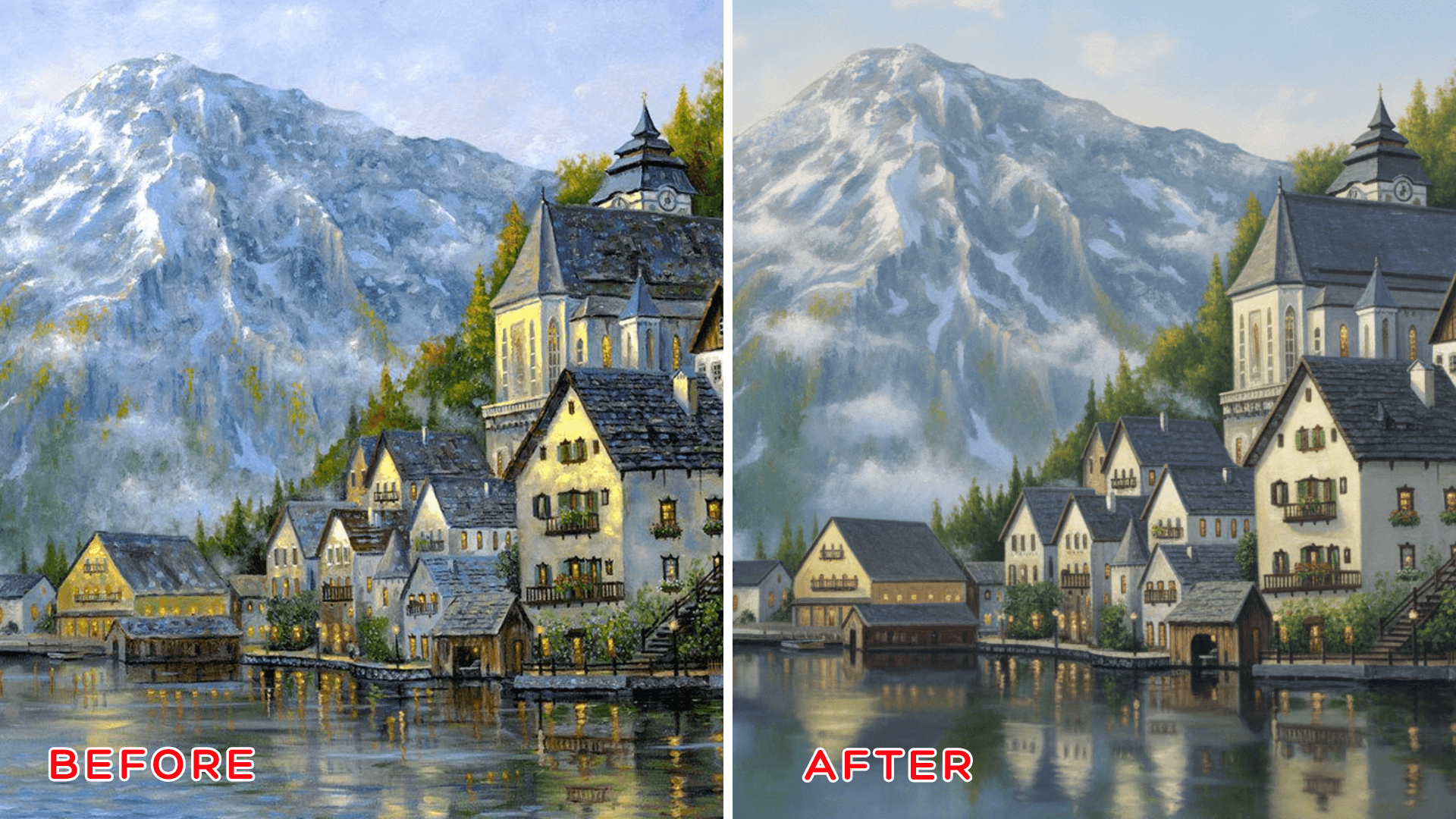
I first tried converting an oil painting into digital art using the Gemini Nano Banana model. The initial result wasn’t very impressive.
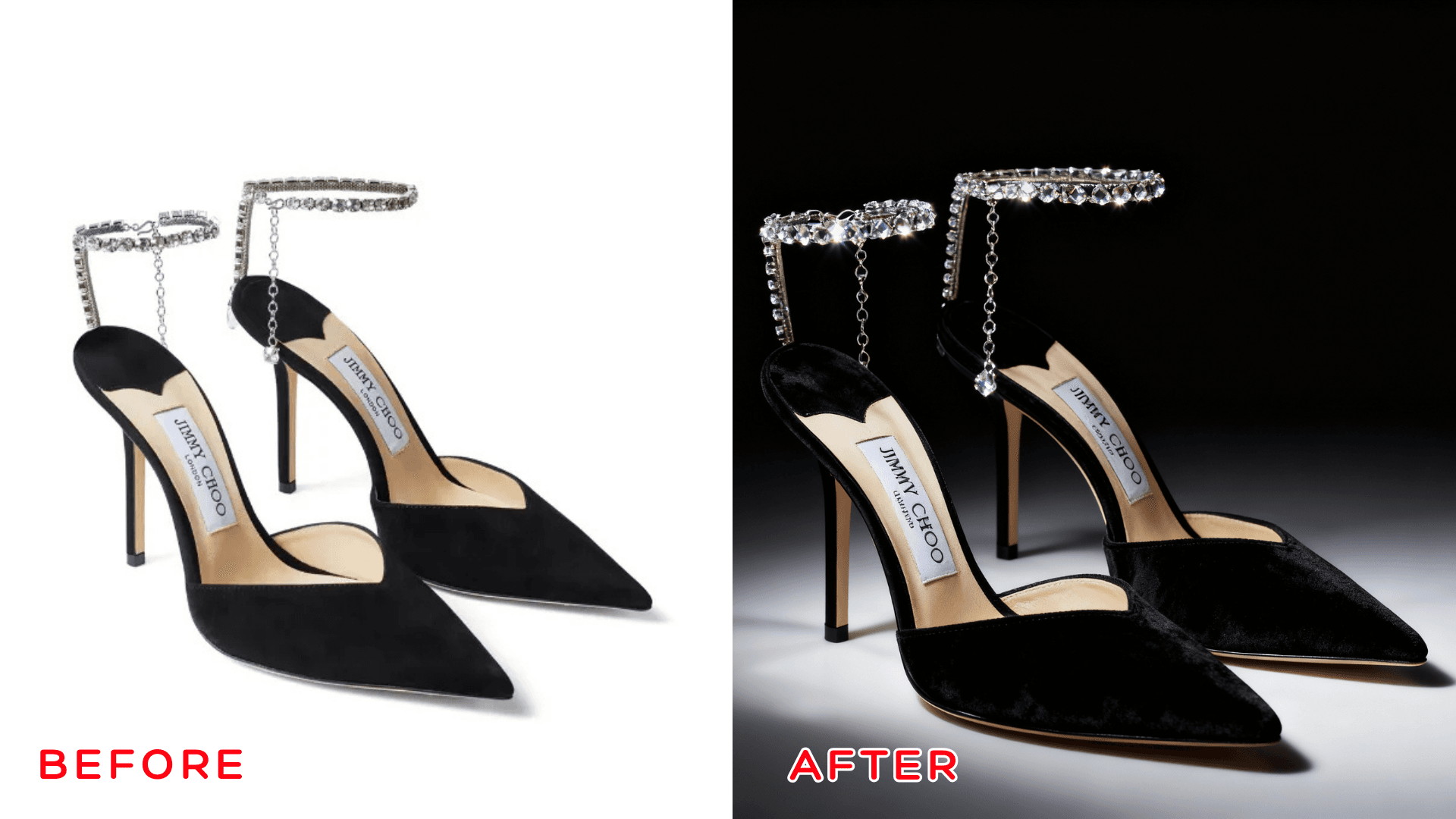
Next, I generated an ad image. For this, we need to switch the preset to “Ad Luxury” and upload a product image. Qolaba transformed the simple footwear image photo into a glamorous, premium campaign shot.
AI Voiceover
With Qolaba, you can easily generate AI voices for different purposes using ElevenLabs. Simply click on “Speech Generator,” paste your script, and within a few seconds, the tool will produce a realistic AI narration.
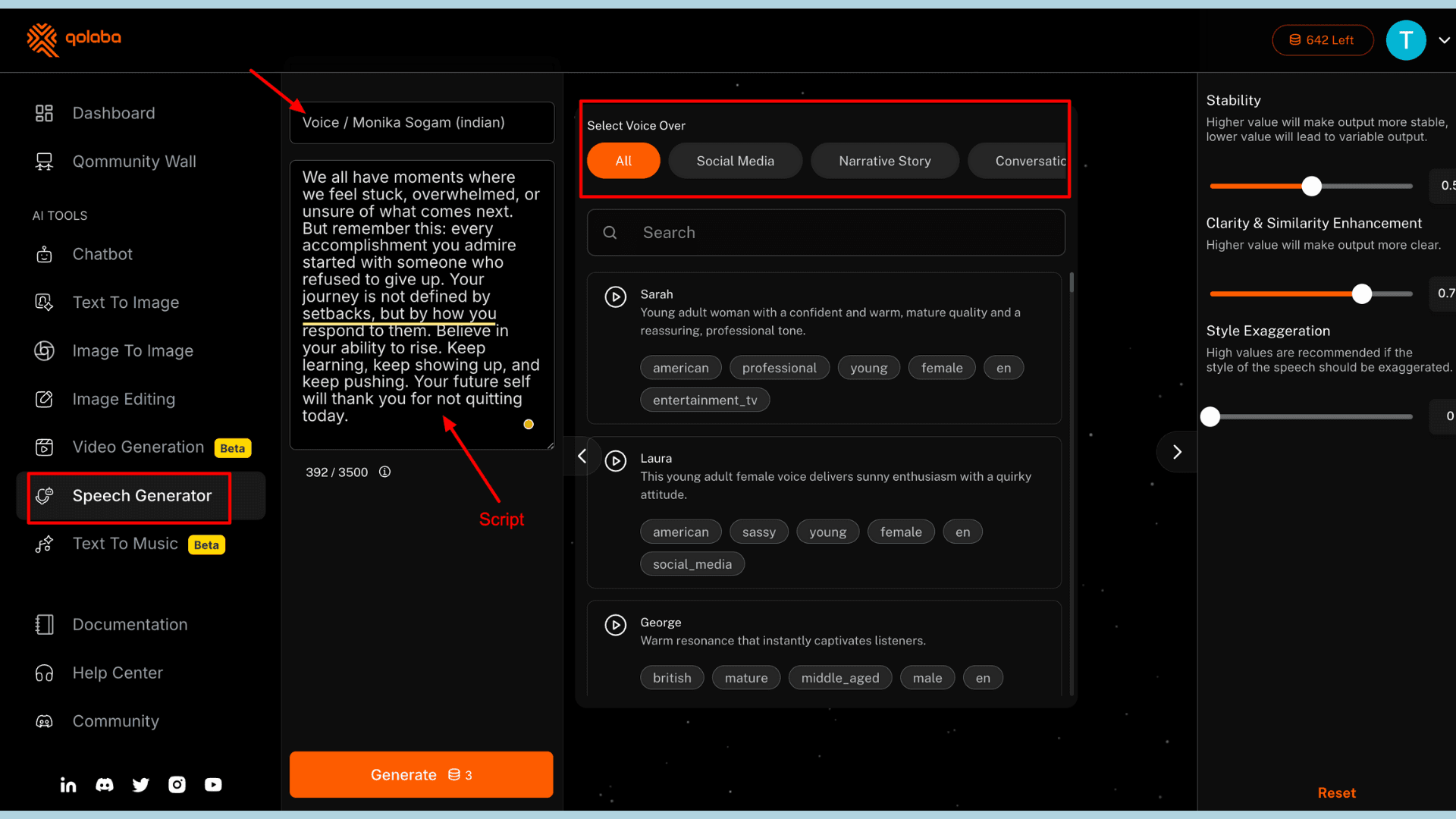
Qolaba offers a large library of AI voices categorized by use cases, such as social media, narrative storytelling, conversation, and more. You can also customize the output by adjusting Voice stability, Clarity, and similarity enhancement.
Style exaggeration is also there for more expressive or dramatic tones. I tested it using a short motivational script for social media. TheAI voice sounded natural, pronouncing every word clearly and with engaging expression.
The only limitation is that you can upload a script of up to 3,500 characters per generation.
AI Video Generator
You can generate short videos on Qolaba with ease. It provides access to advanced video-generation models like Kling 2, Runway Gen-4 Turbo, Sora 2, and more. You can also upload a reference image to include in your video for better customization.
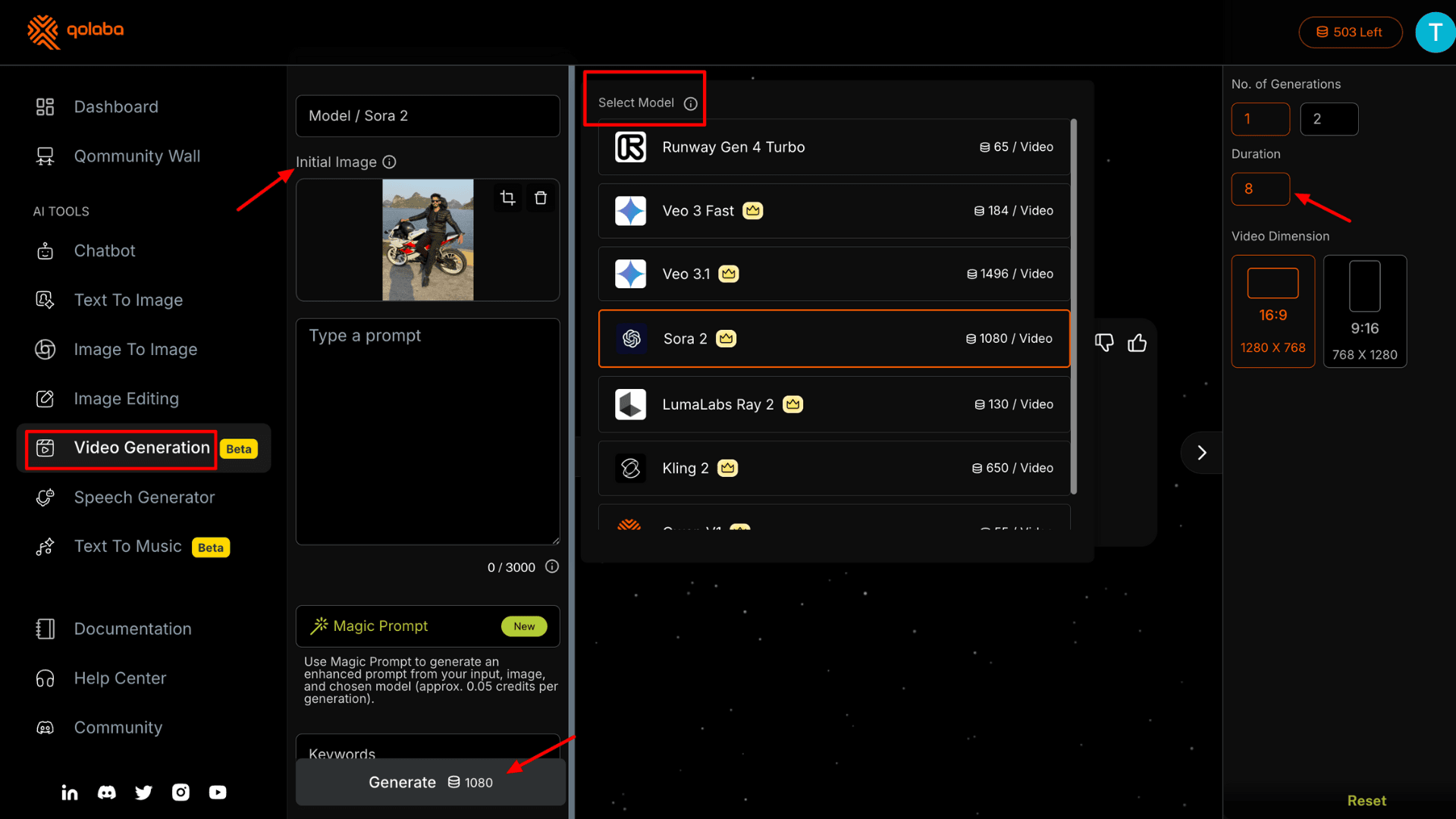
The tool allows you to generate up to two videos at a time. The maximum duration depends on the model you select. For example, Runway lets you create 5-second or 10-second clips, while Sora 2 allows only an 8-second clip.
Considering the advanced AI models available, you will definitely get good results. But credit consumption is extremely high. For a single video, Sora 2 uses 1080 AI credits, which doesn’t even align with the 500 monthly credits included in the Tier 1 AppSumo license.
AI Music Generator
As a content creator, if you don’t want to rely on common music tracks, a text-to-music generator can help. With just a few keywords, you can create an entire instrumental track. Qolaba dashboard looks very similar to its AI image generator, with separate fields for entering the prompt, AI model, adding a negative prompt, etc.
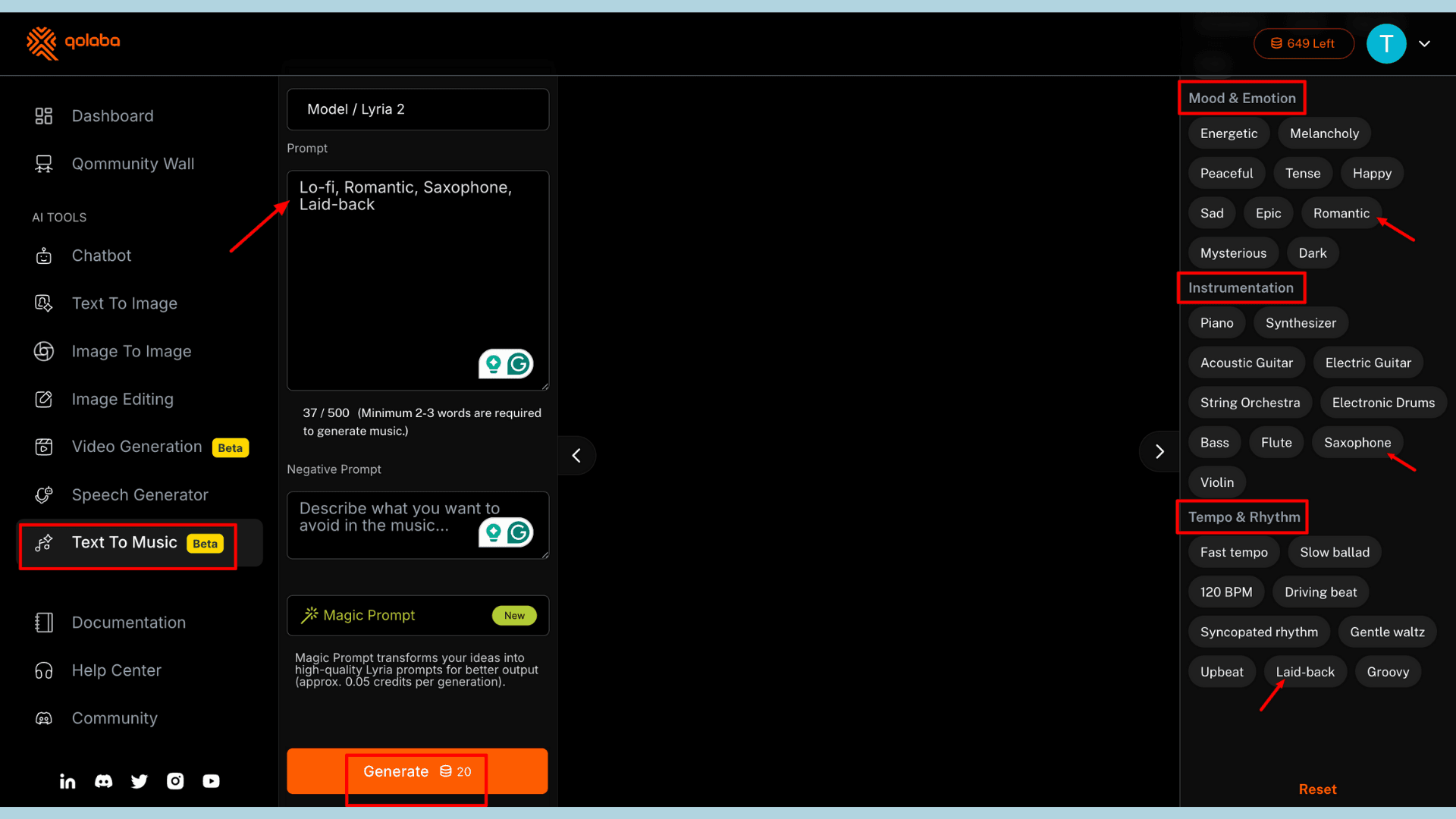
I first tried using my own custom prompt, and Qolaba wasn’t able to generate music. Then, I tried using the keywords listed on the right side. In this section, there are preset options for genre & style, mood & motion, instrumentation, and tempo & rhythm.
You need to select only one option under each category before clicking “Generate.” Why only one? Because when I selected two instruments and two different moods at the same time, it failed to generate anything.
That said, the music it produced matched the selected genre, mood, and instruments very well. However, it’s best suited for simple tracks.
Image Editing Tools
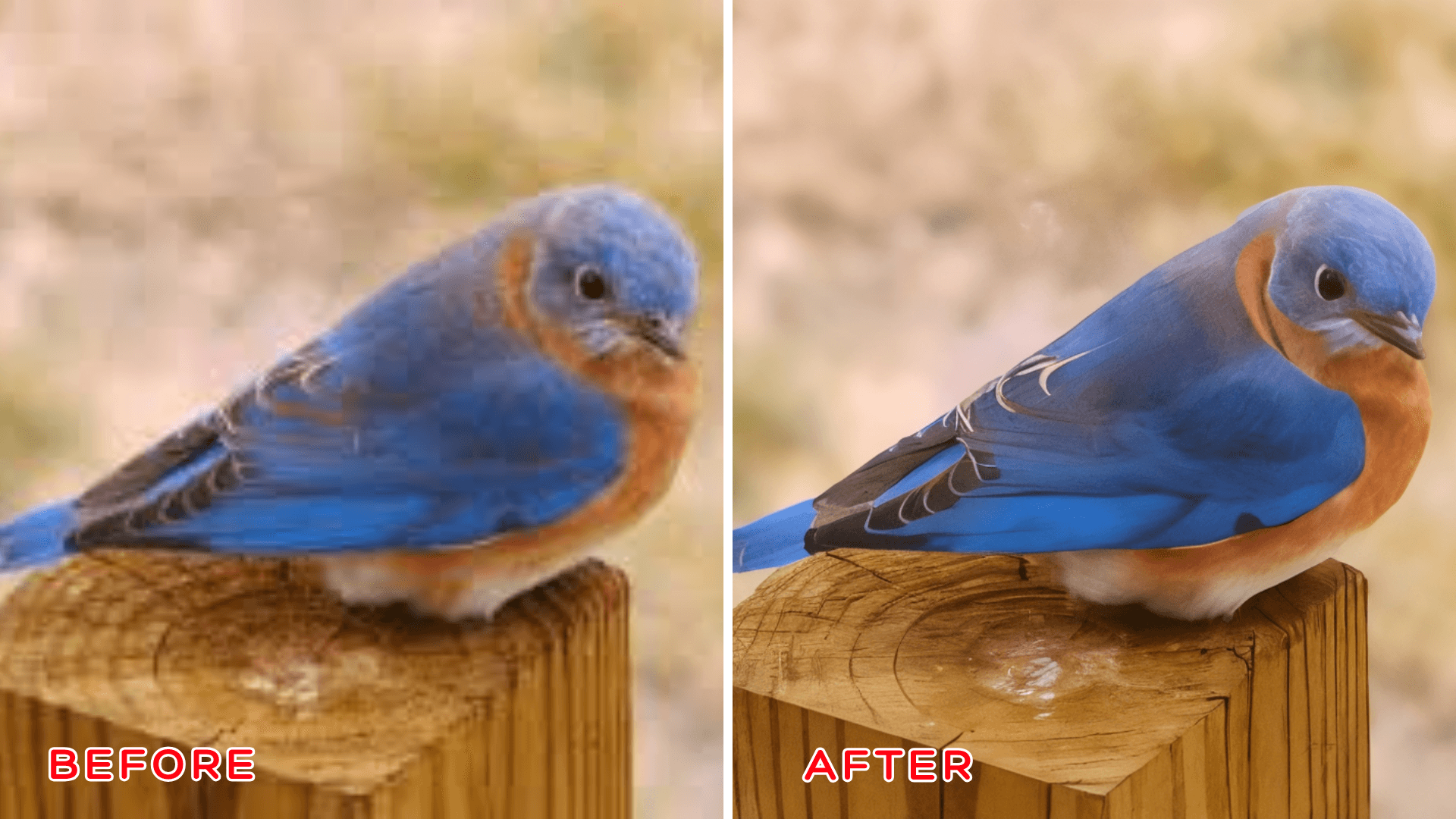
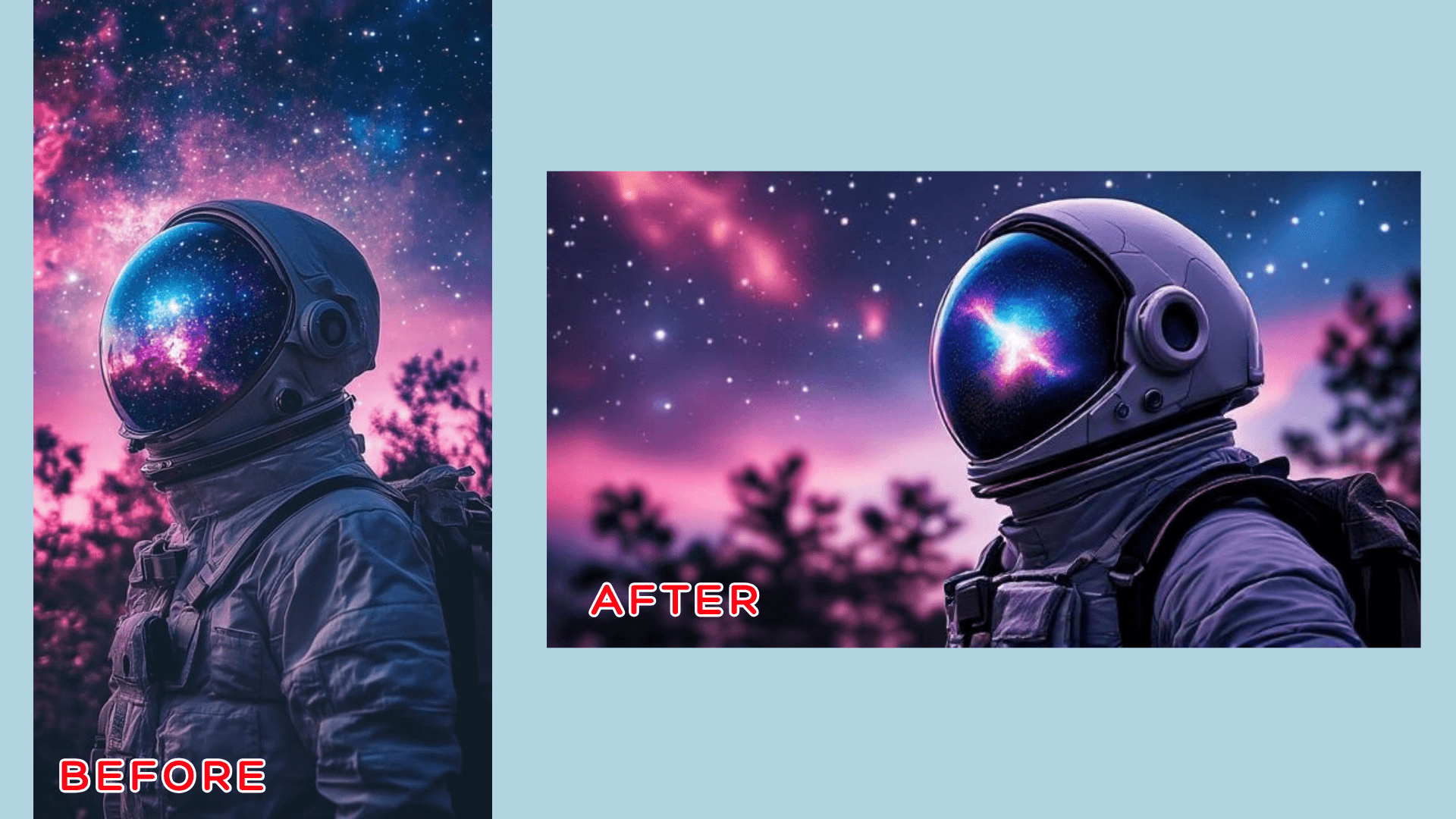
Qolaba offers four image editing tools: inpainting, upscale, replace background, and image variation. I tested all four, but only Image Variation and Upscale worked for me. The Replace Background tool gave me an error every time I tried it.
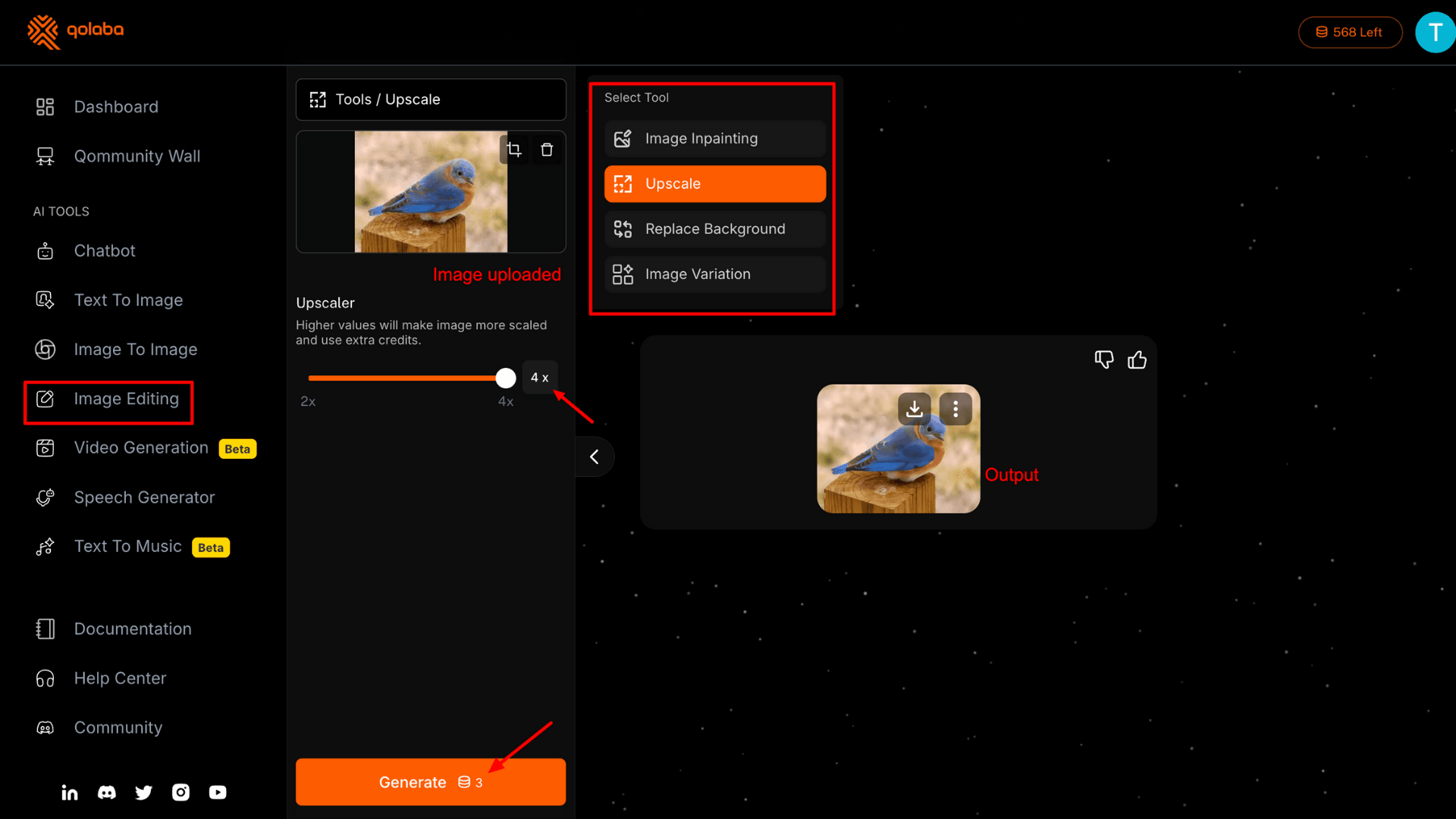
You can upscale an image up to 4x, and it costs only 3 AI credits. The results are impressive; it sharpened the blurry bird photo I uploaded and maintained overall consistency very well. For Image Variation, I uploaded an astronaut picture and used the correct preset and prompt to convert it into a 3D character model. But the output looked more like digital art than a true 3D model.
With Image Inpainting, you’re supposed to be able to add any element. I uploaded a valley picture, brushed over the area, and entered the prompt “add sunflowers.” Unfortunately, it returned the original image with no changes, but still consumed 13 AI credits.
Workspace for Team
For startups and company owners, Qolaba lets users create organizations for team members. You can set up your own workspace and assign credits. Here, you can track credit usage, resources, and work progress.
Plus, in this workspace, you can assign specific roles to track work progress. For example, you can track the sales team, the marketing team, and their actions within a single workspace.
AI Chatbot
If you’re already using ChatGPT or Gemini, Qolaba’s Chatbot will feel very familiar. The main advantage is that you get access to the latest models in one place. Qolaba also provides four quick-access buttons that let you activate internet search, run code, generate images, and enable PII protection.
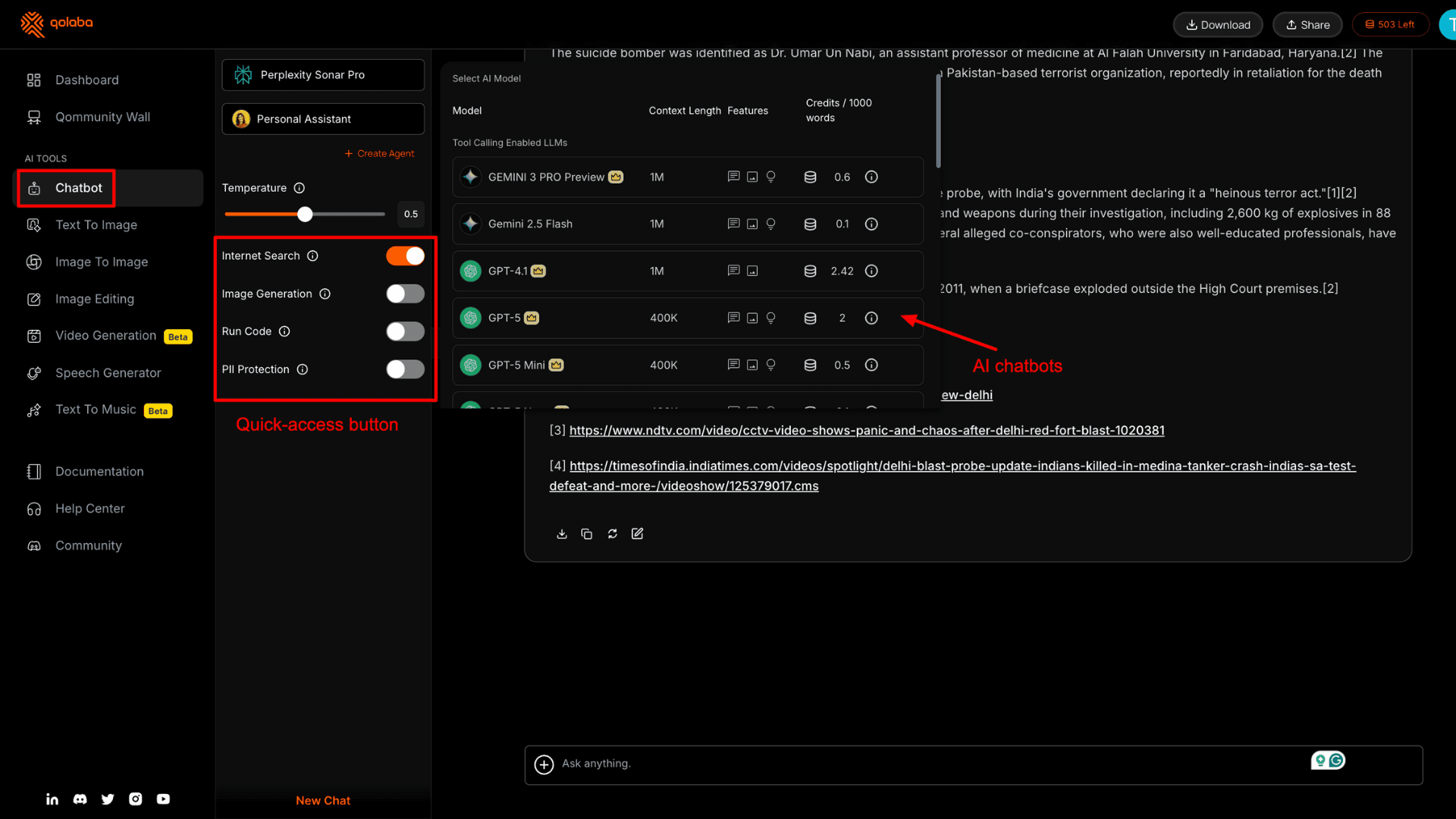
PII protection masks your personal sensitive information before it reaches the LLM. The image generation button feels repetitive since the platform already has a dedicated dashboard for it.
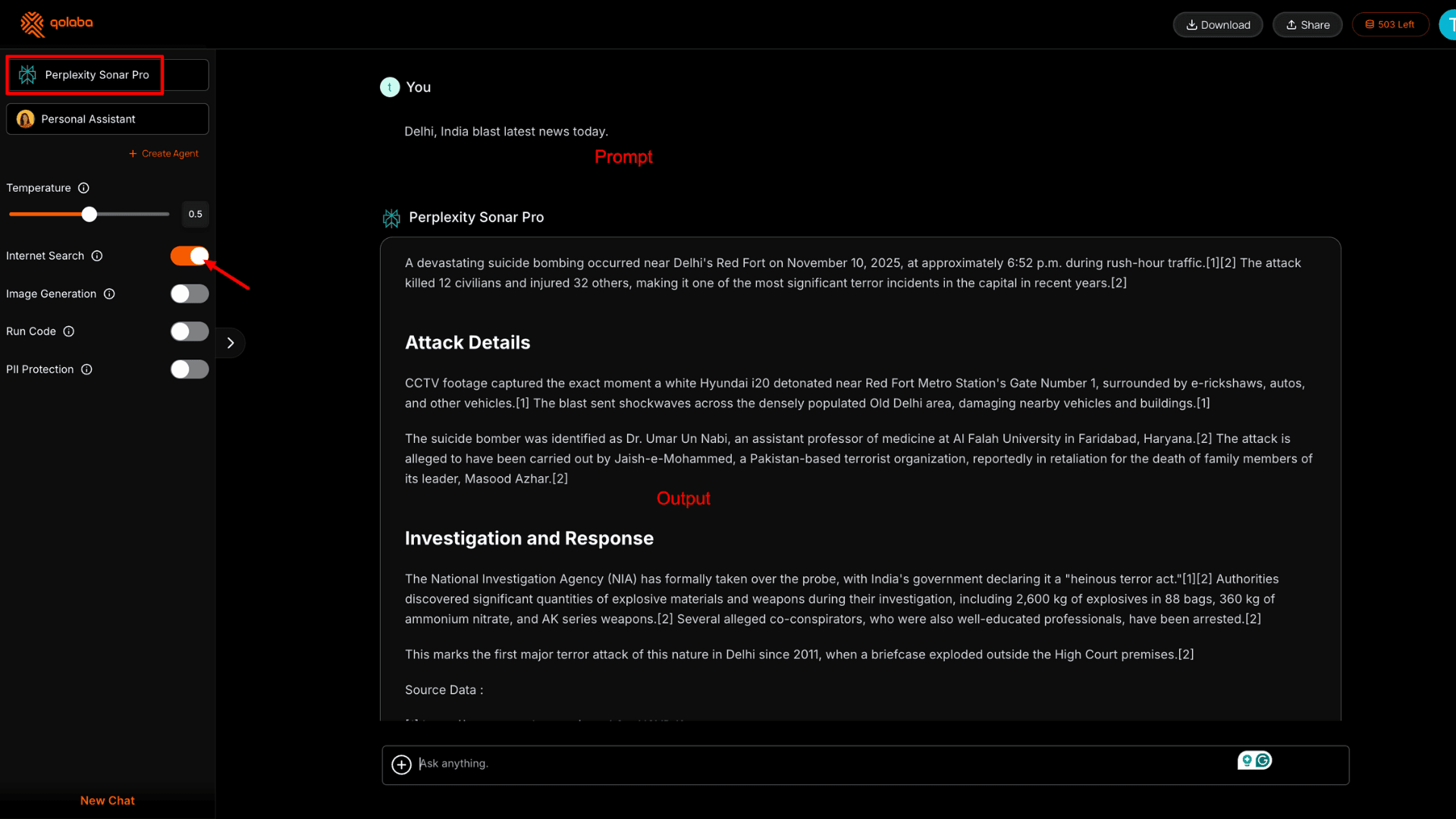
I tested the chatbot by asking: “Delhi, India blast latest news today.” It provided a general report with accurate details. The information was correct, and it was cited with proper sources.
Custom AI Agent Builder
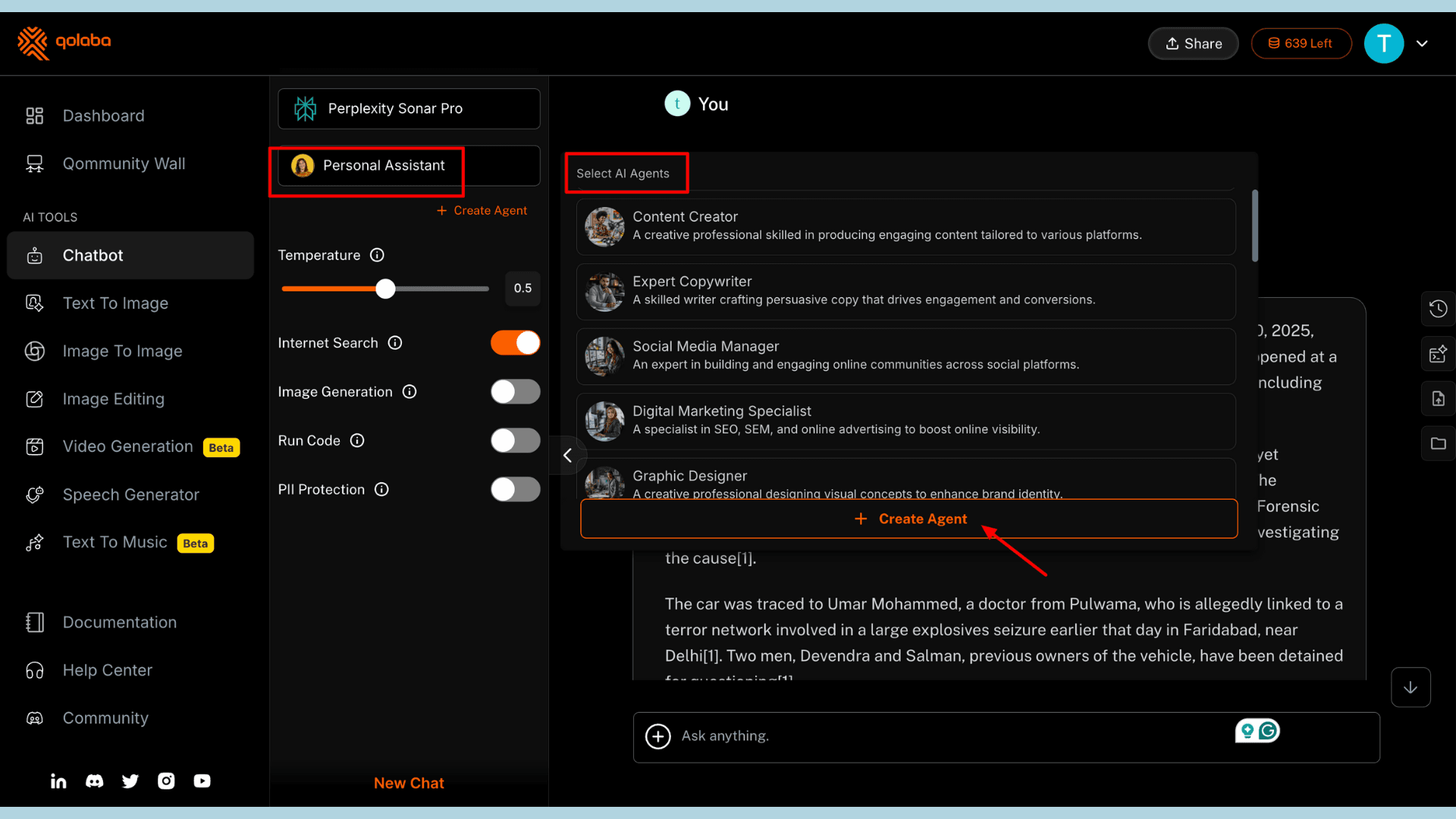
Under the Chatbot section, you’ll find the Personal Assistant feature. These are pre-trained AI agents designed for specific tasks. You’ll find assistants for expert copywriting, marketing strategy, HR tasks, brand management, and more.
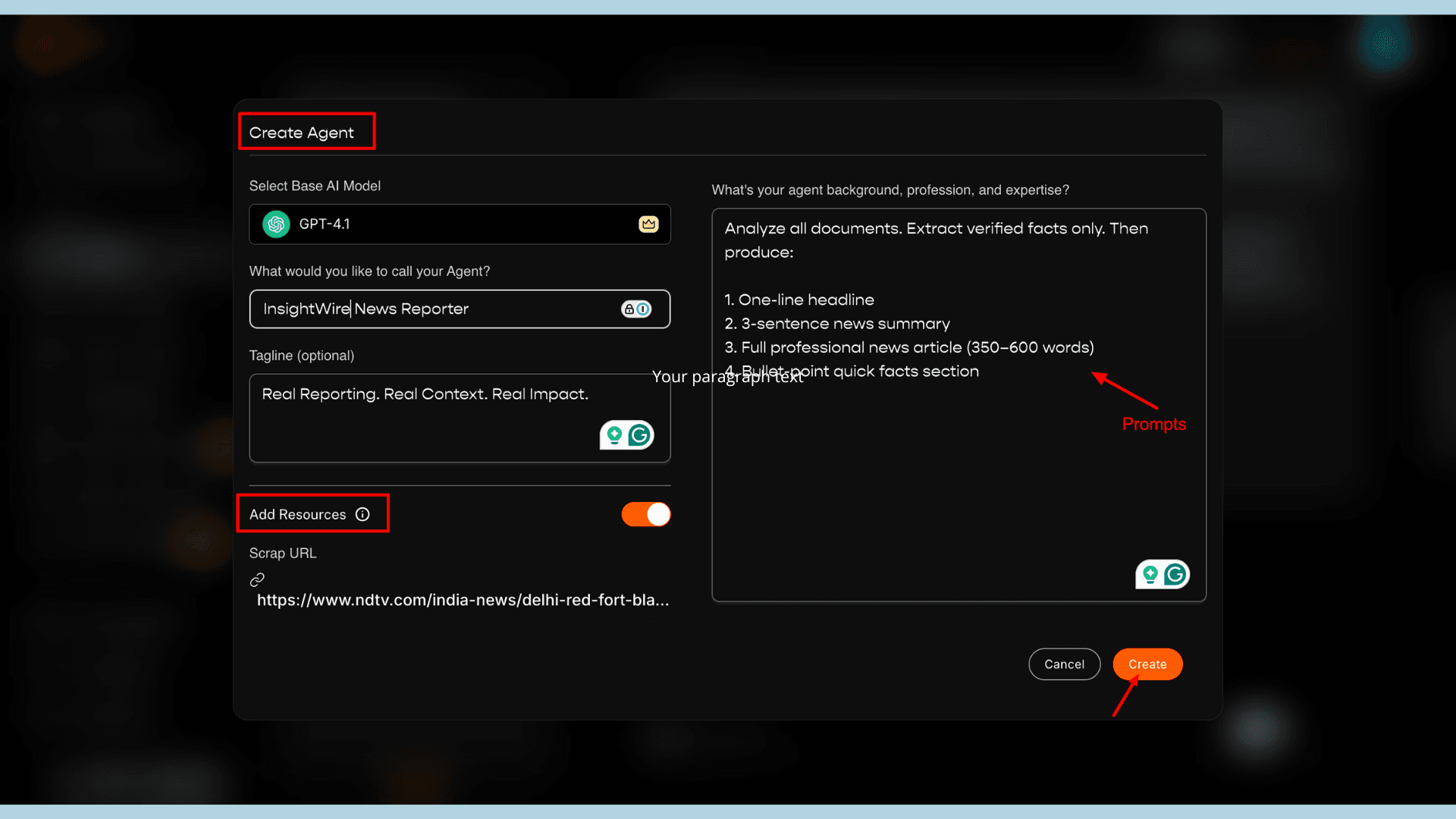
I also created my own custom AI agent, which was surprisingly easy. Since I wasn’t satisfied with the generic news report, I tried building an Expert Journalist agent. To create an agent, you select the model, choose a name, and add an optional tagline. Most importantly, I had to write a detailed system prompt explaining the tasks, output format, and expectations.
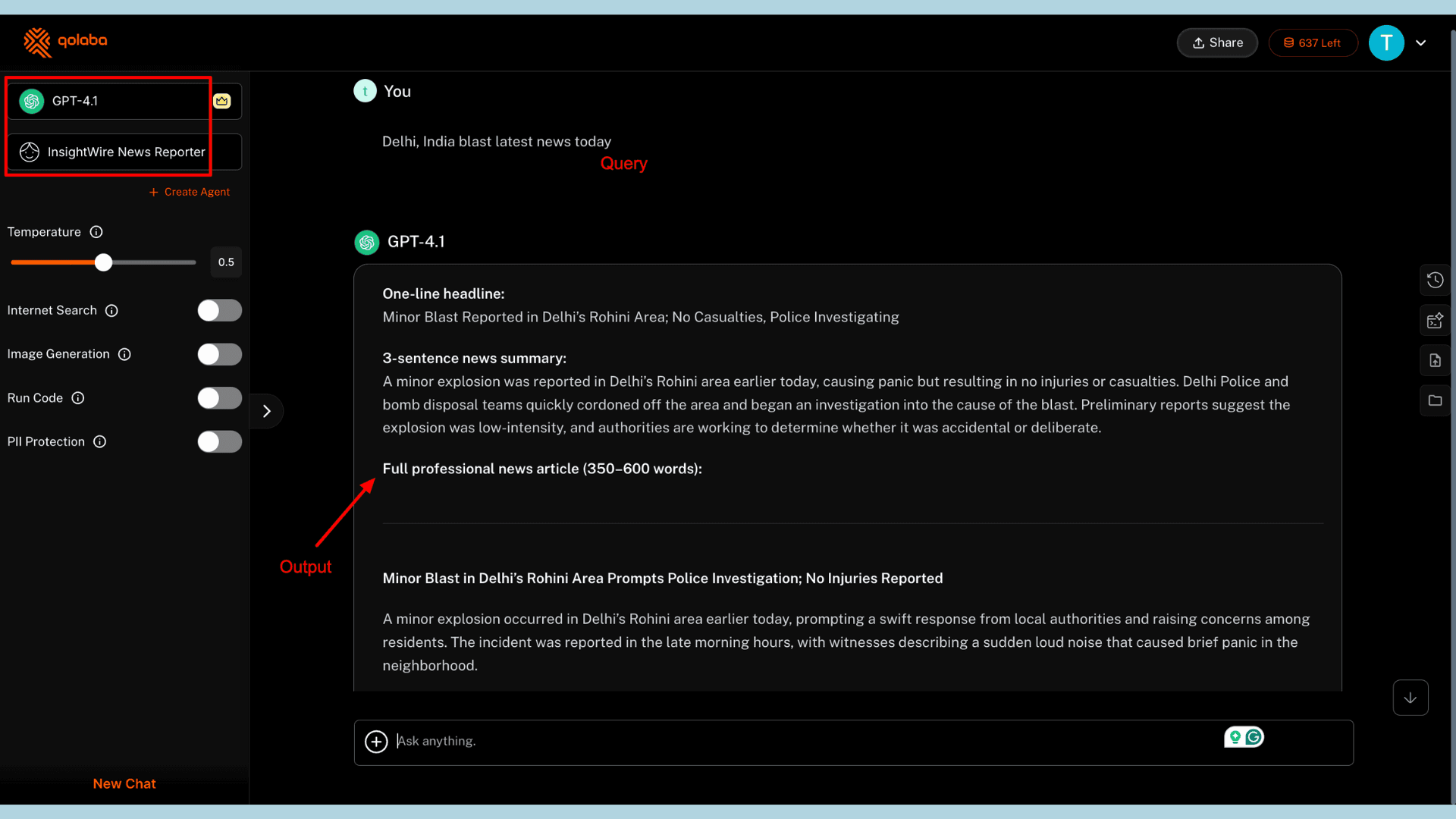
Then, I uploaded a few website links and PDFs under Knowledgebase from reliable sources. I asked the same query: “Delhi, India blast latest news today.” This time, the response was far more structured and accurate.
Qolaba Pricing
| Features | Qolaba Lite | Qolaba Professional |
| Pricing for 1 month | ₹799.00 | ₹1,599 to ₹4,999 |
| Minimum AI credits | 1,000 credits/month | 3,000 to 11,000 credits/month |
| Image generation and editing | 300 | 1000 to 3500 |
| Character limit for GPT-4o Mini and Claude Haiku model | 2M | 6M to 20M |
| Character limit for GPT-4 and Claude Sonnet model | 15K | 450K to 1.5M |
| Email and Discord support | Yes | Yes |
Regular Pricing
For individuals, Qolaba offers two types of plans: Lite and Professional for monthly credits, and a Prepaid plan for one-time credit purchases. If you prefer credit-based usage, the Prepaid plan is a good option, starting at ₹349 for 250 AI credits.
Occasional users may prefer the Lite plan, available at ₹799/month. It includes 100 AI credits per month, 300 image generations, access to advanced AI video generation models, and unlimited rollover of unused credits.
AppSumo Pricing
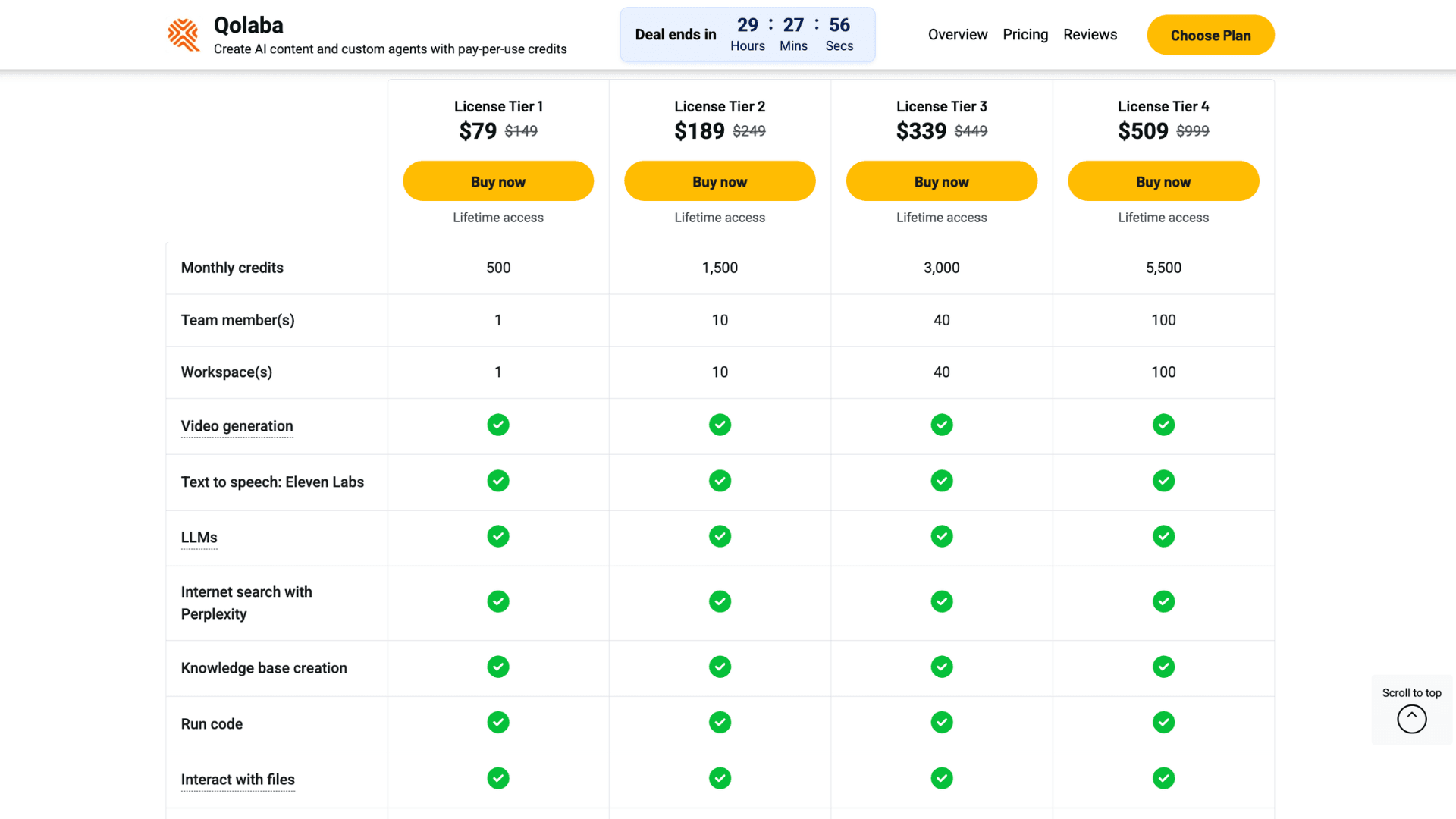
AppSumo is offering four lifetime plans for Qolaba. Tier 1 License is available at $79, offering 1 workspace and 500 monthly AI credits. Tier 2 is priced at $189, providing 10 workspaces and 1500 monthly AI credits.
Refund Policy
Qolaba does not offer a refund policy or money-back guarantee. You can cancel your subscription at any time, but payments are non-refundable. However, if you purchase through AppSumo, you get a 60-day money-back guarantee. So, you’ll get enough time to try the software and decide whether you want to keep it.
Qolaba Customer Support
To help users resolve any issues related to Qolaba’s features, the app includes a built-in Help Center. When you open it, you’ll see two options: send a query directly or book a discovery call.
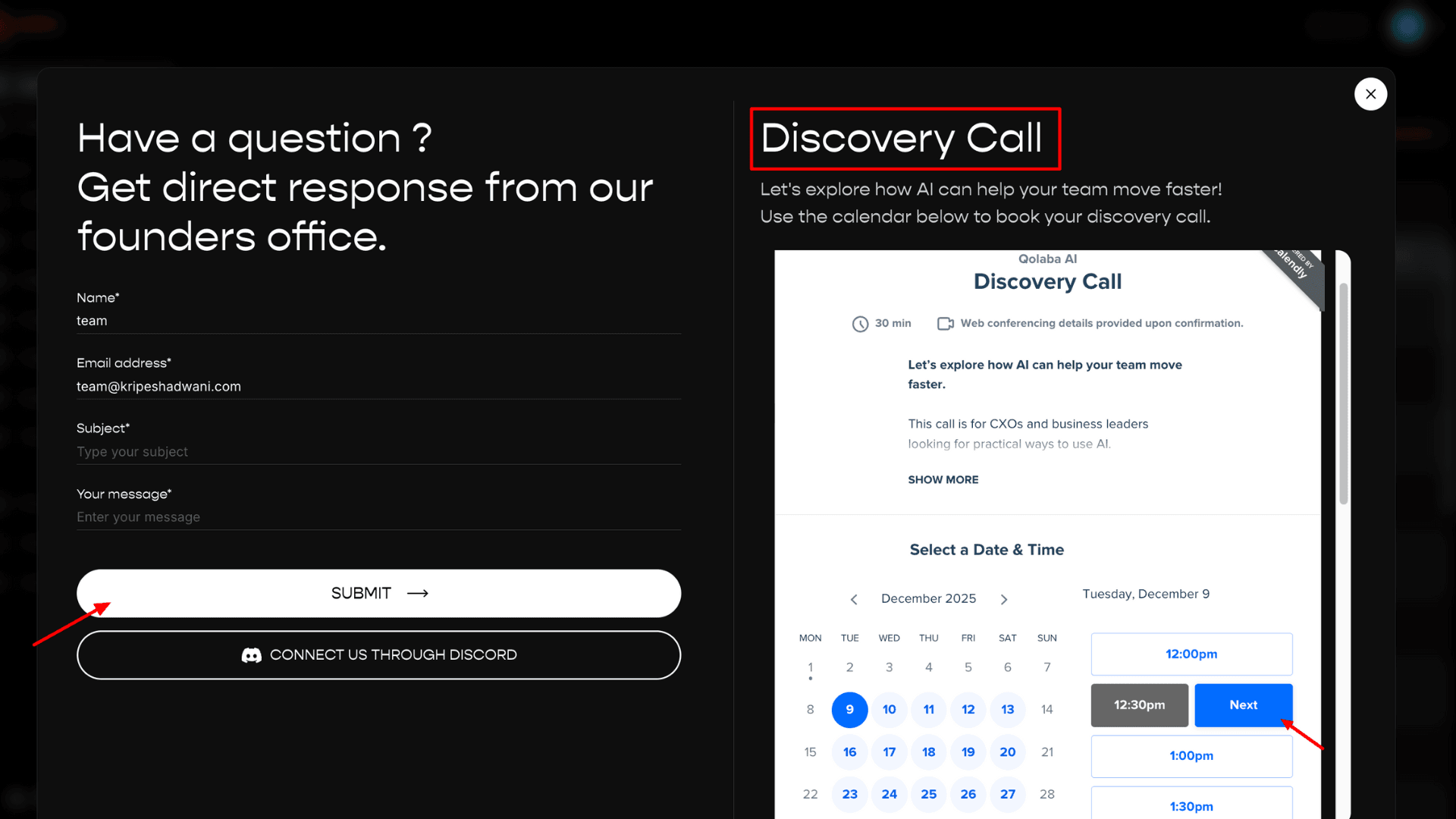
To send a query, you simply describe your issue, and your email ID is automatically fetched. Then click “Submit.” A Discovery Call allows you to learn more about their AI tools. Just select a date and time, fill out the form, and schedule the call.
Plus, Qolaba also has an active Discord community that you can join directly through the app. Joining the community may even provide bonus AI credits. Their official website also offers useful blogs and documentation under the Resources section.
Qolaba Pros
Qolaba is useful software due to the following reasons.
1) Variety of AI Models
As an active AI tools user, managing multiple platforms for daily tasks can feel overwhelming. Qolaba solves this by giving you access to major AI models for image, text, music, and speech within a single, all-in-one workspace.
2) Beginner-friendly Interface
The interface is extremely simple and intuitive. All AI tools are organized under a unified layout. Most features, like the text-to-image generator or video generator, share a similar interface. You simply write a prompt, choose a model, add an optional negative prompt, and click “Generate.”
3) Credit-Based Pricing
Buying subscriptions for different AI models is quite expensive. Qolaba, however, doesn’t charge based on the model you use. Instead, each plan provides a set amount of monthly AI credits, and every feature simply consumes credits as you use it.
4) Workspace and Project Organization
If you manage a team, Qolaba allows you to create multiple workspaces for different groups. You can share resources, tools, and collaborate on projects within each workspace. Admins also have control over workflows and can track project status.
5) No-code Custom AI Agent Builder
Unlike other AI-powered software, Qolaba lets you build a custom AI agent without writing a single line of code. The interface is already preset; you simply provide detailed prompts, rename the agent, and add resources to build it.
6) Create Knowledgebase
The platform includes a useful Knowledgebase feature where you can save multiple website links related to a topic for deeper research. While creating a custom AI agent, you’ll see an option to add sources. The “Scrape URL” feature analyzes content from the links you upload, and you can also add multiple PDFs to enrich the agent’s knowledge.
Qolaba Cons
Unfortunately, Qolaba has some significant shortcomings in its software that need to be addressed quickly.
1) High Credit Consumption for Some Models
Compared to other AI tool suites, Qolaba’s credit consumption is on the higher side. For video generation, it requires a minimum of 55 AI credits, and for image generation using Seedream or DALL·E 3, it consumes at least 20 AI credits.
2) Many Tools Not Working or Still in Beta
Currently, the Video Generator and Text-to-Music Creator are still in beta mode. That means they are under active development. Under Image Editing, tools like Replace Background and Image Inpainting often showed errors or failed to produce the desired results.
3) Credits Deducted Even on Failed Tasks
As mentioned earlier, I faced this issue mainly with the Image Variation tool. It returned the same image without any edits, but still deducted credits. I experienced similar problems with the image generation tools occasionally.
4) Model Availability Can Be Inconsistent
Not every AI tool category allows you to choose between multiple models. For example, the Speech Generator is powered only by ElevenLabs, with no alternative models. Similarly, the AI Music Generator uses only Lyria.
5) Struggles with Long Prompts
Whether it’s image generation or music creation, Qolaba often struggles to interpret long or complex prompts. The Music Generator works best only if you use the short, predefined keywords shown on the dashboard.
Who Should Use Qolaba?
Qolaba is an ideal AI tool suite for the following users:
- Freelancers who need access to multiple AI models but can’t manage separate subscriptions.
- YouTubers, podcasters, and social media creators who need to produce short videos and audio content.
- Tech enthusiasts who enjoy experimenting with a variety of AI models for different use cases.
- Marketing teams managing multiple clients may find Qolaba’s workspace separation, team collaboration features, and credit-based pricing highly cost-effective.
Why Should You Trust Me?
Since 2015, I’ve been working in the digital industry full-time. In the past decade, I have reviewed, tested, and used thousands of generative AI tools. You will find many tried and tested reviews on AI video generators, image upscalers, note-takers, tools for chatting with PDFs, invoice generators, and more.
AI tool suites are something I have been researching for a few months. As I have to use multiple models for my work, these platforms help me a lot to save time. I personally tested each and every feature of Qolaba for weeks. That’s how I finally gained the confidence to share the truth with my audience.
Conclusion
In short, Qolaba is a unified platform that brings together major advanced AI tools like ChatGPT, Claude, Perplexity, Gemini, DeepSeek, and more. It offers a complete interface for text-to-image generation, image-to-image creation, music generation, AI voice synthesis, image editing, and video generation.
The platform truly shines in areas like multi-model access, credit-based pricing, workspace & knowledgebase creation, and its easy-to-use interface. However, some tools are still in beta, and a few features show occasional glitches. Also, the AI credit consumption is quite high compared to its pricing structure.
So, is Qolaba worth your purchase? You can safely try it through the AppSumo deal, which offers a 2-month refund window. During this period, you can test all features thoroughly and decide if it fits your workflow. But on its regular pricing, the credit limits may only be suitable for occasional users.
This was my honest review of Qolaba. I hope you found it helpful. If you have any questions, feel free to ask in the comments section.
FAQs
Is Qolaba AI free to use?
Yes, Qolaba offers 250 free AI credits upon signup. With this, you get access to their basic image-generation models (from text and images), basic prompt templates, and more.
What is the difference between Qolaba and ChatGPT?
ChatGPT is an AI chatbot developed by OpenAI. It is primarily focused on single AI models (like GPT-4) and allows you to engage in text conversations, generate images, perform research, write code, and more. Qolaba offers a single interface for multiple AI models from different providers, including OpenAI, Anthropic, Google, Mistral, etc.
What is Qolaba used for?
Qolaba can be used for generating images from text or other images. Apart from this, you can generate videos and music, edit images, create AI voiceovers, and build custom AI agents.
How does the “credit system” work?
Qolaba provides monthly AI credits based on the plan you choose, and each action consumes credits depending on the model you use. For example, generating an image with Nano Banana Pro consumes 49 credits per image, while using the Flux Dev model uses only 9 credits.
What happens to unused credits if I’m on a paid plan?
As long as your Qolaba subscription remains active, unused credits automatically roll over to the next billing cycle. If your plan expires, any unused credits are stored in the Credit Bank. You can access these stored credits after subscribing to any new paid plan in the future.

Qolaba Pros (+)
- Various AI Models
- Credit-Based Pricing
- Project Organization
- Create Knowledgebase
Qolaba Cons (-)
- High Credit Consumption
- Credits Deducted
- Inconsistent Model Availability
- Struggles with Long Prompts