Creating a PPT from scratch can be time-consuming and tedious. But thanks to AI presentation generators, you don’t have to worry about it anymore.
Gamma uses AI to help you generate visually appealing slides, documents, and even web pages within seconds. I recently came across it. After spending a few weeks testing it out and creating several professional-grade presentations, I am finally here with the Gamma AI Review.
In this review, we will explore everything you need to know about Gamma. Its core features, UI, pricing, support, and more. We’ll also cover its major pros and cons, and explore who it’s best suited for.
So, let’s jump in and see if Gamma is the right AI tool for your next presentation.
Gamma App Review
Summary
Gamma is a fast, modern AI tool with real-time collaboration, quality visuals, Spotlight view, Gamma Agent, API access, and easy exports. Its downsides include limited templates, no animation options, and a restricted free plan.
This tool is ideal for students, educators, small businesses, and professionals who want to create quick, hassle-free presentations.
- About Gamma App
- Gamma User Interface
- Key Features of Gamma App
- 1) Multiple PPT Generation Methods
- 2) AI Presentation Generation
- 3) Gamma Agent
- 4) Customization Options
- 5) AI Text Editing Options
- 6) AI Images & Image Libraries
- 7) App Integrations
- 8) Spotlight Mode
- 9) Multiple Export and Sharing Options
- 10) Templates Library
- 11) Analytics and Insights
- 12) Real-Time Collaboration
- 13) Custom Themes and Fonts
- 14) Create Websites, Documents, and Social Posts
- 15) Gamma API
- Gamma Pricing
- Gamma Customer Support
- Gamma Pros
- Gamma Cons
- Who Should Use the Gamma App?
- Why Should You Trust Me?
- Conclusion
- FAQs
Disclaimer : I strongly believe in transparency. If you buy using the links on our site, we may earn a small commission without any extra cost to you. This helps me to keep producing honest reviews. Read More >>
About Gamma App
Gamma is a cloud-based AI tool for creating presentations, webpages, and documents. It was founded by Grant Lee in 2020. Since then, they have garnered over 50 million users, and more than 700k creations are being done on their platform every day.
You can create PPTs super swiftly by just providing your prompt. The ease of use and appeal of this tool make it ideal for students, educators, and professionals alike. Gamma aims to build tools that their customers tell all of their friends about!
Gamma User Interface
The user interface of Gamma is modern and responsive on all devices. As you log in to your Gamma account, the main screen features a list of your previously generated presentations and other assets.
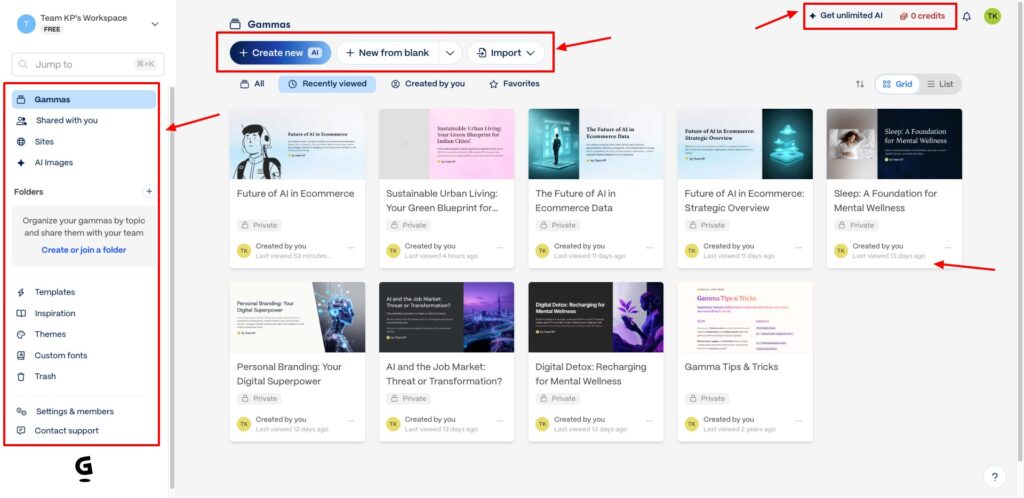
You can create a new PPT or import from other platforms using the buttons at the top. The left panel lets you access templates, themes, custom fonts, inspiration ideas, and more. From the top right corner, you can check your remaining AI credits and account settings.
Overall, the UI looks friendly and easy to navigate. If you have already been using AI tools, you won’t go through any learning curve. But if you’re used to PowerPoint presentations or Google Slides, you may need some time to get used to it.
Key Features of Gamma App
1) Multiple PPT Generation Methods
Gamma App features multiple ways to generate a presentation. You can start by:
- Pasting your text content in the editor.
- Importing content from existing URLs, documents, or web pages.
- Using AI to create your PPT.
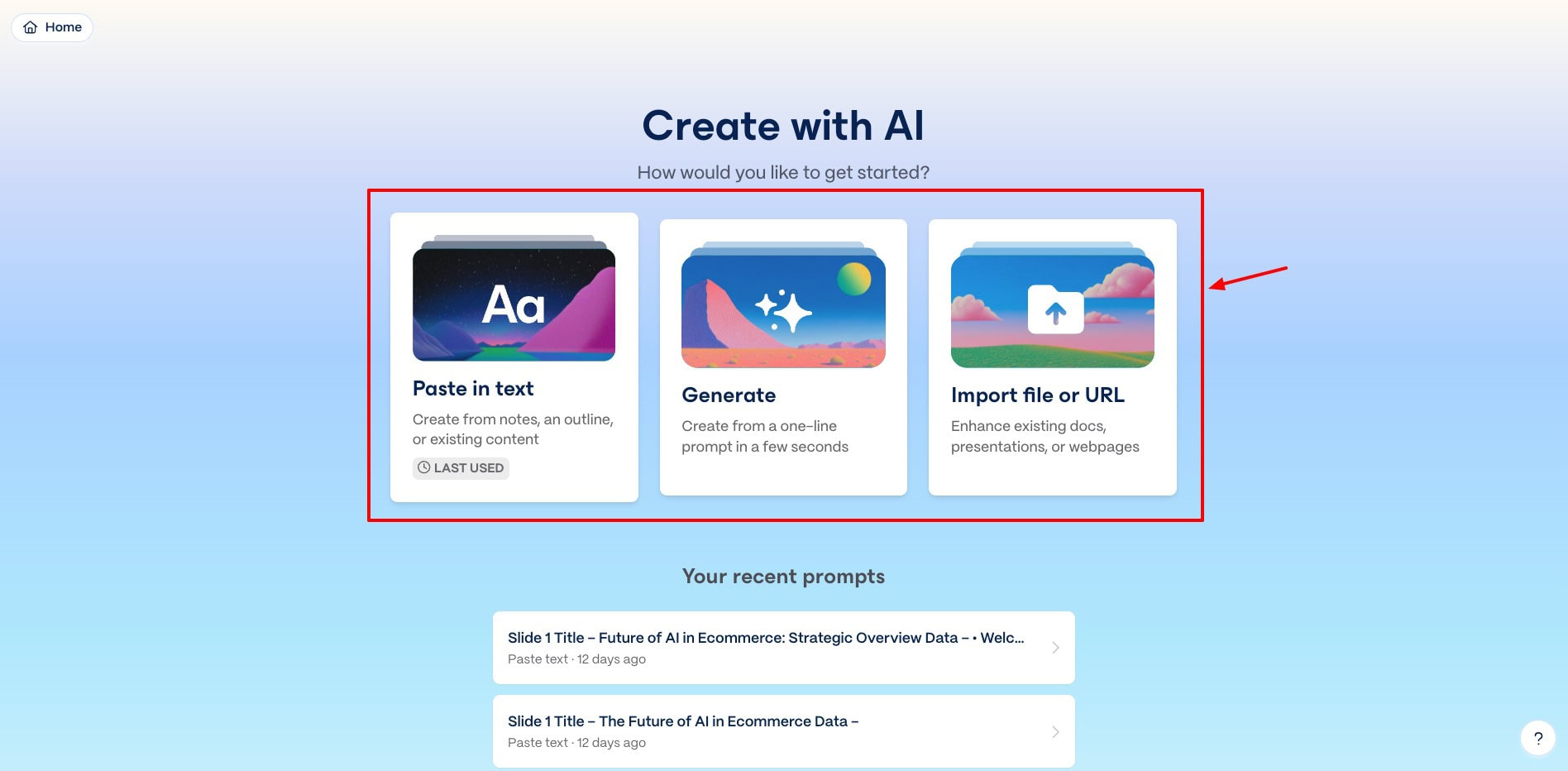
If you’re planning to go with the manual method, you can use AI content generation tools like ChatGPT or Gemini to generate the slide content for you.
2) AI Presentation Generation
Gamma lets you generate a complete presentation using AI technology within seconds. You start by deciding the number of cards (slides) you want in your PPT. The free plan lets you create up to 10 cards. Whereas, with paid plans, you can create up to 50 cards.
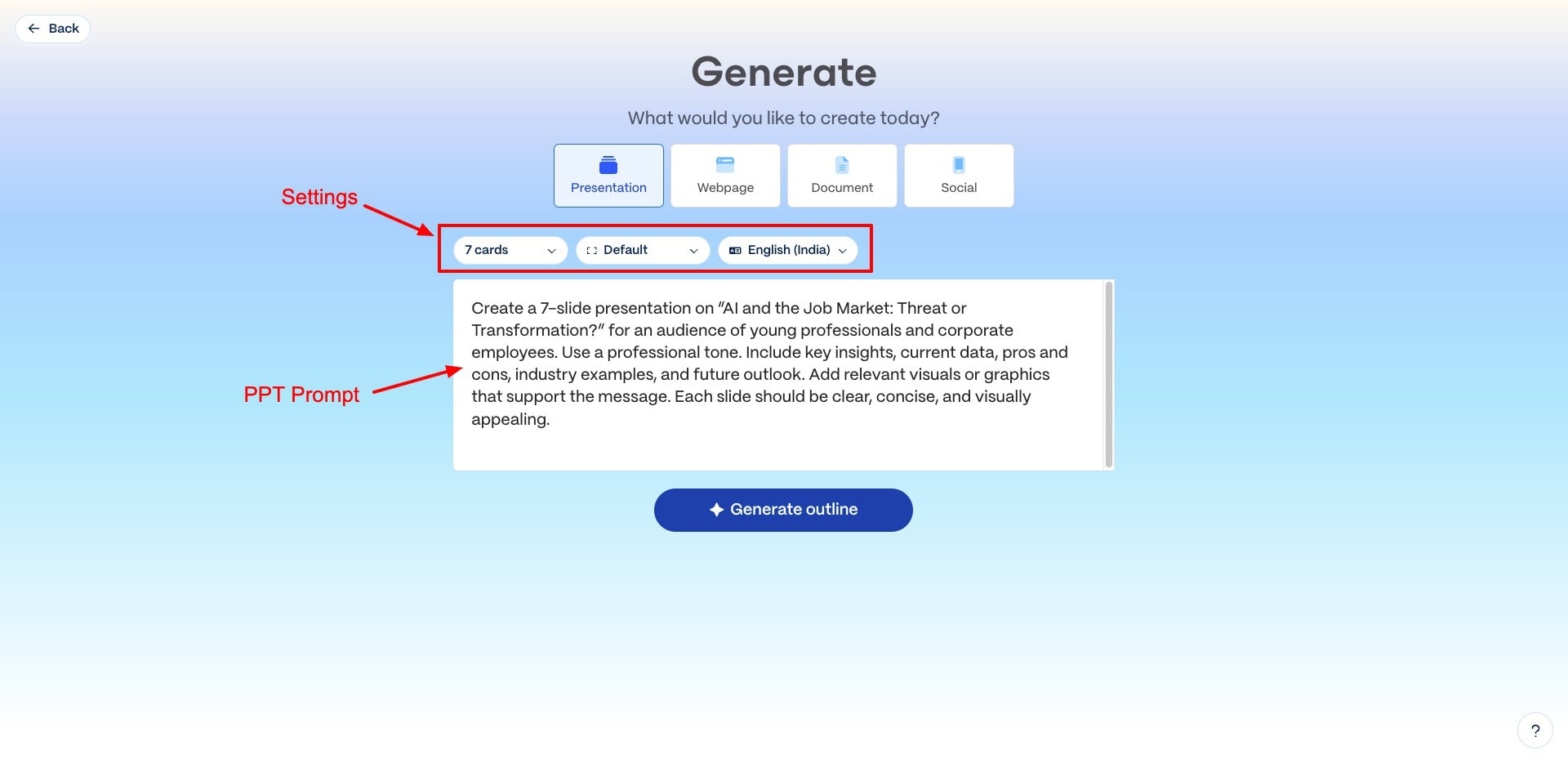
Next, you can choose the page style (default, traditional, or tall) and language. It features 65+ languages to choose from. Finally, you can insert a prompt to generate your PPT. Make sure to include information like topic, number of slides, purpose, target audience, style, and tone of voice in your prompt.
Here’s a sample prompt you can follow:
I want to create a presentation with [enter number of slides] slides on the topic [enter your topic]. It should be tailored towards [enter target audience] with a [enter style/tone] tone. Give me a short and concise prompt to generate a professional presentation with relevant content and images.
Once you provide your prompt, it lets you pick a theme, the amount of text on each card, and an image source. Finally, it generates a visually appealing presentation within seconds. Check out this presentation I created on the topic ‘AI and the Job Market’.
Overall, the AI presentation generation is super impressive. However, I wish they had a larger library of themes. Currently, their theme collection is pretty basic.
3) Gamma Agent
In September 2025, Gamma launched a major upgrade called ‘Gamma 3.0’, which introduced the Gamma Agent. This is an intelligent AI agent that’s designed to edit with you. You can chat with it and request it to review your deck, make design changes, restyle a slide, and more.
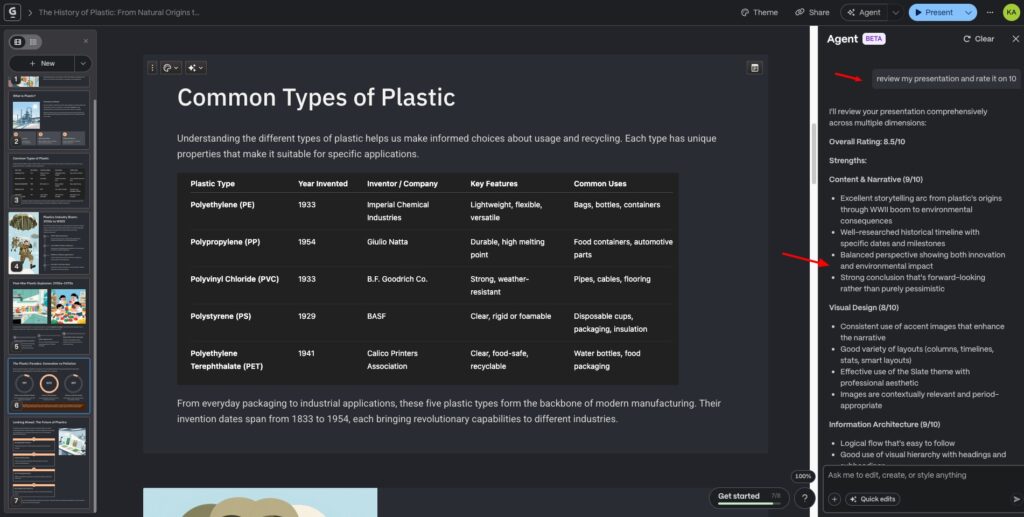
Interestingly, it also works with external content. So you can include any text content, tables, and other data in Gamma Agent, and request it to visualize it in the style of your presentation. It is also connected to the web, so you can make real-time searches to include in your slides.
Overall, the Gamma Agent works well. It can easily restyle and review your slide decks. However, when I uploaded an image of a table, it couldn’t extract the data and style it as per the PPT. It simply pasted the table’s image in the slide, which was quite disappointing.
4) Customization Options
Gamma offers a range of customization options for your PPT. From the right toolbar, you can check dozens of card templates to design a new slide. The Smart layouts section offers various layouts, like bullets, icons, timeline, arrows, funnel, pyramid, steps, and more.
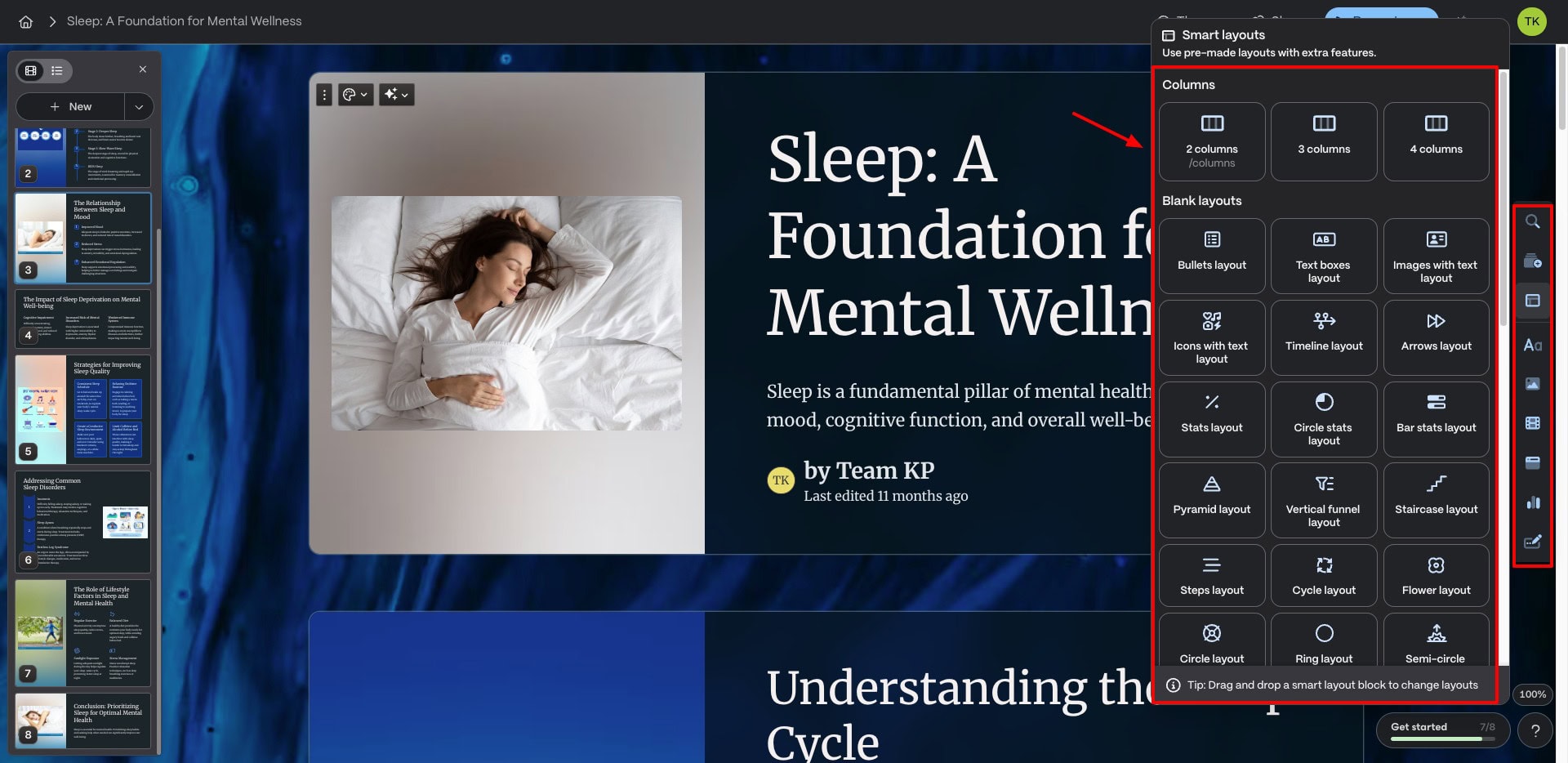
You also get basic blocks like tables, lists, boxes, buttons, code blocks, a table of contents, etc. You can also insert images, videos, interactive elements, media, embed apps and webpages, charts, forms, and buttons into your PPT.
Gamma features a variety of charts, like a pie chart, donut chart, line chart, bar chart, etc. Overall, you get a whole range of customization features to enhance your presentation.
5) AI Text Editing Options
Gamma allows you to easily edit the generated text content with AI. Simply select the text you wish to edit and click on the ‘Edit with AI’ button on the toolbar. Under the Rephrase section, you’ll find options to expand your text, condense it, or make it more engaging.
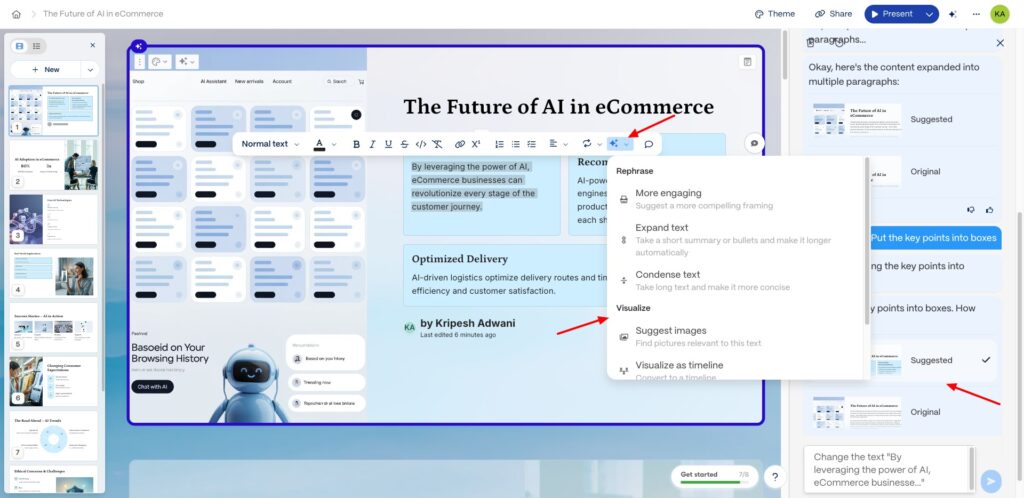
To go a step further, it can also help you fix spelling and grammar, translate your text, break it into bullet points, italicize keywords, put key points into boxes, etc. As you edit the text, a chat window opens up on the right to make it more convenient and friendly for you.
6) AI Images & Image Libraries
If you want to insert or replace images in your PPT, Gamma offers multiple options. It integrates with image sources like Unsplash, web images, AI images, illustrations, animated GIFs from Giphy, QR codes, icons, etc.
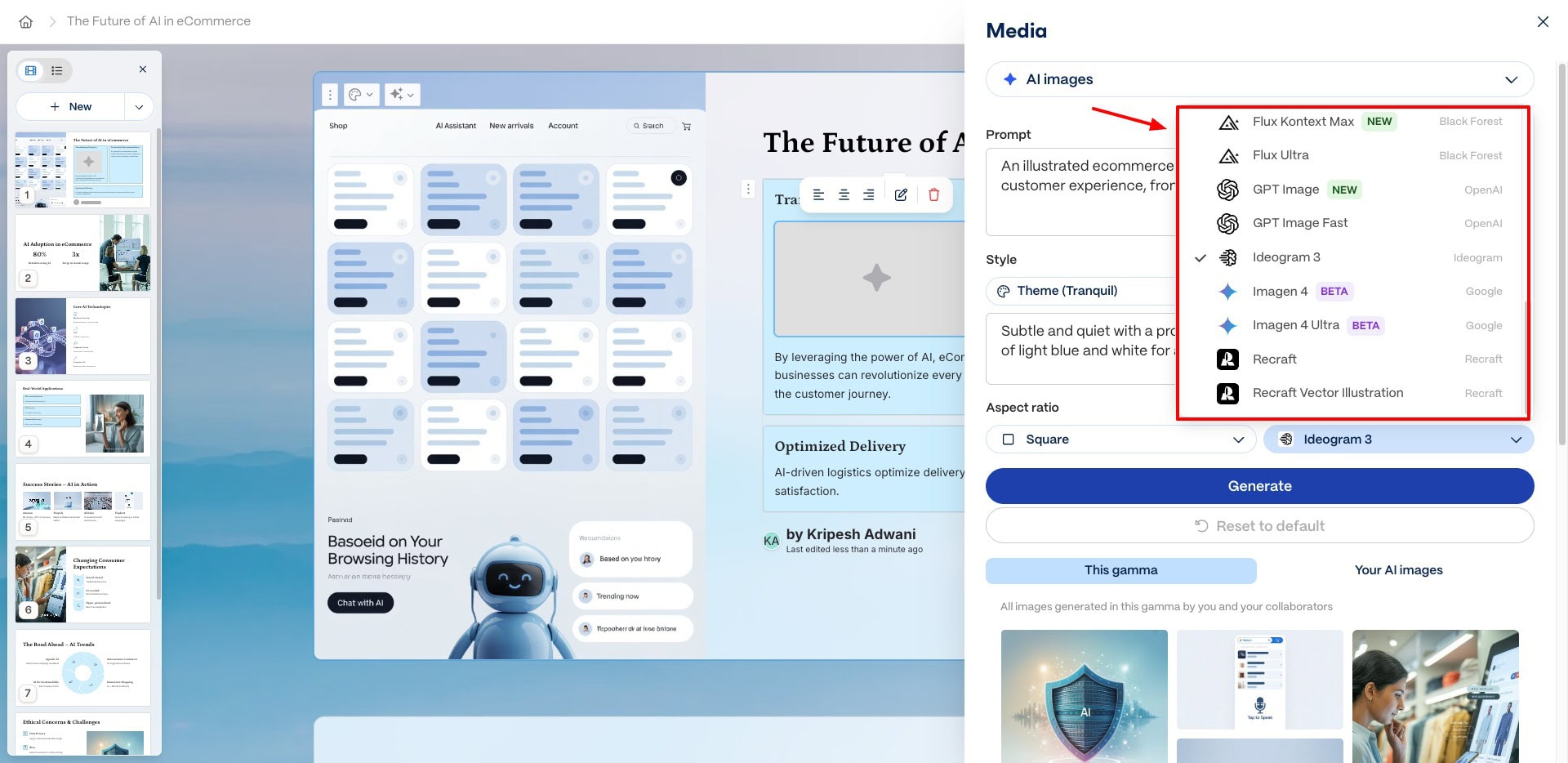
If you choose AI images, you also need to choose an image model. You’ll find popular AI image models like Flux, Imagen, Luma, Ideogram, Leonardo, Dall-E 3, Recraft, and more.
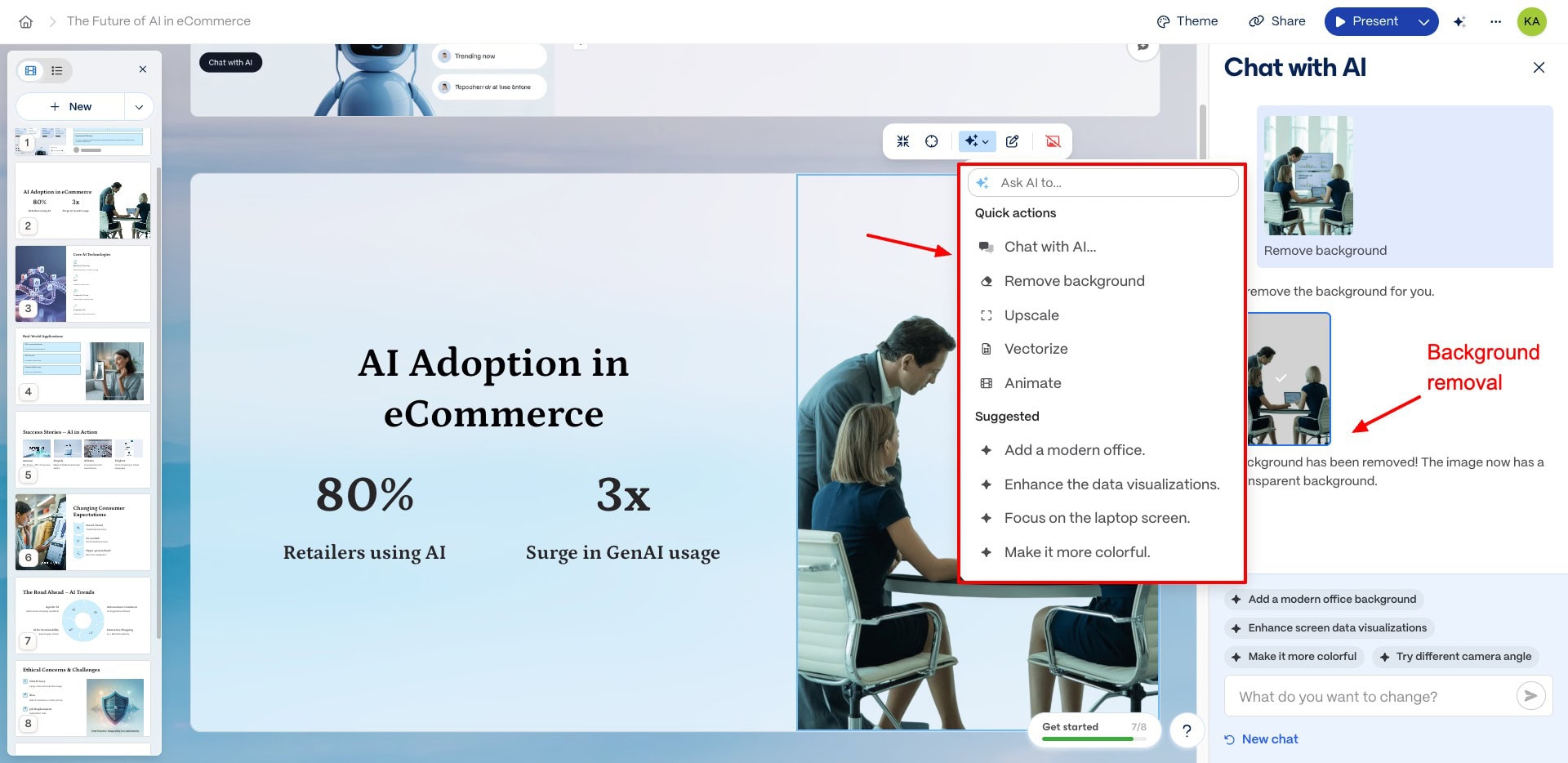
If your AI-generated images are not as per your expectations, Gamma lets you separately fine-tune visuals. Just click on the image, hit the AI button, and chat with the AI to make the edits.
You can also remove image background, vectorize, animate, add natural lighting, soften color palette, etc. I liked the prompt ideas it offers in the Suggested section.
7) App Integrations
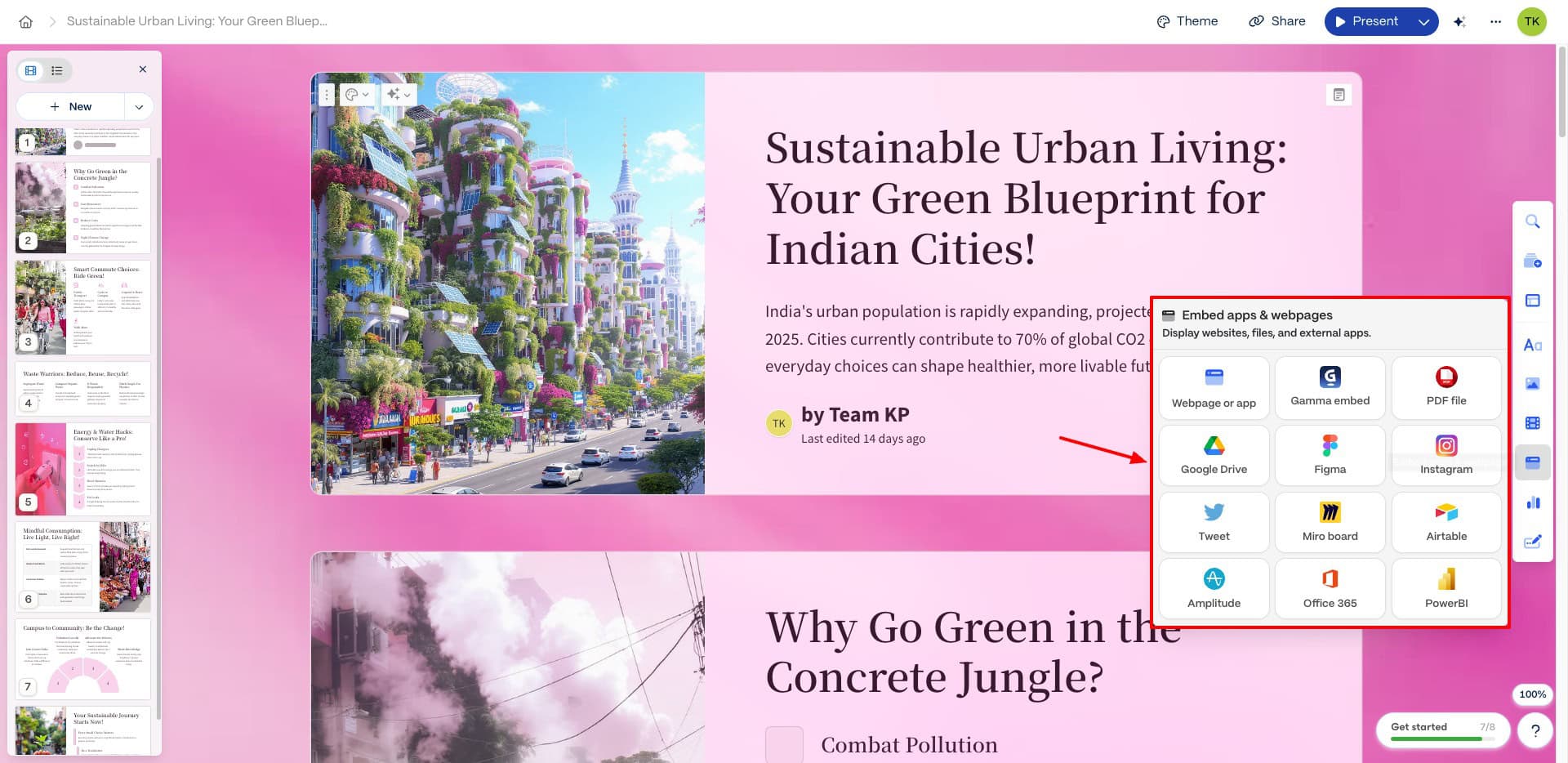
Talking about integrations, the Gamma app integrates with an array of popular applications. You can connect Google Drive, Instagram, Twitter (X), Figma, Airtable, Office 365, Miro Board, PowerBI, and Amplitude.
For images, Gamma integrates with Unsplash and Giphy. Whereas, for videos and media, it offers integration with Loom, YouTube, Vimeo, Wistia, TikTok, and Spotify. With these options, you can easily insert different media elements from the platforms of your choice.
8) Spotlight Mode
Spotlight is a unique and super impressive feature of Gamma. Once you are done creating your PPT, you can start presenting it.
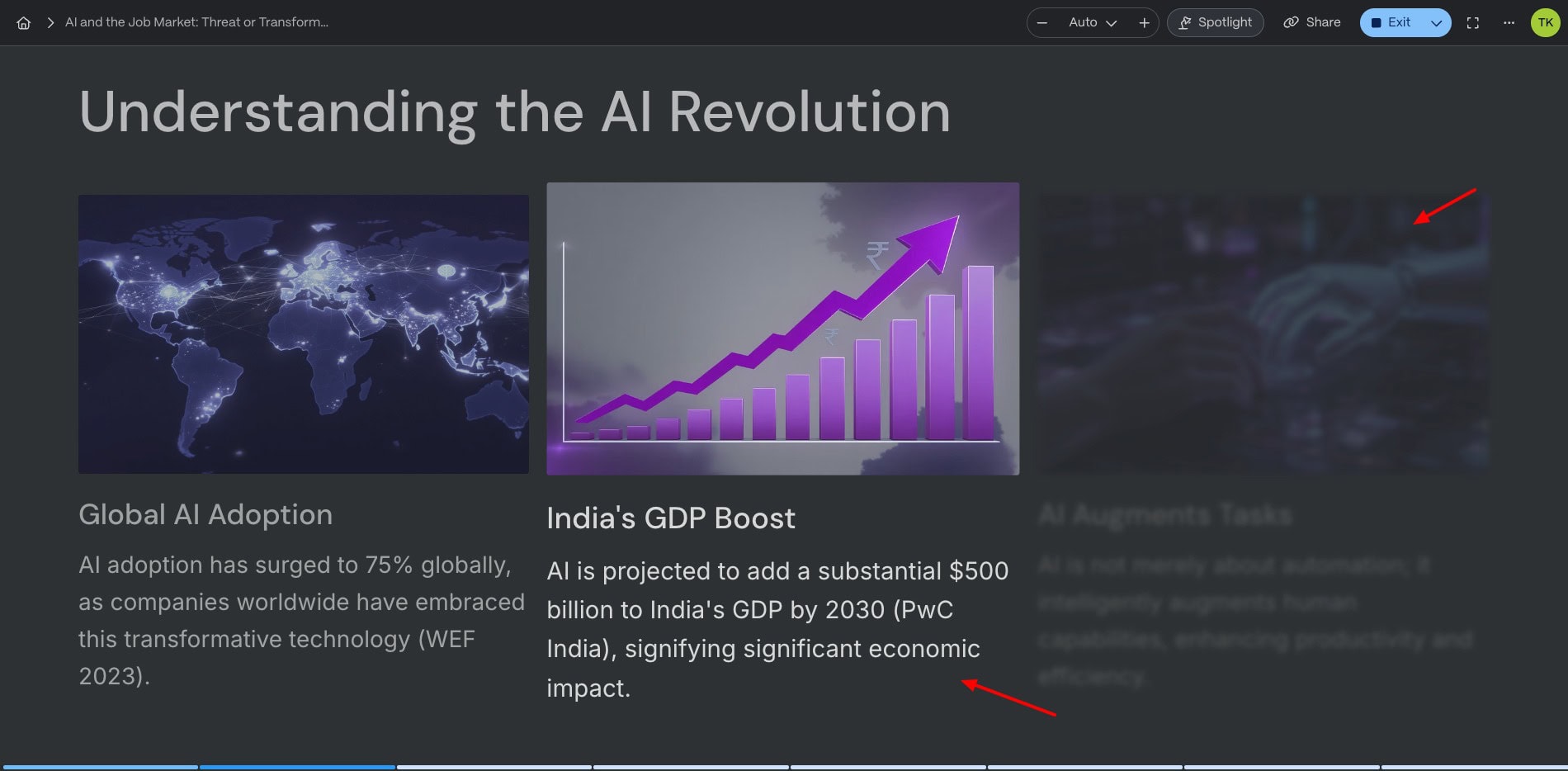
The Spotlight option blurs the elements on your PPT that haven’t been viewed yet. I really loved this cool feature. It keeps the viewers’ attention focused on the point that’s highlighted on the screen.
9) Multiple Export and Sharing Options
Once you are happy with your final PPT, you can share it with others by clicking on the Share button in the top right corner. Before sharing the link, you can set an access permission so the users can view, comment, or edit your shared file.
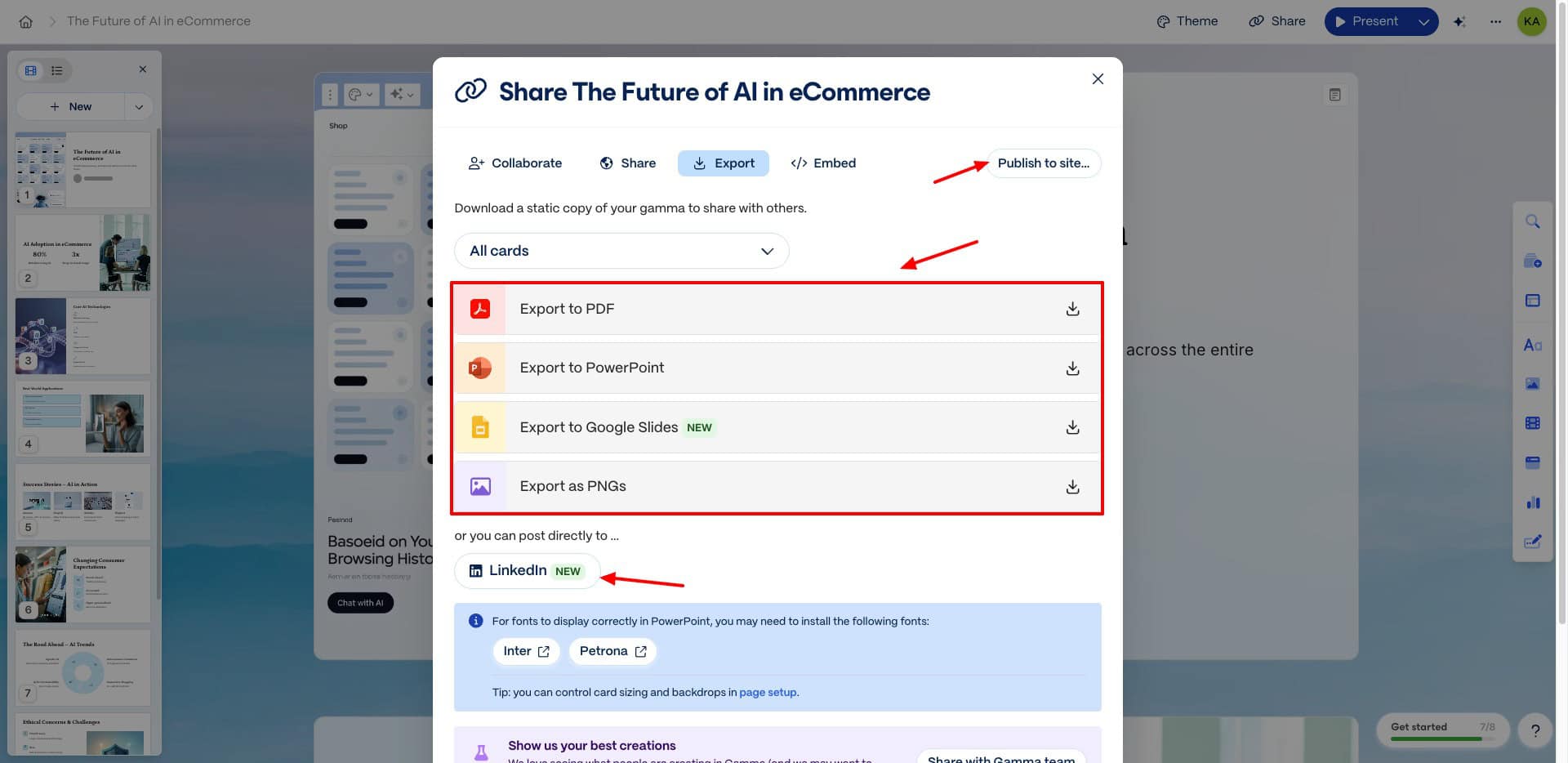
It also features a snippet of the embed code if you wish to embed the PPT on any of your websites. Additionally, if you want to export your PPT, you get the following formats: PDF, PPT, PNG, and Google Slides.
You can also convert your PPT into a free, publishable site by clicking on the ‘Publish to Site’ option. Recently, they have added a button to directly post your PPT to LinkedIn.
10) Templates Library
If you want to build your presentation through templates, Gamma also features a template library. It offers templates for projects and collaboration, sales and marketing, popular templates, and more.
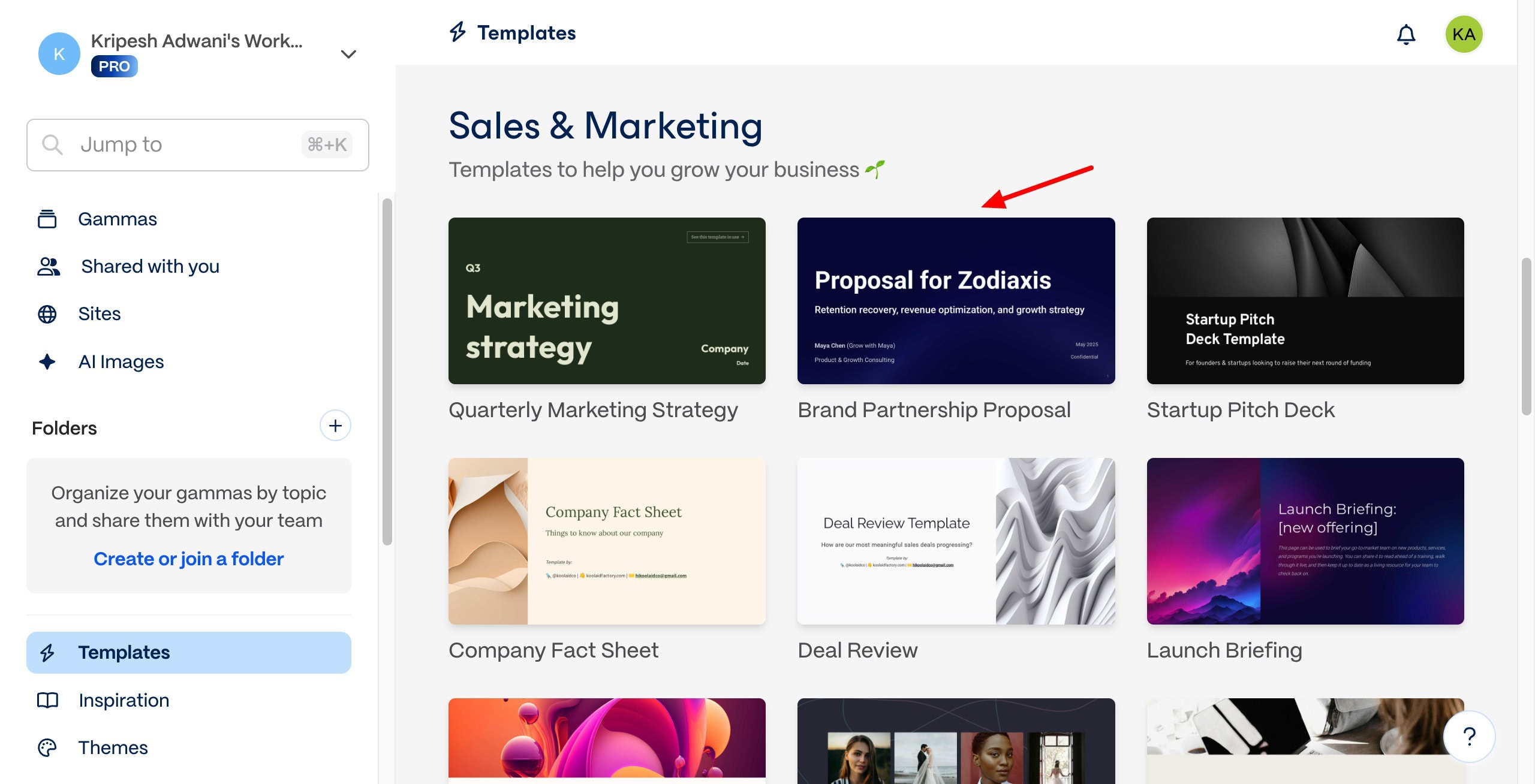
However, the templates are quite limited. I wish they would include more template options in the future.
11) Analytics and Insights
Under the Analytics section, you can check the page views and card engagement. Page Views shows the unique viewers, when they viewed your PPT, and the number of cards they viewed.
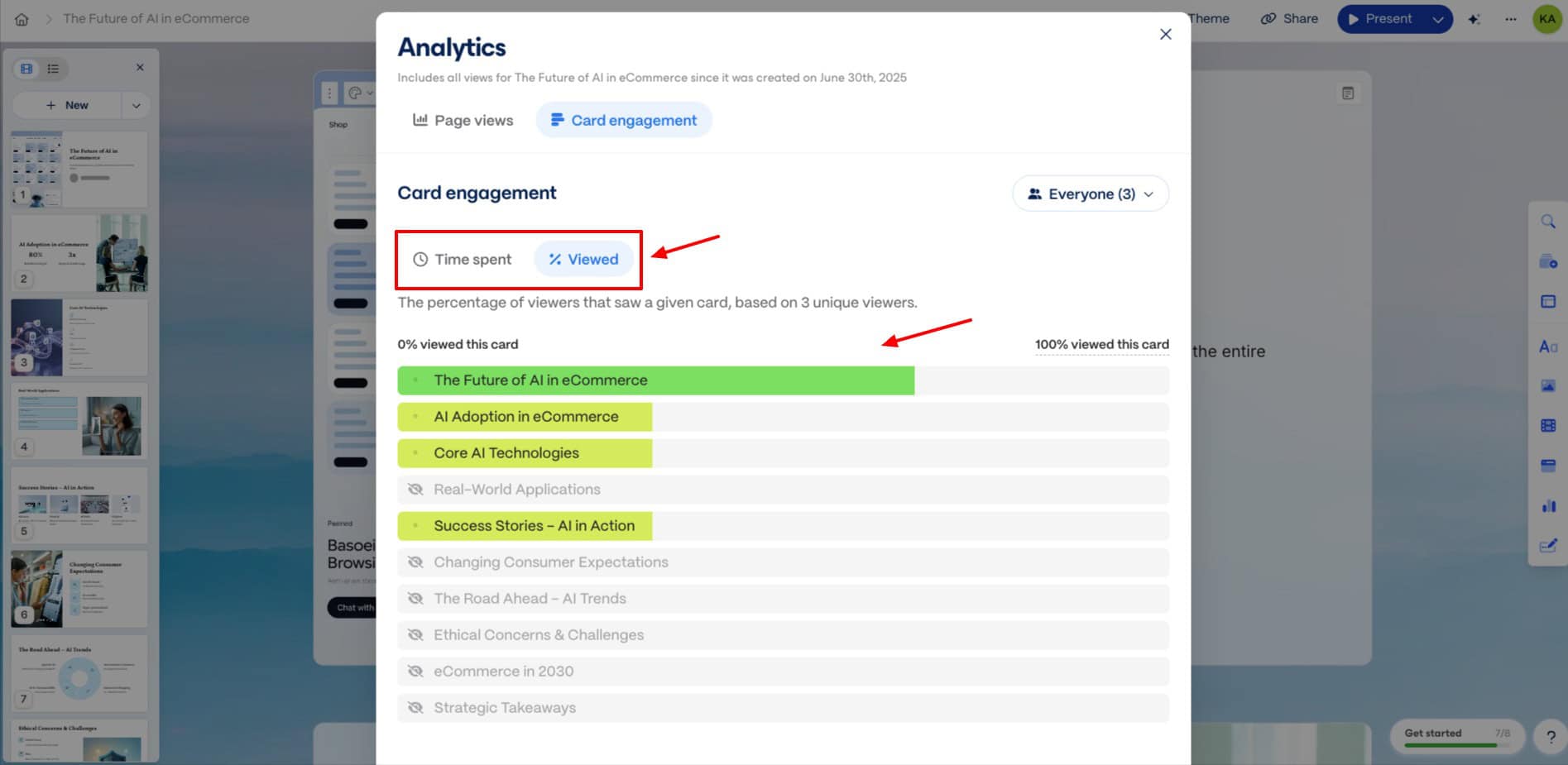
Whereas, in the card engagement section, you can check which cards were viewed the most, and the percentage of viewers that viewed a specific card.
12) Real-Time Collaboration
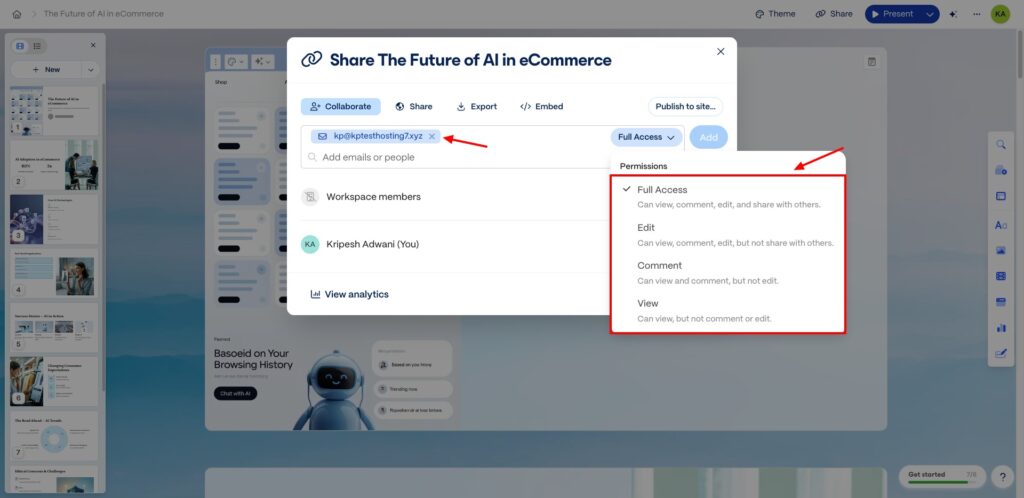
If you have a team of users, you can add their email to Gamma with edit, view, or comment permissions. If you want to provide them full access permission, you’ll have to add them as a workspace member.
13) Custom Themes and Fonts
To streamline your branding with your presentation, the Gamma app allows you to upload custom themes and fonts. It uses these branding elements when generating your presentation.
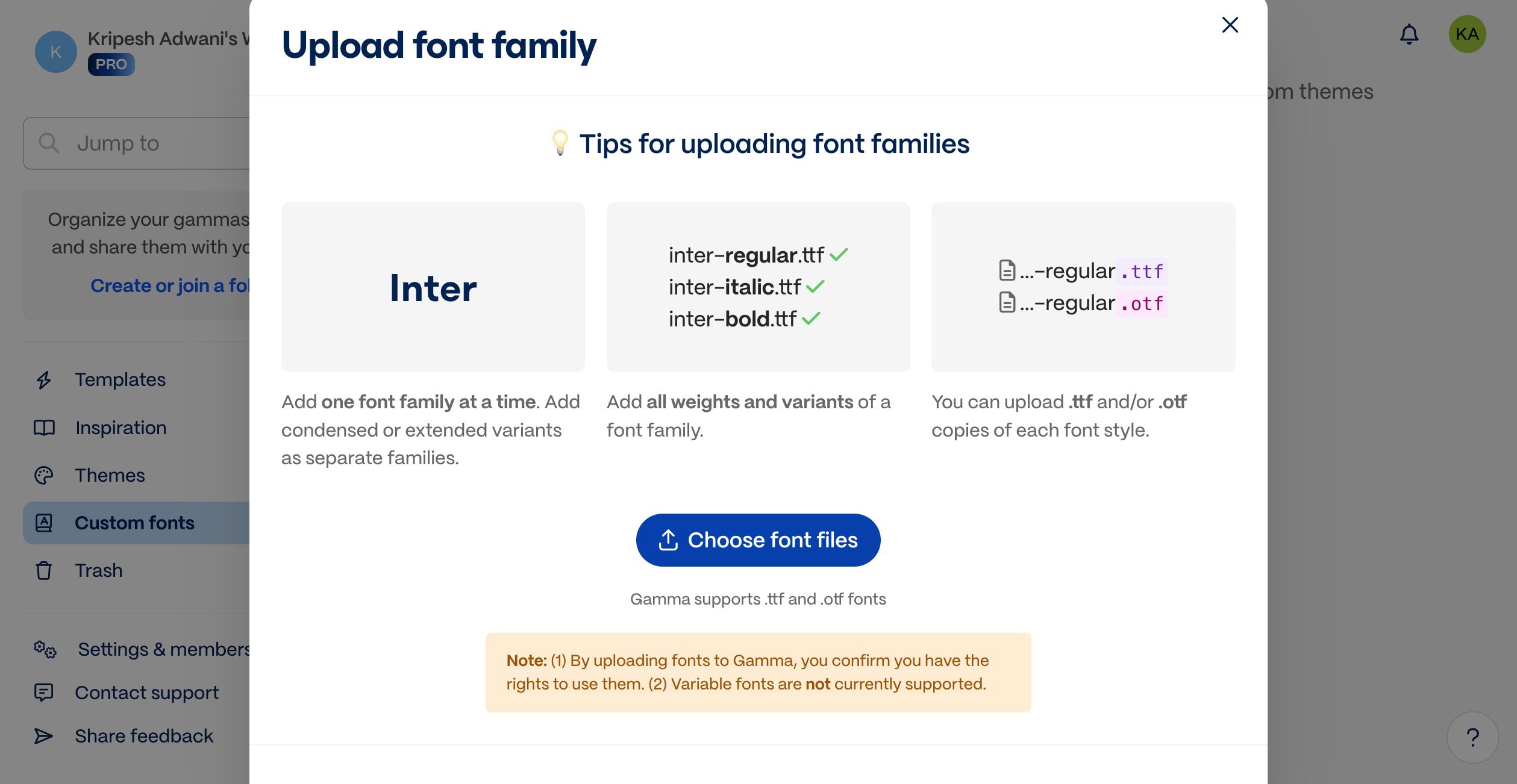
An important thing to note with custom fonts is to include all weights and variants of a font family. Also, use the following formats: TTF and OTF.
14) Create Websites, Documents, and Social Posts
Gamma isn’t just limited to PPT generation. You can do a lot more with it. For instance, you can use it to generate websites. It works similarly to PPT generation. You enter your prompt, choose the number of cards and language, and it creates an outline for your site.
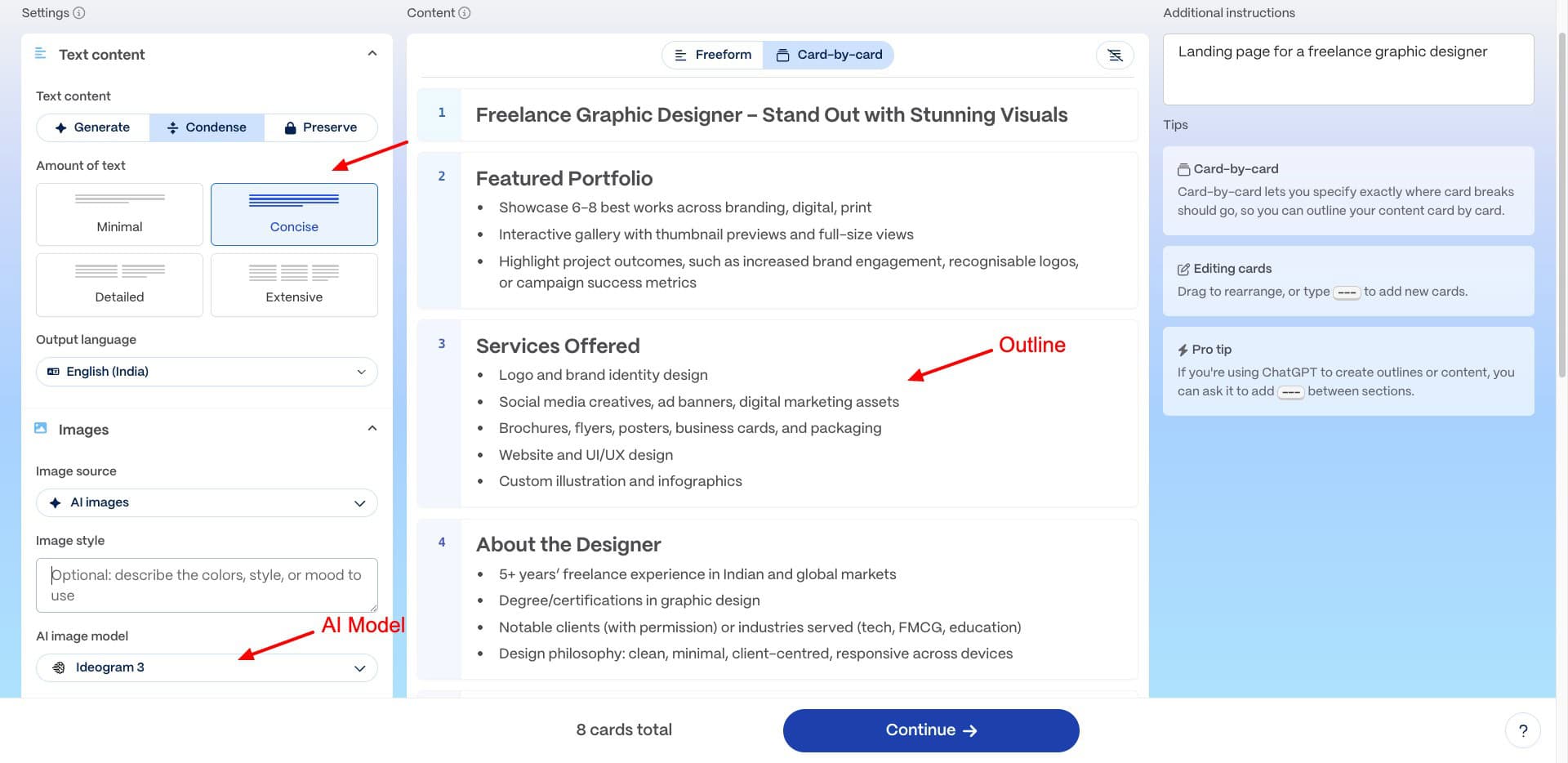
Then, you can choose a theme, content length, image source, style, and AI model. It will generate a beautiful website within seconds. By default, when you publish the site, it goes live as a subdomain under gamma.site. You can also add a custom domain if you want.
Check out this portfolio website I created for a freelance graphic designer. It’s professional, clean, and responsive!
Similarly, you can also generate social media posts for different platforms. It uses apt text content and visuals to match your post. For instance, check out this Instagram post I created to promote my eco-friendly water bottle.
15) Gamma API
As per the recent update (September 2025), the Gamma API is now officially live, bringing a ton of possibilities to life.
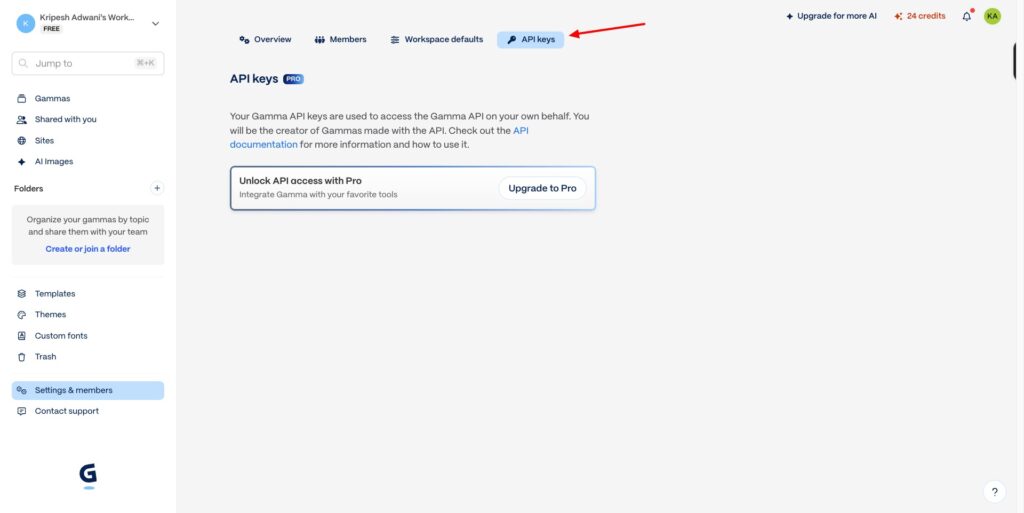
With the API, you can create versions of your slide decks in different languages, catering to different regions. You can create documents, social posts, and more from your PPTs in one go.
Gamma’s API lets you connect Zapier, Make, and other automation platforms. You can connect your favorite tools with it, like ChatGPT, Slack, Google Drive, Gmail, Docs, Hubspot, and more.
Gamma Pricing
Gamma offers two paid plans along with a free plan. The following table highlights the unique features and pricing of its subscription plans.
| Free Plan | Plus Plan | Pro Plan | Ultra Plan | |
| Pricing | ₹0 | ₹400/mo | ₹950/mo | ₹7,833.25/mo |
| AI Credits | 400 (one-time) | 1000 | 4000 | 20,000 |
| Cards | 10 | 20 | 60 | 75 |
| Image Generation | Basic | Advanced | Premium | Most Advanced Models |
| Gamma Branding | Yes | No | No | No |
| API Access | No | No | Yes | Yes |
| Advanced Sharing & Analytics | No | No | Yes | Yes |
Recently, Gamma has updated the pricing of its plans and also introduced an Ultra plan for professional users. If you have a team of users, you can also take a look at their Team and Business plans, where the pricing is decided by the number of seats.
Free Plan
The free plan of Gamma AI offers 400 one-time credits. You can use it to generate presentations with basic images and up to 10 cards. With these credits, you can create anywhere between 3 to 10 presentations.
Free Trial
Unfortunately, Gamma doesn’t offer any free trials. You can sign up for its free plan to explore and test out its features.
Payment Methods
Gamma accepts payments made through all popular credit and debit cards. It also lets you pay directly via any US or EU bank, and via UPI for Indian users.
Refund Policy
It has a 7-day refund policy. So, if you’re unsatisfied with your subscription, you can cancel your plan within 7 days of purchase to receive a complete refund.
However, you’ll need to contact their support to receive the refund. They won’t automatically refund you if you don’t contact their support team.
Gamma Customer Support
Gamma offers customer support via a knowledge base and chat support. Their knowledge base includes clean and annotated articles on topics like AI content and image generation, integrations, publishing, security, etc.
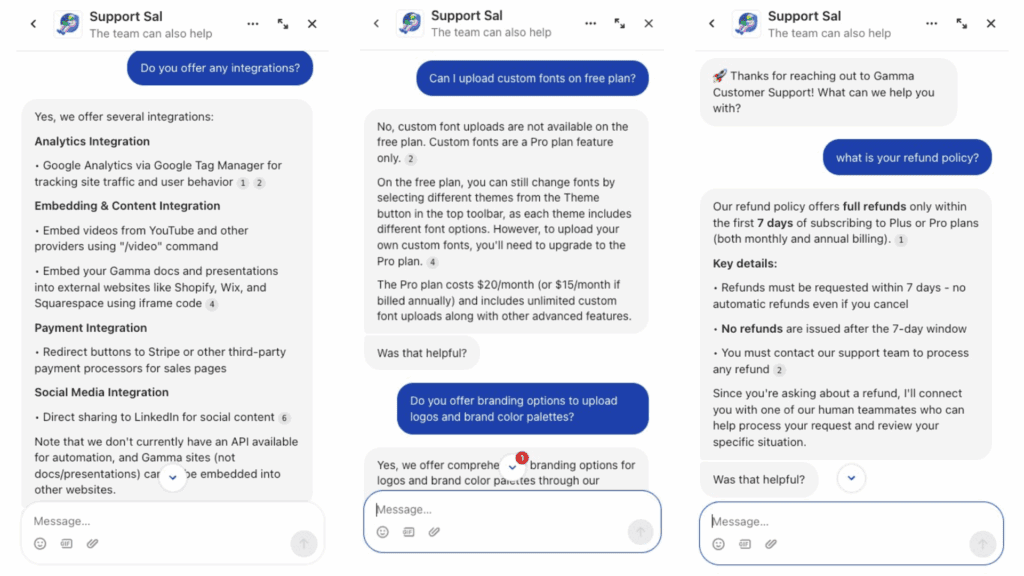
They have an AI agent called ‘Support Sal’ handling their support chat. It is quick and answers all your basic queries very well. However, if you want to connect to a human agent, you will need to upgrade to their paid subscriptions. They only offer an AI assistant on their free plan.
Gamma Pros
1) Quick Presentation Generation
With Gamma, your entire presentation is generated super swiftly within seconds. I was really impressed by its speed and accuracy.
2) Easy to Use
If you’ve already used AI-powered tools like Canva, you’ll observe little to no learning curve on Gamma. However, professionals switching from MS PowerPoint or Google Slides may experience some difficulties at first.
3) Modern UI
The user interface of Gamma is pretty modern, intuitive, and friendly. It supports drag and drop uploads and a WYSIWYG dashboard for easy and convenient editing.
4) Gamma Agent
Gamma recently introduced the Gamma Agent to help with editing your PPTs. It can review decks, restyle slides, and visualize external content from its chat UI. It even pulls real-time web data and does a solid job of polishing your presentations.
5) Gamma API
With Gamma’s API, you can repurpose slide decks into multiple languages, documents, and social posts. It also connects with Zapier, Make, and tools like ChatGPT, Slack, Google Drive, Gmail, and HubSpot for seamless automation.
6) Good Customization Options
With Gamma, you get a range of customization options for your PPT. It lets you edit the images and text with AI, add elements, cards, custom fonts, themes, and more.
7) Multiple Export Formats
You can export your presentation in multiple formats, like PDF, PPT, PNG, and Google Slides. The exported document works well in all formats.
8) Impressive AI Images
The AI images generated by Gamma are exceptionally good. This is because it supports powerful AI models like Imagen, Luma, Dall-E 3, and more to generate images.
9) Unique Spotlight Feature
The Spotlight feature of Gamma is my absolute favorite. It completely blurs the parts of the presentation that have not been viewed yet. The parts that have been viewed appear in a dull color.
10) Real-Time Collaboration
If you have a team of members, you can add them to your organization and collaborate with them in real time. However, it is only supported on the paid plans, and all collaborators must also have a paid subscription.
11) UPI Payments
Now, Gamma also supports payments through UPI for Indian customers. This is really convenient for Indian audiences.
Gamma Cons
1) Limited Themes and Templates
Right now, the theme and template libraries of Gamma are pretty limited and basic. I wish the themes and templates were more attractive, unique, and eye-catching.
2) Limited Free Plan
The free plan of Gamma offers one-time credits. They do not renew every month. So, it’s more like a free trial, instead of a forever-free plan.
3) Output Accuracy May Vary
Simply providing a prompt may not always generate accurate results. You will need to tweak the outline or paste your own content to receive more streamlined results.
4) No Animation Options
By default, the animation is on for all slides in your presentation. However, there are no animation styles to choose from right now.
5) Poor Support
According to multiple users, the customer support of Gamma is very poor. Their team doesn’t help or respond well when paid subscribers encounter difficulties.
6) No Website Embeds
As of now, websites created with Gamma cannot be embedded into other websites. Let’s see when they integrate this option.
Who Should Use the Gamma App?
Gamma is a super handy and reliable tool to create full-fledged presentations with ease. It doesn’t require any technical skills to get started and even has a feature-rich free plan.
This makes it ideal for students, educators, small businesses, and professionals. Overall, it is perfect for anyone who is looking for an easy and convenient way to create impactful presentations.
Why Should You Trust Me?
I have been working full-time in the digital industry since 2015. In the last 10 years, I have used, tested, and reviewed hundreds of digital tools like web hosting, cloud storage, password managers, VPNs, and more.
In the last few years, I have also ventured into testing AI tools and reviewed all popular categories, like AI image generators, AI voice generators, AI video generators, AI logo generators, AI website builders, AI research tools, and more.
Testing dozens of tools for my article on Best AI Presentation Generators helped me get a deeper insight into their pros, cons, and key features. This extensive experience and experience with AI tools give me the authority to recommend the right tools for your needs.
Conclusion
Gamma looks like a fast and modern tool that simplifies presentation creation. With features like real-time collaboration, Gamma Agent, quality AI-generated images, Spotlight view, and multiple export formats, it’s a great option for users looking to save time without compromising on design.
However, with limited templates, a lack of animations, poor support, and a restricted free plan, Gamma still has room to grow. While it’s not a complete replacement for tools like PowerPoint just yet, it’s worth trying if you want quick AI PPTs and don’t mind refining the output a bit.
Anyway, I hope this article helped you understand if Gamma is the right choice for you. Have you tried any other PPT apps? If not, check out these Best AI Presentation Makers. This is Kripesh signing off. Cheers, and keep learning!
FAQs
Is Gamma free for presentation?
Yes, it offers 400 one-time free credits, using which you can create up to 10 presentations.
Can I download a PPT from Gamma?
Yes, you can download your PPT in the following formats: PDF, PPT, PNG, and Google Slides.
What are the disadvantages of the Gamma app?
Major drawbacks of Gamma include a limited free plan, limited themes and templates, and a lack of animation options.
How much does the Gamma app cost?
The paid plans of Gamma start from an affordable price of ₹400/month, where you get 20 cards, advanced image generation, and 50k AI input tokens.
Is Gamma AI any good?
Yes, Gamma is one of the best AI presentation makers right now. It is a super convenient and time-saving option for generating presentations, web pages, and social media posts.
It comes with powerful AI models and lots of customization options to help you create a great PPT.

Gamma App Pros (+)
- Easy to Use
- Modern UI
- Gamma Agent
- Gamma API
- Good Customization Options
- Impressive AI Images
- Unique Spotlight Feature
- Real-Time Collaboration
Gamma App Cons (-)
- Limited Themes and Templates
- No Animation Options
- Poor Support