Looking for the best places to visit in Malaysia? Curious about the most reputable stocks to invest in? Or simply want the latest scoop on a recent event? AI research tools can help you find answers faster than ever!
Research covers everything today, from travel and finance to trending news. Whether you’re a content creator, blogger, student, or just a curious mind, the right AI research tools can save you hours of effort and make your search smarter.
In this article, I’ll walk you through the 8 Best AI Tools For Research in 2026 that will make your research easy, quick, and effortless. We’ll also cover the key benefits of using AI for research and how to choose the best tool for your needs.
Let’s dive in and explore!
- What are AI Tools for Research?
- How We Selected the AI Tools on This List
- 8 Best AI Tools for Research (2026)
- 1) ChatGPT – Best for All-Round Research
- 2) Perplexity AI – Best for Product Comparisons & Analysis
- 3) Copilot – Best for Planning & Analysis
- 4) Grok – Best for Planning, Analysis, and Comparisons
- 5) Gemini – Best for Planning & Budgeting
- 6) Claude – Best for Planning and Comparisons
- 7) DeepSeek – Best for Data Analysis & Advanced Reasoning
- Bonus AI Tool Recommendation: Manus AI
- Why Should You Trust Me?
- Conclusion
- FAQs
What are AI Tools for Research?
AI Tools for research are applications that assist in different parts of the research process using artificial intelligence. This includes gathering information, exploring new topics, analyzing data, summarizing content, generating actionable insights, and more.
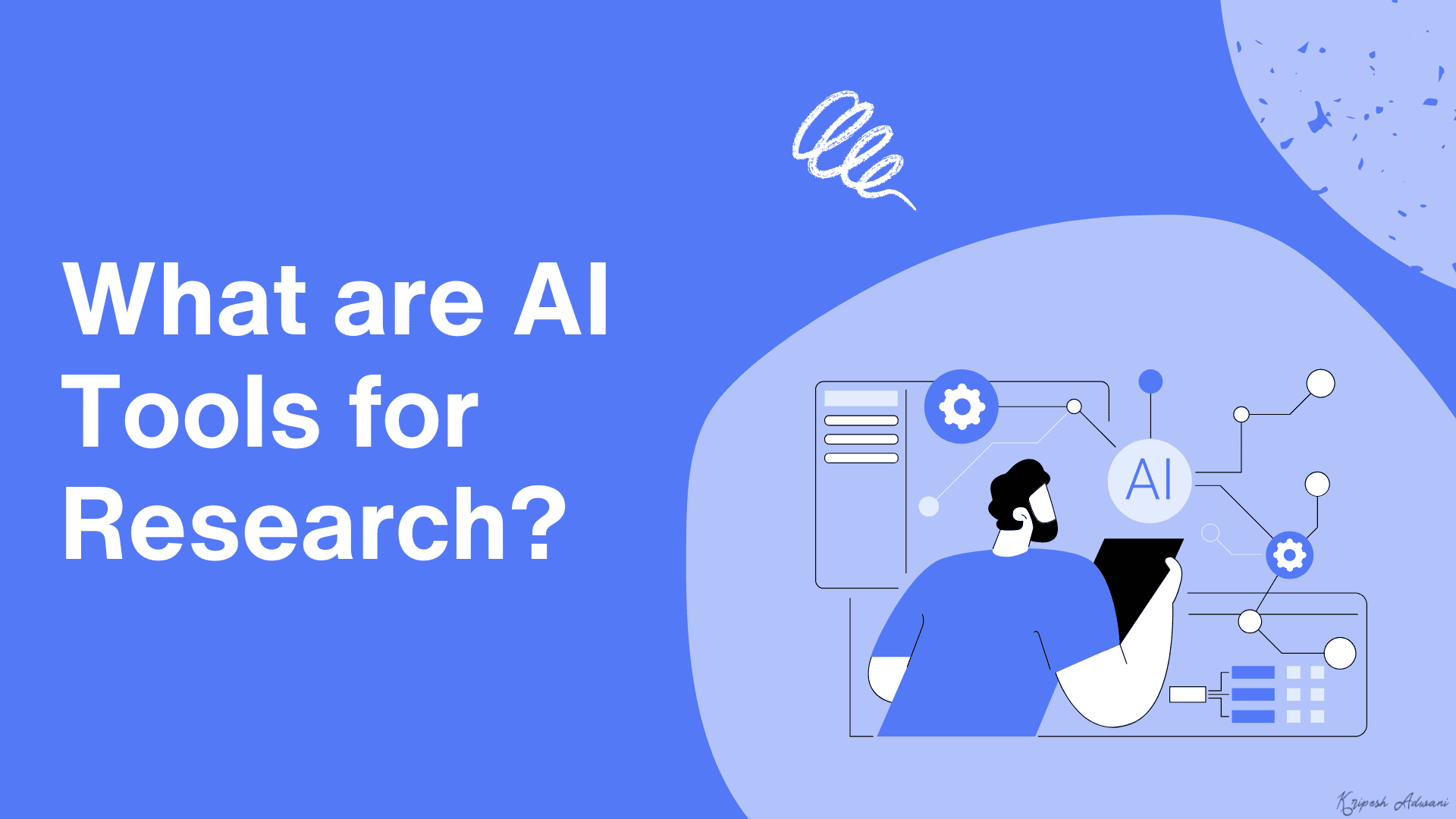
These tools help make your research process fast and efficient. Popular examples of AI-powered research tools include Gemini, Perplexity, ChatGPT, etc.
How We Selected the AI Tools on This List
First, we surfed the web to find all the popular AI research tools available. Then we created accounts on them and ran a few queries covering various categories through each of them. Here’s a list of the queries we supplied to each of the AI research tools.
1) SEO Analysis: Run a thorough SEO audit on Kripesh Adwani’s website (https://kripeshadwani.com/) and deliver a detailed optimization report with actionable recommendations.
2) Travel Itinerary: I need a 7-day Japan itinerary for April 15-23 from Seattle, with a $2500-5000 budget for my fiancée and me. We love historical sites, hidden gems, and Japanese culture (kendo, tea ceremonies, Zen meditation). We want to see Nara’s deer and explore cities on foot. I plan to propose during this trip and need a special location recommendation. Please provide a detailed itinerary and a simple HTML travel handbook with maps, attraction descriptions, essential Japanese phrases, and travel tips we can reference throughout our journey.
3) Data Analysis: Here’s last month’s sales data from my Amazon store. Could you analyze it thoroughly with visualizations and recommend specific, data-driven strategies to boost next month’s sales by 10%?
4) Product Recommendations: I need a detailed comparison of the top 5 wireless earbuds in 2026, specifically focusing on their sound quality, battery life (playtime and charging speed), and price range (under ₹10,000). Please include a breakdown of each earbud’s pros and cons, and recommend the best option for daily commuters who prefer noise cancellation and a comfortable fit.
5) Personal Finance: Can you suggest a detailed monthly budget plan for someone earning ₹50,000/month and living in a metropolitan city like Bangalore? The plan should include allocations for rent (₹15,000-₹20,000), groceries, transportation (public commute), savings, entertainment, and discretionary spending, with an emphasis on balancing lifestyle with long-term financial goals like emergency savings and retirement.
We compared the outputs and analyzed which ones performed better. We also checked the accuracy of output data, free plan limits, user interface, additional features, etc. Based on all these factors, we ranked the AI tools on our list.
8 Best AI Tools for Research (2026)
| Tool Name | Best For | Free Plan Limit |
| ChatGPT | All Kinds of Research | Unlimited chats, 5 Deep Research Credits |
| Perplexity | Product Comparisons, Analysis Reports | Unlimited queries, 3 Daily Pro Searches |
| Copilot | Planning, Analysis Reports | Unlimited chats |
| Grok | Planning, Analysis Reports, Product Comparisons | Unlimited chats, 5 DeepSearches/2 hours, and 10 regular Think searches/2 hours |
| Gemini | Planning and Budgeting | 10 req/min for 2.5 Flash (Experimental) 5 req/min for 2.5 Pro (Experimental) |
| Claude | Planning, Product Comparisons | Unlimited chats with Claude 3.5 Sonnet |
| DeepSeek | Data Analysis, Advanced Reasoning | Unlimited chats with DeepSeek V3 and R1 |
| Manus AI | All Kinds of Research | N.A. |
1) ChatGPT – Best for All-Round Research
ChatGPT is an AI chatbot developed by OpenAI in 2022. It is one of the most heavily used chatbots, with over 400 million weekly active users around the globe.
It can create content, solve complex problems, translate text, perform research, write code, and more. After recent updates, ChatGPT can now generate images, perform deep research, and think before responding.
To get started with ChatGPT, you simply need to enter your query and select a mode relevant to it. It features modes like Search, Reason, Create Image, and Deep Research. These can be enabled as per the query you supply.
Research Performance
1. SEO Analysis
ChatGPT generated an in-depth SEO audit report with the Deep Research mode enabled. It presented the report in an easy-to-read format, covering sections like Technical SEO, On-Page SEO, Off-Page SEO, UX, Content SEO, and a Summary table outlining the issues along with their severity and recommendations.
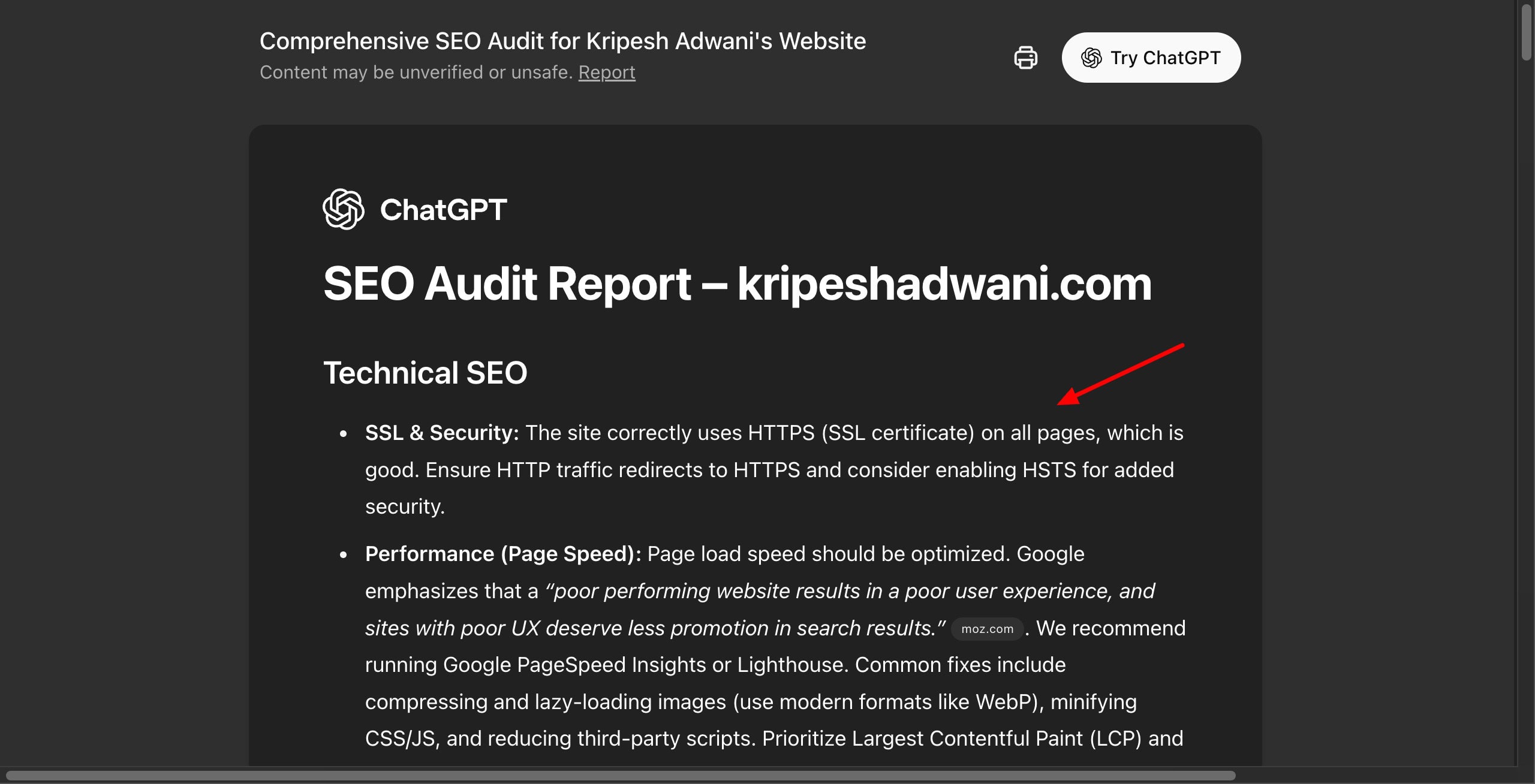
ChatGPT ensured the presence of SSL and commented on the mobile friendliness of website design, crawlability, structured data, targeted keywords, URL structure, internal links, content formatting, affiliate links, brand presence, content quality, and keyword strategy.
ChatGPT arranged the locations to cover each day according to the time of day (morning, afternoon, evening). It also recommended special proposal locations and added sections like budget breakdown, travel tips, and an HTML handbook.
It stood out by offering popular Japanese phrases and their meanings, affordable transport options, and etiquette to follow in Japan. The complete guide was easy to follow.
Using its Deep Research Mode, ChatGPT analyzed the uploaded spreadsheet and produced an insightful analysis. It splits the analysis into clear sections, like sales overview, key trends, top categories and products, promotions, and marketing.
Finally, it reveals 6 solid strategies to increase sales in the upcoming month by giving examples from the spreadsheet data. It also cites the list of sources referenced at the end of the report.
ChatGPT used the Search Mode to find the 5 best wireless earbuds for 2026. For each earbud, it mentioned the price, sound quality, battery life, noise cancellation, comfort, pros, and cons in bullet points. Finally, it revealed the best pick for daily commuters as requested in the query.
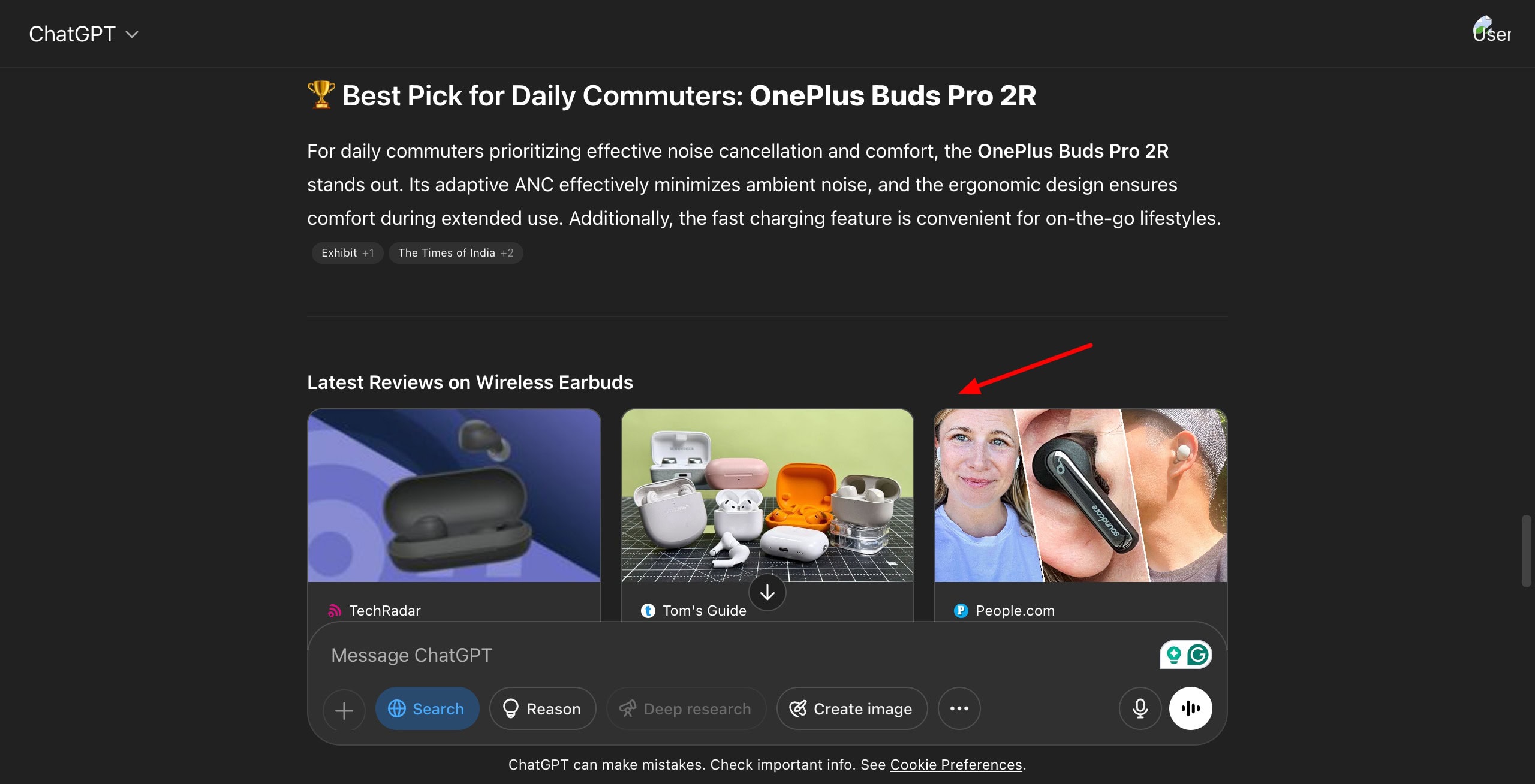
It stood out by also including source links wherever relevant, a summary table, and featured articles from reputed sites like Techradar and Guide for further research.
ChatGPT used the Search Mode for this query. It started with a table showcasing the breakdown of monthly income into different expense categories. Then it offered sections on budgeting tips for financial balance and long-term financial goals.
I liked that it also suggested Affordable Areas to live in Bangalore, along with the rent range for 1 BHK.
Pricing
The free plan of ChatGPT offers 5 monthly Deep Research credits, limited chats with GPT-4o and o4-Mini, and limited access to file uploads, advanced data analysis, and image generation. ChatGPT’s paid plans start at $20/month.
Conclusion
ChatGPT is an impressive AI research tool that offers excellent performance across all tasks. It delivered structured, insightful, and easy-to-understand outputs tailored to each query. It proved to be most powerful and reliable in handling data-driven reports and analysis.
2) Perplexity AI – Best for Product Comparisons & Analysis
Perplexity is an AI-powered search engine founded in 2022. It currently has over 15 million active users. You can use it to collect accurate data with citations, create content, create digestible summaries, analyze data, generate images, and more.
Research Performance
1. SEO Analysis
I ran this query using the Research Mode. It divided the report into multiple sections, like technical SEO assessment, on-page SEO analysis, content strategy evaluation, link profile analysis, etc. The content depth reflects that Perplexity extracted data from the web for this SEO audit.
Finally, it also features a detailed section on actionable recommendations for each category. I liked that it features ‘related queries’ below the report.
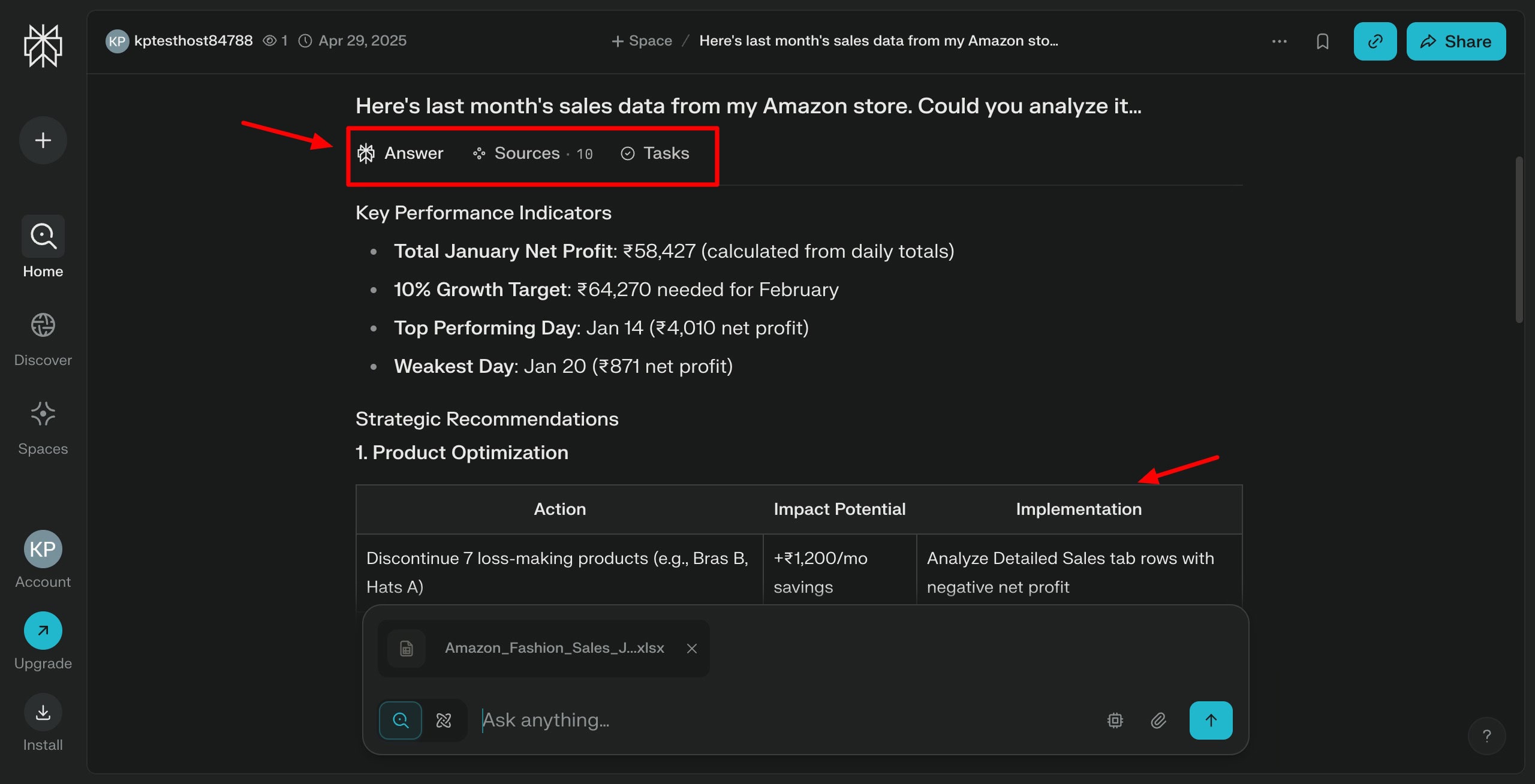
I used the Search Mode for this query. The data analysis report was pretty compact. It started by listing the KPIs, along with 4 strategic recommendations with tactics and action items. At the end, it offers an implementation timeline of 4 weeks, calculating how to increase sales by 10%.
This query was processed using the Search Mode. It generates a pretty basic itinerary with no AI insights or details. It clubbed the itinerary into 2 days each, offering activities and a proposal opportunity for each. The travel handbook was also super compact and offered limited tips.
Again, I used the Search Mode to run this query. It started by naming the 5 earbuds it selected, along with a comparison table. Then it gives the individual breakdown with pros and cons of each.
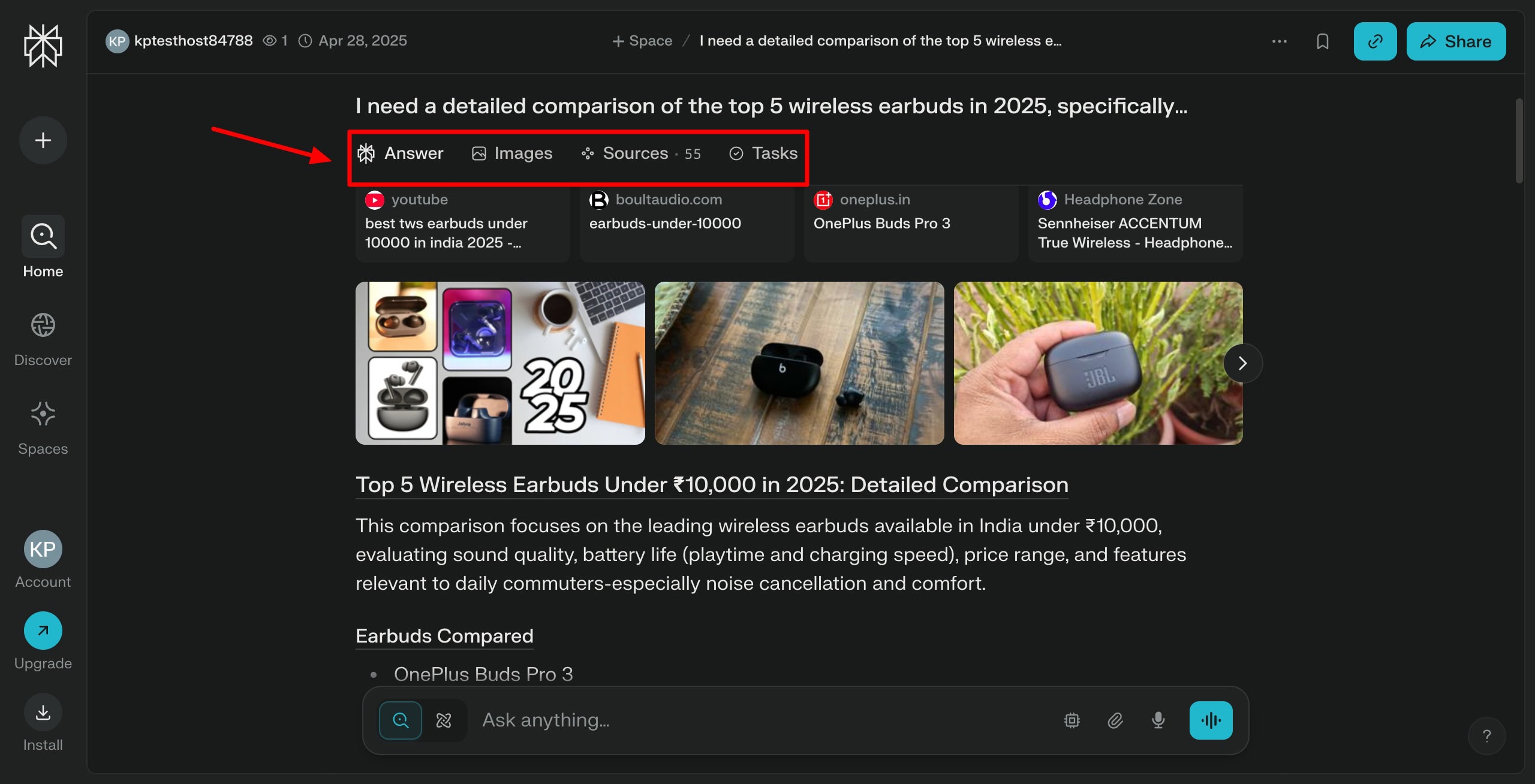
Under recommendations for daily commuters, it features the winner, runner-up, and budget pick, along with reasons for the choice. Finally, it also displays a pros and cons table. I liked that it presented information in an easy-to-digest format.
This query was processed by enabling the Search Mode. It starts with a table showing budget allocation as per the 50/30/20 rule. Then it further classifies the budget into needs, wants, and savings sections, along with tips under each.
Finally, it gives a sample monthly budget table and extra cost-saving strategies. Overall, Perplexity performed decently in the planning section.
Pricing
The free plan offers unlimited queries with 3 Pro searches per day. Its Pro plan is priced at $20/month.
Conclusion
Perplexity performs reasonably well across most research categories. Its outputs are neatly structured and often backed with web citations, especially in SEO and product research.
However, some research areas lacked depth and missed the insights offered by some other tools. Overall, it’s a dependable choice for quick, surface-level research with clean presentation.
3) Copilot – Best for Planning & Analysis
Copilot is a generative AI assistant developed by Microsoft in 2023. It currently has over 28 million active users. It can be used for answering questions, creating and summarizing content, and collaborating on projects with its Microsoft 365 integration.
Research Performance
For all the below queries, I used the ‘Think Deeper’ mode.
1. SEO Analysis
The SEO Audit report is clearly divided into sections like summary, on-page SEO, off-page SEO, Technical SEO, Social signals, internal linking, content strategy, etc. I like how each section is further divided into Observations and Recommendations.
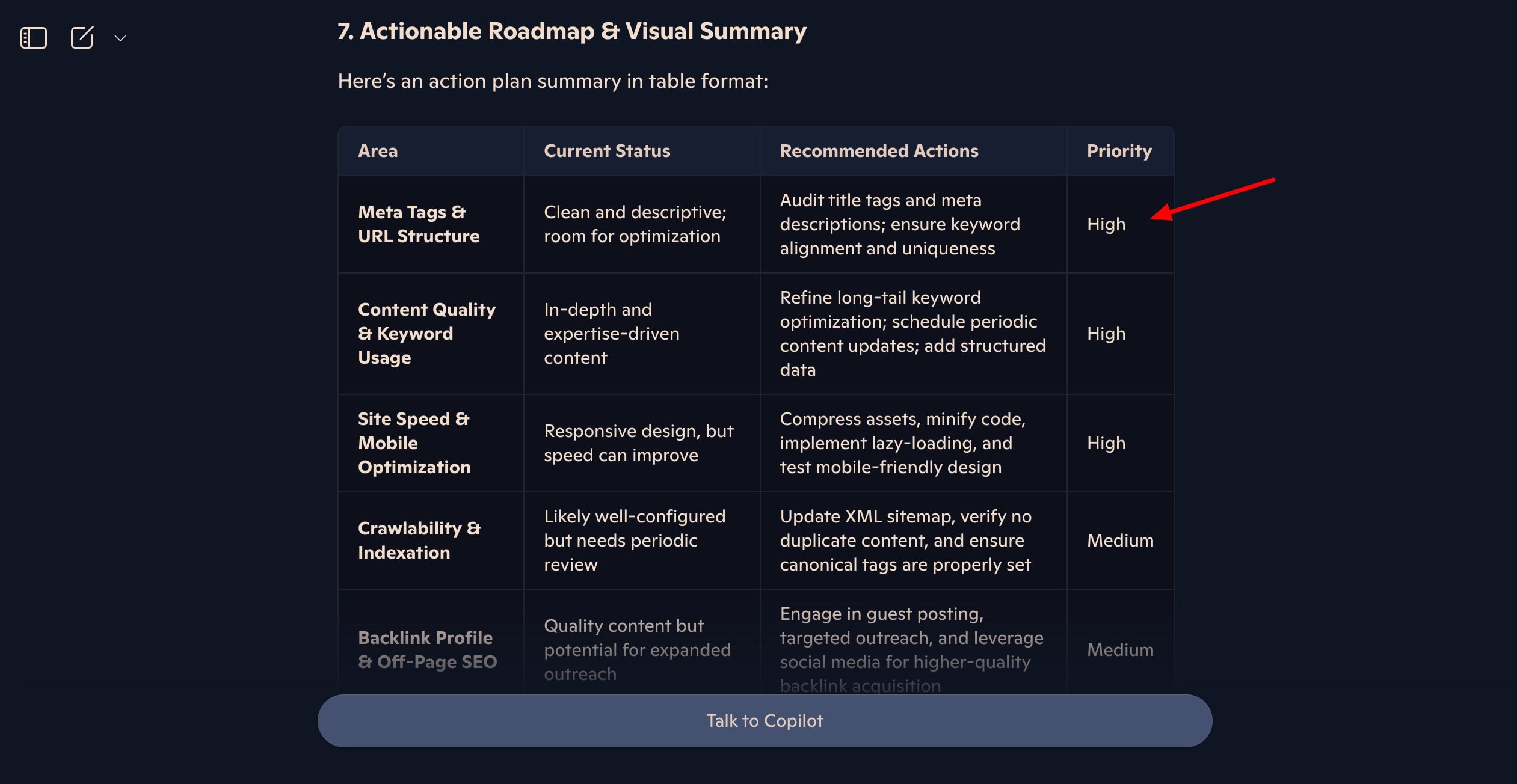
The actionable roadmap gives an easy-to-read table of the status and recommendations for SEO. Overall, the audit report is clean and well organized.
It generates a detailed itinerary with each venue classified by time of day, and the proposal venue suggestion is included. But it lacks details. For instance, it says “Farewell dinner in Kyoto”, but doesn’t suggest restaurants. The Budget notes and travel handbook were helpful.
3. Data Analysis
Unfortunately, Copilot couldn’t process the spreadsheet, commenting that it was “too large to process”. Thus, we were unable to test Copilot for this query.
The product comparison performed by Copilot was decent. It started by stating the factors of comparison and listing each earbud, discussing the sound quality, battery life, price range, pros, and cons. However, it doesn’t mention the pricing range for some products.
I liked that it created a detailed table of comparison and additional insights.
It starts by offering two different variants with a lower and higher rent commitment, unlike others. It also includes sections for additional tips and considerations, and next steps for broader financial insights.
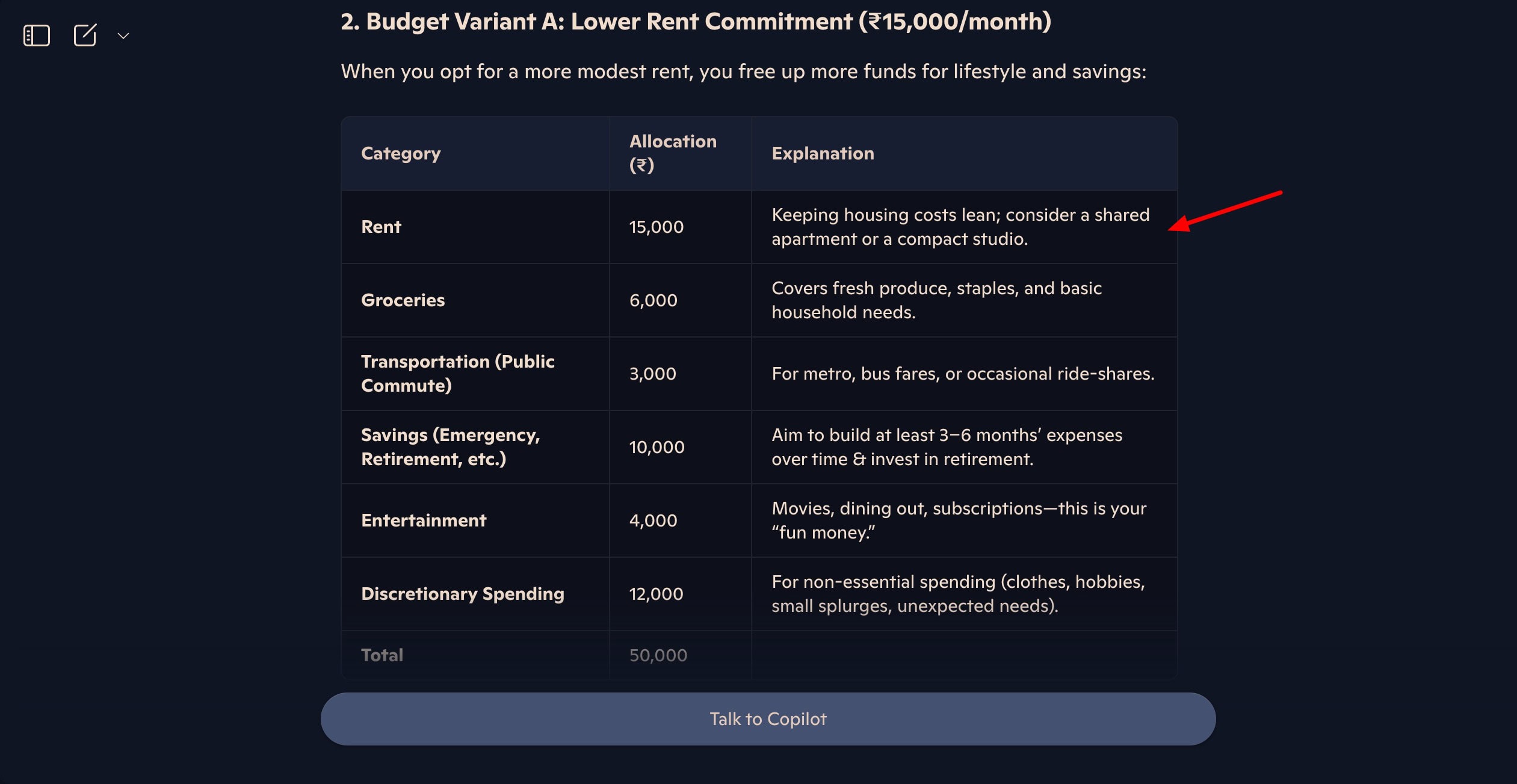
I liked that it used the 50/30/20 rule as a guideline to plan the monthly budget. However, I wish the tables also included the percentage allocation along with the amounts.
Pricing
The free plan offers unlimited chats. The Microsoft Copilot Pro plan is priced at $20/user/month.
Conclusion
Copilot performs reasonably well across most research categories, offering clear structure and useful insights. However, it lacks depth in some areas and struggles with large data files.
4) Grok – Best for Planning, Analysis, and Comparisons
Grok is an AI chatbot developed by Elon Musk’s company, xAI, in 2023. It improves engagement and user interaction on X, which is why it’s integrated into the X app. But you can also access it as a standalone app.
Similar to other AI research assistants, you can use Grok for having discussions, getting coding help, generating and editing images, getting the latest news, role-playing, performing detailed research, and more. It offers two research modes – Deep Research and Deeper Research.
Research Performance
1. SEO Analysis
I generated the SEO Analysis using Grok’s Deep Search mode. It generated a comprehensive audit report with sections like summary, website overview, audit methodology, and conclusion. You can also find key citations under the audit report.
Within the findings section, it featured tables to check the status of different elements under technical SEO, on-page SEO, off-page SEO, local SEO, and UX. Finally, it extends actionable recommendations for each category in concise bullet points.
To create the travel itinerary, I enabled the Search Mode. It started by offering a budget breakdown for 2 people and an itinerary overview in bullet points. Then it classifies venues by the time of day. Unlike others, it also included Dinner, Walking, and Activity sections for each day.
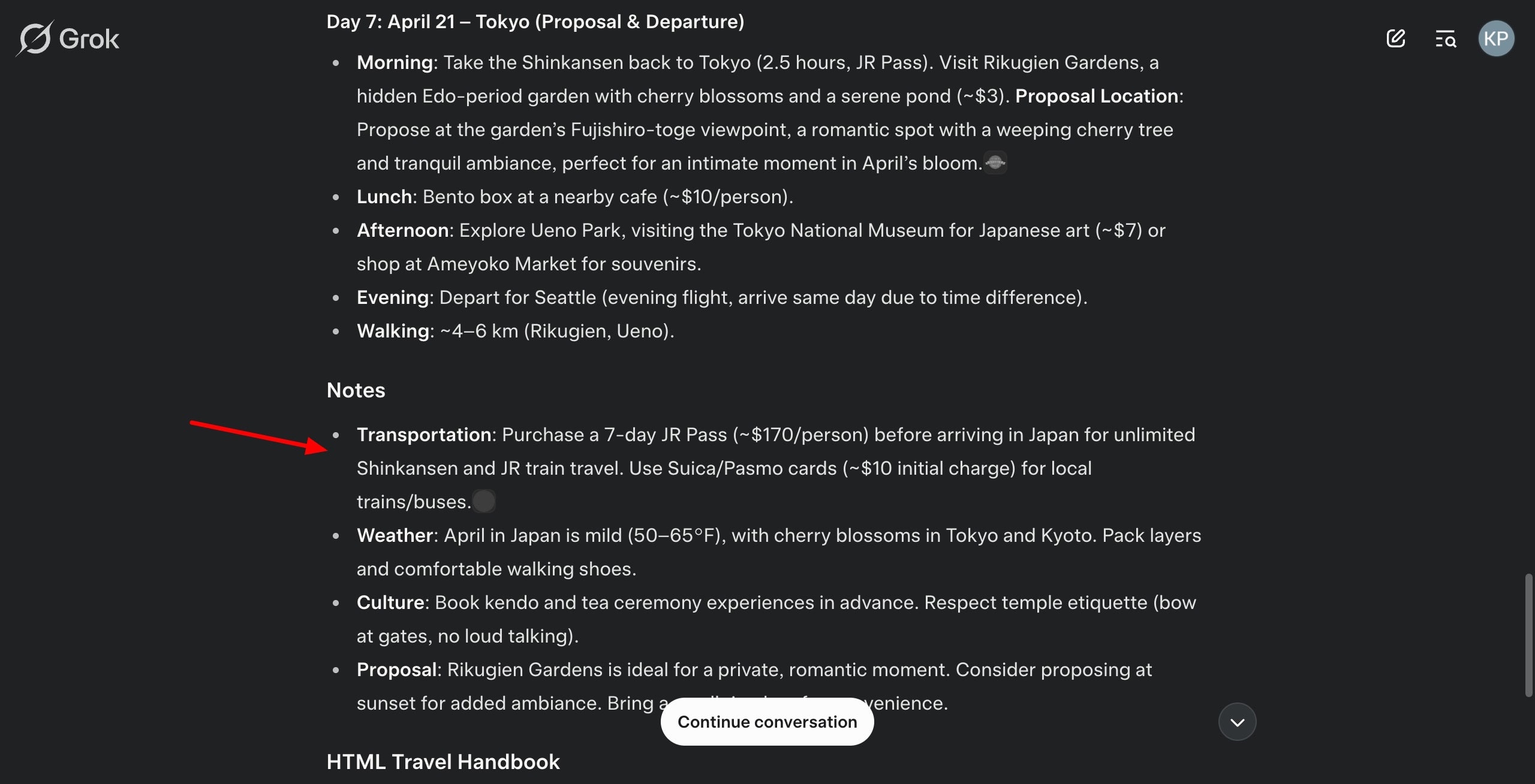
At the end, it gives you notes about transportation, weather, culture, etc. The travel handbook features maps of popular locations along with tables for attraction descriptions and Japanese phrases. Its travel tips were also pretty helpful. Overall, the results were exceptional!
3. Data Analysis
Unfortunately, Grok couldn’t be tested for data analysis. It showed a JavaScript error and didn’t display any output.
Grok performs exceptionally well with product comparisons. For this query, it started by defining the selection criteria and featured 5 earbuds with multiple bullet points under price, sound quality, battery life, pros, and cons.
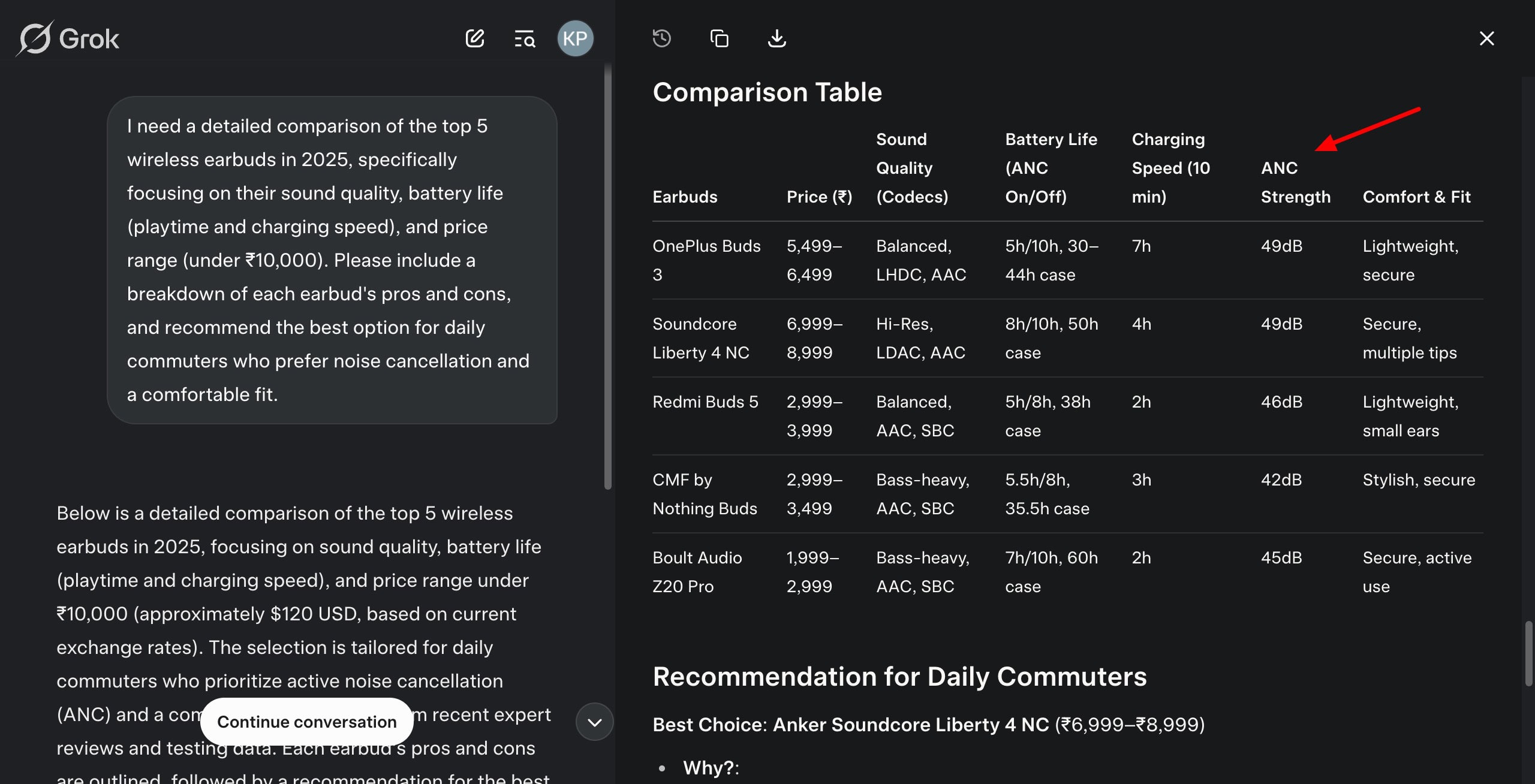
It stands out by offering a ‘Fit for Commuters’ section under each earbud. I also liked that it included a comparison table and the best recommendation for daily commuters with reasons, drawbacks, and a runner-up!
For this query, I enabled two modes – Think and Search. It started with a budget breakdown table. It also offers sections for savings allocation, key features, and tips for success. Overall, the research is decent. I wish it also included the percentage of the allocated amount for each category.
Pricing
The free plan of Grok offers 5 Deep Searches per 2 hours, 3 daily image analyses, 10 regular Think searches per 2 hours, and unlimited general queries. The paid plan of Grok AI (SuperGrok) is priced at $30/month.
Conclusion
Grok delivers impressive performance in SEO audits, travel itineraries, and product recommendations. While the personal finance research was decent, it lacked percentage breakdowns, and Grok couldn’t be tested for data analysis due to errors.
Still, if you want an AI assistant that shines in structured comparisons and trip planning, Grok is a strong contender. It’s just not the best fit for handling Excel-based tasks!
5) Gemini – Best for Planning & Budgeting
Gemini (formerly Bard) is a powerful AI chatbot designed by Google DeepMind. It answers user queries in a variety of formats, including text, image, audio, and video. Gemini has a massive user base of 350 million monthly users!
The recent addition of Deep Research makes Gemini a suitable tool for performing general and advanced research.
Research Performance
1. SEO Analysis
Gemini conducted the SEO Analysis using its Deep Research mode. It generated a bulky audit report with complex paragraphs and included sections like website structure and navigation analysis, technical SEO audit, performance analysis, conclusion, etc.
You’ll find actionable recommendations under each of the sections. However, most of the sections highlight that the website was inaccessible, which is why the performance couldn’t be accessed. Considering my official website has an excellent uptime performance, trusting this audit report is difficult.
I used the 2.5 Flash (Experimental) mode to generate this research. Before processing the query, Gemini showed an error regarding flight tickets for April 2025, as it has already passed. This confirms that Gemini’s research is authentic.
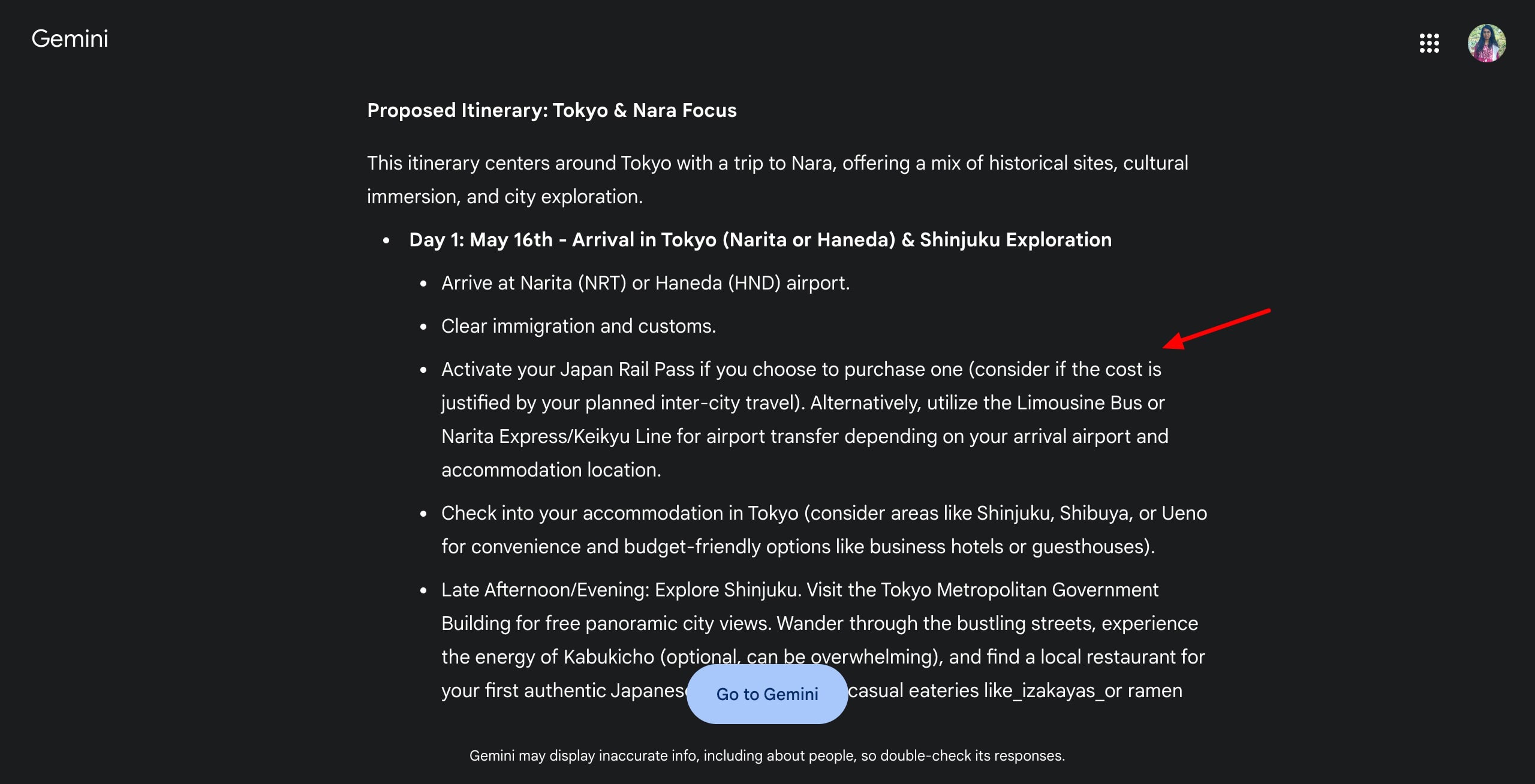
Like ChatGPT, it also categorizes each day’s spots by morning, afternoon, and evening. Each day has a different theme, and it’s more detailed compared to ChatGPT.
I like that it included a separate section with proposal location suggestions, and its budget considerations and tips are spot on as well! The travel handbook contains important Japanese phrases with translations.
3. Data Analysis
Unfortunately, Gemini doesn’t support Excel file updates. This is why its data analysis performance cannot be analyzed.
This query was processed using the 2.5 Pro (Experimental) mode. For each of the 5 earbuds to be compared, it lists the price range, sound quality, battery life, comfort & fit, pros, and cons in bullet points.
In the end, it shares the best recommendations for daily commuters along with strong alternatives. I liked how it explained the reasons for choosing a specific earbud as the best choice.
This research was conducted using 2.5 Pro (Experimental) mode. It starts with assumptions about income, rent range, commute, lifestyle, etc, and gives a table for a proposed monthly budget. The table lists categories, allocation amount, percentage, and notes.
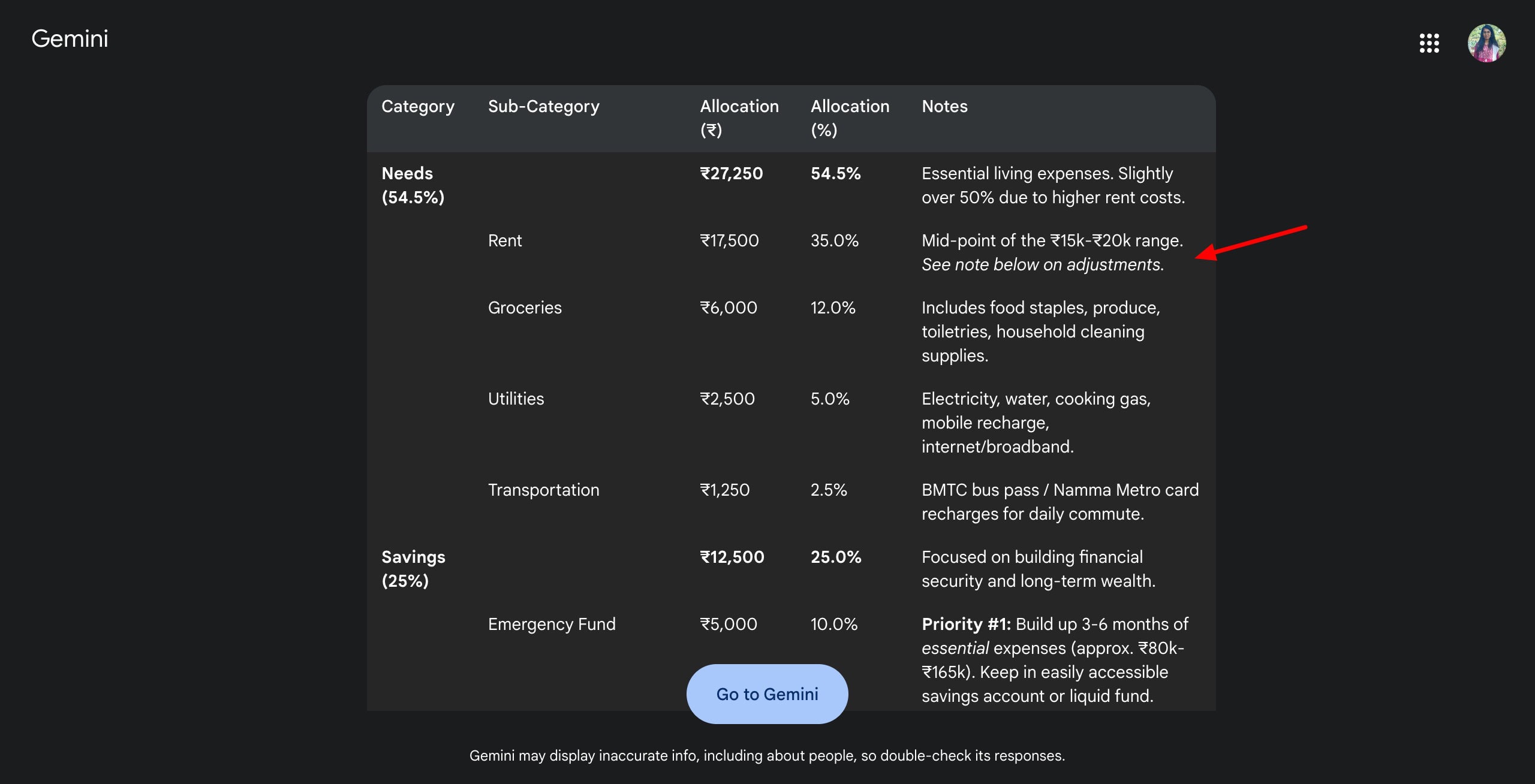
Below the table, you can find the explanations and key considerations mentioned in multiple bullet points. It’s good to see that Gemini stresses on Emergency fund and shares solid tips on retirement and investment. I also liked that it used the 50/30/20 rule as a guideline for planning the budget.
Pricing
The free plan of Gemini imposes rate limits on the usage of its AI models. For instance, the 2.5 Flash (Experimental) mode is limited to 10 requests per minute. Whereas, 2.5 Pro (Experimental) mode is limited to 5 requests per minute for free.
Gemini Advanced can be availed through a Google One AI Premium subscription for ₹1,950/month.
Conclusion
Gemini performed extremely well with planning and budgeting tasks, especially in personal finance. It offered practical tips, clear budget tables, and thoughtful financial advice. It also did a great job in travel planning with detailed itineraries and helpful cultural tips.
However, it fell short in data analysis, lacking support for spreadsheet uploads. Overall, Gemini is best suited for queries around travel and planning. But it’s not ideal for data-heavy research.
6) Claude – Best for Planning and Comparisons
Claude is an AI chatbot developed by Anthropic. It can answer questions, have conversations, summarize text, generate code, solve complex logics, and more. Claude has a user base of 18.9 million monthly active users. You only get the Claude 3.5 Sonnet model on its free plan.
Research Performance
1. SEO Analysis
Unfortunately, Claude only provided a detailed framework to perform the audit. It didn’t perform the SEO audit itself.
Claude was able to generate a pretty basic travel itinerary with destinations arranged by time of day for each day. It also mentions separate sections for proposal locations, budget breakdown for 2 people, and additional travel tips.
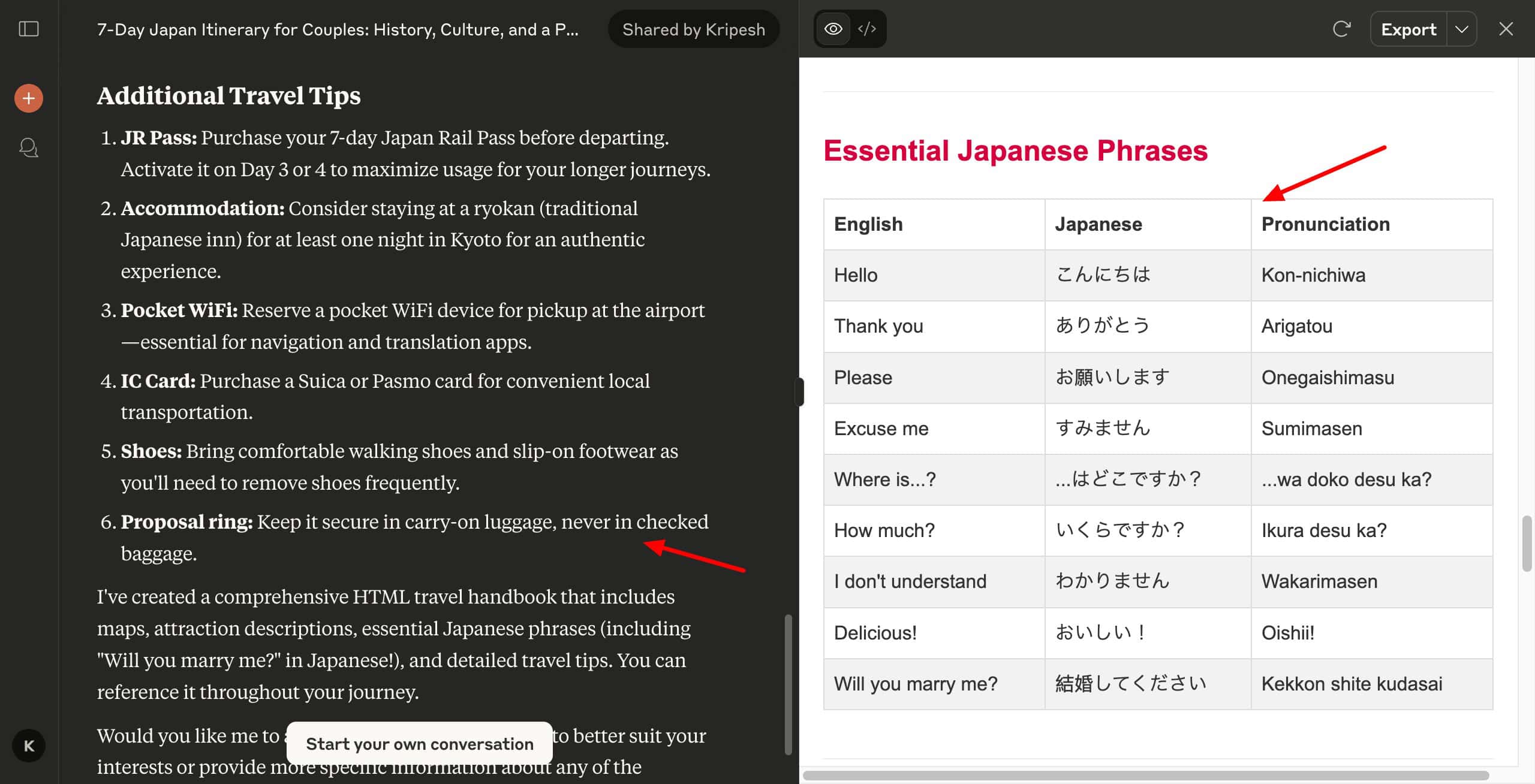
I liked that it included tips for shoes, pocket Wi-Fi, IC card, and proposal ring! Additionally, the travel handbook generated by Claude was the best of all! It included tips for each location, proposal planning, Japanese phrases, cultural experiences, booking info, and emergency contact numbers.
3. Data Analysis
Unfortunately, Claude doesn’t accept Excel file uploads. This is why we couldn’t test its Data Analysis performance.
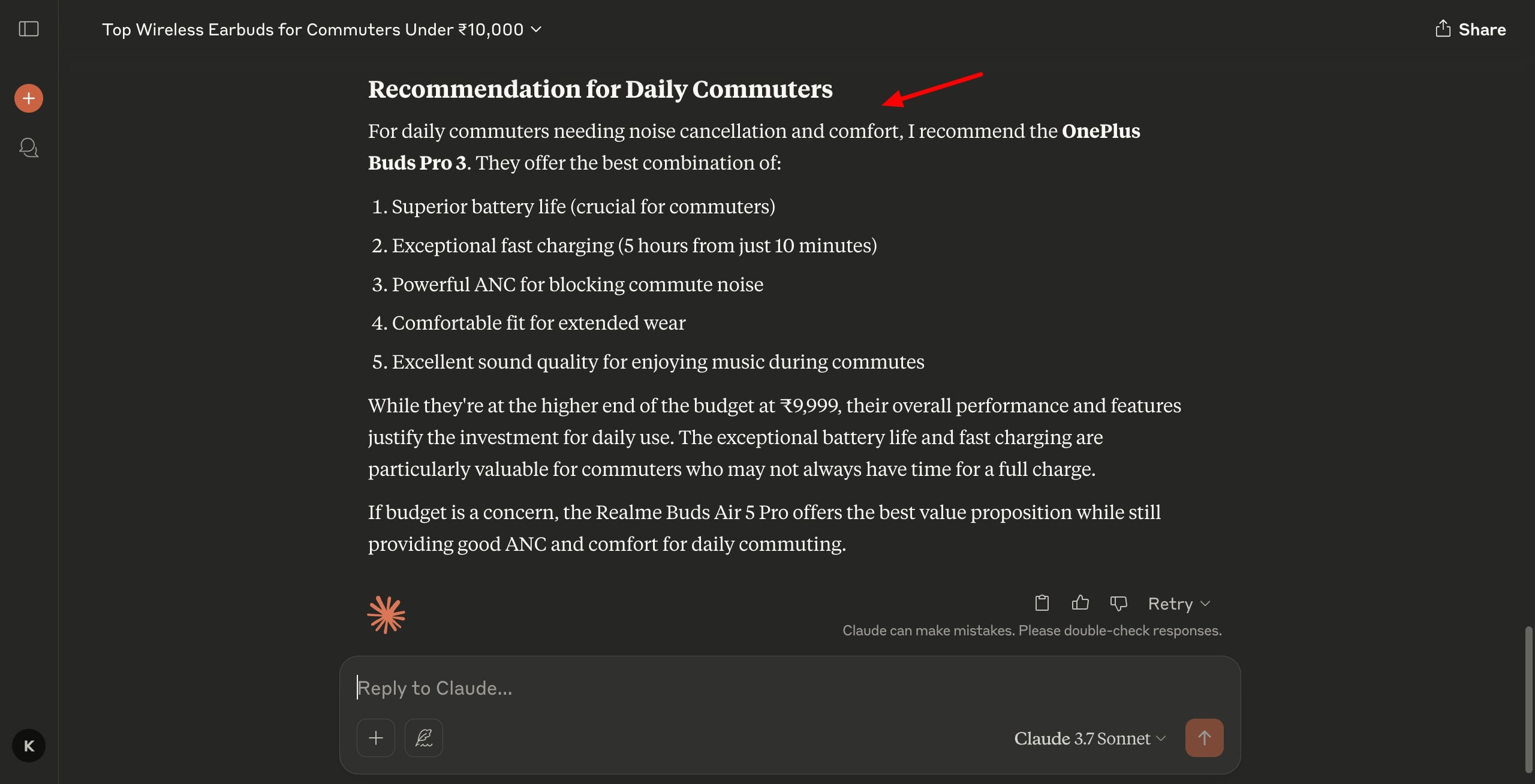
For each earbud, it mentions the sound quality, battery life, pricing, pros, and cons in simple bullet points. At the end, it adds a section for the best recommendation for commuters, along with 5 reasons for the choice. Overall, the research is pretty decent.
I liked that it included the percentage of allocation in brackets alongside the amount for each category. However, I wish it included a table like other AI assistants.
Pricing
The free plan of Claude lets you use the Claude 3.5 Sonnet model to chat, generate code, analyze images, visualize data, and more. Its paid plans start from $17/month.
Conclusion
Claude performed decently in travel itinerary planning and product recommendations, offering thoughtful tips, organized content, and easy-to-read summaries. However, it fell short in SEO audits and couldn’t be tested for data analysis due to a lack of file upload support.
Overall, Claude is a solid choice for general research, especially for travel and product queries, but not ideal for technical or data-heavy tasks.
7) DeepSeek – Best for Data Analysis & Advanced Reasoning
DeepSeek is a Chinese AI research lab founded in 2023. Recently, DeepSeek became the 4th most downloaded AI app with 33.7 million monthly users worldwide. Besides general queries, it can help you perform advanced reasoning, data analysis, decision-making, and research tasks.
Research Performance
1. SEO Analysis
I used the Deep Research Mode to conduct this analysis. However, it simply gave me tool suggestions on how to perform a technical SEO audit, On-Page SEO, Reporting, etc. Usually, an SEO audit also states the things that are performing well on the site, which I didn’t find here.
2. Travel Itinerary
Like other AI assistants, DeepSeek classified each venue by time of day.. At the end, it featured key tips along with the HTML travel handbook. An interesting feature is that, along with the HTML code, it also featured a “Run” button to see your code in action!
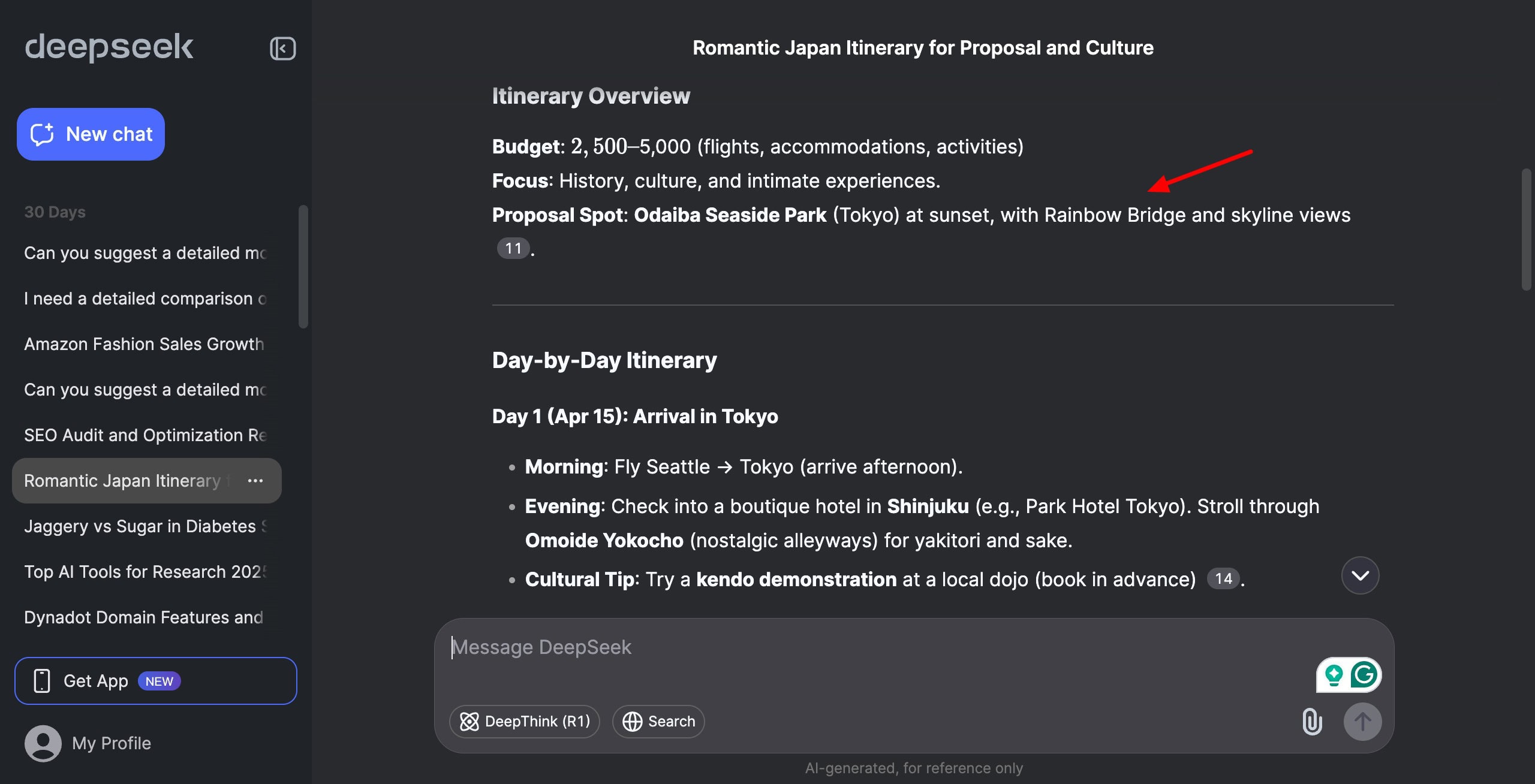
Even though the travel handbook was very compact, I liked the travel tips it mentioned. I wish DeepSeek also added a separate section for proposal destination recommendations.
3. Data Analysis
There’s a length limit on DeepSeek, which is why it could only read the first 17% of my spreadsheet. It starts with a short executive summary and then offers key findings, visualizations, data-driven growth strategies, implementation timeline, and projected outcomes.
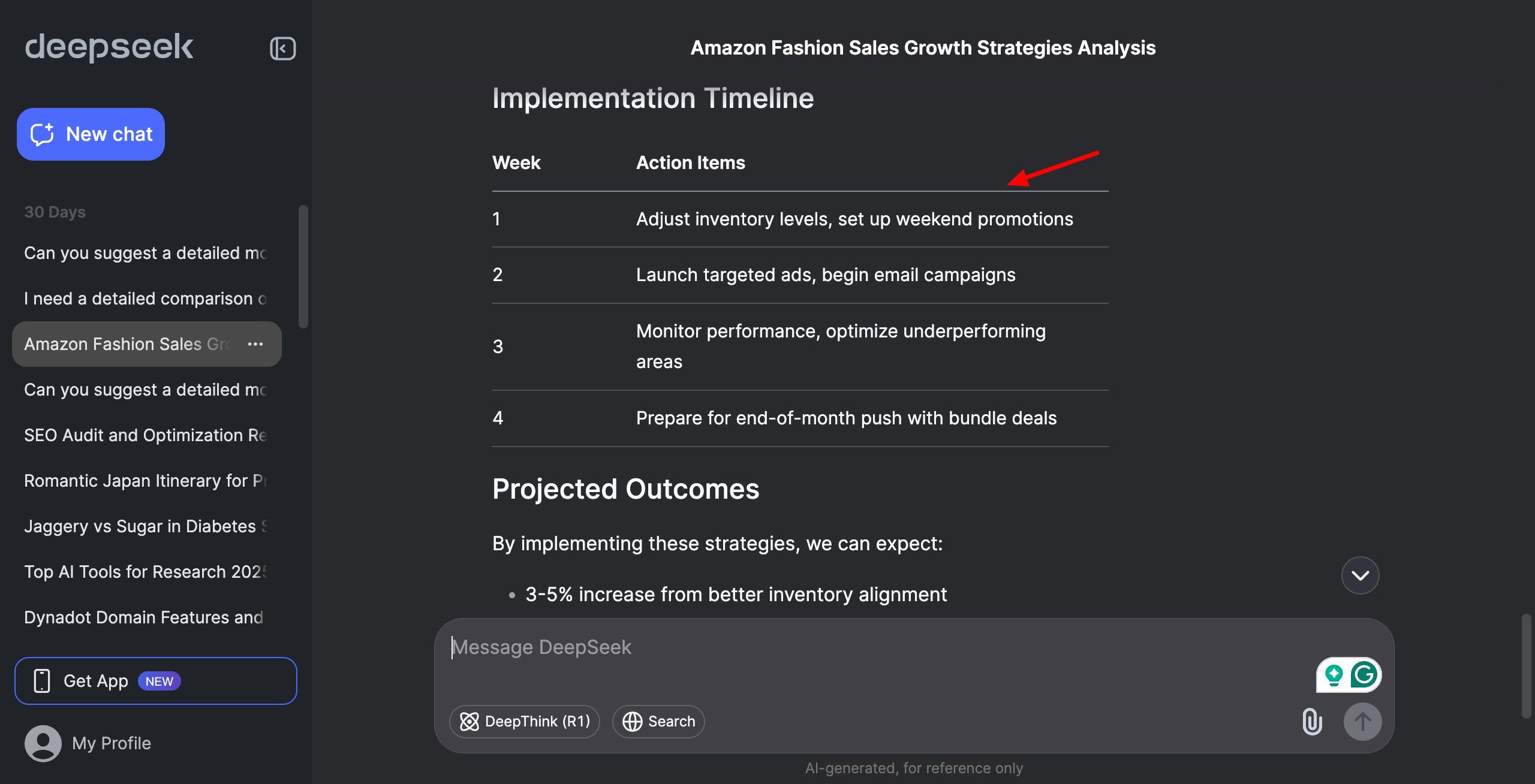
I liked the data-driven growth strategies provided by DeepSeek. However, it stated them with minimal bullet points. At the end, it also gave a rough estimate of the percentage increase in sales by implementing these strategies.
4. Product Recommendations
While running the query, DeepSeek continuously showed a “Server Busy” error. Due to this, the testing for this query wasn’t possible.
5. Personal Finance
While running the query, DeepSeek continuously showed a “Server Busy” error. Due to this, the testing for this query wasn’t possible.
Cons
- For complex searches, it shows a server busy error.
- No options to share chat as a link.
- Cannot enable search mode with file uploads.
- Takes a long time to analyze uploaded files.
Pricing
The free plan gives you unlimited access to DeepSeek V3 and R1 models. However, it imposes a rate limit of 0.3 to 4 requests per minute to ensure fair usage. The paid plans of DeepSeek start from $0.07 for every 1 million input tokens.
Conclusion
DeepSeek works well for advanced reasoning and data analysis, even though it’s limited by file size constraints. It also handles travel planning decently, with handy tips and a unique live HTML preview feature.
However, it falls short in SEO audits and fails to deliver results for product and finance queries due to frequent ‘server busy’ errors. In my opinion, DeepSeek still lacks the reliability needed for seamless research across different categories.
Bonus AI Tool Recommendation: Manus AI
As a bonus, we have included a paid tool called Manus AI. It’s an advanced AI chatbot developed by the Chinese startup Monica in March 2025. It has a range of use cases, from research, productivity, education, data analysis, and more.
It outperforms all the AI research tools mentioned above in all the research categories. It makes the research process organized by creating multiple documents to represent data. It generates the most detailed SEO audit report by analyzing all the relevant factors in detail.
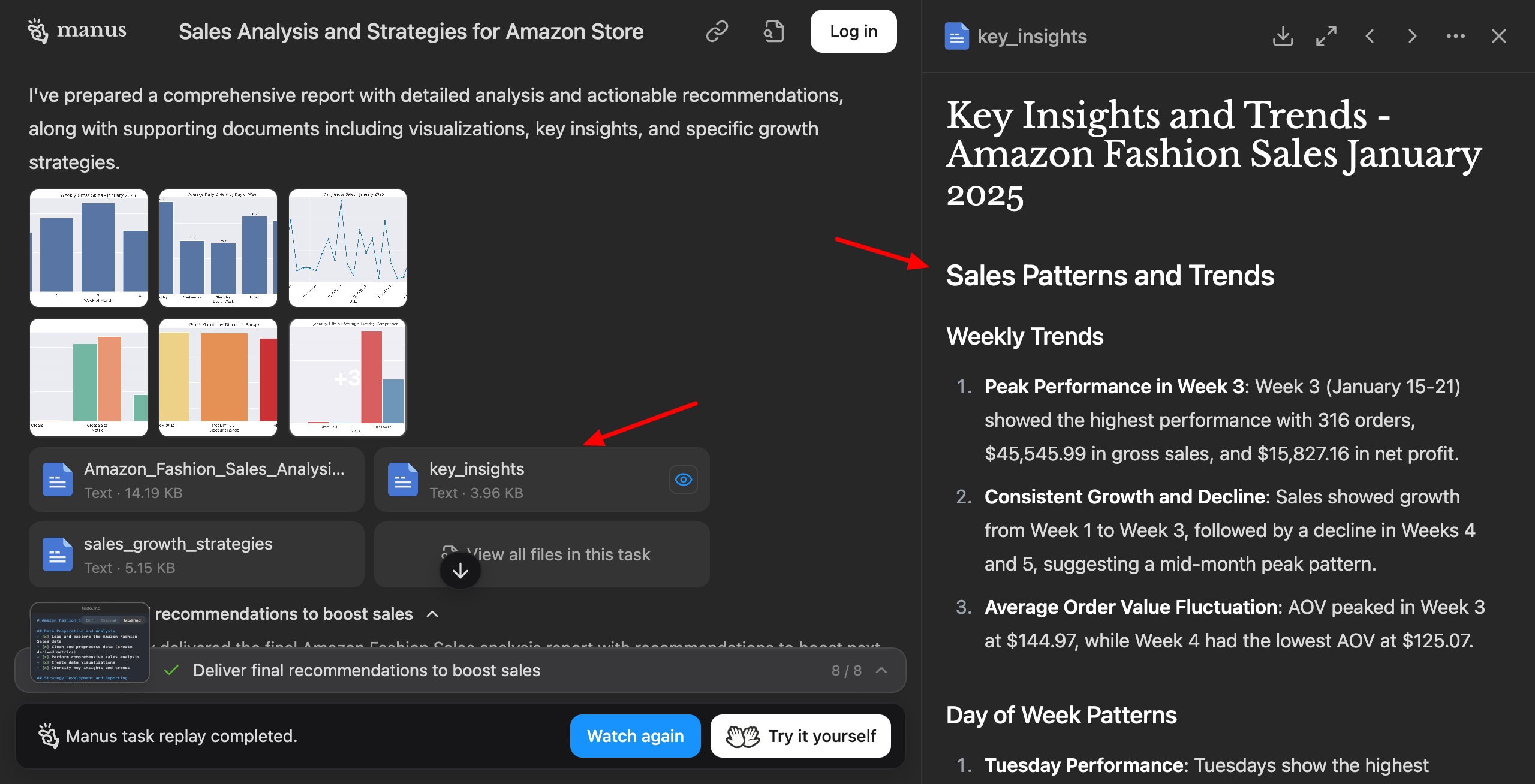
For data analysis, it generates documents for growth strategies, analysis reports, and key insights, along with lots of graphical illustrations. Similarly, it stands out by offering an exceptionally detailed handbook designed like a website for the travel itinerary.
Overall, if you need an all-rounder AI research tool for your workflow, Manus AI is an excellent pick. However, it doesn’t have a free plan right now. Its paid plans start from $39/month.
Why Should You Trust Me?
I have been working full-time in the digital industry since 2015. In all these years, I’ve used and tested hundreds of digital tools. These include free AI tools, AI website builders, AI video generators, AI writers, AI logo generators, AI domain name generators, etc.
I’ve also recommended the best AI tools for small businesses, AI tools for students, AI tools for teachers, AI tools for content creation, and more. Experimenting with all these tools has given me immense experience and expertise to recommend the best ones for your requirements.
Conclusion
In this article, we discovered the 8 Best AI Tools for Research. I hope this article helped you figure out which AI assistant is best for your specific use case. My personal favorites are ChatGPT and Gemini for all my research-related tasks.
Which AI-powered research tool do you use? Do you have any other recommendations? Do share with me in the comments section below. And if you’re enthusiastic about AI, check out these Best Free AI Tools to get help with writing, SEO, design, productivity, video, and more!
Anyway, I’ll be back with more interesting content soon. Till then, keep learning. Cheers! 🙂
FAQs
1) Which is the best AI research tool for data analysis?
If you want to analyze data or create insightful reports, ChatGPT is the best AI tool.
2) Which is the best AI research tool for general queries?
For general research queries, you can prefer different tools. For instance, Gemini is best for finance and budget planning. Grok is suitable for trip planning. Perplexity is best for searching restaurants and news.
3) Which is the best AI research tool for comparative research?
If you want to compare different products, Grok would offer you the best results in an easy-to-read format.
4) Which is the best AI research tool for analytical reports?
If you wish to analyze data like spreadsheets or documents, ChatGPT would offer you the best results.