Sick of online restrictions? Want to browse anonymously? VPNs unlock this power and are becoming increasingly essential!
For the past three years, I’ve been searching for the perfect VPN, testing everything from free options to paid VPN providers. With hundreds available, Surfshark stands out among the top 3 VPNs, offering extensive features and robust security at an affordable price.
Curious to know more about Surfshark? In this Surfshark VPN review 2026, I’ll explore its strengths, uncover potential weaknesses, and reveal why it might be the perfect solution for your online privacy needs.
Surfshark Review 2026
Summary
Surfshark stands out as the best value-for-money VPN in 2026. It offers servers in over 100 countries, high-speed connections via the WireGuard protocol, and all essential VPN features. The service also includes extras like an ad blocker, self-healing connections, antivirus, and an email spam checker.
Minor feature gaps and their jurisdiction may raise some concerns. Overall, it is a feature-rich choice for budget-conscious users.
- Surfshark VPN Review Overview
- About Surfshark
- Surfshark Speeds
- Surfshark Servers
- Surfshark Streaming & Gaming Performances
- Privacy
- Surfshark Past History
- Surfshark Security
- Pricing
- Coupon Code
- Surfshark VPN Customer Support
- P2P
- Additional Features
- Devices
- User Interface
- Performance & Reliability
- Surfshark Pros
- 1) Fast Speeds
- 2) Unlimited Device Access
- 3) Affordable Plans
- 4) Built-in Ad Blocker
- 5) Audited No-Logs Policy
- 6) Strong Privacy Measures
- 7) Email Scam Checker
- 8) Excellent Streaming Support
- 9) Modern User Interface
- 10) Alternative ID
- 11) Antivirus Upgrade
- 12) Split Tunneling on Mac
- 13) Infrastructure improvements
- Surfshark Cons
- Surfshark Alternatives
- Why Should You Trust Me?
- Conclusion
- FAQs
Disclaimer : I strongly believe in transparency. If you buy using the links on our site, we may earn a small commission without any extra cost to you. This helps me to keep producing honest reviews. Read More >>
Surfshark VPN Review Overview
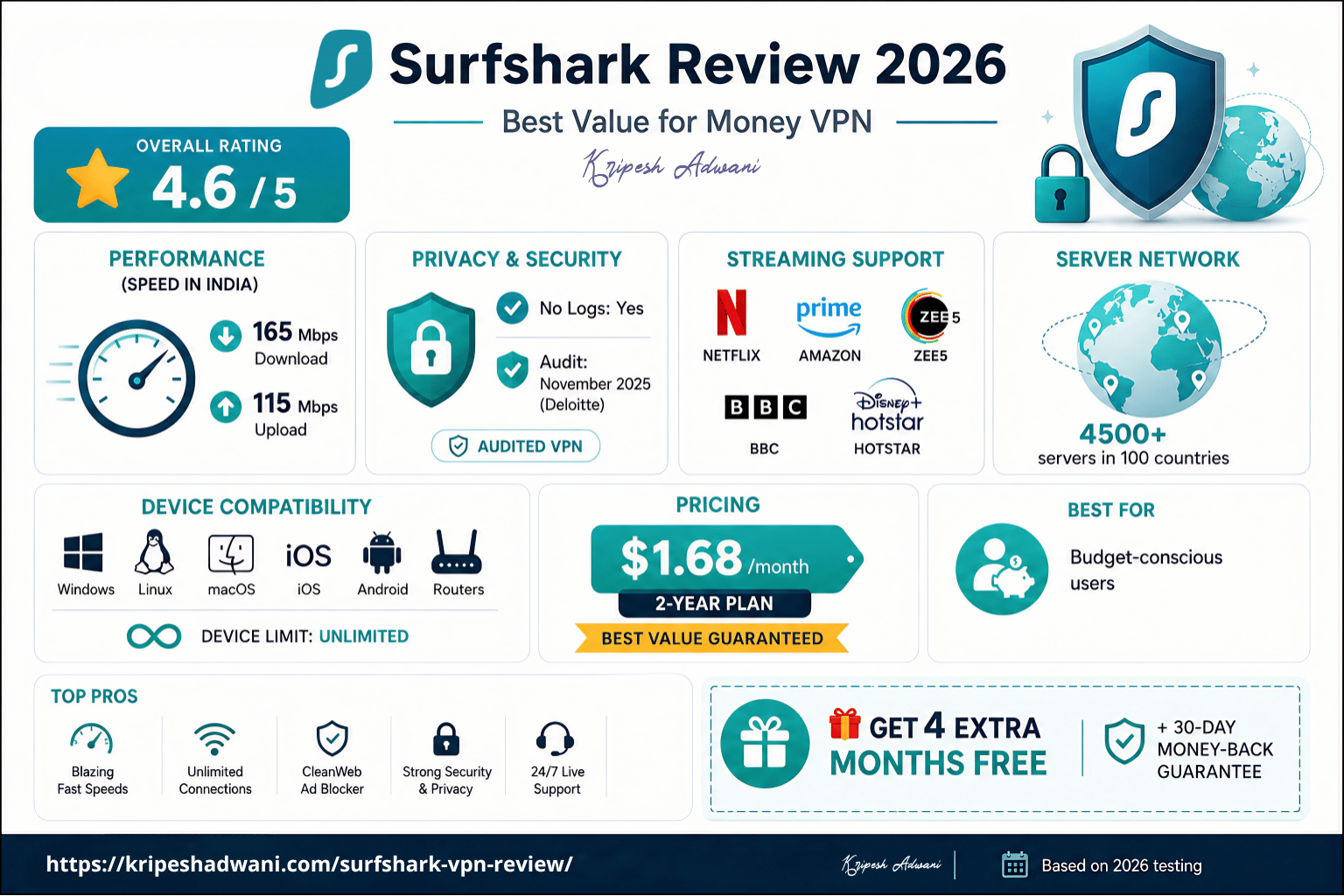
| Rating | 4.3 out of 5 ⭐️ |
| Speeds | Download speed: 165 Mbps Upload speed: 115 Mbps |
| No Log | Yes |
| Audit | Deloitte in Nov, 2025 |
| Streaming | Netflix, Amazon, Zee5, BBC, Hotstar |
| Servers | 4500+ servers across 100 nations |
| Devices | Windows, Linux, macOS, iOS, Android, Routers |
| Pricing | $1.68 per month (2-year plan) |
| Coupon Code | Get Surfshark VPN for 4 extra months FREE 🔥 |
About Surfshark
Surfshark, founded in 2018 by Vytautas Kaziukonis, started with a VPN service and became a leading cybersecurity company. They’ve expanded to offer data leak detection, private search, antivirus, and even a tool to remove your personal data online. In 2022, they joined forces with Nord Security to become an even bigger cybersecurity player.
Originally based in the British Virgin Islands, Surfshark moved its headquarters to the Netherlands in 2021. They also have offices in Lithuania and Poland.
Their mission is to give users complete control over their online privacy with easy-to-use security tools. This approach has led to over 1Cr+ app downloads and over 30 Cybersecurity Awards.
Surfshark Speeds
When it comes to speed, Surfshark ranks well among premium VPNs. I conducted a speed test using speedtest.net with a baseline speed of 200 Mbps download and 7 ms ping. I tested both the Indian and the USA servers to gauge download and upload speeds.
Speed in India
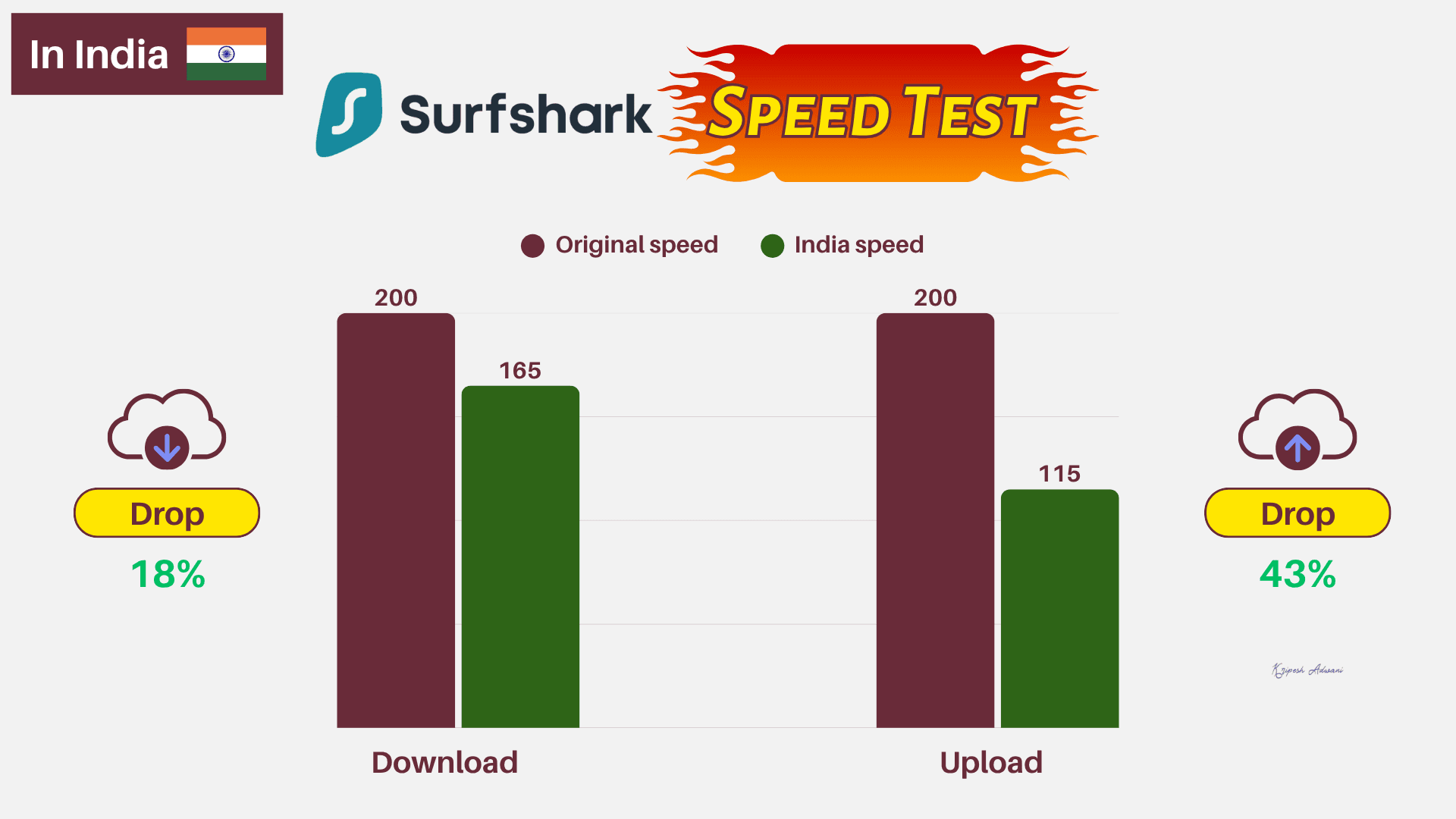
I saw a download speed of 165 Mbps, which is a respectable 17.5% drop from the baseline. However, the upload speed dropped to 115 Mbps, which represents a 42.5% decrease. The ping remained average at 317 ms.
Speed in the US
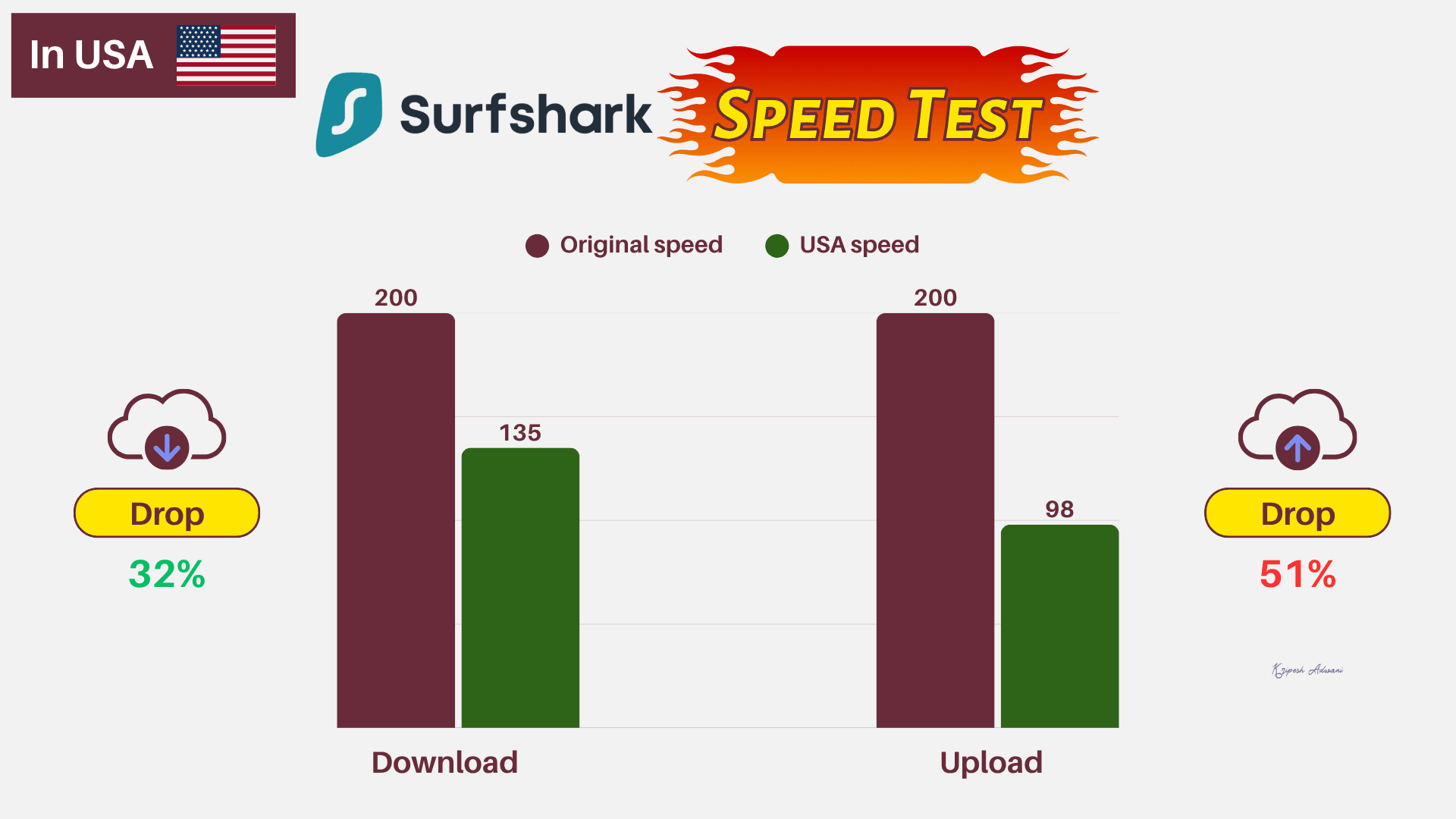
Switching to US servers, the download speed stayed consistent at 135 Mbps, again experiencing only a 32.5% drop. The upload speed here took a bigger hit, dropping to 98 Mbps, around 51% decrease.
| Location | Surfshark | NordVPN | ExpressVPN |
| India Download Speed | 165 Mbps | 152 Mbps | 140 Mbps |
| India Upload Speed | 115 Mbps | 90 Mbps | 129 Mbps |
| USA Download Speed | 135 Mbps | 120 Mbps | 129 Mbps |
| USA Upload Speed | 98 Mbps | 74 Mbps | 95 Mbps |
Compared to other VPNs, Surfshark excels in the following areas:
- ExpressVPN: Surfshark delivered better speeds on Indian servers. However, even on a distant USA server, it outperformed ExpressVPN.
- NordVPN: Here as well, Surfshark offers superior speeds on both Indian and USA servers.
Overall, Surfshark’s speeds are impressive. VPN-induced latency is minimal, allowing for faster streaming, downloading, and even file transfers.
Surfshark Servers
Servers Locations
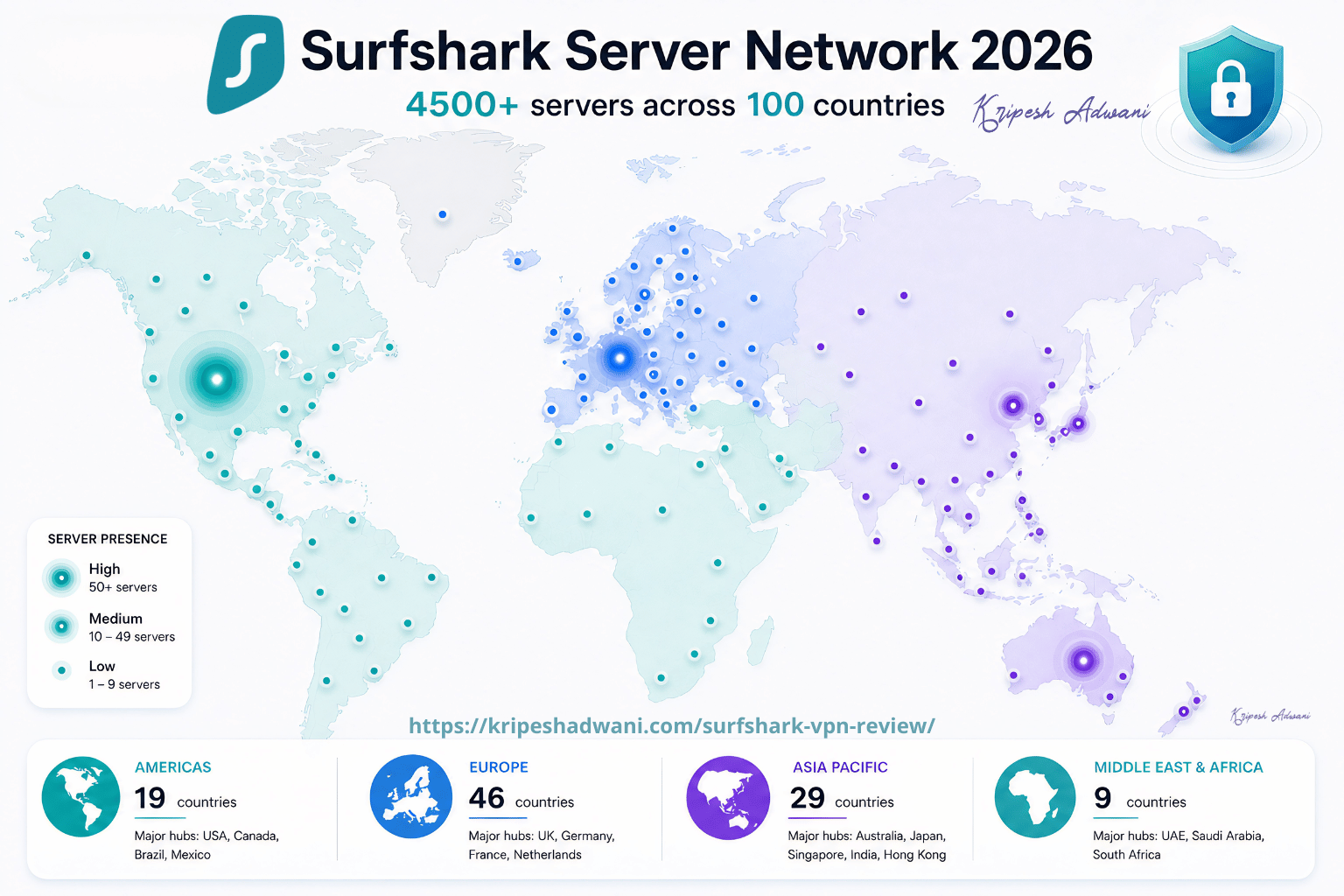
Surfshark operates over 4500 servers across 100 countries worldwide. These servers span Europe, the Americas, the Middle East and Africa, and the Asia-Pacific region. In India, they operate virtual servers for Delhi and Mumbai locations to ensure data privacy.
In 2024, Surfshark upgraded all of its VPN servers from 1 Gbps to 10 Gbps due to the rollout of 5G technology. And in October 2025, it further advanced its infrastructure by launching 100 Gbps servers in Amsterdam, Netherlands. This major upgrade provides 10x capacity for smoother performance during peak times, improved 4K/8K streaming, VR experiences, gaming, and video calls.
While NordVPN offers a larger network of 9,000+ servers across 188 countries, it covers more locations than Surfshark. If you need to connect to any specific server, NordVPN will help more.
RAM Servers
Surfshark uses 100% RAM-only servers worldwide. This diskless server architecture ensures that if any data (session logs, encryption keys, etc.) is collected while the VPN is in use, it is automatically deleted upon every reboot.
Obfuscated Servers
Surfshark provides obfuscated servers for users seeking to bypass government restrictions, internet censorship, strict college or university network limitations, or ISP snooping. These servers are configured to hide VPN usage and make your traffic appear as regular internet activity.
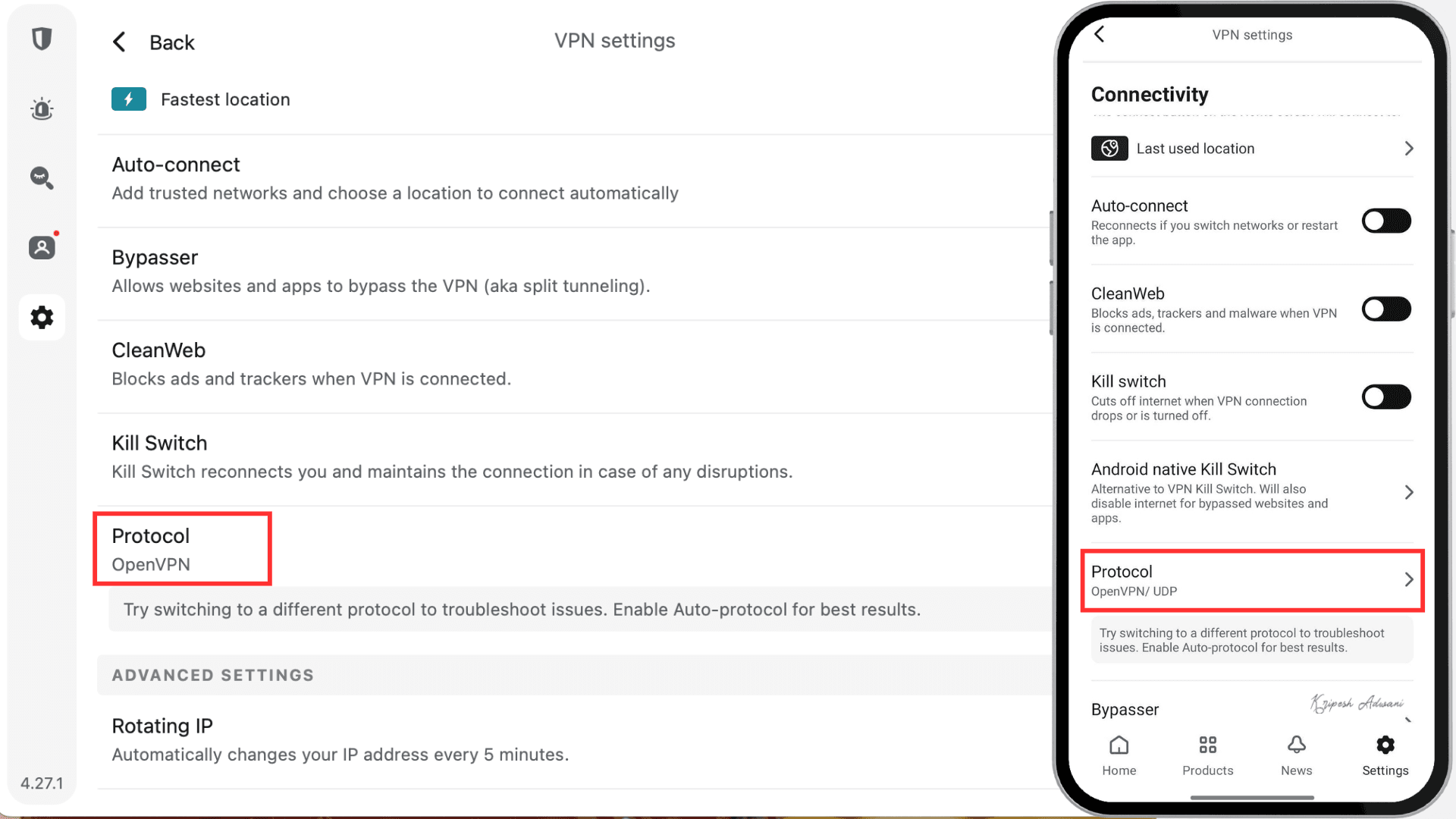
Surfshark’s obfuscation feature is known as Camouflage Mode. To activate Camouflage Mode, switch your Surfshark VPN protocol to OpenVPN (TCP/UDP). This protocol automatically applies obfuscation to your traffic.
For automatic obfuscation, NoBorders mode is also available. I’ll discuss this feature in detail later.
Dynamic or Static IP Address
Surfshark, by default, employs IP rotation technology to assign dynamic IPs. These IPs enhance user anonymity by providing a new IP address with each VPN connection.
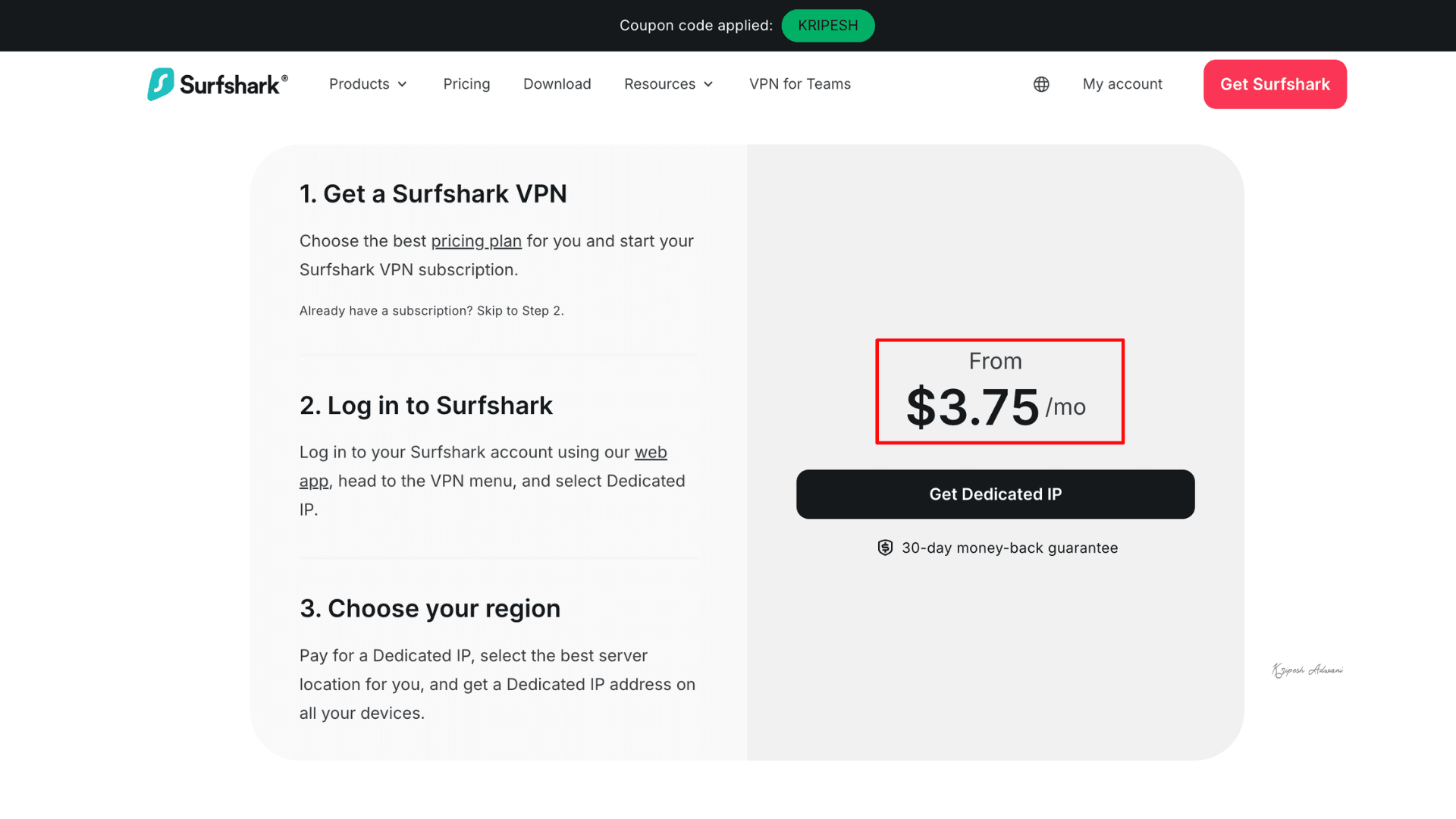
If you need a fixed IP address, Surfshark also provides a static, dedicated IP at an additional cost. This simplifies remote access, reduces bot checks, and allows easier access to IP-sensitive sites. Its dedicated IP service starts at $3.75 per month.
Earlier, Surfshark offered dedicated IP services in 13 locations. It has since added 7 new dedicated IP locations in Turkey, Poland, the US, Brazil, and Singapore.
Surfshark Streaming & Gaming Performances
Looking for the best VPN for streaming? I highly recommend Surfshark. This VPN works with almost all major streaming services.
| Streaming Platform | Yes/No |
| Netflix | Yes ✅ |
| Hotstar | Yes ✅ |
| JioCinema | Yes ✅ |
| SonyLiv | Yes ✅ |
| Zee5 | Yes ✅ |
| Amazon Prime US | Yes ✅ |
In India, you can watch SonyLiv, Zee5, Hotstar, Amazon Prime, and JioCinema. Connecting to US servers, I easily streamed Netflix, Disney+, Hulu, BBC iPlayer, and HBO Max. Plus, I enjoyed 4K HD content with minimal buffering.
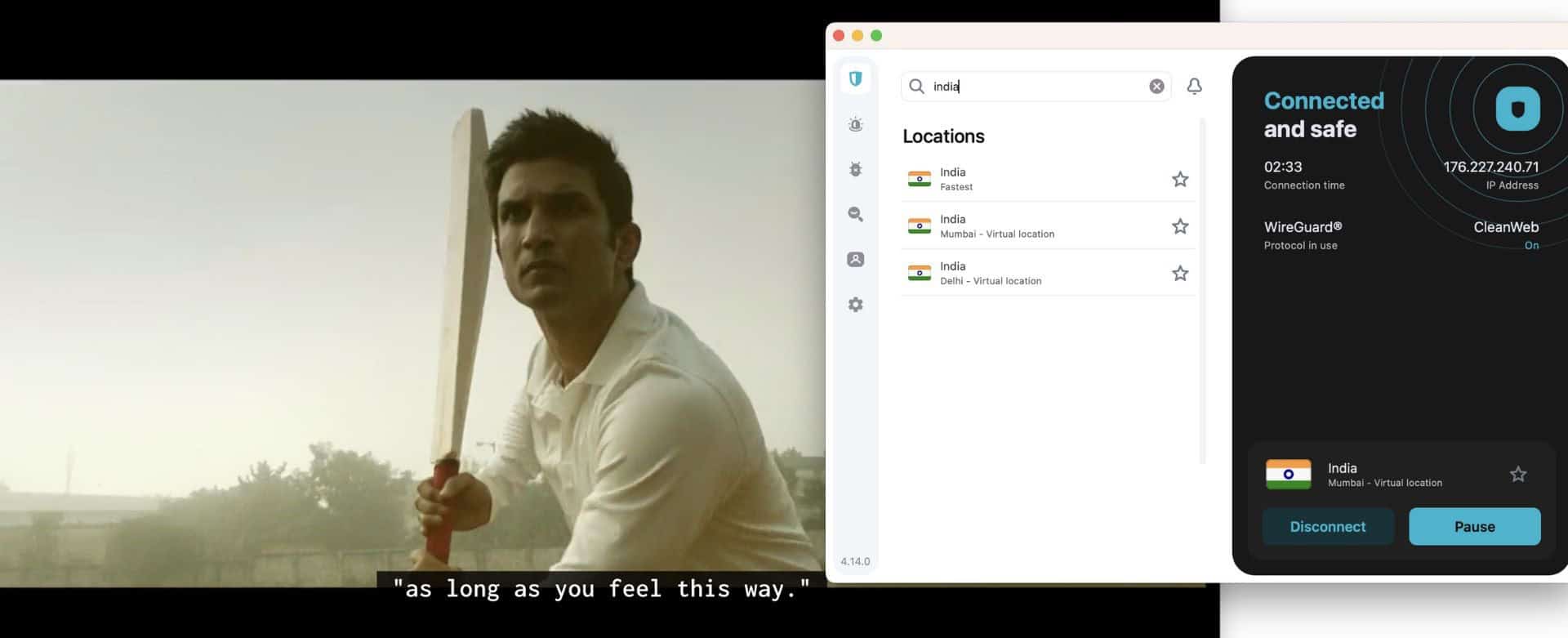
Plus, Surfshark works flawlessly across various devices, including Apple TV, Xbox, PlayStation, Android, macOS, and Windows.

I played Smash Karts and other online games while connected to Surfshark. It delivered decent gaming performance with a ping between 50 to 100 ms. However, NordVPN provided a more consistent, lower-
Privacy
Privacy Policy
Surfshark prioritizes user privacy by not collecting any data related to your online activity. This includes browsing history, visited IP addresses, session information, and network traffic.
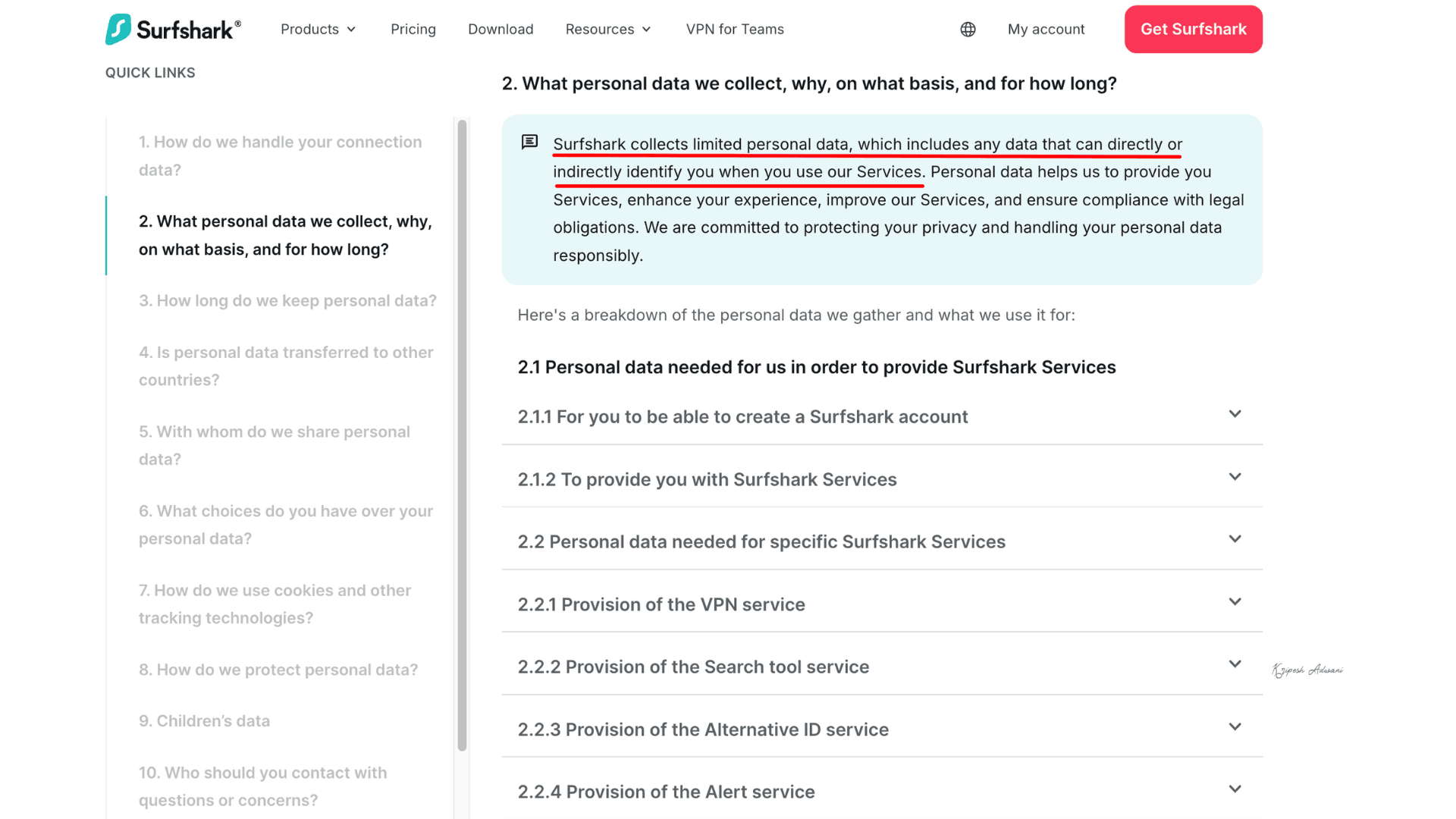
However, they do store minimal connection information, such as connection timestamps and a user ID or IP address associated with a specific VPN server. This data is automatically deleted within 15 minutes of your session ending.
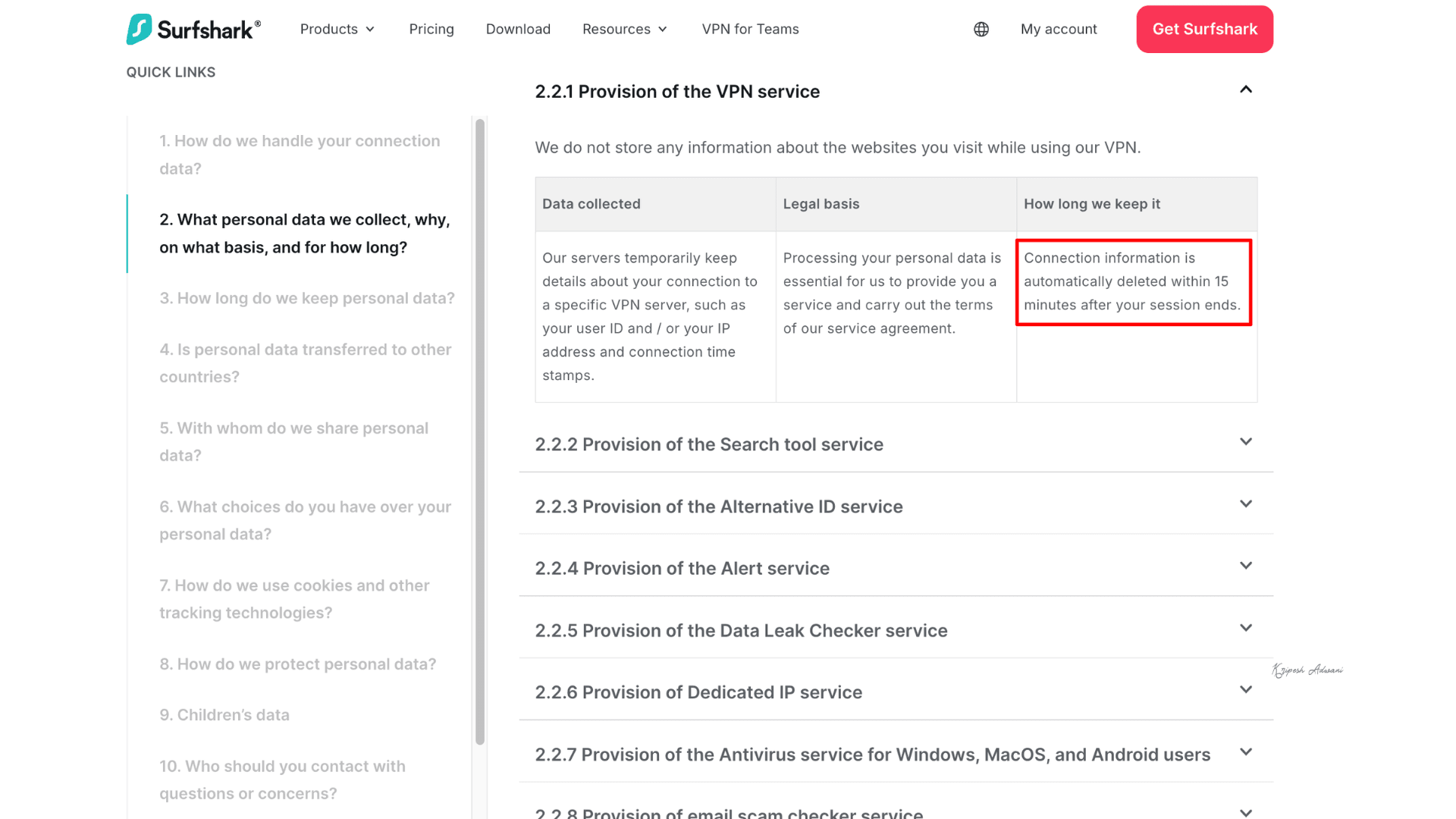
For a complete breakdown of their data practices, I recommend visiting Surfshark’s privacy policy.
No-log Policy
For complete anonymity and online privacy, a no-logs VPN is ideal. That’s why Surfshark ranks among our top 3 recommendations. They prioritize user privacy by not tracking your online activity and adhering to a strict no-logs policy.
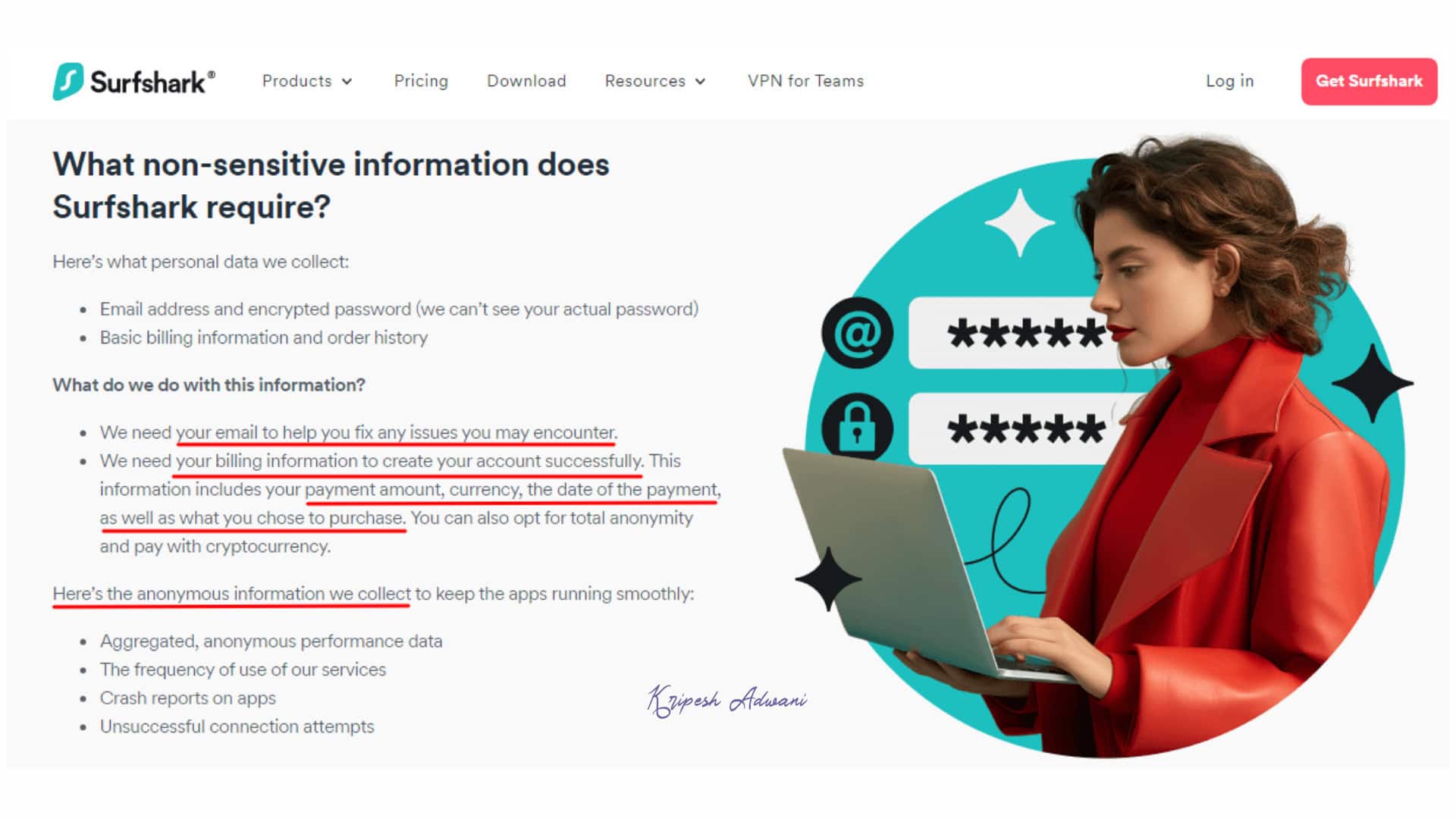
However, they collect some non-sensitive information. This includes your email address, encrypted passwords, basic billing information, and order history. This data helps them troubleshoot technical issues and offer uninterrupted service. For enhanced payment security, Surfshark even accepts cryptocurrency.
Security Audits
To guarantee they follow strict security standards, VPN providers undergo independent audits. Surfshark is no different!
- Deloitte Audit (2025): This audit was conducted in accordance with ISAE 3000 standards. Surfshark’s server configurations and deployment, including standard, API, and SDN infrastructure, were reviewed. The audit verified full compliance with its no-logs statement.
- Cure53 Audit (2021): Cure53, a Germany-based independent security firm, conducted an independent infrastructure audit. The agency confirmed Surfshark VPN’s robust network infrastructure and reliable service.
- Cure53 Audit (2018): For the second time, Cure53 gave Surfshark’s browser extensions (for Firefox and Chrome) a clean bill of health. The Cure53 team audited Firefox and Chrome extensions and found the extensions to be secure and robust.
Apart from that, in January 2026, this VPN provider underwent an infrastructure security audit by SecuRing. The cybersecurity firm conducted black-box penetration testing and verified the network’s resilience against real-world attacks and data breaches. No critical or high-risk vulnerabilities were found.
Surfshark Headquarters
Surfshark’s headquarters are in the Netherlands, which raises some privacy concerns. While the Netherlands has a reputation for being privacy-friendly, it is part of the 9-Eyes alliance. This alliance allows member countries to share intelligence data with each other and potentially compels companies to disclose user information under certain circumstances.
Privacy Comparison
In terms of privacy, NordVPN stands out over Surfshark with its most audited no-logs policy and Panama-based jurisdiction, which is outside intelligence alliances. Notably, NordVPN’s no-logs policy was validated during the 2018 Finland server incident. ExpressVPN is also based outside intelligence alliances; however, it is owned by Kape Technologies. In that regard, Surfshark has a cleaner track record than ExpressVPN.
Surfshark Past History
Surprisingly, Surfshark maintains a clean track record for user privacy and security. There have been no reported data breaches or cybersecurity threat accusations against them.
They’ve consistently demonstrated a commitment to user privacy, implementing new security measures year after year. In fact, to further strengthen its infrastructure, Surfshark merged with cybersecurity leader Nord Security in 2022.
Surfshark Security
Security Protocols
Surfshark prioritizes your security and online experience. That’s why they offer three VPN protocols to suit everyone’s needs:
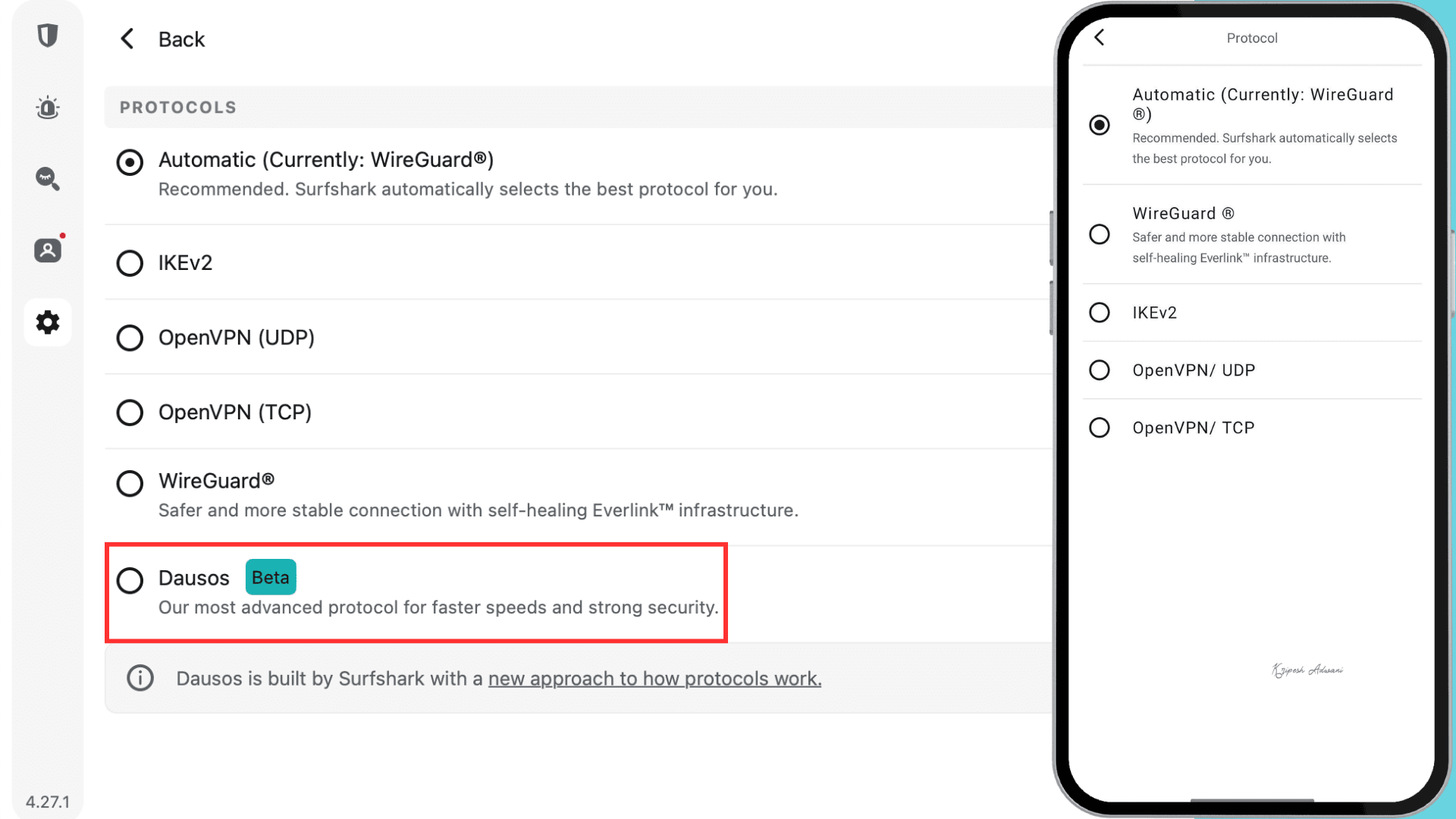
- WireGuard: The lightest and most modern protocol, WireGuard offers exceptional speed and manageability. It’s ideal for users who prioritize high speeds and a low risk of security vulnerabilities.
- IKEv2: Perfect for mobile users, IKEv2 delivers fast connections and seamless automatic reconnection when switching networks. Enjoy uninterrupted browsing and streaming without worrying about dropped VPN connections.
- OpenVPN: OpenVPN is the industry-standard, open-source protocol trusted by security experts worldwide. While slightly more complex than the others, Surfshark includes it for its broad router compatibility.
Surfshark launched the Dausos VPN protocol in January 2026 for macOS users. It is built on quantum-resistant AEGIS-256X2 encryption, which is newer and faster than traditional AES. Dausos assigns each user a dedicated tunnel, reducing interference. As a result, we get faster speeds and a more private VPN connection.
DNS Leak Test
A DNS leak test is crucial to verify your VPN’s security. If a VPN leaks DNS requests, it can expose your browsing activity, web searches, IP address, and location.
New to DNS records? Learn everything from A to Z about the 6 types of DNS records and their purposes.
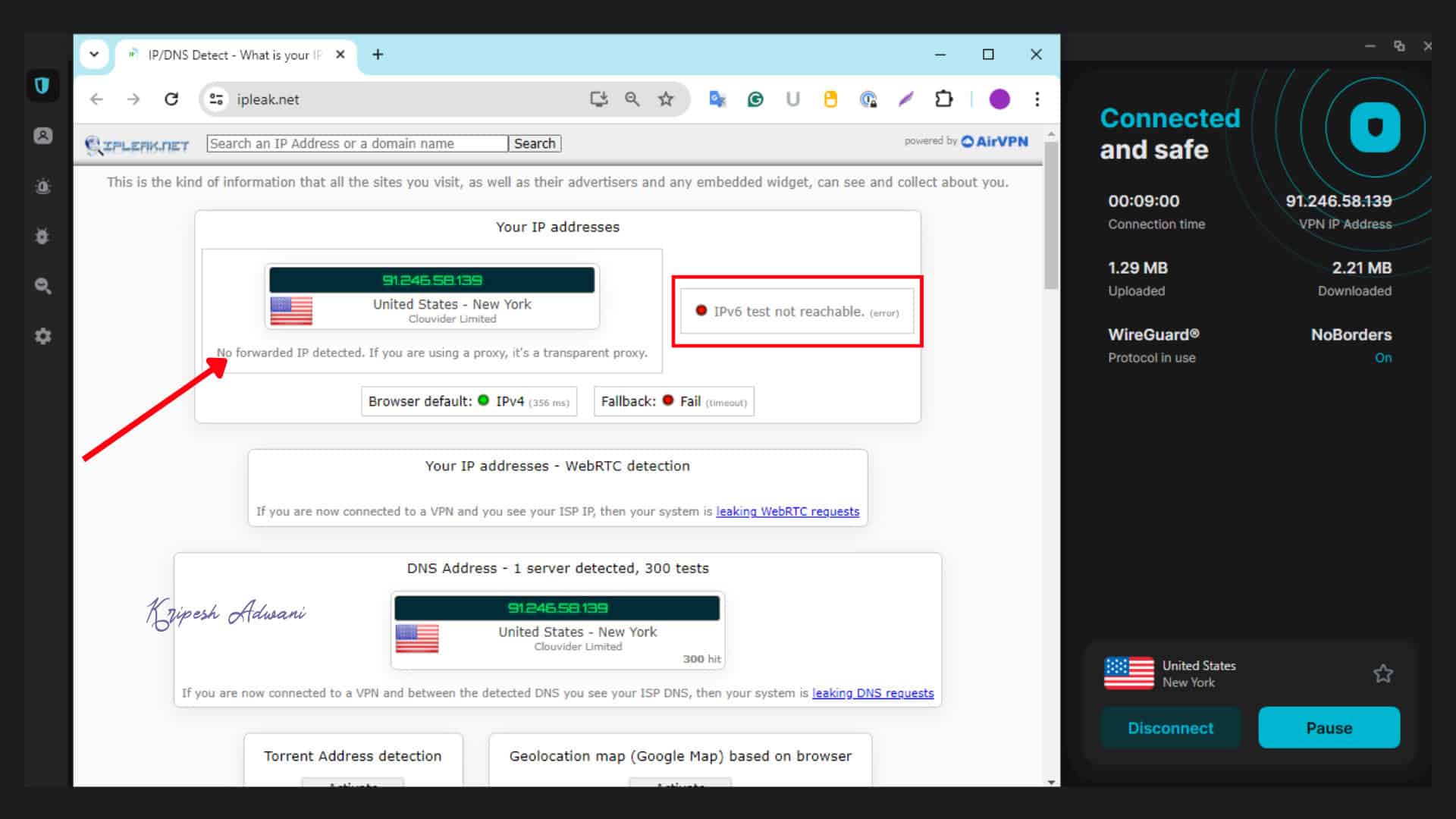
As you can see above, running a test on IPleak.net revealed positive results. The IPv4 address is the server I connected to (New York, USA), showing all DNS requests are routed through Surfshark’s servers. The IPv6 address was unreachable. This confirms that no DNS leaks or security vulnerabilities were detected with Surfshark.
Kill Switch
Your internet connection can drop unexpectedly. Imagine you’re using a VPN–without a safety net, your identity could be exposed if the connection drops. To prevent this emergency scenario, Surfshark offers a kill switch feature.
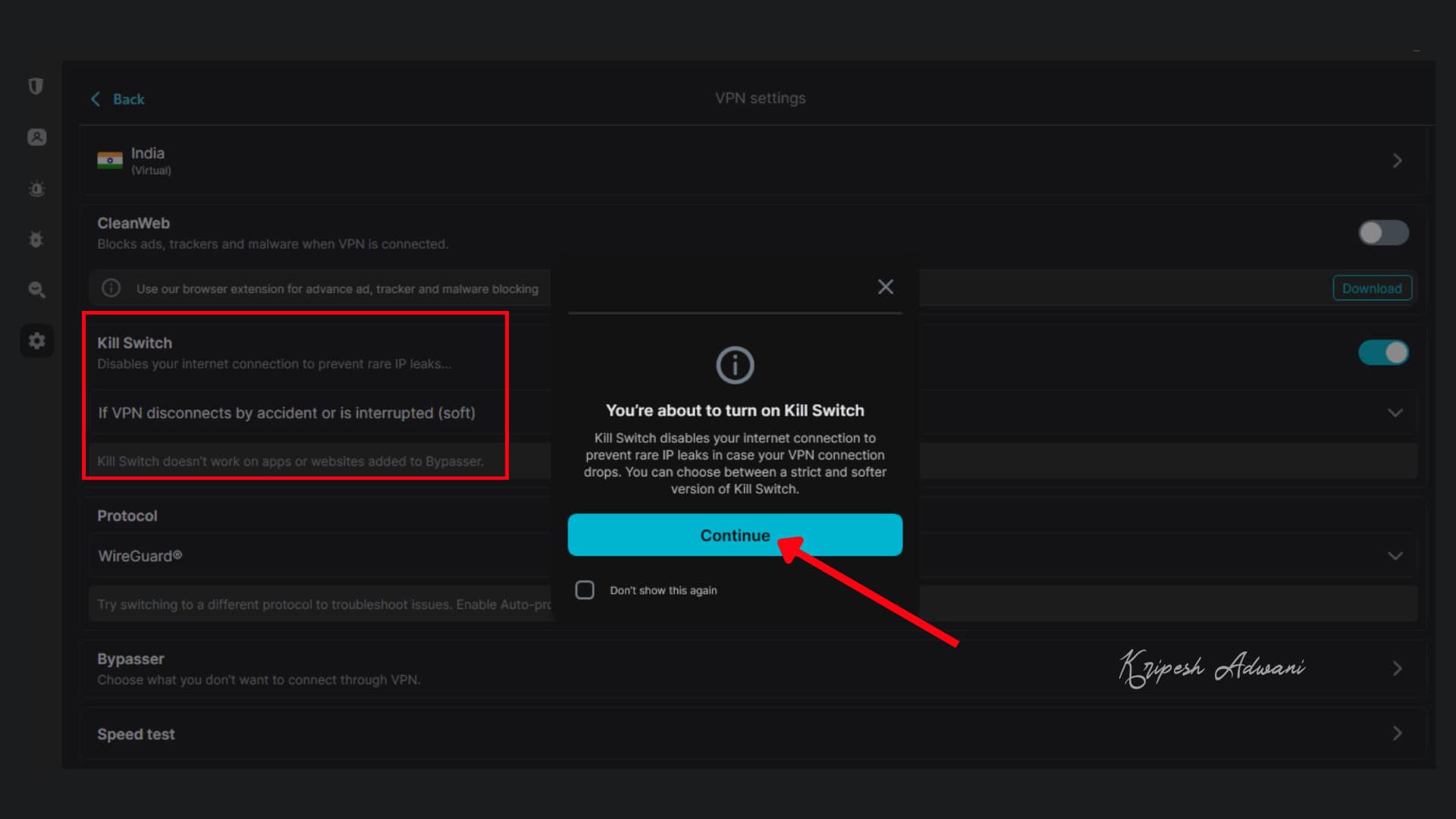
Enabling it is simple: navigate to the “Settings” tab and then “VPN settings.” Once activated, you won’t be able to access the internet without a secure VPN connection.
Security Comparison with Premium VPNs
Surfshark VPN is a reputable cybersecurity provider on par with other premium options, like NordVPN and ExpressVPN. All three services offer robust security features, including industry-standard AES-256-GCM encryption, secure VPN protocol, DNS leak protection, and more.
However, a potential concern with Surfshark is its headquarters location. The Netherlands falls under the jurisdiction of the Nine Eyes Intelligence Alliance. This alliance involves countries that have agreed to share intelligence data for security purposes.
While Surfshark maintains a strict no-logs policy, some users might find the Netherlands’ location a cause for concern due to the potential for government oversight.
Pricing
| Feature | Surfshark Starter | Surfshark One | Surfshark One+ |
| Price (1 month) | $15.45 | $17.95 | $20.85 |
| Price (1 year) | $44.48 ($2.78/mo) | $49.28 ($3.08/mo) | $103.68 ($6.48/mo) |
| Price (2 years) | $47.04 ($1.68/mo) | $55.44 ($1.98/mo) | $111.44 ($3.98/mo) |
| 30-day money-back guarantee | ✅ | ✅ | ✅ |
| Ad-blocker | ✅ | ✅ | ✅ |
| Alternative ID | ✅ | ✅ | ✅ |
| Antivirus | ❌ | ✅ | ✅ |
| Alert | ❌ | ✅ | ✅ |
| Search | ❌ | ✅ | ✅ |
Incogni | ❌ | ❌ | ✅ |
| Identity theft coverage | ❌ | ❌ | ✅ |
Surfshark offers three subscription plans: Surfshark Starter, Surfshark One, and Surfshark One+. Surfshark One+ includes Incogni, a service that enables users to remove personal data from company databases and people search sites. This feature is primarily beneficial for users in the United States. Therefore, if you reside in India or outside of the US, Surfshark One or Surfshark Starter would be more suitable options.
If you require only a VPN, Surfshark Starter is recommended. The two-year plan offers the best value, costing $47 in total for 28 months (24 months + 4 months free). For a comprehensive security suite including a VPN, antivirus, and other security tools, Surfshark One’s 2-year plan is the most cost-effective. It totals $56, so the per-month cost will reduce by 89% from $17.95 to just $1.98.
Money-Back Guarantee
Surfshark offers two ways to try their service risk-free: a 7-day free trial and a 30-day money-back guarantee. This flexibility allows you to choose the option that best suits your needs.
7-Day Free Trial:
- Exclusively through the Google Play Store or Apple App Store.
- Requires selecting the 12-month plan during signup.
- You won’t be charged for the first 7 days, but be sure to cancel before the trial ends to avoid automatic renewal.
30-Day Money-Back Guarantee:
- Applies to all subscriptions purchased directly from the Surfshark website.
- Provides a full refund within 30 days of purchase, even if you forget to cancel the 7-day free trial beforehand.
In short, you’re covered no matter which option you choose.
Payment Options
Surfshark offers a wide range of payment methods for your convenience. You can subscribe to their plans using major credit cards, debit cards, or PayPal. And, if you prioritize privacy, cryptocurrency payments are also an option.
Competitor Pricing
Surfshark offers the most affordable option among these three premium VPN providers when considering annual plans. NordVPN’s annual plan starts at $2.82/month, while ExpressVPN’s is $2.79/month. In contrast, Surfshark’s annual plan starts at a significantly lower price of $1.68/month.
Coupon Code
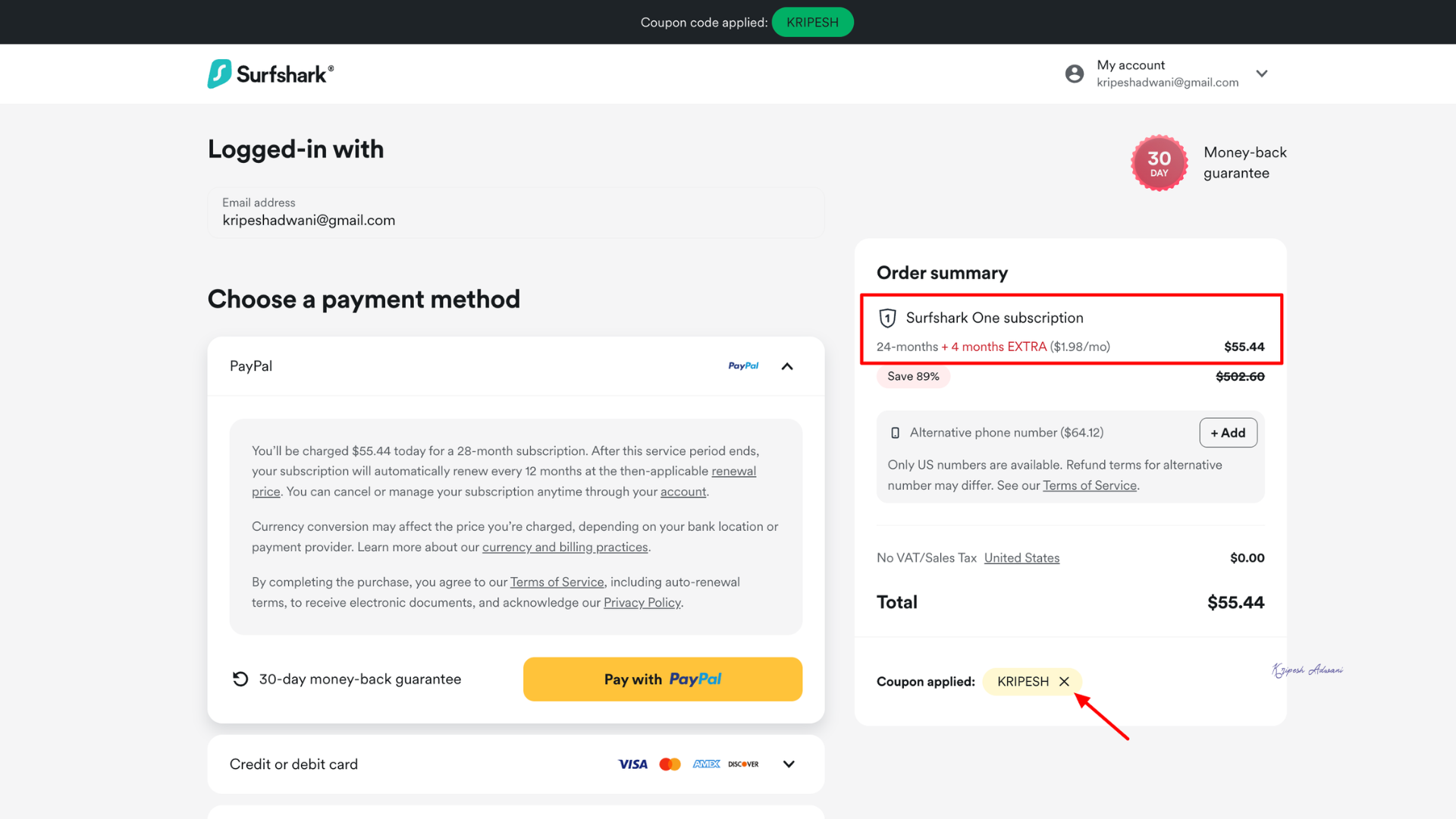
Great news for my viewers! Surfshark is offering an incredible deal on its subscription. If you subscribe to its annual or bi-annual plan, using my link, you’ll get an extra 4 months of service. For example, Surfshark One’s 2-year plan will cost $55.44 for 28 months (24 months + 4 months free).
Surfshark VPN Customer Support
| Customer Support Facility | Surfshark |
| 24/7 Live chat support | ✅ |
| Phone Line | ❌ |
| ✅ | |
| FAQs | ✅ |
| Knowledge Base | ✅ |
Surfshark offers multiple channels for customer support, making it convenient to get help whenever you need it. They provide 24/7 live chat and email support, allowing you to choose the method that best suits your situation.
What I like the most is their comprehensive self-service guide. It includes a knowledge base filled with informative articles, tutorials, videos, and FAQs. These resources cover different topics, including troubleshooting technical difficulties, getting started with the service, navigating the billing process, and setting up your account.
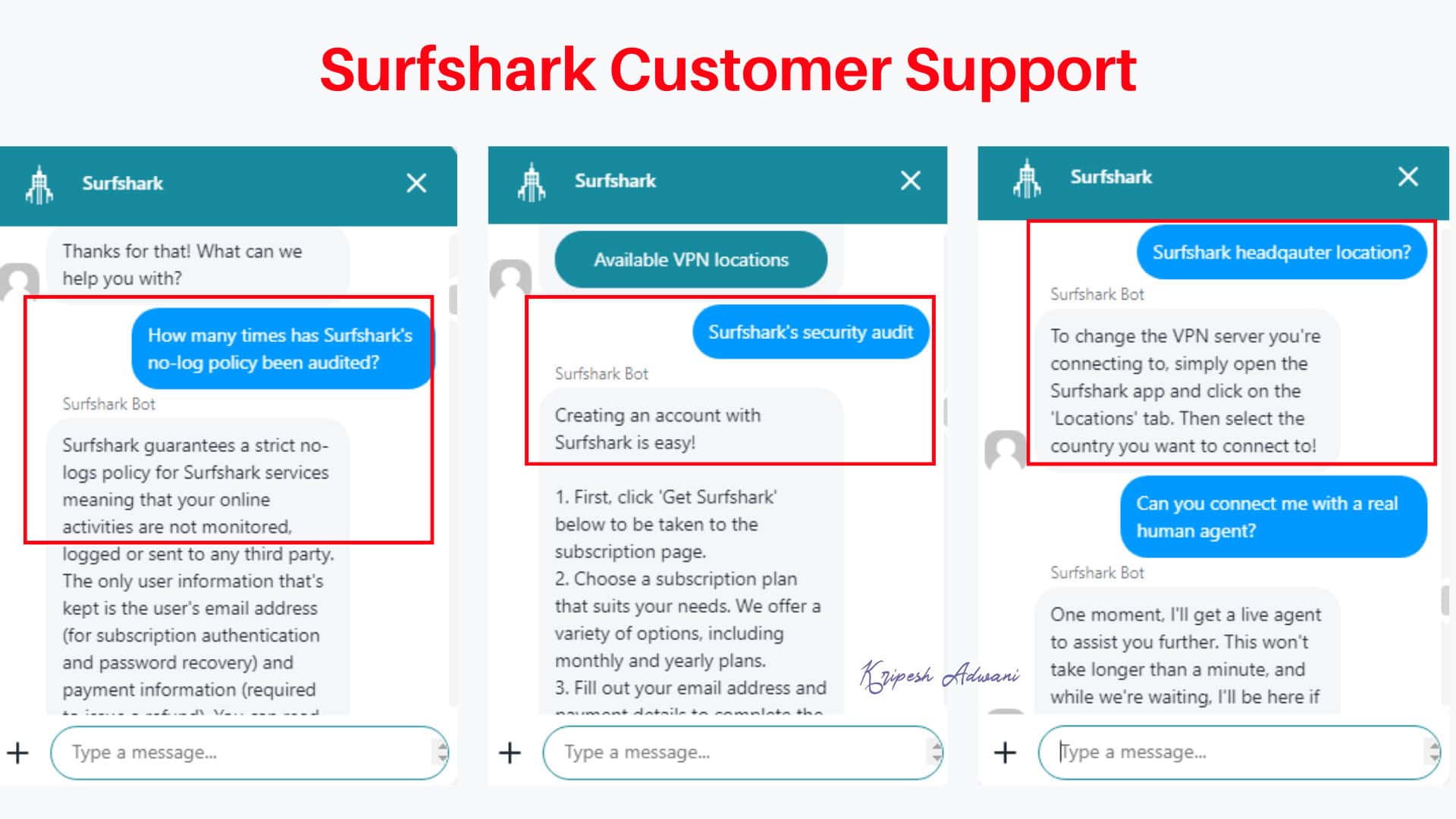
However, Surfshark’s customer support has some limitations. They don’t offer phone support, which might be a drawback for users who prefer direct interaction. Like ExpressVPN, their live chat initially doesn’t connect you with a human agent, but to a bot.
It can be frustrating if you have a complex technical issue requiring human expertise. In my case, the bot wasn’t able to fully understand the problem and provided inaccurate answers.
P2P
No secret. Many people use VPNs primarily for P2P torrenting. Surfshark is a reliable VPN with excellent torrenting support. Surfshark offers a vast server network spanning over 100 countries, offering more options for torrenting in different regions compared to NordVPN’s 59 countries.
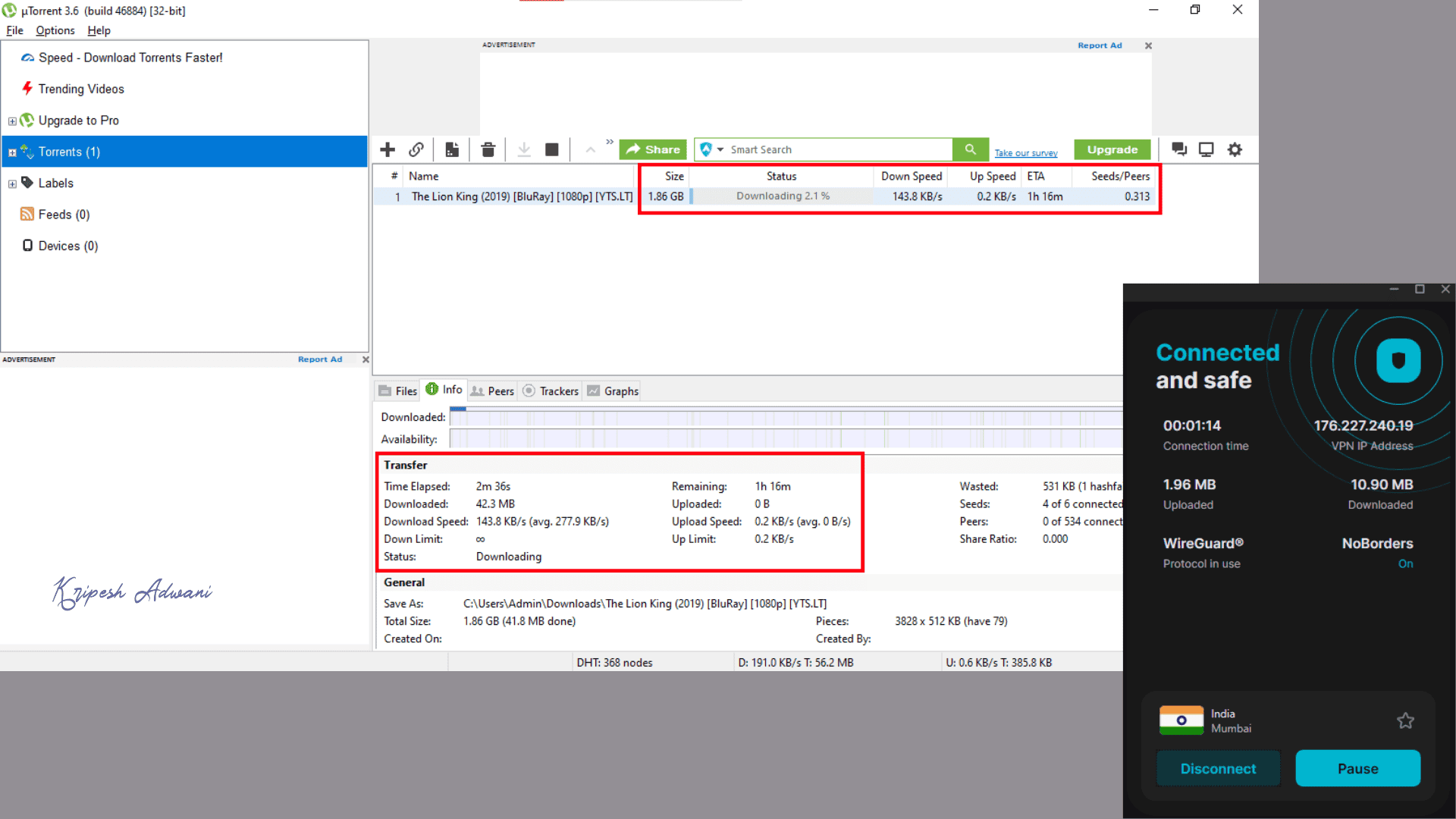
It works seamlessly with all major torrent clients like uTorrent, BitTorrent, qBittorrent, Transmission, Vuze, Deluge, and more. While using Surfshark for uTorrent, I haven’t experienced any significant speed reductions. However, my download speed was 143.8 Kbps, with an estimated download time of 1 hour and 16 minutes.
Additional Features
1) Bypasser
Split tunneling functionality in Surfshark has been renamed Bypasser. This feature allows you to choose which applications use the secure VPN tunnel for encrypted traffic and which bypass the VPN for potentially faster speeds.
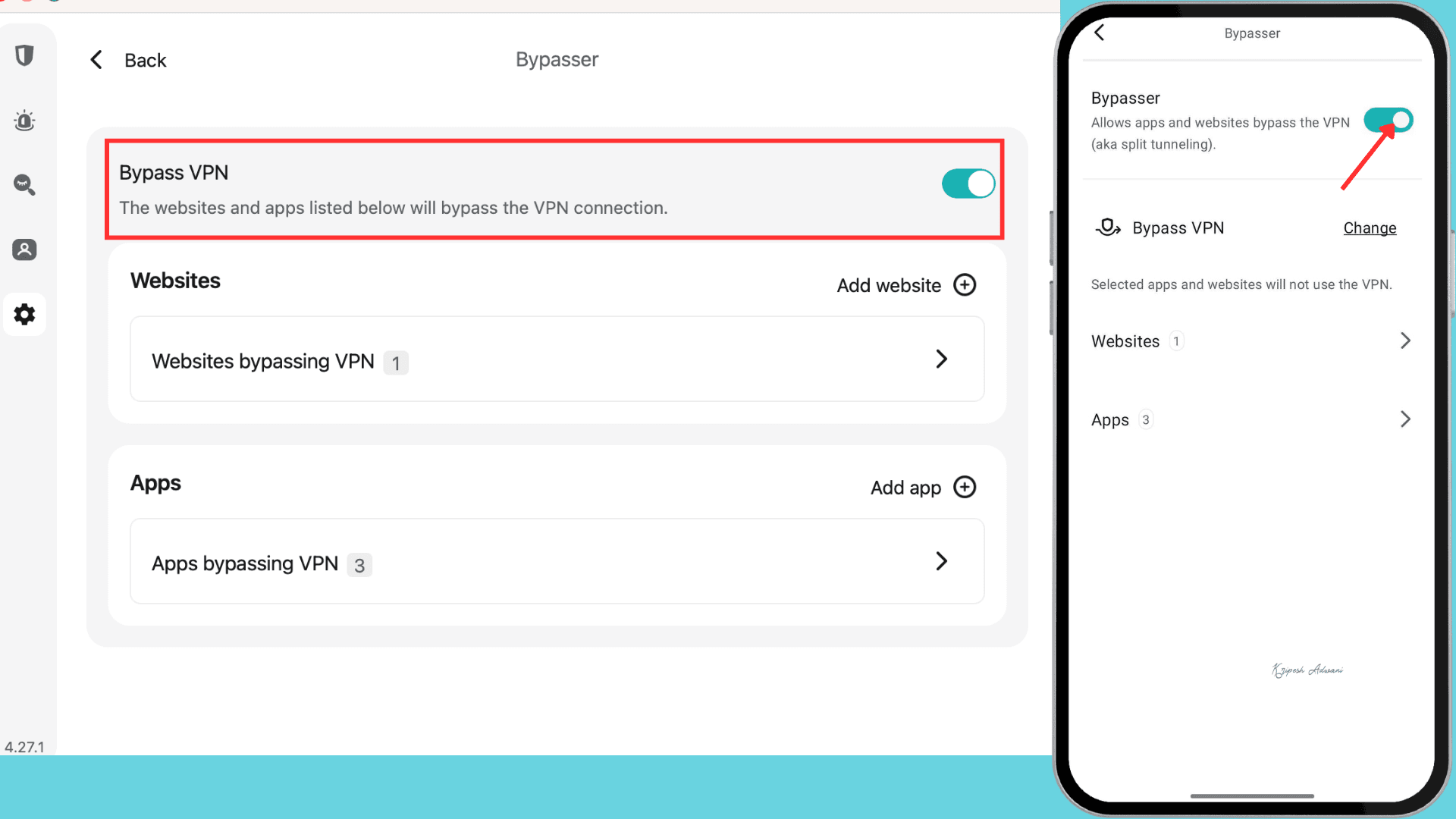
Bypasser provides two options: “Bypass VPN” to access the internet directly and “Route via VPN” to channel specific apps through the VPN tunnel. You can find this option in Surfshark’s VPN settings, where you can manually select applications and websites for optimal performance.
Earlier, it was available on Android and Windows, and Surfshark launched it on iOS last year. It is now available on macOS devices.
2) CleanWeb
Surfshark offers an excellent feature called CleanWeb, included with all its subscription plans. True to its name, CleanWeb blocks ads, pop-ups, and malicious websites, allowing you to enjoy a cleaner browsing experience with fewer trackers.
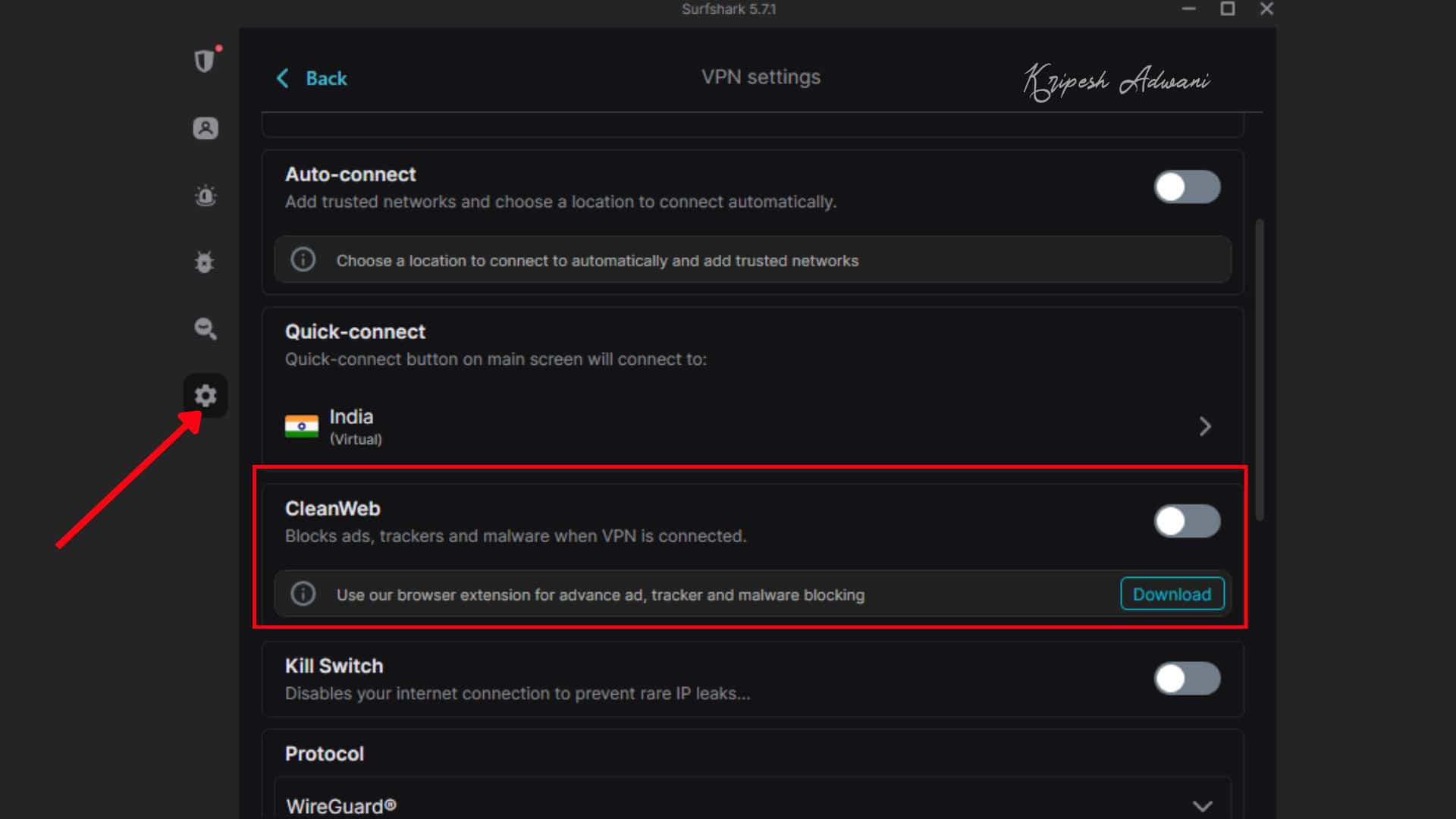
CleanWeb is available on Windows, Android, iOS, macOS, and other devices, including through browser extensions. It functions as a powerful ad-blocker and protects your devices from phishing attacks. Enjoy faster streaming as well.
3) NoBorders Mode
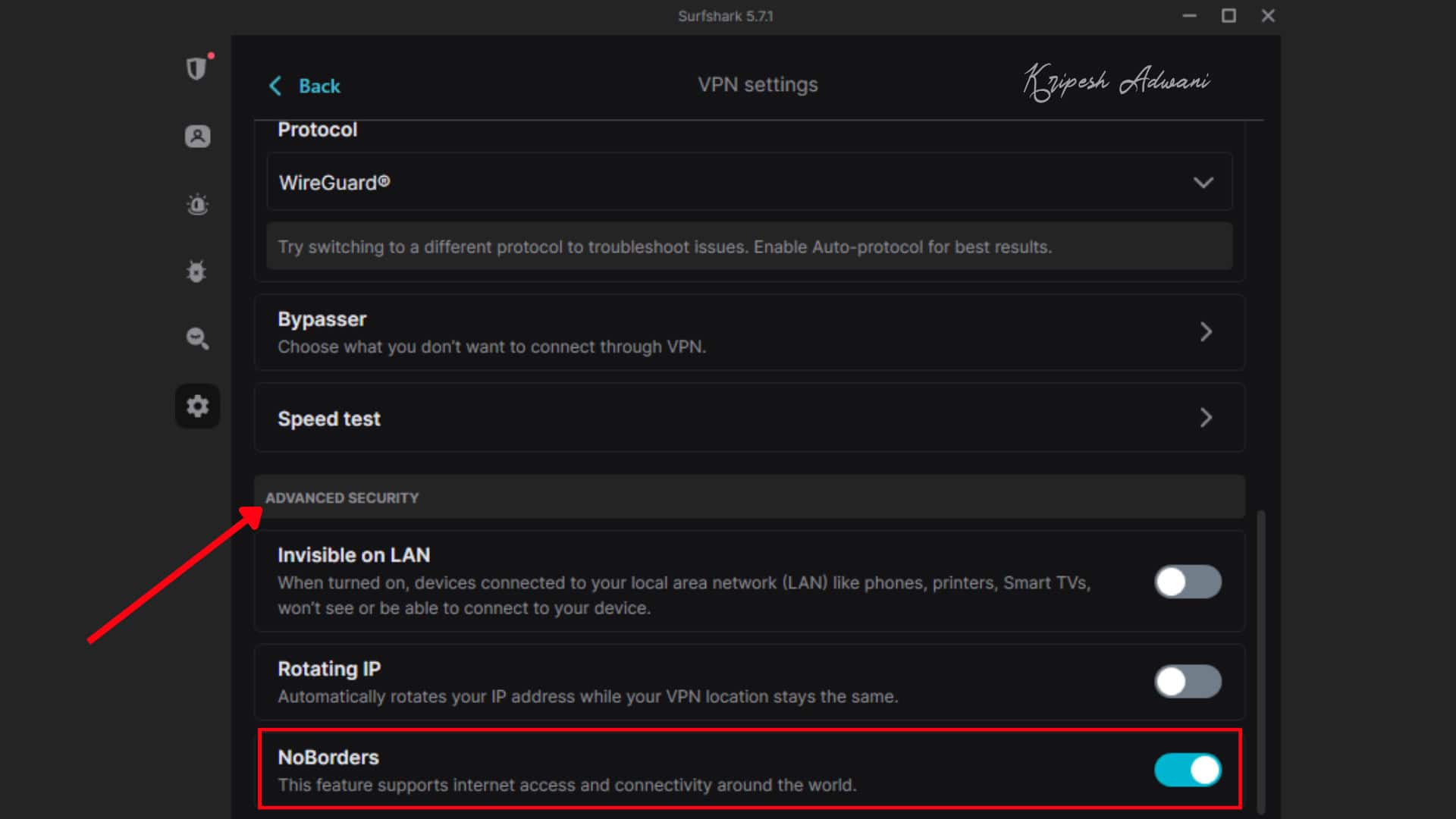
Surfshark’s NoBorders feature helps you bypass geo-restrictions and censorship. When the Surfshark app detects a block, it automatically enables NoBorders mode and suggests the best-performing servers to connect to. You can also enable it manually in the Settings > VPN settings > Advanced Security menu.
4) Multi-hop VPN
For users who value higher anonymity, Surfshark offers a multi-hop, or double VPN, feature. It works by first encrypting data from your device and then routing it via a remote VPN server. The data is then sent through a second VPN server and re-encrypted for an extra layer of security.
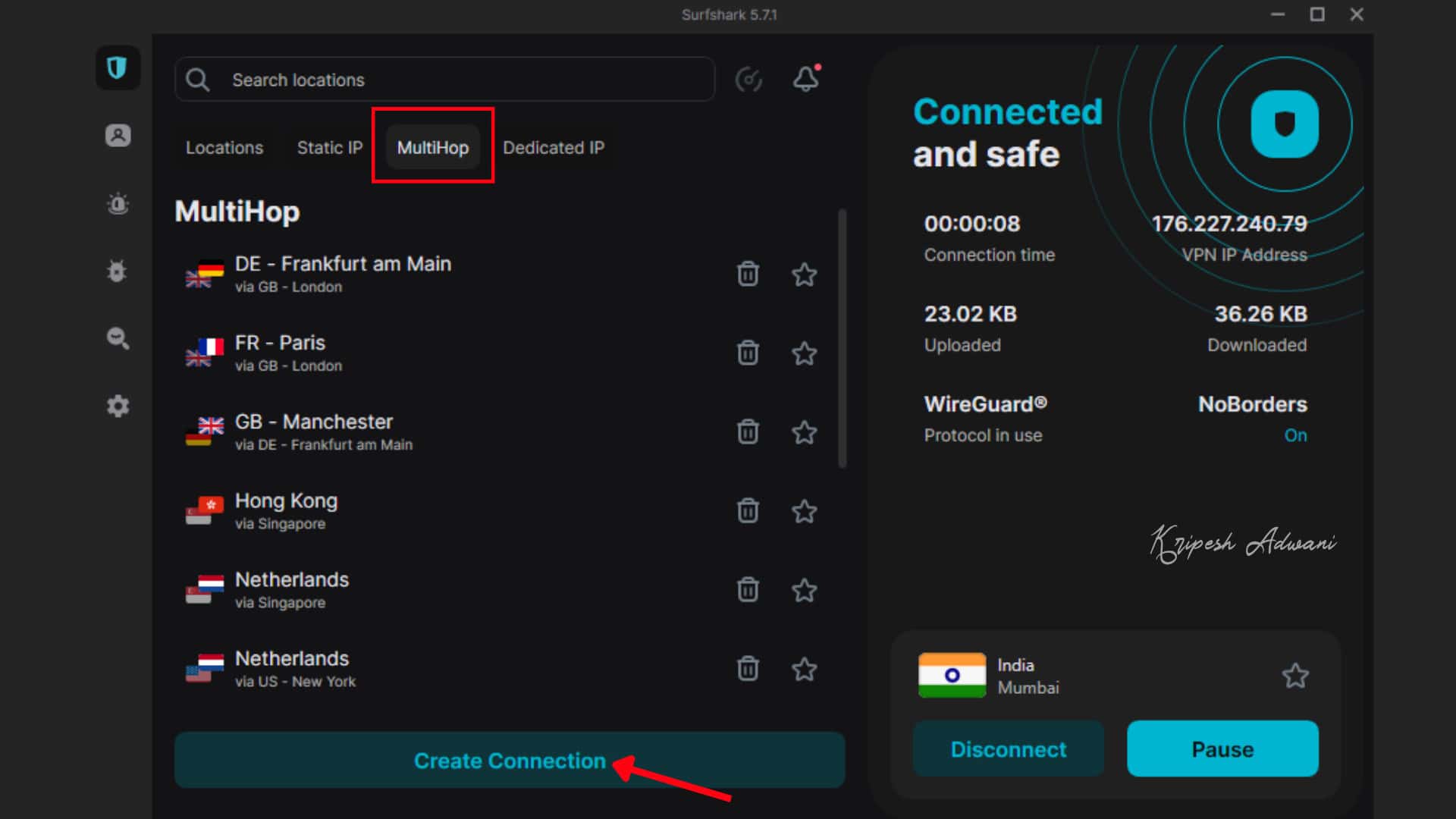
Accessing the multi-hop VPN feature is easy. Simply open the Surfshark app. This feature enhances your online untraceability, helps you bypass censorship restrictions, and allows you to select any server you want to create custom server pairs.
5) Alternative ID
Surfshark recently launched Alternative ID. It’s a new product that generates an alternate US virtual phone number and temporary email address for online use. These credentials help hide your original details.
For example, you can use these IDs when signing up for new accounts or newsletters. Alternative ID can be set up after purchasing a Surfshark plan. While you can make calls and receive messages with the virtual number, it cannot be used for OTPs or verification codes.
For US virtual numbers compatible with WhatsApp, voicemail, and similar services, consider KrispCall.
6) Antivirus
If you want to protect your devices against malicious software and harmful viruses, Surfshark Antivirus will help. Surfshark One and Surfshark One+ users receive a lightweight antivirus at no extra cost.
Features include webcam protection, customizable security, spyware and malware shielding, 24/7 malware protection, and more. While Surfshark VPN supports unlimited devices, the antivirus protects up to five.
Surfshark has now upgraded its antivirus with a more powerful feature: external storage scanning. This allows users to protect USB drives and other external storage devices. It’s usually enabled by default, but we can turn it off if needed.
7) Alert
Want to protect your sensitive data from theft? Surfshark Alerts provides instant notifications to One and One+ users. This feature protects against online data leaks and malware, monitoring your email, credit card information, IDs, and more
8) Everlink Self-Healing System
With most VPNs, if a server goes down, the connection drops. So, such an incident will expose your IP address and identity. Surfshark addresses this with Everlink, a patented server infrastructure designed as a self-healing system.
Everlink automatically reroutes your connection to another functioning server without any interruption. This ensures your VPN connection remains stable and uninterrupted. As a result, the risk of IP leaks was reduced, and disconnection gaps were minimized.
Devices
Surfshark offers extensive device compatibility. You can install the app on various desktops and laptops, including Windows, macOS, Linux, and Chromebooks. Mobile users can enjoy Surfshark on their Android or iOS devices.
The Surfshark app is available for streaming devices like FireTV and Apple TV, and might work on other smart TVs. Surfshark also provides browser extensions for Chrome and Firefox. For ultimate home network protection, you can even configure Surfshark on your routers and gaming consoles.
User Interface
| Devices | User Interface | Experiences |
| Windows | Intuitive | All features accessible in settings |
| macOS | Similar to Windows | User-friendly and modern |
| Linux | Basic | Easy to use, limited features |
| Android and iOS mobile | Well-designed, similar to a desktop | Android offers more features (including Override GPS location) |
| Browser Extension | Easily accessible | Lightweight, includes CleanWeb 2.0 |
While Surfshark works on most major devices and platforms, performance can vary. The user interface appears similar across Windows, macOS, Android, and iOS, but there are slight differences between the browser extension and the Linux system.
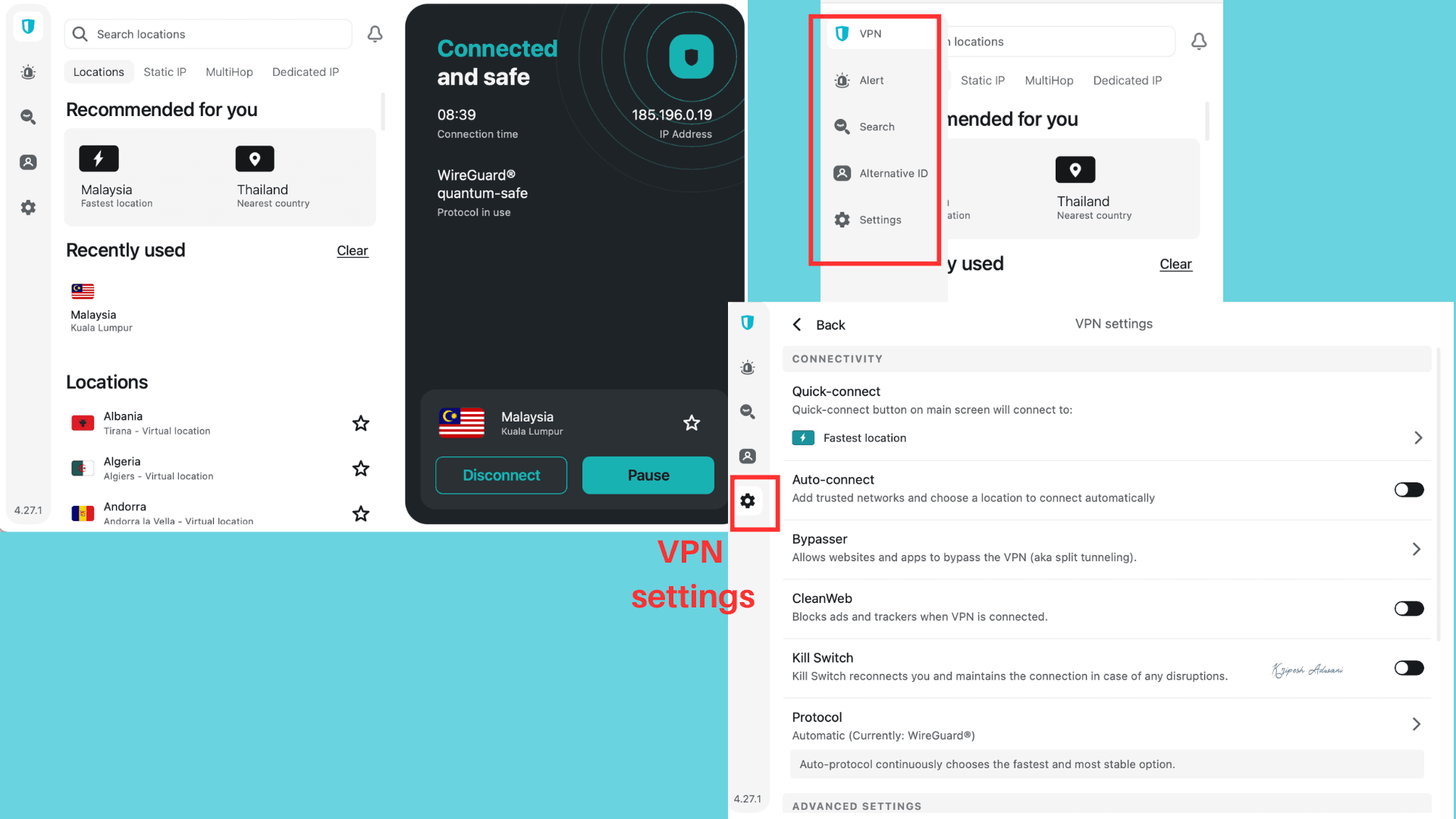
One advantage is that the apps and extensions are all lightweight and well-designed. It can be downloaded in just a few minutes. All features are uniformly available across all platforms. For instance, the Bypasser feature is now launched on macOS devices.
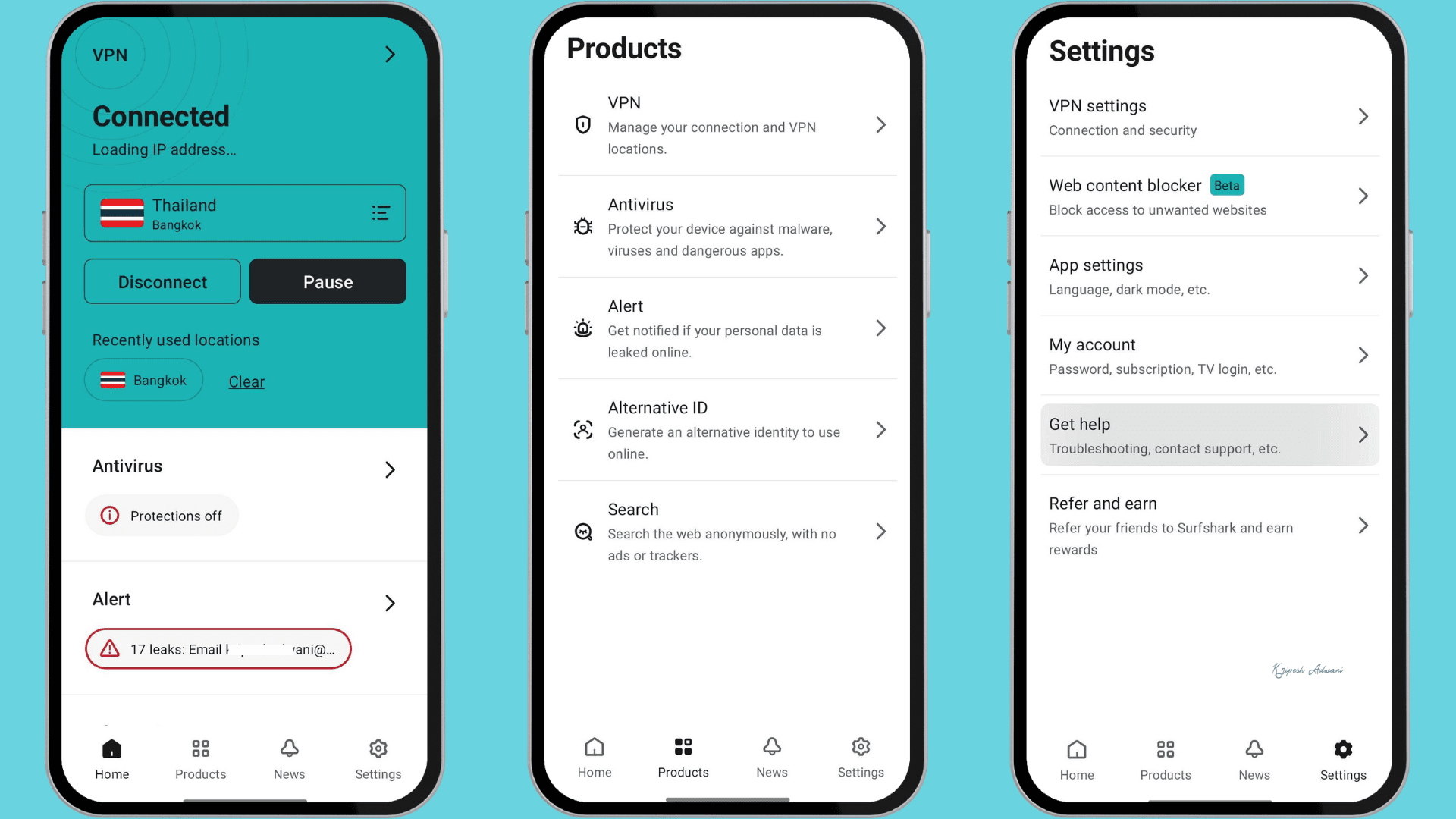
Surfshark has introduced app widgets for Android. So, you can connect to the VPN directly from your home screen without opening the app.
Performance & Reliability
I’ve been using Surfshark VPN for the past few years and consistently find it to be among the top 3 VPN providers. It offers a compelling combination of features at a competitive price.
Surfshark includes all the essential features you’d expect from a premium VPN, like split tunneling, secure protocols, strong encryption, and multi-hop connections. They also go above and beyond with additional features like Camouflage Mode and NoBorders Mode.
I haven’t experienced any issues with speed while using Surfshark. It consistently performs well for streaming and torrenting. While Surfshark is a great choice, it’s not perfect. I’ll disclose some potential drawbacks in the next section. Keep reading!
Surfshark Pros
Based on my experiences, Surfshark outperforms other VPNs in the following areas:
1) Fast Speeds
Surfshark delivers exceptional speeds on both nearby and distant servers. I observed only a 15–30% drop due to VPN-induced latency. This performance is possible because Surfshark combines WireGuard with Nexus and FastTrack technologies to boost speed.
2) Unlimited Device Access
Surprisingly, Surfshark is one of the few premium VPNs that offer unlimited device access. There’s no bandwidth limit either. This means you can download the app on as many devices as you want and access the internet without worrying about data restrictions.
3) Affordable Plans
Compared to NordVPN, ExpressVPN, and ProtonVPN, Surfshark offers the most competitive pricing. Their lowest price starts at $1.68 per month for the 2-year plan. Plus, you get an additional 4 months free when you purchase through my link.
4) Built-in Ad Blocker
Unlike many other premium VPNs, Surfshark includes a unique feature called CleanWeb. This built-in ad and malware blocker helps protect you from intrusive pop-ups, malicious websites, data breaches, and video ads. It’s one of the better ad-blocking solutions offered by a premium VPN and is also available as a browser extension.
5) Audited No-Logs Policy
Surfshark follows a strict no-logs policy, which has been independently verified by third-party security firms multiple times. The most recent audit was conducted by Deloitte in November 2025. In January 2026, Surfshark also completed an infrastructure audit with SecuRing.
6) Strong Privacy Measures
Surfshark has a clear and easy-to-understand privacy policy. The provider clearly explained how user data is handled. The VPN also offers post-quantum protection on WireGuard for enhanced security, a feature that only a few VPN providers currently offer.
7) Email Scam Checker
To help protect users against phishing attacks, Surfshark One and Surfshark One+ include an Email Scam Checker. This AI-powered Gmail tool analyzes email content, sender details, and links for potential scam patterns.
8) Excellent Streaming Support
Surfshark unblocks most major OTT platforms. I didn’t encounter issues while watching Netflix or Amazon Prime Video. In India, users can also stream content on Disney+ Hotstar and ZEE5 without major interruptions.
9) Modern User Interface
The user interface of Surfshark is beginner-friendly across desktop and smartphone. From the home screen, users can easily access different server locations, MultiHop connections, and static or dedicated IP options. Other important features are accessible from the settings menu.
10) Alternative ID
Alternative ID in Surfshark provides a virtual US phone number and a temporary email address. This will help in private account sign-ups and newsletter subscriptions by masking contact details.
11) Antivirus Upgrade
Surfshark has upgraded its antivirus with more powerful features. Now it provides webcam protection, 24/7 malware defense, customizable security options, spyware shield, and external storage scan.
12) Split Tunneling on Mac
Bypasser is Surfshark’s split tunneling feature. Previously, it was available only on Android, iOS, and Windows. It is now available on macOS devices as well.
13) Infrastructure improvements
Surfshark has rolled out Everlink self-healing connections, FastTrack route optimization, and 100 Gbps servers in the Netherlands. All upgrades are aimed at improving stability.
Surfshark Cons
1) Netherlands-Based Jurisdiction
The Netherlands is a privacy-friendly nation, and Surfshark maintains a clean history regarding cybersecurity threats. However, the Netherlands falls under the Nine Eyes alliance. This means that in certain situations, the government can compel Surfshark to disclose user data.
2) Mixed Support Experience
This VPN provider offers 24/7 live chat, email support, and a helpful knowledge base. However, user feedback is mixed. Some people have a great experience, while others find the support less helpful. In some cases, accounts may be temporarily locked if any suspicious activity is detected.
Surfshark Alternatives
Despite being impressed by Surfshark’s extensive features, there are three strong competitors you can consider:
1) Surfshark vs NordVPN
NordVPN, a VPN service founded in 2012, is known for its exceptional speeds and strong security features. Unlike Surfshark’s jurisdiction, NordVPN is headquartered in Panama, allowing it to operate outside major intelligence-sharing agreements.
It offers several unique features, including Meshnet (mesh networking), Threat Protection, dark web monitoring, and dedicated IP addresses. NordVPN also provides more servers (9,000 in 118 countries) compared to Surfshark’s approximately 4,500 servers in 100 countries.
However, its pricing is slightly higher than Surfshark’s. Its 2-year plan, which includes an additional four months of access, costs about $2.82 per month with my link.
2) Surfshark vs ExpressVPN
ExpressVPN is another alternative, launched in 2009. The company is based in the British Virgin Islands, known for its privacy-friendly laws and position outside the 9 Eyes alliance.
It delivers strong connection speeds and includes features such as its proprietary Lightway protocol, a kill switch, split tunneling, an ad blocker, Threat Manager, and password manager.
ExpressVPN has also made its pricing more competitive with the introduction of a biannual plan. Its Basic plan now costs about $2.79/month for 28 months through my link.
3) Surfshark vs Proton VPN
Proton AG, the same Swiss company behind ProtonMail, ventured into ProtonVPN in 2017. Headquartered in Switzerland, it benefits from Switzerland’s strong privacy laws (outside the 14 Eyes alliance) as opposed to Netherlands-based Surfshark.
Similar to NordVPN, ProtonVPN supports 10 devices at the same time. However, unlike Surfshark, ProtonVPN caters to a wider range of users by offering both free and paid plans.
Their 2-year plan provides excellent value at $2.99/month. You can unlock unbelievable discounts by purchasing through our link.
Why Should You Trust Me?
My interest in technological advancements began in 2015, providing me with a comprehensive understanding of the evolving digital landscape. However, my knowledge extends beyond theory. To optimize my workflow and safeguard my data, I actively utilize various SaaS tools and VPN services.
In the past three years, I have reviewed more than 30 paid and free VPN options. Want to know the difference between a VPN and Tor? Confused about the India VPN ban? I’ve got you covered with clear, informative videos.
Not only do I review VPNs, but I also maintain subscriptions to several VPN services. This allows me to stay updated on the latest features, performance enhancements, and crucial security updates. In essence, I’m here to guide you confidently through the intricacies of online security.
Conclusion
Is Surfshark Worth Your Money?
While Surfshark ranks among the top 3 best VPN providers, it has both strengths and flaws. It offers strong security features, including split tunneling, an ad blocker, RAM-only servers, and more. Using the WireGuard protocol, it often delivers faster speeds than competitors like NordVPN, ExpressVPN, and ProtonVPN in many tests.
The only con is its jurisdiction in the Netherlands. Otherwise, it’s a feature-rich, fast, secure, and privacy-friendly VPN that supports unlimited devices. In 2025–2026, Surfshark introduced several upgrades and successfully underwent no-logs audits, further strengthening its credibility.
Overall, for users in India, Surfshark is a budget-friendly, value-for-money VPN in 2026.
FAQs
Is Surfshark the absolute best VPN?
Yes, Surfshark has consistently ranked in the top position for the past two years in my “9 Best VPNs of 2026” list. This is due to its strong features, including AES-256-bit encryption, split tunneling, secure VPN protocols, an ad blocker, antivirus, Email Scam Checker, and Alternative ID, while still remaining the most affordable options available.
Is Surfshark based in China?
No, Surfshark is not based in China or Hong Kong. Originally established in 2018, the company moved its headquarters to the Netherlands in 2022.
Is Surfshark secure?
Absolutely! Surfshark offers a comprehensive security suite, including a kill switch, strong VPN protocols, and top-notch encryption. They adhere to a strict no-logs policy, ensuring your privacy. For maximum user safety, they even offer a multi-hop (double VPN) feature for added security.
Does Surfshark offer a free plan?
Surfshark does not offer a permanent free plan. However, you can try the service risk-free with either a 7-day free trial or a 30-day money-back guarantee.
Is Surfshark good for P2P file sharing?
Yes, Surfshark is a good option for P2P file sharing, especially for budget-minded users. Surfshark allows P2P traffic on all its servers, making it compatible with major torrenting sites like uTorrent, BitTorrent, qBittorrent, and Transmission.
How do I enable Surfshark’s Camouflage Mode?
Surfshark’s Camouflage Mode is actually enabled automatically whenever you connect to a server using the OpenVPN protocol (TCP or UDP). Camouflage Mode can help you bypass government restrictions or censorship that might block VPN usage.
What’s the most cost-effective Surfshark plan?
For VPN access only, the Surfshark 2-year starter plan at $58.52 is ideal. For VPN and antivirus protection, the Surfshark One 2-year plan at $72.52 is a wise choice.
Does Surfshark track my activity?
Surfshark claims a strict no-logs policy, meaning they don’t track your online activity. They only store the minimal data necessary to maintain your VPN connection.
Is using Surfshark VPN legal in India?
Yes, using a VPN like Surfshark is legal in India. However, recent Indian laws require VPN providers to store user data for 180 days. Surfshark thus maintains virtual Indian servers to operate under a “no-logs” policy.
Does Surfshark sell my data?
No, Surfshark claims they don’t sell user data. They emphasize user privacy and state that they don’t collect any information that could identify you or lead to a data breach.

Surfshark Pros (+)
- Fast Speeds
- Unlimited Device Access
- Affordable Plans
- Built-in Ad Blocker
Surfshark Cons (-)
- Netherlands-Based Jurisdiction
- Mixed Support Experience