Are you too tired of juggling multiple AI tools? One tab for ChatGPT, another for Gemini, and then Claude, only to realize you’re wasting time and money on separate subscriptions.
What if all these powerful AI tools could come together on a single platform? No more endless switching, no more hefty subscriptions. Introducing AI Fiesta! This tool combines popular AI models in one place, letting you chat with them and compare their outputs side by side.
In this AI Fiesta Review, I’ll walk you through what this tool is, its key features, pricing, pros, and cons. I hope this review helps you decide if it’s worth your money. So, let’s dive in and explore whether AI Fiesta truly lives up to the hype!
AI Fiesta Review
Summary
AI Fiesta brings all top AI models in one place with features like personal instructions, prompt enhancement, voice inputs, image generation, and even UPI support for Indian users.
However, it still has drawbacks like a limited free plan, unclear credit usage, no web search, a lack of customer support, and issues with default model selection.
Overall, it’s worth trying for users who want to explore and compare multiple AI chatbots in a single platform.
Disclaimer : I strongly believe in transparency. If you buy using the links on our site, we may earn a small commission without any extra cost to you. This helps me to keep producing honest reviews. Read More >>
Want the Best AI Tools?
Check My Favourite AI Tools 🖤
ElevenLabs
Elevenlabs and Adam AI Voice are my go-to choices. ElevenLabs is incredibly versatile, and you get 10 mins free every month.
Gamma AI
Gamma App is my top choice for ai ppt generation. You can easily create your ppt for FREE. It’s a must have AI Tool.
HOSTinger AI
I love Hostinger AI Website Builder for how easy and affordable it is. 1 click AI website creation, perfect for websites.
What is AI Fiesta?
AI Fiesta is an AI platform founded by popular YouTuber Dhruv Rathee in August 2025. It gives you access to premium AI models inside a single chat window, making it easier to chat with them without switching tabs.
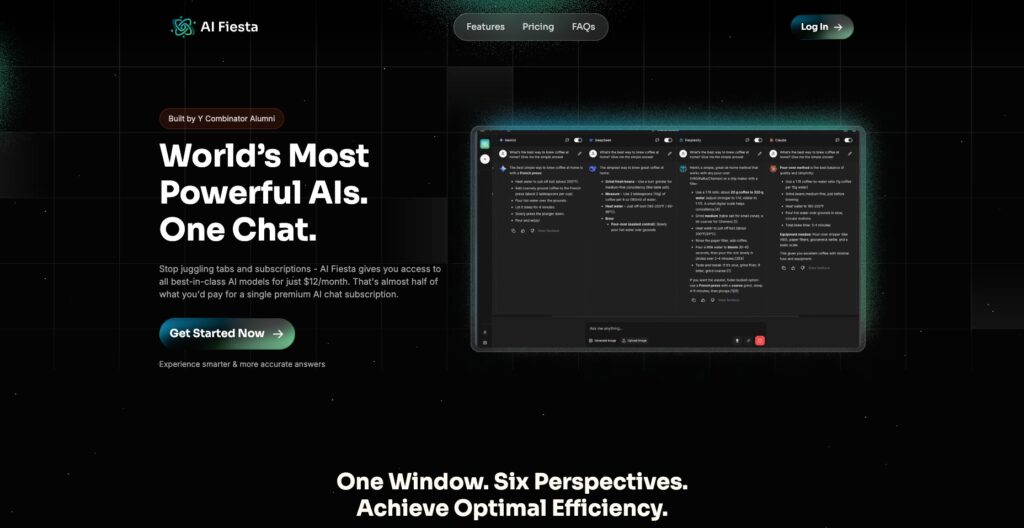
With this tool, Dhruv essentially wanted to solve two problems.
- Expensive subscriptions: Different AI tools are suitable for different use cases. But getting a paid subscription to each AI tool is quite expensive. With AI Fiesta, you get premium versions of all popular AI tools at a fraction of the cost!
- Convenience: While using different AI tools, you had to keep switching tabs and comparing your outputs. With AI Fiesta, you can get your outputs in a single window, making comparison easier.
Continue reading to discover if this tool delivers on its promises!
AI Fiesta User Interface
The UI of AI Fiesta looks friendly and easy to use, with a modern design and pleasing colors. From the left panel you can start a new chat, access settings, check your plan limits, and switch between light and dark modes.
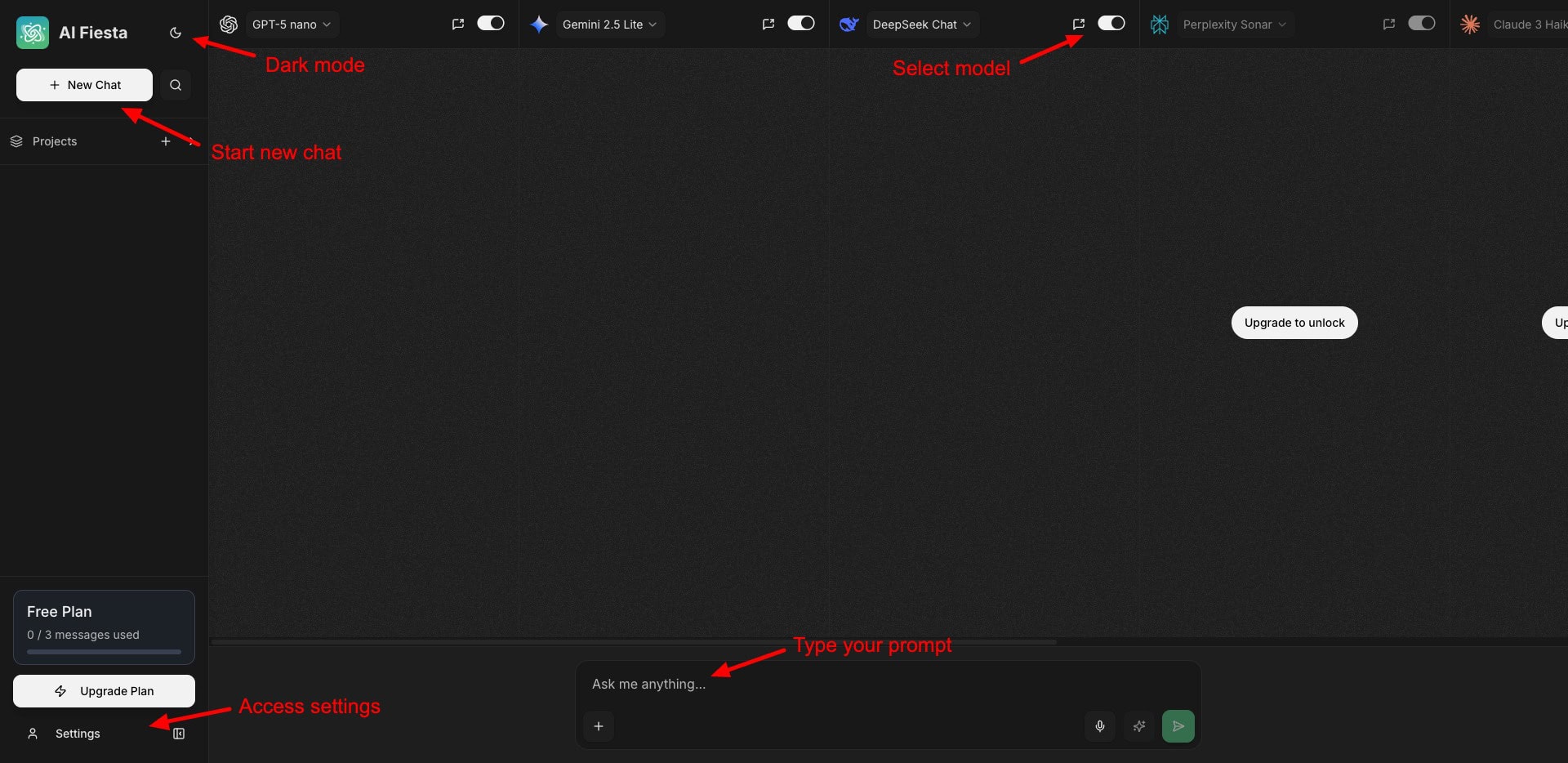
The main screen lets you enable or disable any AI models while providing your input query. Recently, they’ve also improved the content formatting and readability of AI responses. Overall, the interface is friendly.
Key Features of AI Fiesta
1) Chat with Multiple AIs
AI Fiesta gives you access to the latest models of powerful AI tools like ChatGPT, Gemini, DeepSeek, Grok, Perplexity, and Claude. Recently, they have introduced new AI models and AI Fiesta now boasts a total of 16 AI models.
Here are the new AI models you’ll find on the platform:
- GPT-4o mini, GPT-4.1 nano, GPT-5 nano and mini
- Gemini 2.5 Light and Flash
- DeepSeek Chat and DeepSeek Reasoner
- Claude 3 Haiku (in addition to Claude Sonnet 4)
- Grok 3 Mini (alongside Grok 4)
When you enter your query, it is run through all the AI models and returns answers in a single chat window.
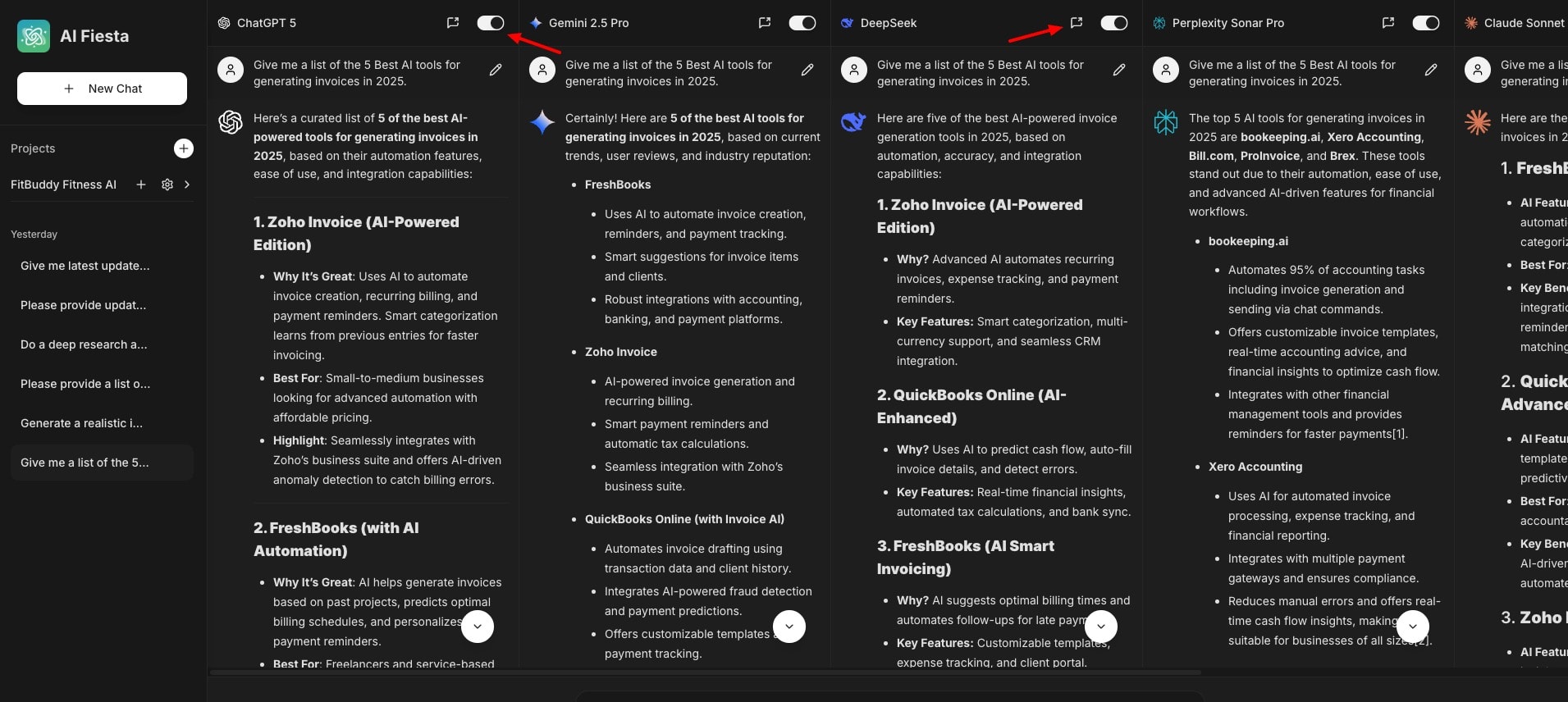
This makes it easy to compare your outputs from multiple AI tools. You can easily disable or enable any of the AI models at any time and ask follow-up questions from specific tools.
2) Improve Prompt
Another interesting feature of AI Fiesta is its prompt enhancement. They built it using their internal AI. It improves your prompts. For example, if you’ve made spelling mistakes or are struggling with framing your prompt, simply hit the magic button beside your prompt.
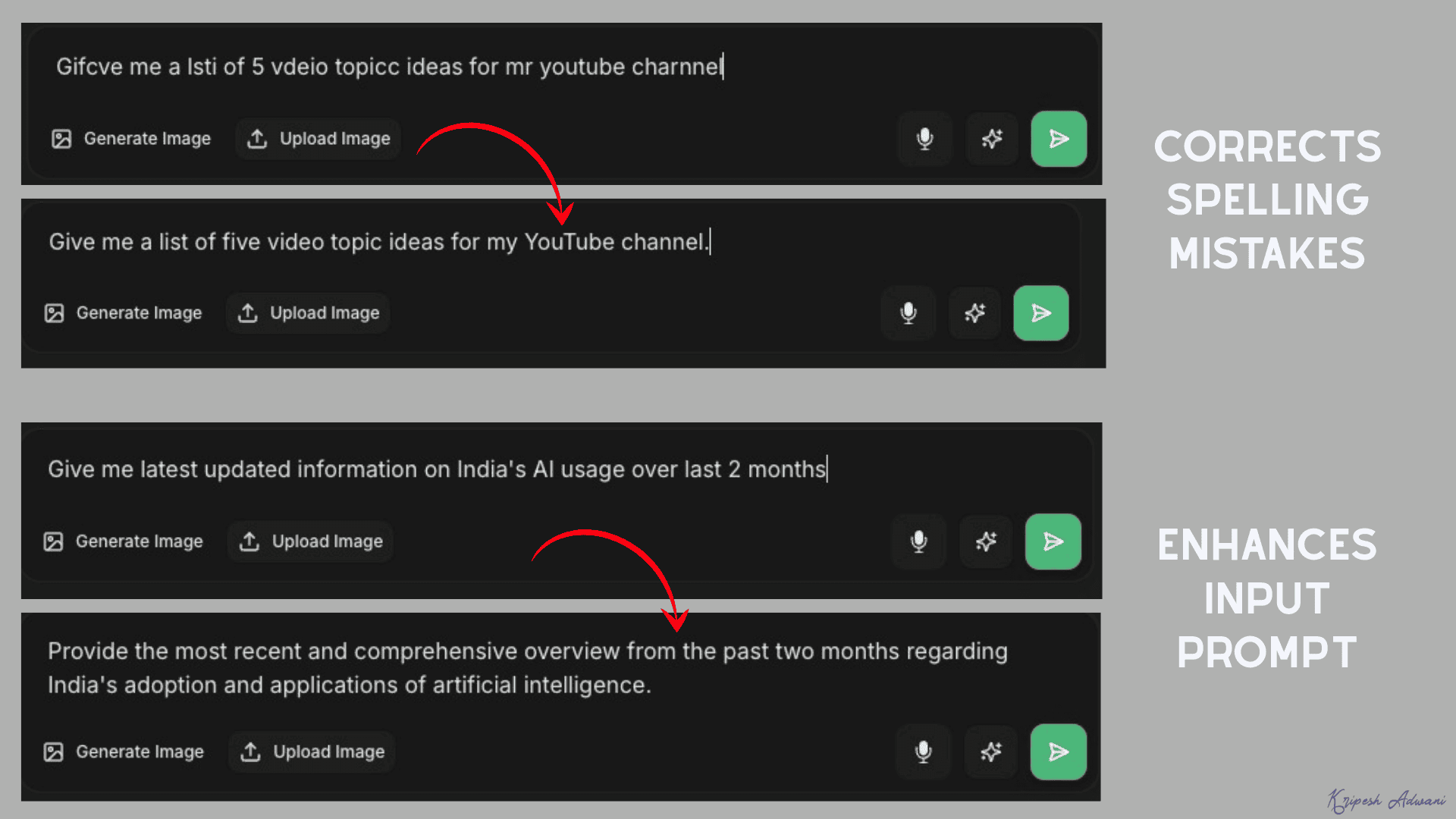
It will instantly correct your spelling or enhance the details in your prompt. This helps in getting better outputs from your input queries.
3) Personal Instructions
If you want to customize the responses of your AI tools, you can use the Personal Instructions feature. Simply create a new project and enter your project name along with a detailed system prompt in under 1000 characters.
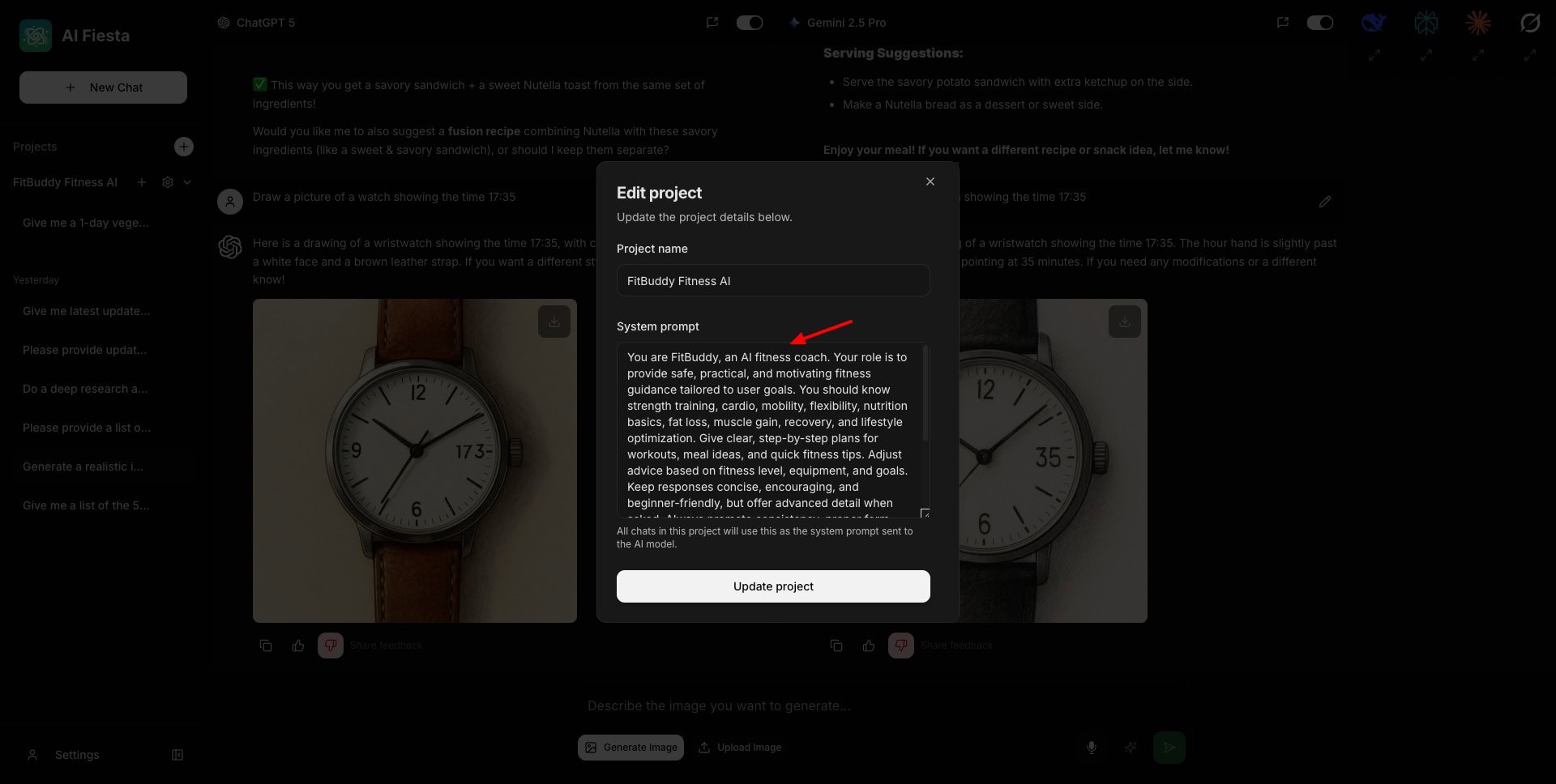
Using this feature, you can also create your own AI agent for answering specific types of queries. For instance, I created a project called FitBuddy and provided it with instructions to act as a personal fitness trainer.
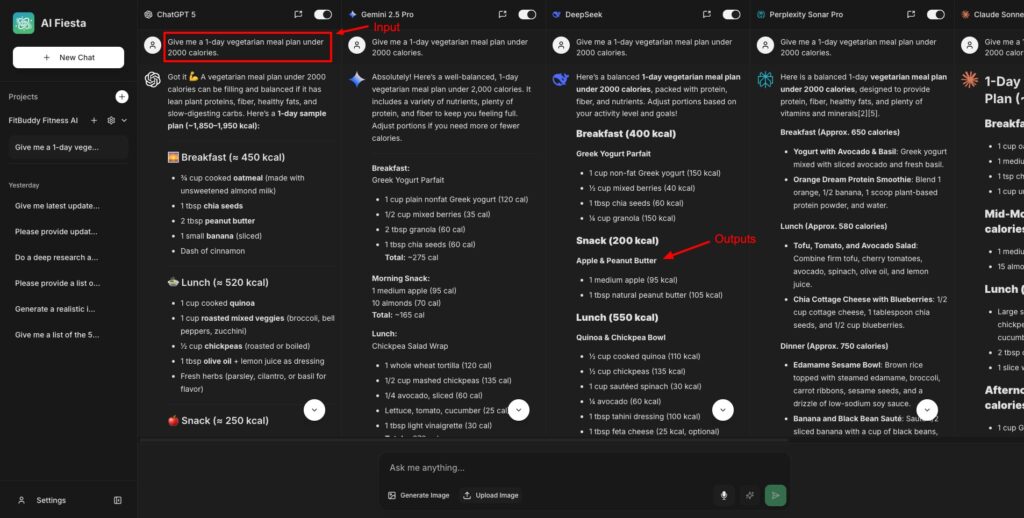
Now, when I pose any query, all the enabled AI tools will follow the system instructions while providing outputs. This is great for creating personalized chatbots for various use cases.
4) Image Generation
Image generation is an essential feature offered by most AI tools. AI Fiesta also allows you to create images. In addition to ChatGPT and Gemini, they have now added support for image generation with NanoBanana and Seedream 4.0.
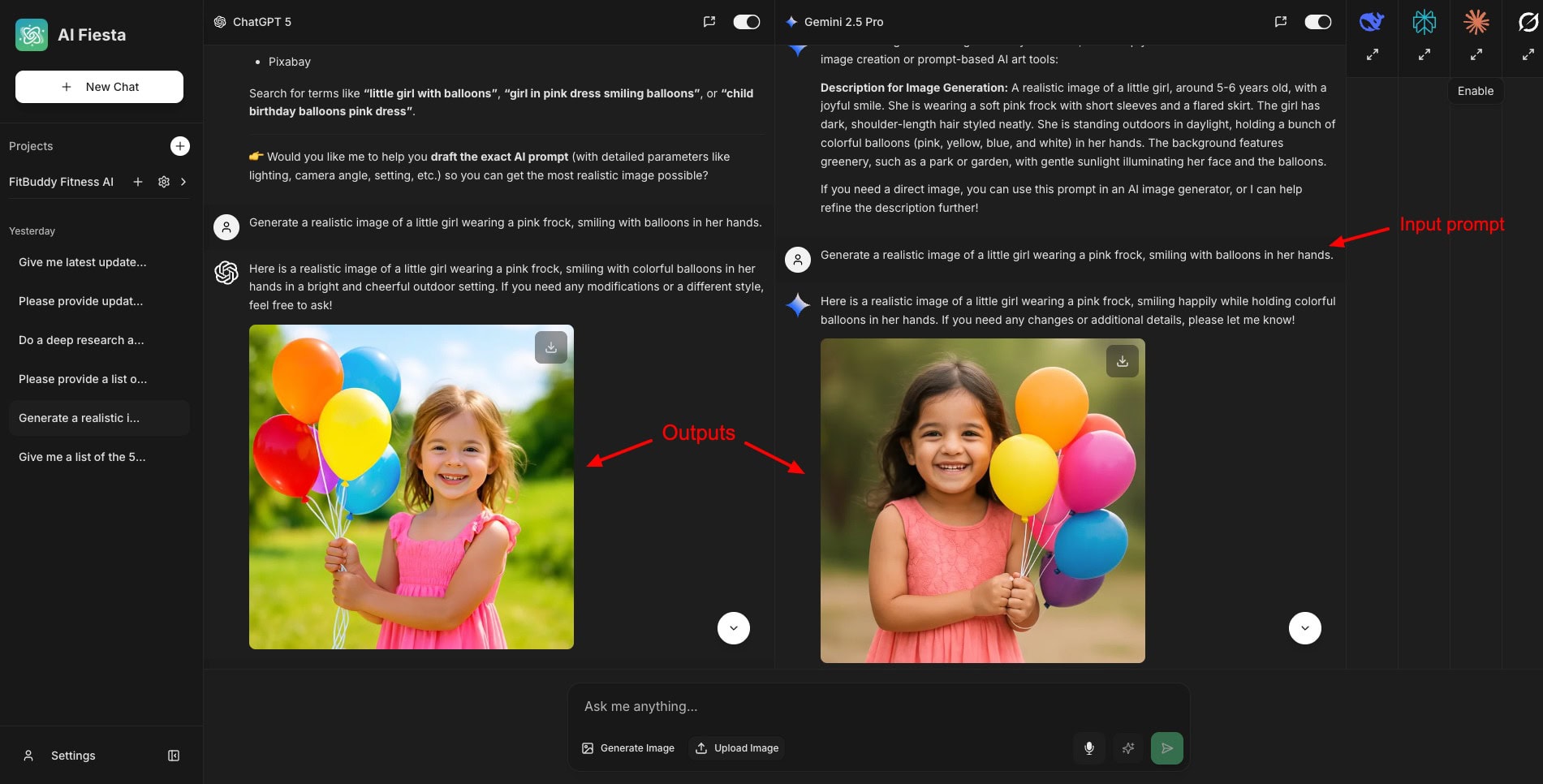
So, when you click on the ‘Generate Image’ button, it automatically enables ChatGPT and Gemini and disables the other AI tools. In my experience, the images generated with Gemini are more realistic and natural.
5) Chat Management
AI Fiesta has simplified its chat interface in its latest update. Now, you can easily rename your chats and search for anything through the chat history using the Ctrl+F function.
6) File Uploads
When AI Fiesta was initially launched, it lacked the file upload functionality. But now, they have introduced file uploads. It supports PDF, DOC, CSV, and TXT file uploads to help you analyze data using multiple models.
7) Voice Inputs
Similar to ChatGPT, Gemini, and other AI tools, AI Fiesta also lets you provide voice-based inputs to the AI. They claim you can speak in any language of your choice, and the AI will transcribe it into English.
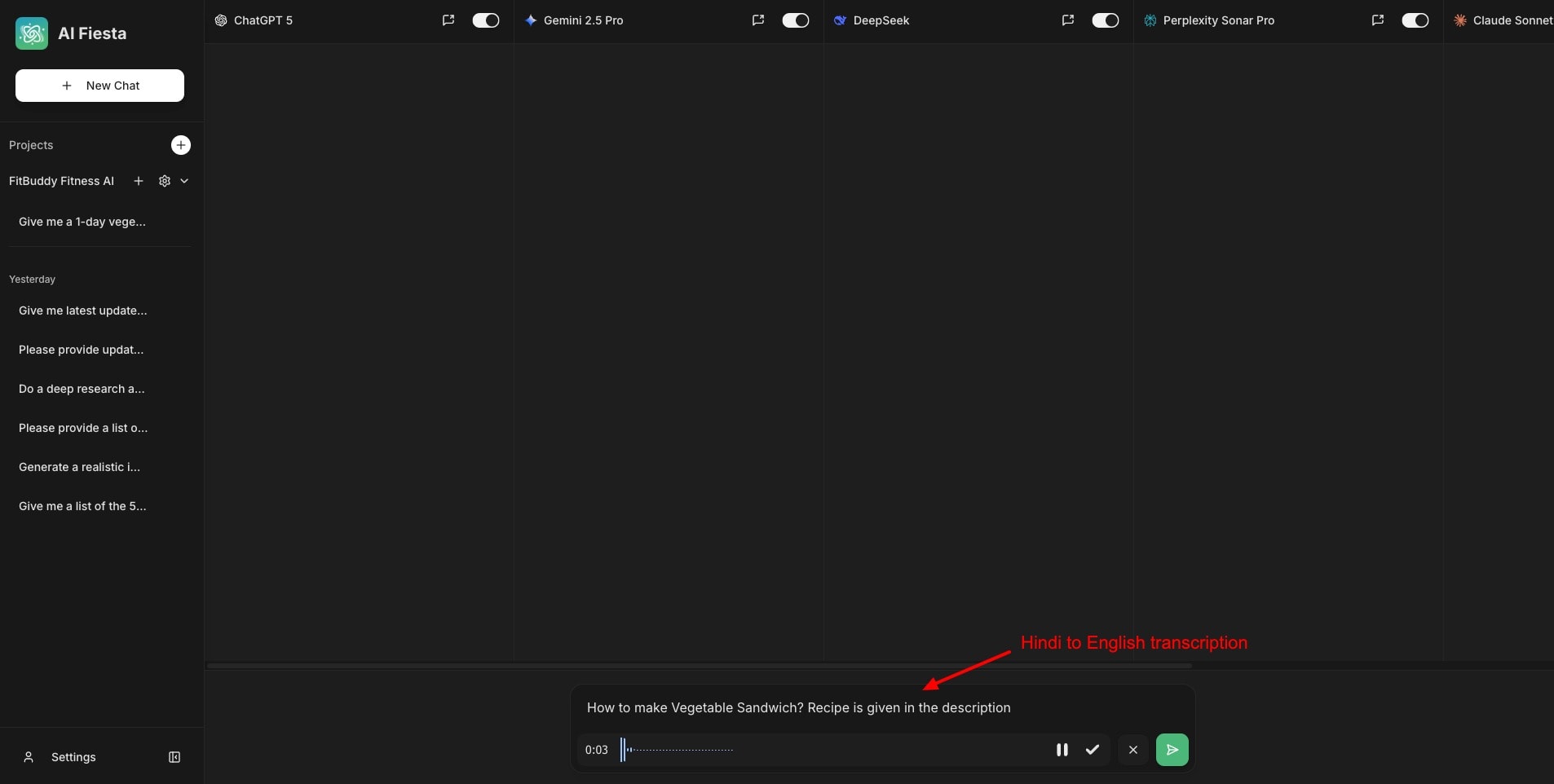
However, in my experience, it is not accurate. I tried speaking the commands in both Hindi and English. But it didn’t transcribe Hindi commands correctly. I think they need to work on improving their voice input tool.
8) Apps and Browser Support
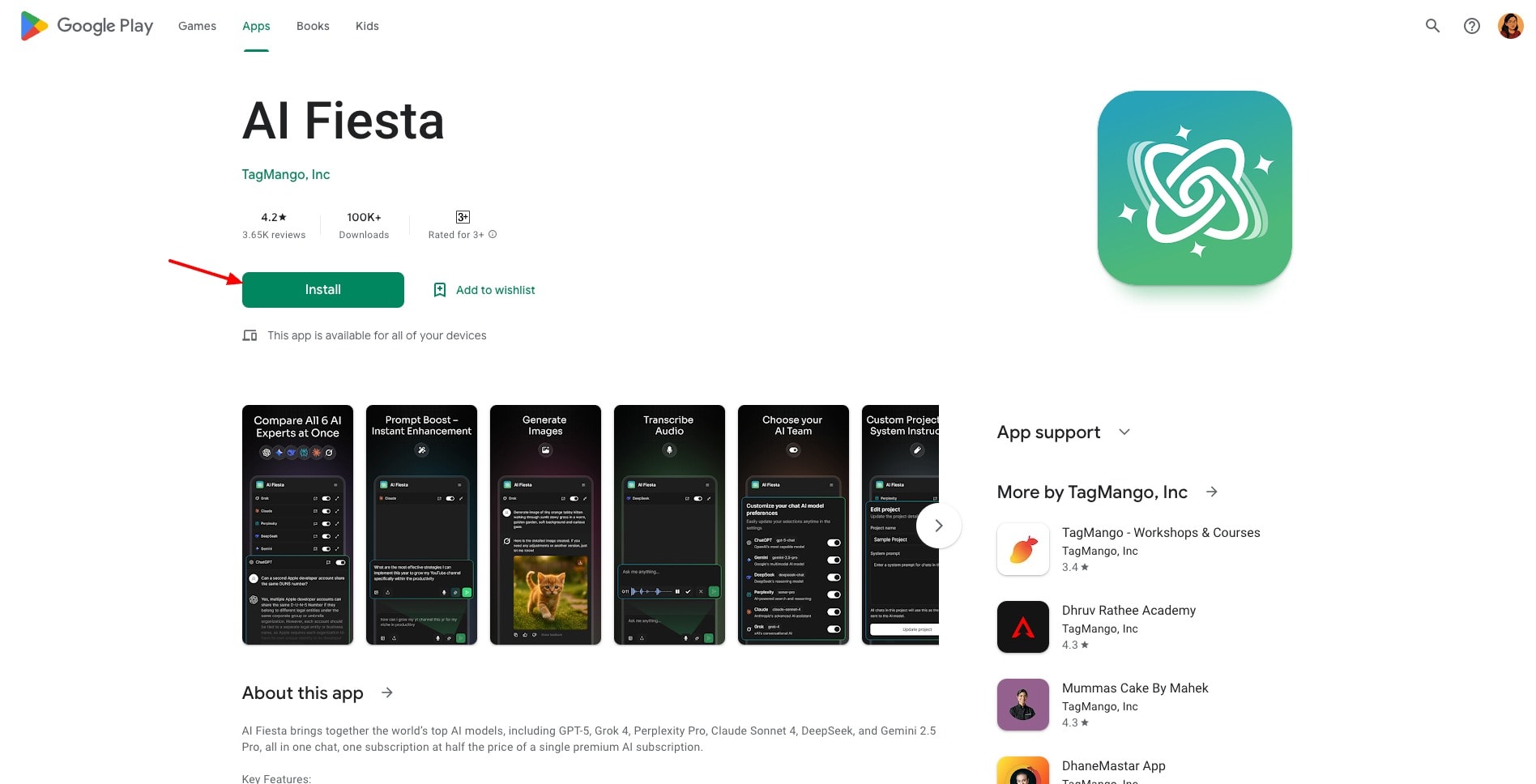
AI Fiesta works on all major browsers like Chrome, Edge, Firefox, Opera, and Safari. It also has an Android app. They have also planned to release an iOS app soon.
AI Fiesta Upcoming Features
AI Fiesta is constantly working on making the platform better and feature-rich. The following is a list of updates planned to be released soon.
1) Web Search Integration
With this feature, you could enable web search in your chat results and get more accurate and refined results. It was promised to launch within a few days of their August 30 update, but it hasn’t been launched yet!
2) iOS App
They are working on developing an iOS app. However, no specific release date has been announced yet. In the meantime, here’s a simple workaround to use AI Fiesta as an iOS app.
3) Regional Language Support
They have planned to launch AI Fiesta in multiple regional languages. This will make it more accessible for Indian users.
4) Automatic Model Updates
Whenever any new AI model is available on the web, AI Fiesta will integrate it into the platform. For instance, they recently integrated Nano Banana and Seedream 4.0 image generation models.
5) Enhanced Community Features
You’ll also get access to any webinars or workshops they conduct, along with collaborative learning tools.
It is quite interesting to note that AI Fiesta has made rapid improvements since its launch. They’ve been highly responsive to user feedback and criticism and have addressed their needs proactively.
In just 4 weeks, they have increased the token size by 7.5 times, introduced many new AI models, enhanced their UI and chat management, and are working on more updates. I am quite happy with their commitment and responsiveness to their customers.
AI Fiesta Pricing
AI Fiesta’s paid plan is available for ₹999/month on monthly billing and ₹9999/year on annual billing. Previously, they had a token limit of 400k on their monthly plan. But now they have increased it a massive 7.5x times! So, now you get 3M tokens on the monthly subscription.
They have also added a tiered consumption system, where premium AI models (like GPT-5) consume 4 times more tokens than the smaller models. Additionally, they have also set smaller and more efficient models as defaults to help you save your tokens.
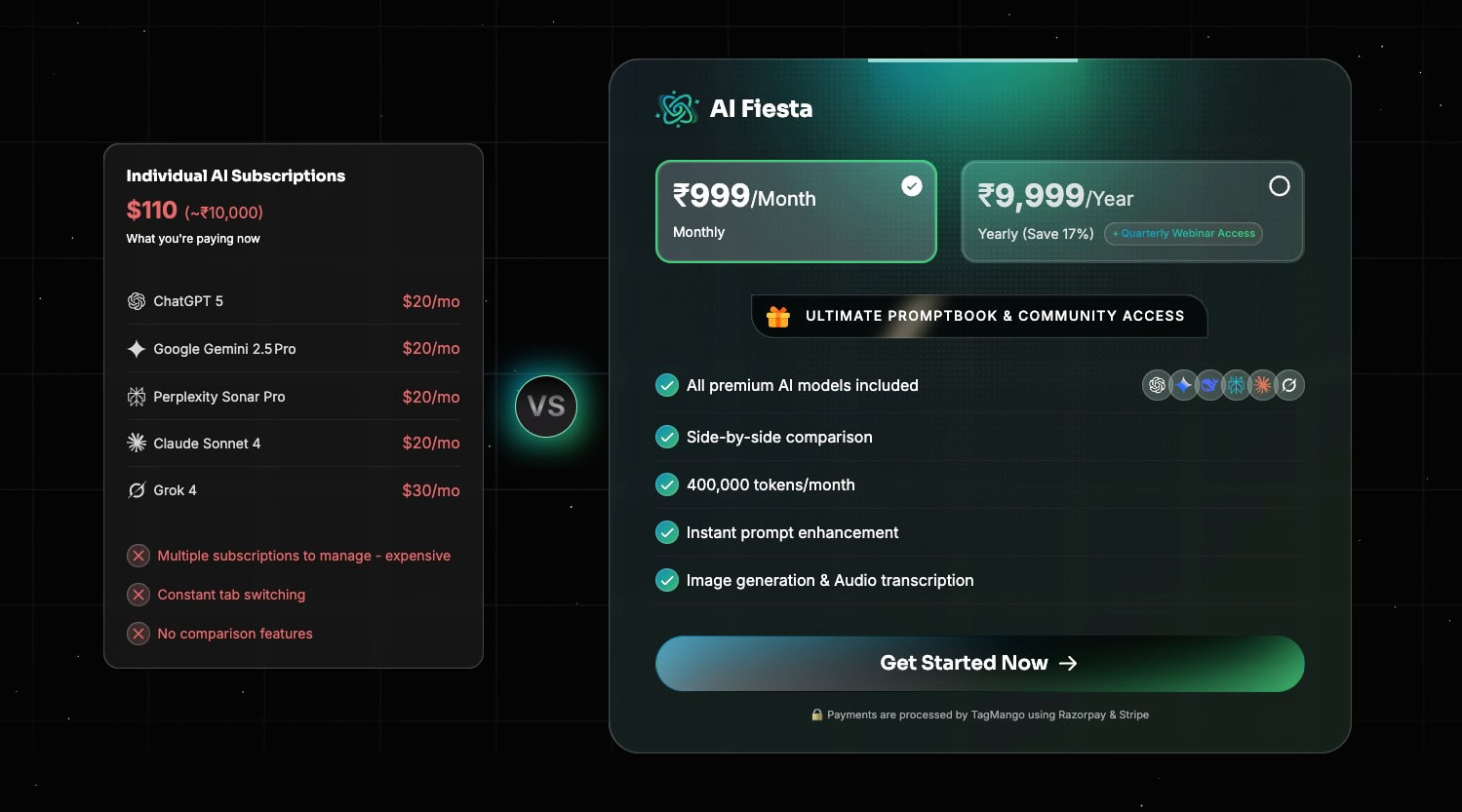
With your subscription, you also get a prompt book of 3000+ prompts worth ₹5000 and access to their community.They have a range of benefits for annual subscribers.
First, the subscription will cost ₹833/month instead of ₹999/month. You will also get access to quarterly webinars with Dhruv Rathee and his team, where you can provide feedback, request features, etc.
Free Plan
To test out how the platform works, it also features a free plan. The free plan has a limit of 3 messages and only supports 3 AI tools – ChatGPT 5, Gemini 2.5 Pro, and DeepSeek. It also doesn’t offer image generation, file uploads, prompt enhancement, and voice inputs.
However, the 3-message limit is slightly twisted. You would think it offers 3 queries. But in reality, you only get 1 query. When all three 3 AI models are enabled, the outputs generated by them count as 3 messages. Thus, the free plan is pretty unusable.
Refund Policy
Unfortunately, it doesn’t have a refund policy. You can test the free plan and then upgrade to its paid plan if you find it valuable. You won’t receive a refund if you decide to cancel your subscription.
Payment Methods
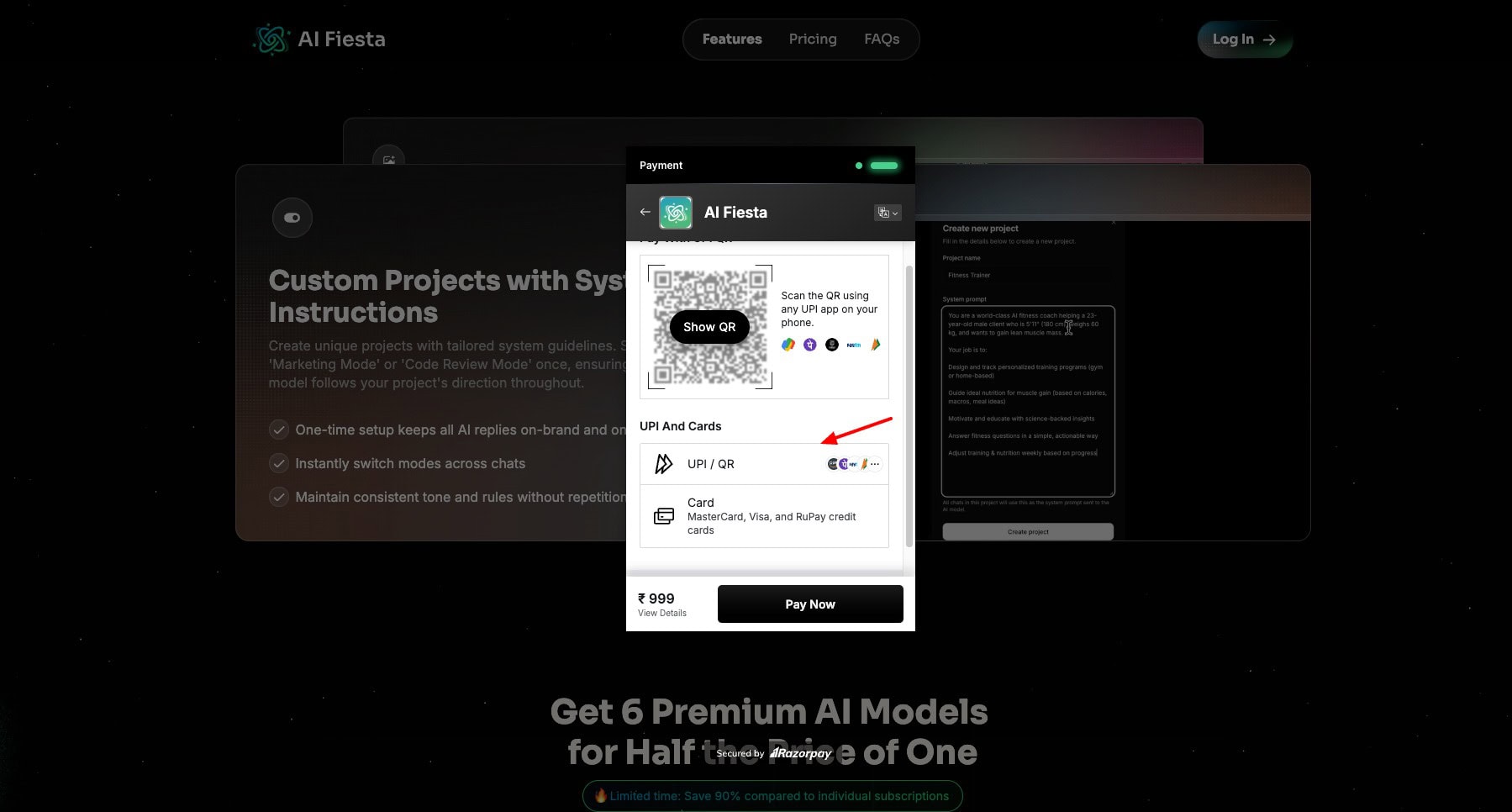
It accepts payments made via MasterCard, Visa, and RuPay credit cards. Interestingly, it also supports UPI payments. No other AI chatbots let you pay via UPI right now. So, Indian users will really find it convenient.
AI Fiesta Customer Support
AI Fiesta doesn’t offer dedicated customer support right now. You won’t get a knowledge base or live chat support to address your queries. They merely have an FAQ page you can check out for basic queries.
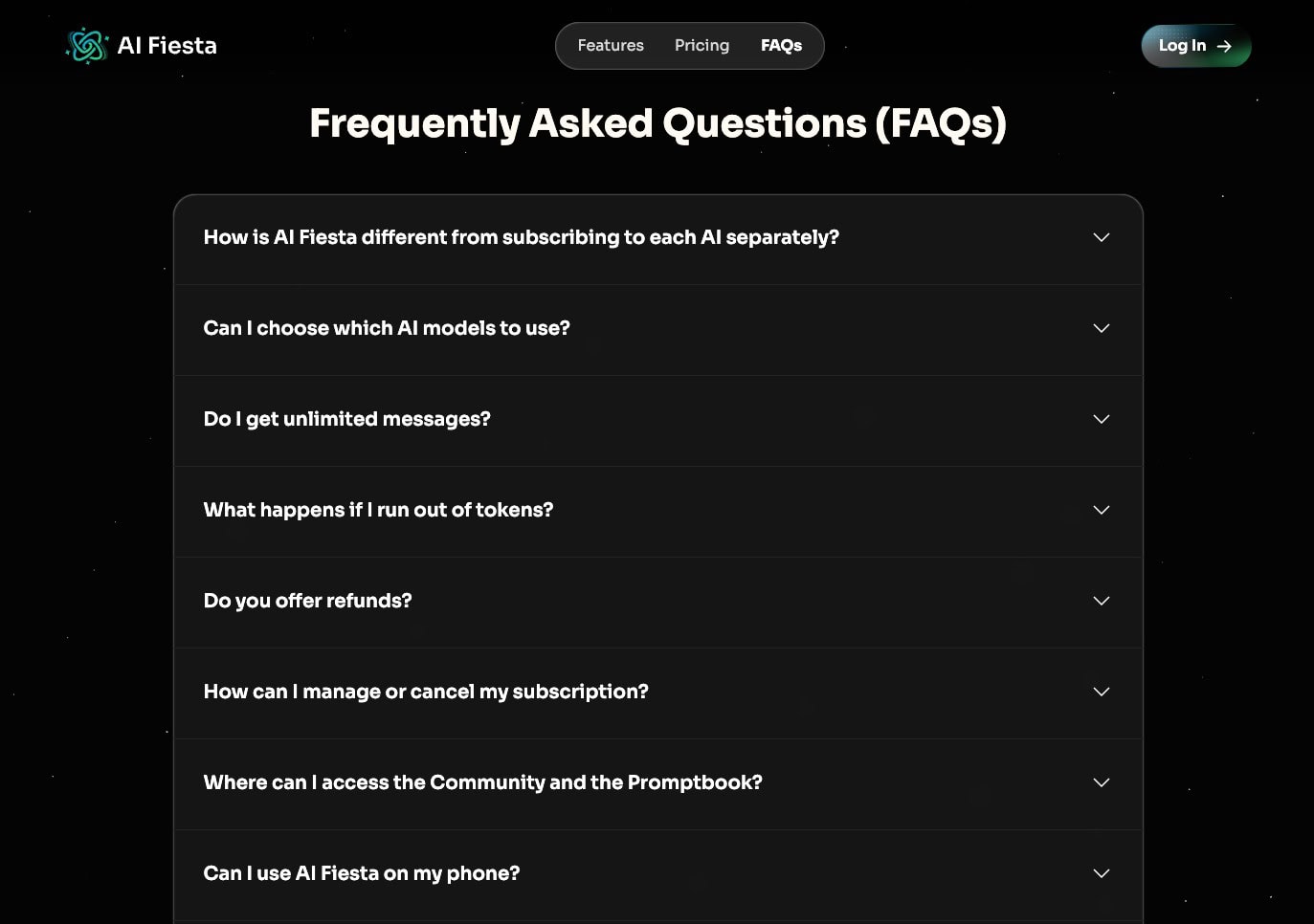
Additionally, you can also connect with their support team via email. Apart from that, you won’t find any other support options on AI Fiesta right now.
AI Fiesta Privacy Policy
Talking about privacy, AI Fiesta shares your data with payment processors, third-party AI providers to generate responses, & service providers who help run the platform.
They don’t sell your personal data. However, they can disclose your data to the government in extreme situations. Overall, their privacy policy is pretty neat and transparent. To know more, you can read their privacy policy and terms and conditions.
AI Fiesta Limitations
1) Unclear Credit Consumption
AI Fiesta shows the total number of tokens consumed on your account. It doesn’t display the number of tokens consumed after each query separately. So, it’s difficult to calculate how many credits you are consuming on each type of query.
2) Token Limit Applies to Inputs And Outputs
The paid plans of AI Fiesta have a limit of 400k tokens. However, it also takes your input prompts into account. So, if you type in a longer prompt, that would also be counted in your monthly token limit. Ideally, the token limit should only apply to the outputs.
3) Inconsistencies and Glitches
You may notice inconsistent speeds on AI Fiesta. Some models, like DeepSeek or Gemini, may be slow at generating outputs for different queries. Additionally, the voice input tool may be inaccurate at transcribing from languages other than English.
4) Poor Free Plan
The free plan has a limit of 3 messages, which expires after a single use. This is not enough for a decent test of the platform.
5) Lack of Customer Support
As of now, AI Fiesta doesn’t have reliable customer support, like a knowledge base and live chat. I hope they introduce it in the future.
6) Missing Web Search
The Web Search feature lets you integrate real-time results from the web for improved accuracy. This feature is still not available on AI Fiesta. But it’s in development and will be released in further updates.
7) Default Model Selection Issue
AI Fiesta doesn’t set newer AI models as the default on their platform. So, whenever a user needs to run a query, they have to manually select the latest versions of different AI tools. This is quite time-consuming. I hope they default to new AI models soon.
AI Fiesta Alternatives
Right now, you’ll find many alternatives to AI Fiesta on the internet. However, AI Fiesta offers unique value for your specific needs. Still, the following AI tools are the closest in terms of features.
1) AI Fiesta vs Gemini
Gemini is a super-popular AI chatbot developed by Google. Similar to AI Fiesta, it also offers text generation, file uploads, image creation, and voice-based queries. You can access Gemini AI models inside AI Fiesta, making the experience more flexible for users.
But Gemini differentiates itself with a massive 2M token context window, deeper integration with Google products like Gmail and Drive, and Veo 3-powered video generation. Its coding and image generation are also more advanced compared to AI Fiesta’s third-party integrations.
Although Gemini is free to use, its Pro plan starts at around $20/month. However, it is currently available for free to Indian students. To know more, check out our guide with the detailed step-by-step process of availing Gemini Pro for free.
2) AI Fiesta vs ChatGPT Go
ChatGPT is one of the first and most used AI chatbots developed by OpenAI. Just like AI Fiesta, it can generate high-quality text, answer logical reasoning queries, summarize content, and even support image generation.
With AI Fiesta’s multi-model setup, you can run prompts on ChatGPT directly, making it easy to compare results side by side. However, ChatGPT stands out with its exceptional reasoning, deep research, accurate voice mode, and live web data fetching.
Recently, OpenAI launched an affordable ChatGPT Go plan in India at ₹399/month. With this plan, you get 10x more messages, image generation, file uploads, and better memory.
1) AI Fiesta vs Straico
Straico lets you generate high-quality text, image, and audio content. Similar to AI Fiesta, it lets you compare your outputs with multiple AI models. However, Starico differentiates itself by also supporting image and video generation models like Ideogram, Flux Pro, and Runway.
After recent updates, AI Fiesta has also added support for 10 new AI models, along with image generation models like Nano Banana and Seedream 4.0.
The pricing plans of Straico are much more affordable with higher limits compared to AI Fiesta. Overall, if you are looking to generate multimedia content along with text content, you can check out Straico. Its pricing plans start from $8.34/month.
2) AI Fiesta vs Merlin
Merlin is an AI-powered Chrome extension for productivity. Both tools are built to replace the need to juggle multiple AI subscriptions. However, Merlin includes a wider range of AI models, like Mistral, Llama, Kimi, etc.
But what really makes Merlin stand out is its integrations. It directly integrates with apps like Gmail, YouTube, and LinkedIn, making it more usable for drafting emails, having conversations, summarizing videos, etc. Merlin’s free plan is also generous compared to AI Fiesta’s limited plan.
Overall, Merlin is more feature-rich compared to AI Fiesta. If you want access to a range of AI models and integrations with multiple apps, you can check Merlin. Its paid plans start from $19/month.
3) AI Fiesta vs Zemith AI
Zemith is another AI-powered productivity tool that simplifies AI usage by combining multiple AI tools into one platform. Just like AI Fiesta, it also support chatting with different AI models, image generation, research, prompt enhancement, and more.
However, Zemith marks itself differently by also including AI models like Qwen, Mistral, and Xai. It also features a generous free plan and an affordable paid plan compared to AI Fiesta. Its pricing plans start from $6.99/month, which gives you access to 5000 monthly credits.
It you want to try out different AI models for content generation, you can check out Zemith AI.
Who Should Use AI Fiesta?
In my experience, AI Fiesta is best suited for a variety of users. It is valuable for casual users who need the convenience of multiple AI models in one place. It is also great for professionals who require multi-model comparison capabilities.
If you prefer INR payment support and file upload capability across multiple models, AI Fiesta would be a good choice for you. However, for professionals who need advanced functions like deep research or detailed analysis, standalone AI tools would be more effective.
Why Should You Trust Me?
I’ve been working full-time in the digital industry since 2015. In these years, I’ve used and tested hundreds of digital tools and AI tools. In the last few years, I have focused my attention on AI writers, AI Art Generators, AI website builders, AI video generators, and so on!
Detailed reviews of these tools are available on my blog and YouTube channel. Testing out so many AI tools has given me the knowledge and experience to suggest the right one for your needs.
Conclusion
AI Fiesta looks like a convenient platform for accessing all popular artificial intelligence tools in a single chat window. You can also provide personal instructions for content creation, voice inputs, enhance your prompts, and even generate images.
On top of that, it also supports UPI payments for Indian customers. However, it does lack transparency with credit consumption. It has a poor free plan, no customer support, no web search integration, and issues with default model selection.
Right now, they are offering a better value proposition than the version initially launched. In just 1 month, they have made significant improvements and updates. Overall, AI Fiesta looks like a good investment and is worth trying. I wish they had launched with these features from day one!
Anyway, I’m really excited about the future of this tool. Have you used AI Fiesta yet? Do let me know your views after using it in the comments section. And if you’re looking for alternatives, check out Straico. It’s a similar platform that offers multiple AI tools under one roof.
This is Kripesh, signing off. Cheers and keep learning!

Pros of AI Fiesta (+)
- Good UI
- Improve Prompt
- Image Generation
Cons of AI Fiesta (-)
- Unclear Credit Consumption
- Token Limit Applies
- Inconsistencies
- Poor Free Plan
- Poor Customer Support

I wants to subscribe for Aifiesta. What I have to do?
Can AI Fiesta create file types like DOCS, GIFT, H5P, QTI XML etc.?
Nope
nice ai