Ever opened your browser to quickly look something up and ended up drowning in 15 tabs, half-read articles, and decision fatigue? Well, traditional browsers are slow, inefficient, and eat into your focus, especially when you want a clear answer or need a task done fast.
This is exactly where AI browsers change the game! Instead of forcing you to manually browse the web, they understand your intent, summarize information, compare options, and even complete tasks for you. You ask once. The browser does the heavy lifting.
After testing, using, and reviewing a handful of popular AI browsers, I’m finally here with my verdict. In this article, you’ll discover the Best AI Browsers for 2026 that are redefining how you research, work, and browse.
So, do you want to save your time and mental effort by switching to AI browsers? Let’s dive right in!
- What are AI Browsers?
- 6 Best AI Browsers (2026)
- 1) Comet – Best for Task Automation
- 2) Fellou – Best for Deep Search and Automation
- 3) Atlas – Best for Research
- 4) Dia – Best for Straightforward AI Assistance
- 5) Sigma – Best Privacy Focused AI Browser
- 6) Arc – Best for Basic AI Summaries
- What are the Advantages of Using AI Browsers?
- How Did We Test AI-Powered Browsers?
- Why Should You Trust Me?
- Conclusion
- FAQs
What are AI Browsers?
Traditional browsers like Google Chrome, Firefox, Opera, Microsoft Edge, etc, helped you browse the web. You had to search for queries manually, open links, read through articles, compare products, and decide which one was the best one for you. That was too much work!

But not anymore with AI Browsers. AI Browsers are browsers powered by artificial intelligence. They can summarize web pages, PDFs, and videos; compare products across sites, fill forms, book tickets, explain complex content, translate text, and much more.
You simply need to type or speak your command in natural language. The AI instantly understands your intent and gets your tasks completed. People these days use AI browsers to save time on research, automate repetitive tasks, get clear answers, and reduce tab overload.
The ability of an AI browser to autonomously perform tasks like form filling, shopping, booking tickets, etc is called ‘Agentic’. These browsers are thus called “Agentic AI Browsers”.
As per a report by Congruence Market Insights, the Global AI Browser market is expected to reach a value of US $15,040.2 million, expanding at a CAGR of 27.7% between 2025 and 2032. Popular examples of AI browsers include Perplexity’s Comet, ChatGPT’s Atlas, Dia, Sigma, etc.
6 Best AI Browsers (2026)
| Browser | Key Features | Best For | Agentic |
| Comet | Task automation, Multi-tab reasoning, fast summaries | Students, professionals, & creators | Yes ✅ |
| Fellou | Visible step-by-step automation, deep multi-tab analysis | Researchers, analysts, & power users | Yes ✅ |
| Atlas | Excellent summaries, strong research refinement | Researchers, students, & writers | No ❌ |
| Dia | Swift speeds, clean tables, preference-aware summaries | Users who want quick insights, research, & clean outputs | No ❌ |
| Sigma | Privacy-focused, deep research reports | Privacy-conscious users & researchers | Partial ⚠️ |
| Arc | Vertical tabs, link previews, direct ChatGPT access | Creators, visual thinkers, & multitaskers | No ❌ |
1) Comet – Best for Task Automation
Comet is an AI-powered web browser launched by Perplexity AI in July 2025. It positions itself as an agentic AI search engine that’s capable of performing different tasks. It is available for Mac, Windows, and Android devices.

Regarding its use cases, Perplexity Comet is effective for summarizing content across various platforms, including blogs, YouTube videos, and PDF files. When you’re working with multiple tabs open on your browser, it understands the context pretty well and pulls insights from all the relevant sources.
For research purposes, Comet performs surprisingly well. When asked to research Notion alternatives for solopreneurs, it effectively picked the accurate tools. When follow-up questions were posed, it filtered and refined the results perfectly.
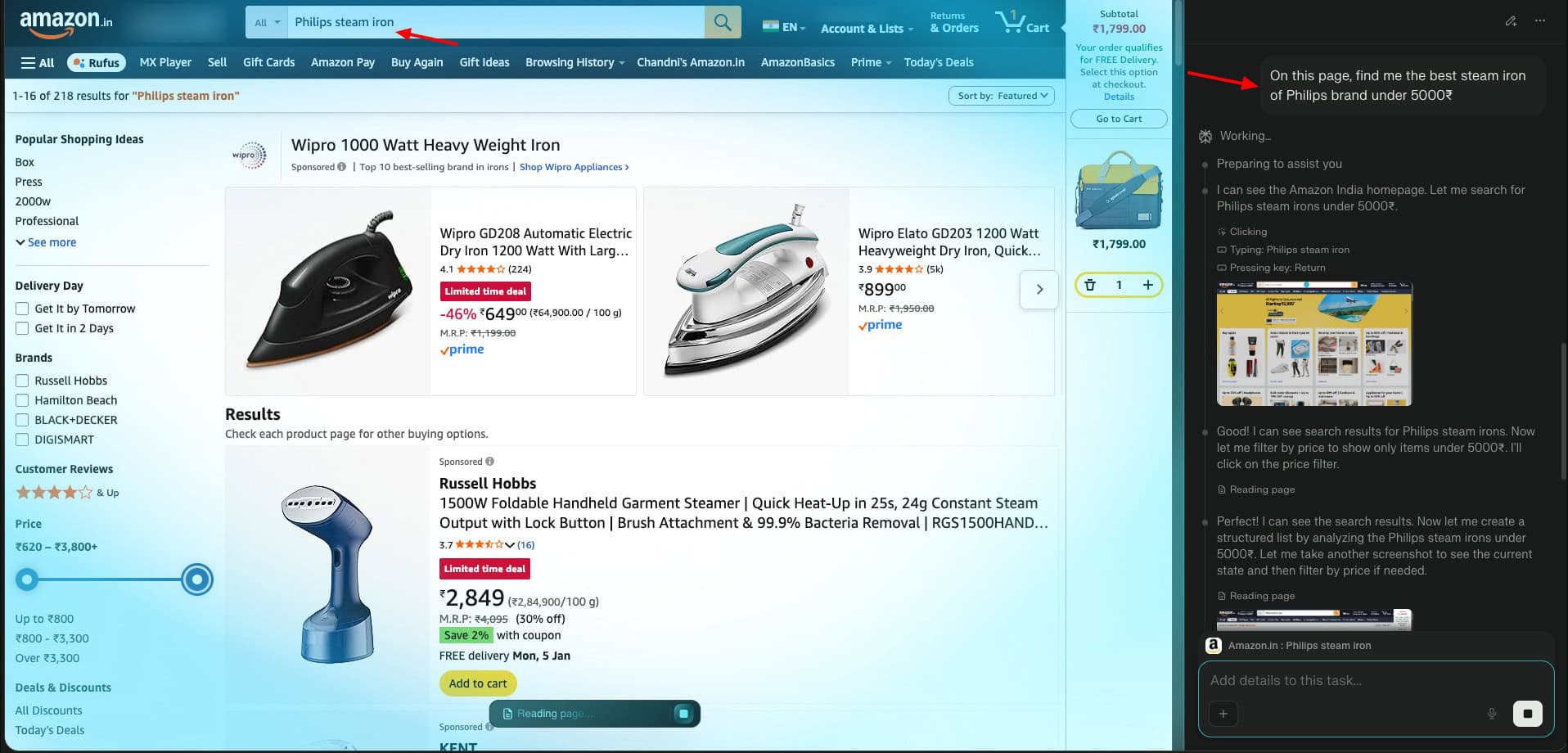
It also performs well in real-world tasks like product searches on eCommerce sites, ticket bookings, and form filling using provided details. Finally, Comet also performs well for explaining complex terminologies using relatable examples and performing everyday productivity tasks like drafting emails in different tones.
However, its memory feature can be improved. It recalls preferences when explicitly asked. But doesn’t retain or apply them across queries. Overall, Comet is a perfect fit for students, professionals, and content creators who need up-to-date information, quick summaries, and task assistance.
Pros:
- Strong summarization and simplification of concepts.
- Accurate product comparisons and well-structured tables.
- Excellent multi-tab awareness.
- Advanced research capabilities with smart filtering.
- Performs agentic tasks well.
- Helpful for everyday productivity tasks.
- Email and calendar integrations for automating bookings.
- Fast performance with a clean, smooth, and pleasing UX.
Cons:
- Does not retain user preferences consistently.
- Memory resets after a few queries.
My Take:
Comet is my favorite AI browser. It is impressive at autonomously performing tasks like eCommerce product search and comparisons, ticket bookings, form fillings, and more. I especially liked its swift speed and polished UI.
That said, its memory feature can definitely be improved. While it can recall preferences when asked, it doesn’t reliably apply them by itself. Overall, I find it one of the most powerful AI browsers for serious users right now.
2) Fellou – Best for Deep Search and Automation
Fellou is the world’s first agentic AI browser, launched in April 2025. It positions itself as a browser specifically built for deep search and handling complex tasks autonomously. Let’s look at how it performs.
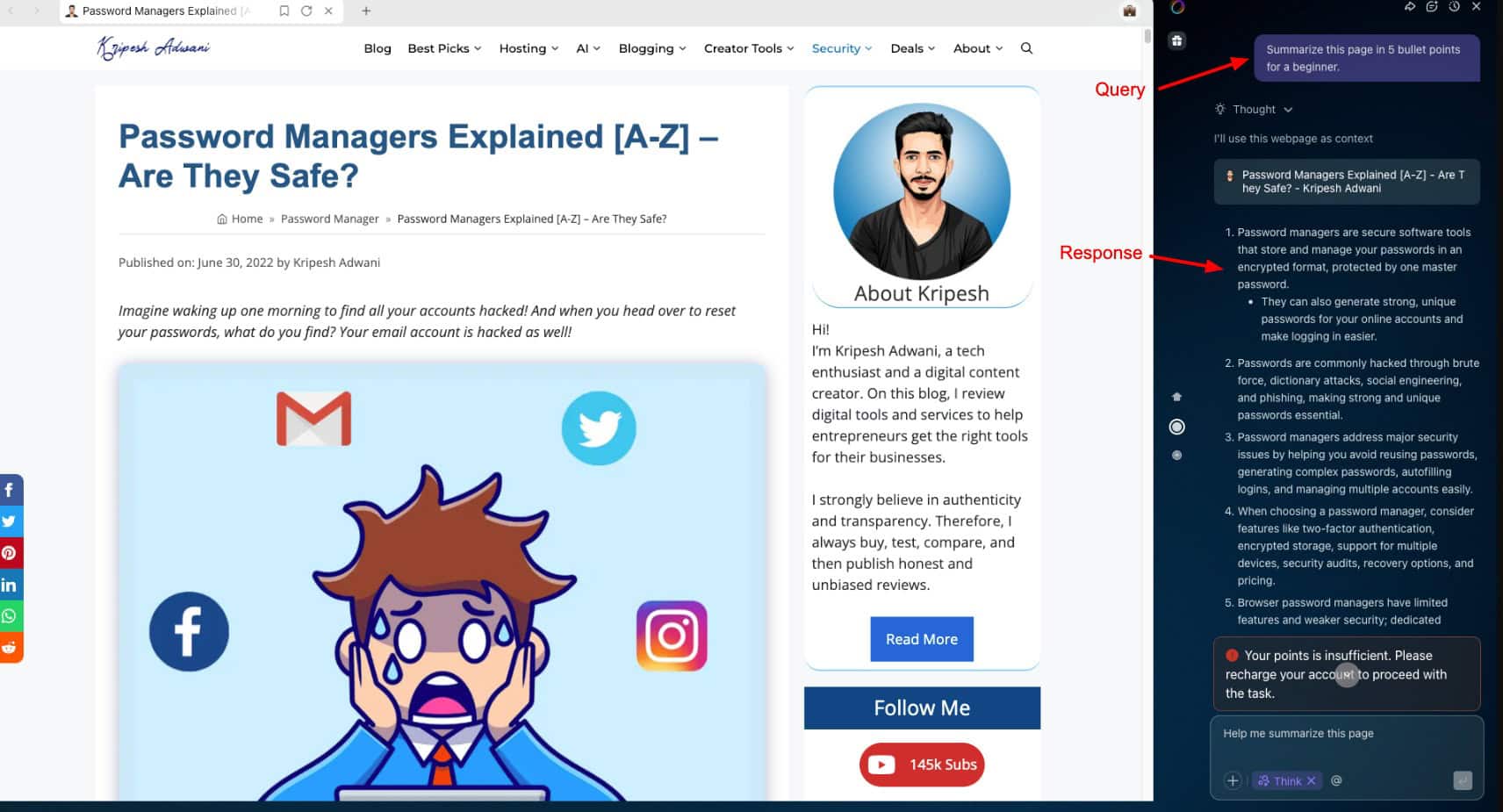
Starting with content tasks, Fellou performs really well. It summarizes blog articles clearly and generates tables with relevant pointers for comparison content. It’s also strong for YouTube video summarization. However, for remembering preferences, it only applies them when you explicitly remind it.
Multi-tab analysis is where Fellou truly shines. It can easily identify and analyze all open tabs and provides accurate and structured answers. This makes it ideal for research-heavy workflows.
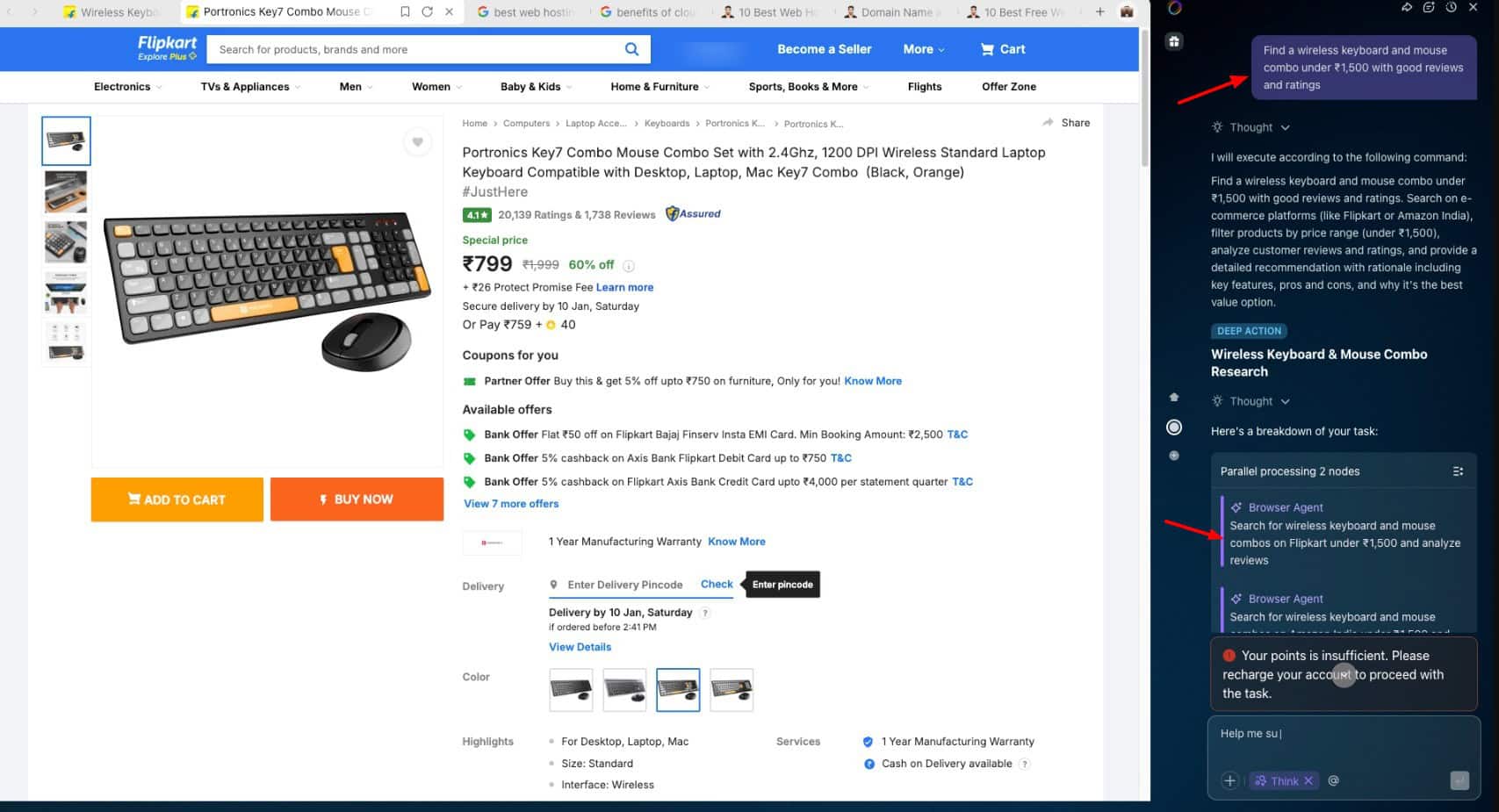
Another strength of Fellou is agentic automation. For shopping tasks, it deploys a browser agent that outlines each step involved in advance. You simply need to click “Run”, and you can see the AI actively typing search queries and navigating pages. You can also interrupt it mid-task with additional instructions, and it will adjust its workflow accordingly.
However, the execution speed is extremely slow. I also noticed a few bugs where the PDF summarization task repeatedly failed due to network errors. Additionally, its free tier has daily usage caps that are pretty limited.
Pros:
- True agentic browser with visible, step-by-step automation
- Strong blog and video summarization
- Instant and accurate comparison tables
- Reliable multi-tab analysis and deep research
- Allows real-time instruction updates when an agent is running
- Successfully completes complex workflows like adding items to cart
Cons:
- Extremely slow execution for agentic tasks
- PDF summarization is unreliable due to frequent network errors
- Preference memory is inconsistent and requires reminders
- Usage is limited by credits, restricting extended testing
- Not ideal for quick, everyday tasks
My Take:
Fellou is an AI-first browser that is built for serious work. I personally found its agentic abilities to be the most advanced I’ve tested so far. It performs tasks autonomously and also takes instructions midway while running a task.
However, its speeds are pretty slow, and it also has free usage limits, making it impractical for daily usage. Fellou is perfect for research, analysts, and professionals who need deep automation and can manage with slower speeds.
3) Atlas – Best for Research
Atlas is an AI-powered browser designed by OpenAI in 2025. It is built on Chromium and has ChatGPT built in for all AI queries. It was launched exclusively for MacOS users, but its Windows version may be released.
OpenAI’s Atlas positions itself as more of a research and assistance-focused browser rather than a fully agentic one. It excels at blog, PDF, and video summary generation with thoughtful and actionable takeaways. It also simplifies complex concepts well, but the explanations could have used relevant examples.
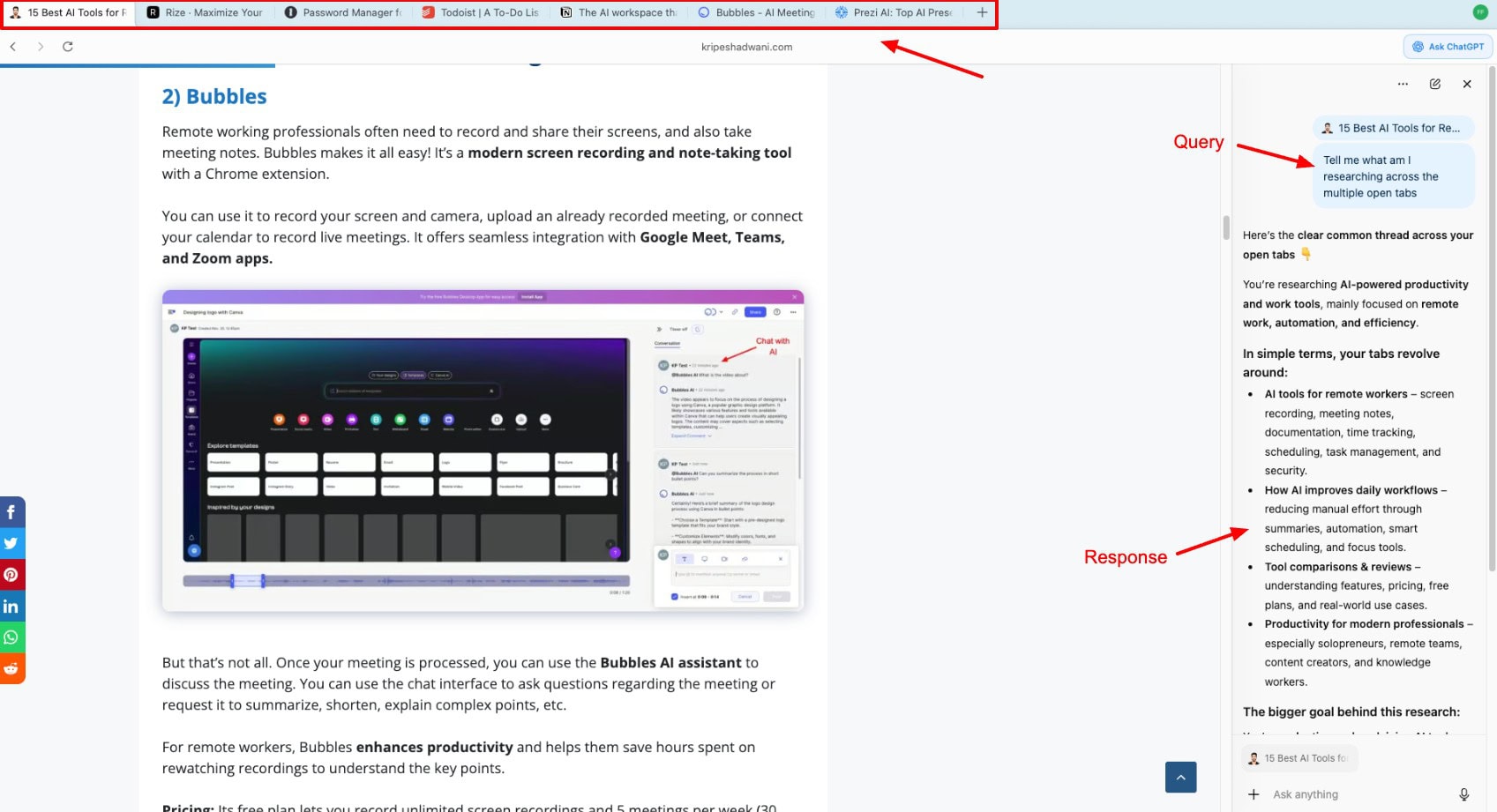
Talking about research, it can easily perform multi-tab comparisons, dive into deep research and refine the results as per your filters. However, it struggles with follow-up context when there are multiple tab conversations happening. It can sometimes forget details from earlier chats.
Though it retains your data across different chats, it lacks the permission to execute it. It’s not an agentic browser, meaning it cannot browse eCommerce pages, add products to cart, autofill forms, or book tickets for you. In fact, ticket prices and availability are often inaccurate.
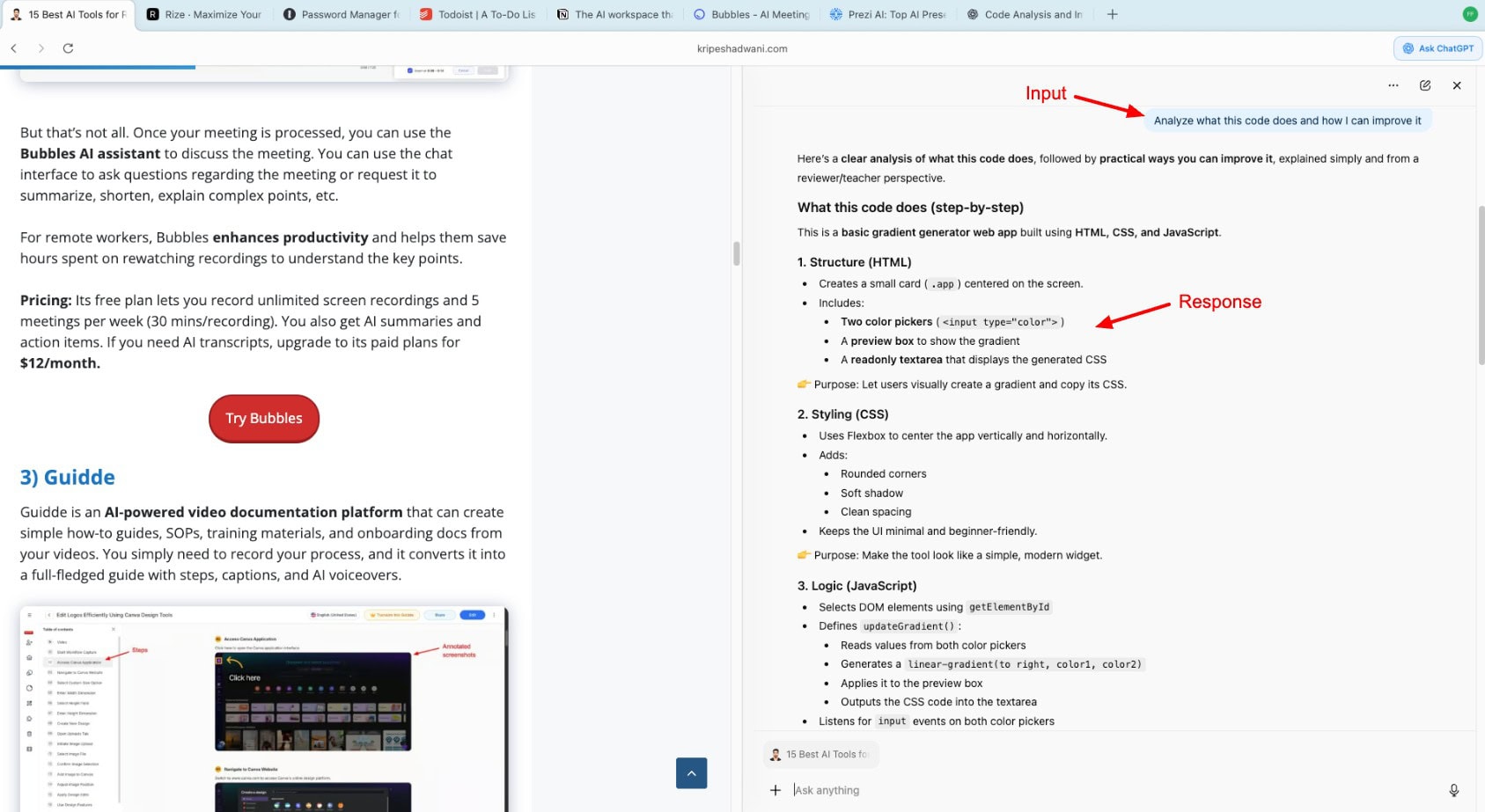
Next, Atlas is great at code explanations and everyday writing tasks like emails in different tones, translations, etc. One noticeable drawback is its memory. Atlas cannot retain user preferences across queries and makes up false responses when asked to remember.
Additionally, it frequently suggests follow-up actions after every query, just like ChatGPT. This feels intrusive and unnecessary.
Pros:
- Good summarization for blogs, PDFs, and videos.
- Clean and well-structured comparison tables.
- Accurate PDF takeaways and research summaries.
- Strong multi-tab comparison within a session.
- Excellent code explanations in simple language.
- Context-aware email drafting with a natural tone.
- Accurate Hindi-to-English translation and summaries.
Cons:
- Not agentic. It cannot browse sites, shop, book tickets, or autofill forms.
- Ticket prices and availability are often inaccurate.
- Weak memory for user preferences.
- Struggles with follow-up context across tab conversations.
- Repetitive follow-up prompts after most responses.
My Take:
Atlas browser is a great companion for research, writing, and learning related tasks. It is useful for professionals, students, and researchers. However, its lack of agentic capabilities, poor memory retention, and intrusive follow-ups make it slightly less desirable.
Overall, if you want a browser to assist you intelligently, choose Atlas. But if you want the browser to autonomously perform tasks for you, it will feel quite limited.
4) Dia – Best for Straightforward AI Assistance
Dia Browser is an AI-first web browser launched by The Browser Company in June 2025. Its primary focus is on speed and accuracy of outputs rather than agentic automation. Starting with content summarization for blogs, PDFs, and YouTube videos, Dia performed really well.
It offered clear summaries, actionable takeaways, and crisp tables. But the difference was that it didn’t add any extra explanations with the table, which is good if you prefer straightforward answers. I really liked the fact that YouTube video timestamps were clickable.
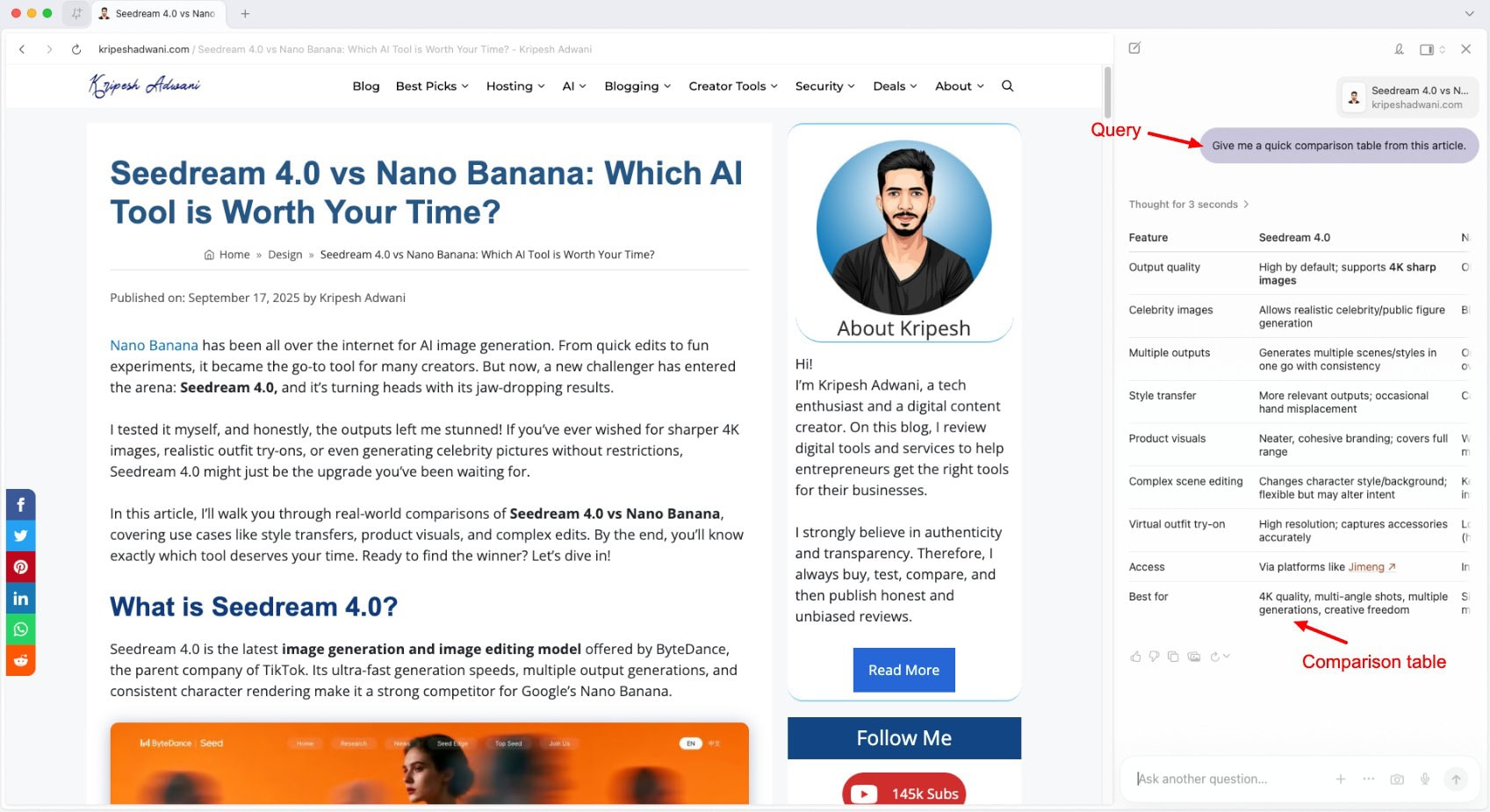
Next, for multi-tab comparisons and research-related queries, The Browser Company’s Dia offered thoughtful reasoning. Its answers differed from those of other AI browsers, but it could justify its recommendations accurately. However, it struggled with identifying newly opened tabs and fetching information from them.
Also, for agentic tasks, Dia seems pretty limited. For shopping queries, it relied on Google search results and offered product ratings and direct links rather than browsing listings from the e-commerce site. It wasn’t able to correctly check delivery dates or ticket availability either.
Similarly, it also performed poorly at form-filling tasks. It couldn’t retain past conversations and invented details when asked to fill out forms. It does have an “Insert All” option that can enter data into forms, but it cannot submit them by itself. Auto button clicks are not supported on Dia.
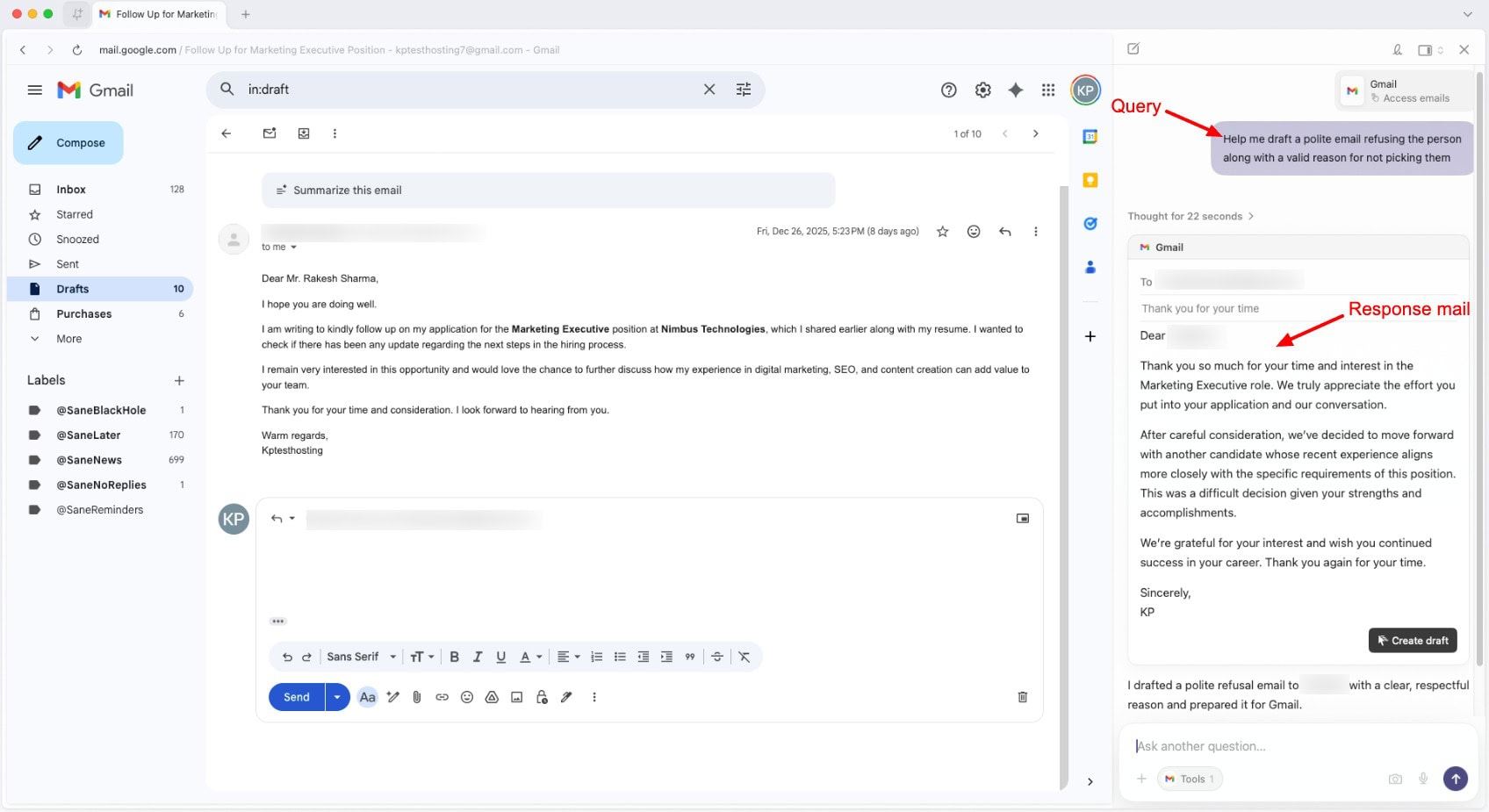
I liked how well it explained code and offered useful suggestions. You can also use it for drafting emails in multiple tones. However, it maintains ethical boundaries by refusing to create emails in a demeaning tone. It is also great at remembering user preferences across queries.
I personally found that it struggled with tab-level awareness. When you have multiple tabs open, it cannot accurately pinpoint which ones were recently added, and thus, it fetches wrong data based on past tabs.
Pros:
- Extremely fast responses with no unnecessary fluff.
- Clean, concise blog and PDF summaries.
- Instant and well-structured comparison tables.
- Accurate YouTube summaries with clickable timestamps.
- Strong research reasoning when asked follow-up questions.
- Good code explanations with practical suggestions.
- Flexible email drafting with tone control.
- Remembers user preferences.
Cons:
- Sign-up process is quite complex.
- Cannot click buttons or perform agentic actions.
- Limited shopping and ticket booking capabilities.
- Cannot submit forms or fully autofill them independently.
- Weak long-term memory and poor context retention.
- Sometimes invents details during form-filling.
- Inconsistent understanding of currently open tabs.
- Tone constraints with general writing tasks.
My Take:
Dia is a fast AI browser that excels at content summarization, research, and clean outputs. But it lacks agentic capabilities, has a weak memory, and low tab awareness. All of these limitations hinder it from becoming a full-fledged AI browser.
Overall, if you primarily need an AI browser for quick summarization, research, and gathering structured information, Dia is your ideal pick. But for automated workflows, it cannot help much.
5) Sigma – Best Privacy Focused AI Browser
Sigma is a privacy-focused AI-powered browser initially launched in 2021. Its AI capabilities, including the local AI Eclipse feature and the Airis AI Assistant, were launched much later in December 2025. To start with, you need to manually add content to the context before you start your queries.
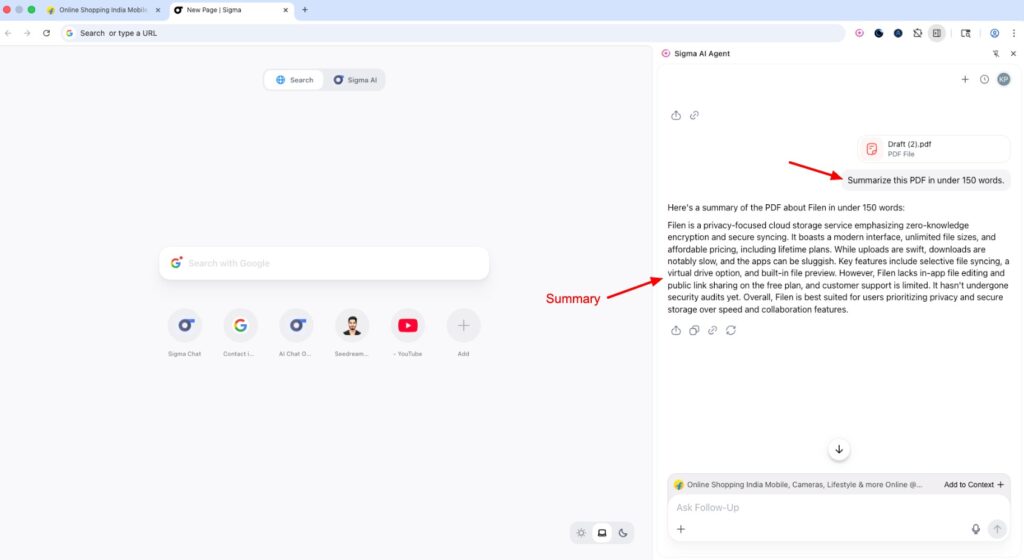
Talking about its performance, Sigma struggles with basic blog summarization. It often cannot understand which page it’s currently viewing and offers a vague summary of the whole website rather than the specific article you need. This makes it a poor choice for quick reading and analysis tasks. However, it works well with PDF summaries.
Next, it creates well-structured comparison tables. However, the process is extremely slow as it employs different AI agents for every process. Also, it includes a lot of texts quoted from the article itself, instead of real, original insights.
When you’re working with multiple open tabs, the Sigma AI browser can produce detailed reports and reasoning, and is aware of the context of your research. But these tasks employ agents and are thus pretty slow. You also cannot perform multiple tasks together because all tabs share a single chat window.
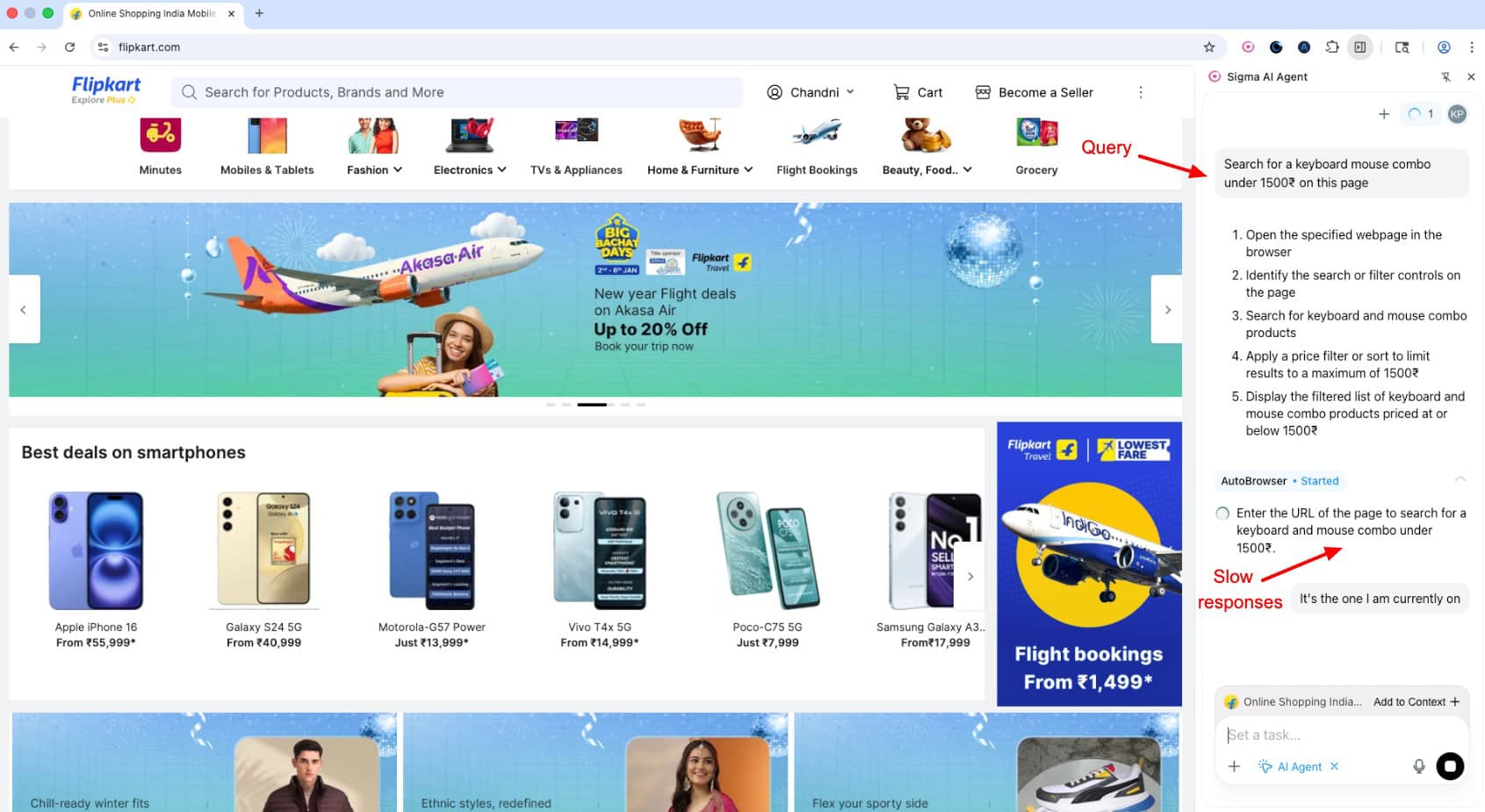
Finally, video content summarization is poor. Sigma is unable to identify when a video is already open on the current tab and keeps asking for the video link. Similarly, it underperforms at shopping tasks too. It struggles with typing correct search terms and takes a long time to open the shortlisted products. I won’t recommend it for agentic tasks.
Additionally, its free plan has a daily limit, making it inaccessible beyond 10-12 AI queries.
Pros:
- Accurate PDF summaries with meaningful takeaways
- Detailed multi-tab comparison reports
- Strong reasoning and context retention
- Visible AI agent execution
- Designed for deep research and complex workflows
- Privacy-focused approach with local AI capabilities
Cons:
- Only Google and Apple logins are allowed.
- Poor blog and webpage summarization.
- Requires manual context setup for most tasks.
- AI agents are slow and resource-heavy.
- Cannot run multiple AI agents concurrently.
- Weak awareness of currently open pages.
- Shopping workflows are unreliable.
- The free plan has strict daily query limits.
- May stop responding after extended use.
My Take:
Sigma browser shines when it comes to handling deep research, PDF summaries, and multi-tab analysis. But it struggles with speed and everyday browsing-related tasks. Its free plan also limits daily queries, making it frustrating for regular use.
Overall, it’s best suited for users who need deep research and privacy over speed. Right now, it has a lot of improvements to make. I won’t be able to recommend it for everyday tasks.
6) Arc – Best for Basic AI Summaries
Arc is a Chromium-based web browser launched by The Browser Company in 2022. Designed for macOS devices, it is popular for its unique and minimalistic UI that arranges tabs in a vertical sidebar on the left.
However, it’s pretty different from other AI web browsers out there. It doesn’t qualify as a full-fledged AI browser. You get basic AI features on this browser. To get started, simply install Arc and turn on Arc Max.
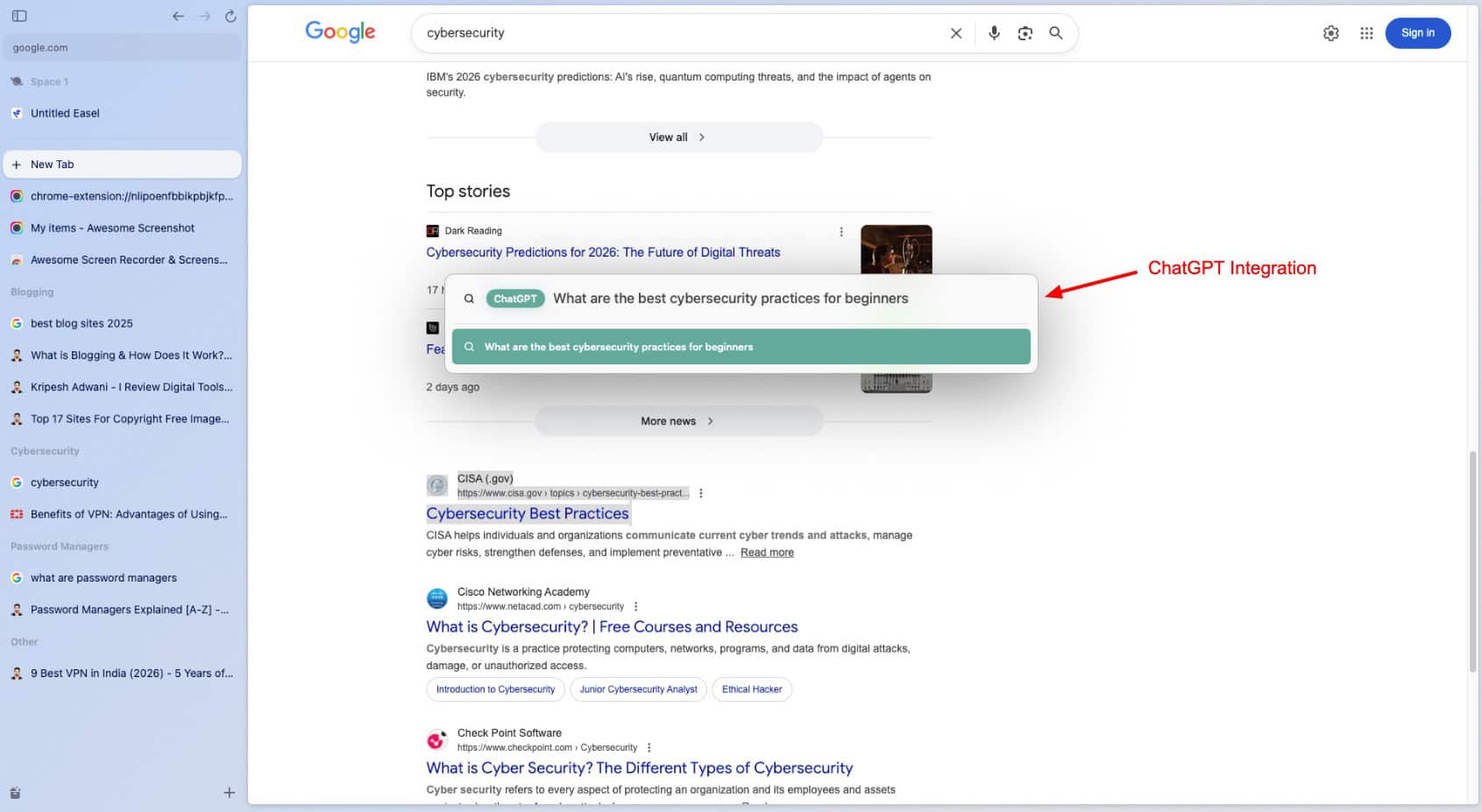
When surfing through a Google SERP page, you can use its Link Preview feature. Simply hover over any link and press ‘Shift’ to get a short preview of the entire article. Additionally, you can use Cmd+Option+G to pose any query to ChatGPT directly from Arc.
The primary use case of the Arc browser is tab organization. So, when you have 6+ tabs open, you can click on the ‘Tidy button’ to automatically organize them into relevant categories. Additionally, the Tidy Downloads option renames your downloads into easier-to-remember versions.
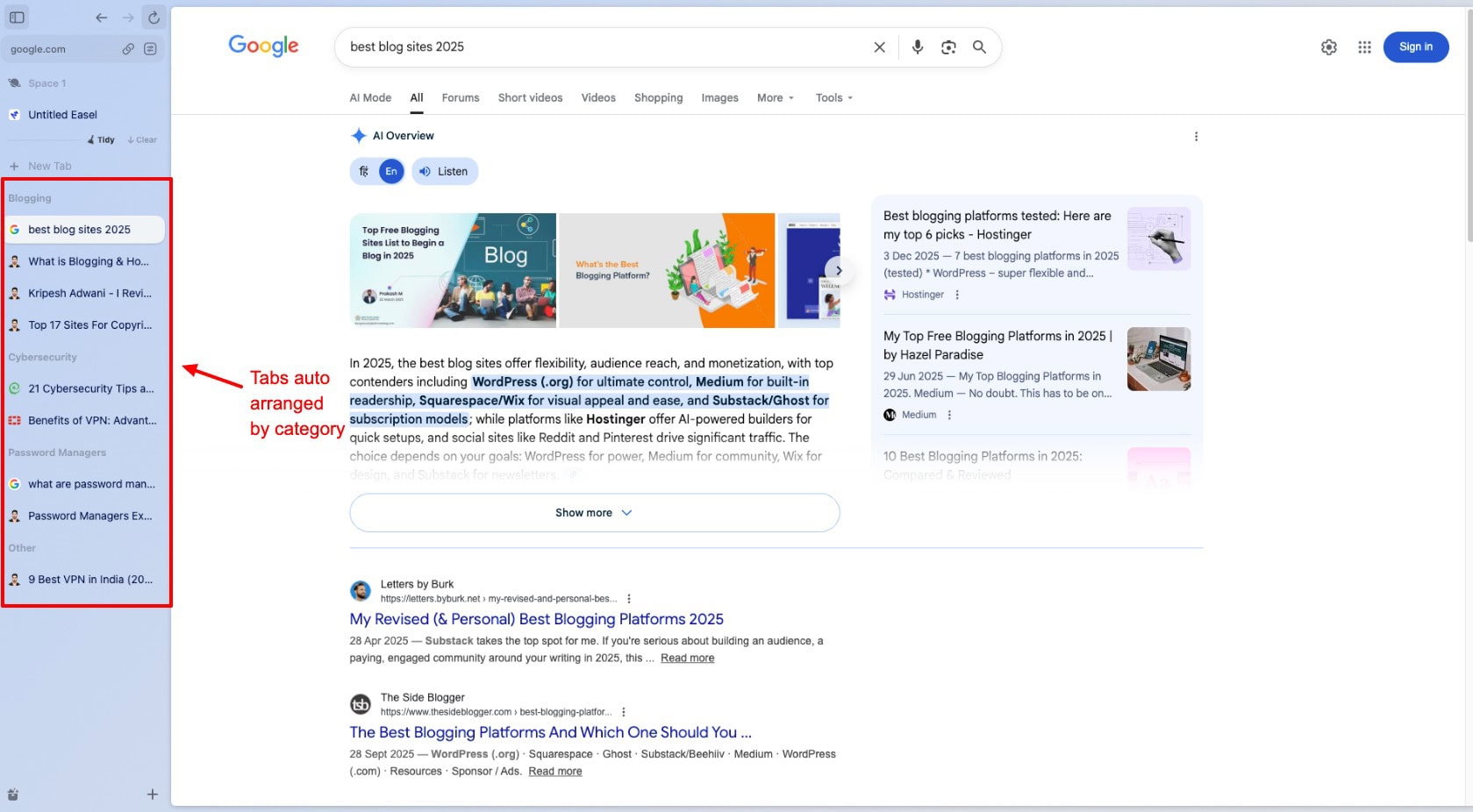
Overall, Arc is not the best option for professionals who need an AI-first browser. It is good for creators, visual thinkers, and multitaskers who prefer a clutter-free workspace and need AI tools for quick summarization.
Pros:
- Direct access to ChatGPT with keyboard shortcuts.
- Extremely easy to use for beginners.
- Unique vertical tab view.
- Excellent tab organization.
- Handy link preview summaries.
- Doesn’t retain any user data.
Cons:
- Very basic compared to other AI browsers.
- Limited AI features.
- Very small user base.
My Take:
Arc looks like a beautifully designed browser with a few AI add-ons instead of a true AI browser. It has unique vertical tabs and a clutter-free layout, but the AI features are limited to surface-level tasks like link previews, tab organization, etc.
It doesn’t yet allow you capabilities like deep research, multi-tab reasoning, automation, etc. Overall, Arc is a good fit for users who need simplicity while browsing. But it is quite limited as a full-fledged AI browser.
What are the Advantages of Using AI Browsers?
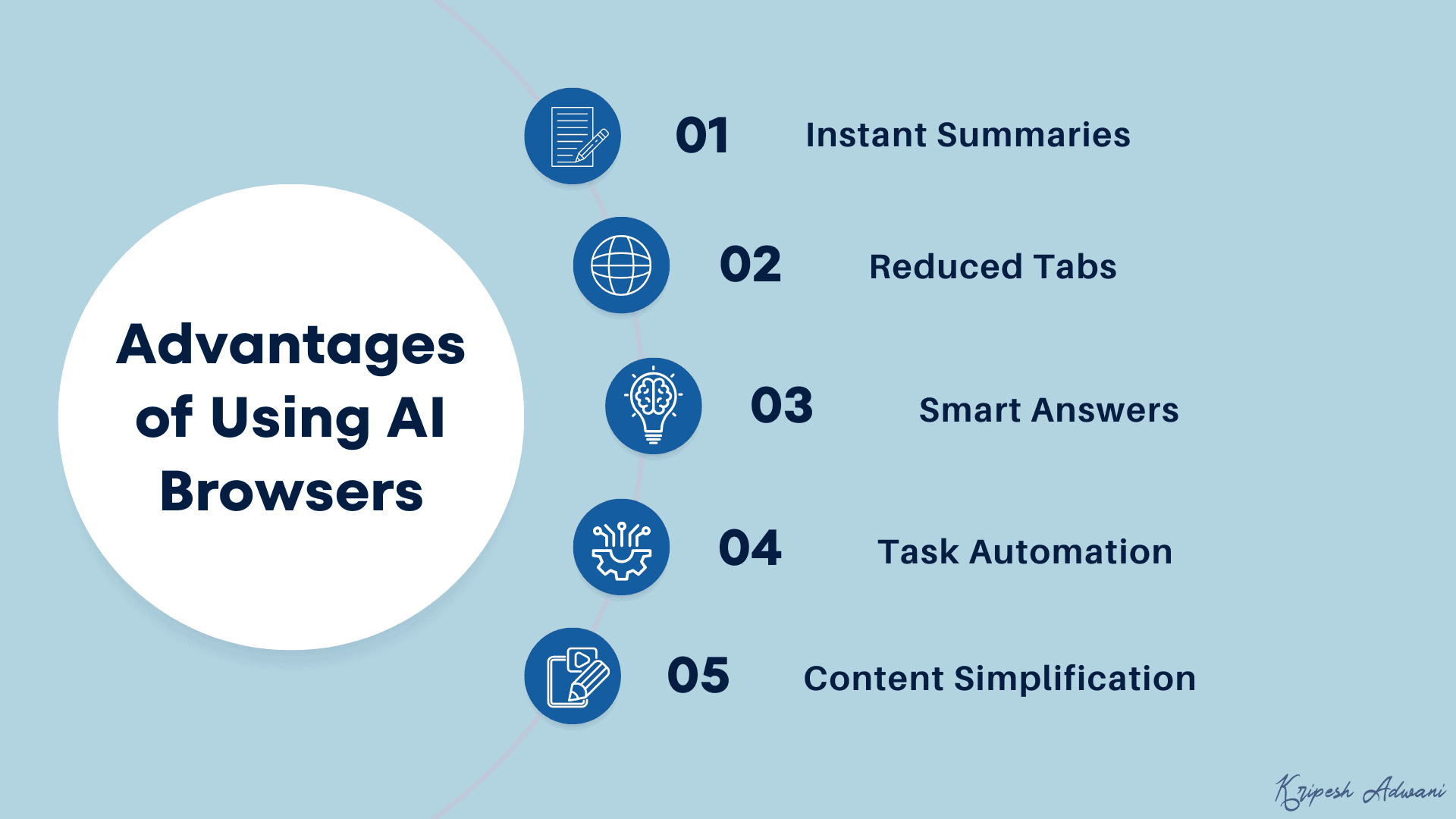
Wondering what makes AI browsers so desirable? Why are more and more people switching to them? Let’s look at the key benefits they offer.
1) Instant Summaries
AI browsers provide quick summaries and insights from articles, videos, and PDF files. This helps you save time spent on manually reading and finding key information yourself.
2) Reduced Tabs
Instead of juggling between multiple tabs, AI browsers can help you gather relevant information in a single place. This helps reduce tab overload and keeps your workflow clean.
3) Smart Answers
AI browsers actually understand your search intent and provide to-the-point answers instead of a list of links that you can browse.
4) Task Automation
Unlike traditional browsers, AI browsers can autonomously fill forms, compare different products, book tickets, and complete repetitive tasks for you.
5) Content Simplification
AI Browsers can explain complex topics or concepts in easy-to-understand language, making it great for beginners and non-technical users.
How Did We Test AI-Powered Browsers?
In order to test these AI browsers, we evaluated each shortlisted tool across real-world web browsing, research, and task-based scenarios. The following are the key factors we considered.
- Summarization Quality: Tested the accuracy of the AI summaries across blogs, videos, PDFs, and multi-tab content.
- Context Awareness: Analyzed how well it handled follow-up questions and remembered the flow of conversation.
- Multi-Tab Analysis: Tested how well it compared and synthesized information from all the open tabs.
- Research Depth: Provided research queries and tested how it filtered information based on features, pricing, and use cases.
- Task Automation: Measured how effectively the browser agents completed shopping, booking, and form-filling tasks.
- Performance: Evaluated query execution speed, errors, and reliability during complex or long-running tasks.
- Everyday Assistance: Tested email drafting, tone modifications, translation, simplification, how-to list creation, and code explanations.
- Memory: Checked if the AI remembered user preferences and applied them automatically.
- Pricing: Evaluated the features available on the free tier and what the AI browser offered on its paid tier.
According to these factors, we tested each AI browser and ranked them on our list.
Why Should You Trust Me?
I’ve been working full-time in the digital industry since 2015, with remote work forming the backbone of my career. Throughout the years, I’ve used dozens of browsers for research, content creation, software testing, and managing daily workflows.
I’ve used, tested, and published insightful articles on topics like anti-detect browsers,anti-detect browsers explained, best Android browsers for privacy, and more. This has given me hands-on exposure to how different browsers behave in real-world scenarios.
Meanwhile, when AI browsers started emerging, I tested them the same way I test other tools- by integrating them into my actual workflow. This practical usage and real testing help me separate genuinely helpful AI-powered browser features from surface-level gimmicks.
Conclusion
In this article, we looked at the 6 Best AI Browsers for 2026. These web browsers are ideal for users who need quick research and summaries, who write consistently, create content at scale, want to study or learn new concepts, and need a clean workflow.
I personally use Comet for my daily workflow, which involves quick summarization, comparisons, research, and occasionally automation. Anyway, which AI browser did you like the most out of the ones we listed? Have you tried any AI browsers? Do share your favorite ones in the comments below.
This is Kripesh, taking your leave. Cheers, and keep learning!
FAQs
Which is the most powerful AI browser for 2026?
If you want a solid AI-powered browser for task automation and research, try the Comet browser.
Which AI browser excels at hardcore automation?
Fellou is great for automating complex tasks. However, you may notice sluggish speeds with agentic tasks.
Which AI browser is best for research and writing?
ChatGPT Atlas is ideal if your workflow revolves around everyday writing tasks like email drafts, social media posts, and basic research.
Which AI browser is best for quick summaries?
If you just need quick, to-the-point AI summaries of articles, PDFs, YouTube videos, or other web content, check out Dia browser.
How are AI browsers different from traditional web browsers?
AI browsers actively understand, summarize, and perform tasks. Whereas traditional web browsers only display webpages.
Can AI browsers summarize PDFs, videos, and webpages accurately?
Yes, AI browsers like ChatGPT’s Atlas and Dia provide accurate summaries for blogs, PDFs, and YouTube videos.
Do AI browsers work with multiple open tabs?
Yes. AI-powered browsers like Fellou and Comet can analyze and compare information across all your currently open tabs.
What are the limitations of AI browsers today?
Currently, AI browsers have lots of limitations, like weak memory, slow agent execution speeds, limited automation, and unreliable performance in complex tasks.