Not everyone has pro-level editing skills. Saturation, contrast, sharpness, lighting—so many features can get confusing, right? You just need AI photo editor apps. They automate the entire process for you.
With just one click, you can change backgrounds, erase unwanted objects, or smooth out textures. These apps use powerful generative AI tools to deliver professional-quality results.
To make your job easier, I’ve spent months testing and researching. Below, you’ll discover the 7 Best AI Photo Editor Apps for Android.
So, ready to get studio-quality edits without an iPhone or DSLR? Keep reading till the end!
- 7 Best AI Photo Editor Apps for Android [Quick Comparison]
- What are AI Photo Editor Apps?
- 7 Best AI Photo Editor Apps for Android (2026)
- 1) Adobe Lightroom — Best for Professional-Grade AI Photo Editing
- 2) PicsArt AI Studio — Best for Social Media Content Creation
- 3) PhotoRoom — Best for AI Product Photography & E-Commerce Sellers
- 4) Canva — Best for Non-Designers
- 5) YouCam Enhance — Best for AI Photo Restoration & 4K Upscaling
- 6) Adobe Express — Best for Commercially Safe AI Content
- 7) Snapseed by Google — Best Free AI Photo Editor
- Testing Parameter
- Why Should You Trust Me?
- Conclusion
Disclaimer : I strongly believe in transparency. If you buy using the links on our site, we may earn a small commission without any extra cost to you. This helps me to keep producing honest reviews. Read More >>
7 Best AI Photo Editor Apps for Android [Quick Comparison]
| AI Photo Editors | App Size | Total Downloads | Play Store Rating | AI Engine/Model | RAW file support | Hero AI Features | Best suited for |
| Adobe Lightroom | 117 MB | 10Cr+ | 4.3 | Sensei + Firefly | Yes | AI Denoise, Generative Remove, AI Masking, Lens Blur | Photographers |
| PicsArt AI Studio | 49 MB | 100Cr+ | 4.2 | Proprietary + Stable Diffusion | No | AI Expand, AI Replace, AI Image Generator, AI Style Transfer | Social media creators |
| PhotoRoom | 102 MB | 10Cr+ | 4.0 | Proprietary Photoroom Instant Diffusion | No | Virtual Model, AI Relight, AI Shadow Generator, AI Background Remove | E-commerce |
| Canva | 29 MB | 50Cr+ | 4.6 | Magic Studio + Leonardo AI | No | Magic Layers, Dream Lab, Magic Edit | Non-designers |
| YouCam Enhance | 111 MB | 10L+ | 4.0 | Perfect Corp. AI + Sora 2 / Veo 3.1 / KLING 2.5 | No | Old photo restoration, AI Colorize, 4K AI Upscale | Restoration |
| Adobe Express | 82 MB | 10Cr+ | 4.5 | Firefly + partner models | No | Generative fill, Text-to-image, Text Effects | Business teams |
| Snapseed by Google | 97 MB | 10Cr+ | 4.1 | Google ML (on-device) | Yes | Snapseed Camera, AI Healing, Smart Masking | Free seekers |
What are AI Photo Editor Apps?
AI photo editing apps are your favorite editing tools enhanced with generative AI features. What professional editors once did manually is now automated with these apps.
Suppose you no longer need to fine-tune sharpness, reduce noise, or enhance details by hand to upscale an image. With a single tap, these AI photo editor apps can upscale low-resolution images.
You can also remove or replace backgrounds, try on virtual outfits, refine facial features, smooth imperfections, and more. Some tools even let you add new elements using text prompts, adjust lighting, or create entirely new images from scratch.
These advanced AI features speed up the workflow, making it easy for beginners to achieve professional-quality results with just a few clicks. But there’s one thing none of these editors can solve, though: once your photo looks right, you still have to write captions that perfectly go with it. If that’s the step that slows you down, an AI caption generator app like ClickCaption can analyze the finished image and suggest captions and hashtags for it. Think of it as a useful companion to the editors below!
Want the Best AI Tools?
Check My Favourite AI Tools 🖤
ElevenLabs
Elevenlabs and Adam AI Voice are my go-to choices. ElevenLabs is incredibly versatile, and you get 10 mins free every month.
Gamma AI
Gamma App is my top choice for ai ppt generation. You can easily create your ppt for FREE. It’s a must have AI Tool.
HOSTinger AI
I love Hostinger AI Website Builder for how easy and affordable it is. 1 click AI website creation, perfect for websites.
7 Best AI Photo Editor Apps for Android (2026)
1) Adobe Lightroom — Best for Professional-Grade AI Photo Editing
Kripesh’s Rating – 4.7/5
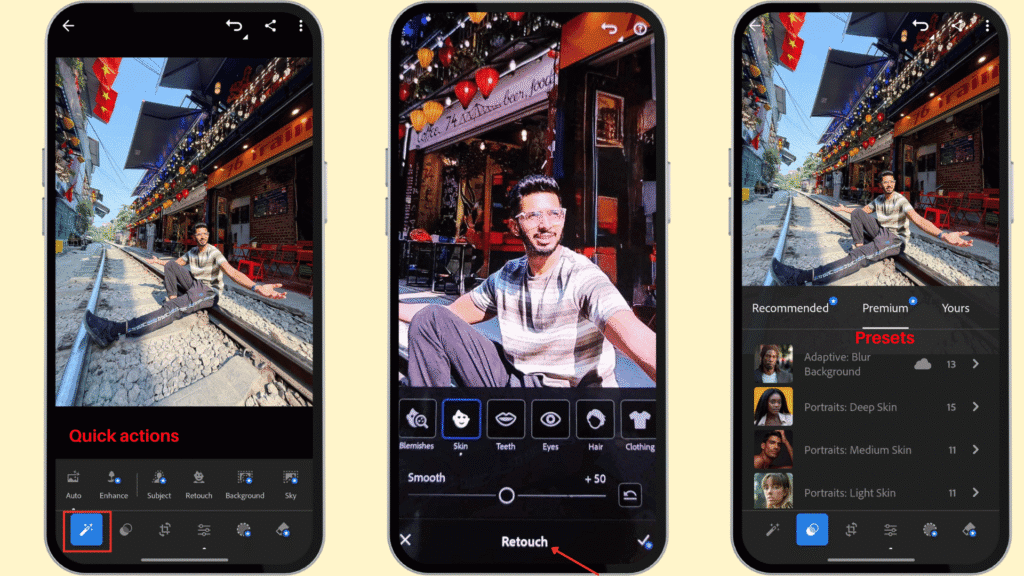
Adobe Lightroom is one of the best tools for advanced mobile editing and professional photographers. Its AI-assisted features include Lens Blur, Denoise, Generative Remove, automated scene enhancements, and precise face retouching tools. The tool supports RAW photo editing. Plus, professionals can manage large photo libraries within the app. Unlike Canva or Adobe Express, Lightroom is focused more on photo editing than quick social media designs.

Pros of Adobe Lightroom
Generative Remove
This feature uses Adobe Firefly to remove/erase unwanted objects. And the results perfectly match the background or surrounding details. For example, you can remove tourists from your vacation photo, signboards, text overlays, etc.
Generative Upscale
We can upscale low-resolution images by up to 4×. During the process, the app processes the image using Topaz Gigapixel software to accurately preserve the original and enhance sharpness.
Auto Adjust
This mode automatically adjusts contrast, brightness, and saturation, leaving your image looking more refined.
AI Denoise
Adobe provides a best-in-class noise reduction feature in Lightroom. It is useful for high-ISO, low-light, and night photography. You can keep texture and detailing intact while reducing noise in indoor images and heavily grainy RAW files.
AI Masking
This feature auto-detects key elements like background, skies, landscape components, and creates masks for them. We can quickly isolate specific areas for sharpening, color correction, exposure adjustments, contrast enhancements, etc.
Lens Blur
The advanced AI in Lightroom understands the depth of any image and allows users to control blur intensity. It creates natural-looking depth effects in images taken without large-aperture camera lenses.
Scene Enhancement
This AI-powered feature is designed primarily for outdoor photography. It automatically improves skies, landscapes, and backgrounds by adjusting exposure, contrast, and colors while preserving natural tones.
AI Select Subject
If you want to clean up the background, make any specific edits, just click on Select subject or Select Sky. Lightroom auto-detects with a single click for adjustments.
Distraction Removal
Lightroom includes both the Standard Remove tool and Generative AI Remove. You just have to brush over the object, and the app removes it without manual healing.
RAW Non-destructive Editing
The app supports RAW files from Canva, Sony, Nikon, and other major brands. And its non-destructive editing preserves the original files so you can always revert changes and export the edited versions separately.
Batch AI editing
Lightroom lets users apply AI-powered edits across multiple photos. Professional photographers now apply AI denoise, subject masks, or other adjustments to large batches of photos at once.
Face Retouch
The app allows you to smooth skin, reduce imperfections, and make detailed edits to eyes, hair, skin, and clothing.
Storage Synchronization
Lightroom offers secure cloud storage and synchronization across Adobe apps and Lightroom Web. You can edit on Android, continue on your desktop, and access your work from anywhere.
Cons of Adobe Lightroom
Premium Features Are Paid
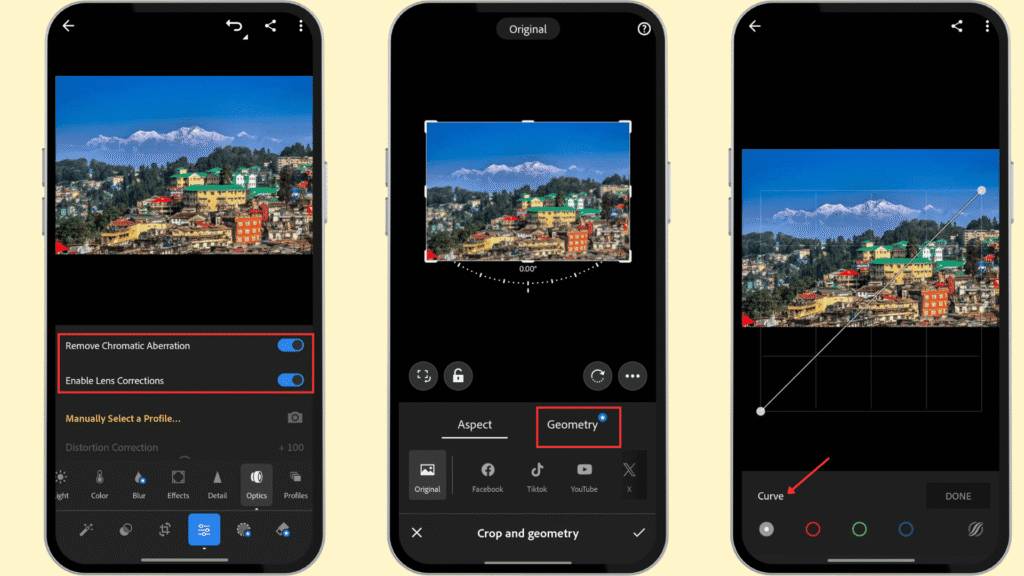
Many of Lightroom’s most powerful tools are locked behind a premium subscription. Even features such as geometric cropping, advanced blurring, and AI masking require a paid plan.
Steep Learning Curve
Adobe Lightroom is not ideal for beginners. Learning how to use its advanced tools and editing workflow effectively can take several days of practice. So, it may feel too complex for casual users who only need quick photo edits.
Pricing
| Adobe Free | Adobe Lightroom Premium | |
| Pricing for 1 week | ₹0 | ₹210 |
| Pricing for 1 year | ₹0 | ₹1700 |
| Quick Actions | Yes | Yes |
| Generative Remove | No | Yes |
| Edit RAW photos | No | Yes |
| Lens Blur & Masking | No | Yes |
Adobe Lightroom Annual Plan is best for professionals. It costs ₹1,700 per year. Alternatively, you can opt for the Adobe Lightroom and Photoshop Annual plan with 1 TB of cloud storage for ₹599.00/month (billed monthly) or ₹6,899.00/year (billed annually).
Ideal For
Photographers, photography students, and professionals who shoot RAW and want high-quality AI enhancements will find the paid plans valuable.
2) PicsArt AI Studio — Best for Social Media Content Creation
Kripesh’s Rating – 4.5/5
PicsArt is a versatile platform that combines creative photo editing with Generative AI features. It offers tools like background and object removal, AI background generation, text tools, style transfers, image enhancers, etc. The tool is limited by low weekly AI credits and interrupted by ads.

Pros of PicsArt
Text-to-Image Generator
PicsArt lets you create images from scratch using text prompts. Its AI Image Generator supports several advanced AI models, like Nano Banana 2, GPT-Image-1, FLUX Pro, and DALL·E 3, and provides high-resolution outputs.
AI Expand
This is PicsArt’s outpainting feature, which allows you to extend the borders of an image beyond its original dimensions. It is useful for resizing images for different social media platforms without cropping important elements.
AI Object Replace
You can brush over any object and swap it with a text prompt. It will be helpful in product mockups, creative edits, or fun transformations.
Background Removal and Change
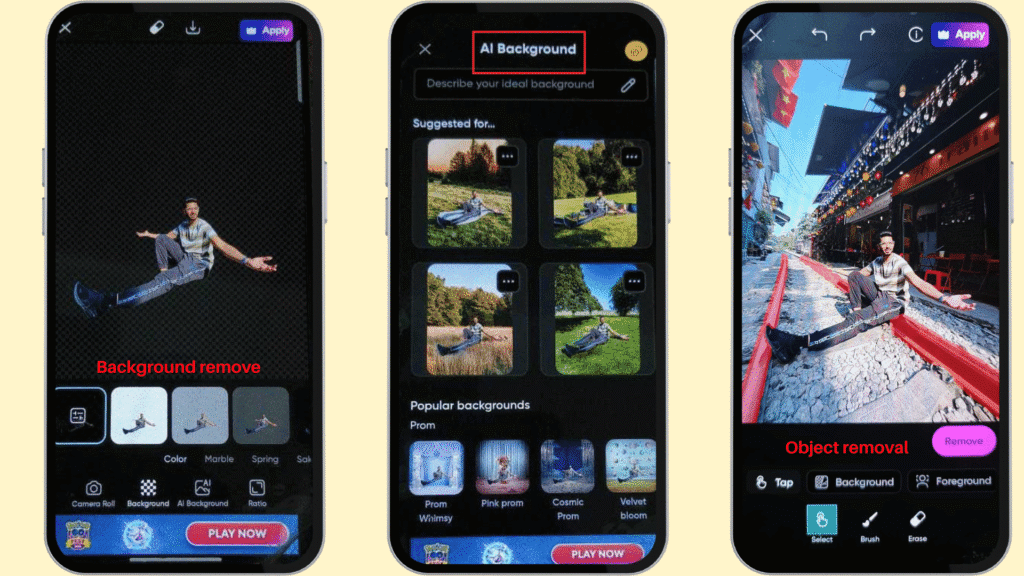
The tools allow you to remove the background with a tap. Without switching tabs, you can instantly replace the background with various effects (e.g., solid colors, marble, fashion week, autumn).
AI Background Generation
Users can experiment with different backgrounds using text prompts. For example, I’ve replaced the original riverside background with a busy street-style photography setting.
AI Avatar generator
Creators can now turn their selfies into avatar portraits. The feature will help social media profiles, creators’ branding, etc.
High-quality Image Enhancement
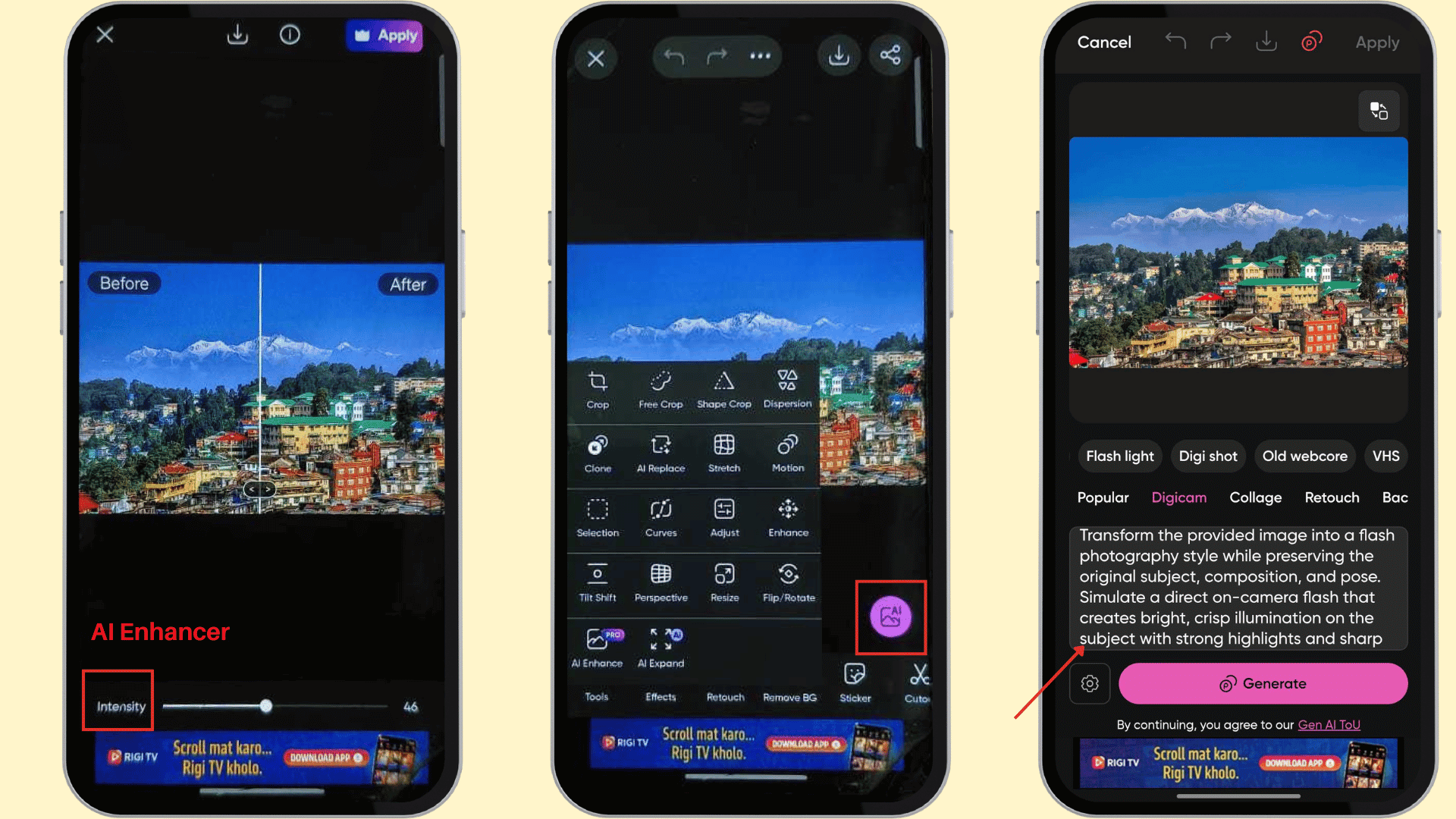
The denoising capability is impressive, which brings clarity to low-light images. The AI Enhancer is very useful for boosting contrast, increasing sharpness, and pixel count with a single click.
AI Style Transfer
If you have one already color-graded photo, you can simply transfer the style to another image. You need to upload the photo, click on AI style transfer, upload the reference image, and it’ll be done in seconds.
Trend-based AI Filters
The platform offers ready-made AI effects that help creators follow trends. AI filters include AI generative art, unlike preset color layers in normal filters. This maintains the originality and uniqueness of the original photo.
Watermark-free Export
The app does not include its own watermark, even when using the free version. Additionally, you can add your personal watermark for free to prevent copyright infringement.
Cons of PicsArt
Limited Free AI Tools
The free version of PicsArt does not offer several advanced AI features. You can’t access face-retouching tools, AI object removal, or AI style transfer.
Low AI Credits
The 5 AI credits per week are quite restrictive. For example, the Smart Background feature can consume 4 credits, and the AI Image Generator can use 2 credits for a single generation.
Ads in the Free Version
PicsArt’s free version displays advertisements. You’ll get ads mostly when opening the app or during downloads.
Pricing
| PicsArt Free | PicsArt Plus | PicsArt Pro | |
| Pricing for 1 year | ₹0 | ₹649 | ₹845 |
| AI credits | 5/ week | 200/ month | 500/ month |
| Cloud storage | 100 MB | 5 GB | 10 GB |
| Face retouch | No | Yes | Yes |
| 1-step background removal | Yes | Yes | Yes |
| 1-step object removal | No | Yes | Yes |
| AI Background | 5 | 200 | 500 |
| AI Sticker Generator | 10 | 400 | 1000 |
| Image enhancer | 5 | 200 | 500 |
| AI Expand | 2 | 100 | 250 |
| AI Replace | 5 | 200 | 500 |
For professional editing needs, I recommend the PicsArt Plus Annual Plan. You have to pay ₹649 total or try the plan for 1 week at ₹44. A 7-day free trial is included.
Ideal For
Social media content creators, influencers, marketers, and small business owners will find this tool suitable.
3) PhotoRoom — Best for AI Product Photography & E-Commerce Sellers
Kripesh’s Rating – 4.3/5
PhotoRoom is a widely loved, ad-free AI photo editor designed for creating polished, professional visuals. Its core strengths include Auto Background Remove & Replace, AI Object Fill, and a suite of powerful AI editing tools. However, free users are limited to standard-quality exports, with HD quality reserved for Pro subscribers.

Pros of Photoroom
Background Remove & Generate
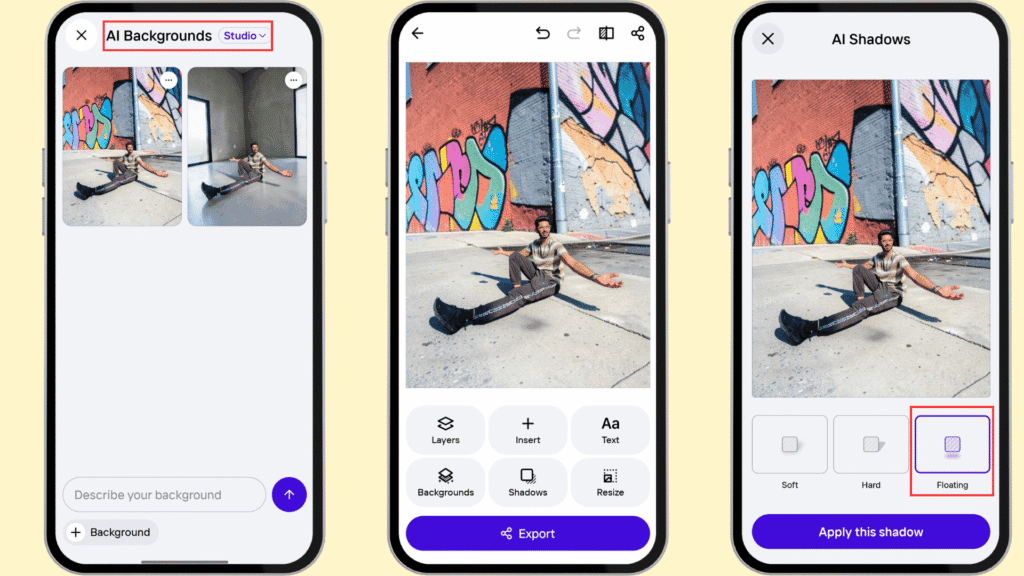
PhotoRoom automatically removes backgrounds as soon as you upload an image. It then suggests realistic, trending AI-generated backgrounds for a clean, professional look.
Virtual Model
You can dress AI models in your products in Photoroom. It’s a really useful feature in product photography to publish product visuals and launch new collections.
AI Relight
If you want to make studio lighting adjustments, it’s possible with Photoroom. The AI relights feature fixes uneven exposure, adjusts intensity, and improves lighting that matches the background.
AI Shadow Generator
The Shadow button adds realistic shadows instantly. You can add the Reflection feature to create polished, professional portraits.
AI Image Enhancer
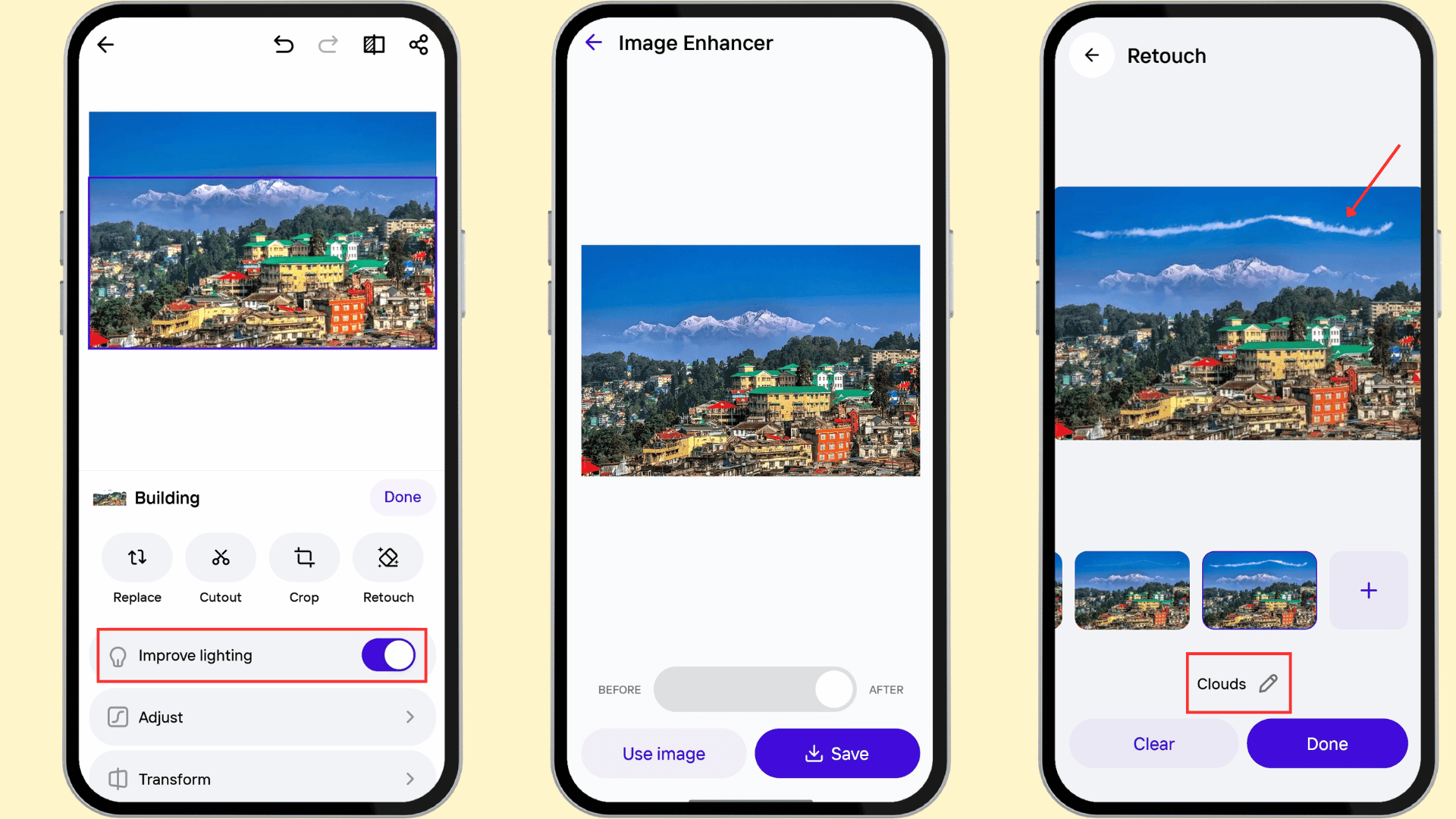
Unlike old editing software that simply stretches pixels, the AI analyzes and reconstructs the details in blurry images. We can enhance resolution, sharpness, and improve overall quality.
Batch editing
Photoroom allows editing 250 photos at once. This will save time for e-commerce product photographers or professionals to edit multiple photos, not one by one.
Listing Score
It’s an AI product image grader that reviews your product pages and optimizes for professional catalogs. It scores images based on image quality, alt text, file name, product titles, and descriptions.
AI Fill
Using text prompts, you can add extra elements to your photos. For example, I added clouds in the skyline, and it blended naturally.
Separate Editing Option
It offers a separate editing option for image elements. You can edit “Person” and “Background” independently for maximum customization.
Ad-free Experience
Editing is smooth and distraction-free in Photoroom. I haven’t faced any promotional ads while using the app for free.
Cons of Photoroom
HD Export Limited to Pro Users
Free users can only export in standard quality, while HD exports are restricted to Pro subscribers.
Unclear AI Usage Limits
PhotoRoom’s pricing page doesn’t clearly mention free AI tool limits or AI credits. This may confuse new users.
Visible Watermark
If you’re using the free tier of Photoroom, it will add the Photoroom watermark after every edit. You can’t use it for commercial purposes.
Pricing
| Photoroom Free | Photoroom Pro | Photoroom Max | Photoroom Ultra | |
| Pricing for 1 year | ₹0 | ₹1999 | ₹3999 | ₹1,09,100 |
| Background removal | 250 | Unlimited | Unlimited | Unlimited |
| AI Backgrounds | Limited | Extended | Extended | Extended |
| AI Image Credits | Limited | Extended | Higher | Highest |
| Batch mode | No | 250 images at once | 250 images at once | 250 images at once |
| Batch exports | No | 500/month | 1500/month | 1500/month |
| Export quality | Standard | HD | HD | 4K |
PhotoRoom’s Pro Annual plan offers better value than its Weekly plan. The annual subscription costs ₹1,999 and includes a one-week free trial as a bonus. If you’re unsure about committing upfront, you can start with the Pro Weekly plan at ₹99 before making a bigger purchase.
Ideal For
E-commerce sellers, Etsy/eBay/Amazon store owners, and fashion photographers can use this tool for virtual model try-ons and product photography editing.
4) Canva — Best for Non-Designers
Kripesh’s Rating – 4.2/5
Canva is one of the most trusted and easy-to-use design platforms available today. It combines AI-powered design and image-editing tools into one app. The tool suite includes Magic Studio, prompt-based image generation, automatic adjustments, etc. You can create social media posts, thumbnails, ads, presentations, etc. But the platform is less suited for deep photo correction.

Pros of Canva
Dream Lab
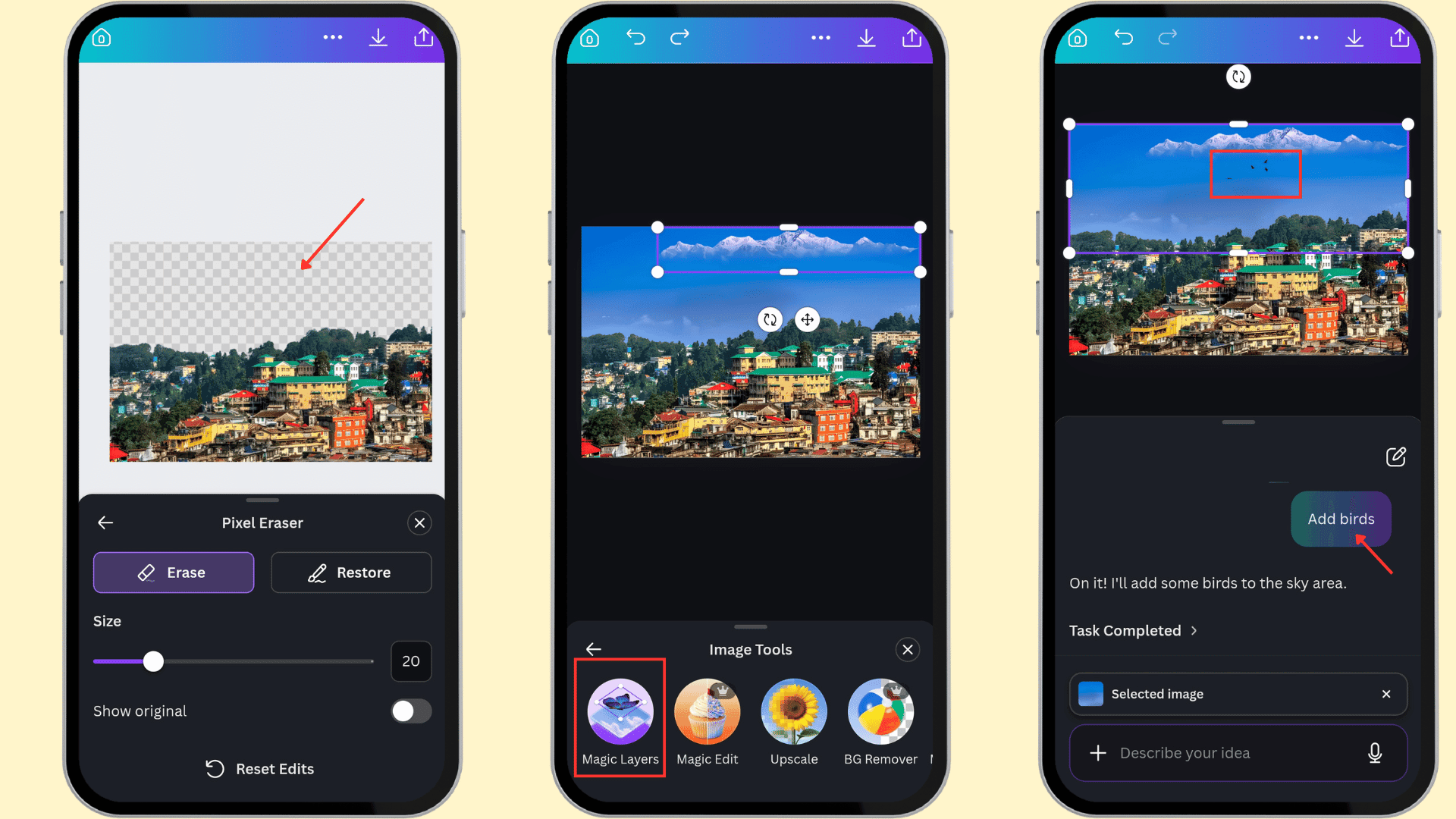
Canva offers a powerful text-to-image generator powered by Leonardo AI. You can generate images from text prompts or perform text-based image editing. For example, I added flying birds to a landscape image, and the result looked surprisingly natural.
Magic Edit Tools
With this feature, I can add, replace, or modify any object in an image. I selected the field I want to change and entered a text prompt describing the edit.
Magic Eraser
Another useful tool that lets me remove unwanted objects from an image. For example, I removed an entire skyline with just a few clicks.
Retouch Your Photos
The tool automatically enhances subjects and boosts details. This feature improves low-light images with one tap.
Background Remove and Replace
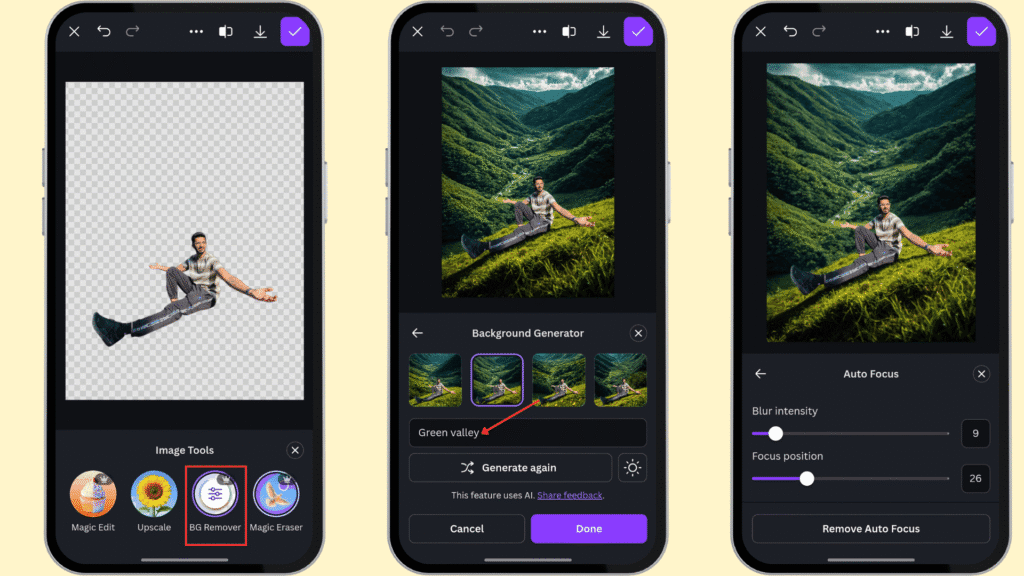
Canva removed the background from my portrait image more cleanly than most other apps I tested. To replace it with a valley scene, I simply typed “green valley” into the prompt box, and Canva generated several suitable options.
Magic Grab
One of Canva Magic Studio’s most powerful AI features. It separates foreground elements from the rest of the image. And you can move, resize, or modify them independently.
Magic Expand
Magic Expand is a generative AI feature that extends the borders of your image beyond its original boundaries. Its generative outpainting technology creates natural-looking results that blend with the existing image.
Magic Layers
In 2026, Canva launched this feature that helped users edit AI-generated images. It converts a flat image into fully editable layers.
No Need to Switch Tools
Canva provides an all-in-one workspace for design, photo editing, and AI-powered enhancements. So, you don’t need to switch between multiple tools to complete your projects.
Watermark-Free Exports
Even free users can export their designs without a Canva watermark. It’s really an advantage over many competing platforms.
Longer Trial Period
Unlike most competitors, Canva offers a 30-day free trial. So, you can explore premium features and decide whether the subscription is worth it before being charged.
Cons of Canva
Limited Access to AI Editing Features
Most of Canva Magic Studio’s AI-powered tools are available only with a Pro or Teams subscription. In fact, even with a Pro plan, AI credits can run out quickly for heavy users.
Not a Real Photo Editor
Canva is not designed for advanced color correction, RAW file editing, professional retouching, or detailed color grading. Dedicated photo editing software offers histograms, tone curves, and advanced adjustment tools.
AI Photo Quality
Once you edit photos using Canva’s AI tools, the resulting quality is usually suitable for social media platforms. So, don’t expect studio-quality photo edits or professional-level output.
Magic Layers Still Needs Improvement
For complex images, Magic Layers may not separate all editable elements. As a result, it may not work for every image-editing scenario.
Pricing
| Canva Free | Canva Pro | Canva Business | |
| Pricing for 1 year | ₹0 | ₹4,000/person | ₹6,800/ person |
| Templates | 1.6M+ | 3.6M+ | 3.6M+ |
| Brand Kits | 1 | 5 | 100 |
| AI Allowance | 200 standard uses 20 Premium uses No access to Ultra AI tools | 10x more AI than Canva Free (Standard, Premium, Ultra) | 20x more AI than Canva Free (Standard, Premium, Ultra) |
| AI Creation Tools | Limited access | High access | High access |
| Cloud Storage | 5 GB | 100 GB | 500 GB |
The Canva Pro plan is ideal for heavy users. Its annual subscription is available at 16% discounted rate than monthly plans. So, the cost will reduce to ₹333/month instead of ₹500. Canva also provides a 30-day free trial, which you can cancel before the trial ends.
Ideal for
Non-designers, bloggers, small businesses, students, and content creators make social media posts, presentations, or marketing designs alongside photo edits.
5) YouCam Enhance — Best for AI Photo Restoration & 4K Upscaling
Kripesh’s Rating – 4.0/5
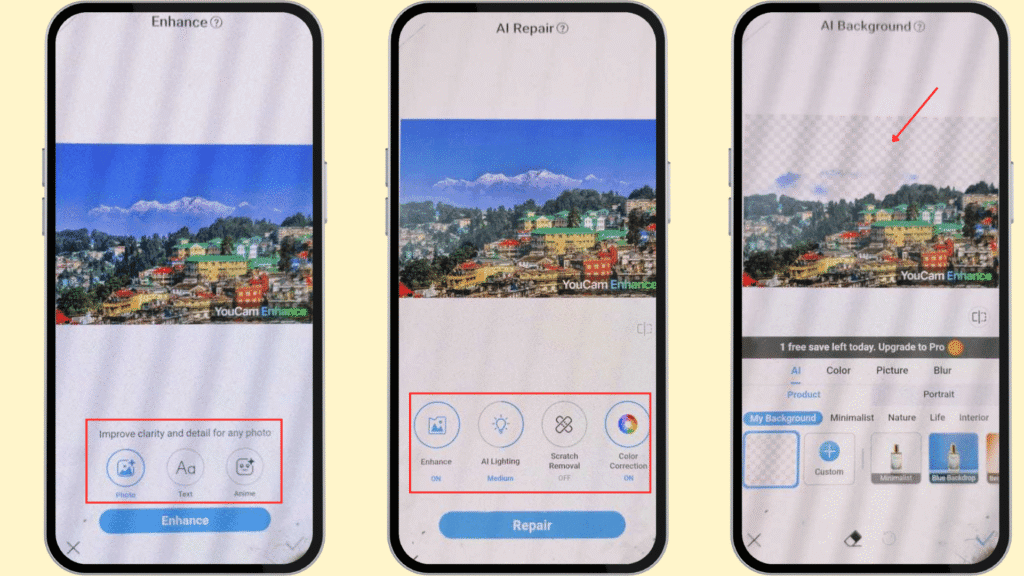
YouCam Enhance is another reliable AI photo and video enhancement app. It supports advanced AI models and helps improve photos quickly through sharpening, upscaling, denoising, and lighting correction. The app also stands out for its old photo restoration, scratch removal, and photo colorization. It even includes an AI agent for prompt-based image editing.

Pros of YouCam Enhance
AI Photo Enhancer
YouCam Enhance lets users sharpen images and upscale them to 4K with just one tap. The photo enhancement feature is genuinely free and does not require a subscription. It reduces noise and enhances the clarity of low-resolution photos.
AI Unblur
If your photo is out of focus, the platform offers a defocus correction tool. Its advanced AI can instantly fix blurry, grainy, or out-of-focus images.
Old Photo Restoration
The platform is highly effective at removing scratches from old photos. It can also restore and enhance colors and give vintage pictures a more vibrant appearance.
AI Colorize
You can transform black-and-white photos into fully colored images. The AI automatically analyzes the objects in the image and applies realistic colors.
AI Lighting Correction
If you’re struggling with dark or overexposed photos, YouCam Enhance can automatically correct the lighting. It instantly adjusts brightness and exposure to create a more professional-looking result.
AI Image Extender
Social media creators need to resize images for Facebook, Instagram, Pinterest, and LinkedIn. Sometimes they have to crop out important elements. YouCam Enhance’s AI-powered image extender can automatically resize images and outpaint the borders. It preserves the original composition without cropping.
AI Replace
You can simply tap any object and replace it with another element. The tool also allows you to remove and replace backgrounds when needed.
AI Agent
Unlike Canva or PicsArt, YouCam Enhance also incorporates an AI Agent for text-based image editing. It works like a simple chat interface where you describe the changes you want, and the AI applies them within seconds.
Batch Photo Enhancement
You can apply AI enhancements, lighting adjustments, and color corrections to up to 50 photos at once. However, the batch editing feature is only available to Pro users.
Cons of YouCam Enhance
Credit-Based Usage
Most generative AI editing features are credit-based. So, you’ll need AI credits to use them regularly. These costs can add up. Even with the Pro plan, you only receive 45 credits per month.
No Manual Editing Controls
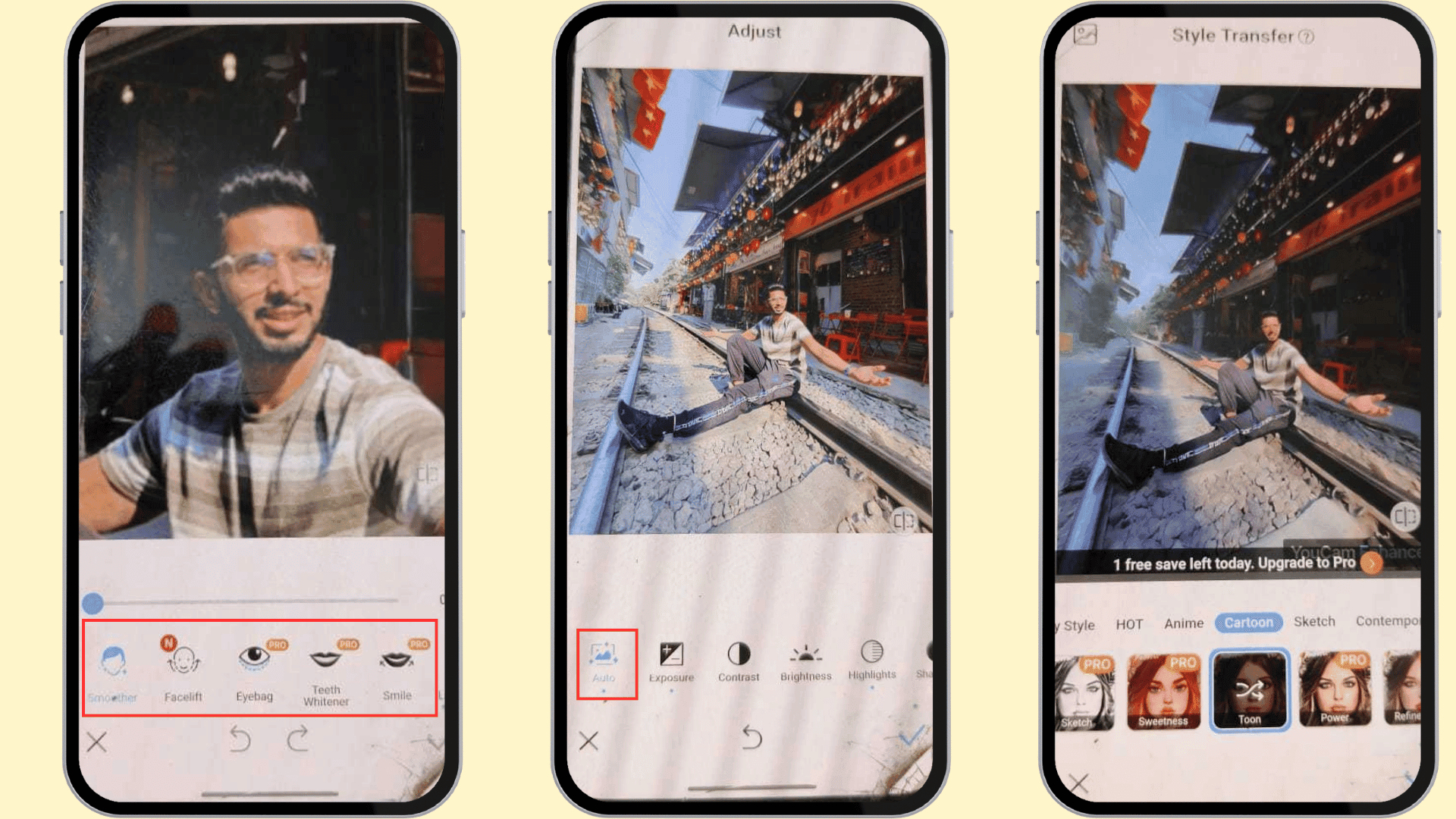
YouCam Enhance lacks advanced manual editing tools. For example, you can’t adjust color curves or make selective edits to specific areas of an image.
Paid AI Features
Except for AI photo enhancement, most AI-powered editing features are paid. While first-time users can try a few AI tools, you’ll require a paid subscription to continue accessing them.
Watermarked Exports
Images edited with the free version are downloaded with a big YouCam Enhance watermark. To use these images professionally, you’ll need to upgrade to a paid plan or use another tool to remove the watermark.
Pricing
| YouCam Enhance Standard | YouCam Enhance Pro | |
| Pricing for 1 year | ₹0 | ₹5900/person |
| AI Credits | No | 45 per month |
| Photo Enhance | Yes | Yes |
| Batch Edit | No | Yes |
| Photo Repair | No | Yes |
| AI Agent | No | Yes |
YouCam Enhance lets you use standard features like photo enhancement, high-quality portrait edits, and limited use of the AI photo editor for free. To use all its advanced features like AI lighting, Color Correction, Batch edits, Face Swap, and the Pro plan is available. If you go for an annual plan, the cost will reduce from ₹990/month to just ₹492 per month.
Ideal for
The platform is ideal for old photo restoration and free one-tap image enhancement.
6) Adobe Express — Best for Commercially Safe AI Content
Kripesh’s Rating – 3.8/5
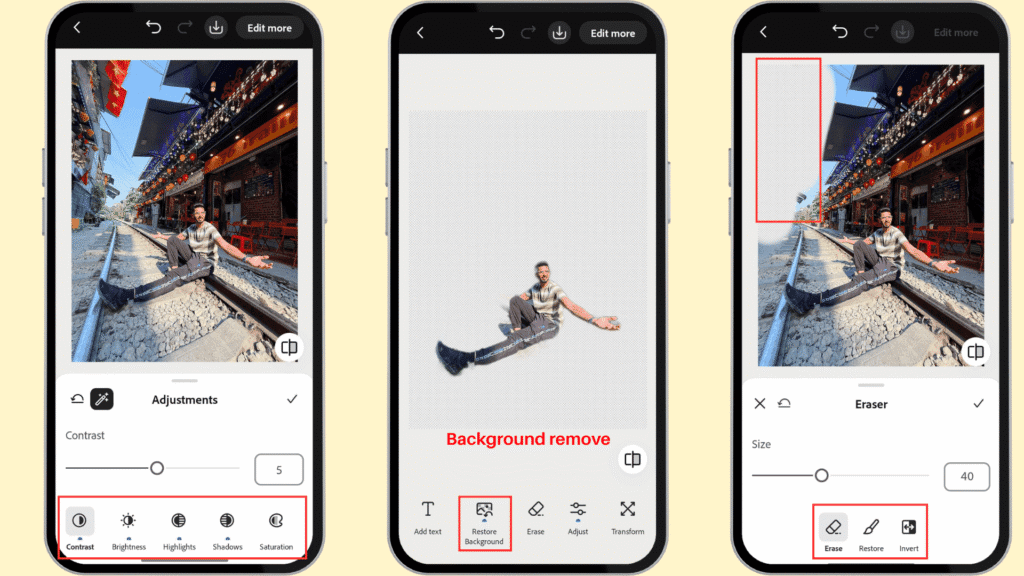
Adobe Express is a versatile and lightweight design platform. It offers a variety of free AI-powered tools, including Background Removal, Background Generation, Image Generation, and Object Removal/Generative Fill for quick image cleanup. It stands out for integration with the Adobe ecosystem. However, it is not a pro photo editor like Lightroom.
Pros of Adobe Express
Text-to-image Generation
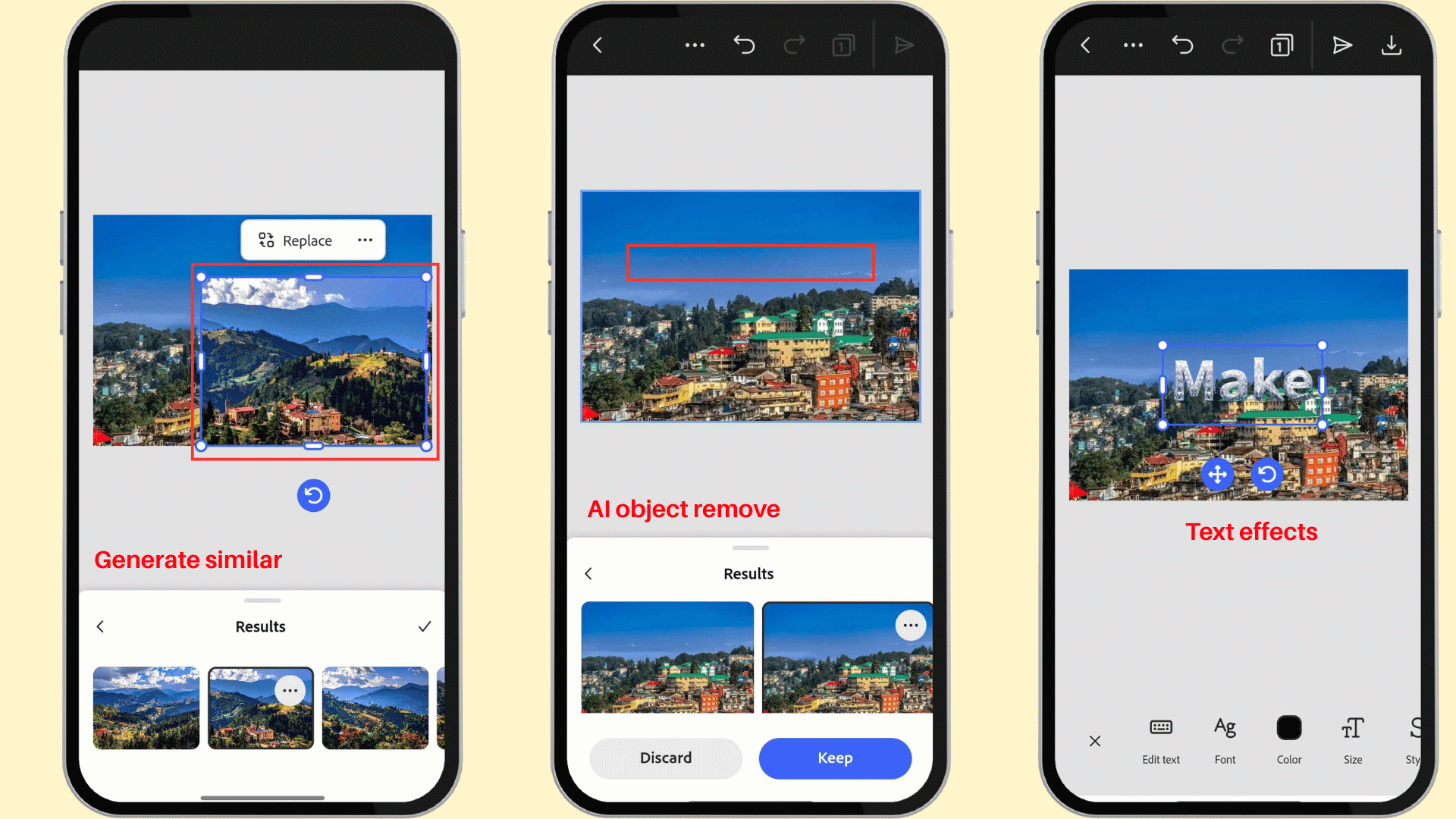
Adobe Express lets us generate images from a simple prompt using Adobe Firefly inside the app. We need to describe what we want, and the AI creates multiple image variations. This feature is best for quick concept art, social visuals, blog illustrations, and marketing creatives.
Generative Expand
Similar to other AI image editors, Generative Expand extends the image canvas or borders beyond the original image edges. It fills the extra space that matches the scene. So, the added canvas blends with the surrounding content instead of looking like a simple crop.
Auto Fix Images
We can make one-tap enhancements that automatically improve an image’s look. Auto-style adjustments correct overall light, color balance, etc. So, we get a more polished baseline before we do any further editing.
Background Removal
Adobe Express lets you remove the background with one click. It removes it completely and can add solid colors or custom backgrounds.
Generate Background
With AI, you can generate new backdrops just by describing them in text, and Adobe Express will add them automatically.
Object Remove/Fill
Generative AI features allow us to remove unwanted objects from your images. We can add new elements to make the composition more suitable.
Quick Replace
This feature compiles all major editing options in one place. It allows you to replace photos or videos, change backgrounds, and add design assets quickly.
Blemish removal
For portraits, we can clean up small skin imperfections. This kind of tool is best for fast touch-ups rather than advanced beauty retouching.
Red-eye Correction
This feature fixes the red pupil effect caused by flash photography. The app can detect red-eye and make it a quick cleanup even on group photos.
AI Text Effects
The platform provides Firefly-powered Text Effects. It turns plain text into stylized, visually rich lettering. Text effects work best for posters, thumbnails, social graphics, and promotional content.
Smart Animations
You can add animated effects to make the social media creatives more engaging. For example, the tool offers preset animations like bungee, circle, drift, etc.
Other Advanced AI Tools
Adobe Express also provides a range of AI-driven design tools. These tools include QR code generation, logo design, poster creation, Instagram post templates, and even webpage design.
Cons of Adobe Express
Slow Processing
Adobe Express takes a long time to load photos from the gallery. A high-speed internet connection is required for smoother editing.
Image Resize is Paid
Free users can’t resize or crop images. This feature is available only for paid subscribers, who can adjust aspect ratios for different platforms.
Overlaps Significantly with Canva
Most of the AI-powered features available in Adobe Express are also offered by Canva. If you’re already paying for Canva, Adobe Express may not be valuable to you.
AI Image Output Quality
While Adobe Firefly can generate high-quality images, its outputs sometimes lack creativity, like other competing AI image generators. As a result, users may find the generated content less diverse.
Pricing
| Adobe Express Free | Adobe Express Premium | |
| Pricing for 1 year | ₹0 | ₹4800 |
| AI Credit | 10/month | 250/month |
| Remove Image Background | Yes | Yes |
| Erase | No | Yes |
| Export as PNG with a transparent background | No | Yes |
| Cloud storage | 5 GB | 100 GB |
For professionals, the Adobe Express Premium plan offers the best value. The monthly subscription costs ₹480, but choosing the annual plan reduces the cost to ₹400/month. Both plans include a 14-day free trial, giving you enough time to test the features before committing.
Ideal For
Designers and marketers who need quick social media graphics, flyers, or posters with AI-assisted edits.
7) Snapseed by Google — Best Free AI Photo Editor
Kripesh’s Rating – 3.5/5
Snapseed is a simple AI photo editing app by Google. Unlike other apps that are available on web-based platforms, it is only available for iOS and Android mobile users. The app is completely free. It uses Google AI models. You can adjust exposure, heal images, make batch edits, and do Non-destructive Editing. But the app misses generative AI features.

Pros of Snapseed
AI Healing
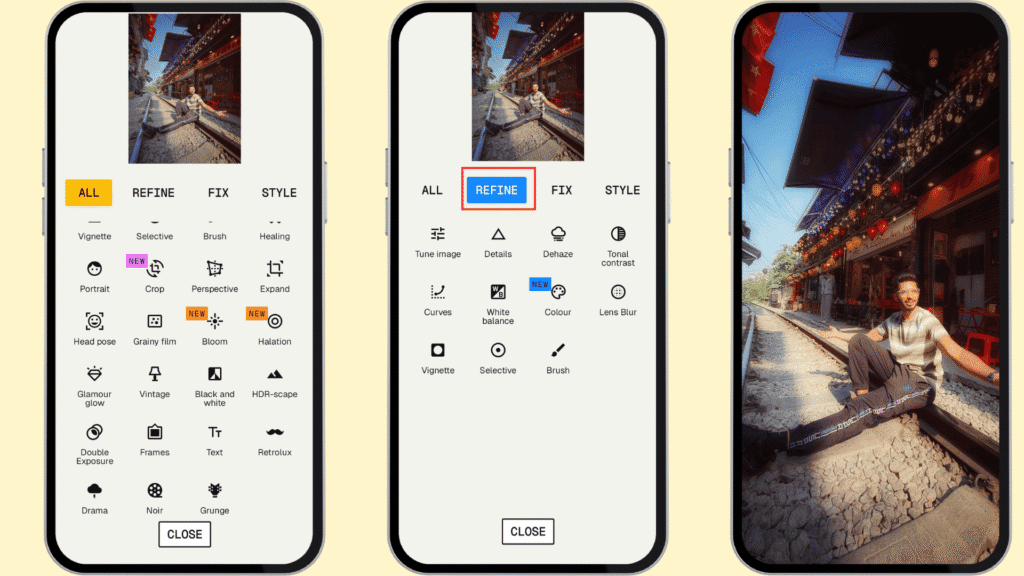
Snapseed’s Healing tool offers object and blemish removal features. It removes small distractions and works best on skin, sky, walls, or uncluttered surfaces.
Smart Masking
This feature instantly isolates a subject or background from the original image. So, we can change portrait, adjust sky/background, and quick selective color or exposure fixes.
Portrait AI
Its portrait tool focuses on face enhancement with Face Spotlight, Eye Clarity, Skin Smoothing, and face pose refinement. It brightens the face and smooths skin while trying to preserve a natural look. We can use this feature to edit selfies, headshots, and casual portrait retouching.
AI Lens Blur
To keep the subject more prominent, we can use the lens blur feature. It creates a shallow depth-of-field effect to get more cinematic or DSLR-like separation.
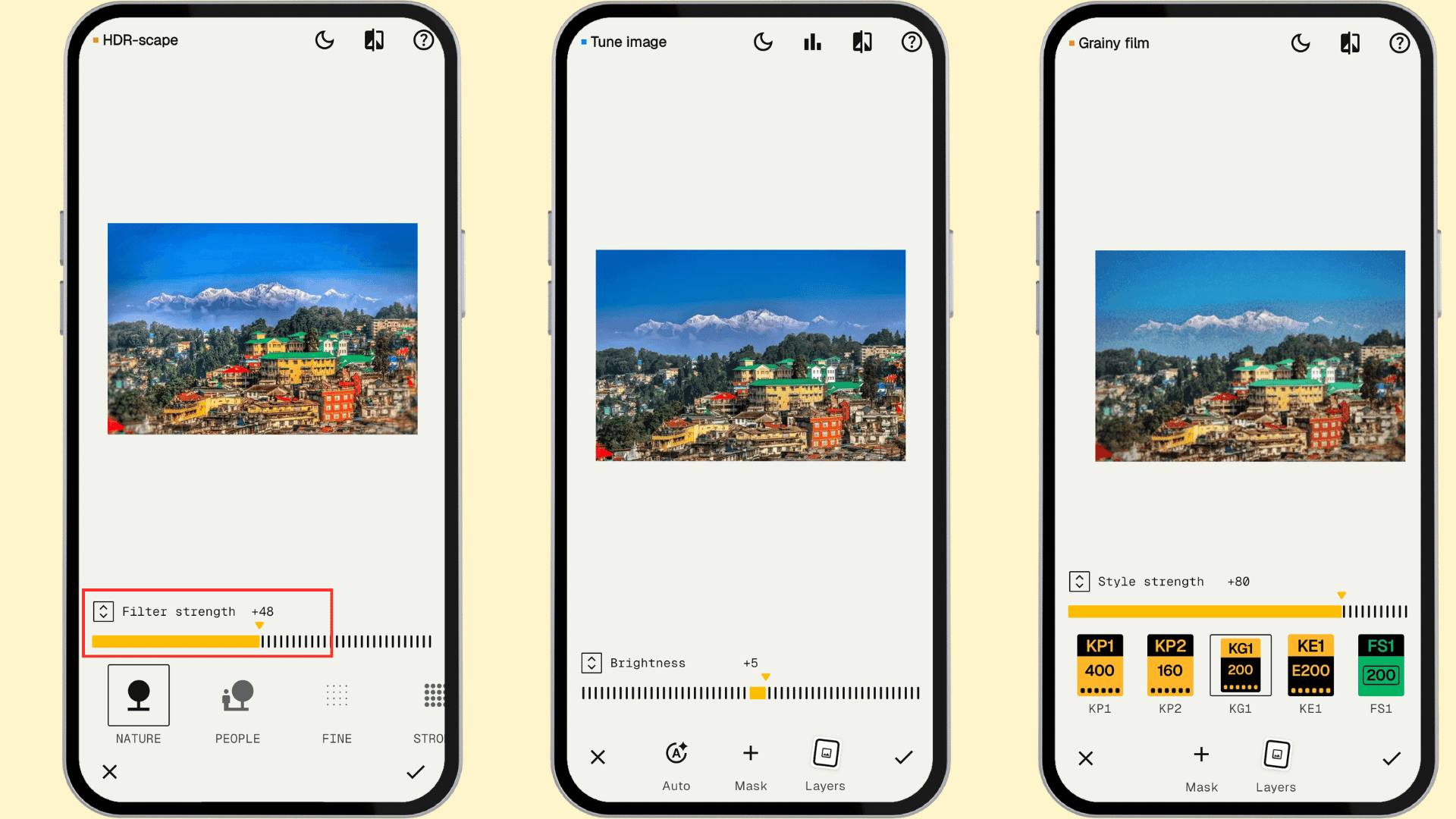
HDR Scape
Suppose your photo looks flat, Snapseed’s scene-enhancement filter will be useful. It boosts local contrast and tone for a more dramatic look.
Haze Removal
We can remove haze and fog from images to improve clarity. We can edit landscapes, skyline shots, and travel photos.
Snapseed Camera
Snapseed provides a new in-app capture tool, which is missing in many competitive apps. It lets users shoot photos using custom styles or film looks.
Batch Editing
This is the only app that allows you to apply the same edits to multiple photos at once for free. It is also a big time-saver for mobile creators who do not want to repeat the same editing steps manually.
Cons of Snapseed
No Generative AI Features
Snapseed lacks modern generative AI features like text-to-image generation. It also does not offer AI-powered tools for background removal, object replacement, or content generation.
No AI Outpainting
Unlike many competing photo editors, Snapseed does not support AI canvas expansion. There are no tools for automatically extending images for different social media aspect ratios without cropping.
No AI Upscaling
The platform provides basic photo enhancement tools but does not include AI-powered image upscaling. As a result, it cannot increase the resolution of low-quality photos.
Less Powerful Healing Tool
While Snapseed’s Healing tool can remove small imperfections, its results are not of high quality. Lightroom’s Generative Remove produces more realistic edits.
Pricing
Snapseed is completely free to use. It does not display advertisements while you’re editing photos. Users get full access to all 29 editing tools without any subscriptions.
Ideal For
Students, travelers, and beginners want a simple AI editor at zero cost.
Testing Parameter
To identify the best AI photo editing apps for the Android device, I began by randomly selecting popular apps renowned for their AI-powered editing capabilities. I then narrowed down the list to apps with a 4-star rating on Google and over 10 million downloads.
I removed apps that only offer paid plans so that beginners can access them too. Finally, I arrived at 7 top-tier recommendations. While testing, I evaluated them based on the following parameters:
- AI feature depth
- Output quality
- Android performance, like app speed, stability, RAM usage, and compatibility
- Editing tools, manual controls, RAW support, curves, selective adjustments, layers
- Pricing transparency
- Learning curve
- Platform availability
- Real-user reviews
Why Should You Trust Me?
For the past seven years, I’ve been reviewing and analyzing SaaS tools. You’ll find many of my tried-and-tested recommendations, including everything from VPNs to cloud storage and web hosting.
AI tools are another area of interest for me. I’ve already I’ve explored topics like the best AI art generators, best AI voice generators, best AI video generators, and more. My goal is to provide unbiased and honest reviews, free from affiliate recommendations.
I want to make AI tools accessible to everyone. With my expertise, I’ve created guides on topics like “How to Create an AI Virtual Influencer” and “How to Upscale Images using AI.” So, I’m confident that my recommended list includes only the most useful and cost-effective AI-powered apps.
Conclusion
AI photo editing apps simplify the manual editing process with powerful tools. The generative AI-based features enhance image clarity, remove objects, retouch skin, and more. I’ve included 7 top tools.
Among the 7 recommended AI image editing apps for mobile devices, Adobe Lightroom is the winner. Picsart AI studio and Photoroom are two great alternatives. Additionally, Canva and Youcam Enhance are also powerful options.
I’ve explained all the features and justifications behind the rankings in the article. Before purchasing any tool, don’t forget to try it out yourself on a free tier. If you’re curious about AI tools, subscribe to the weekly newsletter for AI tool recommendations and the latest news.


i need a photo of a loan
foto ai