What if your web hosting could supercharge your site’s performance, security, and ease of use—all in one package? I’m talking about Elementor Hosting!
After months of testing and research, I am finally here with the Elementor Hosting Review. We’ll start by examining performance results like speed, uptime, server response time, and load testing. You’ll see how Elementor stacks up under pressure.
Next, we’ll dive into its standout features: a user-friendly interface, robust security, lightning-fast CDN, automated backups, caching, domain management, and more. Finally, we will also check out its pros, cons, and I’ll recommend the best alternatives to Elementor Hosting.
Curious to find out if Elementor Hosting lives up to the hype? Let’s dive right in!
Elementor Hosting Review
Summary
Elementor hosting offers excellent speeds, performance, and seamless Elementor builder integration, along with a free domain for the first year.
However, its backup options and customer support could be improved. It’s best suited for users already utilizing Elementor Pro who want an all-in-one hosting and website builder solution.
- About Elementor Hosting
- Elementor Hosting Review
- Elementor Hosting User Interface
- Elementor Server Response Time
- Elementor Speed Test
- Elementor Uptime Test
- Elementor Load Testing
- Elementor Data Centers
- Elementor Domains
- Elementor Cache
- Elementor Backups
- Elementor CDN
- Elementor Security Features
- Elementor Hosting Website Builder
- Elementor Additional Features
- Elementor Hosting Pricing
- Elementor Hosting Support
- Elementor Hosting Pros
- Elementor Hosting Cons
- Elementor Hosting Alternatives
- Conclusion
Disclaimer : I strongly believe in transparency. If you buy using the links on our site, we may earn a small commission without any extra cost to you. This helps me to keep producing honest reviews. Read More >>
About Elementor Hosting
Elementor is a popular page builder for WordPress, founded by Yoni Luksenberg and Ariel Klikstein in 2016. In 2022, Elementor launched its cloud hosting service, which was initially called Elementor Cloud.
The key purpose behind introducing their hosting service was to offer a web host that is performance oriented for both WordPress and Elementor. But did Elementor hosting succeed in achieving its motive? Keep reading to find out!
Elementor Hosting Review
Elementor Hosting User Interface
The user interface of Elementor hosting is easy to use with a modern design. On the main screen, you’ll find a list of your hosted websites. They can be managed using the hosting control panel.
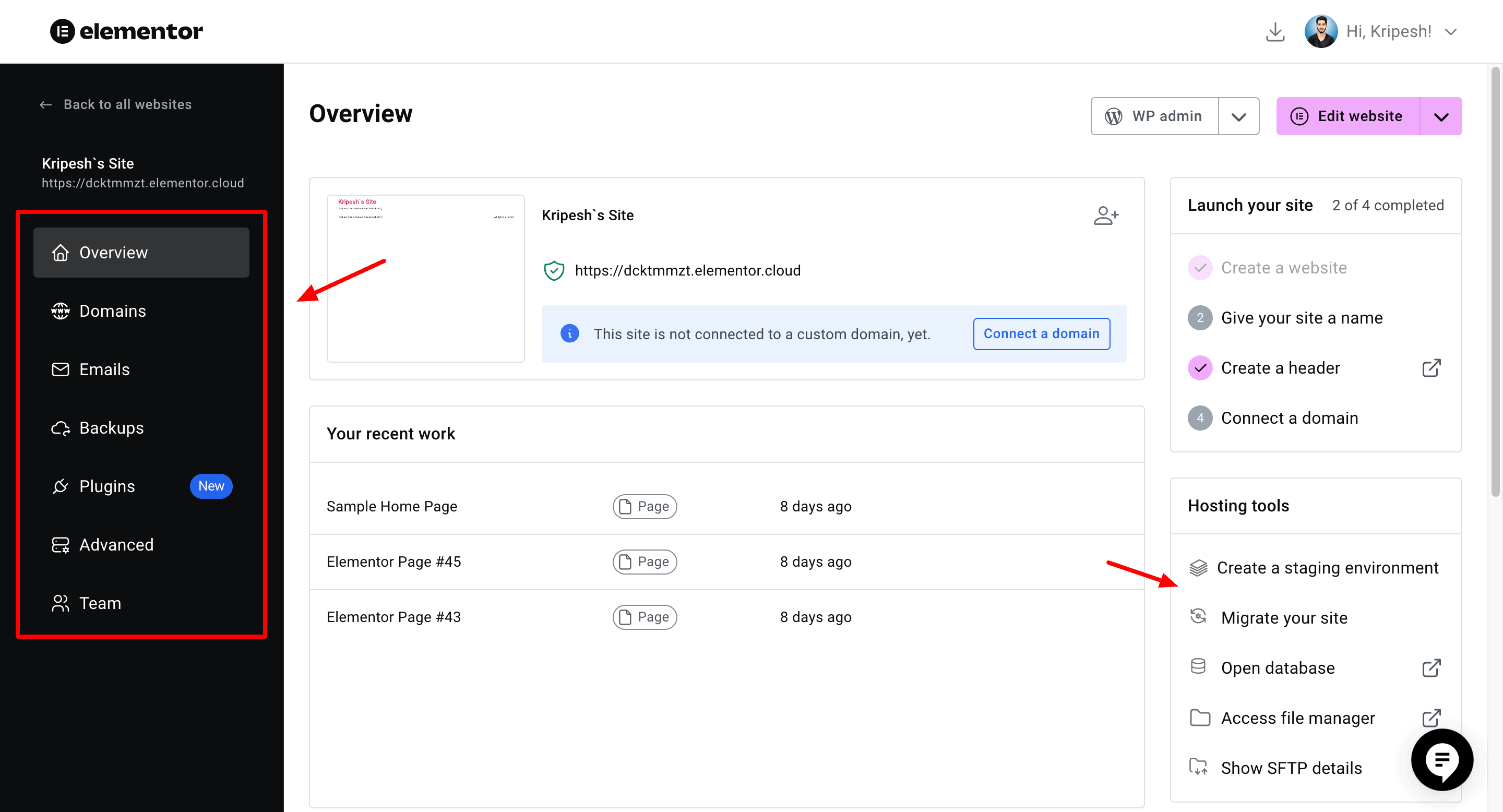
Within the hosting control panel, you can get an overview of your website and the recent pages you have created. The right panel depicts the hosting tools, like launching steps, hosting information, etc. The left panel lets you navigate to features like domains, emails, backups, etc.
Overall, the user interface is super easy to use and friendly for beginners.
Elementor Server Response Time
Server Response Time is the time taken by the first byte of data to reach the user after they request to load a web page. I tested the SRT of Elementor hosting from multiple locations. In countries like US, London, Singapore, Sao Paulo, and Sydney, the SRT was merely 2 ms.
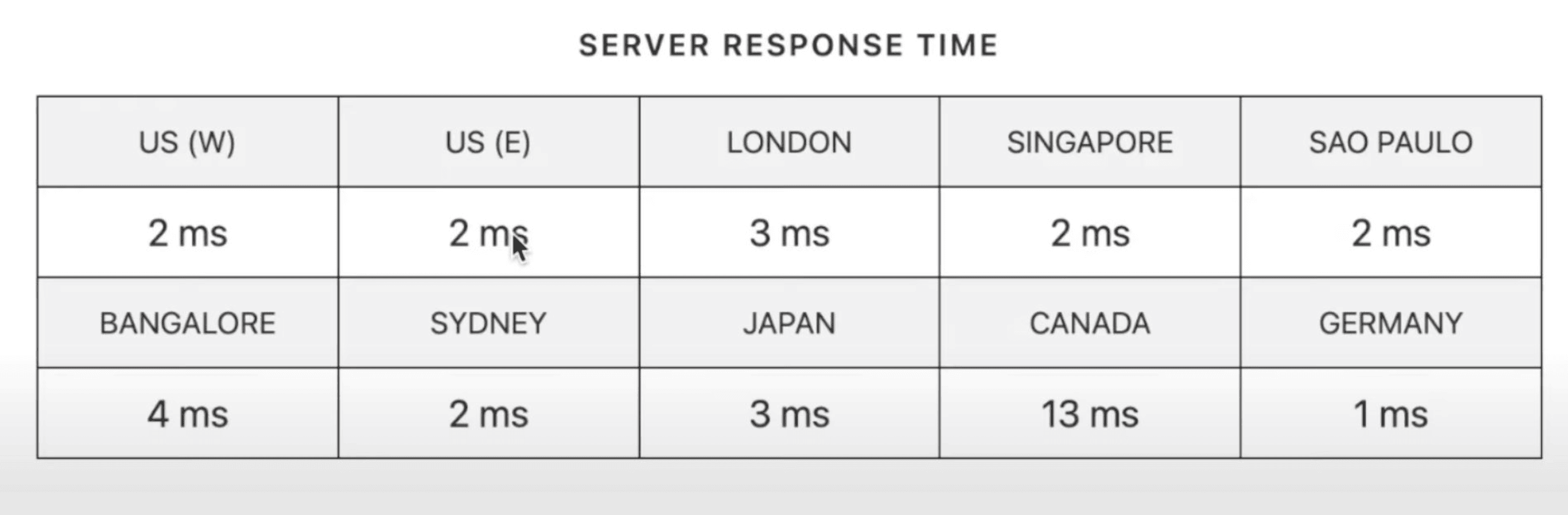
I observed the highest SRT in Canada (13 ms) and the lowest SRT in Germany (1 ms). Overall, the SRT was so swift because of the usage of Cloudflare Enterprise CDN.
Elementor Speed Test
Good speeds are an essential factor in selecting a hosting service. To test website speeds, I used platforms like Google Page Speed Insights and KeyCDN. Let’s look at the results.
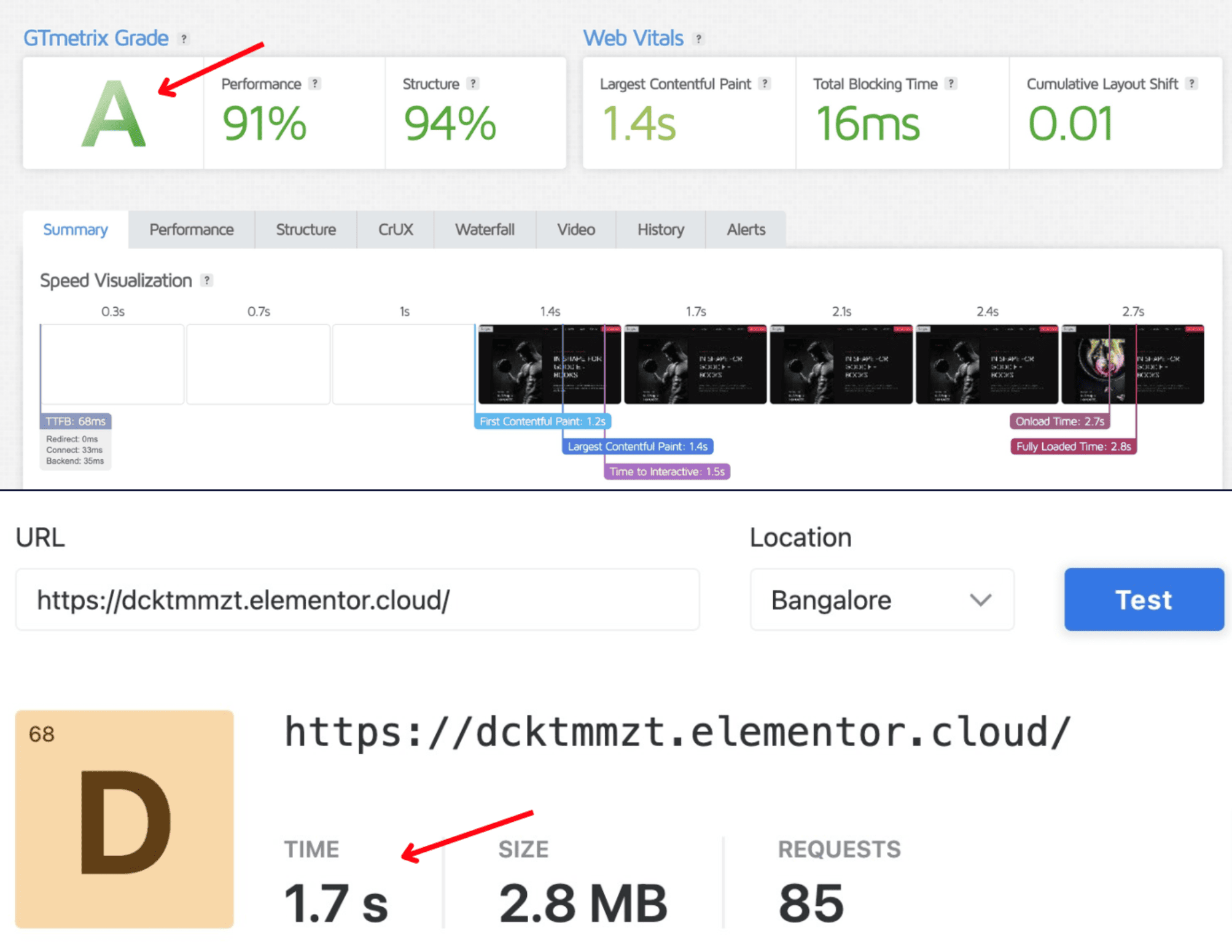
On testing website speeds from India, my entire website loaded in under 1.7 seconds on KeyCDN and 2 seconds on Google Page Speed Insights. These speeds are excellent for an Elementor website, as I didn’t even tweak any cache settings!
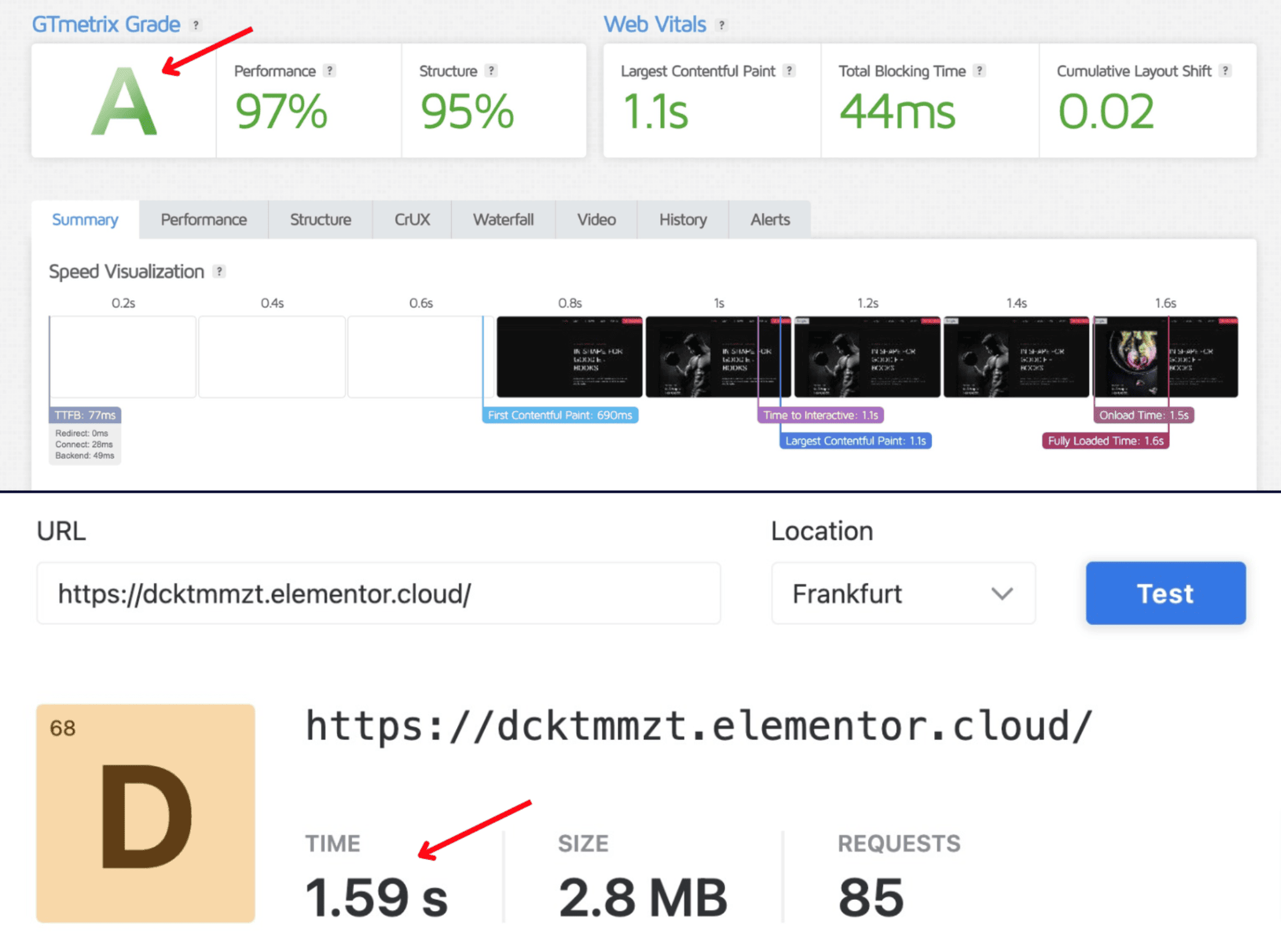
Similarly, when I tested my site speeds from Europe, the results were even better. KeyCDN showed speeds of 1.59 seconds and Google Page Speed Insights noted speeds of 1.6 seconds. This is mainly because their physical data centers are housed in Europe itself.
Overall, you get to experience super-fast speeds across all regions. But if they had physical servers in Asian regions like India, it would’ve been much better.
Elementor Uptime Test
I’ve been constantly testing the uptime of Elementor hosting for the last year. For this, I have used the uptime monitoring tool called Better Uptime. It checks the website uptime every 30 seconds.
Elementor Hosting Uptime Status Report (Last 12 Months):
Here’s the uptime report for Elementor hosting (European Servers) for the last 345 days.
| February 2025 | 100% |
| January 2025 | 100% |
| December 2024 | 100% |
| November 2024 | 100% |
| October 2024 | 100% |
| September 2024 | 100% |
| August 2024 | 100% |
| July 2024 | 100% |
| June 2024 | 100% |
| May 2024 | 100% |
| April 2024 | 100% |
| March 2024 | 100% |
| February 2024 | 100% |
In the last 30 days, I have received a flawless 100% uptime with no downtime incidents. The average uptime I observed in the last 345 days was also an impressive 100%.
Note: I have an active plan of Elementor Hosting (Basic plan). Every month, the uptime will be updated here.
Overall, the uptime performance of Elementor hosting is exceptional, because of the use of Google Cloud platform and Cloudflare Enterprise CDN.
Elementor Load Testing
For conducting the load test, I sent 50 virtual users over to my website hosted on Elementor hosting. They made a total of 10.4k requests out of which none failed.
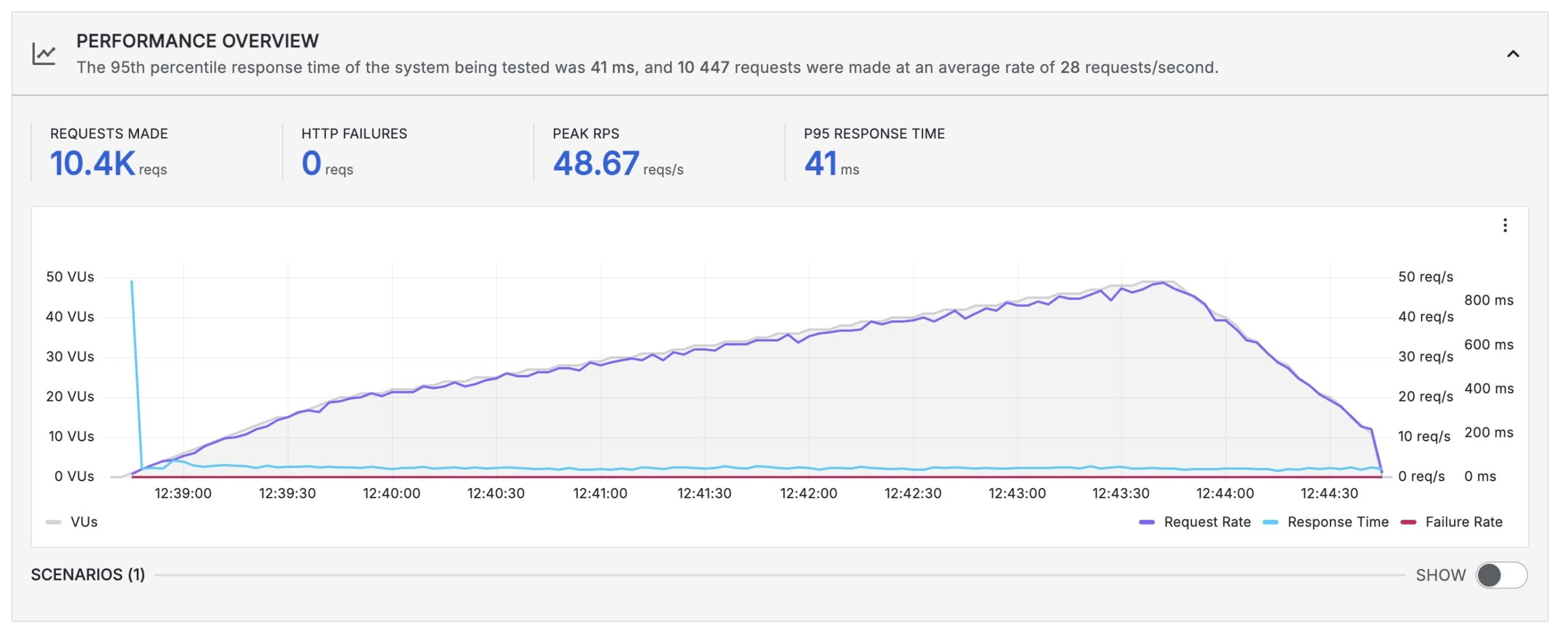
The peak requests reached 48.67 requests/second and the P95 Response time was 41 ms. (P95 Response Time is a metric that depicts the response time of 95% of the requests made to a system. Here, 95% of the requests had a response time of 41 ms or less.
There were no spikes noticed in the response time. It was stable throughout the test duration despite numerous requests! Overall, Elementor hosting performed exceptionally well in the load test.
Elementor Data Centers
Elementor hosting only has 1 data center, which is located in Belgium, Europe. They employ Google Cloud servers with NVMe storage to ensure fast speeds within Europe. For swift speeds outside Europe, they use Cloudflare Enterprise CDN, included for free with the hosting.
Overall, the availability of a single data center may affect speeds and performance. I hope they introduce more data centers in the future.
Elementor Domains
When you purchase an Elementor hosting plan, you get a free domain for the first year. It also features a temporary domain, which is a free sub-domain under Elementor.cloud. Temporary domain is helpful when you want to preview how your website looks without connecting your business domain.
Elementor Cache
Elementor hosting comes equipped with its built-in cache system called Elementor Advanced Caching. It is available under the WordPress dashboard. You can set cache timeout from a range of 30 mins to 30 days.
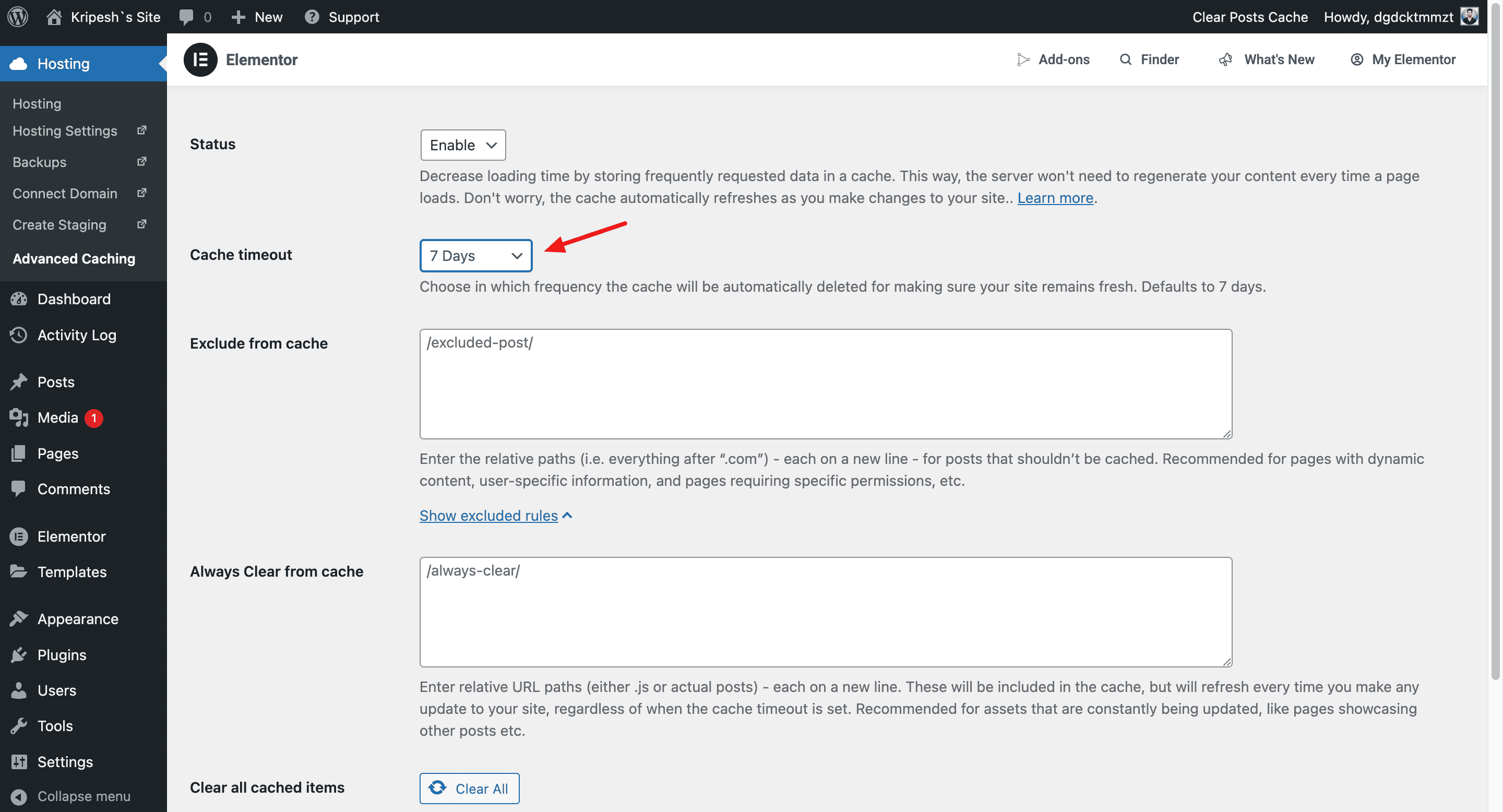
Compared to other web hosts offering advanced cache settings like Litespeed cache, Elementor hosting is packed with basic cache options. It focuses on ease of use for beginners.
Elementor Backups
Daily Backups are a crucial art of a hosting service. Elementor Hosting offers automatic backups that are created every 24 hours. These backups are stored on their servers for 14 days. You can easily restore any backup from the last 14 days or export it to mail.
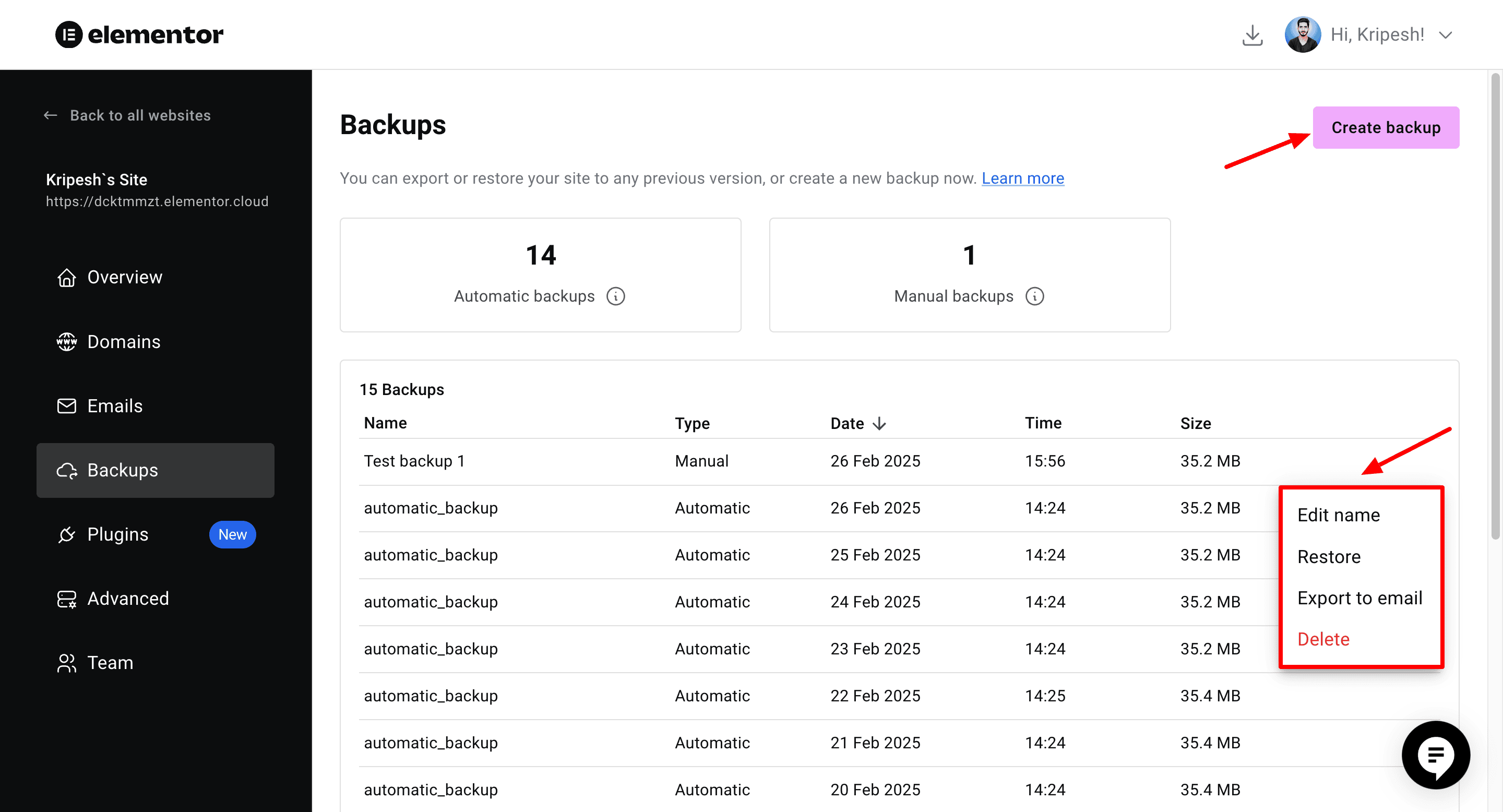
Additionally, it also allows you to create manual backups that are stored forever on their servers. The only option I found missing was the ability to selectively restore specific files and folders. I hope they will implement it in the future.
Elementor CDN
Content Delivery Network is a group of servers that enhance website speeds and performance by caching web content near the user’s location. Elementor hosting uses the Cloudflare Enterprise CDN, which is the premium tier of Cloudflare CDN.

It stores your web content on 310 servers across the globe, making website data accessible to end users more swiftly. Overall, it improves speeds and user experience.
Elementor Security Features
Talking about security, Elementor hosting offers a range of attractive features to protect your website data and online presence. Let’s look at the major ones below.
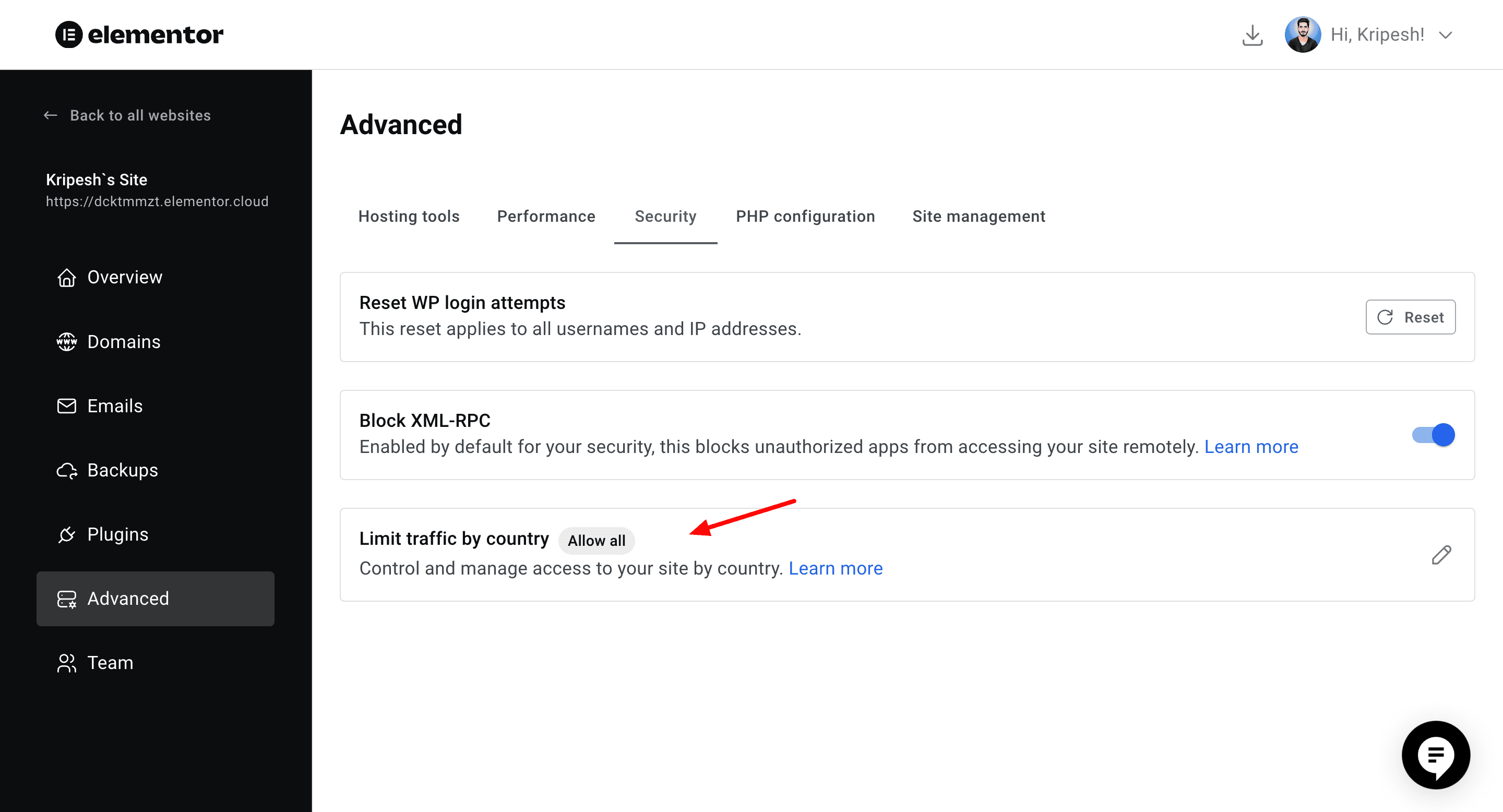
- SSL Certificate: You get free SSL certificates from Cloudflare to protect your website on all Elementor hosting plans.
- DDoS & BotNet Protection: Elementor uses Cloudflare’s network to analyze incoming traffic and filter any malicious or suspicious users before they reach your web server.
- 2FA: Two-factor authentication is available via SMS. This requires you to enter an SMS verification code along with your credentials when logging into your Elementor hosting account.
- WAF: Its integrated web application firewall detects malicious cyber attempts and eliminates them.
- Geoblocking: It lets you allow or block selected countries from accessing your website.
- Maintenance: You can select a time range to allow the Elementor team to perform server updates and site checkups.
- Site Lock: It prevents your website from being displayed on search engines. Visitors need to enter a code to access your website.
Elementor Hosting Website Builder
All Elementor hosting plans come integrated with Elementor Pro website builder (except Starter plan). It’s a drag-and-drop website builder that offers lots of pre-designed templates to create your website.
You also get to choose from dozens of Basic and Pro widgets or insert ready-made blocks and pages. To ensure the consistency of web pages, you can even customize global settings. But the best part about the Elementor plugin is Elementor AI.
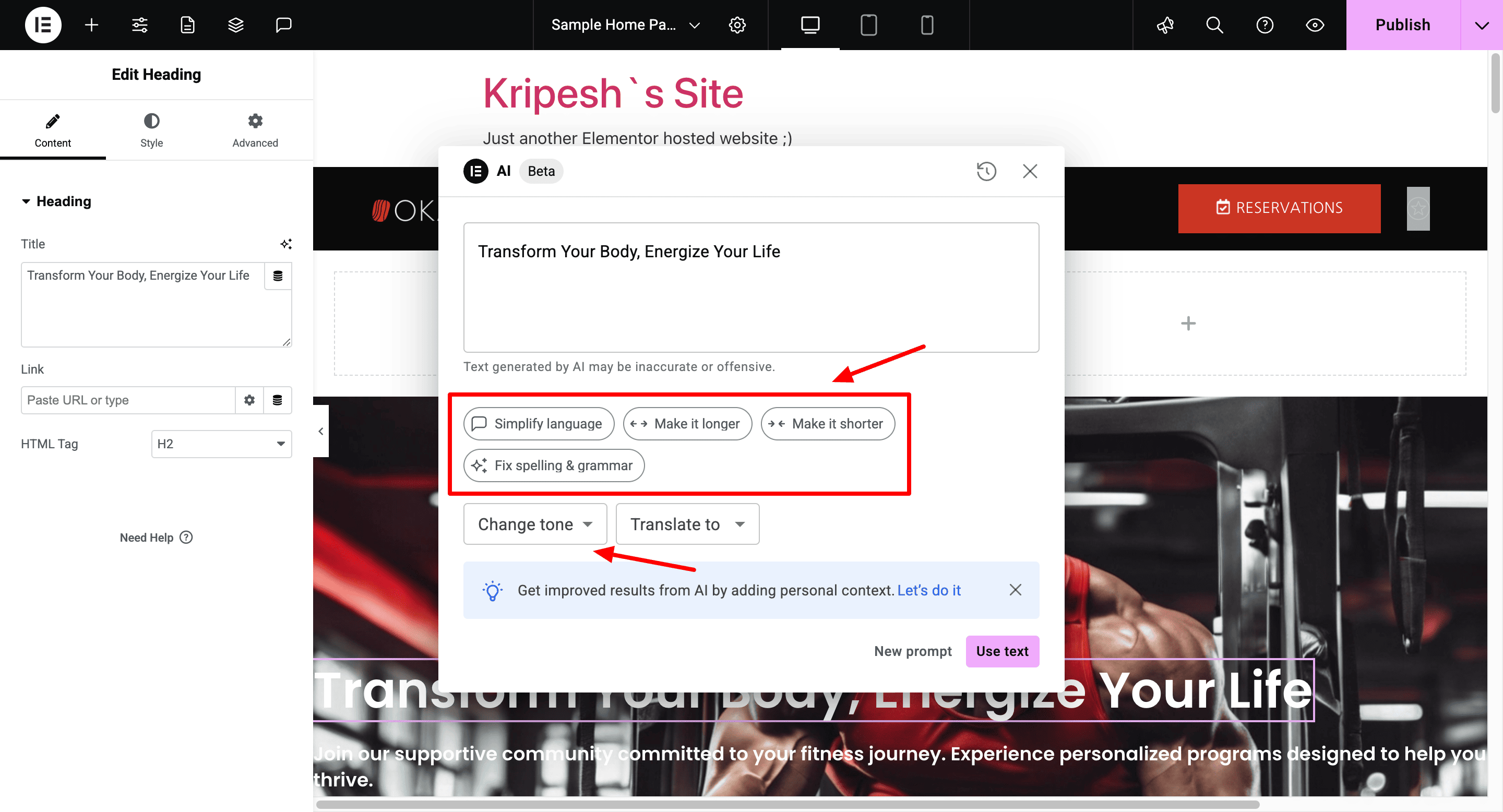
It’s a set of AI features you can use to automatically generate new sections via prompts. The AI content generation works well, but the AI doesn’t generate images. Overall, Elementor is one of the best and most convenient website builders for a WordPress website.
Elementor Additional Features
1) Team Features
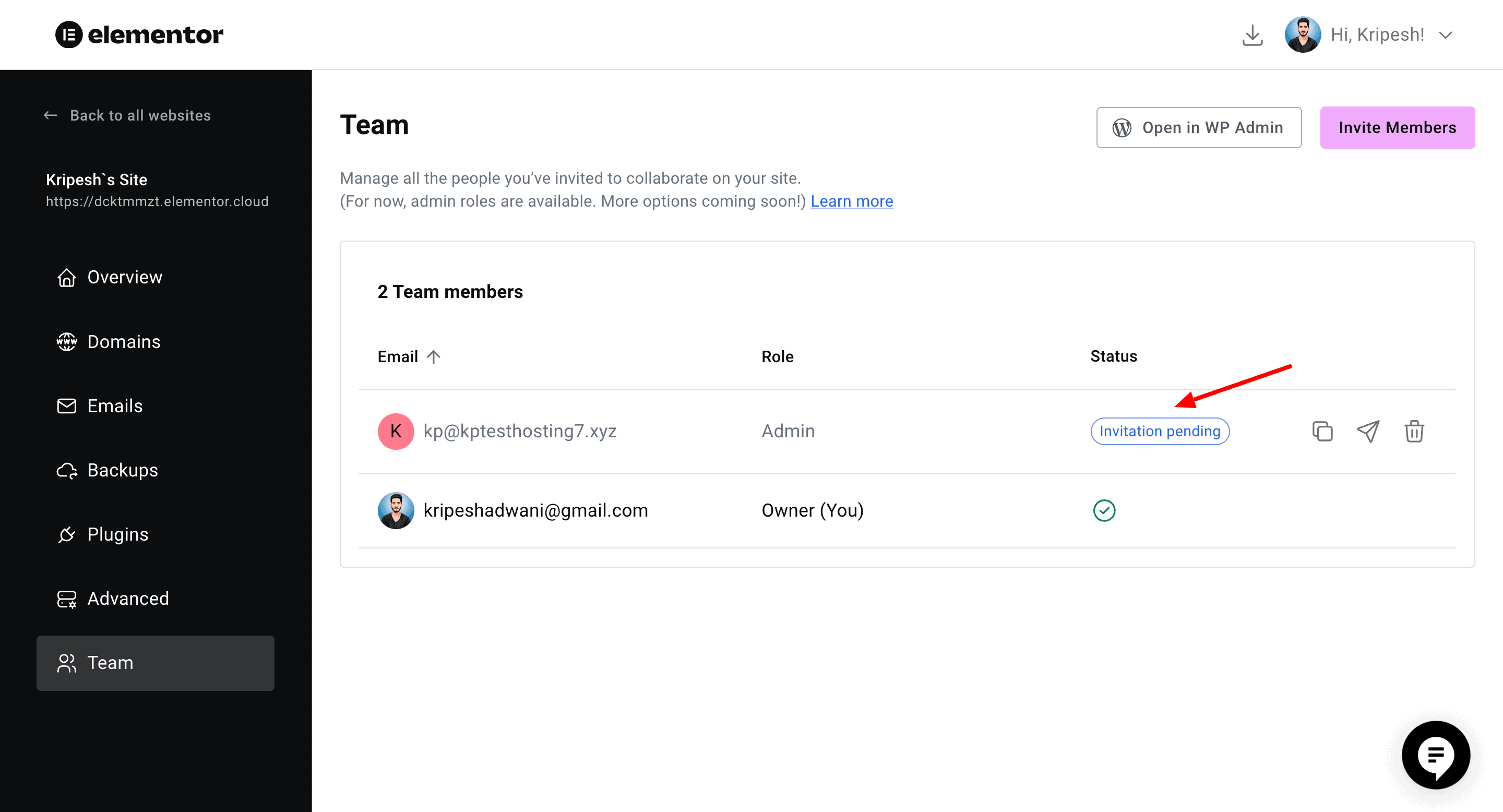
If you have a team of users, you can use the Team feature of Elementor hosting to collaborate with them. It lets you invite anyone to become an admin on your account. You can also allow admins to edit, manage, or publish website content with ease.
2) Technology
You can access the following technology on Elementor hosting:
- Litespeed servers for lightning fast speeds across all regions.
- SFTP Access with your preferred email client.
- File Manager to organize your website files.
- Latest PHP 8.3 support.
- Database access via phpMyAdmin.
3) Website Migration
Elementor hosting offers 1 free website migration. Users can migrate their website manually by following the steps in their knowledge base article. However, it can be quite lengthy and complicated for a beginner.
A better option would’ve been that their team could migrate the website, essentially reducing the hassle for inexperienced users.
4) Auto Scaling
Handling your website during sudden traffic surges can be difficult. To cater to this increased traffic, Elementor WordPress hosting offers an auto-scaling feature. It makes additional resources available to you when your website requires, ensuring you don’t experience any downtime.
5) Email Hosting
It offers integrations with Zoho, Google Workspace, and Microsoft to connect your business email. However, it doesn’t come with a built-in email hosting.
6) Add-Ons
If you wish to extend the functionality of your website, Elementor hosting offers 40+ paid add-ons. These include popular plugins like SolidWP, LearnDash, UpdraftPlus, RankMath SEO, Yoast SEO, Google Site Kit, etc. You can check the entire list on Elementor Addons page.
Elementor Hosting Pricing
Elementor comes with 4 paid plans. The following table compares the features of these plans.
| Lite Plan | Basic Plan | Business Plan | Grow Plan | |
| Pricing | $2.99/month | $9.99/month | $19.99/month | $22.99/month |
| Renewal Price | $11.99/month | $14.99/month | $24.99/month | $32.99/month |
| Sites | 1 | 1 | 1 | 3 |
| Monthly Traffic | 10k | 25k | 50k | 75k |
| Monthly Bandwidth | 10 GB | 30 GB | 50 GB | 75 GB |
| Storage | 5 GB | 10 GB | 20 GB | 25 GB |
| Elementor Pro | No | Yes | Yes | Yes |
| Backups | 1 Day | 14 Days | 30 Days | 30 Days |
| PHP Workers | 200 | Unlimited | Unlimited | Unlimited |
Its starter plan (Lite plan) costs $2.99/mo, where you get the free version of Elementor website builder and merely 10k monthly visitors. Also, it renews at an expensive $12.99/mo.
This is not a value for money option, in my opinion. You can get much better features for the same price point on Hostinger!
Refund Policy
You get a standard refund policy of 30 days with Elementor hosting. If you are not satisfied with their services, you can get a complete refund within 30 days of purchase.
Payment Methods
Elementor hosting accepts payments made through PayPal and all major credit cards. I hope they also supported UPI payments for the convenience of Indian users.
Best Plan
In my experience, the Basic plan of Elementor hosting is its best plan. For $9.99/month, you get access to Elementor Pro, 25k monthly visitors, and unlimited PHP workers. Elementor Pro itself costs $6.58/month when purchased separately.
This makes it a valuable option. It would’ve been even better if the backups could be extended to 30 days.
Elementor Hosting Support
With Elementor hosting, you get support through a variety of methods. It offers live chat support, ticket support (on Lite and Basic plans), dedicated customer success manager, and WhatsApp support (on higher plans).
You can also check out their academy with free courses, community support, and knowledge base with annotated articles. However, in my experience, the live chat support on the Basic plan is pretty average.

I had to face a lot of issues in getting my queries resolved. For instance, when my first query was answered, and I asked them another question, they abruptly asked me to start another chat. As per their policy, they only answered 1 query per chat session!
With a queue of customers, multiple queries meant multiple waiting lines and lots of wasted time! I think this was quite unreasonable! For the price that I’m paying ($9.99/mo), I expected to receive better support. They should work on improving their customer support to a great extent!
Elementor Hosting Pros
1) Excellent Speeds
You can experience superior speeds across all locations with Elementor hosting. This is because they provide Cloudflare Enterprise CDN on all plans.
2) Remarkable Performance
Besides swift speeds, Elementor hosting also guarantees an unbeatable uptime, stable load management, and great SRT. Thus, Elementor hosting is great if you need a performance-oriented hosting.
3) Easy to Use
It is a managed WordPress hosting. So, all the technical aspects of your handled by the Elementor team. You get a friendly UI and easy-to-use features, making it ideal for beginners.
4) Highly Optimized for Elementor
Elementor hosting offers a seamless integration with the Elementor website builder. So if your work revolves around Elementor, you should definitely try it out!
5) Good Website Builder
All plans of Elementor hosting (except Starter plan) come with Elementor Pro. It is equipped with dozens of templates, elements, and AI features to help you create an attractive website for your business.
6) Good for eCommerce Sites
On the Starter plan of Elementor hosting, you get 100 PHP workers. Whereas, on all other plans, it features unlimited PHP workers. This makes it great for hosting eCommerce stores.
7) Free Domain
For the first year, Elementor hosting offers a free business domain. You also get a temporary domain to preview how your website looks without connecting a custom domain.
8) Decent Backups
Elementor hosting creates automatic backups of your website data and stores it for 7 to 30 days, depending on your plan. You can also create manual backups whenever you want. However, selective restoration is not supported yet.
Elementor Hosting Cons
1) Only 1 Physical Data Center
Elementor only has a single data center in Belgium, Europe. This may hinder their speeds and performance in regions farther away from Europe. I hope they implement more data centers in locations like Asia, US, etc.
2) Average Live Chat Support
The live chat support offered by Elementor is pretty weak. They don’t answer multiple queries in a single chat, making it inconvenient for users. I hope they work on improving their support in the future.
3) Expensive Pricing
The pricing of Elementor Hosting’s plans is pretty expensive, especially the Lite plan, which doesn’t have Elementor Pro. Its renewal pricing is even more expensive.
4) Missing Features
Features like website staging, cloning, extended backups, email hosting, and better support are all on higher tier plans (Business and Grow plans). These are essential features that shouldn’t have been limited to higher plans. Also, the visitors allowed on all plans are quite limited.
5) Built for Elementor Ecosystem
Elementor hosting is ideal for users who work within the Elementor ecosystem. If you want to use a different website builder along with a different WordPress theme or plugin, this may not be a good option for you. For more, check out this list of Elementor incompatible plugins.
6) Migration can be Difficult
They offer 1 free website migration that users can perform manually by following their guide. However, it may be difficult for first-time users. I wish their team offered to migrate our website to Elementor hosting for free.
Elementor Hosting Alternatives
1) Elementor Hosting vs Cloudways
Cloudways is a powerful, cloud-based hosting platform that runs on top of unmanaged providers like AWS and Google Cloud. With over 65 data centers, it guarantees impressive performance and scalability, especially for growing websites.
Though it lacks a direct Elementor optimization, it offers advanced security features, flexible resource scaling, and superior uptime. Cloudways is ideal for businesses needing more control and flexibility, making it better suited for users who prioritize performance and scalability.
The pricing plans of Cloudways start from $11/month. You can use my link and enter the coupon code KRIPESH to get 20% off on your purchased plan for first 3 months.
2) Elementor Hosting vs Hostinger
Hostinger is an affordable and well-rounded hosting provider. It offers good performance, fast speeds, and a variety of security features, along with Indian payment methods and GST invoices.
While it doesn’t have the same level of Elementor optimization as Elementor Hosting, it’s a solid option for users looking for a budget-friendly solution. Hostinger excels in its affordability and user-friendliness, making it ideal for general use rather than specific builders like Elementor.
The pricing plans of Hostinger start from ₹149/month. You can use my link and enter the code KRIPESH to get 10% off on your purchase.
Conclusion
Overall, Elementor hosting offers a compelling package for website owners, especially those using the Elementor builder. With its excellent speeds, remarkable performance, and seamless integration, it stands out as an optimized solution for WordPress users.
Including Elementor Pro and a free domain for the first year further enhances its value. While its backup options and support could be improved, the overall hosting experience makes Elementor a reliable and performance-driven hosting service.
In my opinion, Elementor hosting is ideal for those who are using Elementor Pro and have purchased a hosting plan separately. With Elementor hosting, they can enjoy the benefits of managing their hosting and website builder from a single panel.
But if you don’t use Elementor website builder and your website is non-Elementor focused, I won’t recommend opting for Elementor. In this budget, you can check out other powerful web hosts like Hostinger, Cloudways, ChemiCloud, etc.
Anyway, which hosting do you currently use? Have you used Elementor hosting before? How does it compare to other hosts? Do share with me in the comments section below. This is Kripesh signing off. Cheers and keep learning. 🙂

Elementor Hosting Pros (+)
- Excellent Speeds
- Easy to Use
- Optimized for Elementor
- Free Domain
Elementor Hosting Cons (-)
- Average Support
- Expensive Pricing
- Missing Features
- Built for Elementor Ecosystem