Creating engaging videos can be a real headache! Between expensive equipment, hiring actors and voice artists, and the time-consuming editing process, it’s enough to make anyone give up.
But what if there was a way to create professional, stunning videos in minutes, without breaking the bank or needing a film degree? Well, this AI video generation platform makes it possible. Introducing – JoggAI!
In this JoggAI Review, we’ll explore how this AI video generation platform can revolutionize your content creation workflow. We’ll cover everything from its user interface and key features to its pricing, support options, and even compare it to alternatives.
So, if you’re ready to ditch the video creation struggles and embrace a simpler solution, let’s dive right in!
Jogg AI Review
Summary
JoggAI excels at AI video generation, and offers high-quality AI voices, making it a top-tier tool for content creators. However, video length is limited on Tier 1, and avatar quality can vary. In 2026, I would highly recommend it, specifically for video content creation!
Disclaimer : I strongly believe in transparency. If you buy using the links on our site, we may earn a small commission without any extra cost to you. This helps me to keep producing honest reviews. Read More >>
About JoggAI
JoggAI is an AI-powered video generation platform founded by Anbang Xu in March 2024. Headquartered in Singapore, JoggAI currently has over 95k+ users on its platform.
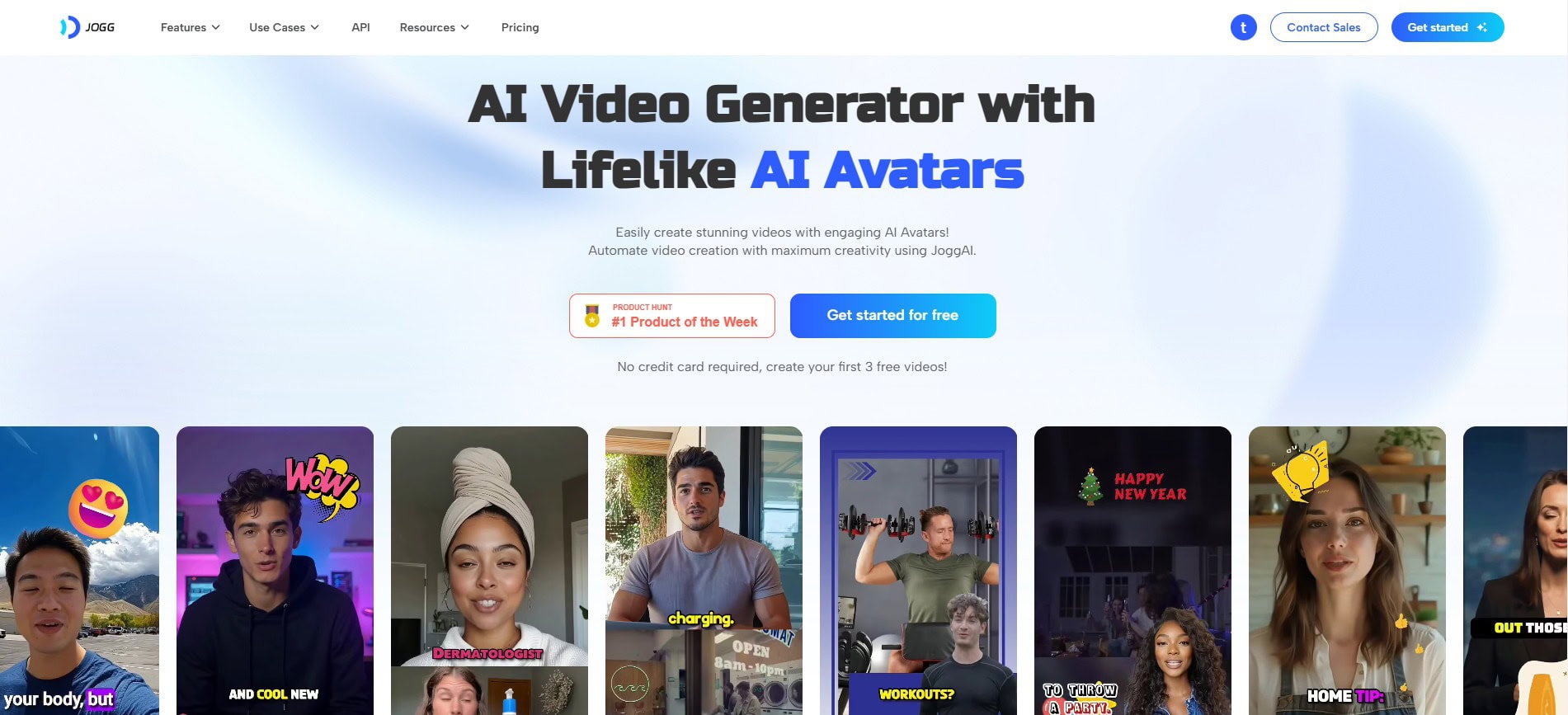
It was initially focused solely on creating video ads. But now, they have expanded their features to cover multiple aspects of video creation. This includes AI video generation, avatar generation, custom avatars, voice generation, video editing, voice cloning, and more.
JoggAI User Interface
The user interface of JoggAI is quite modern with pleasing colors and design. As you log in to the JoggAI dashboard, the main screen features the popular tools for creating AI avatars and avatar videos. On scrolling down, you can also check out video templates and popular avatars.
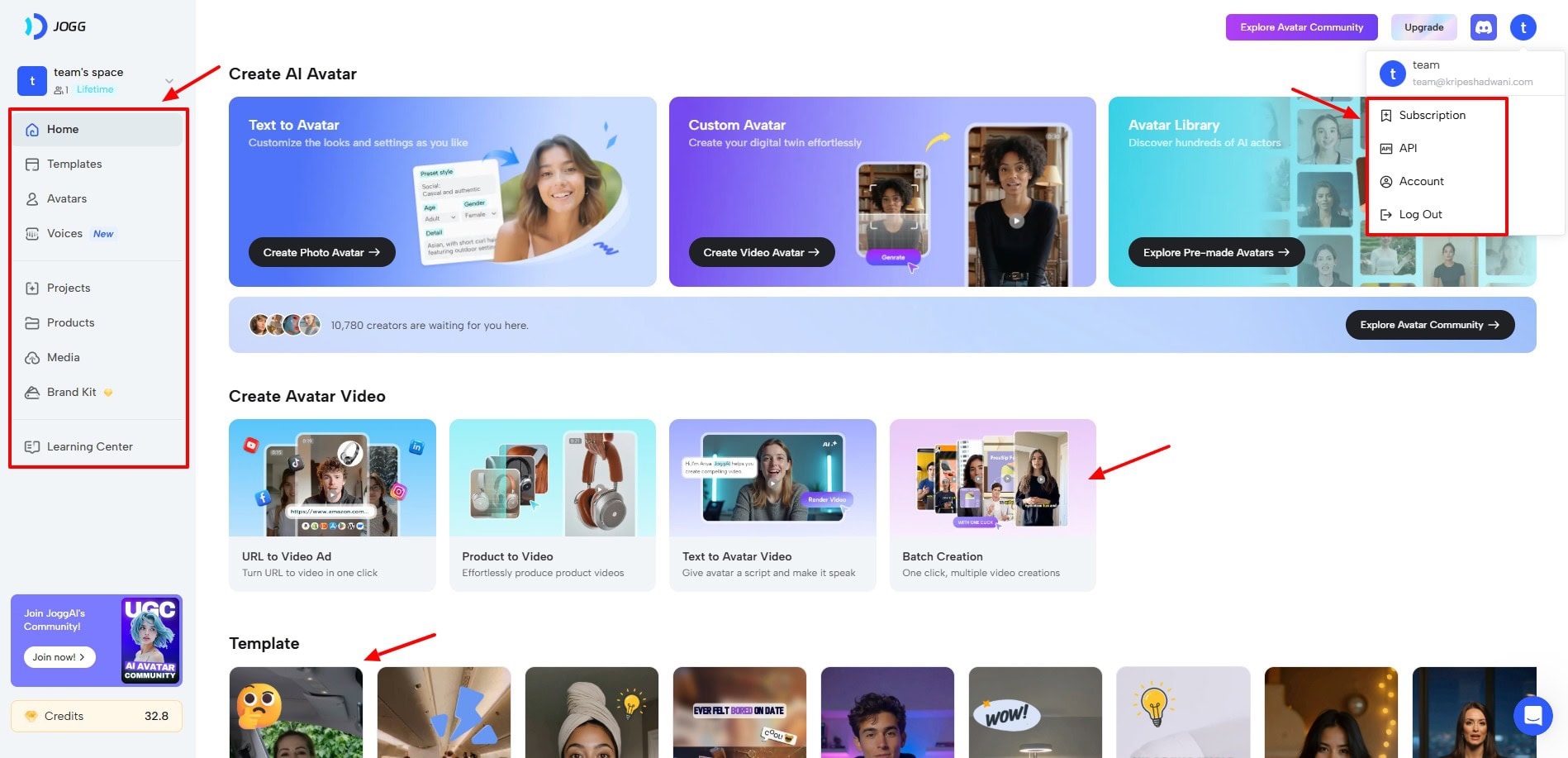
On the left panel, you can access all the features and functions of JoggAI. The bottom right corner features a chat button where you can check out messages from your team. From the top right corner, you can access the JoggAI community, Discord server, and account settings.
Overall, the user interface of JoggAI is super friendly, clean, and easy to navigate. Even beginners will be able to use it effortlessly.
Key Features of JoggAI
1) Generate AI Video Ads
Creating a video ad can be a long and cumbersome process. But not anymore, with Jogg AI. To get started, you need to enter your product URL. It supports platforms like Amazon, eBay, App Store, Google Play Store, Shopify, Shein, WordPress, and more.
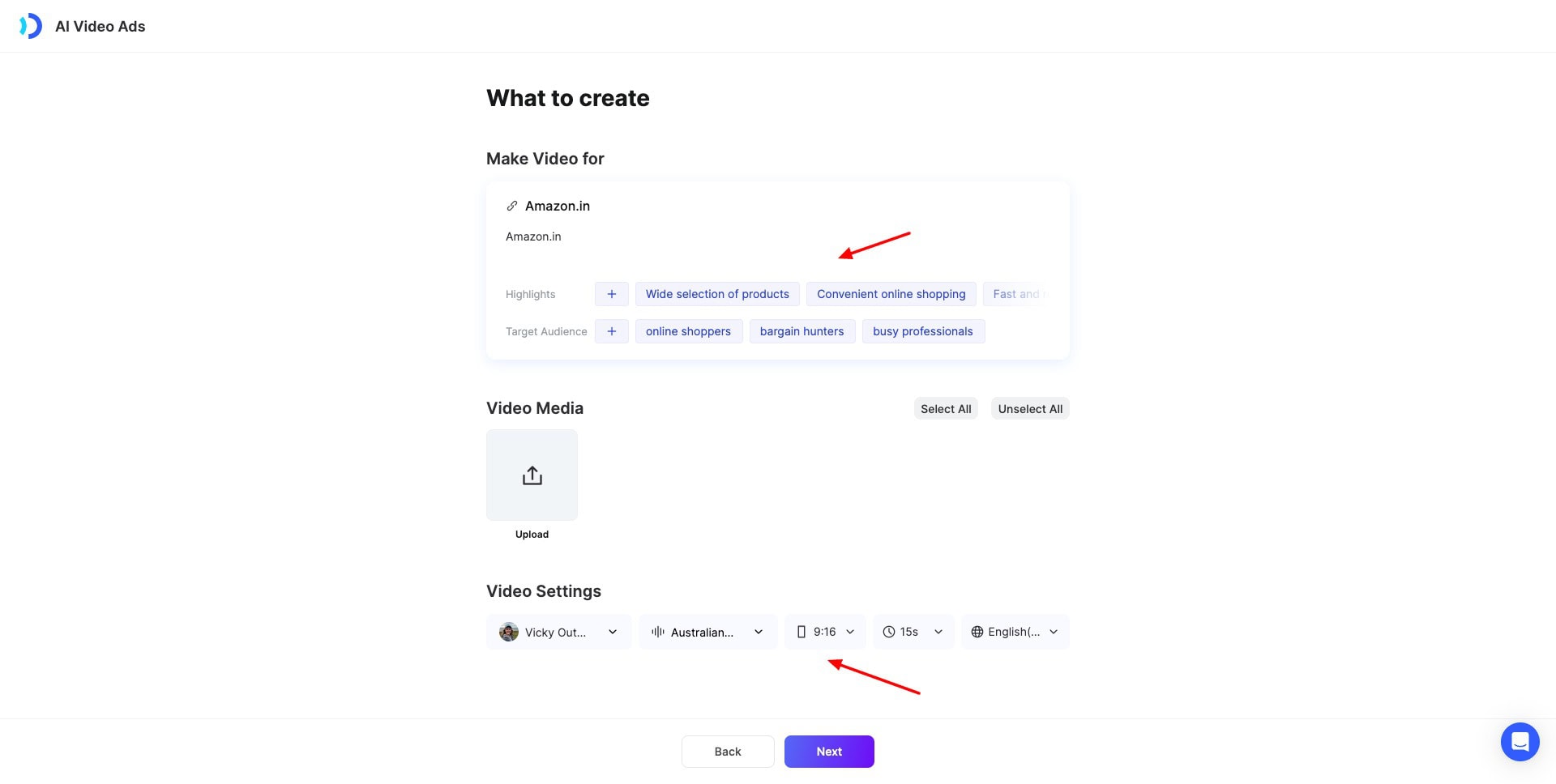
Next, it will analyze your URL and fetch the highlights and target audience of your product. If you have a video, you can upload it. Otherwise, choose a video avatar, AI voice, orientation, ad duration, and language.
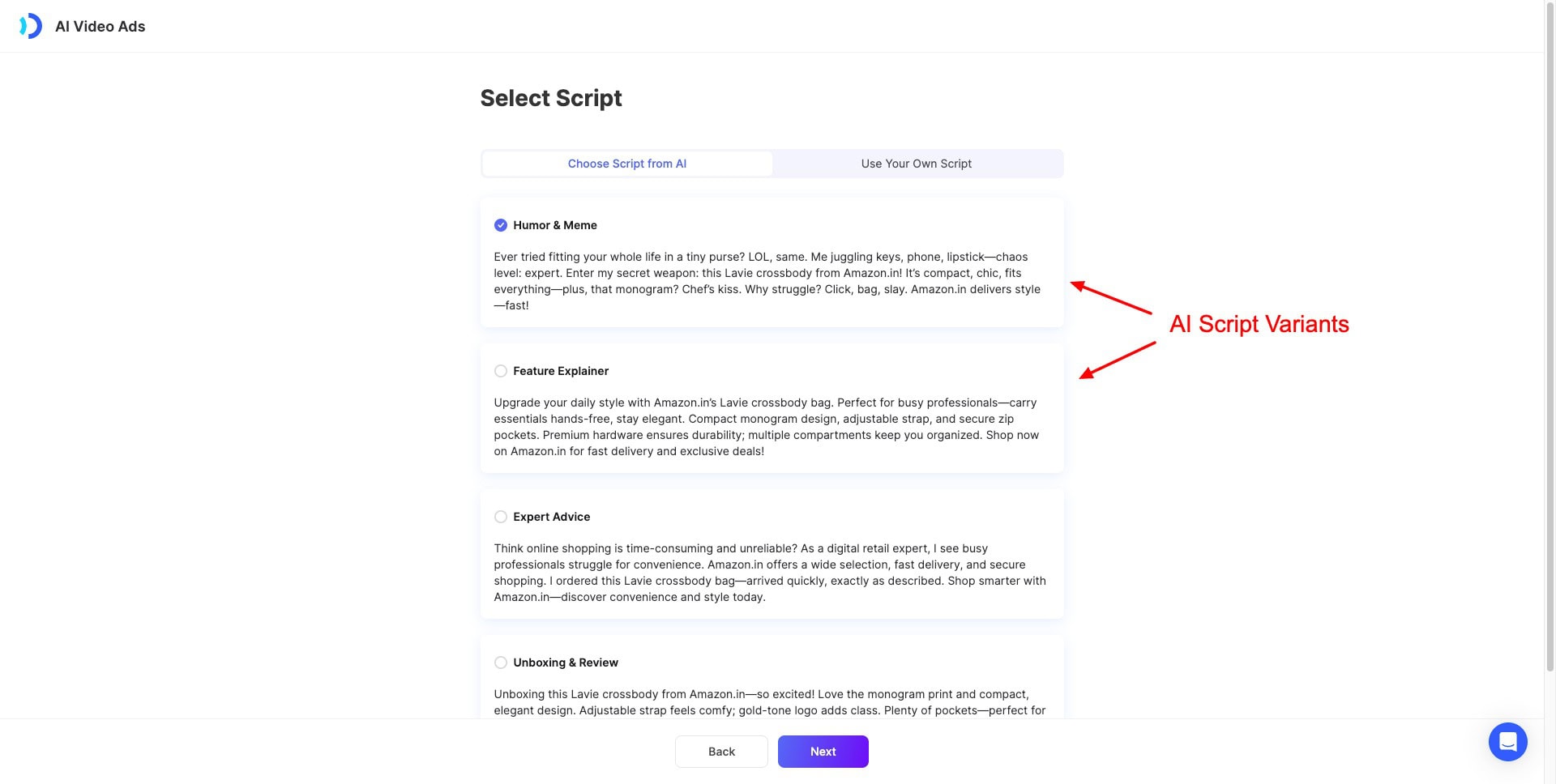
Next, upload at least 2 images or 1 video file. Then, it will generate a few variants of AI script from different perspectives. For instance, Humor & Meme, Feature Explainer, Expert Advice, etc. You can choose the version you find most appealing or upload a custom script as well.
Finally, it generates 10+ variants of your ads within seconds. You can preview them to the end, but they are not lip-synced. You can render the videos you like, and the lip-synced versions will be generated for them.
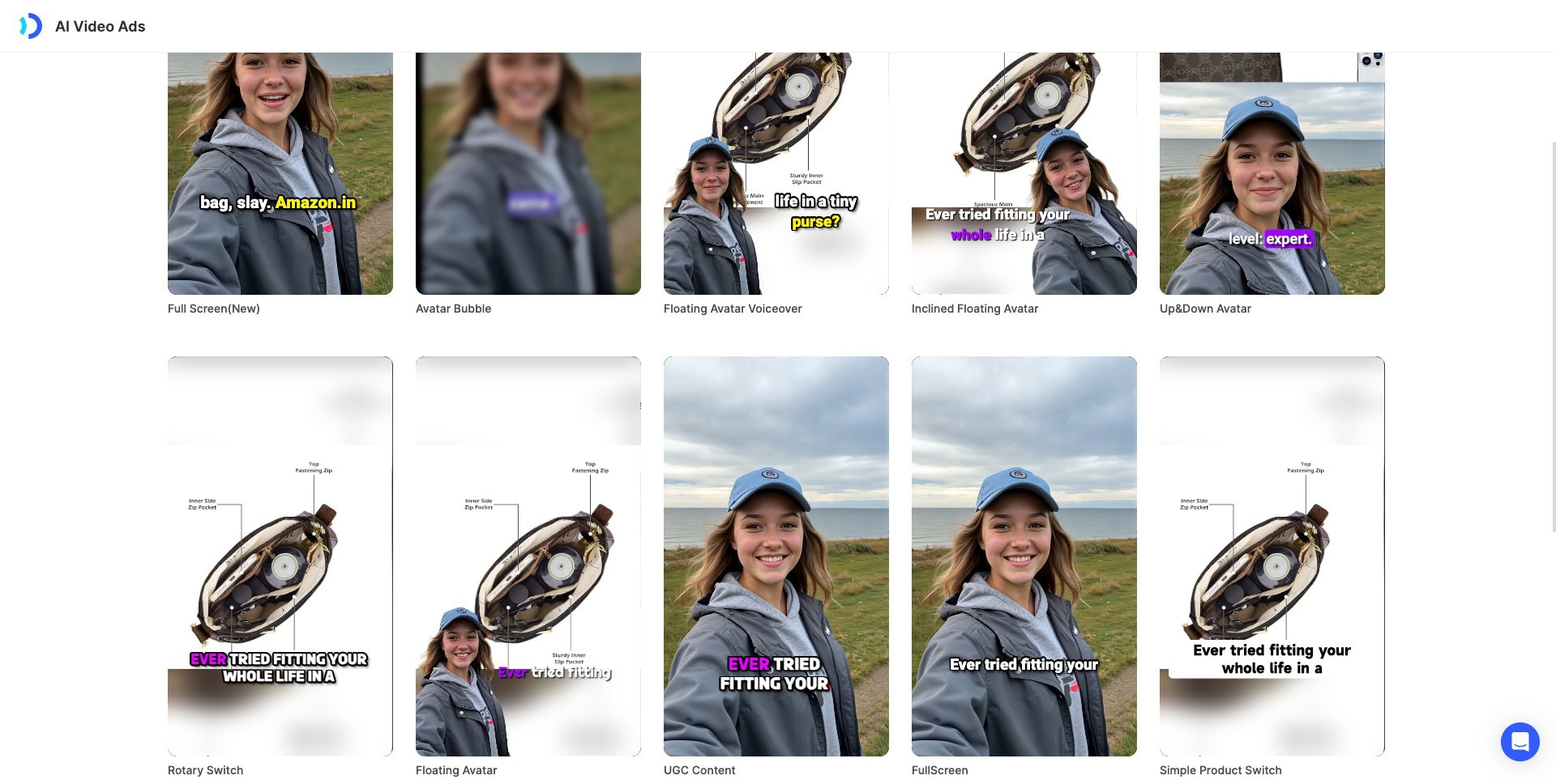
I tried to generate an ad with AI, but the video quality was average. However, I liked how the voiceover script and the video were in sync.
I saw much better results while generating a video ad using JoggAI’s native templates. The lip sync and the usage of product images were on point! Similarly, you can upload your product image/video and the product name and description to generate an ad manually.
Check out this video ad I created for a sling bag.
I loved its AI script generation capability and the final video ad. This tool is good for reels, social media videos, content marketing, and video marketing, where you need speedy video generation.
But it can’t replace manual video creation. The final AI ads will require proper editing and polishing before you publish them.
2) Create Avatar Videos
Another interesting feature of JoggAI is Text to Avatar Videos. To get started, you need to select your avatar from categories like outdoor, education, business, etc, and choose an orientation (portrait/landscape).
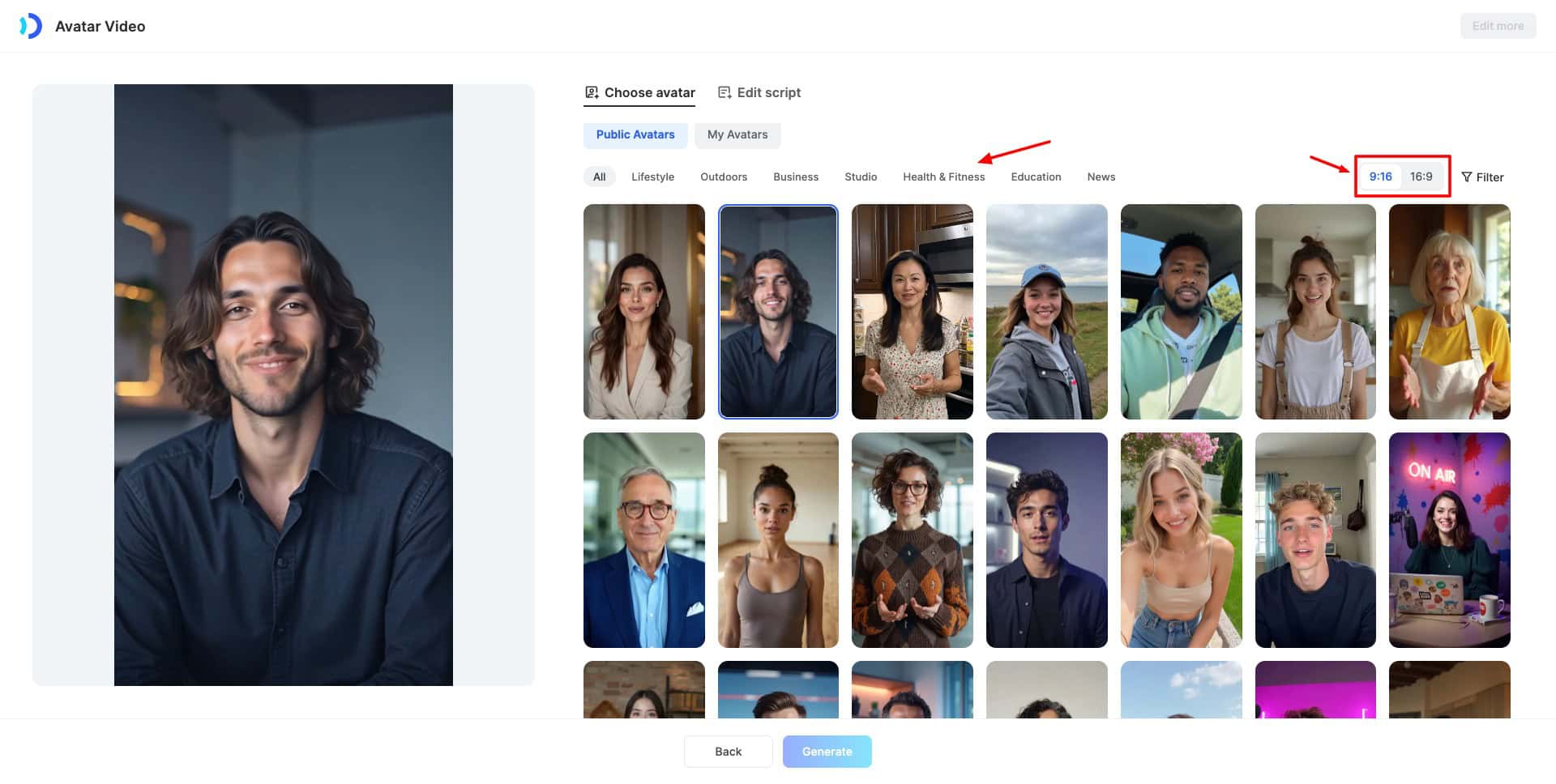
It features a huge range of 290+ avatars. If you don’t want to use avatars from their library, you can also upload a custom photo/video avatar.
Next, you can enter your script and enable/disable captions. It supports 1000 words in my plan. Jogg AI also integrates ChatGPT, so you can make edits to your script with AI.
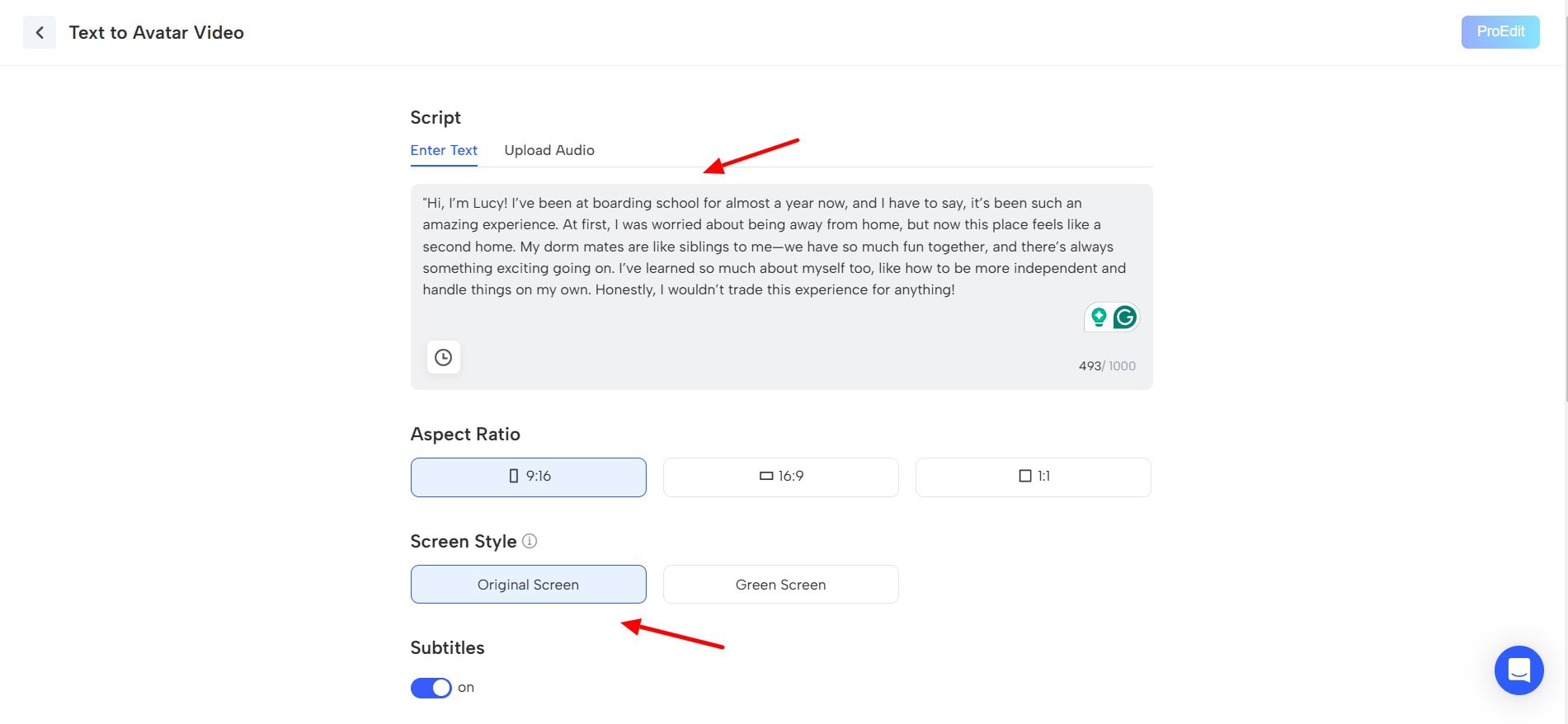
Again, this tool produced captivating videos! The avatars, along with their facial features and body movements, feel super realistic. Check out this video of AI Avatar ‘Ronald’, who’s a CEO, talking about leadership!
3) Custom Video Avatars
Another cool feature of JoggAI is custom video avatars. If you want to generate AI videos using your own videos, this tool is helpful. You simply need to upload a clear video of yourself speaking.
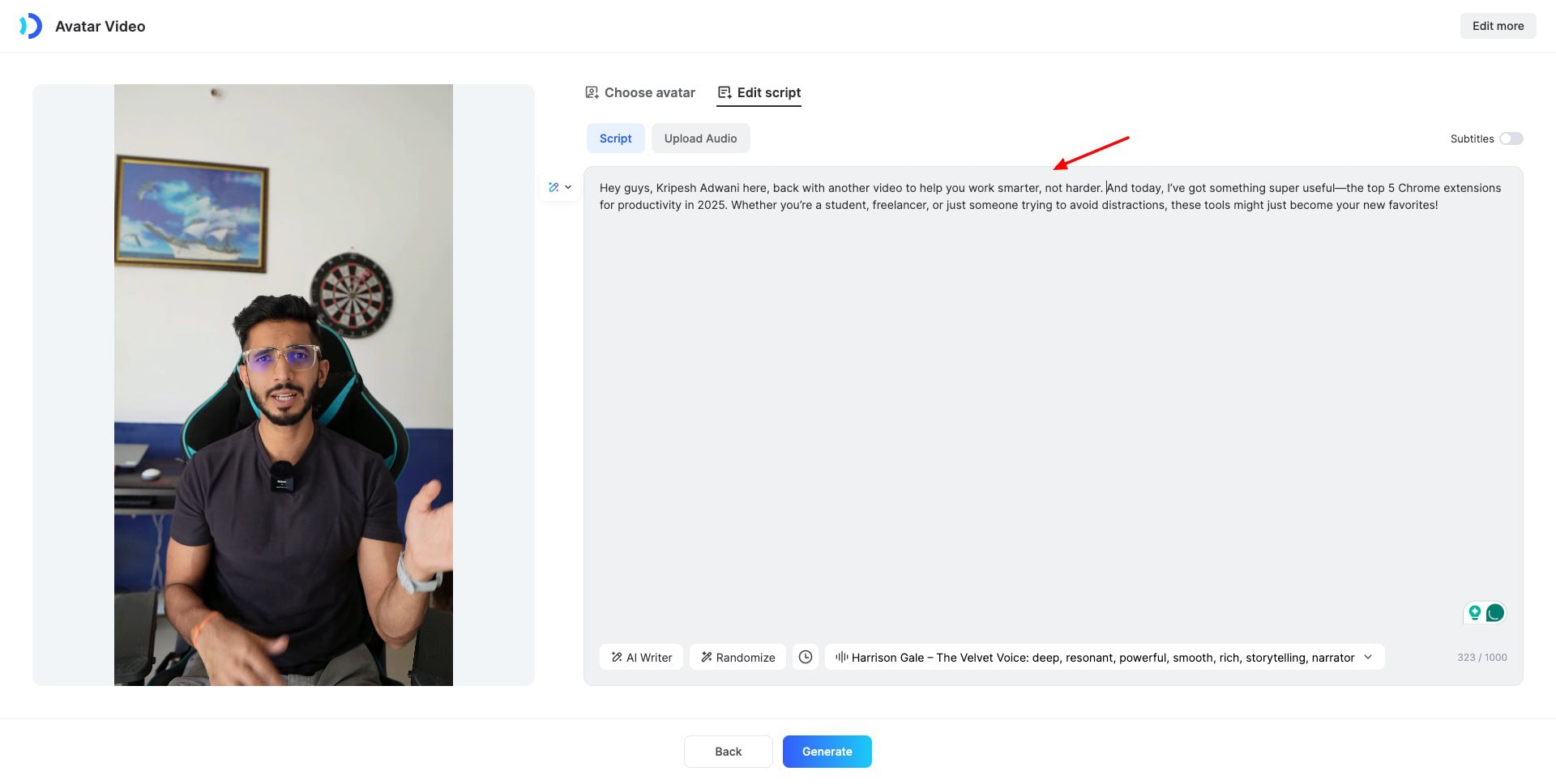
Then, enter your script and choose an AI voice. It will generate a pretty realistic-looking avatar video for you. Check out this video I generated with my video avatar.
4) Talking Photos
Ever wanted to transform your picture into a talking video? Well, it’s now possible with JoggAI. It allows you to create photo avatars in two ways – by uploading your photo or through AI.
Custom Photo Avatar
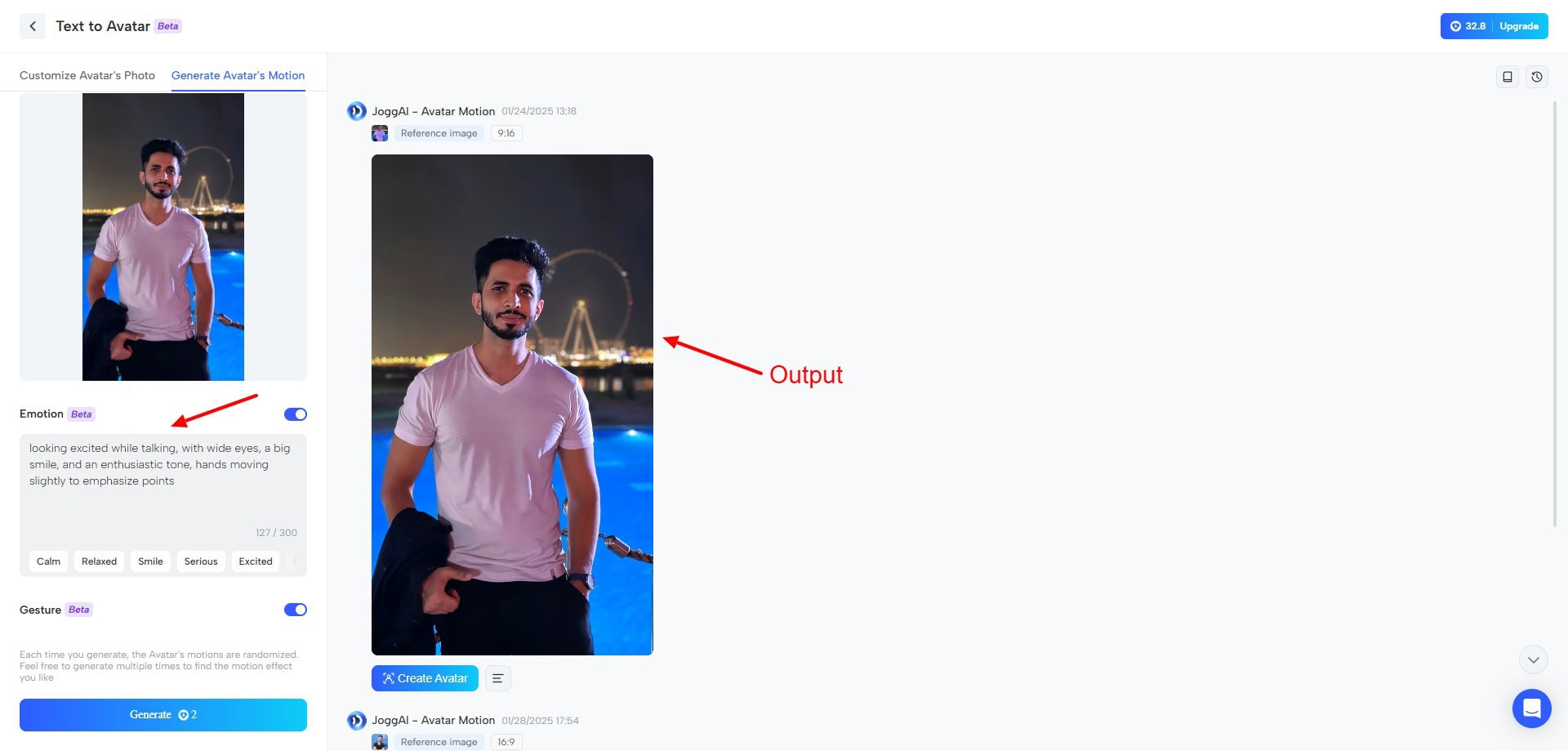
If you want to create a photo avatar manually, upload a clear photo and define the expression you need it to depict. It will generate an avatar video with your desired facial expressions and relevant body movements.
For instance, here’s an avatar video I generated from my photo with relaxed emotion and gestures enabled.
AI Avatar
Alternatively, if you wish to create an avatar with AI, you need to select a preset style and generation model. Under appearance, set the age, gender, and ethnicity of your character along with any details you wish to add.
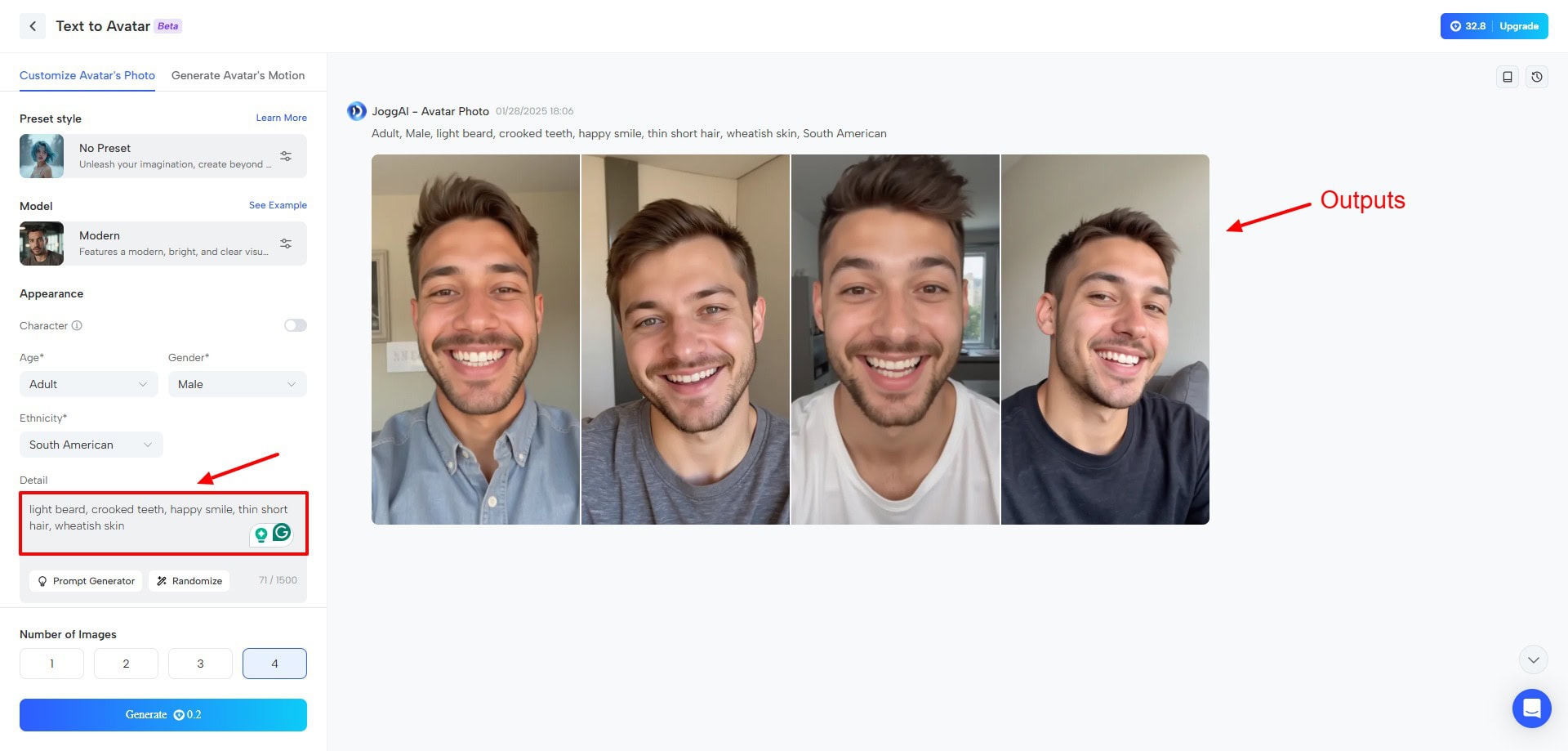
You can also describe the background, talking pose, aspect ratio, and the number of images you wish to generate. If you already have an image in mind, upload it as a character. This will keep the image generation consistent.
Avatar Style Customizer
If you want your avatar to be placed in a specific setting or style, you can use the Avatar Style Customizer. It features multiple styles, like lifestyle, outdoor, business, fashion, news, medical, cartoon, etc.
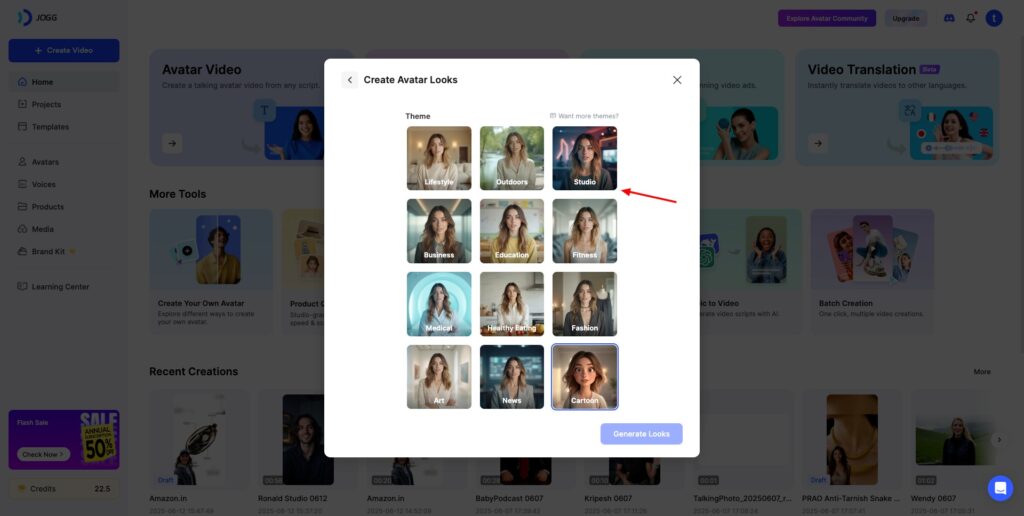
The resultant photo avatars generated were really impressive using all the methods. This is a great way of adding life to your 2D images.
5) Video Editing
Now that you’ve created your AI video, let’s edit it before publishing it online. Well, guess what? JoggAI offers a built-in video editing functionality in its editor! All you need to do is hit the “Edit as New” option beside your project.
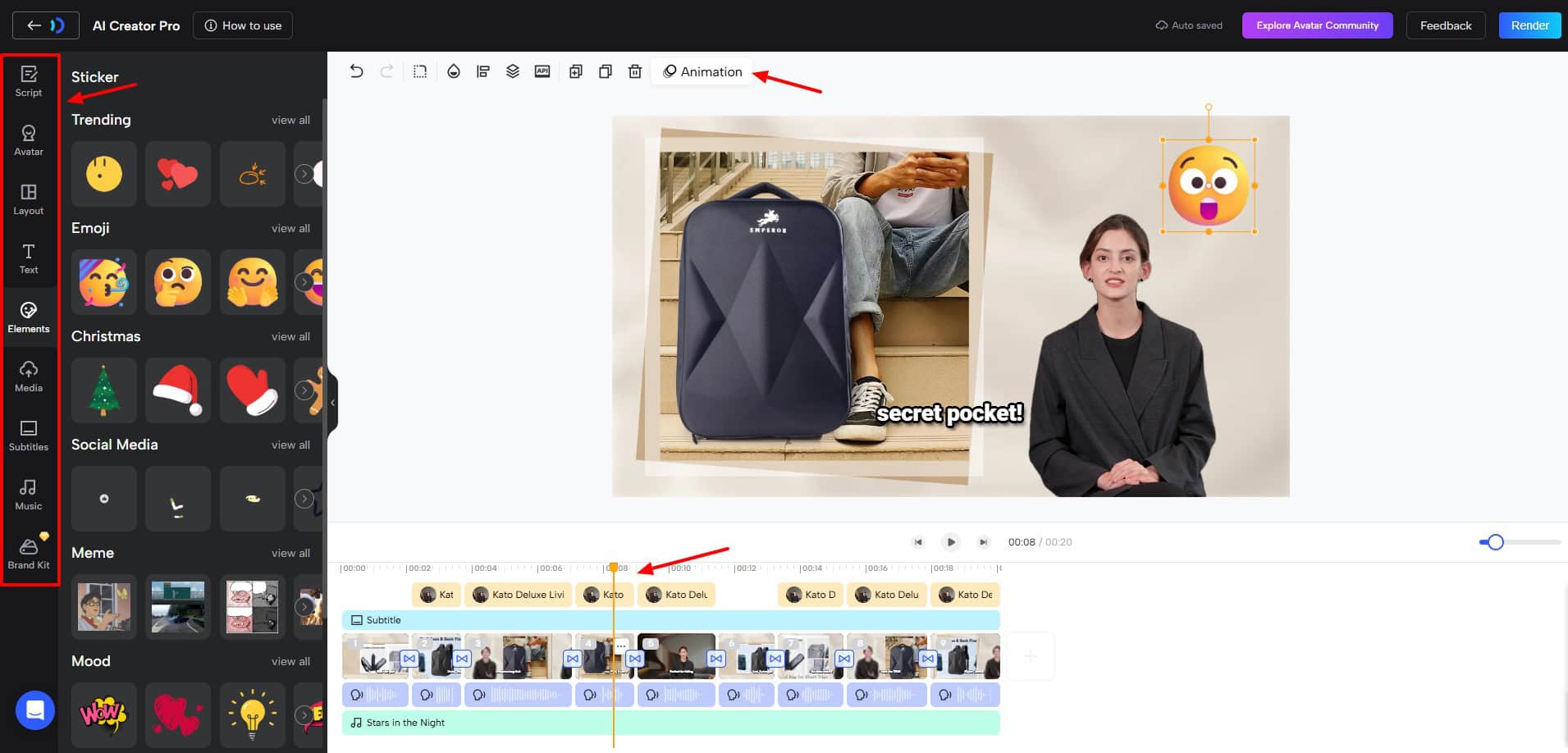
In the video editing dashboard, you will be able to edit your script and choose a different voice for your voiceover. You could change your AI avatar, modify your video layout, add text, insert elements, subtitles, music, and upload images and videos, and more.
For your generated video, you could easily edit the placement of your avatar and other elements. On the bottom, you’ll find the video timeline where you can trim and adjust the voiceover, subtitle, music track, etc.
I personally found the video editor to be excellent. It resembles Canva and has all the tools you would need for editing, from elements to animations. JoggAI really is an all-in-one platform for your entire video creation process.
6) Enormous Voice Library
Looking for a unique AI voice for your next project? Check out the extensive voice library of JoggAI. It integrates voices from ElevenLabs, meaning all the voices are highly refined and of professional quality.
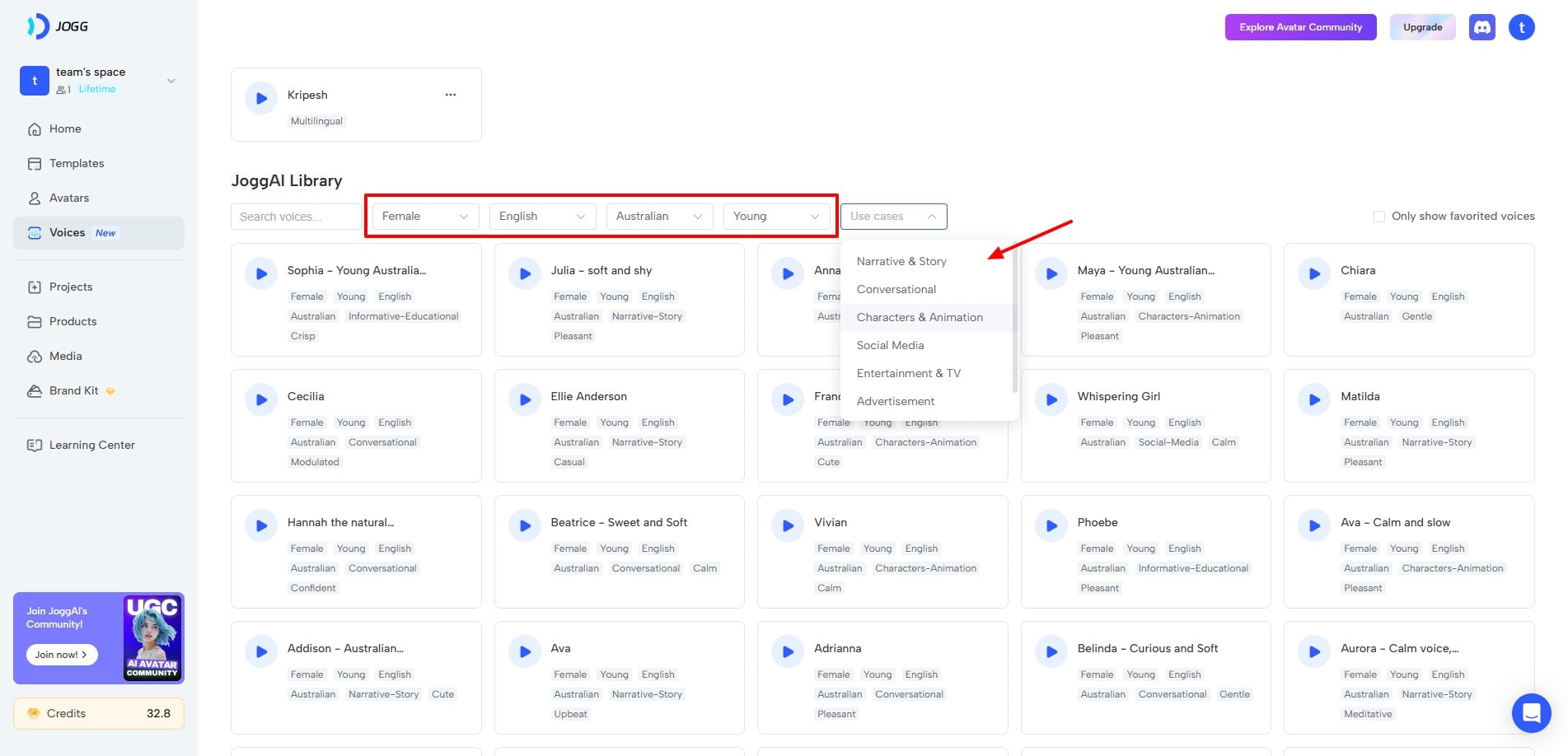
You can filter them by gender, language, accent, age, and use cases. Within each voice, you will find a variety of tags to classify them. You can preview each of them and mark them as favorites to use in a project later.
I also liked the Hindi voices in their library. They are great if you’re running Hindi ads and promotional content.
7) Voice Cloning
If AI voices don’t excite you and you wish to use your own voice in your videos, try Voice Cloning. All you need to do is upload a short audio recording of yourself and select if you wish to enable or disable background noises.
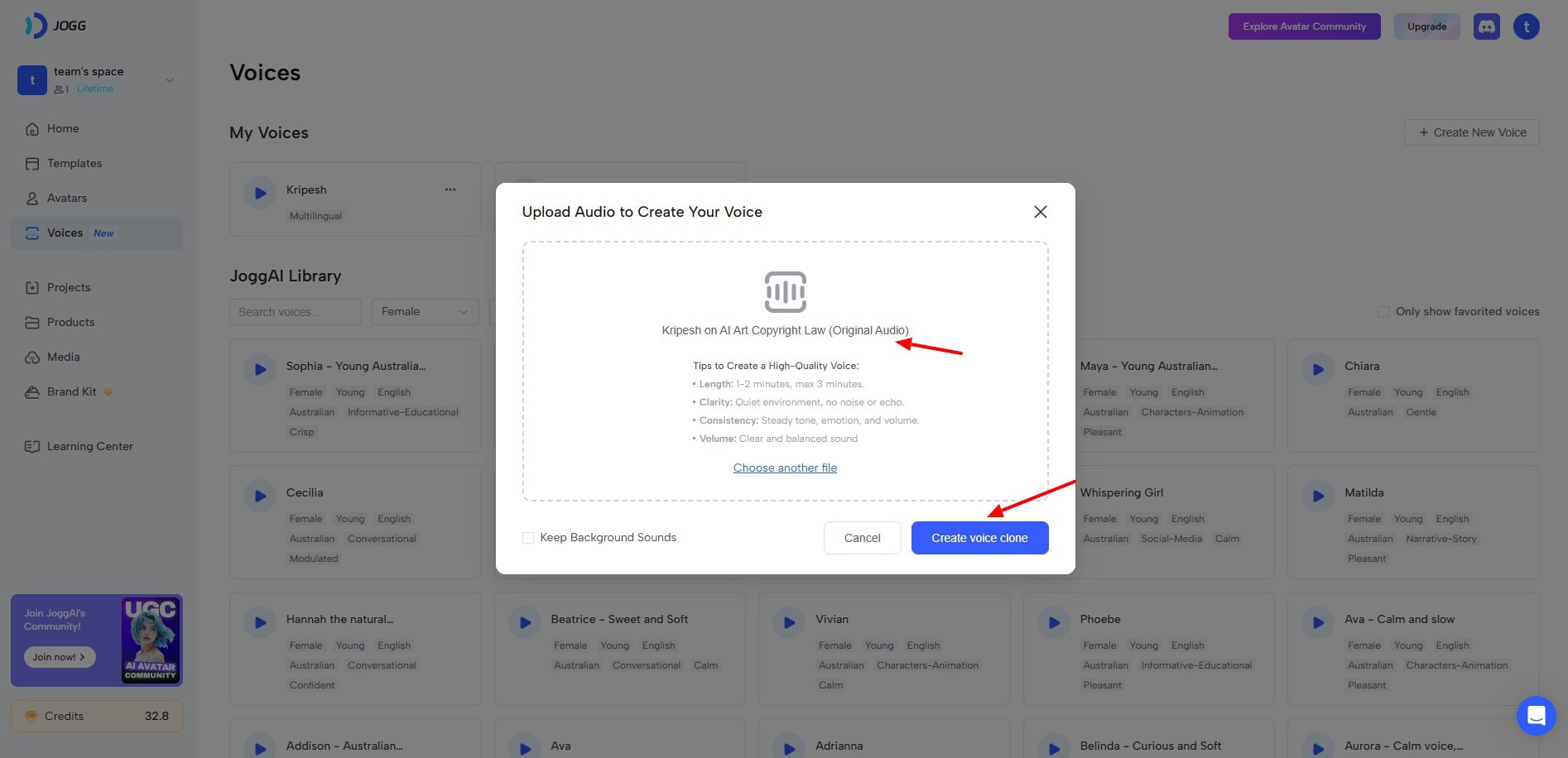
Your voice clone will be generated within seconds. I personally found it pretty accurate compared to the audio I uploaded. Now, you can use this voice while generating a video ad. If you need quick and efficient voice clones, JoggAI is the perfect fit for you!
8) Video Translation
What if you create videos in a specific language but need to attract a wider audience? You can use the Video Translation tool of Jogg AI.
To get started, you just need to upload your video, subtitle file, and select original language, target language, and output voice. If you want, you can also include lip sync, dynamic duration, and captions.
Check out this video translated from Hindi to English!
The output looks decent. It would work well when you translate English into other languages, not the other way round. In my opinion, the YouTube Auto-dub option is better.
9) Talking Baby Podcasts
Talking baby podcasts are in trend right now. To use this tool, just select a baby from their library and enter your script.
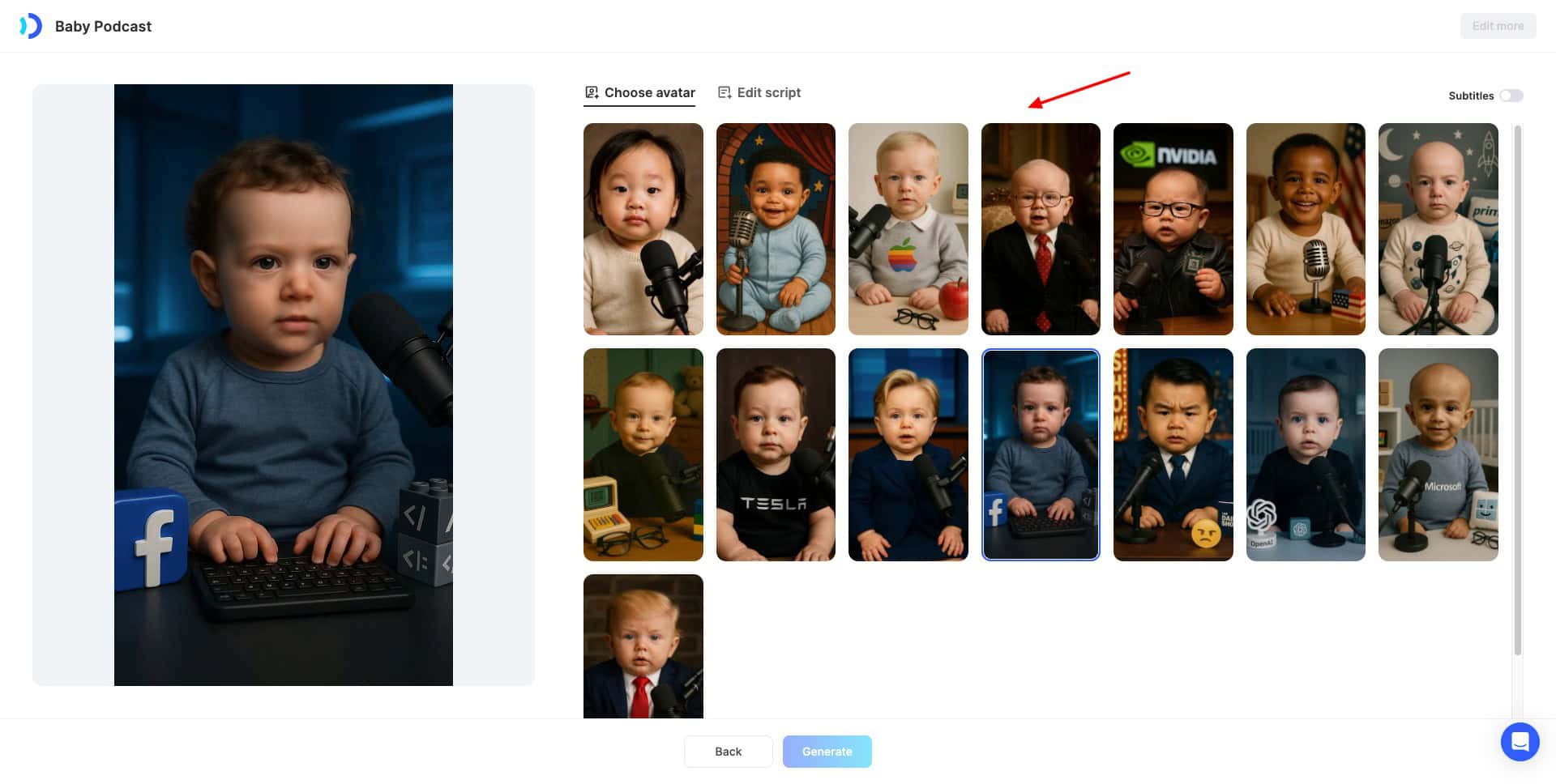
They have baby faces of popular celebrities, like Elon Musk, Donald Trump, Mark Zuckerberg, etc. Here’s a talking baby podcast I created-
10) Video Podcasts
JoggAI makes podcast creation simple. You can upload your script, audio file, or generate a script by providing your website URL, YouTube video link, PDF, or long text.
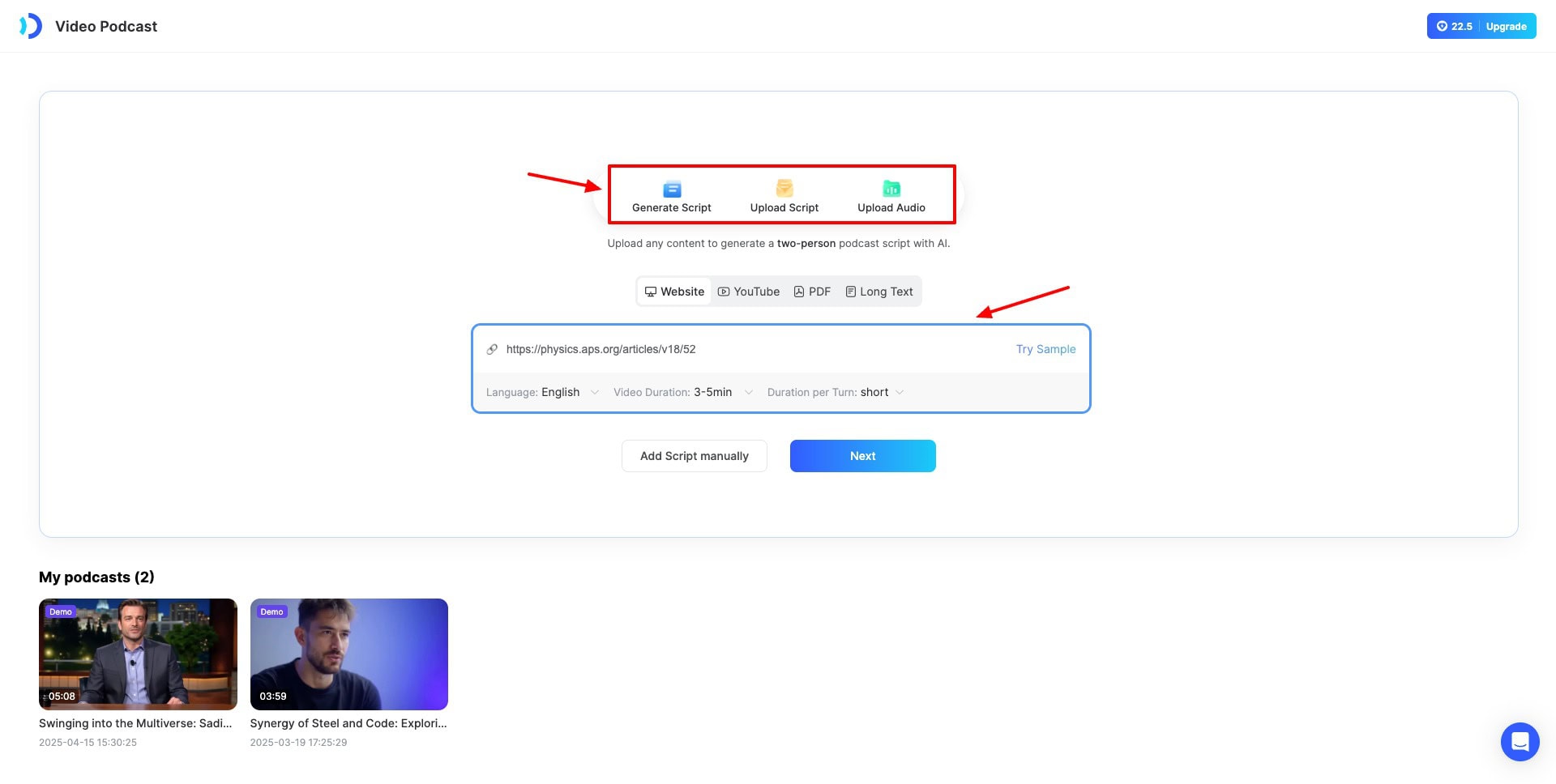
As per the source you select, it generates a 2-person script with dialogues. Then you can choose an appropriate scene and render the video.
11) Batch Video Generation
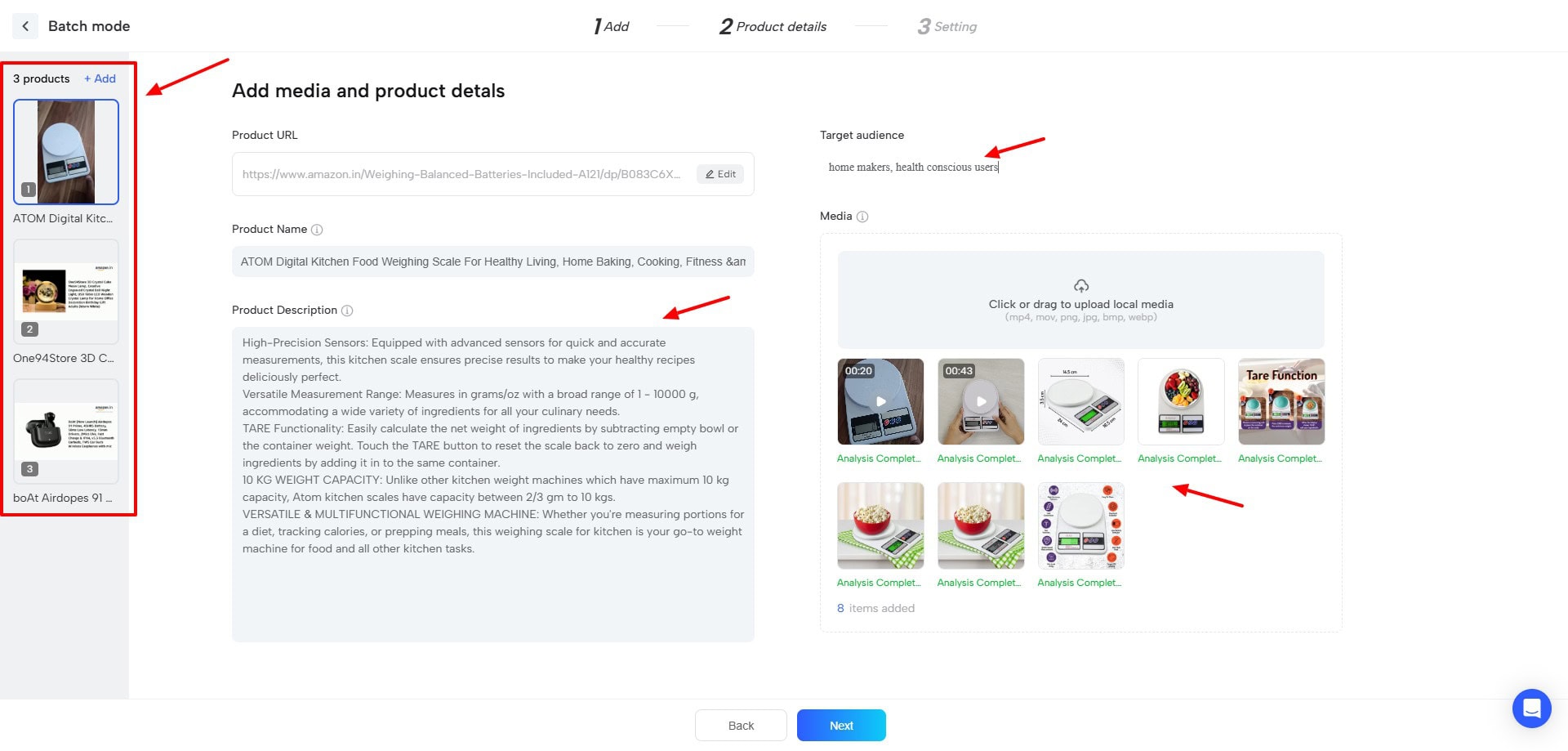
If you’re short on time, you can use JoggAI’s batch mode to generate multiple videos together. It lets you insert up to 10 product URLs at a time. In the next step, it fetches the product details, and you need to specify the target audience for each product.
Next, in the video render settings, you can choose the video orientation, timing, and language. You can also enable or disable subtitles and music. Finally, you can select a script from its 6 generated variants and pick a template of your choice.
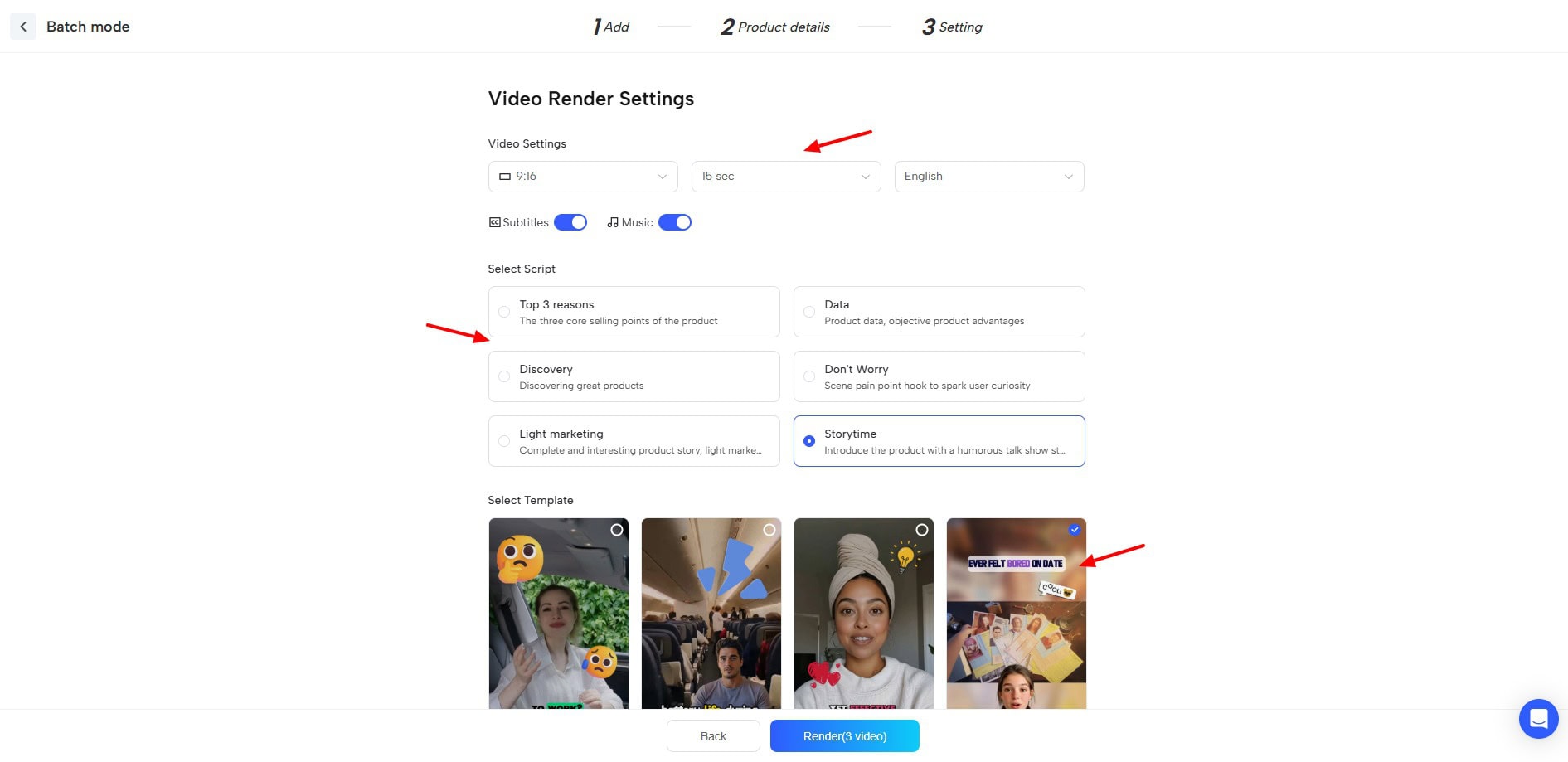
Finally, hitting the Render button will generate all your product videos together. This is a premium feature available on AppSumo Tier 3 and Tier 4.
JoggAI Credit Consumption
Here’s how credits are consumed on JoggAI:
- Generating a new video: 1 credit
- Re-editing a video: 0.4 credits
- Photo Generation: 0.2 credits
JoggAI Customer Support
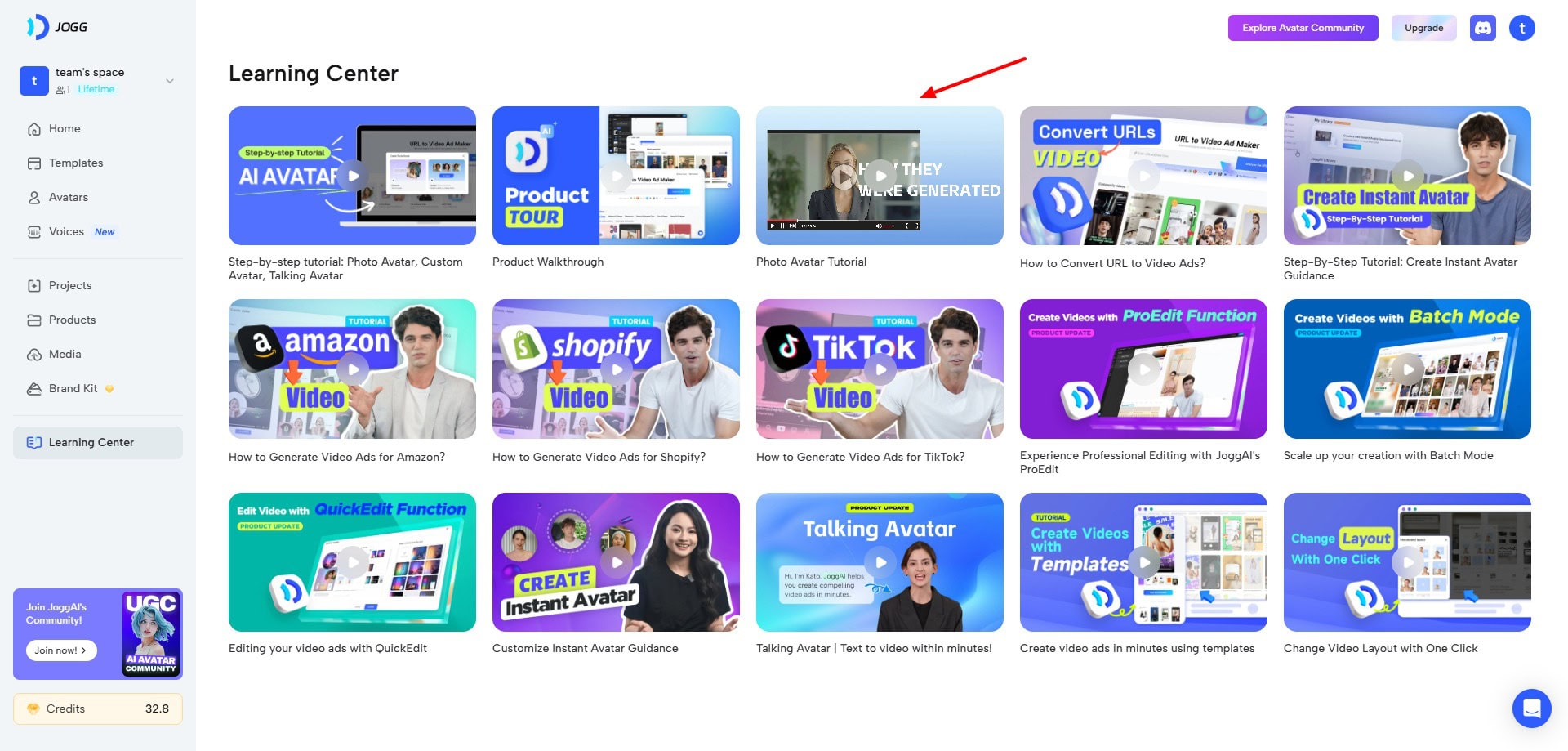
JoggAI offers customer support via its email and learning center. The Learning Center features a limited 15 tutorial videos to understand how to use their platform. Along with that, the help center features an FAQ section with lots of popular questions.
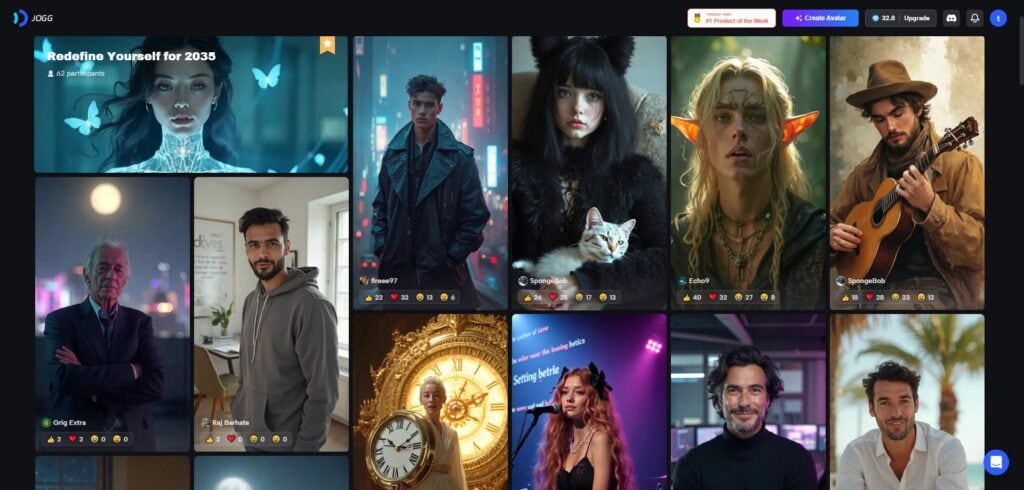
All JoggAI users get access to its extensive community of AI avatar videos. You can check them out for inspiration and remix them with your projects if you want. They also have a Discord community, where customers can interact with each other and get their queries resolved.
Overall, the support options are pretty limited. I wish they also offered live chat support and a diverse knowledge base with more articles and tutorial videos.
JoggAI Roadmap
JoggAI is a relatively new product, launched at the beginning of 2024. Thus, they are using a roadmap to keep track of their features. You can find feature requests, feedback, questions, and continuous updates on their roadmap.
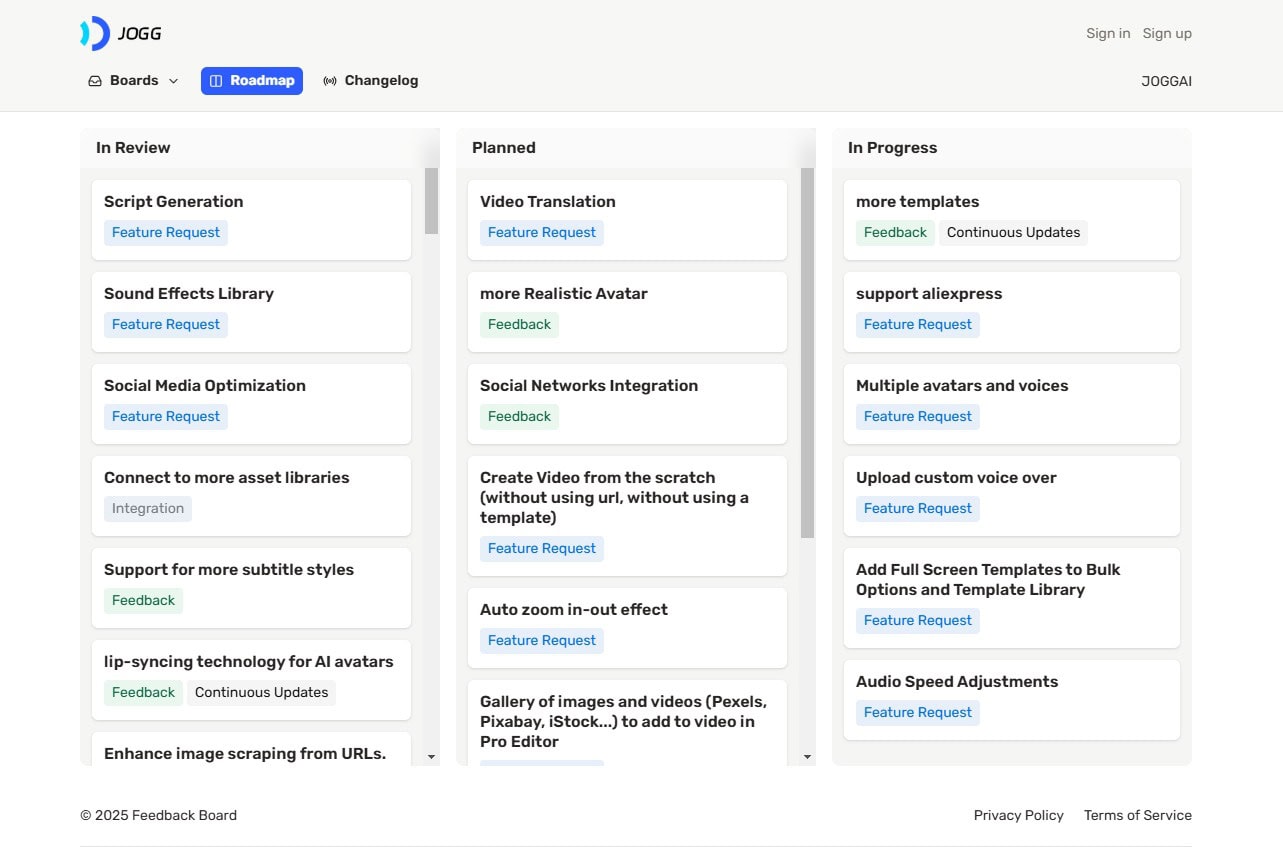
Features like sound effects library, social media optimization, and script generation are under review. Whereas features like custom voiceovers, multiple voices, and avatars, audio speed adjustments, etc are in progress.
I wish they also added an ETA for their features to avoid any confusion for the customers. For more information, you can access the JoggAI Roadmap.
JoggAI Pricing Plans
AppSumo Deal
JoggAI used to be on a lifetime deal back when it was a video-ad generation platform. But now, due to high demand from the audience, it is back on a lifetime deal on AppSumo.
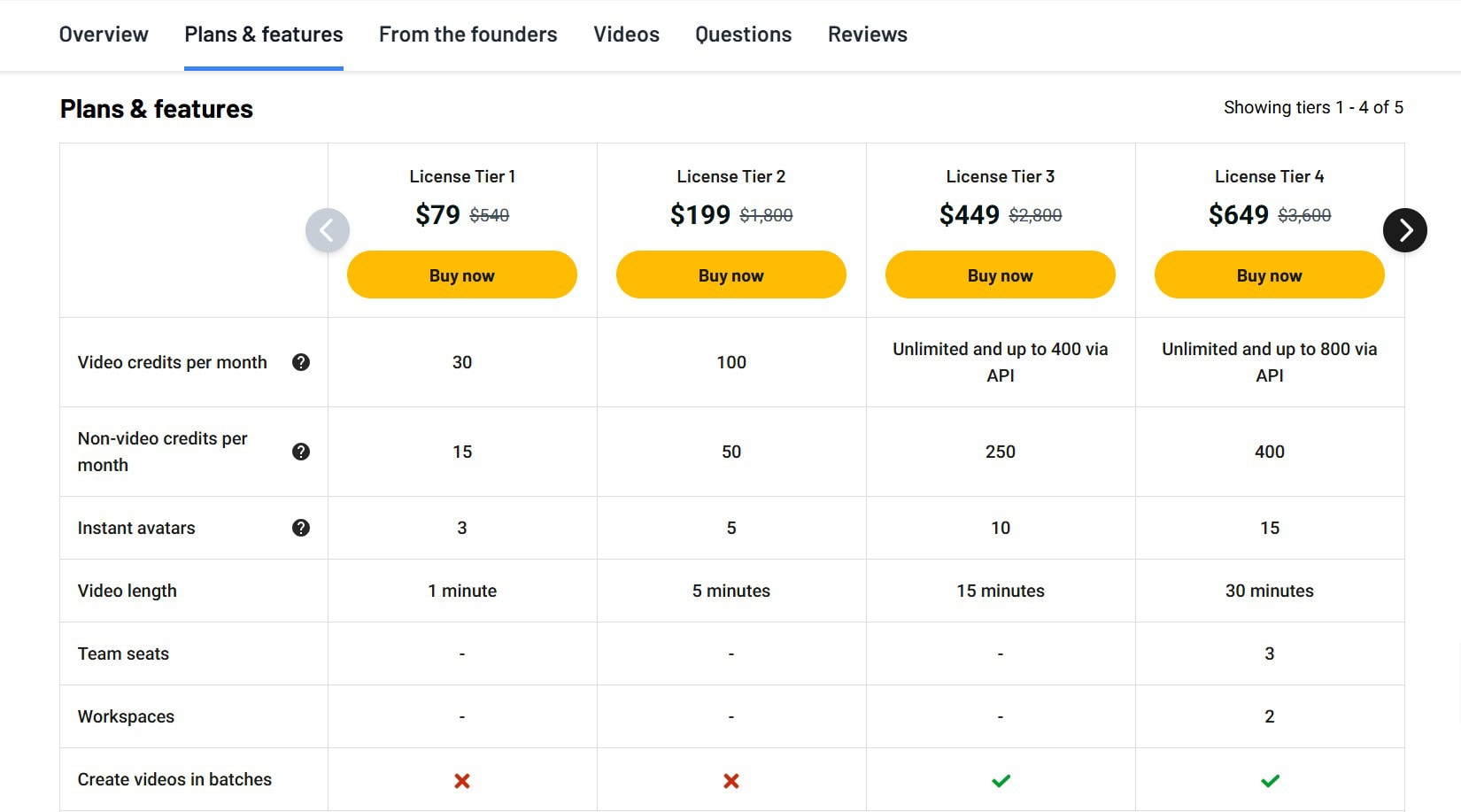
Its Tier 1 plan is priced at $79, where you get 30 monthly video credits, 15 monthly non-video credits (cloning, photo avatars, etc), and 3 instant avatars. The videos are limited to 1 minute. If you need more credits, you can upgrade to its higher plans.
On its Tier 3 and Tier 4 plans, you also get API access. In my opinion, this tool is worth investing all your money in! Beginners can start with Tier 1 for $79. But if you’re a professional, the higher tiers will prove to be more valuable for you.
Regular Pricing
JoggAI’s regular plans feature a free plan along with 3 paid plans- Starter, Creator, and Team plans. The following table contrasts their pricing and key features.
| Free Plan | Starter Plan | Creator Plan | Team Plan | |
| Pricing | $0/month | $24/month | $36/month | $46/seat/month |
| Videos | 3 | 200 | Unlimited | Unlimited |
| Video Generation | 30 sec | 1 min | 15 min | – |
| Custom Video Avatar | 1 | 3 | 10 | 10 |
| Photo Avatars | 1 | 100 | 240 | 360 |
Free Plan
Yes, JoggAI also features a free plan with 3 free credits. This allows you to generate 3 video ads with the JoggAI watermark. However, the videos are limited to 30 seconds.
Payment Methods
JoggAI accepts payments via PayPal, International cards, Apple Pay, Google Pay, etc.
Refund Policy
Unfortunately, JoggAI doesn’t offer any refunds. So, even if you cancel your subscription without using any credits, your amount will not be refunded.
JoggAI Pros
1) Modern UI
The user interface of JoggAI is modern and pleasing in design. It is clean and friendly for beginners as well as professionals.
2) High-Quality AI Voices
JoggAI integrates with ElevenLabs to offer a gigantic library of AI voices. All the voices available on their platform are of high quality.
3) Professional Video Ads
You can generate complete video ads with high-quality avatars, clean voiceovers, and elegant designs by simply providing your product URL within minutes.
4) Lots of AI Avatars
The JoggAI avatar library is pretty impressive. They offer 115+ realistic avatars with multiple looks to help you create the perfect video for your projects.
5) Create Custom Avatars
If you don’t want to use the pre-designed avatars in their library, JoggAI also lets you create custom avatars by uploading your photos or using AI.
6) Good Video Editing
You don’t need to employ separate video editing software to edit your AI videos. JoggAI offers a built-in video editor where you get a range of elements, animations, music tracks, media elements, etc to effectively edit your video.
7) Good Lifetime Deal
Right now, the lifetime deal of JoggAI is live on AppSumo for a one-time price of just $79. So, if your work revolves around video content, you should definitely get this deal.
JoggAI Cons
1) Video Length Limitations
On the AppSumo Tier 1 plan of JoggAI, you can only create videos up to 1 minute in length.
2) Avatar Quality Issues
When it comes to pre-designed avatars, you will note differences in the quality. Some of the avatars will generate accurate lip sync and quality, while others will perform average.
3) Limited Support Options
JoggAI’s customer support options include email support and a limited knowledge base of video tutorials and FAQs.
4) No Refunds on Regular Plans
On the regular pricing plans of JoggAI, they don’t offer any refunds. So, if you want to cancel your subscription midway, you won’t be compensated for any unused credits in your account.
5) No Document Imports
While generating AI avatar videos, you don’t get to import your PDF or DOC files. You can simply paste your script or upload your audio.
6) Brand Kit Only on Higher Tiers
Brand Kit allows you to upload your brand logos, colors, videos, fonts, music, and images to reuse across your projects. However, this functionality is limited to the Tier 3 and Tier 4 plans of AppSumo.
Who Should Use JoggAI?
JoggAI looks like an all-in-one platform for all your content creation needs. Besides generating video ads, it also helps you create photo and video avatars, experiment with AI voices, clone your voice, edit videos, and more.
Thus, it would be highly valuable for advertisers, marketers, content creators, startups, agencies, video editors, and anyone looking to create video content.
JoggAI Alternatives
1) ElevenLabs
ElevenLabs is one of the best AI voice generators available today. It features a range of voice tools and highly realistic AI voices. Like JoggAI, it offers high-quality AI voice generation, a diverse voice library, and voice cloning capabilities.
However, ElevenLabs focuses primarily on audio, offering more advanced voice customization and control. ElevenLabs also offers voice dubbing tools, which are not a core feature of JoggAI.
On the free plan, you get 10k characters/month. Whereas, the paid plans of ElevenLabs start from $5/month.
2) Synthesia
Synthesia is an AI-powered video generator trusted by over 50k+ companies around the world. Similar to JoggAI, Synthesia enables AI video creation with avatars, text-to-video functionality, and video editing capabilities.
However, Synthesia emphasizes streamlined video production, offering a more structured workflow for generating videos with pre-defined objectives and target audiences. Also, Synthesia comes with a larger library of AI avatars and supports more languages than JoggAI.
Its free plan offers 36 mins of video per year, 9 AI avatars, and 60+ templates. Paid plans start at $18/month.
Why Should You Trust Me?
I’ve been working full-time in the digital industry since 2015. In all these years, I’ve used and tested hundreds of AI tools. These include AI writers, AI domain name generators, AI website builders, AI Art Generators, AI Voice Generators, and so on!
I’ve recently tested dozens of AI Video Generators to discover the best ones available in the market. Testing out so many AI tools regularly has given me the knowledge and experience to suggest the right one for your needs.
Conclusion
This JoggAI review explores the tool’s video content creation capabilities. As a satisfied customer who purchased its AppSumo deal, I consider it a top favorite and highly recommend it. Even beyond video generation, its impressive high-quality AI voices make it a valuable asset.
JoggAI is a must-have for content creators seeking AI-powered custom avatar creation or top-tier AI voice generation. In my opinion, it’s among the best AI tools currently available on a lifetime deal.
Anyway, if you wish to explore other video tools, check out these Best AI Video Generators for 2026. This is Kripesh, taking your leave. I’ll be back with more informative reviews. Till then, take care and keep learning. Cheers! 🙂

Jogg AI Pros (+)
- Modern UI
- High-Quality AI Voices
- Professional Video Ads
- Lots of AI Avatars
- Custom Avatars
- Video Editing
- API Access
Jogg AI Cons (-)
- Video Length Limitations
- Avatar Quality Issues
- Limited Support Options