Did you know businesses make double their money back on Google Ads? Yes—for every $1 spent, the average return is $2. Digital advertising is a powerful way to boost brand awareness, but launching a campaign involves multiple steps behind the scenes.
From ideation and copywriting to designing visuals and managing advertising campaigns, the entire process is overwhelming. If you’re a solopreneur or working with a small team, that’s tough. But now QuickAds can help!
This AI-powered platform shortcuts the ad creation process by generating high-quality visuals and content. It even offers tools for competitor analysis to help you stay ahead in the game.
Want to know more? Read this QuickAds Review to uncover all its features and hidden benefits.
QuickAds Review
Ease of Use
Summary
QuickAds is an AI tool that helps entrepreneurs and small teams create ad campaigns from simple ideas—no skills needed.
It offers brand-consistent graphics, videos, voiceovers, and even AI photoshoots. While powerful, it comes with a learning curve and occasional glitches.
Disclaimer : I strongly believe in transparency. If you buy using the links on our site, we may earn a small commission without any extra cost to you. This helps me to keep producing honest reviews. Read More >>
About QuickAds
QuickAds is an AI-powered ad generation platform built for small brands, startups, and marketing agencies. It enables users to analyze, create, and publish ad creatives that align with their brand identity. QuickAds was launched in August 2023 by Nitin Mahajan. The platform has already generated over 401 K+ ads and helped brands achieve a 240% increase in ROAS.
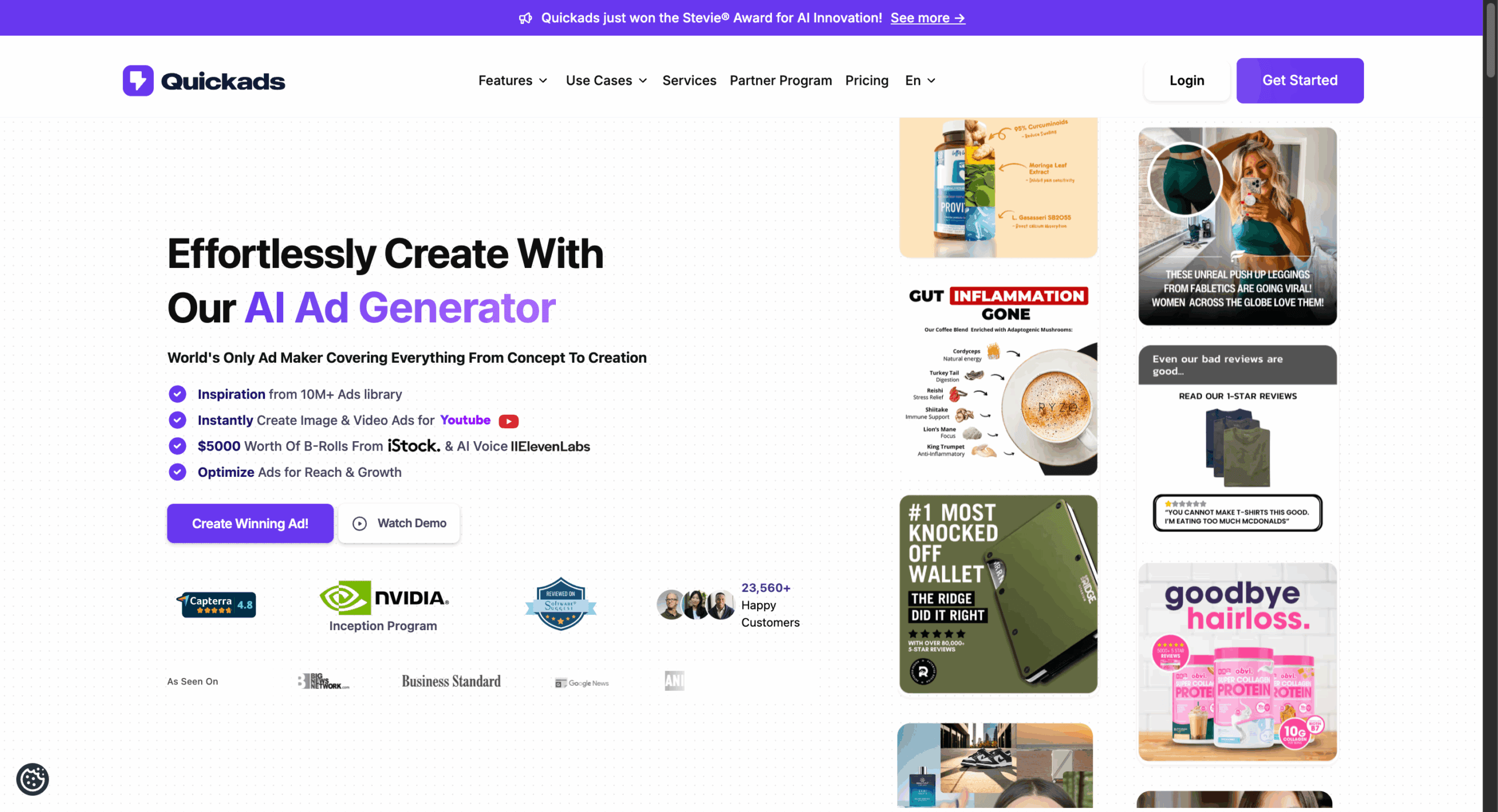
Basically, it automates the entire ad creation process, eliminating the need for manual brainstorming, creative planning, ad shoots, visual design, and performance tracking. With QuickAds, average users can effortlessly produce video ads, promotional images, faceless videos, YouTube Shorts, AI-powered product photoshoots, and more.
QuickAds Interface
The user interface of QuickAds is clean and thoughtfully designed. Upon logging in, the homepage dashboard loads quickly and displays all your analyzed ad campaigns, image creatives, video creatives, etc. Under the “My Assets” section, you’ll find all your uploaded images and content in one place.
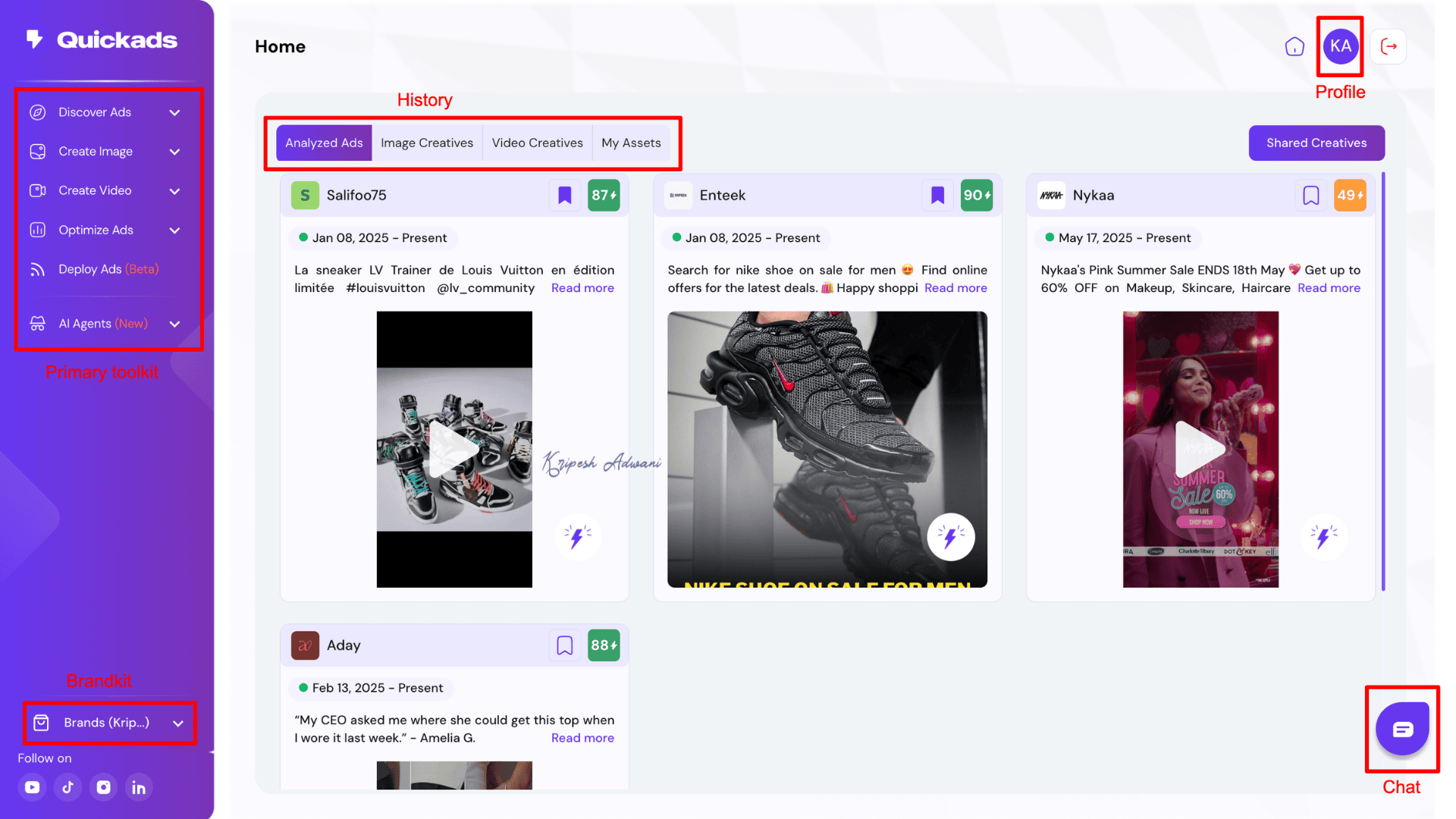
The left-hand menu bar provides clear navigation to all key features, including ad discovery, image and video creation, ad optimization, deployment, and AI agents. In the top-right corner, you’ll find your profile settings, where user details are easily accessible. Meanwhile, the chat support option is conveniently in the bottom-right corner.
QuickAds Ad Library includes good filters to easily find assets, past campaigns, or templates. However, there is a slight learning curve, so you may need to invest some time initially to fully explore and understand all available features.
Key Features
QuickAds comes with tons of captivating features for automating the ad generation process. Let’s see what they are:
1) Discover Ads
One of QuickAds’ standout features is its ability to help you research existing ads, analyze their performance, and bookmark your favorites. Under the “Discover Ads” section, you’ll find three key options, starting with:
1) Ad Library
QuickAds offers a massive ad library that lets you explore millions of ads from platforms like TikTok, YouTube, Meta, and Audience Network. To use it, simply enter a keyword or brand name in the search bar.
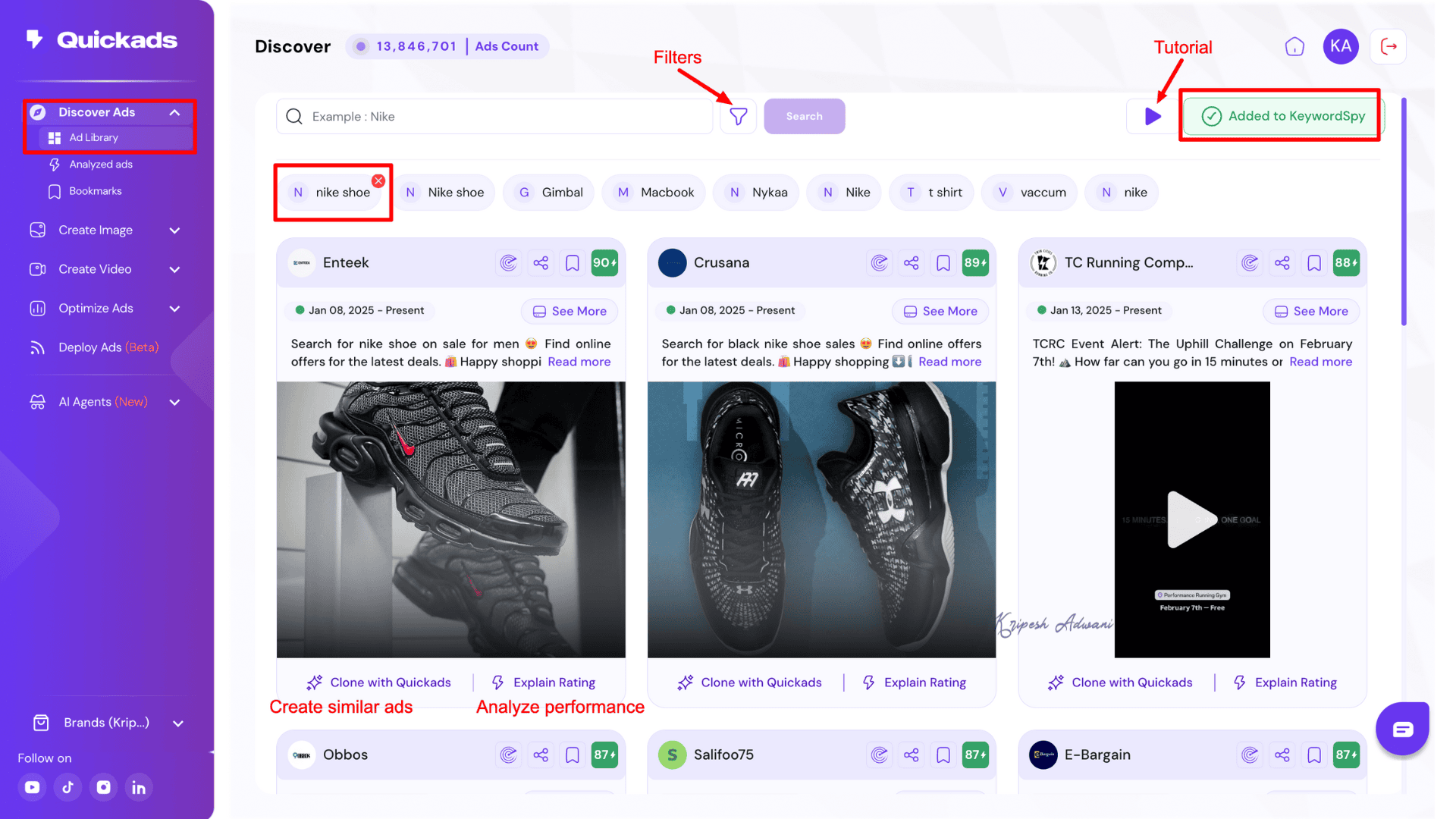
The platform also provides advanced search filters such as Ad Format, Ad Platform, Ad Status, Ad Theme, Industry, and more. These filters make ad research fast, targeted, and highly efficient. Once you find an ad that suits your needs, you can analyze its performance using the “Explore Rating” tool.
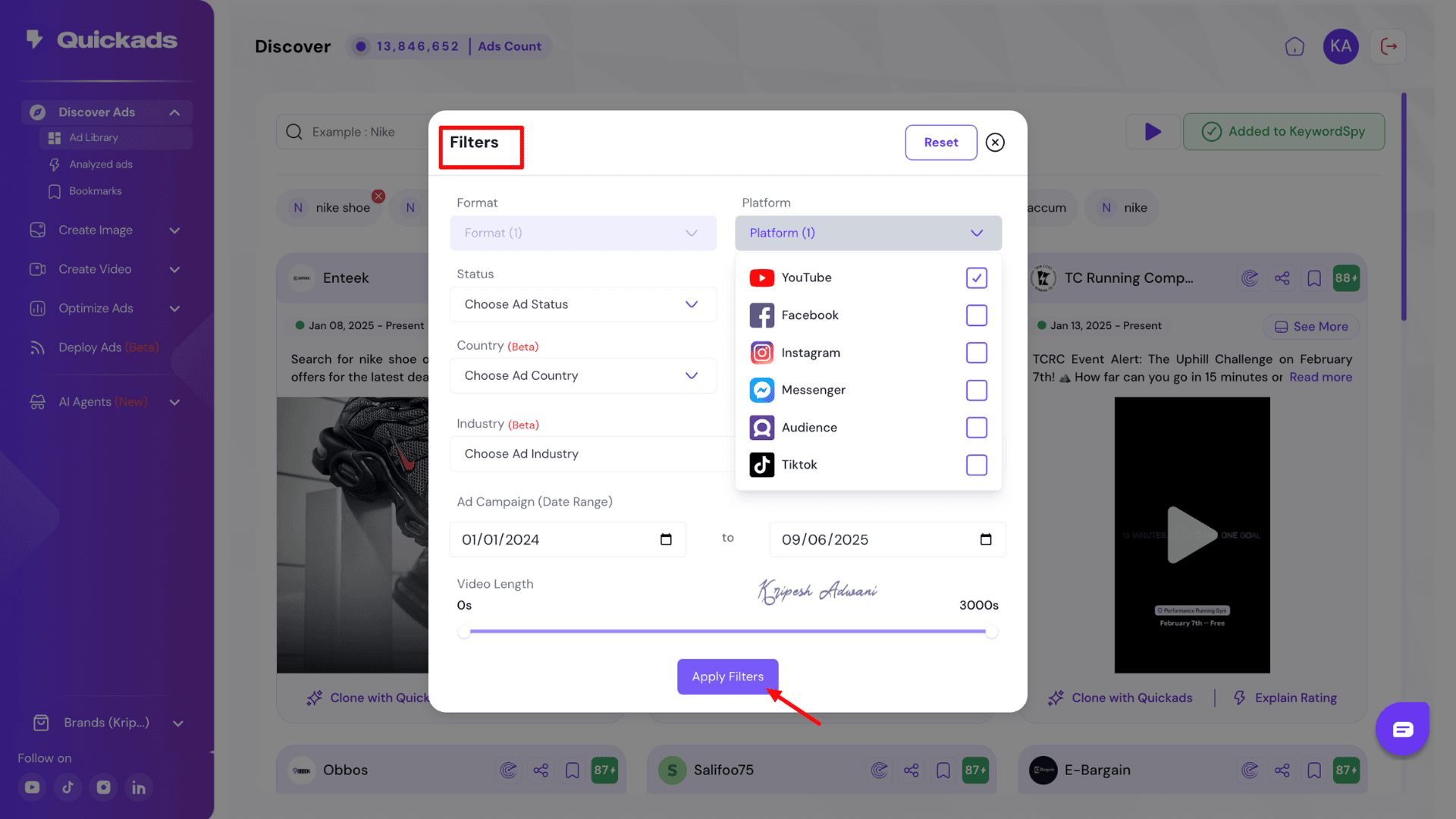
Otherwise, you can click “Clone with QuickAds” to instantly create a similar ad using AI. The tool lets you even add the keyword to “Keyword Spy” for deeper market analysis. We’ll cover the Keyword Spy feature later.
2) Analyzed Ads
All the ads you select using the “Explore Ratings” option are saved under the Analyzed Ads section. This dashboard displays each ad’s overall performance, including key metrics like Creative Score and Performance Score.
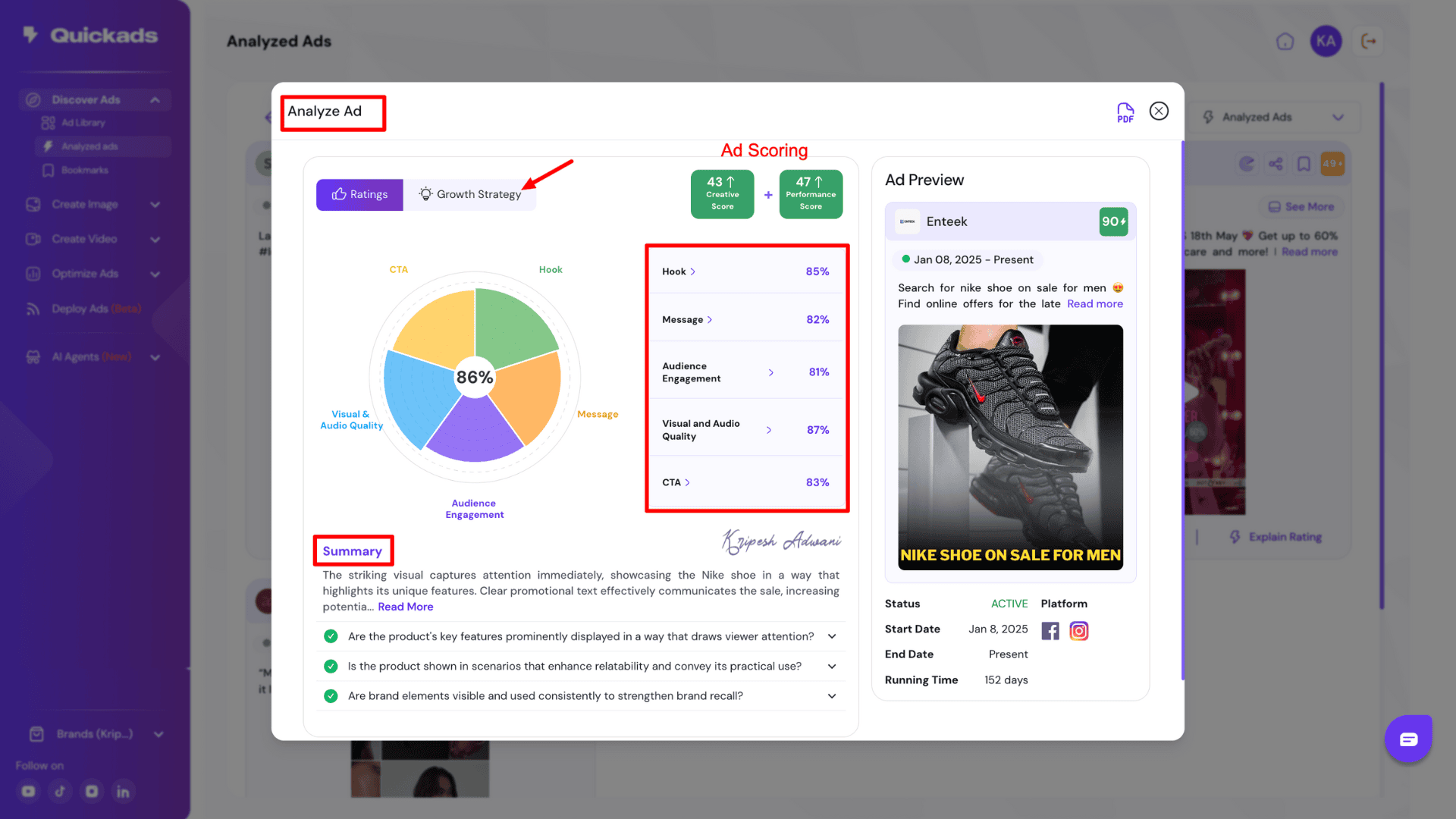
QuickAds uses Ad Scoring and Competitive Spying techniques to help small brands create high-performing, market-tested ads with confidence. Plus, you can explore the strengths, weaknesses, and suggestions of each ad under Growth Strategy.
The platform also visualizes ad analysis with a performance pie chart, breaking down percentages for elements like Hook, Call-to-Action (CTA), Message Clarity, Ad Quality, and Audience Engagement. You can download these insights as a PDF report, making it easy to review offline.
3) Bookmarks
You can save your favorite ads, especially those from competitors, under the Bookmarks section. This dashboard helps you easily locate and organize top-performing ads from your industry.
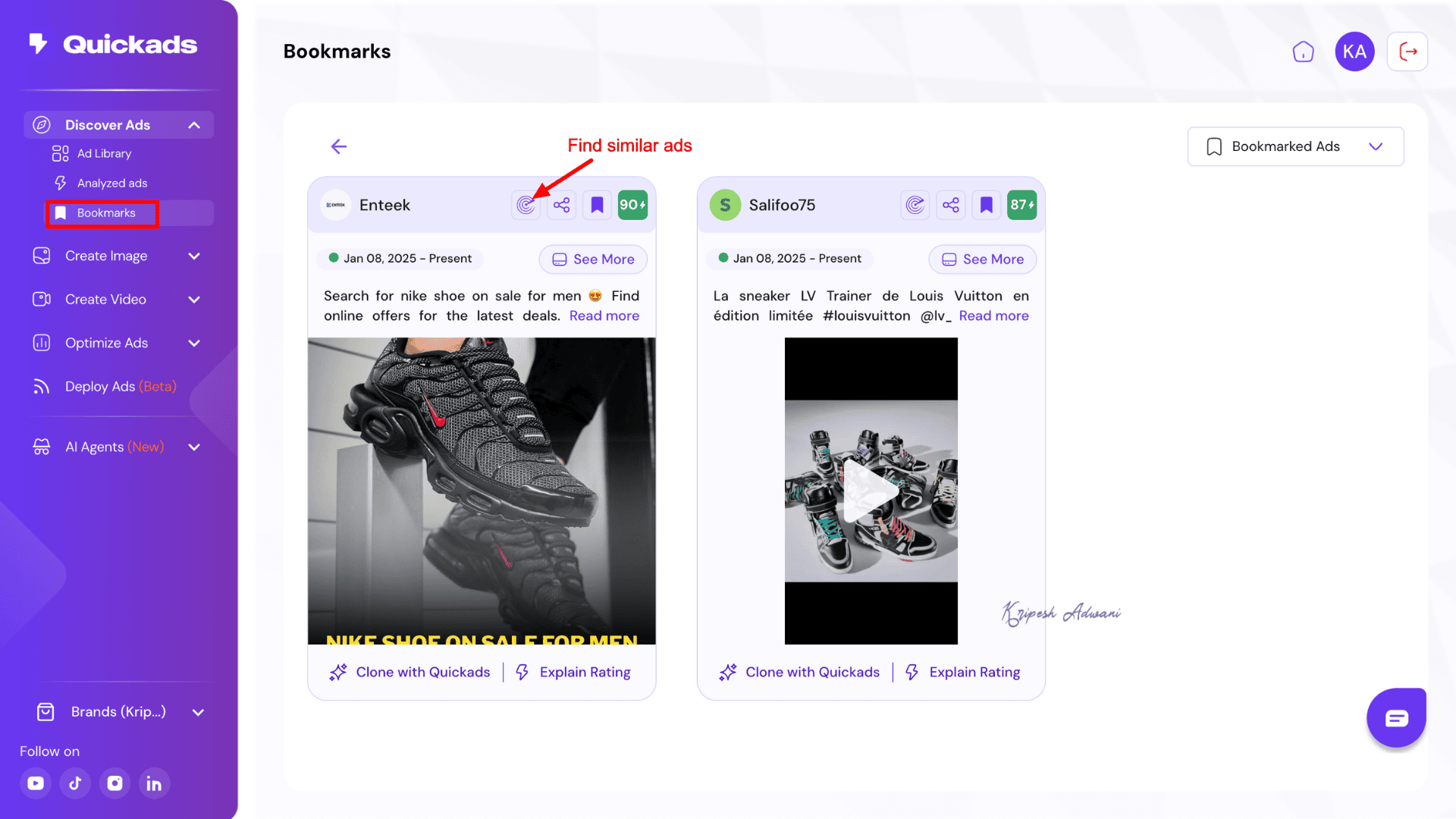
Additionally, the “Find Similar Ads” button allows you to discover related creatives from competitor brands. This feature makes it easier to gather inspiration and creative ideas.
2) Image Ads Creation
QuickAds lets users choose between five options under image ad creation: AI Ad Creation, Image Ads, Social Media posts, Fashion Photoshoot, and Product Photoshoot.
1) AI Ads and Posts
The platform allows you to automate the entire image advertisement creation process through this dashboard. To get started, you simply enter basic product information, such as the product URL, ad language, and post size. Under the Advanced tab, you can also specify campaign objectives, target platform, and ad copy.
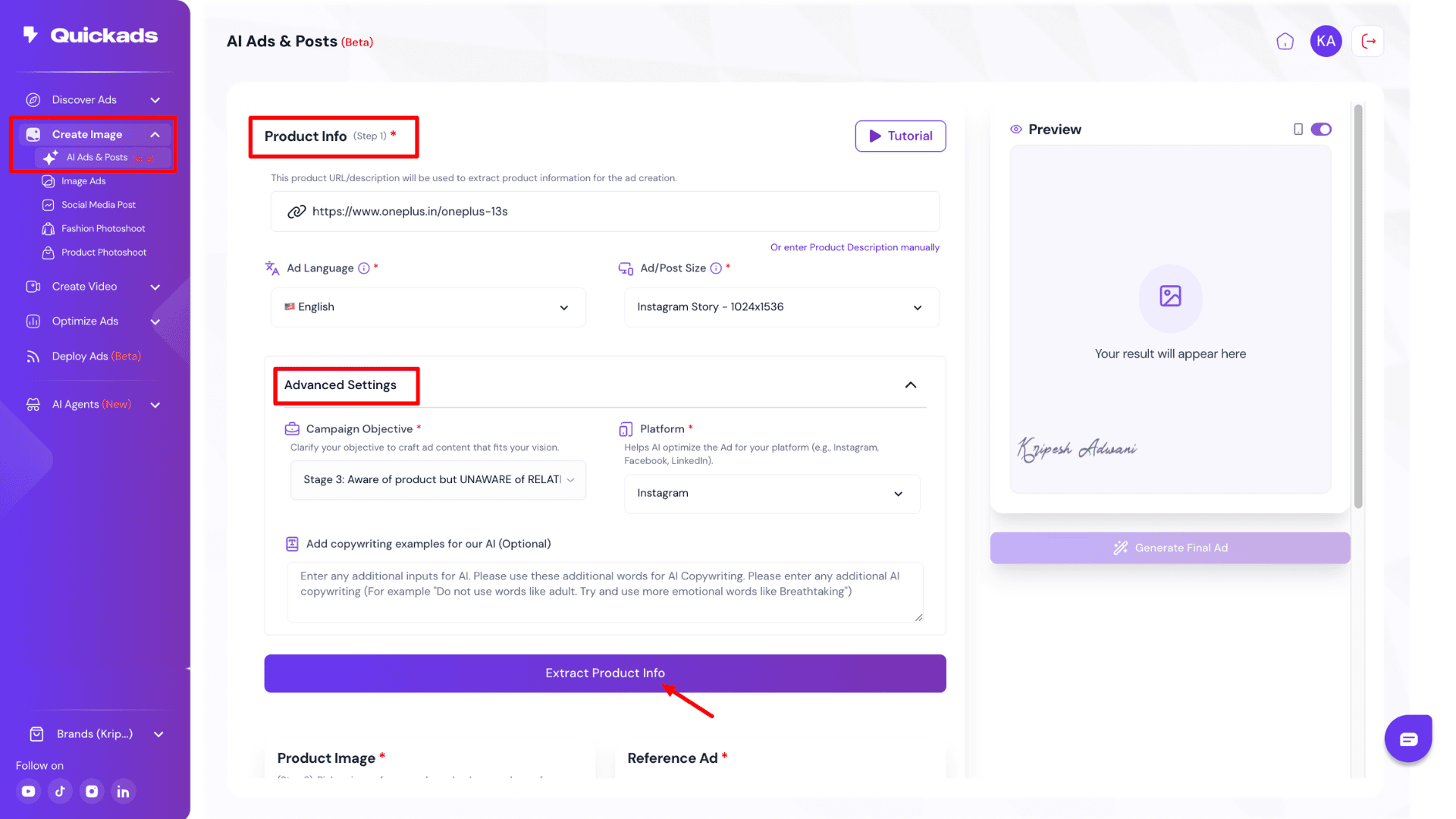
When you click on “Explore Product Info,” the platform takes a few moments to fetch and suggest relevant images from the product’s website. Now, select your preferred image and template, then click “Generate Final Ad.” The overall ad creation process is fast and delivers quality results.
Well, I feel the manual editing options are limited. You cannot directly adjust the text, colors, or images. Instead, you must input prompts into the Edit Image section, and the AI will generate changes automatically. This approach actually restricts us to fine-tune creatives and doesn’t even help much.
2) Image Ads
To create visual promotional content, you can either paste the product link or manually enter product details. In manual mode, you’ll be asked to provide the product name, type, brand tone, industry, and a brief product description.
For a more personalized result, it’s recommended to upload your brand logo and select customizable brand colors. Next, you’ll need to choose your ad objective, select the ad language, and pick between a social media ad or a banner ad. Now, select the desired image, and your ad will be generated within seconds.
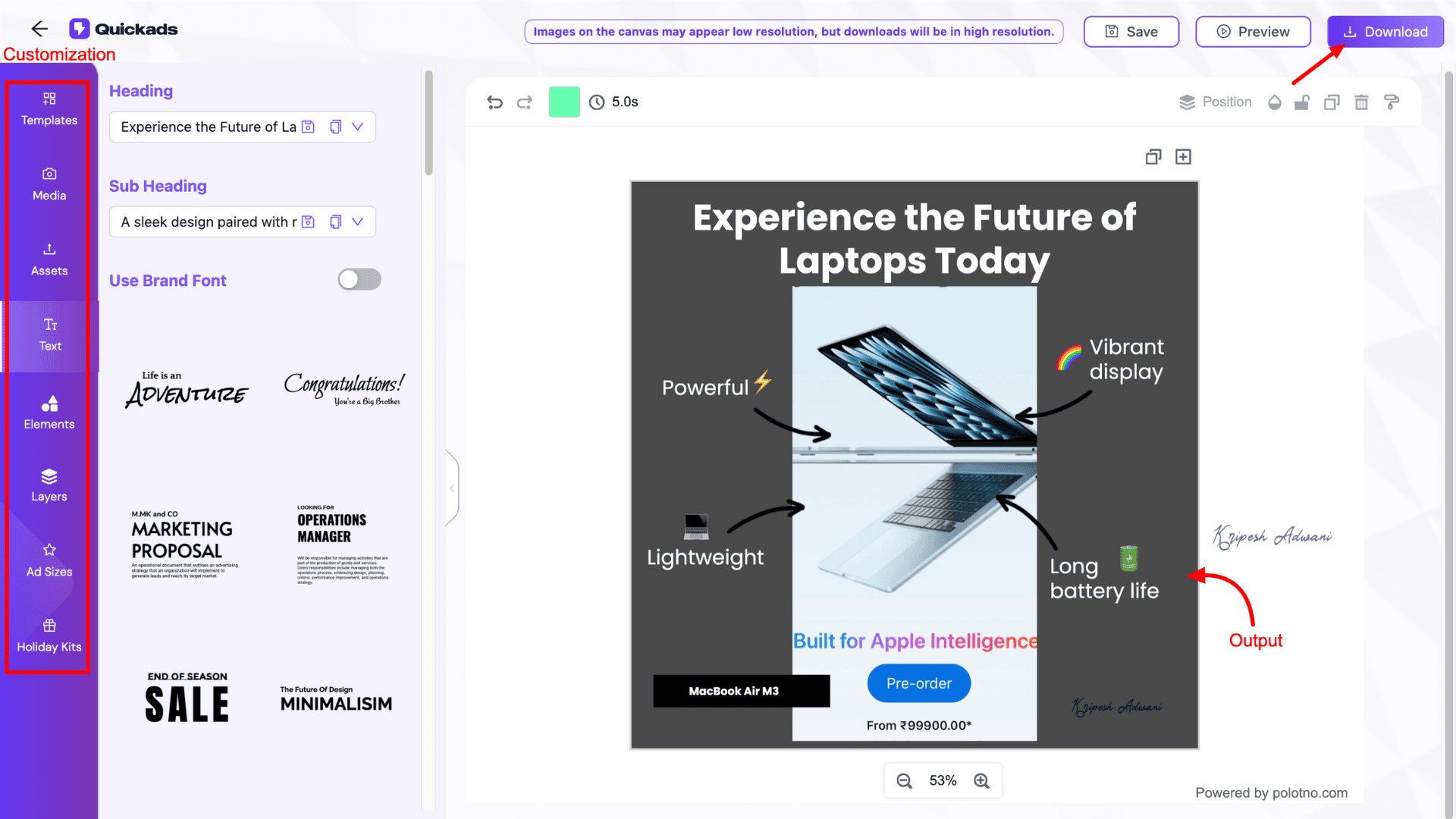
QuickAds also allow you to experiment with different templates and customize AI-generated ad content. However, while the results are ideal for beginners or small teams, the template variety is quite limited, and the output may not meet the expectations of advanced designers or professional marketers.
3) AI Virtual Try-on
If you want to showcase your accessories or garments on different models, QuickAds’ Fashion Photoshoot feature is a game-changer. You can use AI-powered virtual try-on to create high-quality visuals effortlessly without investing in hiring models or a professional product photo shoot.
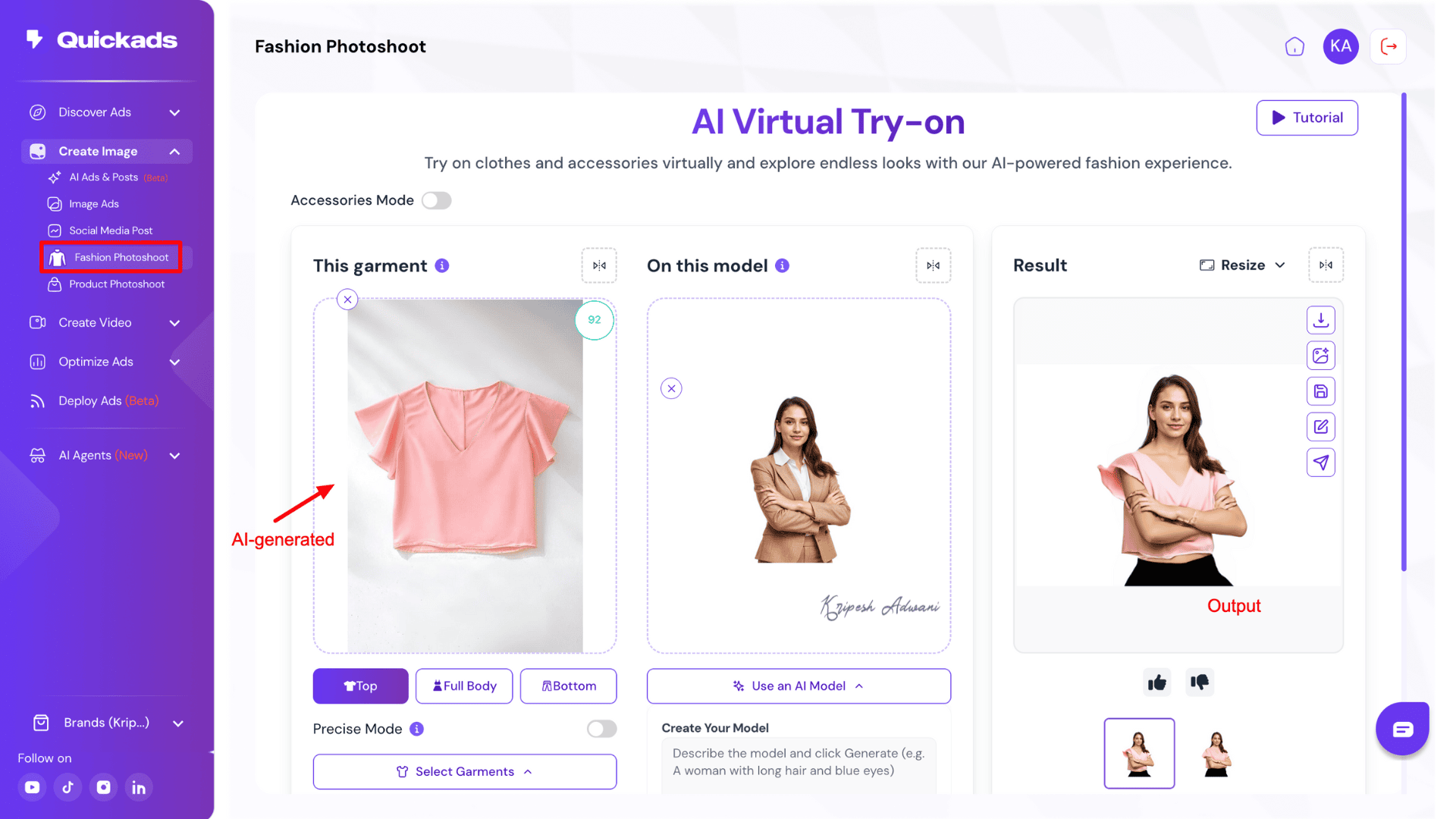
Simply upload your garment image and either use your own model photo or choose from QuickAds’ AI-generated models. Click “Generate” and the platform will provide up to 4 clean, realistic samples within seconds.
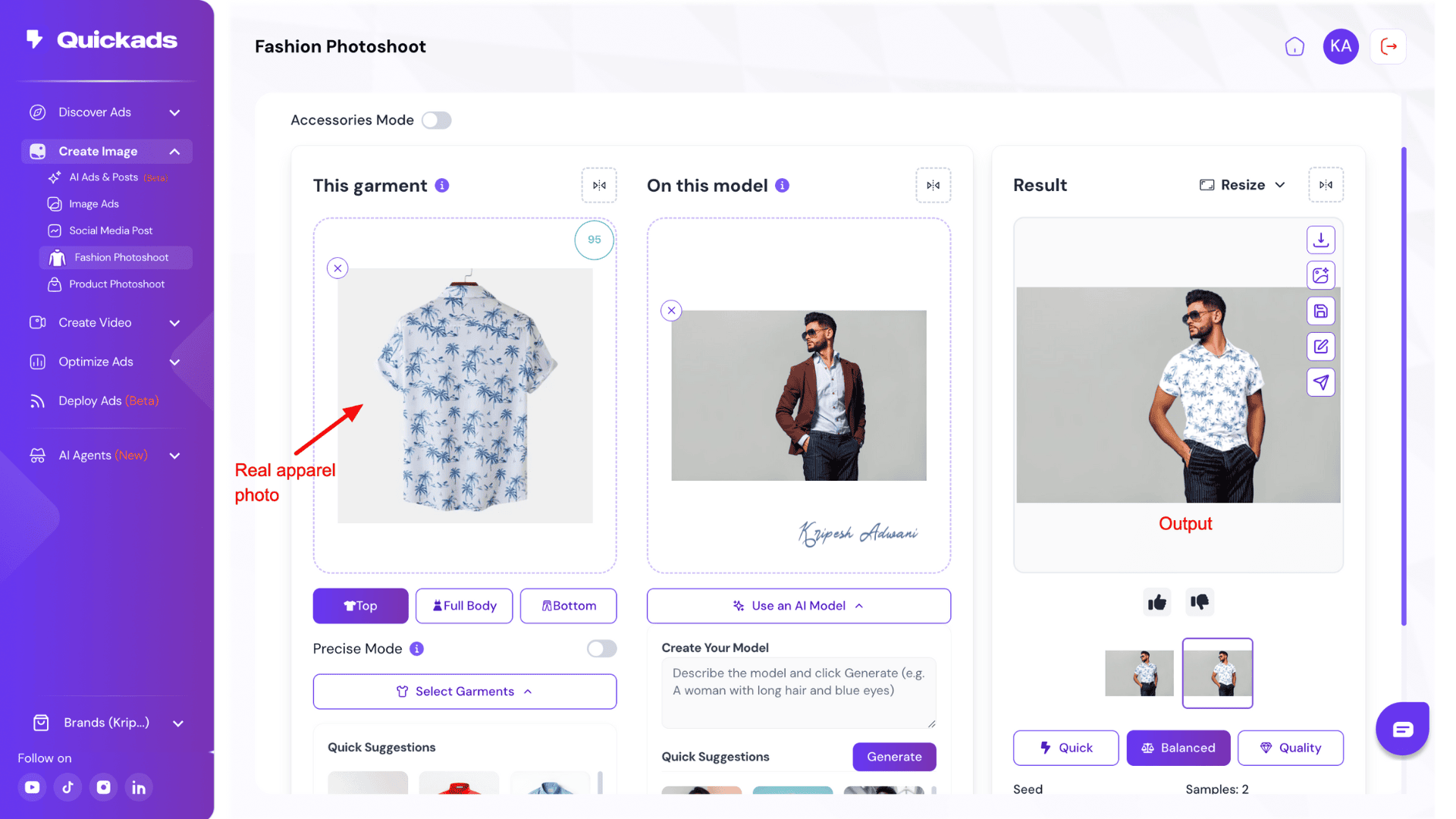
This feature allows small ecommerce brands to create diverse product catalogs, test new designs quickly, and increase visual variety across ads, listings, and social campaigns. I tested it with both AI-generated garments and real apparel photos, and in both cases, the results were surprisingly accurate and visually impressive.
4) Product Photoshoot
To get started, simply upload a standard product image. QuickAds’ AI will automatically detect the product type and generate a matching product description, which you can manually edit if needed.
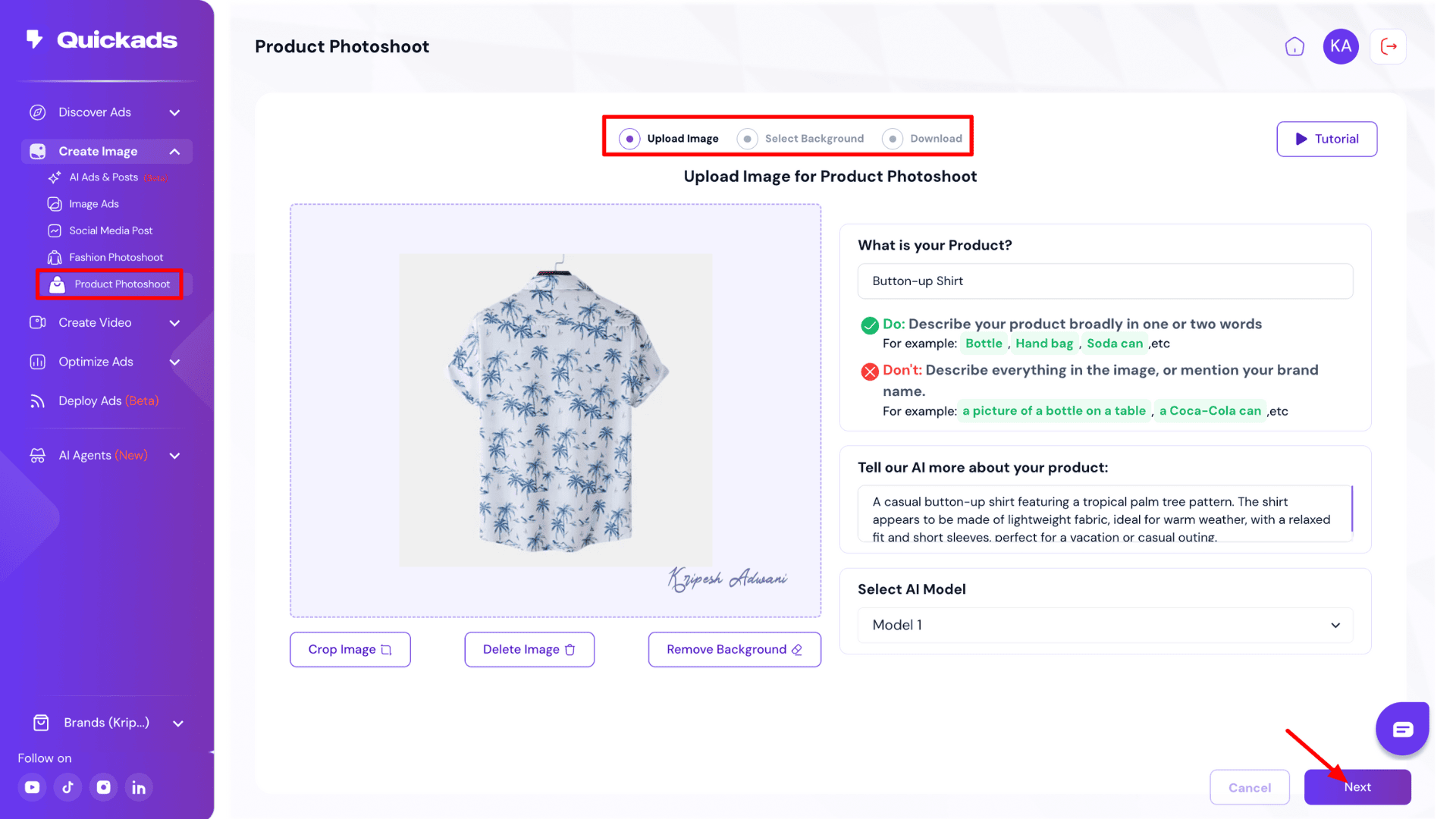
Next, select from pre-suggested background styles and image styles to customize the look and feel of your shoot. In the Advanced Settings, you can fine-tune your output by adjusting: Negative prompts, Image format, Blend value, Lighting options, and more.
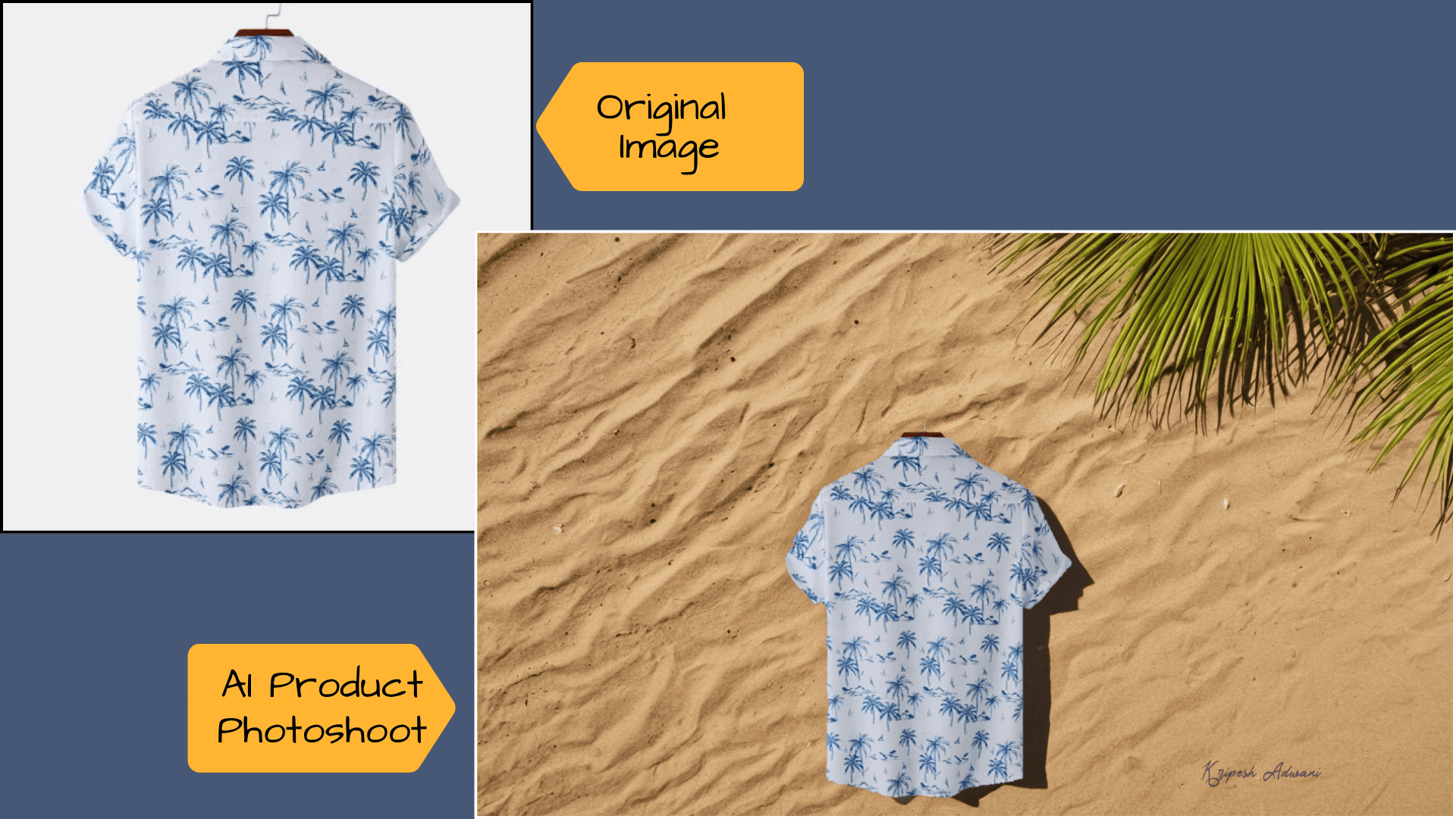
In just two steps, QuickAds generates professional-quality product shots. Small agencies can absolutely use these images for e-commerce listings, social ads, and brand campaigns.
3) Video Ads Creation
Just like image ad creation, Video Ad creation in QuickAds offers five core options. All of these tools provide high-definition video ads with ease. Whether you’re a beginner or a seasoned marketer, there’s a learning curve..
1) Direct response Video
To create targeted video ads for your brand, QuickAds offers a Direct Response Video feature. You start by pasting your product URL, selecting the language, and optionally uploading demo videos. Once that’s done, you can choose a hook, an AI model, preferred text styles, background music, and even an optional product video to enhance your output.
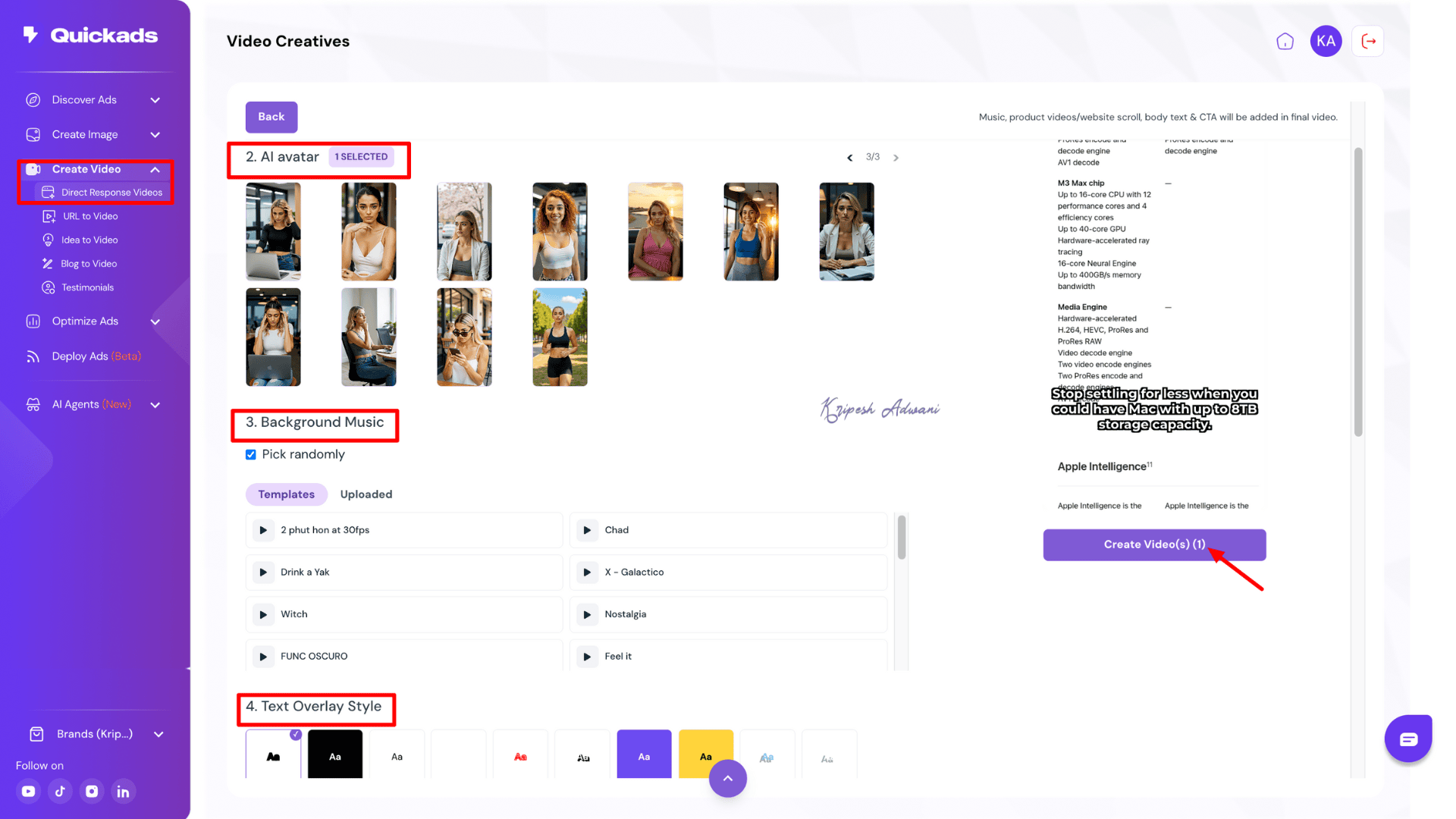
The platform takes a little time to fetch detailed information from the product URL, but the overall experience is smooth. Its auto-generated captions are highly accurate, engaging, and consistently align with your brand voice.
One limitation is the limited variety of AI avatar options available. While QuickAds allows you to customize and edit videos, this feature may not be very effective for faceless promotional video creation.
2) URL to Video
Only have a product URL and nothing else? No worries! With QuickAds, you can still create eye-catching video ads with no manual effort. Just paste your product link or website URL, select the language, and click Next.
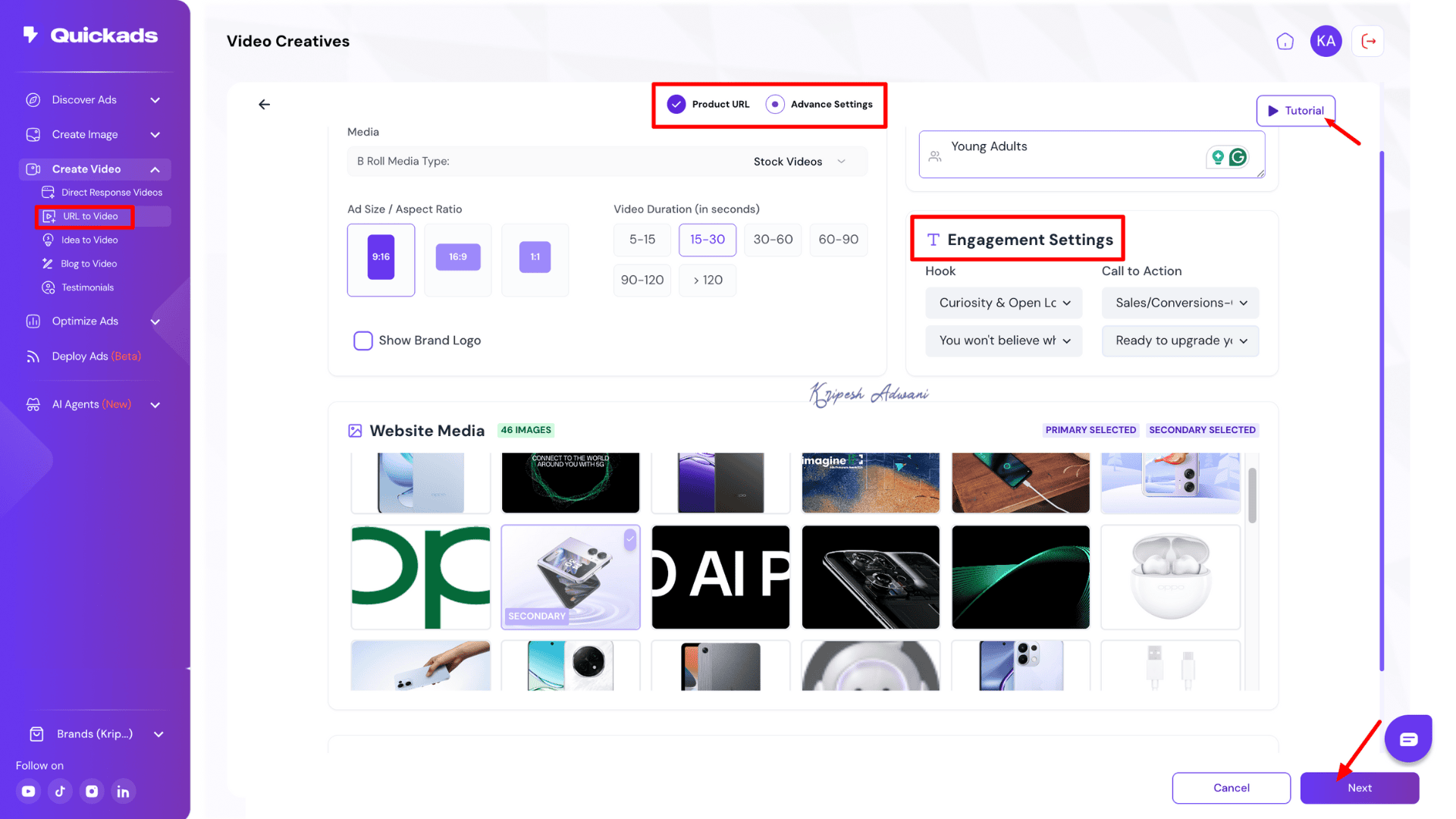
QuickAds will automatically fetch multiple product images from your website and even suggest several hooks and calls to action that align well with your brand message. All you need to do is confirm a few basic settings, like aspect ratio, video duration, visual style, and choose the best images from your website’s media.
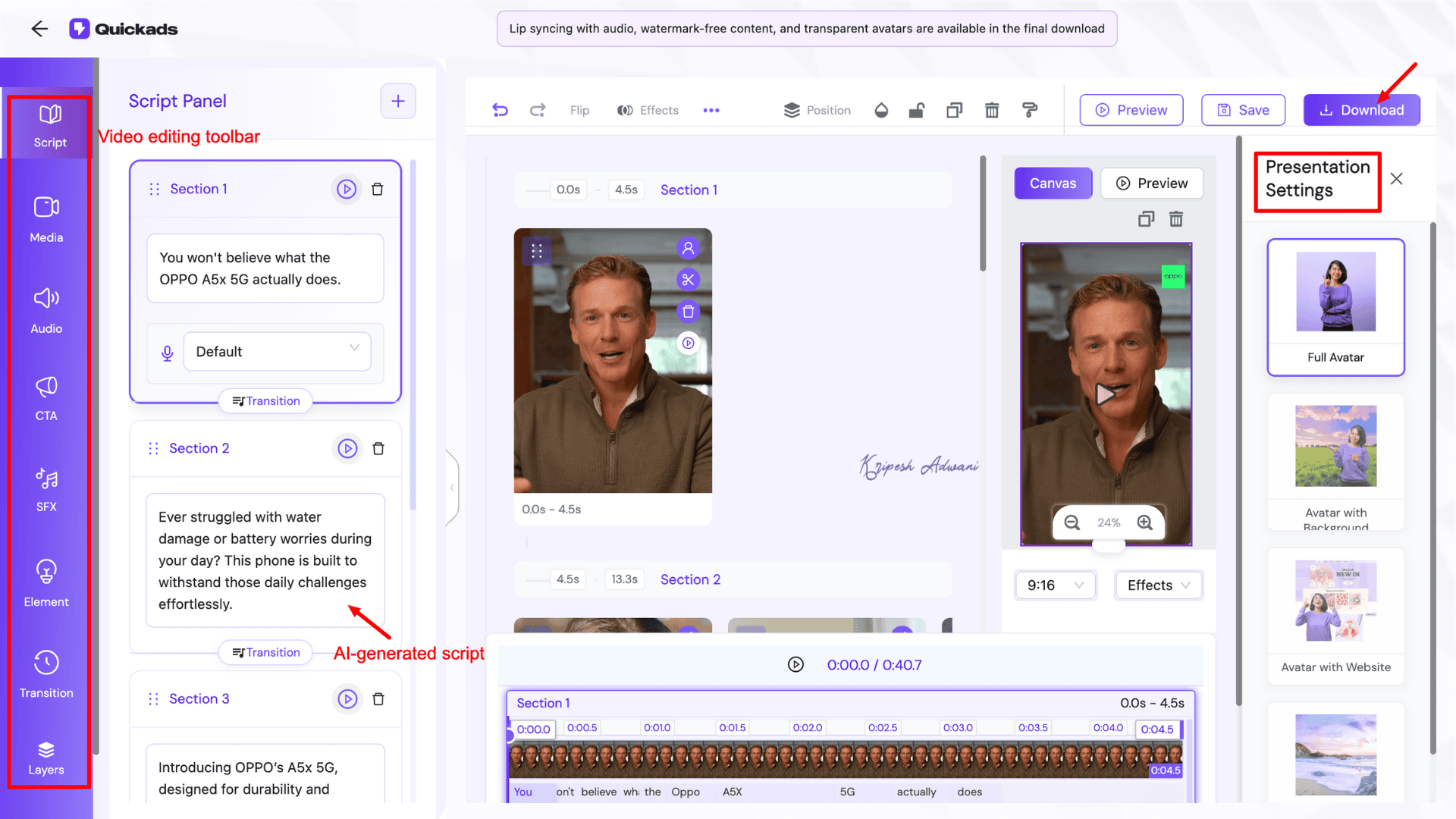
You have full flexibility to edit the script, avatar, and text styles. The video quality is impressive, and during testing, the platform consistently produced content that matched the brand voice.
[Button: Click here to see the final video]
That said, I recommend reviewing and slightly tweaking the script. A few human touches can really make the ad feel authentic and less like AI-generated content.
3) Idea to Video
If you have a great concept for your next video ad, give QuickAds’ Idea to Video generator a try. Just describe your idea briefly. Choose the aspect ratio, AI voice, and a few other basic settings—it’s a simple 2-step process.
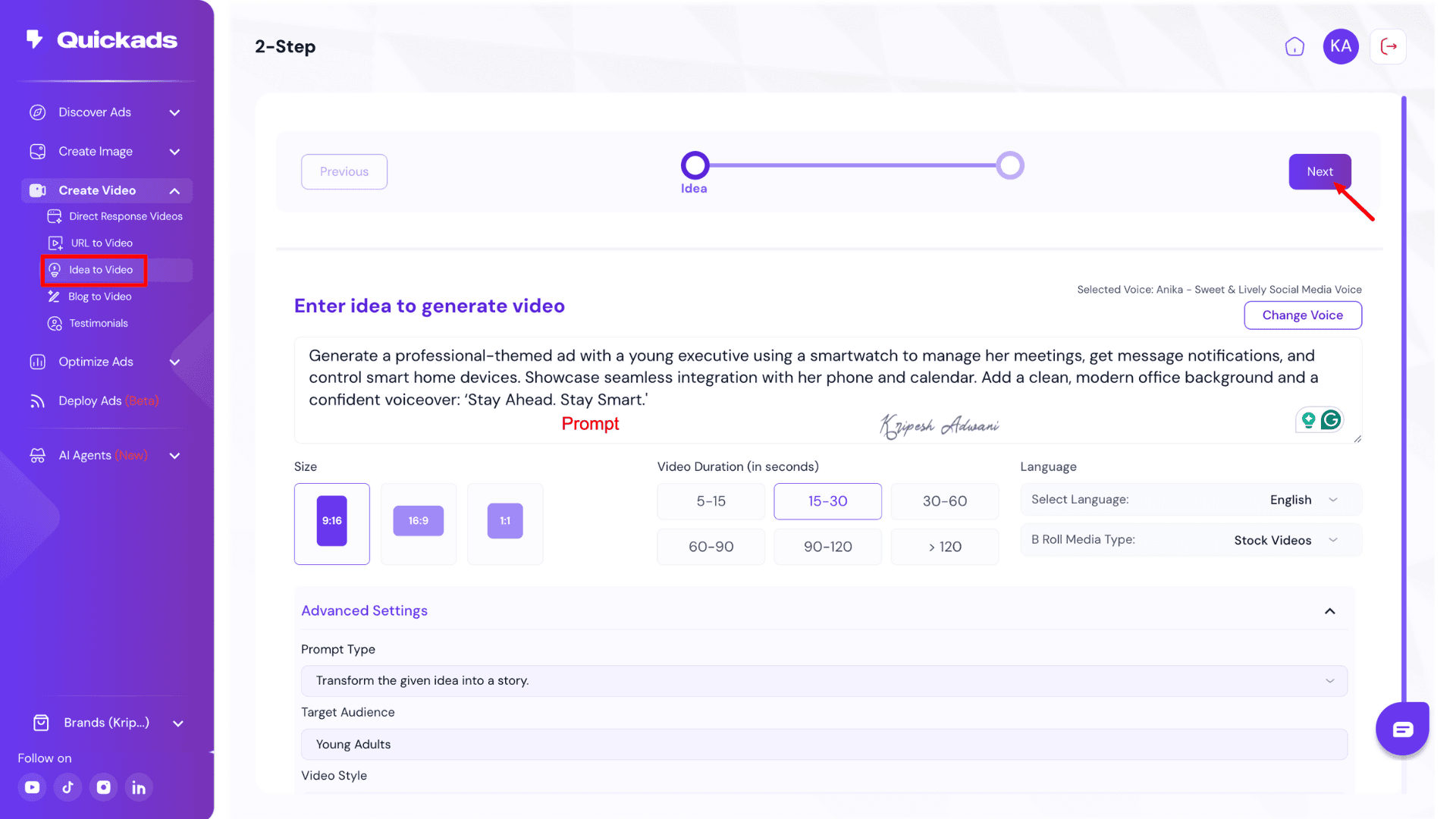
I was genuinely impressed by the output. With just a short idea, you can generate a video up to 120 seconds long. The content feels natural and engaging, not robotic. The stock images and video clips used are well-matched to the ad theme, and you also have the option to edit the video further if needed.
4) Blog to Video
We all know that video content gets more reach than text-based content. So, if you run a blogging website and want to maximize the value of your published posts, this Blog to Video generator is a great tool. I tested it using my blog “3 Best VPNs for Gaming in India”.
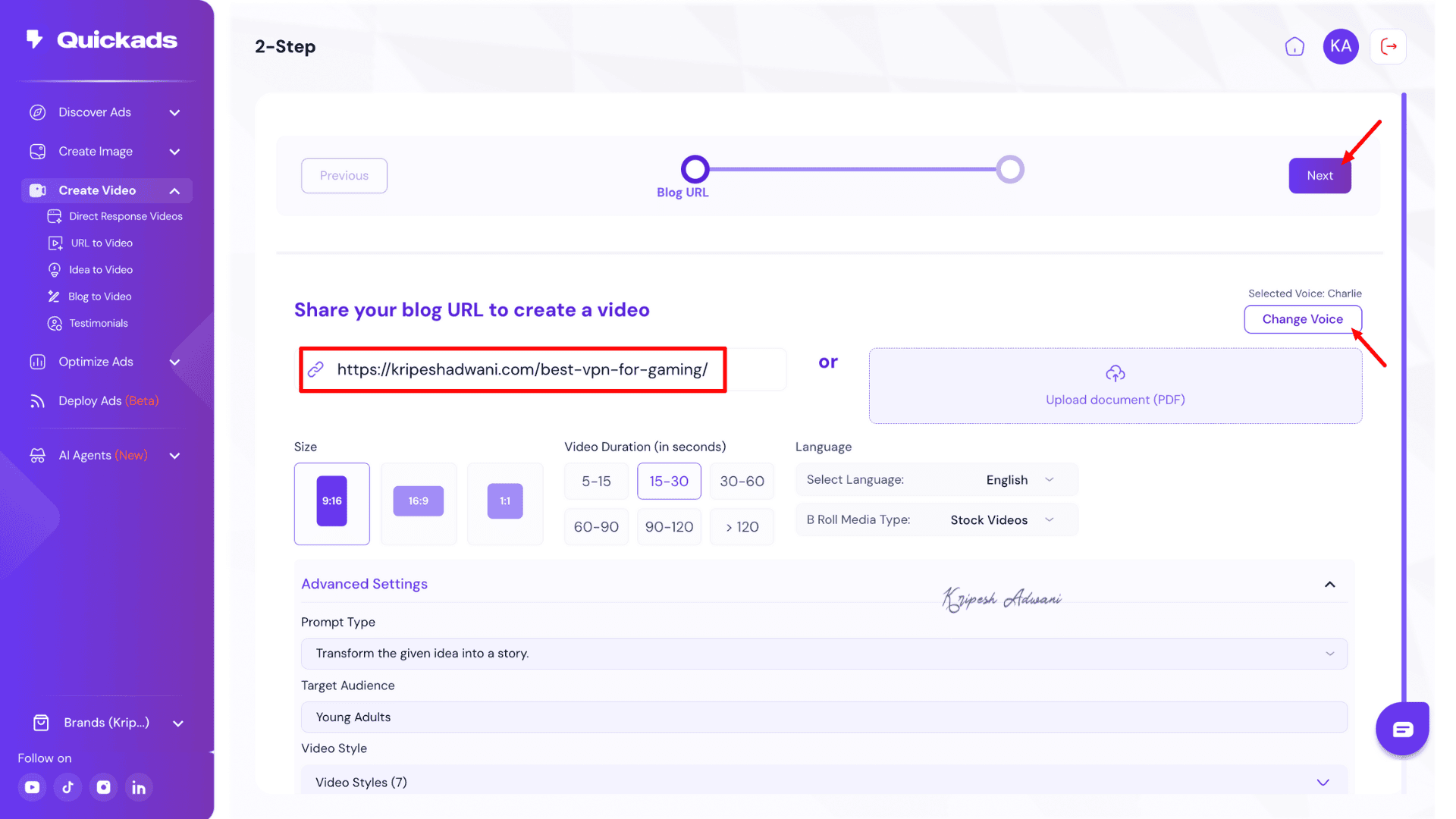
After entering the blog URL, I selected the voice, aspect ratio, and duration, just like in other QuickAds video generators. This tool was noticeably faster than other video creation features and did a great job of extracting key highlights from the blog.
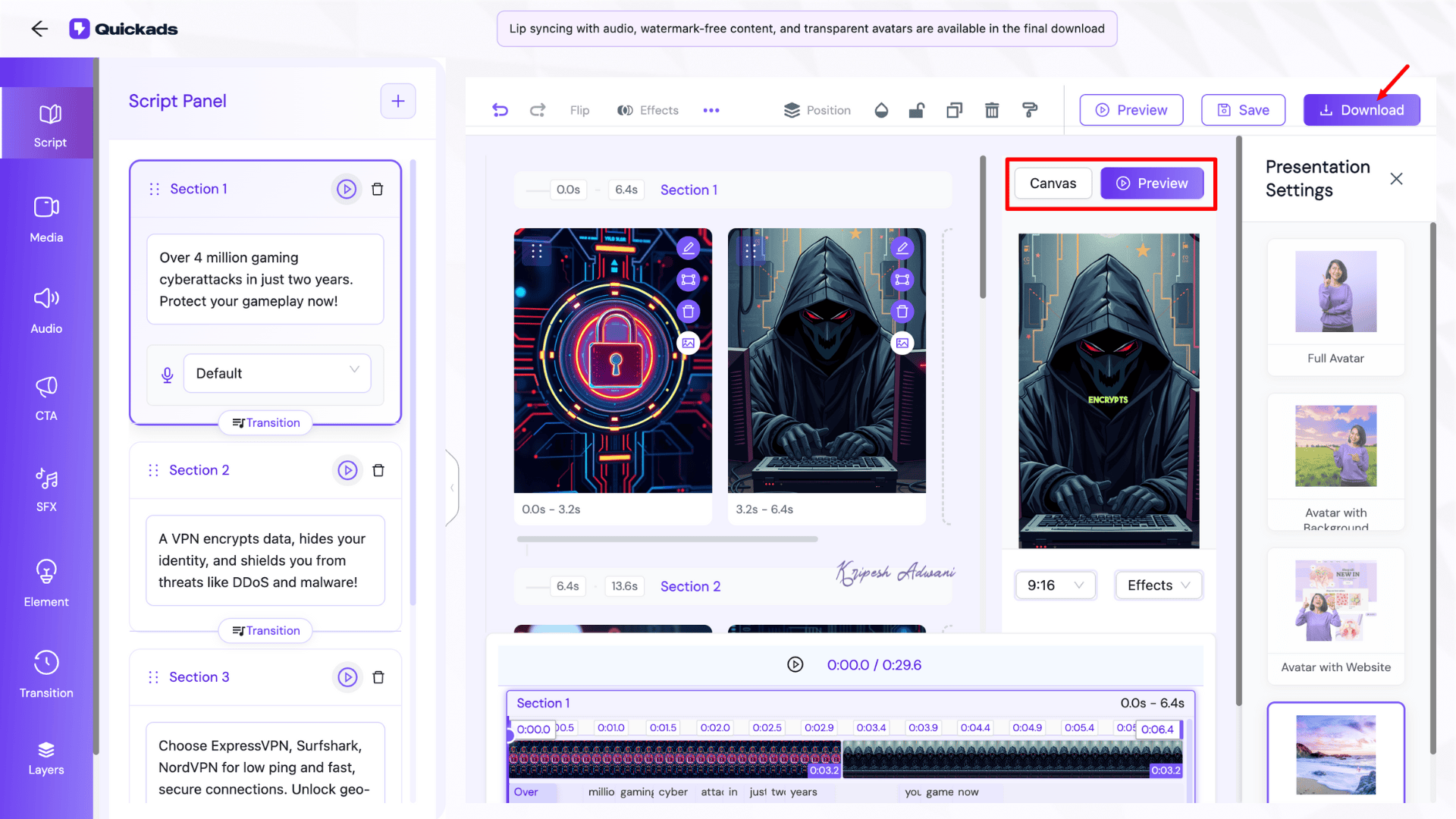
The final video focused on attention-grabbing points. So, the output makes it ideal for quick audience engagement.
5) Testimonial Videos
QuickAds also helps you create product testimonial videos, which are great for building trust and credibility, especially for small brands and startups. With just a few steps, you can turn word-of-mouth into professional-looking video content.
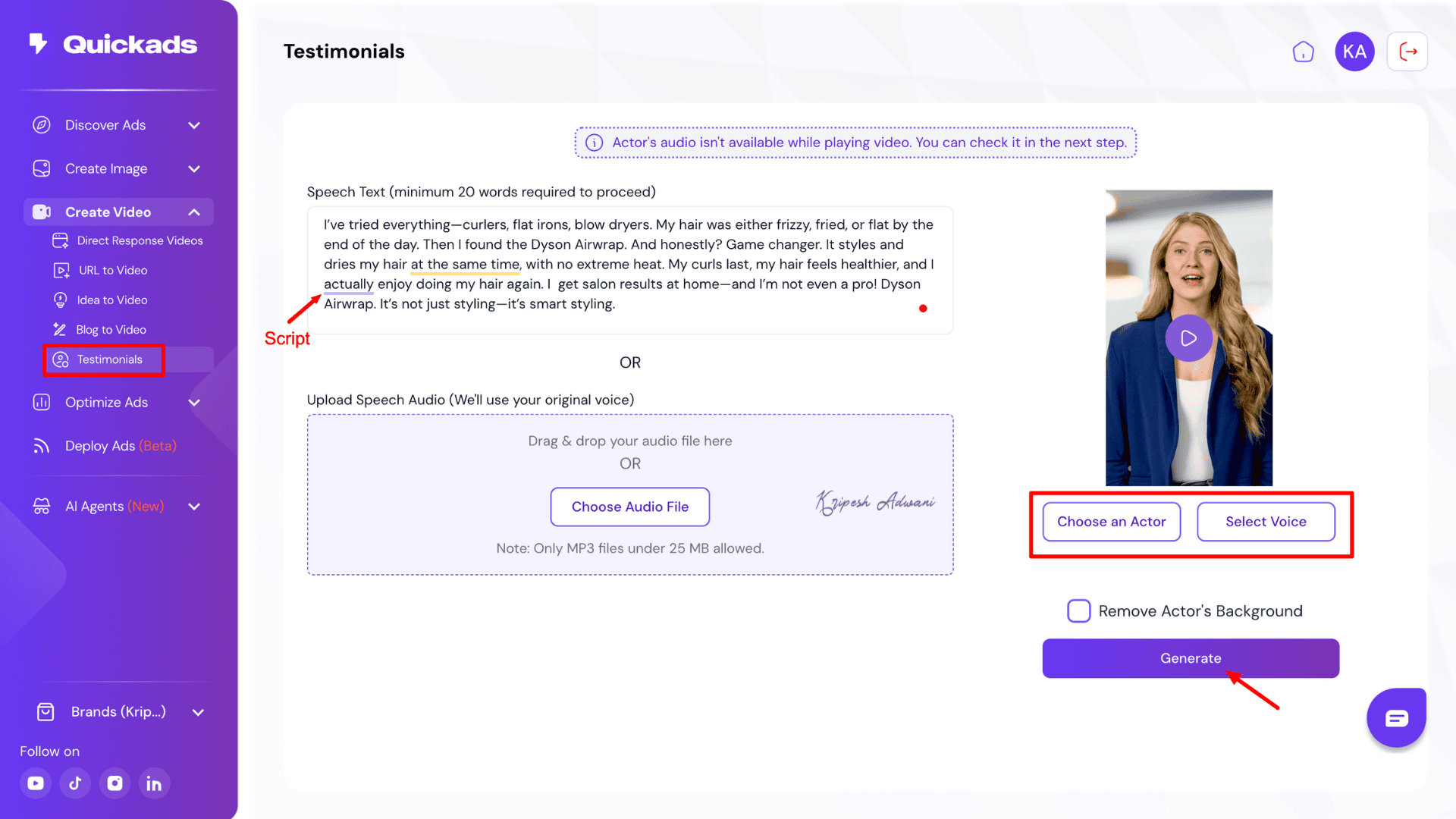
Simply upload your testimonial script (you can even use an AI writing assistant to craft it), then choose a model and a suitable voice. The platform takes just a few minutes to generate a high-quality, believable customer testimonial that can boost your brand’s authenticity.
4) Optimization & Analytics
With QuickAds, you can easily analyze the performance of your ad creatives. The platform offers a detailed report highlighting each ad’s strengths, weaknesses, and areas for improvement. Plus, it tracks performance metrics such as audience engagement, hook, strength of CTA, etc.
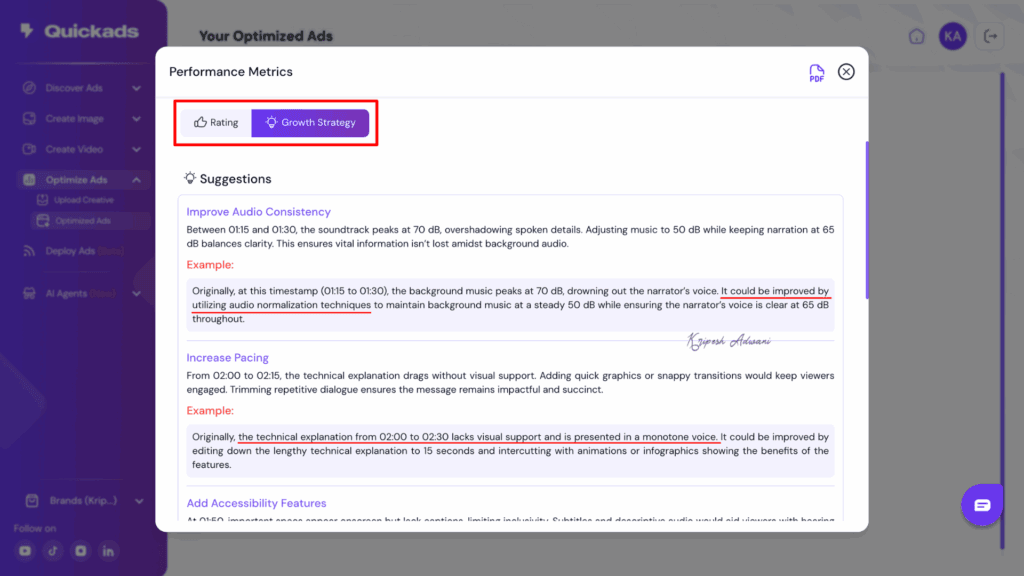
//Ad Optimization Report
One of the standout features is the dedicated optimization tools for platforms like TikTok and Meta. Additionally, the built-in Compliance Analysis tool is especially useful for beginners, helping them avoid ad rejections or bans on various advertising platforms.
5) Schedule Ads
For easy content management, QuickAds allows users to schedule content through its built-in content calendar. You get two options: first, you can deploy the advertisement as a social media post; second, you can directly upload the ad creative to the respective platform.
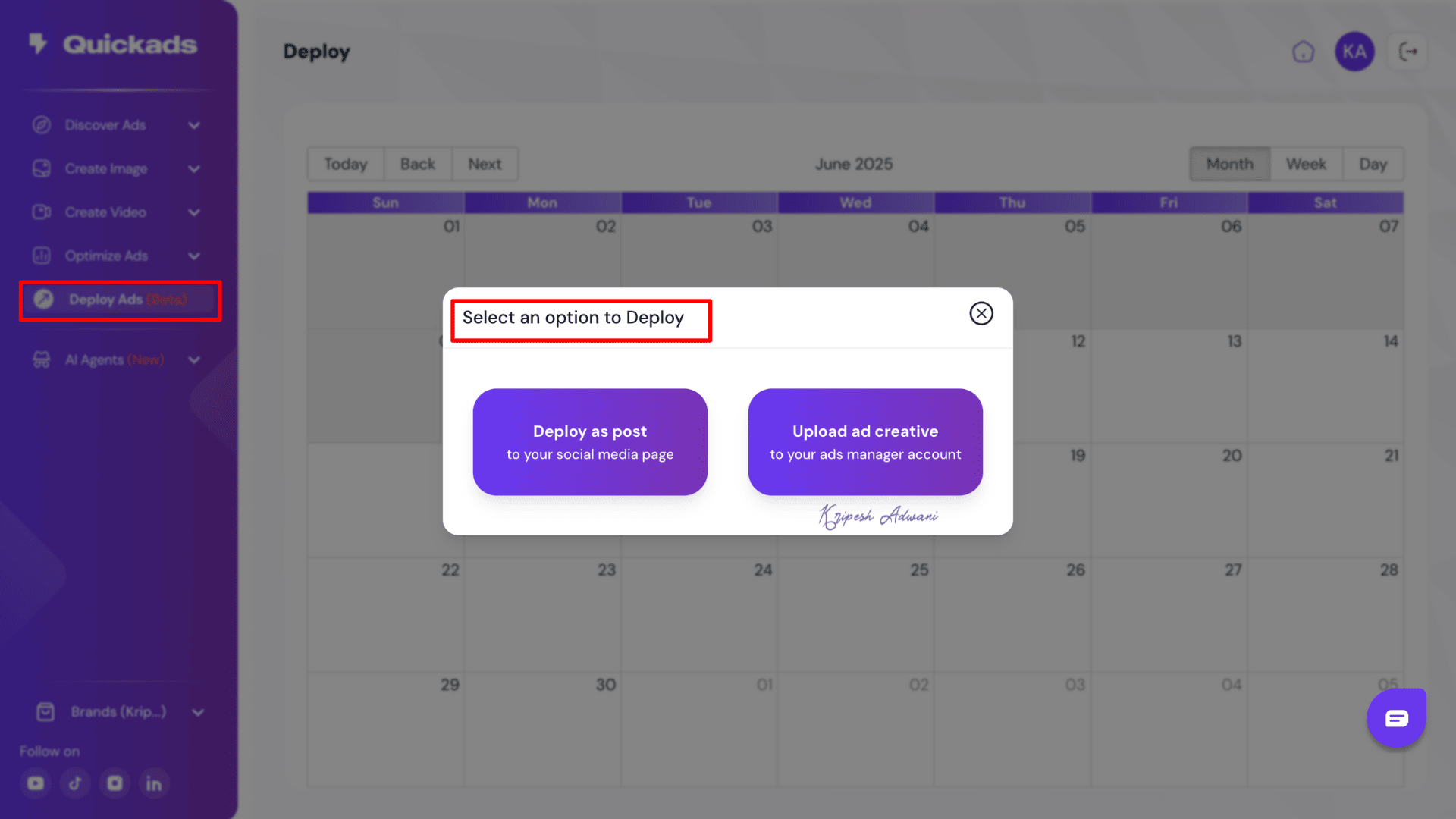
QuickAds integrates with Facebook, Google Business, and TikTok Business. Just select the future date and click on the desired option. The “Deploy Ad” feature is currently in beta mode, so we can expect regular upgrades in the coming days.
6) Research with AI Agents
AI Agents are a brand-new feature of QuickAds, designed to automate manual, repetitive tasks. With QuickAds, you’ll get two AI Agents:’
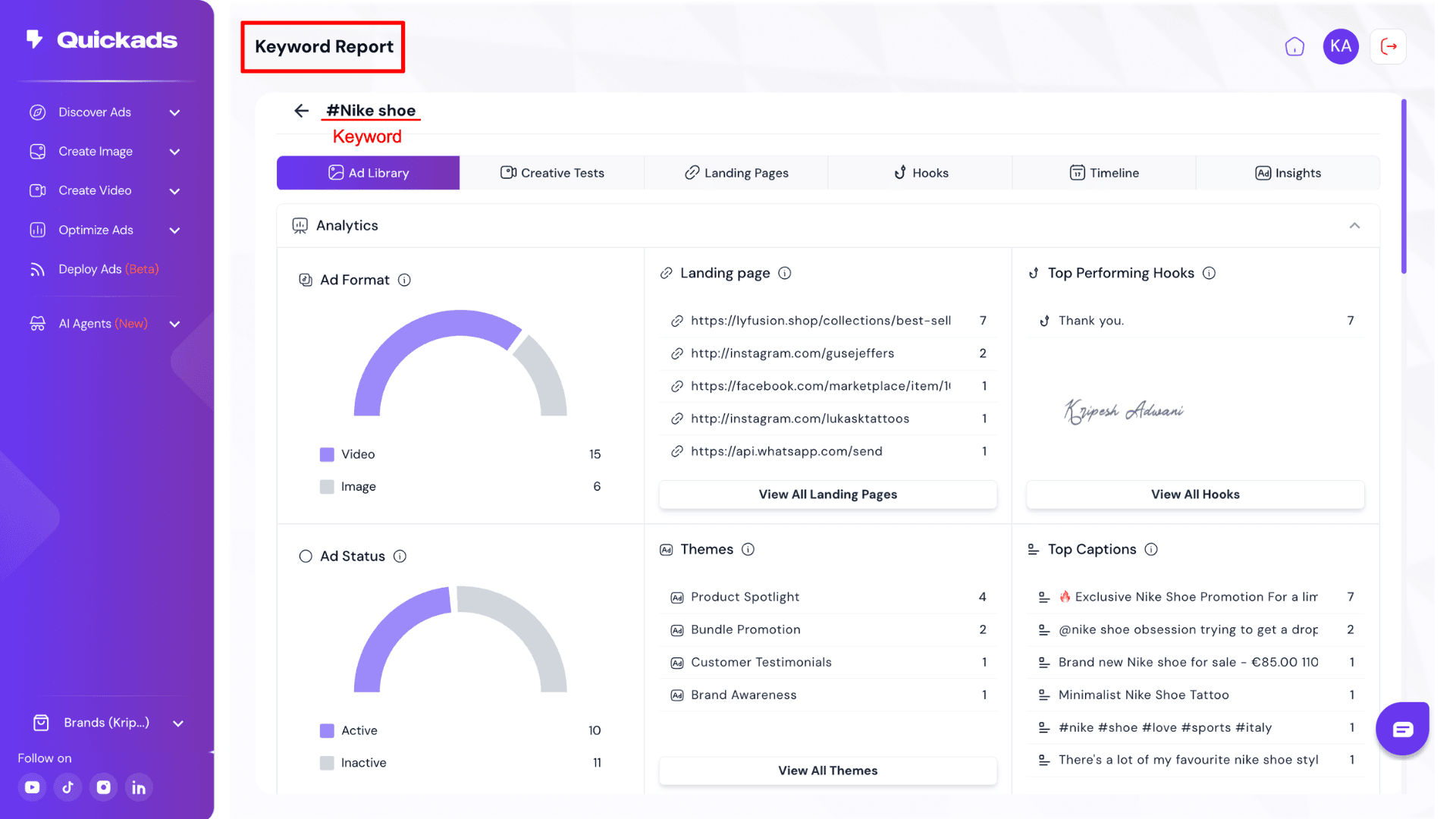
Adam, the Creative Spy: This agent helps you in two key ways. Keyword Spy helps in discovering the keywords on which competitor brands are ranking. And Brand Spy makes researching top-performing ad creatives from competitor brands easy.
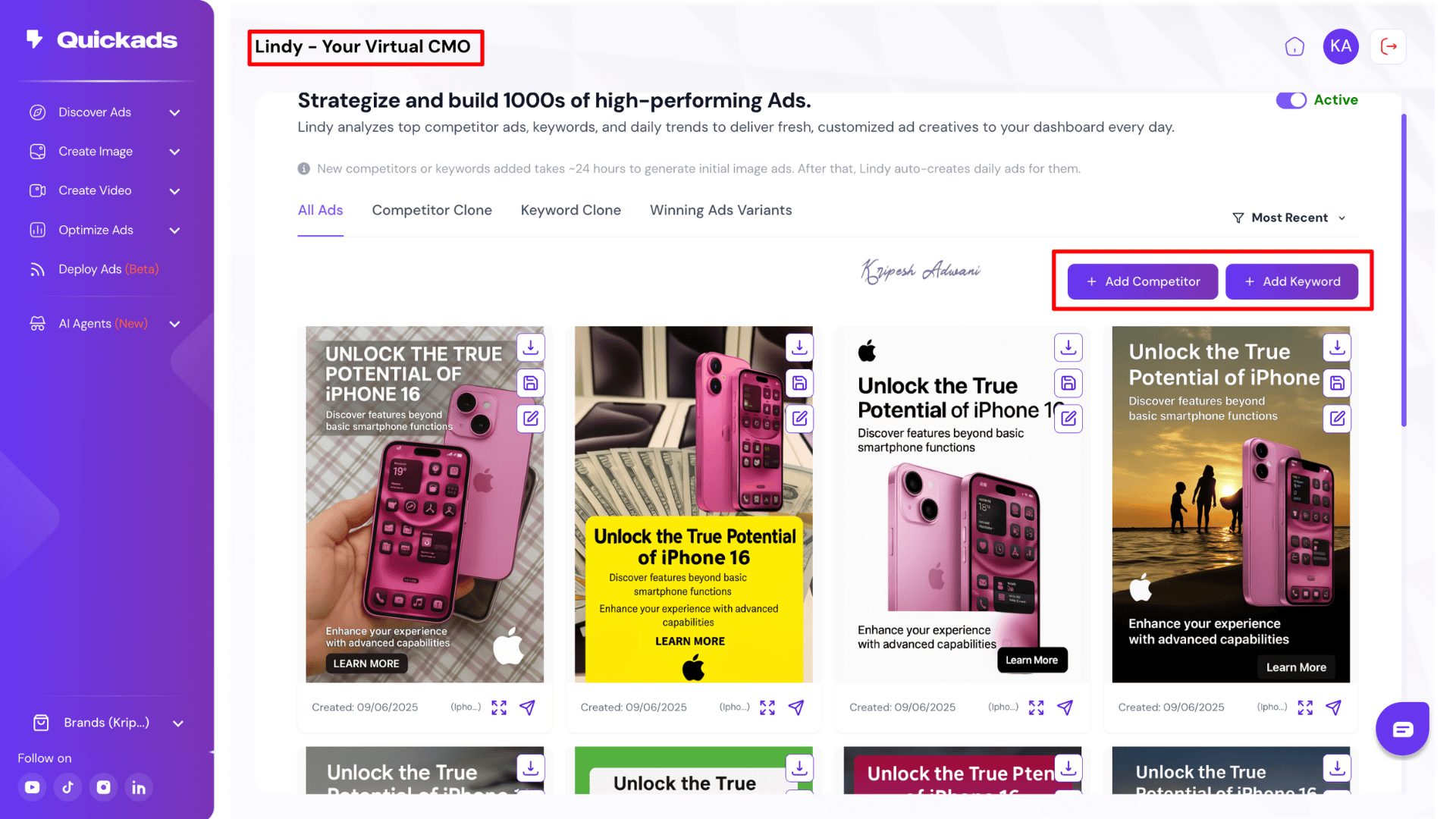
Lindy, the Creative Agent: This AI Agent simplifies bulk ad creative generation for a single brand. Simply paste a product URL or website link, select your competitors and keywords, and Lindy will clone ads and keywords from competitor brands and generate new ad creatives daily.
QuickAds Integrations
1) Brand Kit Integrations
QuickAds allows you to add your own brand to use videos for commercial purposes. You’ll find ‘Brand Kit’ on the left-side menu bar. Here, you can upload your brand logo. The platform will automatically fetch your brand’s color palette, tone, font, and industry.
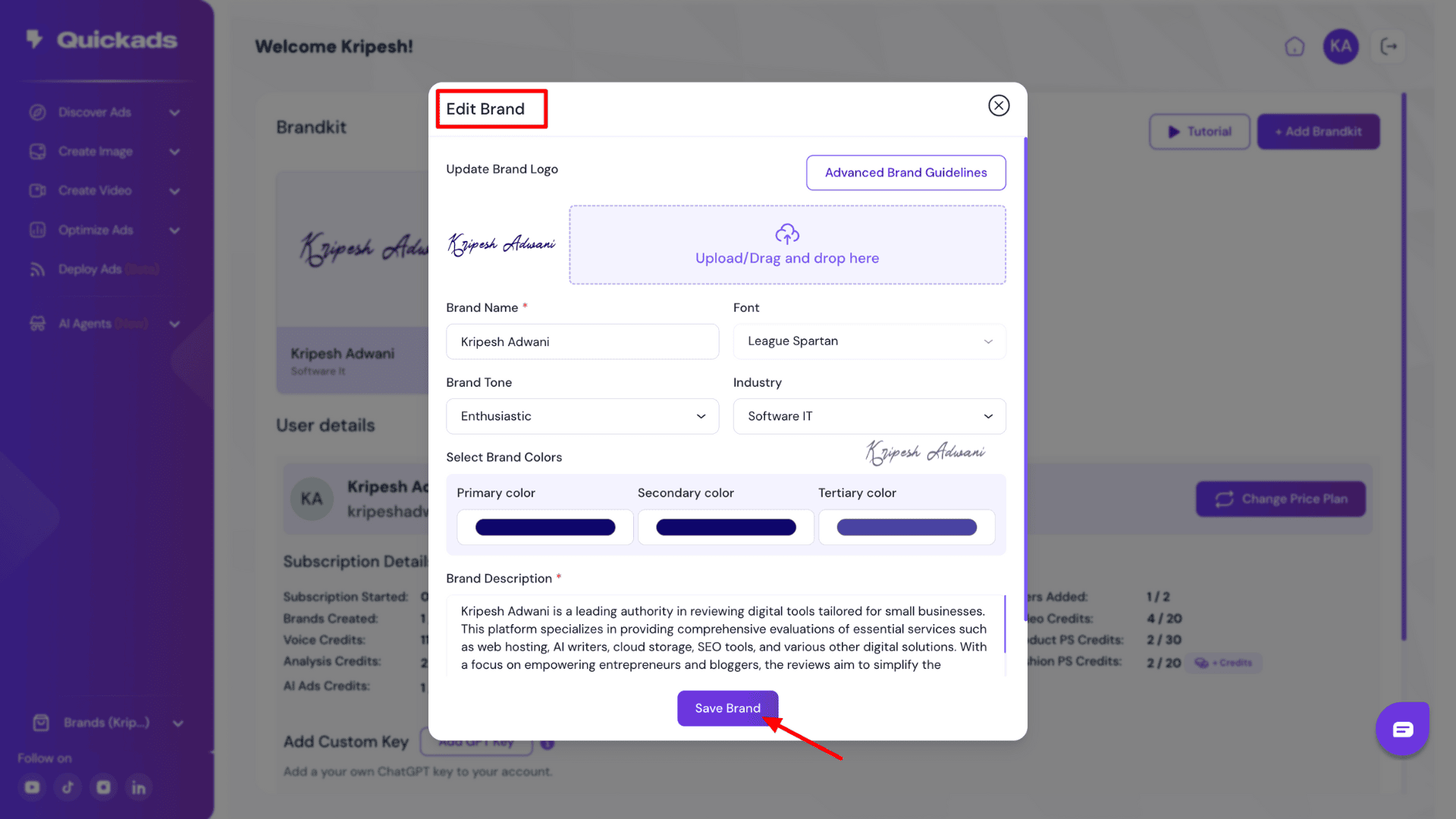
This feature ensures that all the ad creatives you generate are perfectly aligned with your brand voice. In fact, it even auto-generates a brand description from your website, which you can further edit.
2) Social Media Integrations
If you want to directly post ad creatives from the QuickAds platform to your social media accounts, you can! Our Deploy Ad feature allows you to integrate your social media profiles to auto-schedule content publishing. QuickAds integrates with YouTube, Facebook, Instagram, and TikTok.
Customer Support
When you’re in the QuickAds dashboard, you’ll find a chat option at the bottom-right corner. You can directly chat with a human agent there. Keep in mind that this chat support isn’t available 24/7; it’s limited to business hours. Also, they generally take about 15 to 20 minutes to respond to a single question.
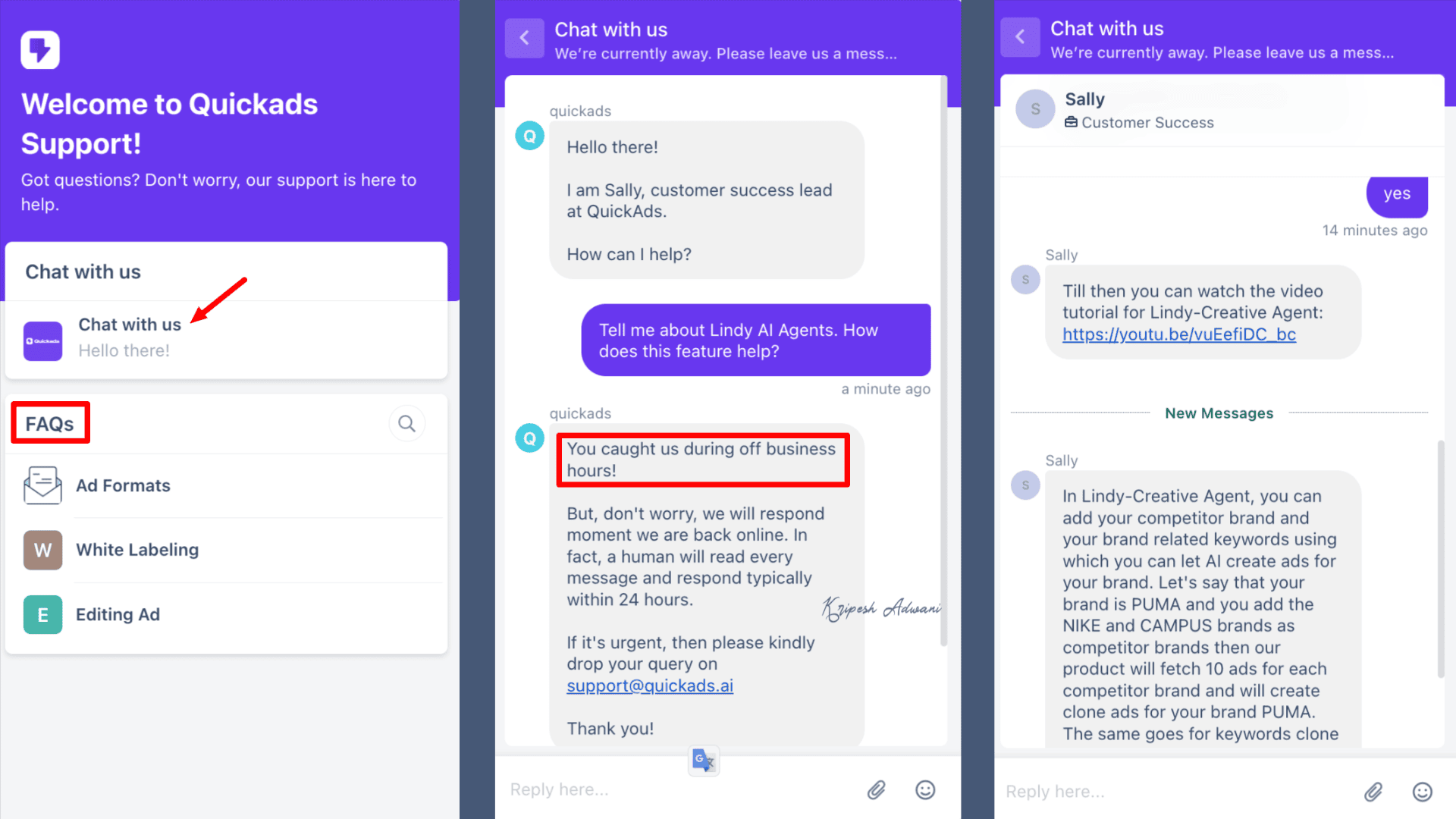
Beyond the chat, you can also visit the QuickAds Contact Support page and fill out a contact form for further assistance. Their email address, [email protected], is also readily available. Plus, right next to the chat button, you’ll find a section with FAQs.
I’m not happy with Chat support, but impressed with their knowledge guide. Even with a slight learning curve, QuickAds provides helpful tutorials/user guides under every feature. The official website also offers a comprehensive knowledge base, including blogs, tutorials, and more FAQs.
Pricing
Regular Pricing
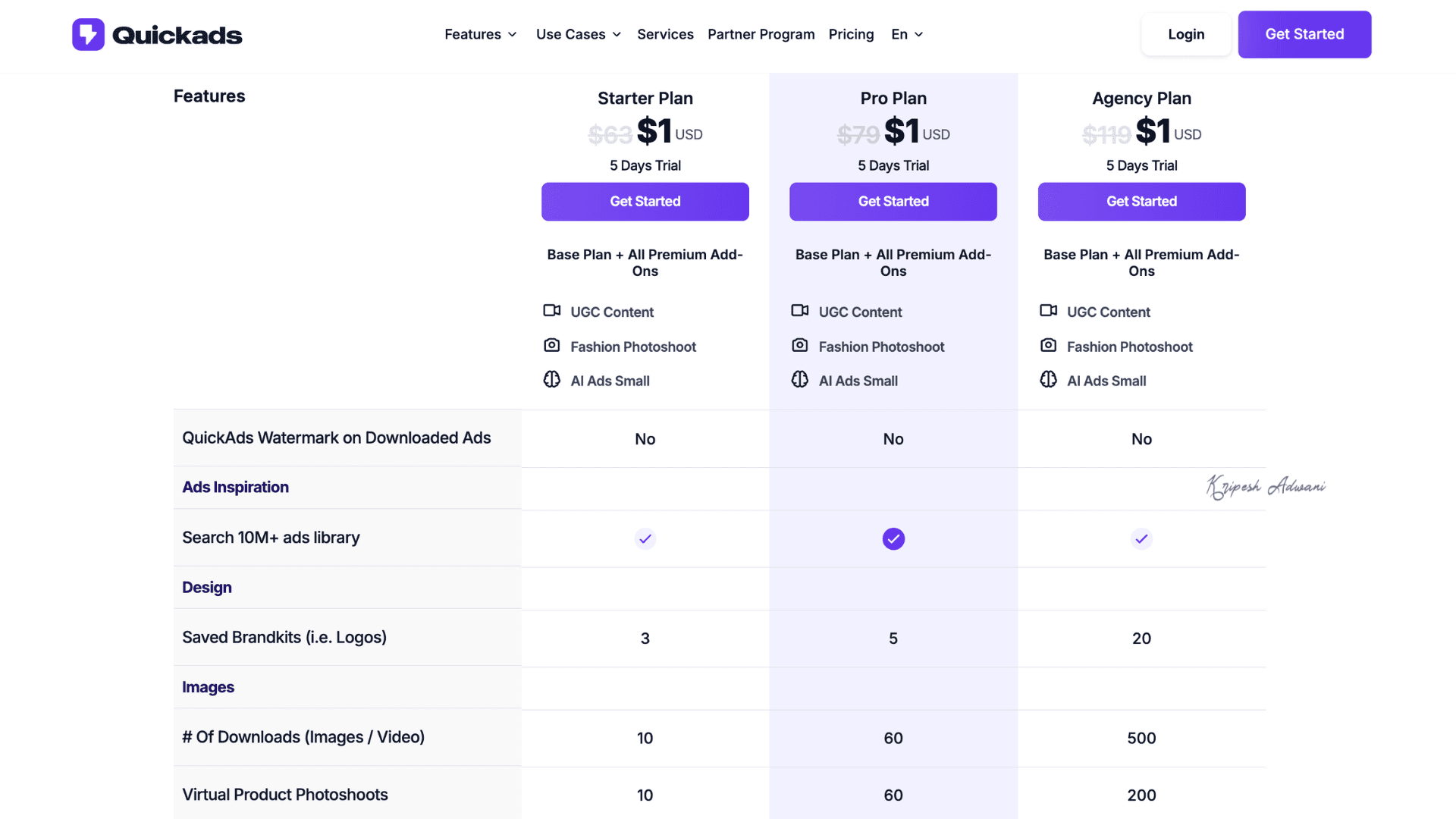
QuickAds offers three pricing plans: Starter, Pro, and Agency. These plans are available with Monthly, Annual, and Lifetime options.
For example, the Starter plan costs $63 yearly and includes features like adding up to 3 brands, 10 image downloads, 30 AI video generations, SD (640×360p) quality exports, and basic AI voice support. To unlock premium features, you’ll need the Pro plan, priced at $79 annually.
AppSumo Pricing
QuickAds is now available with an amazing AppSumo deal! You can get the regular Starter plan with added features for just a one-time payment of $69.
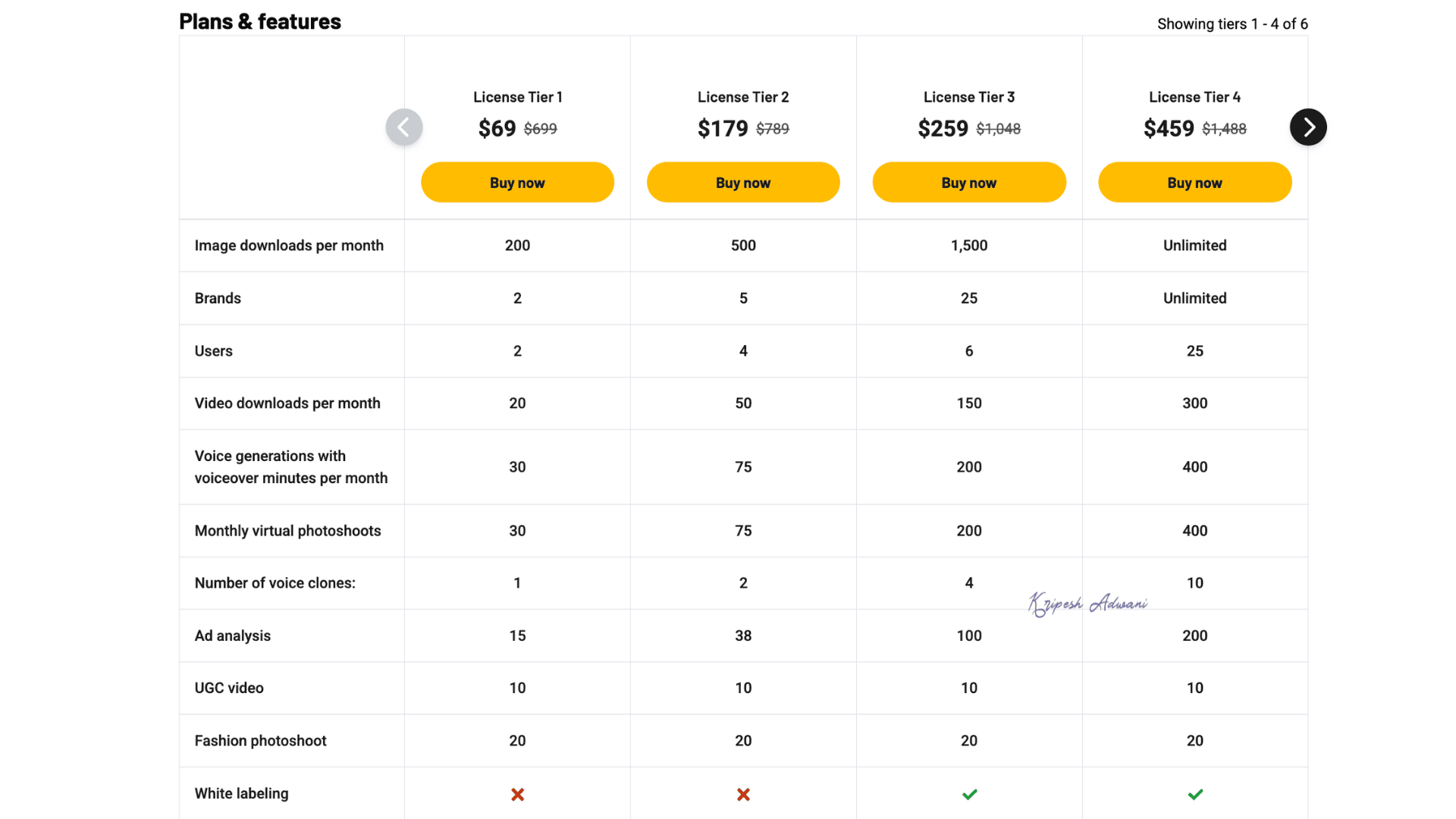
Tier 1 and Tier 2 are ideal for individuals and small teams, while Tier 3 and Tier 4 are better suited for agencies. Tier 1, priced at just $69 (one-time), includes 200 image downloads per month, 2 brand slots, 20 video downloads per month, 1 voice clone, 20 AI photoshoots, and several other valuable features.
Refund Policy
If you purchase QuickAds through their regular pricing plans, refunds are not available. However, they’re currently offering a 5-day trial for just $1, with limited feature access.
On the other hand, if you purchase QuickAds through the AppSumo deal, starting from $69, you get a 60-day money-back guarantee. So, you get two full months to explore the platform risk-free.
QuickAds Pros
1) Quick Ad Generation
As the name suggests, QuickAds truly speeds up the ad creation process. In just two to three simple steps, you can generate both image and video creatives complete with matching visuals, brand logo, and engaging copy.
2) Award-Winning Ad Database
QuickAds offers a database of over 10 million ads for creative inspiration. Updated daily, this extensive collection helps you stay ahead and innovate with fresh ideas.
3) Copywriting Assistant
Ad copies need to be concise yet impactful. QuickAds helps beginners and budding copywriters draft content, including hook lines, CTAs, and body text that align with your brand message.
4) Multilingual Support
QuickAds supports ad copy generation in over 30 languages. Whether you need creatives in Hindi or Malay, the platform ensures accurate, culturally relevant messaging in your native tongue.
5) Customizable Brand Kit
Even with Tier 1 of the AppSumo deal, you can add a minimum of 2 brands. QuickAds automatically pulls in your brand logos, color palettes, and tone preferences to maintain consistency across all creatives.
6) Editing Toolkit
You can fine-tune AI-generated image creatives using simple text prompts. For video creatives, QuickAds offers a full-fledged editing dashboard where you can customize avatars, text styles, scripts, durations, and more.
7) Ad Cloning
It’s a standout feature of QuickAds. You can replicate the structure of top-performing brand ads and make minimal edits to adapt them for your own use. The AI intelligently mimics templates while preserving your brand voice.
8) Virtual Try-on
Freelancers or startup eCommerce brands often can’t afford to hire professional models. With QuickAds’ AI Virtual Try-On, you can generate multiple images of your clothing apparel on different AI avatars, without the need for real models.
9) AI Product Photoshoot
A product photo shoot in any high-end studio is expensive. QuickAds’ Product Photoshoot feature transforms ordinary product images into high-quality, professional-grade commercial graphics.
10) Bulk Advertisement Creation
The Lindy AI Creative Agent is especially useful for startups and small teams. Just input your competitor’s name, product URL, and relevant keywords, and it will generate daily ad inspirations by cloning high-performing competitor campaigns.
11) Detailed Performance Metrics
QuickAds Optimization and Analysis dashboard provides valuable insights into what’s working, what’s not, and how your ads compare to industry leaders. You can also download comprehensive reports to review or present with your team.
QuickAds Cons
1) Learning Curve
While the QuickAds interface appears simple at first glance, each tool is packed with multiple features that require exploration. Even after watching tutorials, I had to spend some time understanding how to use the platform effectively.
2) Slow Rendering
The video rendering process can be quite slow. You cannot download a video until it’s fully rendered. In my experience, switching tabs or windows often leads to rendering failures.
3) Limited Templates
For beginners, ready-to-use ad templates can be a great help, especially for image creatives. However, QuickAds offers a limited selection. Some templates don’t align well with diverse use cases or niche categories.
4) Occasional Glitches
The platform occasionally experiences glitches, particularly during extended use or while editing videos. Even on high-performance devices like a MacBook, QuickAds has occasionally crashed or become unresponsive.
5) Delayed Customer Response
Customer support is only available during business hours and is not 24/7. Their response times are also slow, often taking 10 to 15 minutes or more to reply.
6) Beta Features
Several features in QuickAds are still in beta, including Deploy Ads and AI Agents. While promising, they may not yet offer full functionality or consistent performance.
Who Should Use QuickAds?
QuickAds is an AI-powered ad generation platform that simplifies the creation of image and video ads. It can produce high-quality creatives using minimal input, such as a product URL or a basic content idea.
This makes it especially useful for beginner content creators, social media managers, and freelancers looking to save time and effort.
Beyond ad creation, QuickAds is equipped with AI-driven optimization and analytics tools. These features support content research, competitor analysis, and campaign performance tracking.
As a result, professional marketers and small agency teams can also benefit from using QuickAds for ad testing and to gain a competitive edge in their advertising efforts.
Why Should You Trust Me?
Since 2015, I’ve been in the digital industry, working with thousands of SaaS products and technical tools designed to simplify workflows. With the rapid rise of AI, I’ve expanded my focus to researching and reviewing AI-powered tools that genuinely make a difference.
As a content creator, I’m always on the lookout for smart, practical solutions that save time and effort, especially for beginners, freelancers, small business owners, and agencies.
My reviews cover a wide range of AI tools, including AI website builders, AI video generators, and in-depth evaluations of platforms like ElevenLabs, Molypix AI, and Polygraf AI.
This extensive hands-on experience gives me the confidence to recommend tools that are not just trendy, but truly valuable.
Conclusion
Is QuickAds Worth Your Money?
Launched just two years ago, QuickAds is already helping over 25,000 brands generate SEO-optimized ad creatives within seconds. The platform builds ad content from scratch. It’s capable of creating both short- and long-form video ads ready for social media, making it a powerful asset for modern marketers.
Freelancers and small agencies can easily rely on QuickAds to handle everything from ad creation to publishing, and even tracking and competitor analysis. For beginners, it’s a practical, timesaving tool. And yes, it’s definitely worth trying!
Right now, QuickAds is available on AppSumo for a one-time payment of $69—a deal that’s even more affordable than their regular Starter plan. Plus, there’s a 60-day money-back guarantee, so you can try it risk-free.
Enjoyed this AI tool review? Have suggestions or feedback? Let’s chat in the comments section below. Until next time—happy creating!

Pros of QuickAds (+)
- Quick Ad Generation
- Multilingual Support
- Brand Kit
- Editing Toolkit
- Ad Cloning
- Virtual Try-on
- AI Product Photoshoot
- Detailed Performance Metrics
Cons if QuickAds (-)
- Learning Curve
- Slow Rendering
- Limited Templates
- Occasional Glitches