Are you tired of drafting emails from scratch or scrolling through endless email threads? Do you also wish you had a tool that could write replies, summarize long conversations, and help you stay on top of your inbox?
Introducing AI Email Assistants. These tools streamline your email workflow, save time, and make communication feel effortless. In this article, I’ll walk you through the 9 Best AI Email Assistants to try in 2026. We’ll also cover what AI email assistants are and the key benefits they offer.
Let’s dive in!
What are AI Email Assistants?
AI Email assistants are tools that help you improve your email communication. These tools use artificial intelligence to draft, manage, and organize your emails.

Some comment features of AI email assistants include drafting emails, reply suggestions, grammar check, email summarization and scheduling, inbox organization, etc. Popular examples of AI email assistants include Shortwave, HyperWrite, MailMaestro, etc.
7 Best AI Email Assistants for 2026
| Tool Name | Standout Features | Apps | Best For | Free Plan |
| Mailbutler | Smart Scheduling, To-do List Creation | Integrates with Gmail, Outlook, & Apple Mail | Freelancers, independent professionals, & marketers. | 14-day free trial with limited usage |
| Shortwave | Inbox Management, AI Replies | Windows, Mac, iOS, & Android | Productivity enthusiasts | 14-day free trial with limited usage |
| MailMaestro | AI Thread Summaries, Rapid Replies | Gmail & Outlook integration | Busy professionals, managers, & corporates | 14-day free trial with limited usage |
| Merlin AI | Quick reply buttons | Android, iOS, and Chrome extension | Casual Gmail users | Limited access to Basic and Pro-level models |
| Mailmeteor | Scheduled follow-up email | Gmail extension, integration with Google Docs, Sheets, & Excel | Small businesses, marketers | 50 daily emails & 500 monthly emails |
| Compose AI | AI Response Prompts | Chrome extension | Individual Gmail users and professionals | 1500 words/month |
| Voila AI | Model choice, cross-platform availability | Windows, Mac, mobile app, and extensions for Chrome, Edge, Firefox, Safari, & Brave | General users, content creators | 250 one-time requests |
1) Mailbutler
Mailbutler is an AI-powered extension for your Apple Mail, Outlook web, Outlook app, and Gmail. It transforms your inbox into a smart inbox! When you open your Gmail inbox, the Mailbutler icon can be found on the right sidebar.
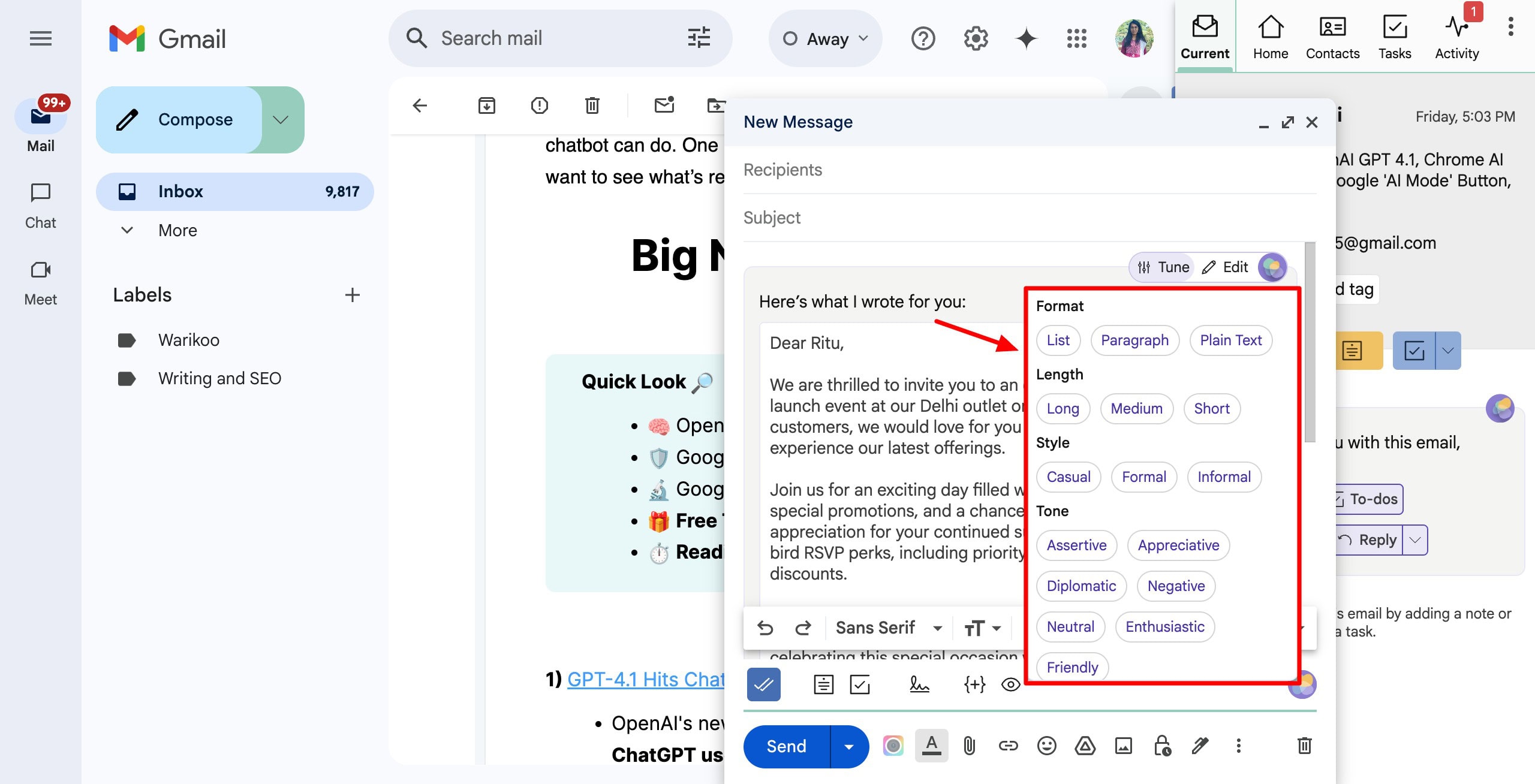
To compose a new email, you can use the Smart Assistant button in the bottom right corner. When you enter your prompt, it generates a draft that can be further tuned by specifying a format, length, style, and tone.
It can also help you fix spelling and grammar, and create to-do lists from your email content. Next, you also get an email tracking button. If you enable it, you will be able to track when the email is opened, viewed, etc.
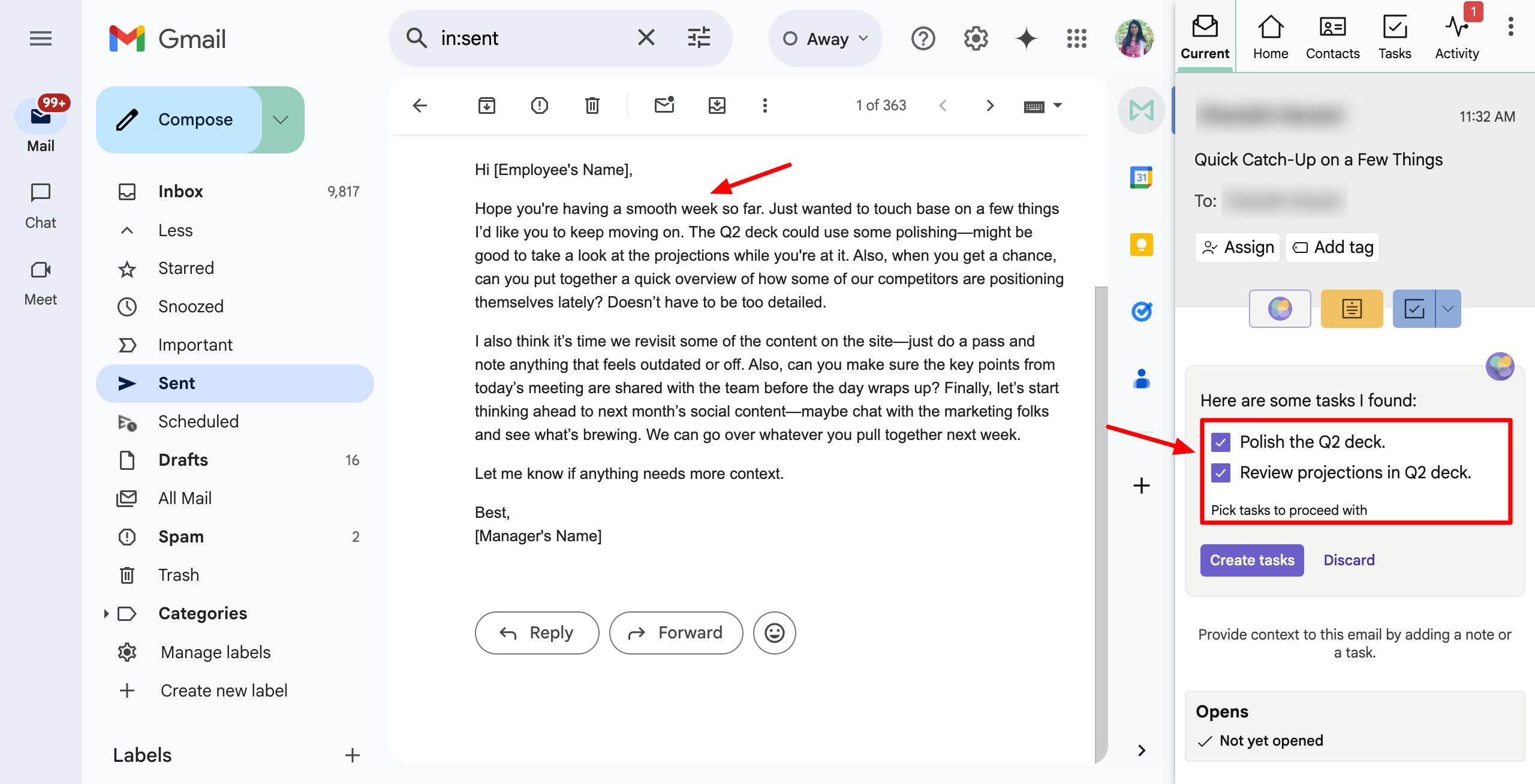
Mailbutler’s smart email scheduling option lets you set a time and date to deliver the email. If you want, you can also enable manual delivery approval, optimize delivery for receiver’s email, etc.
Finally, you can also add notes and tags to the email to remind yourself of important things related to the email later. The right panel displays a ribbon with a list of scheduled emails, assigned emails, tracked emails, etc. You can also view contacts, composed emails, tasks, and activities on your account.
Overall, Mailbutler is best for freelancers, independent professionals, marketers, businesses, and sales teams who are looking for strong email communication and management.
Cons:
- No free plan.
- No inbox management
Pricing: It offers a 14-day free trial with limited usage. The paid plans of Mailbutler start from $3.95/month.
2) Shortwave
Shortwave is an AI-powered email software that improves your email management and enhances productivity. To get started with it, you need to sign up with your Google or Outlook account. It fetches your entire inbox into the Shortwave dashboard.
Next, you can start writing your prompt into the AI chat panel on the left side. It generates a complete email draft with the recipient’s email and the subject line. You can chat with the AI to make any further edits (like tone/length adjustments) to the content.
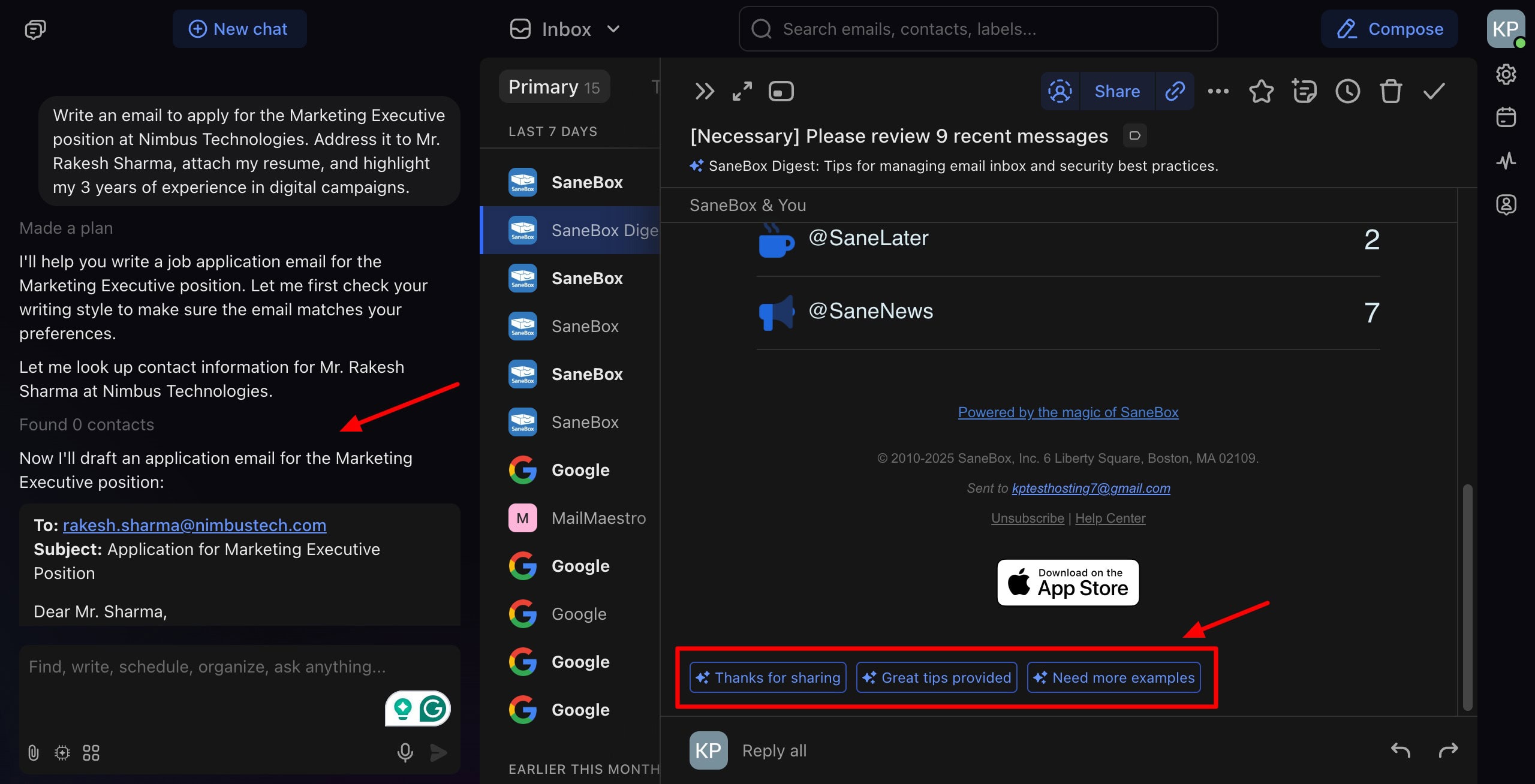
Another interesting feature of Shortwave is its AI Replies. Whenever you open an email, it generates probable response prompts based on the email content. When you click any one of the prompts, it generates a reply email to be sent out within seconds.
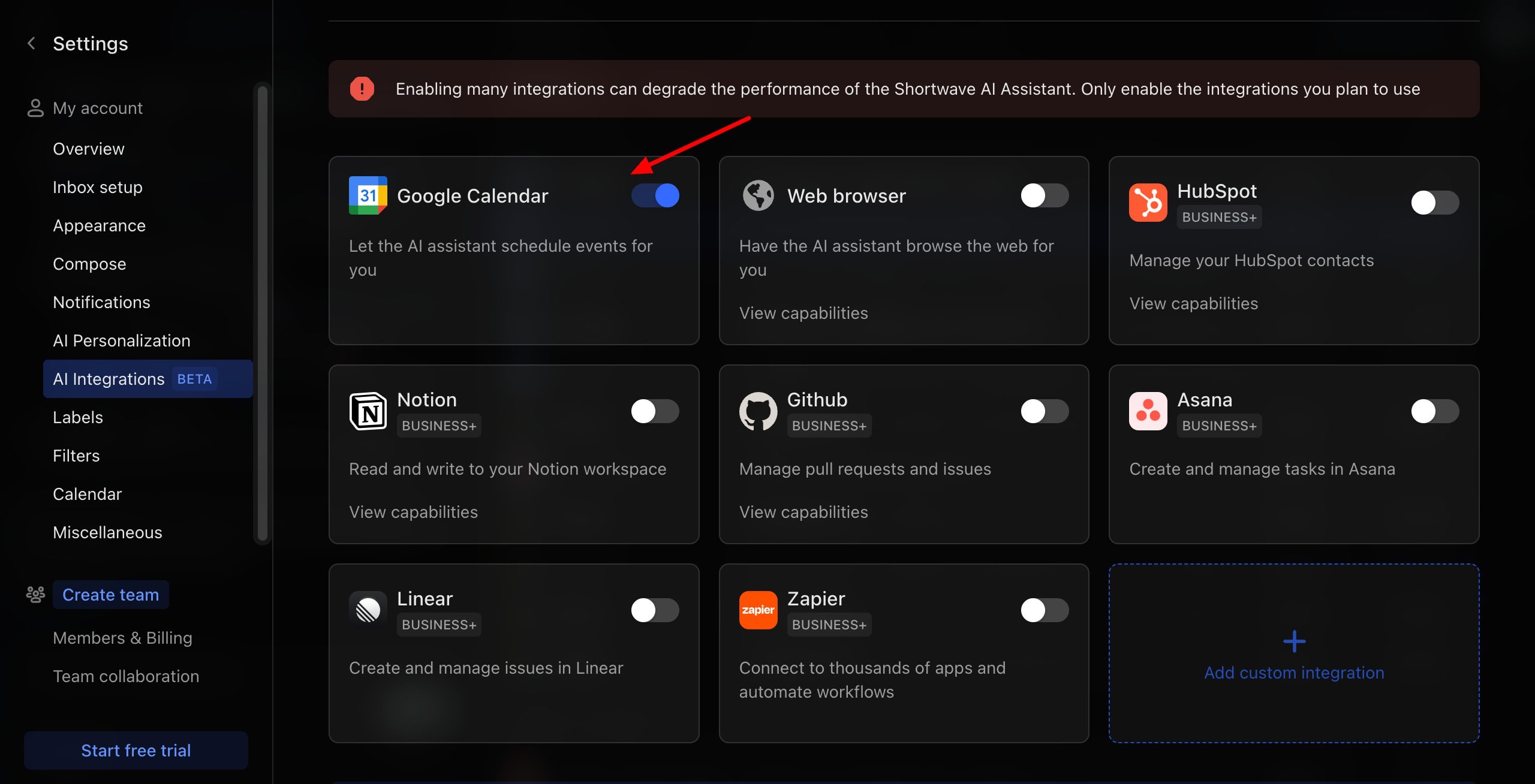
You can request it to find any urgent emails, plan your day, unsubscribe in bulk, and organize your inbox for you. It also integrates with popular services like Google Calendar and a web browser for free. Business+ users can connect Notion, Zapier, GitHub, Asana, etc.
Overall, Shortwave is an impressive email assistant that is focused on productivity. It’s perfect if you want to reduce your inbox clutter and work with lots of productivity app integrations.
Cons:
- No free plan.
Pricing: You get a 14-day free trial without card details. Its paid plans start from $14/month.
3) MailMaestro
MailMaestro is an AI-powered email assistant for writing, responding to, and managing your emails. To get started, you can integrate your Gmail or Outlook account with it. It helps you in various stages of email, from creation to summarization.
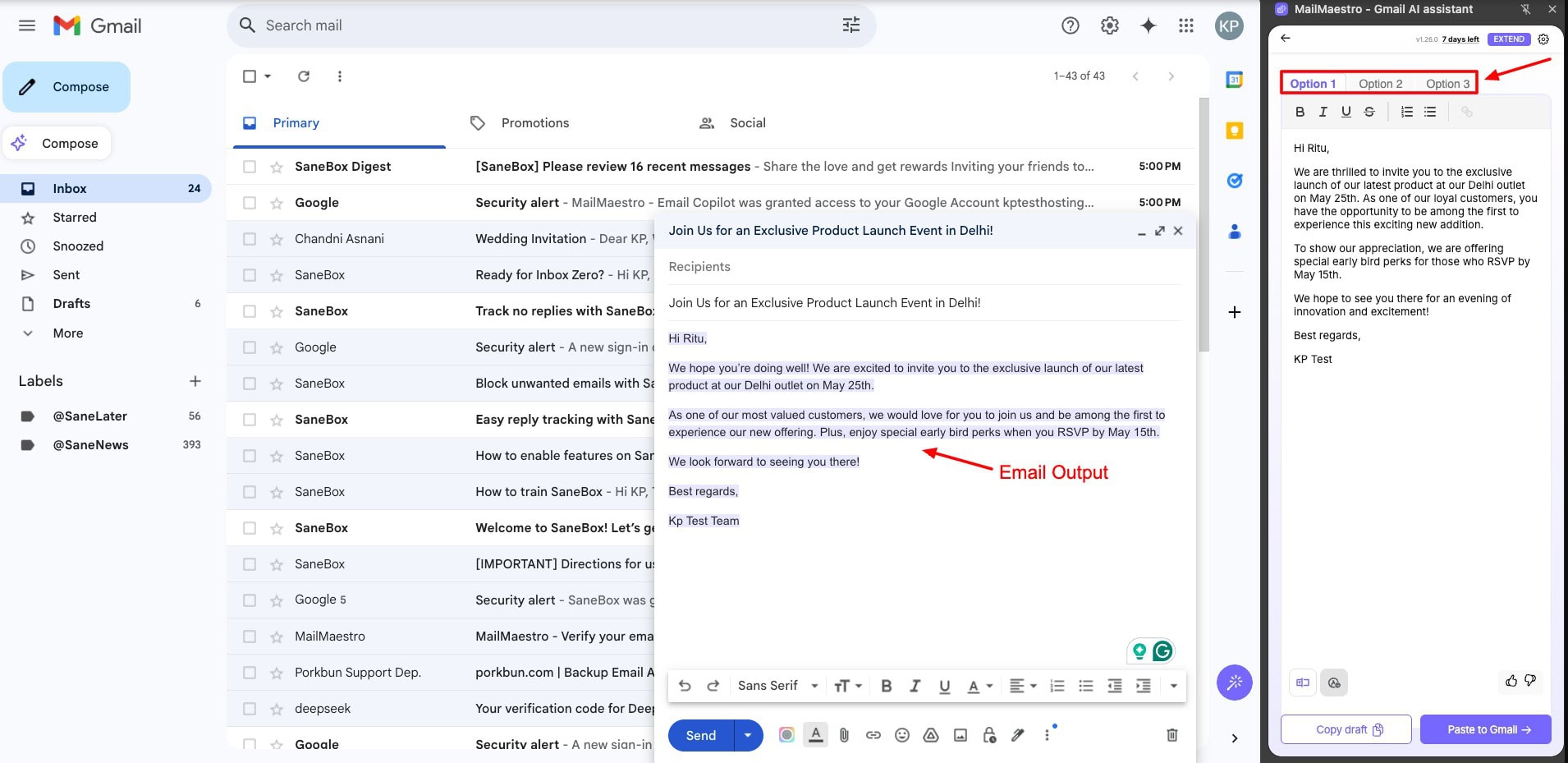
First, it helps you in composing an email and a subject line. You can insert your prompt and select a tone, from professional, casual, urgent, etc. It presents you with 3 output variants and helps improve your email by fixing typos, polishing content, or rewriting it in a different tone.
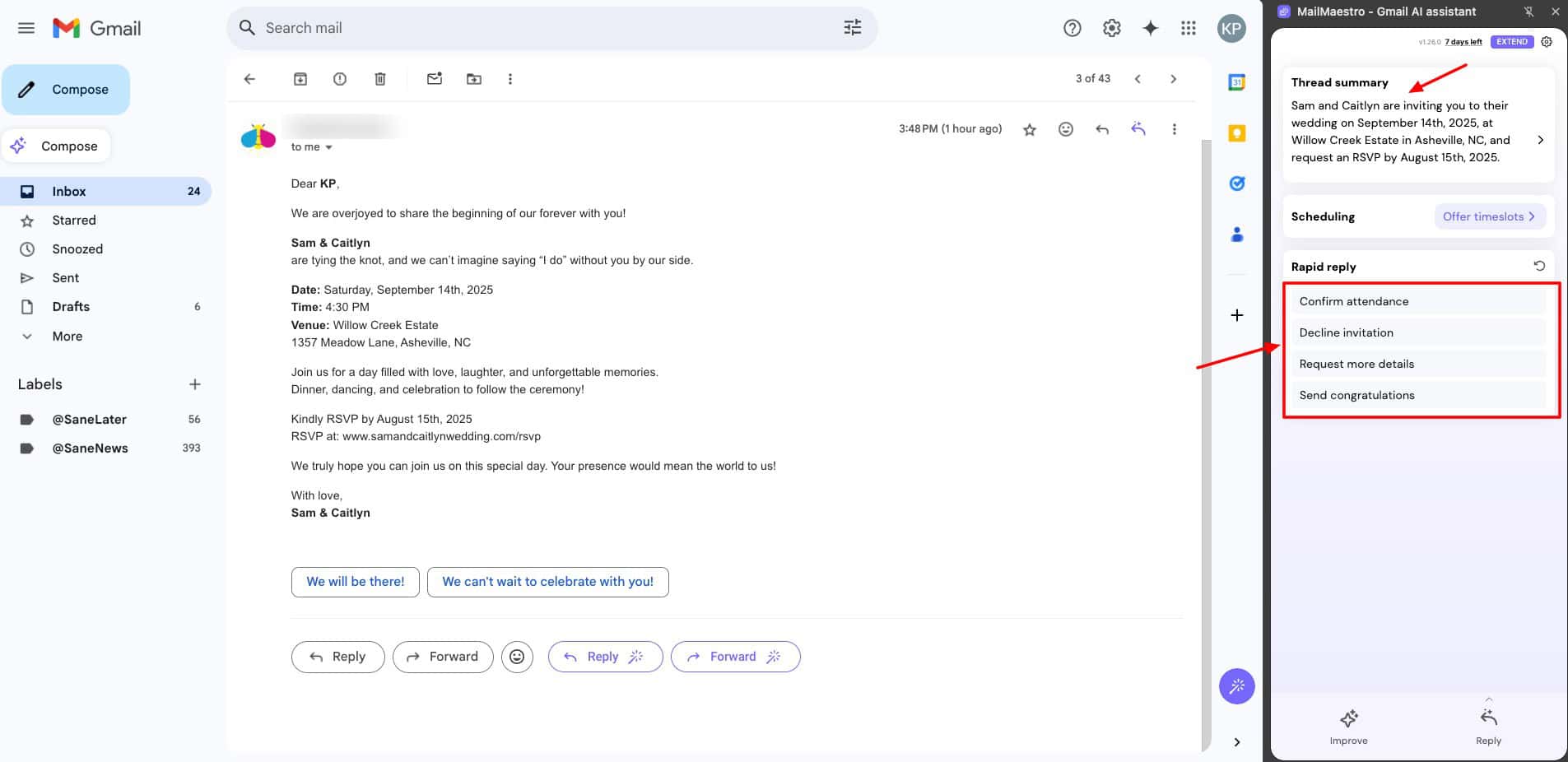
Next, when you open up an email thread, the AI analyzes the context and summarizes the conversation for you. Similarly, the Rapid Reply option presents you with different action items under the email. Upon clicking on an action item, a short email response is generated instantly.
Overall, if you need a functional email assistant to help you with all stages of email creation, you should check out MailMaestro. It is perfect for busy professionals, managers, and corporate employees who need fast summarization, quick replies, and tone adjustments.
Cons
- No free plan
- No inbox management features
Pricing: It comes with a 14-day free trial to get a test run of its features. MailMaestro’s paid plans start from $17/month.
4) Merlin AI
Merlin is an AI assistant that allows you to research, write, and summarize content on any website. With over 1 million users, Merlin AI is available as a Chrome extension and as an app for iOS and Android mobiles.
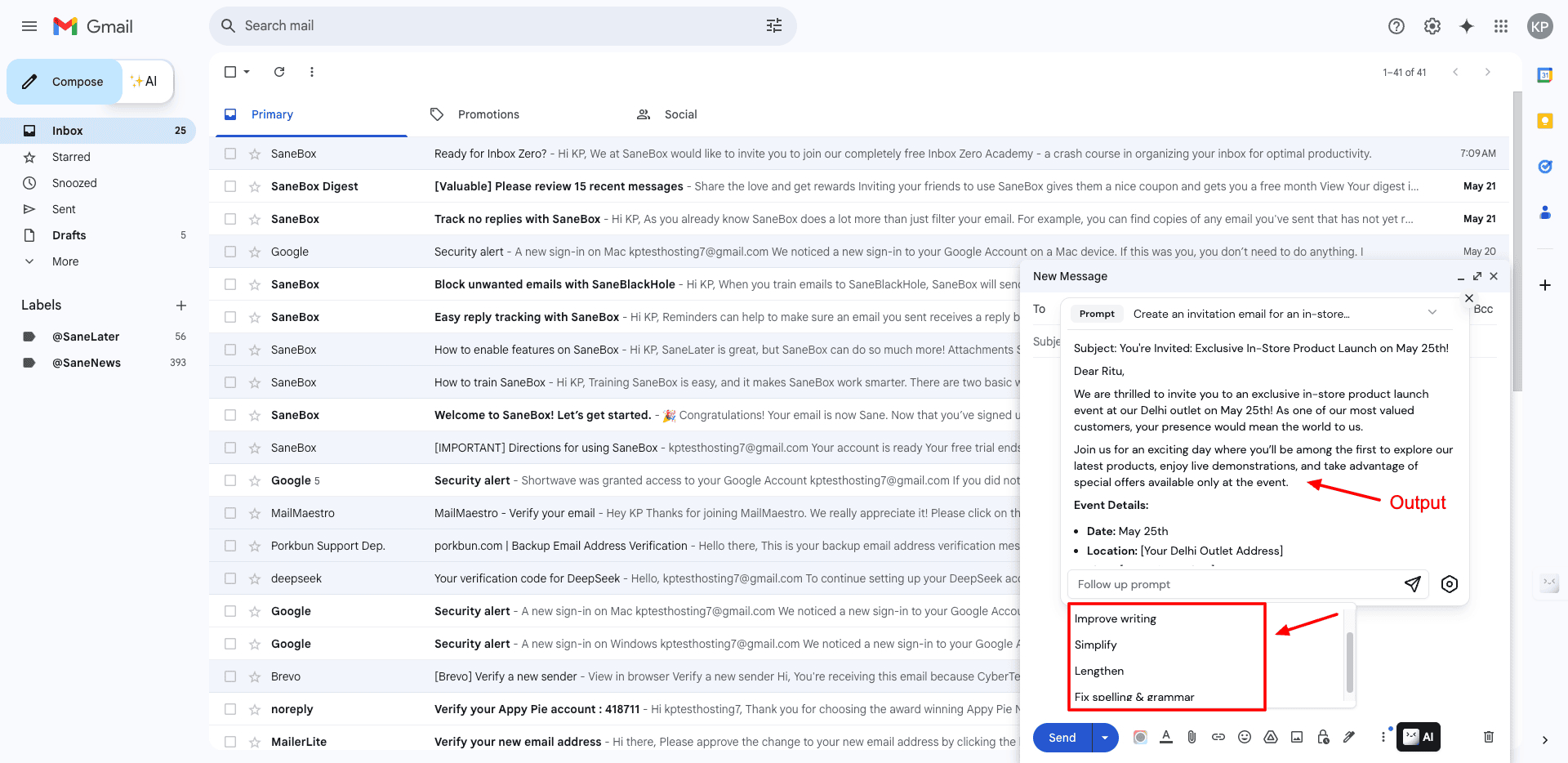
To get started, install the Merlin extension and open Gmail. Hit the ‘AI’ button right next to the compose email button. Next, enter your prompt. Under settings, you can also choose your preferred AI model, from GPT-3 and GPT-4.
Once your initial email is generated, you can also use follow-up prompts like shorten, simplify, improve writing, lengthen, or fix spelling and grammar. Or if you want, you can also write a custom prompt.
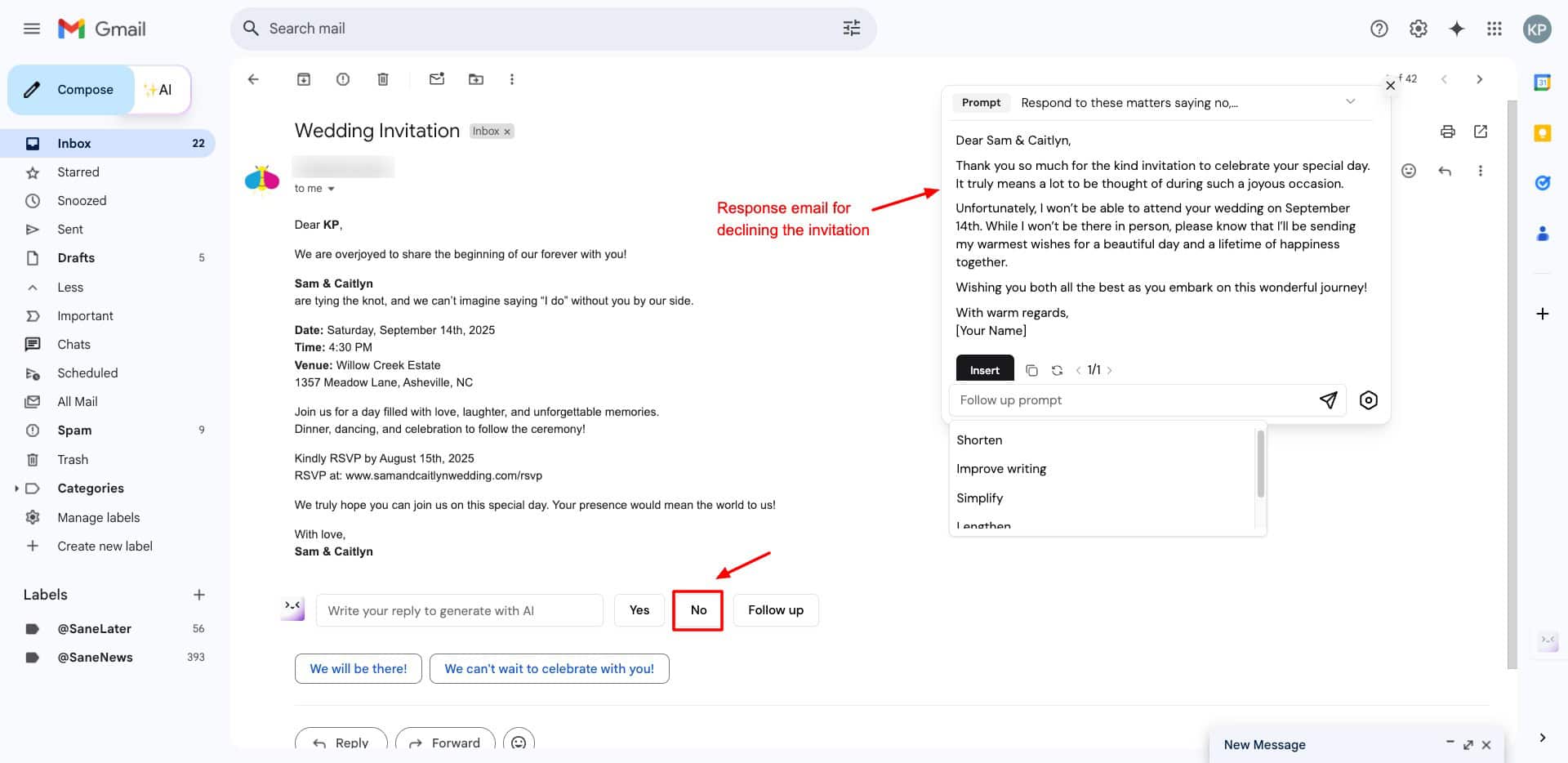
Similarly, it also helps you draft responses to your email threads. You can simply hit “Yes”, “No”, or the “Follow up” button to write a custom response prompt. It aptly generates a polished response. I think Merlin is best for casual Gmail users who need help in writing and replying to emails.
Cons:
- Limited free plan
- No inbox management
- No integrations
Pricing: Its free plan offers limited access to Basic and Pro-level models. Its paid plans start from $19/month.
5) Mailmeteor
Mailmeteor is an email marketing platform used by over 6 million users. It’s trusted by popular names like Spotify, Uber, Pinterest, Hootsuite, Shopify, etc. To access its AI features, you need to install its Gmail extension.
When composing an email in Gmail, press the AI button to access MailMeteor. Write your email prompt, and it will generate a complete draft for you.
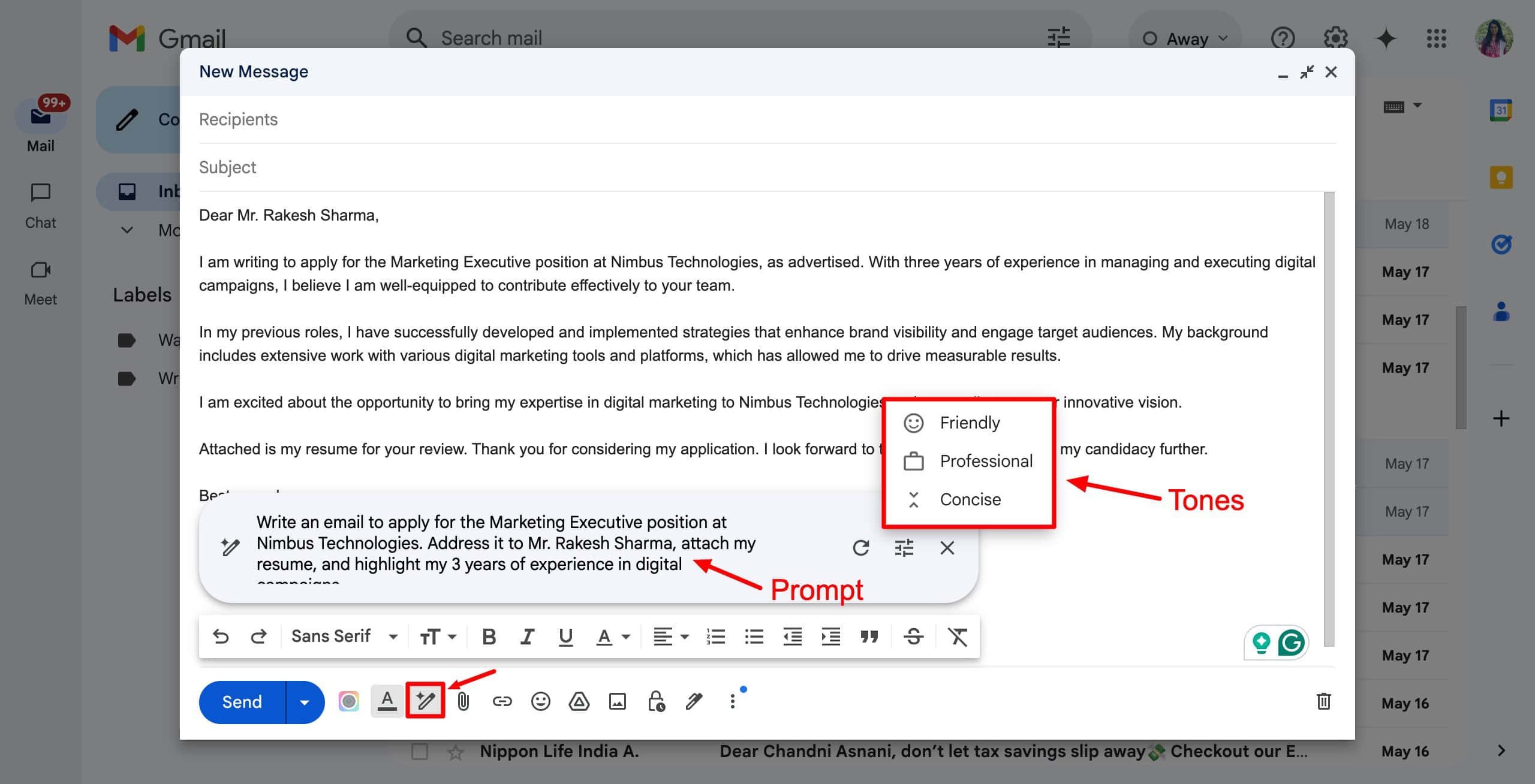
You can also specify a tone from Professional, Friendly, and Concise to match your style. It will instantly regenerate the email in your selected tone. Overall, the email content is relevant, and it also follows tone settings well. However, it doesn’t generate an email subject line.
If you want to respond to any email, simply hit the AI Email Writer button in the formatting bar. It will show you response suggestions, clicking on which will generate a clear and concise reply.
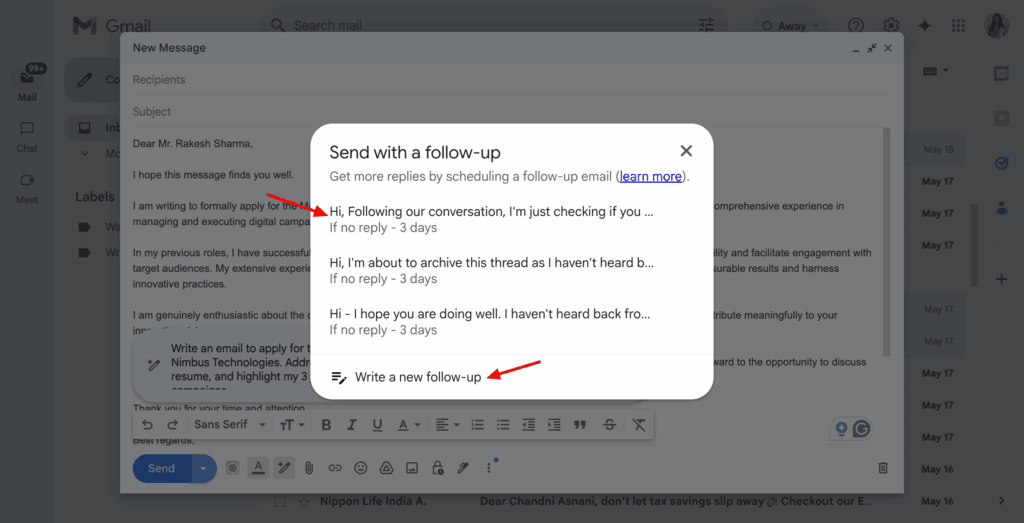
Another interesting feature of Mailmeteor is its “Send with a follow-up” button. You can send a customized follow-up email that will be delivered on your specified day after the first email. This is a great option to enhance engagement and build relationships.
Overall, Mailmeteor is ideal for you if you use Gmail and want quick email generation and follow-ups.
Cons:
- No subject line generation
- Limited features
- No AI editing options
- No inbox management features
Pricing: The free plan of Mailmeteor has the following limits: 50 emails/day, 500 emails/month, 3 campaigns, and 1 sender. Its paid plans start from $4.99/user/month.
6) Compose AI
Compose AI is a free writing assistant that improves your writing efficiency. To start with, install its Chrome extension and create a new email in Gmail. Typing “//” will activate the extension.
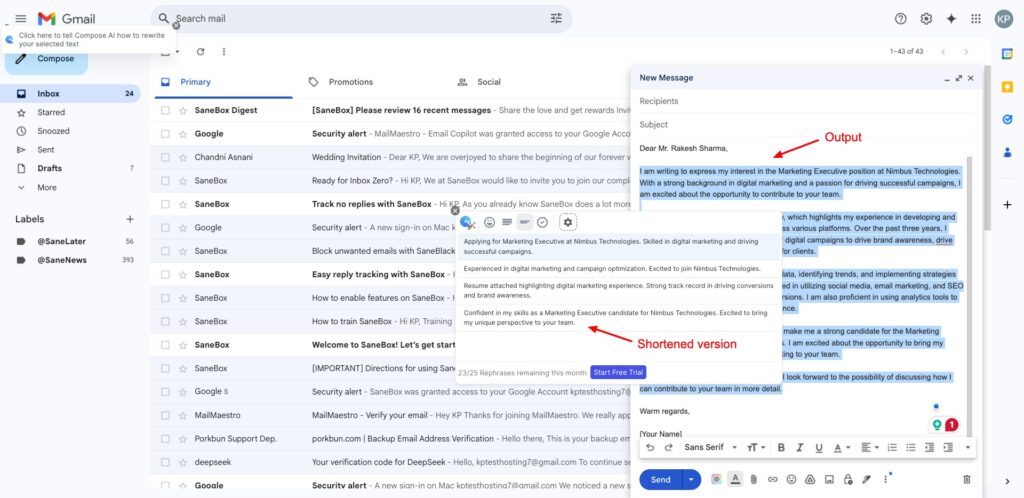
Next, insert your prompt and watch it generate a professional email in seconds. For further tweaks, you can select any section of the email and shorten, elongate, change to a friendly tone, or fix spelling and grammar.
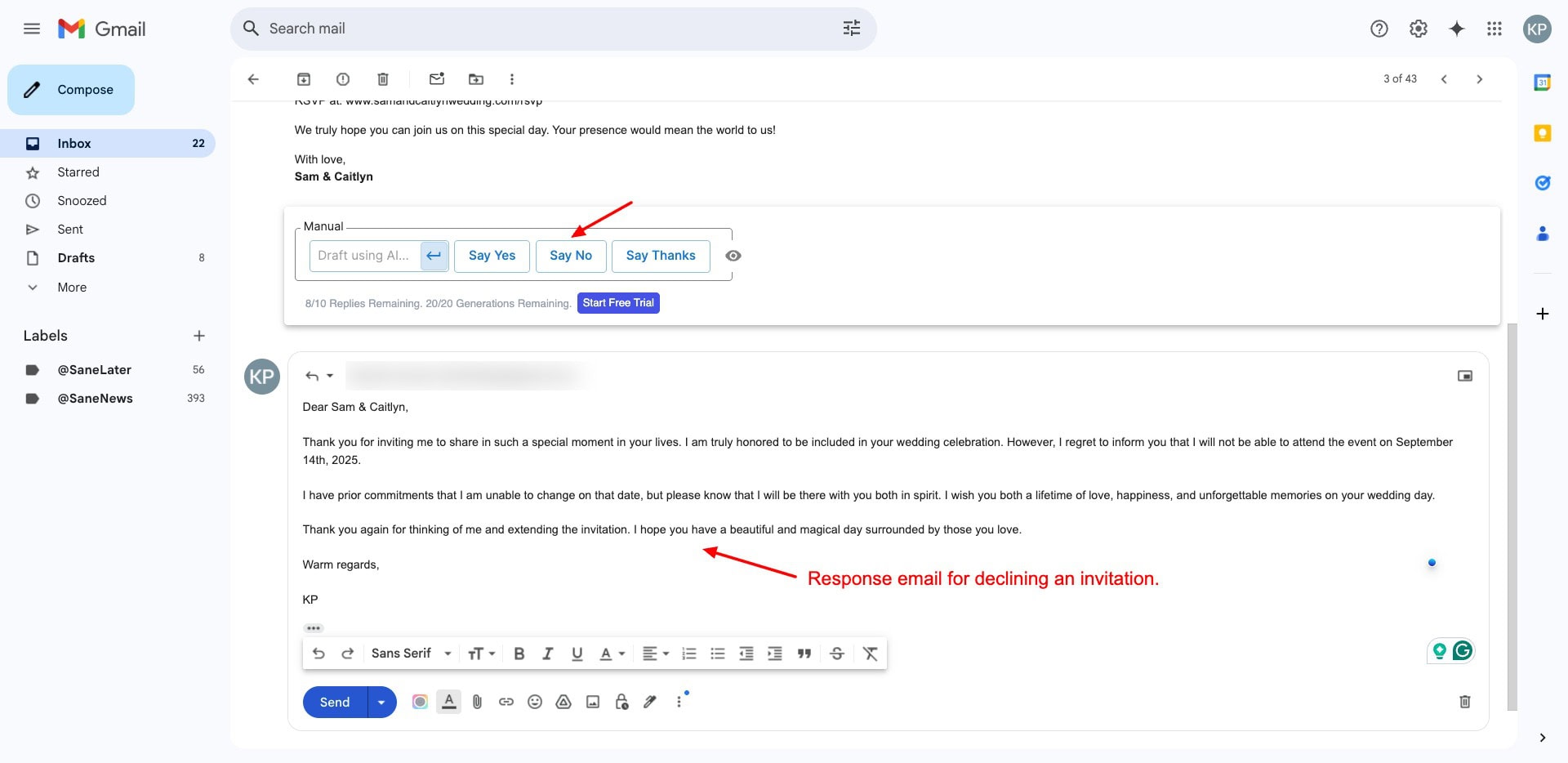
Similarly, it analyzes your email threads and gives you prompts to respond. You can click on the prompt to generate the complete email in an instant. If you need an easy-to-use AI assistant to speed up email drafting and replying without the advanced features, check out Compose AI!
Cons:
- Only 1 tone option available
- No subject line generation
- No inbox management.
Pricing: The Free plan offers 1500 words per month. Its paid plans start from $9.99/month.
7) Voila AI
Voila is an AI assistant trusted by over 100k users across the globe. It helps you create, write, brainstorm, summarize, and research content. It features functional desktop and mobile apps, along with a handy browser extension. It also integrates with your Gmail.
To get started with Voila AI, start a new email. Then click on the Voila AI icon on the bar below. Next, choose an AI model from GPT-4o, GPT-4o mini, or automatic. Enter your prompt and select a tone, like neutral, casual, formal, friendly, etc.
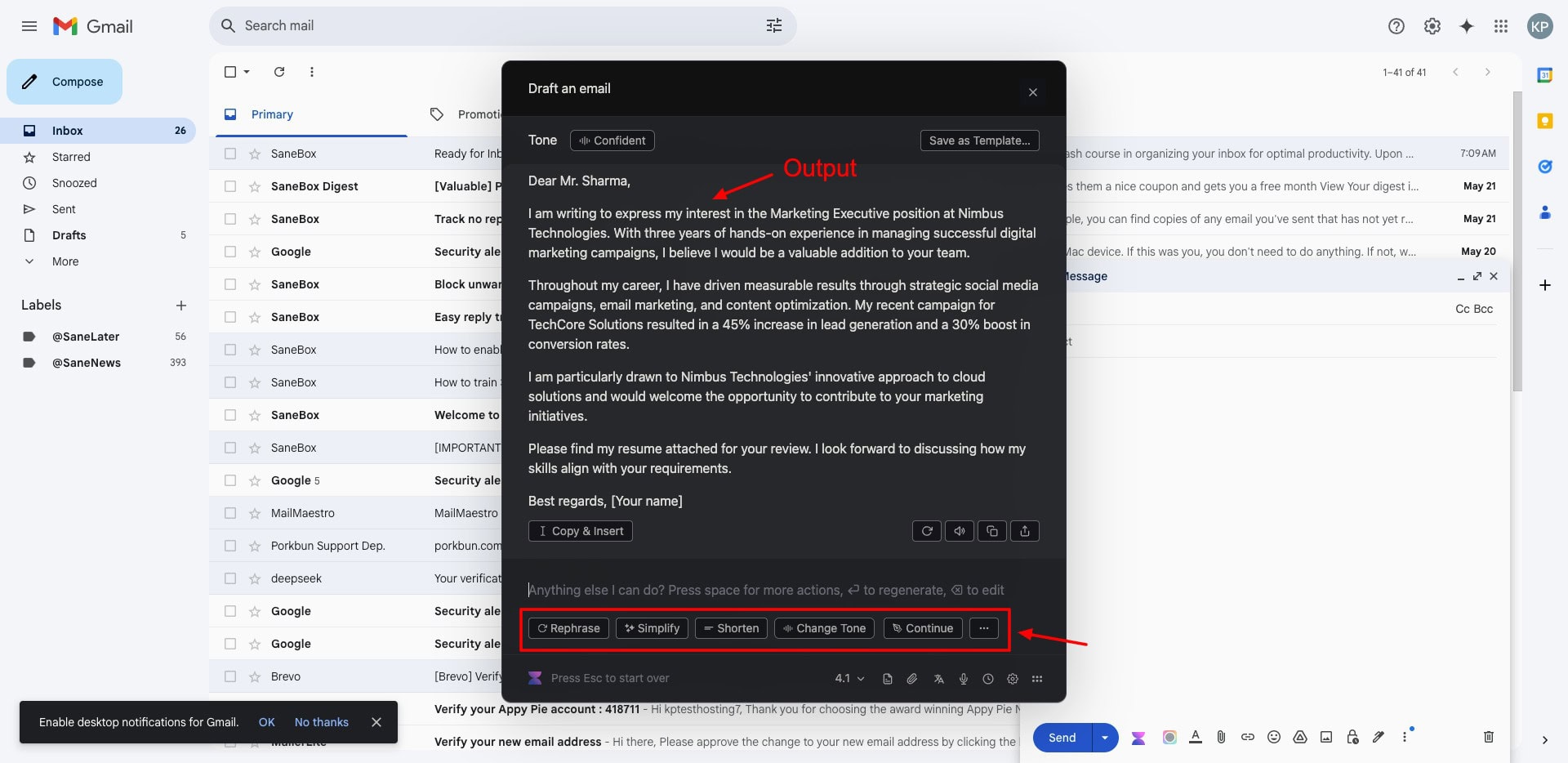
Once your email is generated, you can rephrase it, simplify it, shorten it, or change the content tone. Though Voila is not specifically designed for emails, it is a simple and easy-to-use tool that you can use to draft emails and email responses.
Cons:
- No subject line generation
- No inbox management
- Not focused specifically on emails
Pricing: The free plan of Voice offers 250 requests. Its paid plans start from $6/month, where you get 3000 monthly requests.
Key Benefits of AI Email Assistants
//Benefits of AI email assistants
1) Improved Communication
Email assistants can use AI to quickly understand your instructions and generate professional emails for you within seconds! These are ideal for users who struggle with written communication.
2) Better Email Organization
With AI email assistants, it becomes easier to manage your inbox. These tools automatically categorize and tag emails, prioritize important emails, and keep track of reminders, deadlines, and to-do lists for you.
3) Enhanced Productivity
With an AI email assistant, you can draft your emails and replies quickly. They can help you fix grammar, tone, and spelling mistakes, and also suggest intelligent responses.
How Did We Select the Best AI Email Assistants?
To test A-powered email assistants, we made a list of all the popular available AI email assistants on the web. Then, we created free accounts on them and tested their functionality. We tested their email generation by using the following prompts:
- Write an email to apply for the Marketing Executive position at Nimbus Technologies. Address it to Mr. Rakesh Sharma, attach my resume, and highlight my 3 years of experience in digital campaigns.
- Create an invitation email for an in-store product launch event on May 25th at our Delhi outlet. Invite loyal customers like Ritu and offer early bird RSVP perks.
Apart from this, we also tested the key features they offered, the performance of their extensions or apps (if present), limits on the free plan, highlighted features, etc. Finally, after evaluating the tools for all these factors, we ranked them on our list.
Why Should You Trust Me?
I have been working full-time in the digital industry since 2015. In the last 10 years, I have worked with a range of email tools for inbox management, sending out newsletters, setting up campaigns, and enhancing productivity.
I have also tested and reviewed free email marketing tools and discovered ways to connect your business email to Gmail for free. Working with so many email tools has given me the expertise to recommend the right ones for your work.
Conclusion
This article helped you discover some cool AI assistants to enhance your productivity and streamline your workflow. My favorite tool is Mailbutler to help me manage my emails and respond to them promptly.
Have you used any AI email assistants before? Or do you have any other suggestions not included in this list? Do share in the comments section below. Also, if you’re into emails, check out these free email marketing tools!
To stay updated with the world of AI, do subscribe to my AI newsletter, where I share the latest AI news and a free AI tool every week. Anyway, this is Kripesh signing off. Cheers and keep learning!