Your calendar probably looks full, but your most important work still doesn’t get done. Meetings take over, focus time disappears, and personal habits are often the first to be sacrificed. So, what’s the solution?
Instead of manually rearranging tasks every day, you can use Reclaim AI. It’s an intelligent scheduling tool that syncs with digital calendars, automatically allocating time for tasks, deep work, personal habits, appointments, and downtime. It can also rearrange your schedule if any conflicts appear and assist you in monitoring your time usage.
In this Reclaim AI review, we’ll explore its core features, pricing, limitations, and real-world usability to help you decide whether it’s worth using.
Reclaim AI Review
Summary
Reclaim AI is an AI scheduling assistant and calendar management tool. It connects with Google/Outlook calendars and helps you plan the day, block time for deep work, manage internal meetings, and protect break hours.
Key strengths of the app include its smart scheduling, flexible task management, effective workload balancing, and valuable time analytics. But the initial setup can take time, and there’s no mobile app. Still, a 14-day free trial definitely makes it worth testing for solopreneurs and small to mid-sized teams.
Disclaimer : I strongly believe in transparency. If you buy using the links on our site, we may earn a small commission without any extra cost to you. This helps me to keep producing honest reviews. Read More >>
About Reclaim AI
Reclaim AI is an AI-powered scheduling and meeting assistant founded in 2019 and later acquired by Dropbox in August 2024. The app is designed to eliminate the hassle of manual event scheduling by automatically finding the best time for tasks, prioritizing important work, and protecting deep focus hours, while staying flexible enough to handle last-minute changes.
Users simply install the software and connect it to their digital calendar. Reclaim will automatically sync routines and optimize the workweek. With intelligent features and automation, the app claims to save users up to 395 hours of focus time per year.
Reclaim AI User Interface
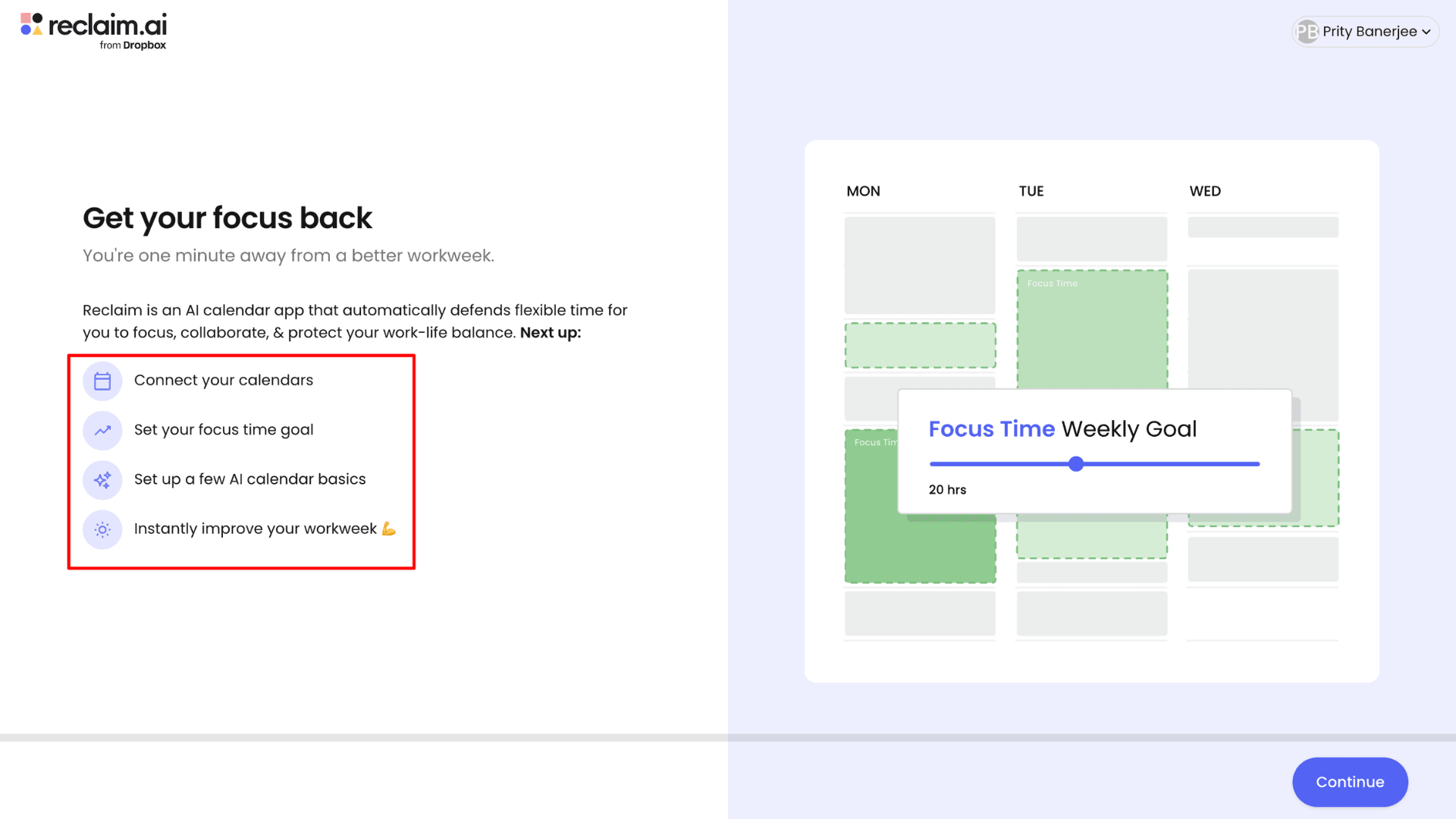
To use Reclaim AI, you first need to visit the website and create a free account. Reclaim AI offers a four-step guided onboarding process: connect the calendar, set focus-time goals, and configure a few basic settings (use case, job role, department, etc.). Once completed, the AI automatically generates an optimized work schedule.
After logging in, users are greeted by Reclaim AI’s signature dark blue and white dashboard. The left sidebar displays key sections such as the daily planner, calendar, stats, time-blocking features, meetings, and more. Under the Help section, there is a well-structured guided tour that walks beginners through the platform’s core features, making the initial setup easier.
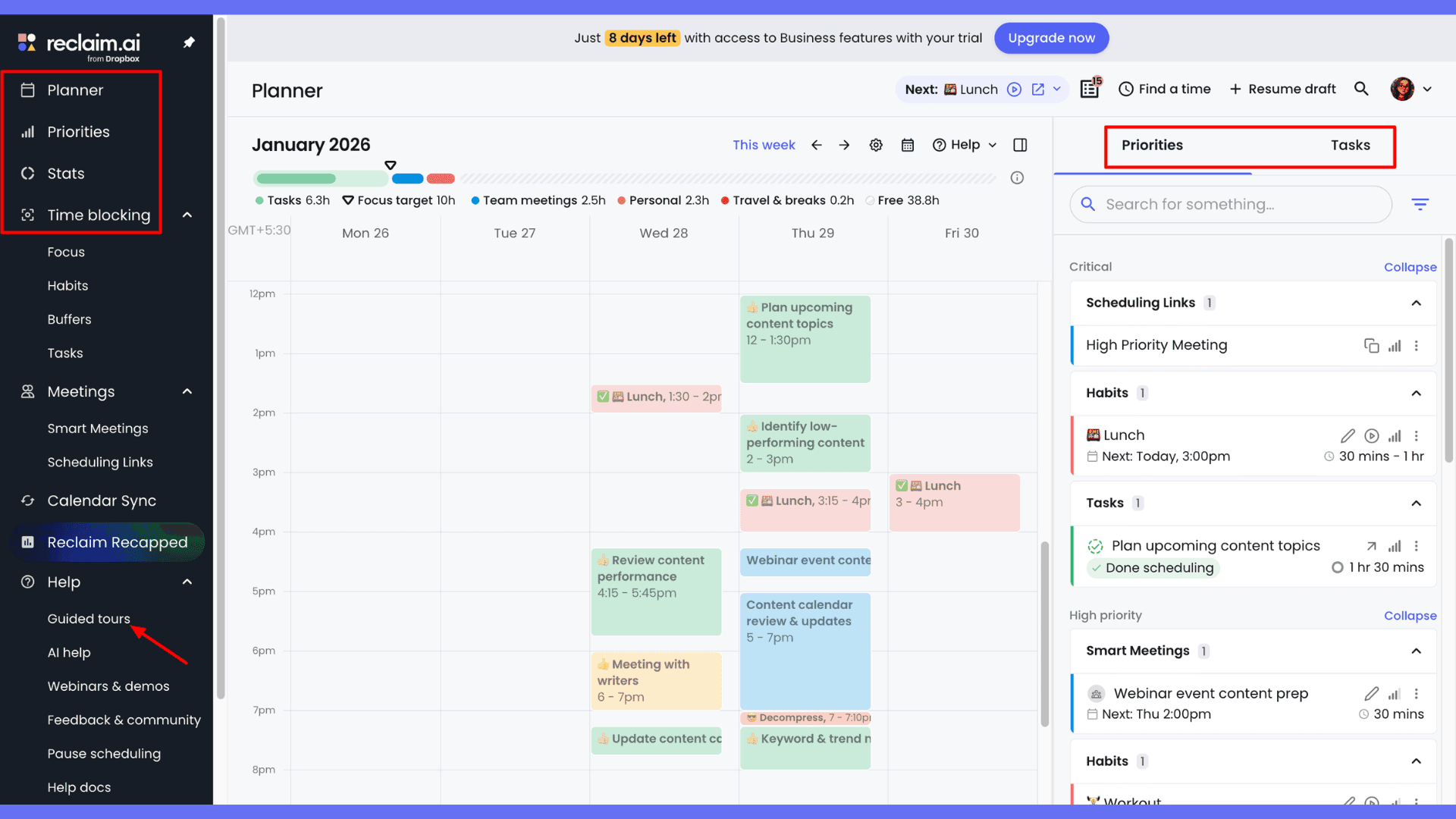
On the right side of the dashboard, users can manage tasks and activities, adding new ones or editing existing entries. Priority settings allow users to distinguish between important and flexible events. While the interface is modern and intuitive, beginners may need to spend some time initially to fully understand how all the features work together. Plus, there is no live chat support button available directly on the dashboard.
Key Features of Reclaim AI
1. Calendar Synchronization
Reclaim AI connects with Google Calendar and Microsoft Outlook. During onboarding, you have to connect all digital calendars. You could set one calendar for work and another for personal use.
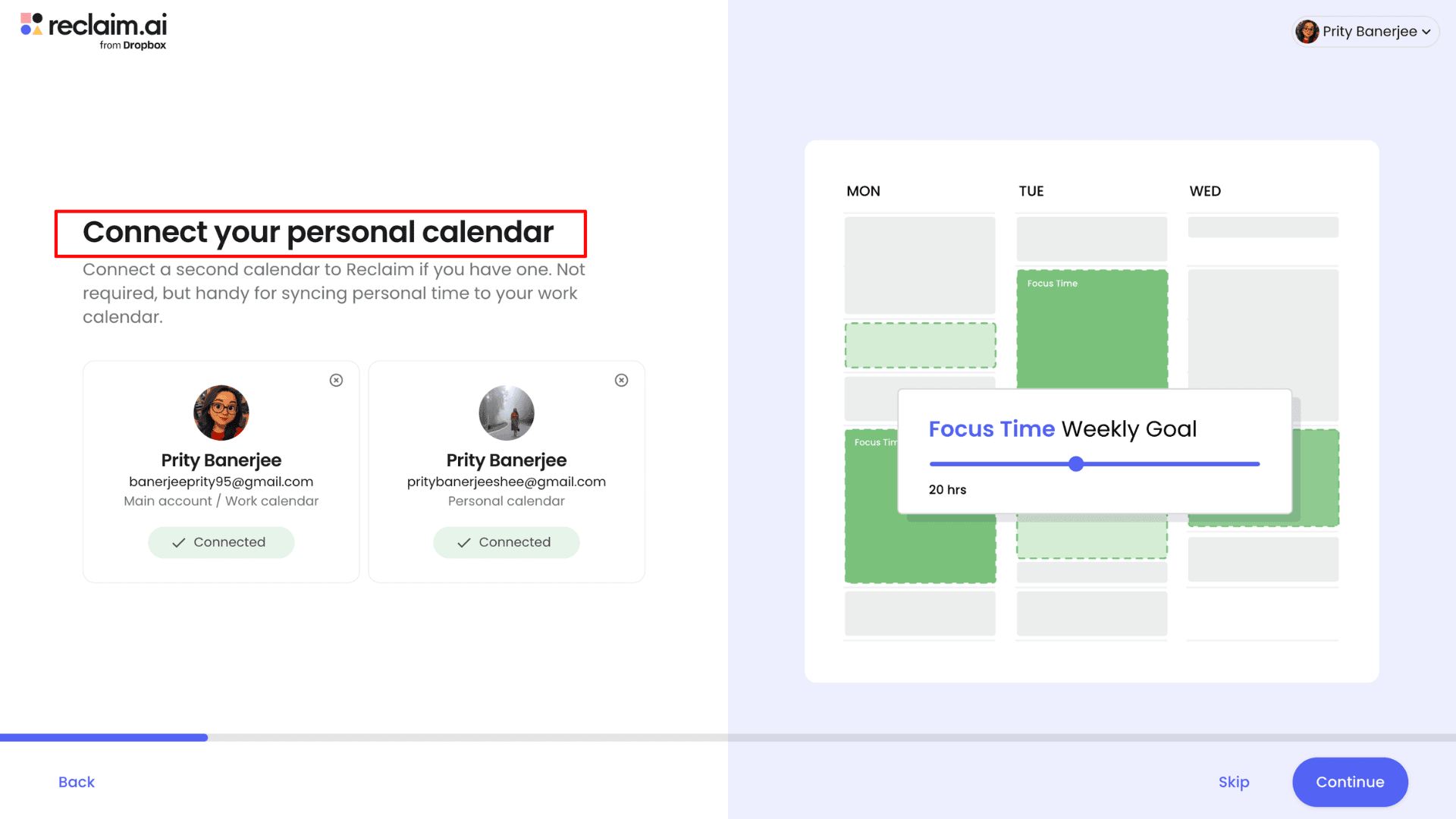
Once connected, Reclaim syncs all events from my calendars and displays them in a single Planner dashboard. Because of its two-way calendar sync, whenever an event is booked on a source calendar, Reclaim creates a synced copy of that event in its own calendar. This ensures that the time is blocked across all my calendars, so others can see my availability and I never get double-booked.
Another useful feature is how Reclaim handles RSVP status. If RSVP sync is turned on and an event doesn’t have a response yet, Reclaim automatically marks that time as free. When the RSVP status is Yes, the time is marked as busy, and if it’s No, the app removes any synced copies of the event from the target calendar.
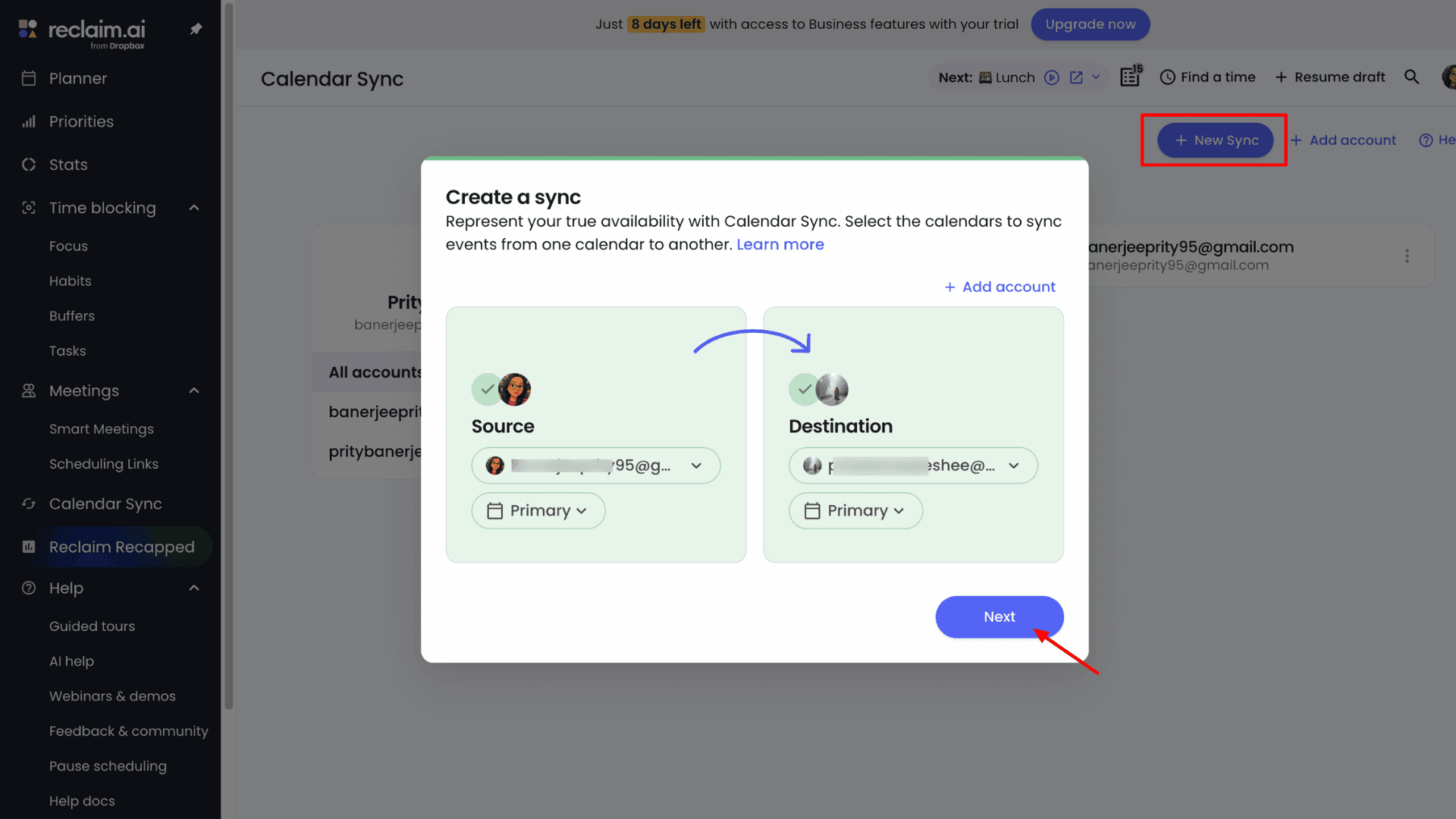
The app also gives full control over calendar sync settings from the “Calendar Sync” page. From there, I can choose which calendars to sync (personal, business, or travel), adjust visibility settings, change color categories, and more.
2. Reclaim AI Planner
The planner dashboard has a calendar-style central interface that gives a clear, detailed breakdown of all events. Each event is color-coded based on priority, and events with a dashed outline are marked as free time.
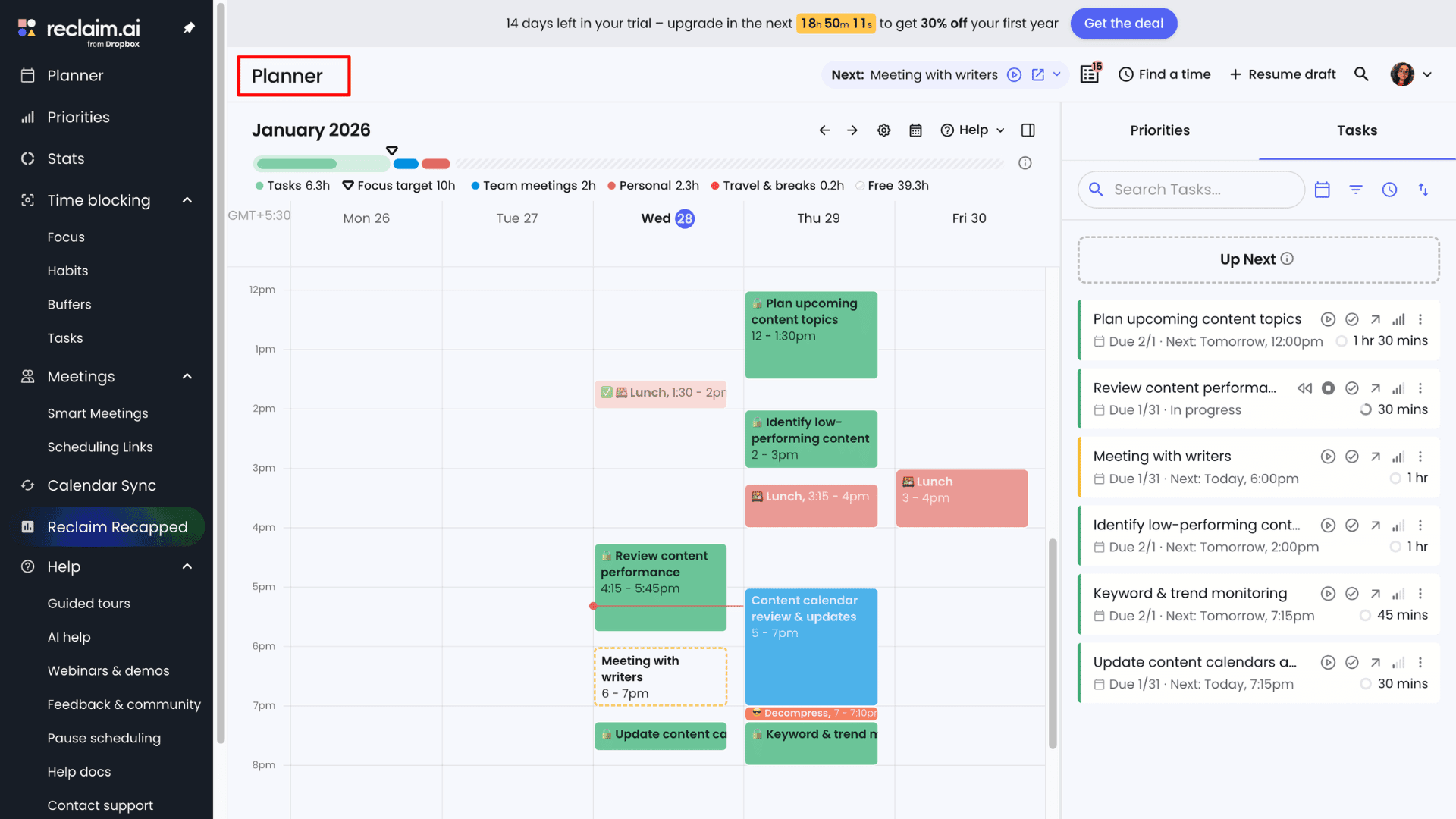
I can switch between day and week views depending on what I need. At the top, there’s a focus bar that helps me clearly check an hourly breakdown of my tasks, personal hours, free time, team meetings, and more. I can even manage privacy by toggling between “view as you” or “view as others,” which makes it easy to control what others can see.
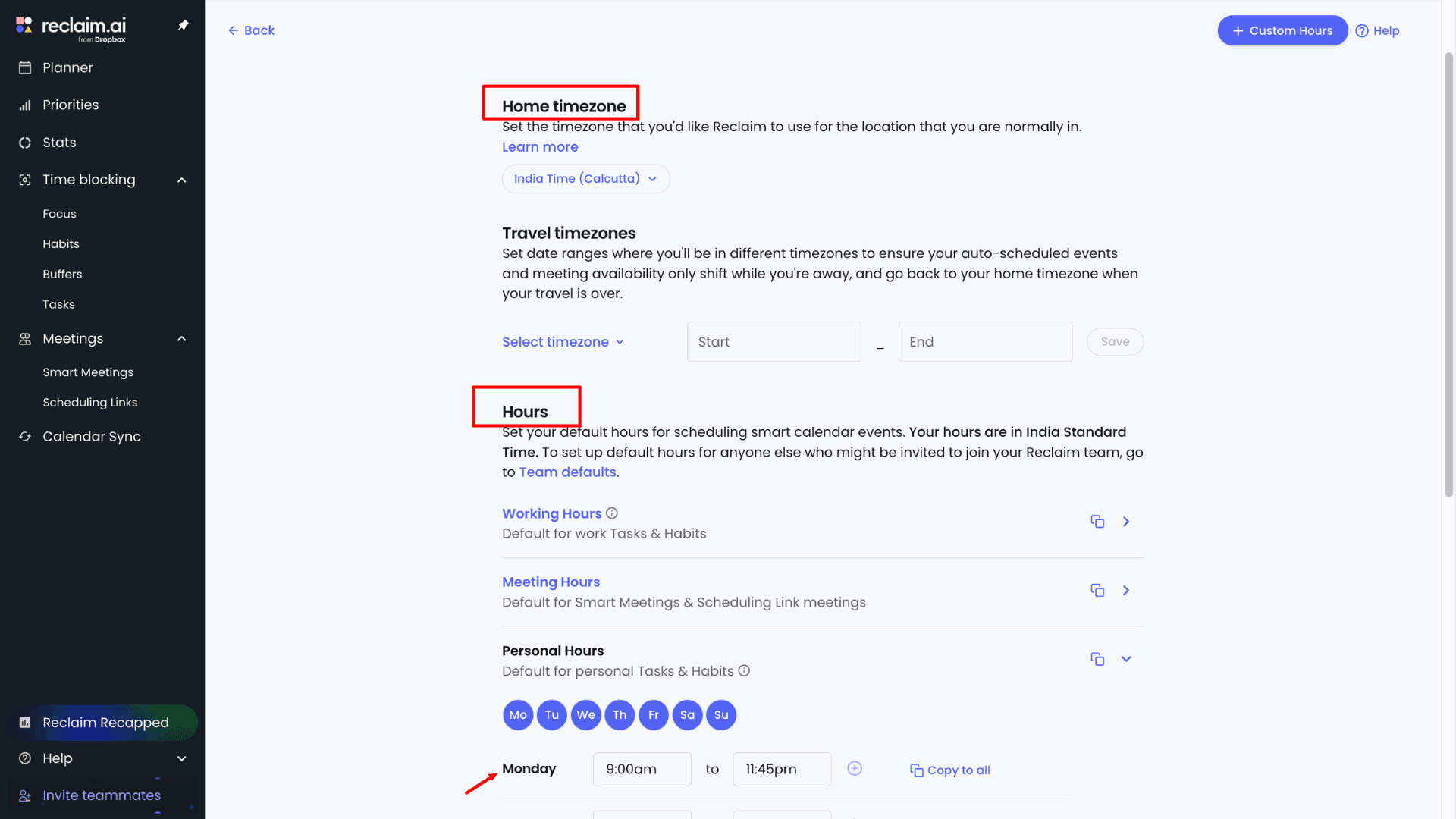
The drag-and-drop interface makes rescheduling very easy. I can move an event to another day in a single click. Reclaim automatically locks the time for that event. When I click on any event, a sidebar opens with all the details like duration, synced calendar, category, visibility, time, and more.
3. Manage Tasks and Events
Unlike manual to-do lists that don’t update in real time, tasks and events in Reclaim AI work as a dynamic to-do system. When I want to add a new activity, I can click on any time block in the Planner. A small tab opens where I choose between Task, Event, or Plan Work. For tasks, I simply add the title, duration, number of hours, start time, and end time, then click Create.
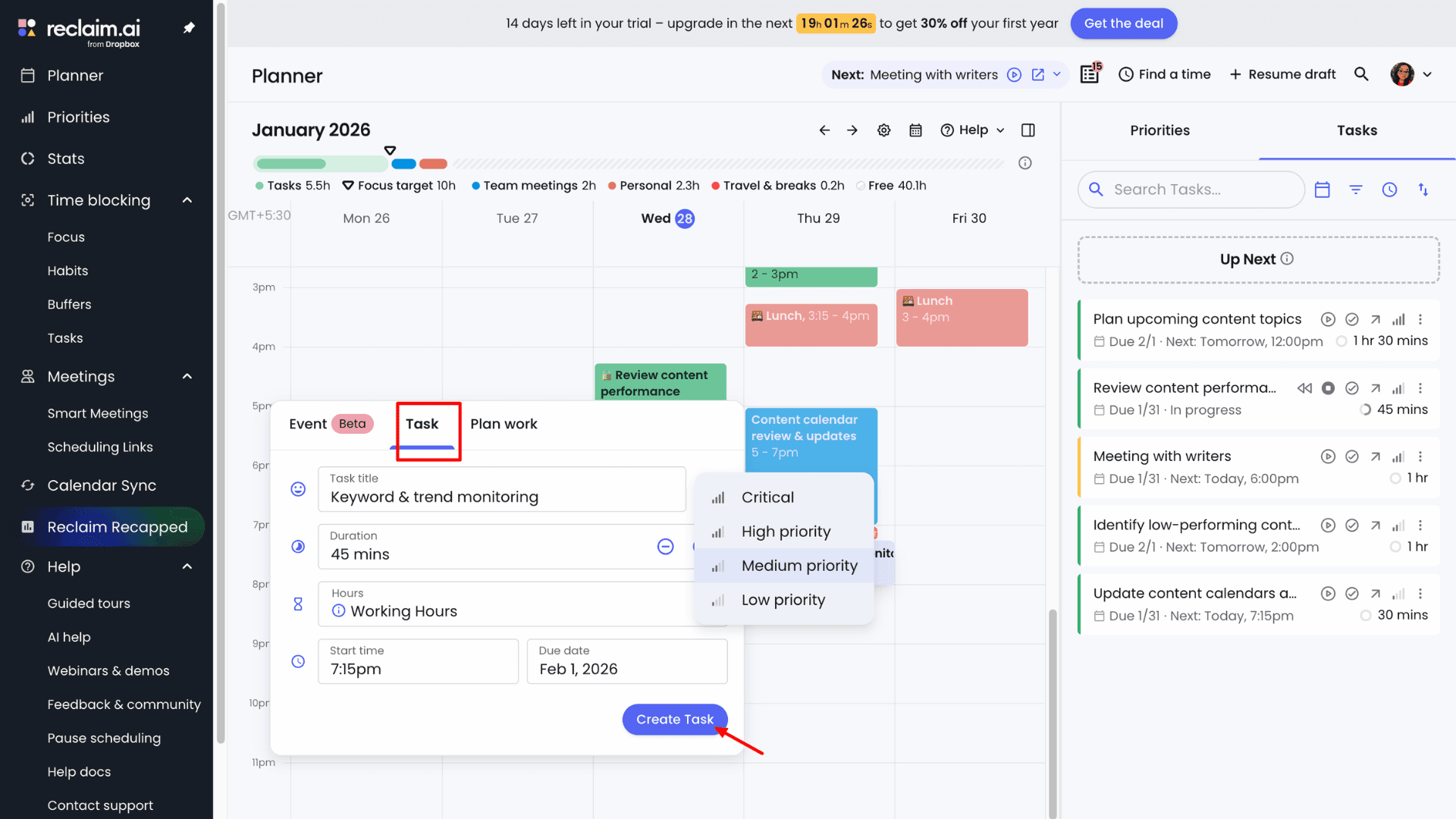
Reclaim also allows users to create tasks from third-party tools such as Slack, Google Tasks, Google Calendar, and project management software like ClickUp and Todoist. I can start, pause, and resume tasks or events at any time. If two tasks overlap, Reclaim automatically reschedules the lower-priority task to the next available time slot.
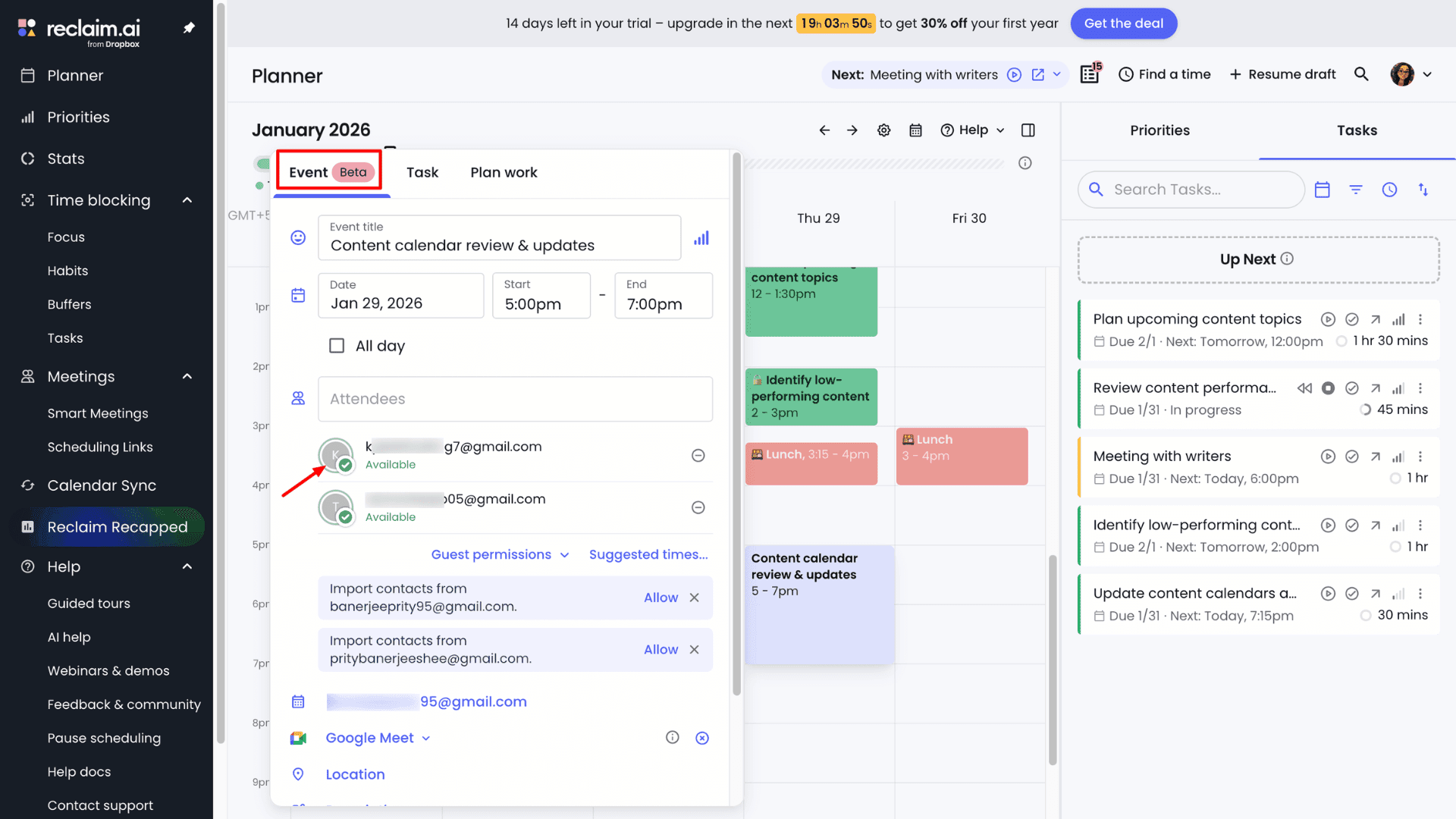
If I don’t want a task to move, I can lock its time by right-clicking on the event. From the Tasks page, I can also perform bulk edits, making it easier to manage multiple tasks at once.
4. Task Priorities
Reclaim offers four levels of task priorities: P1 (Critical), P2 (High), P3 (Medium), and P4 (Low). When adding a task, you must assign a priority from the dropdown menu, which is represented by a bar icon.
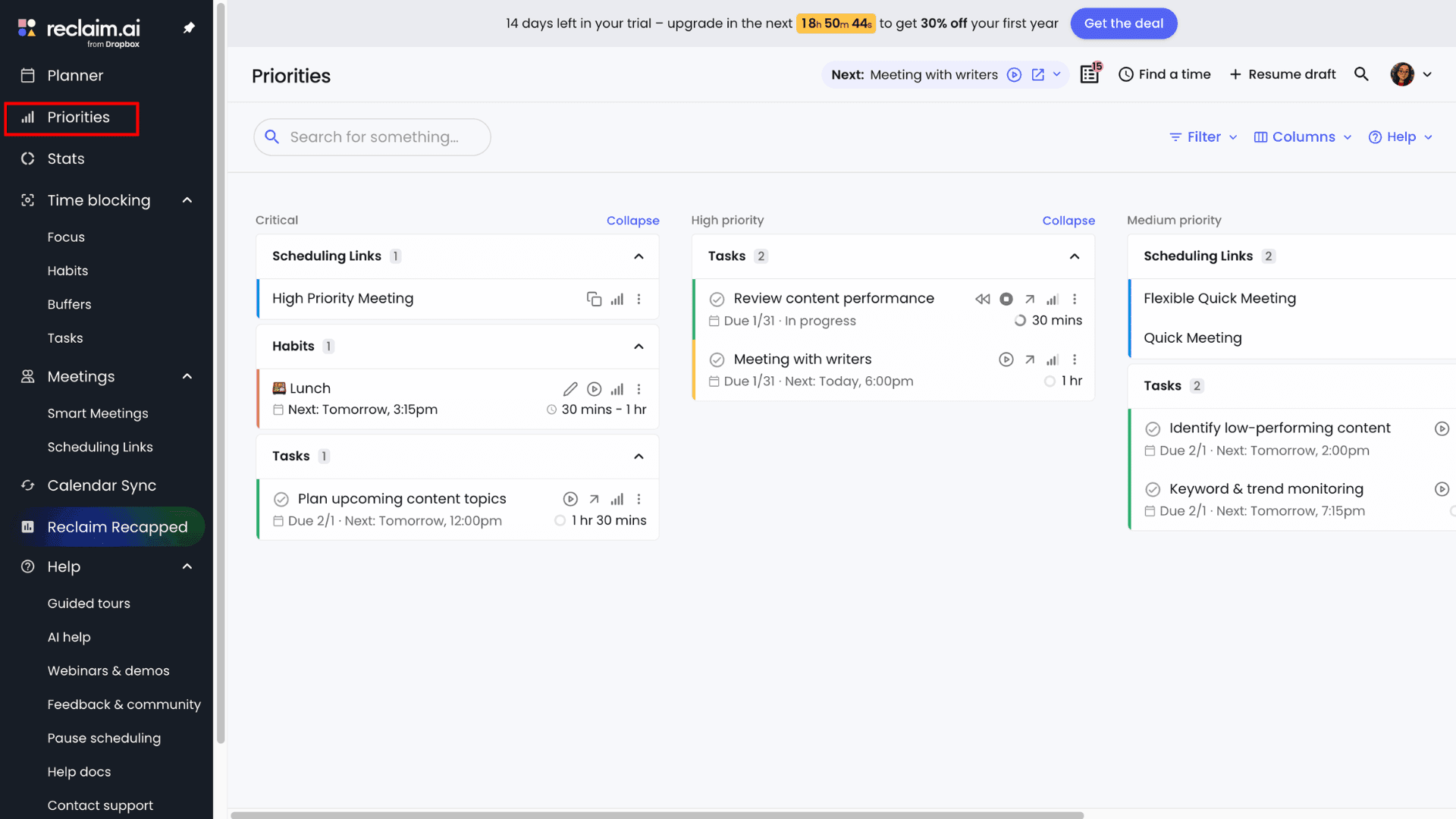
This priority system ensures that high-priority tasks are scheduled first, while lower-priority tasks remain flexible and can be moved if needed. The system usually overbooks low-priority tasks but avoids locking them into fixed time slots. If an urgent task arises, lower-priority items are automatically rescheduled.
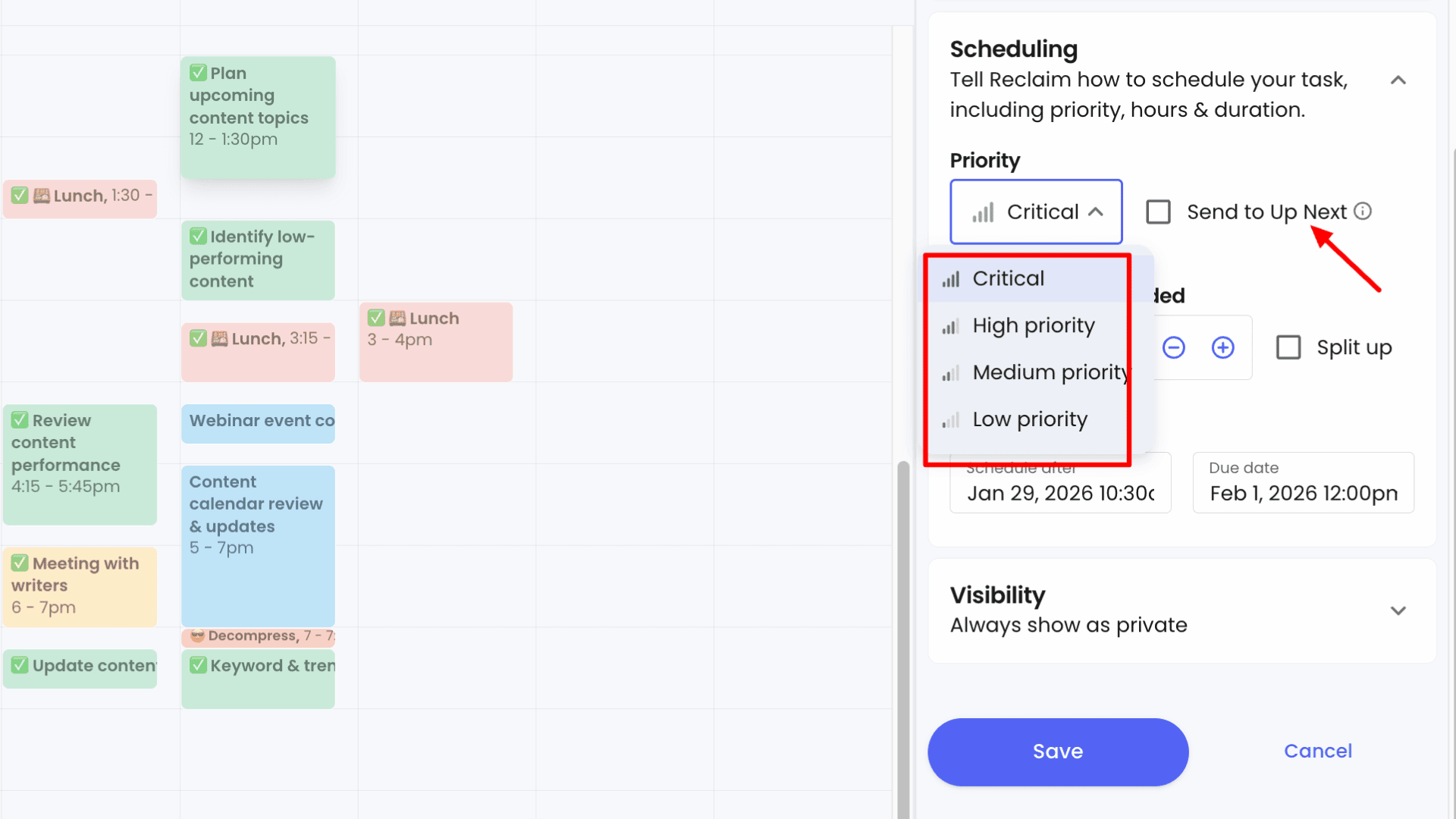
At the same time, you remain in control. If you mark a task as “Up Next,” Reclaim will prioritize it immediately and schedule it before other tasks, even those with higher default priority levels.
5. Focus Time for Deepwork
You can be more productive by blocking time for deep work with Reclaim AI. From the Focus Time page, the app lets you control exactly how your focus time is scheduled. It offers two scheduling modes: Proactive (best for moderately busy calendars) and Reactive (meeting-heavy schedules).
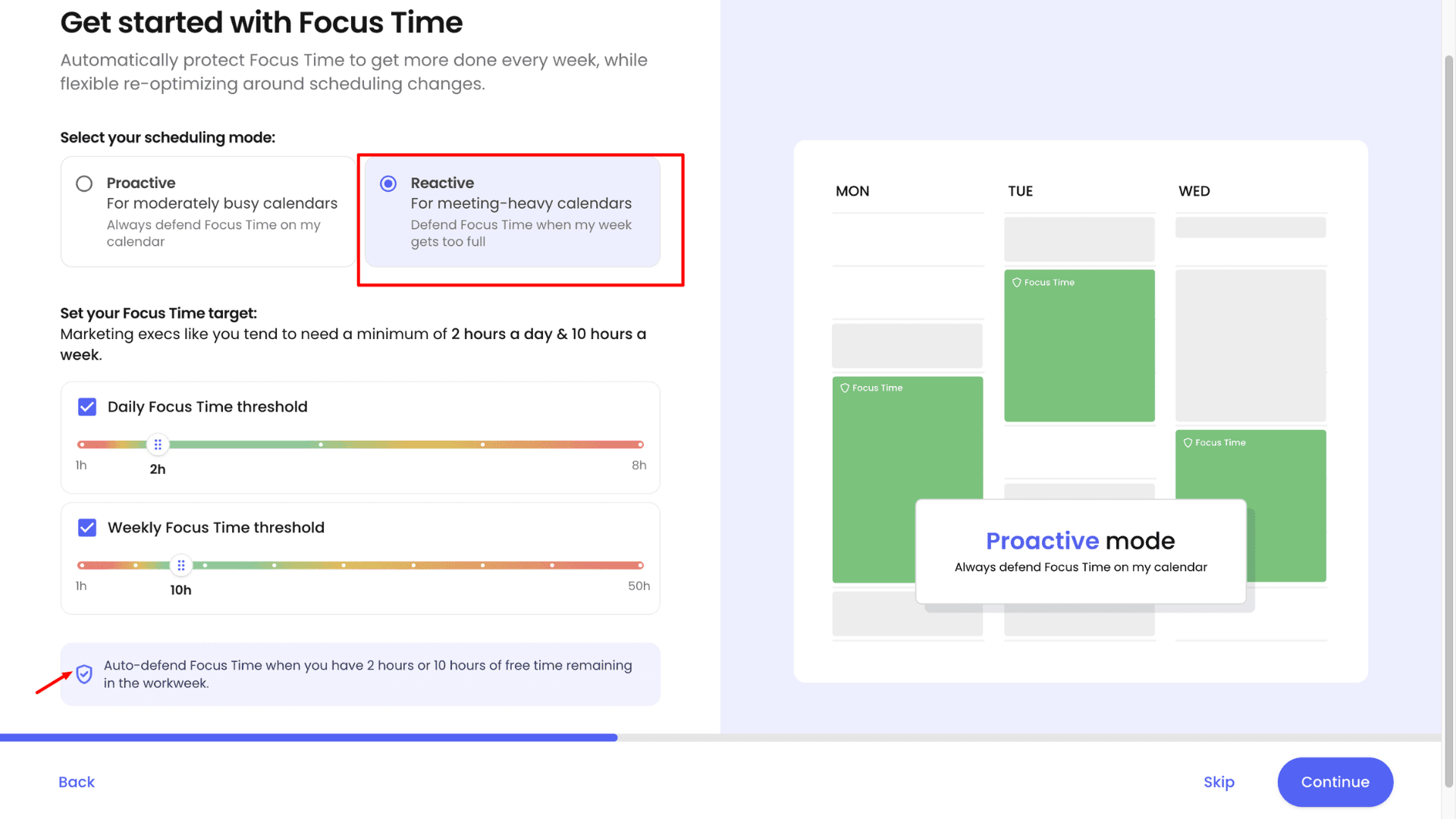
When I enable Proactive mode, I tell the system how much focus time I want each week, and it actively reserves that time in advance. For example, if I set a goal of 10 hours of focused work per week, Reclaim keeps fewer time slots open for meetings. This makes my schedule less flexible, but it helps me stay more disciplined and consistent with deep work.
For team leaders and managers, the Reactive mode is a better fit. In this mode, the app prioritizes meetings first and only blocks focus time when it detects open availability with no productive work scheduled. Based on my minimum focus target, Reclaim then creates deep-work blocks to help maintain balance without disrupting essential meetings.
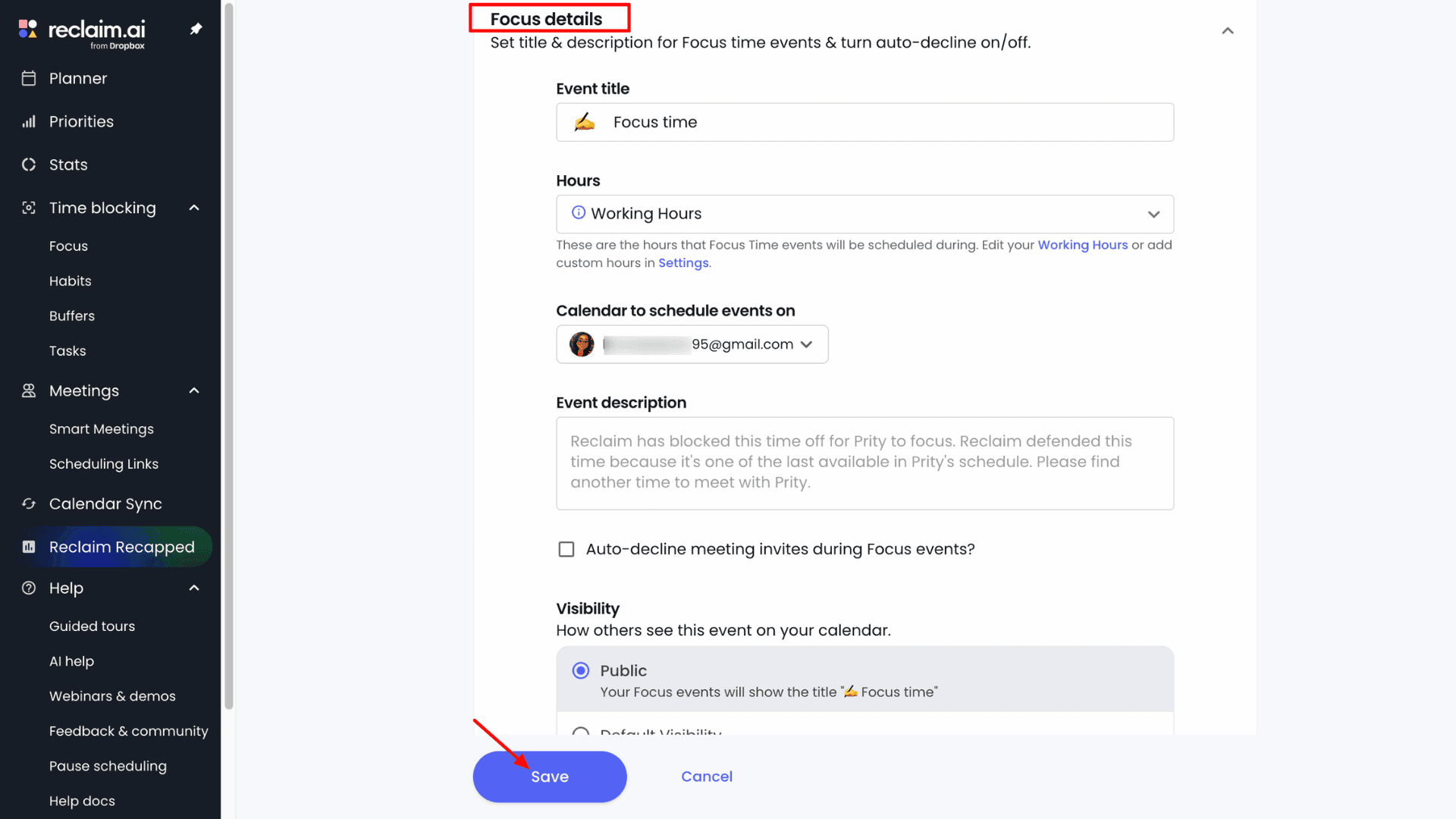
Also, while setting up focus time, the app lets users customize details such as the title, number of hours, target calendar, auto-decline behavior, visibility, and more. They can also set up team focus time, which helps everyone reduce unnecessary meetings and prioritize deep work during dedicated time blocks.
6. Habit Tracker
Reclaim automatically adds lunch as a default habit, but I can create new habits from the Habit page by clicking + New Habit. While setting one up, I can customize details such as the title, priority, category, hours, duration, and more. I can also set a custom frequency if I don’t follow a habit daily or want it scheduled only on specific days, edit them, search using the habit list, disable or snooze habits, or delete them entirely.
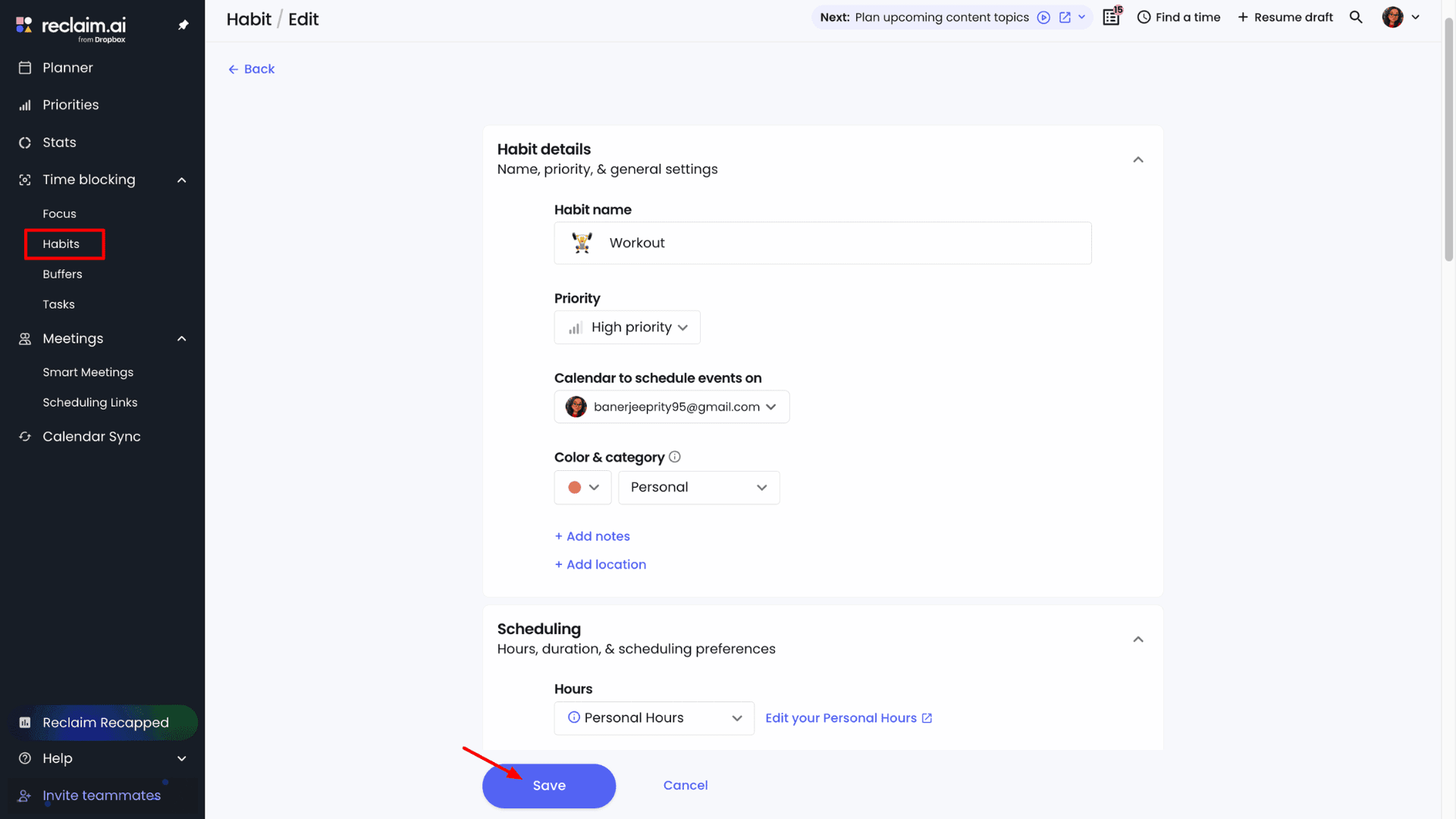
The Time Defense option lets me decide whether I want to follow the habit aggressively or keep my schedule more flexible. I can even enable auto-decline to prevent meetings from being booked if they interrupt my habit time.
I can also log work for habits I’ve already completed in the past. What I find especially useful is that the app intelligently reschedules habits to another available time when urgent tasks come up, to let users maintain a healthier work-life balance.
7. Smart Meetings
If you spend too much time coordinating meeting schedules around everyone’s availability, this feature is extremely helpful. When I click + New Smart Meeting, Reclaim lets me create individual scheduling rules for 1:1 or group meetings.
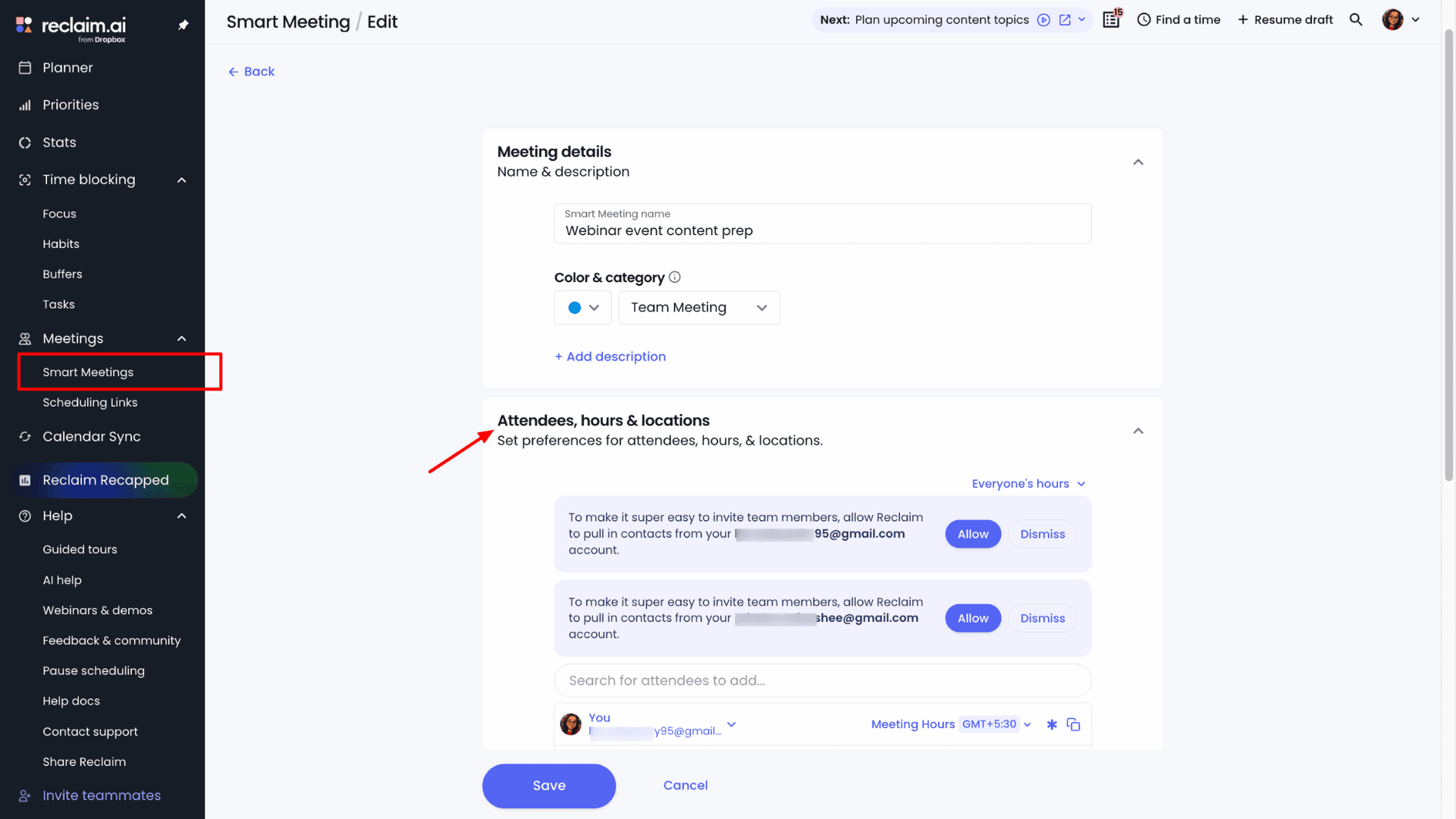
The process starts by setting the meeting name, attendees, meeting hours, frequency, duration, and ideal time. I can then assign a date and priority. If I schedule a meeting over 24 hours in advance, Reclaim initially marks that time as free to keep my schedule flexible. As the meeting time approaches, it automatically switches the status to busy.
This meeting scheduler also intelligently adjusts meeting priorities. If I skip the same meeting for multiple consecutive weeks, its priority gradually increases from medium to high, and eventually to critical, so it doesn’t get overlooked.
If users connect to meeting platforms like Zoom or Google Meet, Reclaim automatically adds the meeting links when booking. They can also assign a physical location using Google Workspace resources when meetings aren’t fully remote.
Another detail I find useful is that if Reclaim can’t schedule a meeting in any available slot, it keeps the meeting at its ideal time and marks it with a ⚠️ icon instead of removing it entirely.
8. Scheduling Links
As a busy professional, scheduling 1:1 or team calls when everyone is available is hard. With Reclaim AI scheduling links, I simply share a link, the other person picks a time from my availability, and the meeting is booked automatically.
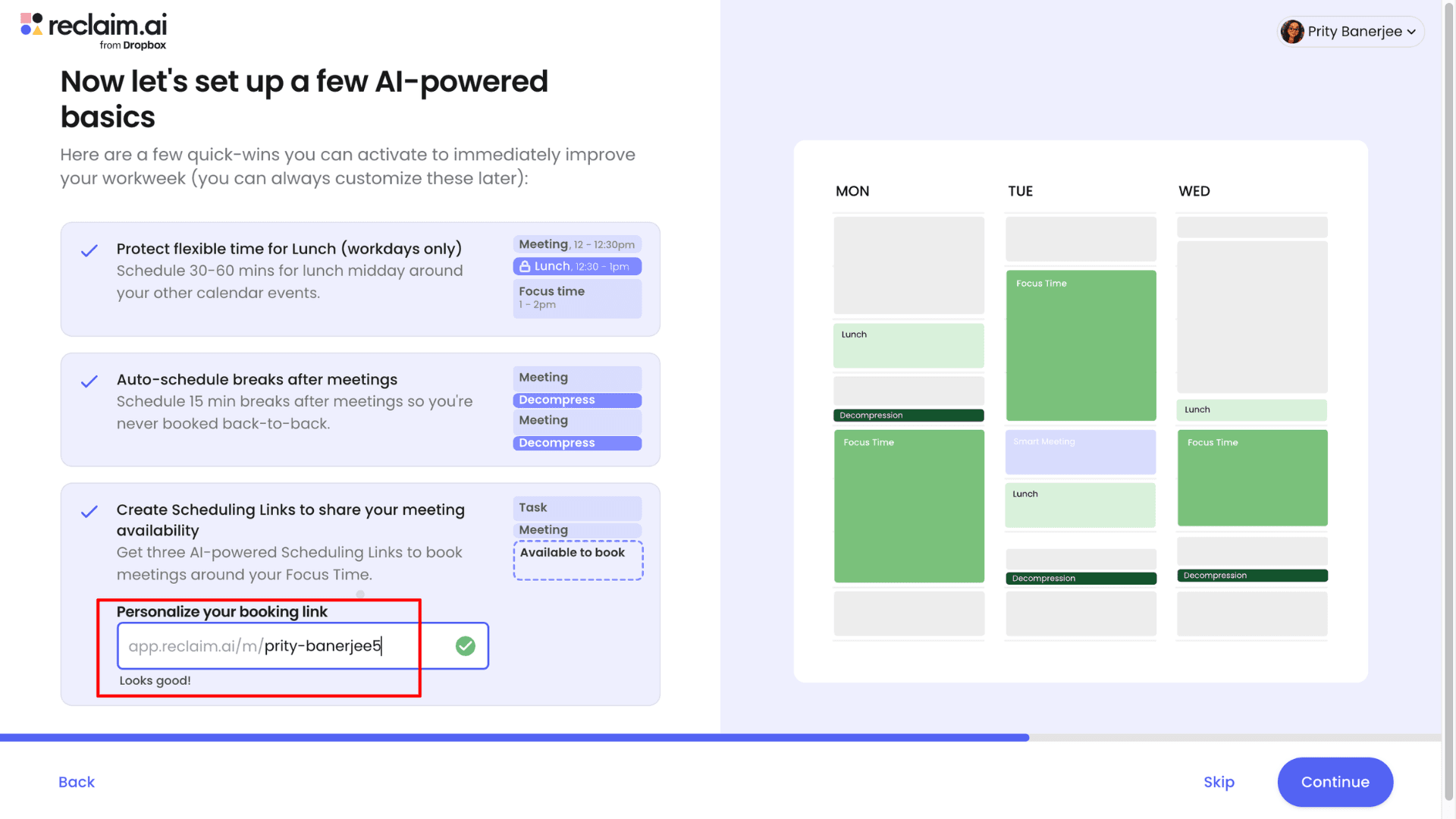
Reclaim doesn’t limit availability to only empty slots; it treats lower-priority events as available and reschedules them when needed. One scheduling link also supports multiple durations (30, 45, or 60 minutes), so there’s no need to send separate links.
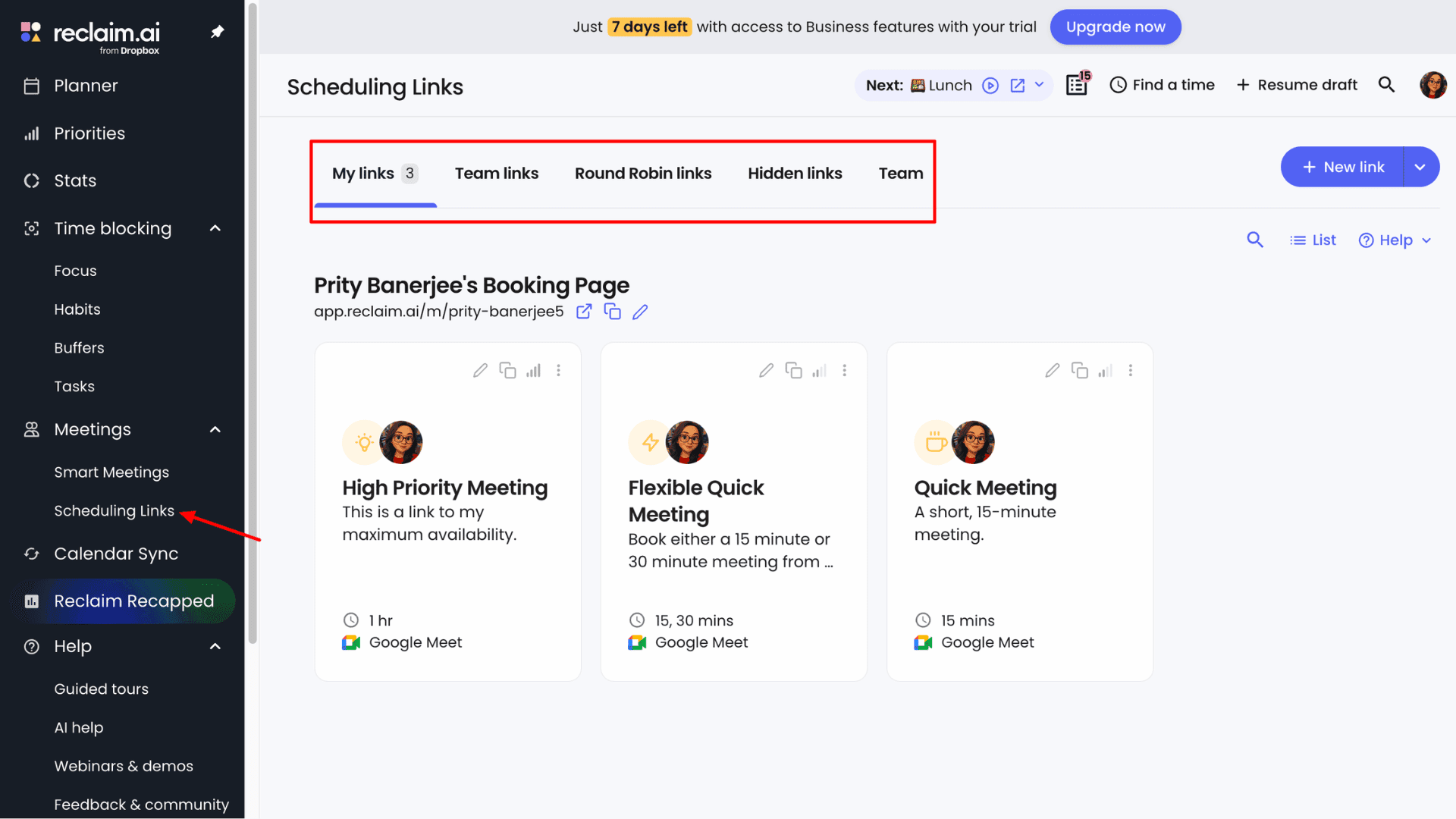
The app lets me duplicate, customize, and reuse links without changing my default setup. For team links, Reclaim checks everyone’s calendars and offers times that work for all participants.
The Round Robin link is especially useful for managers. It books meetings with any available team member instead of requiring everyone to attend, and if someone becomes unavailable, Reclaim automatically reschedules the meeting to another teammate.
9) Buffer Time to Decompress
Reclaim AI actively helps maintain work–life balance with its Buffer Time feature. It automatically adds spaces between back-to-back meetings and tasks, which helps me avoid calendar overload, reset mentally, and take breaks.
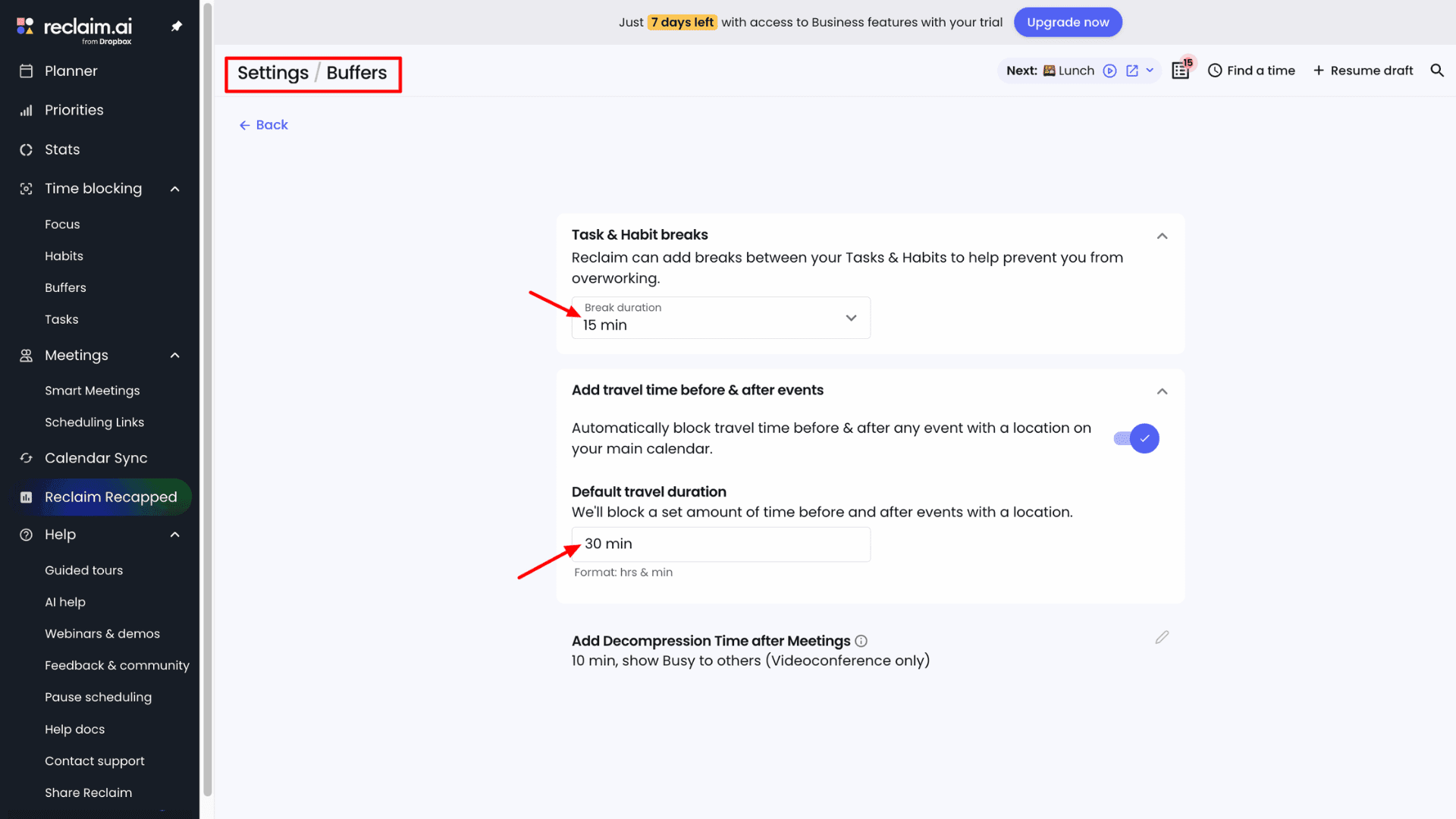
You’ll find three types of buffer time: Task & Habit breaks, Travel time, and Decompression time. I find travel and decompression time especially useful. For example, when I add a doctor’s appointment at 2 PM, Reclaim automatically schedules reasonable travel time, let’s say 30 minutes before and after, so my other tasks aren’t disrupted.
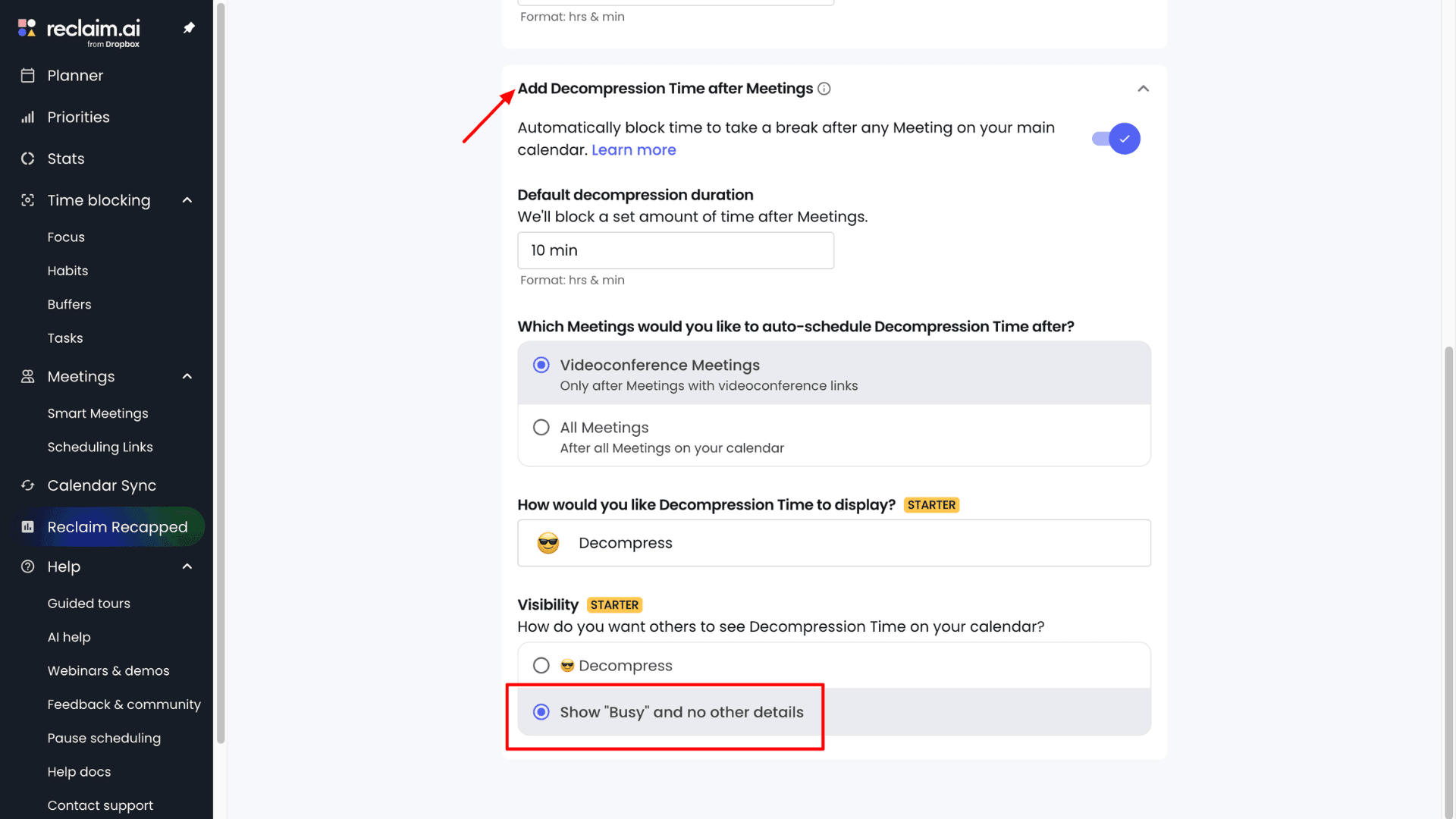
Decompression time adds short breaks before and after meetings. I can control the break duration and visibility. If my meeting schedule changes, Reclaim automatically adjusts the buffer time to match.
10) Stats to Analyze Productivity
Unlike other AI scheduling assistants, Reclaim AI lets me clearly see how I’m spending my time through detailed stats and an analytics dashboard. It offers two types of overviews: Individual Stats and Team Stats. For easier analysis, stats can be auto-grouped or viewed by day or week.
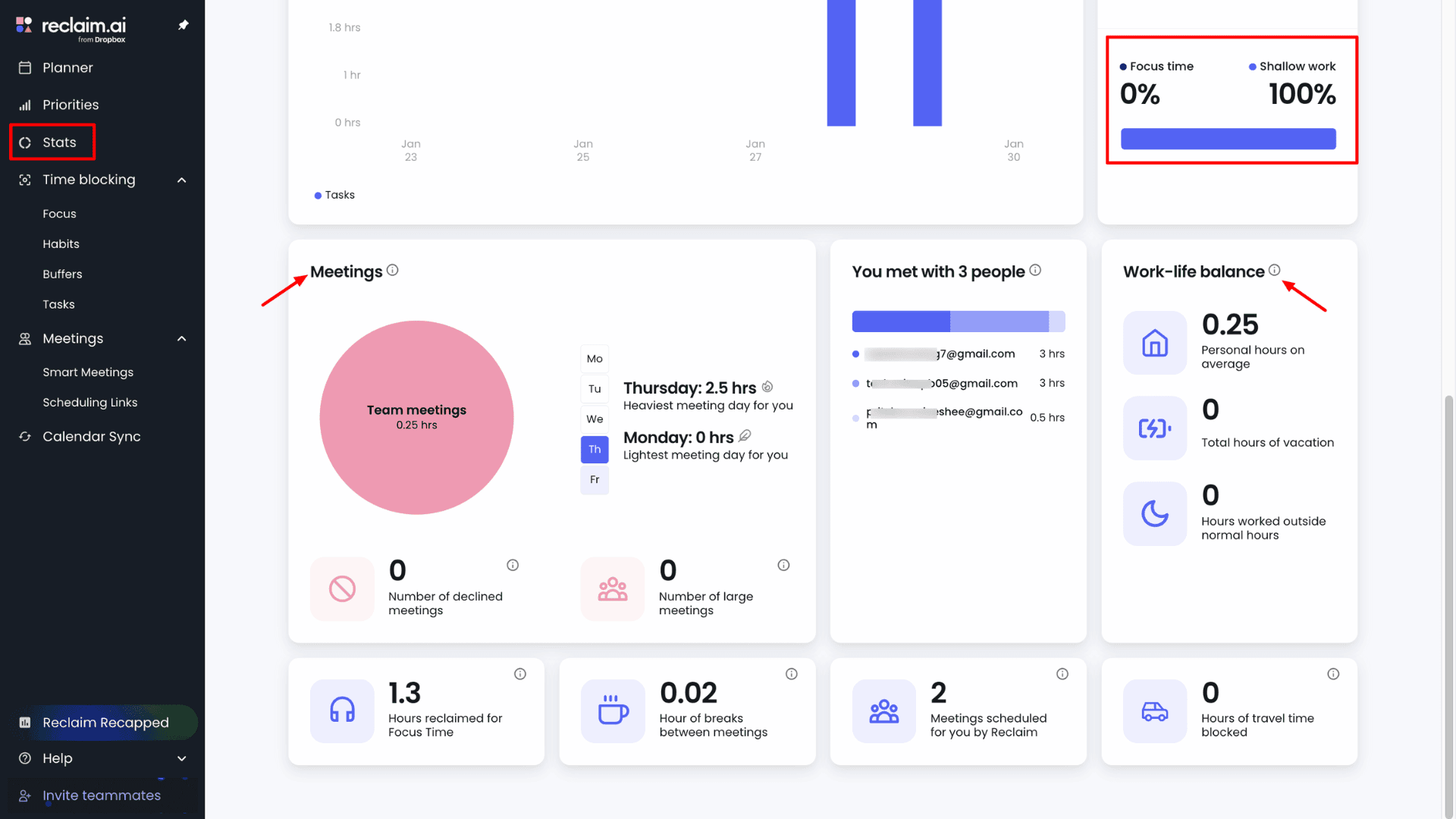
Under the “My Stats” section, I get a 2D visual pie chart or time breakdown. Here I can see the time I spend on meetings, deep work, travel, breaks, and more. It also highlights whether I’m getting enough focus time, if I’m at risk of burnout, and how balanced my week looks overall.
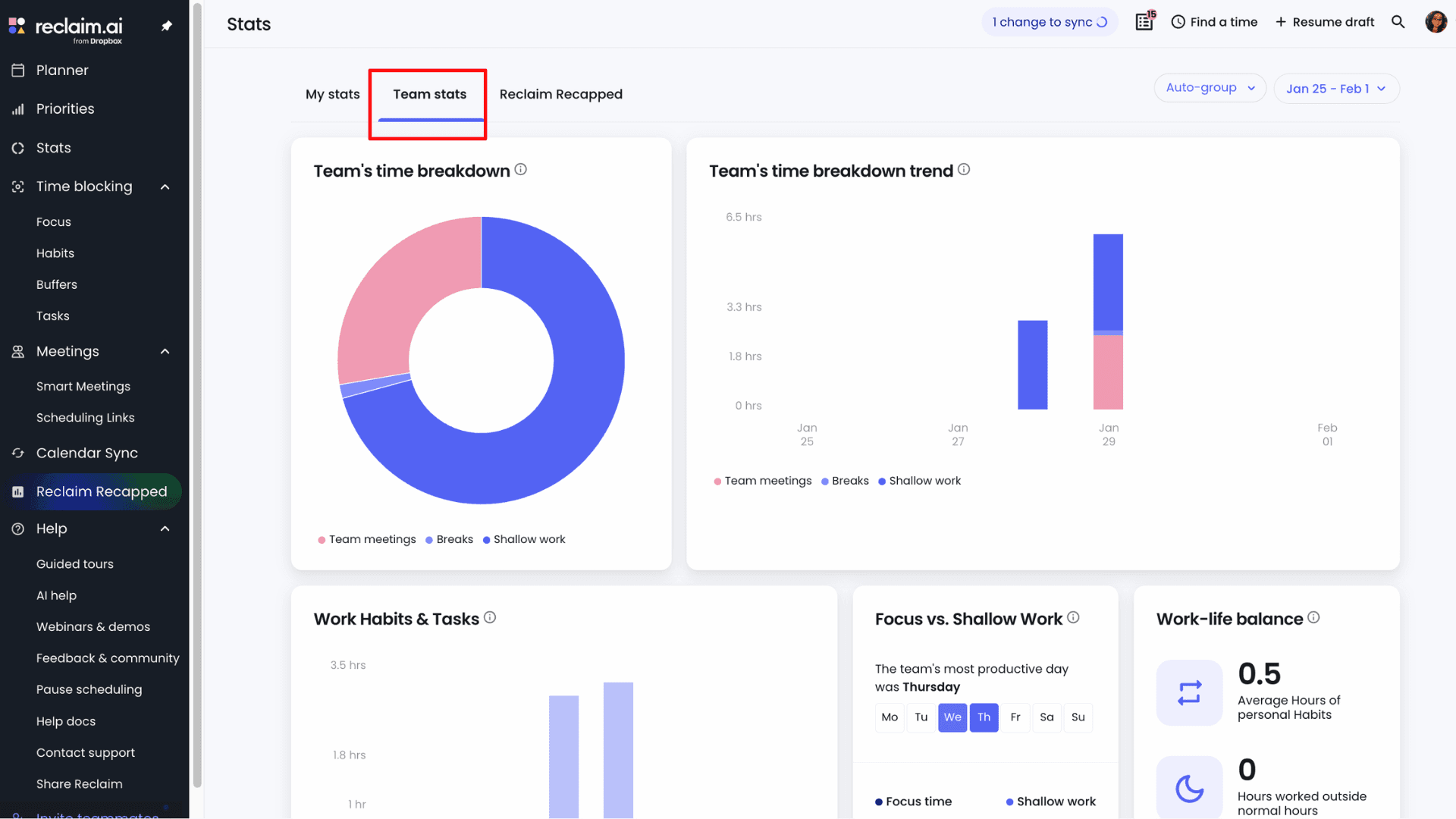
Team Stats shows meeting load, focus time, break hours, and burnout risk. It actually helps managers understand whether meetings are crowding out actual work without micromanaging.
11) Seamless Integrations
Reclaim AI supports powerful third-party integrations that make task management more efficient than many other tools. To connect your apps, simply go to Settings → Integrations. Reclaim syncs seamlessly with platforms like Asana, ClickUp, Google Tasks, Jira, Todoist, and Linear.
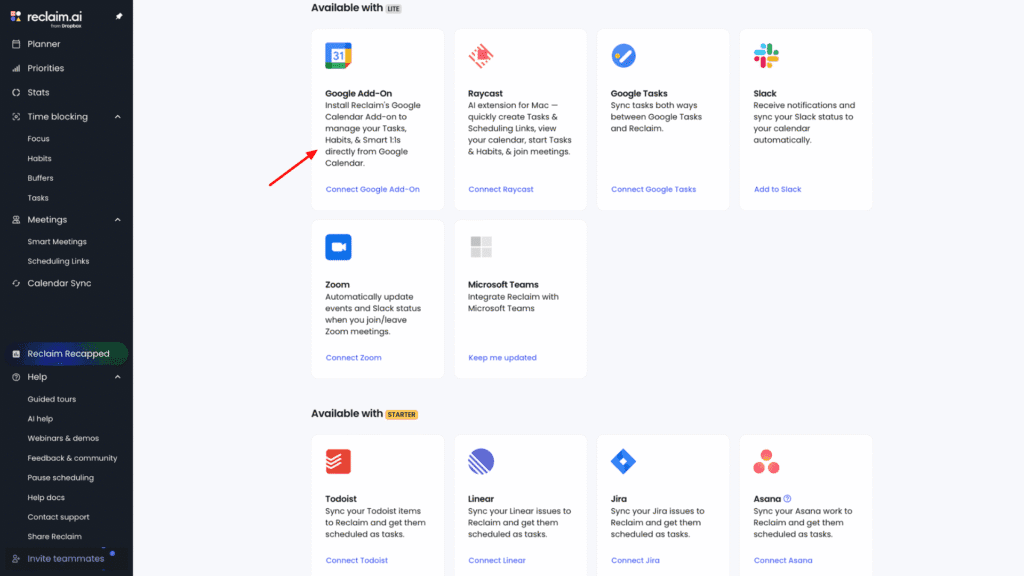
Once connected, I don’t need to manually update tasks in Reclaim. The app automatically pulls in updates from these tools, keeping everything in sync so nothing falls through the cracks. Beyond task management, Reclaim also integrates with tools like Slack, Zoom, Raycast, and Webhooks.
Reclaim AI Pricing
Reclaim AI offers one free plan and three paid plans. The following table gives a detailed comparison of the unique features available under each plan:
| Lite | Starter | Business | Enterprise | |
| Pricing for 1 year | $0 | $10/seat/month | $15/seat/month | $22/seat/month |
| No. of users | 1 | 10 | 100 | 100+ |
| No. of Connected Calendars | 2 | Unlimited | Unlimited | Unlimited |
| Calendar Sync Range | No | 12 months | 12 months | 12 months |
| Habits tracking | 1 | Unlimited | Unlimited | Unlimited |
| Scheduling Range | 1 week | 8 weeks | 12 weeks | 12 weeks |
| Scheduling Links | 1 | 3 | Unlimited | Unlimited |
| Focus Time | No | Unlimited | Unlimited | Unlimited |
| Smart Meetings | No | 3 | Unlimited | Unlimited |
| Task Integrations | Google Tasks only | All | All | All |
| Max Users Across Domain | 100 | 100 | 100 | Unlimited |
| Support | Community | Basic | Priority | Dedicated |
Reclaim AI paid plan starts at $10 per user per month if you choose the annual plan. This means you pay $120 per user for 1 year for the Starter plan. Otherwise, the cost is $12 per user per month on a monthly billing cycle. You can add up to 10 users under this plan.
This plan is suitable for solopreneurs and small teams. However, it comes with limitations, including an 8-week scheduling range, 3 scheduling links, and 3 smart meetings, along with unlimited integrations. To access unlimited scheduling links, unlimited smart meetings, priority support, and advanced features, users need to upgrade to the Business plan.
Technically, by paying an additional $3 per user per month (that is, $15 per user per month on the Business plan), you get significantly better team collaboration features. If you can afford it and have a team of over 10 people, choosing the Business plan instead of the Starter plan is the better option.
Free Plan
Reclaim AI offers a solid free plan for individual users. It includes a one-week scheduling range, one scheduling link, tracking for one habit, limited integrations, unlimited tasks, and unlimited buffer time.
Plus, when I first created an account, Reclaim offered a 14-day, no-commitment free trial. There’s no need to add a credit card, and all premium features are unlocked during the trial, which makes it easy to fully test the platform before upgrading.
Refund Policy
Reclaim AI does not offer refunds for subscriptions purchased on the monthly plan. However, refunds are available on a pro-rata basis for annual plans only, subject to certain conditions.
For example, if you purchase an annual paid plan and cancel your subscription within 30 days of the purchase date, your subscription will be ended. Here, you can contact the Reclaim AI support team to request a pro-rata refund for the remaining unused period of your subscription. For more details, check out theReclaim AI Terms of Service page.
Payment Methods
The app accepts all major credit cards, including Visa, Mastercard, and American Express, for purchasing paid plans. In addition, U.S. bank accounts are also accepted as a payment method.
Reclaim AI Customer Support
In the Reclaim AI app, we can access dedicated customer support through the “Help” tab. This section includes Guided tours, AI Help, Webinars & demos, Help docs, and Contact support. If you face any issues while getting started or using Reclaim AI’s features, both the Help docs and Guided tours are very helpful and cover the most common use cases.
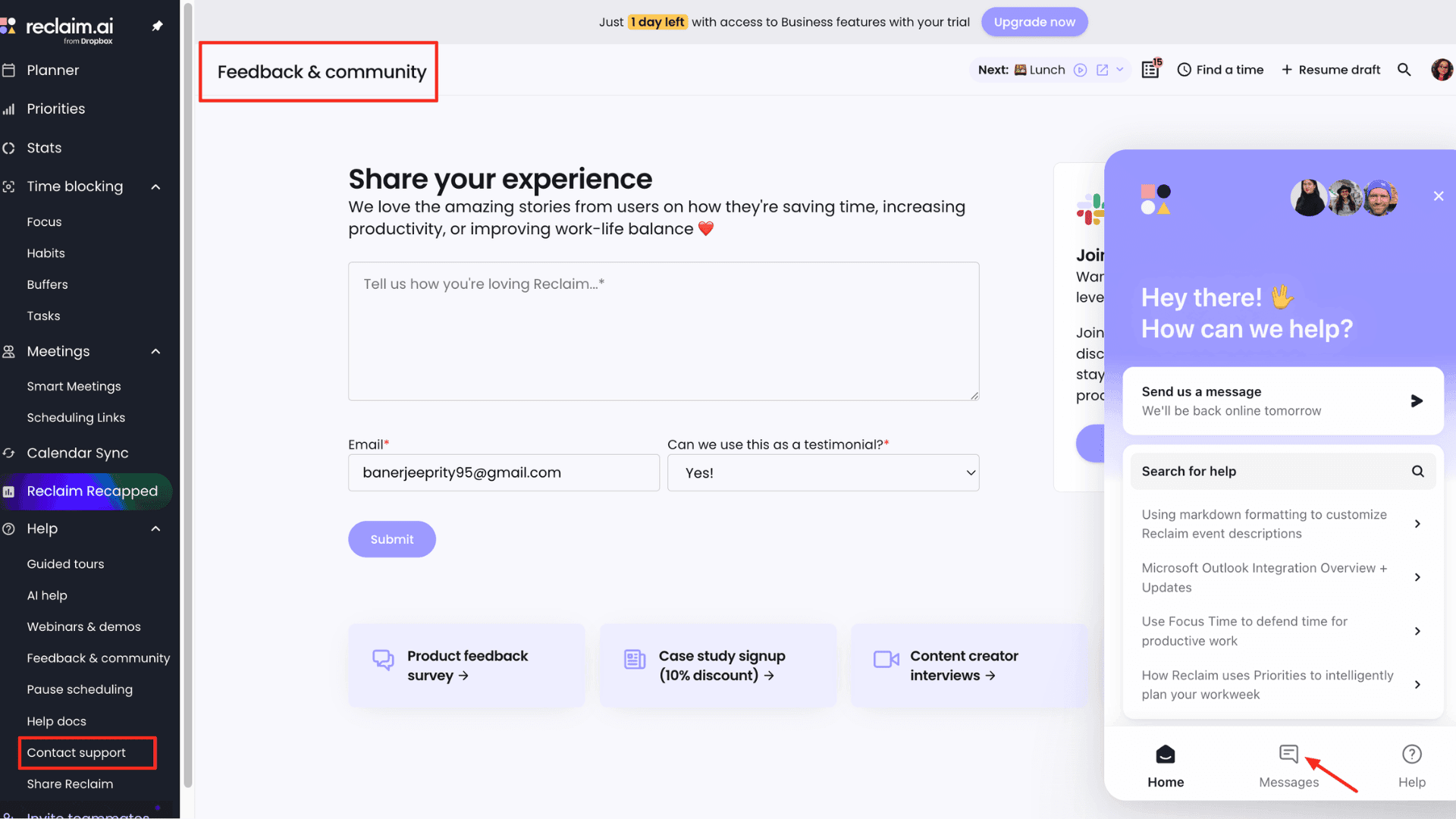
In case we have limited time to go through the documentation, then it’s better to directly ask questions to AI Help related to its services and features and get instant responses. To connect directly with the support team, Reclaim AI also offers a chat support option.
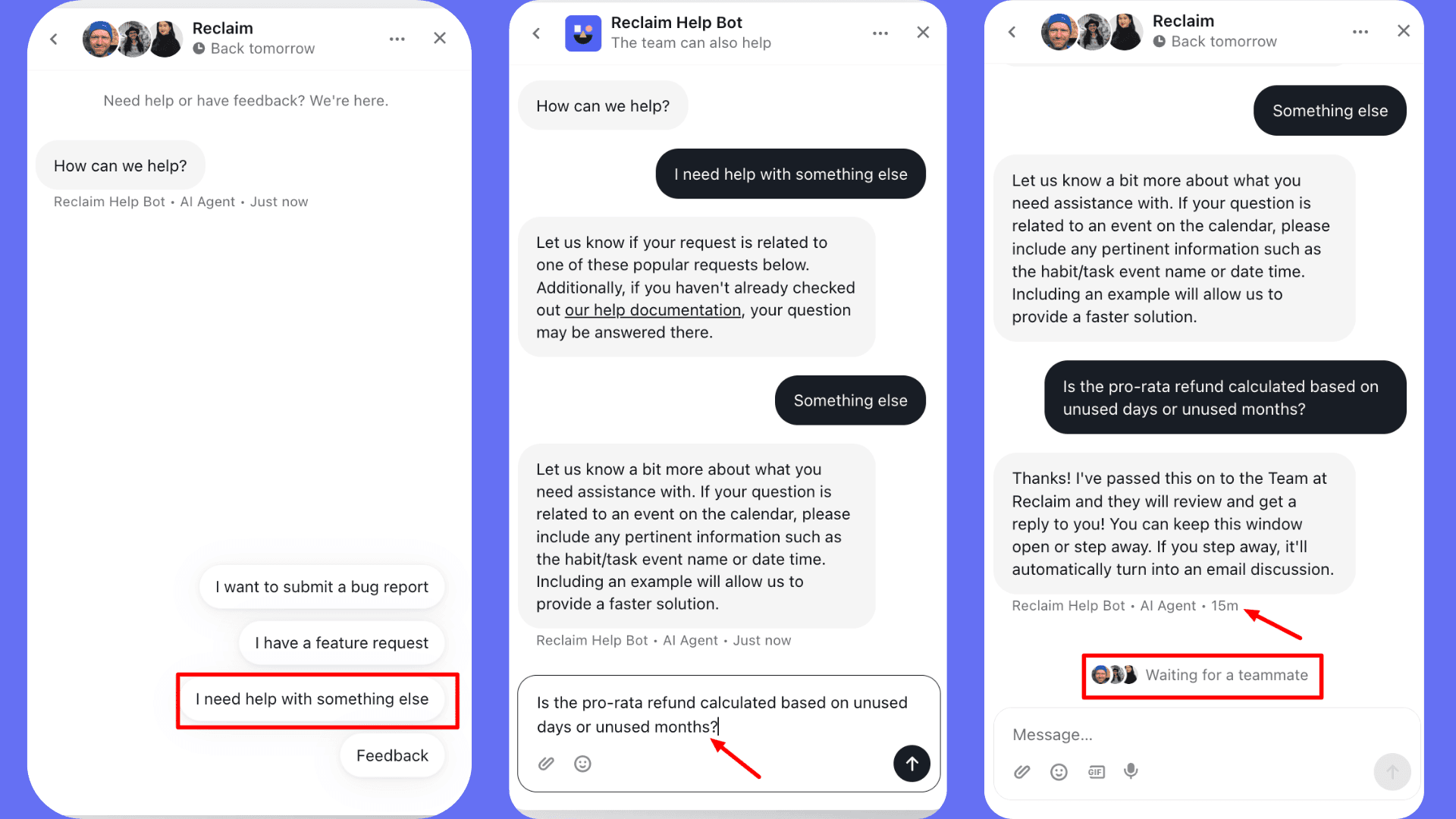
You can access it by going to Contact Support, entering your message, and selecting from preset options to start a conversation with support agents. Initially, you’ll be connected to a bot, and later routed to a human agent. But the waiting time was quite long.
Plus, customer support is available Monday to Friday, from 7:00 AM to 7:00 PM (Pacific Time). Reclaim AI does not offer 24/7 support.
Pros of Reclaim AI
1. Priority-Based Rescheduling
Reclaim AI continuously monitors your calendar and automatically schedules tasks based on priority, deadlines, and availability. If plans change or a meeting suddenly pops up, the app intelligently moves lower-priority items while respecting locked events.
2. Smart Meetings and Scheduling Links
The Smart Meetings feature allows you to configure separate links for team meetings, 1:1 sessions, and round-robin scheduling. The link only displays your available time slots so you can avoid endless back-and-forth conversations.
3. Minimizes Calendar Chaos
If you struggle with unfinished tasks or heavy meeting loads, Reclaim AI automatically adjusts incomplete work without manual intervention. It proactively updates your schedule and keeps your planning intentional.
4. Strong Integrations with Popular Tools
Unlike Motion or Clockwise, Reclaim integrates with all major productivity tools used in daily workflows. It syncs with Google Calendar and Outlook, and pulls tasks from tools like Asana, Slack, ClickUp, Todoist, Jira, and more.
5. Built-In Productivity Analytics
The analytics dashboard provides logical insights into how you spend your time. It offers both individual and team breakdowns of meetings, tasks, habits, focus time, and more. Managers can also monitor team workload and burnout risk without micromanaging.
6. Easy Habit Management
Reclaim helps maintain a healthy work-life balance with its dedicated habit tracker. It automatically blocks time for recurring activities like lunch breaks or workouts. If conflicts arise, it reschedules habits to the next available slot.
7. Adaptive AI Scheduling
Reclaim AI uses an adaptive scheduling engine that learns your preferences. It adjusts to patterns such as preferred meeting times, lunch breaks, deadlines, travel time, and time zones to make a more personalized schedule.
Cons of Reclaim AI
1. Initial Setup Effort
Reclaim AI takes time to set up, which can be tough for busy professionals. Beginners may also face a learning curve when trying to explore all the features. In fact, the guided tours can feel overwhelming at first because of multiple rules and settings.
2. No Mobile App Availability
There’s no iOS or Android app, so you can’t manage schedules or urgent tasks on the go. You’re limited to the web app, which also requires you to log in every time you visit the website.
3. Restricted Free Plan
The free tier is quite limited as it allows only one user, one scheduling link, one-week calendar view, and one habit tracker. Key features like smart meetings, focus time, time blocking, and time tracking are not included. So, Reclaim’s free plan is not enough for beginners to continue after the trial period ends, and professionals will probably need a paid plan.
4. Not a Complete Project Management Tool
While Reclaim AI claims to replace tools like Asana or ClickUp, it falls short in practice. Its organization features are very basic, with no support for subtasks or end-to-end project tracking. As a result, you’ll still need a separate project management tool to manage complex workflows.
Who Should Use Reclaim AI?
Reclaim AI will be an ideal AI scheduling and calendar management app for the following users:
- Small to mid-sized teams with heavy meeting loads. Features like smart 1:1 meetings, round-robin links, and “no-meeting” rules help protect focus time.
- Solopreneurs and freelancers managing multiple projects who need a single, realistic schedule to see all personal commitments.
- Knowledge workers who need deep work time and struggle to defend long, uninterrupted focus blocks.
- Google Calendar or Outlook users who want smarter scheduling, better prioritization, and time analytics
That said, people unfamiliar with digital calendars or project managers who rely on Gantt charts and detailed resource planning may not find Reclaim AI to be the right fit.
Why Should You Trust Me?
I’ve been working full-time in the digital industry since 2015. Over the years, I’ve tested extensively and reviewed SaaS and cybersecurity tools like VPNs, web hosting services, cloud storage providers, password managers, and website builders.
With the recent boom in the AI space, I’ve focused on solutions that genuinely help solopreneurs and small to mid-sized teams work more efficiently. I’ve already shared honest insights on Gamma App, AI Fiesta, Zemith AI, Letterly, ElevenLabs, and Copy.ai, and received positive feedback from my readers.
This experience gave me the confidence to do a hands-on review of Reclaim AI based on real usage.
Conclusion
Reclaim AI is a powerful scheduling tool for busy professionals who need to balance a chaotic meeting schedule with deep, focused work. It transforms your digital calendar from a static grid into a dynamic assistant that automates rescheduling and task prioritization.
Features like Smart Meetings, Habit Tracking, and Buffer Time don’t just organize your schedule; they actively help prevent burnout by ensuring you have space for breaks. If you rely heavily on Google Calendar or Outlook, Reclaim AI effectively bridges the gap between your to-do list and your calendar.
That said, the initial setup requires effort, the free plan is limited, and there’s no mobile app for managing schedules on the go. It’s also not a full-scale project management replacement. Overall, it’s an excellent choice for knowledge workers and teams who value smarter time management.
If you’re ready to stop manually rearranging your calendar and start focusing on what truly matters, give Reclaim AI a try today. Stay tuned for more honest and insightful reviews.
FAQs
Is there a free plan for Reclaim AI?
Yes, Reclaim AI offers a free Lite plan. But it comes with limitations such as a 1-week scheduling range, 1 habit tracker, limited integrations, and just 1 user access.
Can I use Reclaim AI on mobile?
No, Reclaim AI does not currently offer a mobile app. It is only accessible through the web app.
Does Reclaim AI support teams?
Yes, Reclaim AI supports both individual users and team collaboration. It offers features like shared Smart Meetings, 1:1 templates, round-robin scheduling, team scheduling links, shared habits, and team analytics.
Can I override Reclaim’s scheduling decisions?
Absolutely. You can manually adjust scheduling decisions at any time. For example, you can drag-and-drop events, lock tasks, adjust priorities, or customize scheduling rules from the settings panel.
Which apps does Reclaim AI integrate with?
Reclaim AI integrates with Google Calendar and Microsoft Outlook. It also connects with tools like Asana, Slack, ClickUp, Todoist, Google Tasks, Jira, Linear, Zoom, and more.

Reclaim AI Pros (+)
- Priority-Based Rescheduling
- Smart Meetings
- Minimizes Calendar Chaos
- Easy Habit Management
Reclaim AI Cons (-)
- Initial Setup Effort
- Restricted Free Plan
- Not a Complete Project Management Tool
- No Mobile App Availability