Want to make your next music album look as good as it sounds? We have the tools that can turn every beat and every frequency into stunning, eye-catching visuals!
A Music Visualizer software helps you create dynamic graphics that match the amplitude and frequency of an audio track. You can create any animation, from waveforms and audio spectrums to swirling patterns, and much more.
The secret is out! Today, I’ll feature the 5 Best Free Music Visualizers. These apps are feature-rich, compatible with desktop and mobile, and provide offline access.
So, let’s get started!
Top 5 Free Music Visualizers (Summary)
| Music Visualizer | Max Export Resolution | Export Format | Customization Options | Learning Curve | Unwatermarked Videos/Month |
| Vizzy | 4K, 60 FPS | MP4 | Audio analyzer, layers, effects, Lyrics mapping | Easy | Unlimited |
| Musicvid.org | 1080p, 60 FPS | MP4 | Automation, colors, effects, templates, | Moderate | Unlimited |
| VSDC | 8K | MP4, MPG, WMV, FLV, etc. | Advanced color grading, keyframes, 500+ presets, | Complex | Unlimited |
| Headliner | 1080p, 30 FPS | MP4 | Audiograms, progress animations, captions, and resize | Easy | 1 video export/mo |
| Canva | 1080p, 30 FPS | MP4, GIF | Drag-drop, animations, templates, AI tools | Easy | Unlimited |
What Is a Music Visualizer?
A music visualizer is a software that adds visual effects while you’re listening to any audio file. You can create animated videos that synchronize with a song’s rhythm, amplitude, and frequency. Unlike music videos, which feature complex videography or plots, music visualizers display dynamic, simple imagery.
Basically, a visualizer creates an aesthetic visual experience during audio playback. You might see swirling patterns, bright colors, or abstract visuals dancing with the beat. These high-quality visuals help musicians capture an audience’s attention.
Top 5 Free Music Visualizers for 2026
1. Vizzy
Vizzy is our top choice for a free audio visualizer that lets users create watermark-free animated graphics. The app offers a very easy-to-use interface. As a free user, you’ll get the best built-in effects and presets to edit videos.
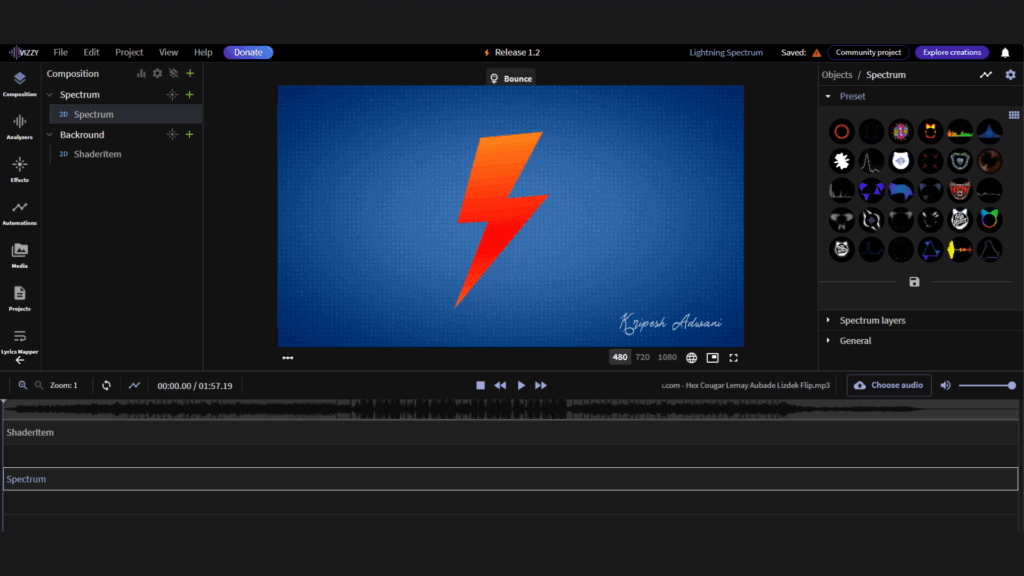
The audio analyzer feature allows you to change how the effects will react to the uploaded audio. Vizzy gives you the option to map lyrics to the audio. Whatever edits you make are saved instantly to the cloud. Layer editing is also available.
In fact, you can work offline to an extent after the initial loading. Next, the tool saves the file on the cloud so that you can access it later anywhere. One thing to note is that Vizzy is web-based but is primarily optimized for the Chrome browser.
Limitations
- High-speed internet is required for the best performance.
- Performance slightly depends on your computer’s processing power.
Pricing
Vizzy is completely free to use. You can edit and export as many projects as you want, but the export limit is 4GB, and the maximum audio file size you can load is 1GB.
Ideal for
Musicians, YouTubers, and live performers who require professional-quality visualizers, 4K outputs, and unlimited free exports.
2. Musicvid.org
Musicvid is another lightweight, web-based audio visualizer I specifically recommend for beginners. You don’t need to sign up to use the tool.
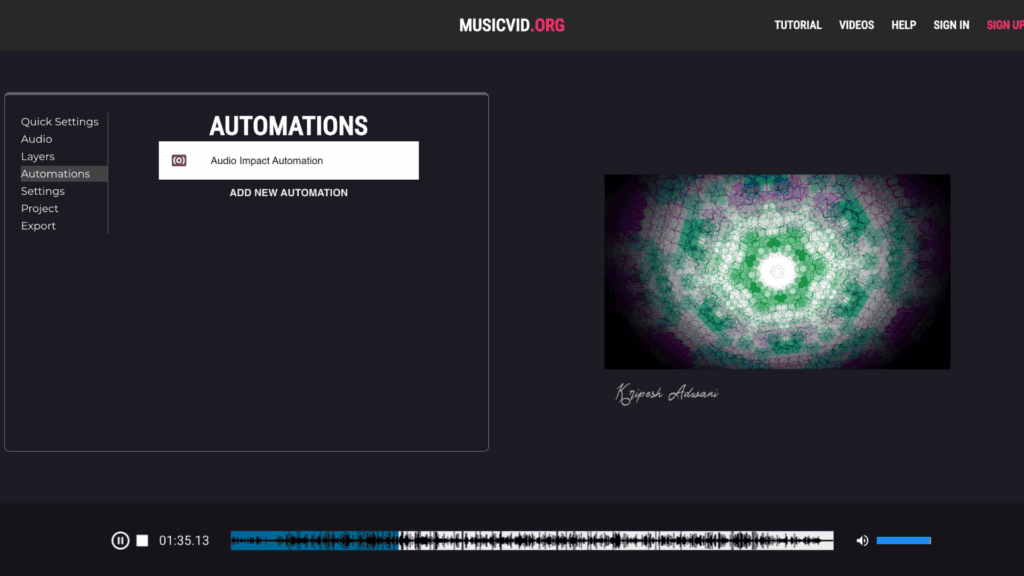
The editing process here starts with selecting pre-designed templates. You’ll get many free templates, but some may require attribution to the creator.
Here you’ll find a quick settings option, which gives you full control over the spectrum, particles, background, and emblem. Like Vizzy, an audio analyzer with spectrum settings is also available here.
Musicvid provides four advanced automation controls (point, audio reactive, math input, shake) for professional-grade animation control. The best thing is that the Musicvid Discord community is active, like Vizzy’s. You can expect video tutorials and extensive support through this community.
Limitations
- Only Full HD video export is allowed.
- No cloud synchronization is available.
- Some templates require attribution to the original creator.
Pricing
Musicvid doesn’t restrict users from editing or exporting audio files. However, the maximum resolution is 1080p 60 fps. Only MP4 is allowed as an export format.
Ideal for
Independent artists, social media content creators, and users who value speed, budget, and community-driven templates.
3. VSDC
Are you facing issues with poor internet speed? Well, VSDC is a powerful video and audio editing suite that works offline. It provides multiple tools, including a video editor, screen recorder, audio-video converter, and music visualizer.
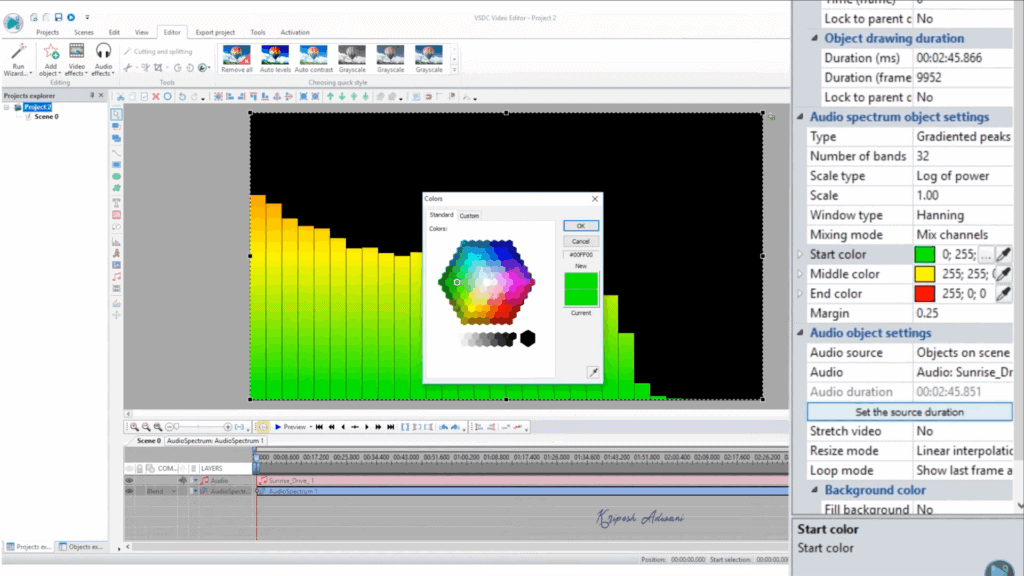
You can simply download and install the app from its official website. This tool lets you create linear or circular audio spectrum styles or abstract music visualizations. It also offers advanced color correction, motion tracking capabilities, and a masking tool.
Professional editors can add keyframe animation to videos. Plus, you can use 500+ audio visualizer presets, cinematic effects (such as raindrops, overlays, and foggy glass), side-by-side video features, and more.
The VSDC tool allows you to extract and visualize audio from another video. We can add text, titles, and lyrics, like a full-featured video editor. Once editing is done, you can directly upload your creation to social media platforms.
Limitations
- No cloud storage is available
- Only supports Windows systems
- The interface can be complicated for beginners
- Steeper learning curve than similar online tools
Pricing
The VSDC free plan offers 8K, 4K, and Ultra HD export, no watermark, standard mask tools, Chroma Key, and voice-over features. For motion tracking, HDR video technology, hardware acceleration, and advanced audio waveform display, you can upgrade to VSDC Pro. It’ll cost a one-time fee of ₹3,122.35.
Ideal for
Pro creators, musicians promoting albums, YouTubers making music videos, and Windows users.
4. Headliner
Headliner podcast video tool is already popular among 1.5 million podcasters worldwide. This tool helps in music visualization as well as video editing. The tool is available for both desktop and smartphone users.
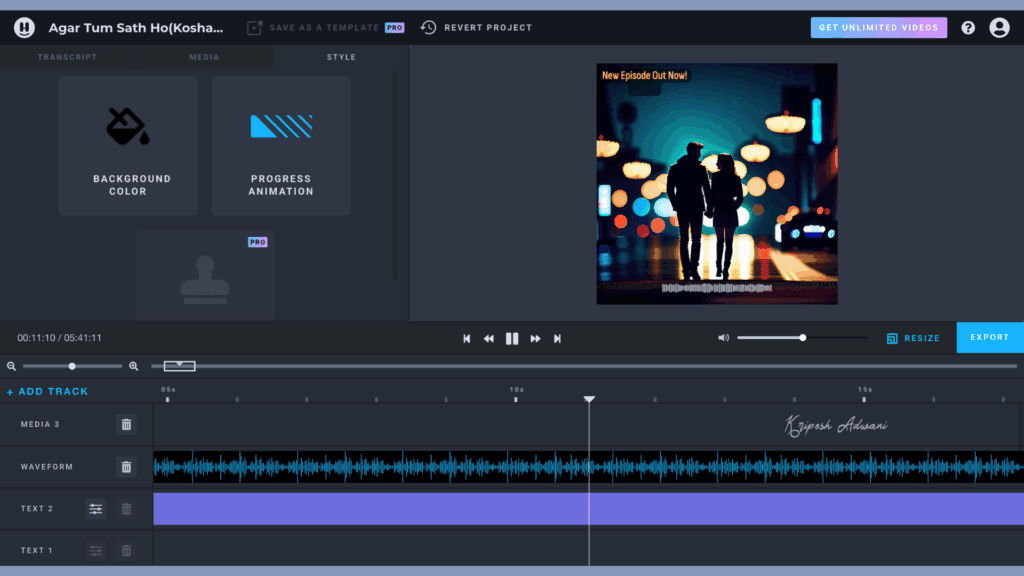
First, you need to sign up using Gmail or Email. The tool will not ask for credit card details for the free plan. Next, you have to select an audio tool and upload your audio first. This may take some time.
Next, the toolbar will open. Here, you can select the background, add text, select a waveform, etc. For background and media files, you can search Google from the app or use AI-generated art.
All edits done here are layered, making it very easy. You can add custom fonts, auto-upload from YouTube, and custom intros and outros with paid plans. Once all editing is done, you can either download or store it on the cloud.
Limitations
- Only 1 unwatermarked video per month is allowed.
- Maximum export quality is 1080p.
- Basic waveform is available.
- Less suitable for complex or abstract animations
Pricing
Headliner free tier allows 1 unwatermarked video export per month, unlimited watermarked video edits and exports, basic waveform, editing tools, etc. Their basic plan starts at $7.99/month if billed annually. Here, you’ll get 10 unwatermarked video exports monthly, 2GB video file uploads, auto-post to social media, and more.
Ideal for
Beginners, growing content creators, podcasters who create audiograms, and those who need to prioritize ease of use over advanced customization.
5. Canva
The last tool on our list is Canva. This image and video editor is a favorite among millions of non-designers due to its ease of use, advanced features, and AI-powered editing tools.
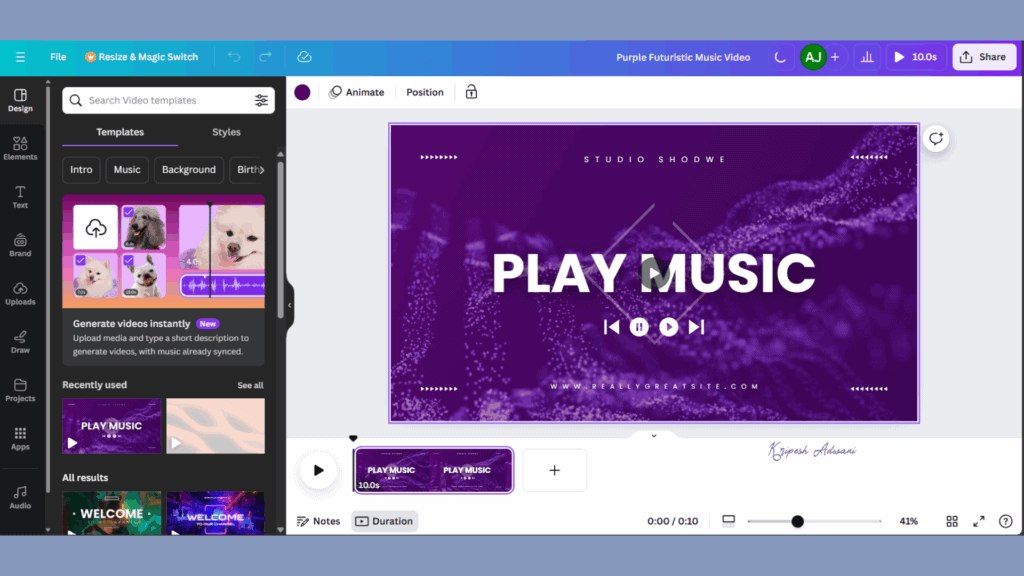
To start, you can use pre-built templates for music videos and graphic designs. Then, you can begin customization with drag-and-drop editing tools. Canva includes 500,000+ royalty-free music tracks and sound effects, which you are free to use.
A notable feature is Beat Sync, a tool that automatically synchronizes video cuts and transitions to the music tempo. Magic Studio is another amazing feature of Canva, where all advanced animations and AI-powered tools are available, though this is part of the paid subscription.
All the editing can be done through their desktop or mobile app. You can easily add text, stock photos, and illustrations. Once the editing is finished, Canva lets you save the project on the cloud. Otherwise, you can download it without a watermark or share it with friends.
Limitations
- Video export is by default, 30 FPS.
- Premium elements require a Pro subscription.
- Some Canva music may trigger YouTube copyright issues.
- Audio upload limit is 250MB.
- Less specialized for dynamic music visualization compared to dedicated tools.
Pricing
The Free tier offers a drag-and-drop editor, 5GB of cloud storage, manual beat sync, and limited access to Canva AI. Their paid plans start from around ₹4000 per year, granting you unlimited premium template access, higher AI access, Auto Beat Sync, 1TB of cloud storage, and more.
Ideal for
Complete beginners, multi-purpose creators who also need graphic design tools, and users seeking AI-assisted design capabilities.
How We Picked the Top Music Visualizer Tools
I researched all viable music visualizer tools and then prepared a list of free tools. I rejected all those tools that offer free trials, as a free trial would not help beginners to test them before purchase.
Next, I tested each tool for a thoughtful, fair comparison. My criteria for selecting Music Visualizer Tools were:
- Ease of Use
- Compatibility with desktop and mobile
- Cloud storage
- Practical Use Case
- Social Integration
- Customizations like visuals, colors, video templates, and effects
- Export Options
- Cost and plan flexibility
- Output Quality
Finally, I shortlisted only 5 Best Free Audio Visualizers, considering real-world user experiences, tutorial availability, ratings, and update frequency. I kept in mind through the process that the selected music visualizer tools are diverse, reliable, and suitable for casual content creators and live performers.
Why Should You Trust Me?
I started my journey in the technical field in 2015. Over the decade, as a tech content creator, I have been exploring various SaaS products, digital tools, and AI tools. To help beginners, freelancers, small startup organizations, and tech enthusiasts, I test every tool hands-on and deliver honest reviews through my blog and YouTube channels.
You can check out helpful guides on Best AI Tools for Academic Research, How to Use AI in Canva, Best Free Plagiarism Checker Tools, How to Use eSIM While Traveling, etc. I purchase, test, and post honest reviews on tools like QuickAds, Brizy Cloud, Elementor Hosting, Dadan, etc.
From years of experience, I gained the confidence to help my viewers with the best knowledge and recommendations. From hosting to video generators to VPNs to security tools, you’ll find everything related to tech here.
Conclusion
Music Visualizers provide a fun way to liven up any favorite audio tracks. The dynamic graphics, abstract visuals, and real-time animations offer an eye-catching experience to anyone. Plus, live performers, music producers, social media creators, and professionals can use these tools for their music videos and album promos.
I hope my list of free music visualizers will help beginners to pro artists. Vizzy ranked first due to advanced features. Musicvid.org can be a good alternative for anyone looking for a lightweight, budget-friendly app. VSDC is the best for offline, pro-quality editing.
Do you have any other music visualizers in mind? Let me know in the comments section below. If you find this guide helpful, stay tuned for my next best finds.