Are you tired of juggling multiple tools just to create one great video? First, you record with one app, then switch to a video editor. And then hunt for a video hosting platform. All of this can be time-consuming, messy, and inefficient.
Introducing Dadan AI – your all-in-one solution to record, edit, host, and share videos seamlessly from a single platform. It’s designed to save time, simplify your workflow, and let your creativity shine without the tech hurdles.
After thoroughly testing the platform, I’m here to share my in-depth Dadan Review. We will cover its top features, pricing plans, customer support, pros and cons, and who it’s best suited for. Plus, there’s an exciting AppSumo deal running right now.
So, if you’re curious about upgrading your video creation game, keep reading. Let’s dive in!
Dadan Review
Summary
Dadan AI stands out with 4K recording, interactive features, strong AI tools, and reliable cloud hosting, making it a solid Loom alternative. However, its clunky UI, slow editor, and frequent crashes hold it back from being fully polished.
That said, it’s currently available at a great value through an AppSumo deal. It’s a great fit for marketers, educators, support teams, and remote professionals who need an all-in-one video solution.
Disclaimer : I strongly believe in transparency. If you buy using the links on our site, we may earn a small commission without any extra cost to you. This helps me to keep producing honest reviews. Read More >>
About Dadan
Dadan is a suite of video creation and optimization tools founded in 2024. It helps you record, edit, host, and share high-quality videos with ease. Currently, Dadan is used by over 20k+ users across the globe.
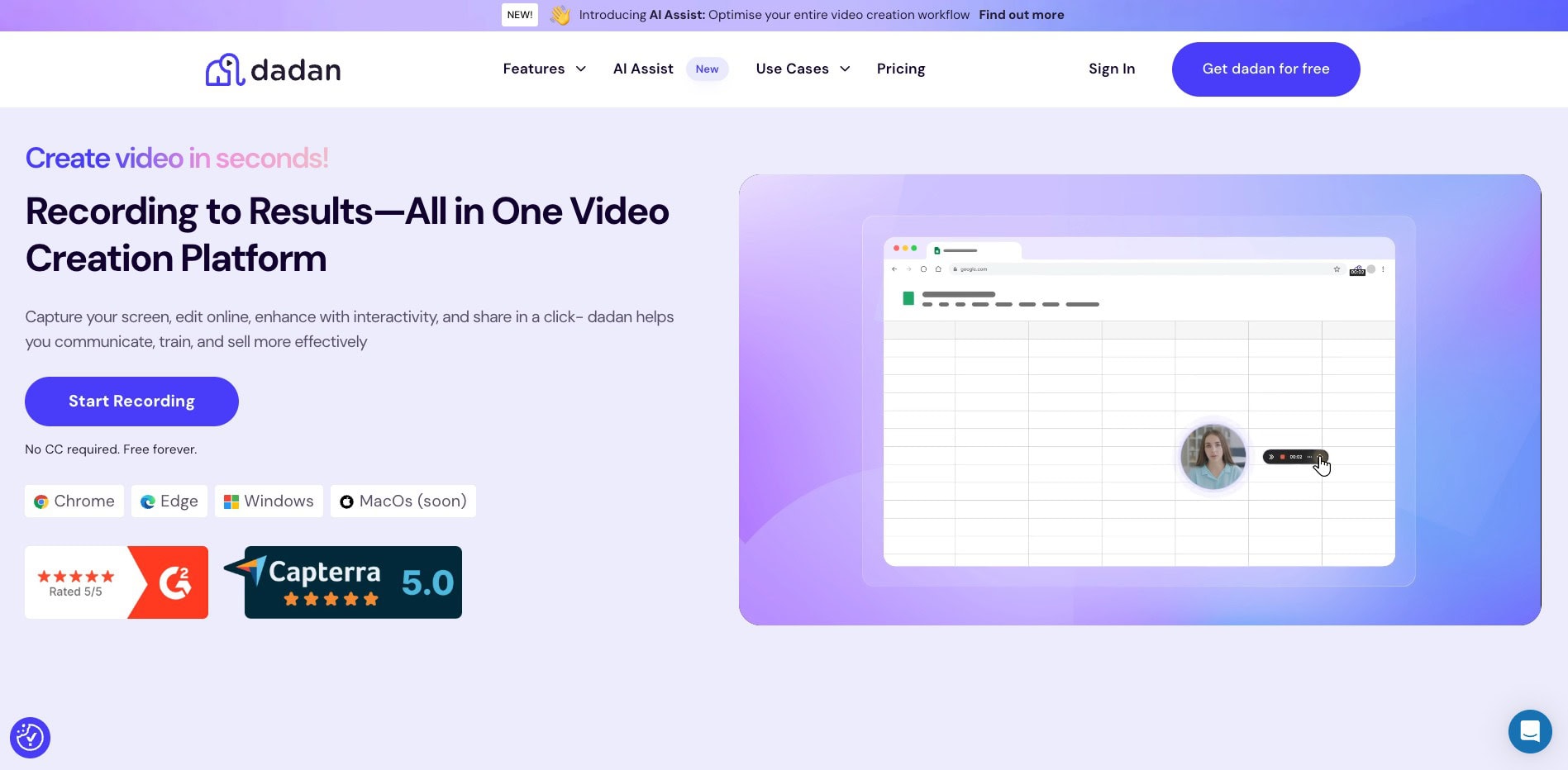
Its unusual name is inspired by the ancient city of Dadan, featuring a rock carved in the form of an elephant. Their vision is to create a timeless and intuitive tool to empower people to think, create, and share ideas effortlessly.
Dadan Review Video
If you’re not much of a reader, here’s a video review of Dadan AI. It’s in the Hindi language with English subtitles. Hope you enjoy watching!
Dadan User Interface
The user interface of Dadan AI is decent. As you log in to the dashboard, you will get a list of your created videos. The left panel features a button to create new videos and multiple tabs to access your playlists, shared videos, archived videos, etc.
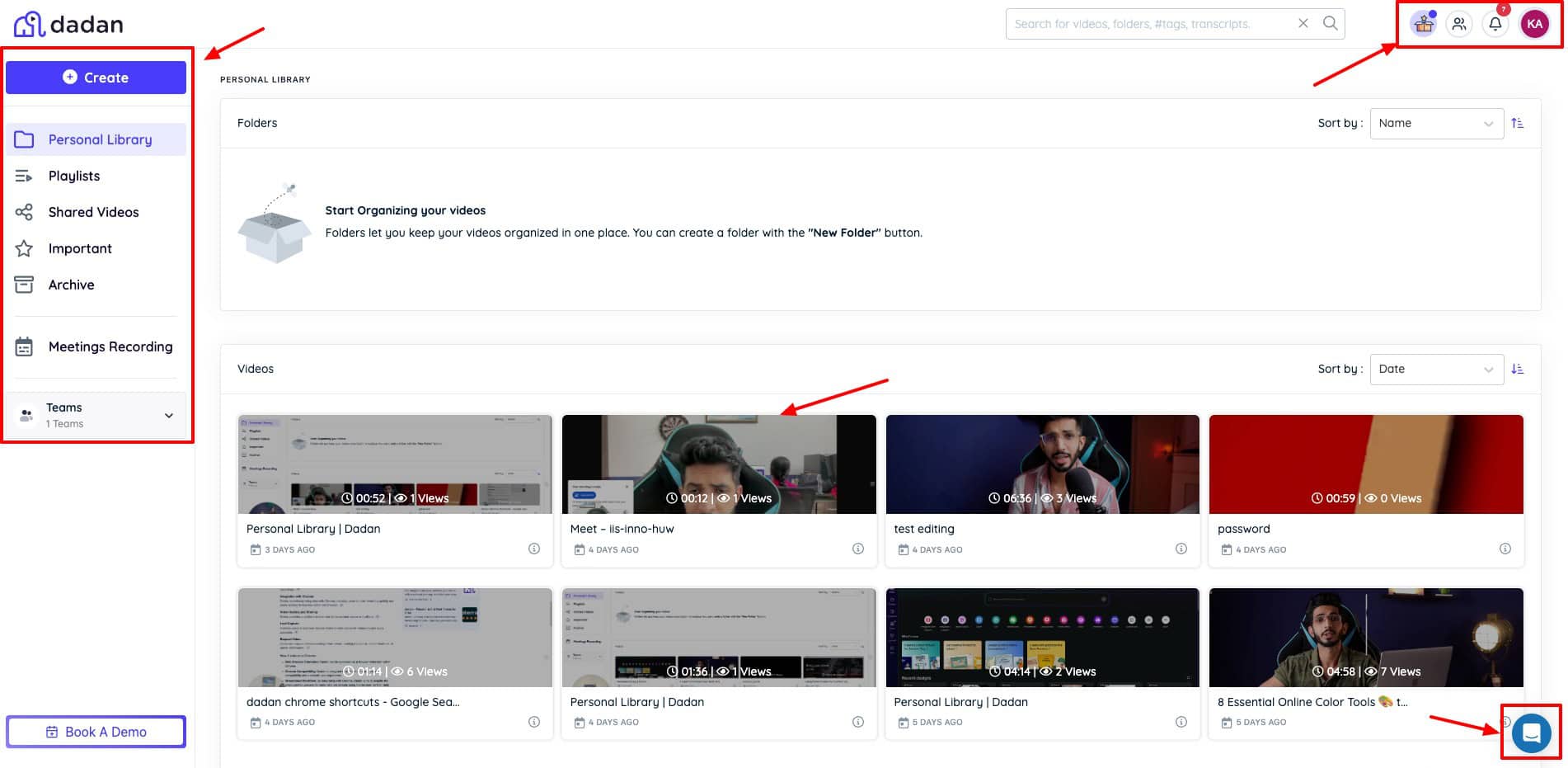
From the top right, you can access notifications, account settings, updates, and team joining requests. Finally, you can access customer support from the button on the bottom right.
However, the video editing interface is pretty slow to load. It takes a lot of time to access basic elements and features. I wish they would improve their video editing dashboard soon.
Key Features of Dadan
1) Screen and Webcam Recording
The most striking feature of Dadan is its screen and webcam recording. You can use it through its web app, browser extension, or Windows app. I personally find it way more convenient to use the Chrome extension.
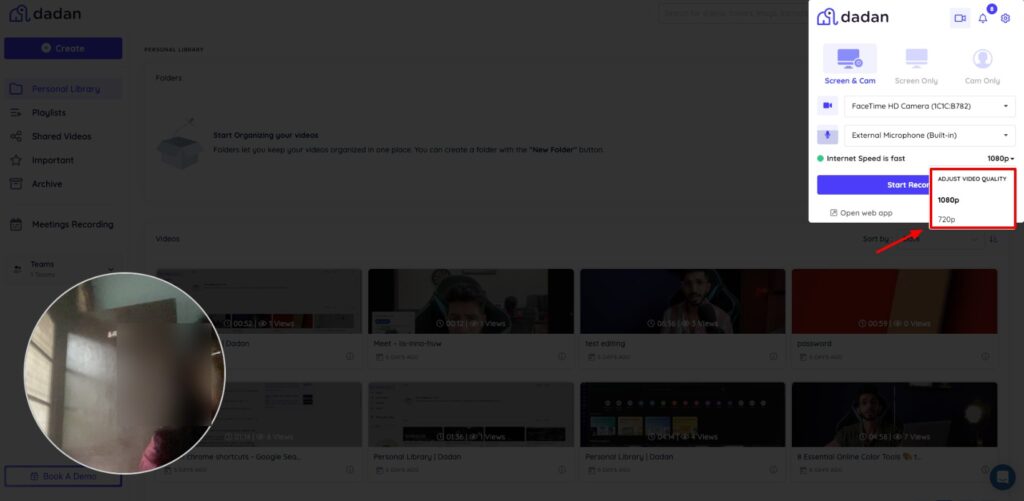
The extension’s interface is like other screen recorders. You get options to select if you wish to record your screen, camera, or both. What makes Dadan stand out is its video quality. It lets you record in 720p, 1080p, and even 4K if your device supports it.
If you enable the screen and webcam recording option, Dadan lets you drag your camera anywhere on the screen. You can also resize the camera icon and switch between square and circle shapes.
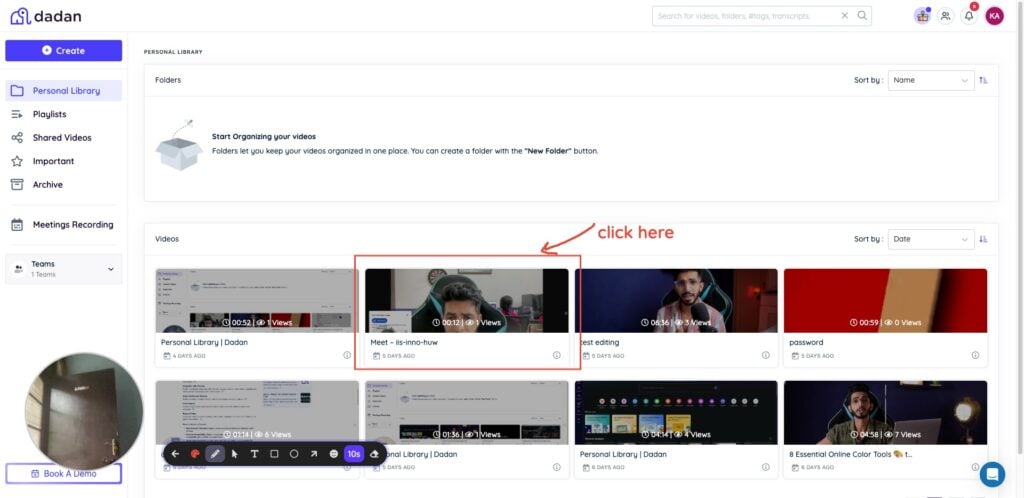
There are live annotation options as well! So, while your video is recording, you can add text or shapes and draw on the video with the pen tool. The annotation options are surprisingly smooth. However, there are no shortcuts to enable them right now.
Once you stop recording, the video is instantly uploaded to the cloud, and you get a shareable link for it. Overall, the video quality is impressive.
2) AI Features
Once your video recording is complete, you can find a range of AI-powered features and interactive elements beside your video. Let’s check them out.
AI Transcription
You simply need to choose the language your video is made in. Dadan AI will transcribe it accurately. It supports 30+ languages right now.
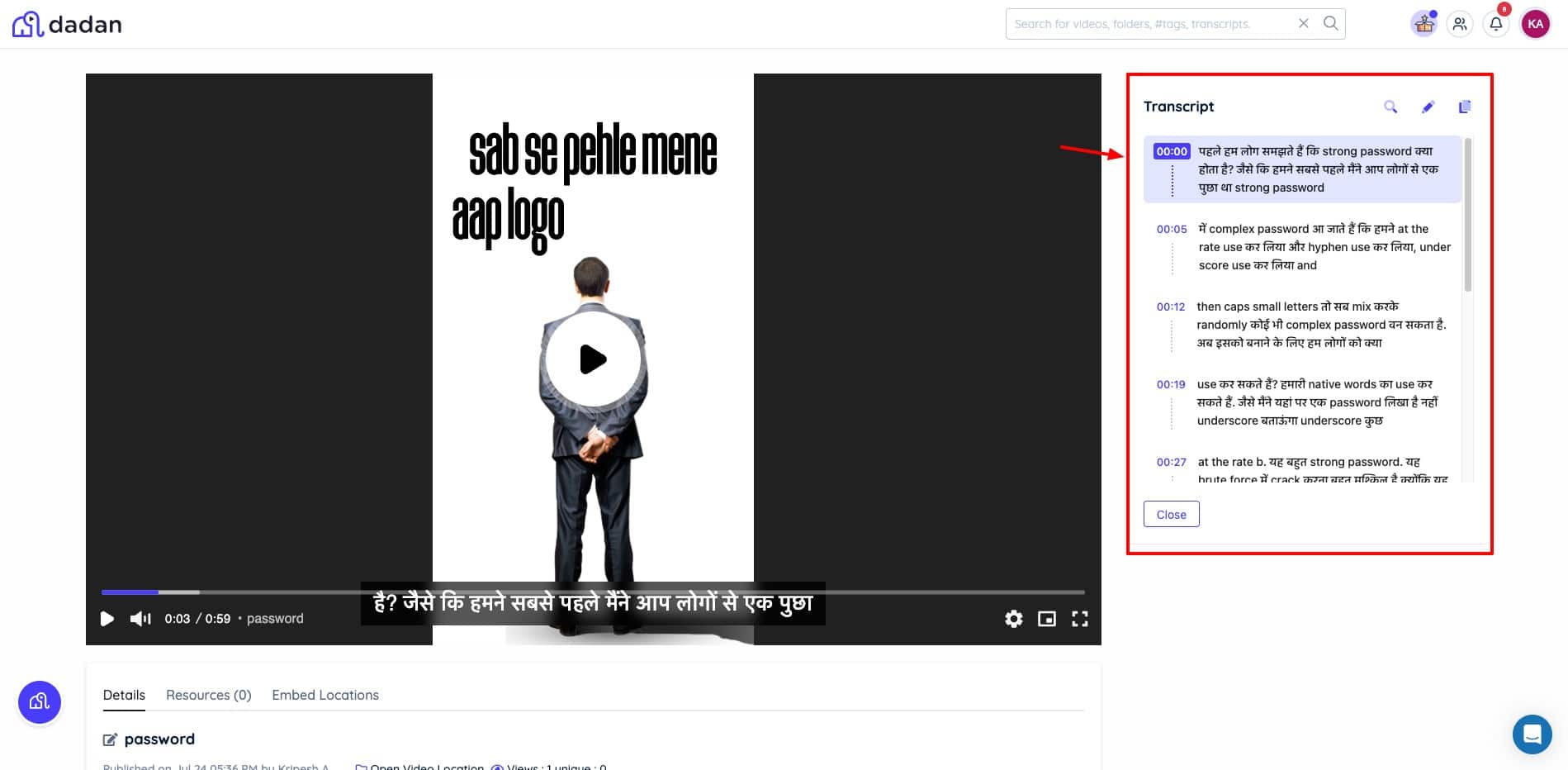
Interestingly, when I transcribed my video made in a mix of English and Hindi, it generated a Hindi transcript keeping the English words in English font. This shows how powerful its AI transcription is. Based on your transcript, you can implement the other AI tools.
However, the only drawback is that all the AI tools will adapt the language of the transcript itself. I wish there were an option to change the language for other AI tools.
AI Video Title
Clicking on the title generates 1 AI title for your video. You can accept or generate another. Accepting it will automatically add it to the video title.
AI Video Tags
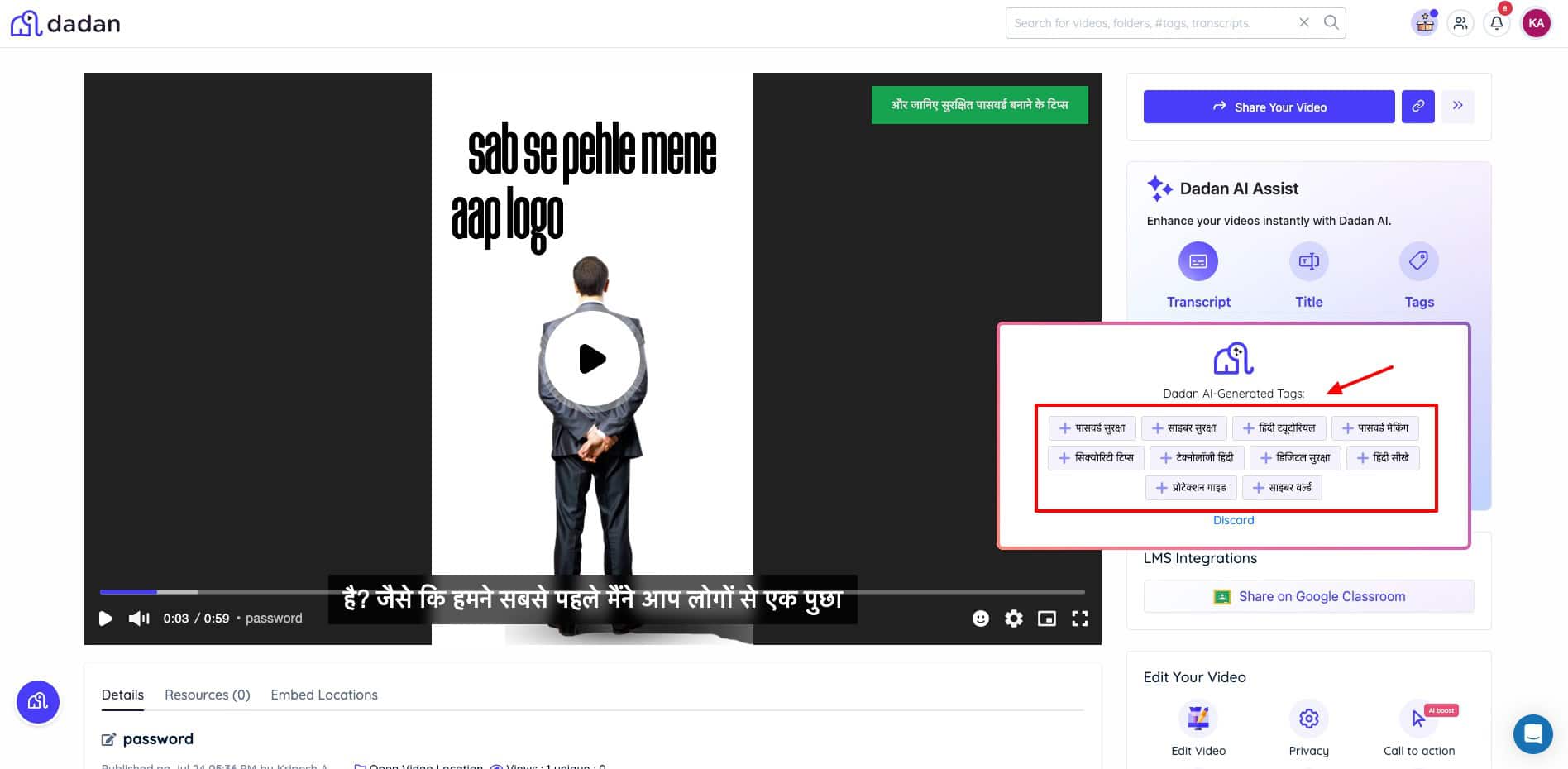
It analyzes the transcription and offers a list of relevant tags to use. You can click on a tag to include it. The suggestions are very relevant.
AI Video Description
This tool gives you a short description of your video based on the transcript. If you’re not satisfied with the description, you can regenerate it.
AI Summary
This generates a video summary with AI. It’s like a page-long document with important pointers from the video.
AI Translation
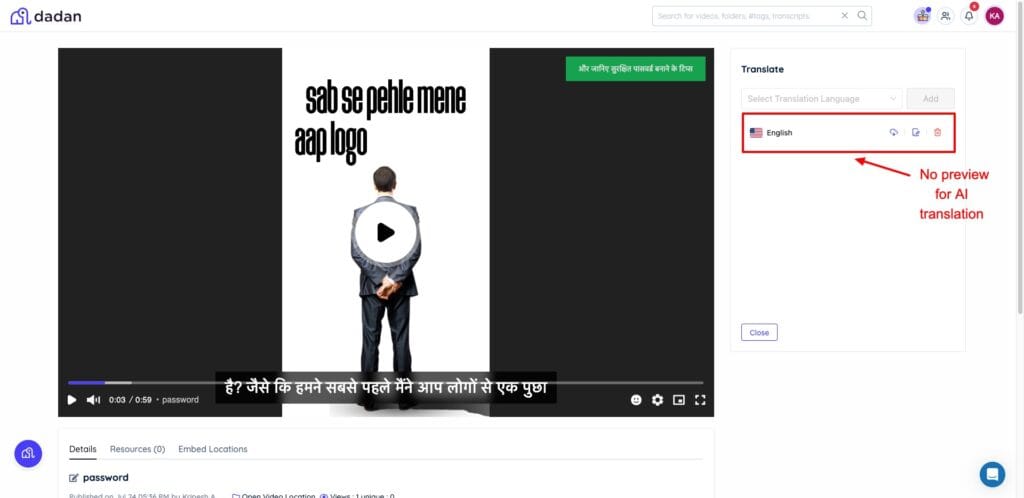
If you wish to translate your video into a different language, you can do so with AI. Simply select a language, and it will translate the transcript of your video into that language. You’ll find it when you enable the video captions. The translation is decent, but it could’ve been better.
Also, you cannot preview your translation. You can only export it. I wish there were an option to view your translation before downloading it.
AI Note Taker
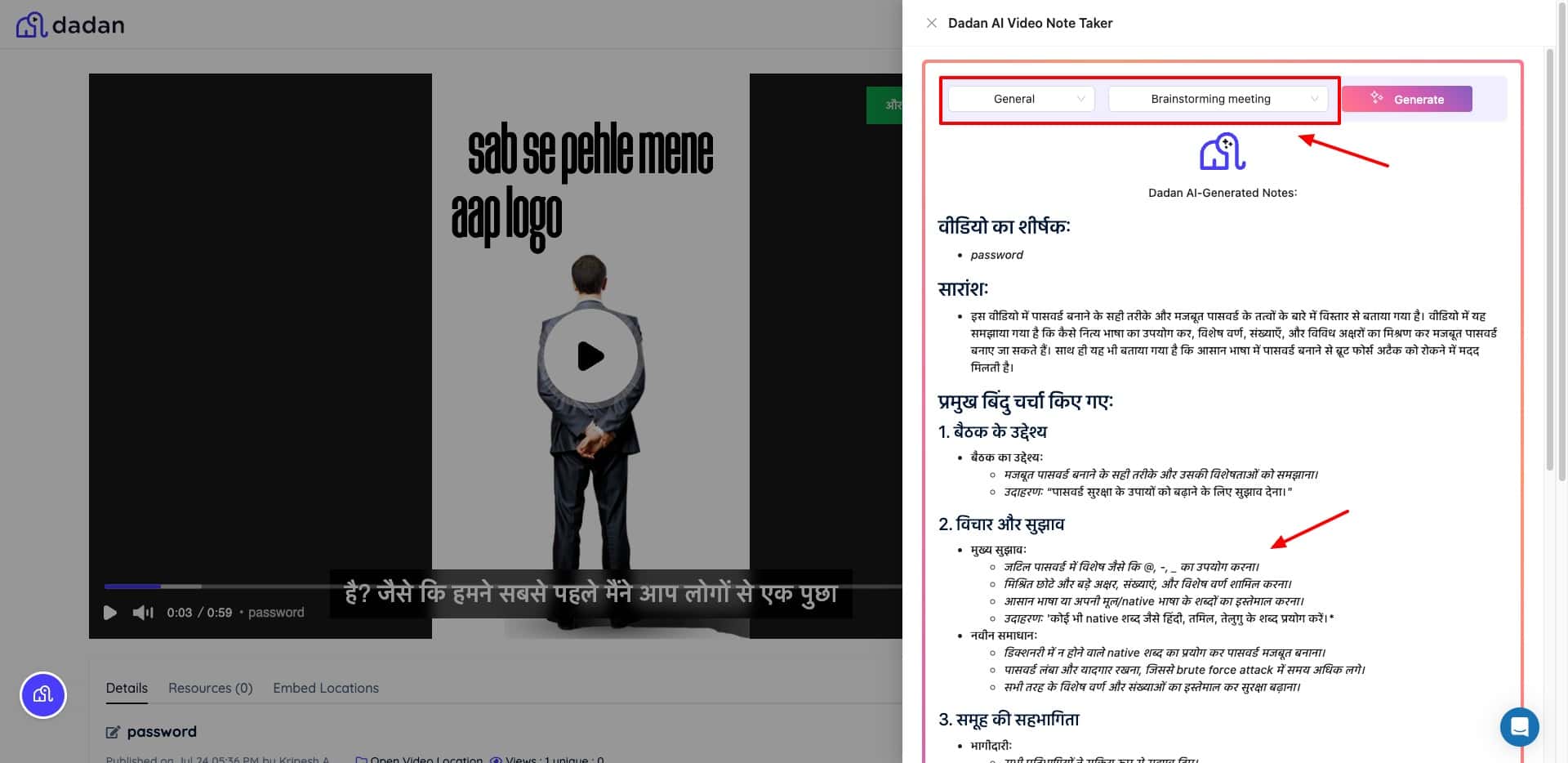
If you want to create notes out of your video, use Dadan’s AI Note Taker. Simply select your use case category (HR, Sales, General, etc.) and the type of meeting notes you want (minutes of meeting, job interview, business review, feedback call, etc). It generates insightful notes as per the required fields and sections.
3) Interactive Elements
This is where Dadan truly differentiates itself from tools like Loom. You can embed interactive elements directly into your videos. These aren’t just overlays; they’re integrated experiences that viewers can engage with while watching.
Quizzes and Questions
You get 6 types of interactive elements to keep the viewers engaged – quiz, poll, true or false, rating, content, and open-ended question. You can also use AI to generate these interactive elements. All the interactive elements function really well.
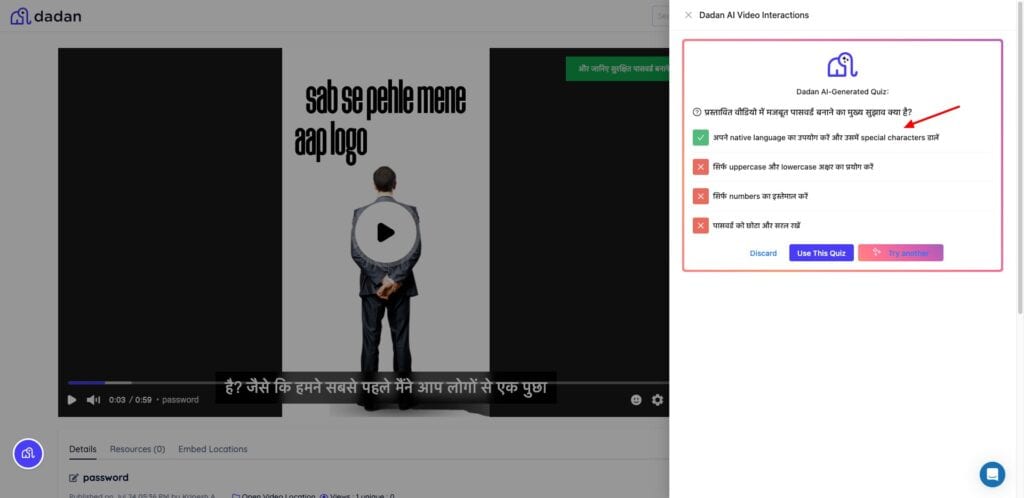
I liked the quiz options. If you are creating a tutorial video, you can use quizzes that pop up at the right time to test learners’ comprehension.
In-Video Leads
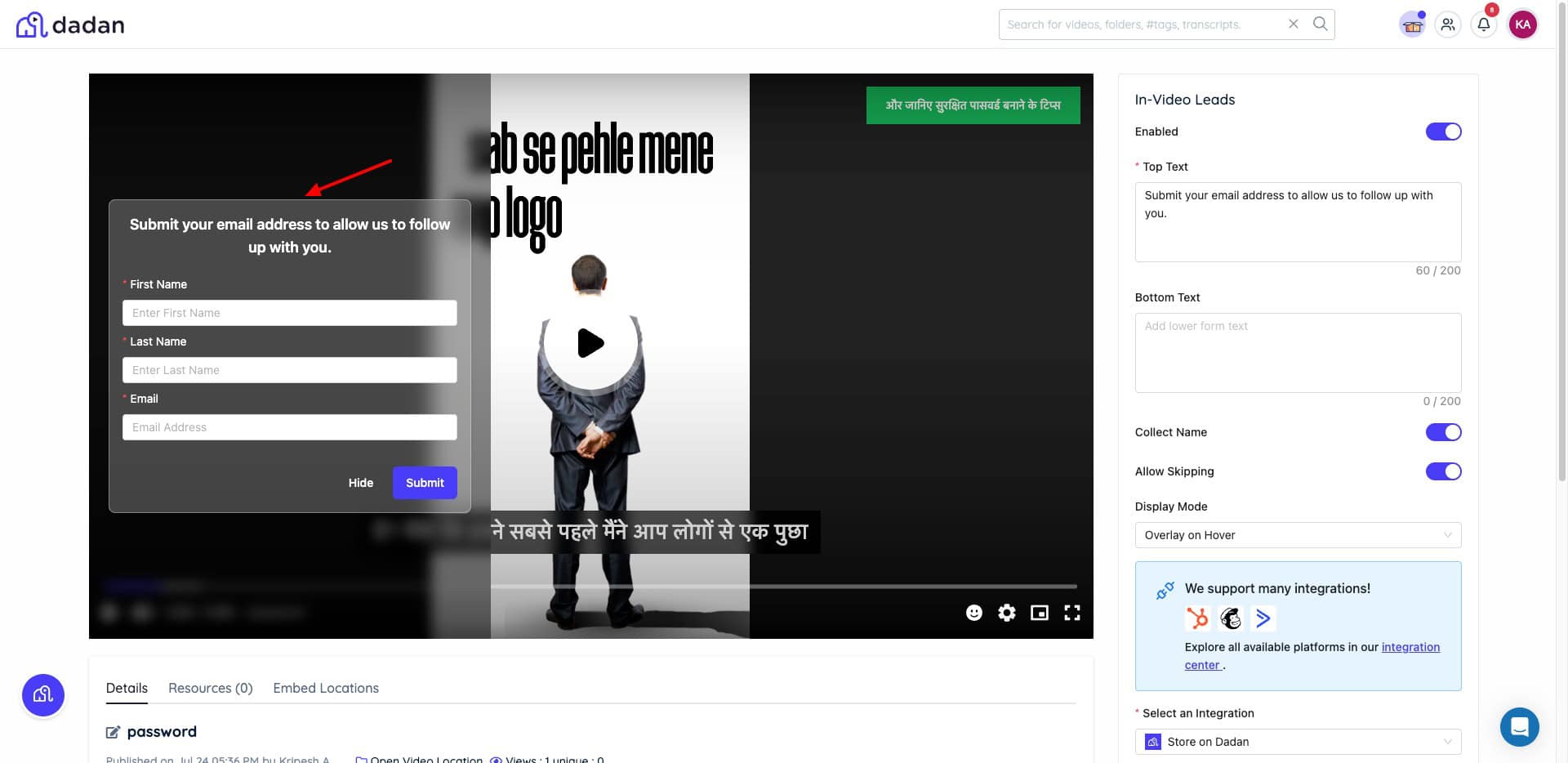
In-Video leads simplify lead collection. It displays a form as an overlay on your video. You can collect the viewer’s first name, last name, and email with it. Then, you can integrate with email marketing tools to re-target them later. This is great for building product demos. You can seamlessly collect emails.
Call to Action
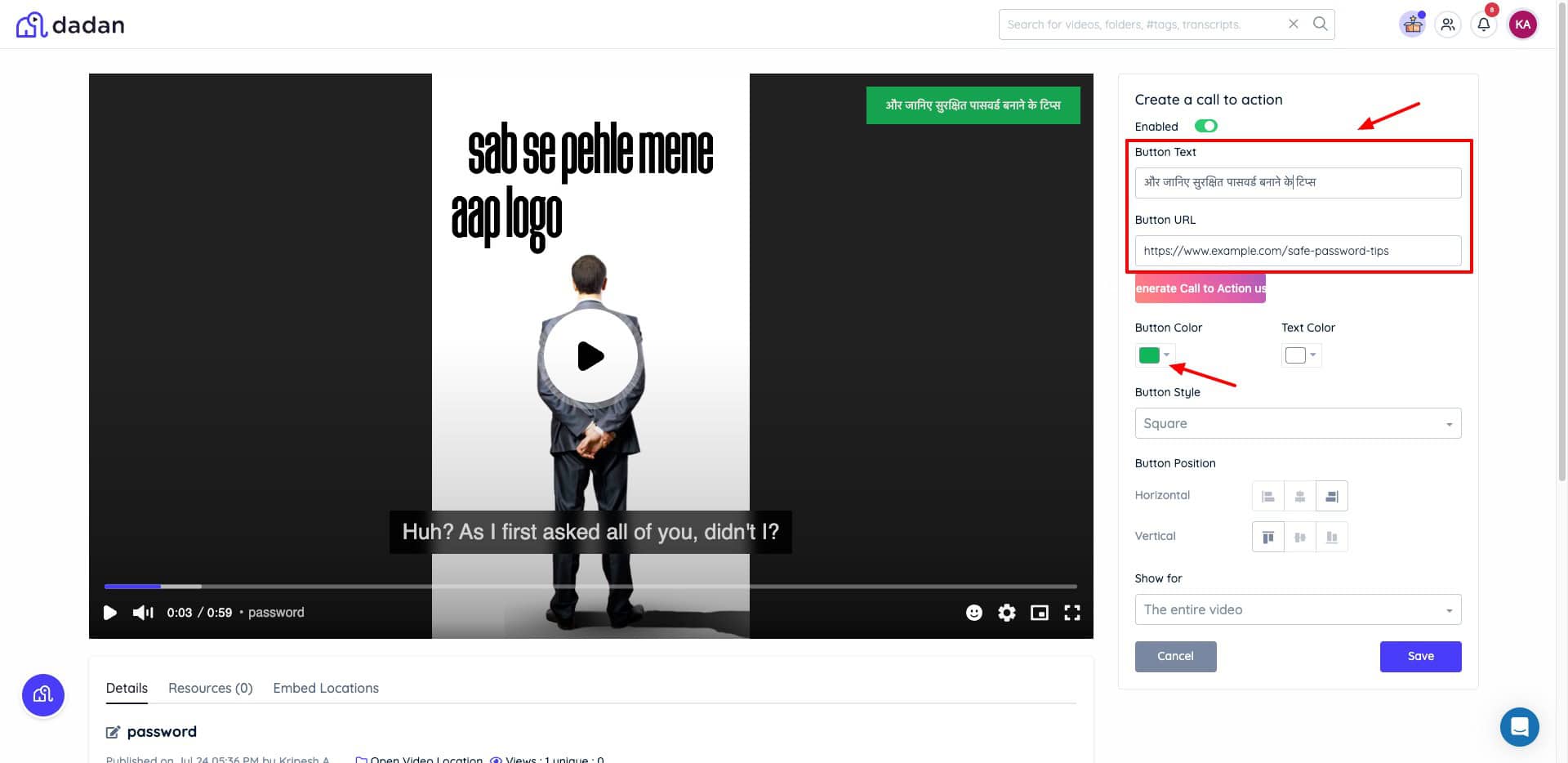
Under the CTA button, you can add any URL to be displayed as a button on your video. You can also specify button text, position, button color, and the time duration you want it on the screen.
Video Chapters
If your video comprises multiple sections, you can use the Chapters element. It automatically generates chapters from your video.
Time-stamped Feedback
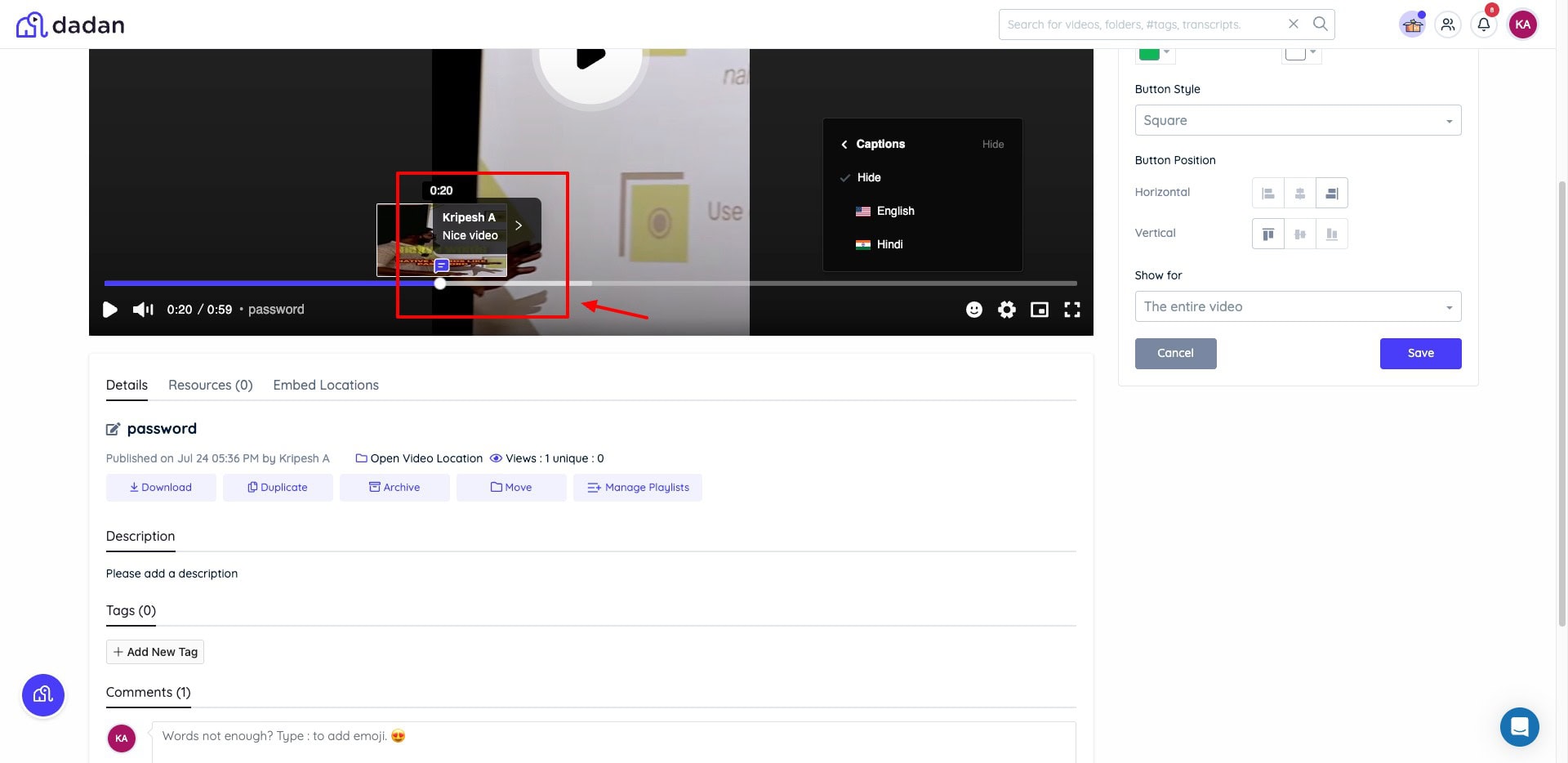
To add feedback or comments to any video, just place your cursor at a specific video duration. Then, post your comment. It will be displayed as a time-stamped comment on the video timeline.
4) Video Editing
Dadan AI also has a built-in video editing interface. It edits the video locally, which makes it quite fast. It feels like a simplified Canva with basic features. You can add elements like emojis, stickers, and shapes. You can insert text elements that feature 15 fonts.
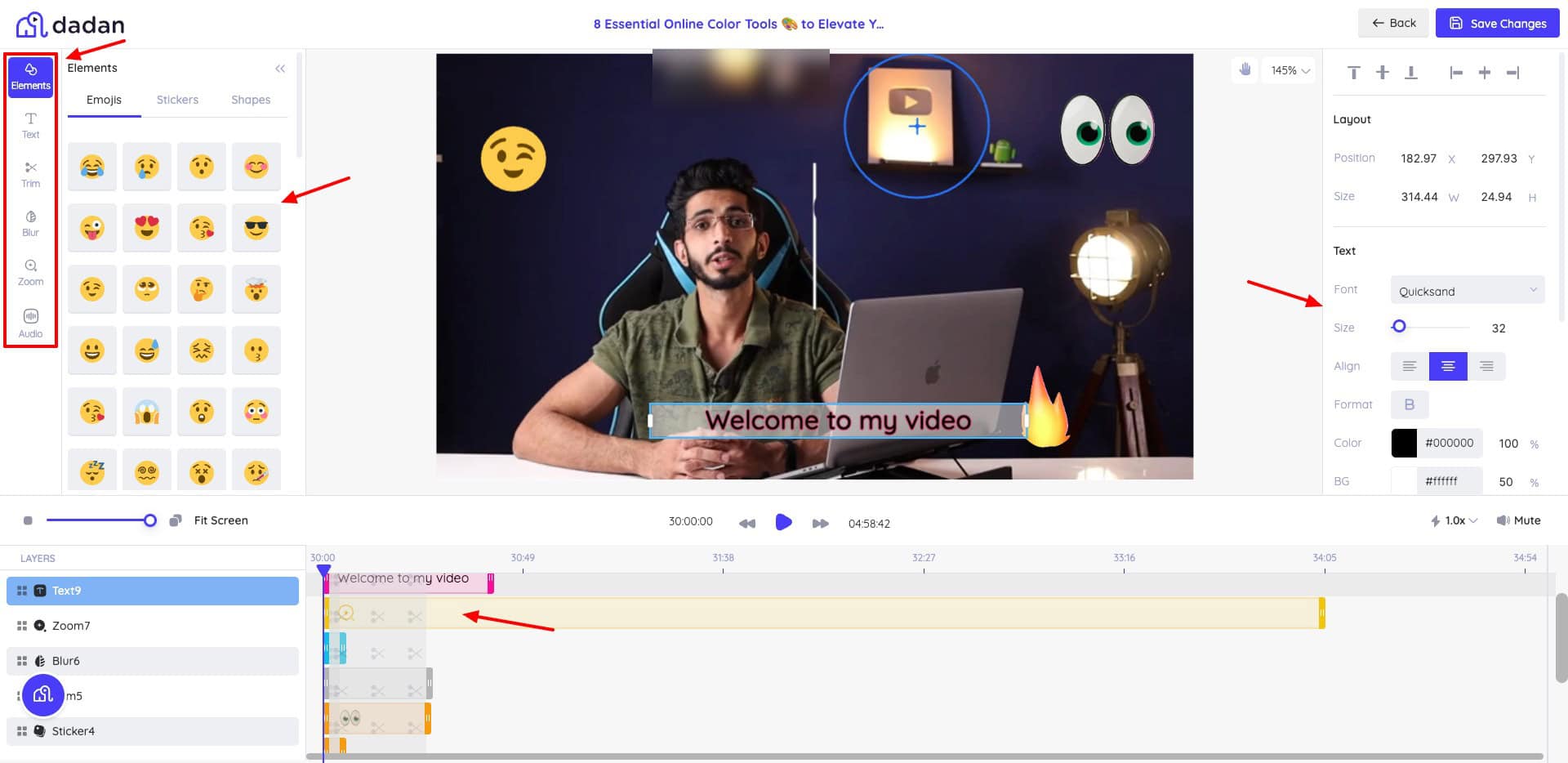
The trim option lets you cut specific parts from the video. The blur option places a blurred box on your screen to hide sensitive details. Similarly, you can zoom into any part of the video with the Zoom button, and control volume settings using the Audio button.
The video timeline is displayed at the bottom. You can view all the elements and effects added to your video and adjust their duration from the timeline. Overall, you get all the basic editing features in Dadan’s video editor.
5) Video Sharing
Dadan features multiple options for sharing your videos with others. Let’s look at the options available.
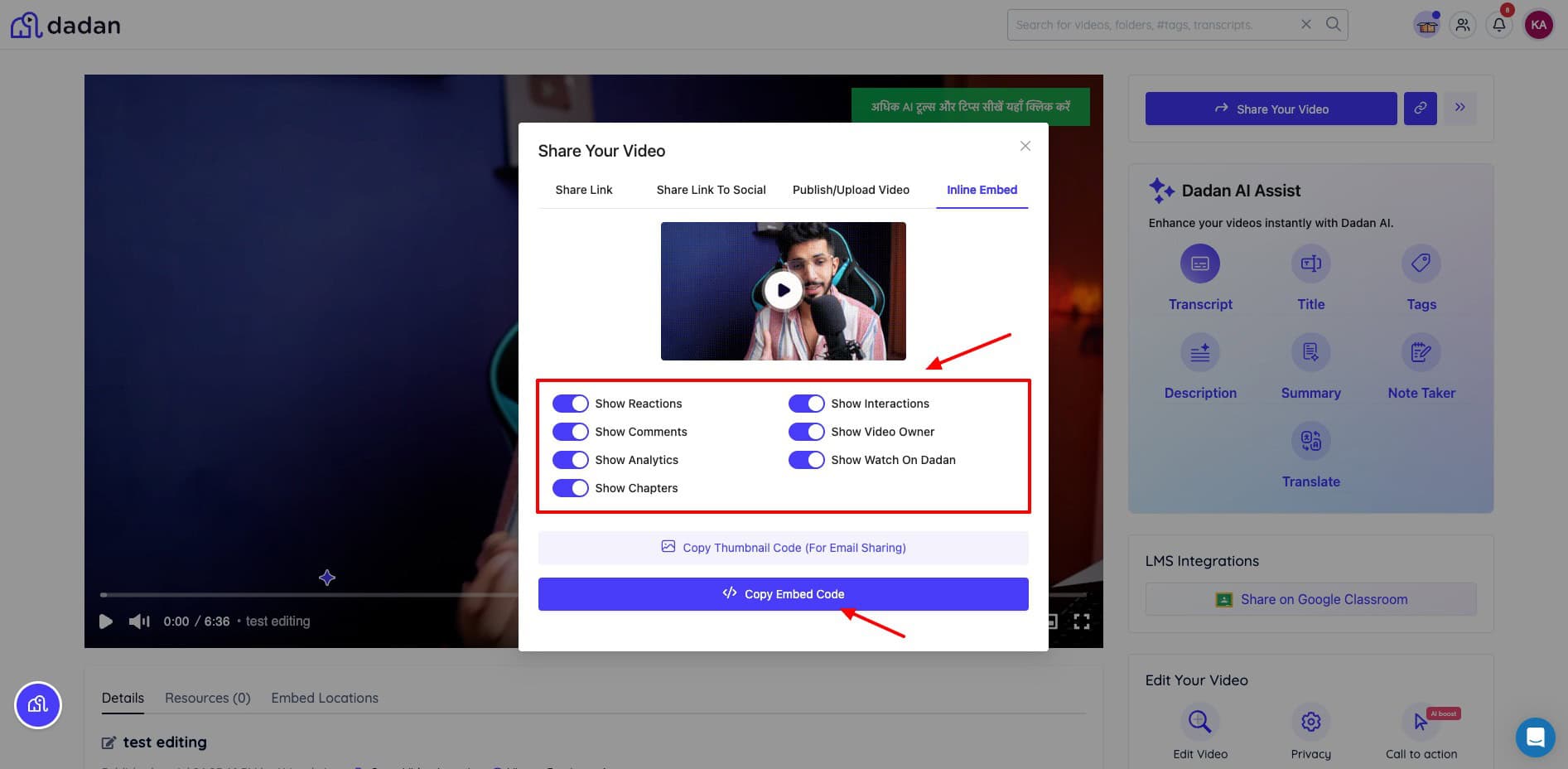
- Public link: It’s generated as soon as you record and save your video. You can share your video with anyone via a public link.
- Socials: Share to socials by connecting your social media accounts. It supports Facebook, WhatsApp, LinkedIn, X, and Gmail.
- Upload: You can also directly upload to YouTube, LinkedIn, Slack, Dropbox cloud storage, or Shopify.
- Embed: If you want to embed your videos into a website or app, Dadan offers embed code as well.
Dadan also employs various security features while sharing videos via public links. Keep reading to find out what they are!
6) AI-Powered Meetings
This is one of my favorite features. If you have a meeting scheduled but are unable to join it, you can paste the meeting link on the Meetings Recording tab. Dadan’s AI note taker will join the meeting and summarize what happened in the meeting with detailed notes.
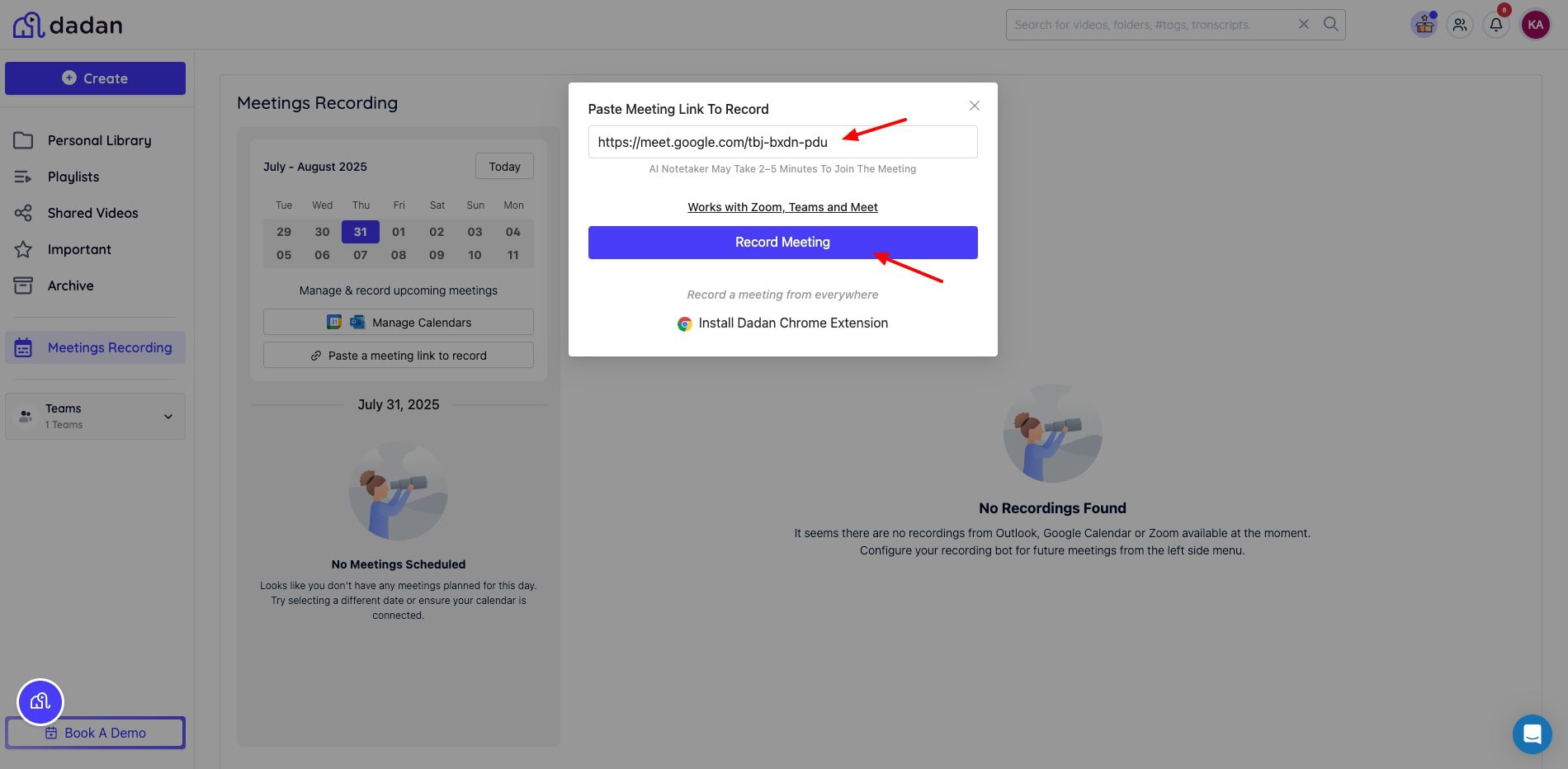
It can also translate your meetings for you. It works across MS Teams, Google Meet, and Zoom. This is a really helpful and time-saving feature for busy professionals.
Additional Features of Dadan AI
Integrations
You can also connect a range of apps and services to Dadan AI to simplify your workflow. Let’s look at the integrations it supports for different categories.
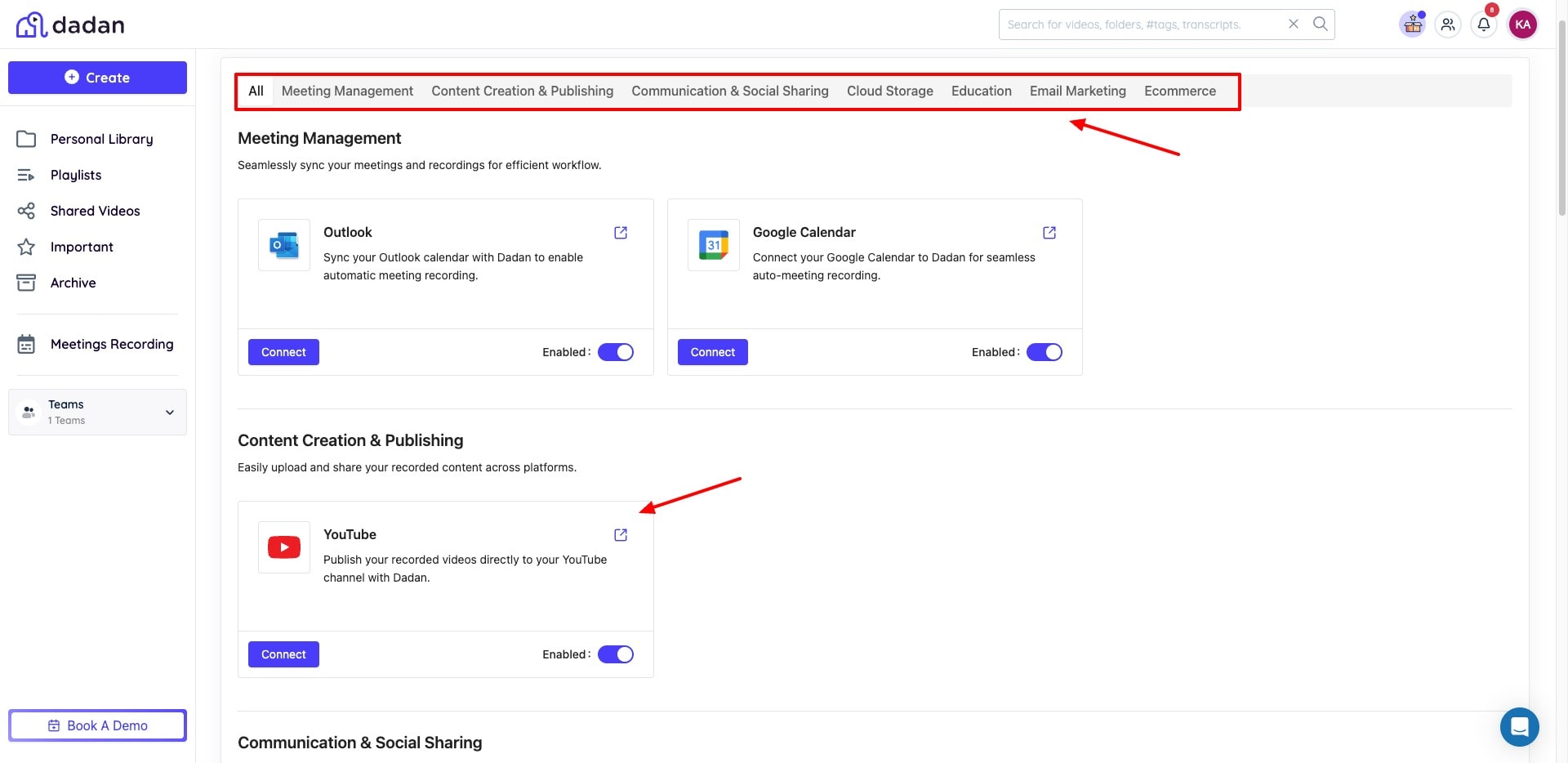
- Meetings: Outlook, Google Calendar
- Content Creation: YouTube
- Communication: LinkedIn, Slack
- Email Marketing: Brevo, MailerLite, GetResponse, Sendfox, Active Campaign, Mailchimp, HubSpot, etc.
- eCommerce: Shopify
- Education: Google Classroom
- Cloud Storage: Dropbox
However, the number of integrations you can enable depends on your plan. For instance, on the AppSumo Tier 1 plan, I can enable only 2 integrations.
Video Storage & Secure Sharing
You can upload your videos to Dadan’s library and organize them into folders and playlists. The upload and download speeds observed were exceptionally fast.
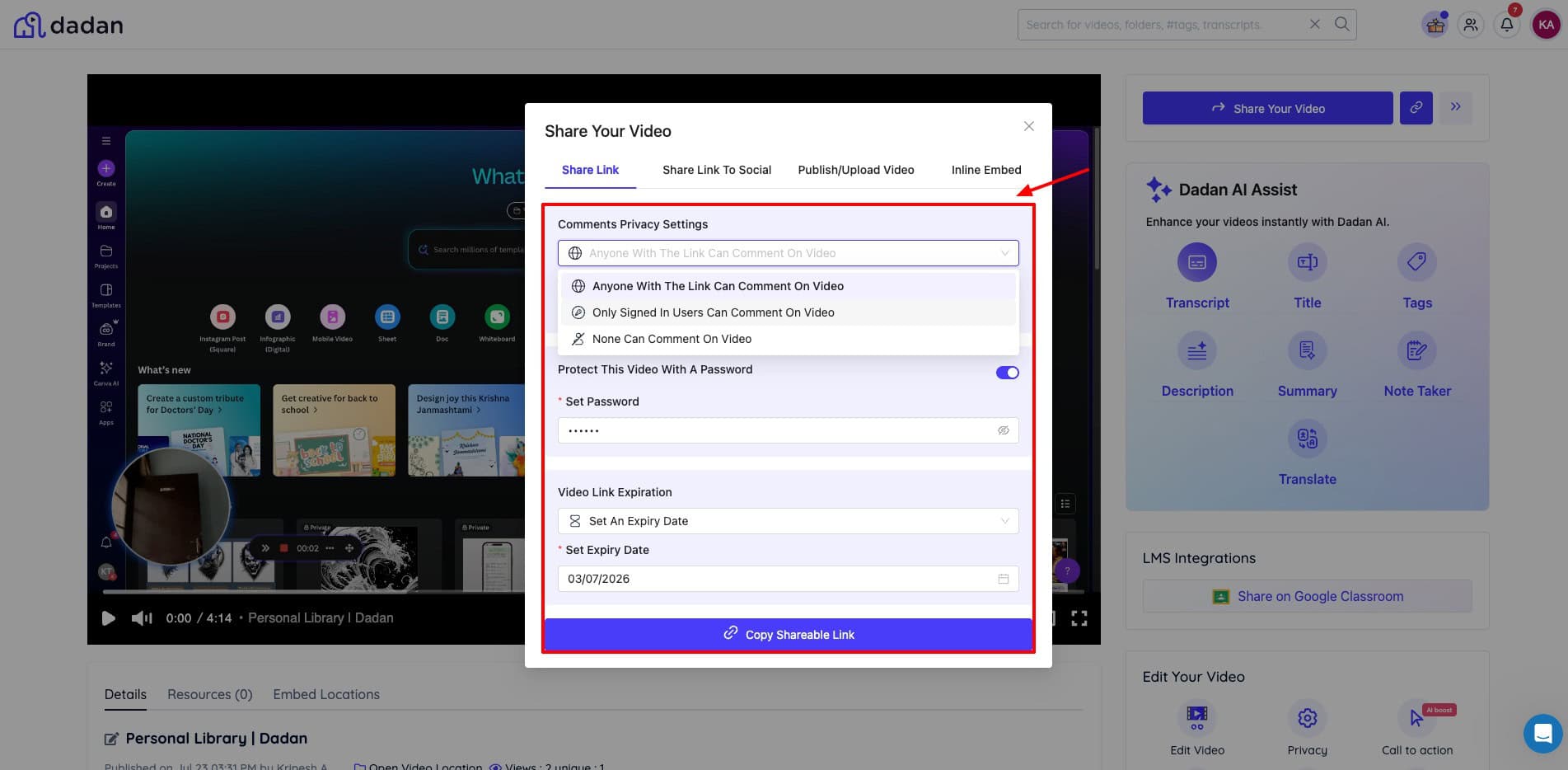
While sharing your video via link, you also get security features like link password protection, link expiry dates, and domain filtering to blocklist or allowlist different URLs. These features help you maintain control over who sees your content.
Video Analytics
Analytics is an important part of video marketing. Dadan AI also lets you view the engagement under each video.
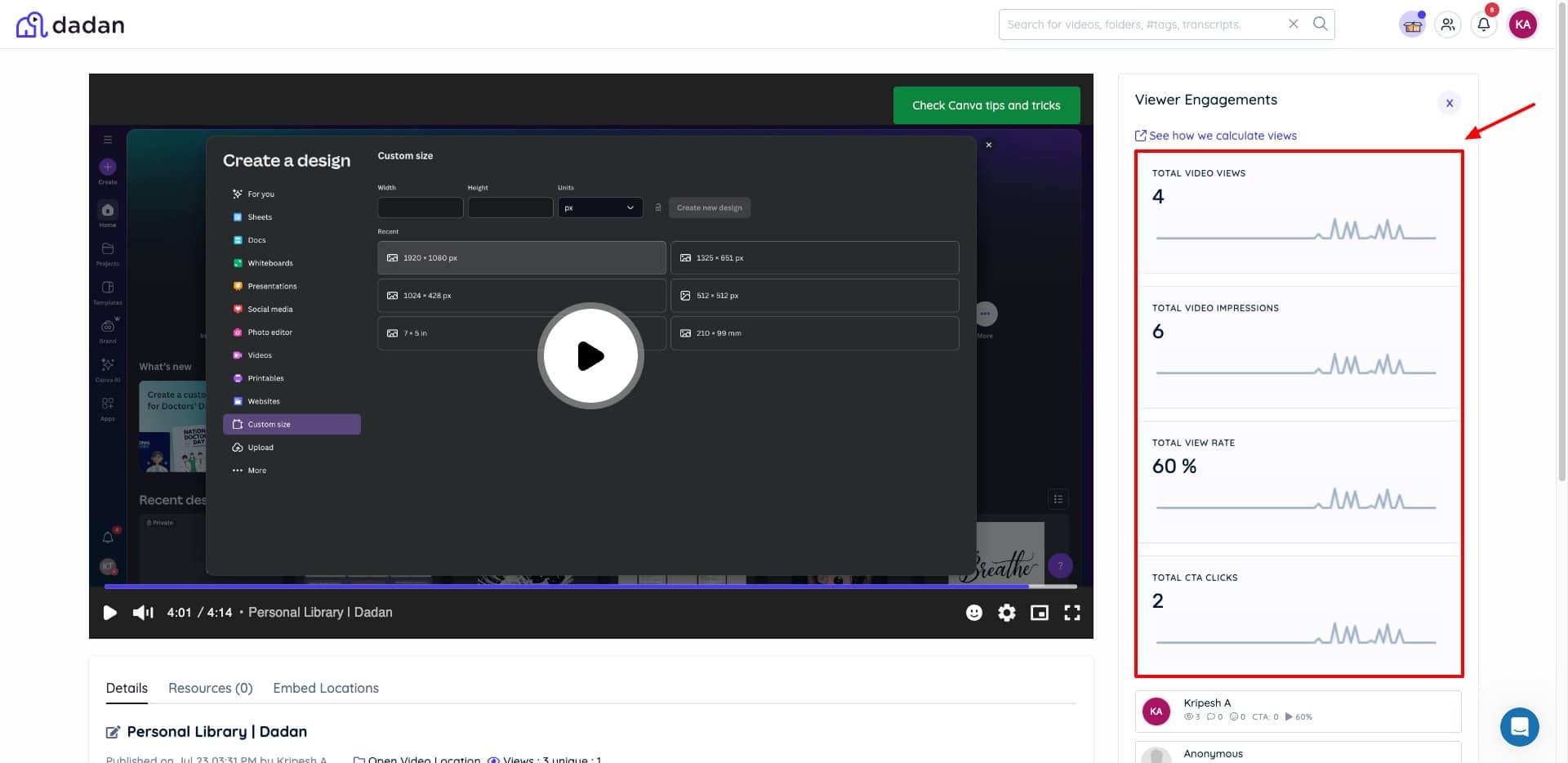
You can check the total number of views on your videos. Additionally, it also allows you to check the total video impressions, total view rate, and total CTA clicks. Based on this data, you can improve your next videos.
Video Recording Request
If you are an educator, a team lead, a support agent, or a recruiter, a large part of your work may revolve around collecting videos from people. With Dadan, it becomes easier.
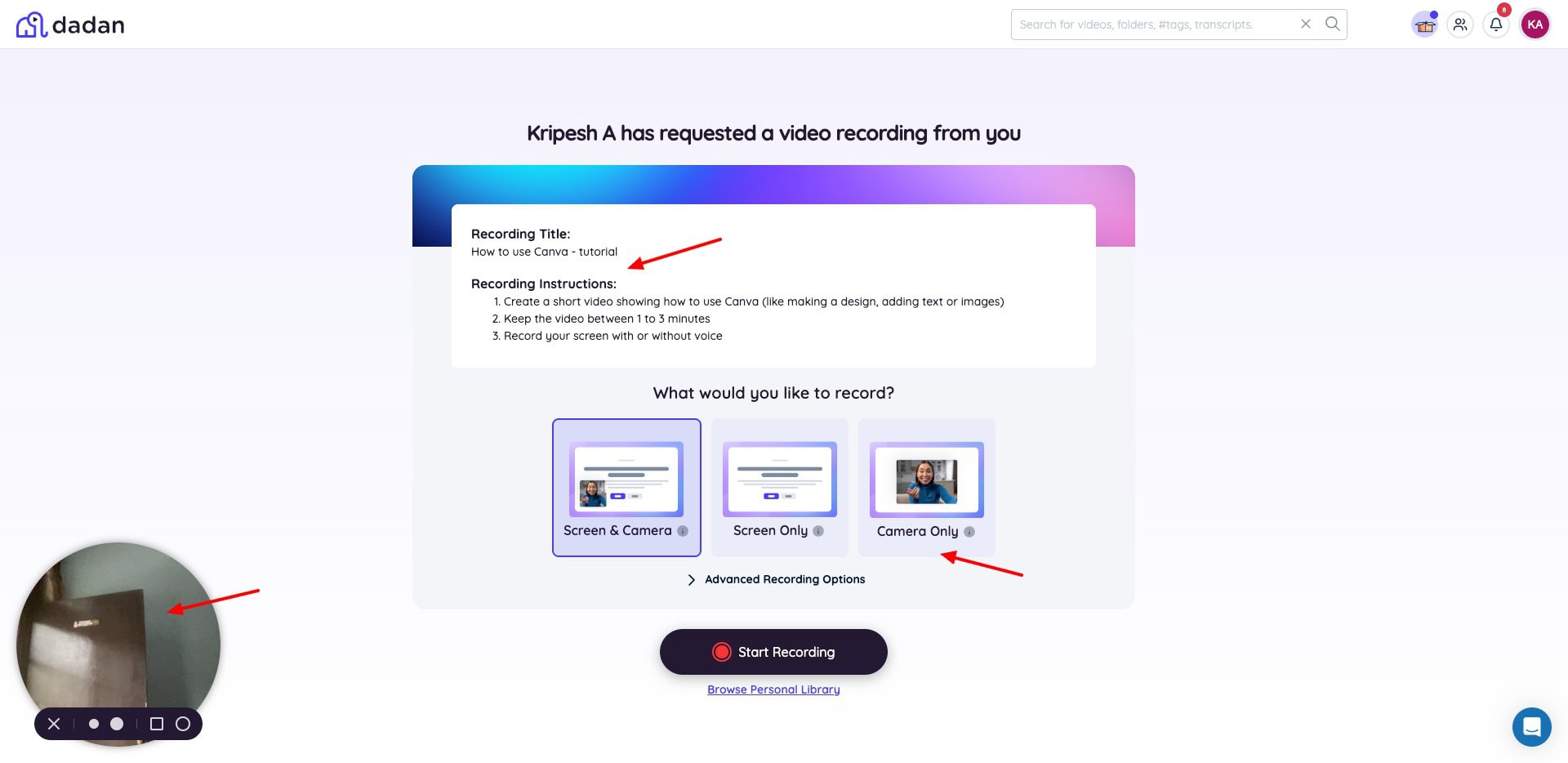
You can create a video request and send it out as a link. The receiver can quickly record a video of themselves and submit it. As they submit it, it will automatically be uploaded to your library. This is a really convenient and time-saving option for collecting video content.
Custom Branding
If you want to customize your videos with your brand identity, Dadan AI makes that possible with a custom branding feature.
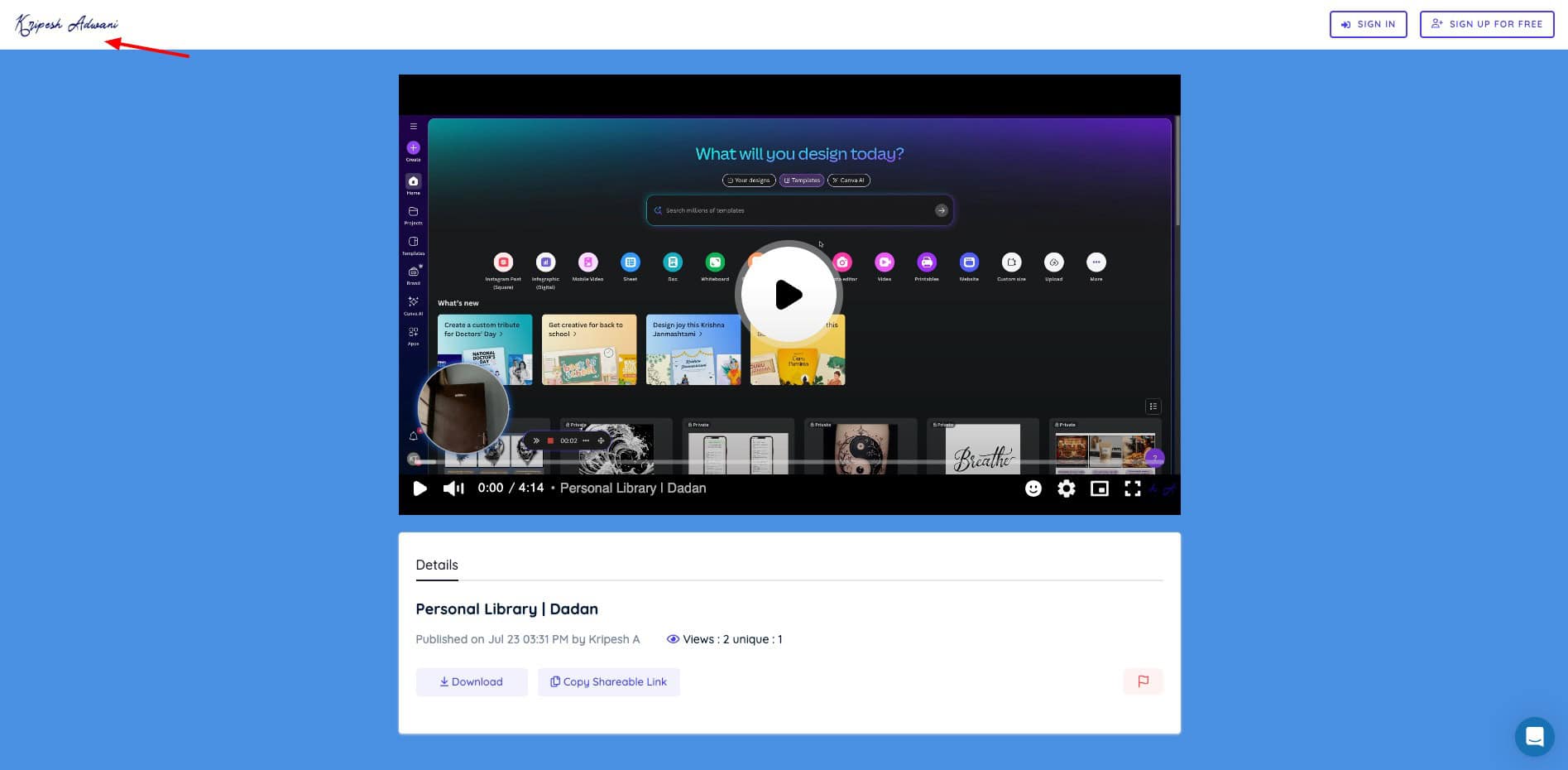
You can find it under Appearance settings, where you can upload your brand logo and choose your brand color. This is great if you wish to highlight your branding in your videos. However, Dadan doesn’t offer white labeling. So, you cannot add your custom domain here.
Dadan AI Apps and Extensions
Apart from its web app, Dadan is also available on various other platforms for your convenience. It has handy browser extensions for Chrome and Edge browsers.
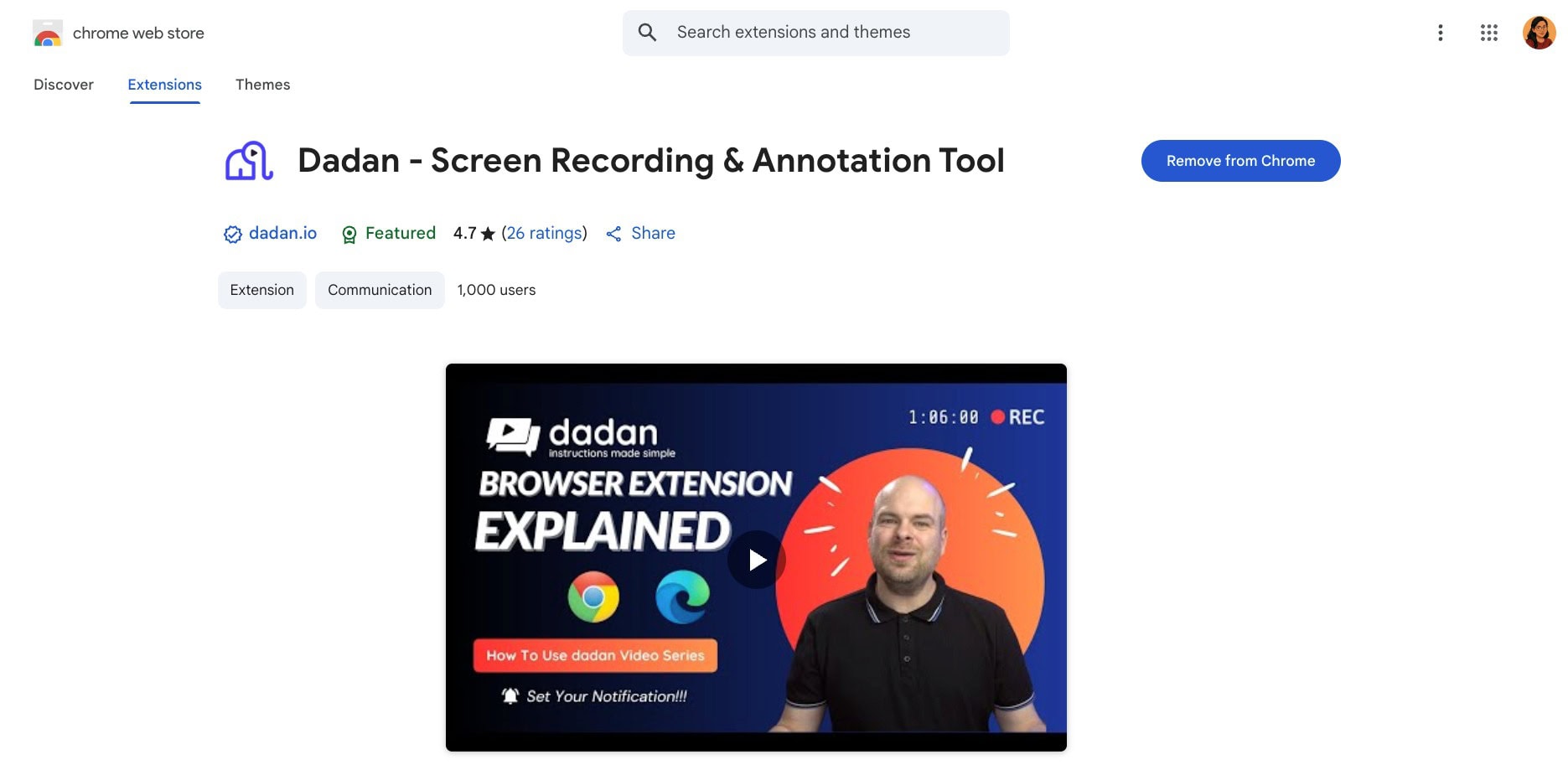
The extension works really well. You can instantly record videos with live annotations to make them more interactive. Additionally, it also has a Windows app. Their Mac app is also about to be released soon.
Dadan Pricing
With its regular pricing, Dadan offers a free plan and a Pro plan. The following table contrasts their main features.
| Free Plan | Professional Plan | |
| Pricing (Yearly) | $0/user/month | $8/user/month |
| Videos | 25 | Unlimited |
| Resolution | Up to 720p | Up to 4k |
| Duration | 5 mins/video | Unlimited |
| Storage | 20 GB | Unlimited |
| Screen Drawing | Yes | Yes |
| Video Downloads | Yes | Yes |
| Advanced Editing Suite | No | Yes |
| Advanced Analytics | No | Yes |
| AI Assist | No | Yes |
| Collaborations & Interactions | No | Yes |
Payment Methods
At the moment, Dadan only accepts payments made via credit cards, including Visa, Mastercard, and American Express.
Refund Policy
Dadan offers prorated refunds within 30 days of payment. This means that only the refund amount equivalent to the unused services will be refunded on cancellation within 30 days of subscription.
AppSumo Deal
Right now, Dadan AI is available on an exciting AppSumo Deal. The following table depicts its 3 license tiers with their pricing and features.
| License Tier 1 | License Tier 2 | License Tier 3 | |
| Pricing | $59 | $129 | $299 |
| Users | 1 | 3 | 5 |
| Videos/month | 100 | 200 | Unlimited |
| Minutes/video | 60 | 120 | Unlimited |
| AI Transcriptions/mo | 120 | 300 | 600 |
| AI Translations/mo | 60 | 120 | 300 |
| Integrations | 2 apps | 5 apps | Unlimited |
| Storage | 50 GB | 100 GB | Unlimited |
| Upload Size Limit | 2 GB per file | 5 GB per file | 25 GB per file |
If you’re into course creation, education, or marketing, you should definitely try this deal! AppSumo deals also have an extended refund policy of 60 days. So, if you’re not satisfied with your purchase, you can return it within 2 months of purchase and get your entire amount back.
Dadan Customer Support
Talking about support options, Dadan AI features a basic knowledge base where you will find answers to all your generic queries around recording, editing, sharing, collaboration, and more.
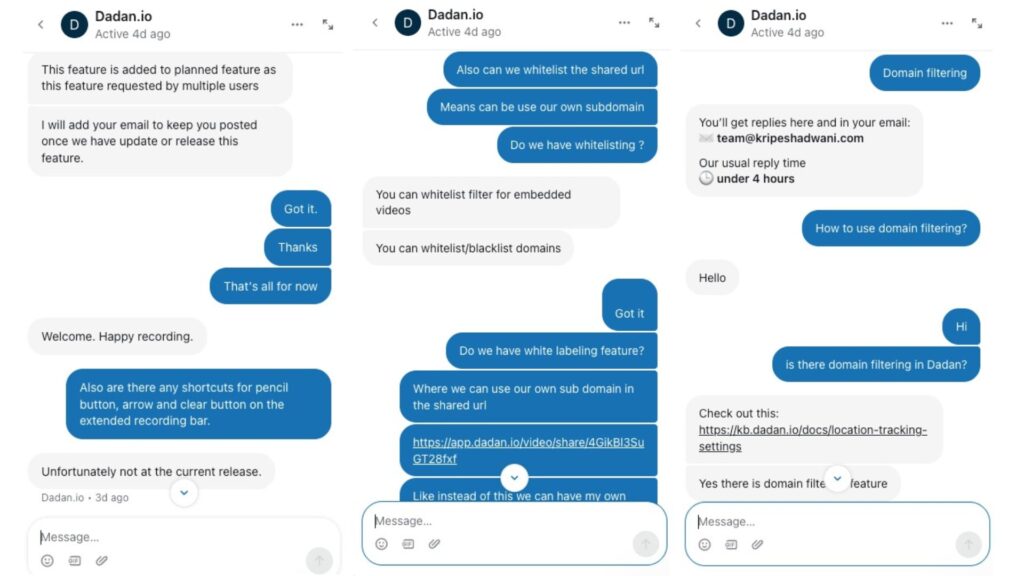
Besides that, it also has live chat support that’s helpful and polite. I really had a good experience connecting with their customer service. They resolved my queries quickly.
Dadan Pros
1) All-in-one Solution
Dadan looks like a true all-in-one solution for your video needs. It offers not only impressive recording features with 4K support but also powerful AI tools. It is the ideal Loom alternative.
2) Strong AI Capabilities
It features a range of AI-powered tools to generate transcriptions, translations, AI notes, titles, tags, and more. I was impressed with the accuracy of its transcriptions.
3) Unique Interactive Elements
It’s also equipped with lots of interactive elements like CTA buttons, quizzes, in-video leads, and more to engage your audience.
4) Attractive Lifetime Deal
Right now, Dadan is available as a lifetime deal on AppSumo for just $59. With this deal, you can create 100 videos/month and 120 AI transcriptions. This is pretty good for anyone whose work revolves around video recordings.
5) Video Cloud Storage
Dadan also works as a great video cloud storage solution with advanced controls. As soon as you finish recording your video, it is stored on the cloud.
Dadan Cons
1) Average Interface
I personally didn’t like Dadan’s interface. The icons appear to be too flashy and colorful, as if designed by an amateur. The overall website doesn’t give a professional feel and lacks finishing.
2) Frequent Crashes
I noticed multiple crashes while editing videos and using its AI features. The video editor is also pretty slow and sluggish. I hope they work on improving it soon.
3) No White Labelling
Dadan doesn’t offer white labeling on any of its plans. So, you cannot add a custom domain to your shared videos. It features limited features for personalization, like uploading your logo and color scheme.
4) AI Tools Language Limitations
The AI tools in Dadan AI depend on the video transcription. If you select a particular language to generate the transcript, all the AI tools will generate content in the same language.
Who Should Use Dadan AI?
In my experience, Dadan AI is suitable for the following:
- Marketers, Salespeople, and content creators who need to create video presentations regularly and want to engage viewers with interactive elements.
- Customer support agents that need to demonstrate technical processes, communicate with their team, and solve issues more efficiently.
- Educators seeking to create tutorial videos to explain complex concepts and to receive video submissions.
- Remote teams who wish to create presentations, provide time-stamped feedback, share team updates, etc.
Overall, Dadan AI is a good option for replacing video meetings with video messages. It will save you time and enhance productivity.
Why Should You Trust Me?
I’ve been working full-time in the digital industry since 2015. In all these years, I have used, tested, and reviewed hundreds of digital tools and AI tools. These include web hosting, cloud storage, video hosting, VPNs, password managers, and a range of AI tools.
I’ve also used a range of video recording and video editing tools for my work, like Loom, BerryCast, Awesome Screenshot, Scribe, Premiere Pro, Final Cut Pro, Da Vinci Resolve, etc. This has given me the experience and expertise to recommend the best ones for your requirements.
Conclusion
Dadan AI appears to be a powerful alternative to Loom. It’s a true all-in-one video solution that supports 4K recordings. It also offers lots of interactive elements, good cloud video hosting, and strong AI capabilities with an AI meeting notes generator and accurate AI translations.
It also has a value-for-money AppSumo Deal. However, its UI is poor, with a slow video editor and frequent crashes while editing. Right now, it’s not a completely finished product. But considering the pace at which they are growing, it’ll become a polished product soon.
Overall, if you record videos for training, product demos, presentations, etc, look at Dadan AI. It is best suited for marketers, educators, remote teams, support agents, and anyone who needs to record and edit videos with ease.
Anyway, I hope this review helped you identify whether Dadan AI is a good investment for you. Have you used any other tools like Dadan AI? Do share with us in the comments section below. This is Kripesh signing off. Cheers and keep learning! 🙂

Pros of Dadan (+)
- All-in-one Solution
- AI Features
- Unique Interactive Elements
- Attractive Lifetime Deal
- Video Cloud Storage
Cons of Dadan (-)
- Average Interface
- Frequent Crashes
- No White Labelling