AI Voice Generators have taken the internet by storm! With these nifty tools, the perfect voice for each of your projects is just a click away.
If you’ve been looking for a tool to generate AI-powered voices, you’re at the right place. Recently, while testing out dozens of AI Voice tools for my article on the Best AI Voice Generators, ElevenLabs stood out to me! Thus, I decided to do a detailed ElevenLabs Review.
We’ll begin by discussing the user interface and all the striking features of ElevenLabs. Then, we’ll discover its pricing plans, support performance, pros and cons, and also look at some suitable alternatives.
So, are you ready to dive deeper and discover an innovative and game-changing AI Voice Generator? With no more delay, let’s dive right into it!
ElevenLabs Review
Summary
ElevenLabs offers lifelike voices, multilingual options, and versatile tools for dubbing, cloning, and sound effects, all starting at just $5/month.
However, its music generator, Studio tool, and free dubbing still need polishing. It’s a great choice for YouTubers, content creators, voice artists, and video editors seeking realistic AI voiceovers.
- About ElevenLabs
- How does ElevenLabs Work?
- ElevenLabs User Interface
- Testing Parameters
- ElevenLabs Features
- ElevenLabs Voice Tools
- Tips to Use ElevenLabs Effectively
- Advanced Prompting Techniques
- How Can You Earn With ElevenLabs?
- ElevenLabs Support
- ElevenLabs Pricing
- Will AI Voice Be Monetized?
- ElevenLabs Pros
- ElevenLabs Cons
- Who Should Use Eleven Labs?
- Why Should You Trust Me?
- Conclusion
- FAQs
Disclaimer : I strongly believe in transparency. If you buy using the links on our site, we may earn a small commission without any extra cost to you. This helps me to keep producing honest reviews. Read More >>
About ElevenLabs
ElevenLabs is an American tech research company founded by Piotr Dabkowski and Mati Staniszewski in 2022. They work on developing natural-sounding text-to-speech and voice-generation software by implementing AI and deep learning techniques.
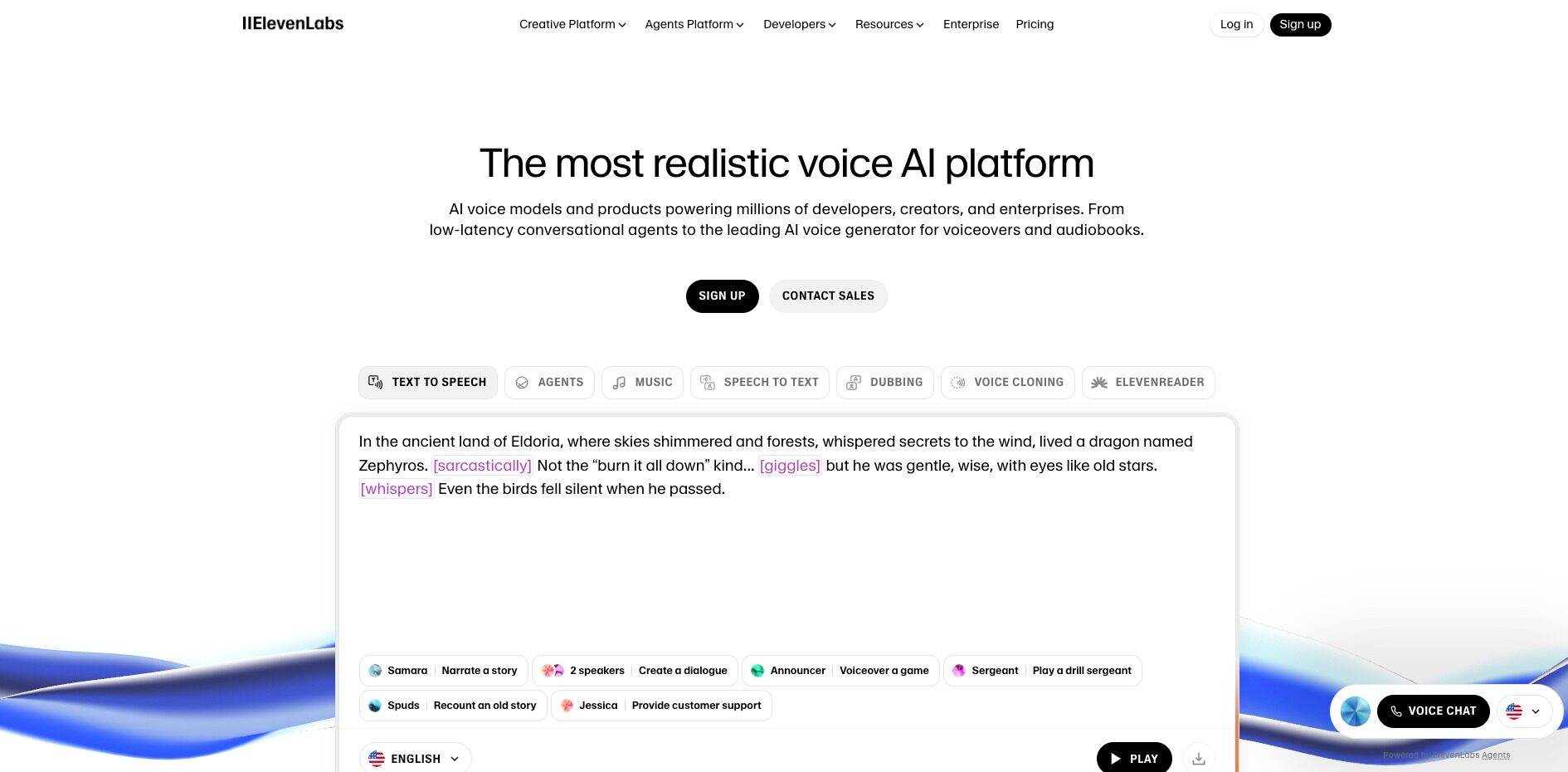
They offer a variety of AI voice tools on their platform. From AI voice generation to voice dubbing, voice changing, and voice cloning, you get everything under one roof! Recently, ElevenLabs raised $80 million in January 2024, making it the latest AI Unicorn!
ElevenLabs aims to break language barriers with on-demand audio translation for all kinds of voices, from education to movies, gaming, and even real-time conversations.
How does ElevenLabs Work?
ElevenLabs is built on a deep-learning model for speech synthesis. First, the AI model is trained on extensive amounts of human speech. This helps it identify and understand the nuances of human language like tones, rhythm, pitch, intonations, and emotions.
Once the AI model is trained on large amounts of data, it can accurately replicate human speech in its natural flow. This is how you can generate surprisingly realistic voices with ElevenLabs.
ElevenLabs User Interface
The user interface of ElevenLabs looks simple, neat, and easy to use. As you log in, the dashboard features your latest creations along with their major voice tools to start creating.
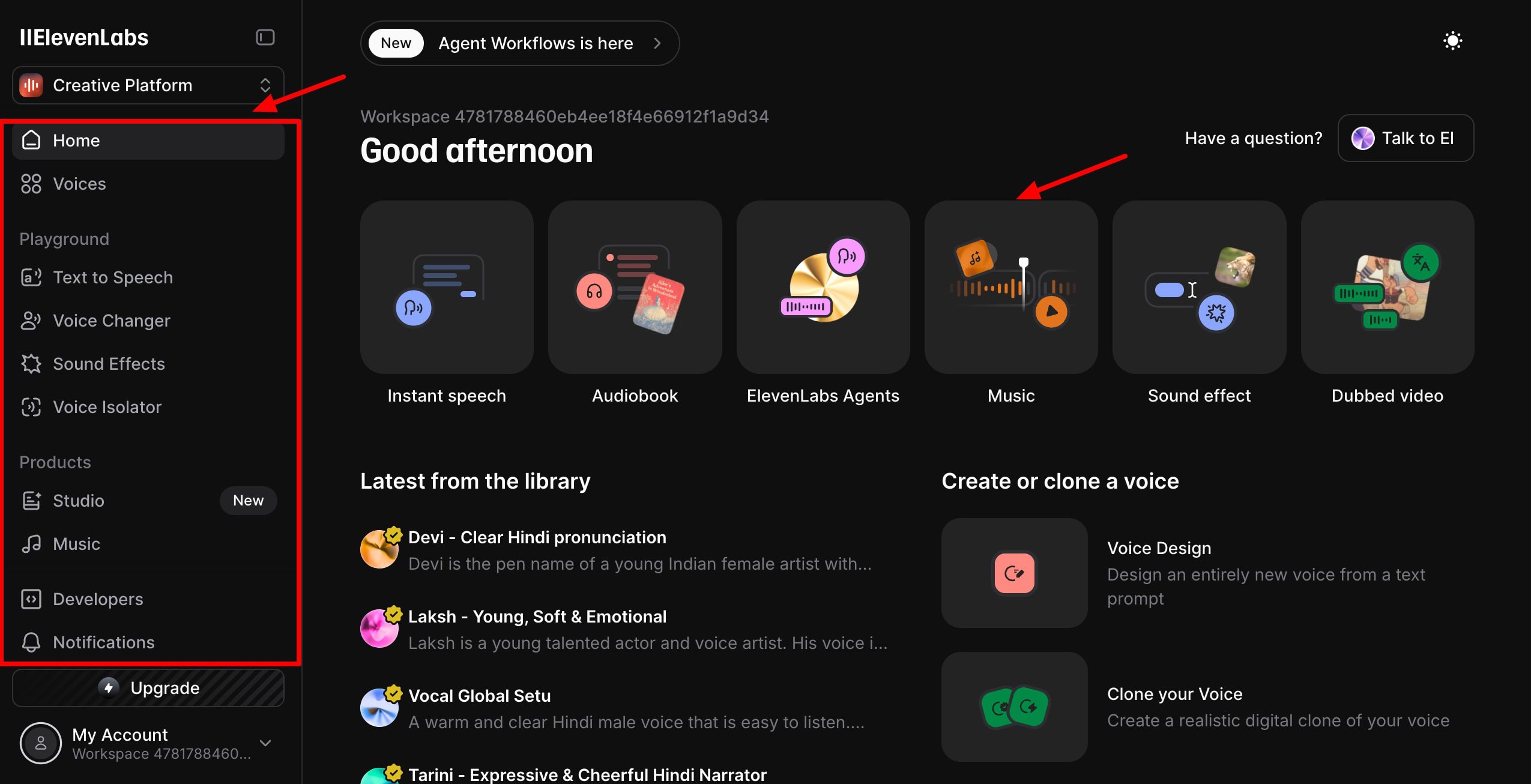
On the left sidebar, you can access their voice library along with all the voice tools. You can also access your account details and upgrade to its paid plan.
To prevent eye strain, they have also introduced a dark mode button on the top right corner. Overall, I found the interface to be well-organized and easy to navigate. Even beginners will be able to operate it with no trouble.
Testing Parameters
To test the AI voice capabilities of ElevenLabs, I used the following audio content in the English and Hindi languages. Throughout this article, I’ve used these recordings to generate different types of AI voices.
English Audio on AI Art Copyright Law
Hindi Audio on Importance of Reading Books
These audios are recorded in my original voice. Now, let’s start experimenting with the below tools to see how my voice changes!
ElevenLabs Features
Now, let’s dive deeper and discover the key features offered by ElevenLabs.
1) AI Models
ElevenLabs offers different AI voice models. You can select anyone as per your use case.
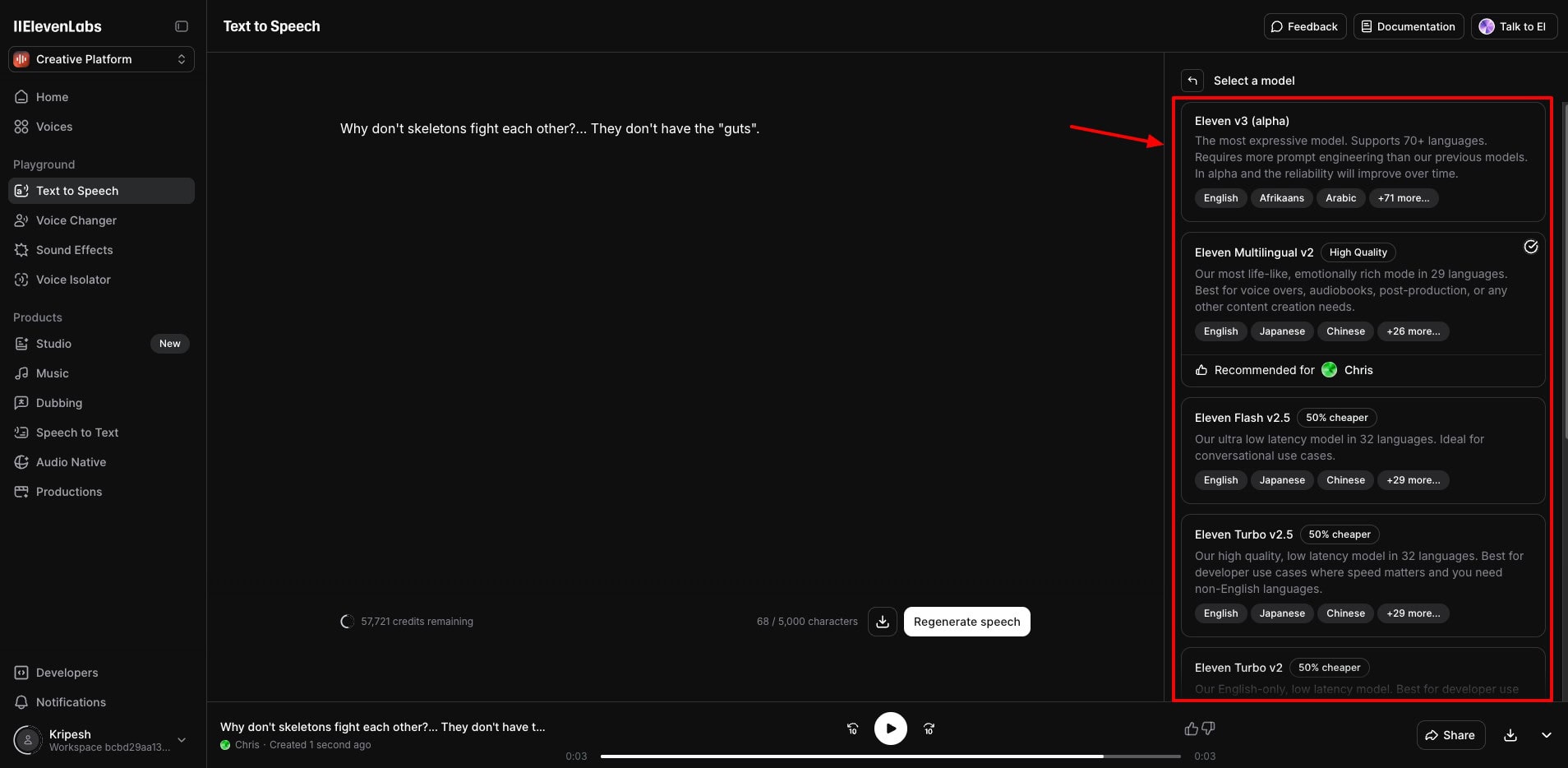
| AI Model | Function |
| Eleven Turbo V2 | Highly refined and natural-sounding speech in English. |
| Eleven English V1 | Their 1st AI model. Generates speech in different voices, moods, and styles in English. |
| Eleven Flash V2 | Ultra low latency model that supports only English language. Best for conversational content. |
| Eleven Multilingual V1 | Supports 10 language options for generating lifelike voices. |
| Eleven Multilingual V2 | Generates realistic voiceovers in 29 mainstream languages |
| Eleven Turbo V2.5 | Ultra low latency model that supports 32 languages. Best for multilingual conversations. |
| Eleven Flash V2.5 | Best used for quick real-time outputs & designing AI agents. |
| Eleven v3 (Alpha) | Their most expressive AI model. Best used for storytelling, audio books, podcasts, etc. |
So, if you need to generate content in a range of languages, you can use the Eleven Multilingual V2. For adding realistic expressions, you can opt for the Eleven V3 (Alpha) model.
The best part is that ElevenLabs automatically recommends the most appropriate AI model whenever you select an AI voice.
2) Voice Library
ElevenLabs features 5000+ pre-made voices in different English accents, like American, British, Indian, Australian, and African. It supports 74 different languages, including French, Hindi, Arabic, Korean, Italian, etc.
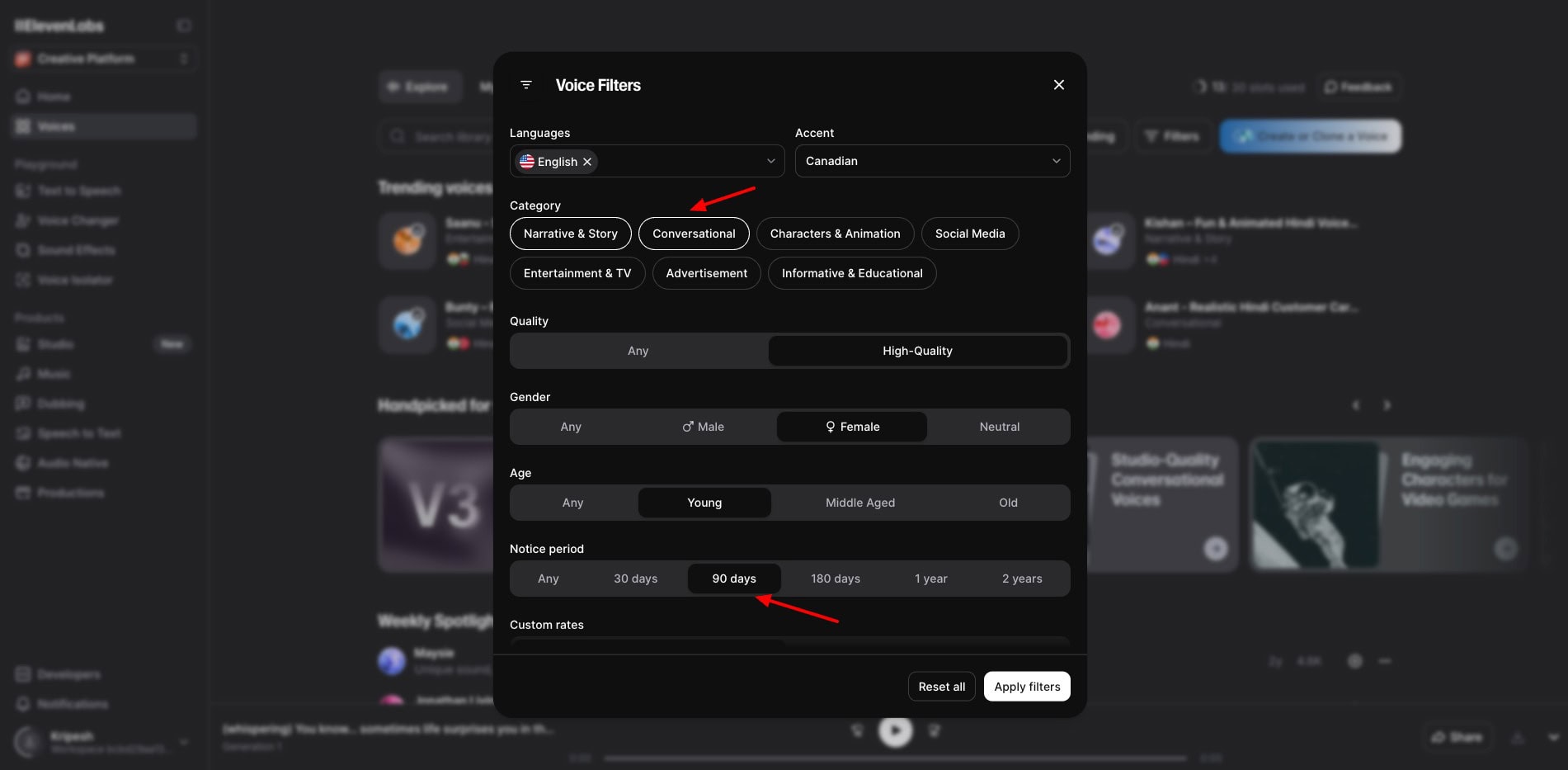
You can filter these voices by parameters like category, gender, age, and accent, or use cases like Conversational, Social Media, Advertisement, Narrative & Story, etc.
Recently, they have also introduced a new filter – “notice period”. You should select 90 days or more in the notice period. So, if the voice is getting removed from ElevenLabs, you’ll be notified at least 90 days prior.
Overall, their voice library is very rich. However, they should add a tone filter to pick the best voices with ease.
3) Voice Settings
If you wish to customize your generated voice, you can do so from the Voice Settings tab. It features a slider bar where you can adjust the voice settings, like stability, similarity, style, etc. Let’s understand these features below.
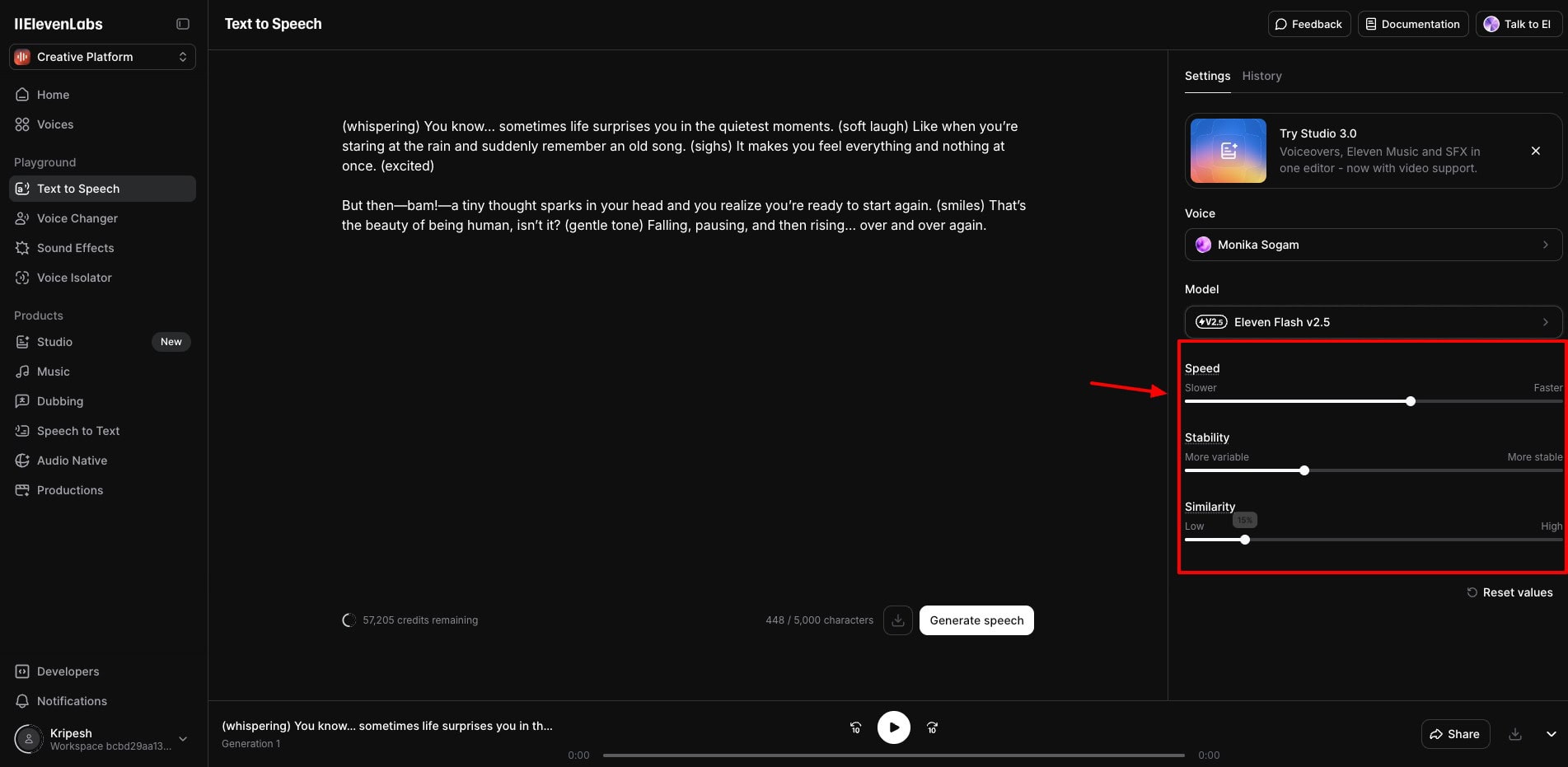
- Speed: It helps you set a pace for your voiceover. You can vary the slider bar between slower and faster speeds.
- Stability: It depicts how expressive the voice is. If you keep it towards the ‘more stable’ side, the voice will sound monotonous. If you keep it towards the ‘more variable’ side, it will sound more expressive.
- Similarity: This depicts how similar the AI voice should be to your original voice. If you want it to resemble your original voice, keep it at high.
- Style Exaggeration: It amplifies and exaggerates the style of your voice. But I recommend keeping it at the default 10% to avoid any inconsistencies.
- Speaker Boost: It makes the AI audio sound more like the original speaker’s voice. I would recommend that you keep it enabled at all times.
4) Audio Export and Sharing
The AI voice files generated by ElevenLabs can be exported in multiple formats, including MP3, WAV, M4A, and FLAC.
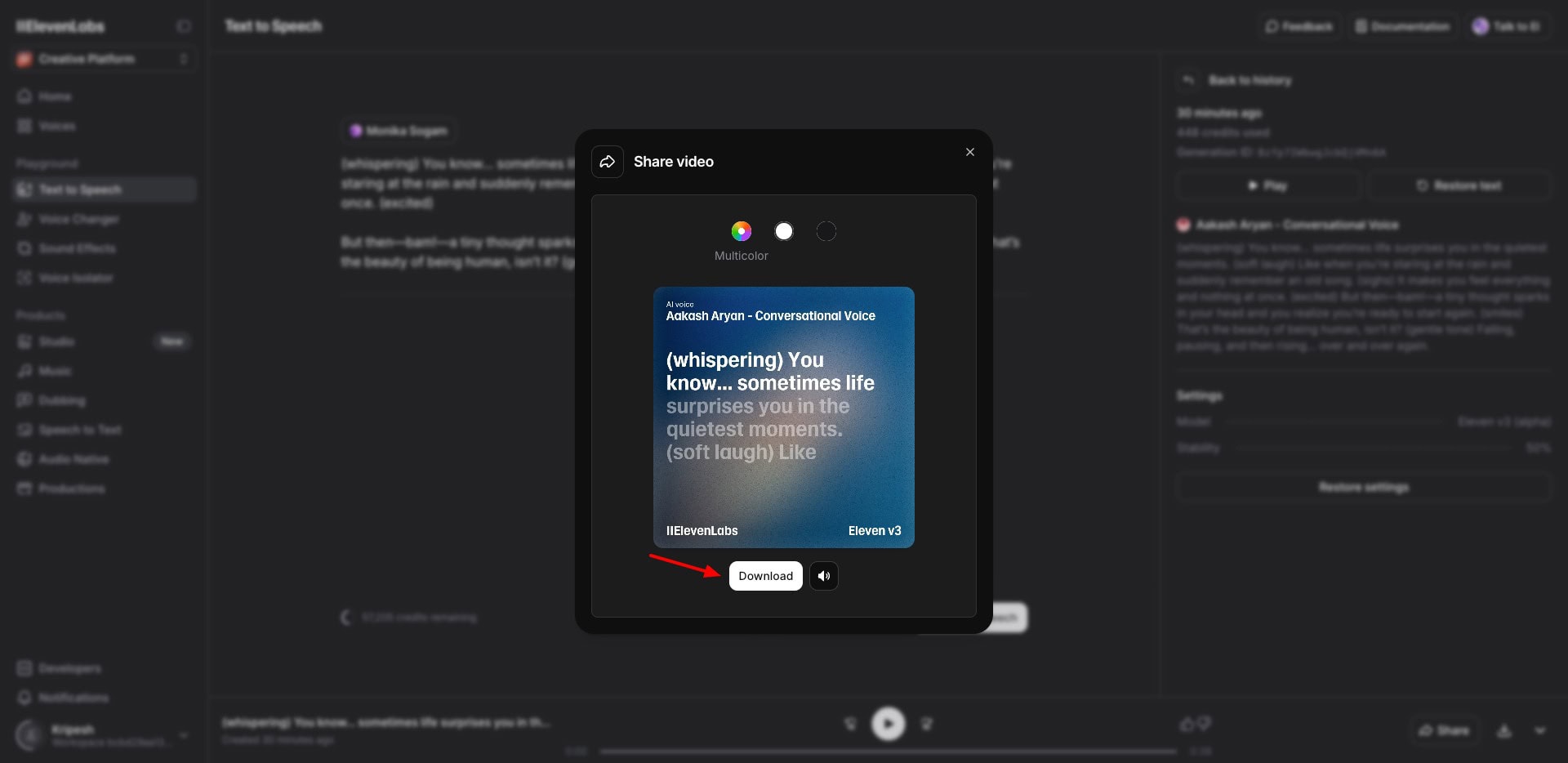
You can also share your file with others by downloading it as a video file. The video features lyrics that are highlighted as per the text being spoken.
Now, they don’t allow creating public links for all voice generations. You can only share the voices in the “My Voices” library as links.
ElevenLabs Voice Tools
1) AI Voice Generation
You can generate AI speech in your favorite voice through the Text-to-Speech tool. All you have to do is paste your script in the text box. It will show you the number of words consumed and the remaining credits.
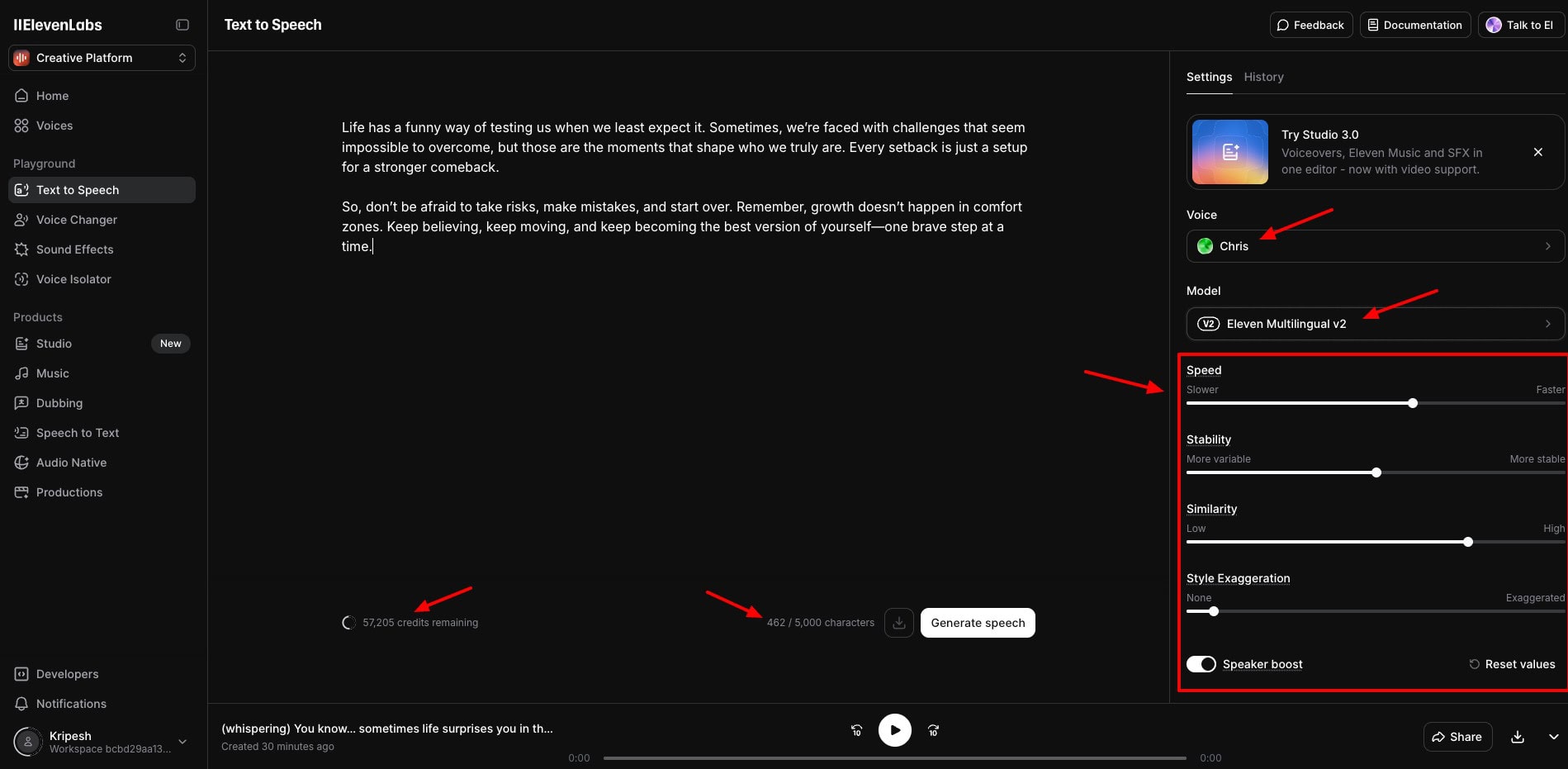
Then, select a language model and an AI voice. Finally, tweak the voice settings like stability, clarity, and style and hit the ‘Generate’ button. Following are the outputs generated by the Text-to-Speech tool.
AI Voice in English
AI Voice in Hindi
I loved the quality of the AI voice outputs in ElevenLabs. They were crisp, clear, and very realistic. Nobody can tell them apart from the voices of real people!
2) AI Sound Effect Generation
ElevenLabs has recently launched an innovative AI tool that lets you generate sound effects from text prompts. With this tool, you can generate sounds, instrumental music, character voices, custom dialogues, etc.
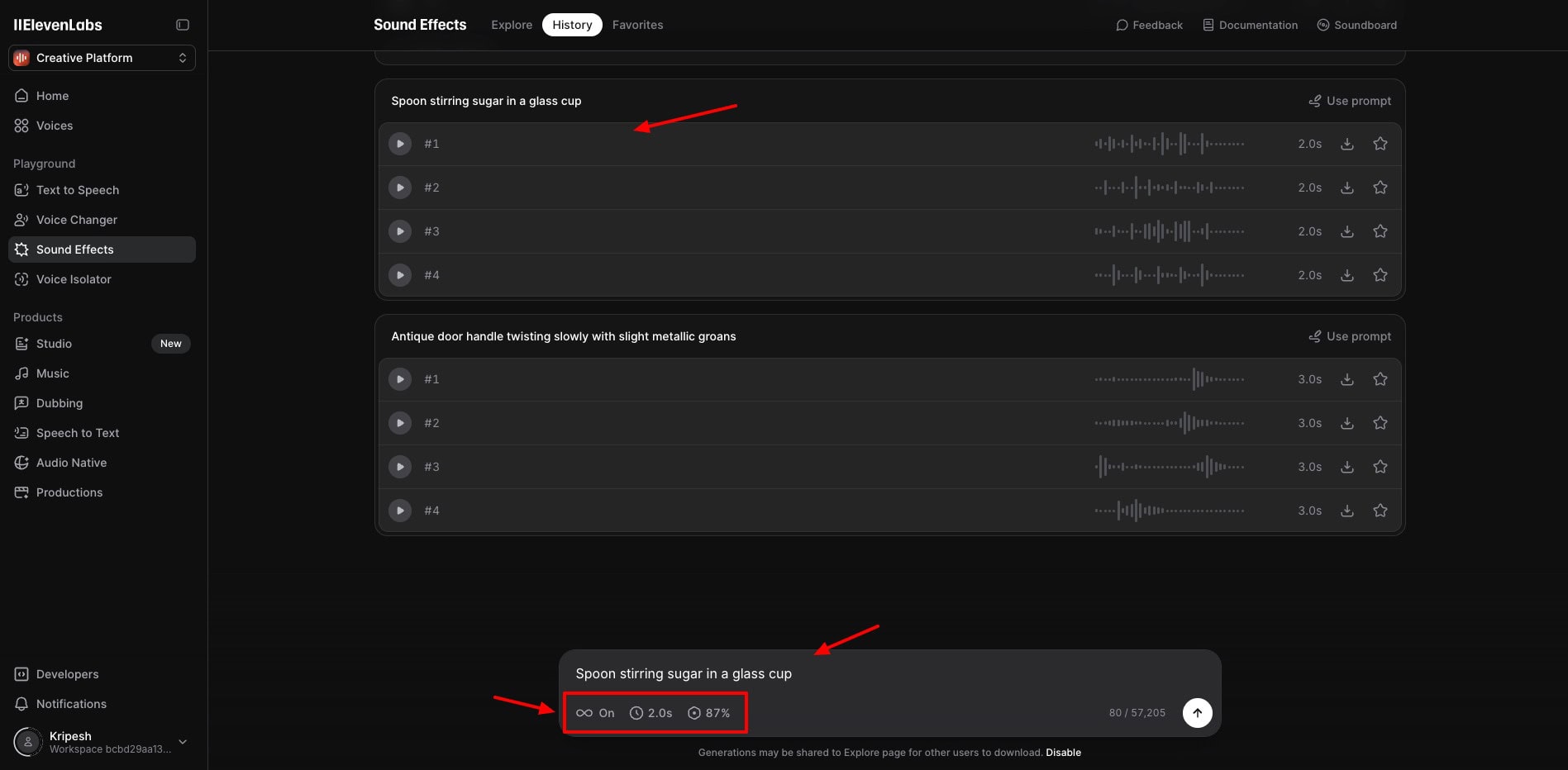
All you need to do is write a prompt for whatever sound you wish to generate. Under the settings, you can set the prompt influence, select a duration, or automatically adjust the output to the best length.
It also features a “Loop” option if you want to keep repeating the sound effect. It generates 4 outputs for every prompt. Check out some examples that I generated with the Sound Effects tool.
Character Dialogue
Fast Typing on Keyboard
Kids Cheering
Creepy Monster Dialogue
In my experience, the sound effects tool worked really well. The potential of AI sound effects is insane! With some experimentation, you can generate some cool sound effects with this tool.
It is especially valuable for video editors who need specific sound effects for their videos. However, you will only find limited generated sound effects in their History. I wish they expand their History section.
3) Voice Changing
Have you ever wanted to transform your voice into a different one? Maybe a deeper masculine voice, or a high-pitched feminine one? ElevenLabs AI makes this possible with its Voice Changer tool.
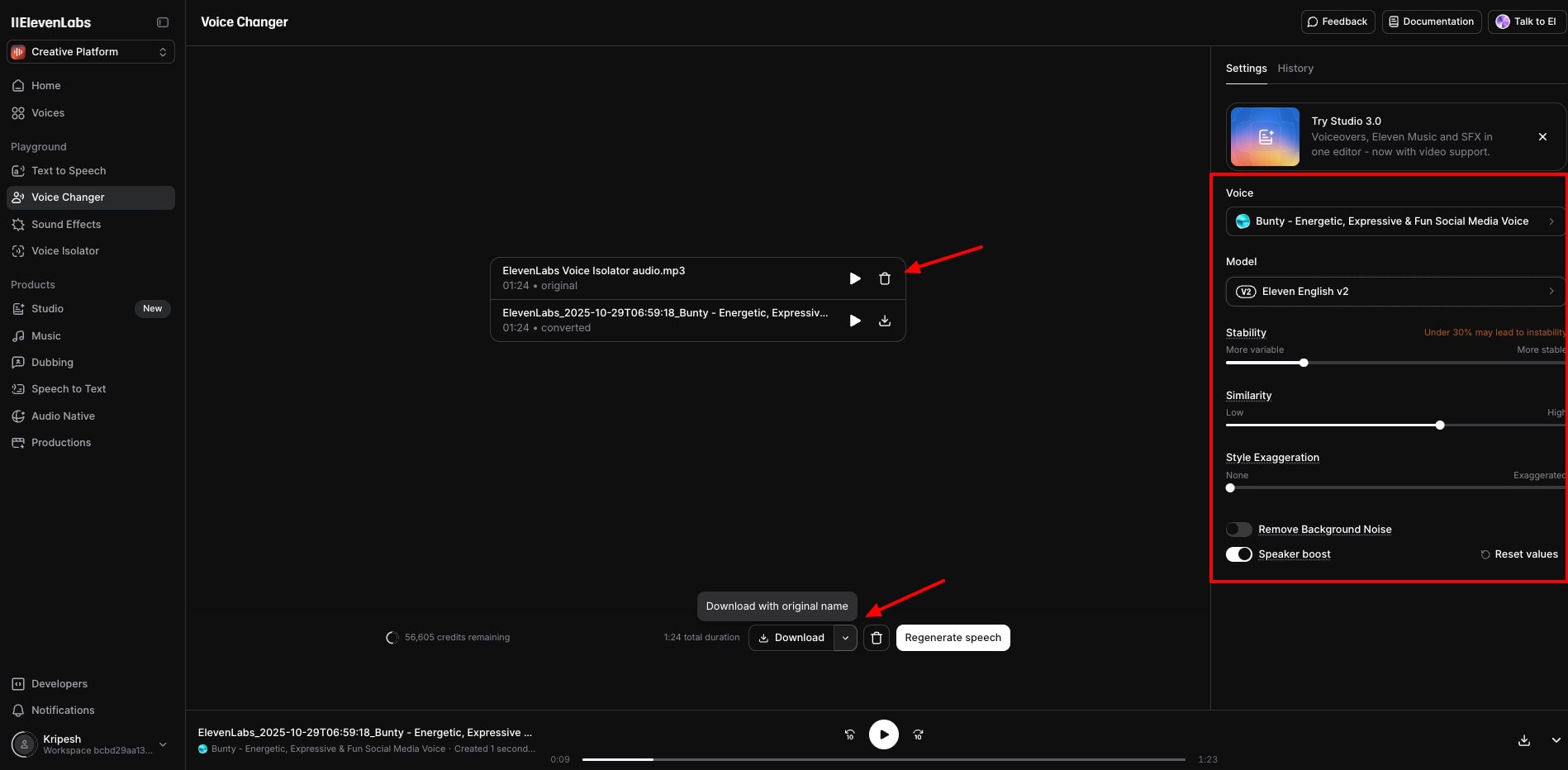
To change your voice, you simply need to head over to the Voice Changer tool and upload your voice or record it live. It supports file uploads up to 50 MB in size.
Then you can choose the target voice from their extensive library and watch the transformation! Check out some examples that I generated with the Voice Changer tool.
AI Voice in English
AI Voice in Hindi
I loved this tool. It preserved all the details of the input audio, including the tone, pitch, style, voice intonation, and variations. However, it only works well as long as the input and output languages are the same.
For example, when I uploaded a Hindi audio and tried to change it into an American female’s voice, the pronunciation of words was terrible. So, make sure you select the right language when using this tool.
4) Voice Cloning
What if AI could record your podcasts or videos in your voice? Think about the number of hours it would save! Well, all of this is now possible with AI Voice Cloning. You get two types of voice cloning.
- Instant Voice Clone: It is available on the Starter plan and requires a short sample of your voice. The voice clone is created instantly,
- Professional Voice Clone: It is available on the Creator plan and requires at least 30 mins of your voice samples. The voice clone is created within 6-8 hours & multilingual clones take up to 24 hours.
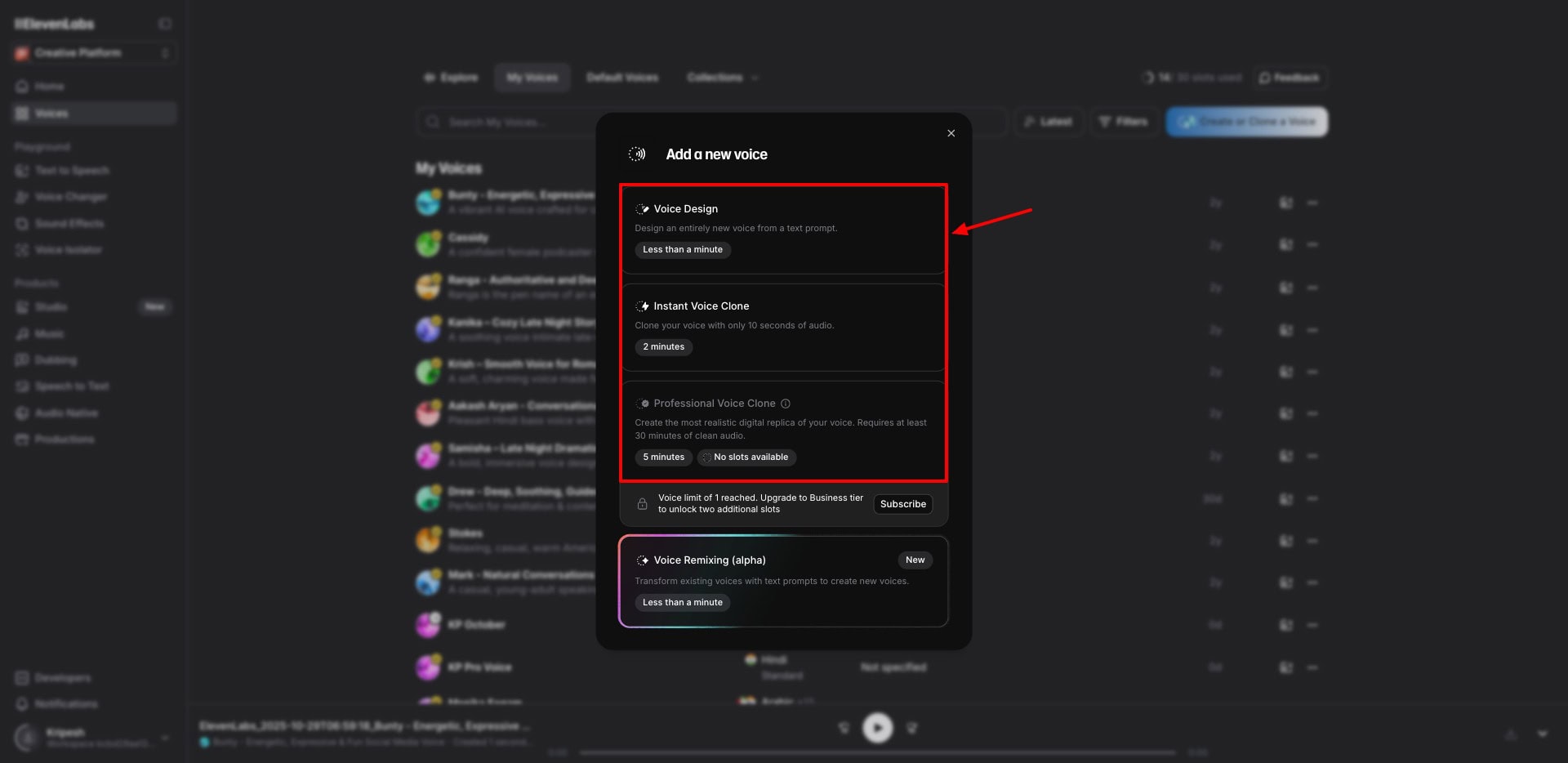
To test this tool, I uploaded a few samples of my voice recordings in both English and Hindi languages. Then, I used the cloned voice to read out a script with a mix of English and Hindi content that was similar in context to the training data.
I was impressed at how swiftly it created the voice clone. Following is the cloned voice reading out a text in English and Hindi languages. Let me know which one sounds similar to my voice!
Kripesh’s Cloned Voice
To my surprise, the Hindi voice sounded quite similar to my original voice. However, it converted the English script into an American accent, which I didn’t like much.
They also have a professional voice cloning feature, which is available on the Creator plan. It may take up to 7-8 hours to train the AI model on your voice, but the results produced are starkly similar to the original voice!
For example, here’s a professional voice clone of my voice that I trained on a decent amount of long-form data.
Kripesh’s Professional Voice Clone
In my opinion, this output sounds much more similar to my original voice. What do you think? How similar is it? Let me know in the comments below.
Overall, voice cloning is a valuable tool and can help you immensely with content creation. I would recommend going for the Creator plan if you want to use voice cloning.
The major advantage is that with their Pro voices, you won’t face any issues with YouTube monetization. Their cloned voices also support multilingual content. So even if you trained an AI in Hindi, it can also speak other languages.
On the free plan, you can create up to 3 custom voices through prompts using the Voice Design feature. It works decently in English, but I won’t recommend it for other languages at the moment.
On my plan (Creator plan), I’m getting 30 custom voices. I’m sure this tool will enhance your productivity and also help maintain a constant audio quality!
5) Voice Dubbing
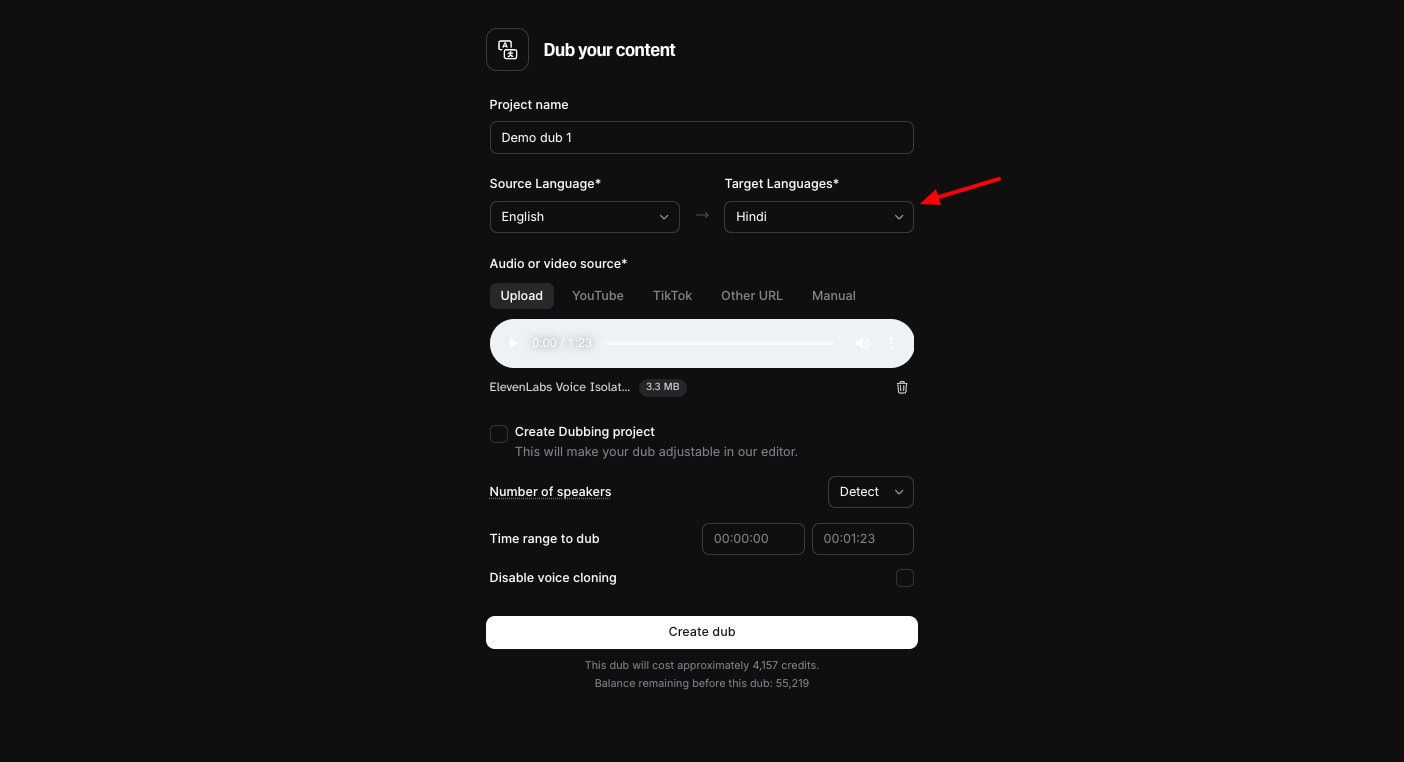
You can even dub your voice into a different language with ElevenLabs. To get started, you can select your source language, and target language, and upload your video or audio file. It also supports platforms like YouTube, X, Vimeo, TikTok, other URLs, etc.
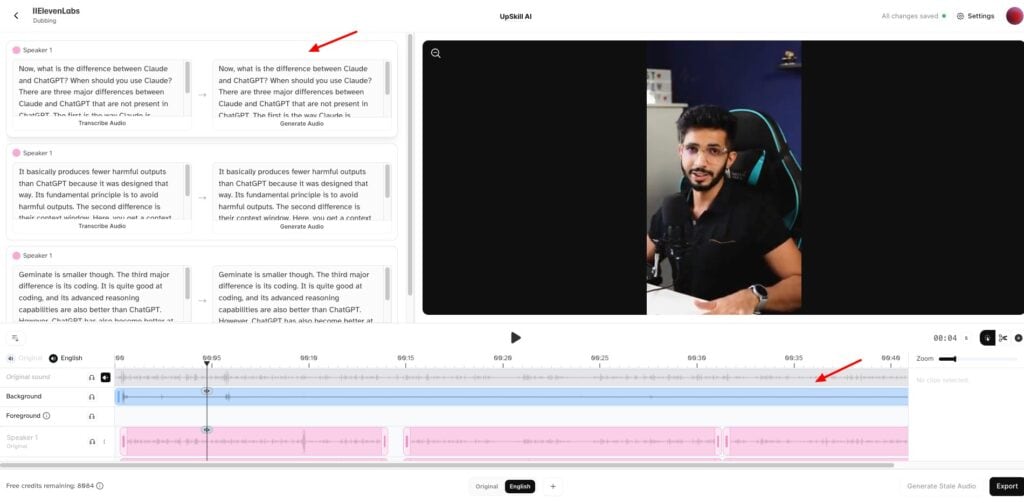
After processing your file, it transcribes the audio into the original language and breaks it down into shorter chunks. Then it generates a dubbed version of those short blocks in your target language.
You can review the dubbed script and change any words or sentences as per your choice. As you start finalizing, you can start generating audio for the specific blocks. So, if you are planning to dub your voice, upgrade to its paid subscription and use this tool.
In my experience, the English-to-Hindi dubbing was superb. For instance, here’s the English-to-Hindi dubbed version of my audio track on “AI Art Copyright Laws”’.
English to Hindi Dubbing
As you can observe, it does sound a bit like me! I like how the dubbed version matched the pace, style, and tone of delivery. It makes the overall voice dubbing sound natural.
Next, I tried to dub my Hindi audio content on “Claude vs ChatGPT” into English. Let’s hear how that sounds!
Hindi to English Dubbing
The dub really impressed me. It actually sounded starkly like me. You can use this tool for YouTube video content, podcasts, film production, educational content, etc. You can also experiment with other languages to see if it works well!
6) ElevenLabs Studio
If you are a professional who needs all voice tools in a single dashboard, you can try out ElevenLabs Studio. From audiobooks to podcasts to video editing, everything can be done seamlessly in Studio.
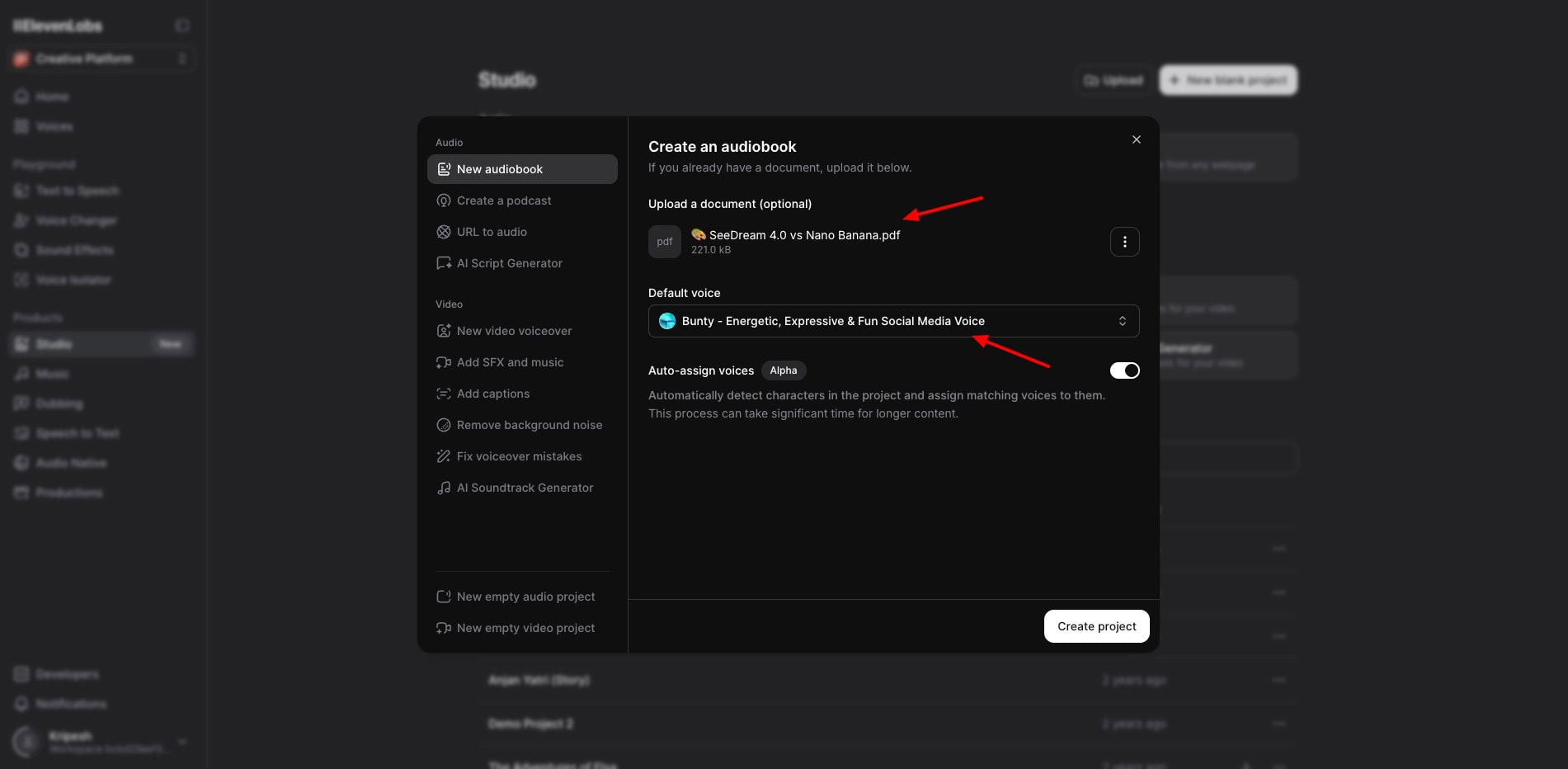
You start by uploading your document or providing URL of your content. Then, you can select an AI voice and create a project. It opens up in a full-fledged dashboard.
Here, you can edit videos, adjust video timeline, add sound effects, music, captions, and more. Finally, your work can be exported in a relevant format like MP3, WAV, etc.
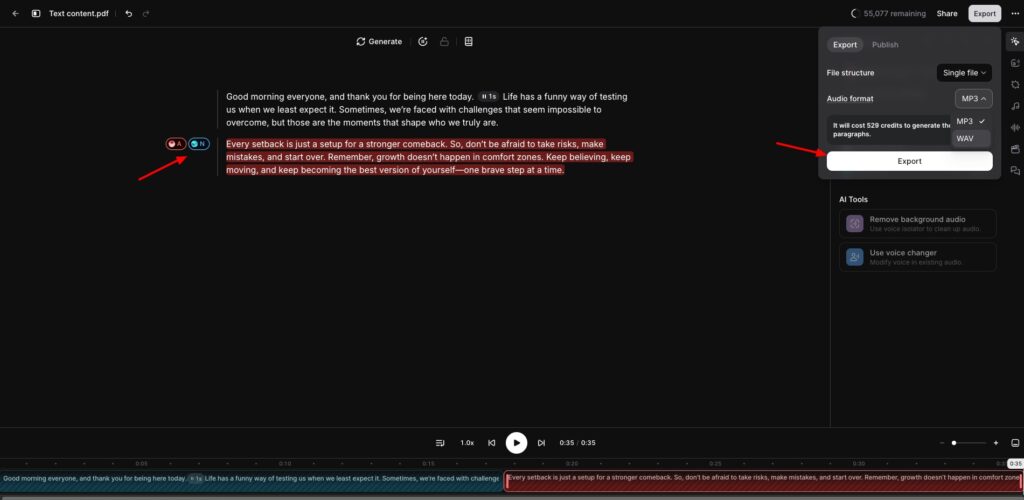
If you are a voice artist or audiobook creator, you will find this tool exciting. I personally didn’t find Studio to be a finished product. I would recommend using Final Cut Pro or Capcut if you are a professional editor.
Listen to this children’s audiobook I created narrating the story “The Adventures of Elsa”. It comprises 3 chapters with multiple speakers!
So, did you like the audiobook? Did it sound realistic or could you guess it was AI-generated? Share your opinions in the comments box below!
7) Audio Native
Have you ever wanted a media player on your blog posts that automatically reads out all your content for the users? The Audio Native feature of ElevenLabs makes that possible.
It’s basically an AI text-to-speech generator for your blog or website. Under player settings, choose an AI voice and a generation model. Here are my recommended voice models:
- Eleven Turbo v2.5: For multilingual audio generation in Hindi, etc.
- Eleven Turbo v2: For English audio generation
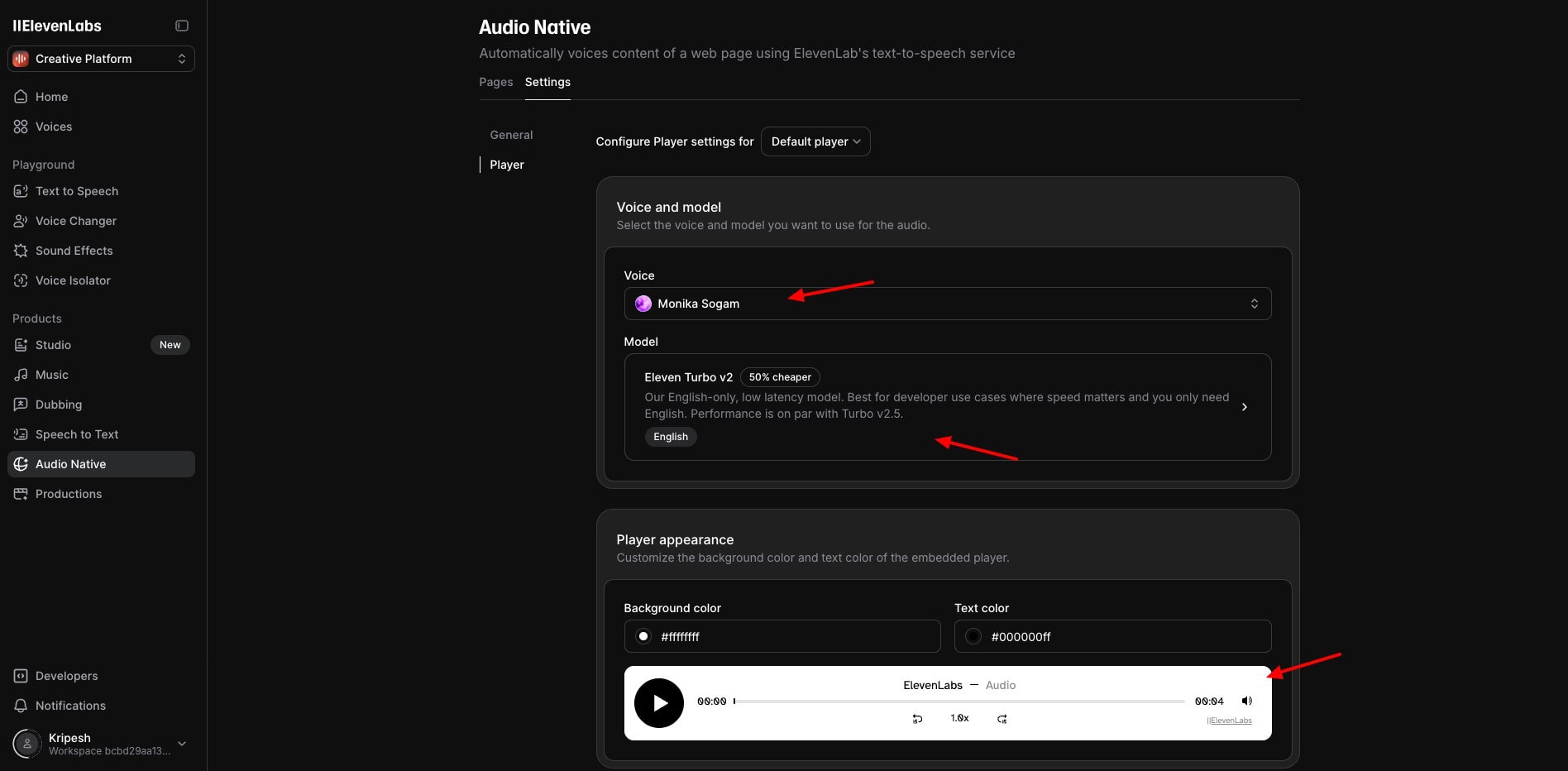
You can also customize player appearance like background color, text color, etc. Next, from under the General settings, you can copy the embed code and embed it in the blog post where you want the audio reader.
If you are a blogger or a website owner, this could be an interesting feature to try out!
8) Voice Isolator
If you are fed up of background noise ruining your audio, you can try ElevenLabs’ Voice Isolator. This tool quickly removes all kinds of noises and disturbances from your audio and makes it crystal clear!
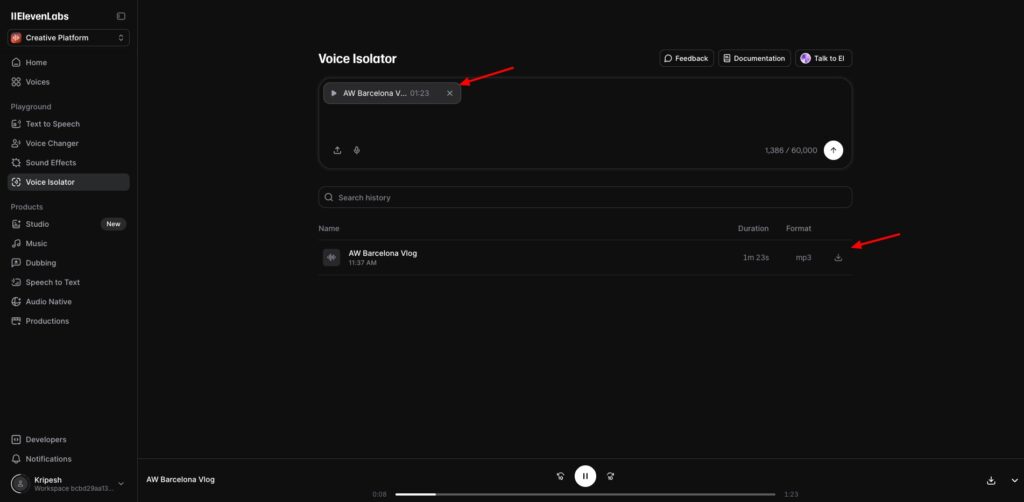
Once your isolated version is generated, you can download it in MP3 format. It is even available on the free version. I really found the Voice Isolator to be effective.
Content creators, video editors, online educators, and podcasters should certainly try it!
9) Music Generator
ElevenLabs also features a music generator on its platform. You simply need to enter your prompt, select a duration, number of outputs, and specify if you want instrumental or lyrical music.
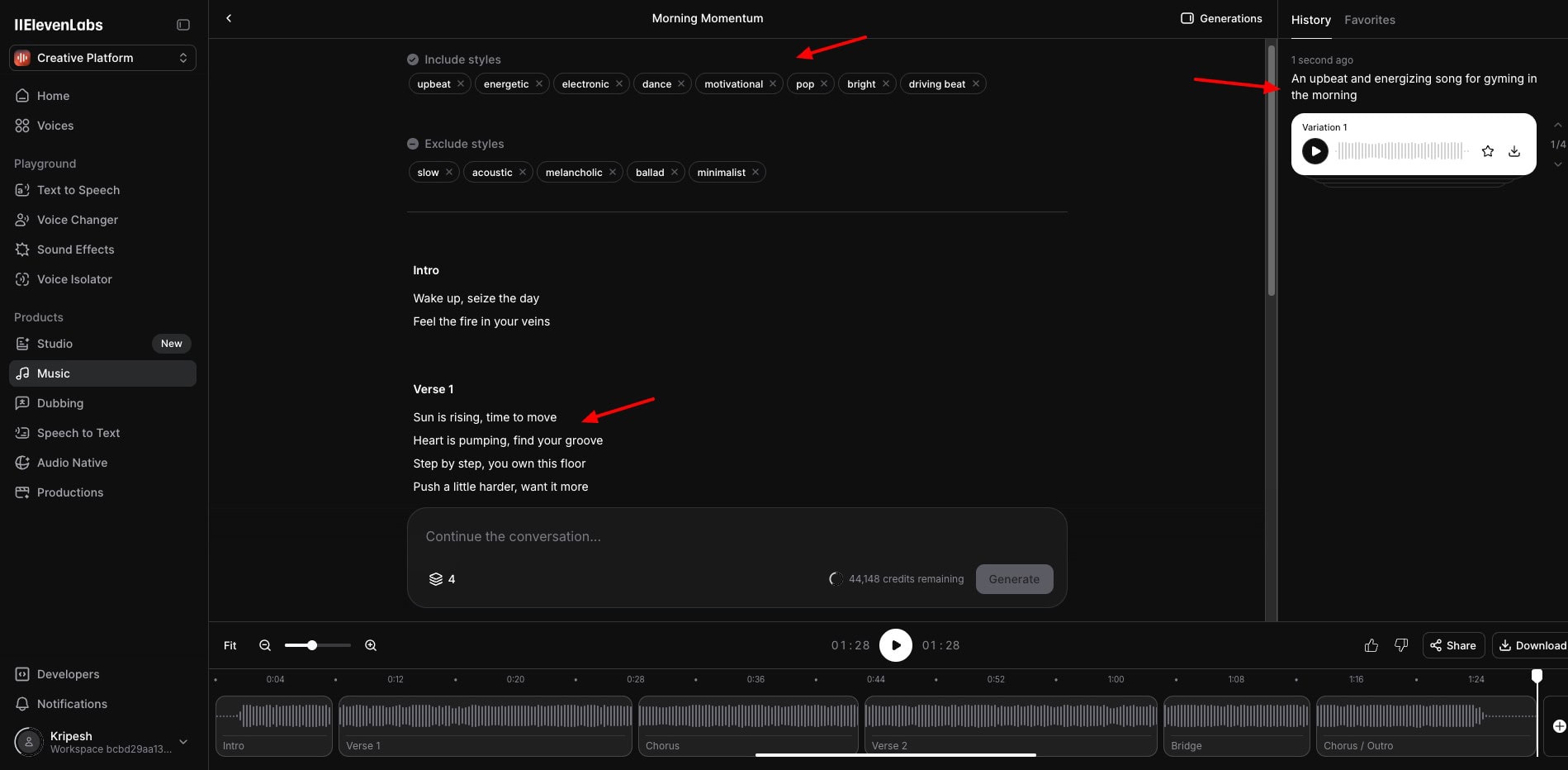
It will automatically include relevant tags, and generate a song with lyrics, including intro, verses, chorus, bridge, outro, etc. Finally, you can download your music in MP3, MP4, FLAC, or WAV formats.
However, the outputs are pretty average. Check out this “An upbeat and energizing song for gyming in the morning“.
I won’t recommend this tool right now. If you want to generate music or songs, Suno AI is better. It’ll help you generate high-quality and realistic music for all use cases.
Tips to Use ElevenLabs Effectively
If you are new to voice generation, check out these tips for making the most out of the Eleven V3 (Alpha) model.
1) Start with Basic Emotion Tags
To begin with, you can experiment with simple emotion tags. Once you feel comfortable using them, you can increase the complexity.
2) Test Voice Compatibility
Before you start, test if the voice is compatible with your content type. For example, if you pick a calm voice, it’s not sensible to use tags like shouting, excited, speak loudly, etc with it.
3) Avoid Short Content
The V3 (Alpha) model works better for longer content. So it’s best to avoid using short sentences with it. If you have longer paragraphs or multiple speakers in your voiceover, it would work best.
4) Won’t Work on Cloned Voice
This voice model does not work well on cloned voices. So, make sure you avoid using them with it.
Advanced Prompting Techniques
The Eleven V3 (Alpha) model is the most expressive AI model created by ElevenLabs. Here are some techniques to get the best out of this model.
- To insert breaks: Add the following tag – <break time = “1.5 s”/>
- To add stress: Mention the specific word or sentence in uppercase.
- To insert natural pauses: Add 3 or 4 dots after any sentence.
- To insert emotions: Add tags in brackets wherever you want these emotions to be added.
- Basic emotional states: (sad), (happy), (angry), (excited), etc.
- Nuanced emotional states: (sorrowful), (intense), (upbeat), (dramatic), (awe), etc.
- To modify dialogue delivery: Insert delivery style tags like (whispers), (shouts), (laughs), (slowly), (rushed), (drawn out), (Indian accent), etc.
If you are just getting started with the basics of ElevenLabs, check out my beginner-friendly tutorial explaining how to get the most out of this tool.
How Can You Earn With ElevenLabs?
If you were wondering how you can start earning with ElevenLabs, here’s an interesting way. They now allow you to share your professionally cloned voices in their Voice Library.
Whenever someone uses your voice on their projects, you will earn a share of the revenue. However, this is only applicable to Professionally Cloned Voices, which are available on the Creator+ plan.
So, this is a simple way through which you can earn a passive income with ElevenLabs. For more details, you can check out their guidelines on sharing your professionally cloned voices.
ElevenLabs Support
ElevenLabs offers customer support via a knowledge base, email tickets, and calls. The knowledge base features 90+ articles. I liked how the articles are straightforward, and cover all the major user queries.
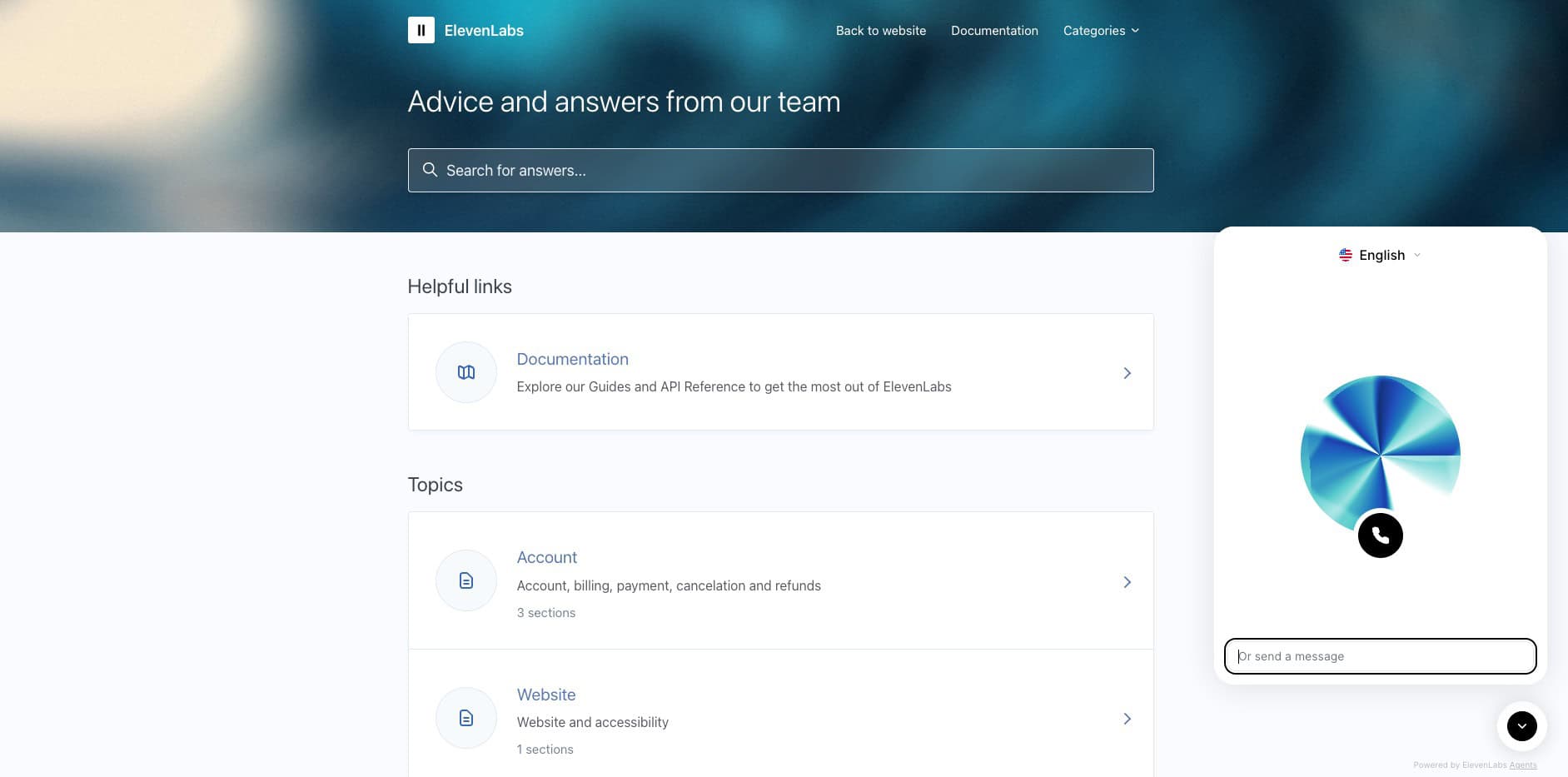
You can talk with their support representatives via call or messages with their AI agents. But the call support is too slow.
They also have a helpful Discord community where you can interact with other ElevenLabs users and get their help in troubleshooting your problems. Overall, the support offered by ElevenLabs is good.
ElevenLabs Pricing
ElevenLabs AI offers 4 premium plans, namely Starter, Creator, Independent Publisher, and Growing Business. Besides these, it also has an enterprise plan for larger businesses with custom requirements.
The following table compares the key features of ElevenLabs’ pricing plans.
| Starter | Creator | Pro | Scale | Business | |
| Price | $5/mo | $11/mo | $99/mo | $330/mo | $1320/mo |
| Characters | 30k | 100k | 500k | 2M | 11M |
| Minutes | 60 | 200 | 1000 | 4000 | 22000 |
| Commercial Licence | Yes | Yes | Yes | Yes | Yes |
| Additional Minutes | N.A. | $0.15/min | $0.12/min | $0.09/min | $0.06/min |
For this review, I have purchased the Creator plan which is priced at $11/month. With this plan, you get 100k characters/month along with professional voice cloning, and the ability to create long-form content.
With the Creator plan, you also get a commercial license, so you can use the AI-generated voices for commercial projects too.
In my opinion, there’s a huge gap between the Creator and the Pro plans. They should introduce a mid-tier plan around $50/month, as switching from $11/month to $99/month may not be viable for most of the users!
Free Plan
ElevenLabs has one of the most generous free plans found on an AI tool. You get 10k characters/month along with access to tools like Text to Speech, Speech to Text, Music Agents, Studio, Dubbing and API access.
You can use your monthly AI credits for either 10 minutes of high-quality Text to Speech generation or 15 minutes of AI Agents. Overall, they provide most of their voice tools on the free version.
However, you can only use your generated voices for personal use. A commercial license is not available on the free plan.
Payment Methods
You can make your payment through the following methods on ElevenLabs: International credit cards, Apple Pay, and Google Pay.
Refund Policy
ElevenLabs offers refunds within 14 days of purchase. However, to get your money back, you shouldn’t have used any character credits for that duration.
I personally didn’t like these conditions imposed on the refund. A refund policy secures users from losing their money if the product isn’t what they need. Thus, I think ElevenLabs should offer a 14-day money-back guarantee with no conditions.
Will AI Voice Be Monetized?
A major concern for creators using AI voices is the monetization aspect of these voices. You can easily use AI-generated voices for creating marketing content, including Facebook and Google Ads, etc. But will it be monetized?
A while back, there were no issues with the monetization of AI voices. However, now they have introduced some strict guidelines which makes monetization tricky.
So, my suggestion would be to use Audacity to fine-tune your AI voice before publishing it online. You can find the Audacity tutorials on YouTube. Just follow the steps to fine-tune your voice and you’re good to go!
Alternatively, you can also use the Pro voice cloning feature available on ElevenLabs premium plans. Cloned voices combined with fine-tuning through Audacity will help you safely bypass any monetization issues.
Another tip from my side would be to use good quality creatives, including videos, images, text effects, and background music to create an engaging end-product. This will make the monetization even easier.
ElevenLabs Pros
1) Highly Refined Voices
ElevenLabs offers highly natural and lifelike voices. It generated a natural-sounding speech with natural pauses, pacing, and tone inflections.
2) Extensive Voice Library
ElevenLabs features thousands of highly refined and realistic AI voices in different English accents. If you wish to experiment with more languages, they also have a Community Library where you can find voices in different languages and styles.
3) Powerful AI Models
ElevenLabs features multiple powerful AI models to generate different kinds of voices. Eleven Flash V2.5 is good for real-time outputs and AI agents. Whereas, Eleven V3 (Alpha) enables expressive voiceovers.
3) Modern Interface
The user interface of ElevenLabs is modern, clean, and organized. The dashboard is easy to navigate and even beginners will find it easy to use.
4) Versatile Voice Platform
ElevenLabs is a versatile tool with an AI Voice Generator, Voice Cloning, Voice Changing, Voice Dubbing, and more. Thus, you can perform all kinds of voice-related tasks right from ElevenLabs itself.
5) Good Voice Cloning
The professional voice cloning tool offered by ElevenLabs is appreciable. The results are pretty close to the original voice. For accurate cloning, their paid plans are worth it.
6) Impressive Voice Changer
I loved the AI Speech-to-Speech tool of ElevenLabs. It changes your voice to an AI voice with utmost precision. The results are super impressive.
7) Impressive Sound Effects
The Sound Effects Generator of ElevenLabs is great for creating unique sound effects that you won’t find on other platforms.
8) Affordable Starter Plan
The pricing plans of ElevenLabs AI start from an affordable price of $5/month, where you get 30k characters/month. (between 4200 and 7500 words) Their free plan is also pretty feature-rich.
ElevenLabs Cons
1) Average Music Generator
The music generator available on ElevenLabs is not up to the mark right now. They need to make lots of improvements in their AI to generate better music.
2) Average Voice Cloning & Dubbing for Free
The instant voice cloning tool and the voice dubbing tools offer average results on the free version. You need to upgrade for more precise results.
3) Average Studio Tool
The Studio tool of ElevenLabs feels a little unfinished. It lacks the polish of professional tools like CapCut or Final Cut Pro.
4) Measures Character Count
ElevenLabs counts the AI Credits in characters, not words, unlike other voice generators. So, before generating your AI voice, trim out all the blank spaces from your script to save up on the character credits.
5) Doubtful Refund Policy
ElevenLabs offers a 14-day refund policy with its plans. However, the amount is refunded only if you haven’t used any AI credits on your plan. I think they should not impose any restrictions and offer a transparent refund policy.
Who Should Use Eleven Labs?
ElevenLabs is a versatile AI voice platform that could be used for high-quality content narrations or voiceovers. They can also be used for creating audiobooks, online courses, video games, podcasts, storytelling, etc.
Thus, ElevenLabs AI could be a really valuable tool for content creators, startups, YouTubers, freelancers, small businesses, video game developers, educators, bloggers, voice artists, and all AI enthusiasts.
Why Should You Trust Me?
I’ve been working full-time in the digital industry since 2015. In all these years, I’ve used and tested hundreds of AI tools. These include AI writers, AI domain name generators, AI website builders, AI Art Generators, AI video generators, and so on!
I’ve recently tested dozens of AI Voice Generators for creating an article on the Best AI Voice Generation Tools. Testing out so many AI tools regularly has given me the knowledge and experience to suggest to you the right one for your needs.
Conclusion
ElevenLabs looks like a powerful AI Voice Platform with versatile tools. It features an extensive voice library offering multiple languages and accents, and tools for dubbing, cloning, and changing your voice.
Recently, they have also introduced a sound effects tool, a music generator, and an audio isolator. All of these features are available at an affordable price starting from $5/month!
However, features like the music generator, Studio tool, and free voice cloning or dubbing still need improvement. The platform’s character-based credit system and restrictive refund policy can also be limiting.
Still, if you’re a YouTuber, content creator, voice artist, video editor, or developer, ElevenLabs is absolutely worth trying for its impressive voice quality and wide creative potential.
Anyway, have you used any AI voice generators before? How does ElevenLabs compare to them? Let me know in the comments below. And if you’re interested in AI voices, you can also check out the list of our Best AI Voice Generators.
I’ll be back with more such interesting articles soon. This is Kripesh signing off. Cheers, and keep learning. 🙂
FAQs
1) What is the refund policy of ElevenLabs?
ElevenLabs AI offers a 14-day refund policy. However, you only get your refund if you haven’t used the character credits in that duration.
2) Does ElevenLabs have a free plan?
ElevenLabs features a decent free plan, where you get 10k characters per month and 3 custom voice creations. However, you don’t get a commercial license. So, the voices you generate cannot be used for commercial purposes.
3) What are the payment methods accepted by ElevenLabs?
ElevenLabs accepts payments made through International credit cards, Apple Pay, and Google Pay.
4) Are unused characters rolled over to the next month?
Unfortunately, ElevenLabs AI doesn’t roll over unused characters to the next month. So, it’s best to use up all the credits on your account by the end of the subscription to avoid losing them.
ElevenLabs Pros (+)
- Highly Refined Voices
- Voice Library
- Powerful AI models
- Modern Interface
- Good Voice Cloning
- Voice Changer
- Impressive Sound Effects
ElevenLabs Cons (-)
- Average Music Generator
- Average Free Clone & Dub
- Average Studio Tool
- Doubtful Refund Policy

Hii