The internet is flooded with AI-generated content. Telling what’s written by a human and what’s spun out by a bot is getting harder every day. So, how do you distinguish AI slop from real, fact-checked content?
Introducing – Polygraf AI! This tool helps you effortlessly detect AI-generated content. After spending a few days testing and reviewing this tool, I’m ready to share my honest opinions in this Polygraf AI Review.
We will start by discussing Polygraf AI’s standout features, pricing, Chrome extension, its ongoing AppSumo deal, and its major pros and cons. Curious to know if it’s worth your time? Let’s dive in.
Polygraf AI Review
Summary
Polygraf AI offers accurate detection, a useful Chrome extension, and great value with its $59 lifetime AppSumo deal. It has a few inactive buttons and features advanced tools on higher tiers. But these don’t affect core functionality. It’s ideal for writers, editors, and educators who need quick, reliable AI content checks.
Disclaimer : I strongly believe in transparency. If you buy using the links on our site, we may earn a small commission without any extra cost to you. This helps me to keep producing honest reviews. Read More >>
About Polygraf AI
Polygraf is an AI-powered security tool founded by Anton Stepaniuk, Vignesh Karumbaya, and Yagub Rahimov in 2021. It helps you detect AI content and plagiarized content, and helps make it more human.
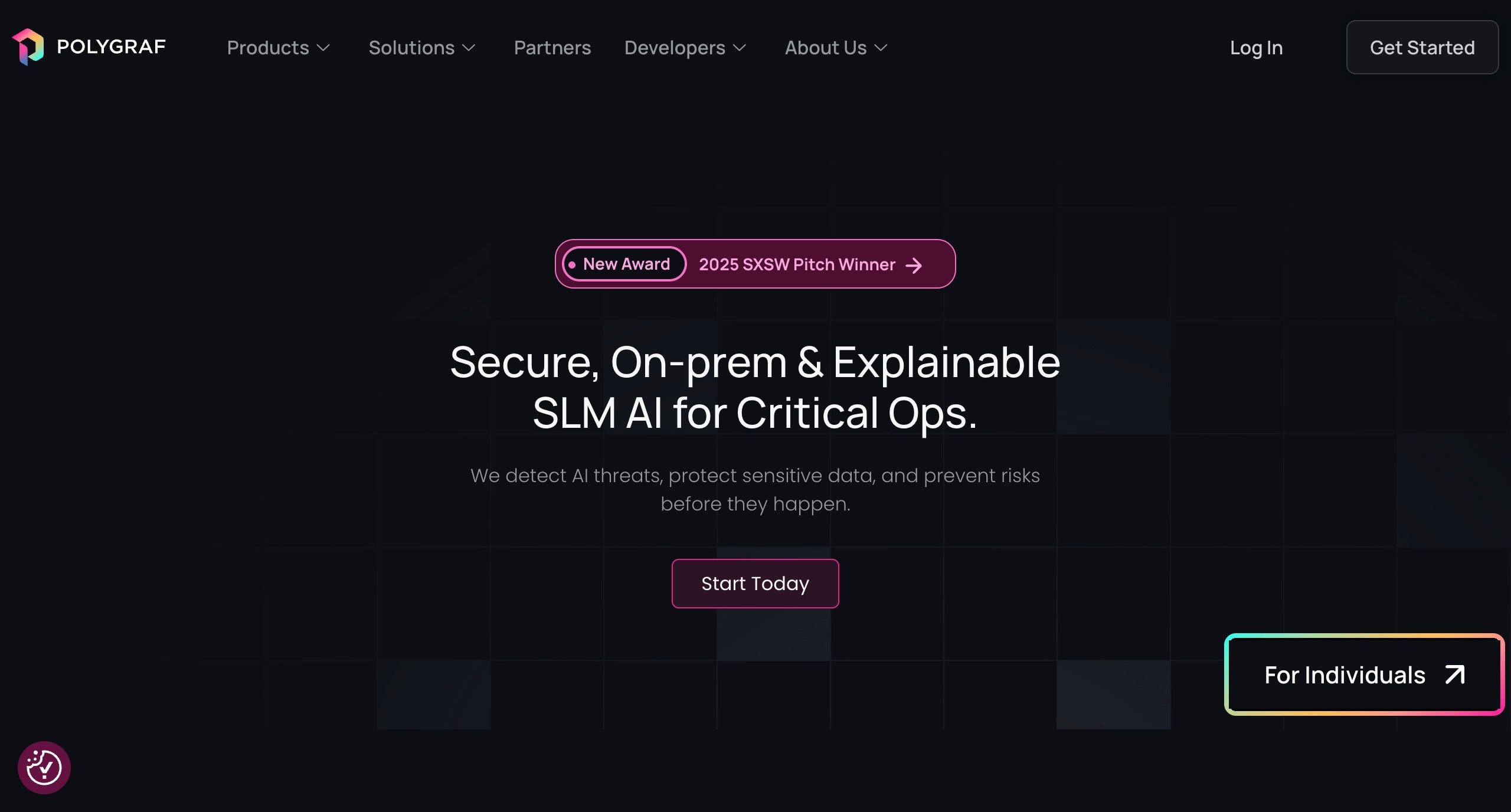
It even gives you deeper insights with the analysis of your writing style and structure, and highlights AI-generated parts. Polygraf is perfect for content writers, educators, and copywriters who wish to evade AI detection and make their content look more authentic.
Polygraf AI User Interface
The user interface of Polygraf AI is pretty modern and pleasing. The main screen features a list of quick actions along with the number of tokens used. The left panel has a list of all the tools and features you could use, along with account settings.
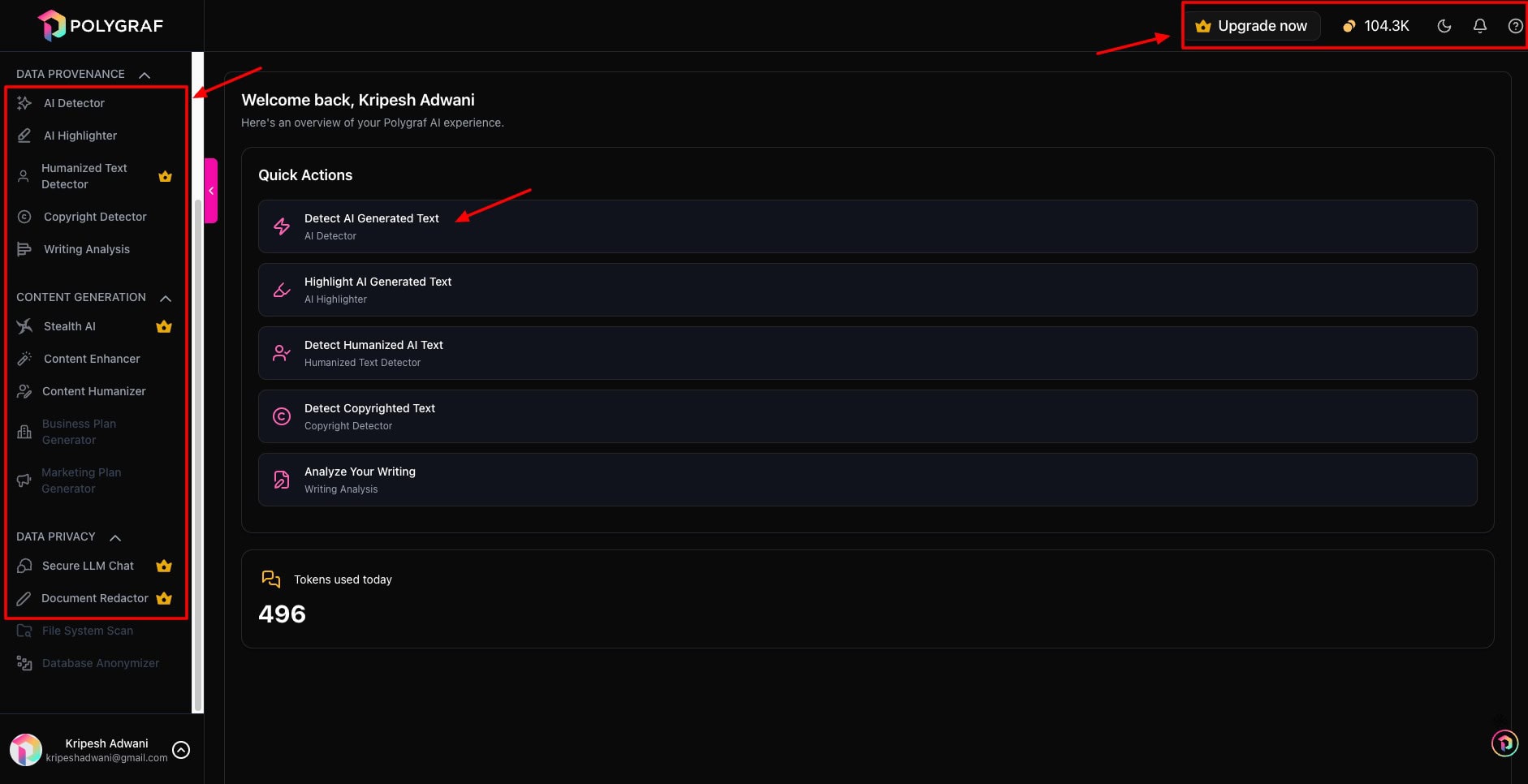
In the top right corner, you can view the token balance on your account, upgrade your account, and switch between light and dark themes. However, the support and notification buttons are inaccessible. I hope they fix it soon!
Overall, the UI of Polygraf AI looks easy to use for beginners and has no significant learning curve.
Key Features of Polygraf AI
I have purchased the Standard plan of Polygraf AI to test out its capabilities. So, below are the features of its Standard plan.
1. Detect AI Content
The primary feature of Polygraf is detecting AI-generated content. You simply paste your block of text or upload it as a PDF file on the dashboard.
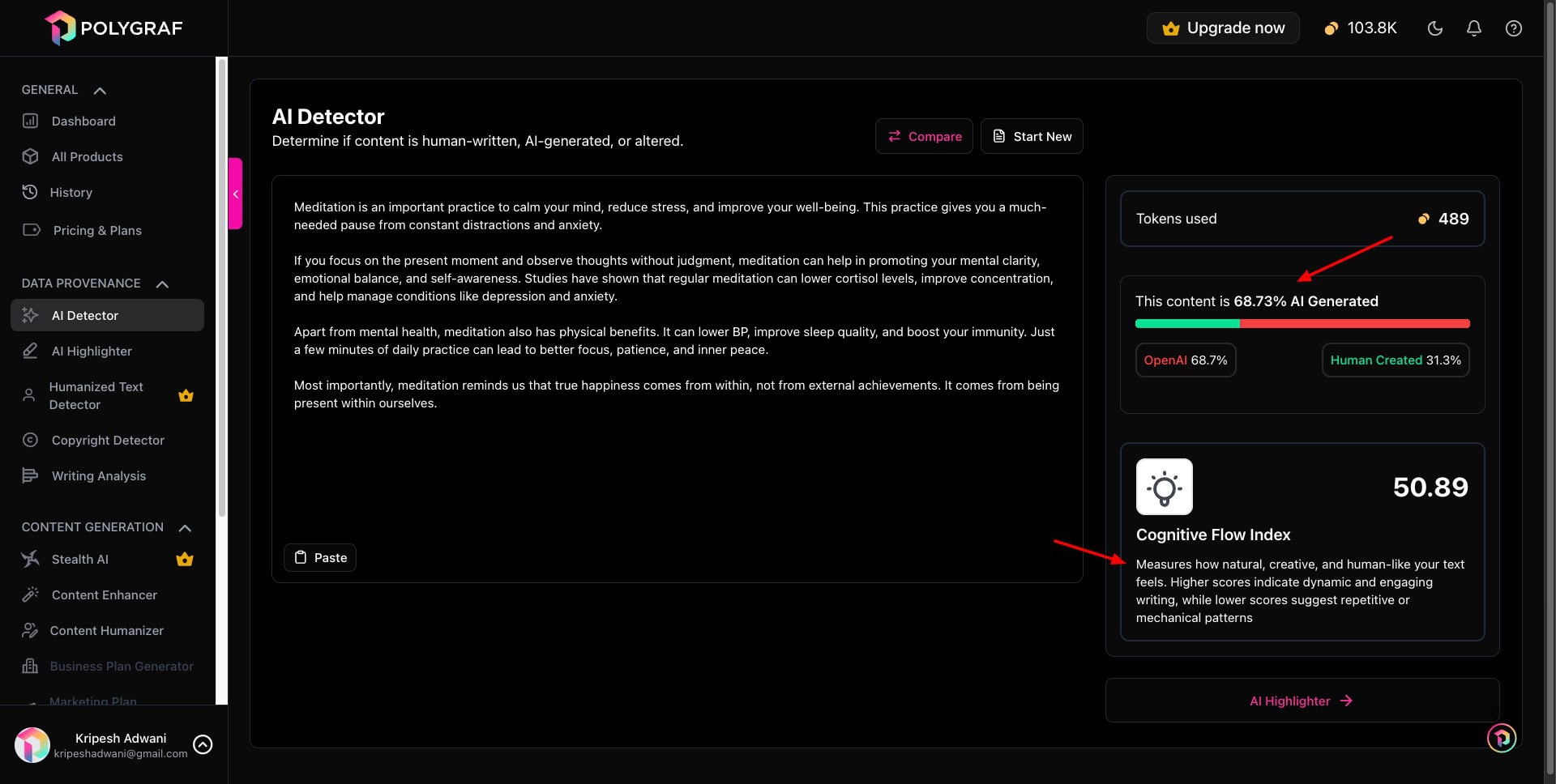
Before analyzing your text, it gives you the number of tokens the analysis will cost. The longer the text, the more tokens it will consume. Once you hit the Analyze button, it gives you the percentage of AI and human content in the text.
You can also check the Cognitive Flow Index of your content, which measures how natural and human-like your text feels. These are the general standards for CFI scores.
- 80 to 100: Highly human-like
- 60 to 79: Moderately human-like
- Below 60: Probably AI-generated
So, always try to keep your CFI score above 80 to bypass AI detection tools.
2. Highlight AI-Generated Text
Once you detect the amount of AI content found in your text, the next step is to identify which parts are AI-generated. Polygraf AI’s AI Highlighter helps in this case. It uses different colors to highlight the AI and human parts for you.
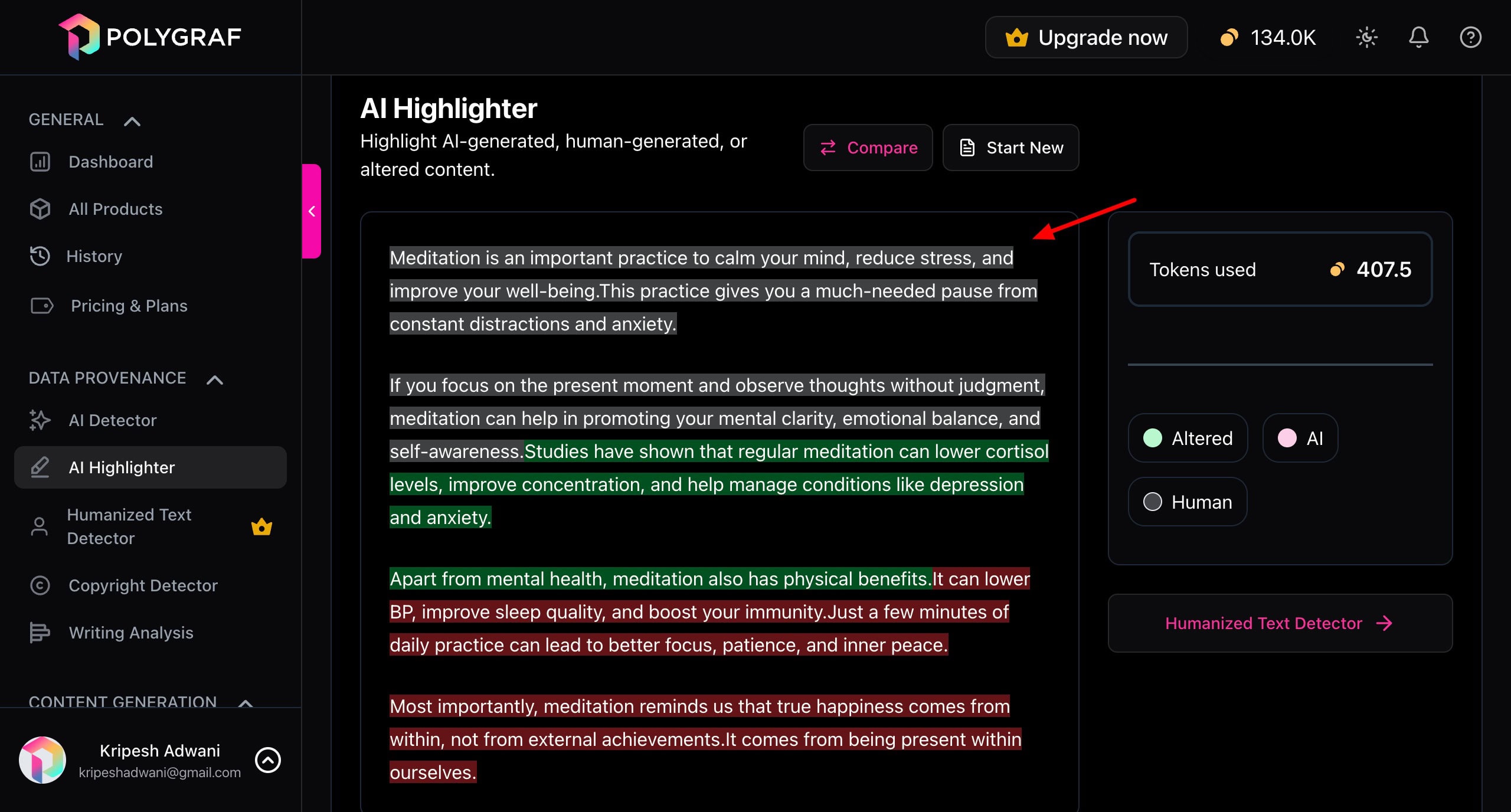
For instance, the red highlights suggest completely AI-generated text. The green highlights indicate altered content. Whereas, the grey highlights hint at completely human-written text. You can manually edit the red and green highlighted parts to humanize your content.
Alternatively, you can use the Humanized Text Detector to check which parts have been humanized. This feature is available on the Premium plan.
3. Detect Copyrighted Content
AI tools are trained on massive amounts of data. Thus, they may generate copyrighted content as it is or paraphrased versions of it. To evade copyrighted content in your text, you can use the Copyright Detector tool of Polygraf AI.
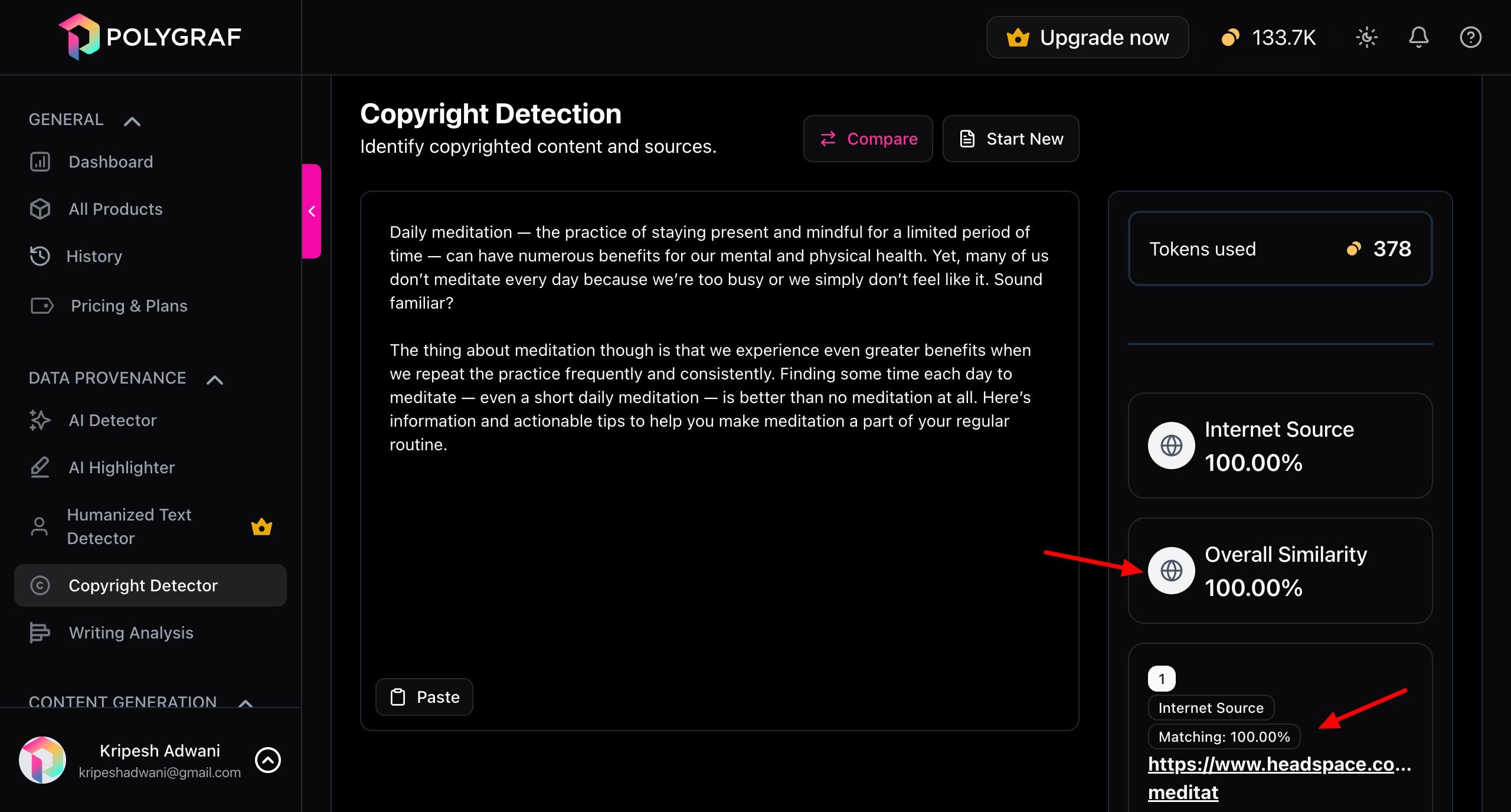
Simply paste your text into it. It returns the probability of it being an internet source, the percentage of overall similarity, and the link to the source. This is useful for content writers and bloggers.
4. Analyze Writing
Once you accurately detect AI content in your draft, it’s time to get an analysis with the Writing Analysis tool.
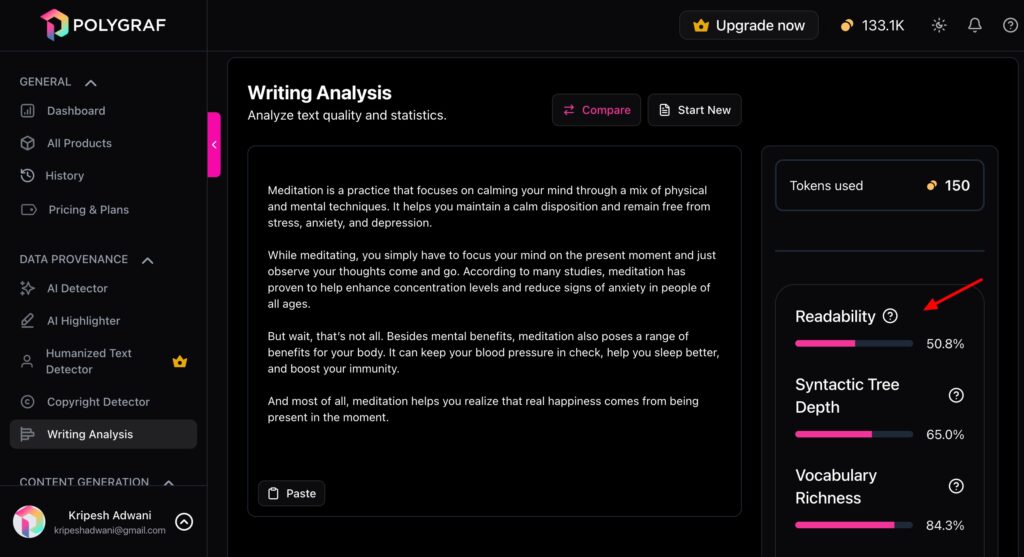
As you paste your content in the dashboard, it scores your writing for the following metrics.
- Readability: It measures the ease of reading and understanding your content.
- Syntactic Tree Depth: It measures the complexity of your sentence structures.
- Vocabulary Richness: It checks the variety of words used in your text.
- Perplexity: It’s the measure of how predictable your text is.
- Average Sentence Length: It checks the number of words in every sentence.
- Cognitive Flow Index: It evaluates how creative and natural your text feels.
This is helpful for writers to identify how natural their text sounds. If it scores low on certain criteria, you can manually edit it and recheck the scores.
Polygraf AI Chrome Extension
To provide easy access, Polygraf AI offers a handy Chrome extension to its users. All you need to do is install the extension and log in to your account. Whenever you visit a website, just select a specific block of text, and Polygraf AI will tell you if it’s AI-generated or real.
It works on all platforms, including social media apps like Twitter (X), LinkedIn, etc. So, you can easily detect AI usage in posts, comments, and replies. You can use it on news sites, blogs, etc.
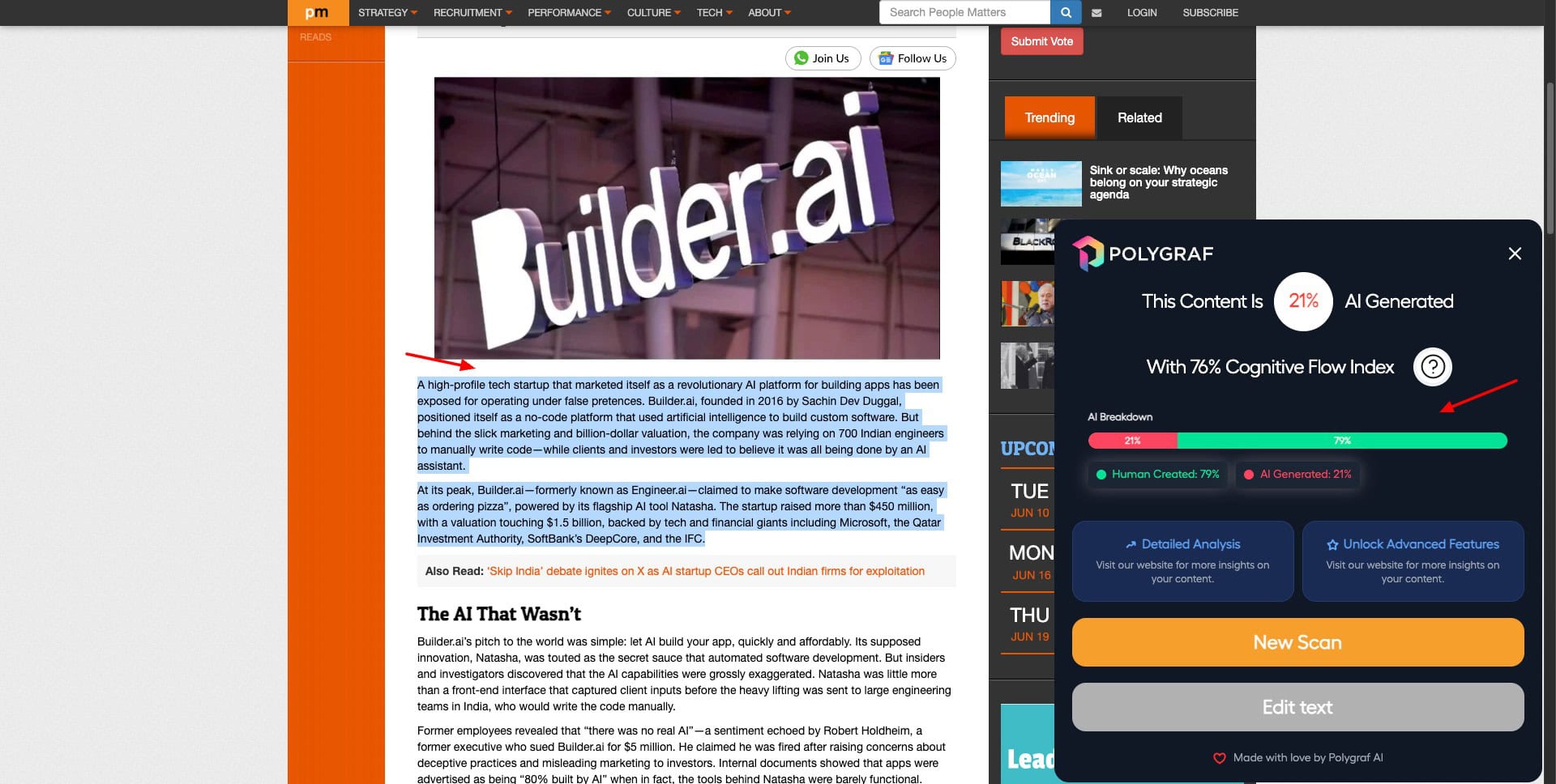
You can also humanize or summarize the selected block of text within seconds. The dashboard features your token balance and the number of tokens used on different tasks. Overall, Polygraf’s extension makes AI content identification accessible.
Polygraf AI Pricing
Polygraf AI offers two paid plans along with a free plan. Its paid plans start from $8.29/month for the Standard plan. With this plan, you get 150k AI tokens along with features like AI Highlighter, Advanced Copyright Detector, and Content Humanizer.
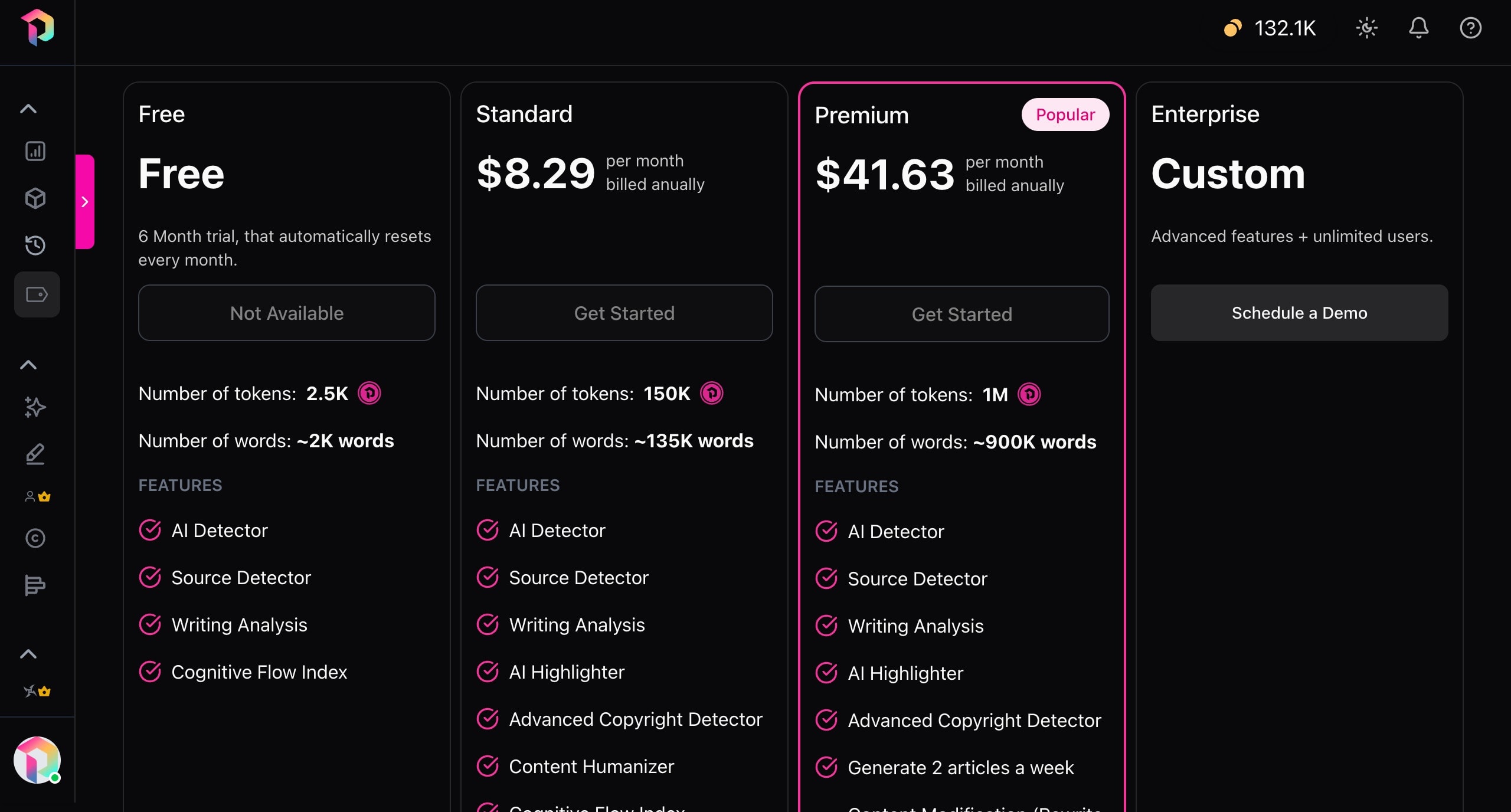
For advanced features like Reference Generator, PII Detector, Content Modifier, Document Redactor, and Article Generator, you can upgrade to its Premium plan for $41.63/month. If you have a large team of users and need more advanced features, you can contact their team for the Enterprise plan.
AppSumo Deal
Right now, Polygraf is available as a lifetime deal on AppSumo’s Sumo Day Sale. It is priced at $59, where you get 150k monthly tokens and 135k monthly words. If you are not into lifetime deals, you can check out its annual tier priced at $159 with 1 million monthly tokens and 900k words.
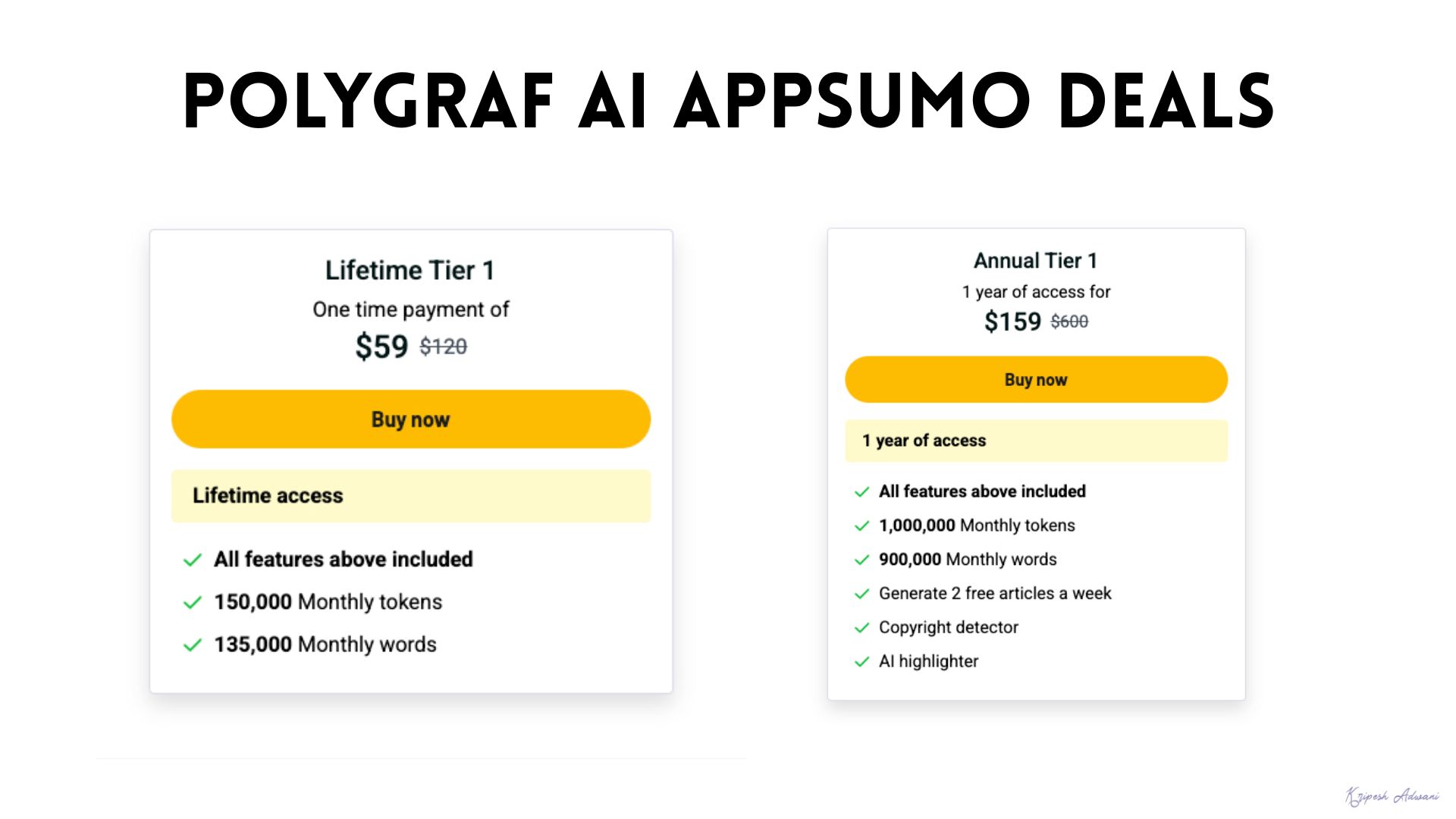
AppSumo also offers an extended 60-day refund policy. So, you can thoroughly test out the features of Polygraf AI, and if you’re not satisfied, you can return it within the 60-day window.
PolyGraf Pros
1. Accurate AI Detection
Unlike most tools, Polygraf AI not only shares the percentage of AI content detected but also highlights the AI-written parts. In my experience, it accurately identified the AI-produced and copyrighted parts.
2. Affordable AppSumo Deal
The AppSumo lifetime deal of Polygraf AI is priced at a super low price of $59. With this deal, you can easily test out all the features of the tool and decide if it’s worth it for you.
3. Handy Chrome Extension
The Chrome extension of Polygraf makes it highly accessible and easy to use. You can select text from any webpage and analyze if it’s human-written or AI-generated content.
4. Transparent Credit Consumption
Unlike other tools. Polygraf AI clearly defines the credits to be consumed for each of your analyses. You can also check the balance of tokens on your account at any time. This transparency is appreciable.
Polygraf Cons
1. Advanced Tools on Higher Plans
Though Polygraf is a security platform, it restricts access to its advanced security features to the Enterprise plan users. This includes Voiceprint checks, deepfake detection, PII mapping, etc.
2. Unusable Buttons
The buttons featured in certain places don’t work. For example, the notification and support buttons on the dashboard are inaccessible. I hope they fix it soon.
Polygraf AI vs Quetext vs Copyleaks
To evaluate how Polygraf AI performs compared to others in the same category, we picked the two most popular AI detection tools- Quetext and Copyleaks. We supplied the same blocks of text to each of the tools and tested their AI detection capabilities.
| Polygraf AI | Quetext | Copyleaks | |
| Free Word Limit | 2k words | 250 words | 25k characters |
| Completely AI Content | 99.98% AI | 99.80% | 100% AI |
| Partially AI Content | 68.73% AI | 99.8% | 100% AI |
| Completely Human Content | 99.93% | 4.59% | 0% |
| Additional Info with Detection | AI Models used along with %Cognitive Flow Index | Number of AI Phrases DetectedRed highlights for AI parts | Quotes AI sentences |
All three AI tools performed equally well in detecting completely AI-generated text. However, Polygraf AI stood out in detecting partially generated AI text and human-generated content. It even detected the percentage of AI contribution of different AI models, like Claude and OpenAI.
Whereas, Copyleaks and Quetext over-detected AI even in human-written text, making them less accurate. So, if you need precise and reliable AI detection and analysis, Polygraf AI is the better choice.
Why Should You Trust Me?
I have been working full-time in the digital industry since 2015. In all these years, I have used, tested, and reviewed hundreds of digital tools for small businesses and entrepreneurs. In the last few years, I’ve also tested a range of AI tools.
I have talked in detail about AI Writers, AI Content Detectors, AI Humanizers, Tips to detect AI-generated content, and more. Extensively working with AI writing tools and AI assistants has given me the authority to recommend the right ones for your needs.
Conclusion
Polygraf AI stands out with its accurate and transparent AI content detection, affordable lifetime deal, a handy Chrome extension, and overall ease of use. This makes it a solid choice for writers, editors, content reviewers, and educators.
Even though it has inactive buttons, and security features are only available on higher plans, its lifetime deal is a value for money! Right now, it’s available on AppSumo’s Sumo Day Sale for $59. You also get a 60-day refund policy to test it out thoroughly with no worries.
Anyway, are you planning to use Polygraf AI Detector? Have you used any other similar tools? Let me know your opinions in the comments section below. And if you’re interested in the AI space, subscribe to my weekly AI newsletter to stay updated with the latest news and free tools.
This is Kripesh signing off. I’ll be back with more interesting content soon. Till then, cheers and keep learning. 🙂

Pros of Polygraf AI (+)
- Accurate AI Detection
- Affordable AppSumo Deal
- Chrome Extension
- Transparent Credit Consumption
Cons of Polygraf AI (-)
- Advanced Tools on Higher Plans
- Unsable Buttons