Looking for an advanced Linux VPN app with a full graphical interface? Private Internet Access (PIA) can meet both needs.
It’s a well-established USA-based VPN provider owned by Kape Technologies. PIA offers several advanced features, including an ad blocker, port forwarding, and Identity Guard, all at a price of under $2 per month.
With strong competition in the market, the key question is: Is PIA ranked among the best VPNs in India? In this Private Internet Access VPN Review 2026, I’ll break down everything from key features and speeds to torrenting performance, streaming support, pros, and cons.
Let’s jump into the review!
Private Internet Access Review 2026
Summary
Private Internet Access (PIA) is 15-year-reputed VPN provider. It stands out for its feature-rich offering, verified no-logs track record, P2P support, open-source apps, and modern Linux UI. However, it’s not reliable for streaming, and some users have concerns about its US jurisdiction and ownership by Kape Technologies.
So, it is a good choice for torrent-heavy users, Linux users, and those who need split tunneling support on macOS.
- Private Internet Access Features Overview
- About Private Internet Access
- PIA Speeds
- PIA Servers
- PIA Streaming and Gaming Performance
- P2P Torrenting
- Privacy
- Private Internet Access History
- PIA Security
- Pricing
- PIA Customer Support
- Devices
- User Interface
- Additional Features
- Performance & Reliability
- PIA Pros
- PIA Cons
- Private Internet Access Alternatives
- Why Should You Trust Me?
- Conclusion
- FAQs
Disclaimer : I strongly believe in transparency. If you buy using the links on our site, we may earn a small commission without any extra cost to you. This helps me to keep producing honest reviews. Read More >>
Private Internet Access Features Overview
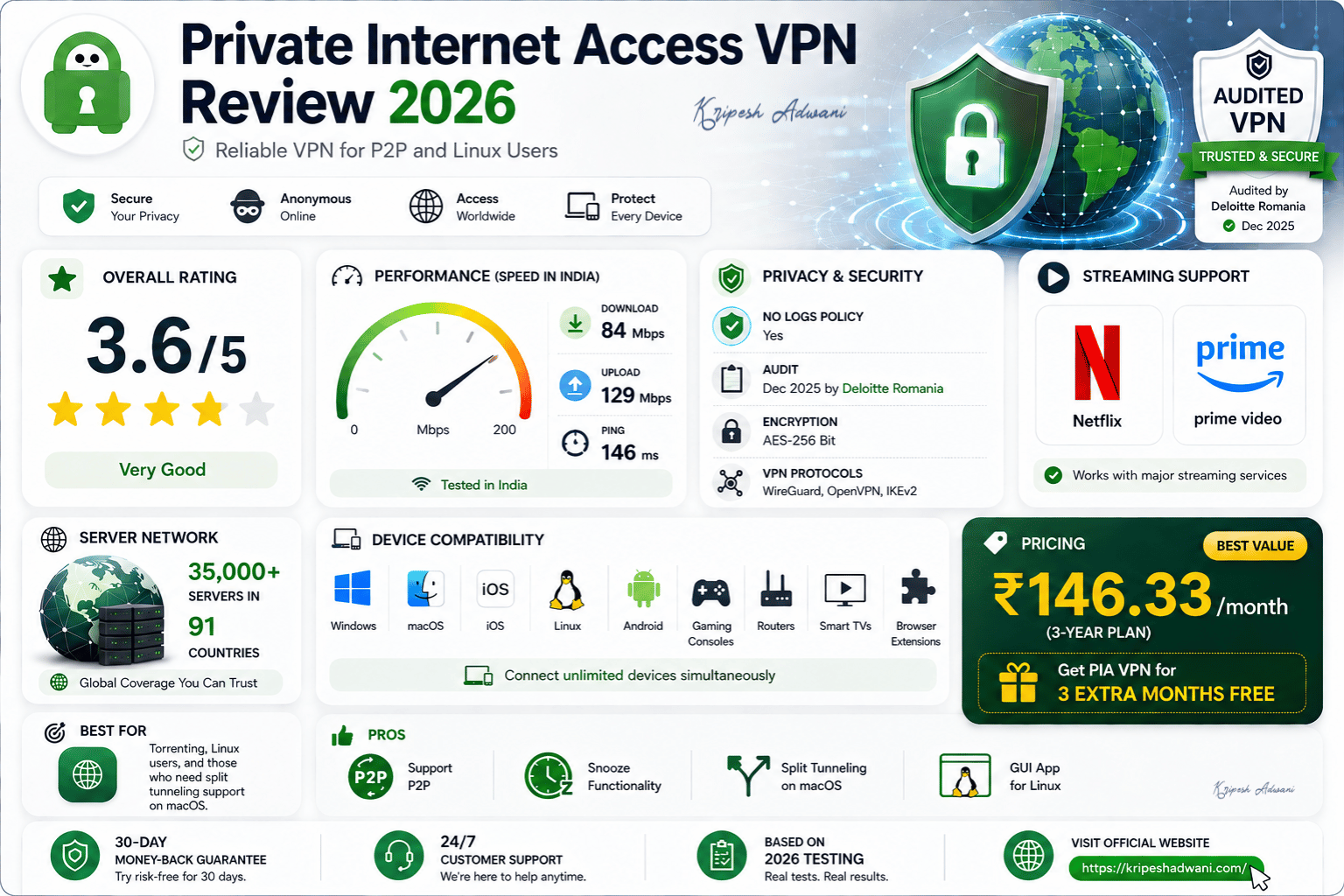
| Rating | 3.6/5⭐ |
| Speeds in India | Download speed: 84 Mbps Upload speed: 129 Mbps |
| No Log | Yes |
| Audit | Dec 2025 by Deloitte Romania |
| Streaming | Amazon Prime Video, Netflix |
| VPN Servers | 35,000+ servers in 91 Countries |
| Devices | Windows, macOS, iOS, Linux, Android, Gaming consoles, routers, smart TVs, browser extensions |
| Pricing | ₹146.33/month (3-year plan) |
| Coupon code | Get PIA VPN for 3 extra months FREE |
About Private Internet Access
Private Internet Access (PIA) is a US-based virtual private network provider. It was founded in 2010 by Andrew Lee under London Trust Media. In 2019, Kape Technologies acquired the VPN service.
The VPN stands out for its audited no-logs policy, open-source apps, and servers in 91+ countries. However, Kape Technologies’ acquisitions have raised privacy concerns among experts and users.
PIA has acquired a user base of over 15 million worldwide and has over 10 years of experience in the industry. The app is rated 3.6 stars with over 1 crore downloads on the Google Play Store, and 4.7 stars on the Apple App Store.
PIA Speeds
To test PIA’s speeds, I relied on Speedtest.net, and I observed quite inconsistent speeds on PIA.
My baseline speed is 200 Mbps with a 7 ms ping rate. I connected to PIA’s India and USA servers and recorded the average speeds.
Speed in India
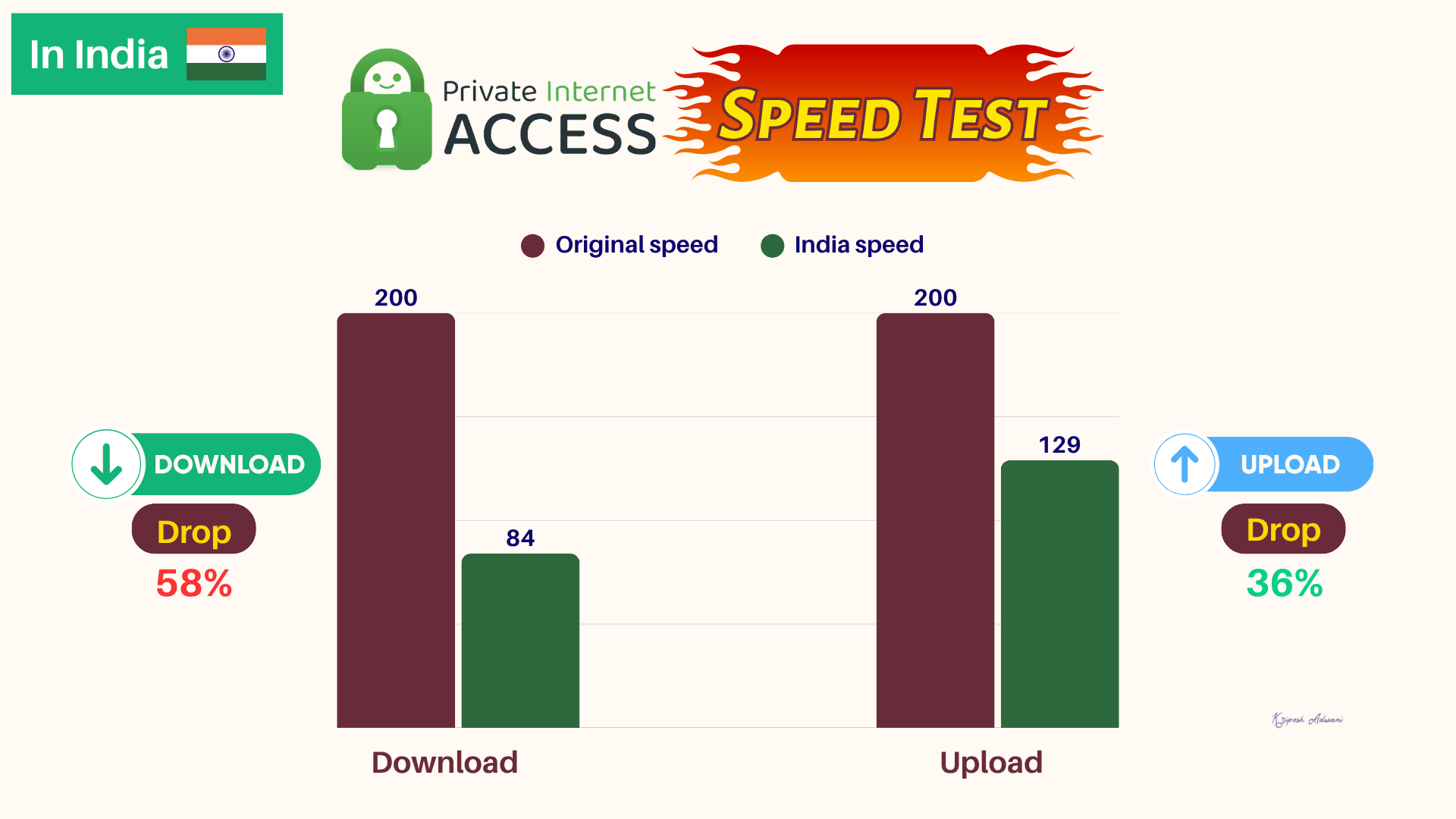
While testing on an Indian server, my baseline download speed dropped to 84 Mbps, around 58%. The upload speed decreased less, reaching 129 Mbps (a 36% drop).
Speed in the US
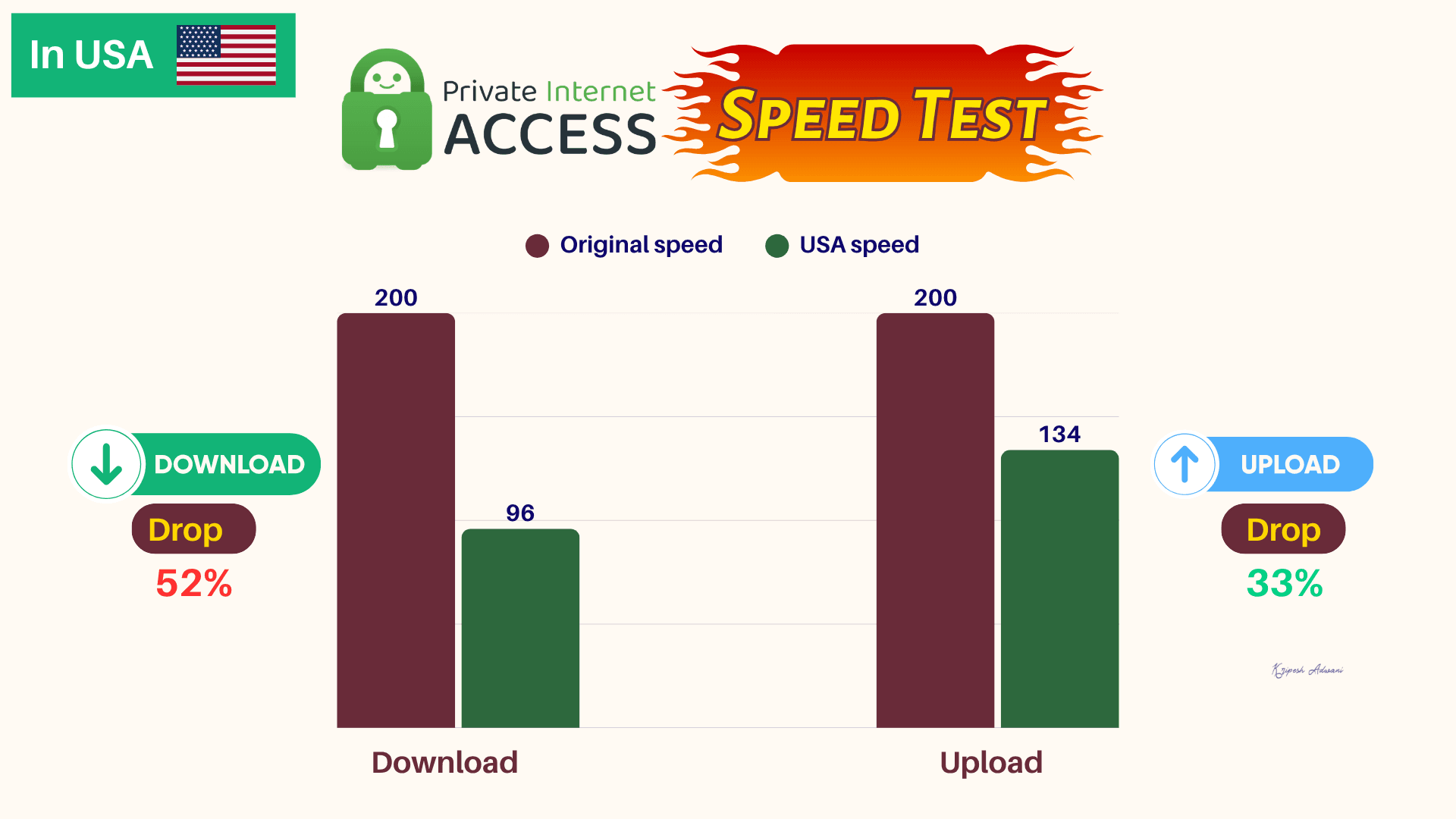
The download speed dropped to 96 Mbps, a 52% reduction. Meanwhile, the upload speed decreased to just 134 Mbps, a 33% drop.
| Private Internet Access | NordVPN | Surfshark | ExpressVPN | |
| India Download Speed | 84 Mbps | 152 Mbps | 165 Mbps | 140 Mbps |
| India Upload Speed | 129 Mbps | 90 Mbps | 115 Mbps | 129 Mbps |
| USA Download Speed | 96 Mbps | 120 Mbps | 135 Mbps | 129 Mbps |
| USA Upload Speed | 134 Mbps | 74 Mbps | 98 Mbps | 95 Mbps |
When compared with top-tier VPNs, NordVPN, Surfshark, and ExpressVPN deliver better download speeds than PIA. But PIA’s upload speeds were competitive on the Indian server.
On the US server, PIA outperformed all three VPNs in upload speed. However, in terms of download speeds, it again lagged these competitors.
PIA Servers
Servers Locations
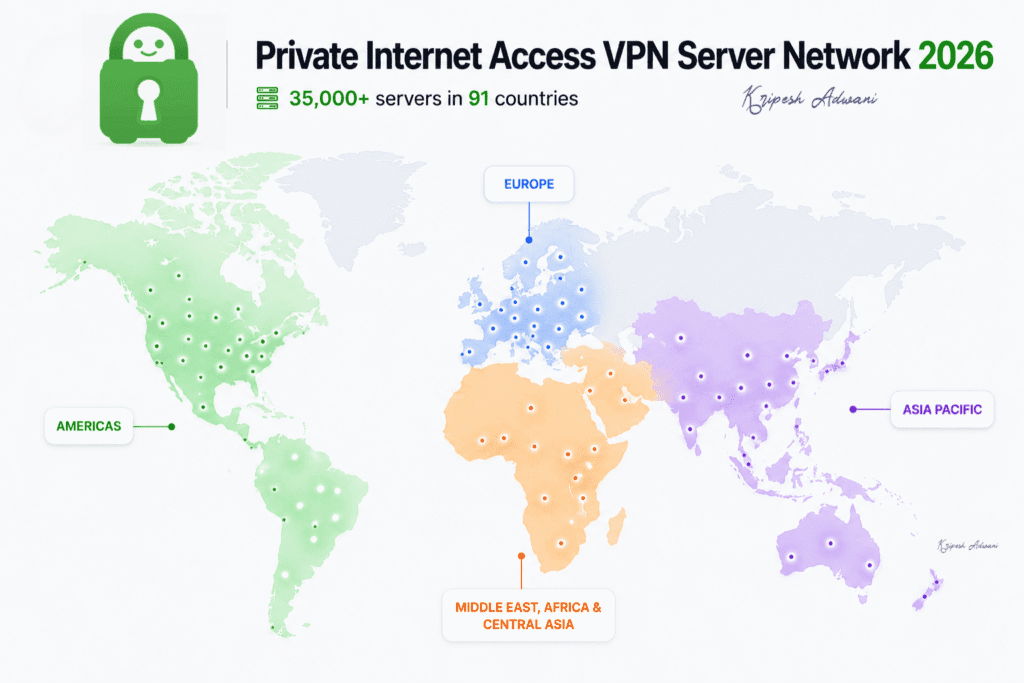
PIA operates 35,000+ servers across 91 countries and 104 cities. Its servers are categorized into 5 regions: the Americas, Europe, Asia Pacific, the Middle East, Africa & Central Asia.
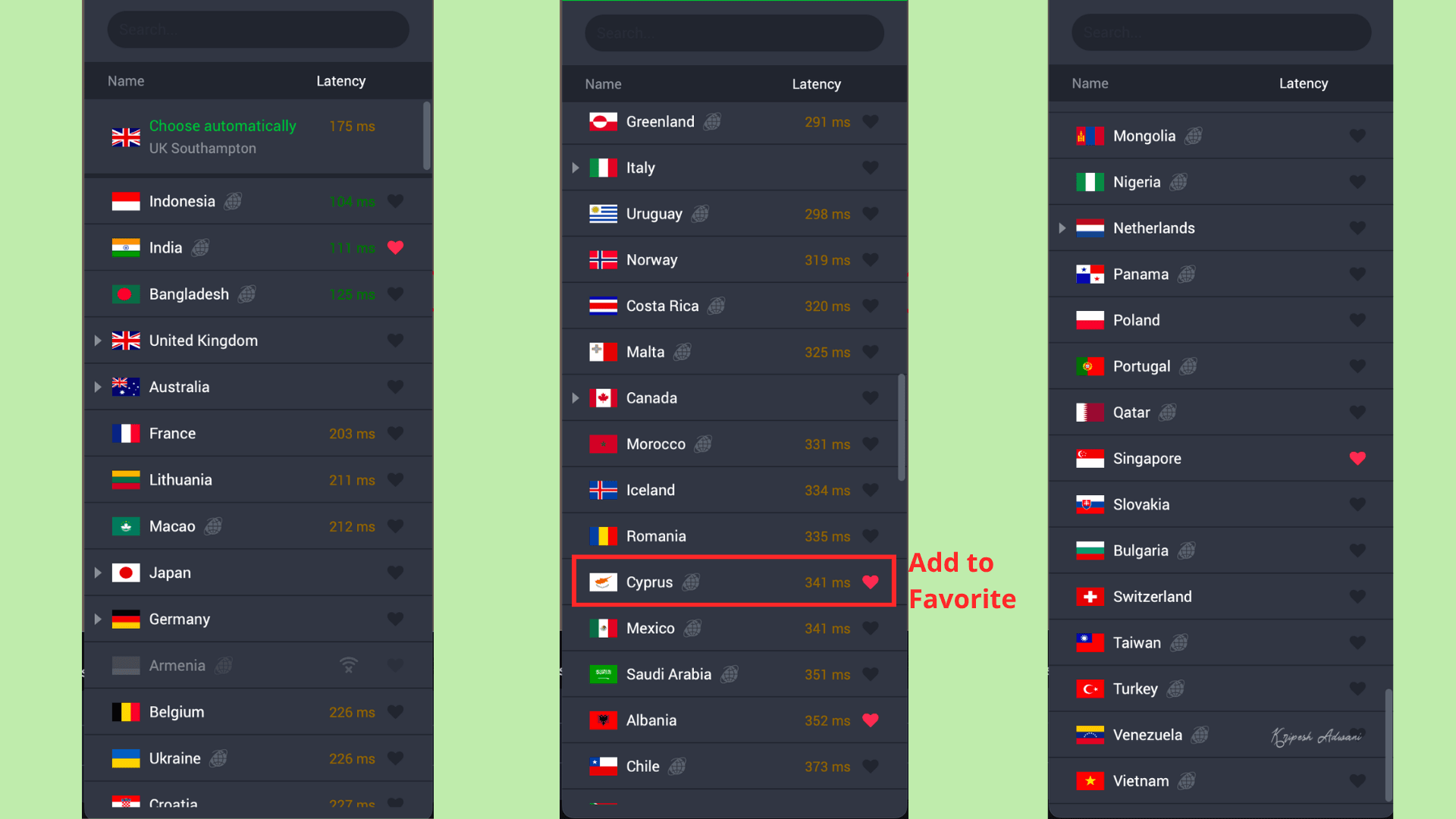
The globe icon beside a server name indicates a virtual location. PIA provides servers in almost every US state, with 10 Gbps servers designed for high speeds. In India, it has only one virtual server in Mumbai.
RAM Servers
Similar to NordVPN or Surfshark, PIA uses RAM-based servers. RAM is a volatile memory, so even if servers store any session data, everything is automatically wiped on every reboot.
Obfuscated Servers
Private Internet Access provides obfuscated servers across all devices, Windows, Mac, and Android. To enable this feature on any device, you need to switch the protocol to OpenVPN (TCP). Only then will you see the obfuscation option on mobile and the multi-hop feature on desktop.
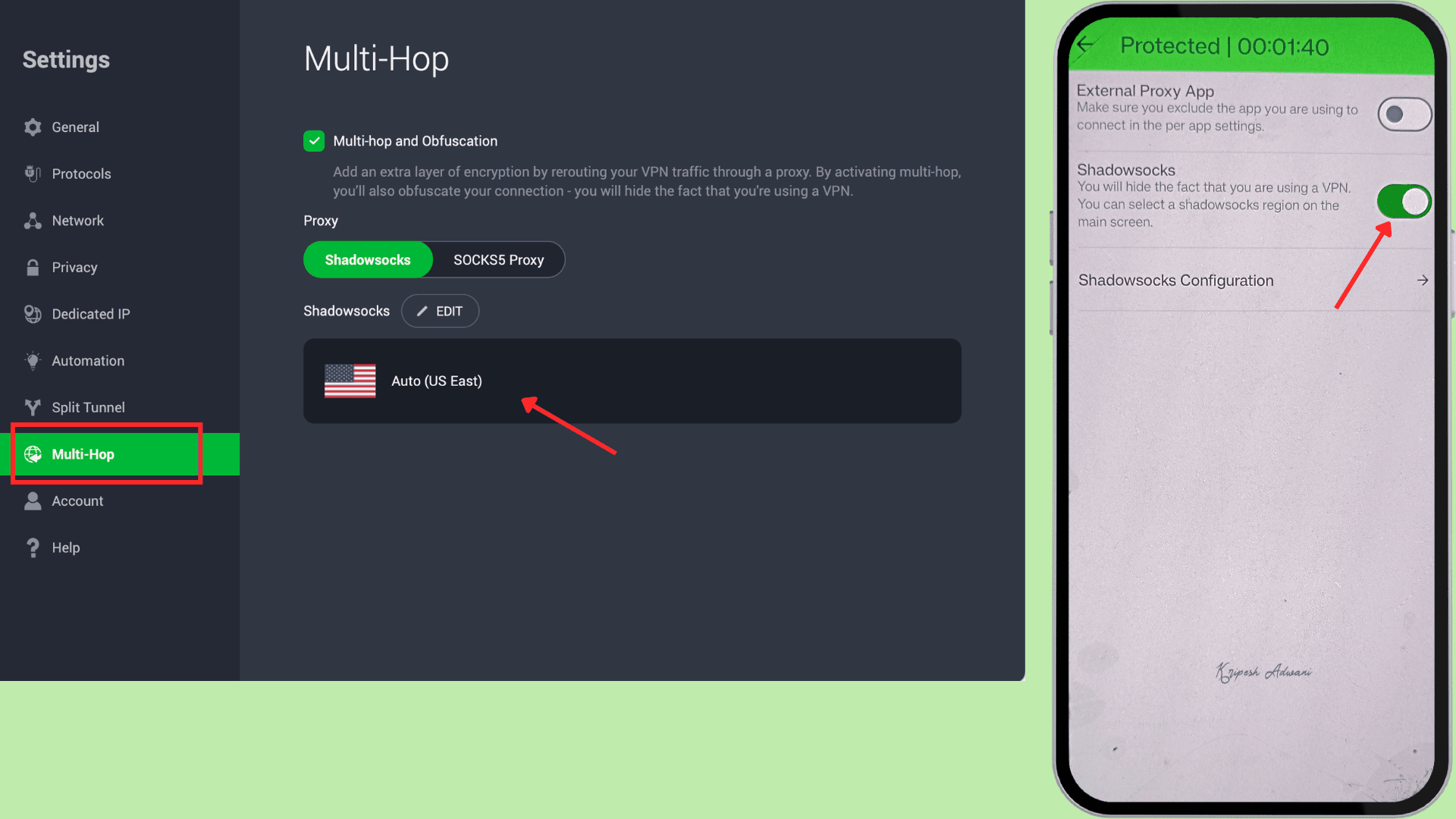
PIA offers multi-hop servers using Shadowsocks or a SOCKS5 proxy, not Stealth mode. Typically, when you enable obfuscation, this VPN automatically selects exit locations. But we can manually choose from six locations: the UK, the Netherlands, Japan, the US, Canada, and Switzerland.
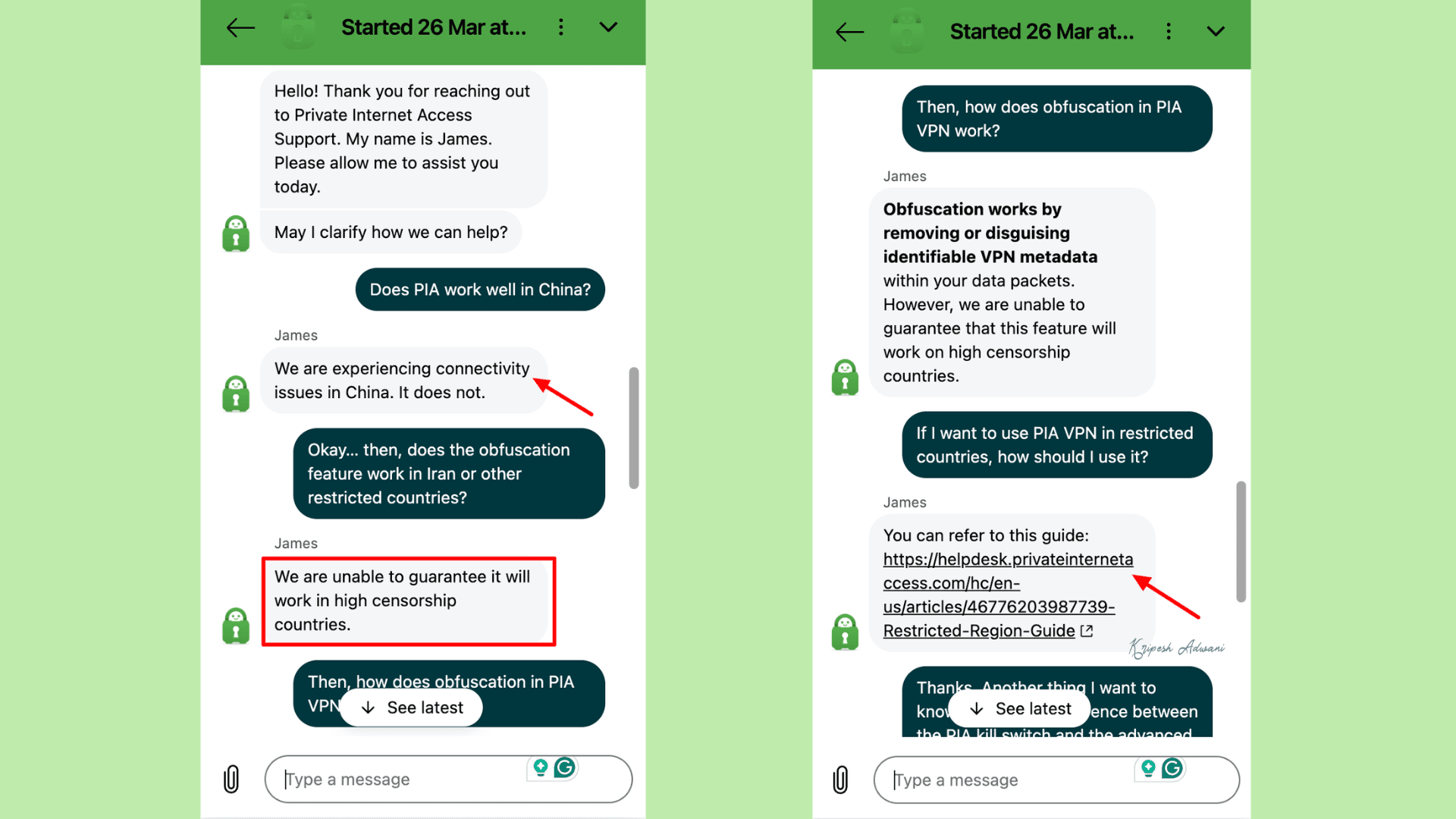
For countries with high censorship, PIA may not be as reliable as other top VPNs. Even when I contacted the support team, they could not guarantee that the VPN would work to bypass restrictions in countries like China or Iran.
Dynamic or Static IP Address
By default, users are assigned dynamic IP addresses. This means that every time we connect to a server, we receive a new IP address. This helps prevent tracking and enhances user privacy.
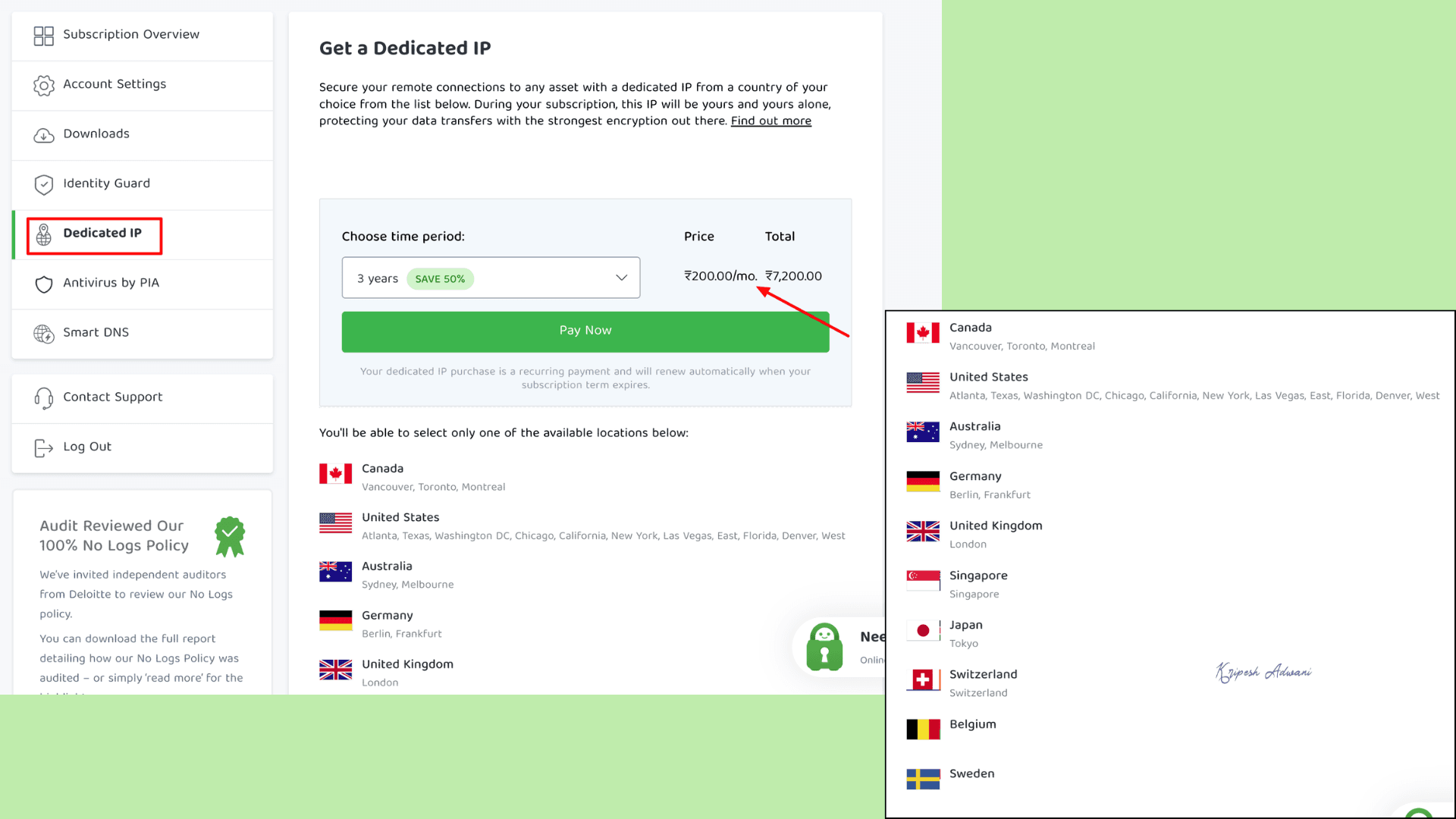
PIA VPN also offers dedicated static IPs (unique to each user) for consistent access without shared IP blacklisting. These IP addresses are available in 10 locations: Canada, the USA, the UK, Switzerland, Germany, Singapore, Australia, Sweden, Belgium, and Japan.
But similar to NordVPN and Surfshark, you need to pay extra for dedicated IP addresses. The cost is ₹200/month with a 3-year plan; otherwise, the monthly charge is ₹400.
PIA Streaming and Gaming Performance
| Streaming Service | Yes/No |
| Netflix US | Yes |
| Amazon Prime US | Yes |
| Hotstar | No |
| JioCinema | No |
| SonyLiv | No |
| Zee5 | No |
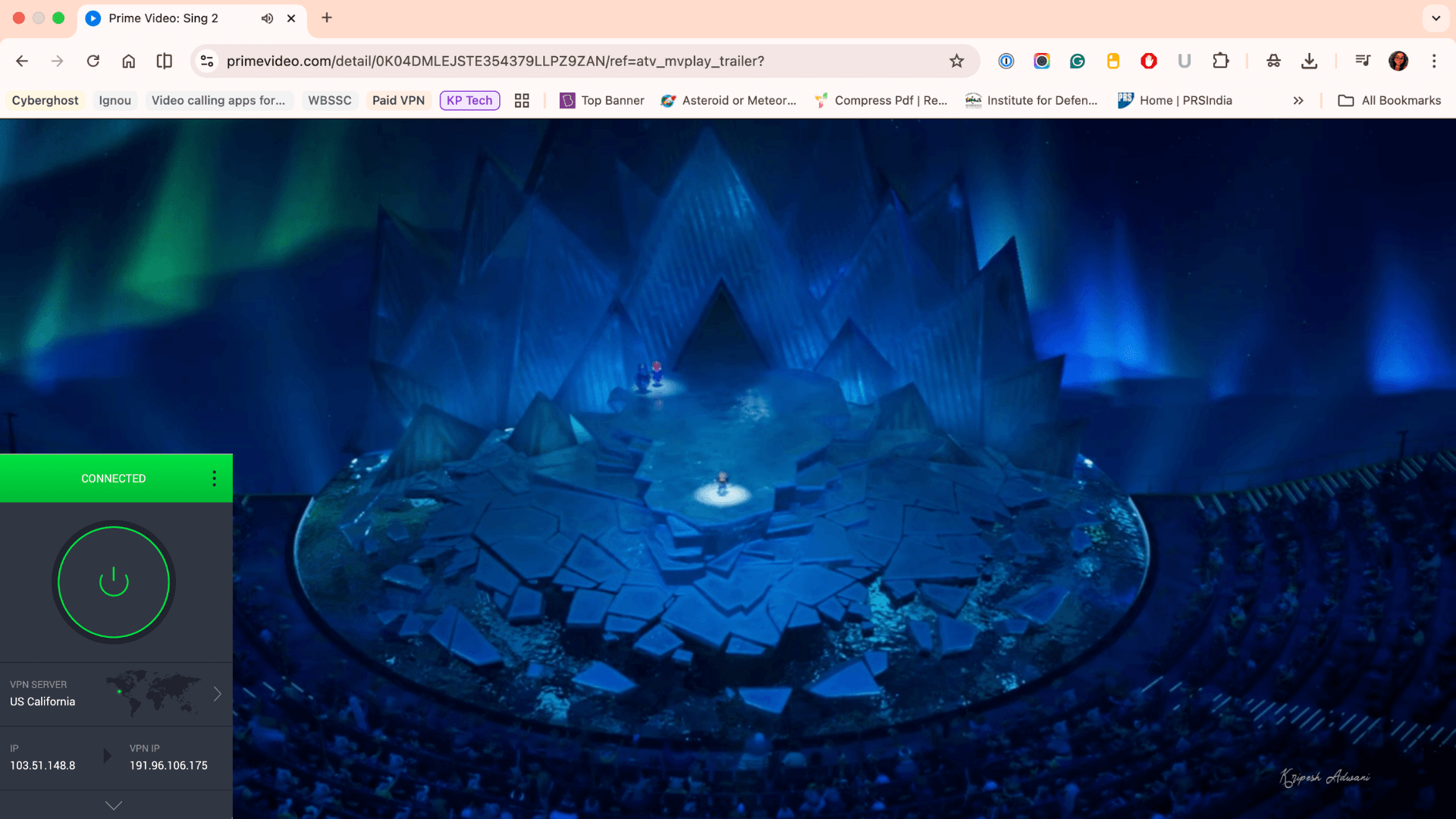
PIA performs better than most mid-tier VPNs for unblocking OTT platforms. It easily unblocks Amazon Prime Video, Netflix libraries, and Hulu. The speeds were decent enough for buffer-free streaming.
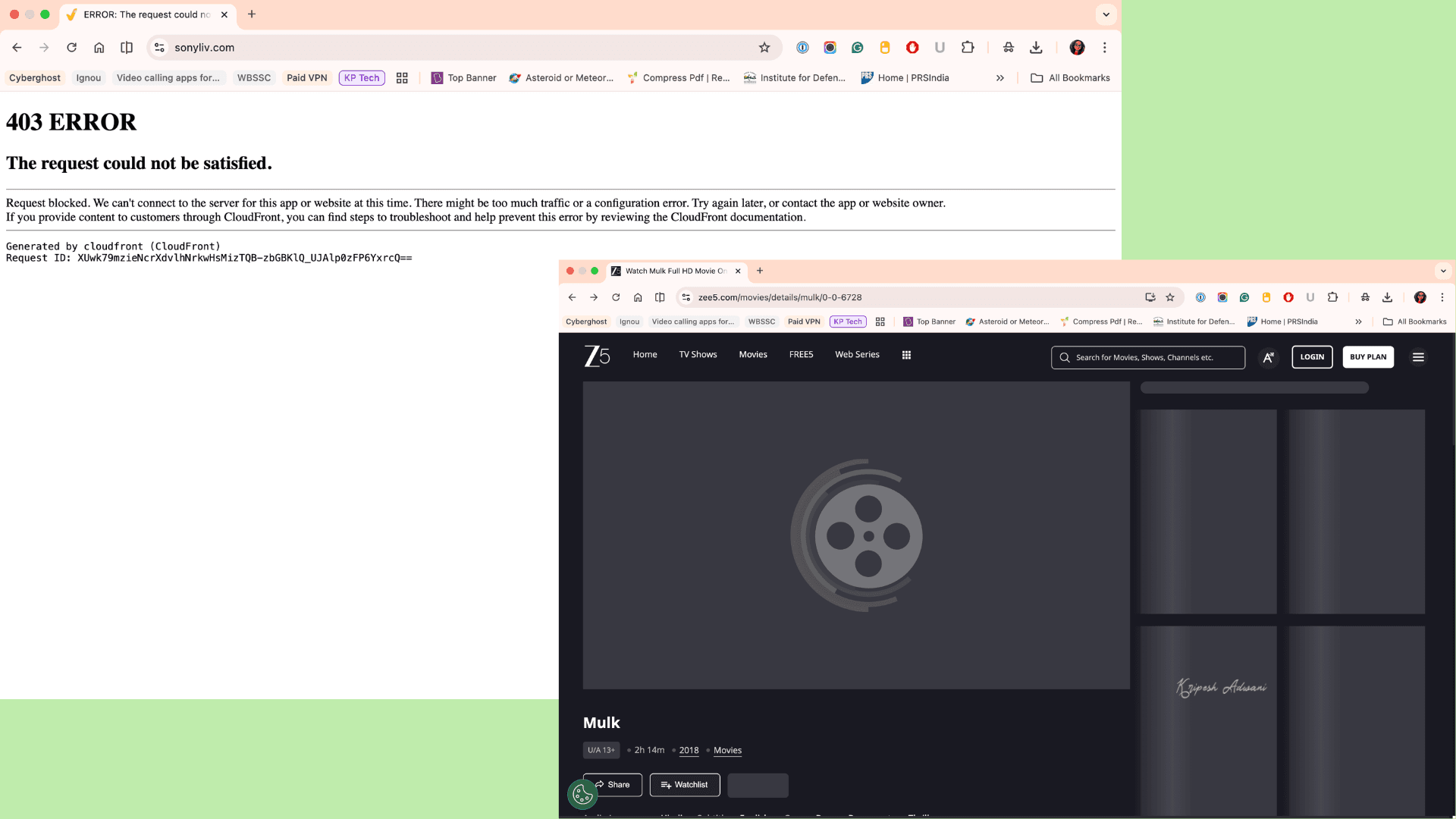
For Indian OTT platforms, PIA could only unblock Hotstar. It did not work with Zee5, SonyLIV, or JioCinema.
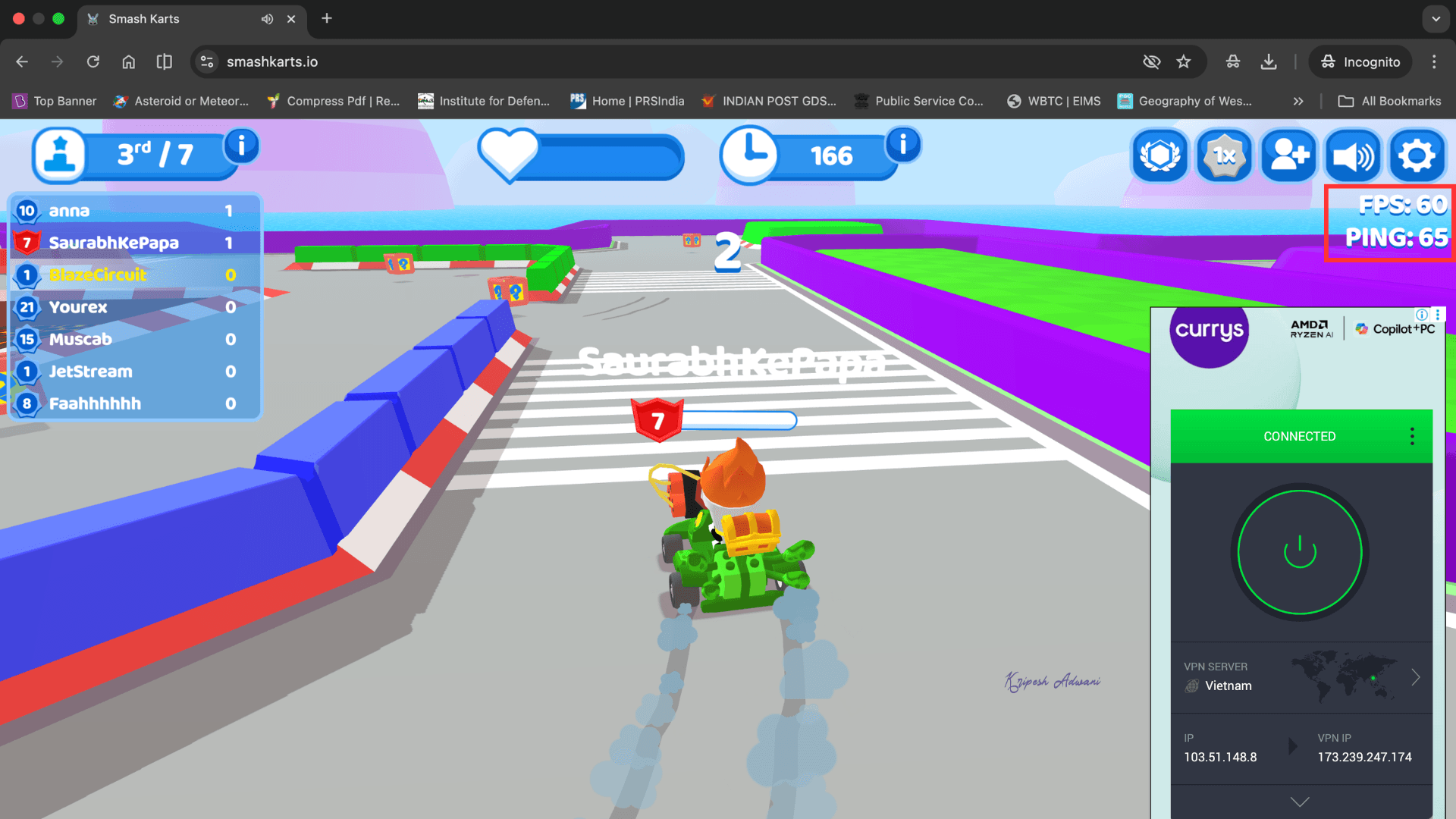
To test gaming performance, I played Smash Karts while connected to a Vietnam server. The ping rate was around 65 ms, and the performance was stable enough for responsive gameplay.
P2P Torrenting
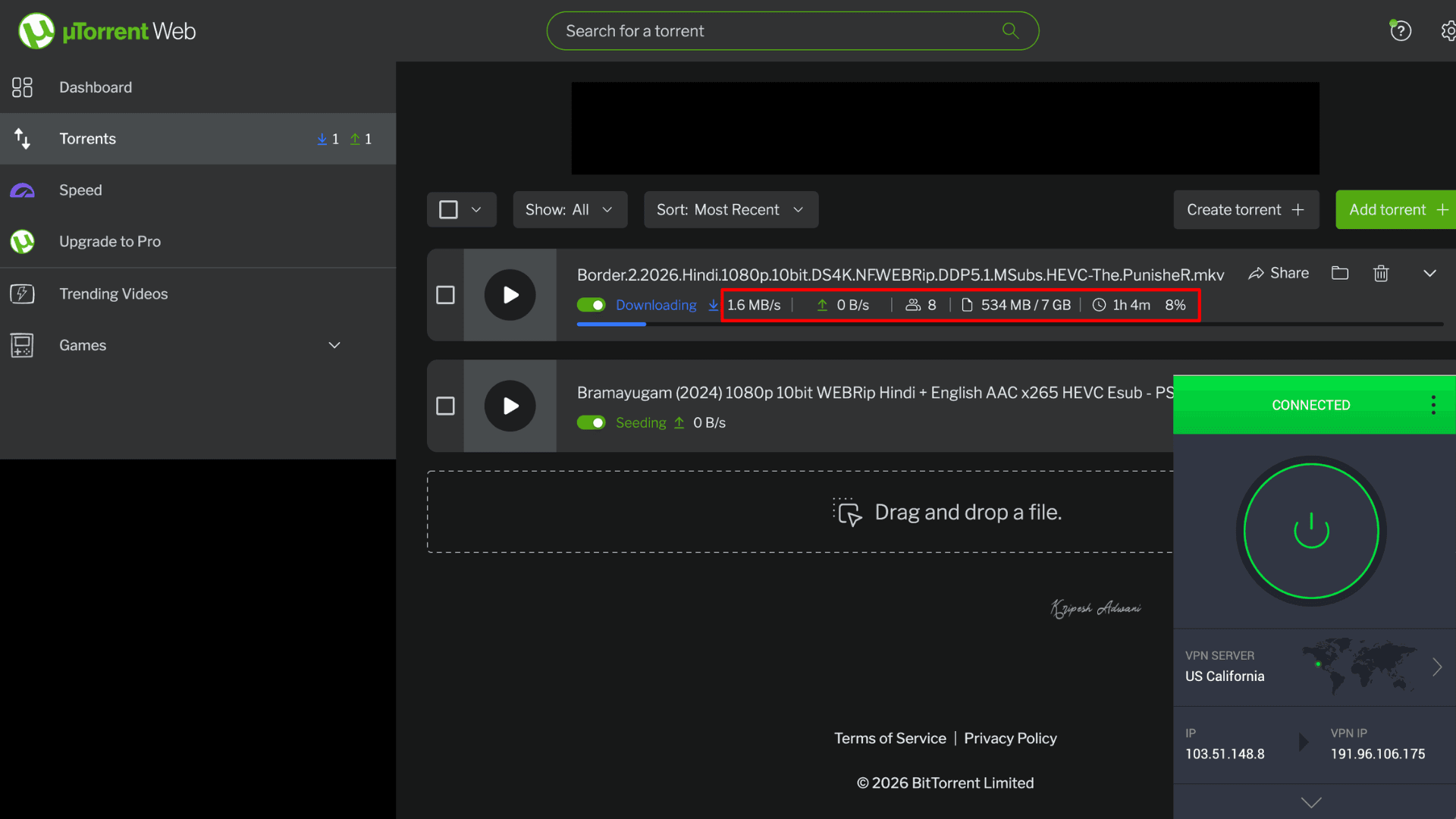
Compared to other mid-tier VPNs, PIA is a good option for torrenting, as it offers unlimited bandwidth. In my testing, I could download a 7 GB file in less than an hour. It supports P2P traffic on clients like qBittorrent and BitTorrent.
It also offers a port forwarding feature. The setup process is simple; just go to the Network settings tab and enable the “Request Port Forwarding” option. PIA will then assign a random open port for that session.
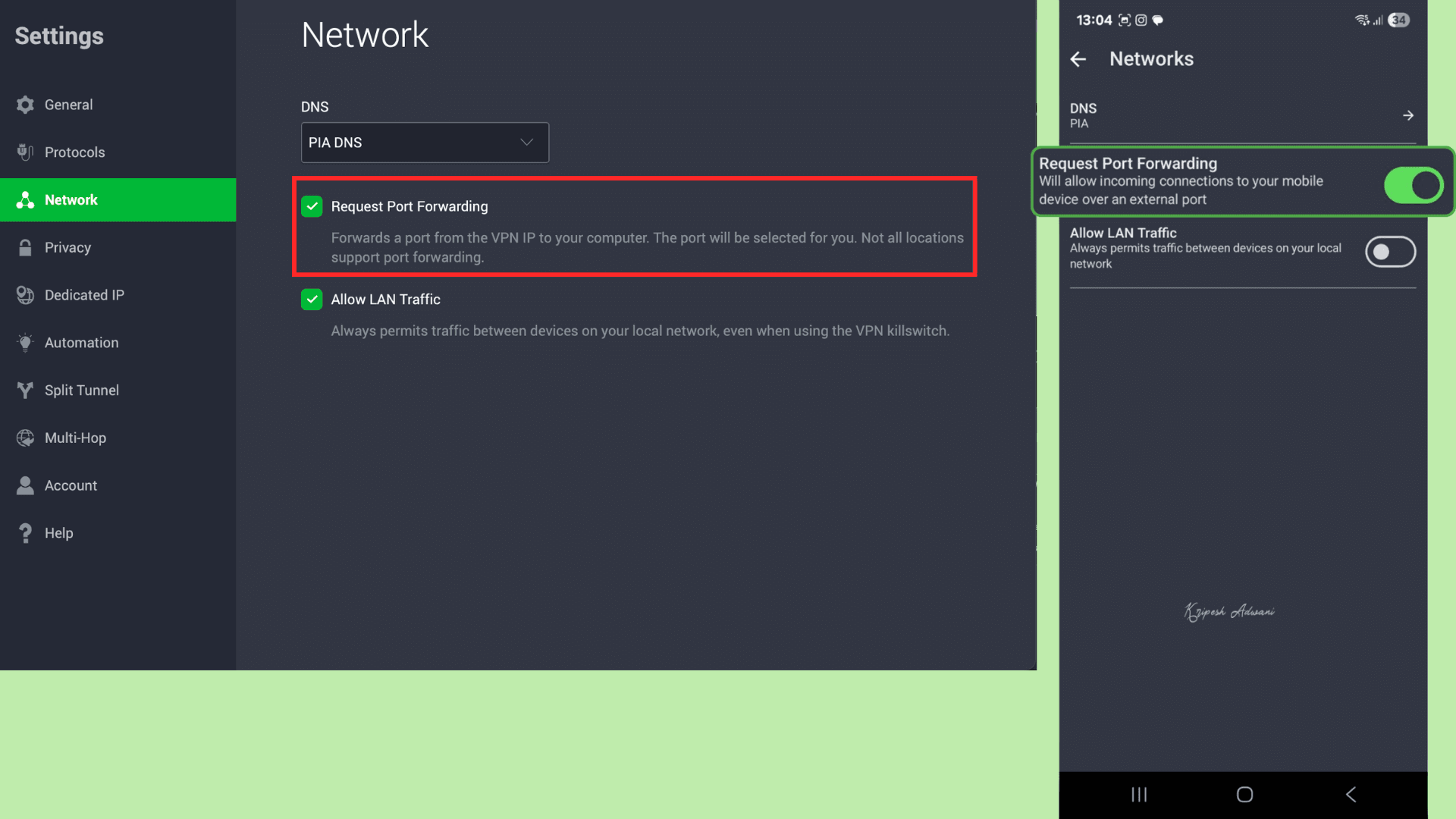
PIA allows manual port forwarding setup. Refer to PIA’s tutorial for proper guidance. However, port forwarding is not available on all server locations.
Privacy
Privacy Policy
Users can easily find Private Internet Access’s privacy policy on its official website. It is clear, transparent, and written in simple English for easy understanding. PIA privacy policy includes detailed sections on the personal and non-personal data they collect, disclosure of personal data, and other relevant information.
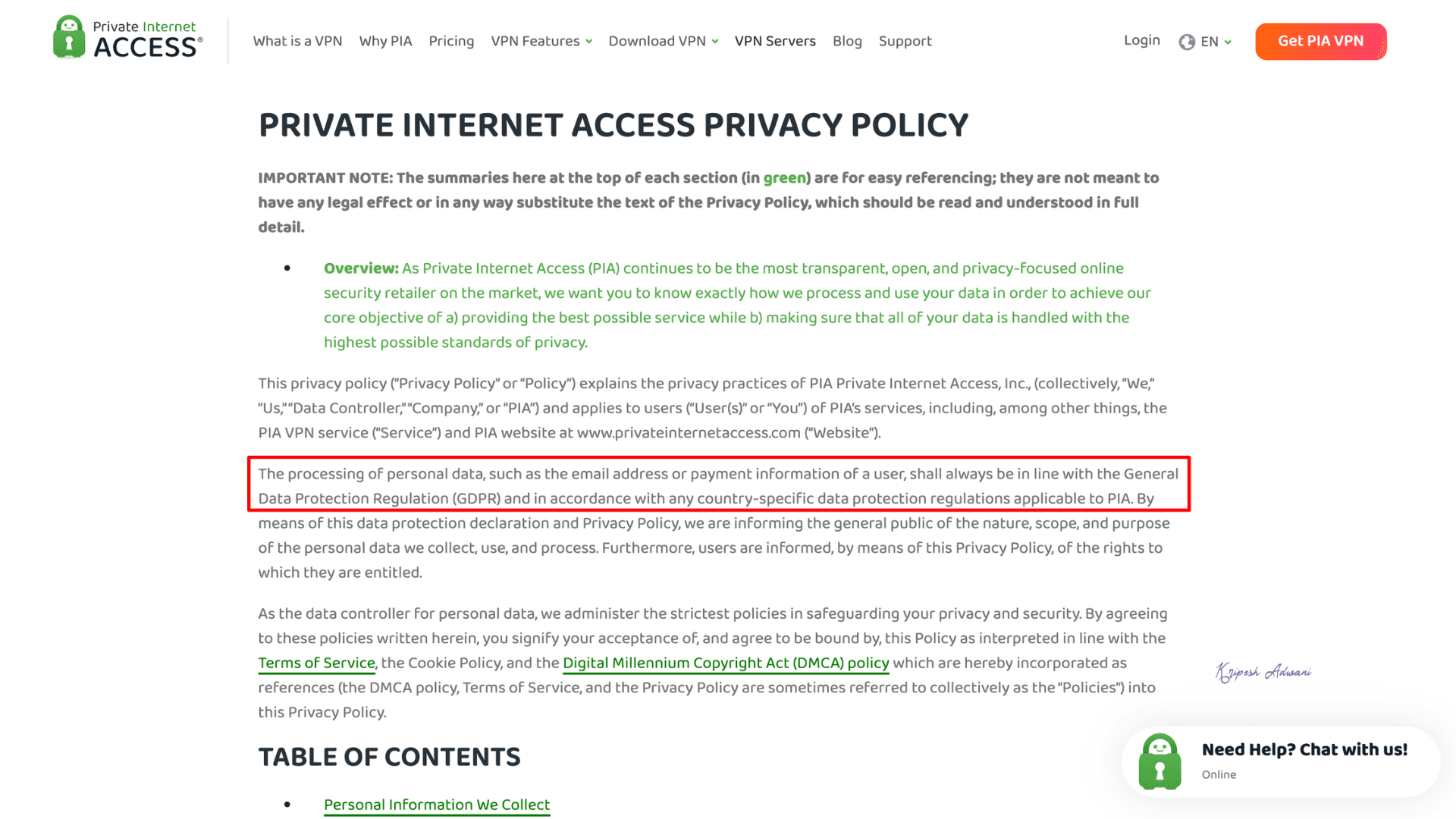
After reviewing each section carefully, I did not find any major discrepancies. The privacy policy is GDPR/CCPA-compliant. PIA also offers open-source apps for transparency and independent verification.
No-logs Policy
A premium VPN ensures your identity remains hidden by not storing your IP address, the servers you connect to, your browsing activity, or session timestamps. PIA doesn’t log user-sensitive information.
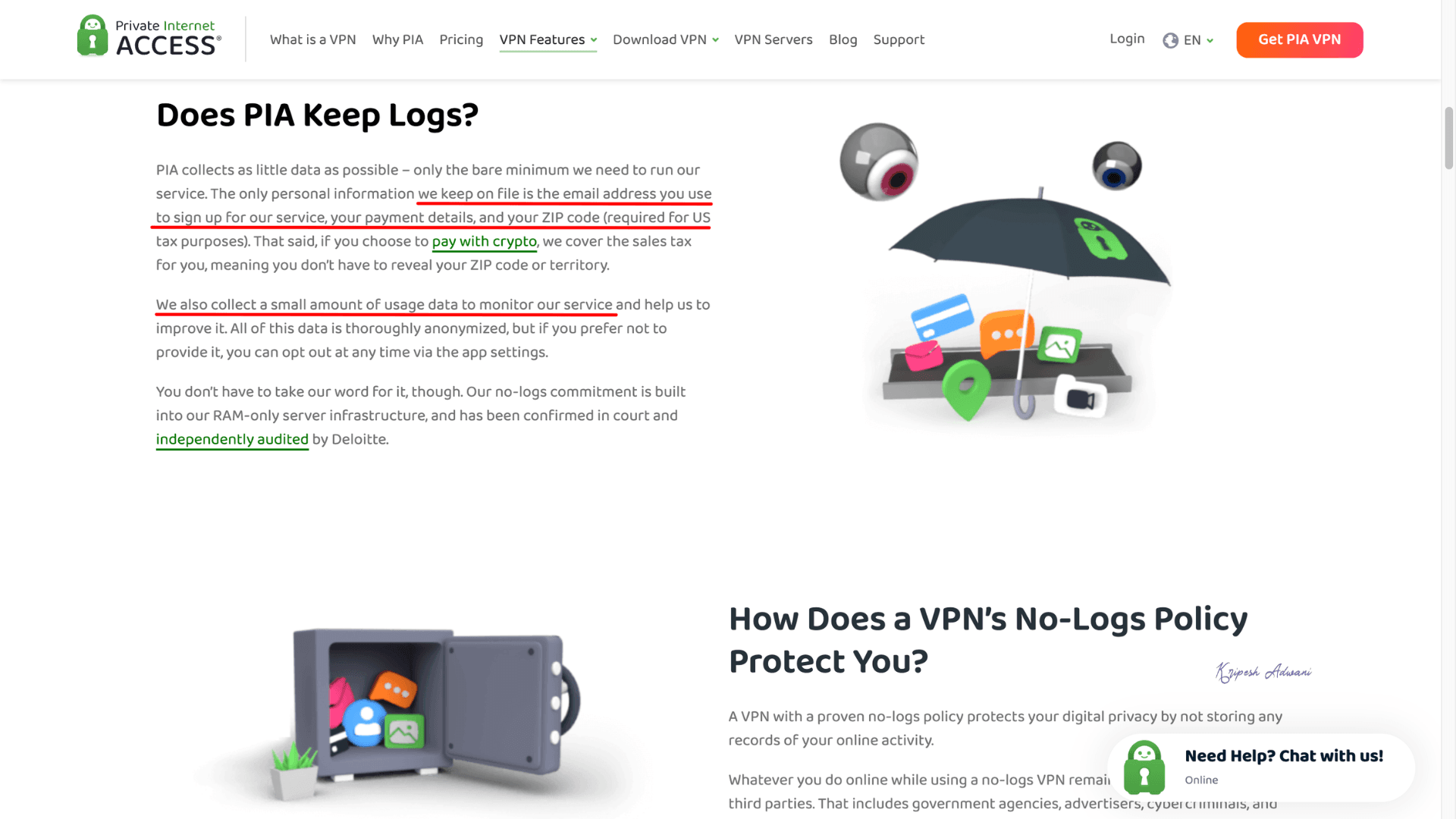
It collects only the minimal information required to operate its services. The data it collects, like email address, payment details, ZIP code, and limited usage data, is clearly outlined on its website. If you choose to pay with cryptocurrency, PIA does not store your payment details.
Security Audits
PIA has undergone three independent security audits by Deloitte as of 2026.
- December 2025: Deloitte Romania performed a full infrastructure audit of PIA’s VPN and distribution servers under ISAE 3000 standards. The audit verified PIA’s claims of zero data retention.
- January 2024: The same organization conducted another audit, expanding the scope to include network security, incident response, and dedicated IPs. No critical vulnerabilities or third-party exploitation risks were found.
- June 2022: PIA underwent its first audit covering server configuration and VPN services. Deloitte Romania confirmed that PIA’s servers align with its privacy policy and no-logs design. The servers operate on encrypted RAM-only disks.
Private Internet Access Headquarters
PIA VPN is legally registered in Denver, Colorado, United States. The company was founded in 2010 by Andrew Lee under London Trust Media. After nine years, in 2019, it was acquired by Kape Technologies, a London-listed cybersecurity organization.
Privacy Comparison
In my view, PIA maintains a strong privacy standard, comparable to other premium VPNs. It uses RAM-only servers and follows an independently audited no-logs policy. Its no-logs claim was also tested in a 2018 court case, where it could not link user activity to an individual.
But there are a couple of concerns. First, PIA is headquartered in the United States, which is a member of the Five Eyes intelligence alliance. Second, before rebranding as Kape Technologies, Crossrider was associated with developing adware.
Since the acquisition, PIA has continued to operate independently. They have improved their privacy practices and undergone audits three times. That said, ExpressVPN has also been acquired by Kape Technologies.
Private Internet Access History
Private Internet Access is one of the oldest VPNs in the market, with over 16 years of a clean track record. Since its founding in 2010, it has steadily upgraded its services by introducing standard VPN features.
In 2018, the VPN was linked to a court case involving Ross M. Colby. A federal court requested customer data related to alleged hacking activity connected to a PIA IP address. However, the provider could not supply any user records tied to that IP. So, the court validated PIA’s no-logs claims.
In November 2019, London-listed Kape Technologies acquired PIA, similar to its acquisition of other VPNs like CyberGhost. This raised concerns among privacy-focused users. But between 2022 and 2026, PIA underwent three independent security audits. So, its commitment to user privacy and zero data retention is reinforced again.
PIA Security
Security Protocols
Private Internet Access provides users with 3 VPN protocols.
| Protocol | Encryption | Security | Speed | Best For |
| OpenVPN (UDP/TCP) | AES-256 encryption | Most secure | TCP is slower than UDP | Security, firewalls |
| IKEv2/IPSec | AES-256 encryption | Highly secure | Faster than OpenVPN | Mobile users |
| WireGuard | ChaCha20 | Secure | Fastest | Streaming, gaming, daily |
PIA’s website claims that it offers three industry-standard protocols, but I found only two. OpenVPN and WireGuard are the only two protocols available on both its desktop and mobile apps.
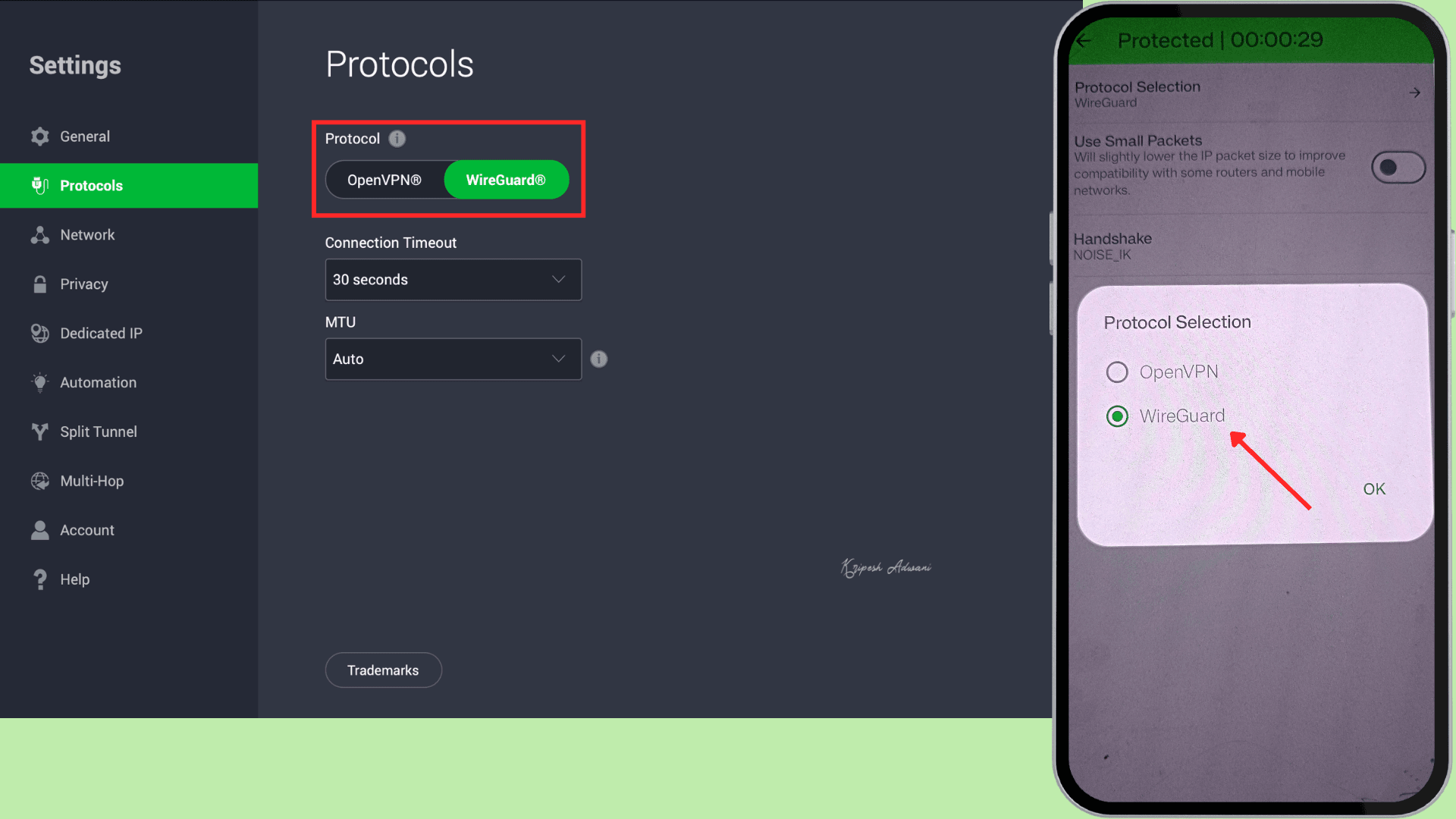
If you want better speeds, WireGuard is the best option on PIA. For more secure connections, OpenVPN is the better choice.
DNS Leak Test
I performed a DNS leak test on Ipleak.net to verify whether my DNS queries were routed through the VPN tunnel instead of my ISP’s servers. If a leak occurs, it can expose your browsing history, actual IP address, location, search queries, app usage, and other sensitive information that a VPN is meant to protect.
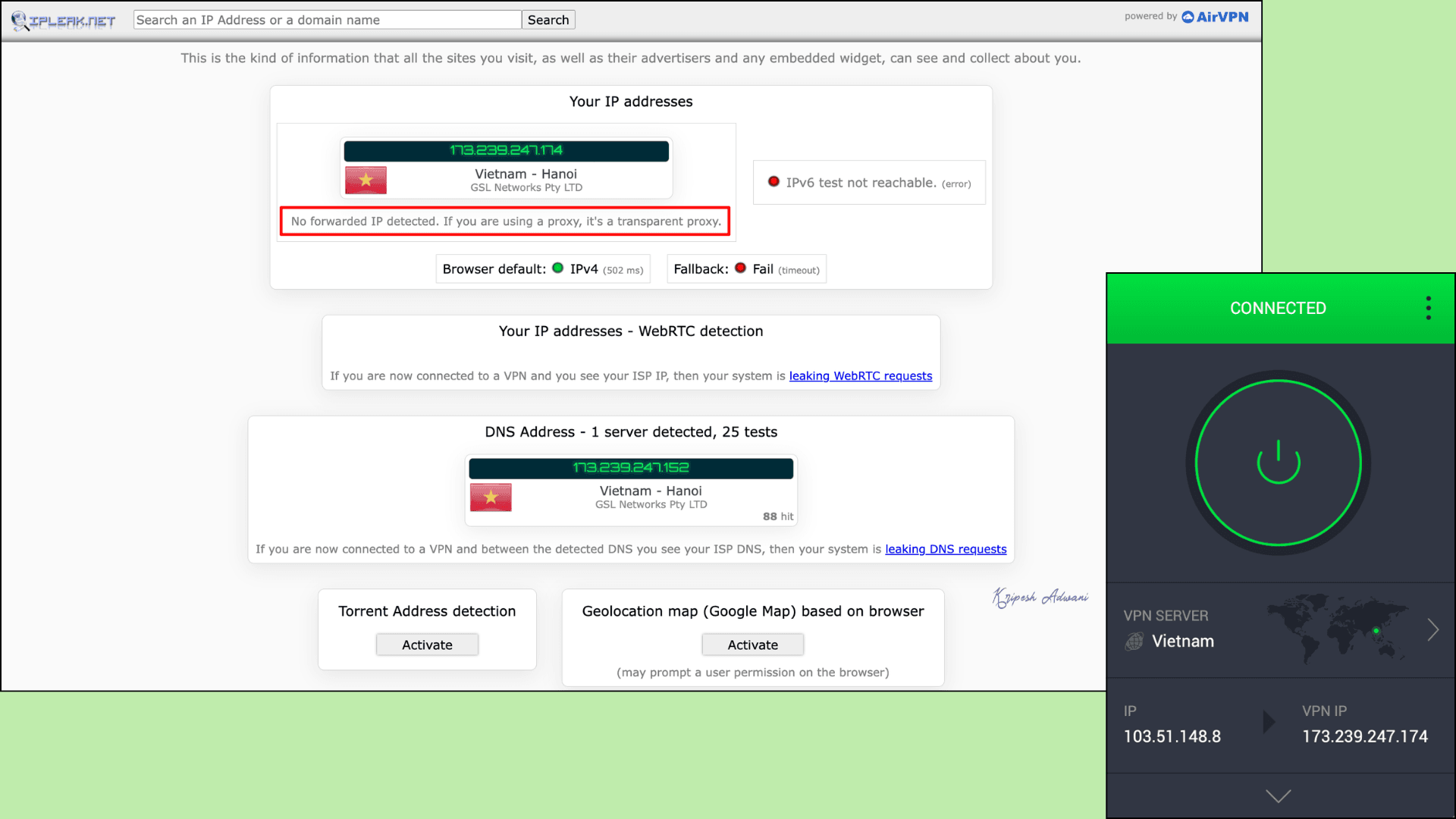
As observed, PIA successfully hid my original location and showed Vietnam (Hanoi), which was the server I connected to. WebRTC was blocked, confirming no IP exposure. There were no forwarded proxies, and IPv6 was unreachable.
Overall, PIA passed the DNS leak test. It maintained complete anonymity through its encrypted servers.
Kill Switch
A kill switch protects a VPN user’s identity by preventing exposure during network failures. It works by immediately blocking internet access if the VPN connection drops.
For stronger privacy protection, PIA offers two types of kill switches on Mac and Windows. The standard kill switch remains enabled by default and blocks device traffic when the VPN connection drops. The advanced kill switch, on the other hand, acts like a firewall. It blocks all internet traffic even when the VPN is not actively connected, making it ideal for high-risk scenarios.
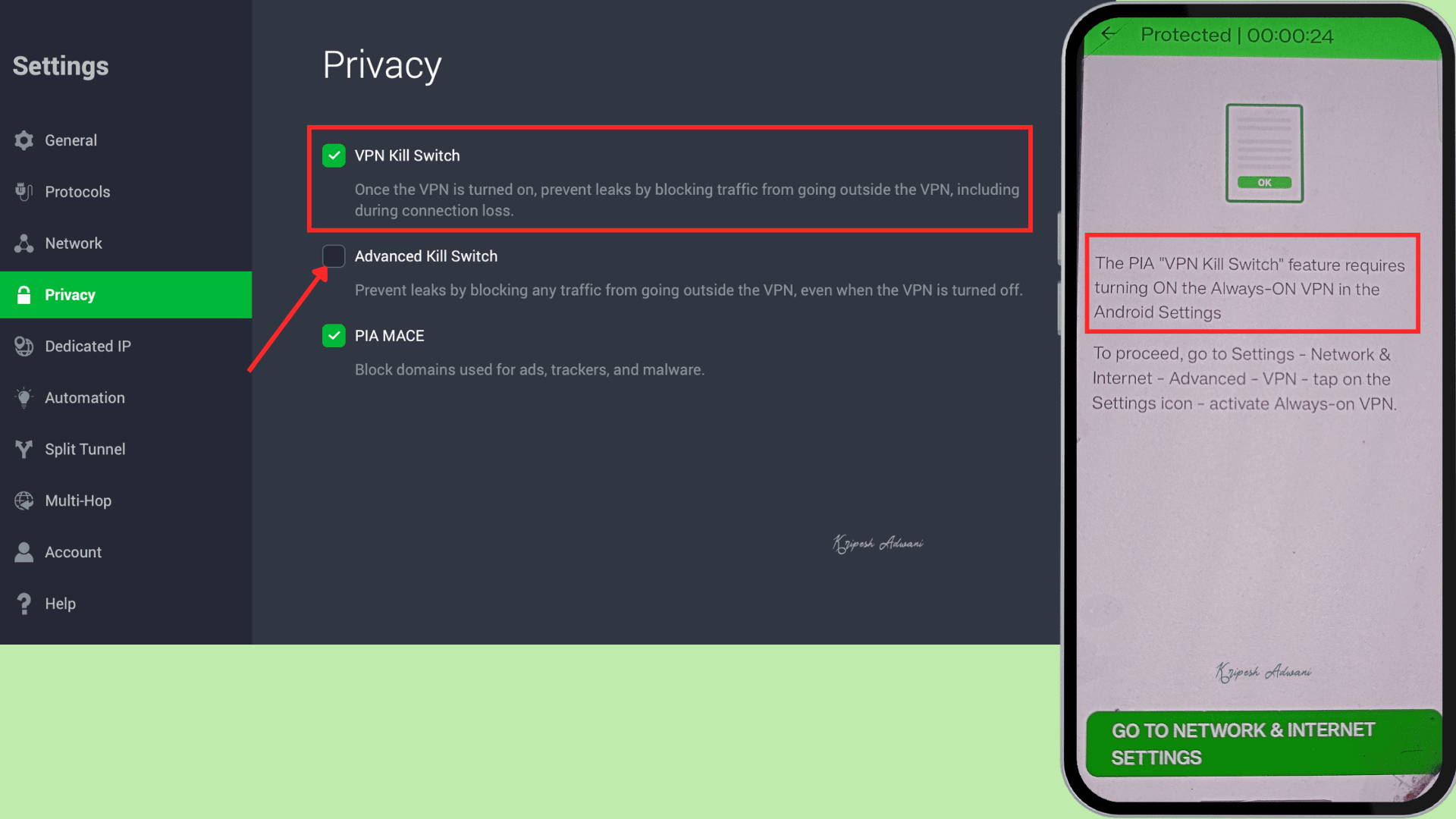
On Android, similar to other VPNs, you can enable the kill switch from the Network & Connections settings. It works through the Always-on VPN feature, which blocks internet traffic if the VPN is not connected.
Split Tunneling
PIA offers app-based split tunneling across Windows, Mac, Android, and iOS devices. Apart from apps, you can also add IP addresses of specific websites, though this feature is not available on Android.
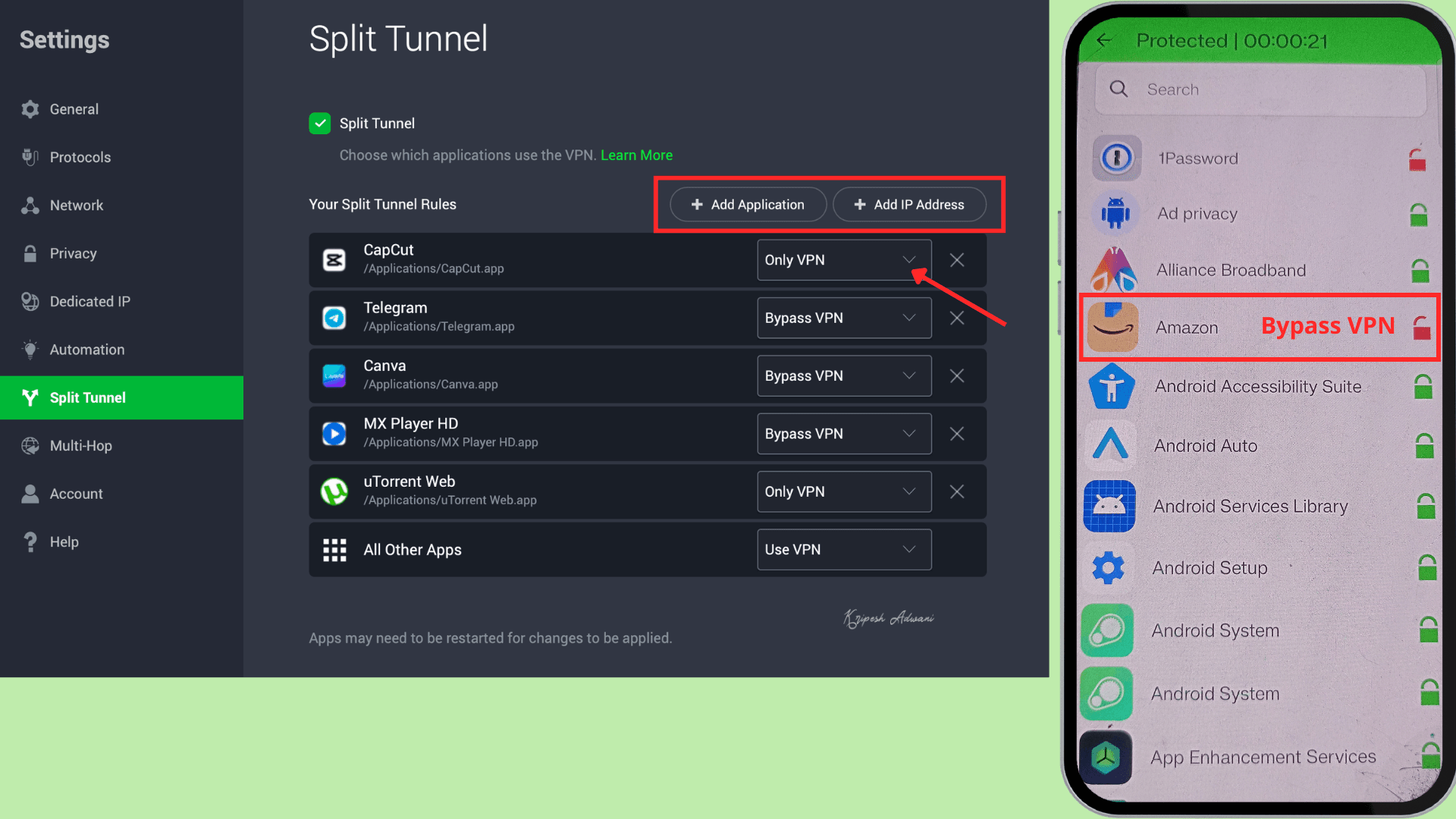
To enable split tunneling, go to Settings > Split Tunnel, then select the apps you want to route through the VPN or bypass it. On Android, there are two icons: the red lock icon indicates bypassing the VPN, while the green icon represents a regular VPN connection.
Security Comparison with Premium VPNs
Similar to NordVPN and Surfshark, PIA offers system-wide support for WireGuard and OpenVPN protocols, along with IPv6 and DNS leak protection. It also includes split tunneling for both apps and IP domains. In fact, its kill switch is as advanced as those found in other top-ranking VPNs.
Overall, PIA provides a secure, encrypted connection for users.
Pricing
| Private Internet Access | Pricing for 1 month | Pricing for 3 months | Pricing for 3 years |
| Per-month cost | ₹900.79 | ₹ 250.83 | ₹146.33 |
| Total cost | ₹ 900.79 | ₹3,009.93 | ₹5,853 |
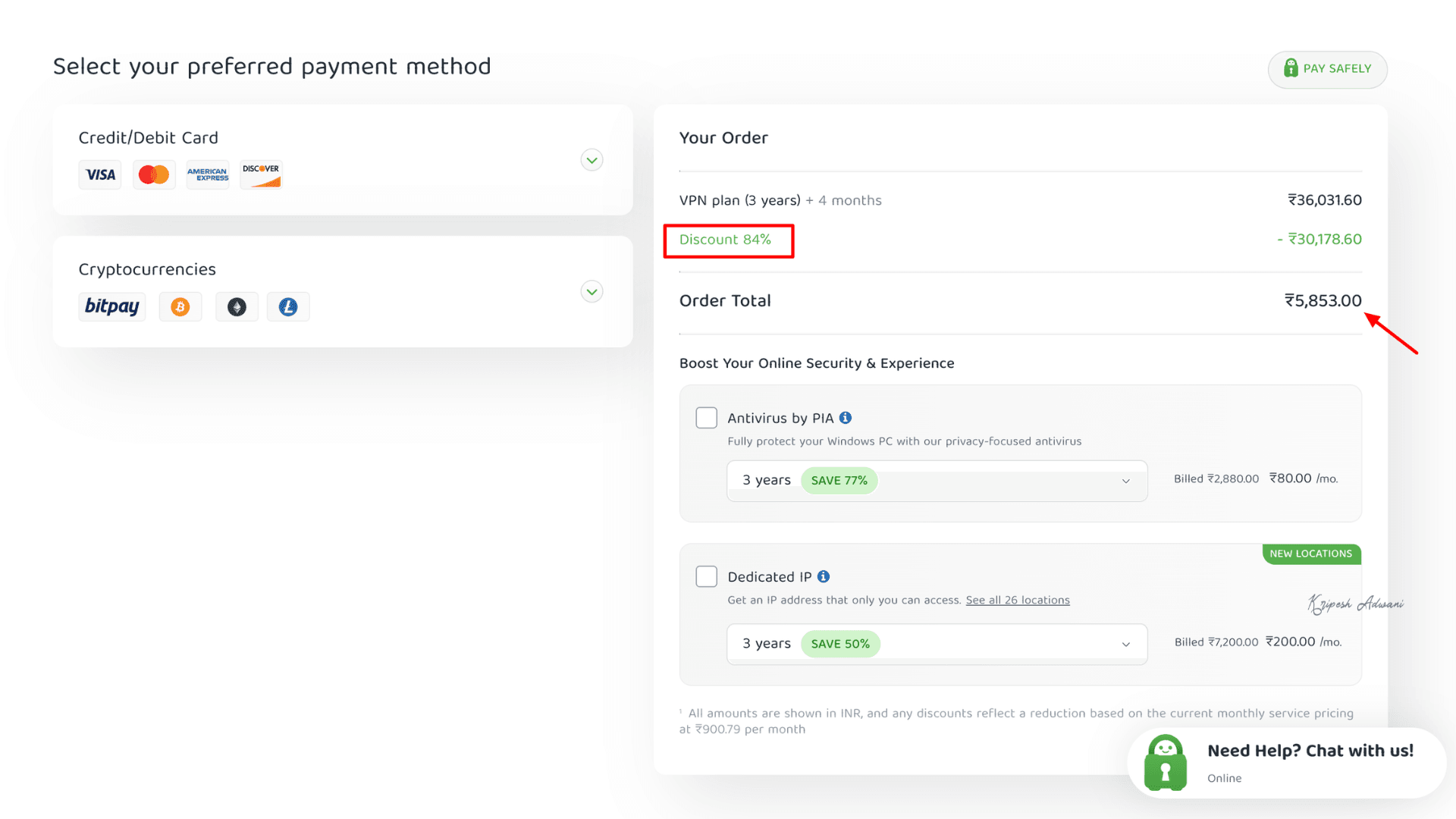
Unlike NordVPN or Surfshark, PIA offers a single plan with different durations: 1 month, 1 year, and 3 years. As shown above, the 3-year plan provides the best value, where you can save around 84% on the monthly cost. You’ll need to pay ₹5,853 at a time to reduce the monthly price from ₹900.79 to just ₹146.33.
Plus, the 3-year plan includes 3 extra months, giving you 39 months of access. Regardless of the plan you choose, you get unlimited device connections, access to NextGen servers in 90+ countries, a 100% no-logs policy, and strong overall security.
Money-Back Guarantee
You can get a full refund within 30 days of purchasing a PIA subscription. All you need to do is contact the support team and submit a refund request. However, this 30-day money-back guarantee is available only to first-time purchasers.
Payment Options
Private Internet Access accepts payments via credit and debit cards, as well as PayPal. It also supports cryptocurrency payments through BitPay. Additionally, mobile in-app purchases are available via the Apple App Store and Google Play Store.
Competitor Pricing
If I compare PIA with the most affordable VPN, Surfshark, in terms of price, PIA appears cheaper every month. With PIA, you get a 39-month subscription at around $1.57 (₹146.33) per month, whereas Surfshark’s 28-month plan costs about $1.78 per month.
However, PIA requires a longer commitment of 3 years, meaning you have to pay a higher upfront amount ($63 for PIA vs. $43 for Surfshark).
PIA Customer Support
| Customer Support Facility | Private Internet Access |
| 24/7 Live chat support | Yes ✅ |
| Phone Line | No ❌ |
| Yes ✅ | |
| FAQs | Yes ✅ |
| Knowledge guide | Yes ✅ |
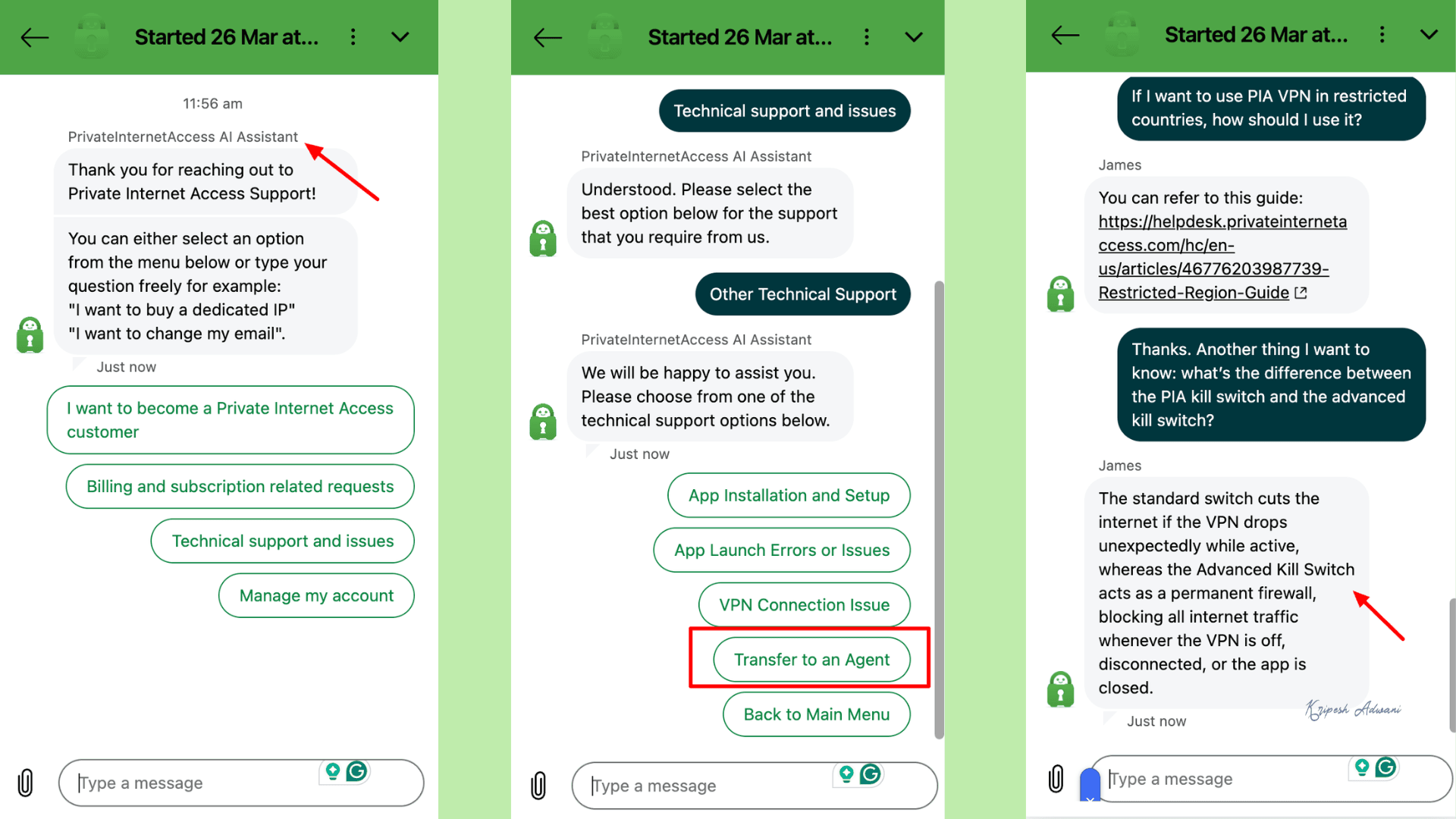
For quick assistance, PIA offers 24/7 live chat support. Initially, I was connected to an AI agent, but when I requested to “transfer to an agent,” I was quickly connected to a human representative. The response time was fast, and the support was helpful.
In addition, users can visit the PIA support portal. Here, I found a solid knowledge base with FAQs, installation and setup guides, troubleshooting tips, and information on features and settings.
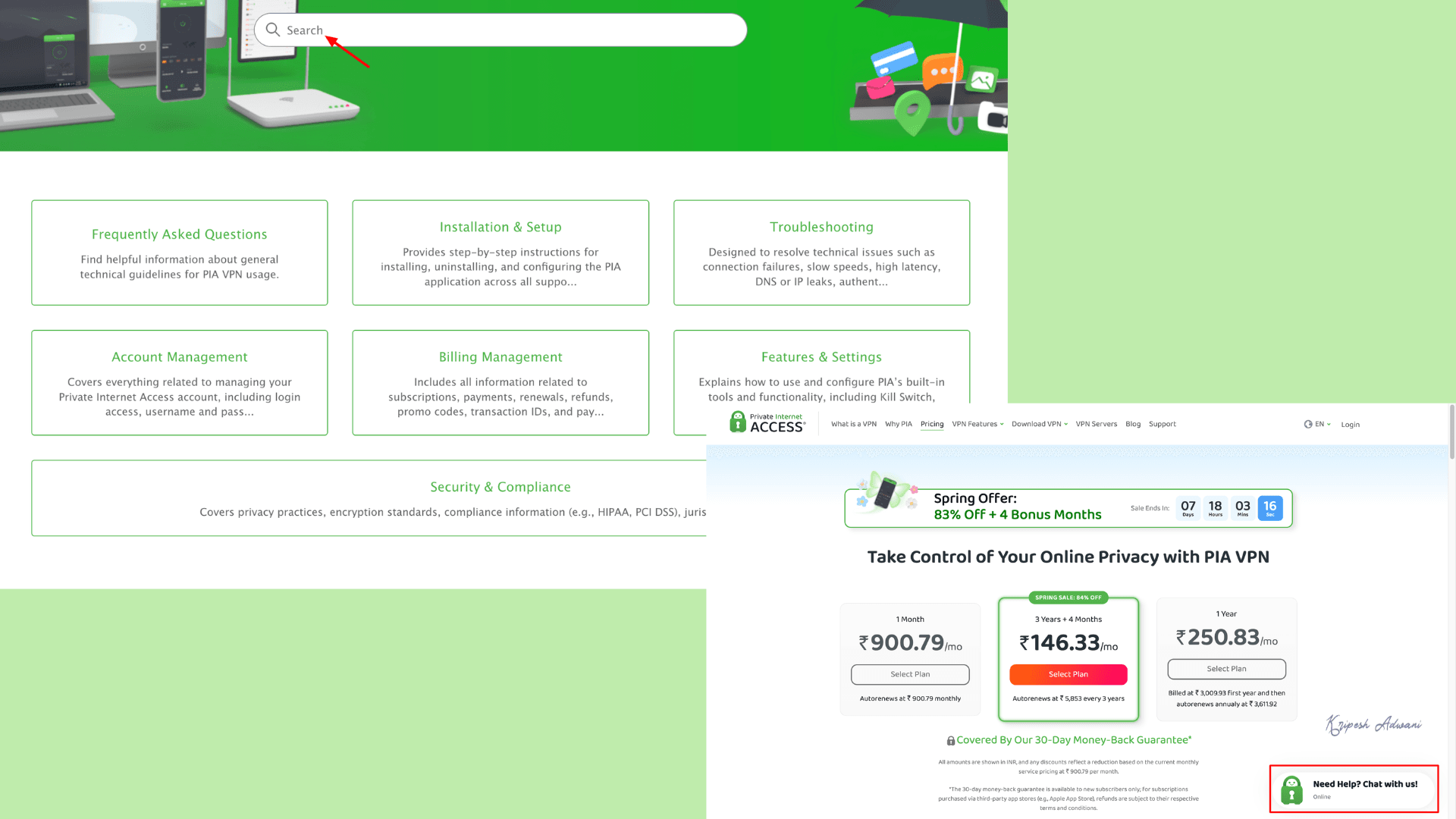
If your issue requires further assistance, I recommend submitting a request form through their website.
Devices
You can download the PIA VPN app on Windows, macOS, iOS, Linux, and Android devices. It is also available for gaming consoles, routers, and smart TVs. Moreover, browser extensions for Chrome, Opera, and Firefox are available for browser-based users.
User Interface
| Devices | User Interface | Experiences |
| Windows | Simple on the surface; highly customizable dashboard with deep settings | Easy to use, but overcomplicated for casual users |
| macOS | Same general design as Windows | Works well and feels smooth |
| Linux | Full graphical interface | Major strength for advanced users |
| Android app | Used to feel dated, but newer versions look much better | Easy to use and feature-rich |
| iOS app | Straightforward and convenient | Fewer advanced customization options than the desktop apps |
| Browser Extension | Lightweight | Best for quick, casual use |
When you open the PIA app on Windows or macOS, it offers a clean home screen with a prominent connect/disconnect button. I can expand the interface to access more advanced settings and the toolbar from the dropdown menu. All essential features, such as split tunneling, kill switch, protocols, and language, are available under the settings tab.
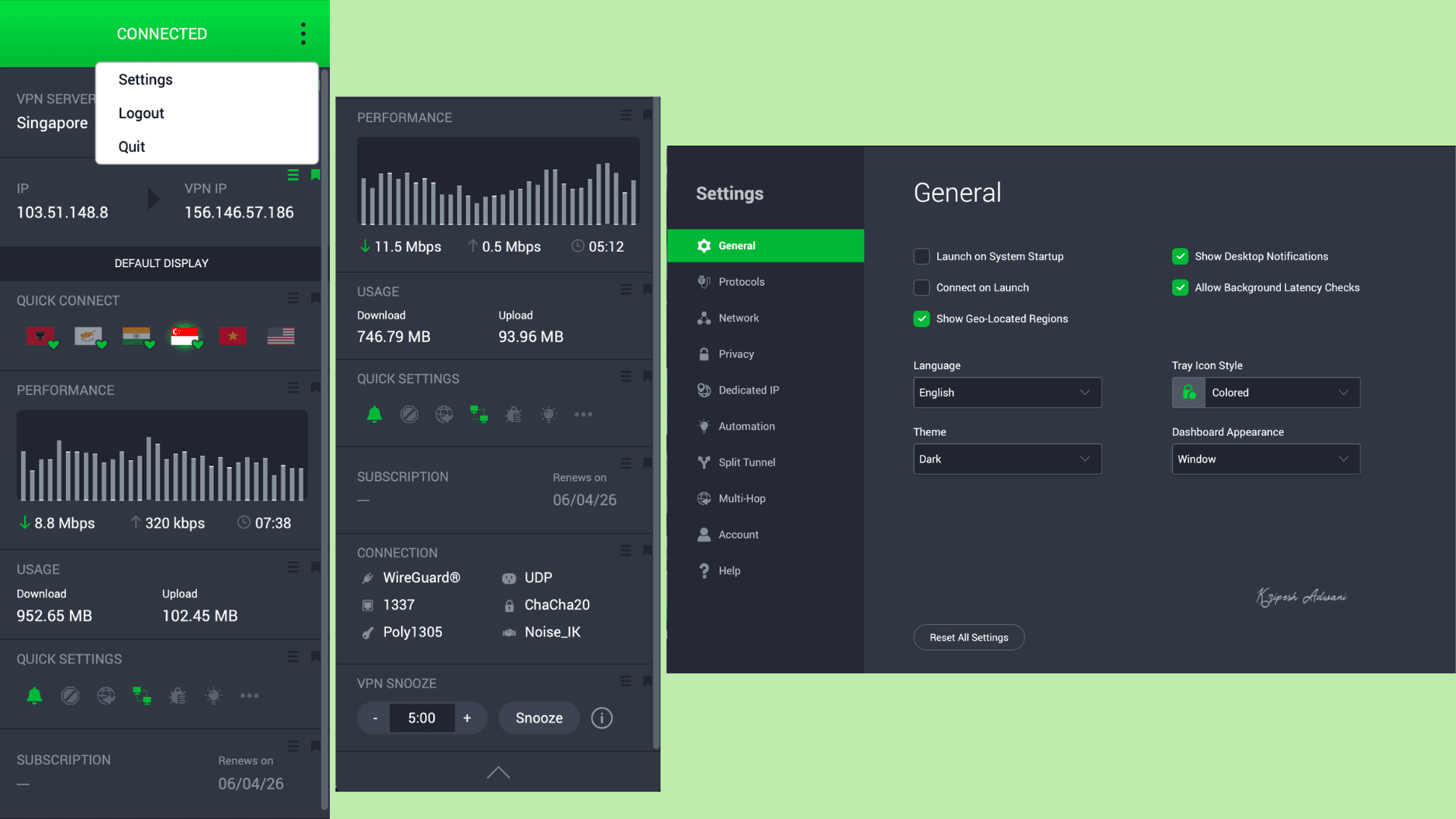
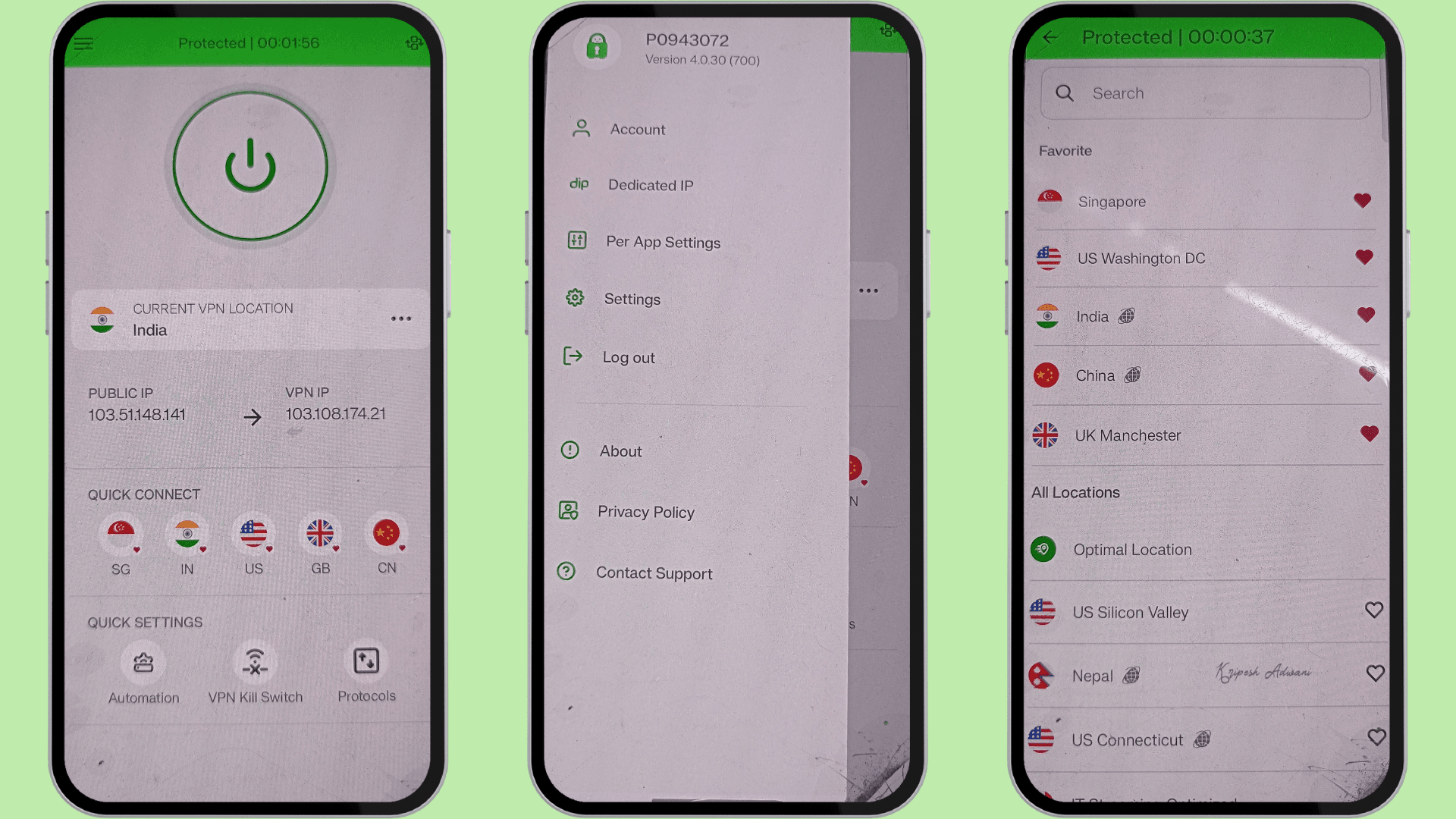
On Android, the app has been upgraded and now feels more modern and feature-rich. However, the iOS app offers fewer advanced controls. The browser extension is useful as a lightweight add-on, but it is not a full replacement for the main VPN app.
One of the major strengths of PIA VPN is its Linux app. It provides a proper graphical user interface rather than just a basic command-line tool. As a result, users get access to most of the same features available on Windows and macOS.
Additional Features
1) Ad blocker
PIA MACE is the ad blocker offered by Private Internet Access. It protects devices from ads and malware at the DNS level, unlike traditional ad blockers that only filter browser content. MACE checks DNS requests against a curated list of harmful domains, blocking ads before they even load.
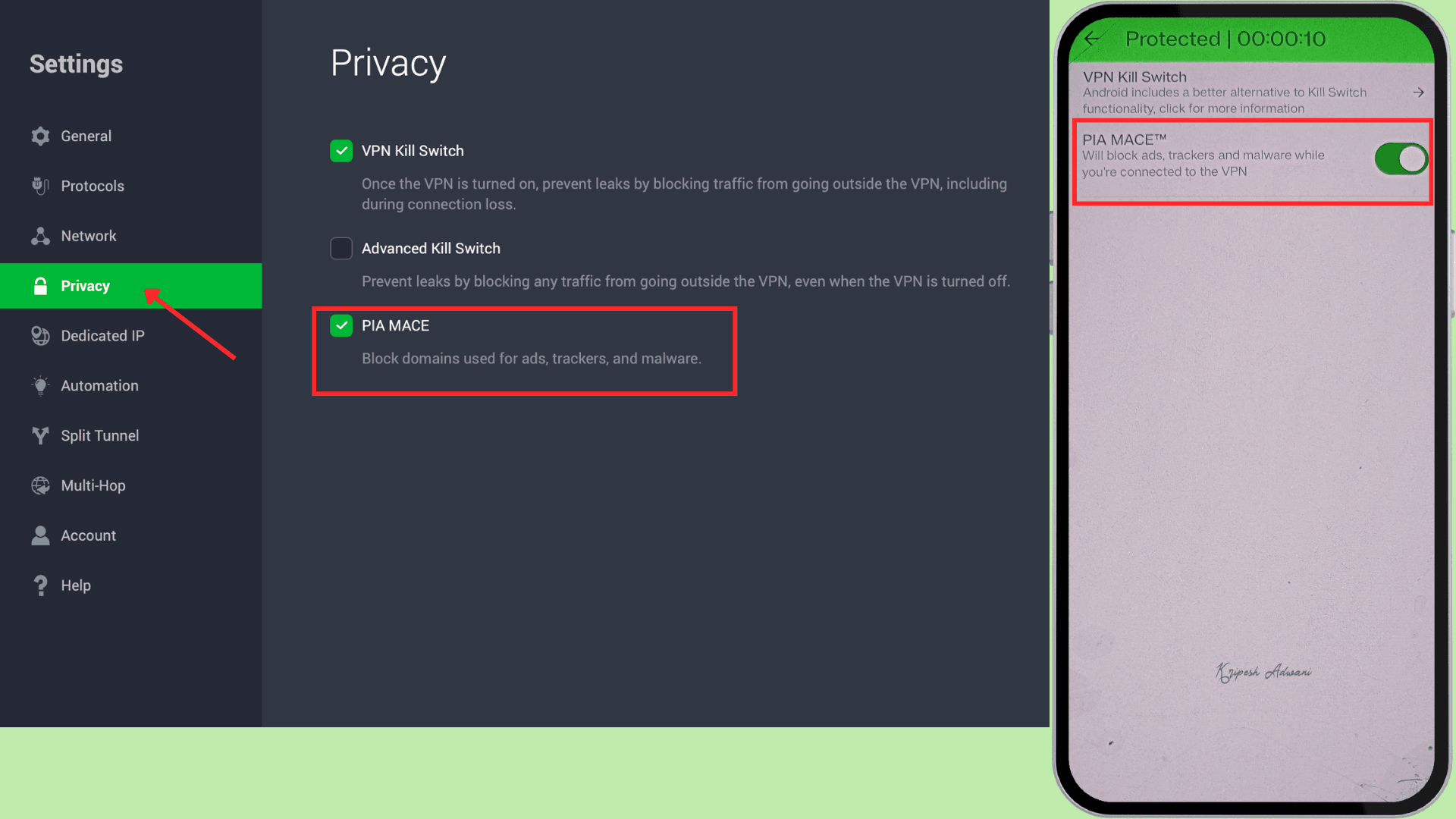
It can block pop-ups, trackers, and banner ads, but it does not eliminate all ads; for example, in-video ads may still appear. Overall, it helps make web pages cleaner and faster to load. MACE is available on Android, Windows, macOS, iOS, and even within PIA’s browser extensions.
2) Antivirus
Antivirus protection in PIA VPN is available as an optional add-on security feature. It detects and blocks ransomware and malware, scans files, and identifies other suspicious threats. It maintains an updated database of viruses and malware to protect devices against new threats.
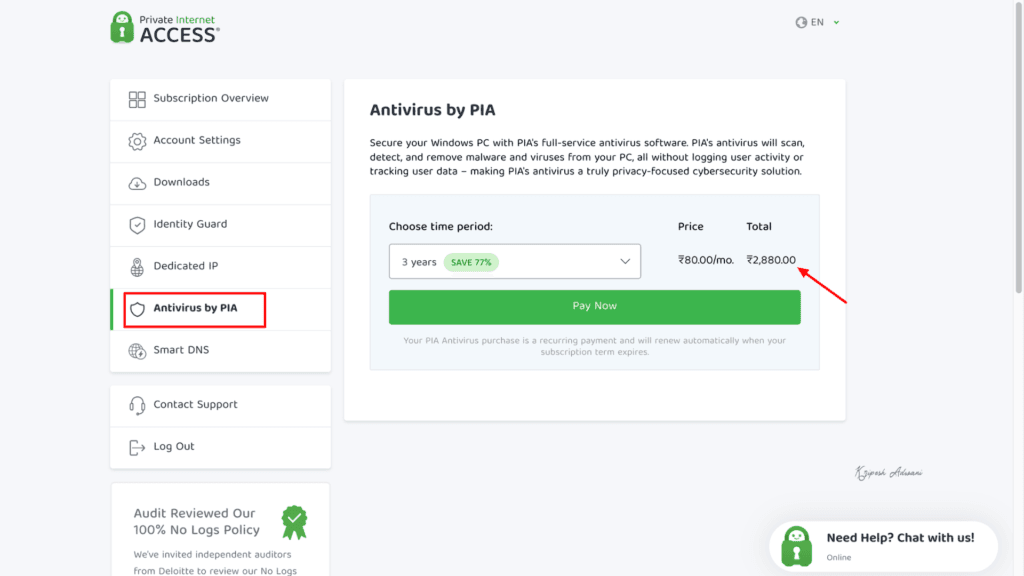
However, PIA’s antivirus is available only on Windows devices. To bundle it with a standard PIA VPN subscription, it costs ₹345/month. With the 3-year VPN plan, the antivirus add-on is available at a reduced cost of ₹80/month (₹2,880 in total).
3) Smart DNS
For users who want to access content from a specific region, PIA’s SmartDNS can be very useful. It is a streaming-focused tool that changes your DNS requests but does not encrypt your entire traffic like a VPN. Instead, it reroutes traffic through private servers, helping mask your IP address and location.
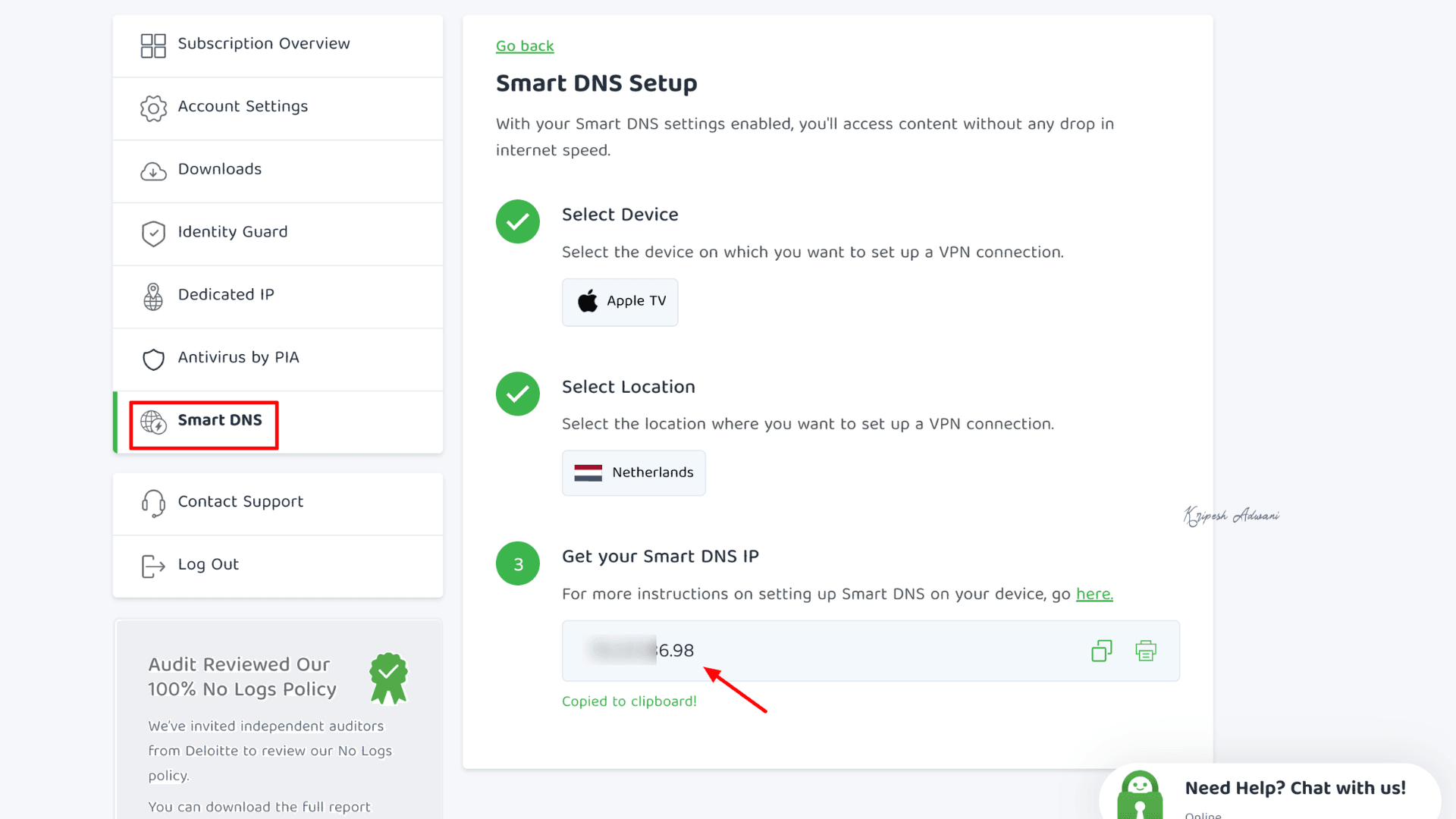
Since there is no encryption overhead, content can load faster compared to using a VPN. However, it is designed for streaming speed, not full protection against IP leaks or privacy risks. It is also available on smart TVs and other devices that do not support VPN apps.
For a detailed guide on how to set it up for Smart TVs, you can check the PIA guides.
4) Identity Guard
Identity Guard by PIA is a breach-checking tool that lets you see if your email address has been exposed in a data breach or compromised. You simply enter your email address, and the results appear quickly.
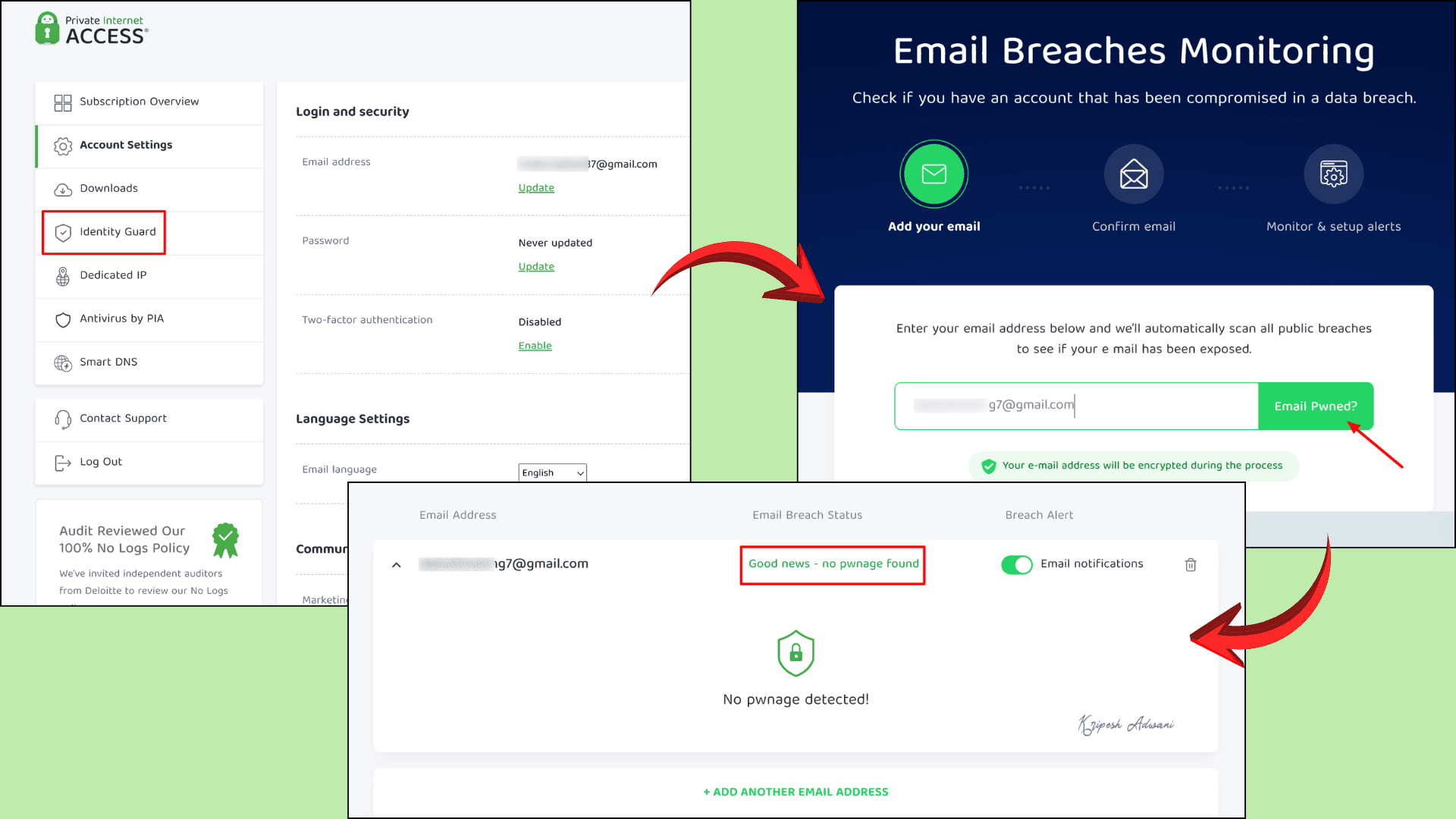
However, it does not offer full credit monitoring or dedicated identity theft protection.
5) VPN Snooze
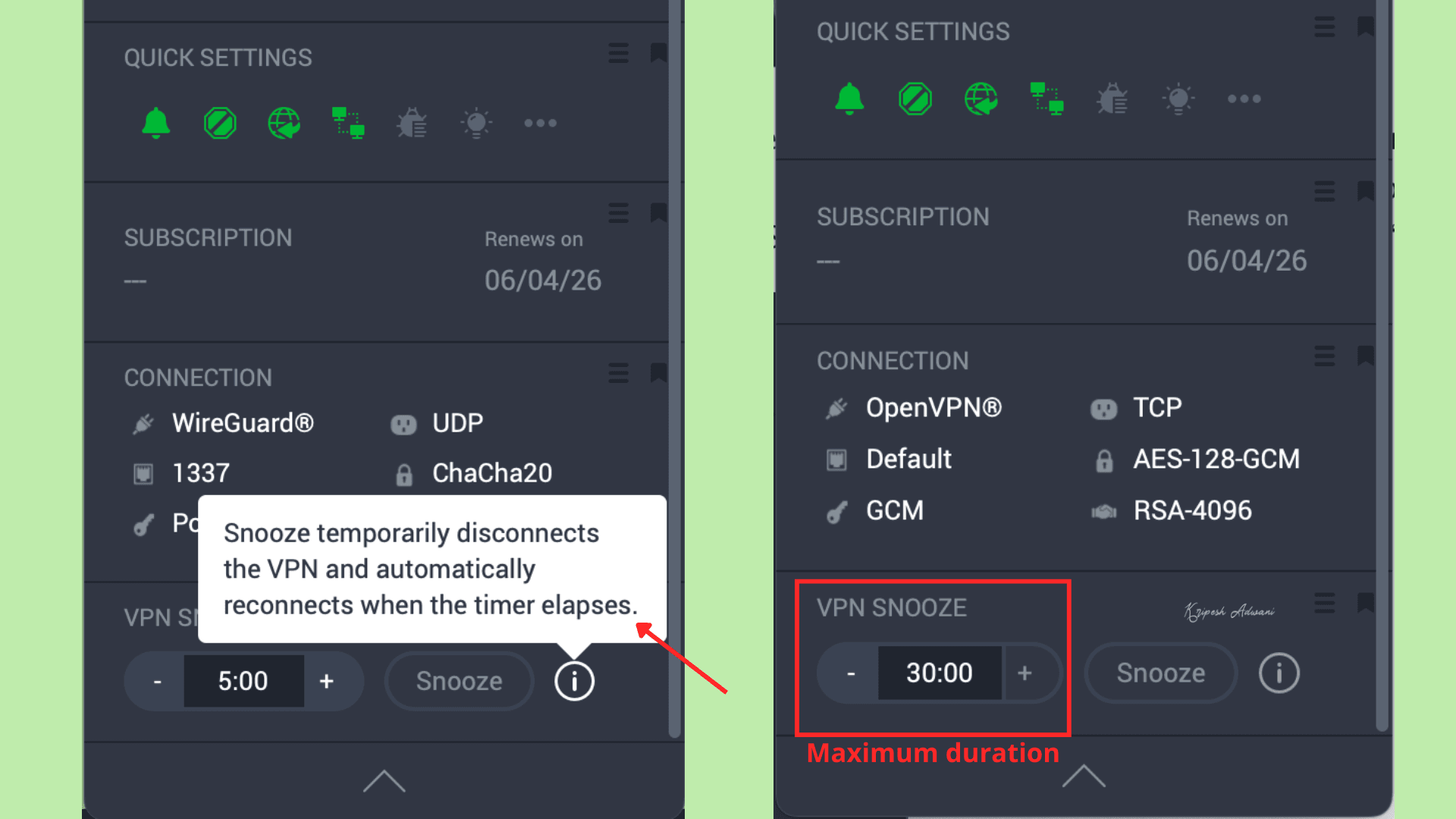
PIA’s VPN Snooze is a temporary pause feature. It lets you disconnect the VPN for up to 30 minutes. Once the selected time expires, the VPN automatically reconnects. This feature is currently available only on PIA desktop apps.
Performance & Reliability
PIA’s overall performance is average. It uses the WireGuard protocol and 10 Gbps servers, which should contribute to decent speeds. Sadly, on both nearby and distant servers, I experienced speed fluctuations.
Its streaming performance isn’t always reliable. While I could unblock Netflix, Amazon Prime Video, and Hotstar, these platforms may not work. On the positive side, it passes leak tests, and the kill switch protects your data if the internet connection drops. Overall, it is fairly reliable for everyday use.
PIA Pros
1) Supports P2P
Port forwarding in P2P activities opens a direct route through the VPN, so other peers can connect more easily. PIA VPN offers port forwarding, which is a good option for torrenting. Many premium VPNs do not provide this feature.
2) Snooze Functionality
PIA offers a unique feature called Snooze VPN, which allows you to temporarily pause the VPN connection for, let’s say, 5 minutes. The VPN automatically reconnects once the selected time has passed.
3) Split Tunneling on macOS
This VPN offers split tunneling on macOS, along with Windows, Android, and iOS. Split tunnel feature lets you bypass the VPN connection for specific apps, improving speed and flexibility.
4) GUI App for Linux
Unlike many VPNs that rely on a command-line interface, PIA provides a full graphical user interface (GUI) for Linux. So, Linux users get access to features similar to those on Windows and macOS, along with detailed OpenVPN and WireGuard configuration options.
5) Open-Source Apps with Advanced Settings
Its apps are open source, which means their code is publicly available on GitHub. Anyone can review the code for transparency. Both desktop and mobile apps include advanced settings such as adjustable encryption, custom DNS options, and split tunneling.
6) No-Logs VPN
PIA does not store user data, similar to other premium VPNs. Its no-logs policy has been independently audited multiple times (in 2022, 2024, and 2025). In a 2018 legal case, its no-logging claims were proven in a San Jose federal court.
7) Decent Upload Speeds
I recorded good upload speeds when connected to PIA servers, 129 Mbps on Indian servers and 134 Mbps on US servers. This makes the VPN suitable for file transfers, video calls, and cloud backups.
PIA Cons
1) Download Speed Fluctuations
Even though I experienced good upload speeds, download speeds were not on par with other premium VPNs. Sometimes, download speeds dropped by over 50%, and performance was inconsistent with fluctuations.
2) Unreliable for Streaming
PIA VPN cannot unblock most Indian OTT platforms like Zee5, SonyLIV, and JioCinema. While I can access Hotstar, Amazon Prime Video, or Netflix, streaming performance is inconsistent and may not work reliably for all content.
3) US-based Headquarters
This VPN company is headquartered in Denver, Colorado, USA. As a US-based VPN and part of the Five Eyes intelligence-sharing alliance, the provider may be subject to federal data requests.
4) Kape Technologies Acquisition
Like CyberGhost and ExpressVPN, PIA VPN was acquired by Kape Technologies in 2019. The company previously operated as Crossrider, which had associations with adware and malware distribution.
Private Internet Access Alternatives
PIA VP has some flaws, so if you’re looking for alternatives, here are the three options I would suggest.
1) PIA vs Surfshark
Surfshark is known as the most affordable VPN in the market. This Netherlands-based VPN provider introduced the product in 2018. As of now, they offer 4500+ servers across 100 nations globally.
Surfshark VPN lets you connect as many devices as you want. The speed was excellent with low ping for better streaming and gaming. As privacy add-ons, you’ll get Alternative ID, Antivirus, Surfshark Search, and data breach alerts.
Surfshark VPN’s pricing is competitive with PIA’s, but it requires only a 2-year commitment, unlike PIA’s 3-year plan. The Surfshark Starter plan costs $1.68 per month (₹157/month) for 28 months.
2) PIA vs NordVPN
NordVPN is one of the most powerful all-around VPNs in 2026, already well known for its cybersecurity products like NordPass and NordLocker. The VPN is based in Panama, outside major intelligence-sharing alliances. NordVPN stands out for its excellent speed because of its proprietary NordLynx protocol. Users can also access all major streaming platforms.
Unlike PIA, NordVPN offers specialized servers such as Double VPN, Onion over VPN, obfuscated servers, and dedicated IPs. Its advanced features include Meshnet, Dark Web Monitor, and multi-factor authentication (MFA) protection.
In terms of pricing, NordVPN is slightly more expensive than PIA. Its 1-year plan costs $4.89 per month (₹457/month) and includes 4 extra months of access with my link.
3) PIA vs ExpressVPN
Another VPN acquired by Kape Technologies, similar to PIA, is ExpressVPN. Despite the acquisition, ExpressVPN operates independently and has upgraded its infrastructure to remain a premium VPN in 2026. Its Lightway protocol provides consistent and stable speeds, and it can reliably unblock major streaming platforms. Gaming performance is also excellent, with very low ping rates.
The apps are modern and polished, and their jurisdiction is based in the British Virgin Islands. Users get access to over 3,000 servers across 105 countries. It also includes advanced features such as an ad blocker, Threat Manager, password manager, and ID alerts.
With my link, the ExpressVPN Basic plan costs $2.79/month (₹261/month) for 28 months. While the monthly cost is higher than PIA, the plan duration is limited to 2 years.
Why Should You Trust Me?
I’ve been working in the tech and tools space since 2015, with hands-on experience testing over 30 VPN services. Over the years, I’ve reviewed popular providers like Surfshark, NordVPN, ProtonVPN, NymVPN, and ExpressVPN. On my website, I also publish helpful guides on topics such as the best free VPNs, ways to reduce VPN latency, top gaming VPNs, anti-detect browsers, and more.
My reviews are based on real-world testing, focusing on performance, ease of use, and reliability, not just technical specs. I maintain active subscriptions to multiple VPN services to stay up to date with the latest features and changes. This practical approach helps me evaluate newer options like NymVPN with confidence and deliver honest, unbiased insights.
Conclusion
Private Internet Access (PIA) is a trusted VPN provider if your major priorities are privacy, advanced controls, and torrenting. It offers servers across 91 countries, WireGuard support, and RAM-only servers. Its no-logs policy has been audited and even proven in court cases.
The VPN is especially strong for P2P and torrenting, as it supports port forwarding, which improves peer connectivity, something many VPNs lack. It is also open source, and Linux users get a full GUI app with advanced features.
On the downside, PIA is not the best VPN for streaming. Speeds can fluctuate, and it struggles to unblock platforms like Netflix, Amazon Prime Video, and Hotstar. Its US jurisdiction and Kape Technologies ownership may also raise concerns for some users.
Overall, PIA is a torrent-friendly VPN best suited for technical users. If you need a feature-rich Linux app, split tunneling on Mac, and P2P support with port forwarding, it’s a solid choice. Otherwise, there are better alternatives available.
FAQs
Who owns Private Internet Access?
Private Internet Access VPN was originally launched by London Trust Media in 2010. In 2019, it was acquired by Kape Technologies.
Can PIA unblock Netflix and other streaming services?
Yes, PIA can unblock Netflix, but the performance is not always reliable. In some cases, streaming may stop working mid-session.
Is PIA suitable for torrenting?
Yes, PIA is a great VPN for torrenting. It supports major P2P platforms and offers port forwarding, which helps improve peer connectivity.
Does Private Internet Access offer a free trial?
Yes, PIA offers a 7-day free trial if you purchase through the Google Play Store or Apple App Store for the first time. Otherwise, it provides a 30-day money-back guarantee.
How many devices can I use with PIA?
With a single PIA subscription, you can connect unlimited devices. PIA VPN is available for TVs, mobile devices, desktops, and routers.