The average Indian types around 35–40 words per minute. But with AI voice dictation, you can easily reach 150 WPM without even touching the keyboard.
Today, I’m reviewing Wispr Flow, an AI-powered voice dictation tool that can transcribe speech, fix grammar, add punctuation, and support 100+ languages in real time.
Since the tool was launched in India recently, a detailed hands-on review feels necessary. In the Wispr Flow Review in 2026, I’ll share its core features, practical use cases, and my honest pros and cons after using it for over six months.
Stay tuned until the end to find out whether Wispr Flow is actually worth using or just another overhyped AI tool.
Wispr Flow Review
Summary
Wispr Flow is a powerful AI voice dictation tool for people who type a lot, especially writers, developers, and students. It stands out for its transcription accuracy, Hinglish language support, context-aware text corrections, keyboard shortcuts, Command Mode, and snippet library.
But the tool is cloud-based and does not work offline, which may raise data privacy concerns for some users. Casual users should try the 14-day free trial before purchasing.
Disclaimer: I strongly believe in transparency. If you buy using the links on our site, we may earn a small commission without any extra cost to you. This helps me to keep producing honest reviews. Read More >>
About Wispr Flow
Wispr Flow is a context-aware AI-powered transcription and documentation tool launched in 2024 by Tanay Kothari. The app is available for Windows, iOS, Android, and macOS devices. You can easily download it from its official website.
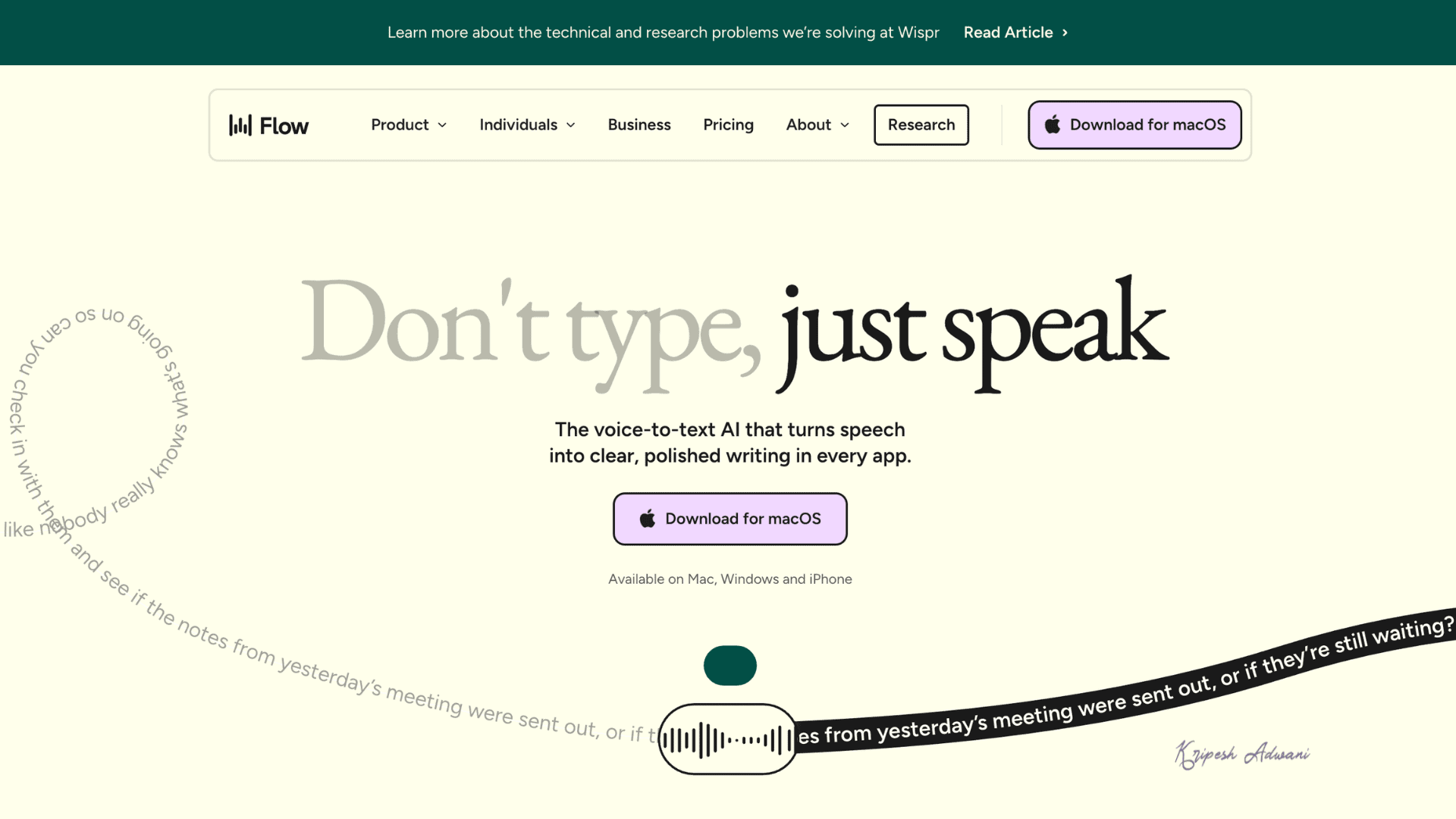
Wispr Flow converts your voice into written text, helping professionals save time by eliminating the need for manual typing. The tool is already being used by professionals from Amazon, OpenAI, Substack, Perplexity, and other major tech companies. It has also received the Best AI Design Award for 2026.
Wispr Flow Review Video
Here’s the review video of Wispr Flow for those who want to see how it works in real time.
Wispr Flow User Interface
When I opened Wispr Flow on my MacBook, the first thing I noticed was its clean black-and-white interface. The dashboard displays all your recent dictation history along with useful stats like word count, typing speed, and usage insights.
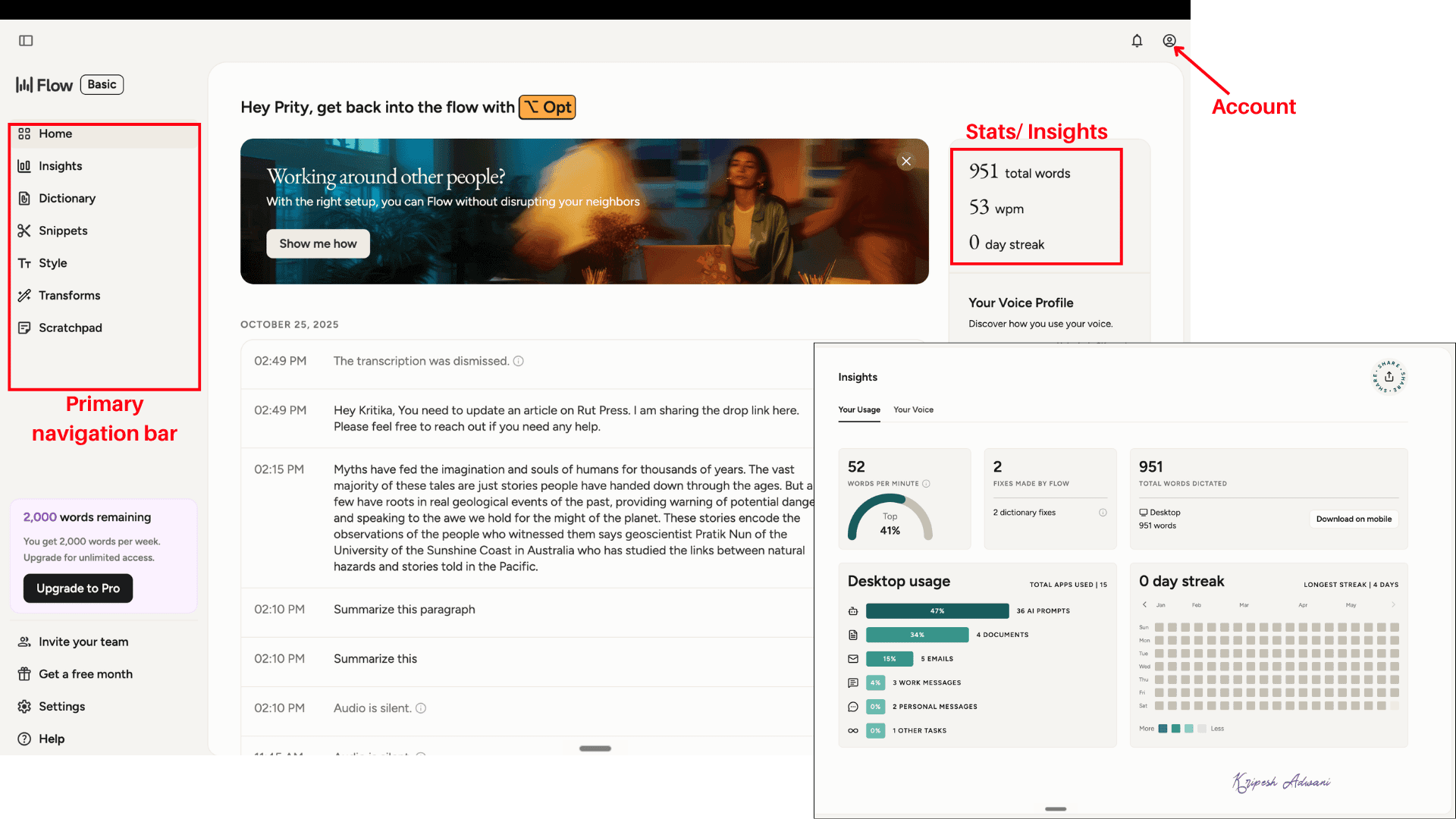
From the left sidebar, I could access Home, Insights, Dictionary, Snippets, Style, and Notes. Below were additional options like Settings, Help, and Invite Your Team. The account button is placed neatly in the top-right corner, from where I can check my profile, subscription plans, and download the mobile app.
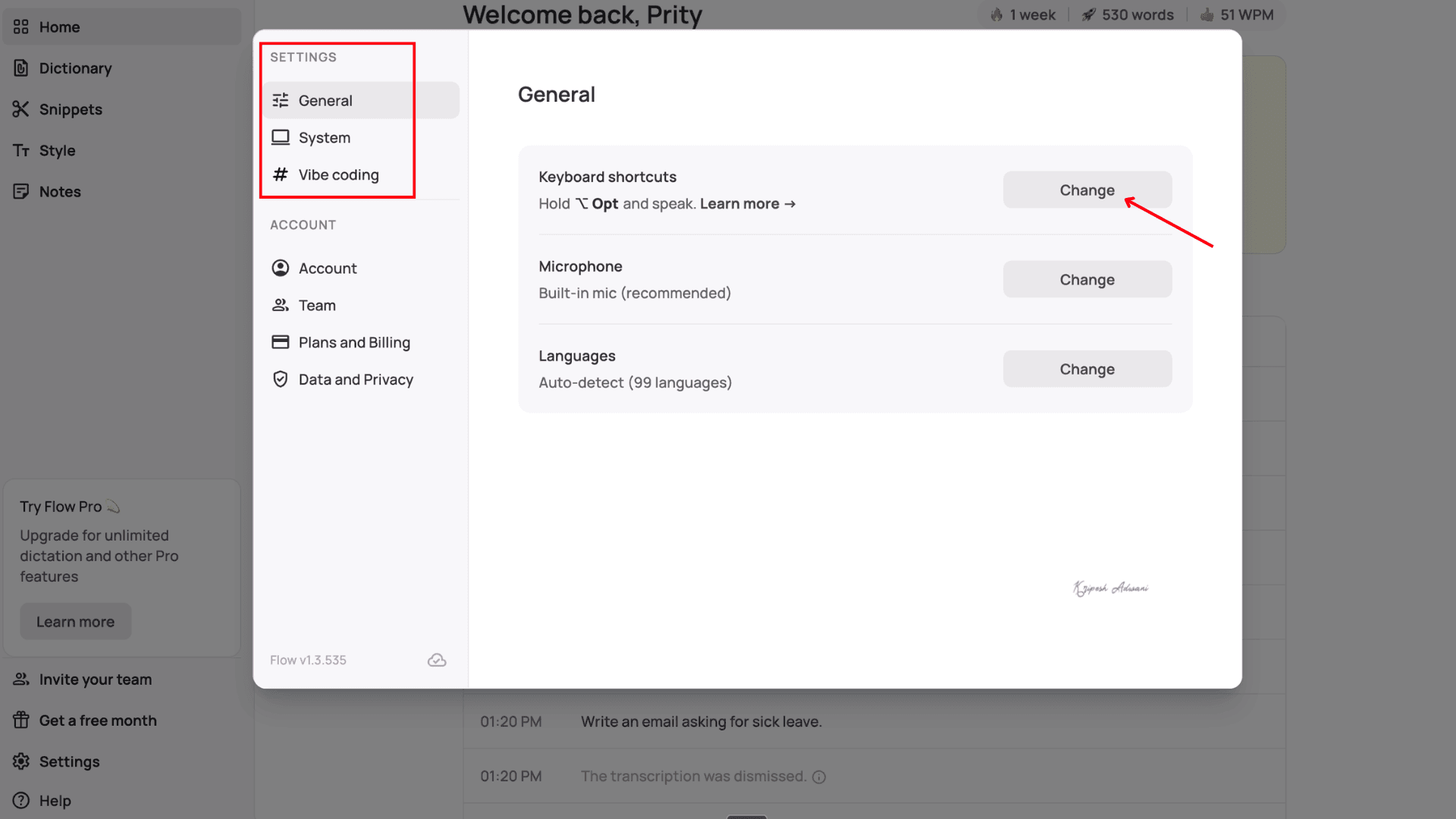
Inside the Settings section, I could customize keyboard shortcuts, microphone preferences, language settings, and other configurations quite easily. The Help section lets users contact the support team or share feedback directly from the app.
Wispr Flow’s Android app is still quite new. Unlike the iOS version, which comes with a dedicated AI keyboard, the Android app mainly works through a floating bubble interface.
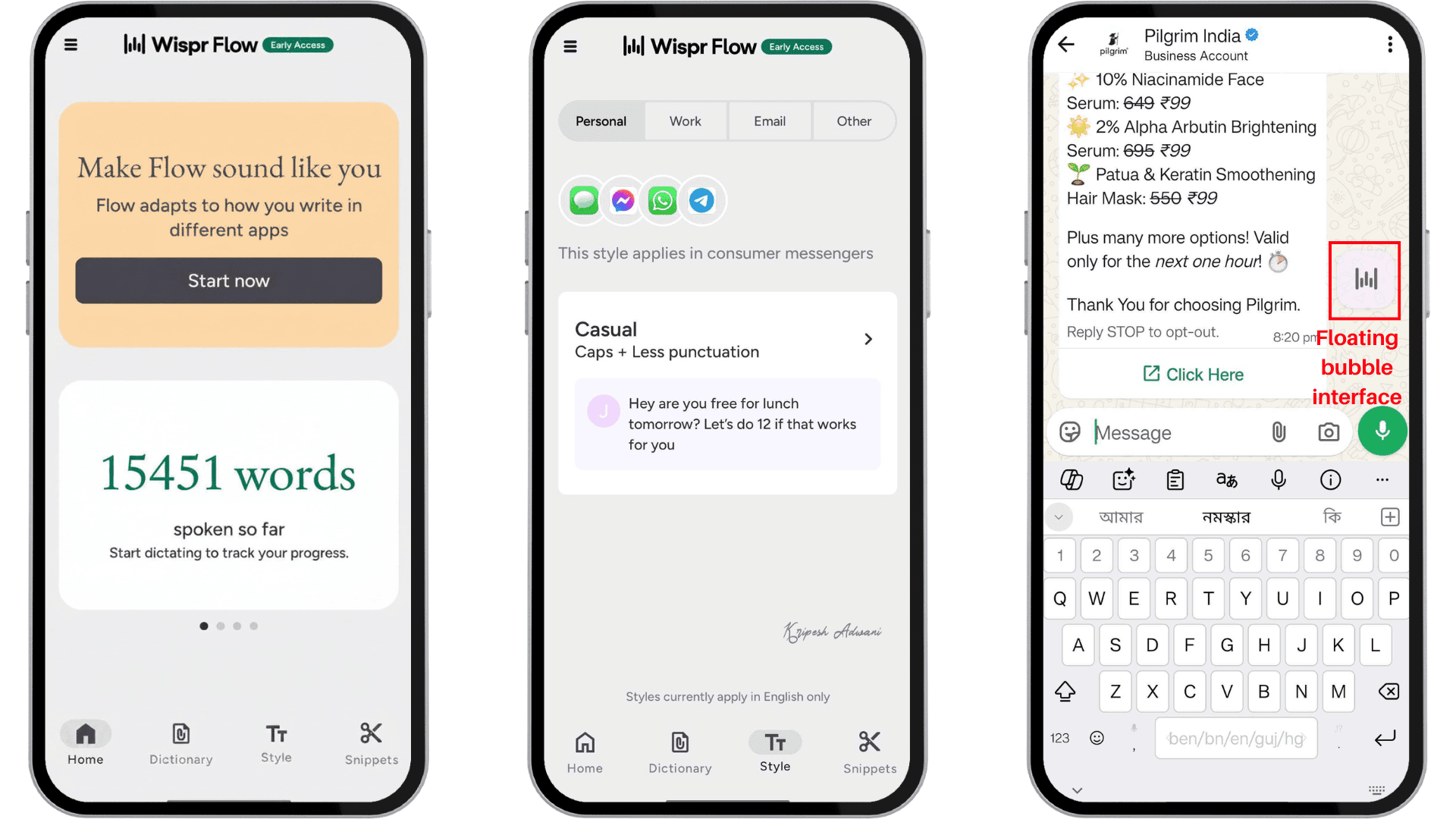
You simply tap the bubble on any app to start voice dictation and tap again to stop it. Similar to the desktop version, the app also lets you add snippets, set your dictation style, access the dictionary, and manage a few other settings directly from the app.
To me, the macOS version feels much more polished, modern, and intuitive. The Android app works fine for basic dictation. And compared to the desktop version, it still feels a bit incomplete.
How to Use Wispr Flow?
Wispr Flow AI is very easy to use. Just follow a few simple setup steps, and you’re ready to go!
1. Visit the Website and Download the App
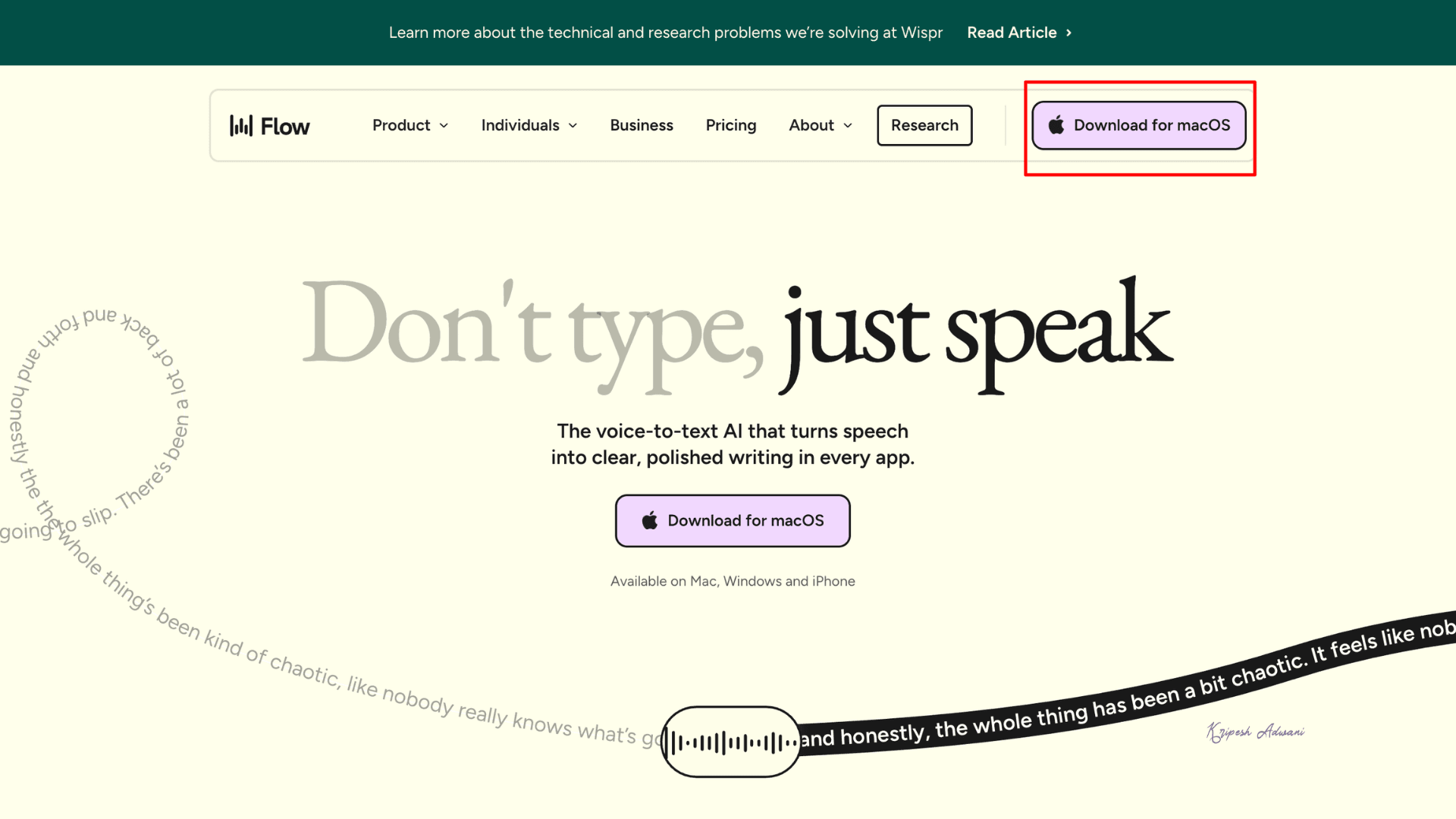
First, we will go to the official Wispr Flow website. Here, you’ll find “Download for macOS” buttons. Since I’m using a Mac device, that option appeared for me, but you’ll get the appropriate download option based on your operating system.
Click on it and install the app following the on-screen instructions.
2. Sign Up for a New Account
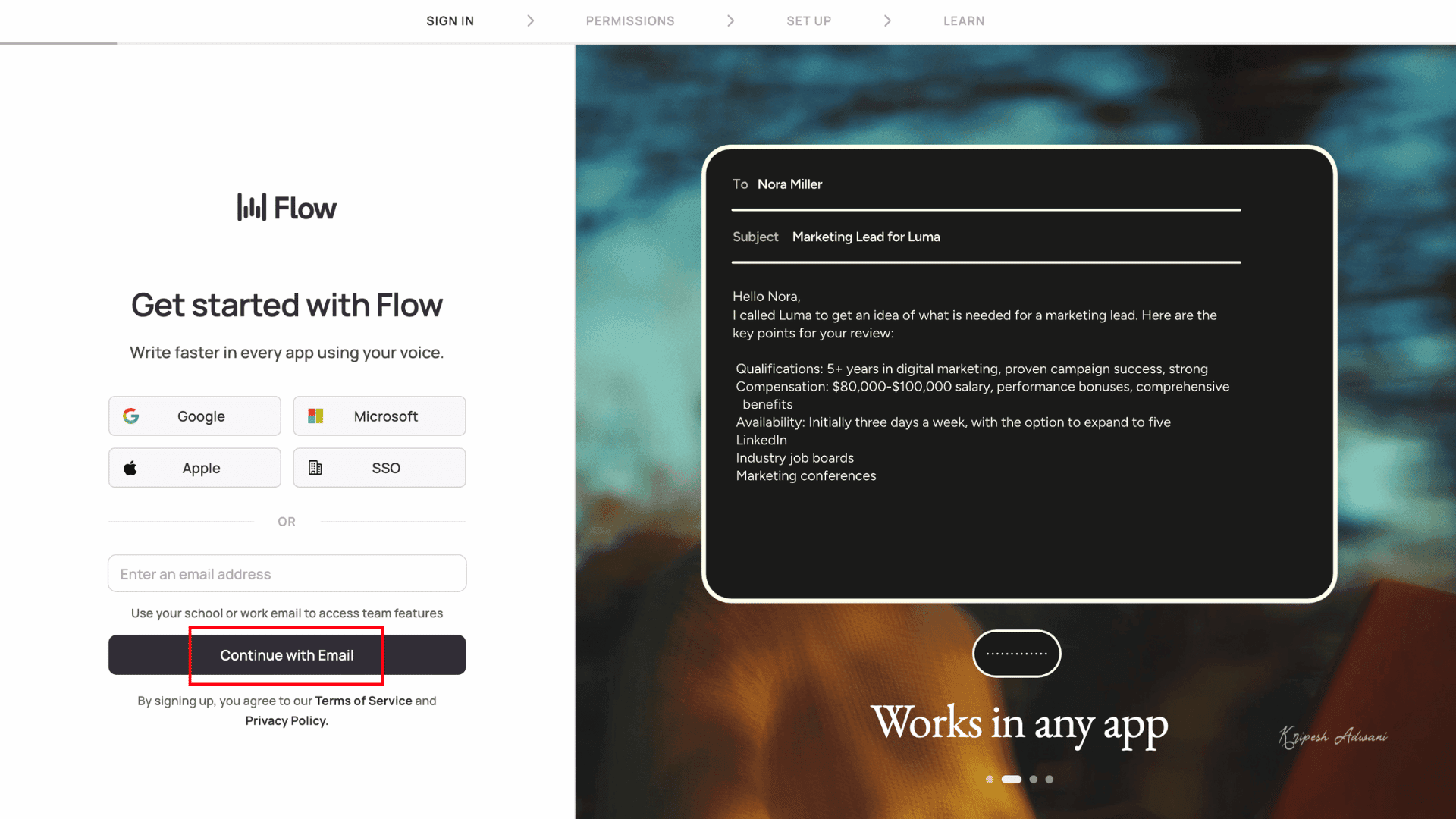
Once installed, create a Wispr Flow account. I used my Gmail ID, but you can also sign up using Microsoft, Apple ID, or email, whichever suits you best.
3. Set Up Hotkeys
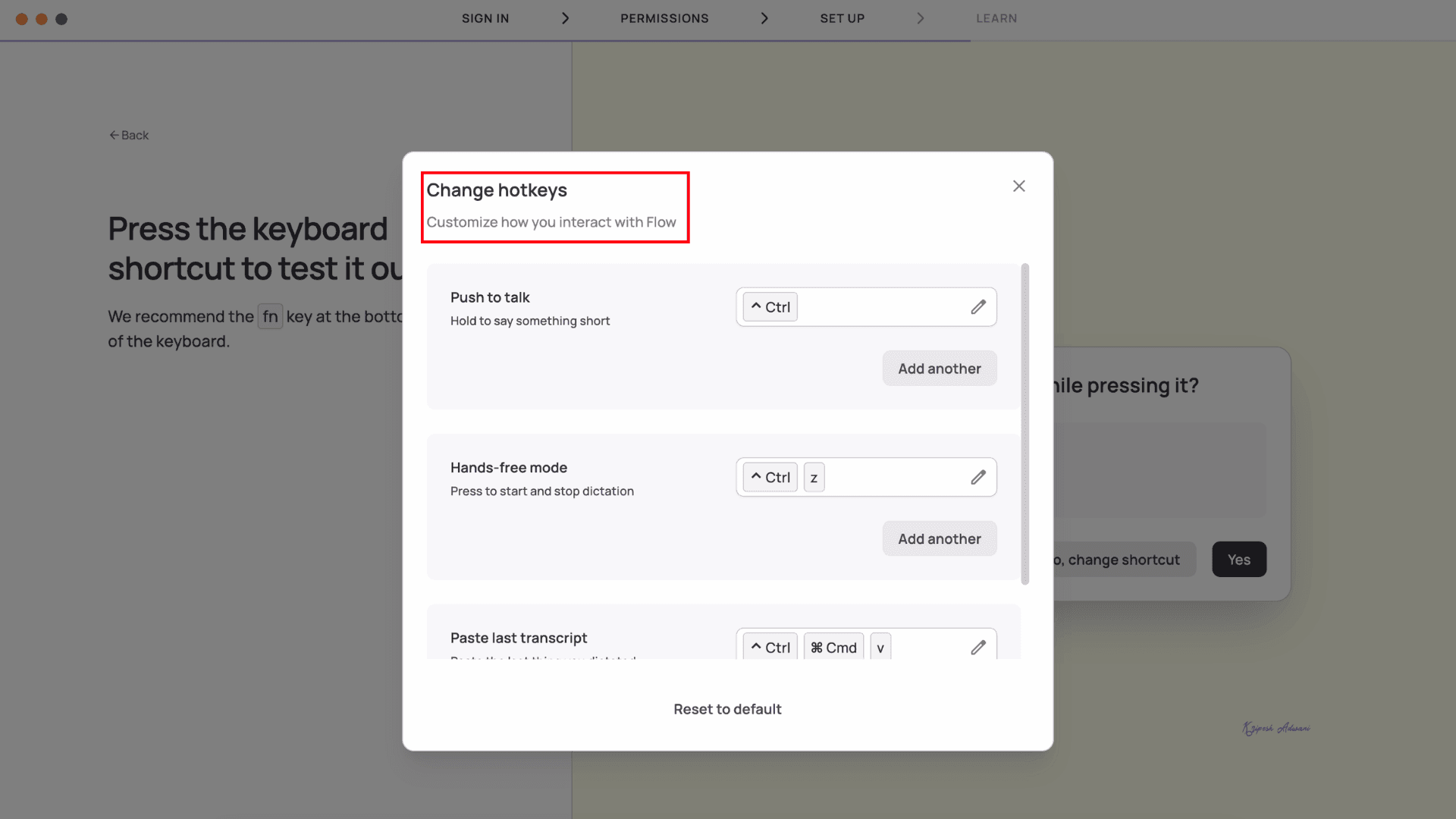
At this stage, Wispr Flow AI will ask you to configure three keyboard shortcuts (hotkeys):
- One for recording,
- One for hands-free recording mode, and
- One to paste the last transcript.
By default, Wispr Flow uses the Fn key, but I changed it to ^Ctrl for convenience.
4. Select Preferred Languages
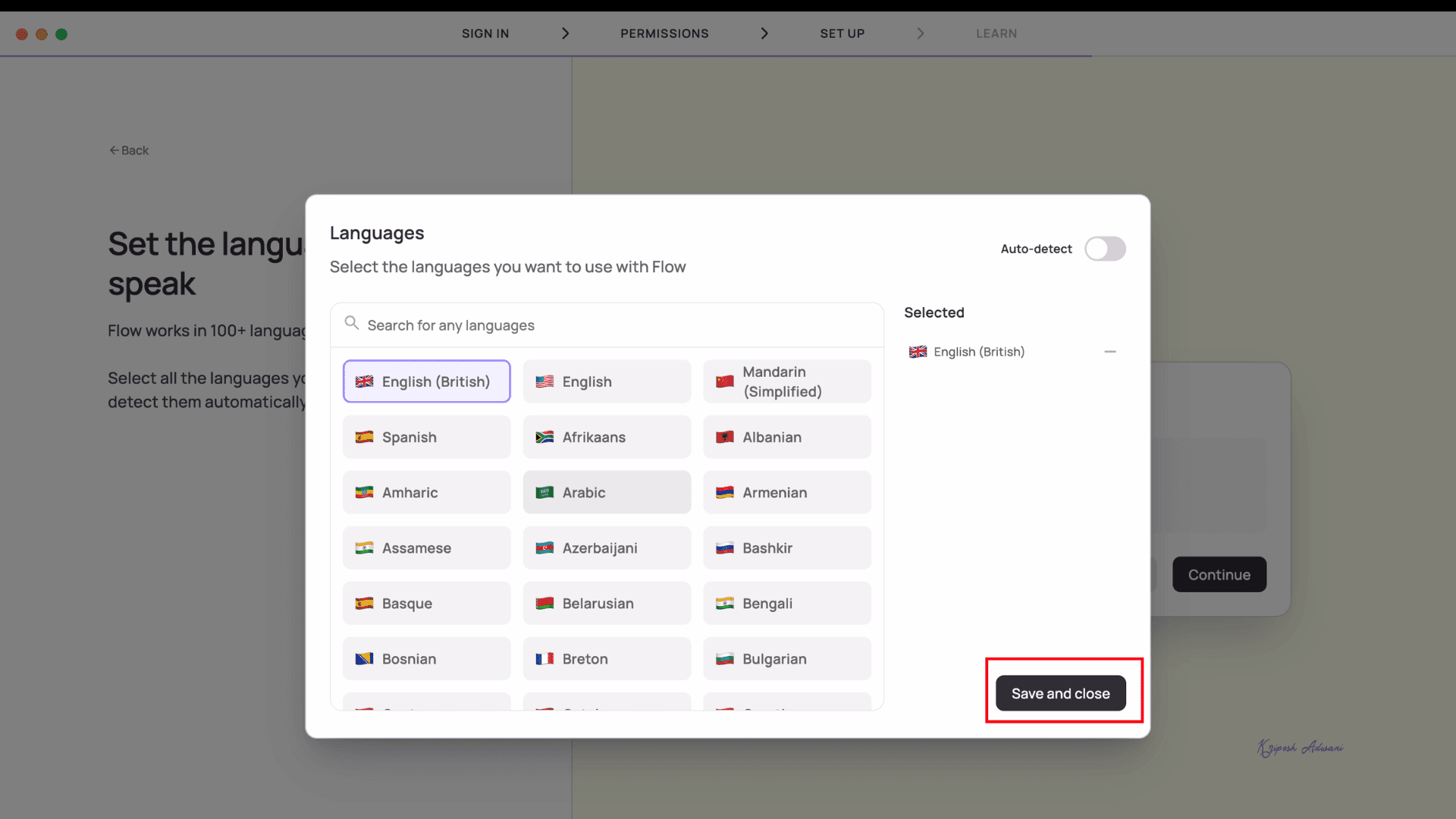
Wispr Flow supports 100+ global languages. You can manually choose the languages you speak. I enabled Auto Detect Mode, which identifies your spoken language automatically.
5. Start Recording
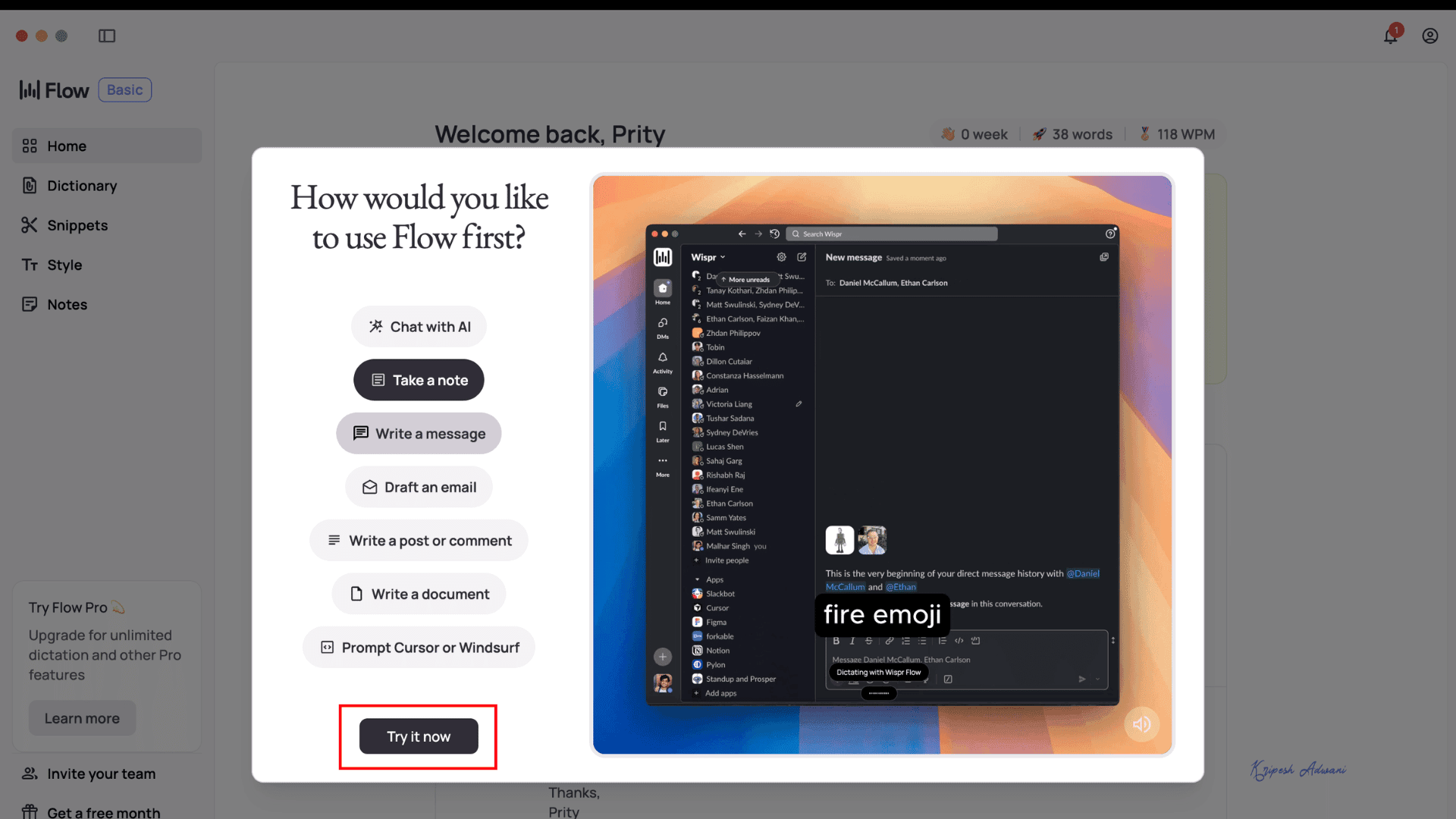
Wispr Flow provides detailed video tutorials for each supported platform, so you can practice as you go.
For example, open ChatGPT, press and hold your chosen hotkey (like ^Ctrl) to record your voice, and watch your spoken words appear instantly as text on the ChatGPT dashboard.
Key Features of Wispr Flow
1. Voice Typing with Natural Corrections
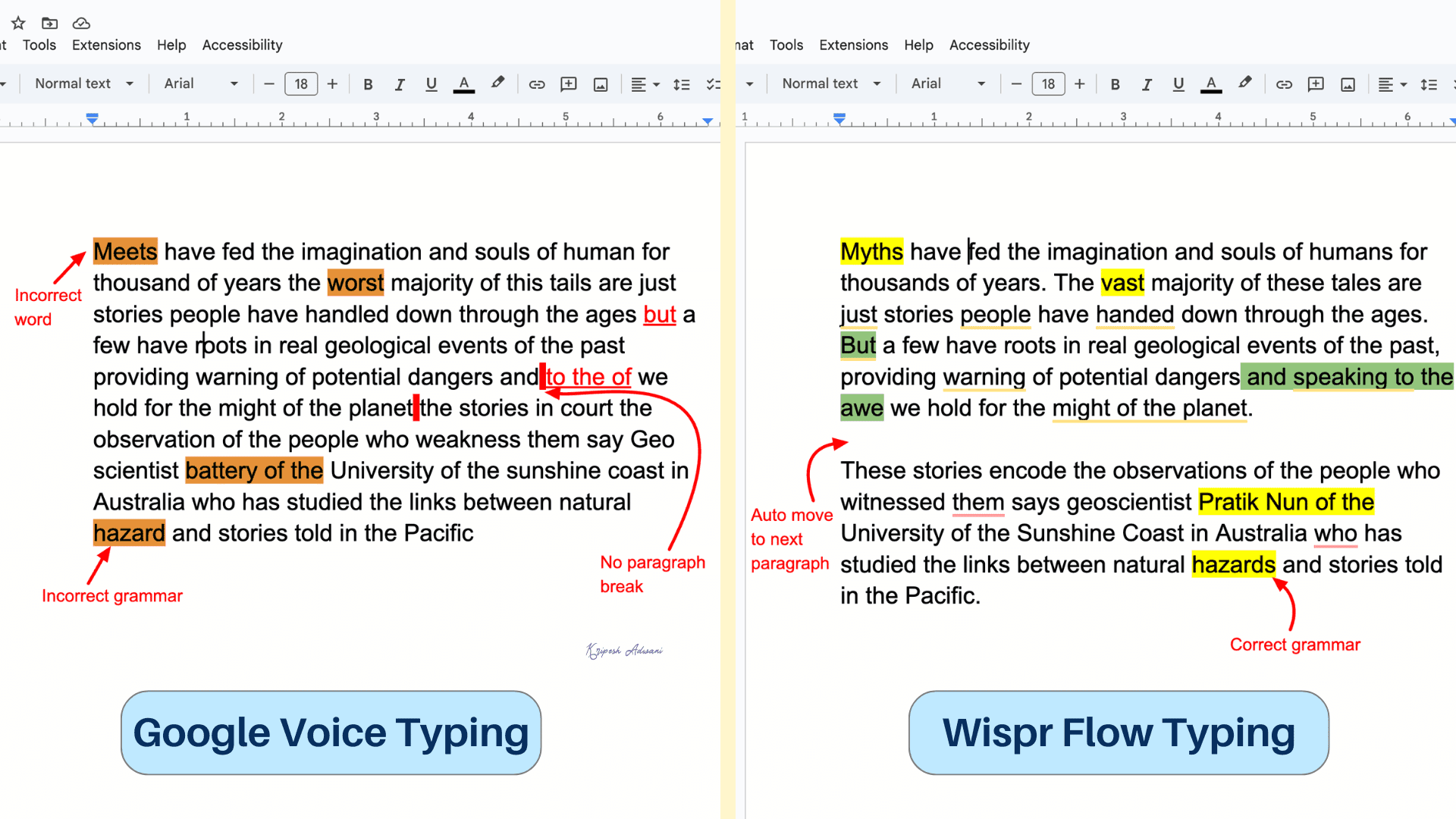
Wispr Flow uses an advanced AI-powered transcription model that accurately captures your spoken phrases. It then automatically corrects grammatical errors, punctuation mistakes, and sentence structure to convert your speech into polished written text.
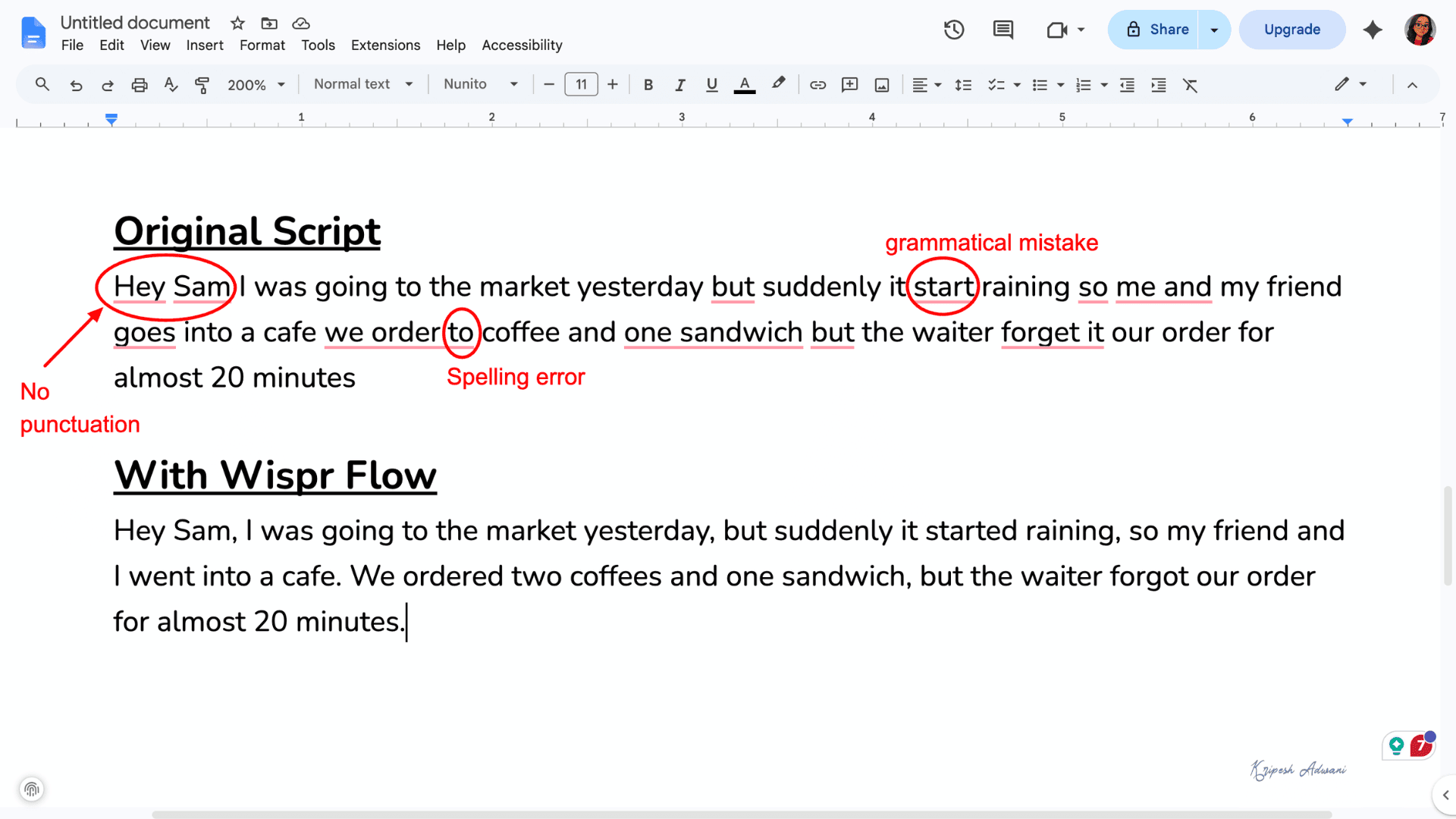
The tool can even recognize technical terms and industry jargon with impressive accuracy.
2. Whisper Mode
Even if you speak in a low voice, Wispr Flow AI catches every word. Its built-in mic is surprisingly strong and works well even in noisy surroundings.
3. Removal of Filler Words
Filler words like “um,” “uh,” and “you know” are common in our everyday conversations. Wispr Flow is smart enough to turn such messy speech into readable text. Even if I pause, repeat, or mispronounce something, the AI automatically removes unnecessary words.
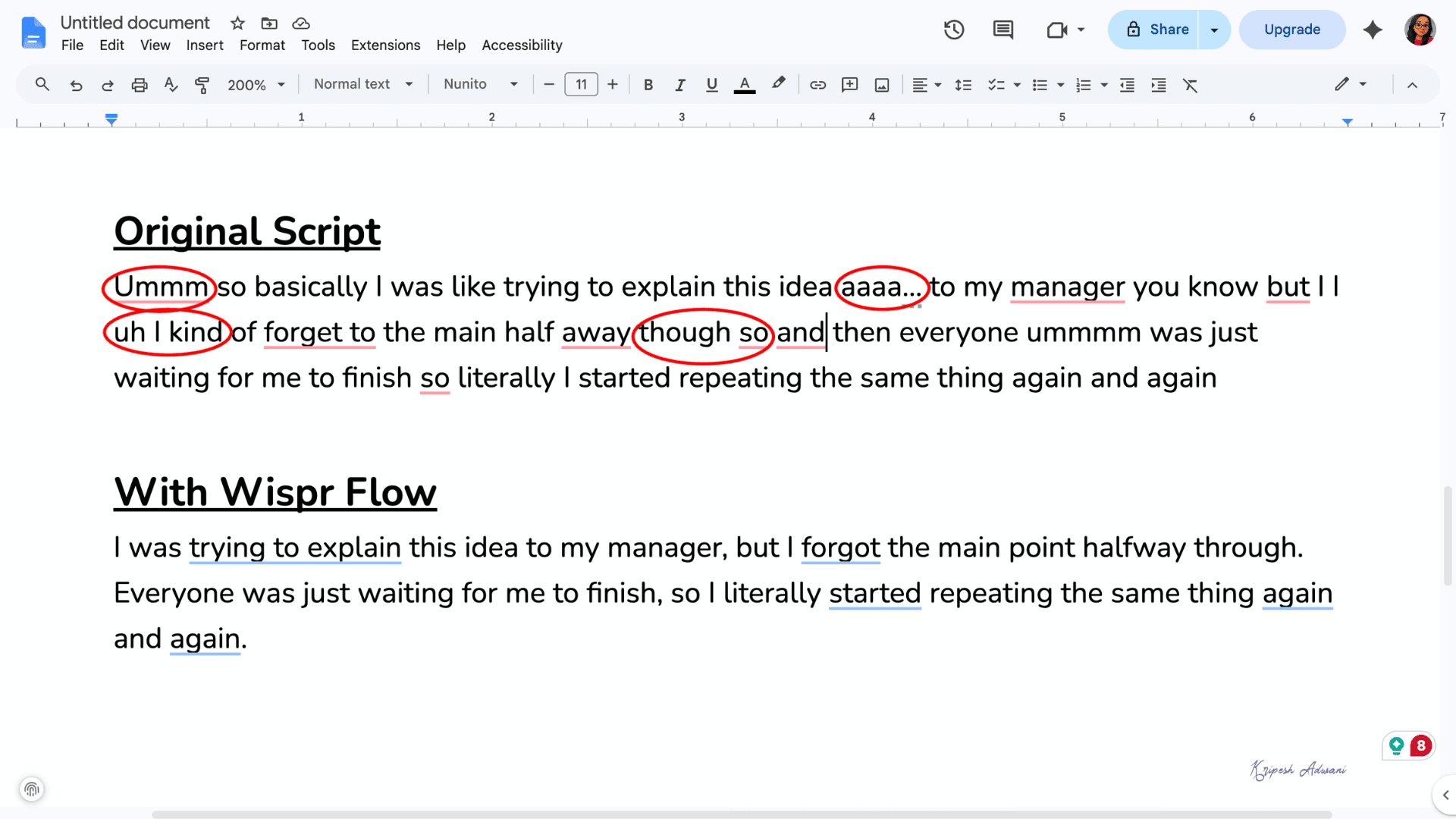
It also uses context to understand self-corrections naturally. For example, if I say, “Meeting at 5 PM… no, actually it’s at 6 PM,” the final text will only mention 6 PM.
So, Wispr Flow is different from basic or “raw” voice dictation tools.
4. Command Mode
Instead of just voice dictation, Wispr Flow also lets you edit or reframe text using voice commands. For example, you can change the tone from formal to casual, make the text shorter or longer, or even translate it into another language.
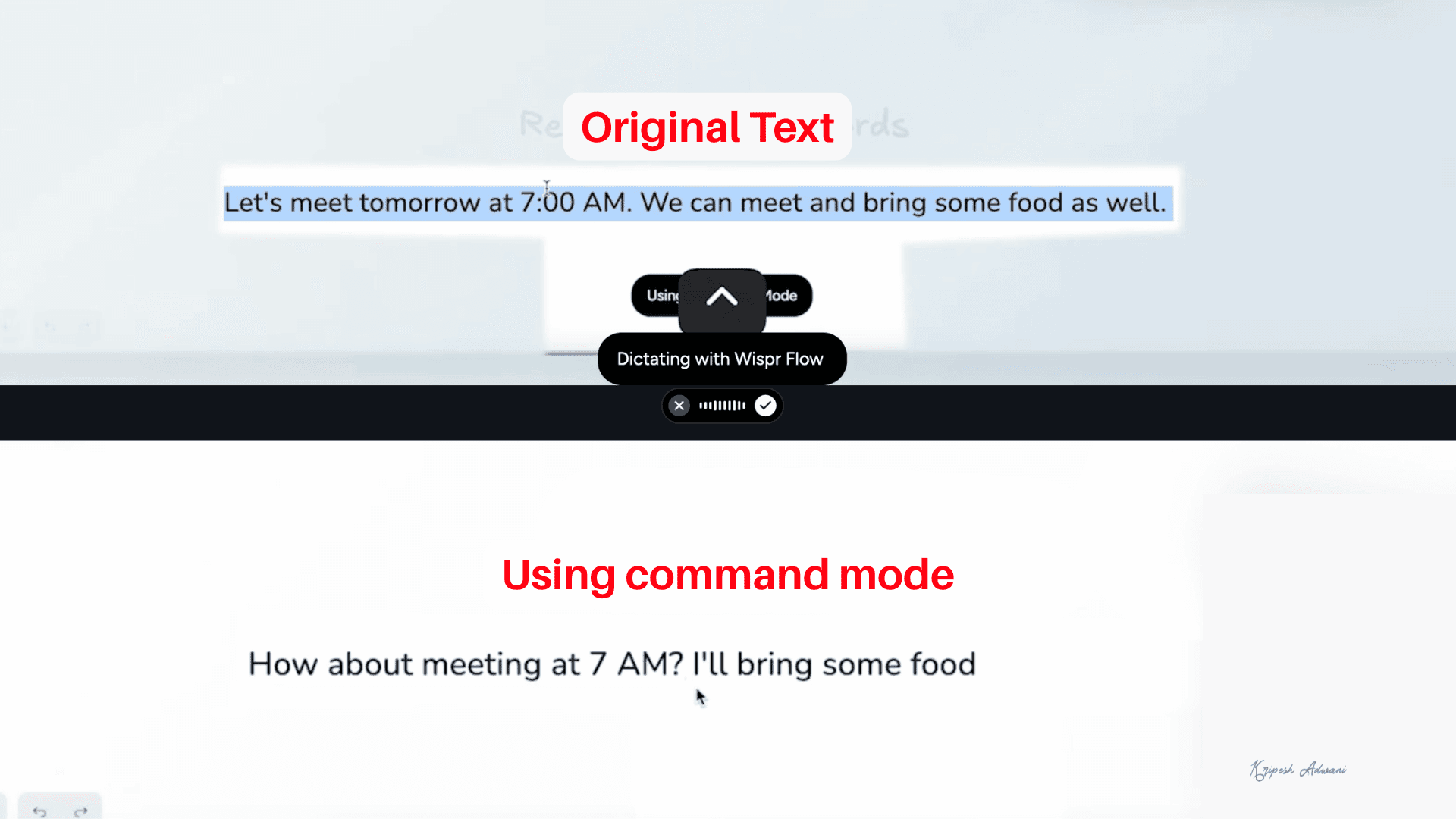
However, this Command Mode feature is only available in the paid plan, not for free. To enable it, go to Settings > Experimental > Command Mode. Once enabled, simply highlight the text, press the shortcut key (usually Fn + Ctrl), and speak your command. Wispr Flow will automatically replace the selected text with the edited version.
5. Snippet Library
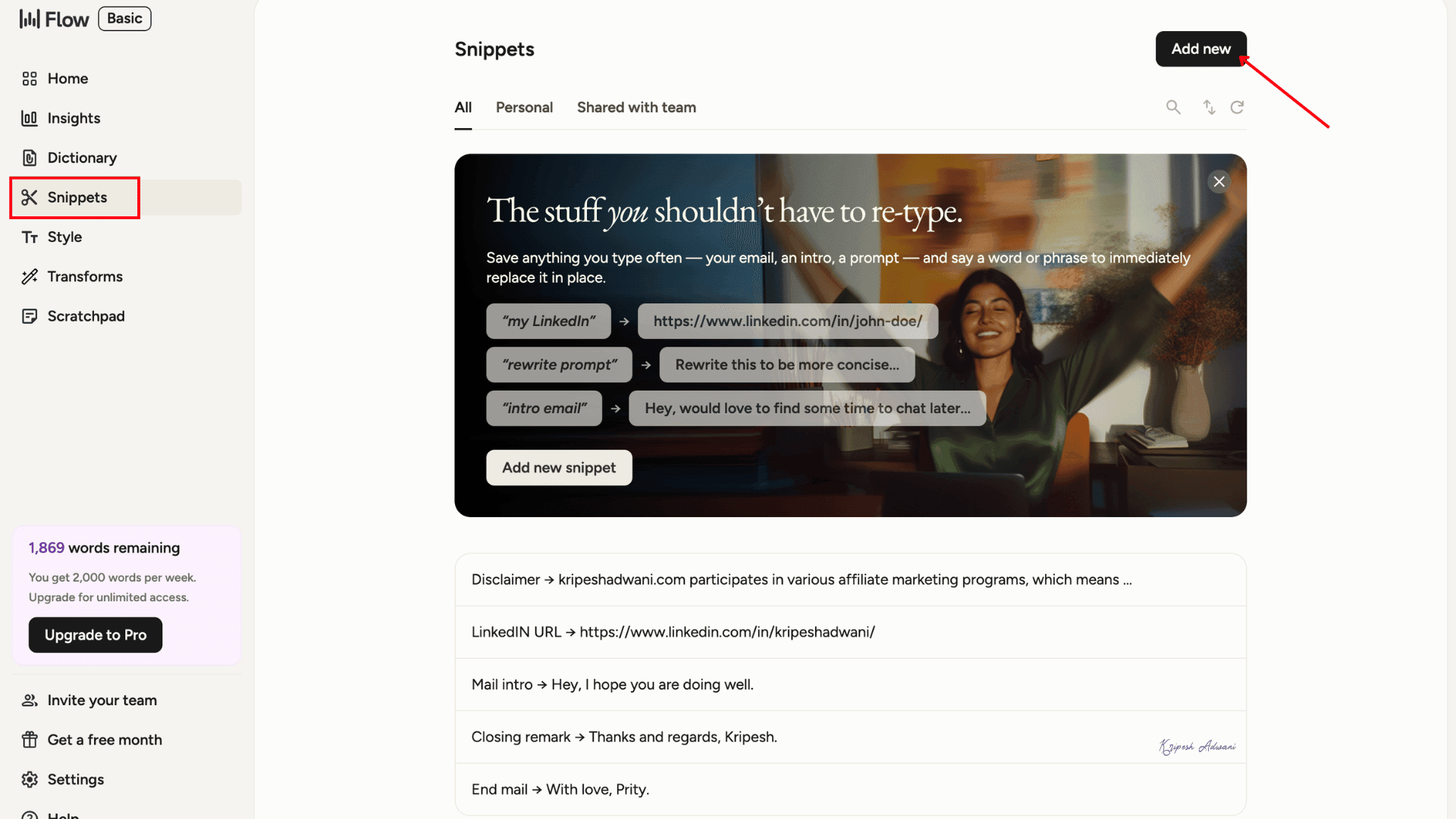
This is one of Wispr Flow’s most useful features. It saves you from typing repeating phrases again and again. You can create snippets by saving frequently used sentences with custom trigger words.
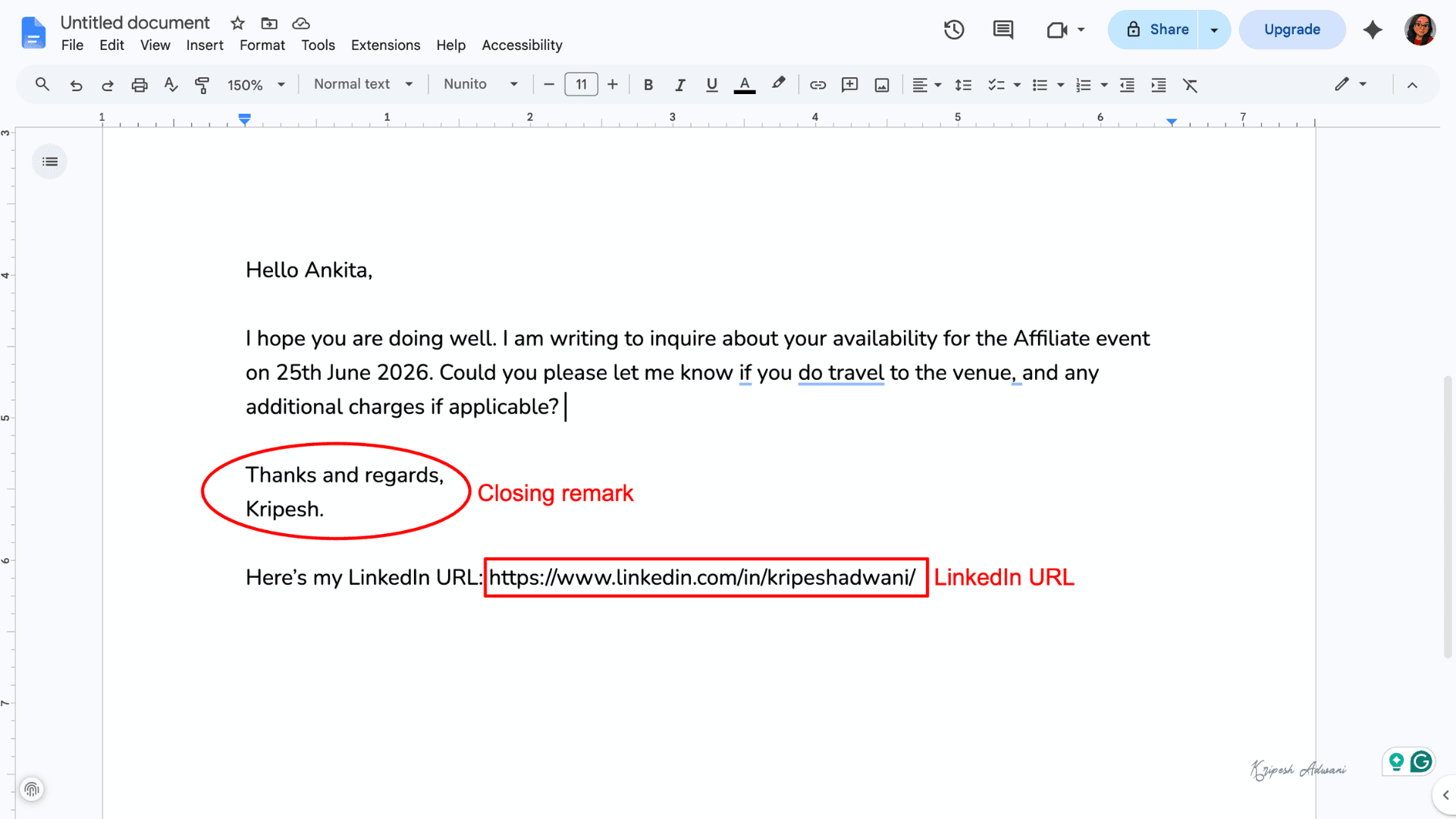
For example, I’ve saved my email closing remark as a snippet. Now, whenever I dictate an email and say “closing remark,” Wispr Flow automatically adds: “Thanks and regards, Kripesh.”
Similarly, I’ve also saved trigger words for social media links, LinkedIn URLs, addresses, disclaimers, etc.
6. Personal Dictionary
You can train Flow with words or phrases you frequently use. These can include unique terms, company jargon, short slang, teammates’ names, etc. Simply click on “Add New Word” and enter the vocabulary you want Wispr Flow to learn.
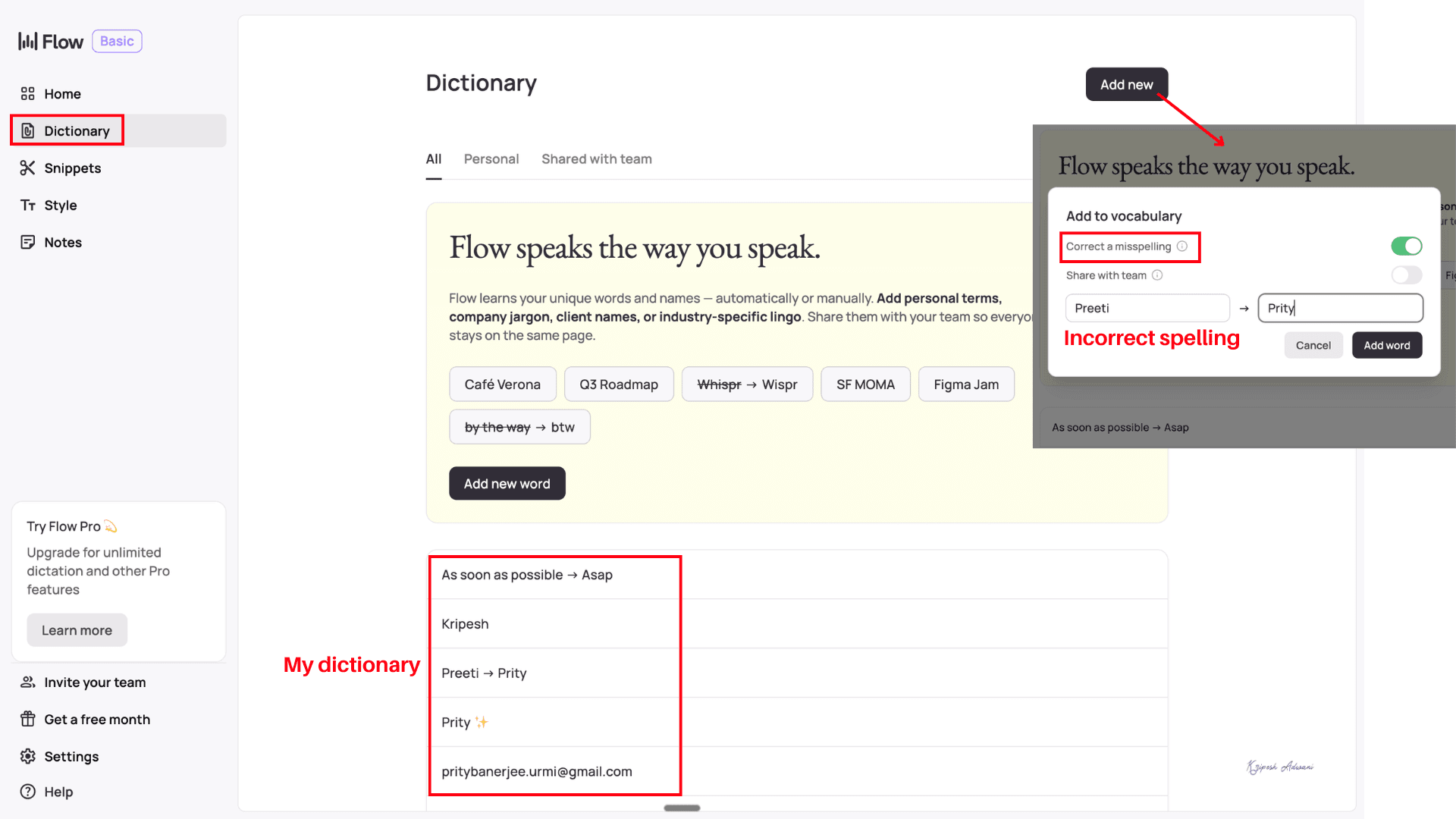
You can also ensure accurate spelling of your teammates’ names. Just enable the “Correct a Misspelling” option while adding new words.
7. Tone Adjustment
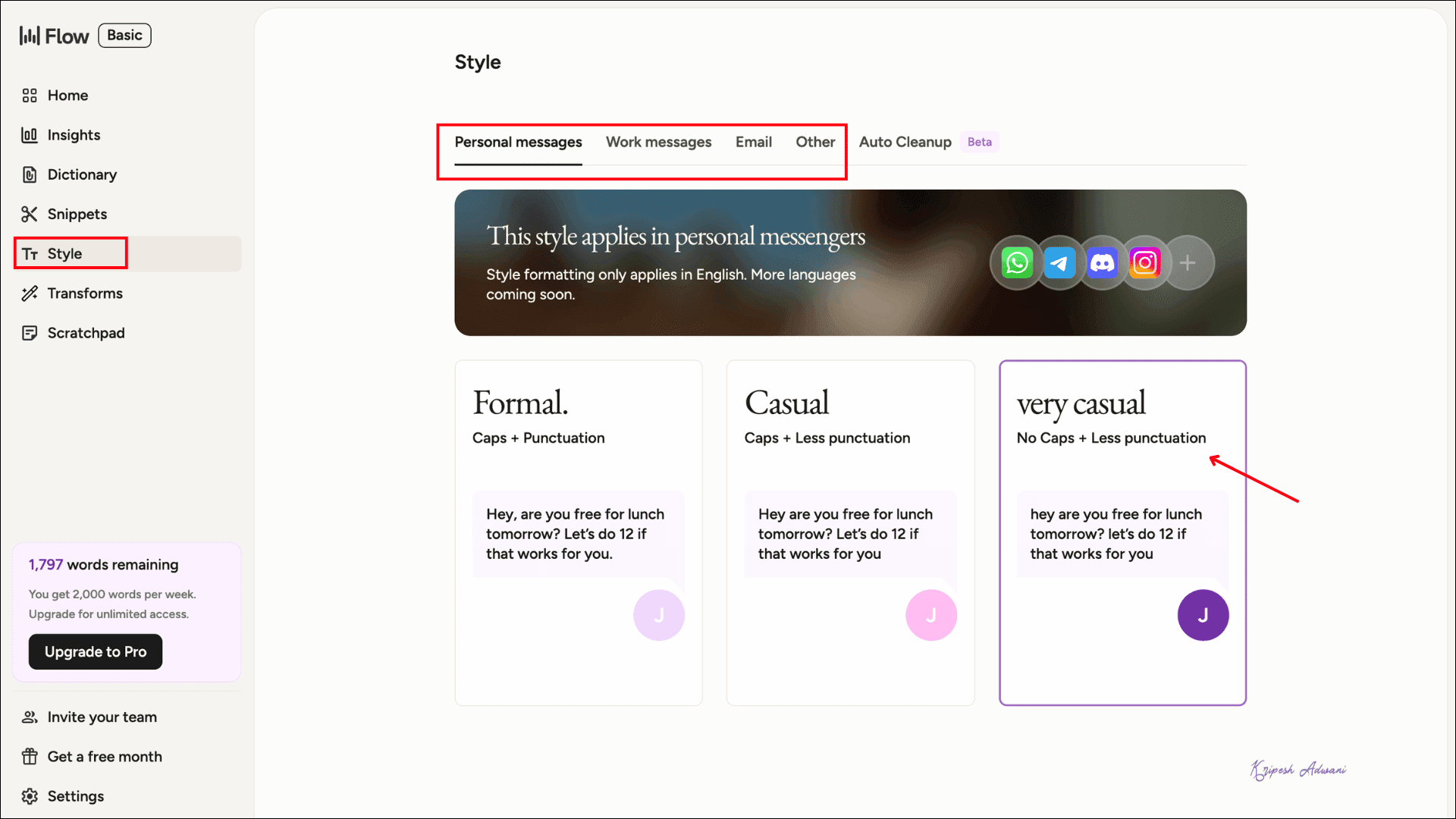
We use different tones for different purposes. For example, I prefer a formal tone for emails and a casual one for personal messages. Under the Style tab, you can add your personalized style for different apps.
8. Multi-Language Support
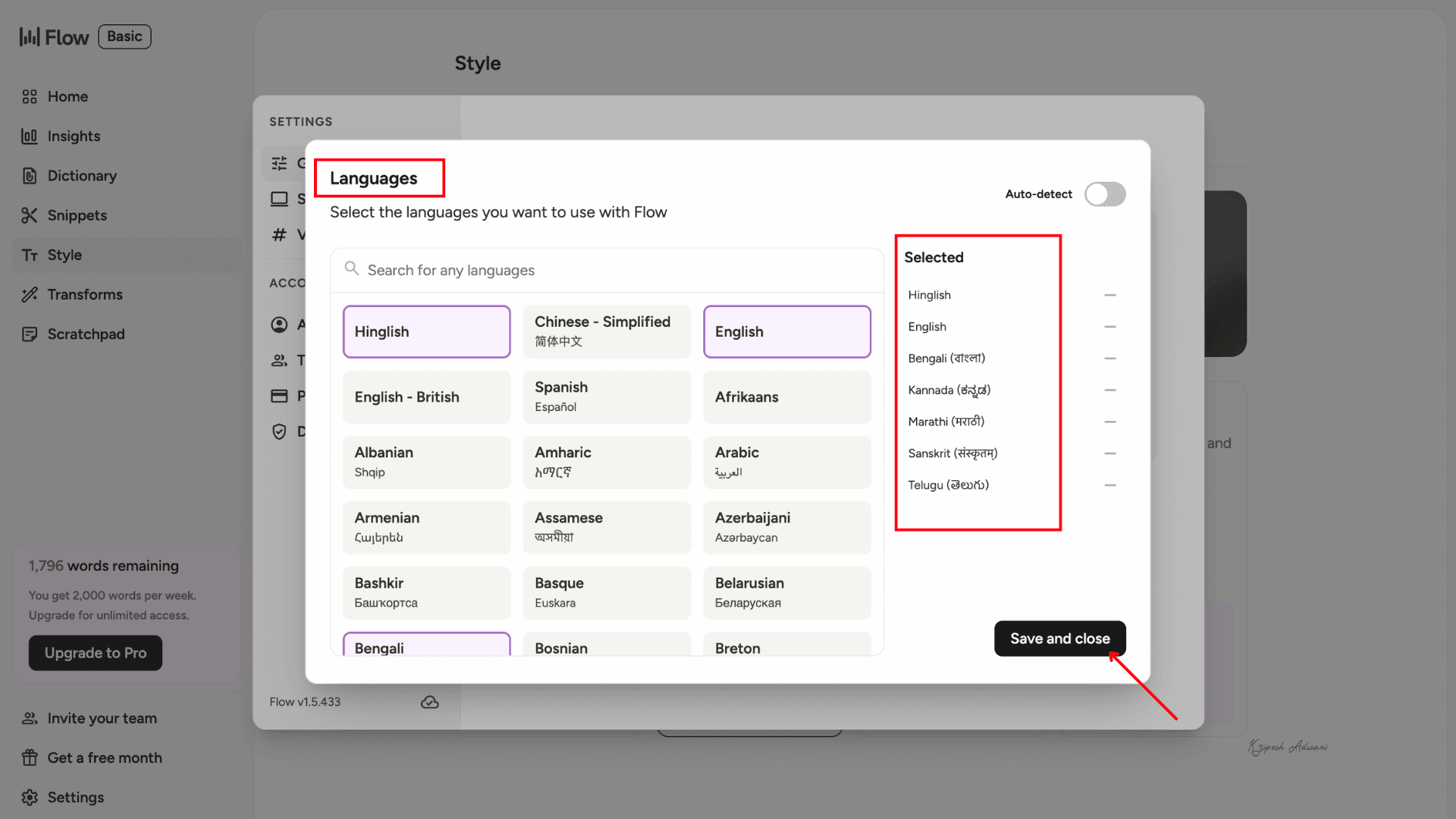
Wispr Flow supports over 100 languages. I was impressed to see that many regional Indian languages, including Hindi, Bengali, Assamese, Tamil, and Telugu, are available.

Since Wispr Flow recently launched in India, the company has also added Hinglish support. This means you can naturally dictate mixed Hindi and English sentences. During my testing, the accuracy was surprisingly good.
9. On-the-go Typing
The app is available for iPhone and Android users. So you can record your voice and create notes or documents while traveling. It’s perfect for professionals who are always on the move.
Wispr Flow Use Cases
1. Content Writing
I use the hands-free mode here since I often need to type long paragraphs. By pressing Ctrl+z, you can start recording, and pressing the same keys again stops it.
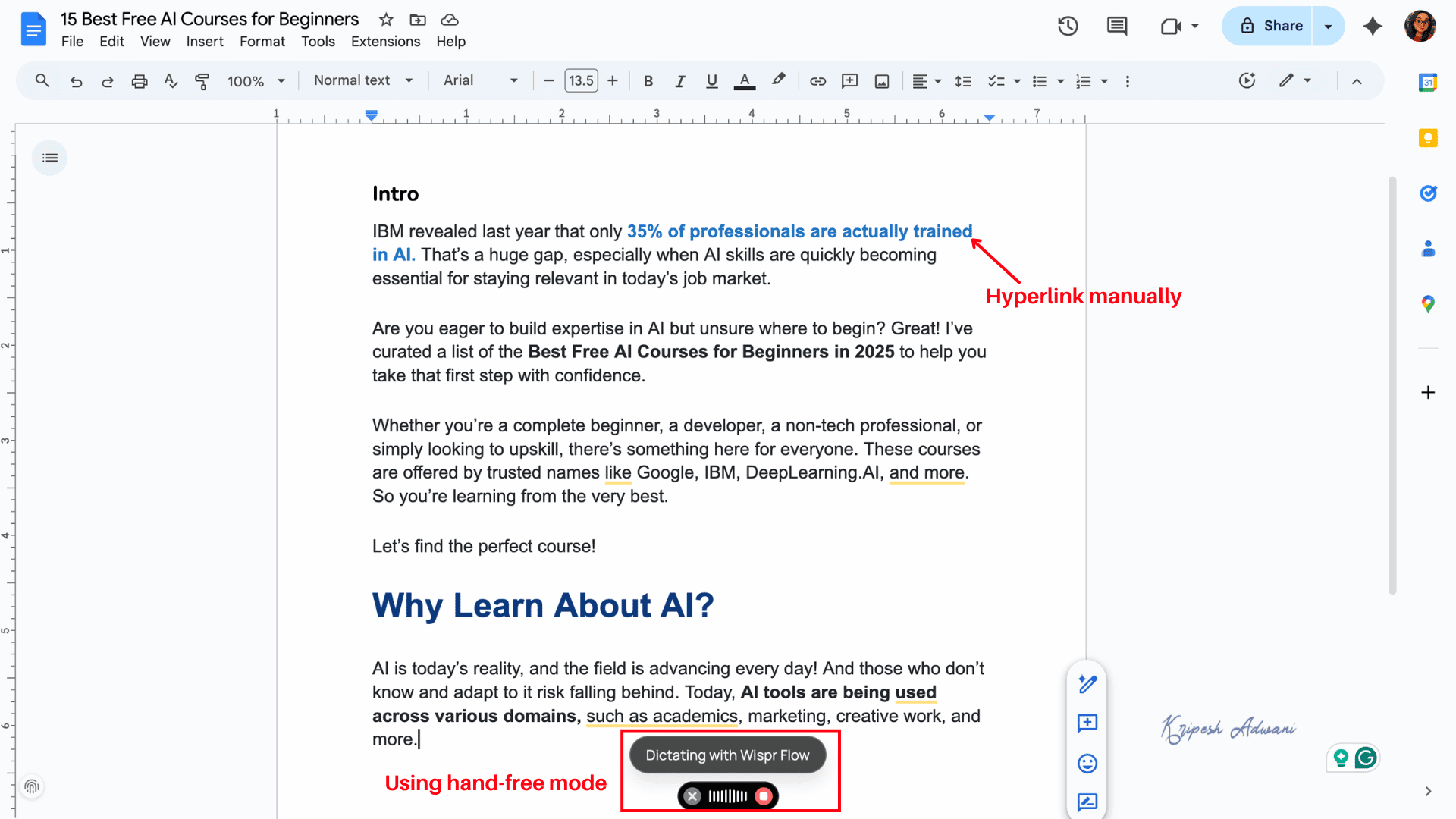
The dictation accuracy is quite good. The only limitation is that I need to manually add hyperlinks and formatting afterward.
2. Drafting Emails
To draft emails, I quickly dictate the body paragraph. I said, “add bullet points” to insert bullets and “move to next paragraph” to start a new one.
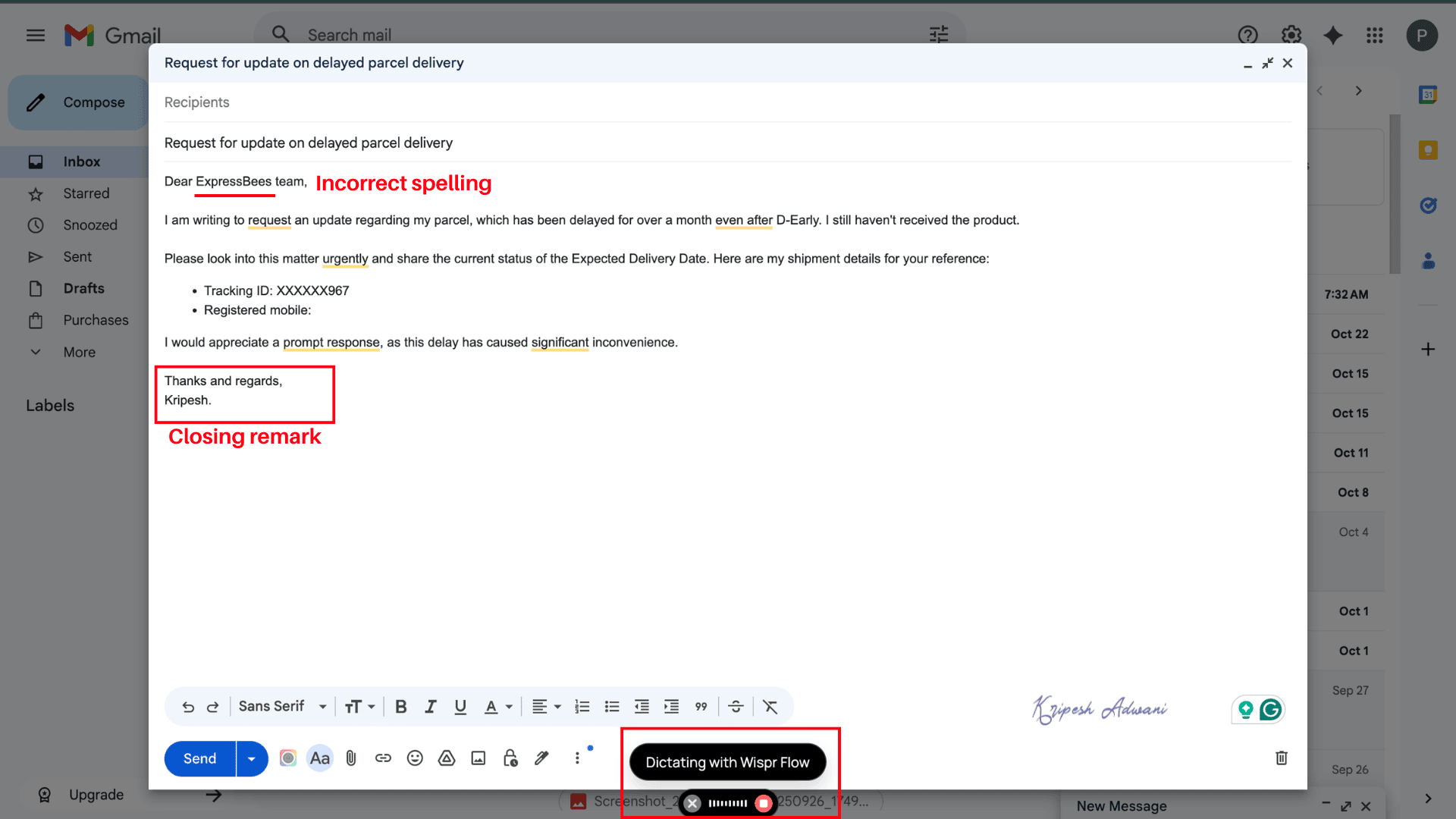
At the end, I ask for a closing remark, then move the cursor to the subject line and press Ctrl + Z again to dictate the subject. The process is smooth overall, though I still have to manually fix spellings if certain words aren’t in the personal dictionary.
3. Code Writing
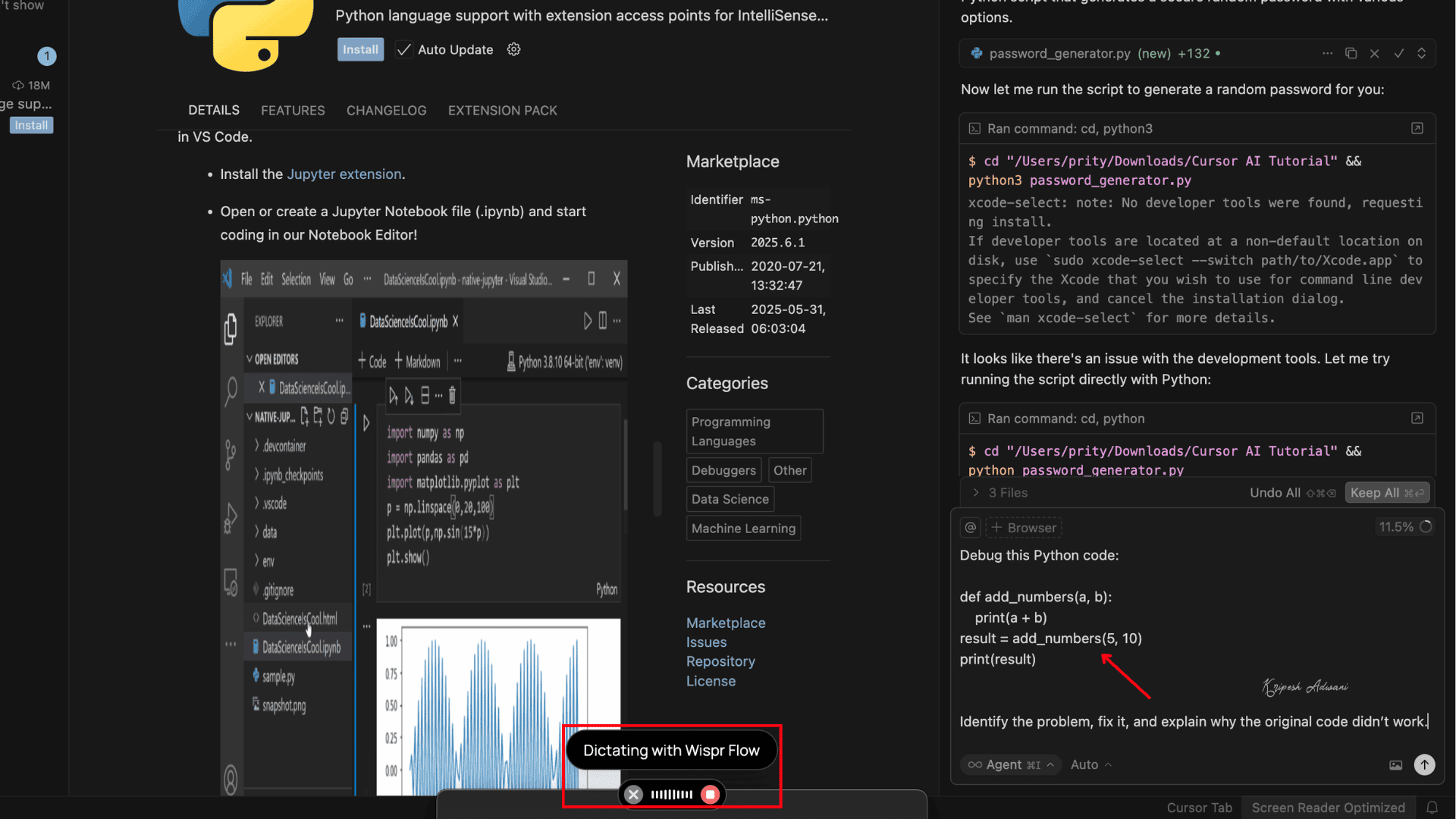
Wispr Flow integrates seamlessly with AI coding assistants like Cursor, Replit, Windsurf, and Warp. It even auto-organizes and labels your files while understanding your code’s variables.
4. Writing Prompt
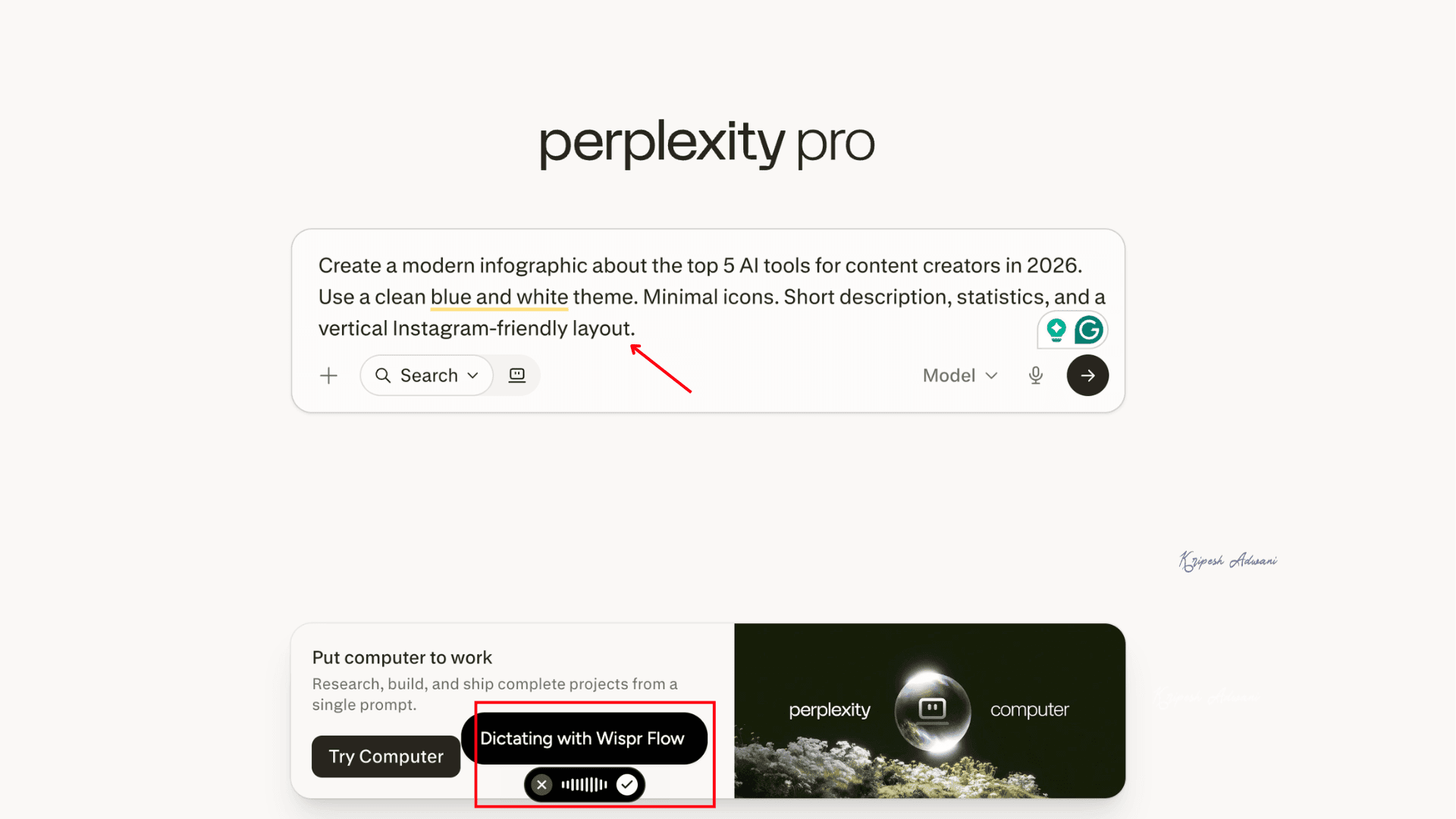
You can use Wispr Flow with ChatGPT, Gemini, Perplexity, or almost any other AI chatbot to dictate prompts using your voice. By simply pressing the hotkeys, I can speak detailed, long-form prompts naturally. And it’s true that a detailed prompt makes writing much faster and generates better output.
5. Sending Messages
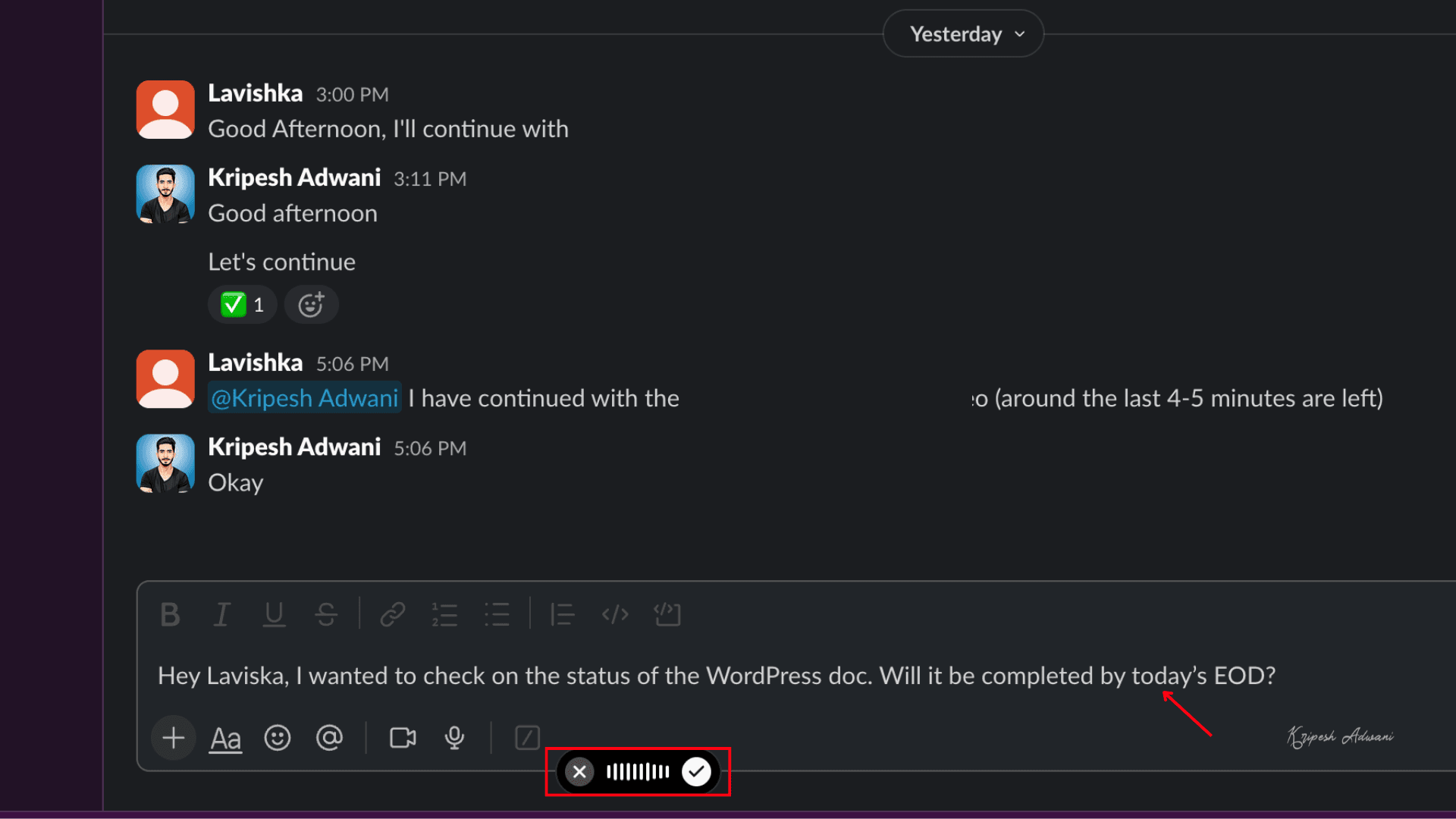
To send messages, just open Slack or WhatsApp, place the cursor on the chat bar, and press and hold the hotkeys to record your message. Wispr Flow automatically adjusts the tone. For example, it makes mine sound very casual, and even AI edits the message before sending.
Pricing
| Flow Free | Flow Pro | Flow Enterprise | |
| Pricing for 1 year | $0 | ₹320/user/month | Customized |
| Word limit | 2000/week on desktop 1000/week on iPhone Unlimited on Android | Unlimited | Unlimited |
| Command Mode for editing | No | Yes | Yes |
| Team dictionary | No | No | Yes |
| Shared snippets | No | No | Yes |
| Privacy mode (Zero Data Retention) | Yes | Yes | Yes |
| ISO 27001 and SOC 2 Type II Compliance | No | No | Yes |
| Customer support | Standard | Priority | Dedicated |
If you’re a beginner, Wispr Flow’s free version is decent enough to explore the basic features and understand how it works. For Android users, it’s now offering unlimited words of voice dictation.
If you’re ready to buy paid plans, it’s better to invest in their annual plan rather than the monthly plan. All annual plans are currently available at a 20% discount. So, if you choose the Flow Pro Annual Plan, it’ll cost ₹320/user/month instead of ₹420/user/month. But, you have to pay ₹3,840 for 1 year at a time.
After creating their account on Flow for the first time, every user gets a 14-day Flow Pro free trial. The platform offers special discounts for students, educators, and non-profit organizations.
The platform accepts payments through UPI and Cards.
Customer Support
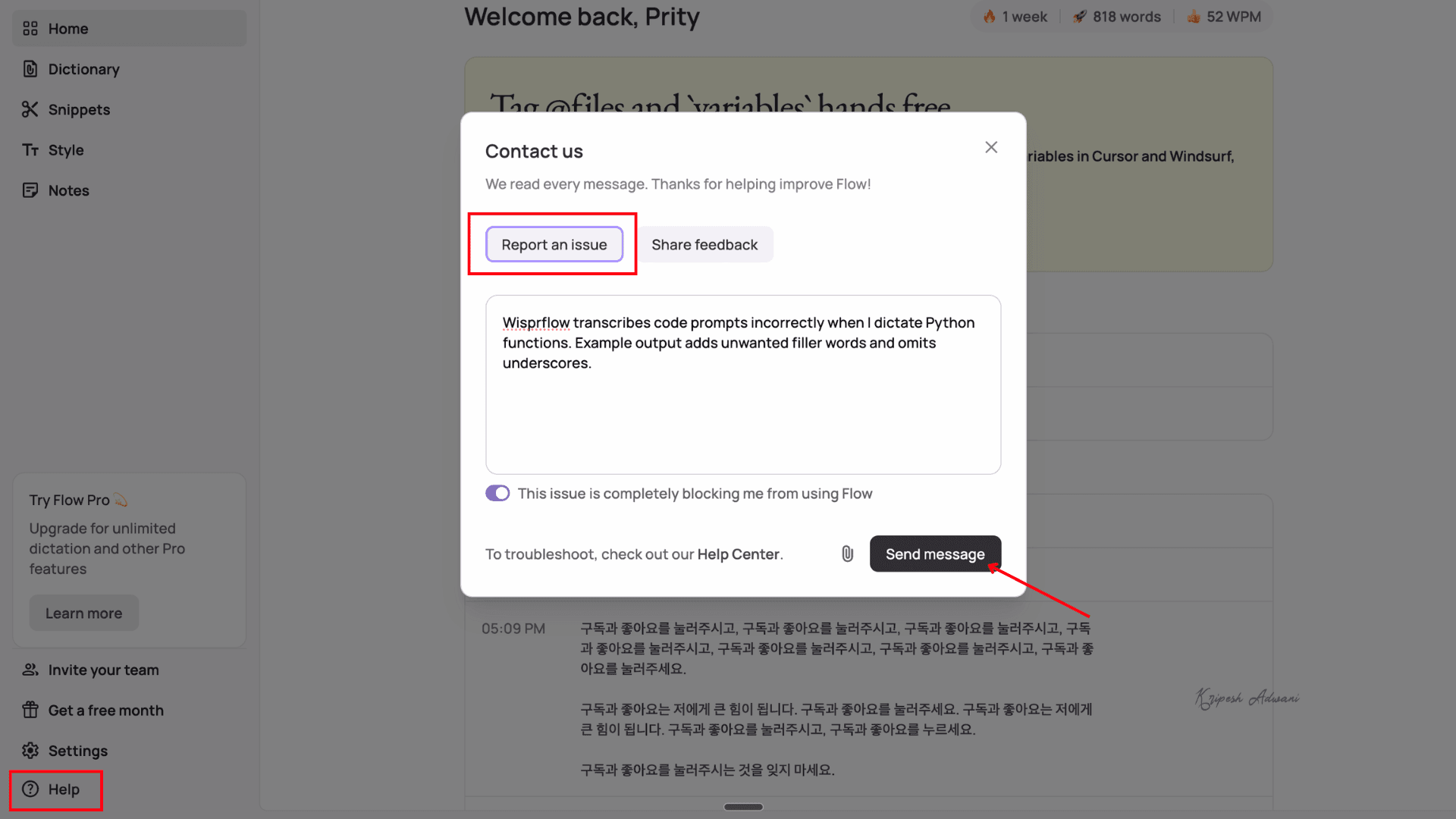
You’ll get three types of in-app support from Flow. To access them, navigate to the “Help” button.
- By clicking on “Help Center,” you can visit its knowledge hub to find solutions for common troubleshooting issues.
- The “Report an Issue” option lets you send queries or feedback directly to the team. You can also attach screenshots or other files for reference.
- The “Contact Sales” button automatically redirects you to an email with its official email ID prefilled. You can ask sales-related questions here.
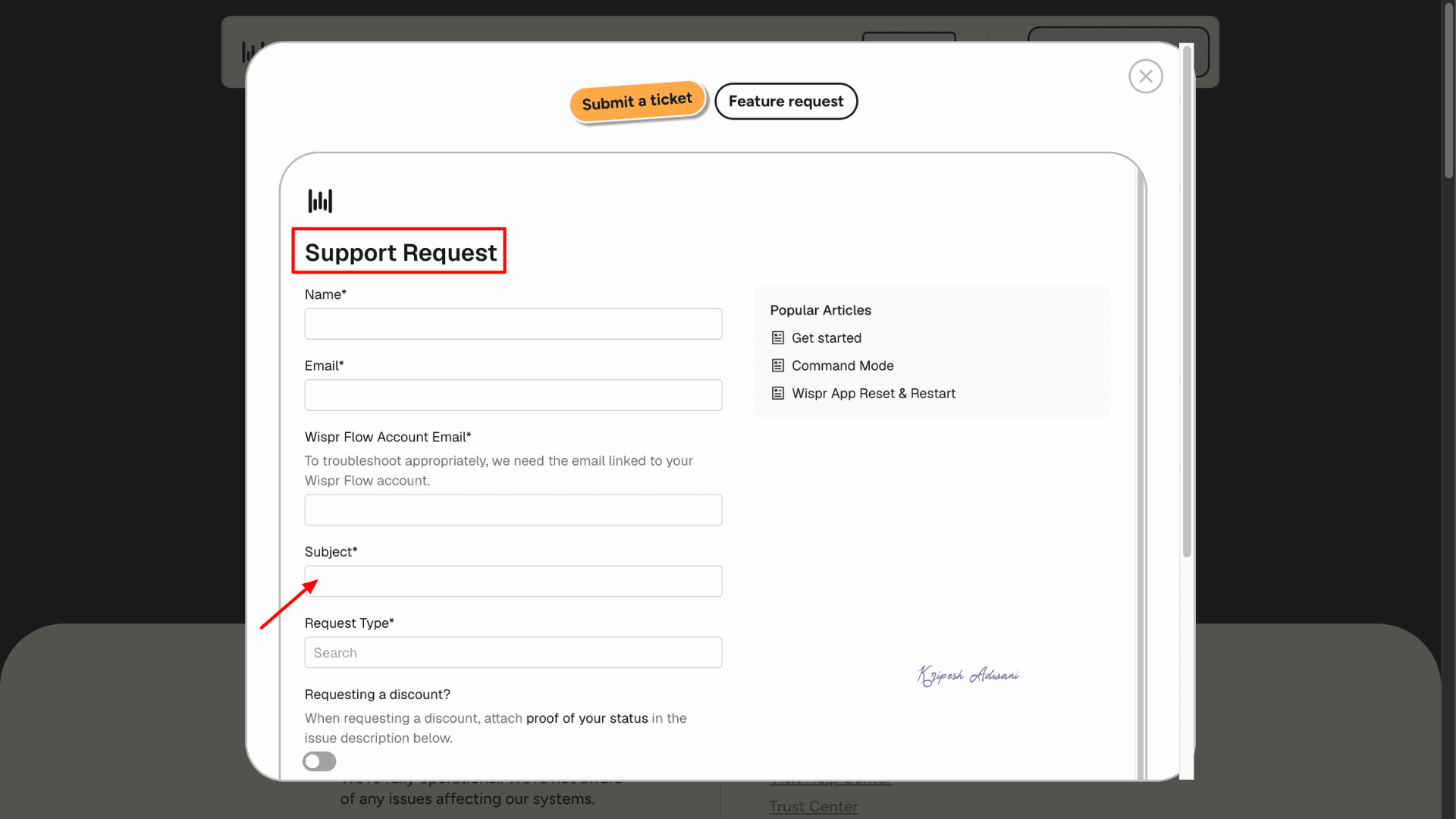
Plus, from their website, you can submit a support ticket by filling out a form with your name, email, request type, subject, and other required details.
I haven’t personally contacted their support team since I didn’t face any issues. However, according to several popular tech review websites, Wispr Flow’s customer support isn’t highly rated. Many users have complained about subscription cancellation problems and unresponsive emails, even for Pro users.
Wispr Flow Pros
1. Accurate Dictation
Whether I dictate long paragraphs or short technical code snippets, Flow captures every phrase accurately. The dictation accuracy is pretty good, even if you speak in a low voice.
2. Compatible with Different Platforms
Flow integrates with almost all major platforms. I’ve used it on WhatsApp, Slack, Gmail, ChatGPT, Perplexity, Notion, and more.
3. Smart Keyboard Shortcuts
With just a few hotkeys, the app becomes incredibly easy to use. I simply press the Fn or Ctrl key to record, and for hands-free mode, I use Ctrl + Z.
4. Auto-Corrects Mistakes
Flow is smart enough to convert only meaningful voice input into text. It removes filler words, corrects spelling errors, auto-adjusts jargon, and automatically moves to the next paragraph, allowing me to speak naturally.
5. Can Use Different Tones
Flow adjusts tonality based on different use cases. Once you set a tone for personal messages, emails, or work communication, you don’t need to adjust it separately for each app.
6. Supports Regional Languages
I can speak in Hindi, Bengali, Gujarati, or other popular Indian regional languages. It’s a great feature for multilingual speakers.
7. Understands Context Well
Wispr Flow is smart enough to understand your context accurately. For example, if you say, “Let’s meet at 3 pm today,” and then correct yourself with, “Um, no, meet at 2 pm,” Flow will ultimately dictate, “Let’s meet at 2 pm today.”
Wispr Flow Cons
1. Doesn’t Work Offline
The first limitation I noticed with Wispr Flow is that it does not work offline. Since it is a cloud-based app, you need a stable internet connection to use it on your phone, laptop, or desktop.
2. Limited Customer Support
Wispr Flow currently does not offer live chat support or a direct support email. Considering it is an AI-focused company, I expected at least an AI chatbot or live chat option for faster assistance. During my research, I also noticed mixed feedback regarding their customer support experience.
3. Privacy Could Be Better
Since Wispr Flow is cloud-based, your voice data is processed through external data centres and AI models before generating the final output. No offline facility is available. Because of this workflow, the platform may not feel fully secure for privacy enthusiasts. The free plan offers basic privacy protections, and zero-knowledge encryption is not possible with this type of real-time AI transcription tool.
Who Should Use
- Software Developers: Wispr Flow’s technical term recognition, fast voice-to-code workflow, and integration with AI coding assistants help in debugging or documentation.
- Content Creators & Writers: Bloggers, newsletter publishers, and content marketers can dictate articles, ideas, and documentation efficiently.
- Students & Educators: Flow dictation mode helps in writing assignments, preparing lectures, and creating detailed explanations.
- Productivity Power Users: Anyone who prefers working by voice across productivity software, email, PM tools, and messaging apps.
Best Alternatives to Wispr Flow
1. OpenWhispr
If you care a lot about privacy, OpenWhispr is a solid free option to consider. Since it is open source, your voice data is not sent to the cloud. The tool is available for macOS, Windows, and Linux.
It also supports offline voice dictation, which means you can continue using it even without an internet connection. OpenWhispr is completely free to use and mainly focuses on accurate transcription, basic formatting, customizable behavior, and simple punctuation support.
In my experience, if you want raw and high-quality voice transcripts with more control over AI models and settings, OpenWhispr feels more flexible.
2. Handy
Another option you can try is Handy. It is a free, open-source, voice dictation app available for Windows, macOS, and Linux. The workflow is quite simple. You just press the hotkey, speak naturally, and release the key. Handy then converts your voice into written text instantly.
One thing I liked is that it supports offline transcription using models like Whisper and Nvidia Parakeet, so your audio is not sent to the cloud. However, it does not offer advanced AI editing features, team collaboration tools, or mobile apps like Wispr Flow.
3. Otter AI
If you are looking for a voice dictation tool mainly for meetings, Otter.ai is another useful option to consider. While Wispr Flow focuses more on helping you write faster across apps, Otter.ai is designed for recording and organizing meeting conversations. It comes with an AI meeting assistant and note-taking features that can record meetings, lectures, and interviews. Then, it automatically converts them into transcripts.
Apart from transcription, Otter AI can also generate AI summaries, action items, and searchable notes, which makes it very useful for professional meetings and team collaboration. In my experience, for meeting management and professional note-taking, Otter AI feels more powerful than Wispr Flow.
Why Should You Trust Me?
Over the past 10 years, I’ve worked with thousands of SaaS products and digital tools as a tech content creator. My focus has expanded to researching and reviewing AI-powered tools that truly add value with the rapid rise of AI.
I’m always on the lookout for smart, practical solutions that save time and effort. My reviews on topics such as the best AI tools for academic research, free AI courses for beginners, and AI email assistants have proven especially helpful for beginners, freelancers, small businesses, and agencies.
You’ll also find my latest in-depth reviews on platforms like ElevenLabs, Molypix AI, AI Fiesta, QuickAds, and Polygraf AI. Drawing from years of hands-on experience, I recently reviewed Wispr Flow to help users save time with its powerful voice dictation mode.
Conclusion
Wispr Flow is an advanced AI voice dictation tool designed for users who want fast, accurate, and natural speech-to-text conversion. The app is available on both desktop and mobile platforms.
It works smoothly with code editors, AI chatbots, messaging apps, and other productivity tools. During my testing, the voice-to-text accuracy was genuinely impressive. The best thing is, now it supports regional languages and even Hinglish dictation.
Wispr Flow app is still evolving, so we can expect more advanced features and improvements in future updates. If you type a lot every day, this tool can easily help you write much faster. AI prompt writers, copywriters, social media professionals, students, and content creators will likely find this tool very useful.
However, this tool is definitely not value-for-money for a casual WhatsApp or Instagram user. What I would still recommend is trying the 14-day free trial first. The good part is that you can test the tool without adding a credit card before deciding whether it fits your workflow.
That’s all from my side! For weekly free AI tool recommendations, subscribe to my newsletter.
FAQs

Wispr Flow Pros (+)
- Accurate Dictation
- Compatible with Different Platforms
- Smart Keyboard Shortcuts
- Auto-Corrects Mistakes
Wispr Flow Cons (-)
- Doesn’t Work Offline
- Limited Customer Support
- Privacy Could Be Better
What does “Whispering mode” mean?
“Whispering mode” allows you to dictate at a low volume. Suppose you’re in a conference hall or public place, you can whisper instead of speaking aloud and get accurate transcriptions.
Which operating systems are supported?
Wispr flow supports Windows, iOS, Android, and macOS operating systems.
Does Wispr flow support multiple languages?
Yes, Wispr Flow can understand 90+ global languages. Indian users can speak in Hindi, Bengali, Gujarati, Tamil, etc.
Is there a free plan or trial?
Yes, Wispr Flow offers free plans for all users. You can dictate 2000/week using a desktop, 1000 words/week using the iPhone app, and unlimited words on the Android app.
What is Command Mode?
Command Mode in Wispr Flow allows users to edit text using voice commands. For example, you can highlight text, make it more formal, convert it into bullet points, summarize content, and more. However, this feature is available only to Pro users.