AI is everywhere right now, and it’s growing fast. With hundreds of new tools launching every day, it’s nearly impossible to keep up. Are you also feeling overwhelmed by the endless options? You’re not alone.
That’s exactly why I’ve created this handpicked list of the Best AI Tools in 2025. It included not just the hyped AI tools, but also those that actually deliver real value.
To make things easier, I’ve organized the tools into clear categories based on different use cases. Whether you’re a student, creator, marketer, or entrepreneur, you’ll find something useful here.
Ready to cut through the clutter and find AI tools that truly work? Let’s dive in.
- 4 Best AI Chatbots (2025) – Which LLM To Use?
- 3 Best AI Tools For Research (2025)
- 3 Best AI Tool For Presentations
- 5 Best AI Voice Generators
- 2 Best AI Tools For AI Avatar Videos
- Best AI Tool For AI Videos
- 6 Best AI Tools for Image Generation
- Best AI Tool For Website Creation
- 3 Best AI Tools For Content Writing
- 2 Best AI Tools for Music
- 5 Best AI Tools for Coding
- 2 Best AI Tools For Design
- 2 Best AI Tools to Create AI Agents
- 2 Best AI Tools For Students
- 3 Best AI Tools For Video Editing
- Why Should You Trust Me?
- Conclusion
4 Best AI Chatbots (2025) – Which LLM To Use?
AI chatbots are tools that use AI to simulate human-like conversations with users. Besides conversation abilities, they also offer logical reasoning, problem-solving, coding help, in-depth research, and more. Let’s first look at the best free AI chatbots you can use.
| Tool Name | Best For | Key Features | Pricing |
| ChatGPT | General use, writing, image generation | Multiple modes | Free, with limited GPT5 access. Paid plans are $20/month. |
| Gemini | Users in the Google ecosystem and coding. | 2 million token context window | Free access to Flash and Pro models. Paid plans via Google One start at ₹1,950/month. |
| Grok | Getting the latest news, event updates, and fact-checking data | Real-time access to X’s data, Twitter-like conversational style outputs | Free with some limits. Full access requires a paid plan starting from $30/month. |
| Claude | Advanced reasoning for complex problems & coding. | Multiple content styles, advance reasoning. | Free access to the Sonnet model. Paid plans are $20/month. |
1) ChatGPT – For General Use
ChatGPT is the first AI chatbot that brought about the whole AI revolution. Designed and developed by OpenAI in 2022, it is still one of the most popular AI chatbots used by 180 million active users every day! For free, you get limited access to GPT-4o and o4-mini models.
You can do pretty much anything with ChatGPT. You can use it to write content, like emails, reports, social media posts, and assignments. It can analyze and compare data, summarize complex data, identify key points, solve math problems, and perform logical reasoning tasks.
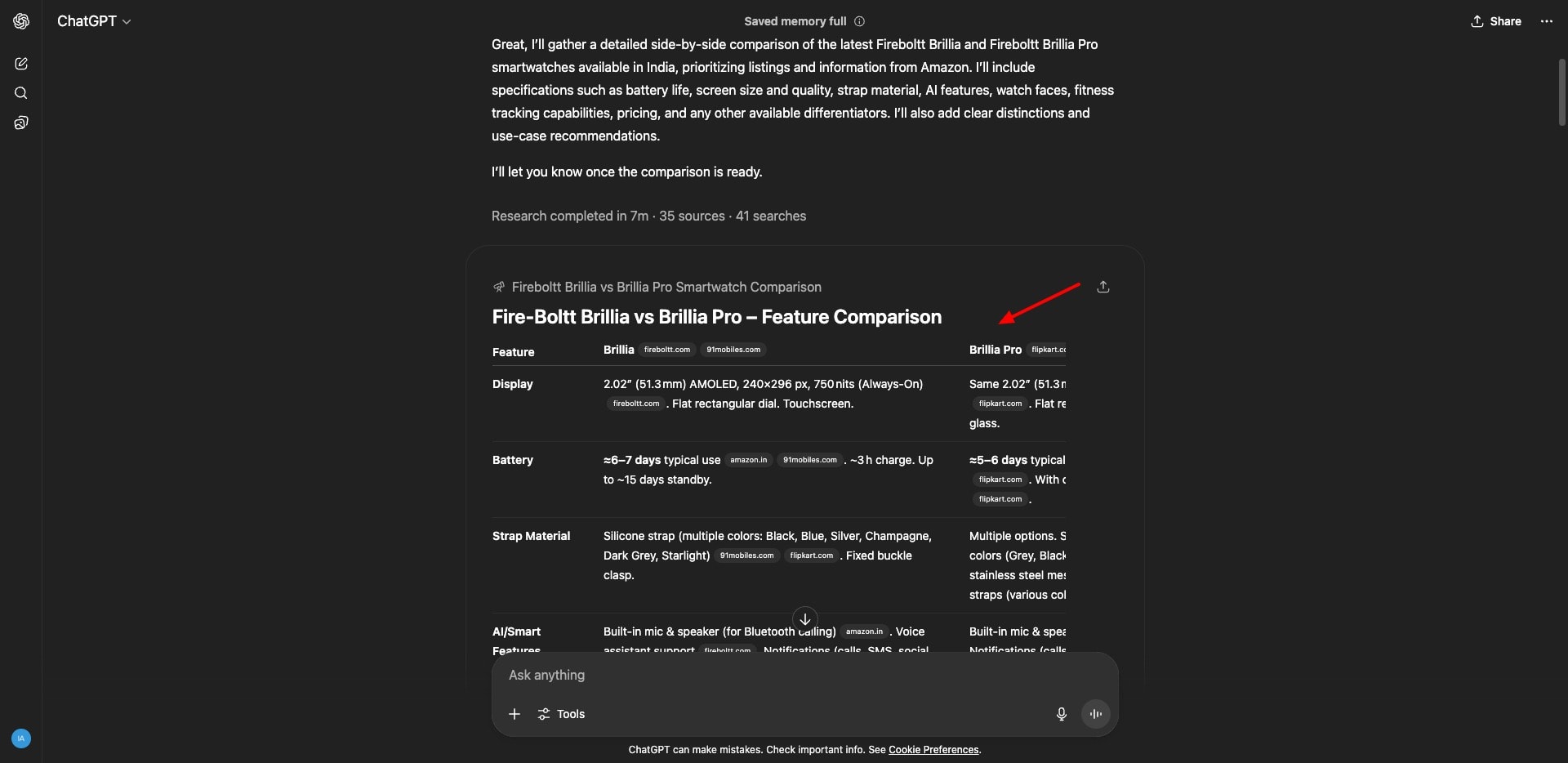
They have also introduced various modes to enable specific types of uses. For instance:
- Web Search: It includes Google search results to get the latest information.
- Think Longer: Shows the AI’s thought process while it answers your query.
- Deep Research: Can access large amounts of data for multi-step research. (Limited to 5 free searches per month)
- Create Image: Can generate images using the 9 styles in its library.
- Canvas: A friendly UI for writing and coding projects.
- Study and Learn: Get help with homework or simply complex concepts.
With the latest GPT-4o model available for free users, ChatGPT can now generate highly realistic images. It even has a handy mobile app, so you can use it anywhere, anytime. Overall, if you need an all-in-one AI chatbot for general use, ChatGPT is the best fit!
2) Gemini – For Google Ecosystem
Gemini is a chatbot developed by Google. It offers Gemini 2.5 Flash and Pro models for free. Similar to ChatGPT, it helps you with basic tasks, including reasoning, research, writing, creative ideas, coding, generating images, etc. However, there are three major points of difference.
First, Gemini has a context window of 2 million tokens, which is significantly larger than ChatGPT. Thus, it can consider large amounts of data when answering a query, leading to more aligned and accurate results. It can process coding projects and legal documents, all in one go!
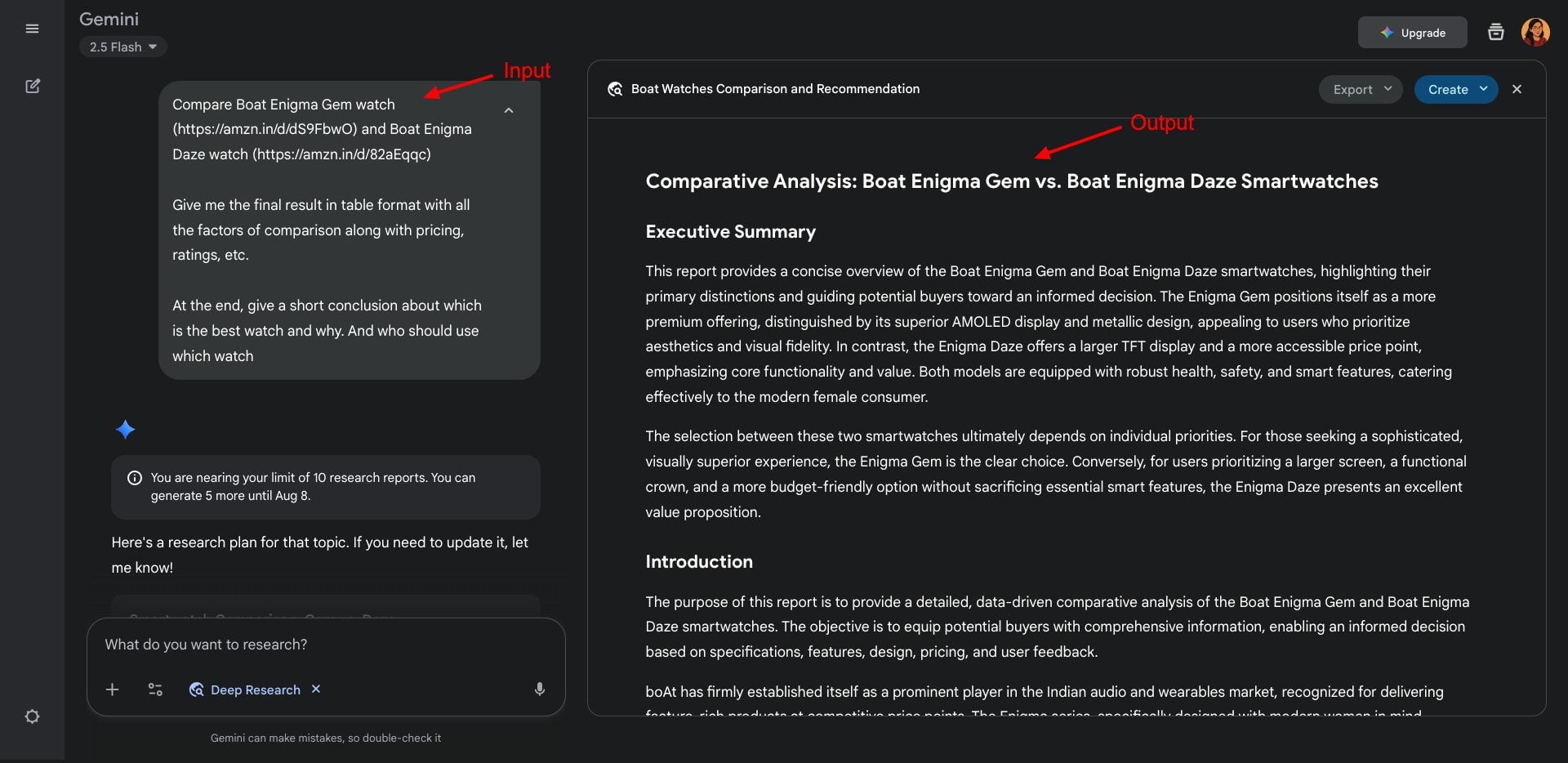
Second, it is a multimodal tool, meaning it can handle text, images, videos, and all kinds of media. Gemini performs exceptionally well in finding the latest information. So whether it’s news, product releases, or weather forecasts, Gemini has always got your back!
Third, it offers the Imagen 3 model for image generation. It is exceptionally good at generating realistic images with accurate text rendering. Overall, if you are deeply integrated into the Google ecosystem, Gemini would be a game-changer for your work!
3) Grok – For Public Sentiments
Grok is another popular AI chatbot developed by xAI (owned by Elon Musk). It was initially released in 2023 and has been a part of many controversies as well! You can use Grok from within the X (formerly Twitter) app or as a standalone app via its website.
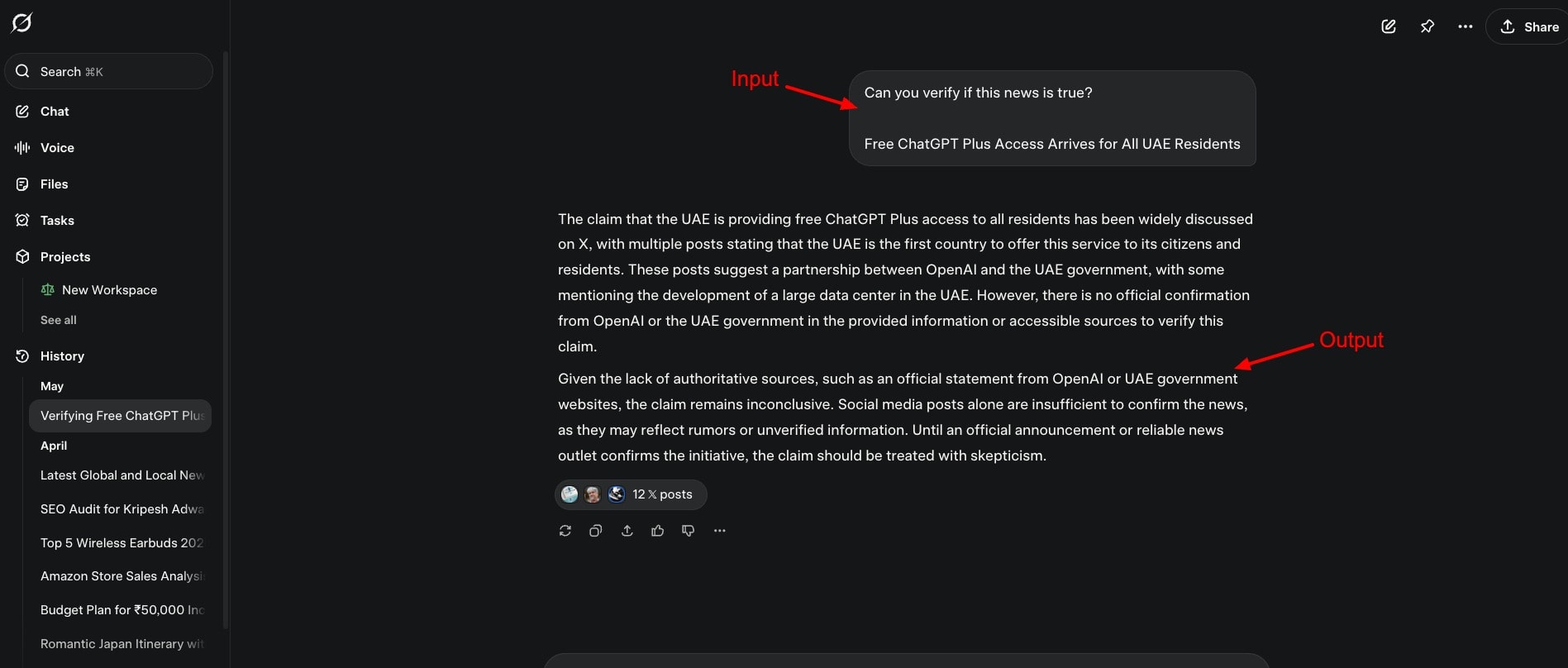
This chatbot is best for getting the latest news headlines and event updates. You can also use it to get public opinion on different topics. In my personal experience, Grok AI is ideal for fact-checking data. You can use it to identify fake news in an instant!
So, Grok AI is not meant for all users. If you specifically need a chatbot to get the latest updates and need your outputs in a Twitter-like language, go with Grok AI. Its paid plans start from $30/month.
4) Claude – For Coding
Claude is an AI chatbot developed by Anthropic. Like other chatbots, it can have conversations, summarize content, answer questions, generate code, solve complex logical problems, and more. For free, you get access to the Claude 4 Sonnet model.
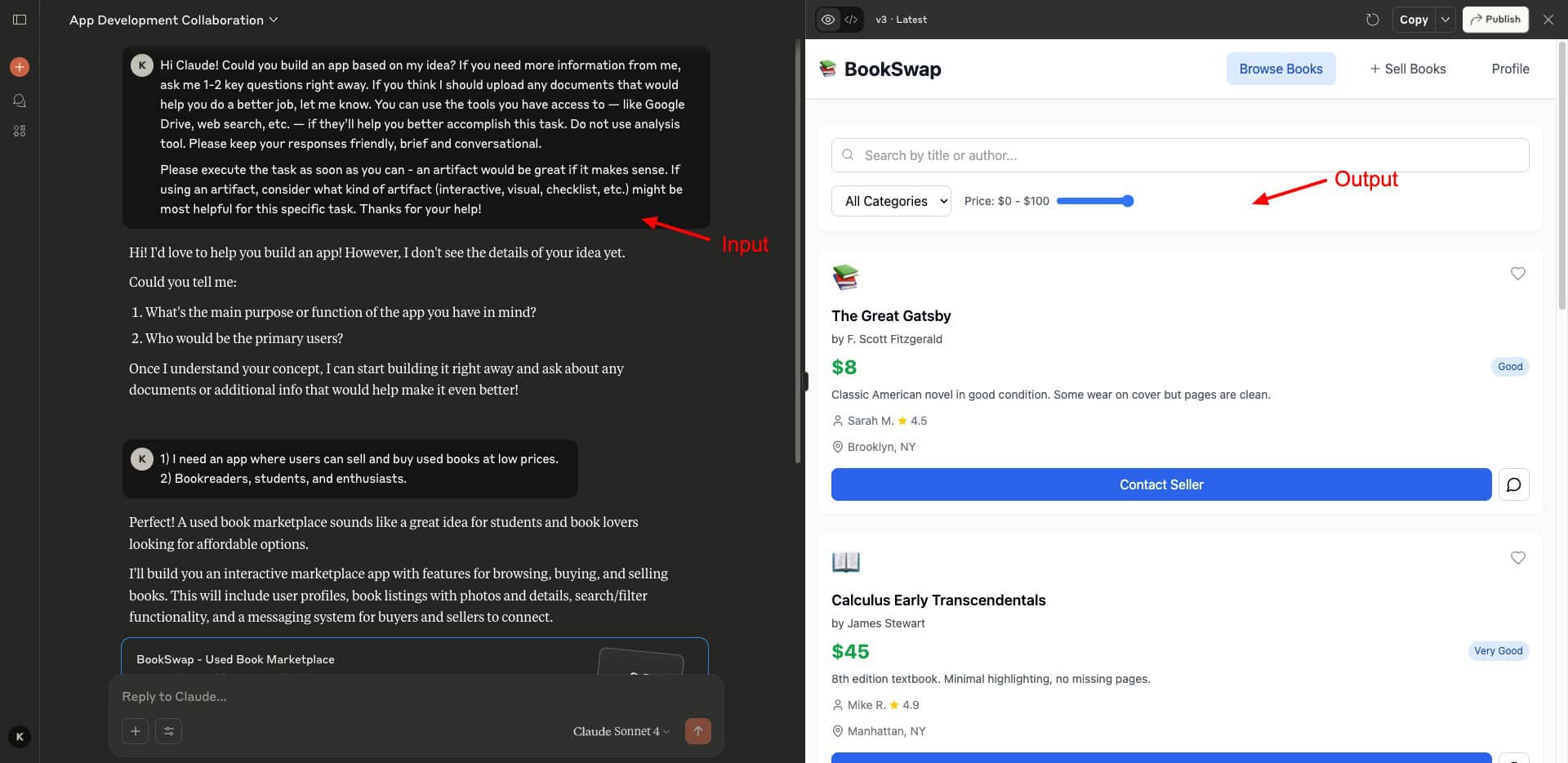
It features a web search mode along with content styles (normal, explanatory, formal, concise, etc) to align your outputs. But the best use case of Claude is its advanced reasoning and robust coding assistance. It integrates with VS Code to help you with your development projects.
So, if you need a coding assistant with seamless integration with VS Code, check out Claude AI.
Which is the Best Paid AI Chatbot?
If you are planning to upgrade your free subscription, which AI chatbot should you choose? If I could recommend only one of the above AI chatbots, I would go with Gemini Pro. Here’s why.
- It is a multi-modal tool (able to access text, images, and videos)
- It integrates with Google services like Gmail, Google Docs, and Excel.
- It works well for coding, reasoning, and image generation.
- It also supports UPI Payments for Indian users.
Right now, Google is offering the Gemini Pro subscription for free to Indian students. It would also include massive 2 TB cloud storage, access to NotebookLM, and more. So, for an Indian customer, Gemini’s Pro subscription is the most value-for-money option.
3 Best AI Tools For Research (2025)
Good research abilities are essential for making informed decisions and solving problems effectively. If you’re a student, researcher, educator, or just a learner, these AI tools will transform your research process.
| Tool Name | Best For | Key Features | Pricing |
| Manus AI | Complex queries, data analysis, and productivity. | Supports multiple modes and data types | 1000 free credits on sign-up & 300 daily credits. Paid plans start from $16/month. |
| Elicit | Academic research and summarizing research papers | Massive database of over 125 million research papers | Data extraction from 20 PDFs/month for free. Paid plans start at $10/month. |
| NotebookLM | Personalized research on your own knowledge base | Audio Overview, Mind Map, Notes, Study Guide | 100 notebooks with daily limits for free. |
1) Manus AI – Best for Autonomous Operations
Manus AI is an advanced chatbot designed and developed by Monica (a Chinese startup) in March 2025. It has a range of use cases, including research, productivity, education, data analysis, and more.
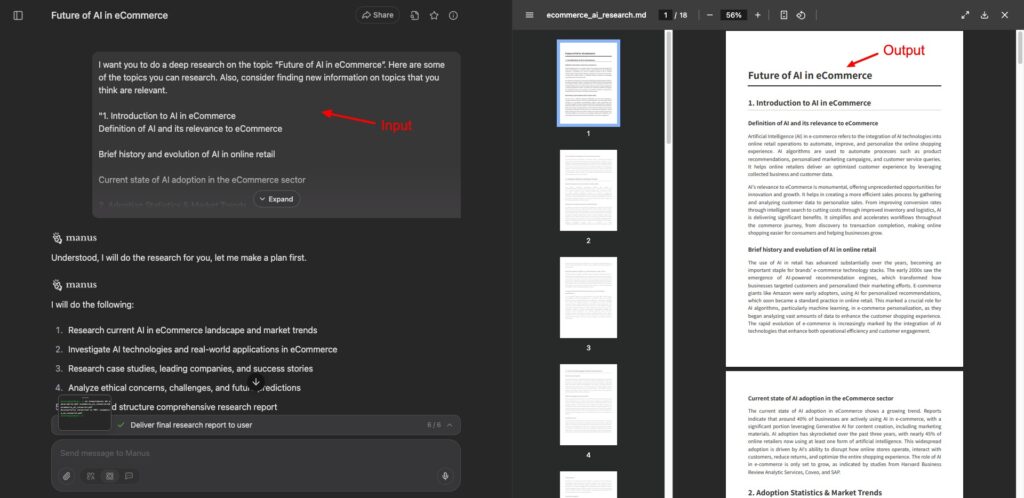
While working with it, Manus lets you choose between speed and quality. It also features different modes, like Agent mode, Adaptive mode, and Chat mode. It also lets you pick the type of data to work with, like images, audio, video, slides, web pages, etc.
What makes it stand out? It can visit websites, log in with your credentials, fill out forms, download PDFs, perform website administrative tasks, take over your browser, and more on your behalf. This is much more advanced than AI chatbots like ChatGPT or Gemini.
Overall, if you need an all-in-one AI research tool for your workflow, Manus AI is a great choice. It performs best with complex queries. Right now, you can also get 1000 free credits on sign-up, along with 300 daily credits. Its paid plans start from $16/month.
2) Elicit – Best for Research Summaries and Reports
Elicit is an AI research assistant that is helpful for literature research. It features a massive database of 125 million research papers. I personally found it useful for 2 major research tasks. First, you can search and summarize research papers with it, and analyze them on key factors.
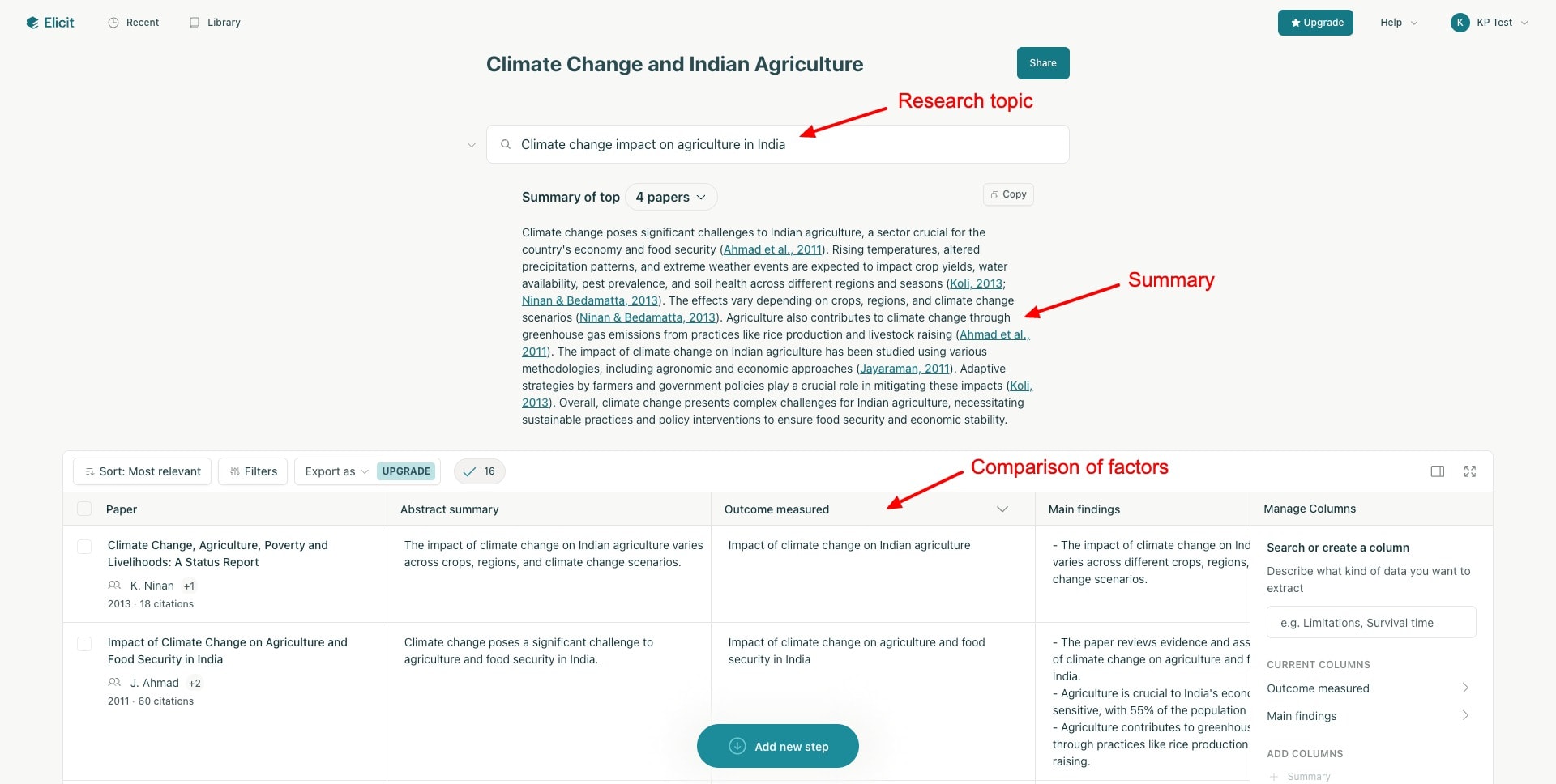
Additionally, you can also generate research reports with Elicit. As you enter your research query, it screens the top 50 papers, extracts important data from them, and creates a comprehensive research report. You can chat with the reports to get more information or clarify concepts.
If your focus revolves around academic research and research papers, Elicit is an excellent pick. Its free plan lets you extract data from 20 PDFs every month, along with unlimited chats, summaries, and searches. Its paid plans start at $10/month.
3) NotebookLM – Best for Personalized Research
If you already have your own knowledge base and want to personalize your research, NotebookLM can help. You can upload all your notes, PDFs, website links, YouTube transcriptions, and documents onto it as source materials.
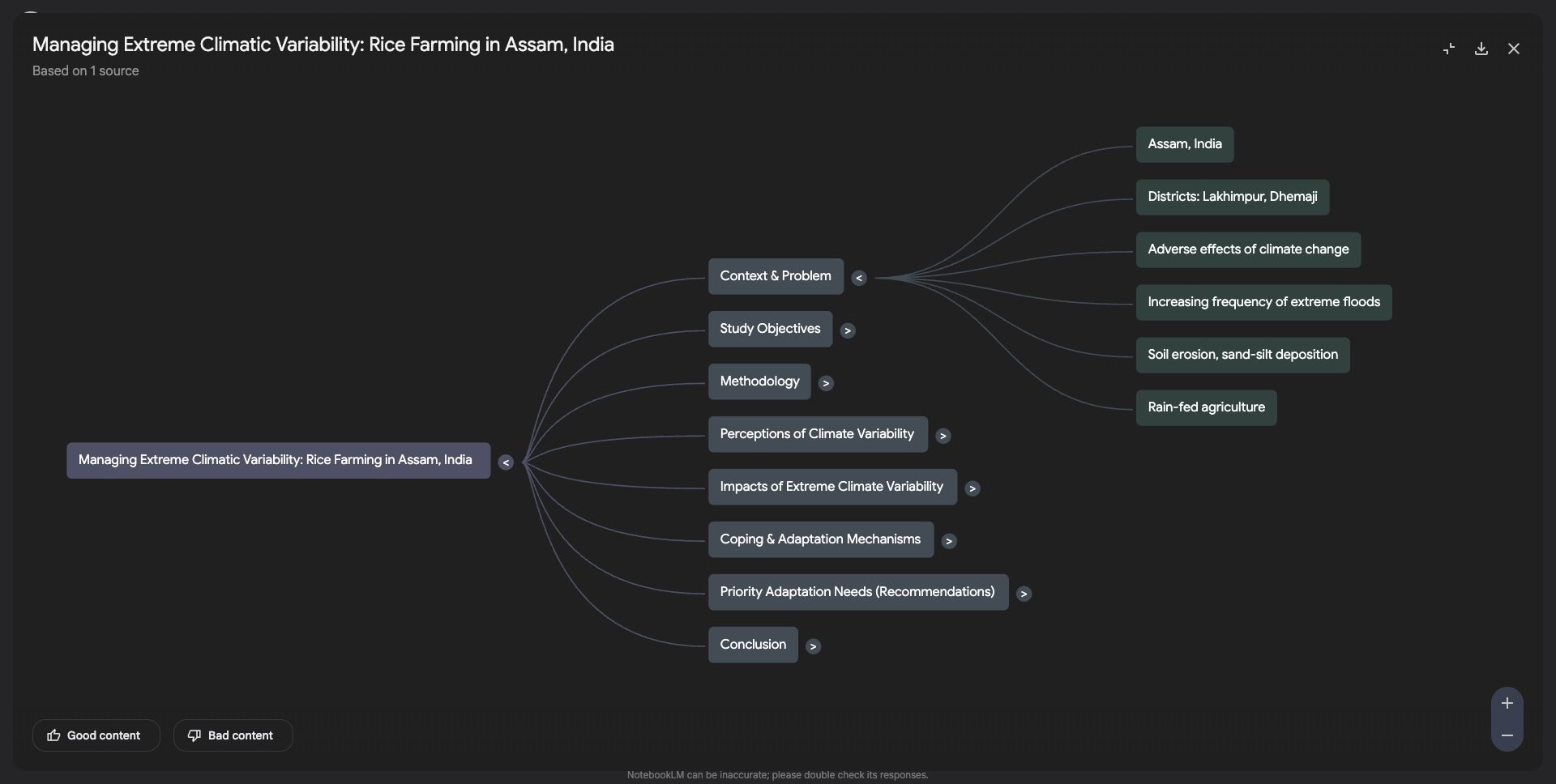
Then, you can ask questions about your specific content and get insightful answers. This is great for simplifying concepts, getting explanations, comparing different research, etc. It features AI tools like Audio Overview, Mind Map, Notes, Study Guide, FAQs, Timeline, and a Discover feature.
NotebookLM is ideal for conducting personalized research on your own knowledge base. Its free plan offers 100 notebooks with daily limits of 50 chat queries and 3 audio generations. Its Pro plan is priced at $19.99/month.
3 Best AI Tool For Presentations
Ever wished you could create a whole presentation just by describing it? Well, it’s now possible with AI presentation generators. Let’s look at the most powerful ones.
| Tool Name | Best For | Key Features | Pricing |
| Gamma AI | Generating PPTs, webpages, & documents from a prompt. | Spotlight feature, multiple export options | 400 one-time credits for free. Paid plans start at ₹400/month for unlimited credits. |
| Beautiful AI | Creating polished, business-ready presentations | Smart templates, brand customization | No free plan. Pricing starts from $12/month. |
| Canva AI | Users who need a versatile design tool | Lots of AI design tools | 10 lifetime PPT generations for free. Paid plans start at $5.99/user/month. |
1) Gamma AI – Best Overall PPT Generator
Gamma is an AI-powered platform for generating presentations, webpages, and documents. You simply have to provide it a prompt, and it will generate a complete slide deck with layouts, text, and images within seconds.
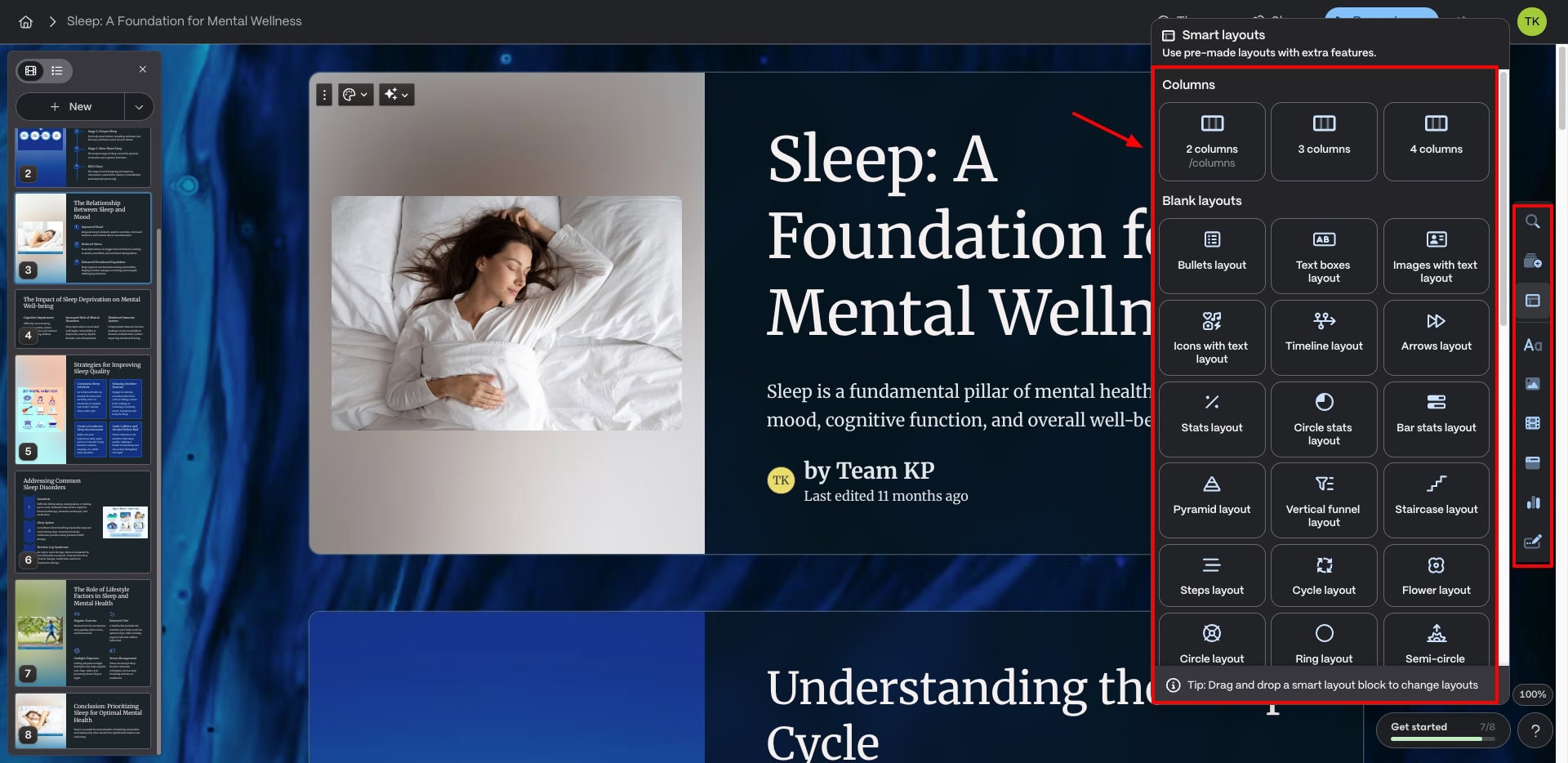
Currently, it’s one of the best free PPT generators out there. I love the quality of its AI images and its customization options. You also get real-time collaboration, multiple export formats, and a modern UI. It stands out with its unique Spotlight view.
They also offer a feature-rich free plan with nearly all features available at no cost. Overall, Gamma is no less effective than traditional PowerPoint for generating high-quality slideshows.
Its free plan offers 400 one-time credits, and each PPT generation costs 40 credits. Its paid plans start at an affordable price of ₹400/month with unlimited credits.
2) Beautiful AI
Beautiful AI features a range of smart templates to help you create your presentations. What’s cool about Beautiful AI is that it lets you add your notes and related content and generates the PPT based on that. Brand colors, fonts, and logos can be added along with customizations.
It doesn’t have a free plan, though. You get a 14-day free trial, and its pricing plans start from $12/month for unlimited slides.
3) Canva AI
Canva is one of the most popular graphic design tools right now. It also offers a presentation generator powered by AI. You type in your prompt, and it generates templates with up to 7 slides. You can also add charts, photos, illustrations, videos, etc, to make your PPTs engaging.
For free, Canva offers 10 lifetime PPT generations. For unlimited generations, you can upgrade to its Pro plan for $5.99/user/month.
If you’re a beginner, check out this easy tutorial on how to create a presentation with AI.
5 Best AI Voice Generators
With AI-powered voice generators, you can not only transform your text into speech but also transform your voice into a celebrity voice, create a voice clone, dub your voice into a different language, etc. Let’s look at the best-performing AI voice generators.
| Tool Name | Best For | Key Features | Pricing |
| ElevenLabs | Realistic AI voices | Massive voice library, voice cloning, voice dubbing | Free plan gives 10k monthly credits. Paid plans start at $5/month |
| Lovo AI | Clear, professional, and engaging AI voices | 500+ AI voices in over 100 languages | 5 mins of AI voice generation/month for free. Paid plans start at $24/month. |
| PlayHT | Refined voiceovers in multiple languages | 900+ AI voices in 100+ languages | Limited free version for testing. Paid plans start at $39/month. |
| Murf AI | Superior voice quality | API access and functional add-ons. | 10 projects and 10 minutes of voice generation/month for free. Paid plans start at $19/month. |
| DupDub | Social media content creation | Massive library of lifelike AI voices, | 3-day free trial with 10 credits. Paid plans start from $11/month. |
1) ElevenLabs – Best for Realistic Voices
ElevenLabs is one of the most renowned AI voice generation tools. It features the most realistic AI voices for every character, situation, and expression. It features a range of voice tools, like a text-to-speech generator, a voice clone, a voice changer, and even voice dubbing!
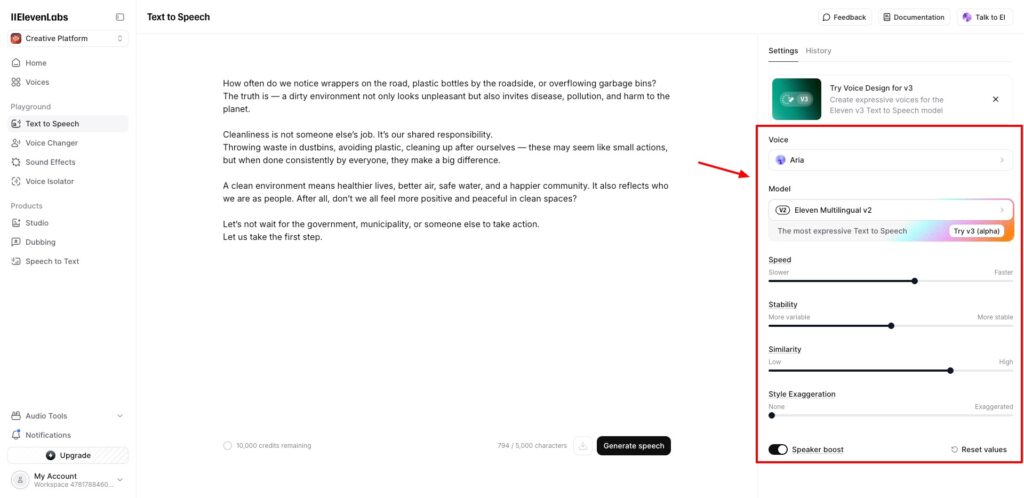
I personally admire its massive voice library with high-quality and natural voices. For most users, ElevenLabs is the gold standard for realistic AI voice. Whether you’re into content creation, YouTube, audiobooks, podcasts, movies, dubbing, or gaming, ElevenLabs has the right AI voice for your requirements.
Its free plan gives you 10k monthly credits, which is sufficient for most beginners to get started. For advanced users, its paid plans start at $5/month, where you get 30k AI credits.
2) Lovo AI
Lovo is a text-to-speech generator that features 500+ AI voices in over 100 languages. If you’re looking for clear, professional, and engaging AI voices, try out Lovo. Its free plan gives you 5 minutes of AI voice generation/month. Whereas, its paid plans start from $24/month.
3) PlayHT
PlayHT is another AI voice generator that offers 900+ AI voices in 100+ languages. I personally like the refined quality of English voices. It is best for professionals who need voiceovers in multiple languages. It offers a limited free version for testing purposes. Its paid plans start at $39/month.
4) Murf AI
Murf AI features a range of AI voices, superior voice quality, modern UI, and API access. It stands out with its functional add-ons. However, some voices sound slightly robotic. If you are a YouTuber or content creator who needs voice generation in multiple languages, try Murf AI.
Its free plan offers 10 projects and 10 minutes of AI voice generation every month. Whereas its paid plans start at $19/month.
5) DupDub
Dupdub offers lots of AI tools for social media content creation. It has a massive library of lifelike AI voices and excels at voice generation and content translation. I also liked its fast AI voice cloning and unique sound effects.
However, DupDub doesn’t come with a free plan. You get a 3-day free trial with 10 credits. Its paid plans start from $11/month, where you get 1800 credits/year.
2 Best AI Tools For AI Avatar Videos
Wish you could speed up content creation game, but can’t be everywhere at once? I get it. But what if your AI avatar could do the work for you? Let’s explore one of the best tools for creating AI avatar videos.
| Tool Name | Best For | Key Features | Pricing |
| HeyGen | Long-form videos with custom video avatars. | Custom video avatars that match facial expressions and gestures | Free plan with 3 videos/month and 1 custom avatar. Paid plans start from $29/month. |
| JoggAI | Short videos with premium AI avatars | Integration with ElevenLabs audio library | Free plan with 3 credits and 1 custom avatar. Paid plans start at $24/month. |
1) HeyGen – Best for Custom Video Avatars
HeyGen is a popular AI-powered video generator that’s popular for its custom video avatars. It also features a range of other AI tools, including talking photos, video translation, voice dubbing, text and image to video generator, etc.
Its personalized video avatar is highly realistic and perfectly matches your facial expressions, voice, and gestures. If your primary use case is creating long-form videos with custom avatars, HeyGen is a great substitute for JoggAI.
However, its pricing plans are slightly expensive, starting from $29/month. You can start with its free plan that offers 3 videos/month (up to 3 mins each) and 1 custom avatar.
2) JoggAI – Best for High Quality Avatars
JoggAI is an AI-powered video generation platform. Previously, its focus was on creating video ads. However, it now allows you to create AI videos, avatars, custom avatars, AI voices, video edits, voice clones, and more.
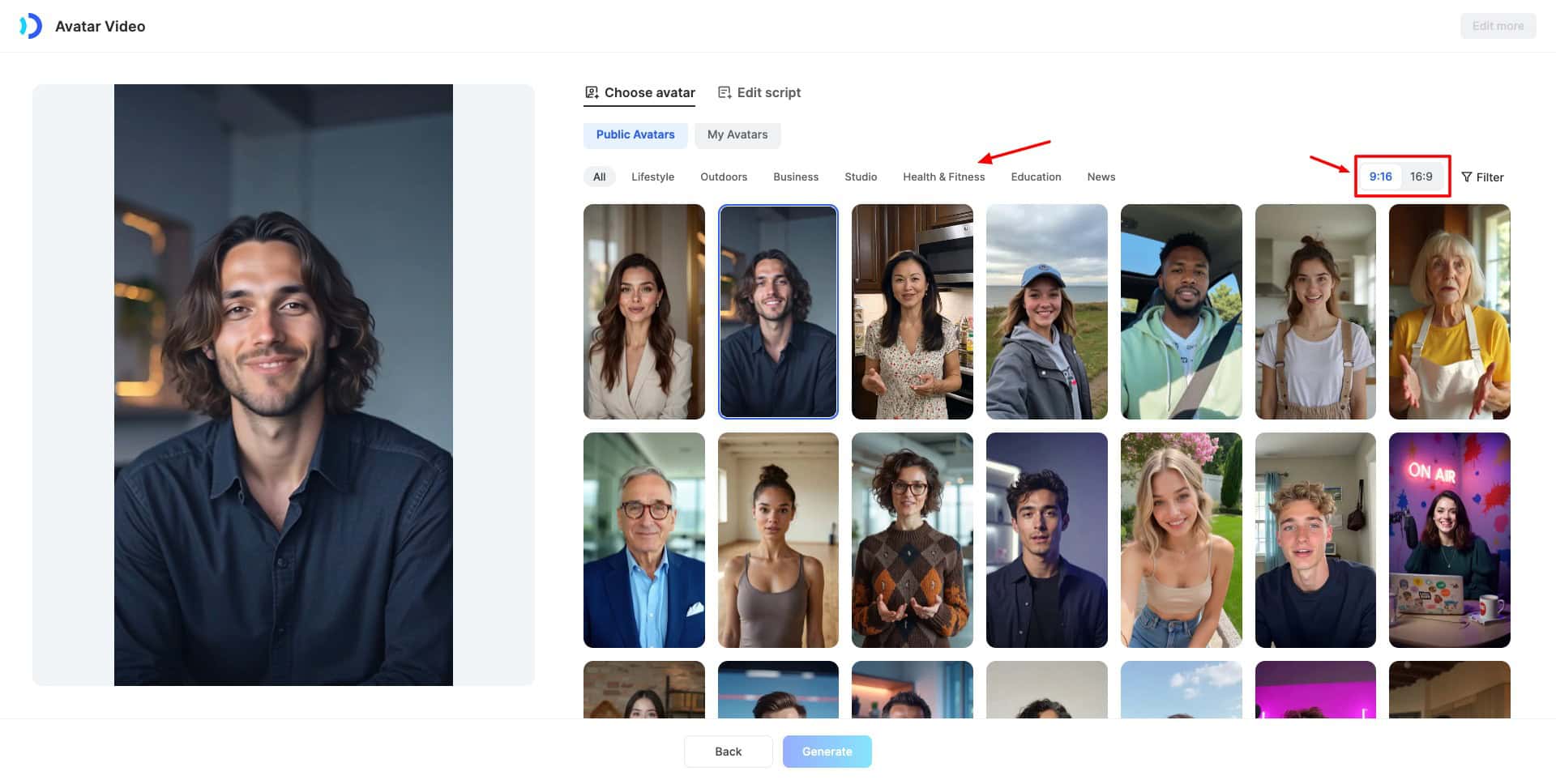
With JoggAI, you can create an AI avatar video of up to 1 minute, with high-quality avatars. It even integrates the ElevenLabs audio library, so you can blend your videos with lifelike voices. Its custom avatars are also pretty good.
I like the fact that it comes at a pretty affordable price compared to other AI tools. Its free plan is also feature-rich. You get 3 free credits to generate 3 video ads up to 30 seconds and 1 custom video avatar. Its paid plans start at $24/month.
Overall, if you need an affordable tool to create short videos up to 1 minute with premium AI avatars, JoggAI is the most value-for-money option. I’m personally using it as well.
Best AI Tool For AI Videos
Creating videos takes time – scripting, shooting, editing. But now, AI tools can turn your ideas into full-fledged videos in minutes. Let’s check out the best AI video generators right now!
1) Veo 3 – Best for Realistic Videos with Sounds
Veo 3 by Google is one of the best AI video generators at present. It lets you create high-quality and lifelike videos using text prompts or image references within seconds. You can use it via its standalone website, through Gemini Pro, or via Google’s Vertex AI platform.
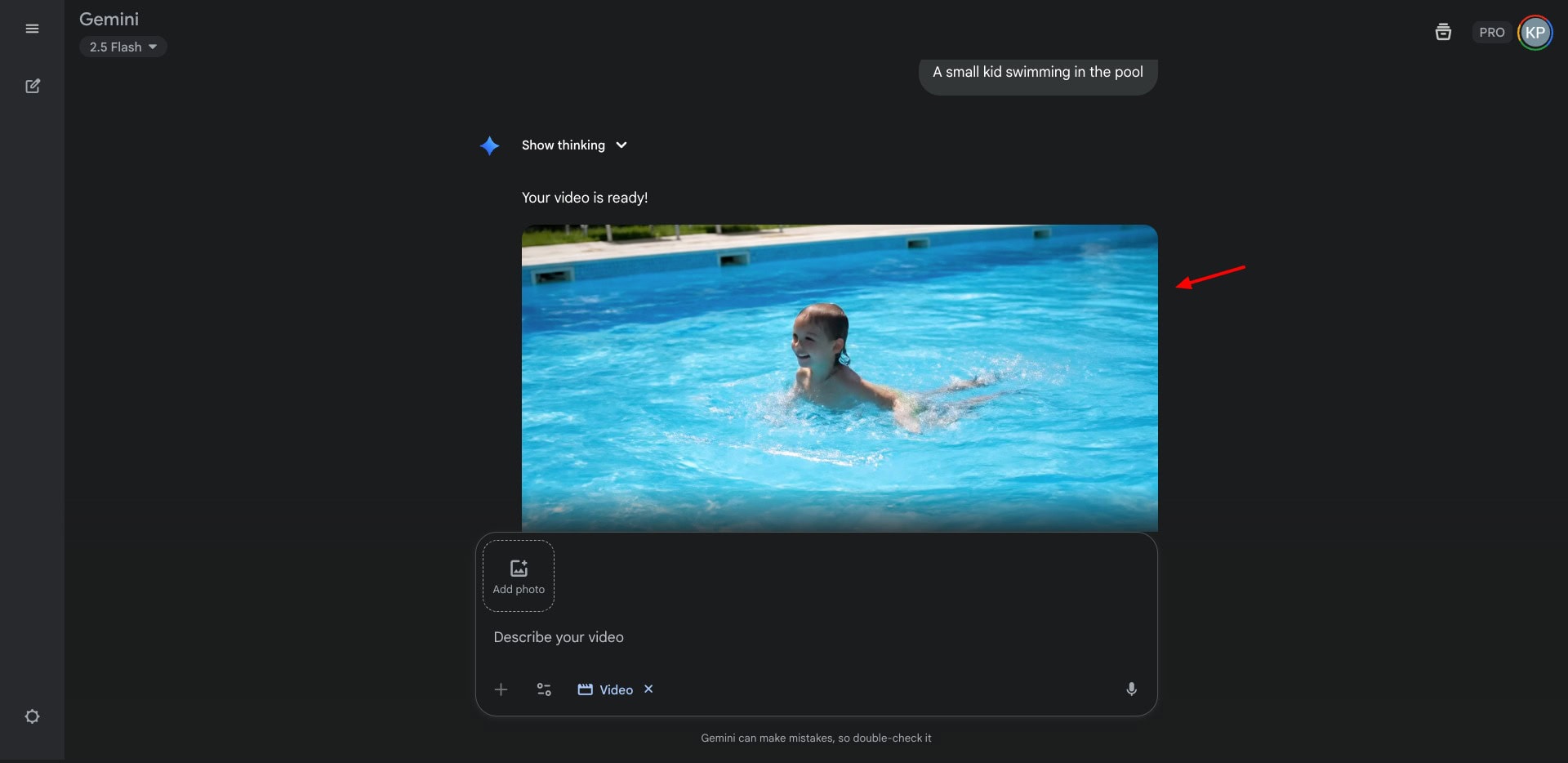
I loved the fact that it automatically includes sounds, human voices, background music, lip sync, and text to make the videos engaging. The output videos are stunning and hard to distinguish from real ones! In my opinion, you can generate mind-blowing videos with Veo 3 if you prompt it correctly.
It doesn’t have a free plan, though. Its subscription plans start from $37.50/month (annually) where you can create 1080p videos up to 8 seconds.
6 Best AI Tools for Image Generation
Need creative images for your next project but lack design skills? No worries. AI image generators can turn your words into stunning visuals in seconds. Let’s check the major free ones below.
| Tool Name | Best For | Key Features | Pricing |
| ChatGPT | Ghibli art, realistic art | Image Editing via prompts | Limited free plan. Paid plans start at $20/month |
| Leonardo | Gaming assets and character design | Lots of customization options | 150 daily fast tokens for free. Paid plans start at $10/month. |
| Ideogram | Images with text rendering | Multiple Image Prompts and Styles | 10 weekly credits for free. Paid plans start from $7/month. |
| Krea | Ultra-realistic images, professional photorealism | High-resolution outputs, no watermarks on free downloads | Limited access with a free plan. Paid plans start at $8/month. |
| Midjourney | Professional creators | Needs precise descriptions for better outputs | Basic plan starts at $10/month. |
| Imagen 3 | Realistic images with text rendering | Integration with Google’s ecosystem | Access through a Google One subscription, starting from ₹1,950/month. |
1) Gemini Nano Banana – Best for Images with Text
Gemini recently released its most powerful image generation and editing model called ‘Nano Banana‘. It stands out with its accurate image editing capabilities. It allows you to blend multiple styles, experiment with backgrounds changes, generate consistent characters, and perform multi-step edits.
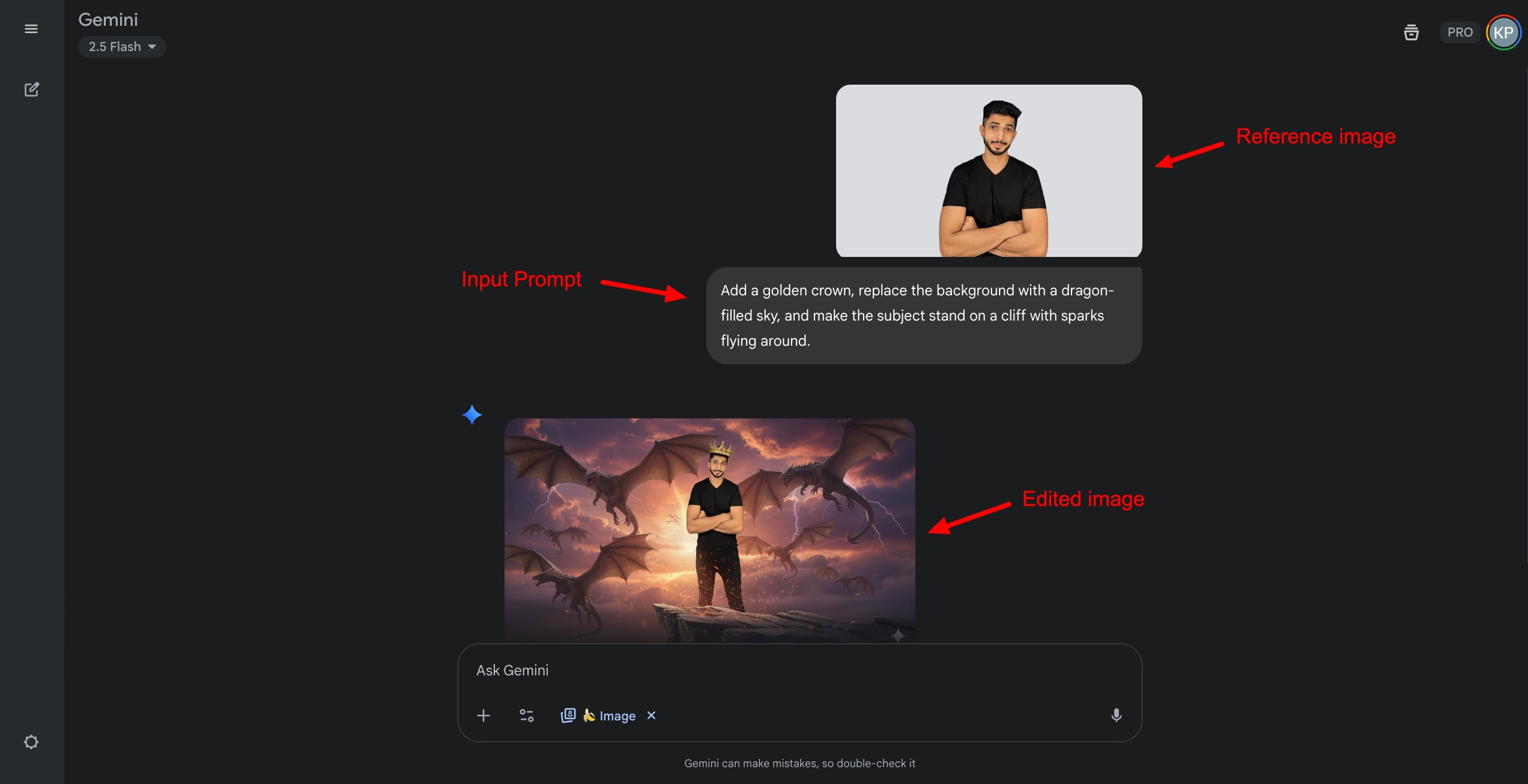
I personally loved using Nano Banana to generate social media graphics, eCommerce product photoshoots, professional headshots, virtual outfit try-ons, restoring old photos, and more. Right now, Gemini Nano Banana is free to use for everyone via the Gemini app.
2) ChatGPT – Best for Realistic Portraits
Recently, ChatGPT has integrated image generation capabilities with GPT-4o on its free subscription. Its usage was boosted enormously with the Ghibli art trend. It’s super easy and convenient to use. Simply type in your prompt, select the Image mode, and choose a style.
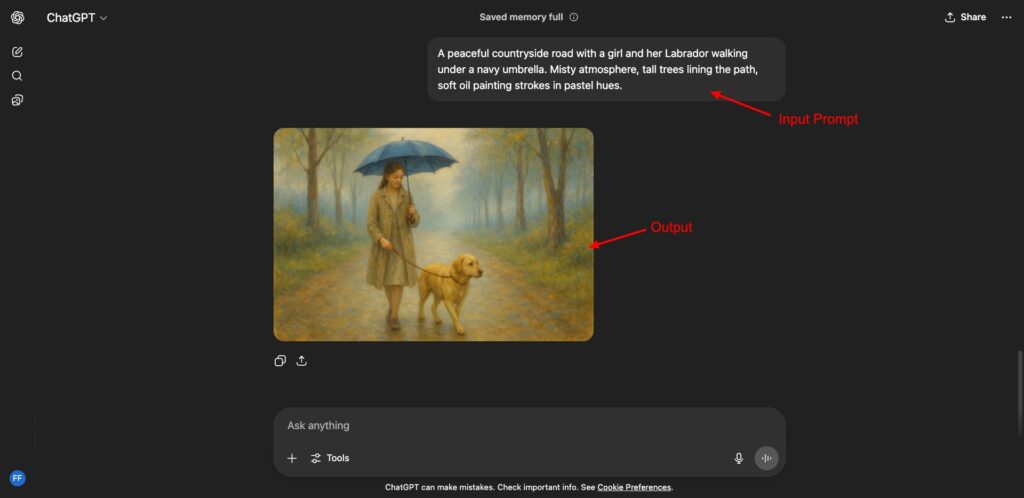
I found the ChatGPT free image generator surprisingly good. It produced exceptional images, whether it was Ghibli art, realistic portraits, or cartoon-style images. You can also edit your output with additional prompts and download it in PNG format.
On the free plan, there’s a usage cap of 2-4 images per session. Its paid plans start at $20/month.
2) Leonardo AI
Leonardo shines in terms of creating high-quality images for product mockups, character design, gaming assets, illustrations, concept art, etc. It offers a range of customization settings to fine-tune your output.
For free, you get 150 daily fast tokens. Whereas on its paid plan, you get 8500 monthly fast tokens for $10/month.
3) Ideogram
Ideogram is a popular image generator that specializes in text rendering. This makes it ideal for creating graffiti art, logos, banners, quotes, posters, memes with text, etc. I loved the accurate text reproduction in its designs.
On the free plan, Ideogram offers 10 weekly credits, where each query consumes 1 credit and generates 4 image variants. Its paid plans start at $7/month.
4) Krea
Krea is one of the latest AI image generators that delivers excellent results. It launched its newest AI model, Krea1, in June 2025. If you want ultra-realistic images for your projects, check out Krea.
I personally loved its attention to detail and prompt adherence. Also, it lets you download your output without watermarks for free. Krea’s free plan gives you limited access to its AI tools. Whereas its paid plans start at $8/month.
Now, let’s take a look at some paid tools for image generation.
5) Midjourney
Midjourney is the gold standard for generating AI images. But to use Midjourney, you must be well-versed in the technical aspects.
If you can be the director of your image, and precisely describe the style, position, lighting, camera focus, angles, background, etc, of your image, Midjourney is ideal for you. It is the first choice of every professional creator.
If you want complete control over your images and are comfortable handling the technical aspects, Midjourney is the best for you. Its Basic plan starts at $10/month.
6) Imagen 3
Imagen 3 is one of the most powerful AI image generation models offered by Google. You can access it through the Gemini chatbot or via the Whisk app. It performs exceptionally well for generating realistic images with text rendering.
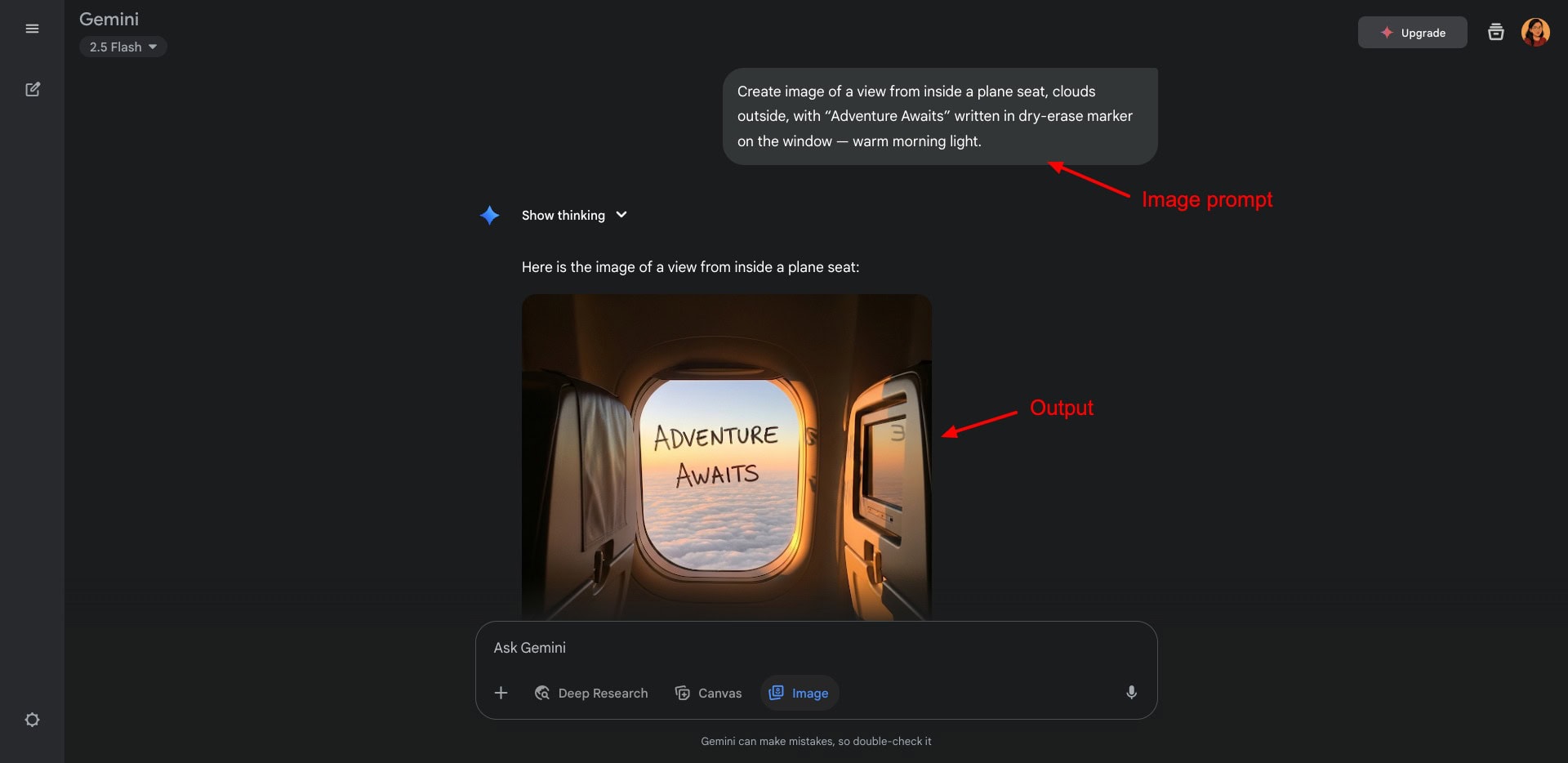
If you are looking to create realistic visuals, posters, logos, invitations, blog banners, hand lettering, thumbnails, quotes, or memes with text, Google Imagen 3 will prove highly valuable. If you’re already in the Gemini ecosystem, this is a huge bonus!
Its paid subscription can be purchased with a Google One plan, starting from ₹1,950/month.
Best AI Tool For Website Creation
Building a website used to take days back then. But now? Just describe what you want, and AI can build it for you—no coding, no hassle. Let’s check out the best AI website builders out there.
| Tool Name | Best For | Key Features | Pricing |
| Hostinger Website Builder | Quick AI Website Generation | Prompt-based generation, large template collection | Paid plans start from ₹89/month. |
| Framer | Interactive Websites | Built-in CMS, Advanced animation and interactions | Paid plans start from ₹311/month/site. |
1) Hostinger Website Builder – Best for Quick AI Websites
Hostinger is one of the most popular web hosting solutions out there. It also features an AI-powered website builder that creates an entire website for you with a single prompt. Once the website is generated, you get lots of customization options to edit your website.
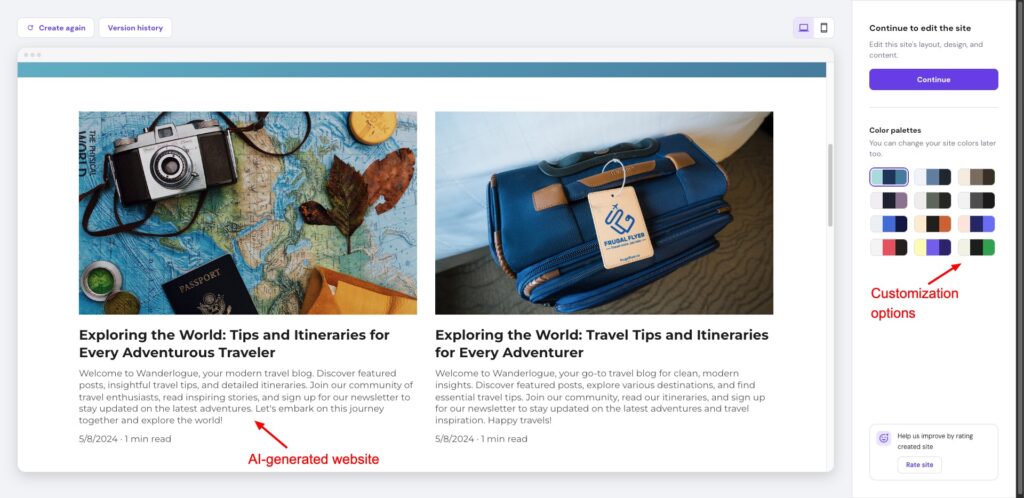
It also features a range of templates, elements, and AI tools to streamline your content, and is extremely easy to use. There aren’t any good website builders available for free. But Hostinger’s website builder is one of the best and most affordable solutions. It also supports UPI payments for Indian customers.
Its paid plans start from ₹89/month when purchased for 48 months. It also includes free hosting along with the website builder. If you use my coupon code KRIPESH, you’ll get an additional 10% off.
2) Framer
Framer is a popular web designing and prototyping platform. It lets you design professional websites without knowing a single line of code! You can use AI to generate complex site layouts in seconds.
It features smooth effects and animations, making your website highly interactive and responsive. You can also collaborate with your team mates in real-time. Apart from that, it also has a built-in CMS to easily manage and update your content.
It is great for creating marketing websites, landing pages, portfolios, and e-commerce sites. The pricing plans of Framer start from ₹311/month/site, where you get 10 GB bandwidth, a custom domain, and 2 pages.
3 Best AI Tools For Content Writing
Struggling with drafting content? Let AI do the heavy lifting. AI content writing tools can assist you with writing emails, blogs, reports, and more. There are tonnes of AI writing tools available, like Jasper, Rytr, CopyAI, etc.
However, in 2025, AI chatbots can double up as AI writing tools as well. The following are my favorite tools for content writing.
| Tool Name | Best For | Key Features | Pricing |
| ChatGPT | More creative content | Multiple modes for different types of searches | Limited free usage. Paid plans start from $20/month. |
| Claude | More logical and refined tone | Large context window for long-form content | Claude Sonnet 4 and lower models for free. Paid plans start from $17/month. |
| StealthGPT | Humanizing AI content | Accurate humanization with very low AI detection | 350-word input limit for free. Paid plans start from $24.99/month. |
1) ChatGPT – Best for All Content Types
ChatGPT is the go-to AI tool for millions of users for content generation. It lets you create reports, emails, resumes, cover letters, invitations, songs, blog posts, social posts, and more within seconds.
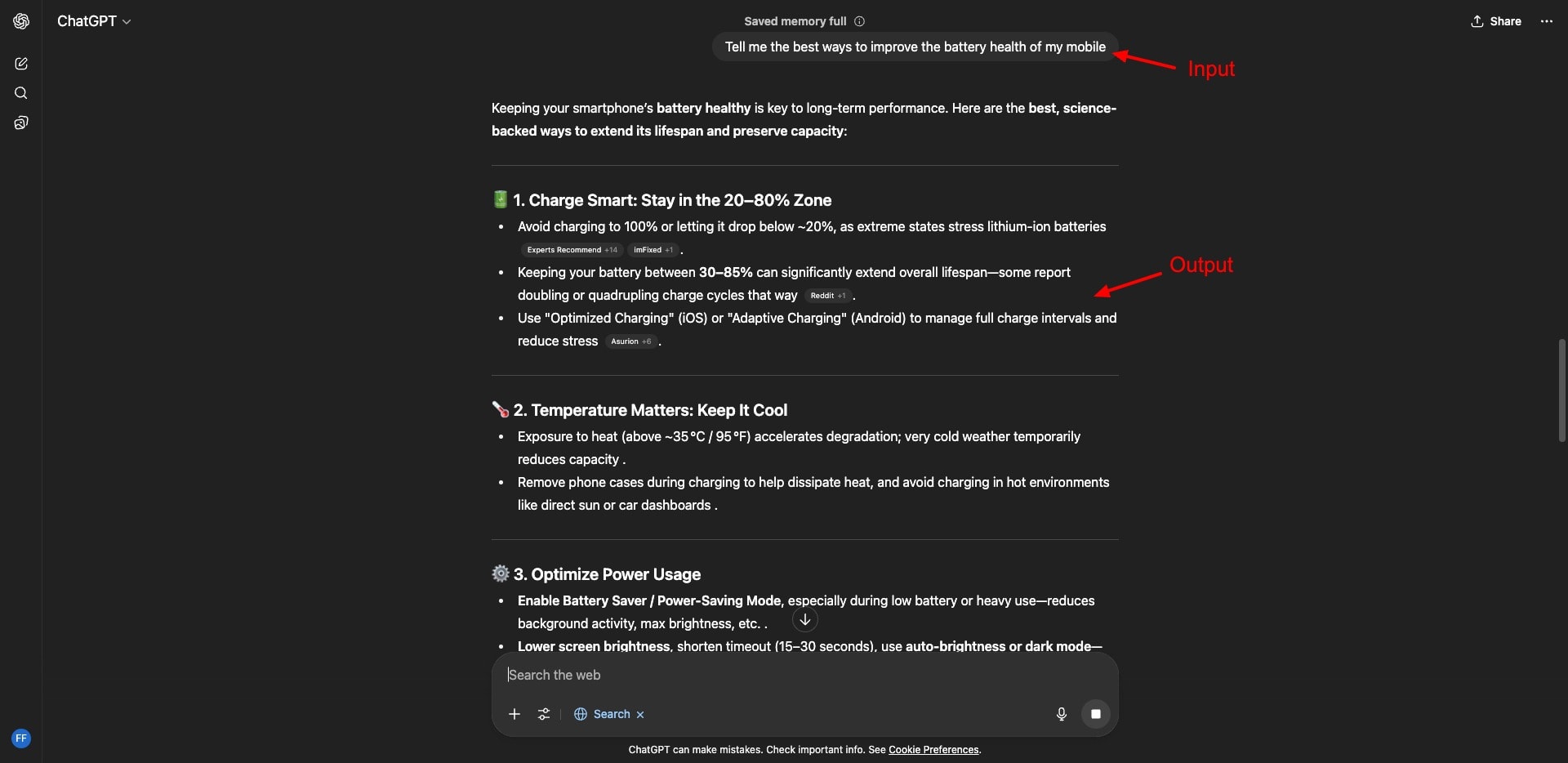
If you want real-time results that integrate web search results, you can also enable the web search mode. Overall, ChatGPT is highly effective for generating short and long-form content. The quality of the output depends on the level of detail in your prompt.
On the free plan, you get limited access to the GPT-4o model. Its paid plans start at $20/month.
2) Claude – Best for Accuracy & Refined Tone
Claude is an AI chatbot developed by Anthropic. It has a context window of 200k tokens, which makes it ideal for long-form content like white papers, blog posts, reports, etc. It is not ideal for creative or narrative writing like ChatGPT, as it lacks that level of imagination.
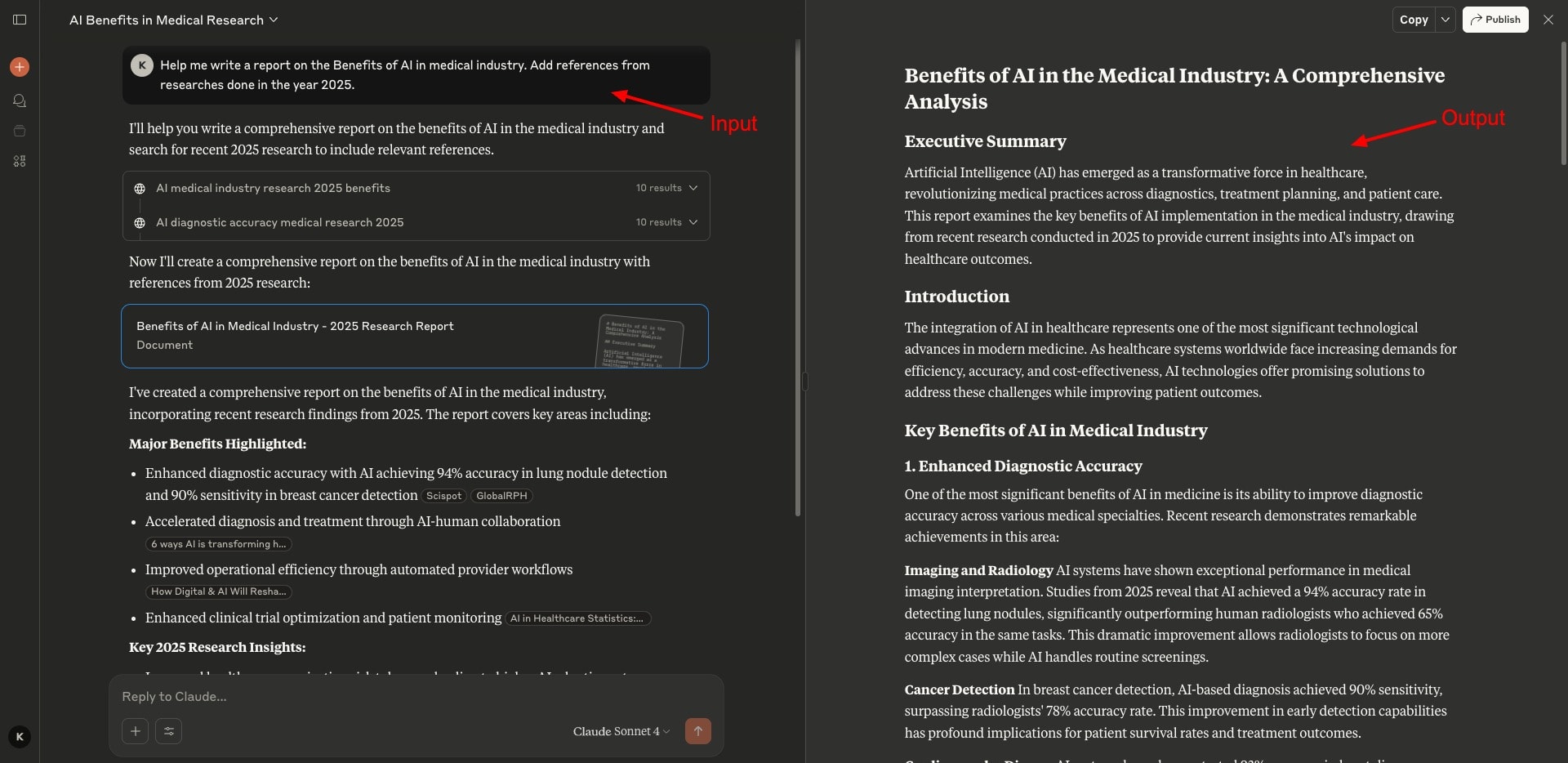
If you prefer more accuracy in your writing with an emotionally intelligent and refined tone, go with Claude. For free, it lets you write and edit content using Claude Sonnet 4 and lower models. On its paid plans, you get access to Claude Opus 4, starting from $17/month.
3) StealthGPT
More than an AI content writer, you need a tool that can effectively humanize your AI-written text. StealthGPT stands out with its highly human-like text and the lowest detected AI percentage among all other tools.
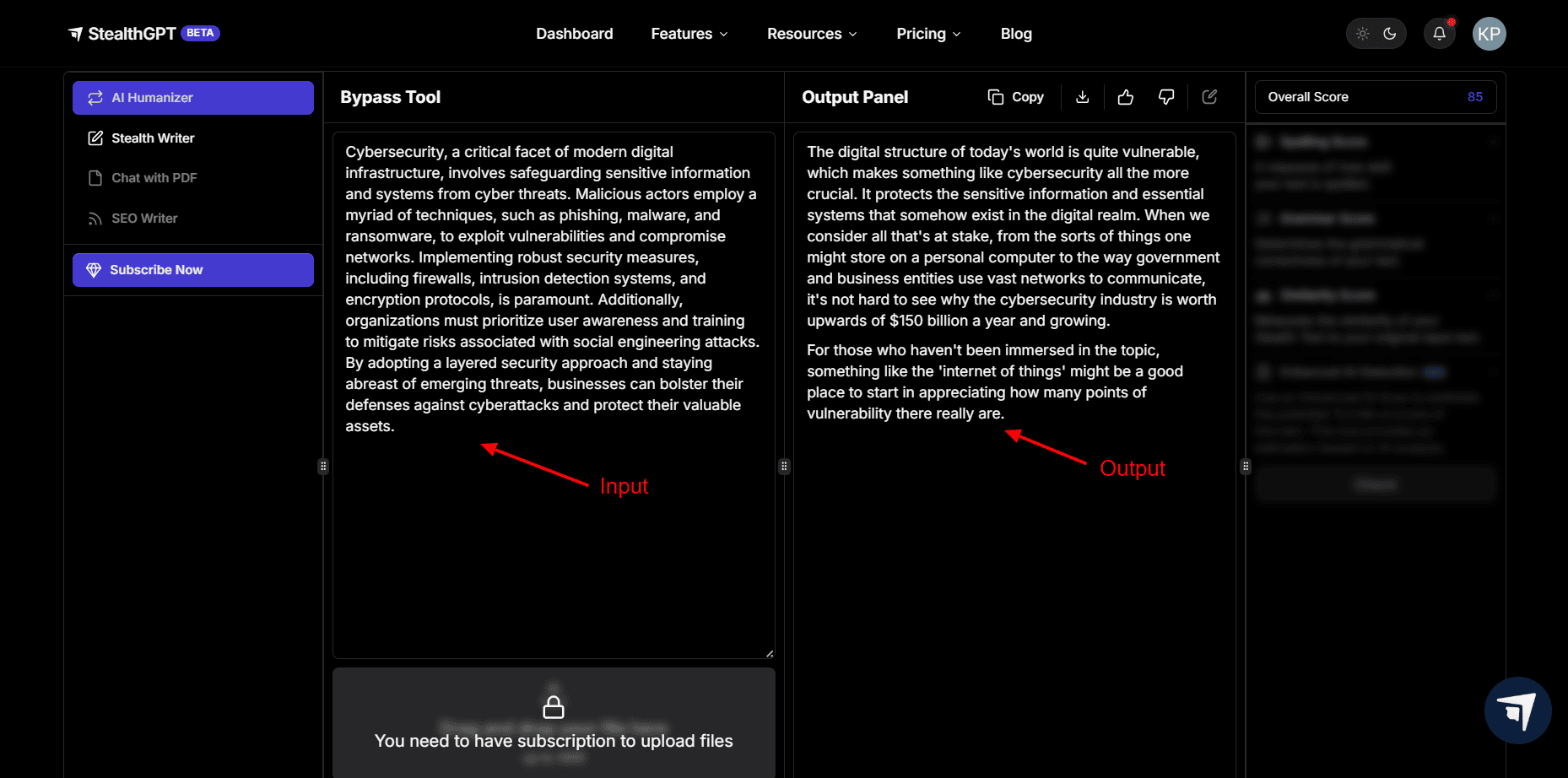
I liked the ease of use of this tool. Its free plan has a 350-word input limit and can be used once every 7 days. Whereas, its paid plans start from $24.99/month. Though it’s a paid tool, bloggers, students, and professionals who publish content online will find it valuable for their workflow.
2 Best AI Tools for Music
Want to make songs or background music, but find it too technical? Don’t worry — AI makes it easy! Now, anyone can create music with AI, knowing nothing about music. With AI music generators, you can make great-sounding tracks in seconds. Let’s check out the best one!
| Tool Name | Best For | Key Features | Pricing |
| Suno AI | Realistic Lyrical and Instrumental Music | Song Customization Options | 50 daily AI credits with the free plan. Paid plans start from $8/month. |
| Eleven Music | Commercial Usage Music | Swift generation speeds, realistic vocals | Free plan offers 10k AI credits/month. Paid plans start from $5/month. |
1) Suno AI – Best for Realistic Lyrics and Instrumentals
Suno AI is an AI-powered music generation app. It offers super-realistic lyrics and instrumental music. You can either enter a prompt to generate your song or enter song lyrics directly. If you want to create background music, you can choose from various musical instruments to include.
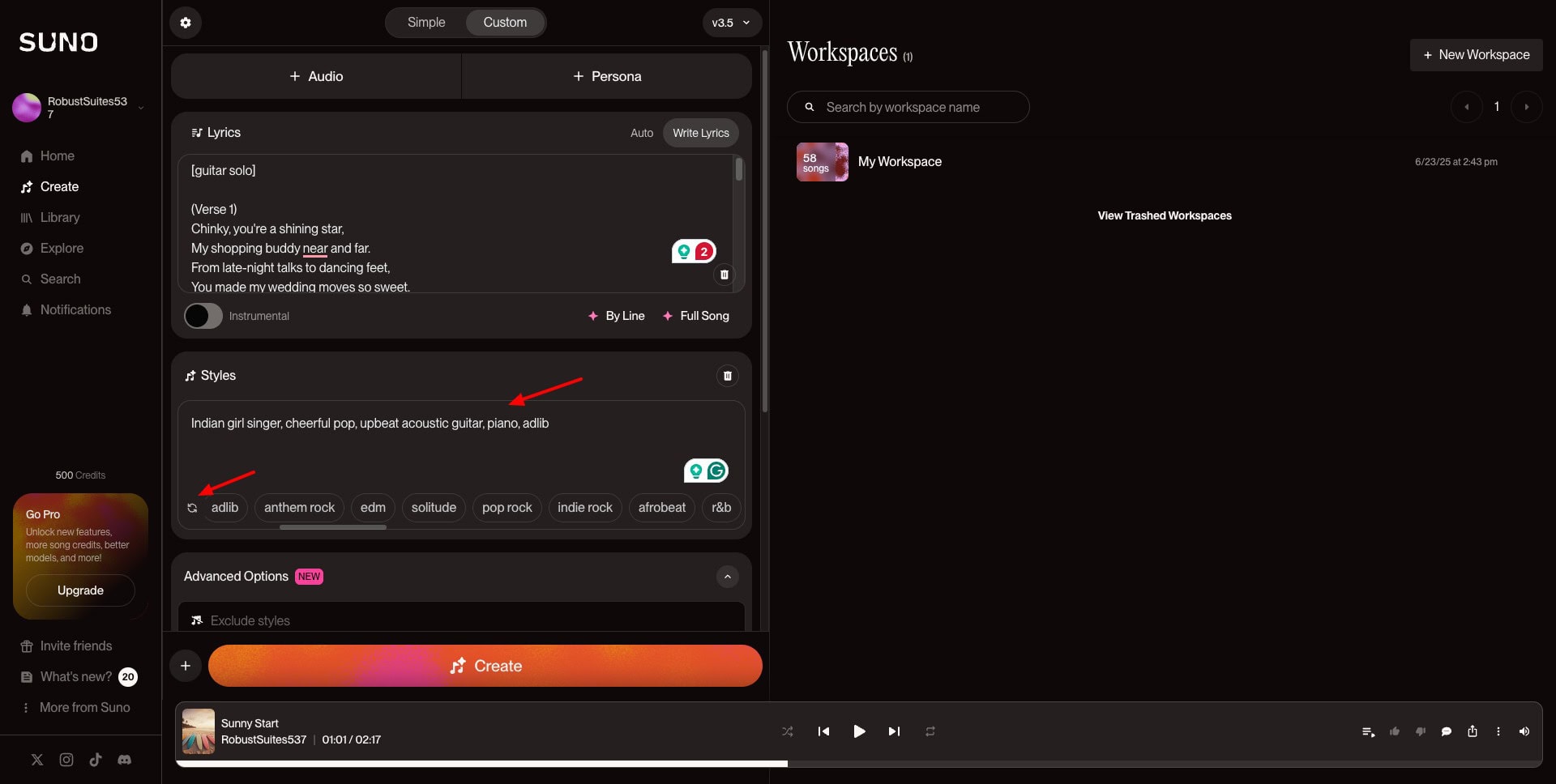
For each prompt, it generates 2 songs. It also offers various editing options to adjust the speed, extend the song, reuse the style, and create a cover. Overall, Suno AI is a fun and easy-to-use app for creating music. You can use it to create birthday songs for your friends as a gift!
The free plan of Suno AI offers you 50 daily AI credits, where each song generation consumes 5 credits. Its paid plans start from $8/month, where you get 2500 credits/month.
2) Eleven Music
Eleven Music is an AI-powered music generator by ElevenLabs that creates complete songs with commercial usage rights. You can generate tracks from 30 seconds to 4 minutes for uses like YouTube videos, children’s songs, or podcast intros.
With the free plan, you get 10k AI credits/month for personal use. Paid plans start at $5/month for 30k credits, commercial usage, and song downloads!
5 Best AI Tools for Coding
Want to code faster but stuck with bugs or complex logic? AI coding assistants can help you out. Even if you’re just starting, these tools can guide you, fix errors, and write code for you. Let’s look at the best ones out there!
| Tool Name | Best For | Key Features | Pricing |
| Hostinger Horizons | Web App Generation | Generate apps from prompts | Starts from ₹1,229/month |
| Lovable | Creating Full-stack web apps | Rapid prototyping, full-stack generation, Github integration | 5 free daily credits. Paid plans start from $25/month. |
| Gemini | Writing coding scripts | Integration with VS Code | Starts from ₹1950/month |
| Cursor | Advanced coders needing all tools under one platform | Integrated Development Environment | 2 week trial of Pro plan. Paid plans start from $20/month |
| Claude Code | AI-coding assistance | VS Code Integration | Starts from $17/month |
1) Hostinger Horizons – Best for Web App Generation
If you want to code a web app with AI, Hostinger Horizons is an ideal option. It is an AI solution from Hostinger that lets you generate entire web apps through a prompt. I created an uptime calculator app and a word counter app for my website using this platform.
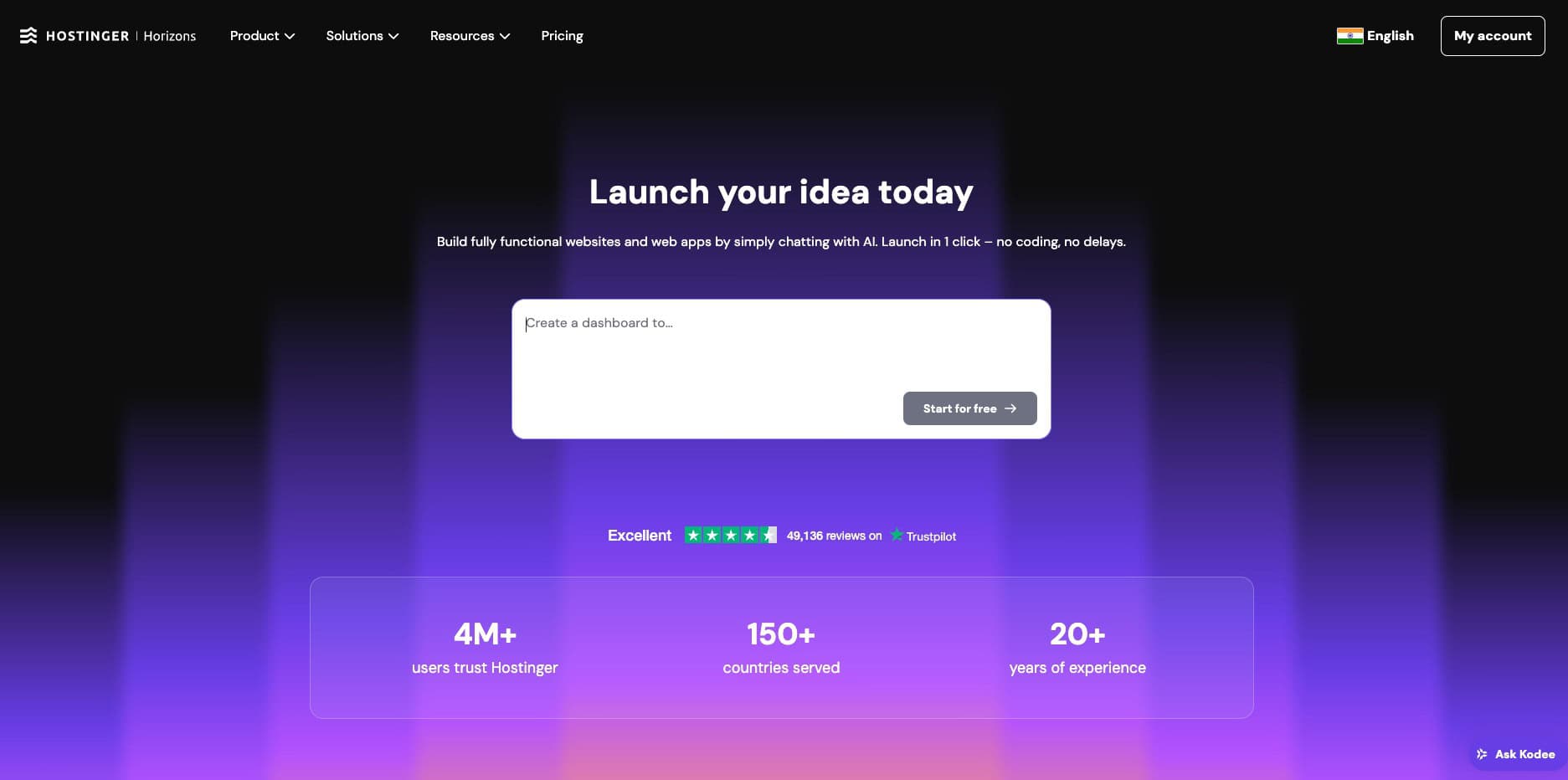
I personally found Hostinger Horizons really easy to use. It also lets you export your code with ease. Its pricing plans start from ₹1,229/mo, which offers a limit of 70 messages per month. You also get free hosting for 1 year, a free domain, advanced security, and more with it.
2) Lovable AI
Lovable is an AI-powered platform that lets you create apps and websites by offering prompts in simple language. It offers features like rapid prototyping, full-stack generation, integrated backend and database services, and Github integration.
Besides these, it also comes with AI-powered debugging, collaboration features, one-click deployment, and more. Its free plan offers 5 daily credits. Whereas, its paid plans start from $25/month for 100 monthly credits.
3) Gemini
If you want to get help with writing coding scripts, Gemini is a great option for both free and paid subscriptions. I tested it in generating a few coding snippets for my website. It performed exceptionally well. Its free plan lets you work with 2.5 Flash and 2.5 Pro models.
If you want access to advanced AI models and more accurate results, you can subscribe to the Google AI plan for ₹1950/month. It will give you access to the Gemini Pro model.
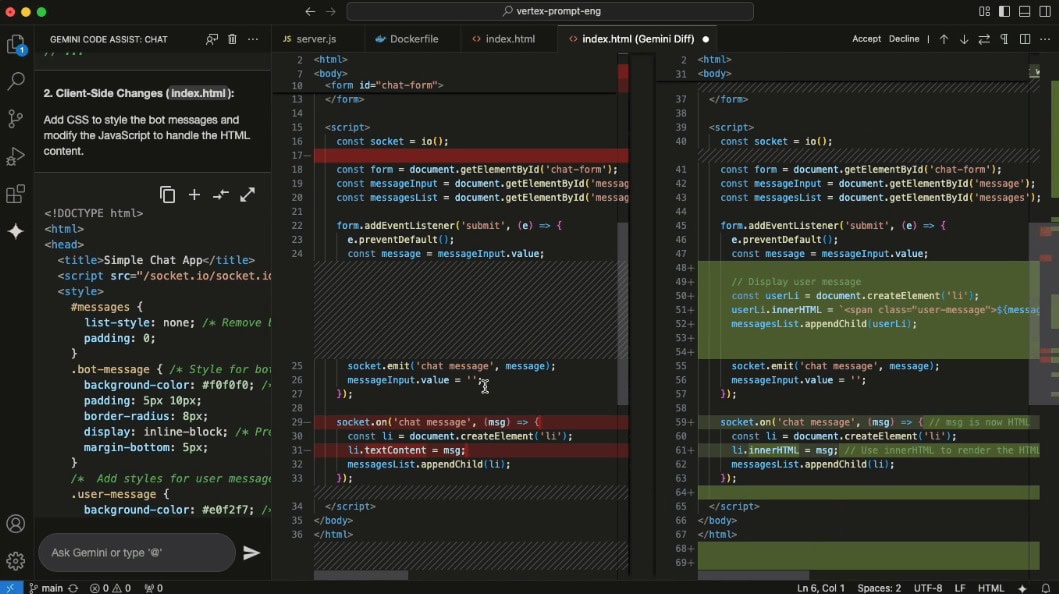
Recently, Google has also introduced Gemini CLI, a free and open-source tool that integrates Gemini into a developer’s terminal. You can use it for free with a personal Google account. It gives you the experience of a coding terminal and also integrates well with VS Code.
4) Cursor AI
If you are an advanced coder, you’ll enjoy using Cursor AI. It features an IDE (Integrated Development Environment), so all the tools required for software development are clubbed into a single, friendly interface.
It is extremely easy to use. Previously, it was quite affordable, but recently, after some pricing updates, Cursor AI has become expensive. Its free plan features a 2-week trial of the Pro plan, along with limited agent requests and tab completions. Its paid plans start at $20/month.
5) Claude Code
Claude Code is an AI-coding assistant offered by Anthropic. It offers a dedicated integration with VS Code. It helps beginners and professionals in debugging and editing their code. To access this feature, you need to upgrade to its paid plan for $17/month.
2 Best AI Tools For Design
Do you want to design logos, graphics, or social media posts, but you’re not a pro designer? AI design tools can help! These tools can help you create stunning visuals in minutes with no design skills.
| Tool Name | Best For | Key Features | Pricing |
| Figma | User Interface Design | Create web apps from prompts | Limited free AI credits. Paid plans start from $16/month |
| Canva | Graphic Design | AI image and video generation | Limited free AI features. Paid plans start from ₹500/month |
1) Figma – Best for UI Design
Figma is one of the most widely used design tools for professional users. It also features a range of AI tools, including AI-generated layouts, UI drafts from text prompts, and more. It also lets you convert static screens into interactive prototypes in one click.
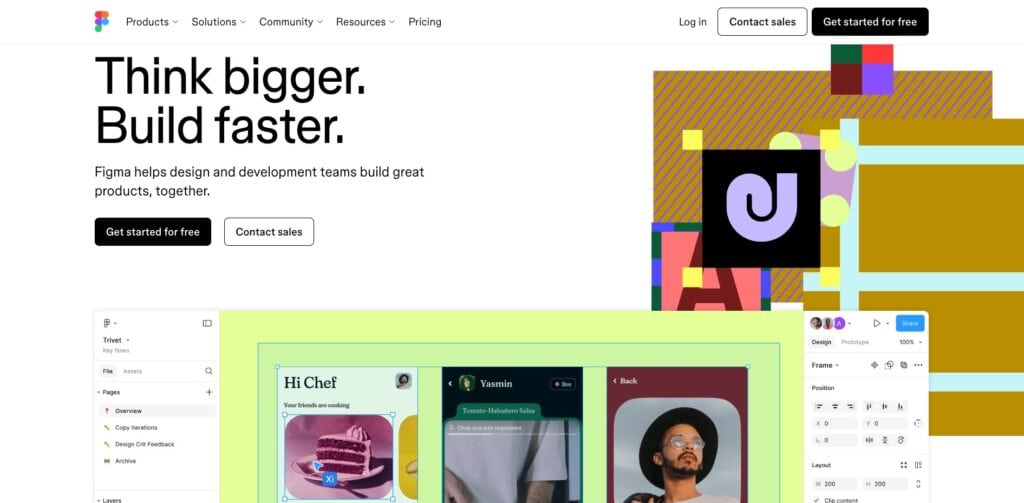
Major features include:
- Figma Make: You can build fully functional web apps with a prompt.
- Figma Draw: It lets you illustrate with vector edits, new brushes, etc.
- Figma Sites: With this tool, you can design and publish websites with ease.
Figma is best for professional users who need advanced tools. Its free plan offers limited AI credits. Its paid plans start from $16/month for a full seat. It gives you 3000 credits/month.
2) Canva
Canva is one of the most popular online graphic design platforms used by millions of users. You can use Canva to design PPTs, posters, blog graphics, social posts, and more. It has a wide range of AI templates for all of these use cases.
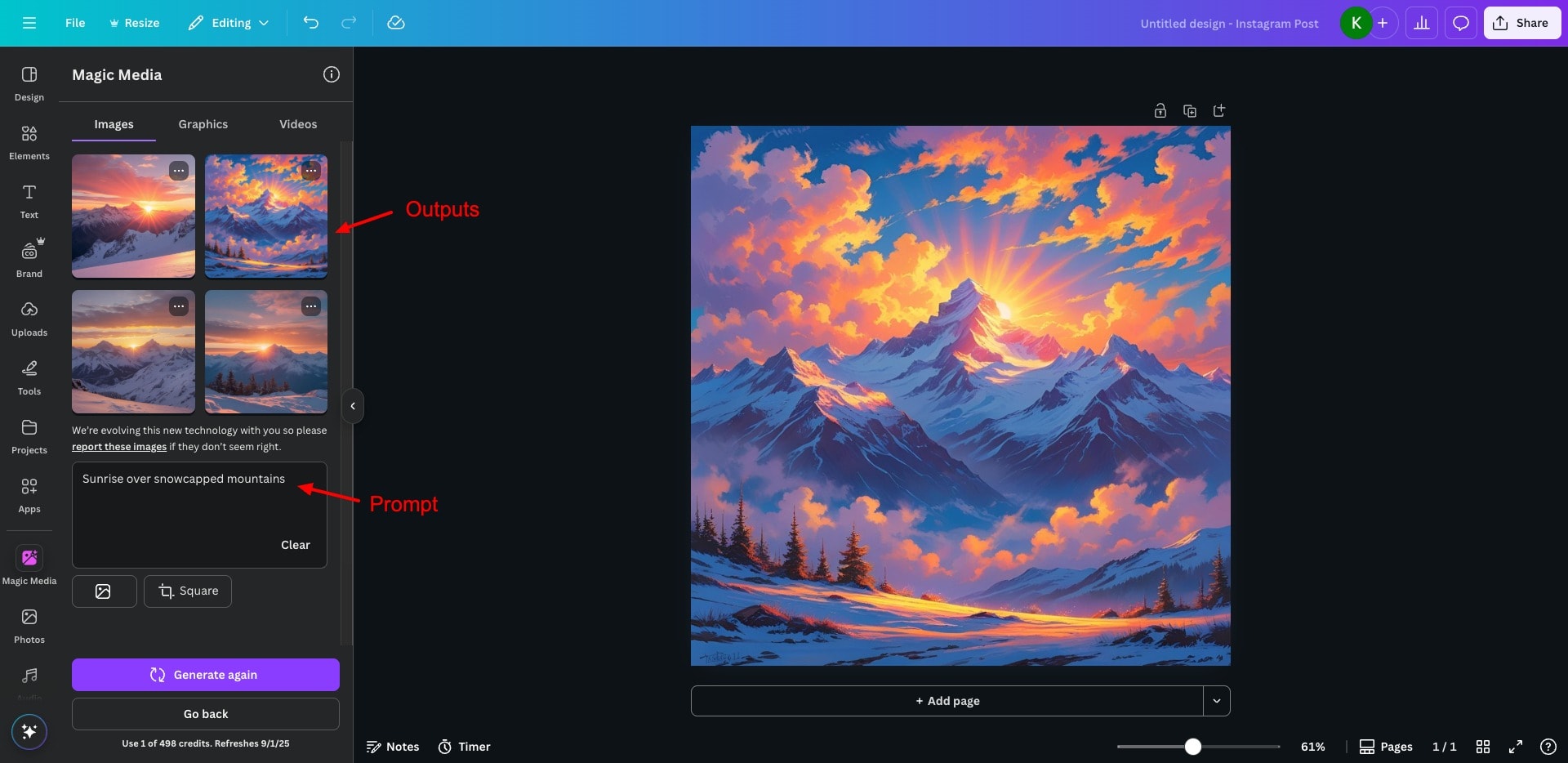
Talking about AI features, Canva includes AI-powered background removal, Magic Write (AI text generator), AI image generation, and AI Video Generation tools powered by Google’s latest Veo 3 model. However, most of their AI features are locked under a paid subscription.
Its paid plans start from an affordable price of ₹500/month for 1 person. With this plan, you get access to 25+ AI tools along with 1 TB of cloud storage space. Overall, Canva is ideal for general users who want simple AI design tools.
2 Best AI Tools to Create AI Agents
What if you could build your own virtual assistant that worked 24/7, learned fast, and handled your tasks for you? With AI agent generators, it’s possible. Let’s explore the best tool for creating your own AI-powered agents.
| Tool Name | Best For | Key Features | Pricing |
| n8n | Unlimited AI Agents | Can host on own servers, create unlimited AI agents | Paid plans start from $20/month. |
| Make.com | Business Process Automation | Visual workflow builder, Extensive app library | 1000 credits on free plan. Paid plans start from $9/month. |
1) n8n – Best for Ease of Use & Unlimited AI Agents
N8n is a no-code workflow automation platform that allows you to connect your apps and data in a single place. It is open-source and easy to use. You can host it on your own servers and create unlimited AI agents with it.
If you want to automate complex workflows and want better customization controls, n8n is a great option. Its pricing plans start from $20/month, where you get 2.5k workflow executions and 5 active workflows.
2) Make.com
Make.com is a no-code workflow automation platform that is powered by AI. It features a drag-and-drop UI to build, design, and automate simple to complex workflows. You can use it for task automation, streamlining project management, automating user account management, etc.
It has 2500+ pre-built apps and offers integrations with popular apps like Gmail, Hubspot, and Google Sheets to automate repetitive tasks. For trying it out, you get a free plan with 1000 credits. Whereas, its paid plans start from $9/month.
2 Best AI Tools For Students
Studying smarter just got easier! Whether it’s note-taking or understanding complex concepts, AI tools can help students save time and enhance learning. Let’s look at the best AI tools every student should know.
| Tool Name | Best For | Key Features | Pricing |
| NotebookLM | Personalized learning | Audio Overview, Mind Map, and Study Guide | 100 notebooks on free plan. Paid plans start at $19.99/month |
| Google AI Studio | Real-time on-demand learning | Screen sharing | Free to use |
1) NotebookLM – Best for Personalized Learning
Do you need help with your assignments, research, or understanding complex topics? NotebookLM is a powerful AI tool that can simplify personalized learning for students. It lets you upload notes, PDFs, or documents and chat with them to clarify concepts and get information.
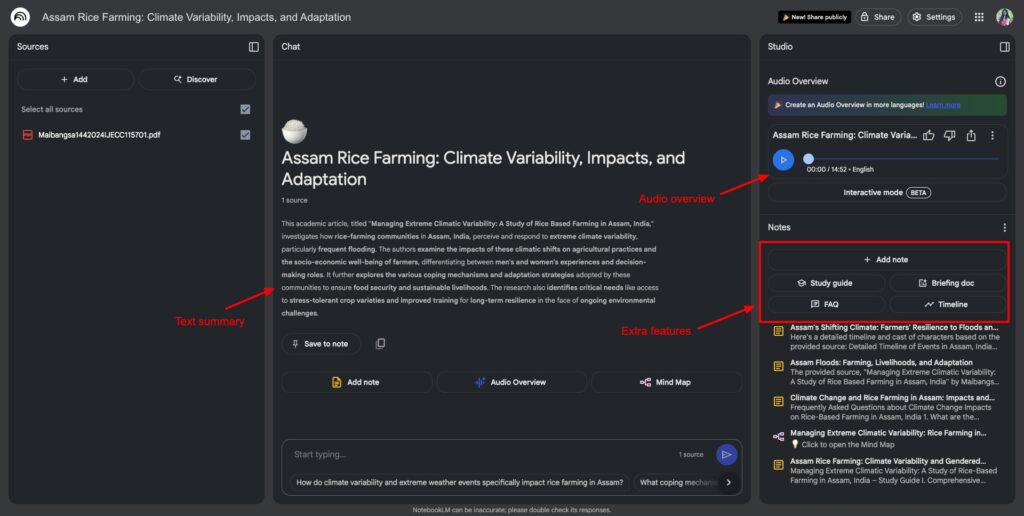
It also features many AI tools like Audio Overview to listen to key takeaways, Mind Map to visualize ideas, Study Guide, Notes, FAQs, etc to dive deeper into your content. Overall, students working on research projects, academic reports, assignments, and essays will love it.
The free plan of NotebookLM lets you create up to 100 notebooks, 50 daily chat queries, and 3 audio generations. Its paid subscription is available for $19.99/month.
2) Google AI Studio
Google AI Studio is an AI-powered tutor that can see what’s on your screen in real time. It is a great example of real-time, on-demand learning. The benefit of this tool is that it can offer immediate explanations, guide you through complex software, or help you debug code.
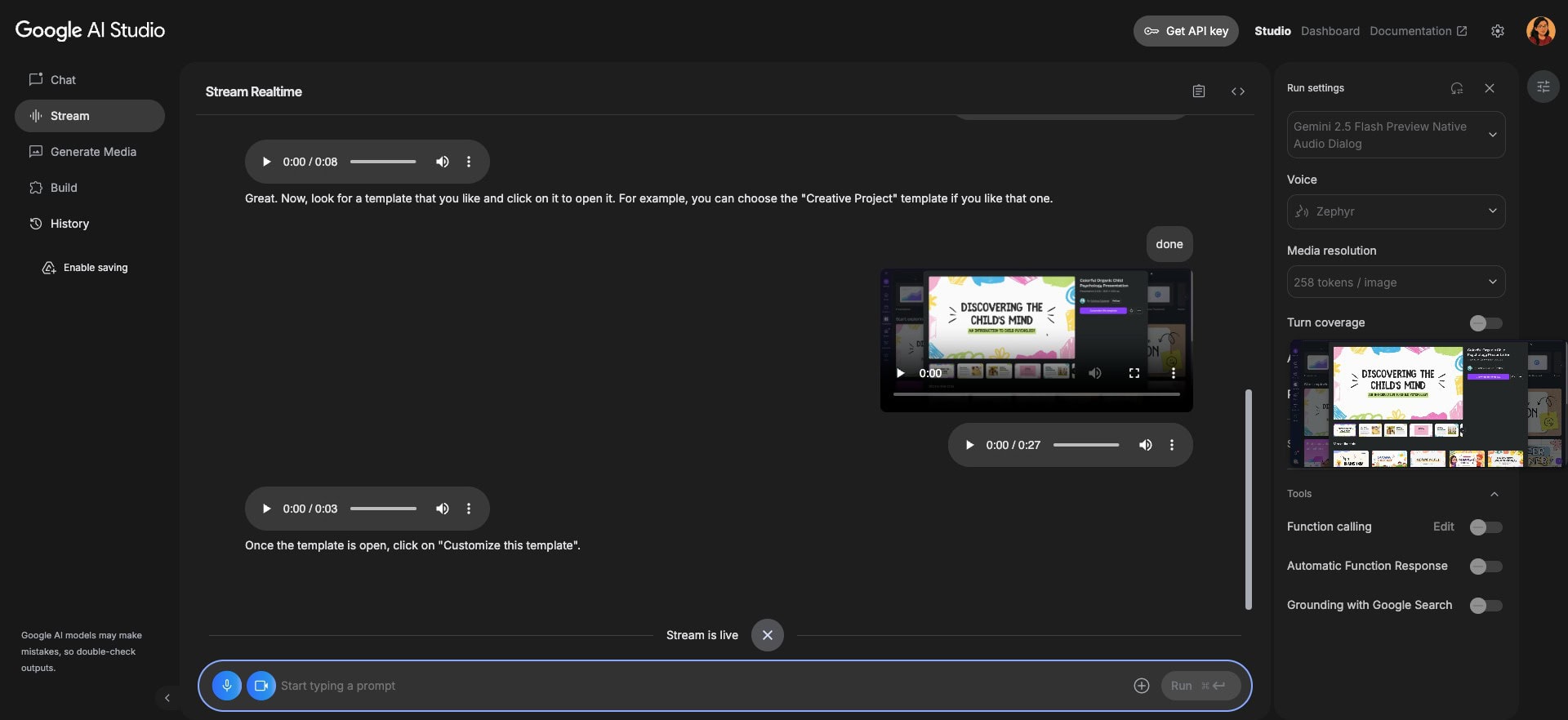
Whether you’re working on Docs, Sheets, or coding apps, just share your screen with Google AI Studio. It will guide you step-by-step on what to do next and also clarify your doubts. If you need a personal tutor for studying or learning, this is a great tool! As of now, this tool is free to use!
3 Best AI Tools For Video Editing
Video editing doesn’t have to be time-consuming. AI tools can now cut, trim, caption, and even enhance your videos automatically. Let’s explore the best AI tools that make video editing faster, smarter, and way easier.
| Tool Name | Best For | Key Features | Pricing |
| Premiere Pro | Editing longer videos | Generative Extend, Auto Reframe | Starts from $22.99/mo |
| CapCut | Editing short-form videos | Pre-designed templates | Lots of features available on free. Paid plans start from $7.99/mo |
| Edits | Editing social media reels | AI photo animation, AI outfit switcher, 4k resolution | Free |
1) Premiere Pro – Best for Overall Video Editing
Premiere Pro is one of the most popular video editing platforms offered by Adobe. It comes with a range of AI tools like generative extend, filler word detection, auto-reframe for adjusting aspect ratios for social platforms, and Rotobrush 2 in After Effects for AI-powered edge detection.
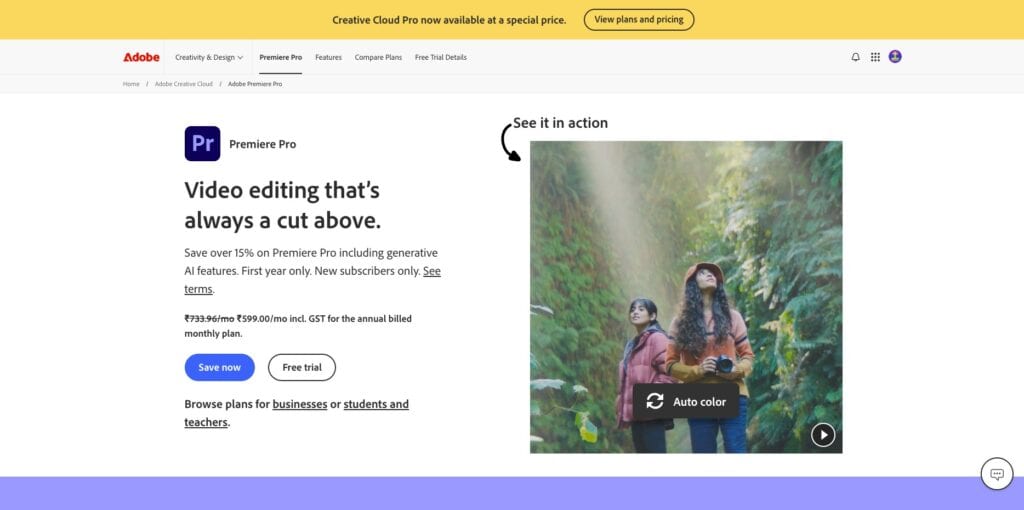
Additionally, it also offers media intelligence search, text-based editing, auto reframe, enhance speech, and auto-captions and translation in over 27 languages. Overall, Premiere Pro is much better than DaVinci and Final Cut Pro when it comes to AI features.
If you are a professional user who needs a power-packed AI video editing platform, Premiere Pro is a must-have. It’s priced at $22.99/month and also offers a 7-day free trial.
2) CapCut
CapCut is a free video editing platform developed by ByteDance. It offers basic editing features, lots of pre-designed templates, filters, effects, music, captions, and more. It also features an AI voice generator, AI video generator, AI video shortener, AI image upscaler, and more.
However, CapCut is not available in India. If you need advanced AI tools to create short-form video content for social media, CapCut is a great choice. It is ideal for beginners who are not well-versed in the technical aspects of video editing.
It has a feature-rich free plan with lots of features. Whereas its paid plans start from $7.99/month.
3) Edits
Edits is a free AI-powered video editing tool developed by Instagram. It features good video editing tools like single-frame precision editing, AI animations, green screen, filters and effects, camera resolution settings, etc.
You also get AI features like auto caption generation in multiple languages, AI photo animation, and AI outfit switcher. The best part is, you can export your videos in 4K resolution without watermarks.
Even though it features limited AI tools, the video editing dashboard of Edits is quite impressive. If you are a beginner looking for an editing app for social media platforms, try out Edits! It’s completely free to use.
Why Should You Trust Me?
I’ve been working full-time in the digital industry since 2015. In the last 10 years, I have used, tested, and reviewed hundreds of digital tools. Since the AI boom, I have explored vast categories of AI tools and reviewed them on my blog and YouTube channel.
These include AI writers, AI image generators, AI video generators, AI voice generators, AI website builders, AI Chrome extensions for students, AI music generators, AI note takers, and more. Working with all these apps has given me the expertise to recommend the right tools for your needs.
Conclusion
In this article, we examined the Best AI Tools for various categories and use cases. I have personally used hundreds of artificial intelligence tools, and after careful consideration, have included the best ones in this list. I hope it helps you choose the right tools for your needs.
My favorite AI tools across all categories are Manus AI, ElevenLabs, and NotebookLM. I regularly use them for my research and content creation projects.
Anyway, did you try any of the tools on this list? How was your experience? Do you have any other recommendations that we missed out? Let me know in the comments section below. This is Kripesh signing off. Cheers and keep learning! 🙂