Are you tired of paying extra for a dedicated IP?
PrivateVPN offers a budget-friendly combo that many users look for: port forwarding on all servers, dynamic dedicated IPs at no extra cost, and a Stealth Mode that can help bypass strong censorship. But the big question is, can it still compete with the best VPNs in 2026?
I’ll break down everything in the PrivateVPN review for 2026. We’ll look at its features, speed performance, streaming reliability, and key drawbacks in simple terms. By the end, you’ll be clear whether this VPN is worth your money.
So, let’s get started!
PrivateVPN Review
Summary
PrivateVPN is a budget-friendly option at $72 for 3 years. It stands out for its P2P support with port forwarding on all 200+ servers, free dynamic dedicated IPs. Plus, its Stealth Mode with Shadowsocks handles censorship well.
But in 2026, it feels outdated, with no split tunneling, weak streaming support, and manual WireGuard configuration. It is only ideal for a dedicated IP, P2P with port forwarding, and StealthVPN.
Disclaimer : I strongly believe in transparency. If you buy using the links on our site, we may earn a small commission without any extra cost to you. This helps me to keep producing honest reviews. Read More >>
- About PrivateVPN
- PrivateVPN Speeds
- PrivateVPN Servers
- PrivateVPN Streaming and Gaming Performance
- P2P Torrenting
- Privacy
- PrivateVPN History
- PrivateVPN Security
- Pricing
- PrivateVPN Customer Support
- Devices
- User Interface
- Performance & Reliability
- PrivateVPN Pros
- PrivateVPN Cons
- PrivateVPN Alternatives
- Why Should You Trust Me?
- Conclusion
- FAQs
About PrivateVPN
PrivateVPN is a budget-friendly VPN focused on streaming. It was launched in 2009 by Martin Muller. The original company, Privat Kommunikation Sverige AB, is based in Sweden.
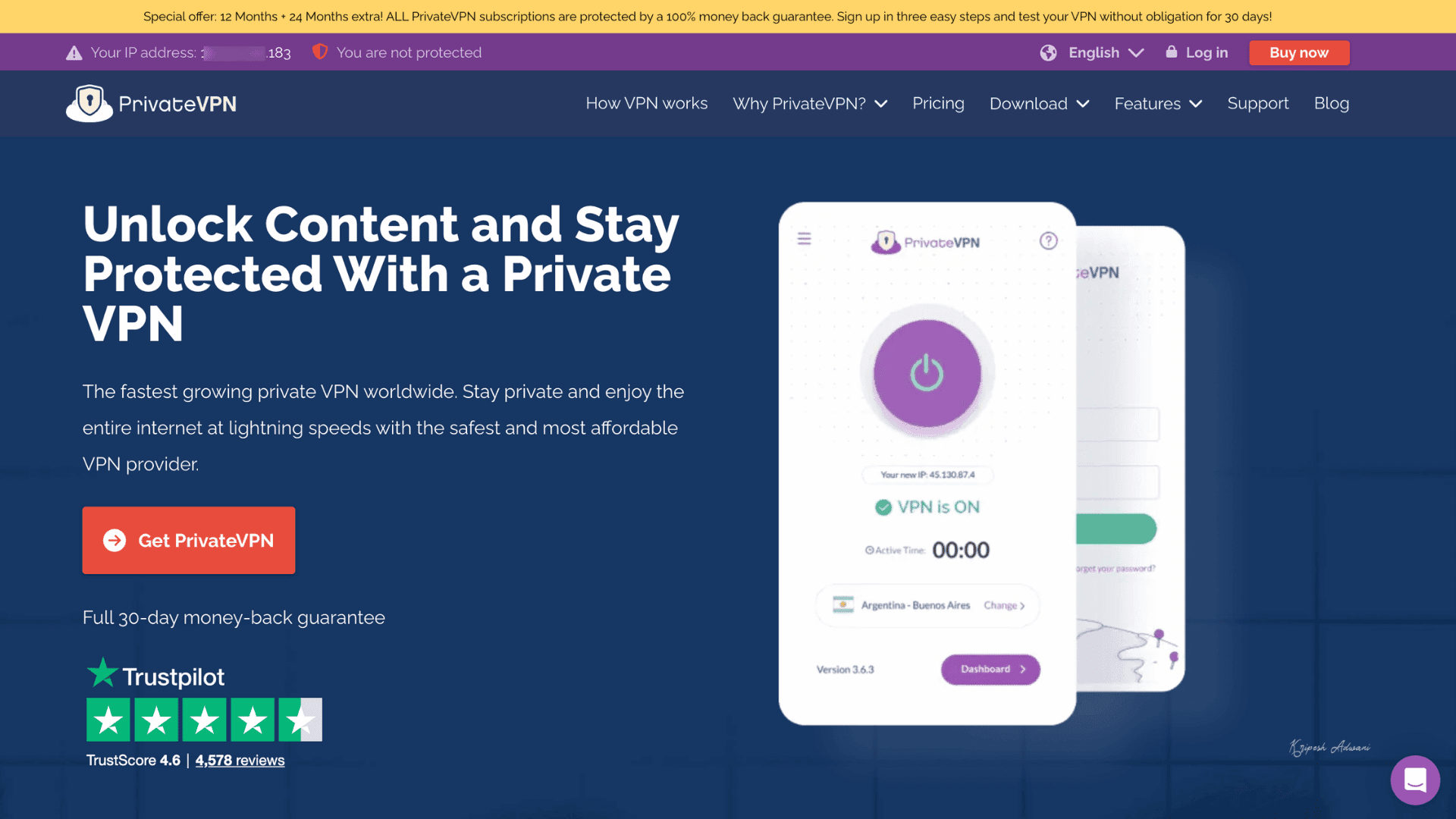
In June 2022, Private VPN was acquired by Miss Group, an international web hosting company (known for brands like StableHost). The provider mainly focuses on security, privacy, decent speeds, and affordability.
Currently, it operates servers in 50+ countries across North America, Europe, Asia, and Africa. As of now, it holds a 3.6-star rating from around 8K users on Google Play and 4.6 based on 4.9K + reviews on Apple App Store.
PrivateVPN Speeds
I tested PrivateVPN speeds on Speedtest.net by Ookla. My baseline speed was 200 Mbps with a 7 ms ping. For easy comparison, I ran the speed tests at least three times on both Indian and US servers, then calculated the average speeds.
Speed in India
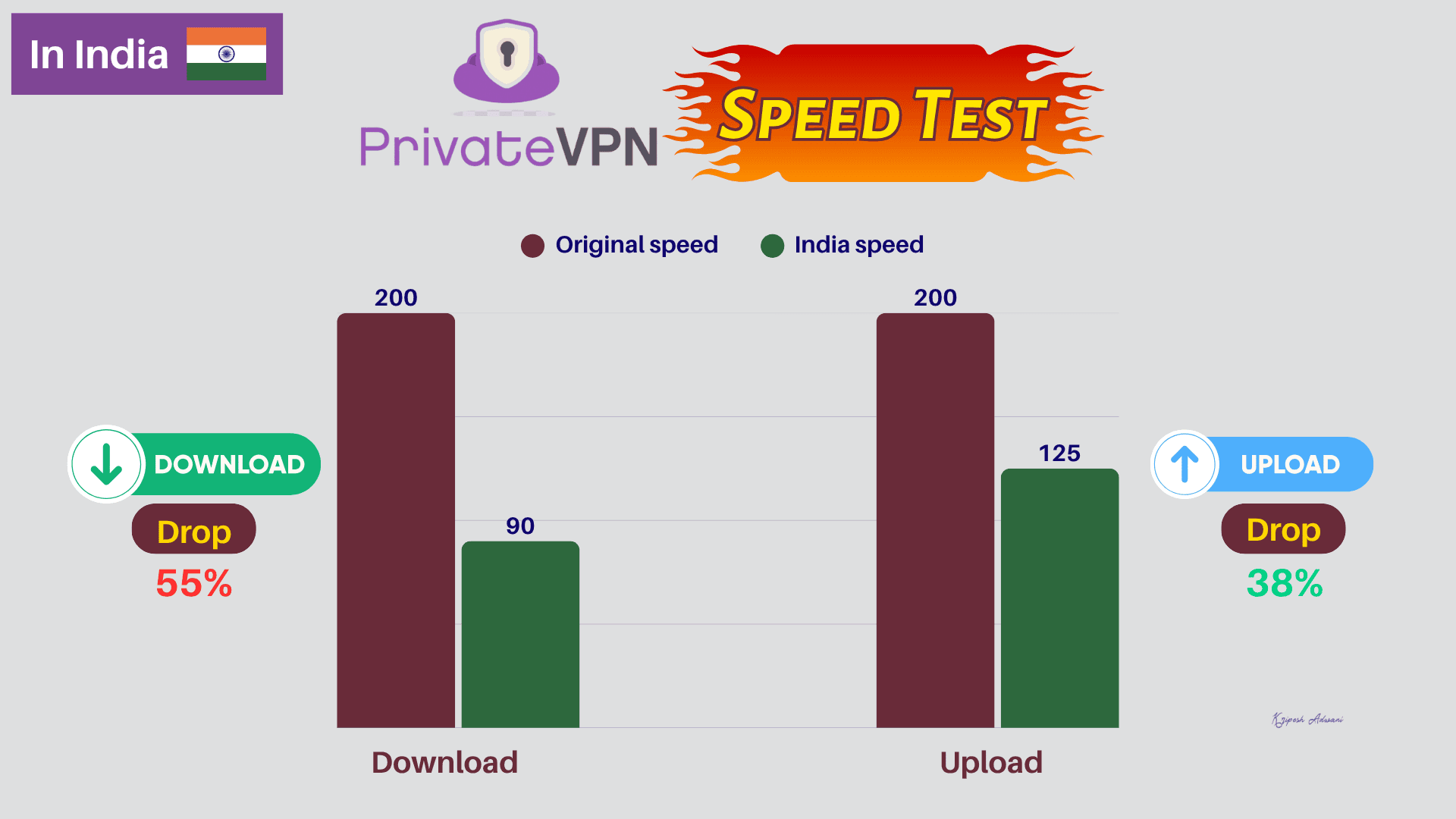
On the India server, the download speed dropped to 90 Mbps from 200 Mbps, which is around a 55% decrease. The upload speed I got was 125 Mbps, so the drop was lower at about 37.5%.
Speed in the US
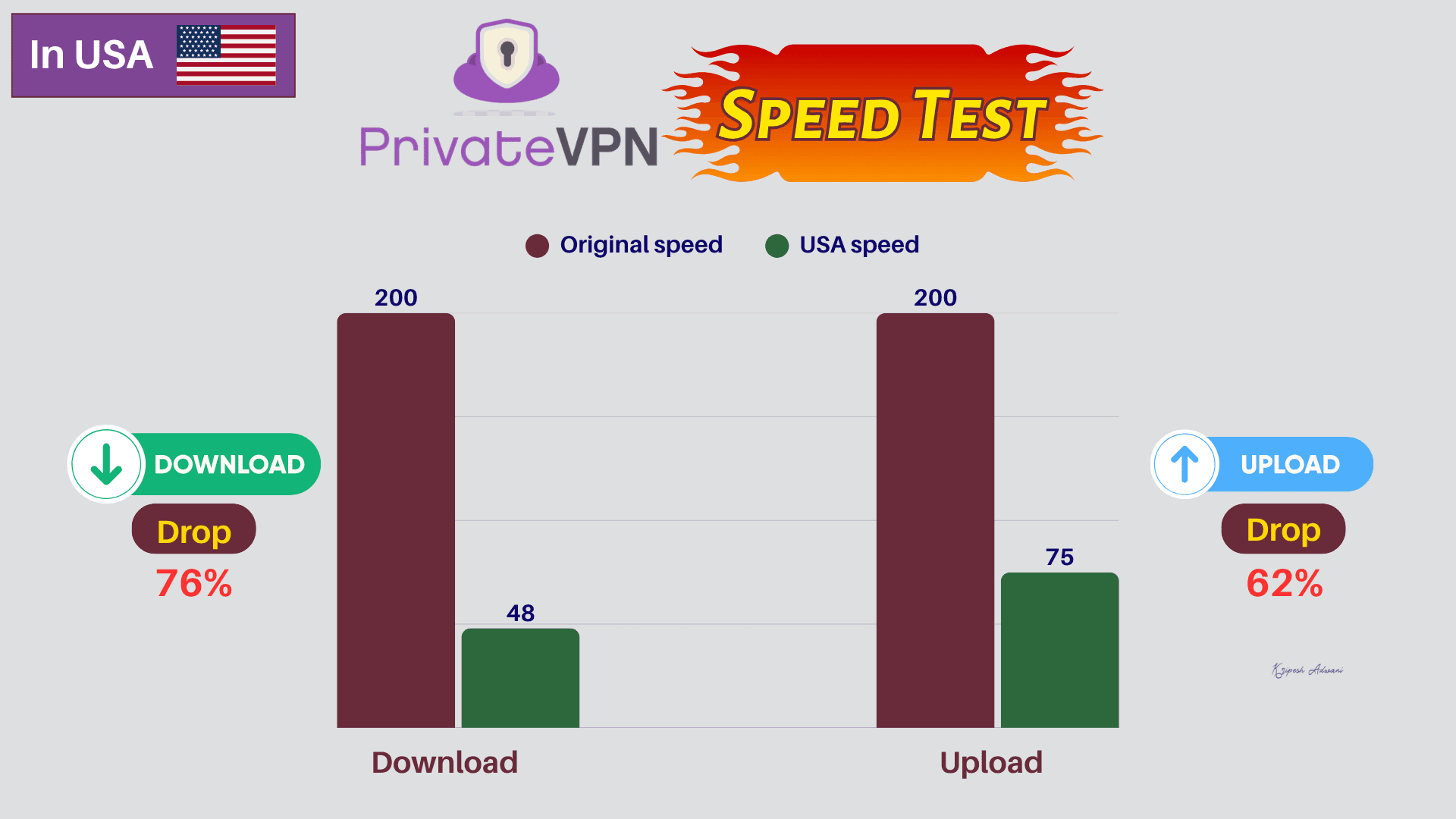
I got just 48 Mbps download speed, a huge 76% drop. The upload speed averaged 75 Mbps, around a 67% decrease.
| PrivateVPN | Surfshark | ExpressVPN | Proton VPN | PIA VPN | |
| India Download Speed (Mbps) | 90 | 165 | 140 | 184 | 84 |
| India Upload Speed (Mbps) | 125 | 115 | 129 | 108 | 129 |
| USA Download Speed (Mbps) | 48 | 135 | 129 | 169 | 96 |
| USA Upload Speed (Mbps) | 75 | 98 | 95 | 71 | 134 |
If I compare PrivateVPN with top-tier VPNs like Surfshark or ExpressVPN, the speed drop is huge. In fact, mid-tier VPNs like Private Internet Access or Proton VPN maintain better speeds than PrivateVPN.
Overall, I’m not impressed with the speed performance of PrivateVPN. Plus, the larger drop in download speed than upload speed indicates slower streaming and potential lag in browsing-heavy apps.
PrivateVPN Servers
Servers Locations
PrivateVPN operates just 200+ servers across 63 countries worldwide. The network coverage is low compared to Surfshark (4500+ servers in 100 countries) or NordVPN (9000+ servers in 188+ nations). Also, it maintains relatively few servers in Asian and African countries.
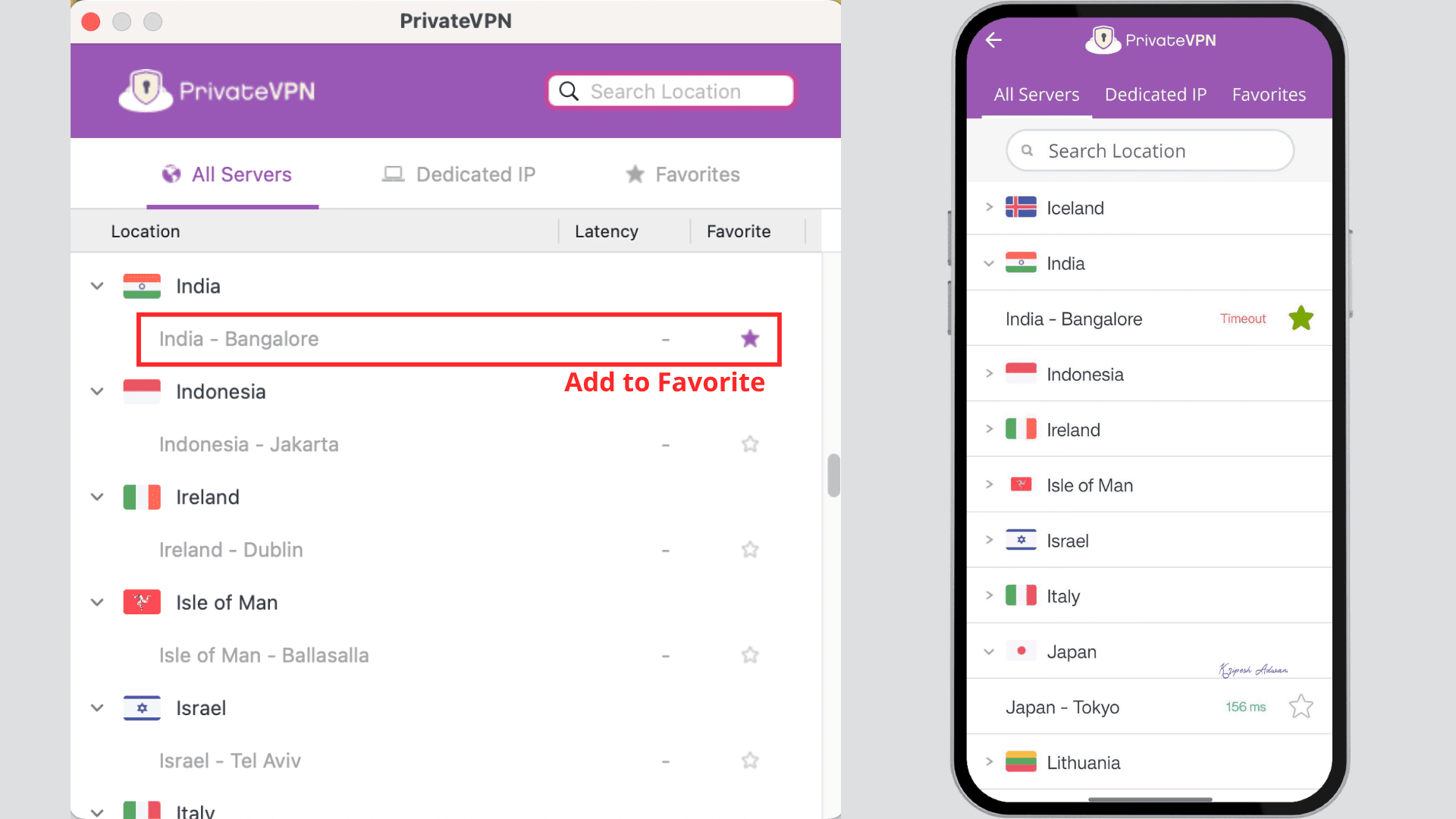
In 2025, I observed that PrivateVPN operated two servers in India: a Bangalore (virtual) server and a Mumbai-based physical server. PrivateVPN still lists “India – Mumbai” in its official server list.
However, in 2022, the Government of India directed VPN providers with physical servers in the country to store user data for up to five years. As a result, many premium VPN providers have shifted away from physical infrastructure in India.
Possibly due to this reason, I now only see a Bangalore-based virtual server in the PrivateVPN app this year.
RAM Servers
Most VPNs use RAM-only (diskless) servers. This ensures that the system automatically wipes user data whenever it reboots. They do not store OS images, processes, encryption keys, or any temporary data on hard drives.
But PrivateVPN does not use RAM-based servers. Independent testing and reviews confirm that it still operates on traditional disk-based hardware servers with a no-logs policy.
Obfuscated Servers
To access restricted content, such as university websites, VPN obfuscation features can be very helpful. PrivateVPN offers a Stealth Mode that hides your VPN usage from ISPs and censorship systems. It portrays VPN traffic as normal web browsing by using special servers, Shadowsocks technology, and HTTPS ports.
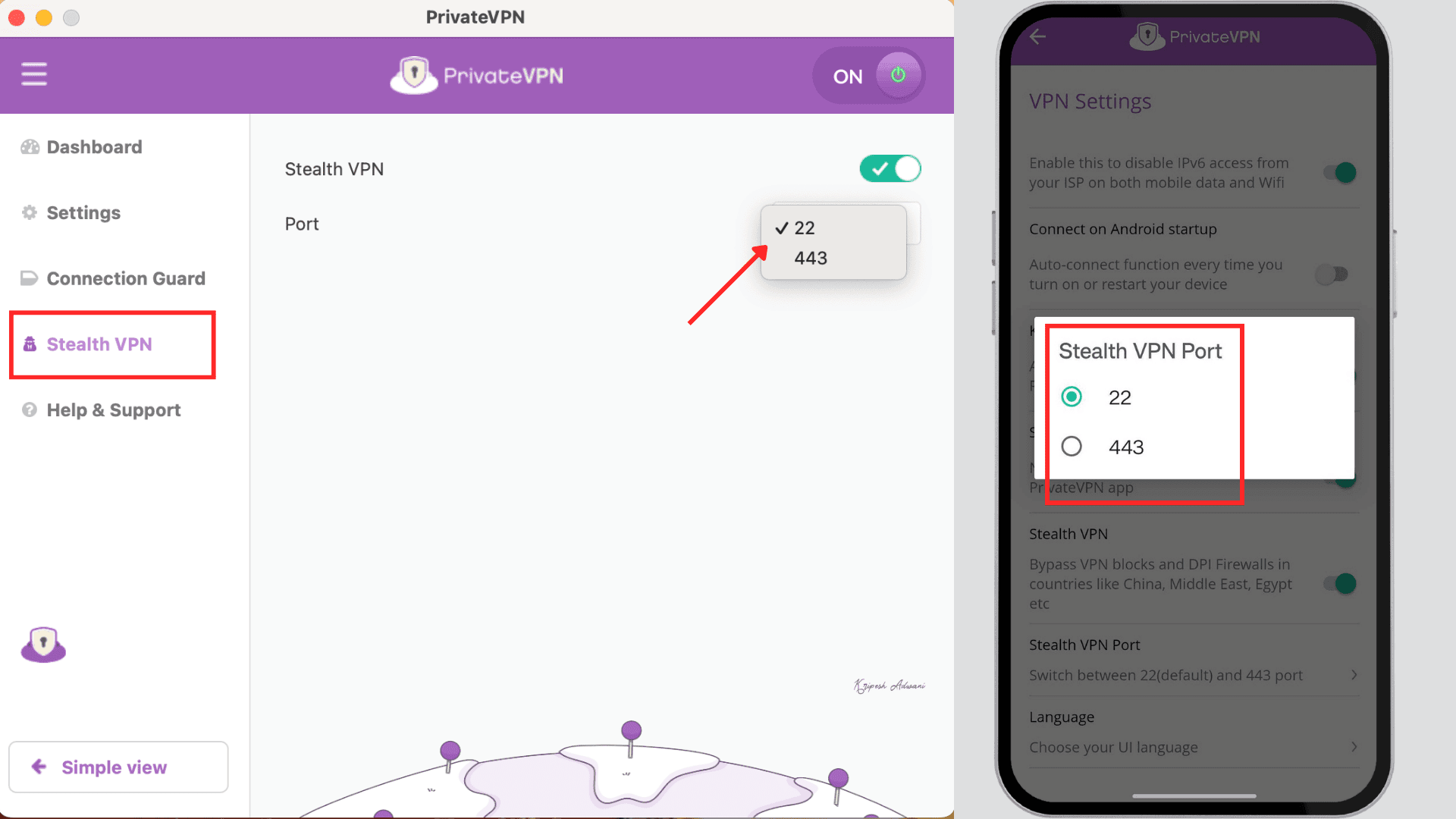
Stealth mode in PrivateVPN is available on Windows, macOS, iOS, and Android devices. You can easily activate it from VPN settings. This feature is super helpful if you’re in countries where VPN usage is usually blocked, like China, Russia, Iran, etc.
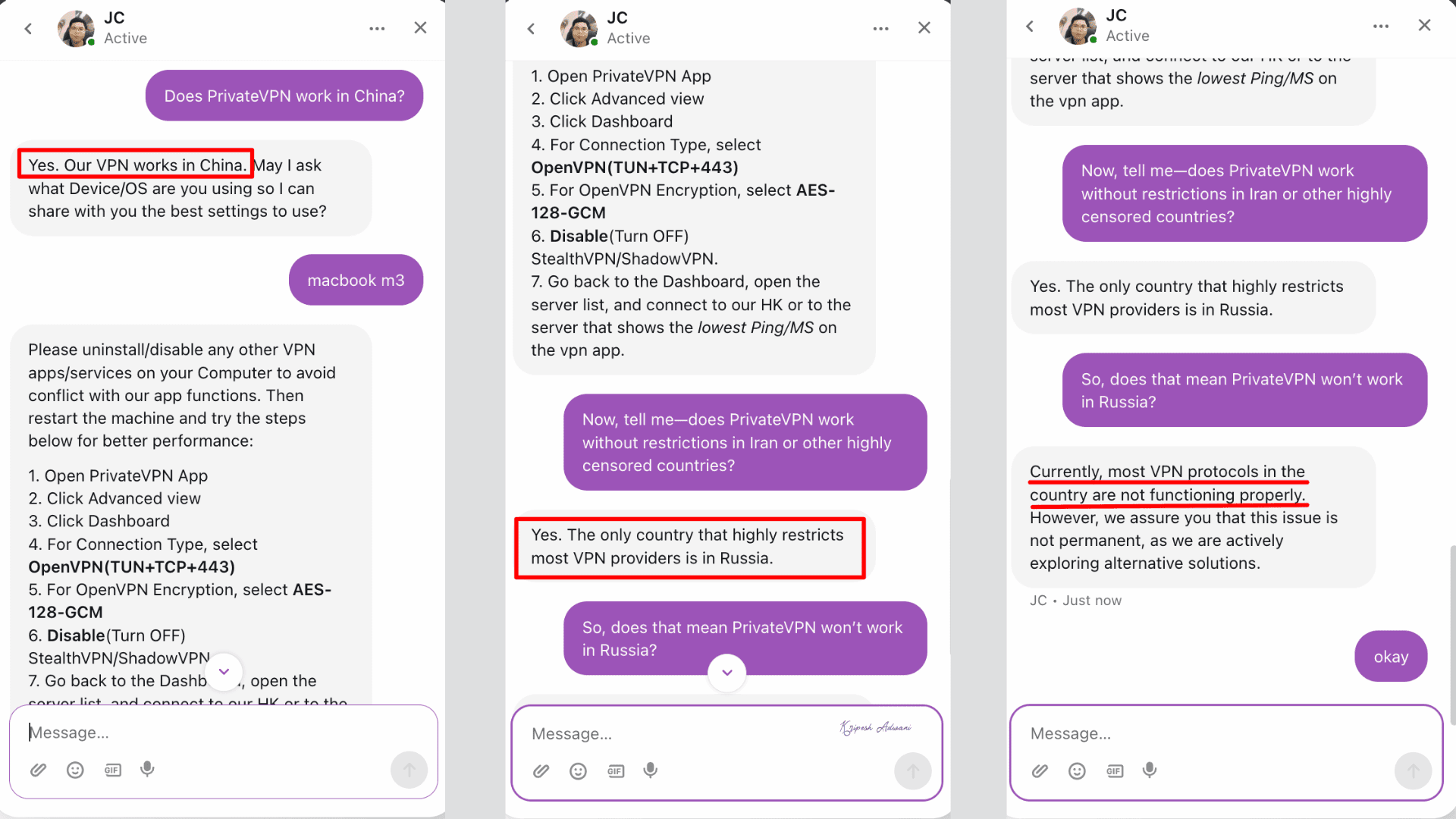
Their support team confirmed to me that PrivateVPN works effectively in China and Iran, but may not work in Russia. But keep in mind that obfuscated servers further slow down VPN speeds due to an extra encryption layer.
Dynamic or Static IP Address
Like other premium VPNs, PrivateVPN offers rotating IPs by default. That means your IP address changes with every connection and is used by multiple subscribers. These shared IPs are good for general browsing, streaming, and basic torrenting.
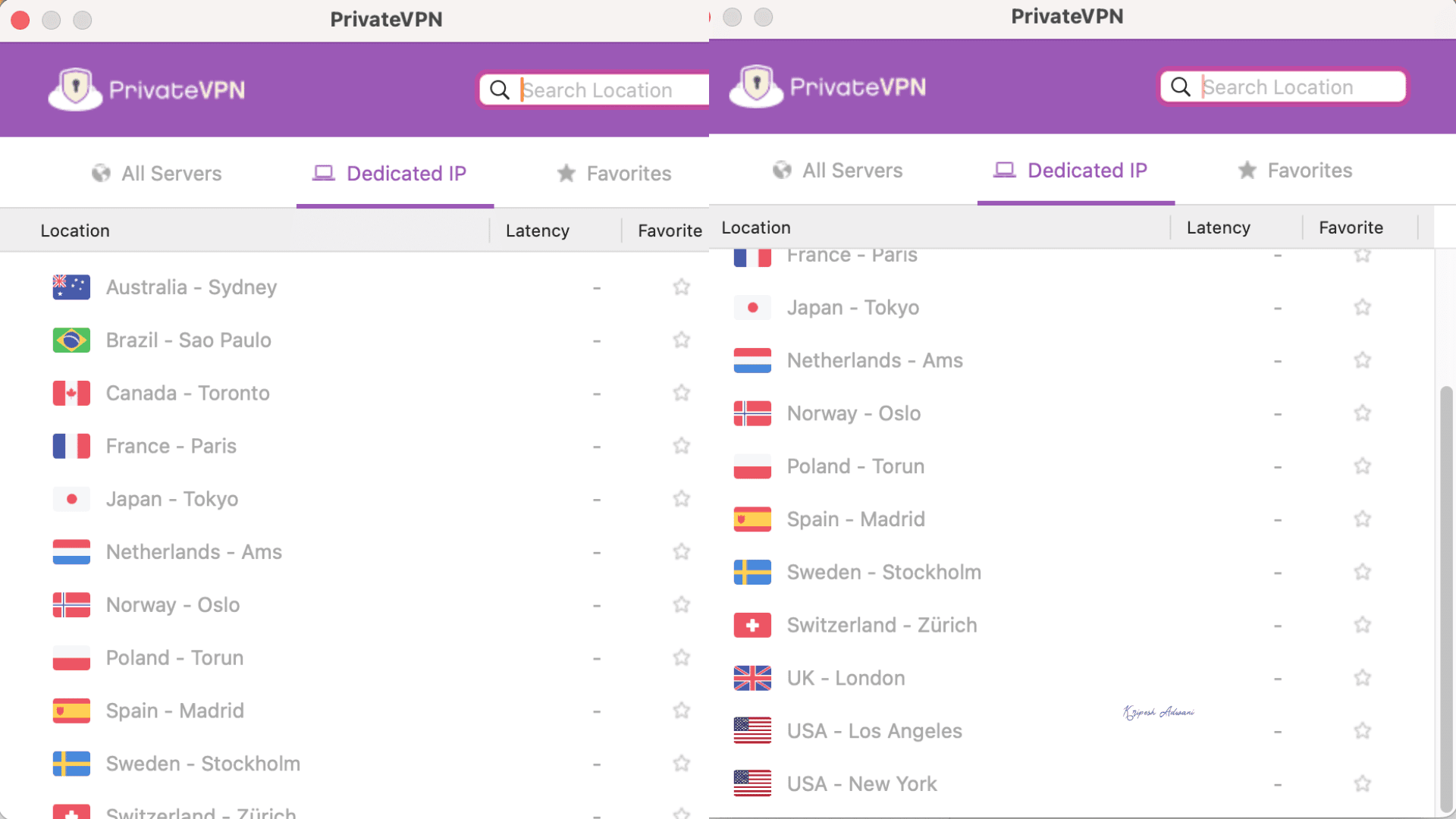
If you need remote access or want to use services that block shared VPN IPs, dedicated IPs will help. The best part is, unlike other VPN services where dedicated servers are paid add-ons, PrivateVPN doesn’t charge extra.
With its paid subscription, you get access to 14 dedicated IP servers. These specialized servers are located in the US, the Netherlands, the UK, Canada, Switzerland, etc. In Asia, however, only Japan is available.
PrivateVPN Streaming and Gaming Performance
| Streaming Service | Yes/No |
| Netflix | Yes |
| Amazon Prime US | No |
| BBC iPlayer | No |
| Hotstar | No |
| JioCinema | No |
| SonyLiv | No |
| Zee5 | No |
PrivateVPN has servers around the world with 14 dedicated servers. When I connected to US servers, it somehow unlocked Netflix libraries. But the speed was too slow to stream content smoothly. It also failed to unblock Amazon Prime Video.
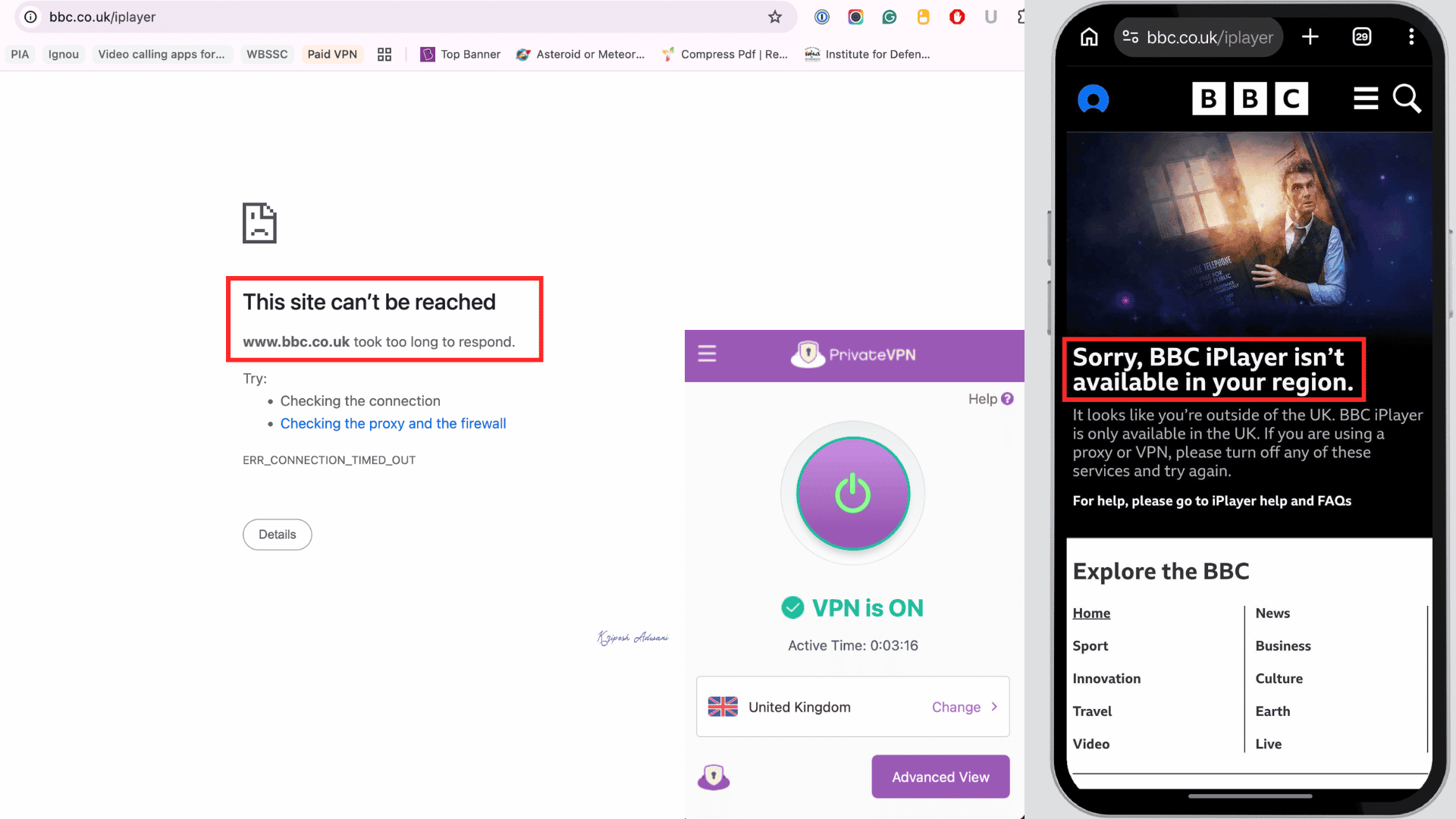
Next, I connected to UK servers and wanted to unlock BBC iPlayer. Unfortunately, both on my mobile and desktop, I received the same notification that I’m accessing content outside the UK.
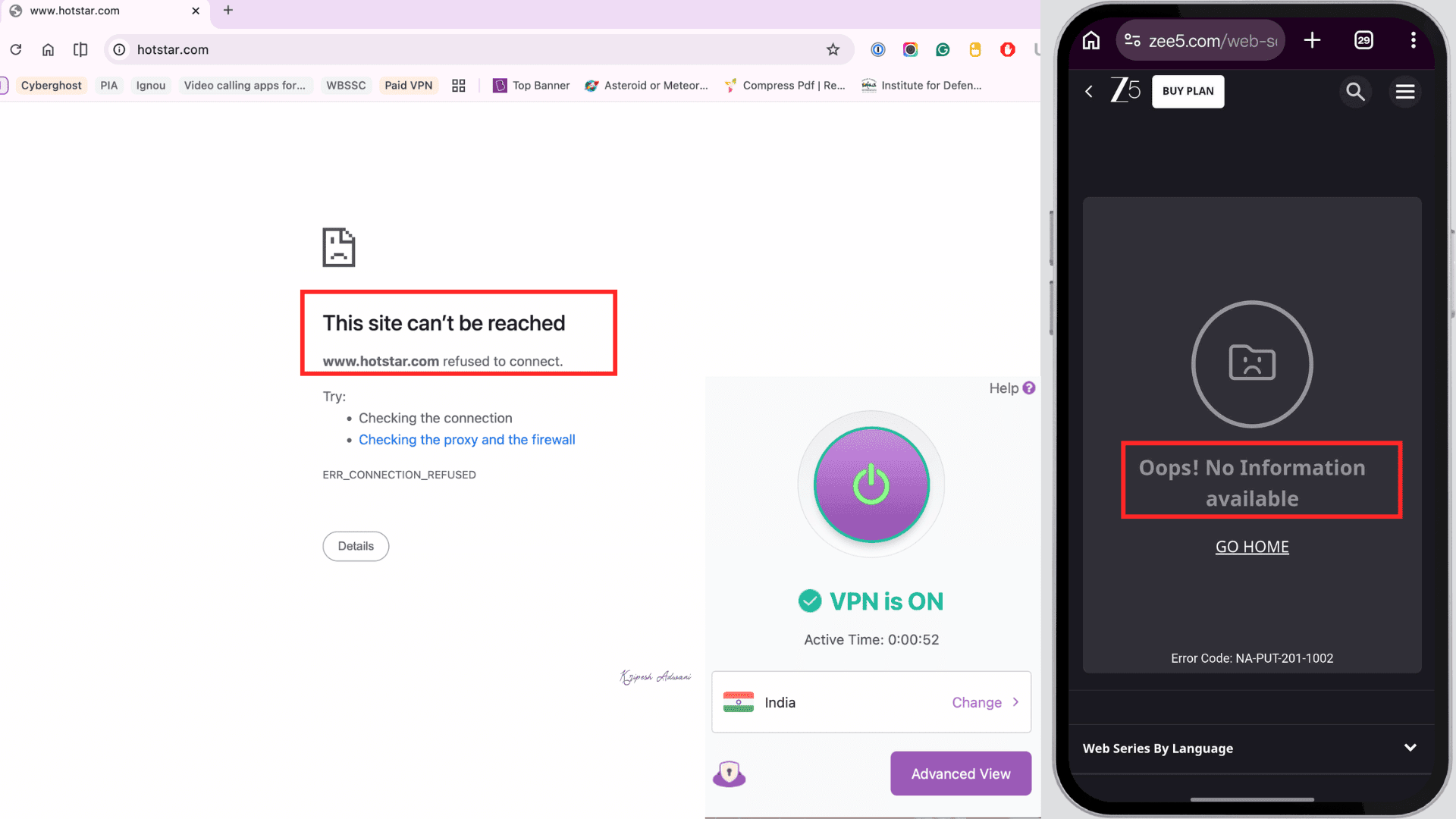
Finally, I couldn’t even access Indian OTT platforms like Hotstar, SonyLiv, Zee5, even when connected to an Indian server.
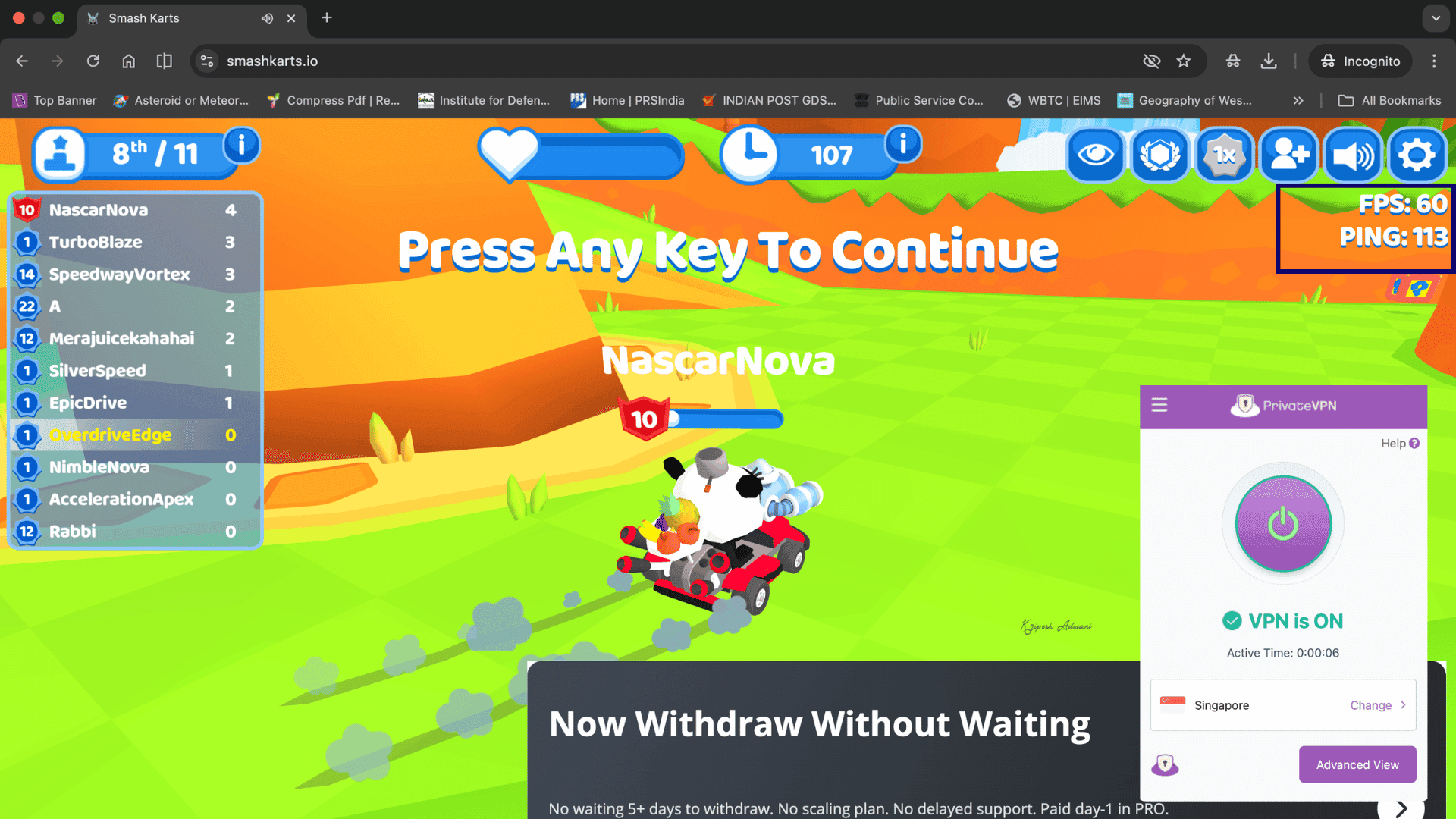
For gaming, I tested PrivateVPN on Smash Karts using the nearest Singapore server. It took a few minutes to load, but I could play without major lag. But the ping rate was higher (113 ms) than VPNs like CyberGhost or ExpressVPN.
P2P Torrenting
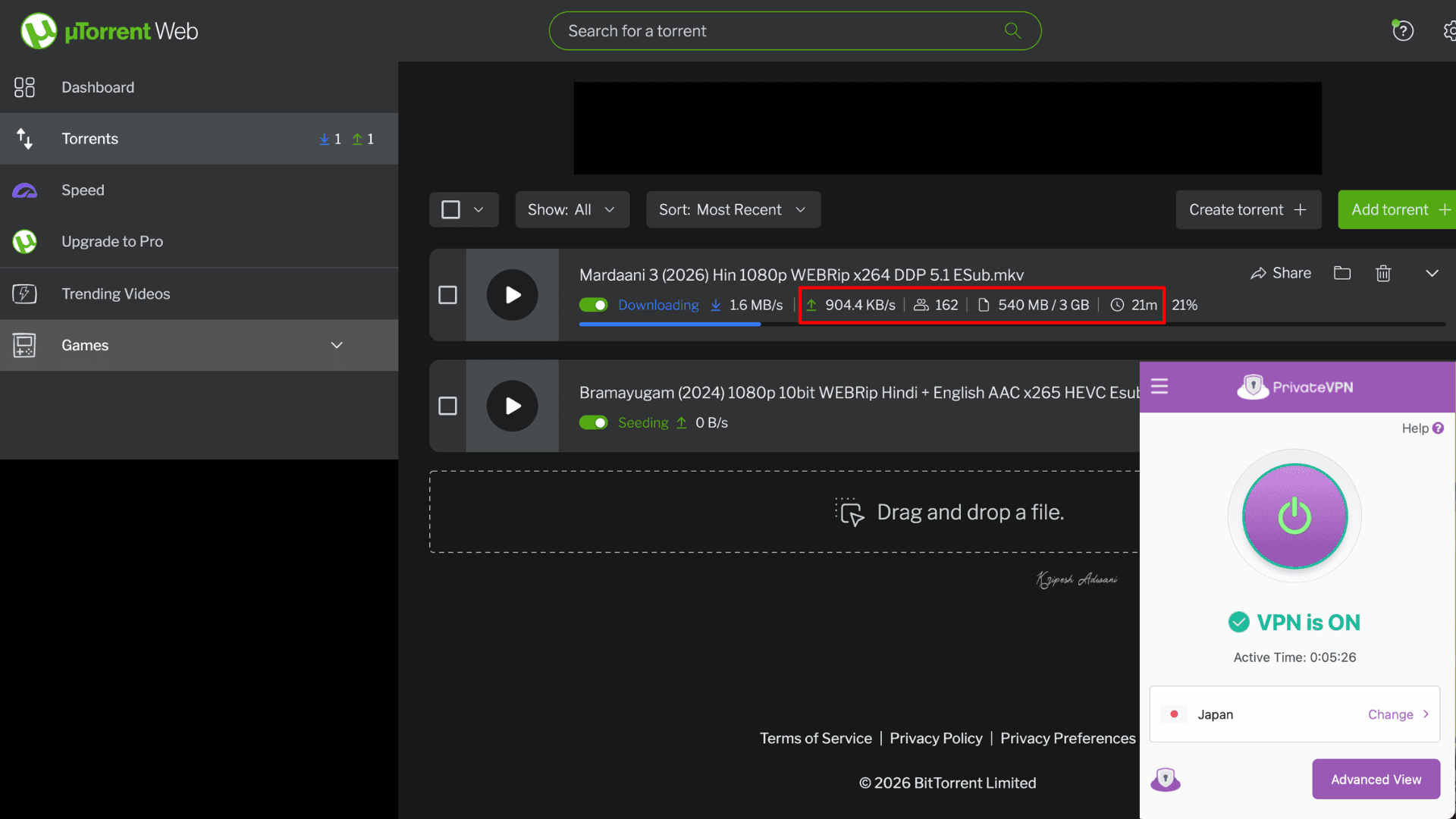
To me, PrivateVPN is a budget-friendly VPN for torrenting. It supports P2P on all 200+ servers, so users can safely torrent anywhere across the world. This VPN provider is compatible with major P2P clients like uTorrent, Vuze, qBittorrent, BitTorrent, etc.
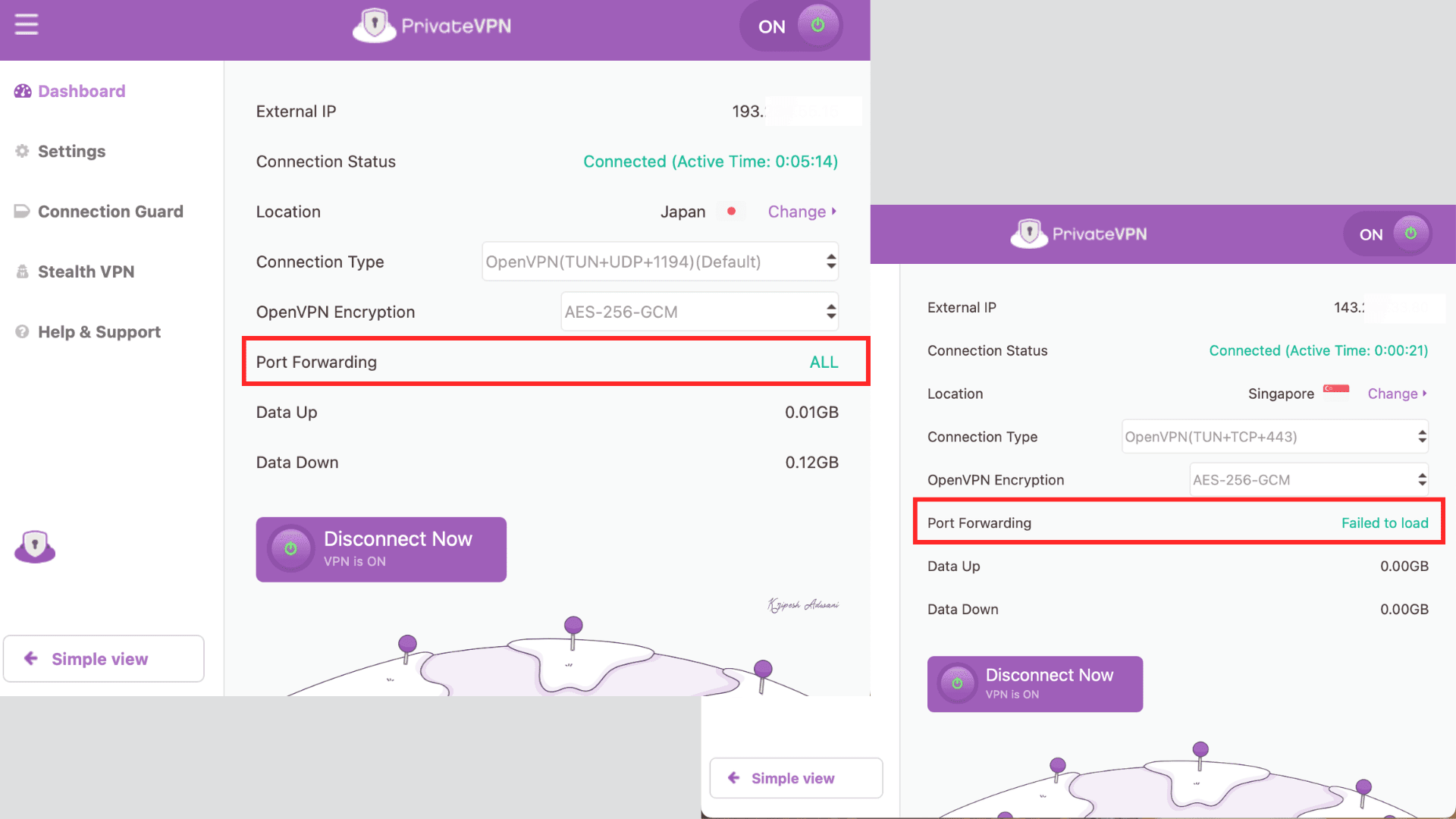
Plus, they offer port forwarding on selected server locations when using the OpenVPN protocol. This feature can improve download speeds as users can connect to more peers. As a result, I could download a 3GB file within 20 minutes when connected to the Japan server.
Privacy
Privacy Policy
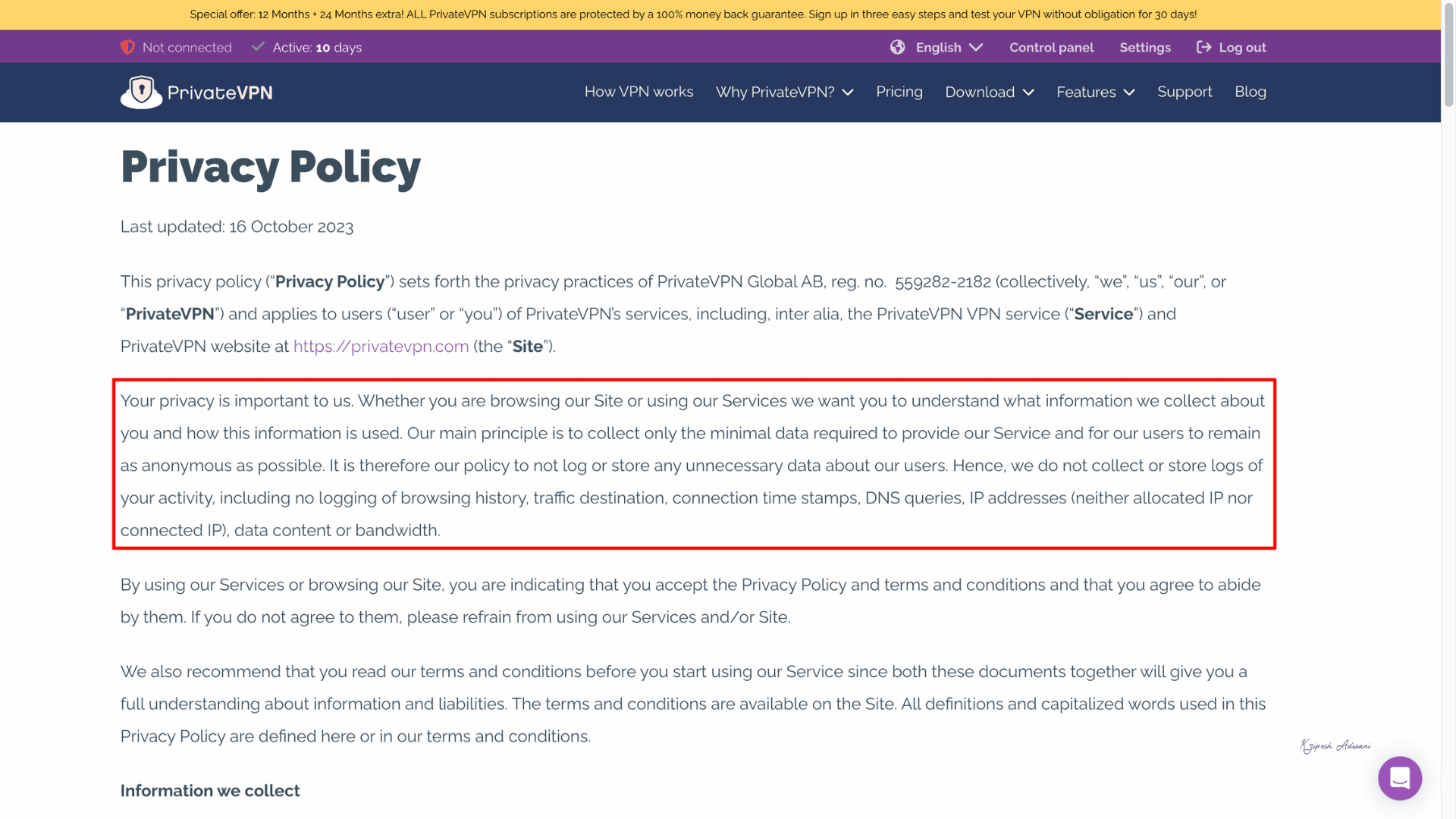
PrivateVPN claims to maintain the highest standard of user privacy. I thoroughly reviewed and did not find anything concerning. PrivateVPN’s privacy policy clearly outlines user rights, data storage practices, complaint procedures, cookie policy, and more.
No-logs Policy
While reviewing its no-log statement, one thing I noticed was that PrivateVPN’s no-log policy is simple and straightforward. They collect minimal usage data, like only account info for identity verification, order processing, internal records, and optional promotional emails.
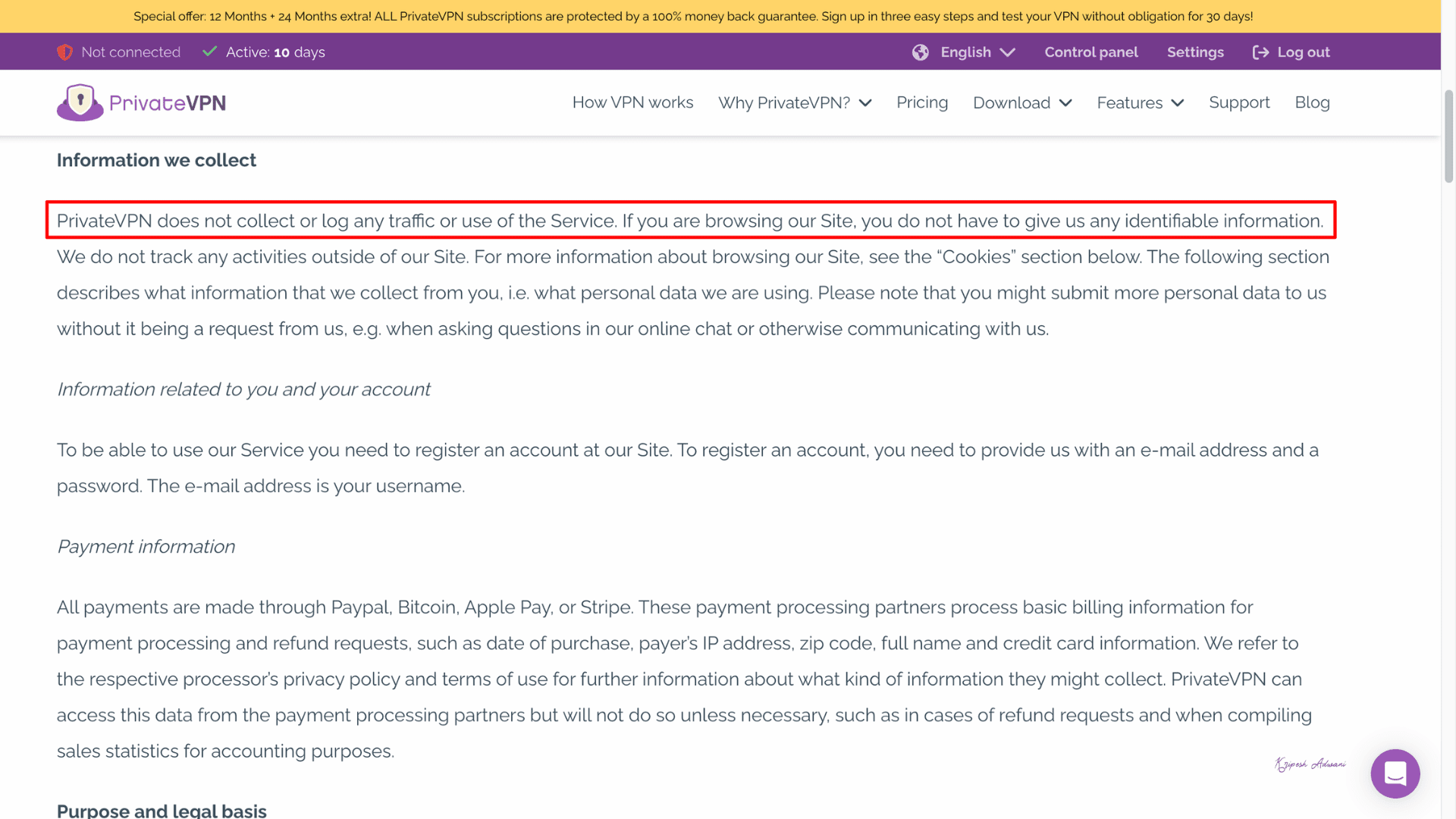
But they don’t store activity data, browsing history, traffic destinations, DNS queries, IP addresses, session duration, or bandwidth usage.
Security Audits
Unfortunately, PrivateVPN has undergone no third-party security audits till now.
PrivateVPN Headquarters
PrivateVPN is headquartered in Sollentuna, Stockholm County, Sweden. Swedish jurisdiction offers strong privacy protection for VPN users, as local laws do not require VPN providers to log user data.
As a member of the European Union, Sweden also enforces strict data protection regulations under the General Data Protection Regulation (GDPR). But Sweden is part of the 14 Eyes intelligence-sharing alliance.
Privacy Comparison
PrivateVPN operates on traditional disk-based servers, unlike Surfshark, NordVPN, and Private Internet Access, which use RAM-only servers. Its privacy policy promises a no-logs approach, but not been independently audited. Plus, its Swedish jurisdiction introduces some theoretical risk of data requests.
Overall, we can say that PrivateVPN’s privacy is decent but mid-tier compared to other paid VPN providers.
PrivateVPN History
PrivateVPN was founded in 2009 by Martin Muller under Privat Kommunikation Sverige AB. By 2017, it had expanded to around 44,000 customers and increased its server presence to 63 locations worldwide. In 2022, the fast-growing hosting company Miss Group acquired PrivateVPN.
Despite the acquisition, it has maintained its headquarters in Sollentuna, Sweden. The VPN provider still upholds its no-logs stance and scaling infrastructure with core features such as P2P support and port forwarding. Over its 17 years of operation, this VPN provider has maintained a clean track record, with no known privacy breaches, data leaks, or major scandals.
PrivateVPN Security
Security Protocols
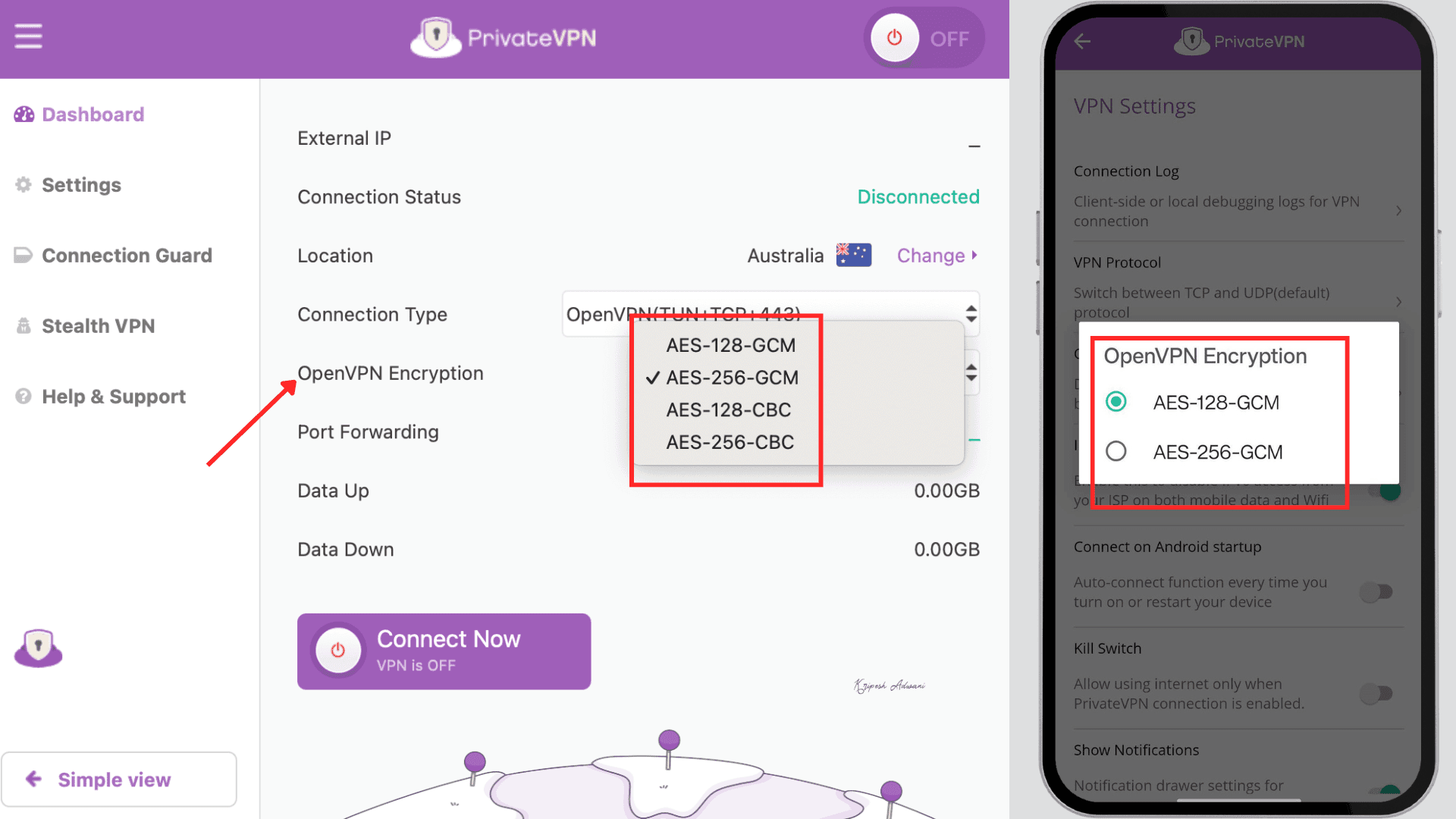
Users will find mainly 5 VPN protocols in PrivateVPN.
| Protocol | Encryption | Security | Speed | Best For |
| OpenVPN (UDP/TCP) | AES-256 | Very High | Moderate | Security across all devices |
| IKEv2/IPSec | AES-256 | High | Fast | Mobile devices |
| L2TP | AES-256 | Medium | Fast | Older devices |
| PPTP | 128-bit MPPE | Low | Very Fast | Legacy use only |
| WireGuard | ChaCha20 | High | Ultra-fast | Modern devices |
PrivateVPN uses OpenVPN as its default protocol. It operates over both UDP (User Datagram Protocol) and TCP (Transmission Control Protocol). TCP is more reliable but slower. If any websites don’t load properly, you can try switching to OpenVPN (TCP).
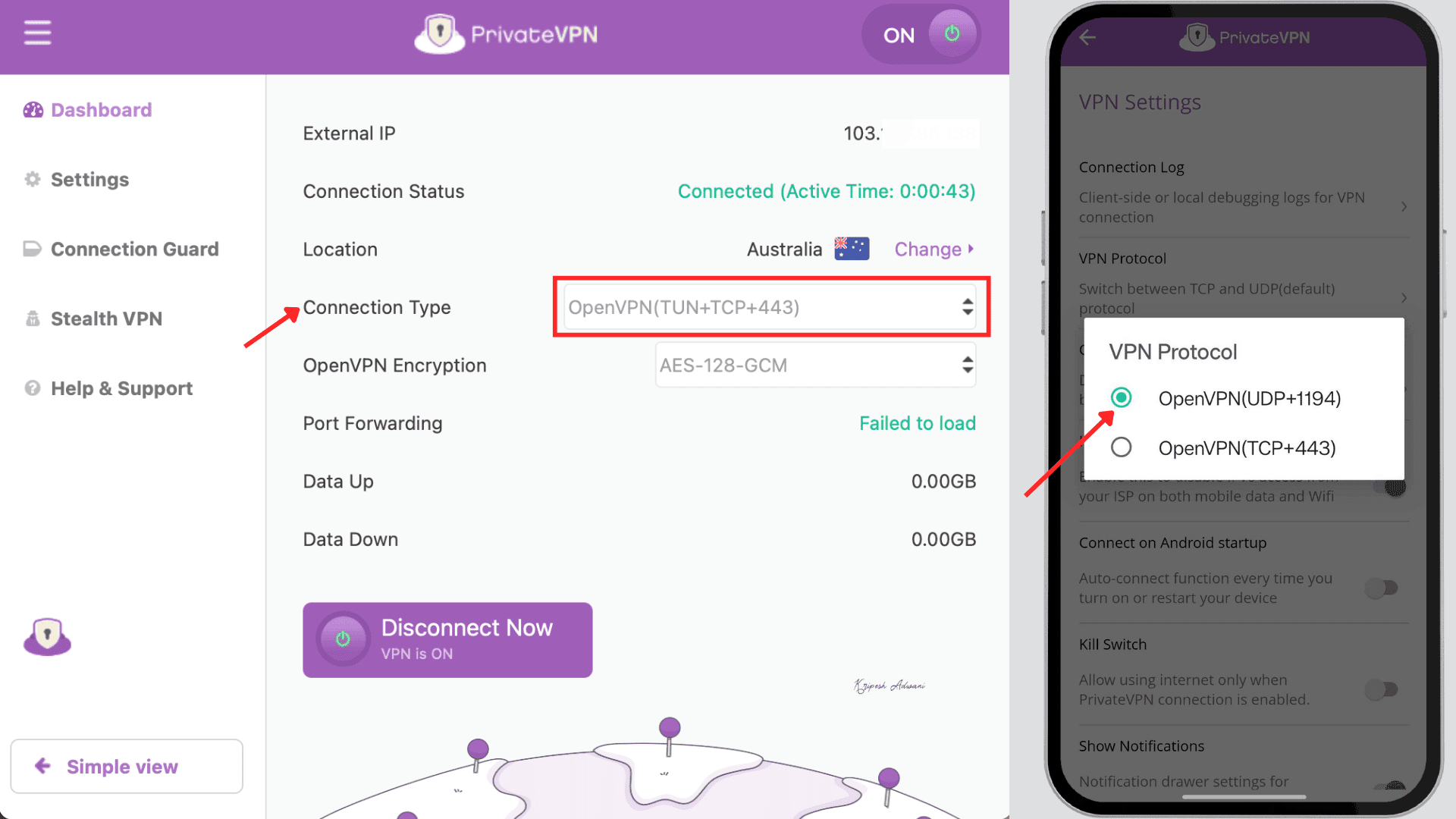
L2TP and PPTP are mainly for older devices. It’s not recommended for modern security needs.
Another drawback is that WireGuard is not available within the PrivateVPN app, unlike in most premium VPNs. Instead, users must manually configure it on each device. You’ll find step-by-step instructions to set up WireGuard or Cisco AnyConnect protocols on their website. Honestly, I found the process to be time-consuming and not worth it.
DNS Leak Test
Even with strong encryption, data leaks can occur, especially with mid-tier VPNs. If your device sends DNS records outside the VPN tunnel, DNS server leaks may happen. As a result, your ISP or other third parties could still see which websites you’re visiting and your approximate location.
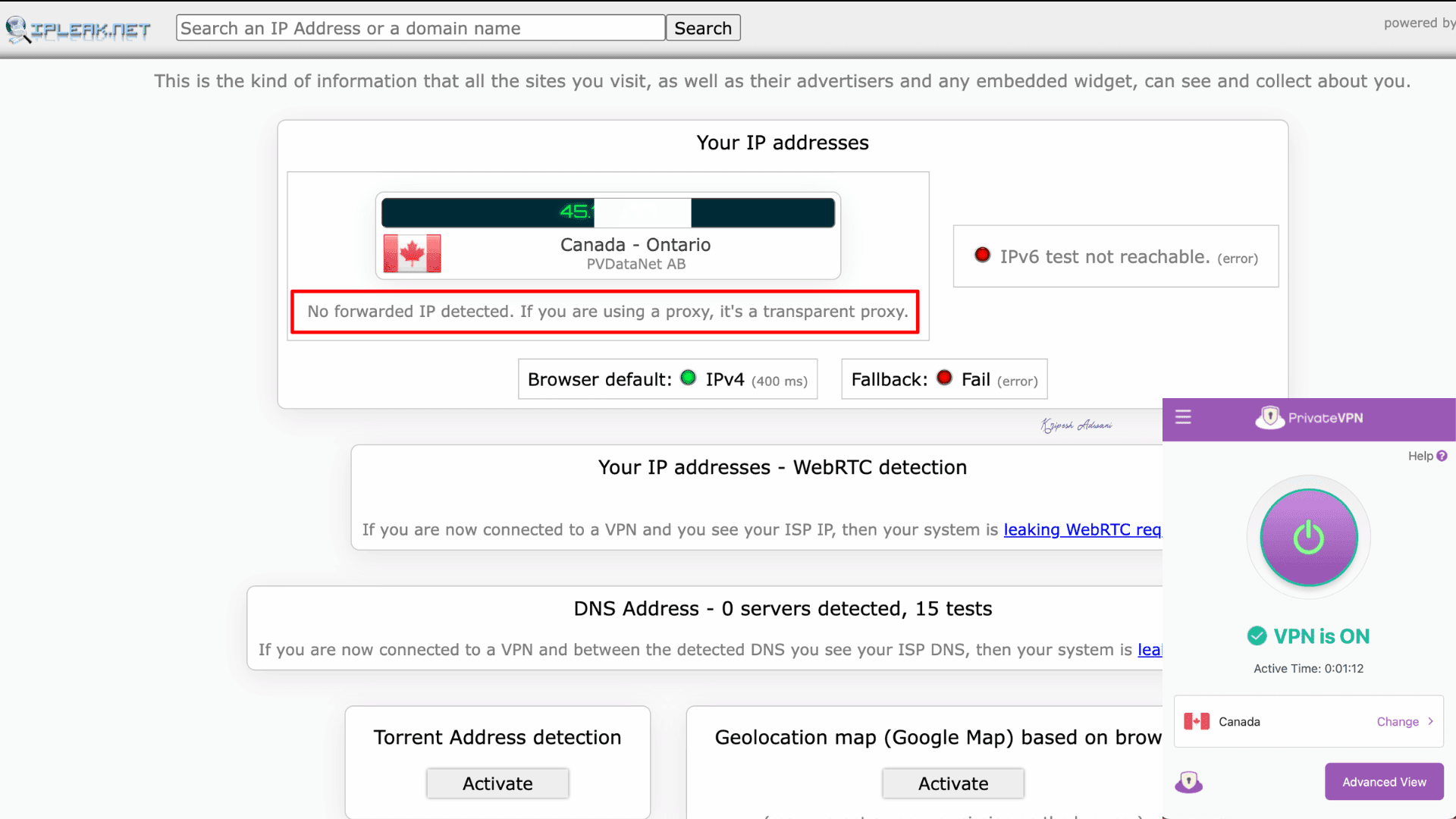
To test this, I performed a DNS leak test for PrivateVPN using IPLeak.net. The results showed that the VPN successfully hid my actual location, with no IPv4 or IPv6 leaks detected.
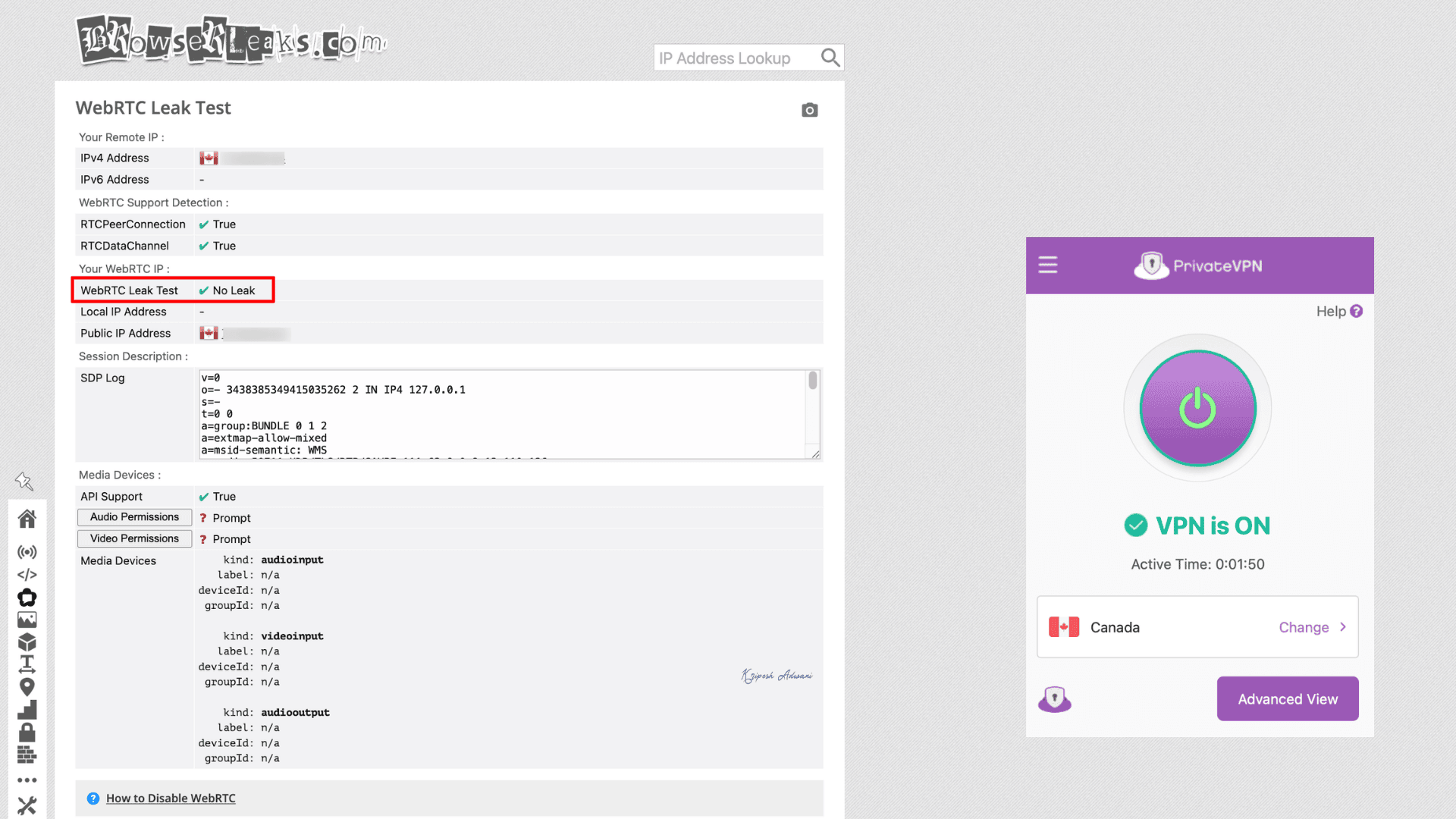
To further verify, I tested for WebRTC leaks on BrowserLeaks.com while connected to the same Canada server. Again, PrivateVPN was able to hide my actual IP address.
Hence, PrivateVPN provides both WebRTC and DNS leak protection.
Kill Switch
PrivateVPN provides a system-wide kill switch across all devices. This feature is called Connection Guard, and it activates when the VPN connection drops unexpectedly because of issues like server crashes, power outages, or accidental disconnections.
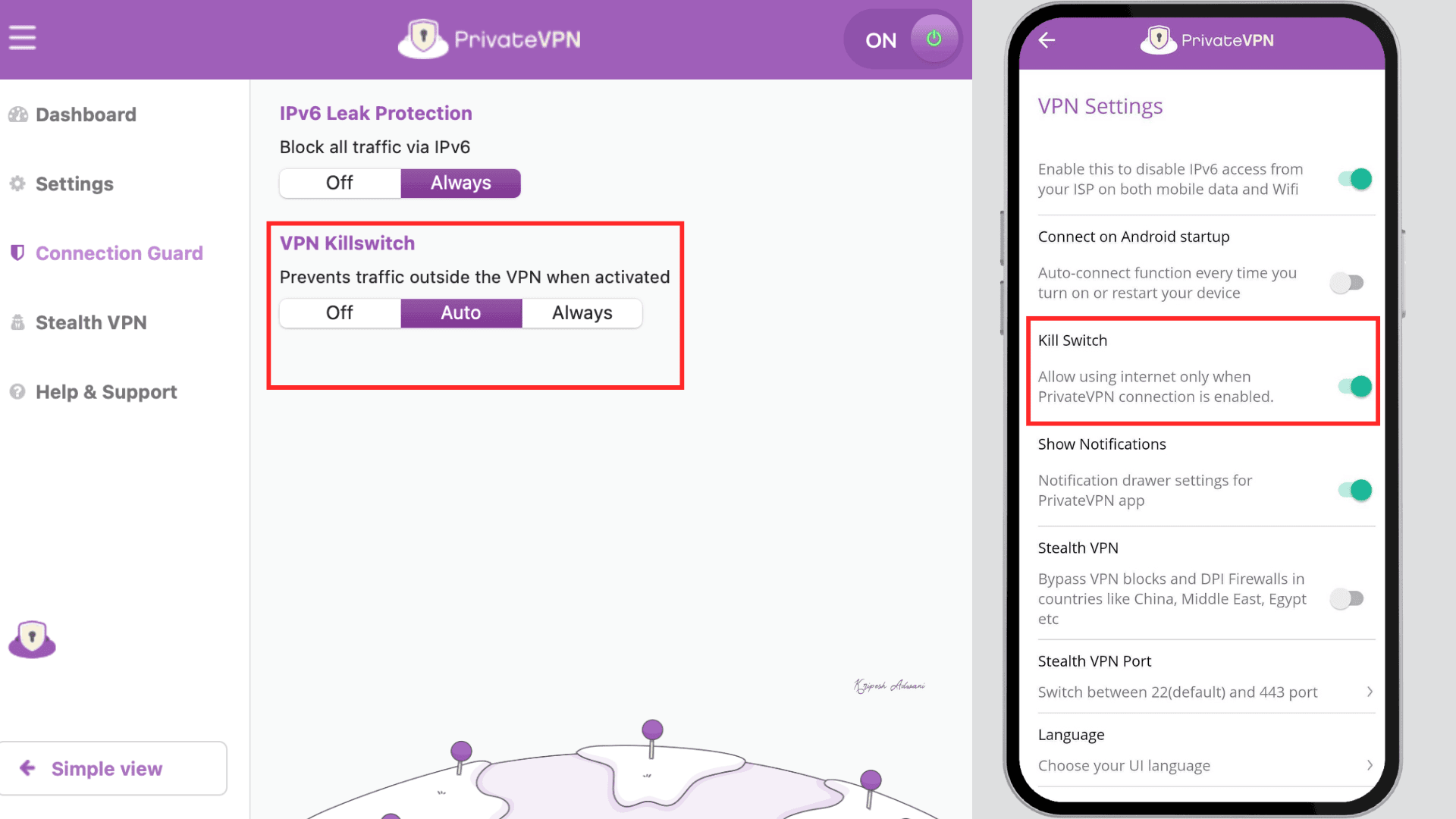
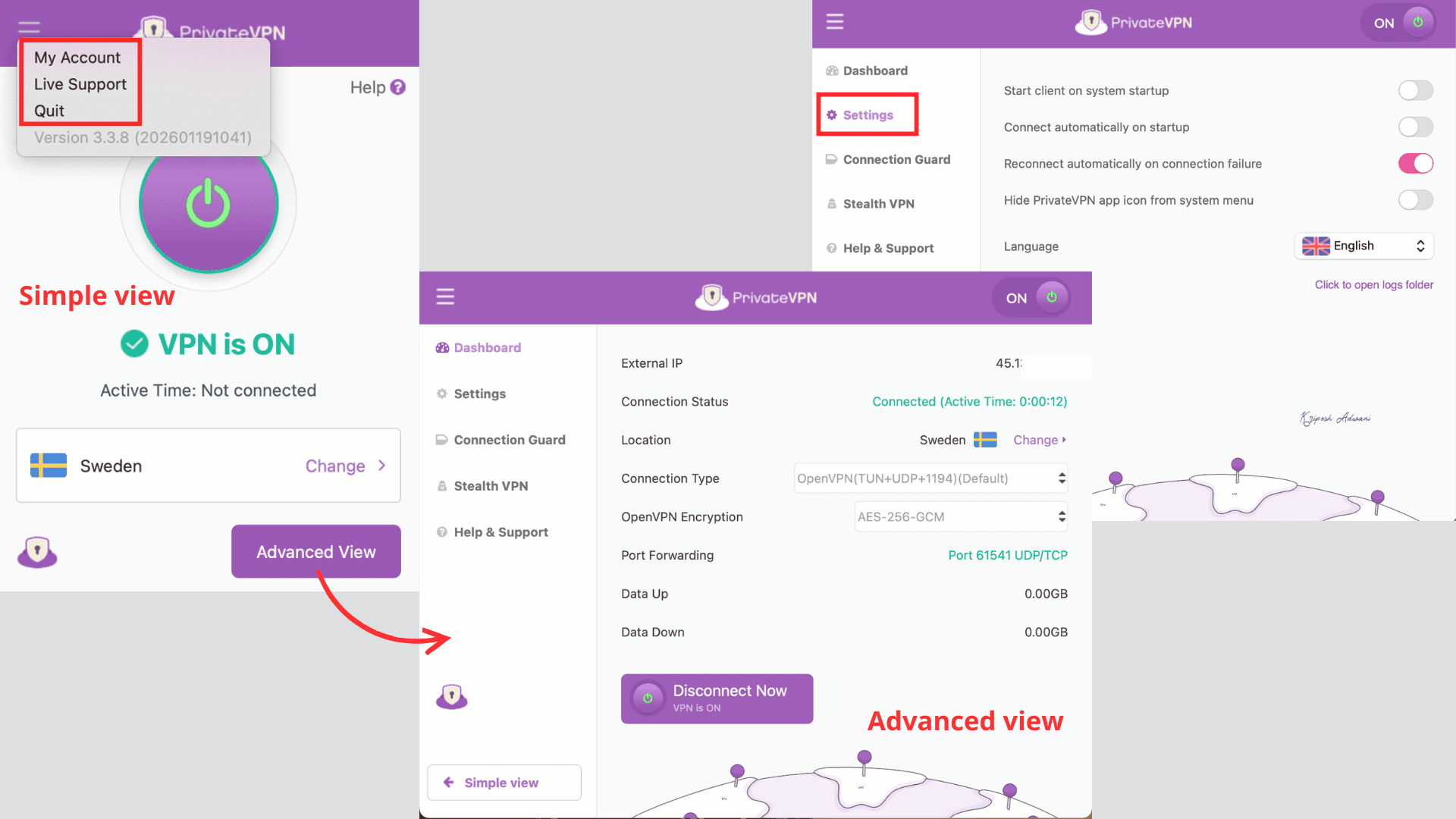
Windows and macOS users can easily enable it from Advanced View > Connection Guard > VPN Kill Switch. As you can see, here are three available options: Off, Auto, and Always. For Android devices, however, I have to enable the Always-on VPN option through the system settings.
Split Tunneling
PrivateVPN does not offer a built-in split tunneling feature like Surfshark, ExpressVPN, or NordVPN. Windows and macOS users can easily enable it from Advanced View > Connection Guard > VPN Kill Switch. As you can see, here are three available options: Off, Auto, and Always. For Android devices, however, I have to enable the Always-on VPN option through the system settings.
Split Tunneling
PrivateVPN does not offer a built-in split tunneling feature like Surfshark, ExpressVPN, or NordVPN.
Instead, you can set up split tunneling manually on certain platforms using third-party apps or configurations. For example, you can configure it using OpenVPN on Android or set it up with WireGuard.
Security Comparison with Premium VPNs
If I compare PrivateVPN with premium VPNs like NordVPN, Surfshark, or ExpressVPN, it lacks a built-in WireGuard protocol. This protocol is highly useful for ultra-fast speeds and strong security services.
Although PrivateVPN passed DNS leak tests, it misses advanced features like Onion routing. Plus, from setting up WireGuard or enabling the kill switch, I have to put in some manual effort. Kill switch protection is decent; it’s not as advanced as what I get with top-tier VPNs.
Pricing
| PrivateVPN | Pricing for 1 month | Pricing for 3 months | Pricing for 3 years |
| Per-month cost | $9.90/ Month | $6.00/ Month | $2.00/ Month |
| Total cost | $9.90 | $17.99 | $72 |
To make the plans competitive and budget-friendly, PrivateVPN offers three simple plans. It would be best to subscribe to a 36-month plan, as you’ll save 85% on the monthly cost. All plans include unlimited bandwidth, 10 simultaneous connections, port forwarding, free remote help and installation, and more.
Money-Back Guarantee
PrivateVPN offers a 30-day money-back guarantee on all plans. If you’re subscribing for the first time, you’ll be eligible for a full refund if you request it within 30 days of purchase. The subscription cancellation process is simple, and PrivateVPN processes refunds within five business days.
They also offer a 7-day free trial. However, according to user reviews, the trial is available only for a limited time.
Payment Options
PrivateVPN accepts payments through major credit and debit cards. You can also pay via PayPal, Google Pay, Apple Pay, and even cryptocurrencies. It supports four currencies: USD, EUR, GBP, and SEK.
Competitor Pricing
If I compare PrivateVPN pricing with Surfshark, PrivateVPN is clearly more expensive with limited features. Surfshark costs around $1.89/month for a 28-month plan, whereas PrivateVPN costs about $2/month, but only with a 36-month subscription. In comparison, ExpressVPN and NordVPN are priced at approximately $2.44/month and $2.98/month, respectively.
PrivateVPN Customer Support
| Customer Support Facility | PrivateVPN |
| 24/7 Live chat support | Yes ✅ |
| Phone Line | No ❌ |
| Yes ✅ | |
| FAQs | Yes ✅ |
| Knowledge guide | Yes ✅ |
I’m impressed with the 24/7 live support offered by PrivateVPN. You can contact the team for any issues directly from their website or app. Initially, you’re connected to a bot, but when I requested to “transfer to an agent,” the handover was immediate.
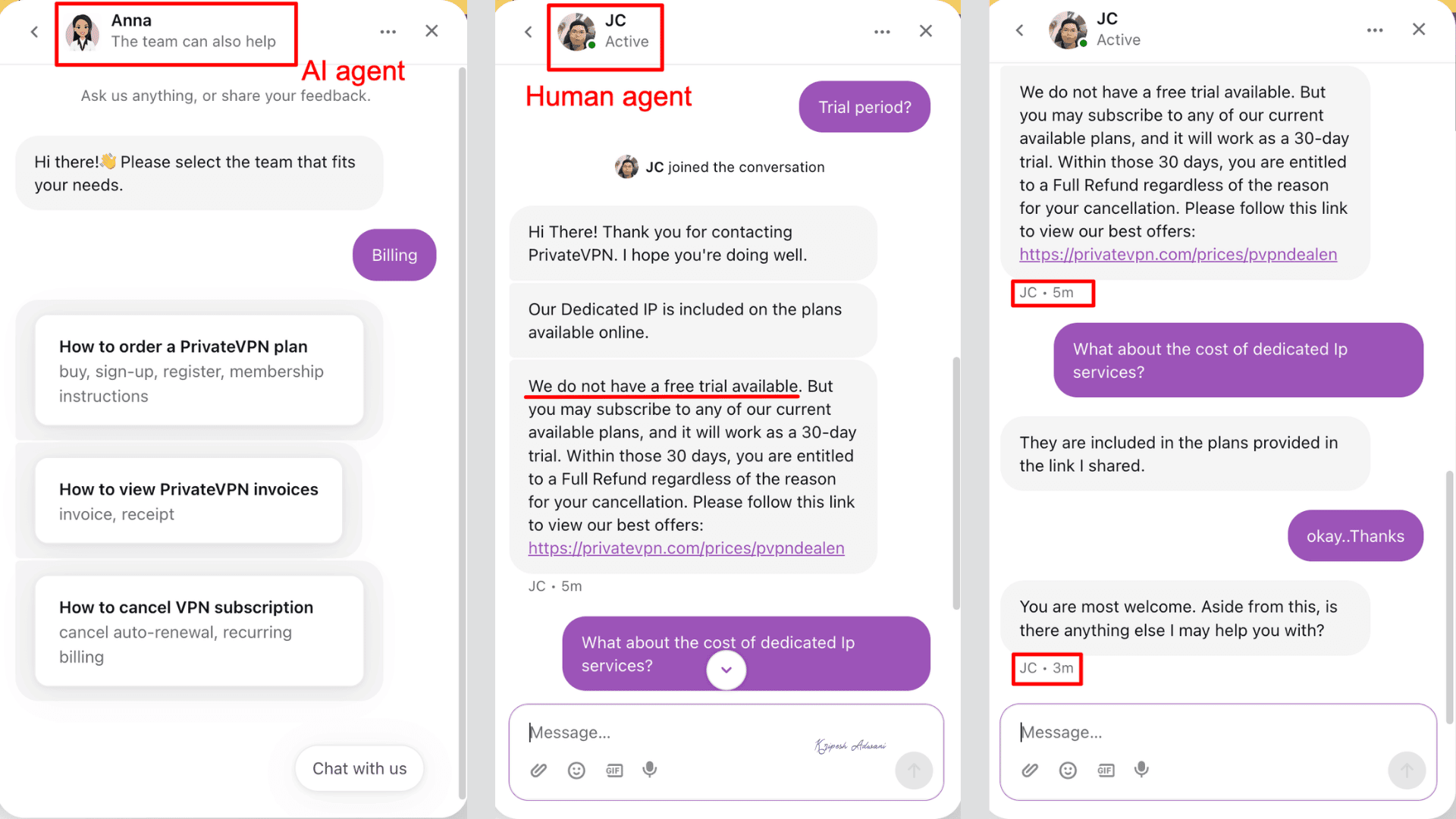
The support team was responsive and knowledgeable. Along with that, there are plenty of articles, FAQs, and guides available on the support page to help with general queries, troubleshooting, and device setup.
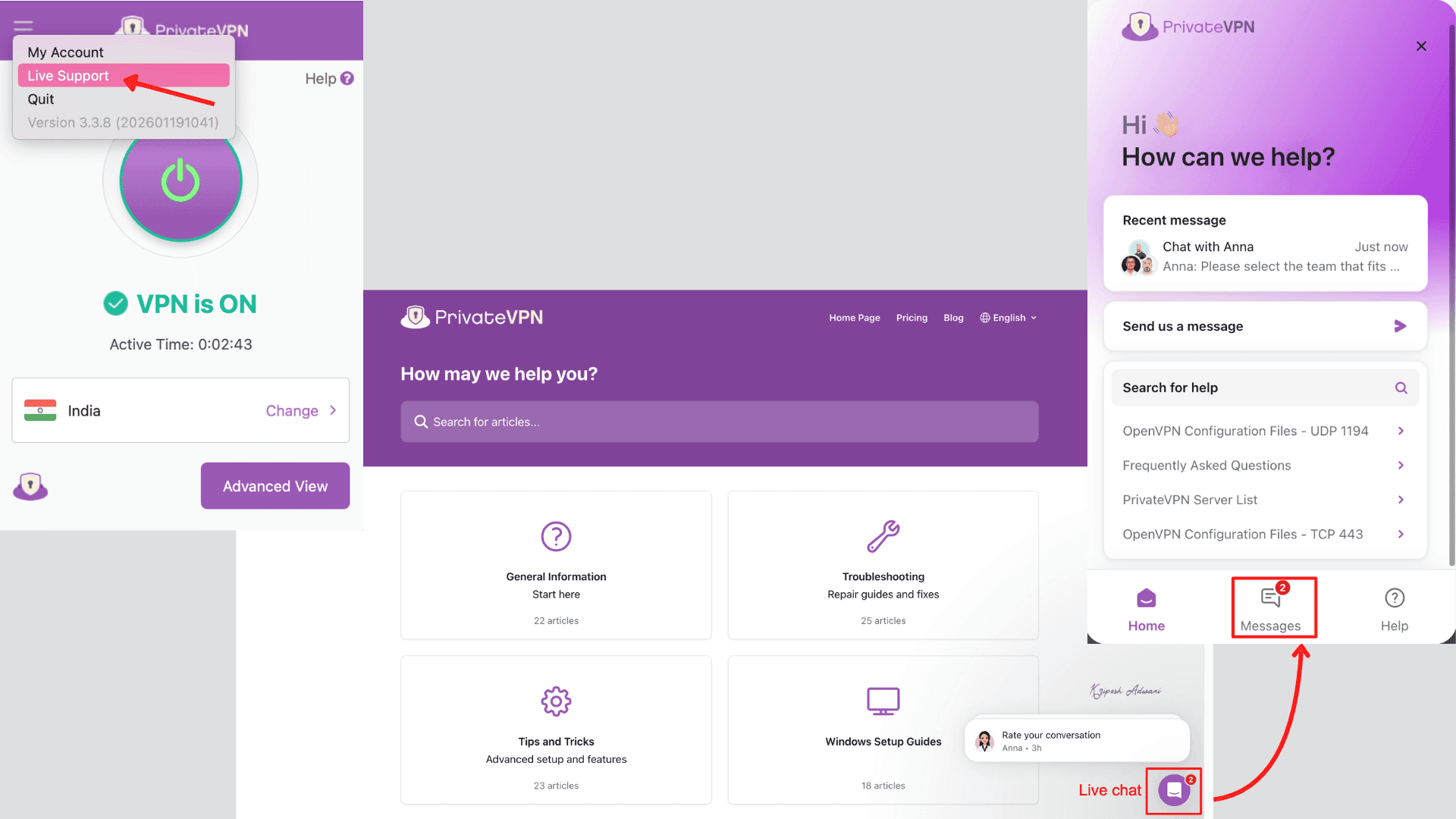
If you still need assistance, you can also reach them via email at [email protected].
Devices
PrivateVPN is available on all major platforms. You can download and set it up on Android, iOS, iPad, macOS, Windows, Kodi, Linux, and routers.
They provide dedicated setup options for VPN for Netflix US, BBC iPlayer, RTÉ Player, torrenting, Android TV, and Fire TV.
User Interface
| Devices | User Interface | Experiences |
| Windows | Simple/Advanced toggle, customizable | Very good |
| macOS | Same as Windows | Good, but missing some Windows features |
| Linux | Manual setup guide | Average, requires technical knowledge |
| Android app | Beginner-friendly | Easy but basic |
| iOS app | Clean, one-screen design | Lacks shortcuts integration |
| Browser Extension | Chrome/Firefox, one-click connect, | Lightweight |
PrivateVPN offers a clean and 2-mode beginner-friendly interface. On the desktop app, you can easily switch between Simple and Advanced views. There are clearly visible buttons for navigation, including settings, live chat, and exit options. A large connect/disconnect button is prominently displayed on both the home screen and within the settings tab.
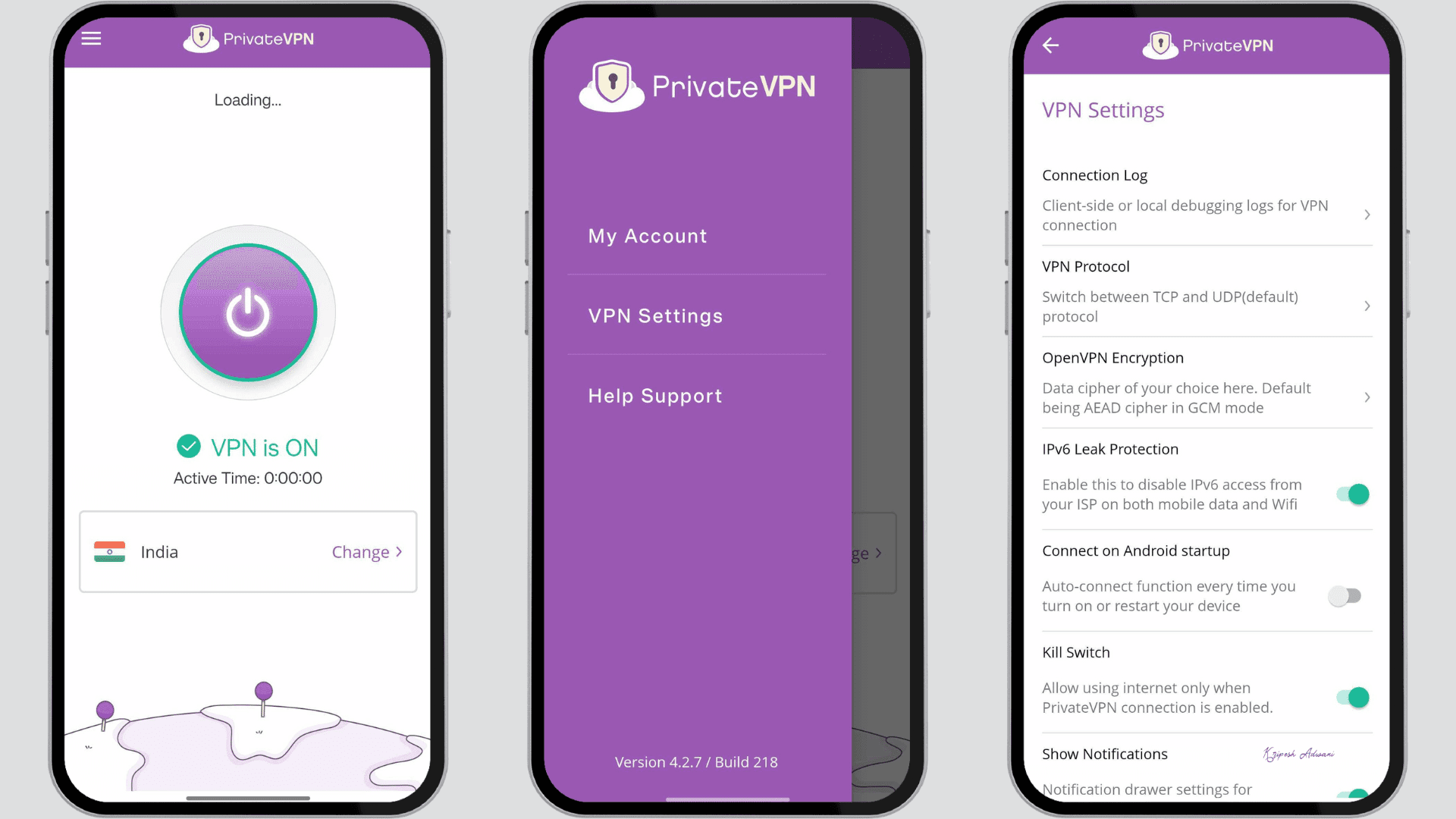
On mobile devices, the interface feels even more beginner-friendly than on the desktop. Under the settings tab, all features are neatly listed with easy toggle switches. One of the best features on both desktop and Android apps is the ping-based server list, which helped me quickly choose the fastest server.
The app also provides live stats of IP addresses, speeds, and port forwarding details. However, the overall design feels more outdated to me than modern competitors. It lacks features like dark/light mode, mobile widgets, and a split tunneling toggle.
Performance & Reliability
PrivateVPN delivered somewhat variable performance. Speeds dropped by 30 to 50% on local servers, with a ping rate of about 50ms. On international servers, speed is reduced by over 60% with higher latency (exceeding 200 ms).
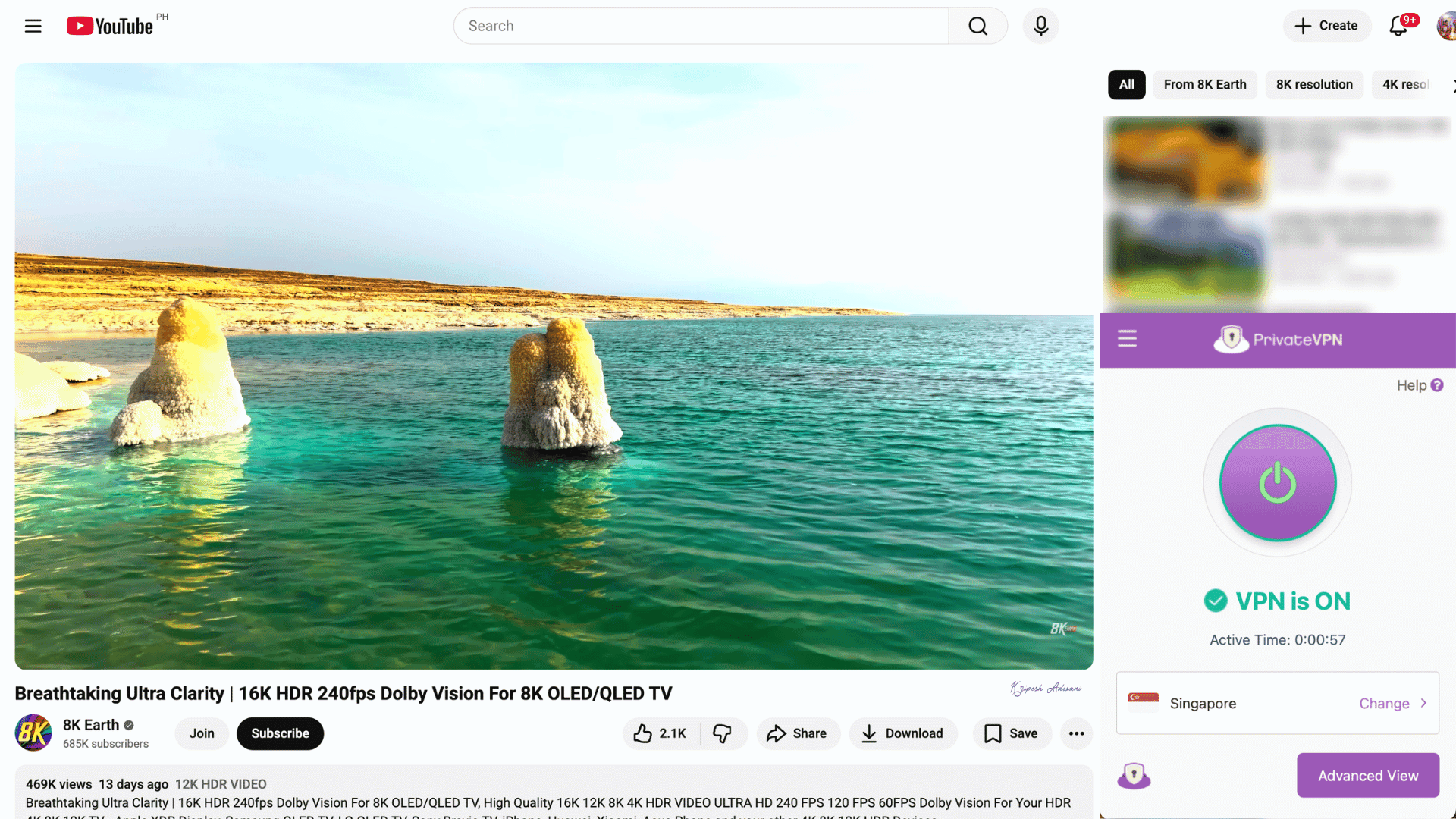
I noticed decent connection stability with 95% uptime and minimal drops. Usually, the VPN connects and reconnects fast. Torrenting speed ranged between 1.6-2 MB/s with stable seeding because of port forwarding.
But streaming capability for 4K HD videos was unreliable. I could only unlock Netflix, but I couldn’t watch because of the poor speed. Also, PrivateVPN’s small network often causes occasional slowdowns on high-demand servers.
PrivateVPN Pros
1) P2P-Friendly Network
PrivateVPN is a good choice for P2P file sharing. It supports all major clients and allows port forwarding for faster speeds. Its port forwarding feature, combined with SOCKS5 proxy, helps bypass firewall restrictions and ensures a secure remote network.
2) Stealth Mode
For obfuscation, Stealth VPN is available across all PrivateVPN’s apps (Mac, Windows, Android, iPhone, etc.) Another advantage is that, unlike many VPNs, PrivateVPN’s stealth mode works in China and Iran.
3) Free Dedicated Servers
Users have to pay extra with the usual subscription plans to access dedicated servers in NordVPN, Surfshark, and ExpressVPN. However, PrivateVPN includes access to dedicated servers within its subscription at no extra cost.
4) Hassle-Free Refund Policy
PrivateVPN offers a 30-day money-back guarantee along with a 7-day free trial. Regardless of the option you choose, the team will process refunds within five business days. The overall process is smooth and quick, with support available via live chat or email.
PrivateVPN Cons
1) Small Server Network
In 2026, PrivateVPN offers only 200 servers in 63 countries. Most servers are located in the UK and the USA, with very limited coverage in Asian and African regions. Hence, global users may experience restricted access or higher server congestion.
2) No Third-Party Audits
PrivateVPN claims to follow a no-log policy. That means they do not store user activity data. But PrivateVPN hasn’t conducted a single security audit by independent third-party firms. Hence, their no-log claim is unverified and feels suspicious to me.
3) Sweden-based Jurisdiction
Sweden is a member of the 14 Eyes intelligence alliance, which shares signals intelligence with the US, UK, Germany, and France, and 10 other countries. This means that in certain situations, PrivateVPN could be legally required to share user data if requested by authorities.
4) Below Average speeds
Even when connected to Indian servers, my speeds dropped by 35 to 50%. They claim to maintain physical servers, but the performance remained below average. For international servers, the speed drop was too high, only useful for basic online activities.
5) Outdated User Interface
I didn’t find the UI/UX of PrivateVPN very appealing. It’s too simple compared to the modern interfaces of NordVPN, Surfshark, and ProtonVPN. They haven’t updated the user interface for desktop or mobile. Many features still require manual configuration.
6) Longer Subscription Commitment
PrivateVPN’s pricing plans are straightforward. But to get the lowest rate ($2/month), you need to commit to a 3-year subscription. In contrast, you can get a competitive rate with Surfshark or NordVPN with just a 2-year plan.
7) Poor Streaming Support
I wasn’t able to unblock most international streaming platforms like Amazon Prime Video (US) or BBC iPlayer. Only Netflix worked with PrivateVPN. Even on Indian servers, services like Zee5, SonyLIV, and Hotstar didn’t work properly.
8) No RAM Servers
Unlike NordVPN or Surfshark, PrivateVPN does not provide RAM-based servers. This means any session data stored while using the VPN may not be automatically wiped upon a system reboot.
9) Split Tunneling Missing
PrivateVPN does not offer a built-in split tunneling feature on any of its apps. As a result, users cannot route some apps through the VPN for security while allowing others to connect directly via their regular internet for better speed.
PrivateVPN Alternatives
If you’re ready to switch from PrivateVPN, here are the top alternatives I would recommend.
1) Surfshark
Surfshark, launched in 2018, is a Netherlands-based virtual private network provider. It is currently one of the most affordable VPNs that doesn’t compromise on advanced features. It offers 4,500+ servers across 100 countries worldwide.
With Surfshark, you get the WireGuard protocol, AES-256 encryption, and 10 Gbps servers for fast and secure connections. Unlike PrivateVPN, which lacks features like split tunneling, RAM-only servers, and multi-hop connections, Surfshark provides these. Plus, it allows unlimited device connections, compared to the 10-device limit on PrivateVPN.
Its Starter plan is available at $1.78/month for a 2-year plan, with 4 extra months included with my link.
2) NordVPN
NordVPN is a premium VPN provider headquartered in Panama that predates Surfshark. First standout feature is its custom WireGuard protocol called NordLynx, designed to deliver faster and more secure connections. Its Threat Protection Pro feature acts like a lightweight, web-focused antivirus.
In PrivateVPN, we get basic DNS and IPv6 leak protection. But NordVPN also includes a Dark Web Monitor that alerts users if their data is exposed online. For enhanced multi-layer security, it offers features like Onion over VPN and Meshnet. The server network is larger than even Surfshark (9,000 servers in 120+ countries).
With my link, you can get its basic subscription for around $2.82/month for a 2-year plan.
3) ExpressVPN
The third option you can consider for accessing content in China or for heavy gaming is ExpressVPN. It has 3,000+ servers in 105 countries, giving you strong global coverage. For faster performance, ExpressVPN uses its own Lightway protocol, unlike standard OpenVPN in PrivateVPN.
It also includes useful features like Threat Manager, split tunneling, a password manager, and ID alerts. Another big plus is that its no-logs policy has been independently audited multiple times (5+ as of 2026). But ExpressVPN is slightly more expensive than PrivateVPN. Its Basic plan costs around $3.49/month for 28 months with my link.
Why Should You Trust Me?
I’ve been involved in the tech and tools space since 2015, with extensive hands-on experience testing over 30 VPN services. Over the years, I’ve reviewed well-known providers such as Surfshark, NordVPN, ProtonVPN, NymVPN, and ExpressVPN. On my website, I also share helpful content on the 7 best free VPNs, Ways to reduce VPN latency, the 3 best gaming VPNs, anti-detect browsers, password managers, and more.
My reviews are based on real-world usage, focusing on performance, ease of use, and reliability rather than just technical specifications. To stay current with updates and new features, I actively maintain subscriptions to multiple VPN services. This practical experience allows me to test newer options like NymVPN with confidence and provide honest, unbiased feedback.
Conclusion
PrivateVPN is an older competitor in the market, launched even before NordVPN or Surfshark. It mainly focuses on being a budget-friendly option with a few standout capabilities for specific users. At about $72 for 3 years, it’s a good choice for cost-conscious buyers.
The first advantage is that it offers a dedicated dynamic IP address at no extra cost. It also supports P2P with port forwarding on all of its servers and Stealth mode to help access content in China and the UAE. But in 2026, it feels like PrivateVPN hasn’t upgraded as much as other VPNs.
It misses essential features like split tunneling, RAM-only servers, and native WireGuard protocol. The app design is a bit old. No independent audits have been conducted to verify its no-log claims. The small network can even cause slow speeds.
In simple terms, PrivateVPN is ideal only if you need a dedicated IP, torrenting with port forwarding, and basic access in restricted nations. Otherwise, there are better and more advanced VPNs available today.
That’s my honest take. Stay tuned for more VPN reviews coming soon.
FAQs
Does PrivateVPN have WireGuard?
No, PrivateVPN doesn’t offer a built-in WireGuard protocol like many modern VPNs. But we can set it up manually on Android and other devices using third-party apps.
Is PrivateVPN safe?
PrivateVPN is based in Sweden, a country that maintains a strong user privacy policy. It has a 17-year-old clean track record and follows a no-logs policy (though it hasn’t been independently audited). Overall, it is considered safe for everyday use.
Does PrivateVPN work in China?
Yes, PrivateVPN offers a Stealth Mode designed to hide VPN traffic in restricted countries like China. Their support team also confirmed to me that it works there.
How many devices can connect to PrivateVPN?
You can connect up to 10 devices at the same time with a single PrivateVPN account.
Does PrivateVPN have ad blocking or antivirus software?
No, PrivateVPN does not include built-in ad blockers or antivirus features.

PrivateVPN Pros (+)
- P2P-Friendly Network
- Stealth Mode
- Free Dedicated Servers
- Hassle-Free Refund Policy
PrivateVPN Cons (-)
- Small Server Network
- No Third-Party Audits
- Sweden-based Jurisdiction
- Below Average speeds