Running out of storage space on your phone or laptop? Looking for a simple cloud-based solution without spending extra money? The solution lies in your phone itself. I’m talking about Telegram!
Did you know Telegram isn’t just a messaging app; it can work as your personal cloud storage too? From files and photos to entire videos, there are multiple ways you can use it to store your data. But the real question is: how safe is your information on Telegram?
After spending hours testing, researching, and actually using it as storage, I’ve put together this in-depth Telegram Cloud Storage Review. We’ll explore its UI, speed, data centers, device support, security, privacy policy, pricing, and more.
You’ll also find the major pros and cons, along with some solid alternatives worth considering. So, is Telegram Cloud the right place for your files, or should you look elsewhere? Let’s dive in and find out!
Telegram Cloud Review
Summary
Telegram Cloud offers free unlimited storage, cross-platform access, fast upload/download speeds, and built-in media playback.
However, it lacks a trash bin, has weak and unaudited encryption, poor customer support, and a privacy policy with red flags.
It is a decent choice for users who need quick and casual file storage, not suitable for sensitive data.
Disclaimer : I strongly believe in transparency. If you buy using the links on our site, we may earn a small commission without any extra cost to you. This helps me to keep producing honest reviews. Read More >>
- What is Telegram Cloud?
- Telegram Cloud Overview
- Telegram Cloud User Interface
- How to use Telegram as a Cloud Storage?
- Telegram Cloud Data Centers & Jurisdiction
- Telegram Cloud Speeds
- Telegram Cloud File Features
- Telegram Cloud Devices and Apps
- Telegram Cloud Security
- Telegram Cloud Pricing
- Telegram Cloud Security Audits
- Telegram Cloud Privacy Policy
- Telegram User Ban and CEO Pavel Durov’s Arrest
- Telegram Cloud Support
- Telegram Cloud Pros
- Telegram Cloud Cons
- Telegram Cloud Alternatives
- Why Should You Trust Me?
- Conclusion
- FAQs
What is Telegram Cloud?
Telegram is a cloud-based instant messaging service that can be accessed on multiple platforms. Durov Brothers created it in 2013, and it’s headquartered in Dubai, UAE.
Telegram lets you store an unlimited amount of data on its servers, including a range of file types like audio files, video files, documents, messages, contacts, and locations, all for free!
We refer to this functionality of Telegram as Telegram Cloud, which has been making a buzz in the market recently!
For video people here’s the Telegram Cloud Storage review for 2026.
Telegram Cloud Overview
| 💰 Pricing | Starts from ₹260/mo or ₹1950/year |
| 📍 Headquarters | Dubai, UAE |
| 🆓 Free Storage | Unlimited cloud storage (file upload limit of 2 GB/file) |
| ⚡ Speeds | Fast upload and download speeds |
| 🔐 Encryption | MTProto encryption (End-to-End encryption only in Secret Chats) |
| 🔑 2FA | Yes ✅ |
| 🔄 Sync | Basic cloud sync (No selective or block-level sync) |
| 💻 Virtual Drive | No ❌ |
| 🔗 File Sharing | Can share files within Telegram chats or channels |
| ✏️ File Editing & Collaboration | No ❌ |
| 🗑️ Trash Retention | No trash bin ❌ |
| 📱 Apps Supported | Android, iOS, iPadOS, Windows, Mac, Linux, Web |
| 🛠 Support Channels | FAQ / Help Center and Volunteer Chat Support |
| 💵 Refund Policy | No refunds ❌ |
| 💳 Payment Methods | App Store / Play Store billing and in-app payments |
Telegram Cloud User Interface
The user interface of the Telegram messaging service is pretty neat, modern, and pleasing to the eye.

However, its cloud storage functionality doesn’t have a different UI. It’s integrated into Telegram itself. So, you won’t find a separate interface like Google Drive, pCloud, etc.
How to use Telegram as a Cloud Storage?
Unlike Google Drive, pCloud, Icedrive, and other dedicated cloud storage services, Telegram doesn’t offer you a separate interface to store your files.
You can access Telegram Cloud from the Telegram messenger itself. All you need to do is sign up on Telegram with your mobile number. Your chats would work as cloud storage. There are 3 ways to access Telegram Cloud. Let me show you how to go about them in detail.
1. Through Saved Messages
The ‘Saved Messages’ folder is visible on your messenger screen by default. Alternatively, if you forward a message/file from any chat, you will get the option to share it to your saved messages folder.
2. By Creating a Bot
- Step 1: Type in ‘Botfather’ in the Telegram search bar.
- Step 2: Select the first result and click on Start.
- Step 3: Click on the command ‘/newbot’
- Step 4: Type a name for your bot and then specify a unique username.
Your bot is created and you can access it from the provided link.

3. By Creating a Private Channel
- Step 1: Click on the new message icon and select the ‘New Channel’ option. Give a name and add a description for your channel.
- Step 2: Now, choose the ‘Private Channel’ option and do not choose any contacts.
Your Private Channel will be created. Now you can use it to save your personal data on the Telegram Cloud.
Telegram Cloud Data Centers & Jurisdiction
Telegram’s data centers are located in multiple locations worldwide. These include Miami, USA, Amsterdam, Netherlands, and Singapore. It uses this distributed network of data centers to store its customer data.
So, if a user stores a file on Telegram, it may be stored in parts across multiple servers. Many users complain that Telegram servers glitch a lot, leading to loss of chats and precious data. Thus, it’s best not to store sensitive files on Telegram.
Talking about jurisdiction, the US, Amsterdam, and the Netherlands belong to the 5 and 9 Eyes Alliances. Whereas Miami and Singapore do not belong to an intelligence-sharing organization.
Telegram Cloud Speeds
To test the speed of Telegram Cloud, I uploaded and downloaded a 160 MB video file on it with a network speed of 30 Mbps. Here are the results.
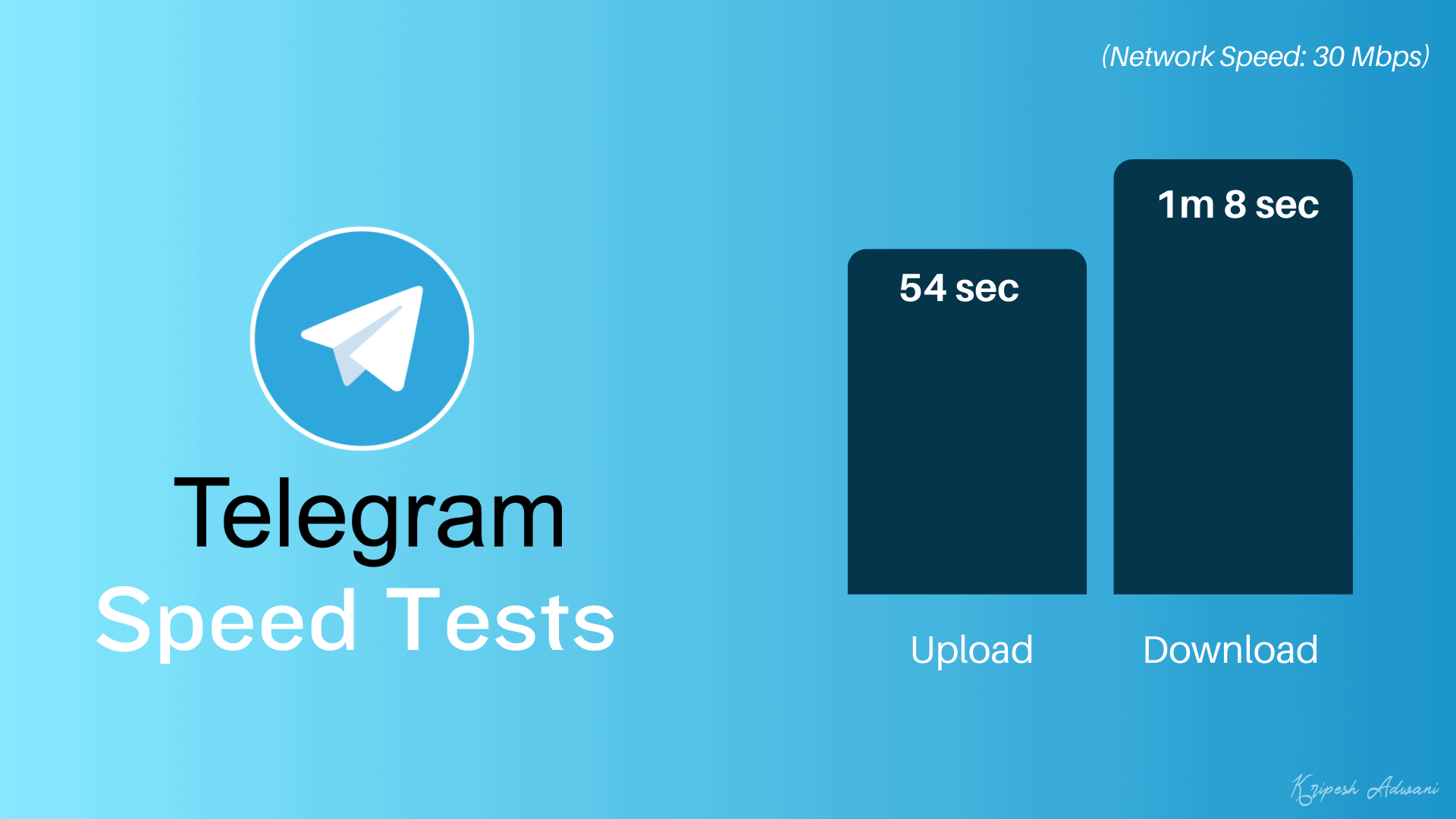
- Upload Time: 54 sec
- Download Time: 1 min 8 sec
Overall, the upload and download speeds are pretty fast. You can use it for storing your documents, photos, and videos.
Telegram Cloud File Features
Now, let’s take a look at the different file features of Telegram Cloud.
File Syncing
Unfortunately, there are no options for selective or block-level sync on Telegram Cloud. It offers basic sync, where your uploaded or deleted files and chats are synced across all logged-in devices.
File Sharing
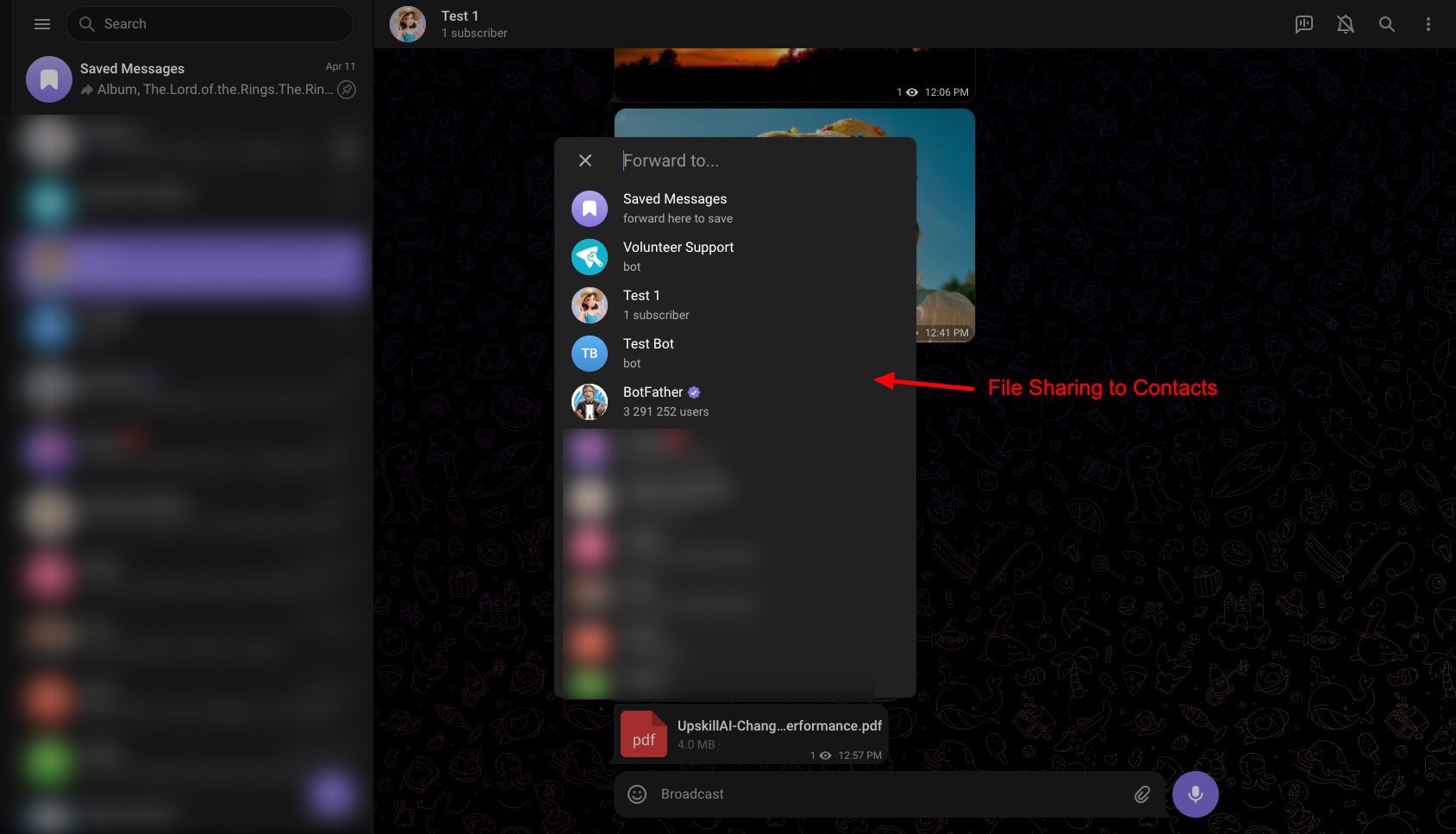
You can only share media and files with other Telegram users. It doesn’t offer any additional options to create public links, enable password protection, set link expiry dates, etc.
File Deletion & Recovery
Telegram Cloud lacks one of the most important features in a cloud storage: the Trash Bin. So, if you delete something, it is permanently deleted forever. You don’t get any recovery options either.
Playback Features

You can easily view videos, images, and audio files on the Telegram Cloud. The image viewer even lets you zoom, rotate, download, or forward an image to your contacts.
File Preview and Editing
It doesn’t have built-in viewers for your documents, PDFs, spreadsheets, presentations, etc. You need to download those files and use third-party apps to view them. No document editing options are available either.
Telegram Cloud Devices and Apps
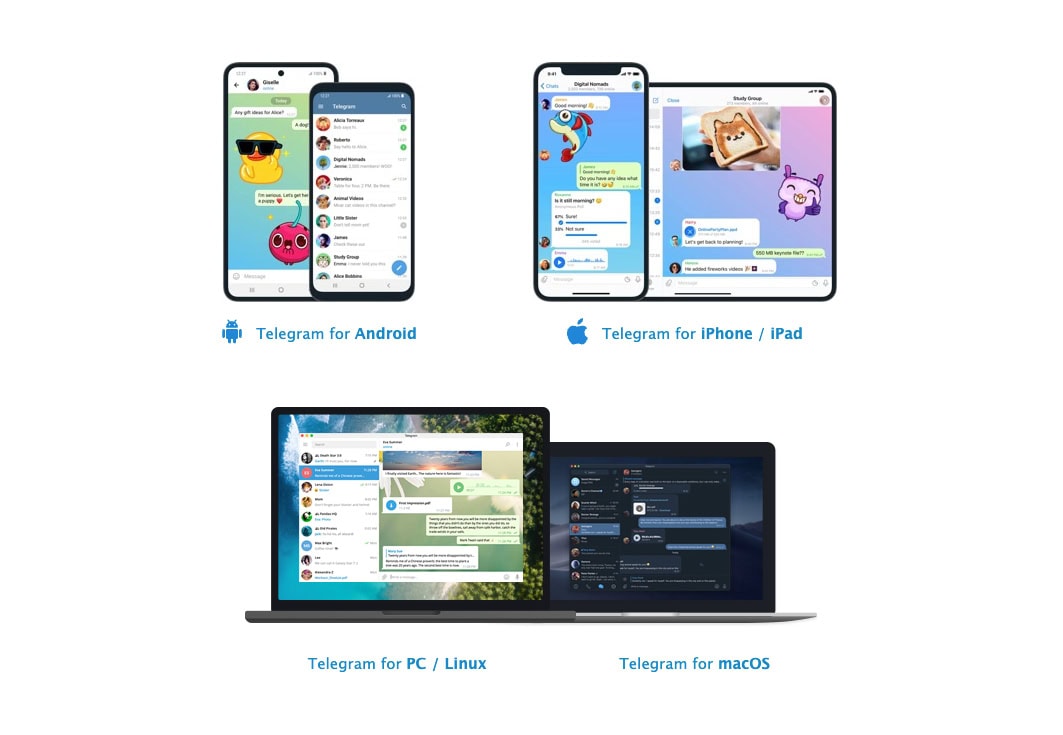
Telegram has built functional apps for all devices, including Android, iPhone, iPad, Windows, Linux, and MacOS. It also has a web app. Whether it’s the Telegram web app, desktop app, or mobile app, all of them work smoothly.
Telegram Cloud Security
When choosing a cloud storage, it is important to ensure your data remains safe and secure on the cloud. Let’s look at the security features offered by Telegram Cloud.
When choosing a cloud storage, it is important to ensure your data remains safe and secure on the cloud. Let’s look at the security features offered by Telegram Cloud.
Encryption
Telegram uses its proprietary MTProto encryption protocol. It is neither open source nor audited by any third-party firms. Also, end-to-end encryption is not enabled on all chats by default. You can use Secret Chats for encrypted chats.
Two Factor Authentication
2FA is enabled by default on Telegram apps. So, when a login attempt is made, you will receive a code via SMS or on your Telegram app, logged in on other devices.
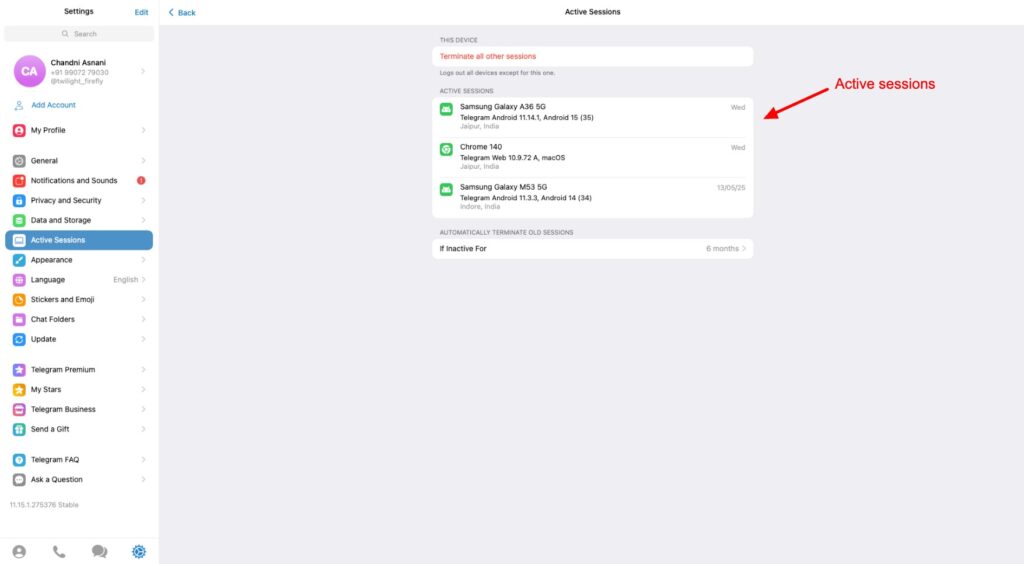
Active Sessions
You can view the active sessions on your account with the device name, location, and time of sign-in. You can also terminate all other sessions except the current one and set auto-termination of old sessions if inactive for a specific time.
Passcode Lock
To ensure additional security, Telegram lets you activate a passcode lock on its desktop and mobile apps.
Auto Account Deletion
Telegram has an auto self-destruct policy. If you don’t log in at least once to your Telegram account within your specified period (between 1 month to 24 months), your account will be automatically deleted along with your chats and files.
Telegram Cloud Pricing
Telegram is available free of cost and is used by millions of users around the globe. However, if you need faster downloads and larger file size limits of 4 GB, you can upgrade to its Premium plan. It can be availed for ₹260/month or ₹1950/year.
Free Plan
Telegram Cloud’s free plan lets you upload unlimited files up to 2 GB in size and have unlimited conversations. You’ll also get to see ads within channels and slightly slower downloads.
Refund Policy
Telegram doesn’t offer any refunds. So, if you purchase a premium plan and wish to cancel it, you won’t get your paid amount back.
Telegram Cloud Security Audits
Telegram Cloud has not been audited by a third-party firm yet. However, they do run bug bounty programs. So, anyone who finds vulnerabilities in Telegram’s code and services can receive anywhere between $100 and $100,000 or more, depending on the severity of the bug.
Telegram Cloud Privacy Policy
Talking about Telegram’s privacy policy, it collects the following data from its users:
- Account data like mobile number, profile info, recovery email, etc.
- Messages and media like cloud chats, public chats, public channels, etc.
- Contacts and phone data, like call logs.
- Metadata like IP addresses, devices used, static or live location, login history, etc.
However, there are various red flags in their policy. First, all your cloud chats are stored on Telegram’s servers and not protected with end-to-end encryption. This means Telegram can access your chat content if it wants.
In 2024, Telegram made some big changes to its privacy policy. As per the update, it can now share your IP and phone number with authorities if you are a suspect in any criminal activities that violate its terms of service.
Additionally, Telegram is not fully GDPR compliant. It allows you to access your data, request its deletion, and doesn’t show ads within the app. However, it features weak encryption and doesn’t disclose who processes its data or where the servers are hosted. This makes it partially compliant with GDPR.
Overall, Telegram’s privacy policy is not so secure. It is advised to be careful when sharing any sensitive information on Telegram.
Telegram User Ban and CEO Pavel Durov’s Arrest
Telegram can ban users if they fail to comply with its terms of service. So, if a user spreads spam messages, keeps sending unsolicited ads, or shares illegal content like child abuse, pornography, etc, they can get banned. The ban may last up to 6 months.
In August 2024, Telegram’s CEO, Pavel Durov, was arrested by French police. He was accused of not stopping illegal activities on his platform, like child exploitation, drug trafficking, etc.
They officially charged him with 12 serious crimes and banned him from leaving France till the investigation was active. Recently, in March 2025, the authorities allowed him to leave France for short periods to visit his home.
Considering these issues, Telegram may not be the safest option for storing your personal data.
Telegram Cloud Support
Telegram offers customer support via its FAQ page and Volunteer chat. On their FAQ page, you will find answers to all the basic questions. But for technical support, you will need to contact their Volunteer chat support.
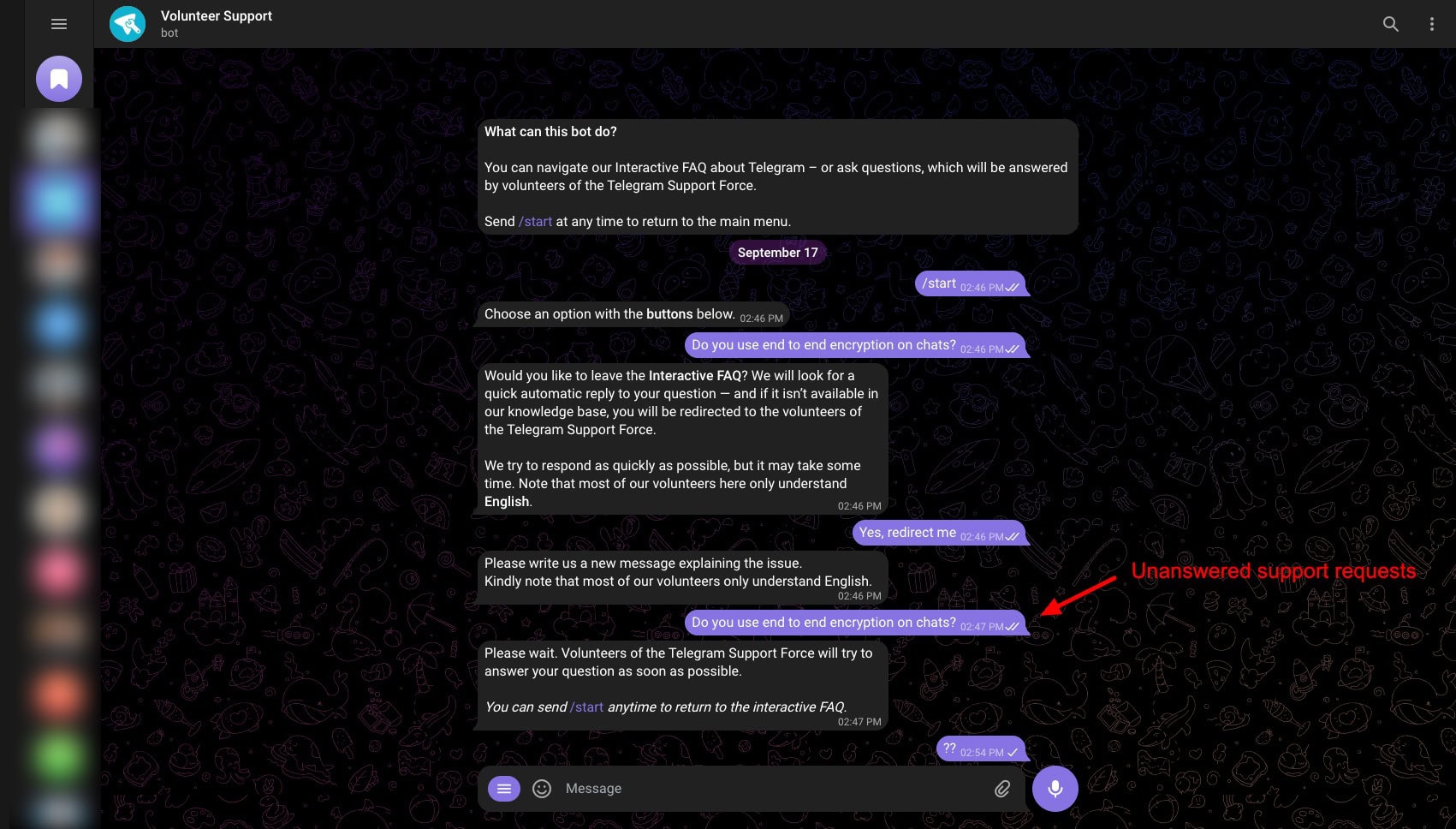
I had a terrible experience with their Volunteer support. Despite waiting for hours and days, I didn’t receive any reply to my queries. They really need to hire a proper support team to address users’ concerns.
Telegram Cloud Pros
1) Free Unlimited Cloud Storage
You can store unlimited files, media, and chats on Telegram Cloud for free. However, there’s a limit of 2 GB on file size.
2) Cross-Platform Access
Telegram app works seamlessly on Android, iOS, Windows, macOS, Linux, and Web. All the devices stay synced.
3) Fast Upload and Download Speeds
I observed the upload and download times to be relatively quick. This is good for regular file sharing and backup.
4) Built-in Media Playback
It supports preview and playback of images, videos, and audio files without needing third-party apps.
Telegram Cloud Cons
1) No Trash Bin or Recovery
If you delete a file from Telegram, it is lost forever. There’s no trash bin feature to temporarily store deleted files or recover them later.
2) Weak Privacy & Encryption
Cloud chats on Telegram Cloud are not end-to-end encrypted by default. They use their proprietary MTProto encryption, which has not been independently audited.
3) Unreliable Servers
While using Telegram Cloud, users often face glitches, lost chats, or deleted data. Thus, their servers are not reliable.
4) Poor Customer Support
The customer support offered by Telegram Cloud is terrible. Their volunteer chat support is unresponsive and won’t reply for days. Besides that, you only get an FAQ page, which only resolves basic queries.
5) Jurisdiction Risks
Some of the servers of Telegram Cloud are in countries that share intelligence data. This raises privacy concerns about data storage.
6) Weak Privacy Policy
The privacy policy of Telegram Cloud has many red flags. They collect your IP address, phone number, metadata, and may share user data with authorities if required.
7) No Advanced File-Sharing Features
Telegram Cloud lacks advanced features for sharing your files, like password-protected links, expiry dates, or permissions.
Telegram Cloud Alternatives
Telegram Cloud vs pCloud
Like Telegram Cloud, pCloud offers fast upload and download speeds and cross-platform access. Both allow users to preview media files. However, pCloud is miles ahead in terms of security, privacy, and advanced features.
Unlike Telegram Cloud, pCloud provides better sync, password-protected links, link expiry options, and file sharing permissions. You also get optional Zero-Knowledge Encryption, pCloud Pass, and auto-backup options, making it a far more secure storage solution.
pCloud’s paid plans start at $4.99/month for 500 GB storage.
Telegram Cloud vs Icedrive
Icedrive shares some similarities with Telegram Cloud in terms of fast speeds and ease of use. Both platforms allow users to store, preview, and share files across multiple devices with a modern and intuitive interface.
Where Icedrive stands out is in privacy, security, and file-sharing features. It provides advanced features like zero-knowledge encryption on paid plans, GDPR and DMCA compliance, password-protected links, access control, and link expiry.
The pricing plans of Icedrive start from $7.99/month for 1 TB of storage.
Why Should You Trust Me?
I’ve been working full-time in the digital industry since 2015. In these years, I have thoroughly used, tested, and reviewed all popular cloud storage services. These include pCloud, Icedrive, Sync, etc. You can find detailed reviews on my blog and YouTube channel.
For this review, I’ve spent a few weeks testing all the key features of Telegram Cloud on all devices and apps. My experience and expertise in the field of cloud storage have enabled me to recommend the best service for your specific needs.
Conclusion
Telegram Cloud offers several attractive features, like unlimited cloud storage for files, media, and chats, cross-platform access, and fast upload and download speeds. It also supports built-in media playback, allowing you to preview images, videos, and audio files easily.
However, Telegram Cloud also has notable drawbacks. It lacks a trash bin, has weak encryption, hasn’t been audited, and offers terrible customer support. Its privacy policy also raises red flags.
Given these limitations, Telegram Cloud is best suited for users who need quick, casual file storage and sharing. It is not apt for users who prefer security and privacy and who want cloud storage to store sensitive documents.
If you’re looking for a reliable cloud storage service, you can check out our curated list of the Best Cloud Storage in India for 2026. Anyway, I hope this article helped you discover if Telegram is the right choice for you. I’ll be back with more such interesting reviews. Cheers, and keep learning!
FAQs
1) Is Telegram Cloud really unlimited?
Yes, you can upload unlimited files on Telegram for free. However, the file size is limited to 2 GB on the free plan. You may also get to experience slower speeds when you upload a large file.
2) Can I organize my files on Telegram Cloud?
No, Telegram doesn’t offer a folder management interface. However, you can use features like pinned messages, saved messages, and the search function to locate your files instantly.
3) Is there a file recovery option in Telegram Cloud?
4) How secure is my data on Telegram Cloud?
5) Can Telegram Cloud be used as a backup solution?
Telegram Cloud can serve as a convenient backup for files and media, especially for quick access across devices. However, due to the lack of advanced features like file recovery and folder management, it may not be suitable for advanced backup needs.
6) Does Telegram Cloud support media playback?
7) Is there a limit to how long my files stay in Telegram Cloud?
Your files remain in Telegram Cloud forever, provided you remain active on your account. If your account remains inactive for a longer duration (up to 24 months, depending on your settings), it may be automatically deleted along with all your stored data.
8) Can I share my files stored on Telegram Cloud with others?
Yes, you can share files stored in Telegram Cloud, but only with other Telegram users. However, Telegram lacks advanced sharing features like password-protected links or link expiration, which are available in some other cloud storage services.




Which network do you use? Complete wrong and biased review.everything can’t be provided for free.i uploaded many 1 gb file in 5 to 8 minutes.i didn’t expect this from you.
Which network do you use? I upload and download 2 gb file in 5-7 minutes with 40 Mbps.everything can’t be provided for free.for everything you want there are paid options. complete wrong and biased review.i didn’t expect this from you.
I agree that everything can’t be provided for free but some people use Telegram as their primary cloud storage without knowing what an actual cloud storage is.
I’m just trying to present what to expect from a cloud storage and then it’s upto them what they want to use.
Excellent review! Thank you!
Just a few points about cons (sorry for my English!):
1. Terrible Speeds
The upload and download speeds of Telegram Cloud are disappointing. Having unlimited storage is of no use at such speeds.
> Not true: it depends on your connection. I have an high speed connection and it took 150 secs to upload a 650 MB file. On a slower connection it took about 5-6 minutes.
2. Limited Sharing
Telegram Cloud limits sharing only with other Telegram users. It does not let you generate public links either.
> It may be true but it’s not a big issue: I can see post in a browser without having Telegram. OK, it’s not like Mega or Drive, but it was created with a different goal.
3. Self Destruct
If you do not login to your Telegram account for 6 months or a year, your account is automatically destroyed.
> Not a problem: I can export my chats from Telegram Desktop and ignore Telegram until they delete my account. More, 1 year is a very long time! If I use a service it’s difficult I don’t open it at least once or twice a week. If I don’t open it for 1 year it means that I don’t use it anymore. I think other services has this policy in order to free up their servers from “dead” stuff.
4. Lack of Advanced Features
Telegram Cloud lacks versioning, sharing, and advanced syncing, that are integral features of any good cloud storage.
> It may be true but, as I said above, Telegram Cloud was not created to replace exixting cloud services. It’s a different tool.
5. No Zero Knowledge Encryption
Only secret chats are secured with zero-knowledge encryption, which is not fair! Either all data should be zero knowledge, or the user should have a choice to secure some sensitive files.
> Yes, but each encryption key is splitted and stored in different servers in different countries, so it’s hard even for Telegram workers to get the whole key to get your data. Then, it’s not still demonstrated that Telegram leaked data or sold user data to third party. It’s technology+policy. Yes… you have to trust them but everything on the internet is a fact of trust! Telegram is not an exception.
6. No Folder Management
Telegram Cloud is not a proper online storage solution. It stores your files within chats, and you cannot separate them in folders or by categories.
> Yes it can be an issue but Telegram has a very good system to find posts and files by name and keywords and you can find them using categories too.
In short: I agree when you say it’s not a complete storage. But I think it was not created to be a full replacement of Pcloud, Mega, Drive and so on. But it can be an excellent support to save a picture, a file a link that you can save in a second time on your “official” cloud service. I use Mega, Cozy and Icedrive and Mega it’s my main storage, but Telegram is a very nice support to save a lot of things. Last not least, I did never loose any file or message in Telegram.
Perhaps in the future they will improve this feature creating folders, link sharing etc.
Cheers,
Libero
Wow!!
That’s a great analysis.
Thank You 🙂
Hello my name is Caroline Atkinson the other day I was in my telegram account and i accidentally somehow without knowing what i did i changed my telegram name when i click on my name to cloud storage how do i get cloud storage out of my name where it is by itself i hope that made sense thank you Caroline Atkinson
I guess you come from the family of Mr. Bean (Rowan Atkinson) 🙂
6. It seems that you can create folders in other apps connected to the ecosystem, T-Drive for Windows or Unlim for mobile devices.
thanks for the info..
You know the Alternative mentioned ‘Mega’ they too delete our data if we have been inactive for 3 months if we are using free account. They clearly mentioned in their terms and conditions
I do not understand one limitation of Telegram. You can limit local storage, and the maximum limit is 10GB. However, I do want to store locally more than 10GB. Is there a way to increase this value?
My telegram videos, documents , images and some files got automatically deleted from telegram folder in internal memory. The total size of all data was around 13-14 GB.
I am using telegram app since 2 years. I had downloaded may files but suddenly yesterday the files got automatically deleted from telegram folder.
It’s a huge setback for me.
I want to know how did it happened & how can I recover it ??
Thanks for writing this blog. I am totally Agree with you. It is very informative. Good experience to visit this site.
Thanks for writing this blog. I am totally Agree with you. It is very informative. Good experience to visit this site.