As a solopreneur, you probably know the struggle all too well. Managing clients, handling bookings, and keeping track of schedules across multiple apps can quickly become exhausting.
To help millions of solopreneurs like us, Trafft builds and hosts your complete scheduling system. You can list your services, let clients book appointments online, accept payments, manage staff availability, send automated reminders, and more, all from a single platform.
And here’s the best part: Trafft is currently available on an exclusive lifetime deal through AppSumo. I’ve put together this honest Trafft Review (2026) to help you decide whether it’s the right investment for your business.
So if you don’t want to miss out, keep reading.
Trafft Review
Summary
Trafft is a cloud-based appointment scheduling and business automation platform designed for service-based businesses, agencies, and freelancers. It enables users to create a customizable booking website without coding, manage staff schedules, accept payments, automate customer reminders, and track finances from a single dashboard. The platform offers a clean and intuitive interface, mobile app access, and strong automation features. However, users on the free plan are limited to fewer website templates, email-only notifications, and restricted payment gateway options.
Disclaimer : I strongly believe in transparency. If you buy using the links on our site, we may earn a small commission without any extra cost to you. This helps me to keep producing honest reviews. Read More >>
About Trafft
Trafft is a cloud-based business automation software. It helps busy professionals manage appointments, track employees, collect payments, engage clients, and handle other day-to-day operations. The software was launched in January 2020 by Nevena Trafft.
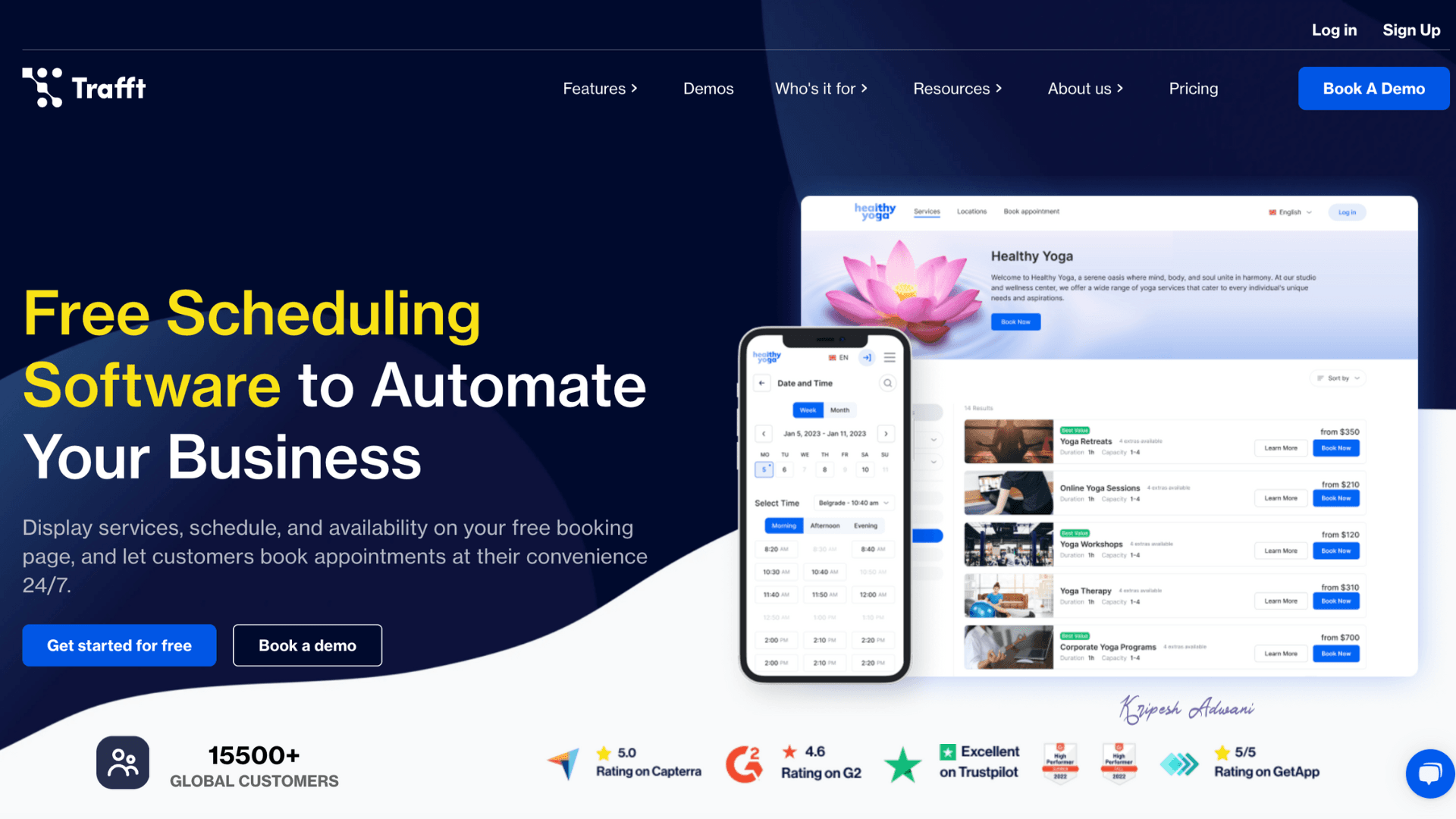
Agencies that handle multiple clients and services can use this scheduling software to manage multi-location businesses efficiently. Trafft integrates with popular apps like calendars, Slack, and social media platforms, which helps improve coordination and tracking. Currently, the platform is used by 50,000+ entrepreneurs worldwide
How to Use Trafft?
We’ll understand the process by creating a free account in Trafft. It is very simple — you just have to follow a few steps to set up the dashboard. Let’s get started!
1) Sign Up to Trafft
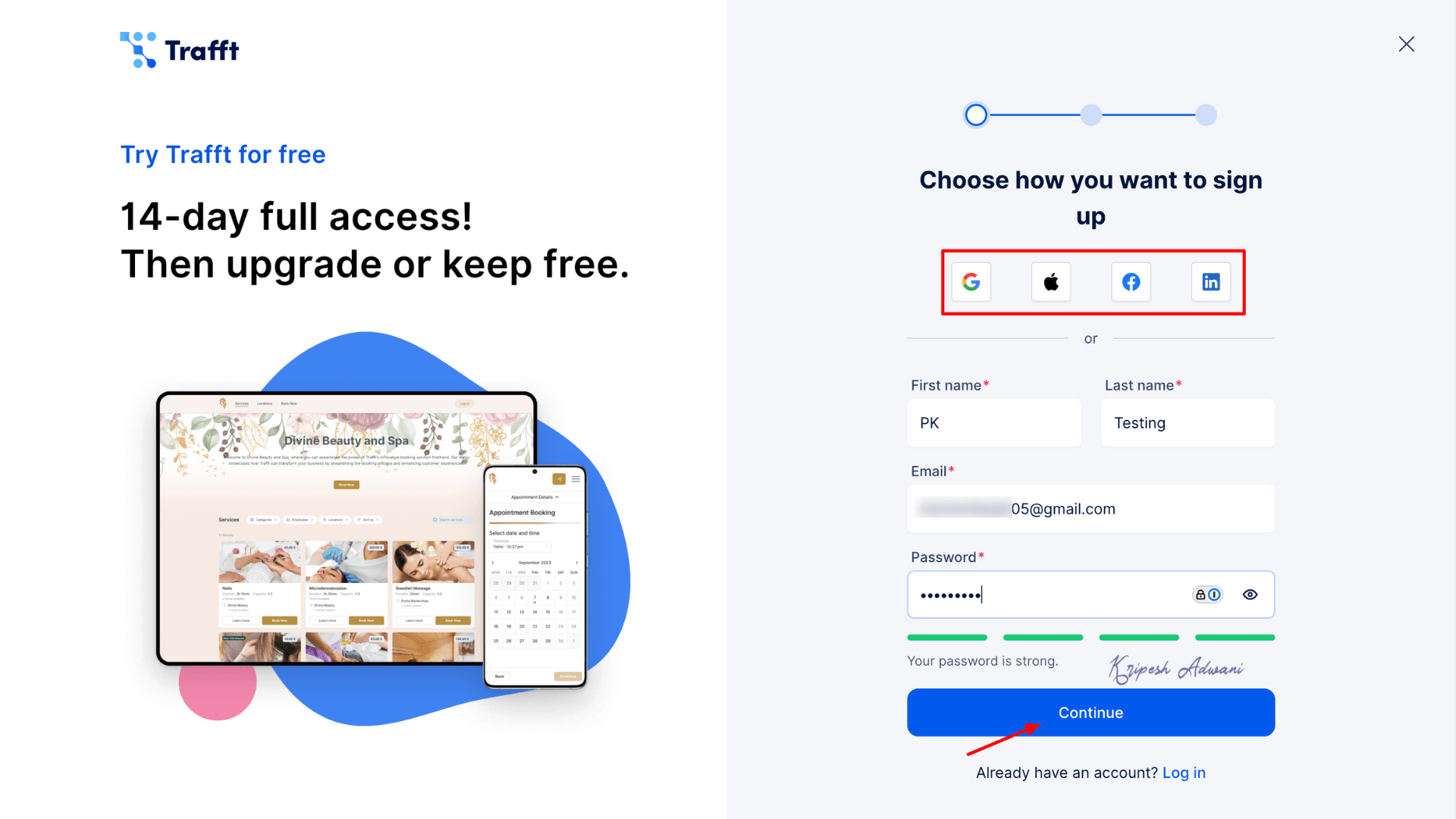
First, go to the official website of Trafft and click on Sign Up. You can sign up using Google, LinkedIn, Facebook, or an Apple ID. Fill up all essential details and “Continue”.
2) Create Your Account
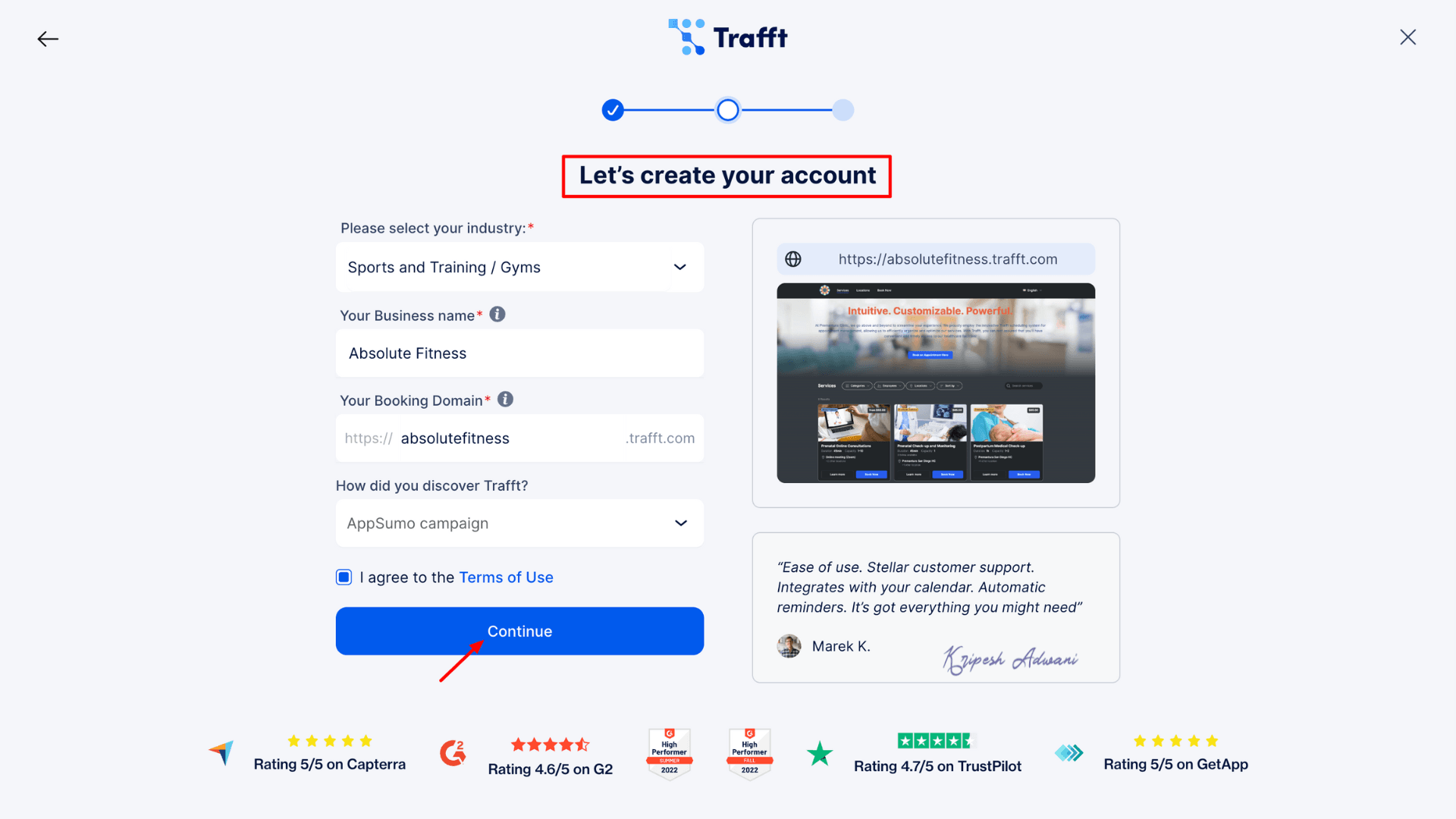
On the next page, select your Industry. Then, enter your Business Name, and Trafft will automatically suggest a domain name for you. Click “Continue”.
For example, I set up my business name as Absolute Fitness under the Sports/Training industry.
3) Set Up Your Theme
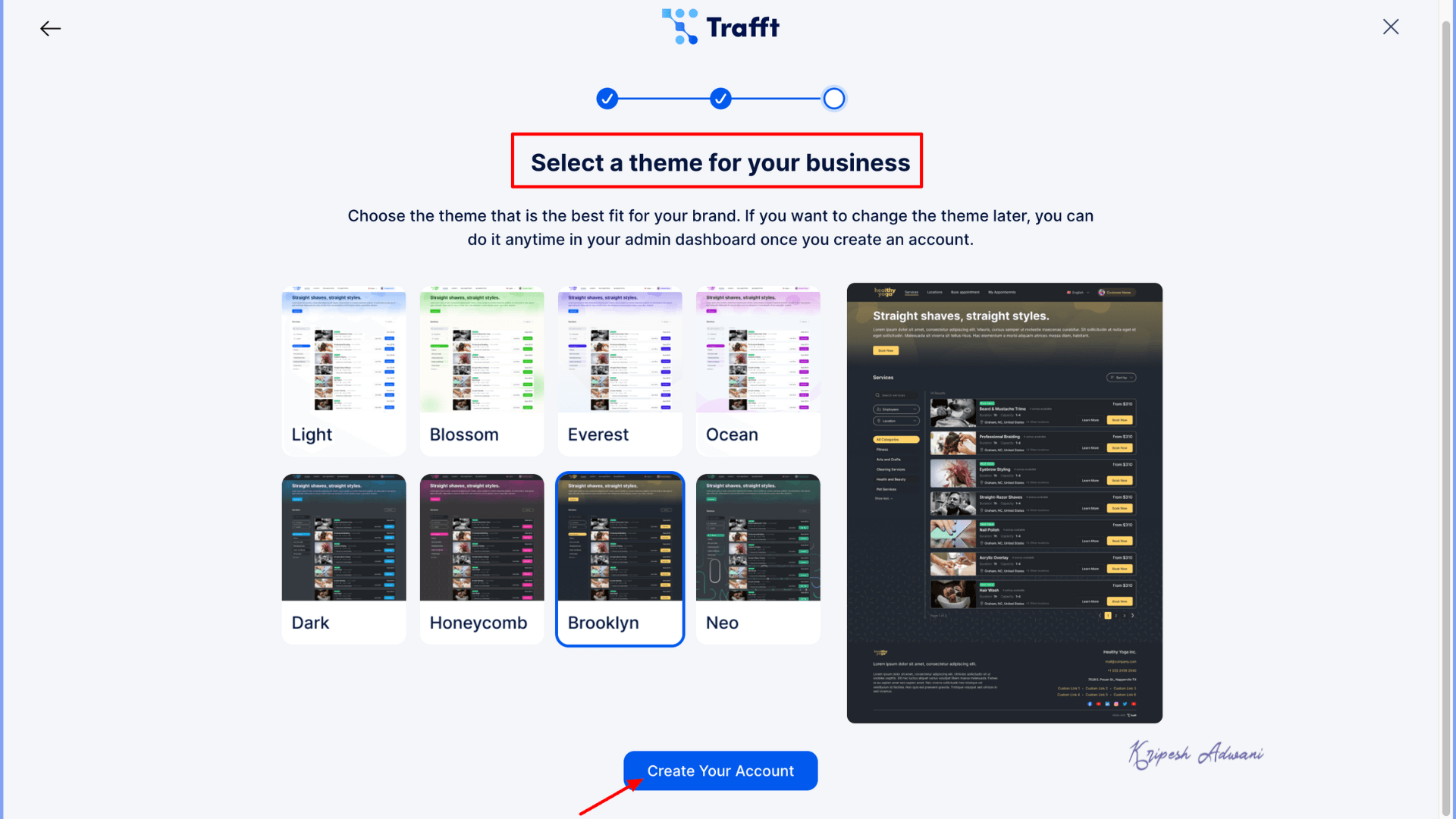
Trafft will suggest 8 themes for your booking dashboard. Choose any theme you like; you can change it later than well. Once selected, click Create Your Account, and you’re good to go!
4) Add Employees
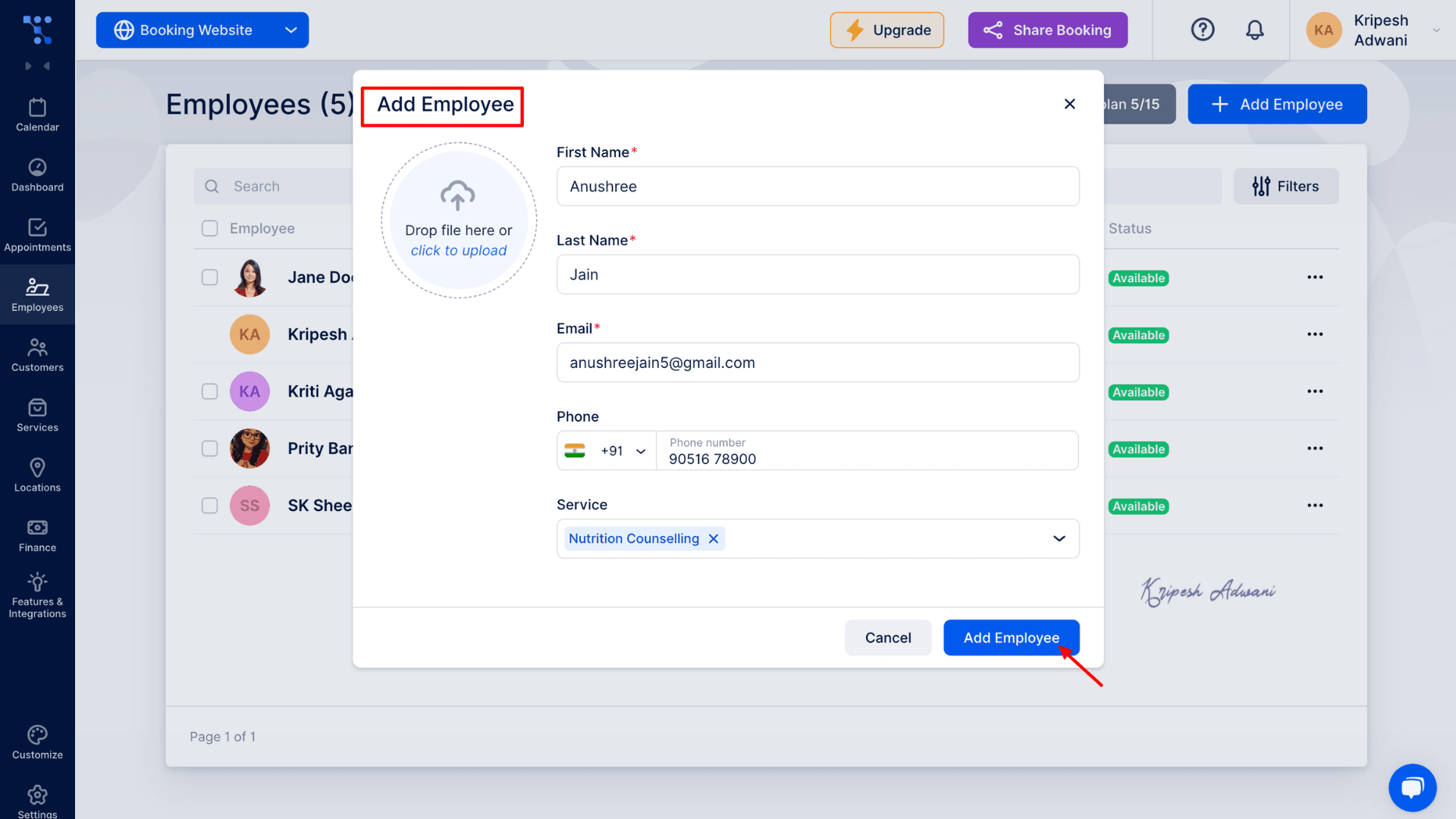
Now that you have entered the Trafft Dashboard, we will start by adding all employees working at Absolute Fitness. From the left side panel, navigate to Employees and click on Add Employee. Enter the employee’s name, email, phone number, and other required details.
You will then be redirected to the employee’s profile page. Here, you can add additional information such as Employee badge, Time zone, Working hours, Days off and Special days (holidays or unavailable dates).
5) Add Services
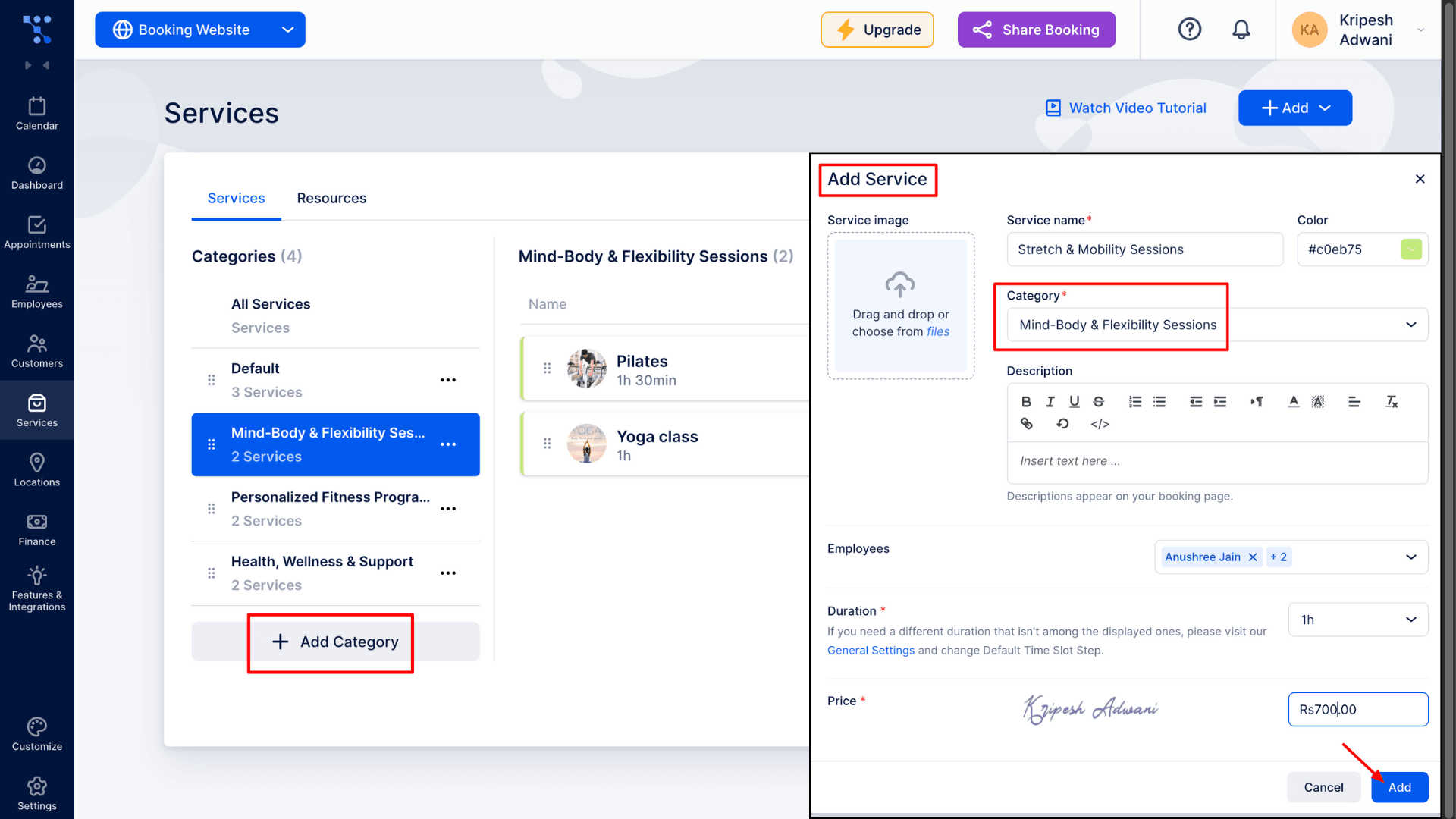
Next, we will set up all the services offered by Absolute Fitness. First, click on Add Category to organize your services. After creating a category, open it and click Add (in the top-right corner) to create a new service.
Fill in all the details about your service or package. For example, I created a category called Mind & Flexibility Sessions. Under this category, I added three services: Yoga, Pilates, and Stretch & Mobility Sessions.
6) Manage Finance
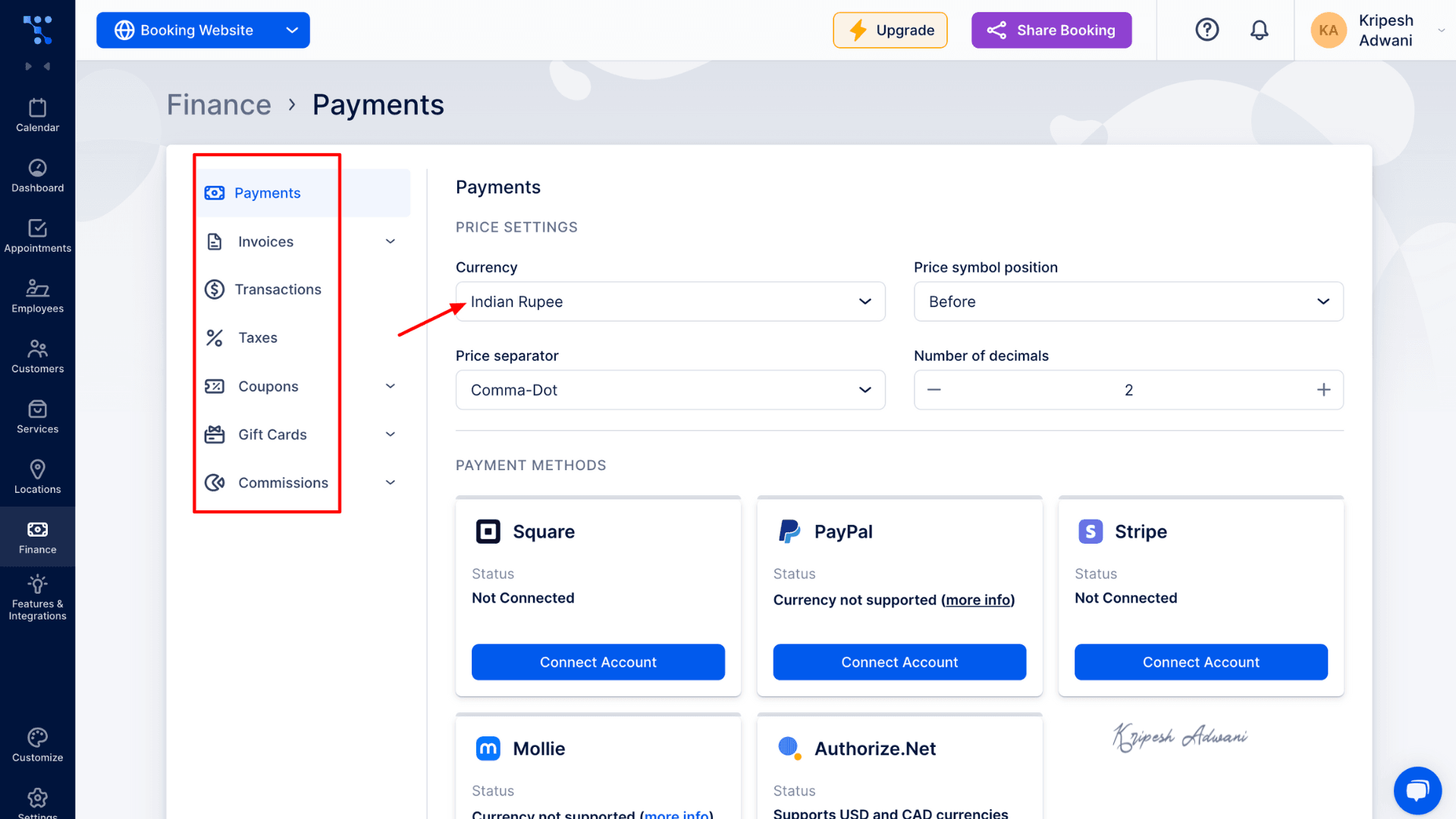
In the Finance section, you can set up payment options, generate invoices, check transactions, and configure taxes and commissions. Under Payment Settings, select your currency and desired payment methods. In the Invoices tab, you can mark payments as Paid or Pending.
7) Book Appointment
Finally, we’ll learn how to book appointments. Simply go to the appointments section and click “New Appointment.”
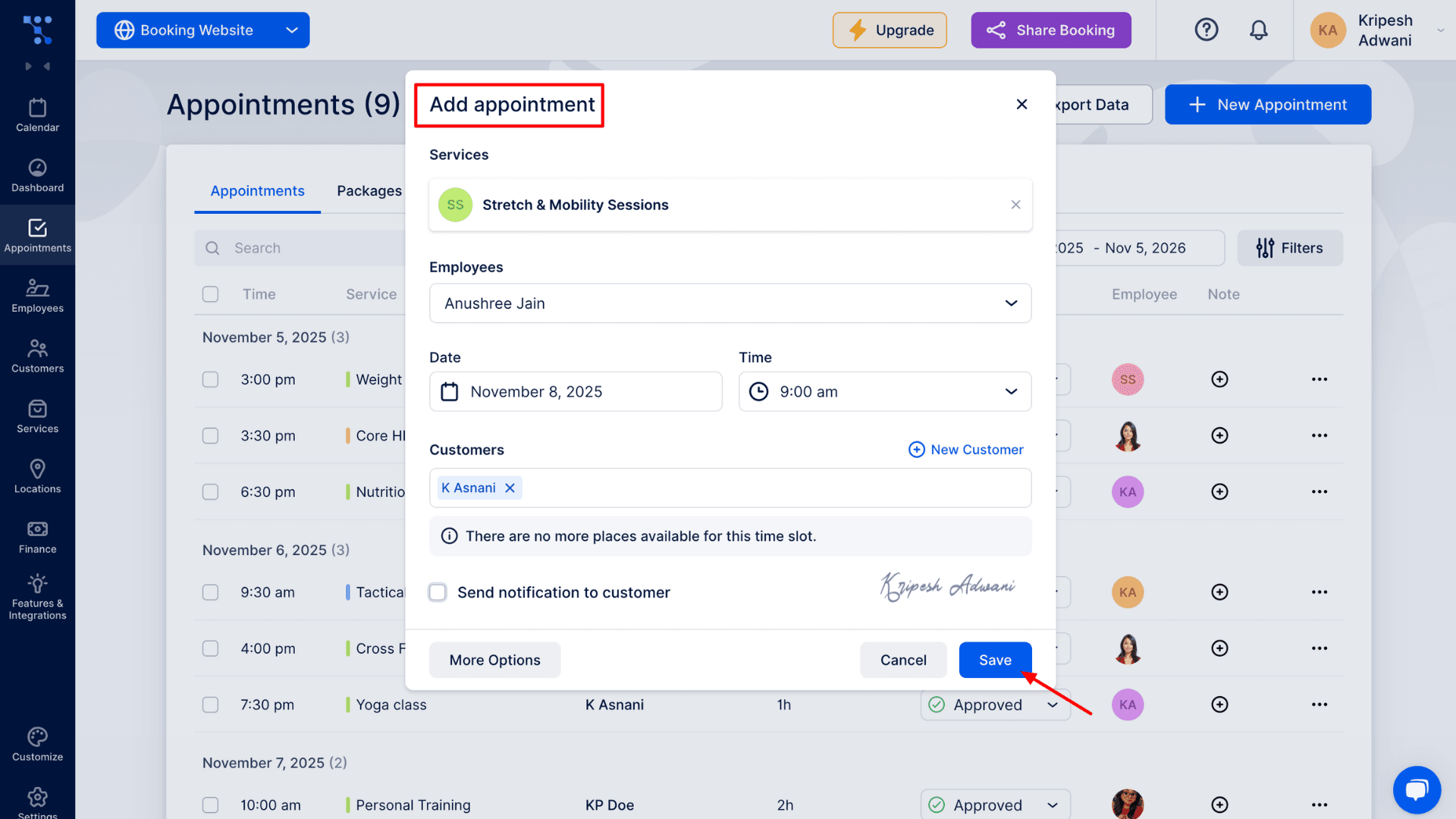
Now you just have to select a service. Then, Trafft will auto-suggest available employees, dates, and time slots. Choose the preferred option and click Save. The appointment will now appear in your calendar.
Trafft User Interface
When you enter the Trafft dashboard, you’ll notice a clean and modern user interface. On the left-hand side, you’ll find the main navigation menu with all primary features listed. Under the Calendar section, you can view your bookings and appointments in monthly, weekly, or daily formats.
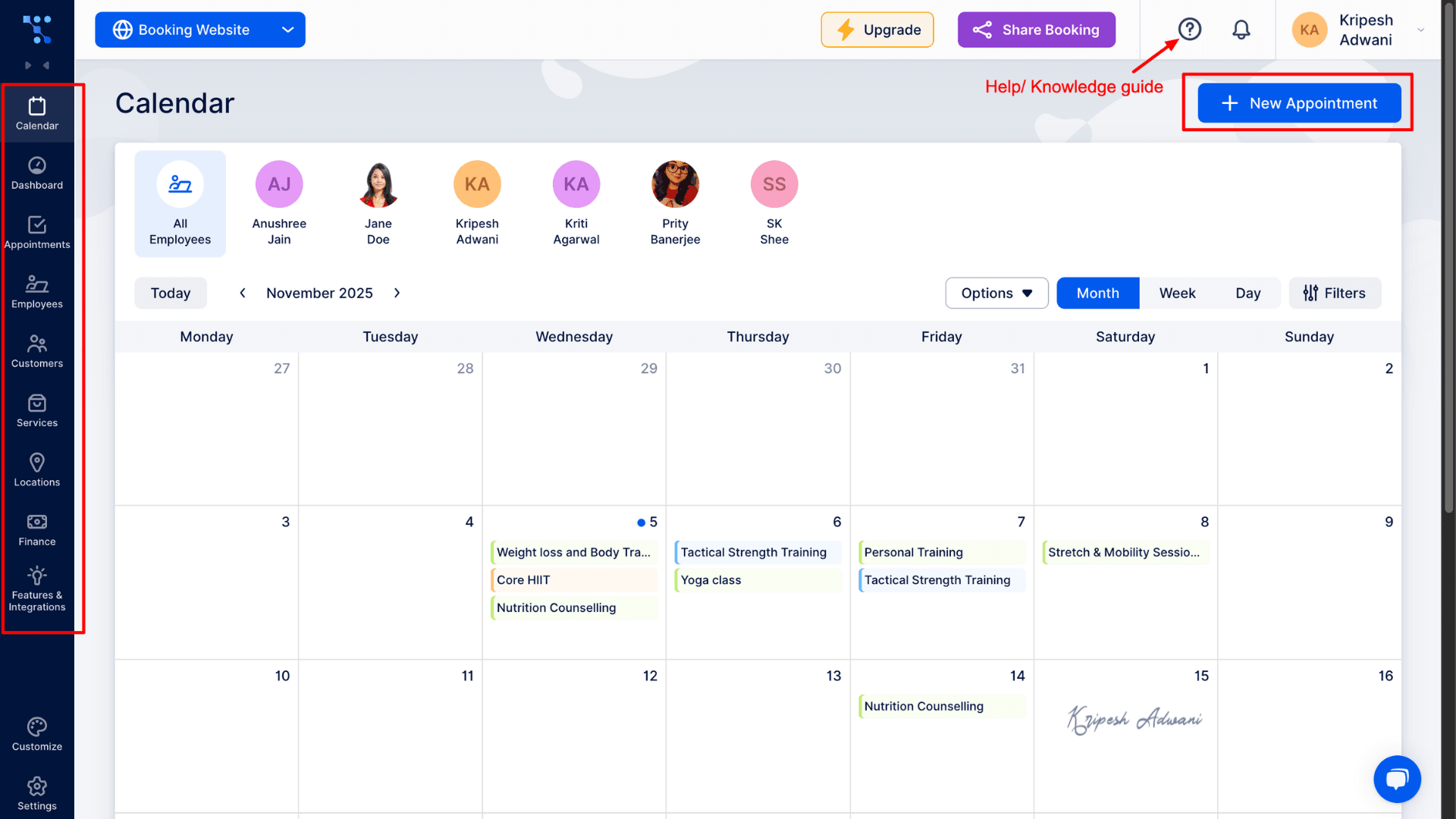
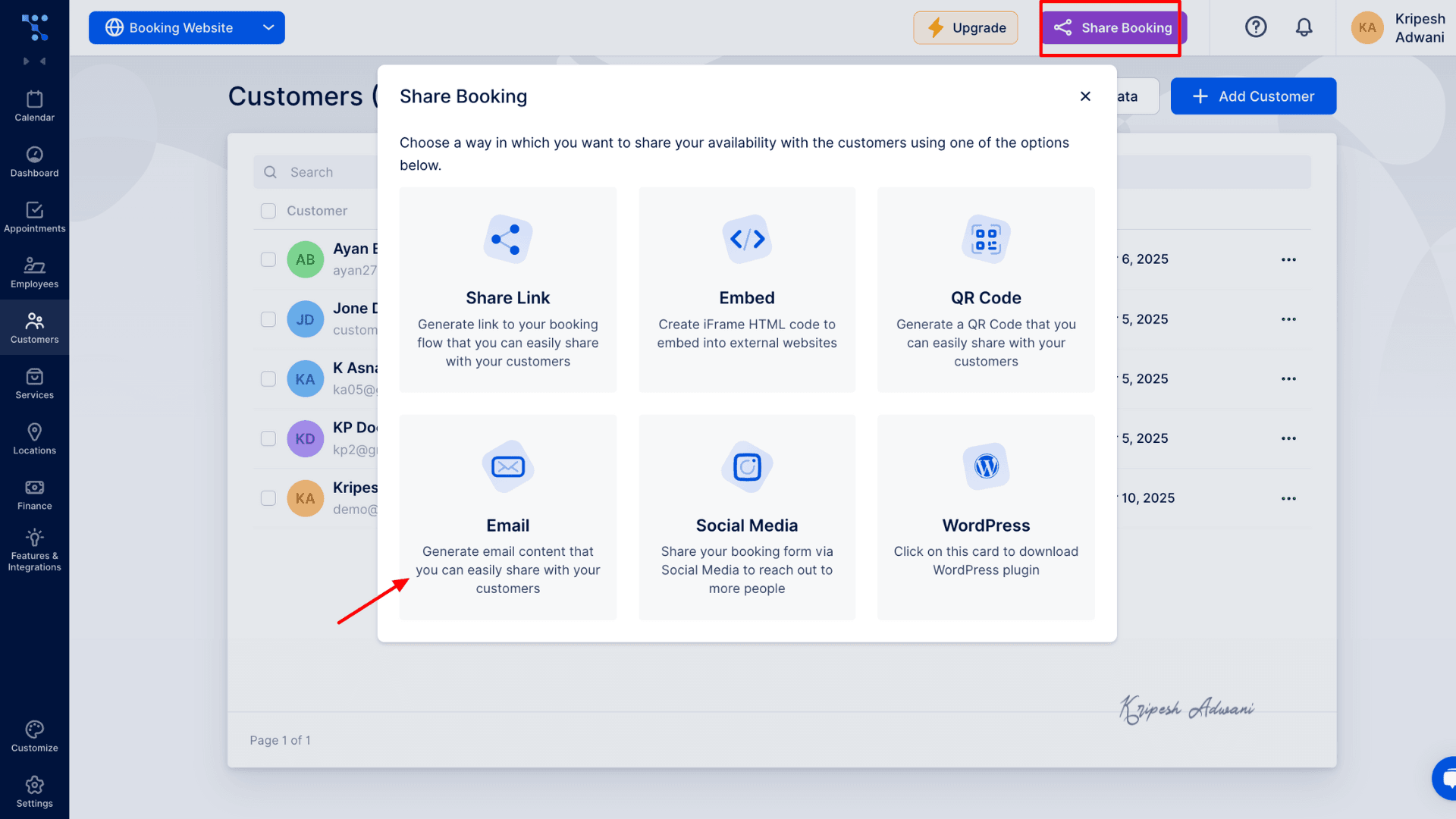
At the top left, you will see the “Share Booking” option. This allows you to share your booking page via Link, QR Code, Email, Social media, etc. Next to it, the question mark icon (?) provides help and support resources. Here, you can contact support, watch video tutorials, and access the knowledge base.
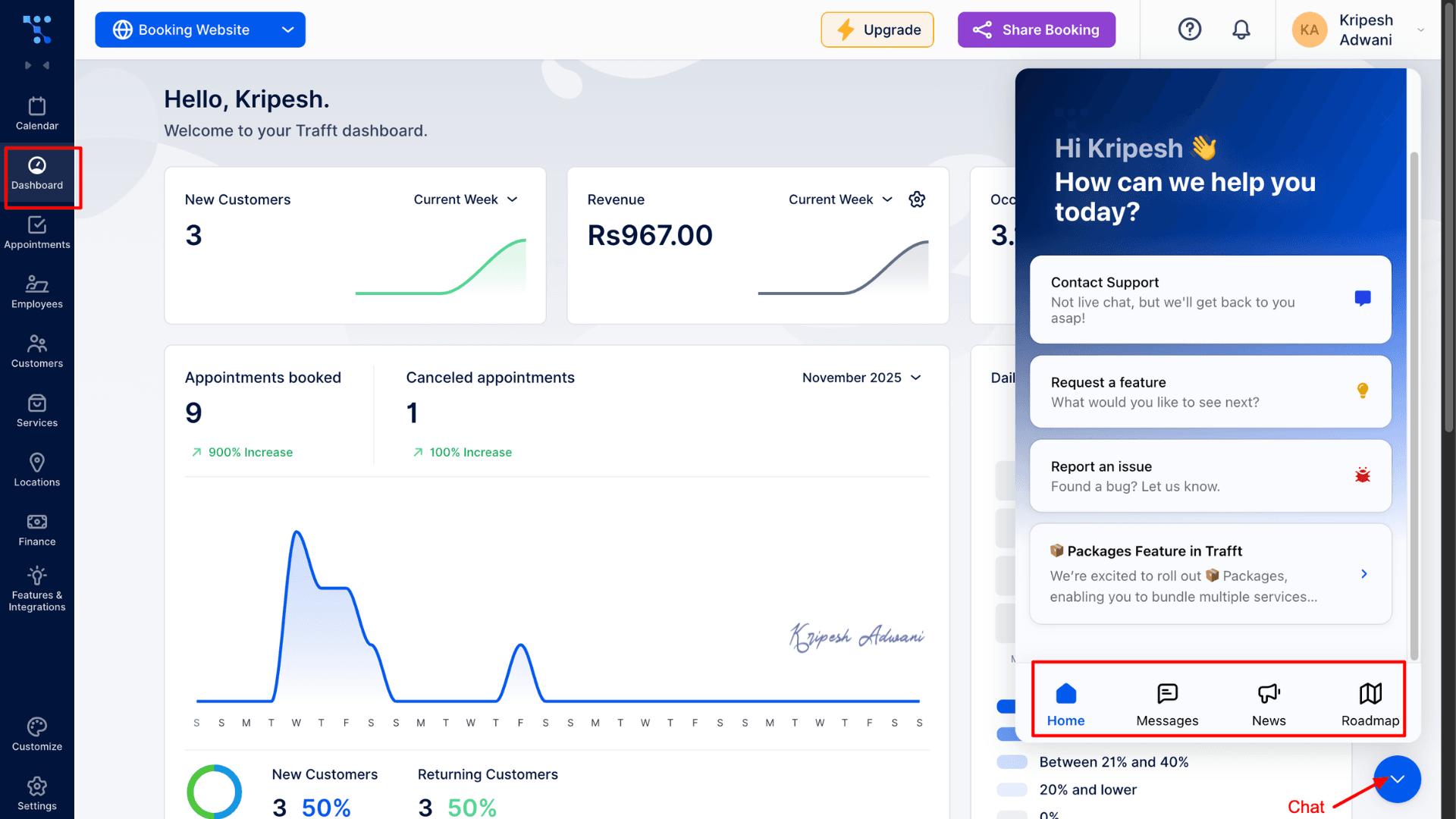
The bell icon beside it shows your latest notifications and updates. Trafft Dashboard clearly displays important statistics such as new customers, occupancy rate, appointments booked, and cancellations.
From the Features & Integrations tab, you can enable third-party integrations such as Google Calendar / Outlook Calendar, Online payment gateways, Zoom, and other communication tools. At the bottom left, you’ll find the Chat button. Here, you can contact support, report an issue, or check the product roadmap.
Key Features of Trafft
1) Design a Website without Coding
With Trafft, you can design a complete booking website without any coding. Simply choose your theme and industry, and the software automatically generates a professional online booking interface. If you already have an existing website, Trafft can be easily integrated into it as well.
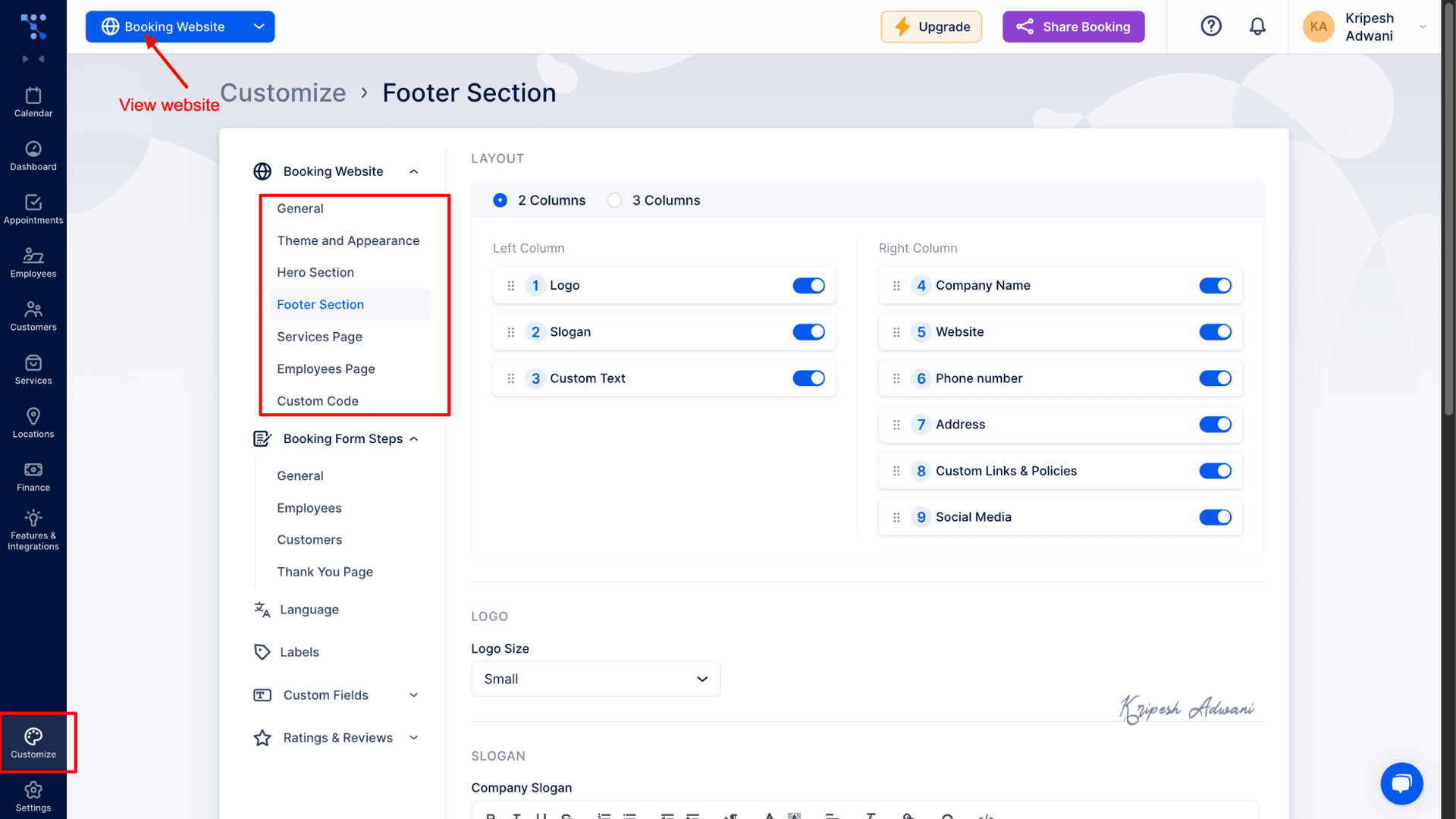
From the Customize tab, you can tailor your entire site to match your brand. For example, I added my custom logo, favicon, header, footer, and more. I also created a dedicated Services page, Employee page, and Booking Forms to give the website a clean and professional appearance.
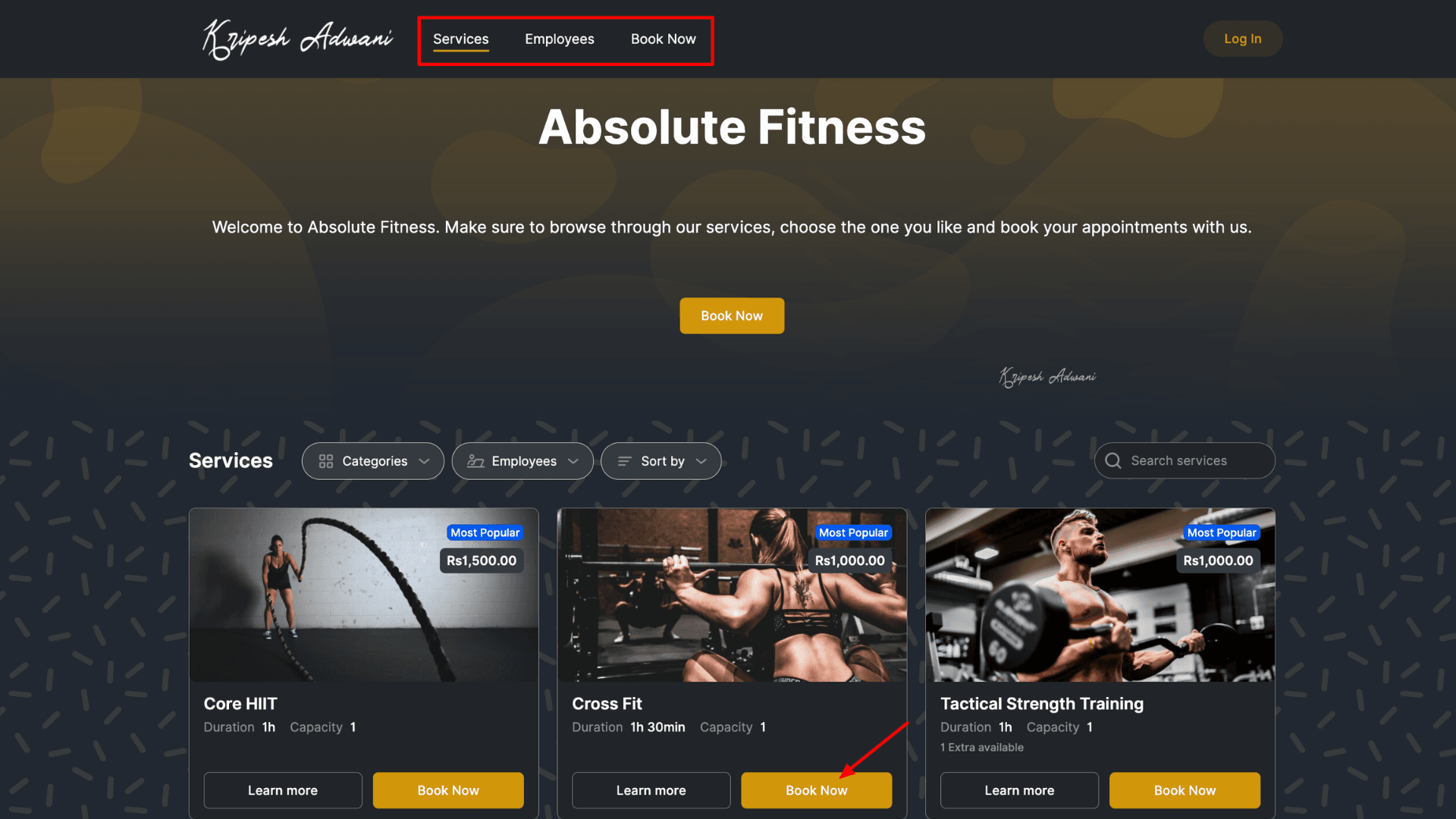
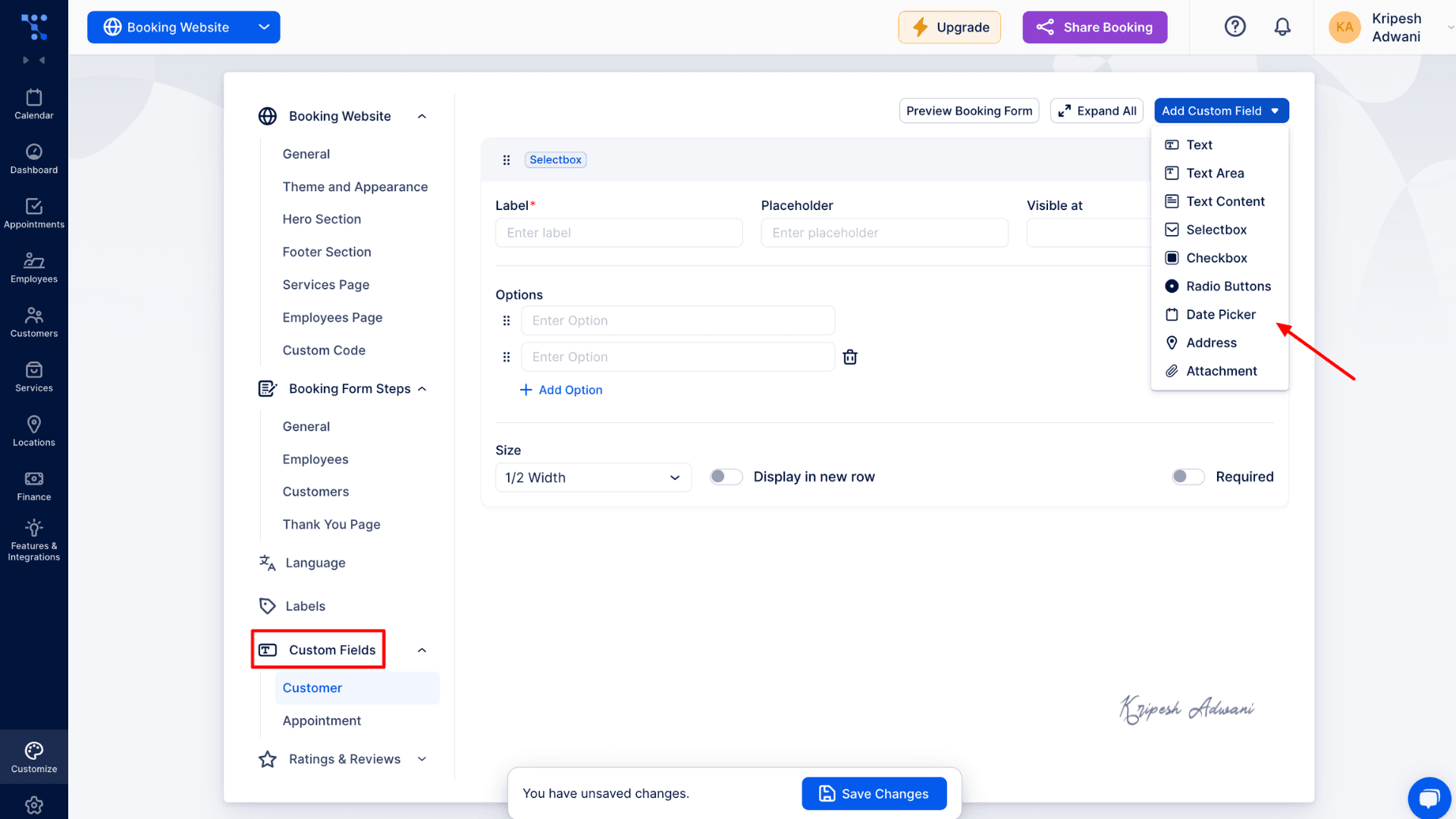
During the setup process, Trafft automatically suggested a domain name based on the business name. However, you can also use your own custom domain if you prefer. Additionally, you can add custom fields to your booking forms — allowing customers to provide extra details or ask questions using checkboxes, text fields, and more.
2) Schedule Appointments Online
The platform allows agencies to accept appointments and manage multiple clients through a simple, user-friendly dashboard. Bookings are available 24/7, and clients can reschedule or cancel at any time.
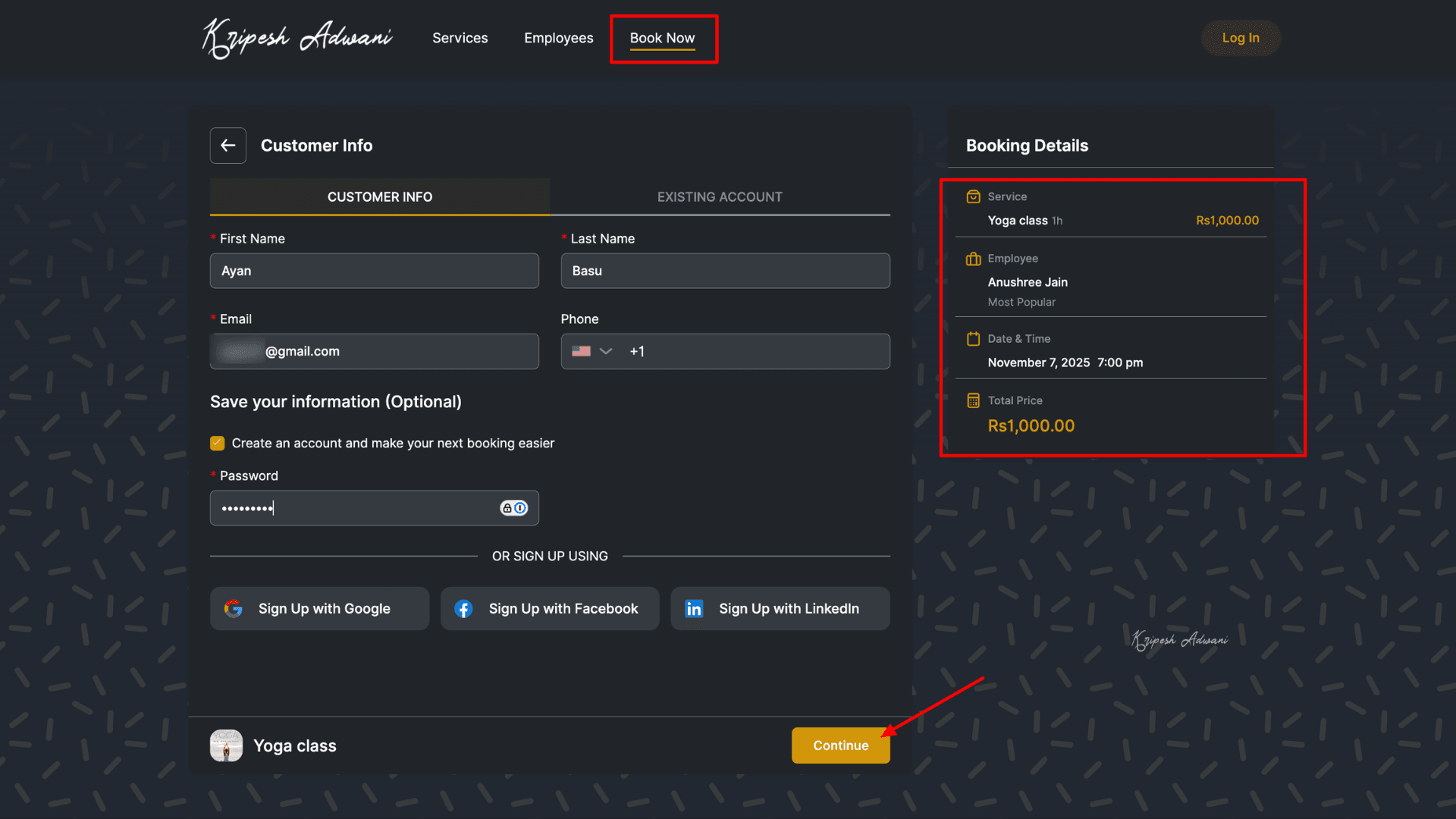
Scheduling appointments is very easy with Trafft. When a customer visits your website, they simply fill out the booking form, choose the service, select an employee, and pick a time slot.
Once the booking is completed, you’ll receive a notification in your portal, and it will automatically appear in the Appointments tab.
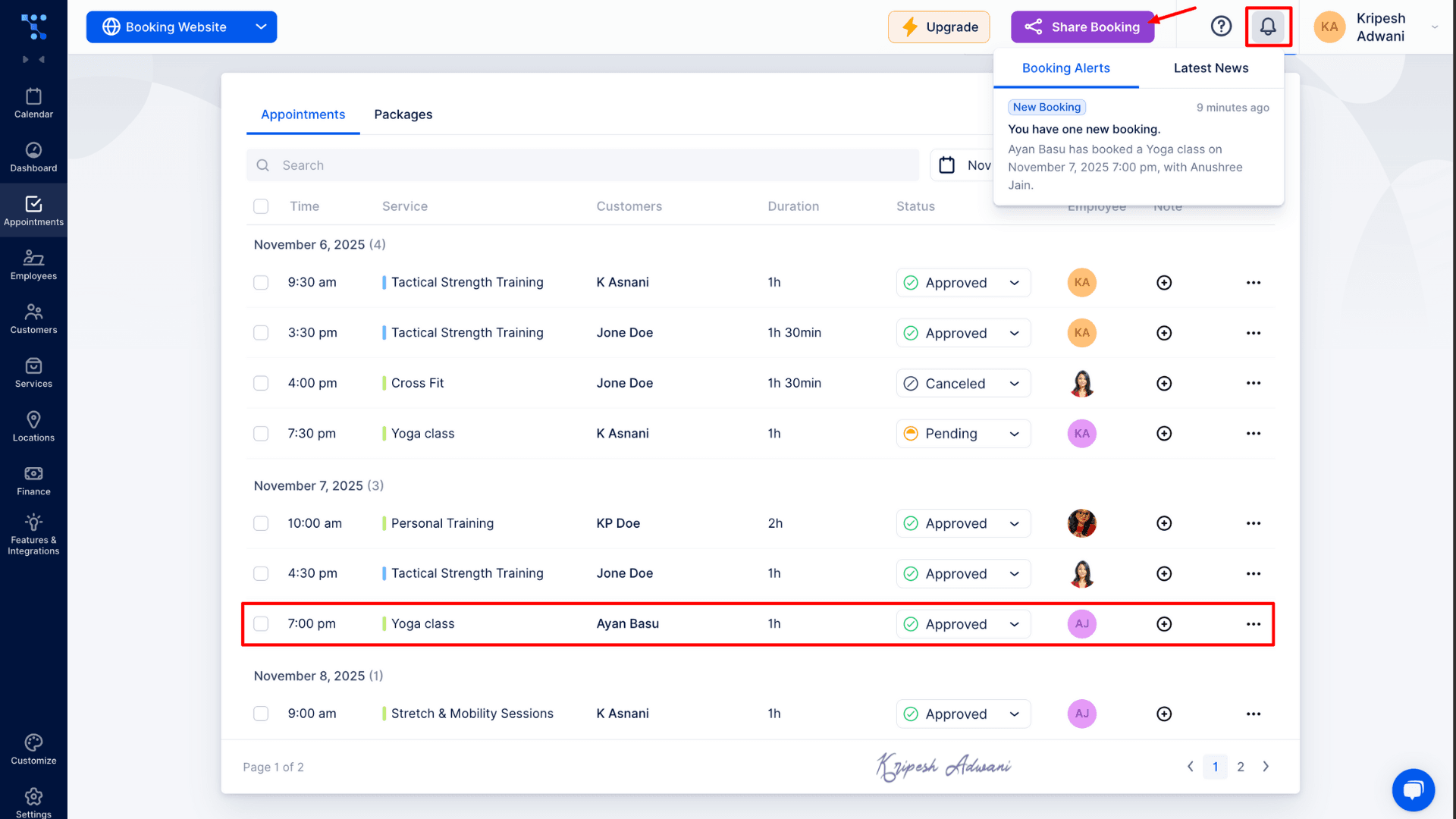
The Appointments tab displays all bookings, including the date, time, status, assigned employee, and notes in a structured layout. As an owner, you can clearly track everything, reducing the chances of missing any appointments.
3) Invoice & Finance Overview
I find this feature extremely helpful for business professionals. The finance portal is organized into seven tabs: Payments, Invoices, Transactions, Taxes, Coupons, Gift Cards, and Commissions.
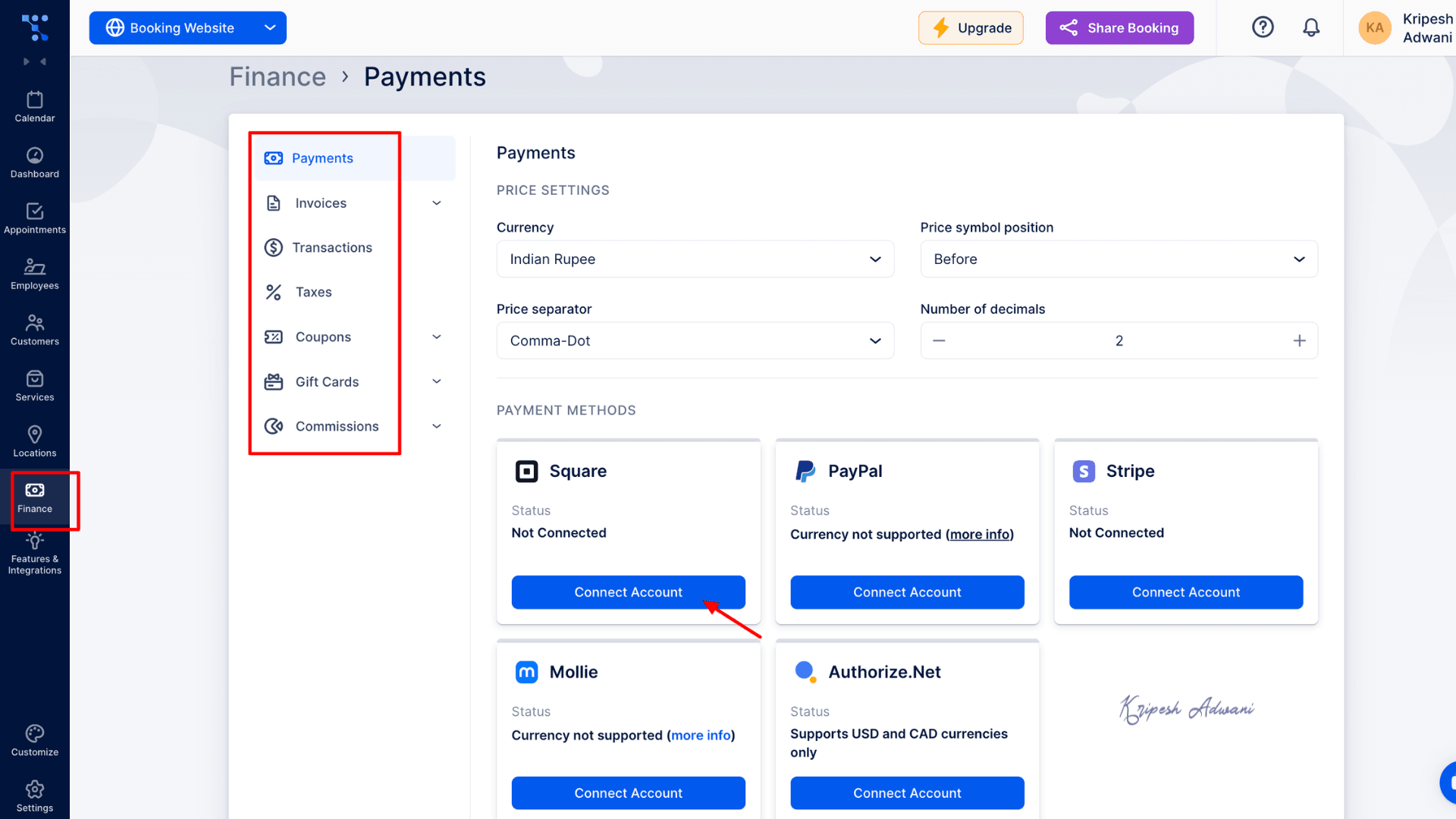
In the Payments section, you can enable different payment gateways. However, for INR currency, I was only able to connect Square and Stripe. The Invoices tab allows you to check the status of all invoices and mark them as paid, pending, or overdue.
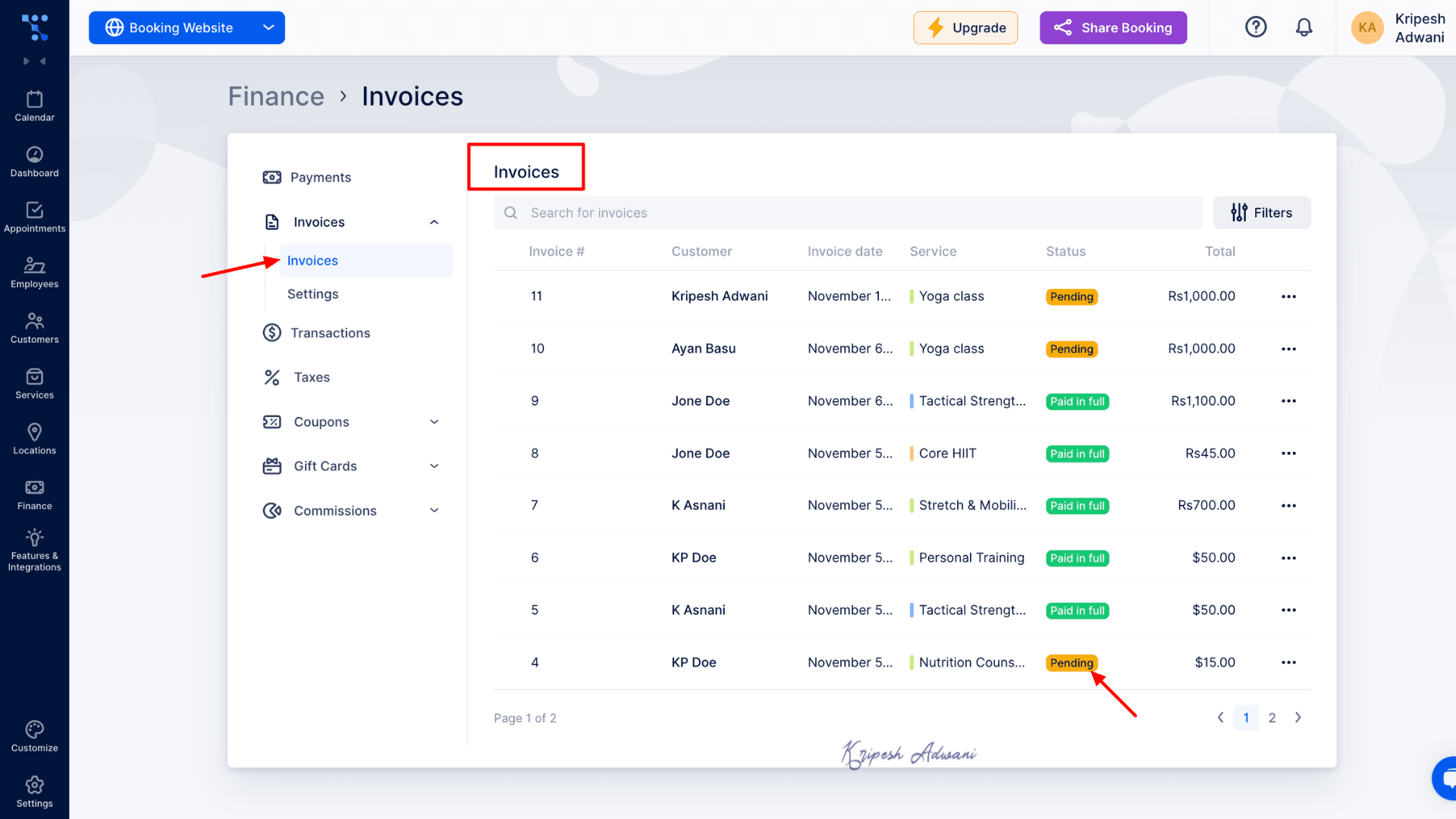
The Transactions tab displays all completed payments along with the service purchased, customer name, amount, and payment method. Under the Taxes section, you can mark which services fall under taxable categories.
Additionally, you can create discount coupons, manage issued gift cards, and even set up employee commissions for simpler expense and revenue tracking.
4) Manage Customer Profile
If you work with repeat customers, this feature is especially valuable. Instead of entering their name, email, and other details every time they book, customers can create their own account and log in or you can set up their profile for them. This saves time and makes the booking experience much smoother.
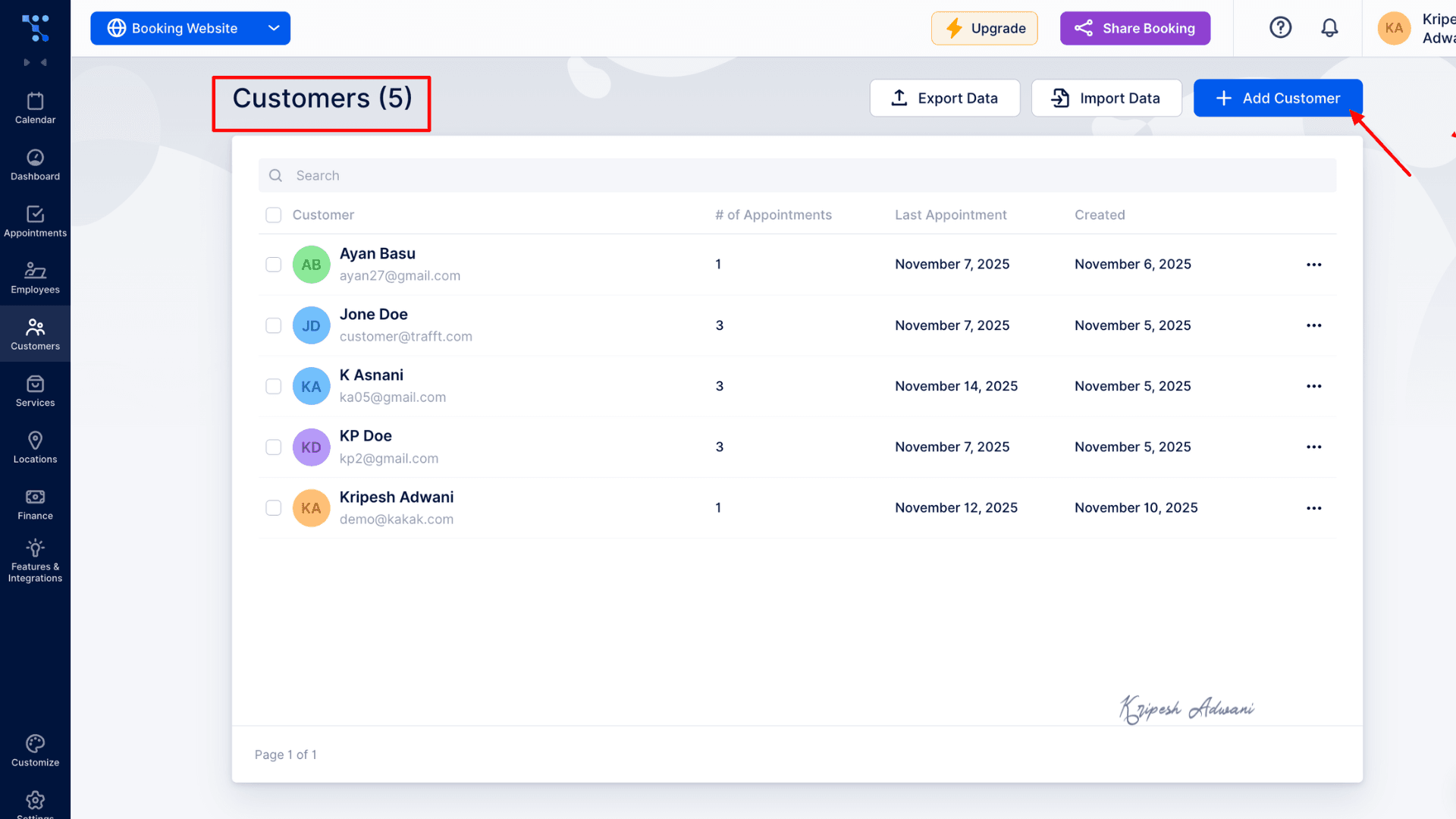
This feature also allows customers to manage their appointments independently. They can reschedule, cancel, or update the status on their own, helping you accept new bookings and reduce no-shows. As a result, it becomes easier to maintain customer satisfaction and build a loyal customer base.
5) Share & Reminders
Trafft allows you to share bookings and set reminders in two convenient ways. First, the agency owner can share booking details directly from the dashboard. You can send email notifications, share booking links on social media, or even generate a QR code for quick access.
Second, after a customer confirms their appointment, Trafft gives them the option to set reminders via Google Calendar. Additionally, agencies can schedule automated reminder emails or messages, eliminating the need for manual follow-ups. If a customer cancels or is unavailable, you’ll receive an immediate notification.
This ensures smooth communication and helps reduce missed appointments.
6) Sync Calendars
Trafft syncs seamlessly with Google, Outlook, and Apple calendars. One of the best parts is that, as an agency owner, you don’t need to manually update employee availability or time slots. Simply set up employee working hours, service availability, and days off.
Whenever a customer books an appointment, it is automatically added to the calendar. Trafft then syncs with the connected calendar, blocks out unavailable times, and shows customers only the open time slots. This way, agencies can manage a smooth, real-time scheduling experience without double-booking.
7) Employee Management
As mentioned earlier, Trafft lets you manage not only customers but also your employees. You only need to enter each employee’s details once, including their name, services they provide, working hours, and days off. There is also an option to set Special Days for flexible or customized working hours.
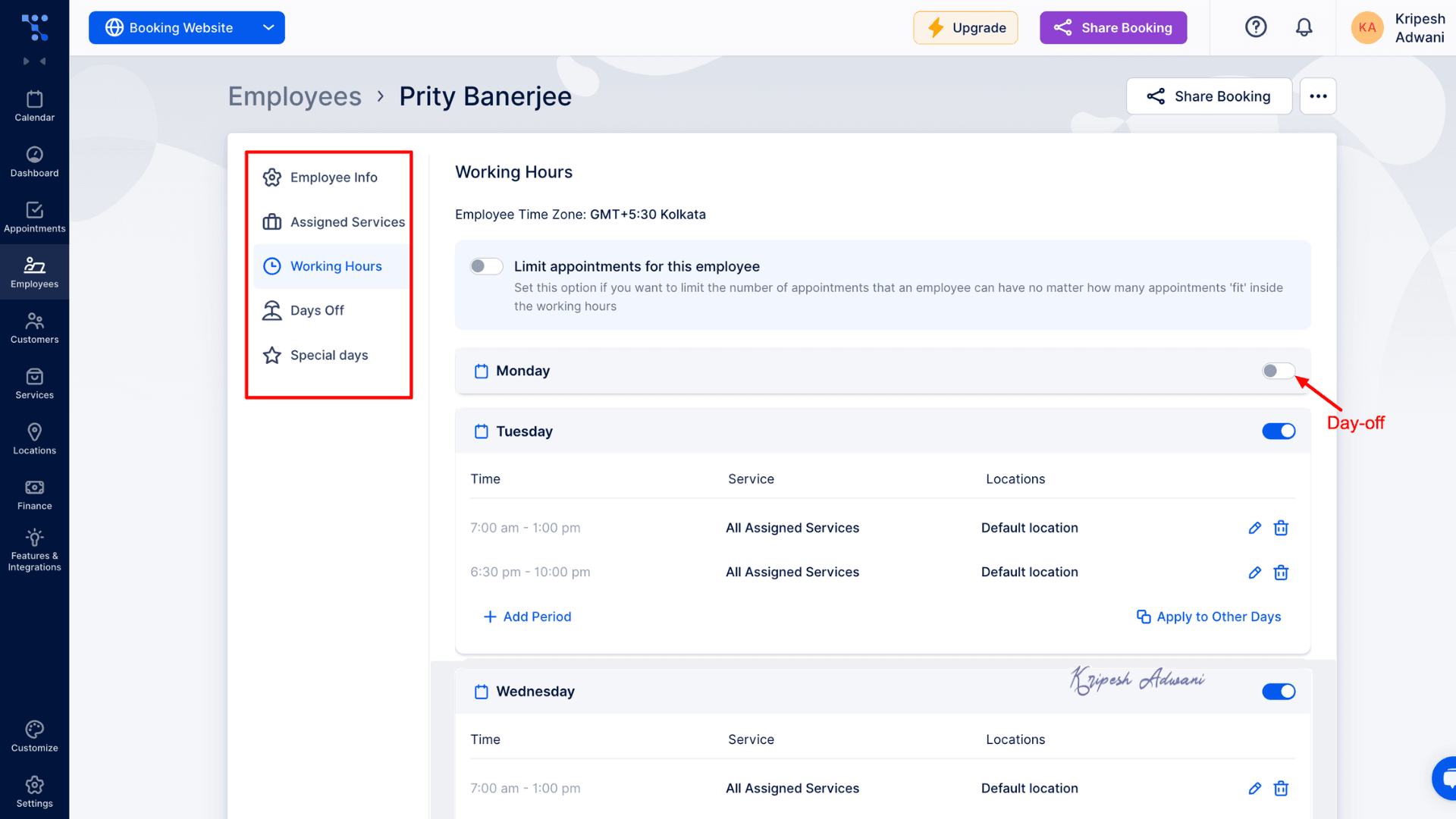
If your team works from different locations, you can also assign a preferred time zone to each employee, ensuring accurate scheduling across regions.
Many agencies offer commissions during peak or festive seasons. Trafft provides a dedicated Commissions Dashboard to manage and track this easily, simplifying payment calculations and reducing manual work.
8) Group Bookings & Recurring Appointments
As the name suggests, Group Bookings allows agency owners to accept bookings for multiple people at once. You simply need to set the minimum and maximum number of available seats, and customers can reserve spots accordingly.
If your customers need to book the same service across multiple days, the Recurring Appointments feature is extremely useful. For example, in a gym or fitness center, members may choose to attend Yoga classes three times a week. Instead of booking each session separately, they can select the date and time once and then choose how many times the appointment should repeat.
However, both of these features are available only on paid plans.
9) Analytics & Dashboards
Trafft dashboard is modern and intuitive, displaying all the key business insights in one place. You can easily track new customers, total revenue, appointments booked, canceled appointments, and more.
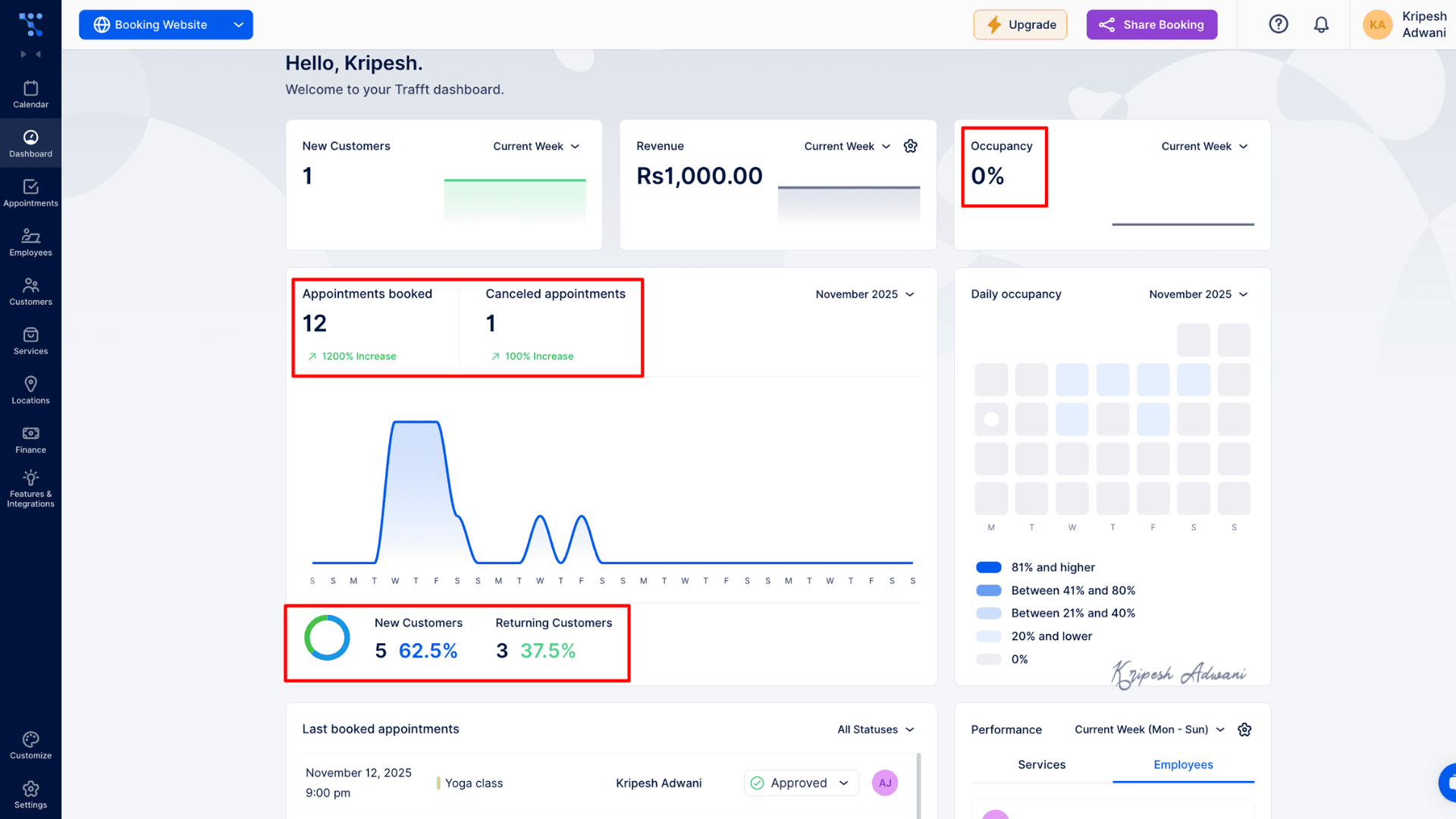
I’m genuinely impressed by how accurately Trafft measures important metrics such as occupancy rate and returning customer rate. You can also monitor employee performance, including your most in-demand team members and the services that are booked most frequently.
Overall, this feature helps business owners make strategic, data-driven business decisions.
Integrations
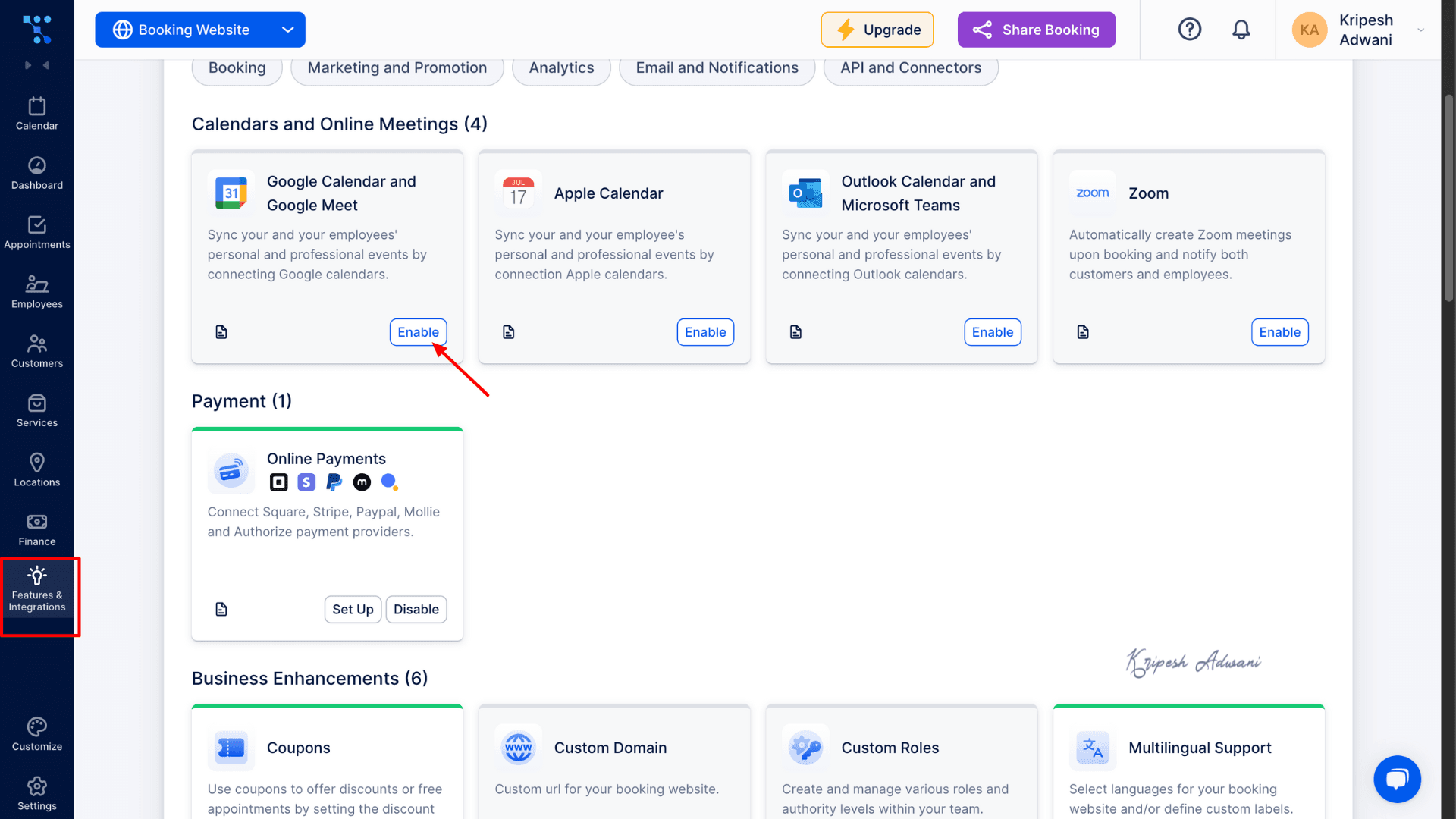
Trafft integrates with a wide range of popular third-party applications. Below is a list of some of the most commonly used integrations:
| Calendar & Video Conferencing | Zoom, Google, Outlook, Apple |
| Payments | Square, PayPal, Stripe, Mollie, Authorize.Net |
| Marketing | WordPress, Google Analytics, WhatsApp, Mailchimp, etc. |
| API and Connectors | API, Zapier, WebHooks |
However, users on the free plan are limited to only four calendar and video conferencing integrations. These include Google Calendar & Google Meet, Apple Calendar, Outlook Calendar & Microsoft Teams, and Reserve with Google.
Trafft Mobile App
Trafft’s mobile app is very easy to use. After signing up, you’ll see the navigation panel at the bottom. This allows you to quickly book appointments, check dashboards, and access your calendar. At the top, you’ll find options to view your booking website, share booking links, access help, view notifications, and manage your account.
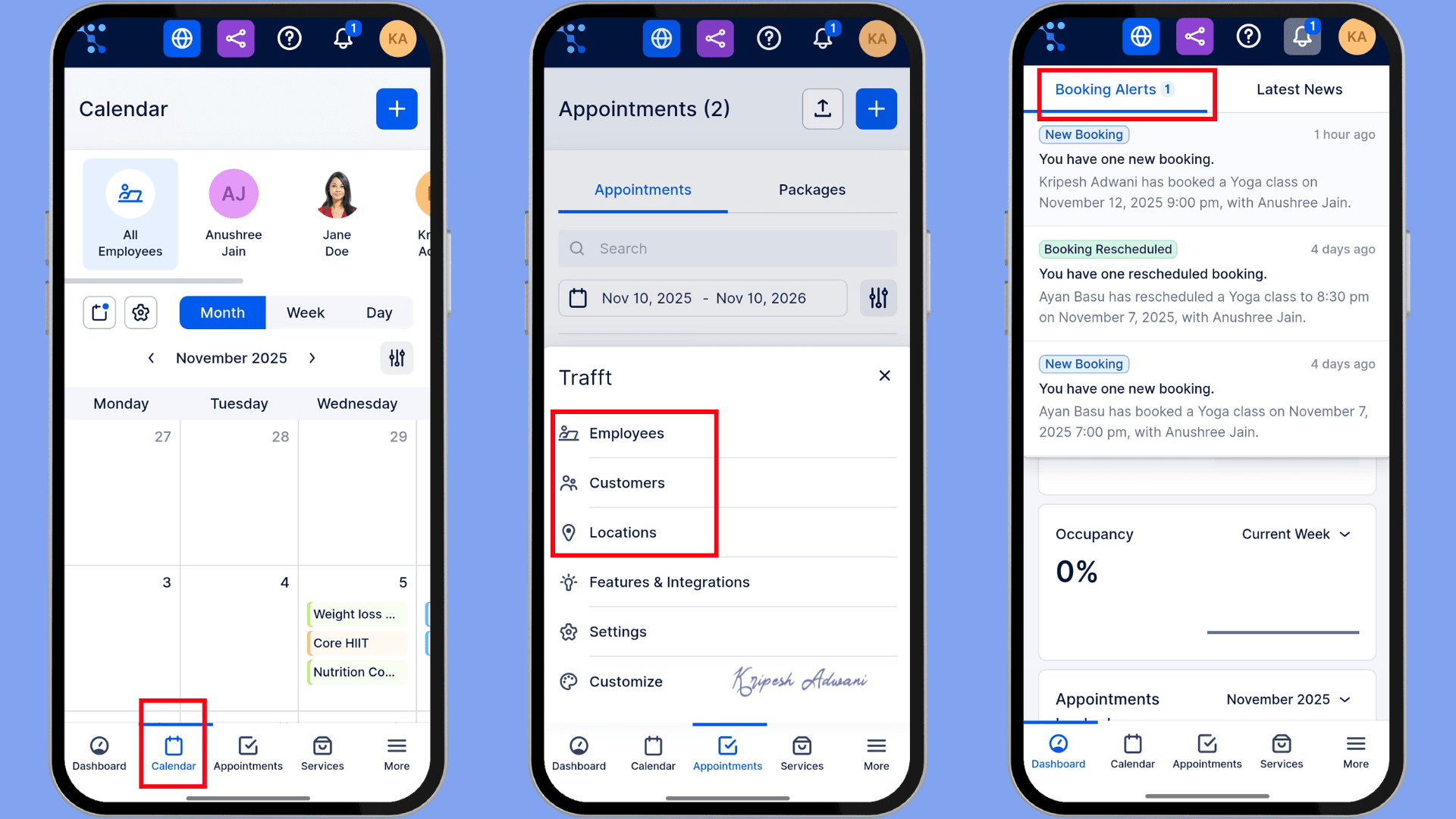
The mobile app is available for both iOS and Android devices. I recommend using the mobile app for easy on-the-go scheduling, quick confirmations, payment reminders, and managing notifications. You can also check daily staff schedules or approve last-minute bookings directly from your phone.
Trafft Pricing
Regular Pricing
| Trafft Free | Trafft Starter | Trafft Scaling | |
| Pricing for 1 mo | ₹0 | ₹1167 | ₹4781.2 |
| Pricing for 1 year | ₹0 | ₹10715 (₹892.9/mo) | ₹37890 (₹3157.5/mo) |
| Number of users | 5 | 10 | 15 |
| Custom feature | 5 | 10 | Unlimited |
| Email notifications | 200 | Unlimited | Unlimited |
| SMS notifications | 0 | 5 credits | 10 credits |
| Charges for additional users | ₹270.52/user | ₹541.94/user | ₹903.83/user |
| Timezone set up | No | Yes | Yes |
| Stats for employees | No | No | Yes |
| Customer Management features | Limited | Limited (more features than Free) | Advanced |
| Payment portals accepted | Square | Gpay, Apple Pay, PayPal, and more | All supported portals |
| Booking website customization | Limited | Limited (more features than Free) | Advanced |
Trafft’s Free plan is suitable for beginners and solopreneurs. However, for growing businesses with multiple customers and staff members, the Trafft Starter plan is ideal. I recommend choosing the annual plan instead of the monthly billing, as it reduces the cost from ₹1,167/month to ₹892.9/month. This way, you can save at least ₹275 per month while accessing more features.
AppSumo Pricing
You can save a huge amount by purchasing Trafft through the AppSumo lifetime deal. AppSumo currently offers 7 pricing tiers at a heavily discounted one-time cost.
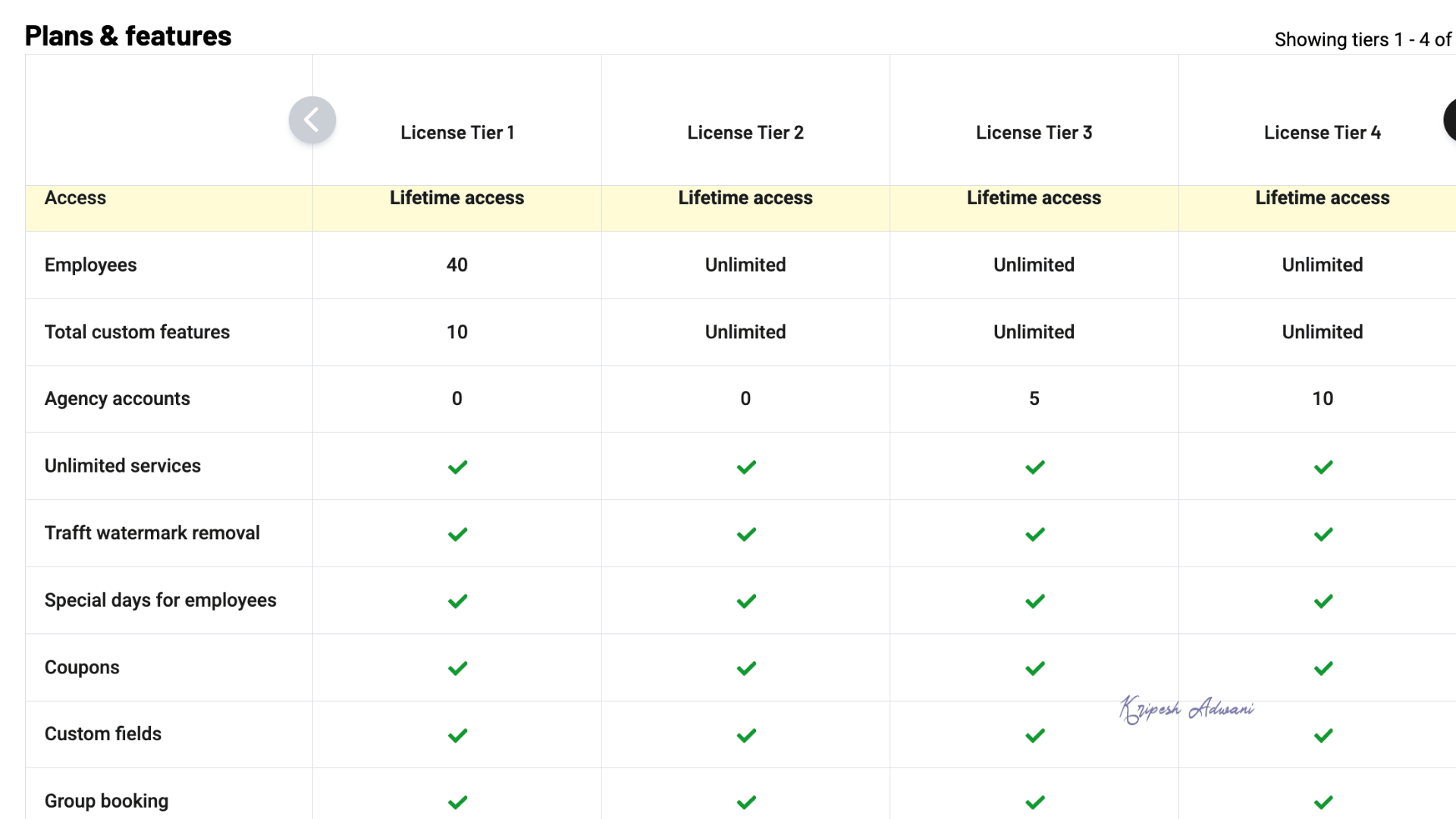
For example, the Tier 1 License is available for $89, and it includes support for up to 40 employees and 10 custom features. Tier 1 is comparable to the Trafft Starter plan.
For unlimited access, the Tier 2 License is available for $159 (lifetime). This gives you more features than the Trafft Scaling plan at a much lower long-term cost.
So if you’re planning to use Trafft long term, this deal offers exceptional value. Hurry before the deal expires!
Refund Policy
If you purchase Trafft at regular pricing, you get a 14-day free trial, after which the subscription becomes non-refundable. However, with the AppSumo deal, you get a 60-day refund policy. This means you can use Trafft for up to two months, and if you’re not satisfied, you can still request a full refund.
Trafft Customer Support
Trafft offers a 24/7 live chat support feature through its app. You are immediately connected with an AI agent that responds to queries within seconds. The response time is quick, and the information provided is backed by resources from the Trafft website.
I was initially confused about their 14-day free trial and 30-day money-back guarantee, and the chat support clarified my doubts clearly. Another helpful feature is that if you encounter any bugs, you can simply send screenshots and supporting files along with a brief explanation directly through the app.
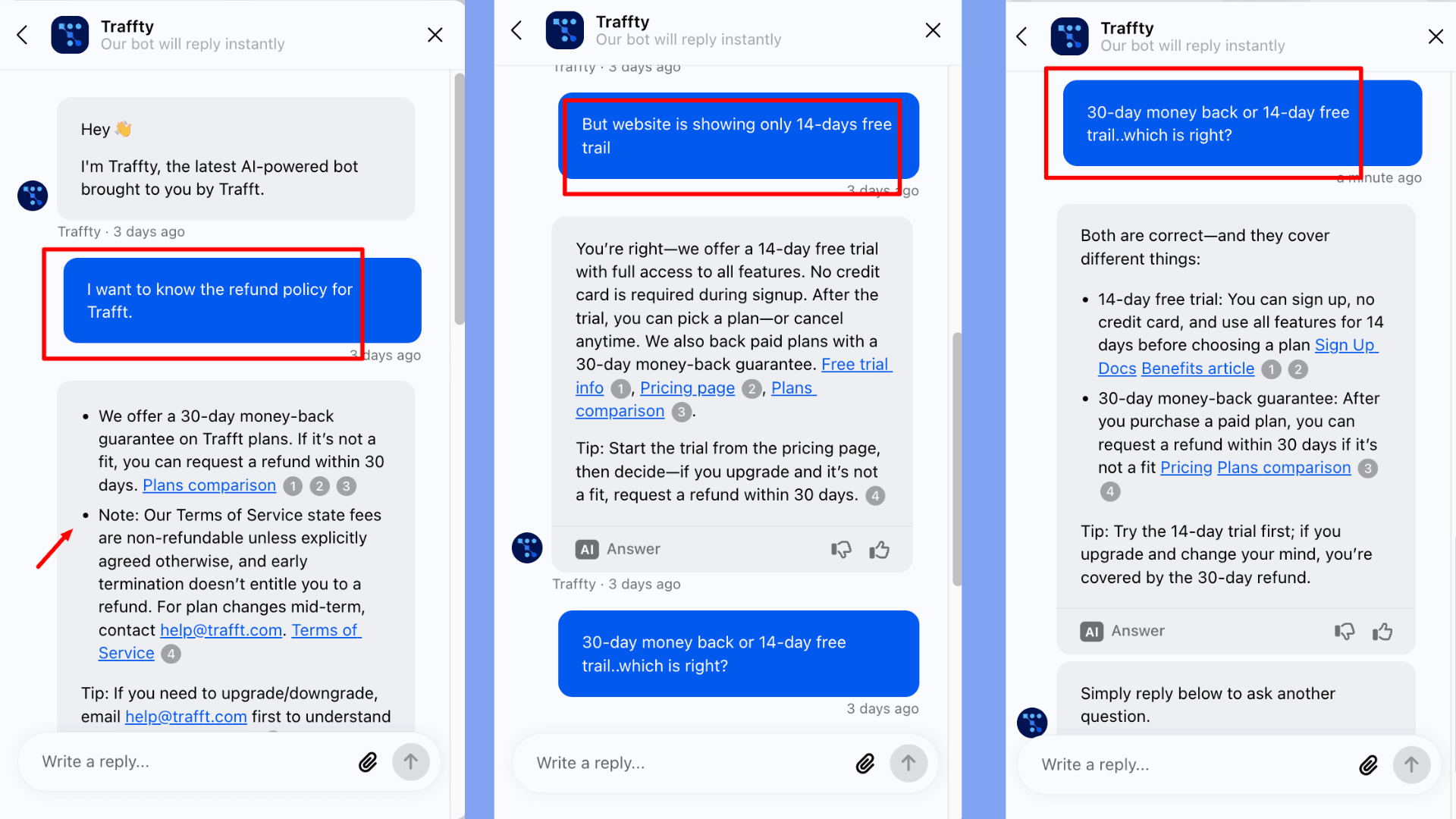
Regarding their knowledge base, you can easily access video guides and user manuals through the “?” (Help) button. Their website also contains plenty of useful resources, mainly through their blog and the Guides & Documentation section.
Overall, I am impressed. However, having the option to connect with a human agent would be beneficial for more complex issues. Currently, you can only submit a request form through their website or use the AI chat.
Trafft Pros
1) Booking Website with WordPress Plugin
Trafft creates a complete booking website from scratch. It hosts your website on WordPress. You simply provide some basic details, such as your business name, industry, and services, and the system generates your booking setup in seconds.
2) No Coding Knowledge Required
You don’t need any UI/UX or design skills to build your booking website. Trafft provides ready-made layouts and templates. Just choose a theme and customize it.
3) Free Customization
Even on the free plan, you can personalize your booking site with your branding, logo, favicon, business name, and even a custom domain. There is a dedicated Customize tab in the app where you can edit service pages, employee pages, booking forms, labels, and more.
4) Easy-to-use interface
The interface is modern, clean, and very easy to navigate. The booking front-end is simple for clients to use, and helpful video tutorials are available directly in the app. Overall, the UI/UX delivers a smooth user experience.
5) Cross-Platform Access
Trafft works on both desktop and mobile. You can manage your booking website or accept appointments while on the go. The mobile app is user-friendly and keeps everything accessible from any device.
6) Automated Customer & Employee Management
Trafft helps you track both customers and staff. You can create individual customer profiles, so their details auto-fill during future bookings. Employee profiles allow you to track availability, work hours, time off, occupancy rate, and more.
7) Two-Week Free Trial
New users receive a 14-day free trial with access to premium features. This allows you to test everything before committing, especially useful for small businesses and agencies.
8) Strong Support Channels
Trafft provides multiple support options. You can refer to their knowledge base for guides, report bugs directly through the app, and use the live chat for help with queries. For more complex issues, you can submit a support request.
9) Good Integrations
Trafft integrates with key third-party tools such as Google Analytics, Mailchimp, Facebook Pixel, and more. It also syncs seamlessly with Google, Outlook, and Apple calendars, ensuring your scheduling stays organized.
Trafft Cons
1) Limited Preset Templates
Trafft provides only eight preset website themes during the initial setup. Although you can later customize branding elements such as colors and logos, the foundational layout options remain limited.
2) Email-Only Notifications for Free
Free plan users can send appointment notifications only via email. SMS and WhatsApp notifications are available only on paid plans.
3) Initial Setup Can Be Time-Consuming
The initial configuration requires you to manually set up multiple elements, including listing all services, entering staff details, configuring schedules, choosing a theme, and applying customizations. This process takes time and patience.
4) Limitations for Indian Currency Transactions
Trafft supports limited payment gateways such as PayPal, Stripe, Square, Authorize.Net, and Mollie. However, for INR payments, only Stripe is available on the free plan. Paid plans may allow additional options, like Google Pay.
Who Should Use Trafft AI?
Trafft AI would be ideal scheduling software for:
- Service-Based Businesses: Coaches, consultants, salons, health clinics, fitness centers, and similar businesses benefit from Trafft’s automated scheduling, reminders, and built-in payment collection.
- Freelancers and Solopreneurs: Independent professionals who want to avoid manual scheduling, reduce no-shows, and manage payments.
- Agencies and Franchises: Teams that manage multiple staff members, calendars, and service locations can use the tool for operational clarity and workflow coordination.
Trafft may not be the best fit for individuals who only need to schedule a few appointments per month or businesses requiring highly advanced CRM, accounting, or enterprise-level workflow automation.
Why Should You Trust Me?
I’ve been professionally involved in the digital space for nearly a decade now. In 2015, I extensively evaluated and compared most of the well-known software and AI tools. Some of the popular business software I’ve reviewed include Gamma App, QuickAds, Prezi, Letterly, Saily eSIM, Vengo AI, etc.
I’ve shared comprehensive reviews and breakdowns of these services across both my blog and YouTube channel. For this specific review, I took a few weeks to thoroughly test Trafft on different use cases. With my background and hands-on expertise, I am confident in guiding you toward the best cloud storage option for your requirements.
Conclusion
Trafft is a powerful appointment scheduling and booking software available for Android, iOS, Windows, and macOS. It syncs with your calendar, manages appointments and staff availability, tracks services, and allows clients to book appointments online with ease.
The platform is user-friendly and also provides a WordPress integration plugin. You can build a booking website without any coding, access a 14-day free trial of all premium features, manage employees, and monitor schedules conveniently through the mobile app.
While Trafft offers both free and paid plans, the free plan may not be sufficient for growing businesses. However, the good news is that Trafft is currently available on a lifetime deal on AppSumo for just $89, along with a 60-day money-back guarantee. If you’ve been looking for an affordable scheduling tool, this is a great time to invest.
This concludes my honest review of Trafft. Have you tried any other scheduling software before? I’d love to know how your experience compares to Trafft.
FAQs
Does Trafft have a free plan or trial?
Yes, Trafft offers a free plan that includes unlimited appointments, up to 5 custom features, email notifications, etc. Plus, when you first sign up, you receive a 14-day free trial of premium features.
Can I embed a Trafft booking form onto my website?
Yes. Trafft allows you to embed your booking form into your existing website. You can find the “Embed” under “Share Booking” options at the top of your Trafft dashboard.
Does Trafft support multi-day bookings for events?
Currently, Trafft does not support multi-day bookings. The platform is designed for single-day appointments, so it may not be suitable for workshops or live events.
Can I schedule recurring appointments or group bookings with Trafft?
Yes. Trafft supports both recurring appointment bookings and group bookings, but only on paid plans. For recurring appointments, customers can choose an initial schedule and then set frequency or end date.

Trafft Pros (+)
- Booking Website with WordPress Plugin
- No Coding Knowledge Required
- Free Customization
- Easy-to-use interface
Trafft Cons (-)
- Limited Preset Templates
- Email-Only Notifications for Free
- Initial Setup Can Be Time-Consuming
- Limitations for Indian Currency Transactions