Do you still spend more time on back-and-forth scheduling than actually attending meetings? If so, you’re draining your energy and wasting valuable time in 2025. It’s high time to rely on an AI scheduler.
These advanced apps integrate your calendars, review your schedule, and control all tasks from a single place. Also, a lot of them let you schedule with teams and see everyone’s free time.
Today, I’ve shortlisted the 9 best AI scheduling assistants in 2026 that are useful. This list includes both free and paid tools, so everyone, from beginners to professionals, can find the right fit for their needs.
- What are AI Scheduling Assistants?
- 9 Best AI Scheduling Assistants [Quick Comparison]
- 9 Best AI Scheduling Assistants
- 1) Reclaim AI – Best Overall AI Scheduling Assistants
- 2) Clockwise – Best Scheduling Software for Teams
- 3) Motion – Best for all-in-one Automation
- 4) SkedPal – Best for Adaptive Time Blocking
- 5) Akiflow – Best for Integration and Single Inbox Consolidation
- 6) Calendar – Best for Team Scheduling & Multi-Calendar Consolidation
- 7) Structured – Best for Visual Planning and GPT-4o
- 8) Trevor AI – Best for Task-focused Scheduling
- 9) Calendly – Best for External Appointment Booking
- Why Do You Need an AI Scheduling Assistant?
- Why Should You Trust Me?
- Conclusion
- FAQs
What are AI Scheduling Assistants?
AI scheduling assistants are AI-powered intelligent software applications that automate calendar scheduling and task management. They integrate with your Google/Outlook/Apple calendar and sync your activities. Then, they find the best times for meetings, schedule new tasks, send reminders, or even block time for deep focus work.
This software is available for mobile and web-based platforms. Many advanced tools also offer natural language processing, which means you can schedule tasks with voice commands. Plus, they can rearrange your schedule to find the best available time if any sudden tasks are assigned to the existing blocked-out schedule.
9 Best AI Scheduling Assistants [Quick Comparison]
| Tool | Ease of Setup | Calendar Integrations | Scheduling Style | AI Features | Best For |
| Reclaim | Intermediate to Pro | Google, Outlook | Smart calendar + Time blocking | Auto time blocking, AI scheduling links, Smart meetings, Analytics | Remote workers |
| Clockwise | Beginners to Intermediate | Google, Outlook | Team calendar optimization | Natural language scheduling, Dynamic rescheduling, Smart focus across teams | Teams with busy meeting schedules |
| Motion | Pro | Google. Outlook, iCloud | AI Work Suite | Dynamic scheduling, Smart time blocking, Multi-skill AI employees, AI Docs/Notes | All-in-one application |
| SkedPal | Intermediate | Google, Office 365, iCloud Calendar | Smart time-blocking with Time Maps | Dynamic rescheduling, Time Maps, Deadline awareness | Adaptive time blocking |
| Akiflow | Beginners to Intermediate | Google, Outlook | Universal inbox + time-blocking interface | Aki AI assistant, Contact‑availability | Integrations |
| Calendar | Beginners | 10+ calendars (Google, Outlook, Apple, Yahoo, iCal, etc.) | Smart calendar + multi-person coordination | Intelligent Time Slot Prediction, Conflict Detection, Real-Time Team Calendar Adjustment | Team scheduling |
| Structured | Beginners | Google Calendar, Outlook, Yahoo, etc. | Visual timeline interface with GPT-4o | Natural Language Planning, Instructions, Physical Document Scanning, Context-Aware Task Placement | Visual planning |
| Trevor AI | Beginners to Intermediate | Google, Outlook | Smart calendar + task planning engine | Intelligent Time Slot Prediction, Batch Intelligent Scheduling, Task Breakdown Generation, Plan My Day | Task-focused Scheduling |
| Calendly | Beginners | Google, Outlook calendar | Specialized booking links (best-in-class) | Natural Language Processing, Context-Aware Scheduling, Intelligent Conflict Resolution | External Appointment Booking |
9 Best AI Scheduling Assistants
1) Reclaim AI – Best Overall AI Scheduling Assistants
If you’re still relying on basic Google Calendar just because it’s free, Reclaim AI is the app you need to upgrade to right now. It’s a smart AI scheduling app that works alongside your existing calendar. It syncs all your activities and automatically finds the best slots for deep work, quick breaks, recurring tasks, and meetings.
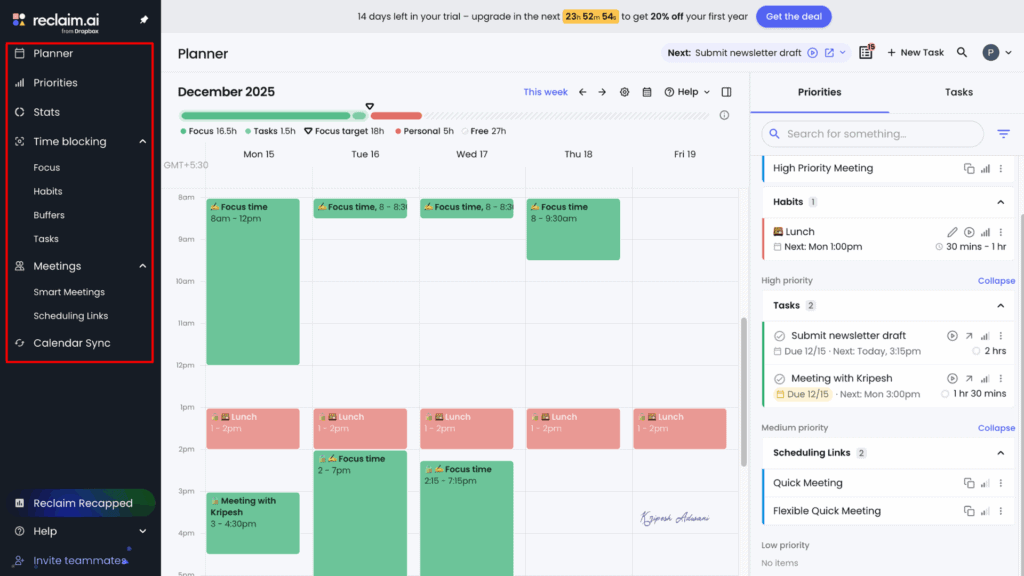
When I first signed up, the initial setup took me a couple of minutes to learn and understand every feature. I quickly connected my Google/Outlook Calendar and other apps like Slack, Todoist, Asana, ClickUp, etc. Next, all I had to do was set time for work hours and habits for recurring routines. I set up different categories (Personal, Solo work, etc.), specific hours, ideal time, duration, etc.
Reclaim, then schedule my focus blocks, habits, and task work into open calendar slots based on time and priorities. If I change the schedule through any app synced with Reclaim, it immediately updates its dashboard and blocks that new time.
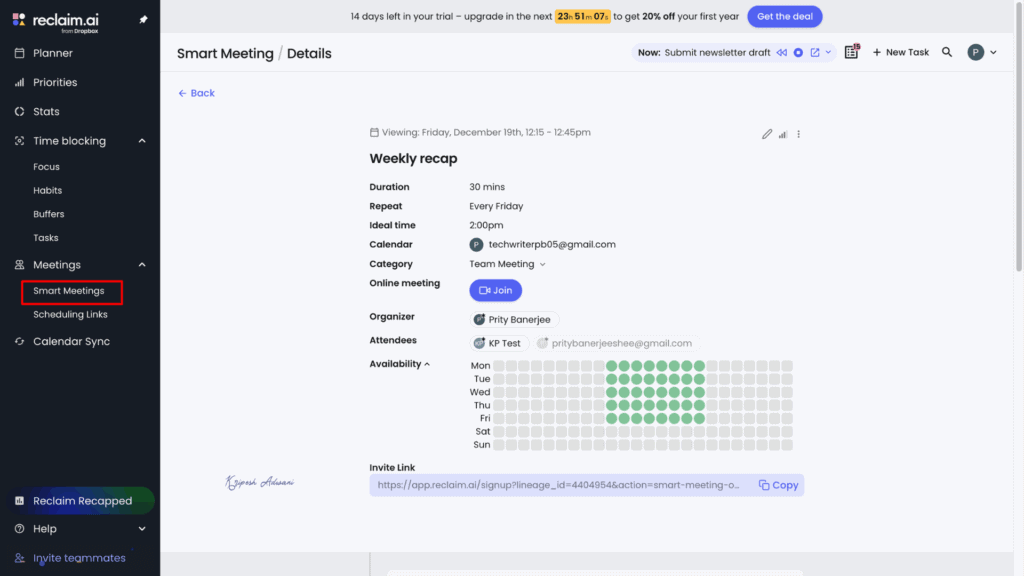
The Smart Meeting feature finds the best time for every team member. I can even share my availability using its AI Scheduling Links. Reclaim tracks everyone’s availability to auto-place meetings at the best time.
I am impressed with its Habit tracking. For example, I set a 1-hour workout session for every Monday to Friday. Reclaim makes sure to find and block the best available time, even when my week gets super busy, so I never miss a session. The flexibility is a lifesaver.
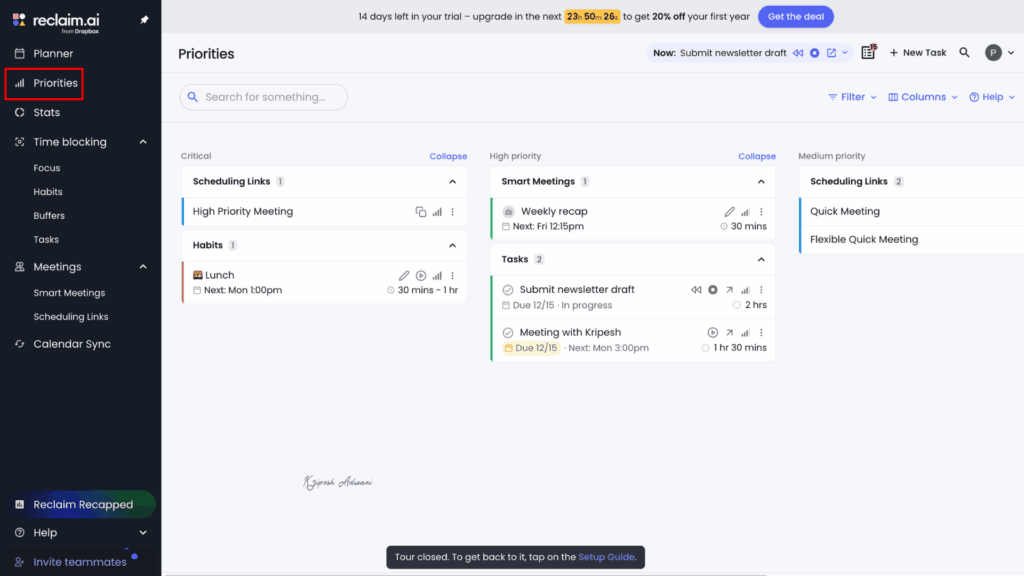
Last, the priority dashboard showcases all tasks with critical, high, and medium priority. In fact, if you change the priority of any tasks, it reshuffles the schedule and makes sure high-priority tasks get the most protected time.
Limitations
- Need to spend more time getting familiar with advanced features
- No mobile app is available
Pricing
Free plan offers access for 1 user, a 1-week scheduling range, 2 connected calendars, 1 shareable link, 1 habit tracker, up to 100 users across your Reclaim domain, and limited integrations. Plus, 14-days free trial is available to try all premium features.
Reclaim offers three paid plans: Starter, Business, and Enterprise. Small teams can start with the Starter plan, which costs $10/month per seat. In this plan, you get 10 user accesses, an 8-week scheduling range, 3 scheduling links, unlimited Focus Time, 3 Smart Meetings, and all integrations.
Who Should Use
Busy professionals and managers with back-to-back meeting schedules, small teams seeking support for managing recurring tasks, and solo remote workers who already use tools like Asana, Todoist, or ClickUp and want their tasks automatically converted into calendar time blocks to reduce manual planning and improve day-to-day productivity.
2) Clockwise – Best Scheduling Software for Teams
Clockwise is a good Reclaim AI alternative you can try for free. It’s a cloud-based AI scheduling and calendar automation tool that mainly focuses on team features. Just like Reclaim, it connects with the organizational Google/Outlook calendar. Then, users have to set up work hours and focus time after creating the account.
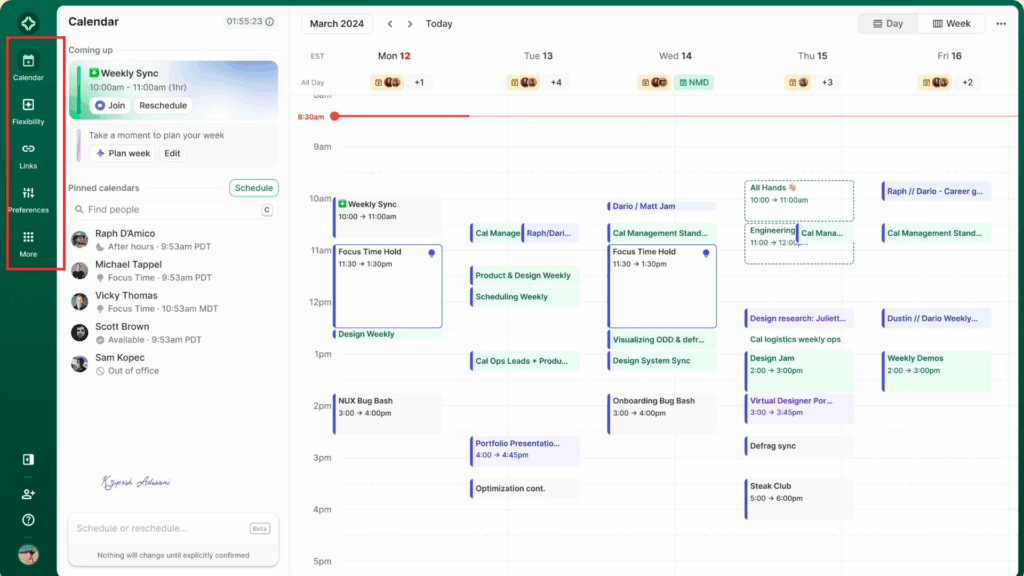
The app automatically fetches tasks and meetings. If you mark meeting time as flexible, then Clockwise auto moves it to block out Focus Time for uninterrupted work. The best thing is, it checks the availability of both internal and external attendees and suggests the best time for everyone. You can easily share your availability with Clockwise links, too.
The Clockwise app is constantly working to resolve task conflicts. It auto-adjusts work hours, no meeting times, and collaboration slots at the team level so that everyone can maintain a healthy balance between work and personal time. It’s smart enough to learn the preferences (like ideal focus windows or lunch timing) of different teammates to create optimized schedules for the whole group.
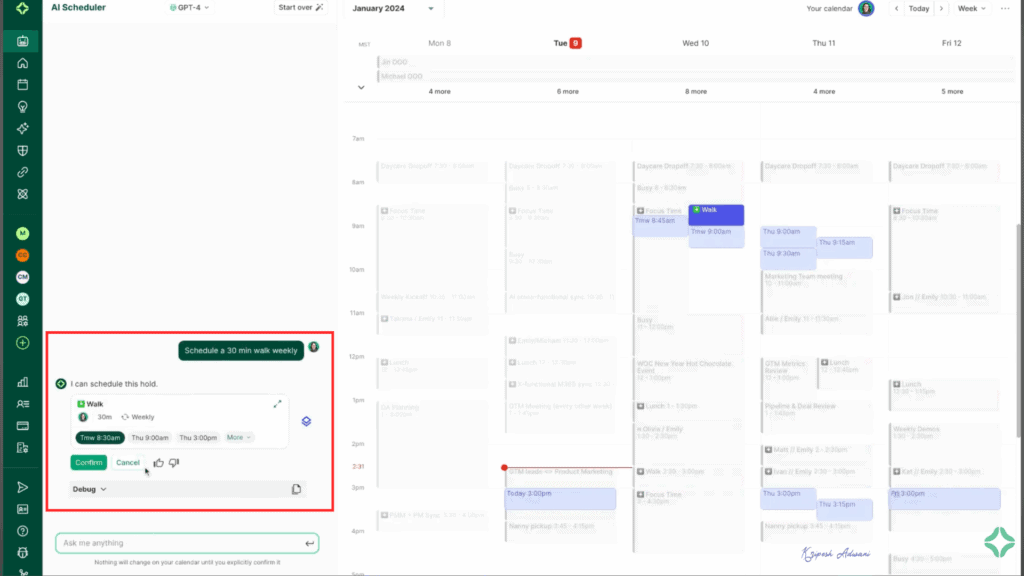
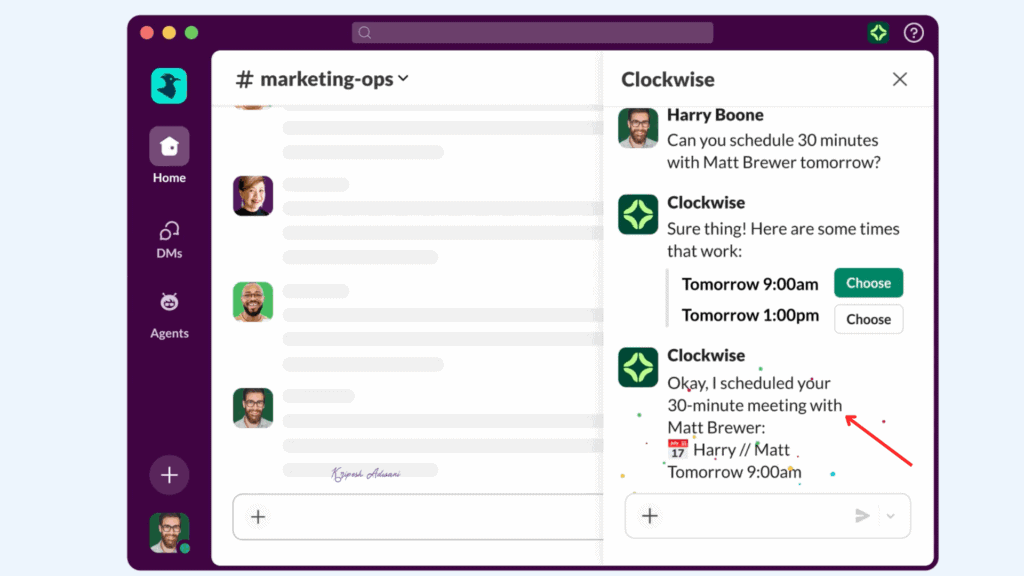
I can use voice commands for quick changes, like “Move all meetings later this week” or “Schedule a quick review meeting with Sam at 5.30 PM. The app integrates with Slack, so it syncs all meeting status and silences notifications for focus time blocks.
Limitations
- Cannot fully replace a native calendar app, as titles, descriptions, and other details still require manual editing within the calendar itself.
- Free plan limits access to team productivity tools
- Occasional disconnections with Google Calendar or Slack
Pricing
Clockwise’s free tier offers a 2-week calendar optimization window, AI calendar features, unlimited scheduling links, and no access to team productivity tools. It has three paid plans: Teams, Business, and Enterprise.
The Teams plan starts at $6.75/user/month when billed annually. It includes access to advanced scheduling, Focus Time, group scheduling links, all team productivity features, enhanced security, priority support, and more.
Who Should Use
Senior workers and managers with meeting-heavy schedules who need protected deep-work time and automatic meeting reshuffling, as well as small to mid-sized teams collaborating across time zones, require flexible scheduling solutions.
3) Motion – Best for all-in-one Automation
If you’re looking for an application that does much more than just AI scheduling, Motion is the perfect match. The app bundles features for project management, time management, knowledge management, and more. The app is available for desktop and mobile users.
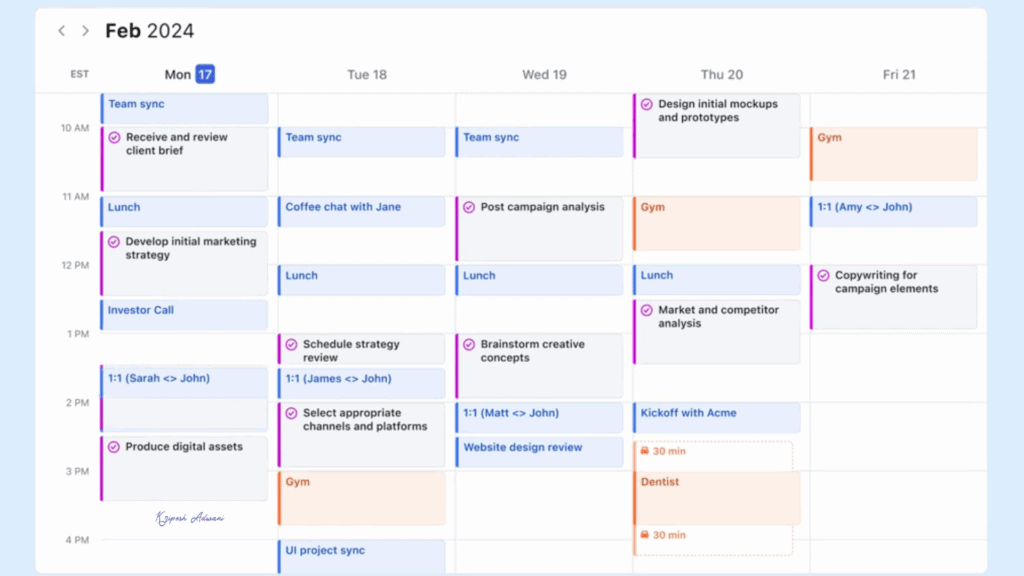
Motion’s AI Calendar syncs with your existing calendar. It uses machine learning to automatically slot all tasks into the open calendar. You can clearly see meetings, upcoming events, deadlines, etc. Whenever any new event pops up, it instantly reshuffles other events. It can rebalance the entire workload when urgent events come up.
Its AI task and project management eliminates manual updates. Wherever a team member finishes any task and marks it as done, the project automatically moves forward. Plus, based on work hours, the priorities you set, Motion auto-schedules every project so you never miss a deadline.
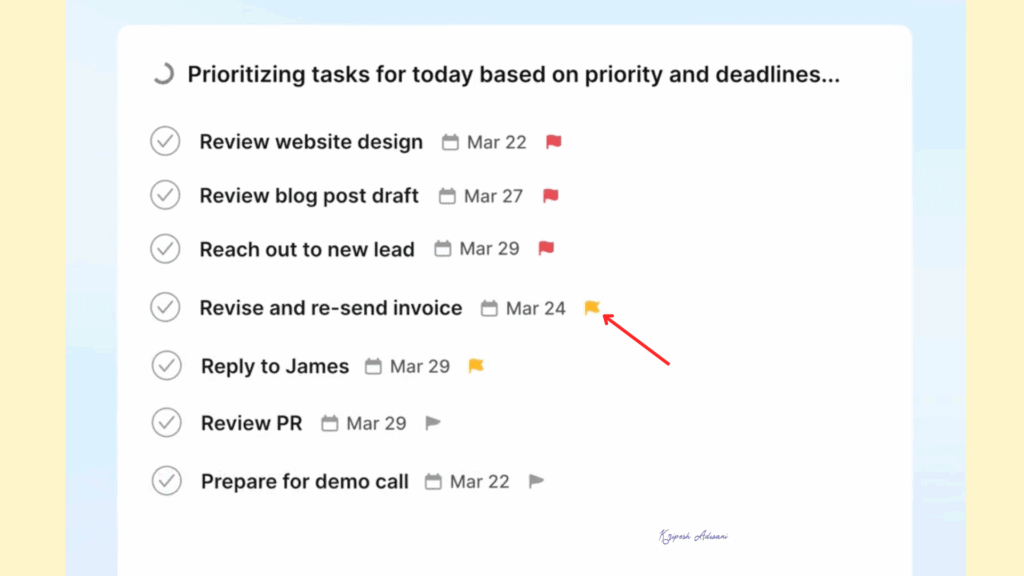
You can handle external bookings with links and a dedicated booking page. There are options to set meeting hours, add buffer time, and even set back-to-back group meetings. Motion’s workflow optimization engine is smart enough to track if you or your teammates have too much work and adjust the schedule.
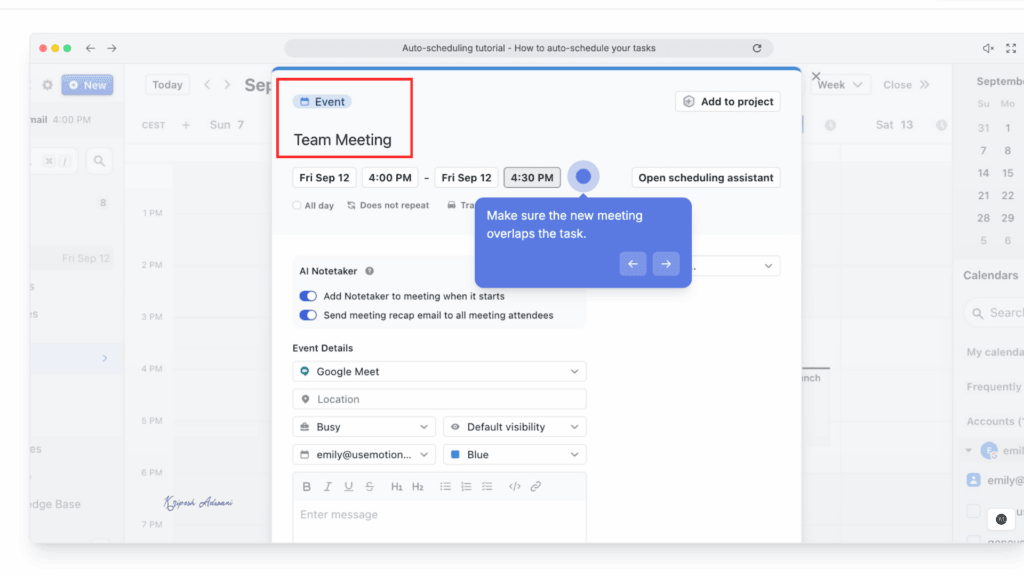
Motion offers an AI personal assistant, which is a pre-built custom agent. The AI agent can help you with replying to emails, summarizing meetings, updating CRM after calls, generating presentation slides, managing tickets, and much more. On top of that, you’ll find AI meeting note takers, AI doc assistants, AI chat, and more.
Limitations
- No free plan available
- Expensive paid plans
- Steep learning curve due to the large number of features
Pricing
Motion AI does not offer a free plan. It has two paid tiers: Pro AI and Business AI. Pricing varies for individuals and teams.
The Pro AI Individual plan costs $29/month when billed annually. For teams, the same plan costs $19/seat/month. The Pro AI plan includes access to AI Chat, AI Projects & Tasks, AI Sheets & Databases, cross-platform access, 7,500 credits per month, and more.
Who Should Use
Founders, knowledge workers, and small teams who manage multiple projects and are comfortable with AI-driven task reshuffling, or struggle with planning and prioritization.
4) SkedPal – Best for Adaptive Time Blocking
SkedPal is another paid AI calendar and task management tool. It connects with Google, Office 365, or iCloud Calendar and converts your to-do lists into scheduled time blocks automatically. For any new event, just hit “Update Schedule” to see the changes. The calendar immediately adapts and adjusts wherever new changes happen.
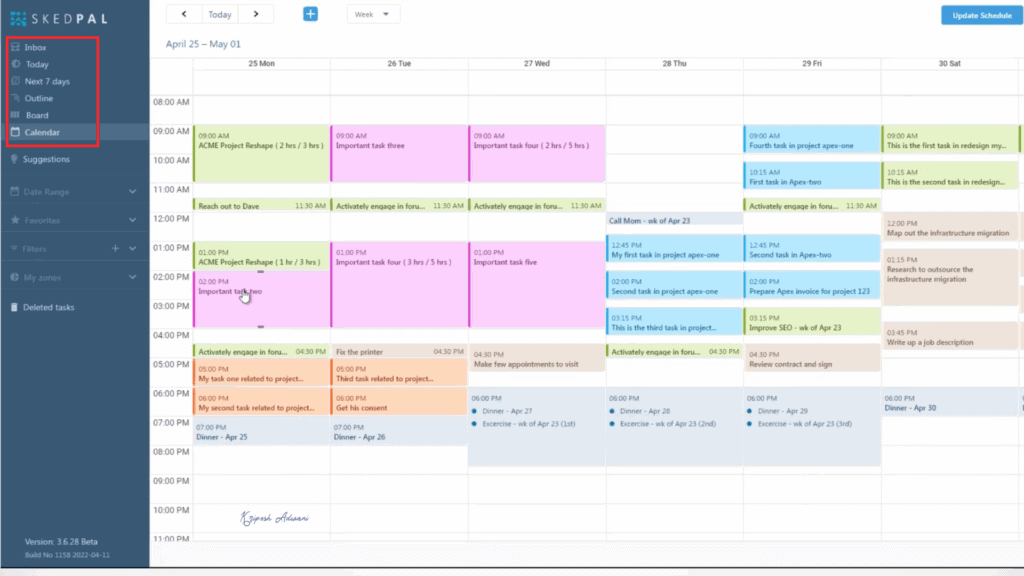
Like other AI scheduler apps, SkedPal auto-schedules tasks based on your work hours. All you have to do is tell the duration, deadline, and priority. Its engine scans your calendar to block out time for those tasks. SkedPal can even distribute small tasks in short time gaps.
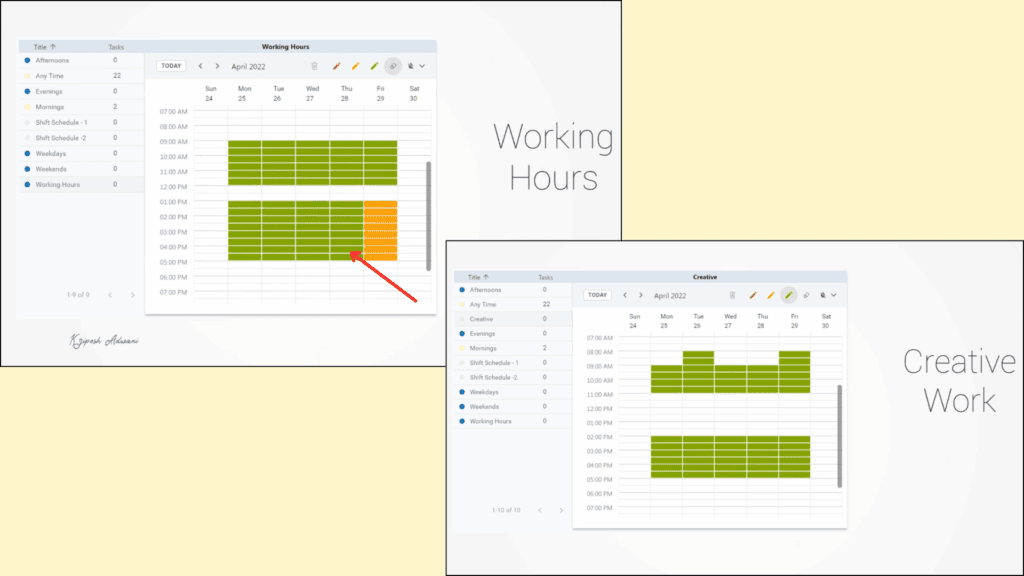
Its signature feature is Time Map. This allows you to use different colors (red, black, green, yellow, etc.) to define the flexibility of your work time. For example, a green zone shows a flexible/ideal time, whereas black zones are reserved for deep work. It even allows overlapping time maps and determines which tasks need more priority during those contested times.
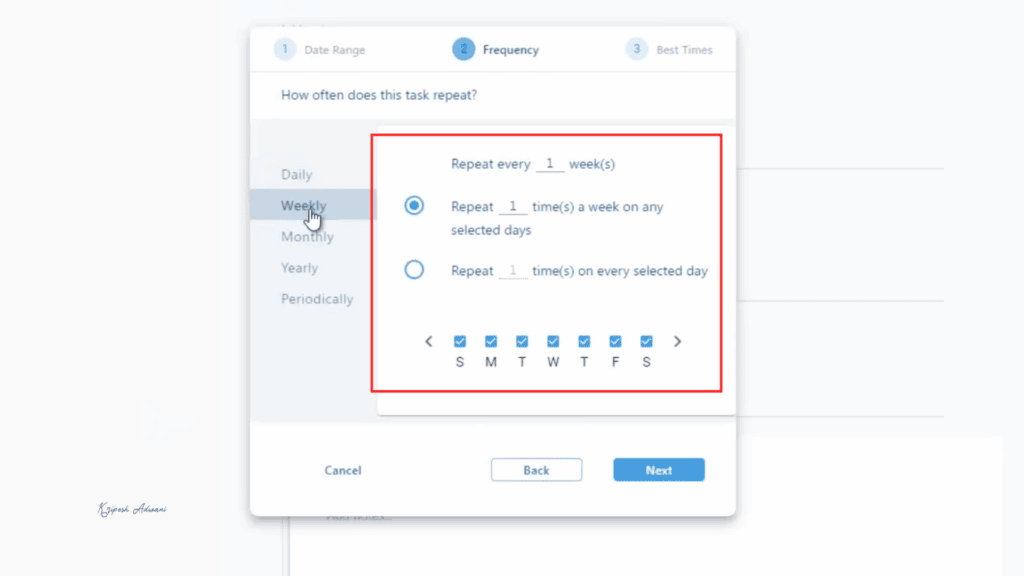
You can keep up your recurring habits even on your busiest days. SkedPal auto-adjusts and finds the best slots for you. The Status Tracker shows how much time you actually spent in each zone versus what you planned. In fact, you can spot work overload because whenever SkedPal can’t schedule a task, it marks it as an all-day unscheduled event.
Limitations
- Beginners may need to spend more time understanding time maps, priorities, and other settings
- The UI can feel overloaded with features
- Users often need to manually press “Update Schedule” instead of the calendar auto-adjusting automatically
- Heavy users with thousands of tasks report slow performance and occasional lag
Pricing
SkedPal does not offer a free plan. It provides two paid plans: Core and Pro. The Core plan costs $9.95/month when billed annually. It includes a 21-day AI-powered scheduling, one calendar sync, unlimited sub-tasks for detailed planning, time budgeting features, and more. A 14-day free trial is also available.
Who Should Use
Academics, consultants, and freelancers who want time maps, zones, budgets, and granular control over priorities will benefit most. It is especially suited for power users who will invest time learning advanced features.
5) Akiflow – Best for Integration and Single Inbox Consolidation
If your work requires accessing 10+ tools and you need just one command centre to manage all your tasks, then Akiflow will be a huge help. It’s a powerful AI Calendar and Scheduling Assistant that combines calendar, tasks, and AI assistance in a single platform.
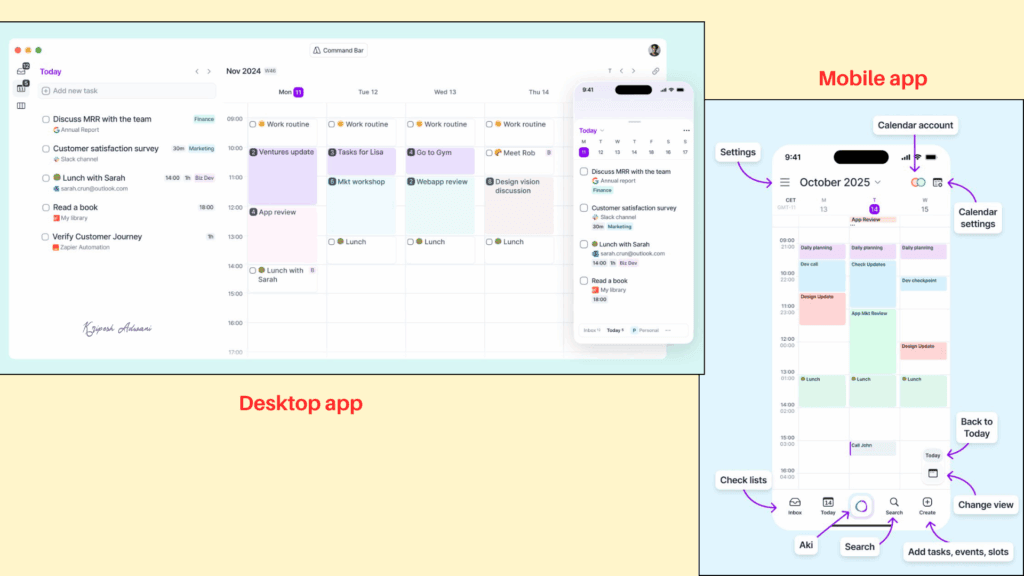
Similar to Motion, Akiflow is available for iOS, Windows, macOS, and web. Once you set up your account, you can connect any calendar you use, Google, Outlook, or iCloud. It automatically grabs all the tasks you already have planned on those calendars. You can create any new tasks right inside Akiflow.
Unlike other tools, Akiflow really stands out because of its deep integration. You can connect Asana, Jira, ClickUp, Todoist, Notion, Slack, Gmail, and other apps. All of these integrations support two-way synchronization, meaning everything stays updated everywhere.
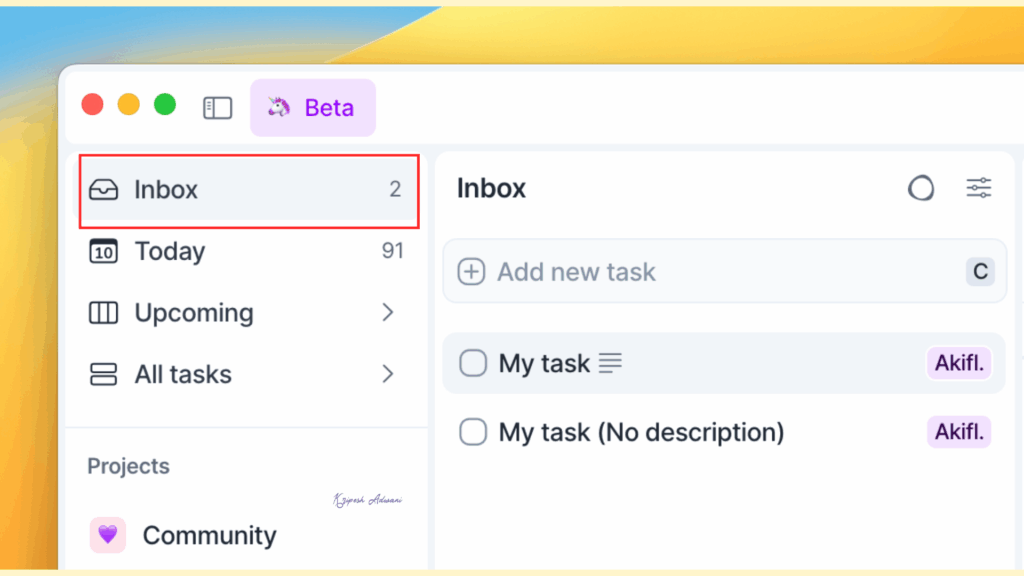
The tool provides a Single Inbox for all workflows. This means it pulls action items from Zoom, Slack messages, emails from Gmail, work items from Notion/ClickUp, and tasks on Google/Outlook calendar. You never have to copy/paste tasks from other apps; you’ll see everything scheduled on a single dashboard.
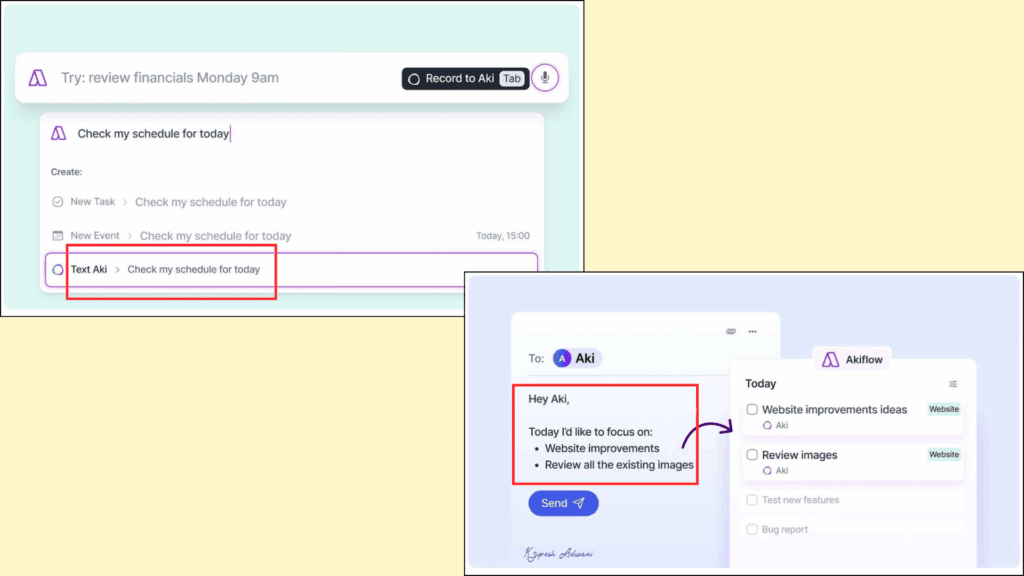
The next amazing feature is Aki, the AI assistant. It understands natural language commands. So, you can just say, “Schedule a meeting at 5 with Harry,” and it’s done. The AI workflow features give you a quick overview of your daily and weekly schedules. When your tasks go over a certain limit, it sends reminders about the overload.
Aki is smart enough to automatically categorize. It assigns incoming items to tags based on your past behavior, which keeps you incredibly organized. It also checks contact availability, schedules meeting links, and even resolves meeting conflicts.
Limitations
- Connecting too many apps can make the universal inbox view feel cluttered
- Beginners may need to invest more time to get started
- Occasional issues with syncing connected apps and updating tasks in real time
- No separate pricing plans for individuals and teams
Pricing
Akiflow offers a single paid plan and does not have a free plan. The Pro yearly plan costs $19 per month when billed annually, while the Pro monthly plan costs $34 per month.
The Pro plan includes unlimited integrations, unlimited tasks, unlimited meetings, a 1:1 coaching call, and access to all features. A 7-day free trial is also available.
Who Should Use
Akiflow is ideal for individuals and busy professionals who already use multiple productivity tools, as well as productivity-focused users, small teams, and freelancers who want a single, AI-enhanced daily planner.
6) Calendar – Best for Team Scheduling & Multi-Calendar Consolidation
As an agency owner, if your top priority is team scheduling, Calendar is a perfect AI Scheduling Assistant for you. It’s a simple web-based platform that gets rid of personal scheduling headaches, makes meeting coordination easy, and provides smart time management. You can also use it on Android or iPhone, and it even has a browser extension.
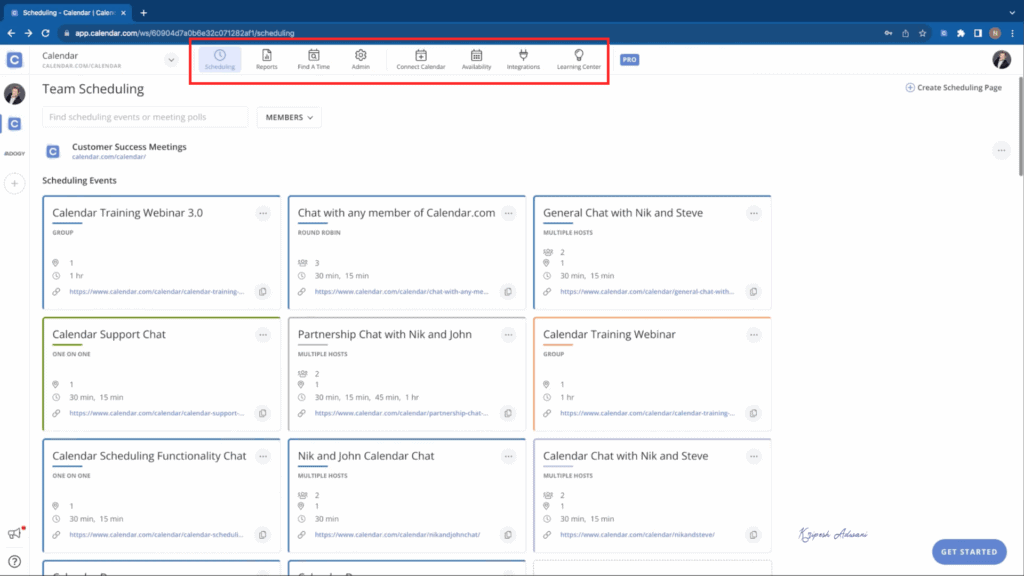
This AI scheduling tool gives you one unified dashboard for 10+ calendars. Users can connect with Google, Microsoft Outlook, Apple Calendar, Yahoo Calendar, iCal, and more. All calendar events get synced up in real-time across every single one of them.
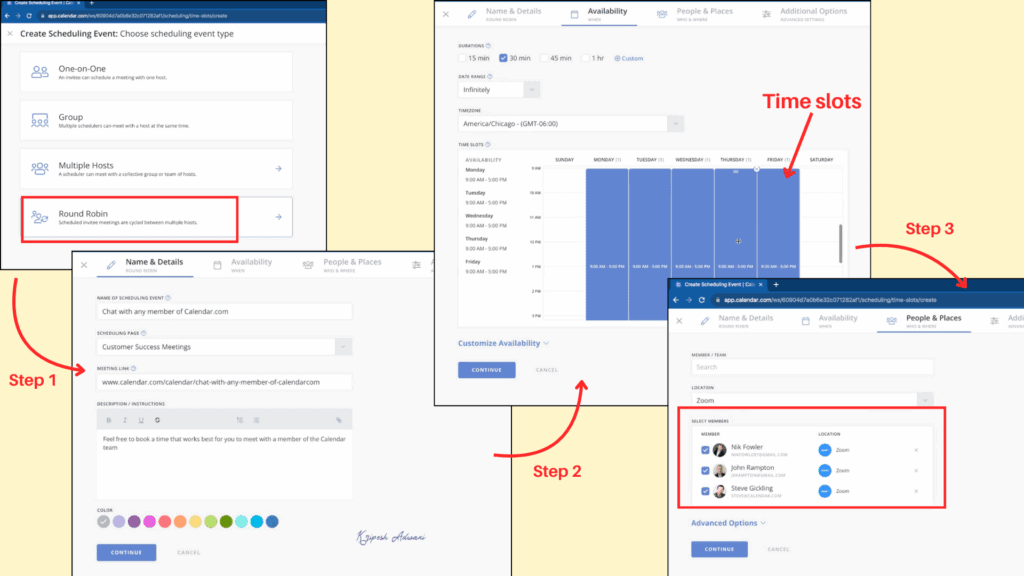
You can add up to 200 team members. Calendar automatically tracks everyone’s schedule and generates the best meeting options. The app is brilliant at coordinating time for multiple people by layering everyone’s availability and only showing slots that work for every participant.
The dashboard makes it easy to move events with a drag-and-drop tool. You can reschedule meetings with just one booking link. In fact, if your schedule is jammed with meetings, the app can even suggest canceling less important ones instead of just rescheduling them.
It can also auto-block focus time by learning from your activities. So, you can have time for deep work, lunch breaks, travel, and any personal activities. Plus, it scans your email threads and adds things like flight reservations and other important events to the calendar so you won’t miss them.
Limitations
- No free plan is available to try
- The app is more focused on team-based features
- Offers only basic scheduling features, with limited advanced automation
- Feature disparity between Android and iOS platforms
Pricing
Calendar offers three paid plans: Standard, Pro, and Enterprise. The Standard plan costs $16 per user per month when billed annually. However, it is currently available at a 50% discount, reducing the price to $8 per user per month.
This plan includes up to three connected calendars, five scheduling event types, 25 workspace teams, unlimited workspace members, and more. A 14-day free trial is also available.
Who Should Use
Calendar is well-suited for sales professionals, small teams, and growing organizations that want unified calendar consolidation with intelligent scheduling assistance and prefer AI-driven suggestions for better time blocks and optimized meetings.
7) Structured – Best for Visual Planning and GPT-4o
Structured is a modern, mobile-friendly day planner and time-blocking application. It works more like a visual day planner than a traditional to-do list. The platform is already incredibly popular with 500k+ pro users, 400K+ positive reviews, and 15M+ downloads.
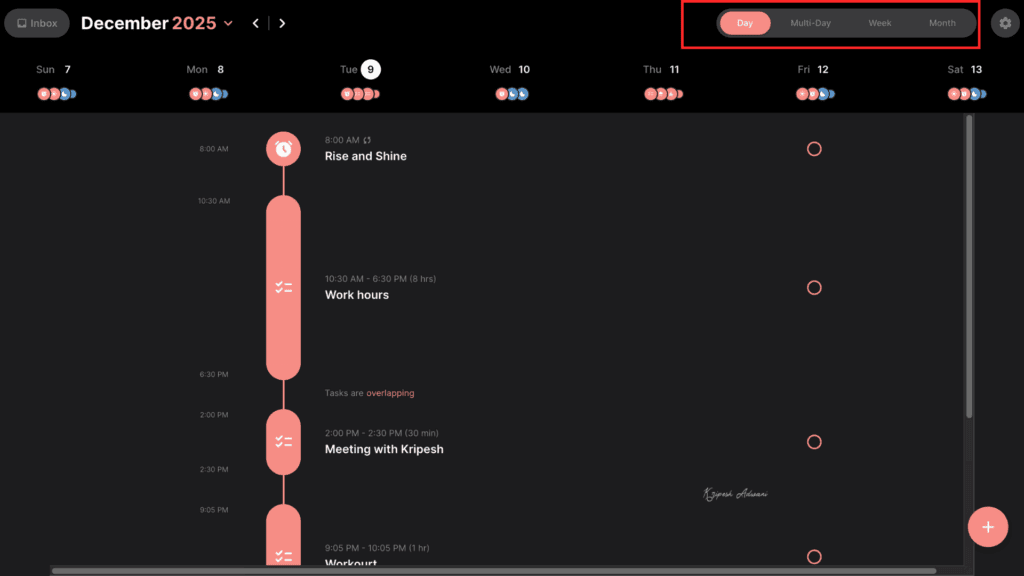
Once you set up your account, Structured lets you plan a day by creating new tasks with time, duration, and extra notes. Plus, you can sync tasks from external calendars like Google Calendar, Outlook, Yahoo, and more. All events already marked on your calendar automatically appear in the app, and you can update tasks in real-time.
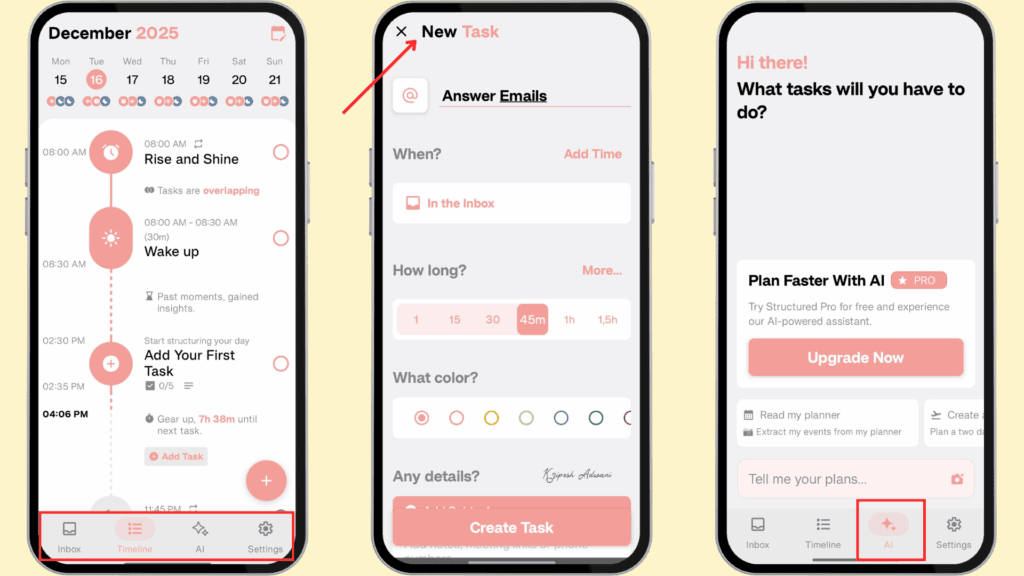
The interface is very simple. At the bottom of the mobile app, the tab bar displays inbox, timeline, AI, and settings options clearly. Timeline displays your entire day’s schedules with horizontal views and hourly breakdowns. All tasks are displayed chronologically, and it clearly shows any gaps and duration. This makes it easy to see exactly when you’re free or if you have over-scheduled the day.
Structured allows unlimited task creation with extensive customization options. I love that you can color-code tasks, select icons, and break things down into subtasks. Creating tasks is very easy using intuitive time wheels and a drag-and-drop interface. Plus, all my tasks are synchronized across my iPhone, iPad, Mac, Windows, and Android devices.
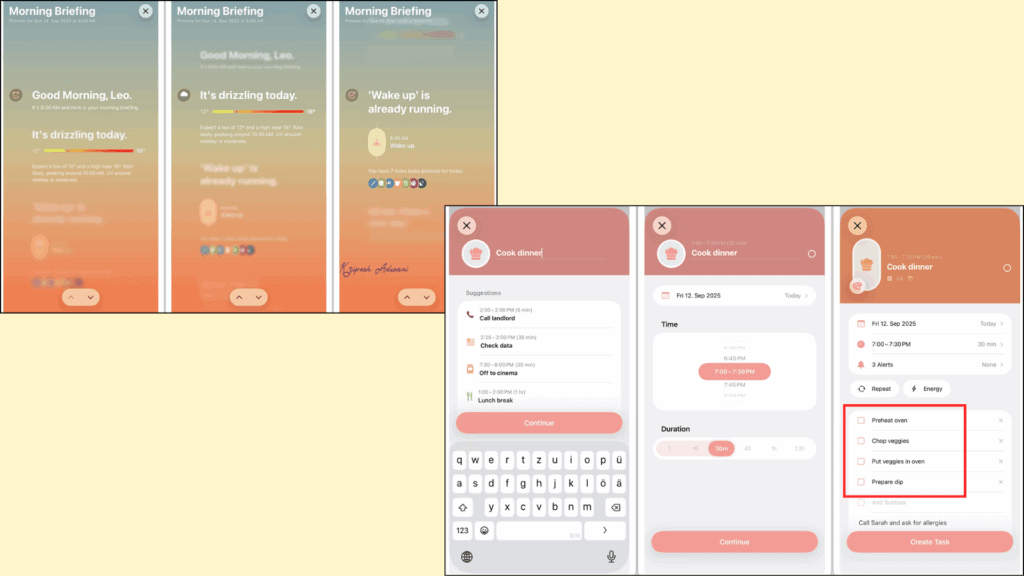
The platform is powered by the OpenAI GPT-4 model. It includes a scanner feature that lets you convert paper to-do lists and calendars into structured planners. I found the voice commands extremely powerful.
You can say, “Schedule my Yoga sessions for 30 minutes for the next two months,” and the AI instantly generates a complete schedule. Plus, it can create shopping lists, generate study schedules for exams, give you a daily briefing, or even provide inspiration for planning difficult days.
Limitations
- Features vary significantly between the web and mobile versions
- The web platform lacks several key features, such as cycle tracking, energy monitoring, and AI assistance
- Most advanced features, including recurring tasks, the AI assistant, and customizable notifications, are restricted to Pro users
- Most features are exclusive to iOS, limiting usability for Android and web users.
Pricing
Structured offers a free plan that allows basic daily planning. To access advanced features or AI assistance, a paid subscription is required.
Structured Pro is available as monthly, yearly, and lifetime plans. The yearly plan costs ₹279 per year and includes a 3-day free trial. Pro users on iOS gain access to Structured AI, recurring tasks, reminder imports, and the ability to re-plan unfinished tasks. A lifetime plan is also available for ₹950.
Who Should Use
Freelancers, academics, and moderately busy professionals who want a calming, visual daily planner with simple drag‑and‑drop time blocking will find Structured ideal. It suits users who prefer minimal and intuitive systems, but it is not ideal for power users who need large‑scale project structure or robust weekly planning views.
8) Trevor AI – Best for Task-focused Scheduling
Trevor AI is a pretty simple AI scheduling platform. This web application is more task-focused because it turns‑do lists into realistic, time‑blocked plans on your calendar. You need to connect to Google/Outlook or the device calendar to get started.
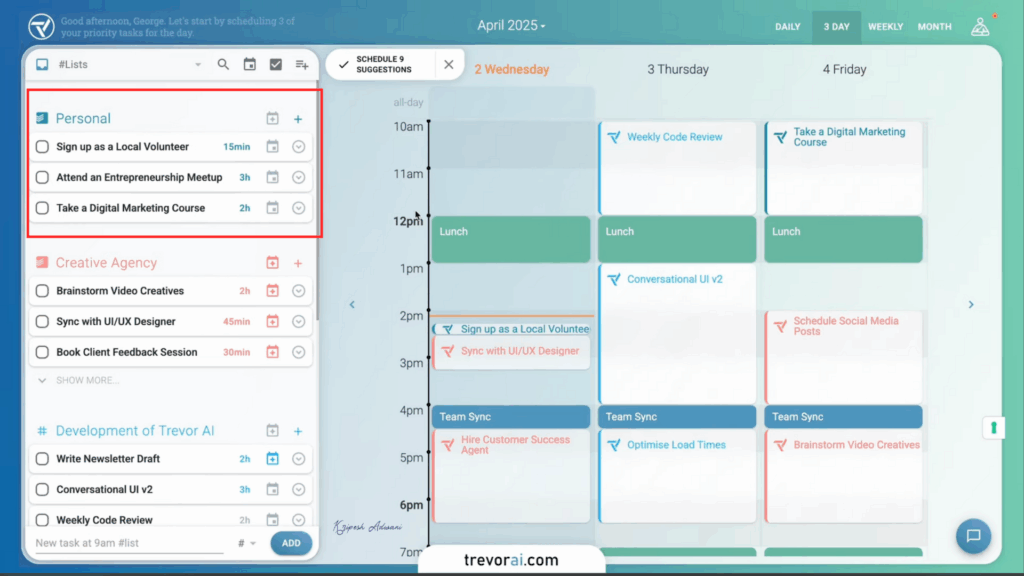
The app syncs every task and shows them in a chronological timeline. You can view your entire day at a glance or switch to monthly or weekly views. I really liked the drag-and-drop features. If you need to move an event or extend a task’s duration, you just grab the edge of the block and stretch it. It’s that simple.
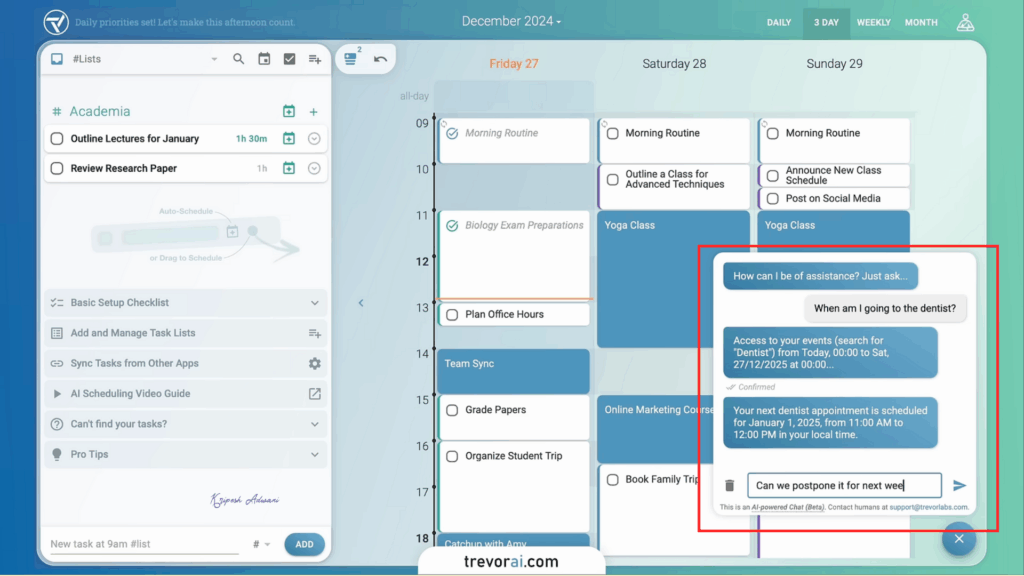
Trevor AI assistant is great at predicting how long a task will take based on your past habits.. It also includes a Focus Mode for deep work, which gives you a timer, a space for notes, and 5-steps task breakdown.
Another useful feature is the “Plan My Day” button. With one click, the AI looks at your unscheduled tasks, existing meetings, and priorities to suggest a full daily routine for you. The Trevor Chat interface lets you converse with AI. You can schedule events, manage tasks, and request guidance with just your voice.
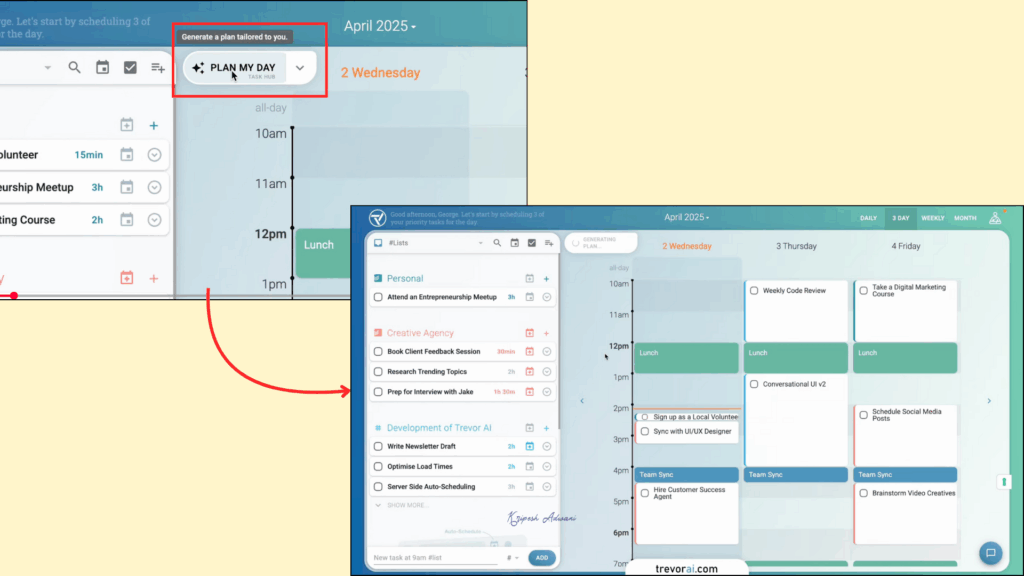
You can schedule multiple tasks at once on this platform. Trevor AI scans your availability, duration preferences, and other commitments to automatically schedule tasks and add them to your calendar. It even offers multiple suggested slots for each task and features a one-click auto-scheduling option for your entire list or day.
Limitations
- Many team collaboration features, such as shared projects and workload management, are missing
- Plan My Day and other automation features can be inconsistent at times
- Advanced features like multiple calendar accounts and Ask Trevor are available only on paid plans
- The UI feels outdated and less polished compared to other AI scheduling tools
Pricing
Trevor AI offers a free plan that includes access to the task hub, smart planner, unlimited task scheduling, focus mode, predicted task durations, and AI scheduling suggestions.
The Trevor Pro plan costs $5 per month when billed annually. It unlocks features such as a personal AI model, multiple calendar accounts, smart scheduling queues, recruiting scheduling tools, and other advanced capabilities.
Who Should Use
Trevor AI is ideal for beginners, remote workers, and individuals with irregular schedules who appreciate a simple, task-focused, visual scheduling application.
9) Calendly – Best for External Appointment Booking
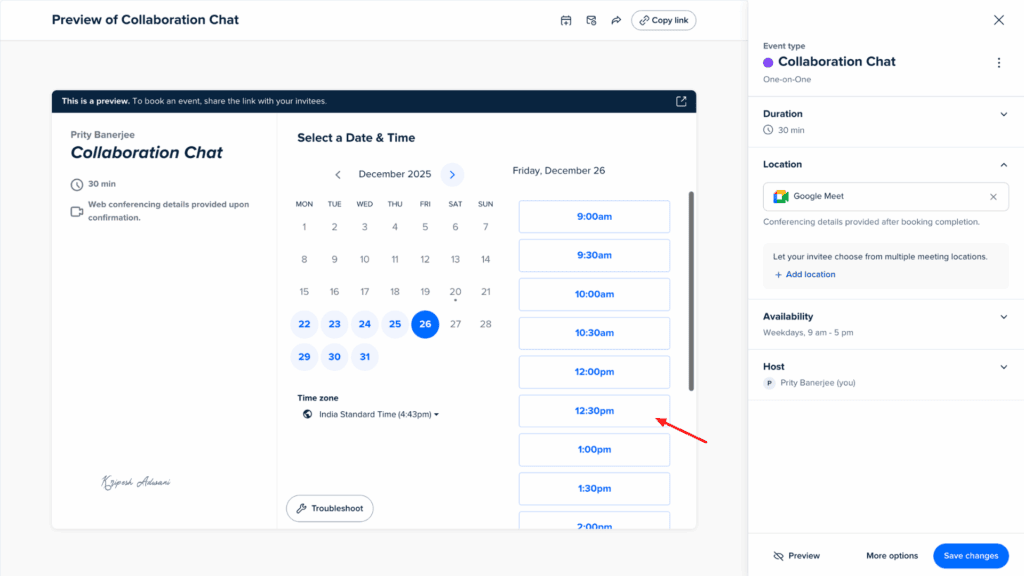
Calendly is a hugely popular web-based scheduling platform. It makes booking meetings and managing multiple calendars incredibly simple with its unified dashboard. The app is already used by over 100,000 organizations and many Fortune 500 companies.
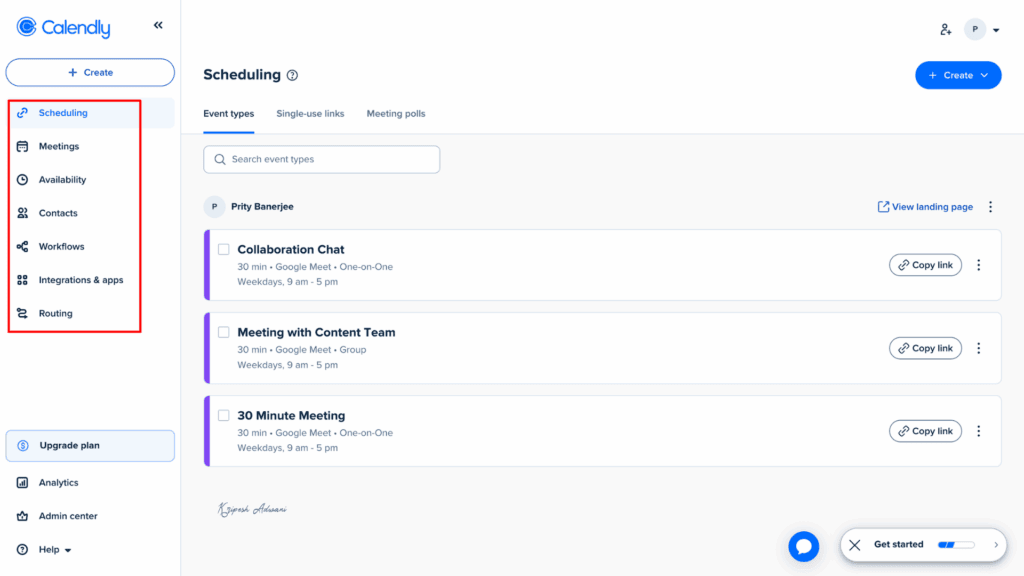
Similar to Akiflow, Calendly supports 100+ integrations. You can connect it with your Google/Outlook calendar, Slack, Notion, LinkedIn, HubSpot, Salesforce, and many other applications. It syncs all your calendars, provides real-time updates of all meetings, and prevents double bookings.
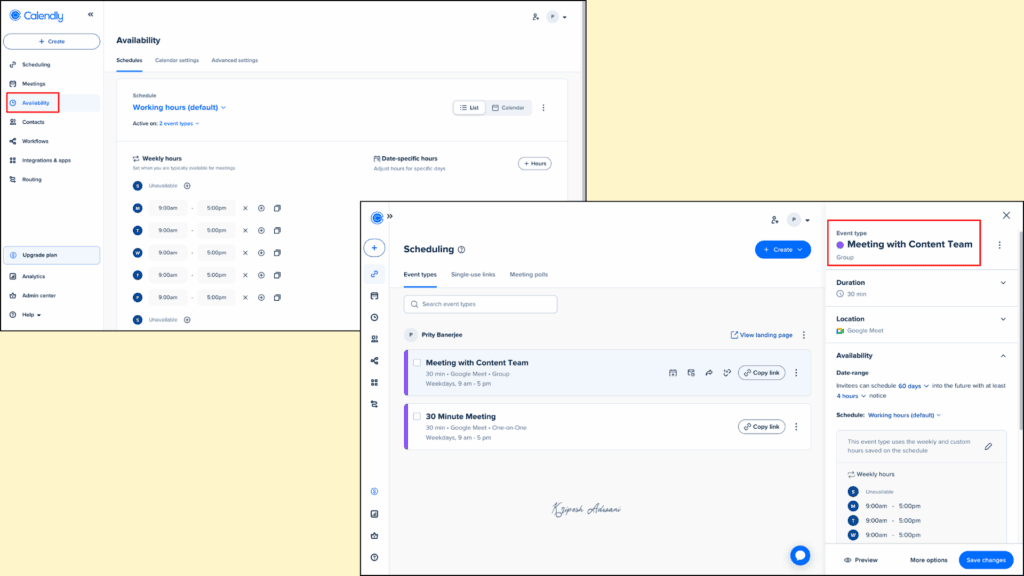
Users can generate personalized scheduling links with Calendly that can even be embedded directly onto websites. This allows invitees to book time with you instantly without having to register. Its AI assistance understands conversational commands, just like the other apps we‘ve reviewed.
The AI can categorize different meetings, prioritize important calls, and even suggest optimal meeting durations. If any conflict arises, it suggests the next available time. The platform gets smarter over time by learning user preferences and past scheduling patterns.
Once a meeting is scheduled, it sends emails through email to every participant. Calendly also integrates video conferencing apps like Zoom and Microsoft Teams. Hence, the email auto attach meeting invitation links.
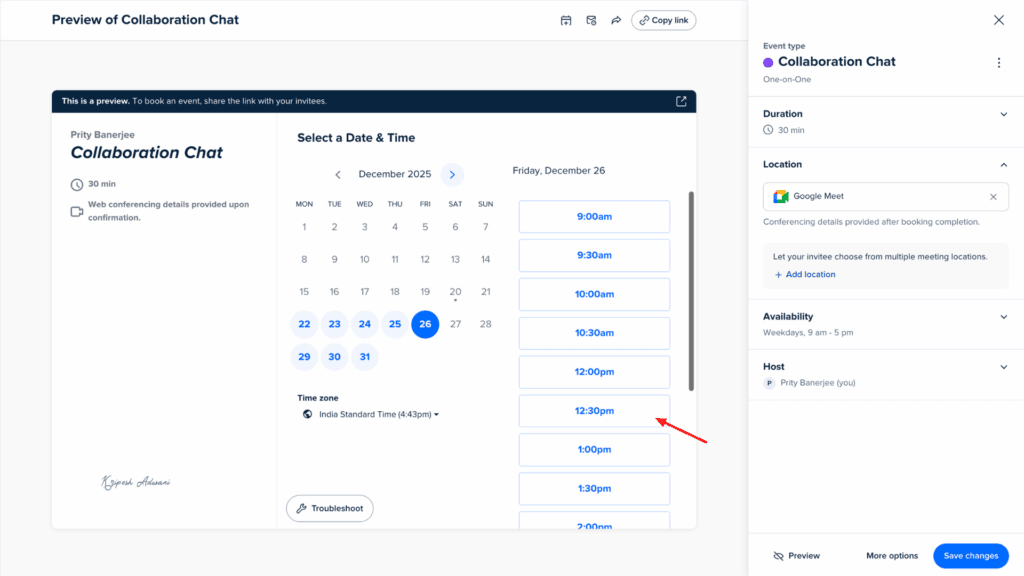
For team meeting scheduling, it checks everyone’s availability and places meetings at the best available time. Calendly automatically detects and adjusts for participants’ time zones, which really prevents no-shows.
Limitations
- Works best as a meeting scheduler rather than a full-fledged calendar management tool
- The Standard plan is relatively expensive, considering the features offered
- Most AI-powered scheduling features are available only on paid plans
Pricing
Calendly offers a free plan that includes one event type, one connected calendar, video conferencing, mobile app access, customized availability, and a browser extension. It also provides three paid plans: Standard, Teams, and Enterprise.
The Standard plan costs $10 per seat per month and includes up to six connected calendars, unlimited meetings, access to payment integrations, 24/7 chat support, and more.
Who Should Use
Calendly is ideal for freelancers, solopreneurs, consultants, and sales professionals who frequently schedule one-on-one meetings. It is also well-suited for teams that need round-robin routing and group event scheduling.
Why Do You Need an AI Scheduling Assistant?
Solopreneurs, small teams, and agency owners—every high-achieving individual needs AI scheduling software. If you haven’t used one in your workflow yet, here’s why you should start today.
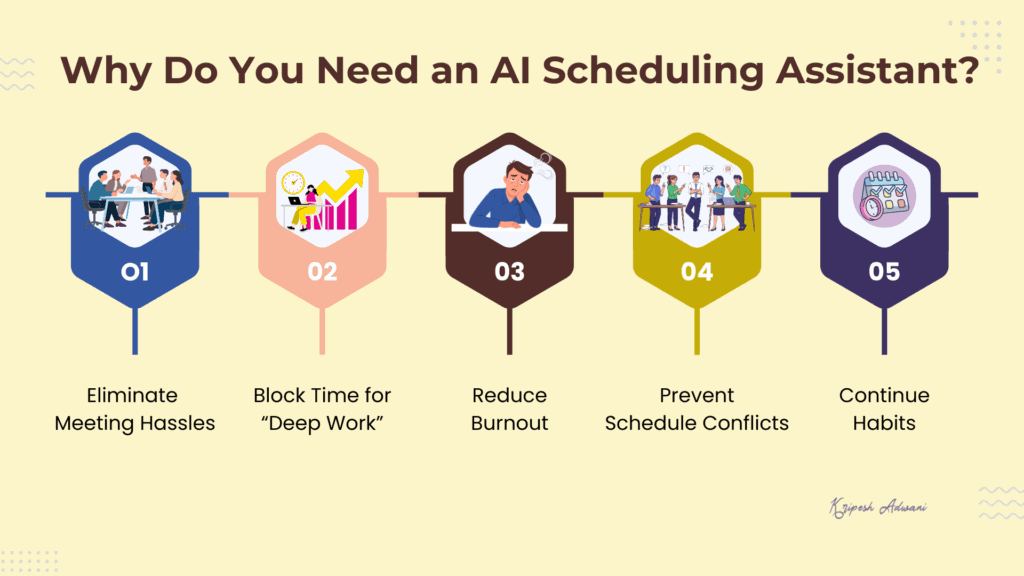
1) Eliminate Meeting Hassles
Suppose you’re trying to coordinate a meeting for a team of 11. Traditional scheduling requires endless back-and-forth: “Is everyone available at 2:00 PM?” An AI assistant tracks everyone’s calendar and automatically identifies the best available slot. If an urgent conflict arises, the AI adapts instantly, rescheduling low-priority tasks to make room for what matters most.
2) Block Time for “Deep Work”
Without back-to-back meetings, your day often ends up with fragmented 30-minute or 1-hour gaps that usually go to waste. AI tools audit your daily meetings and group them together. This creates long, uninterrupted blocks of “Focus Time,” allowing you to dive into deep work without constant interruptions.
3) Reduce Burnout
Every time you manually shuffle your schedule to fill up a last-minute task, you drain mental energy. AI assistants take over this by scanning your to-do list and analyzing deadlines. Then, these tools automatically slot tasks into your calendar based on their importance.
4) Prevent Schedule Conflicts
When tasks or meetings overlap, an AI assistant flags the conflict immediately. To ensure a smooth workflow, these tools prevent double-booking by automatically shifting flexible tasks into the next available slots, keeping your day organized and realistic.
5) Continue Habits
Tools like Reclaim.ai offer dedicated habit trackers. These apps are intelligent enough to learn your patterns. For instance, if you are most productive in the morning, the AI will proactively block those hours for deep work and push non-essential meetings to the afternoon.
Why Should You Trust Me?
Since 2015, I have navigated the digital landscape as a full-time remote professional. Throughout my career, I have spent years field-testing the tools that define modern work, from AI tools for remote work and chatting with pdf to advanced plagiarism checkers and Chrome extensions. My expertise ranges from everyday productivity hacks to AI powerhouses like AI Fiesta, Gamma, and Dadan.
I don’t just review AI; I live in it. Having extensively analyzed everything from AI art generators to website builders, I deeply understand the unique needs of creators and distributed teams. My mission is simple: to filter through the noise and recommend only the tools that genuinely make remote work faster, smarter, and more effective.
Conclusion
An AI scheduling assistant is a must-have application for everyone from individual freelancers to agency owners. These tools save hours of manual work by syncing multiple calendars and scheduling your tasks into the most efficient slots.
Modern scheduling assistants are packed with advanced features designed for high productivity. You can now schedule tasks using natural language prompts, coordinate meetings with large teams at the best possible times, automatically block out “Focus Time,” and maintain recurring personal habits without constant manual adjustments.
Among the top AI scheduling assistants available today, Reclaim.ai stands out as the best overall choice, offering robust features in both its free and paid tiers. Clockwise is the ideal alternative if you manage a team of three or more and need to optimize collective focus time. For those who need a power tool that combines AI scheduling with full-scale project management, Motion is the perfect solution.
That’s all for today! I will be back with more honest reviews soon. Until then, join our newsletter to stay updated on the latest AI news and discover more free productivity tools.
FAQs
What’s the difference between an AI scheduling assistant and a smart calendar?
A Smart Calendar acts as a digital planner. This app allows you to view, manage, and organize events based on preset rules. However, it often requires manual input for complex coordination. In contrast, an AI Scheduling Assistant acts as an active manager and syncs multiple calendars to automate task scheduling and conflict resolution. It doesn’t just track free slots; it intelligently shifts low-priority tasks and ‘defends’ your focus time if an urgent priority arises.
Is it safe to give an AI assistant access to my calendar and email?
Yes, it is generally safe as long as you choose a reputable service provider. If you have any doubts, you can follow certain criteria when choosing an AI calendar assistant. Any trusted provider should have clear data and privacy policies, encrypted connections, and GDPR compliance.
What is ‘Dynamic Rescheduling’ and why is it the most important AI feature?
Dynamic rescheduling is an AI-powered feature through which applications continuously monitor your schedule. When unexpected changes occur, the system automatically updates your calendar in real time. It uses machine learning technology to recalculate and adjust time slots based on your availability, priorities, and constraints. As a result, you don’t need to manually update your schedule every time something changes.
Is there a free AI scheduling assistant that’s actually good?
Yes, Reclaim is one of the best free AI scheduling assistants available. It offers a solid free tier that’s great for beginners to try out. In addition, tools like Structured, Calendly, and Trevor AI also provide free plans with usage limits, making them good options depending on your needs.