Description: This comprehensive guide gives a tried-and-tested list of the best Firefox Extensions to improve your browsing experience.
Mozilla Firefox ranks as the fourth most popular web browser. Even amid tough competition, many still use it. Its clean, customizable interface and over 30,000 extensions have attracted a huge user base of 362 million worldwide.
Are you looking for reliable search engine extensions for a better browsing experience? Need a list of the best Firefox add-ons to boost online security and writing skills? Take your web experience to new heights with the 13 must-have extensions of 2026 and join us on this exciting journey.
In 2026, Mozilla Firefox is still a top pick. Many extensions can boost the user experience, yet many users don’t know about them. We’ve compiled a list of the best Firefox add-ons for bloggers, SEO experts, students, and everyday users.
Let’s explore together: What’s your go-to extension for a seamless browsing experience?
- What are Firefox Extensions?
- Best Firefox Extensions (2026)
- 13 Best Firefox Extensions by Category
- 1) Awesome Screenshot & Screen Recorder – Best for Screenshots
- 2) uBlock Origin – Best for Ad and Tracker Blocking
- 3) Dictionary Anywhere – Best for Instant Dictionary
- 4) Tomato Clock – Best for Time Management
- 5) Grammarly – Best for Grammar and Spell Checking
- 6) Bitwarden – Best Free Password Manager
- 7) 1Password – Best Paid Password Manager
- 8) SEOQuake – Best for SEO
- 9) Tranquility Reader – Best for Readability
- 10) Dark Reader – Best for Eye Protection
- 11) Tree Style Tab – Best for Tab Management
- 12) Cookie AutoDelete – Best for Cookies Management
- 13) Todoist for Firefox – Best for Productivity
- Conclusion
What are Firefox Extensions?
Mozilla Firefox is an outstanding online explorer. You can make it even cooler by adding some software programs called “extensions.” These are little add-on functions that live right in your surfing tool. It makes browsing easier or adds neat tricks.
Need to take screen captures? It has over 5 add-ons available. Want to enable night mode on a website? Absolutely doable! Firefox has extensions for nearly every use. From enhancing security to boosting productivity, it offers over 30,000 add-ons. If you are looking for the best Chrome extensions for productivity, we can guide you here as well!
But beware! Not all extensions are created equal. Some drag down your Firefox browser or spam with ads. So, how do you find your perfect match? We’ve checked out a bunch of extensions and picked out the absolute best ones. Let’s get started!
Best Firefox Extensions (2026)
| Extension | Core Use | Key Feature | Ideal Users |
| Awesome Screenshot | Screenshot & Screen Recording | Screen capture, annotations, instant sharing, screen record | Any individuals |
| uBlock Origin | Ad Blocking | Powerful ad/tracker blocker, multiple filters, low resource | Privacy-focused users |
| Dictionary Anywhere | Instant Dictionary | Instant definitions, Syllables | Learners, researchers, students |
| Tomato Clock | Time Management | Pomodoro timer, customizable intervals | Productivity seekers |
| Grammarly | Grammar and Spell Checking | AI grammar, spelling, style, tonality | Writers, students, bloggers |
| Bitwarden | Password Management for Free | Secure storage, autofill, emergency contacts | Security-conscious, budget users |
| 1Password | Password Management for paid protection | Two-factor authentication, multi-device sync, sharing options | Professionals, teams, premium users |
| SEOQuake | SEO Audit | Real-time SEO metrics, keyword density, SERP overlay | Bloggers, marketers, SEO beginners |
| Tranquility Reader | Readability | Distraction-free reading, offline save, customizable fonts | Readers, researchers |
| Dark Reader | Eye Protection | Customizable dark mode for sites, multi-browser | Night readers |
| Tree Style Tab | Multiple Tab Management | Vertical tree structure, auto-grouping, customizable | Multitaskers |
| Cookie AutoDelete | Auto-cookie deletion | Phishing/malware block, Greylist cleanup | Minimal tracking users |
| Todoist for Firefox | Task manager | Quick task management, reminders, priority list | Productivity fans, to-do list users |
13 Best Firefox Extensions by Category
1) Awesome Screenshot & Screen Recorder – Best for Screenshots
| Downloads | 100,027+ |
| Ratings | 4.4 |
| Browser Extensions | Chrome, Edge, Safari, Brave, Firefox, Yandex, Opera, Vivaldi |
| Official Website | Visit Website |
Want to record your screen or capture a full webpage? With the AwesomeScreenshot extension, you can easily take screenshots and record screen sessions in just a few clicks.
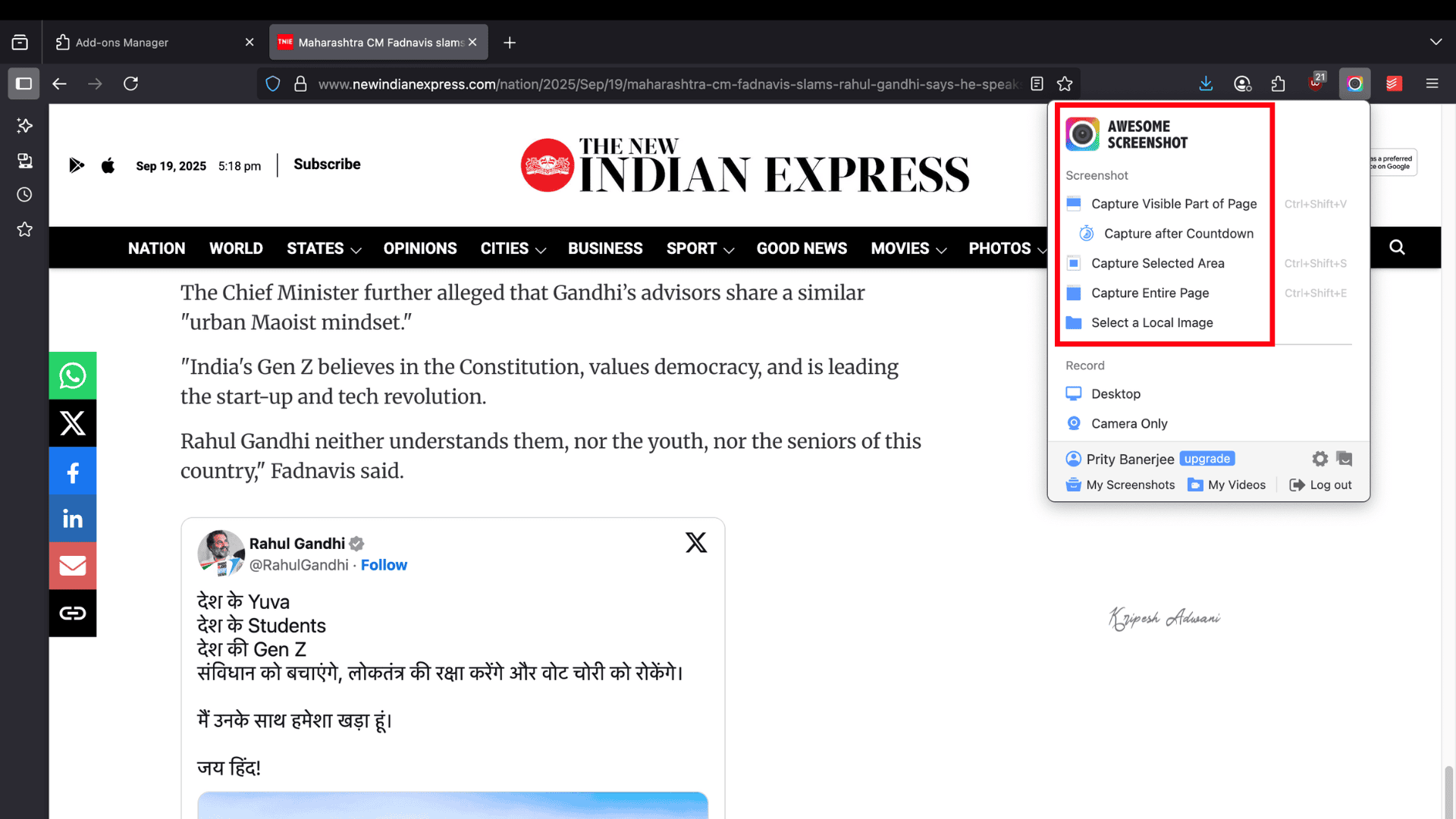
The tool was launched over 10 years ago and is now trusted by more than 3 million users because of its versatility. Unlike many other screenshot apps, AwesomeScreenshot allows you to capture the visible part, a selected area, or an entire page.
You can even record both your screen and camera, and save the files on awesomescreenshot.com. There’s an option to share them instantly via special links. Both screenshots and screen recordings can also be exported directly to your device.
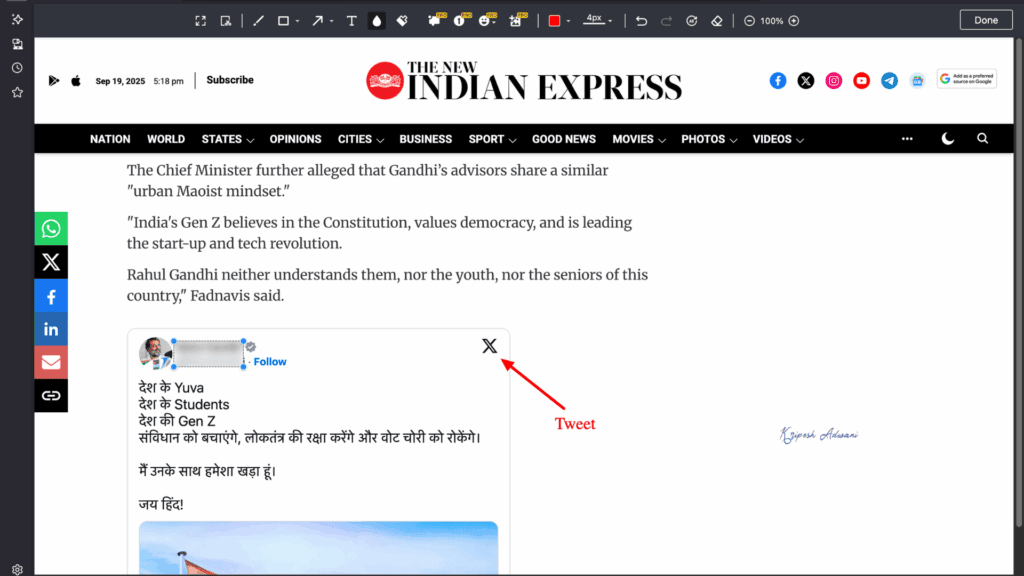
The annotation tools are excellent. You get rectangles, circles, arrows, lines, and more. On top of that, you can add text, upload watermarks, adjust fonts and sizes, and even change background colors. If something on your screen is sensitive, the blur tool makes it easy to hide.
Limitations
- 100 screenshots/ month and 20 recordings/month for free.
- Maximum resolution of 720p for free users
Ideal Users
Professionals who need quick screen captures with annotations, as well as video recordings with easy sharing options.
2) uBlock Origin – Best for Ad and Tracker Blocking
| Downloads | 9933557+ |
| Ratings | 4.8 |
| Browser Extensions | Chrome, Edge, Firefox, Opera |
| Official Website | Visit Website |
uBlock Origin is our top pick for ad-blockers. It blocks ads, scripts, and cross-site requests, making your online browsing safer and smoother.
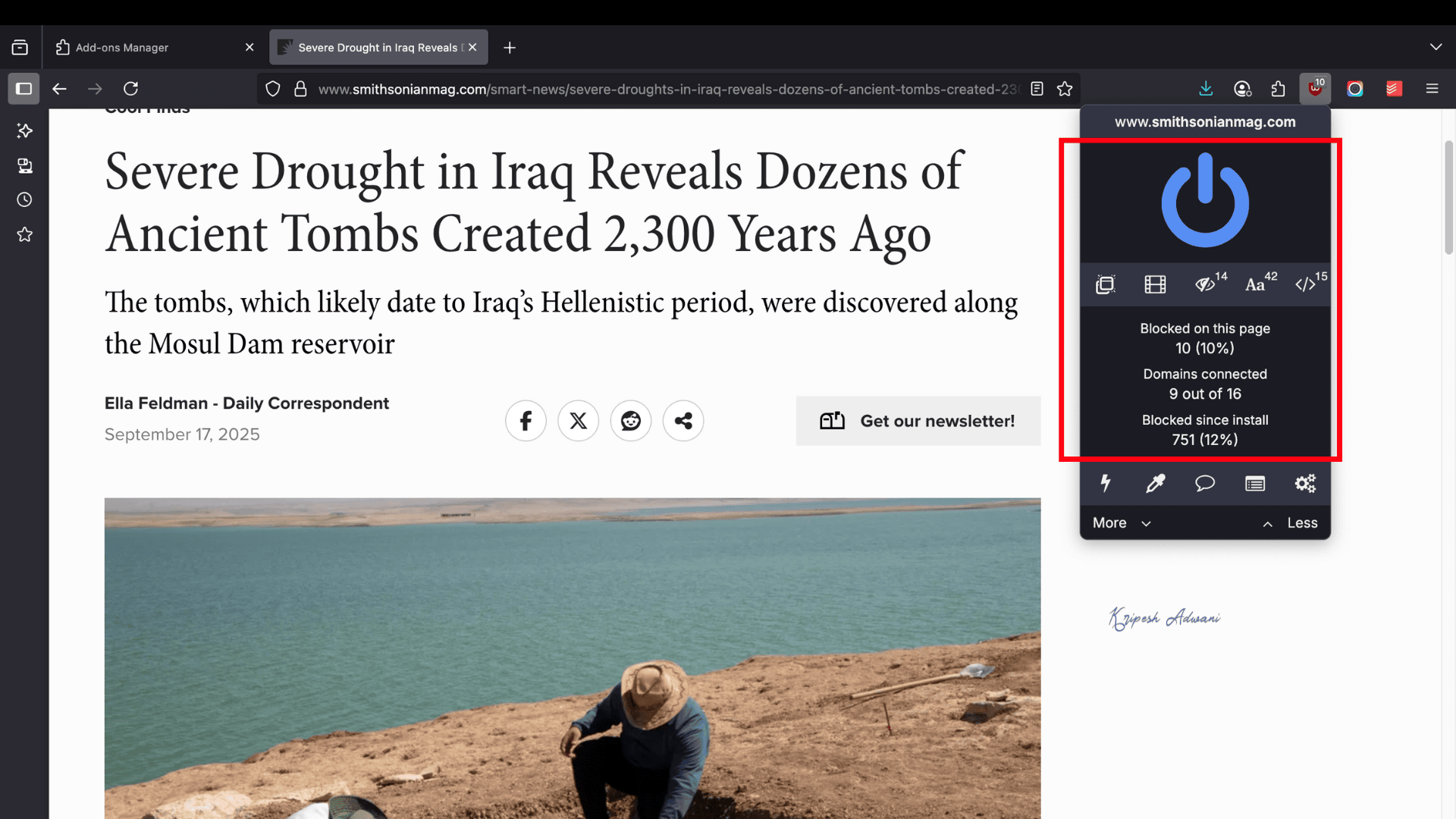
The app was launched in 2014 by Raymond Hill. uBlock Origin has consistently maintained a strong commitment to user privacy. Unlike many other ad blockers, it is lightweight and efficient.
This tool stops banner ads, YouTube ads, pop-ups, coin miners, malware-related websites, trackers, and more. It serves as both an ad blocker and a privacy shield.
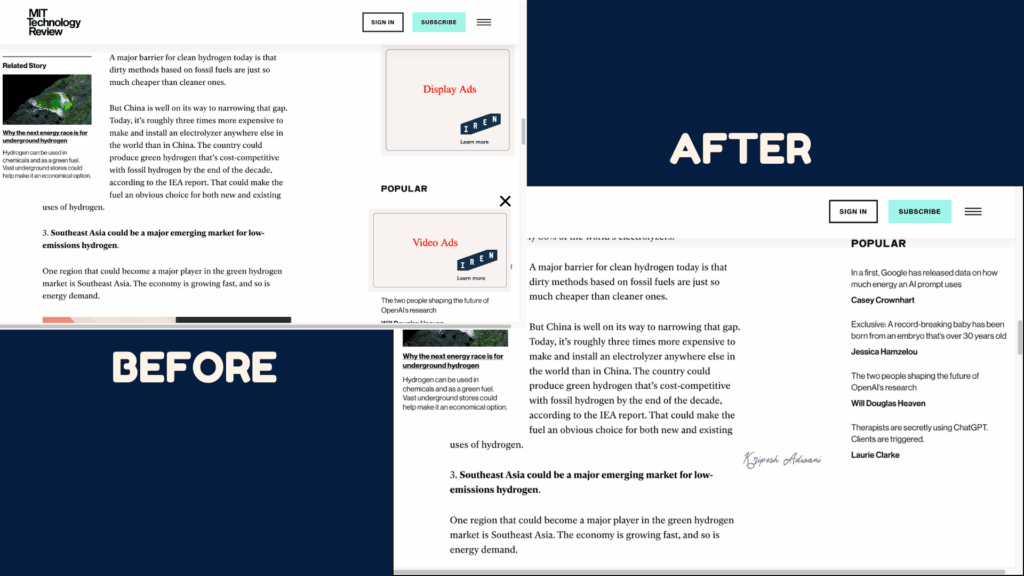
By default, uBlock Origin uses well-known filter lists such as EasyList, Peter Lowe’s Ad Server List, EasyPrivacy, and Malware Domains to protect your online activity. These filters are enabled immediately, but you can customize them based on your needs.
Limitations
- Aggressive blocking may interfere with some website functions
- No system-wide protection; works only within the browser
Ideal Users
Anyone who wants a lightweight yet powerful solution for blocking ads and trackers
3) Dictionary Anywhere – Best for Instant Dictionary
| Downloads | 37759+ |
| Ratings | 3.6 |
| Browser Extensions | Firefox |
| Official Website | Visit Website |
Dictionary Anywhere is a handy extension for students and anyone struggling with vocabulary. It helps you stay focused on your reading without breaking your flow.
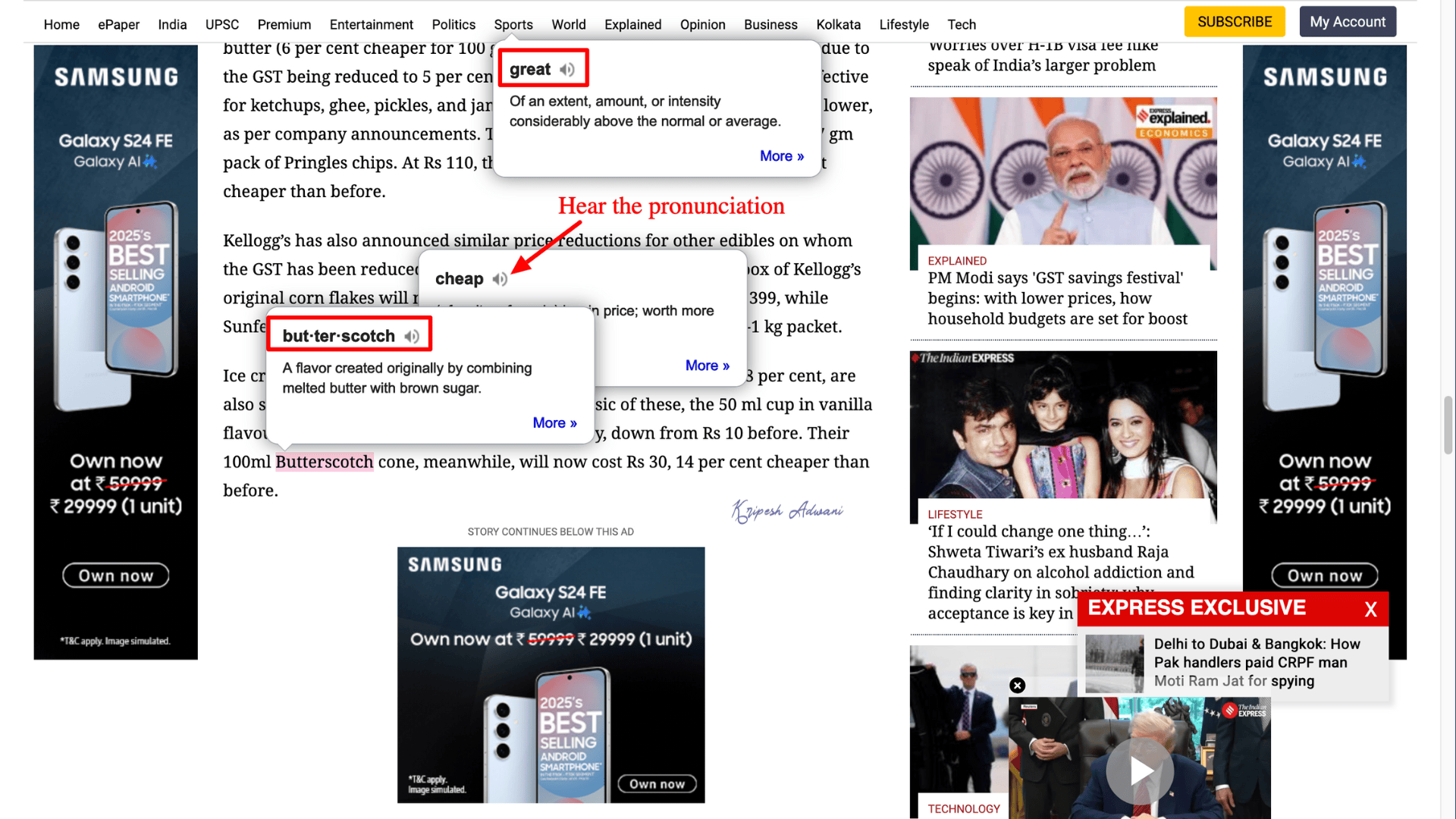
The extension is simple to install and use. Just double-click any word, and a small pop-up bubble instantly shows its definition with a syllable breakdown. You can also hear the correct pronunciation by clicking the audio icon. Need more details? Click on “More” to pull additional information directly from the web.
Another useful feature is its history tracker, which keeps a list of all the words you’ve looked up, and you can even download them. It also comes with Google Translate integration, making it accessible wherever you are.
Limitations
- Supports only English (US), French, German, and Spanish
- Cannot provide definitions for highly technical terms
- Doesn’t work in Firefox Reader Mode or PDF viewer
Ideal Users
Language learners, readers who want instant definitions without switching tabs, and non-English speakers looking to improve pronunciation.
4) Tomato Clock – Best for Time Management
| Downloads | 32028+ |
| Ratings | 4.5 |
| Browser Extensions | Chrome, Edge, Firefox |
| Official Website | Visit Website |
Tomato Clock is a handy add-on designed to boost productivity. Whether you’re new to remote work or a student struggling with time management, this extension is a must.
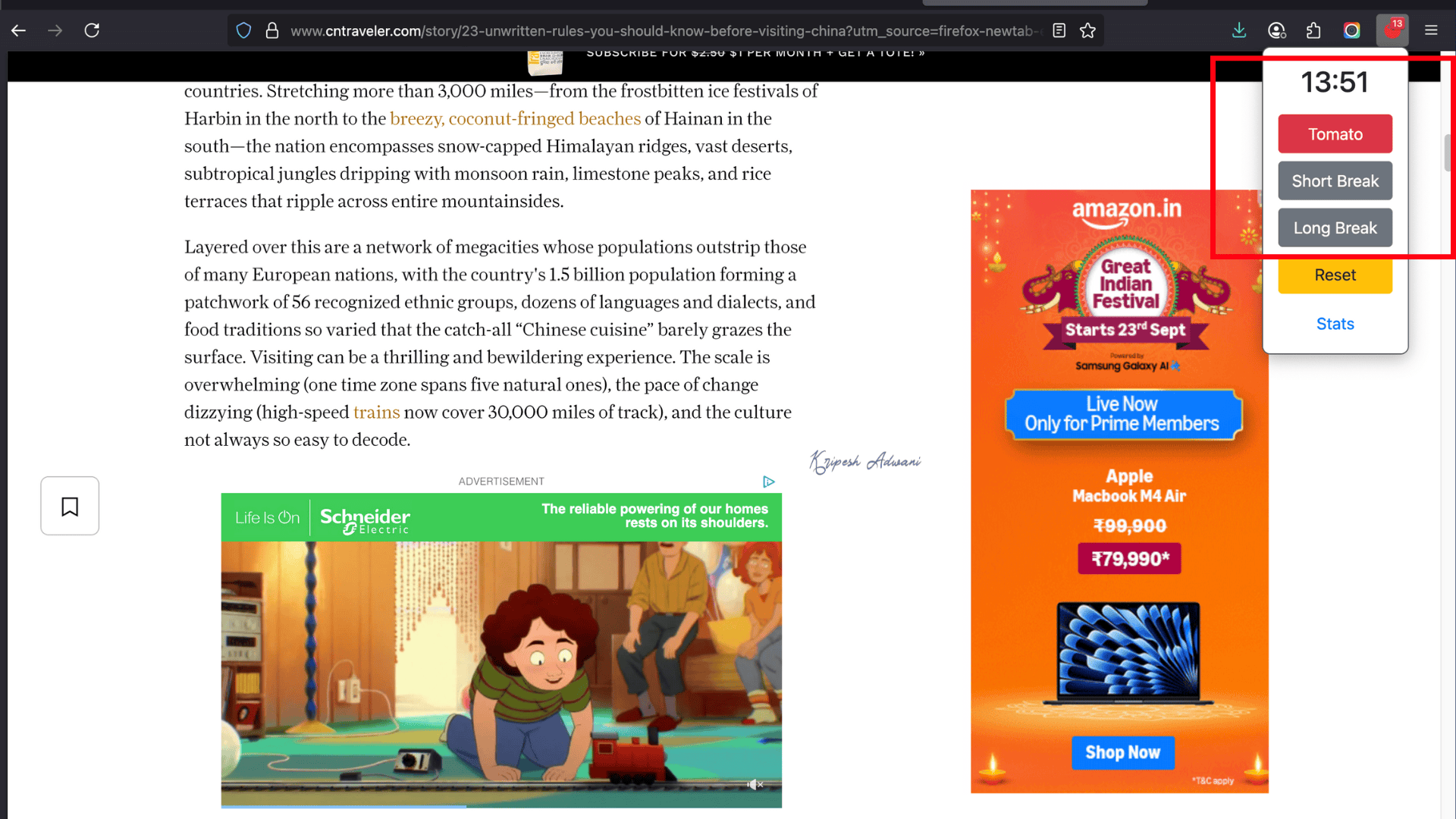
It uses the Pomodoro Technique, breaking your work into 25-minute “tomato” intervals. Each interval is followed by a 5-minute short break. After completing four intervals, you can take a longer 15-minute break. This method helps you build sustainable habits.
Tomato Clock also offers Stats. The data gives you a weekly, monthly, or yearly overview of your productivity. Plus, you can customize timer lengths to match your personal workflow and strategies.
Limitations
- Break timer doesn’t always start automatically after a “Tomato” interval ends
- The notification sound is too quiet.
Ideal Users
Professionals or students seeking a simple Pomodoro timer for focused work sessions.
5) Grammarly – Best for Grammar and Spell Checking
| Downloads | 658533+ |
| Ratings | 4.1 |
| Browser Extensions | Chrome, Safari, Firefox, Edge |
| Official Website | Visit Website |
Do you spend hours checking grammar and vocabulary? Grammarly for Firefox can be a lifesaver for refining your writing!
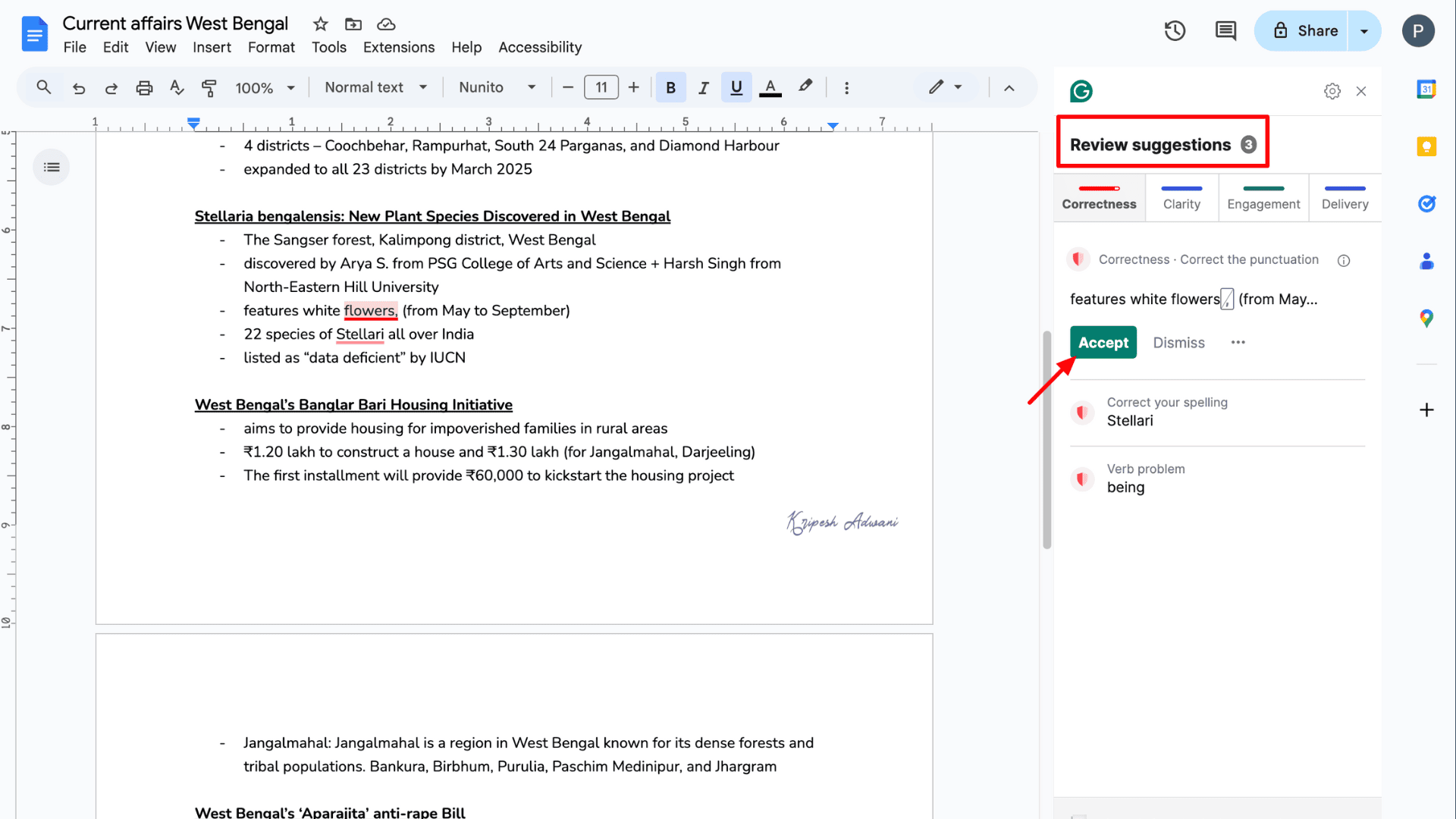
Whenever you type on the web, Grammarly automatically checks for errors and suggests improvements. It reviews spelling, punctuation, grammar, and tone, helping you express yourself more clearly.
You’ll also get synonym suggestions and word definitions by simply double-clicking on any word. With Premium or Business plans, you unlock an AI-powered writing assistant that suggests advanced enhancements.
Premium plans also include plagiarism detection and AI-content checks. Plus, you can customize feedback for academic, technical, or professional contexts.
Limitations
- Over-relying on suggestions may hamper your unique writing voice
Ideal Users
Writers, bloggers, students, professionals who need real-time grammar checks and style improvements
6) Bitwarden – Best Free Password Manager
| Downloads | 873632+ |
| Ratings | 4.6 |
| Browser Extensions | Chrome, Safari, Firefox, Edge, Brave |
| Official Website | Visit Website |
Bitwarden is a reliable and secure online password management tool that’s free to use. This password manager was launched in 2016, ten years after 1Password. It has still gained millions of users due to its trusted security features.
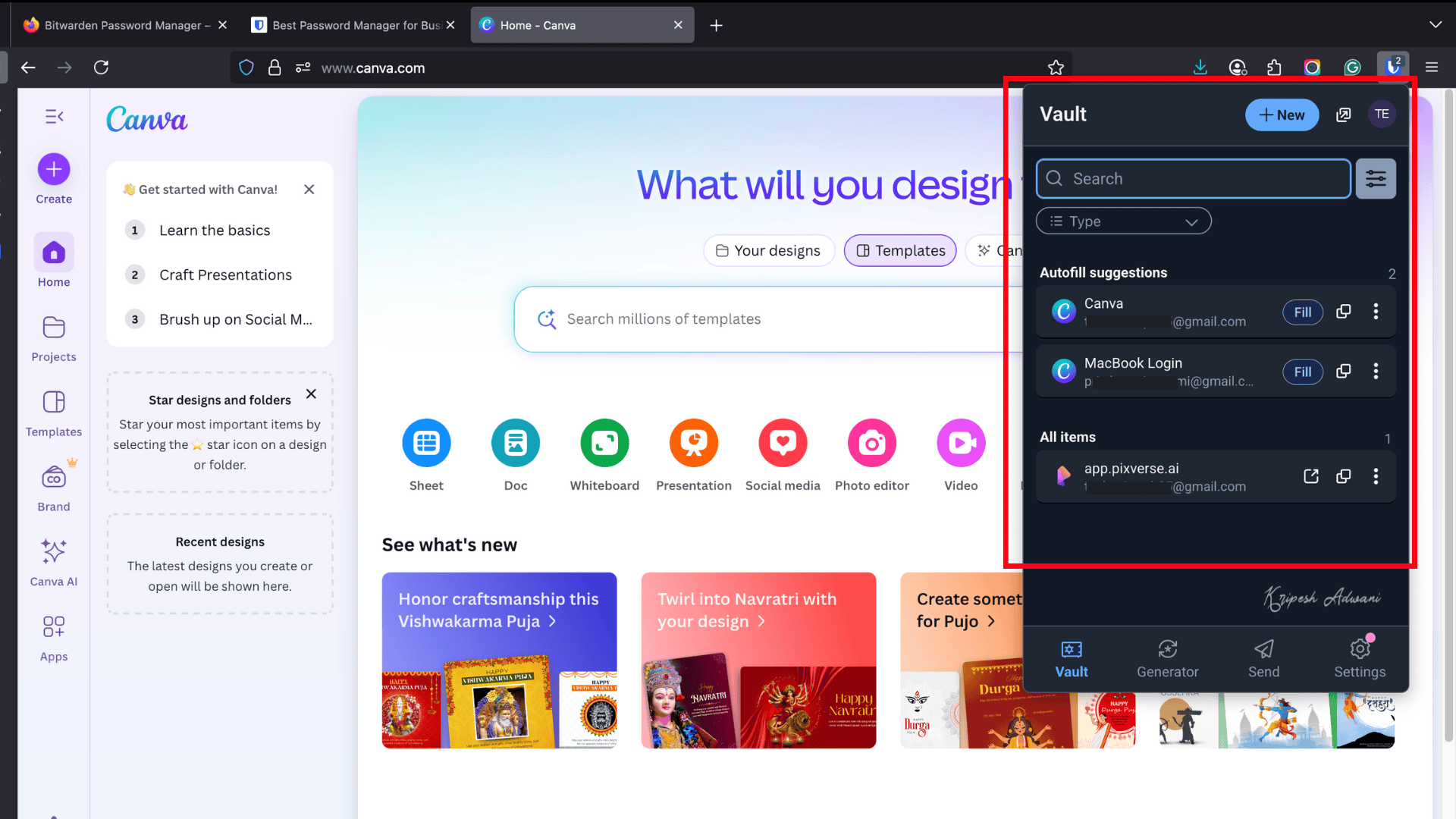
Getting started is simple. You need to create an account with your email, verify it, and set a master password. You can then import all your saved passwords into Bitwarden.
When browsing the web, Bitwarden can autofill your credentials instantly. It also lets you generate strong new passwords and store them securely in its vault. By creating an organization, you can even share passwords safely with others.
The paid version unlocks many advanced features. Unlike 1Password, paid users can set up emergency contacts for account recovery. Plus, advanced two-step login, biometric authentication, etc., are also available.
Limitations
- Shared vault management can be slightly complex
Ideal Users
Budget-conscious users seeking secure, open-source password management
7) 1Password – Best Paid Password Manager
| Downloads | 361850+ |
| Ratings | 3.7 |
| Browser Extensions | Chrome, Safari, Firefox, Edge, Brave |
| Official Website | Visit Website |
If you’re ready to invest a little extra in a reliable online vault for storing all your passwords, 1Password is a credible choice. The software was developed in 2006 by AgileBits Inc. Major brands like Canva, IBM, and Asana recognized it as one of the best password managers available.
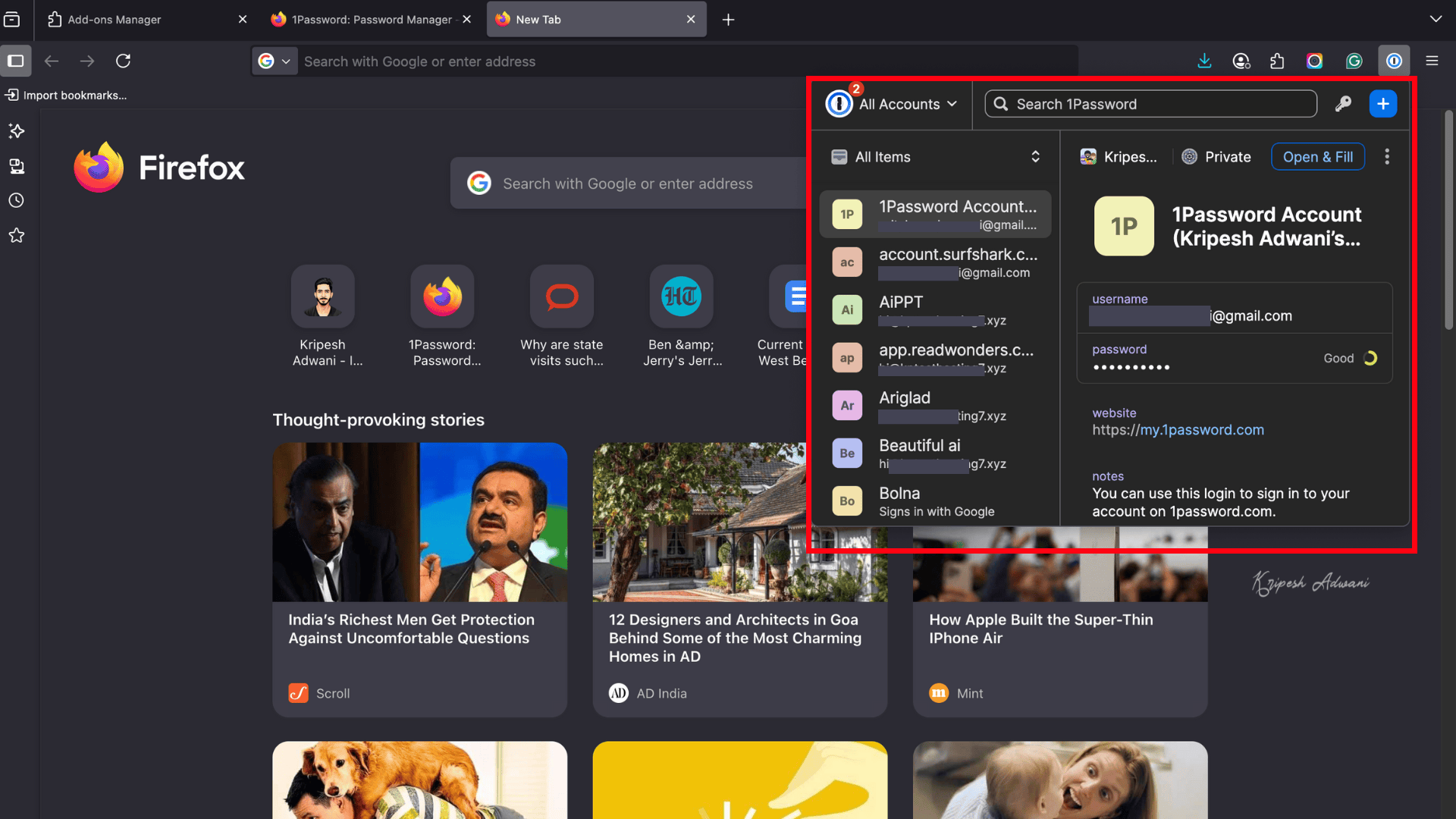
Using 1Password is simple. After purchasing a subscription and logging in with your email ID, you’ll receive an Emergency Kit. The kit contains your secret key, password, and email. This secret key is required whenever you log in from a new device.
Once logged in, you can access your credentials by unlocking 1Password with your master password. The software can autofill login details, letting you sign in within seconds.
1Password also provides different vaults to organize and secure credentials. Shared vaults allow you to share passwords securely, even with non-users. Private vaults keep sensitive information hidden from others.
Plus, you can generate strong alphanumeric passwords, which are securely saved in the software by default.
Limitations
- No free version available
- Does not allow adding trusted contacts for emergency access
- No account recovery options
Ideal Users
Companies and teams needing a polished, feature-rich password management tool with premium support
8) SEOQuake – Best for SEO
| Downloads | 15433+ |
| Ratings | 4.4 |
| Browser Extensions | Firefox, Google Chrome, Opera |
| Official Website | Visit Website |
SEOquake is a free SEO extension powered by Semrush. It’s a must-have for real-time SEO audits of any website. Whenever you open a webpage, SEOquake displays multiple useful SEO metrics instantly.
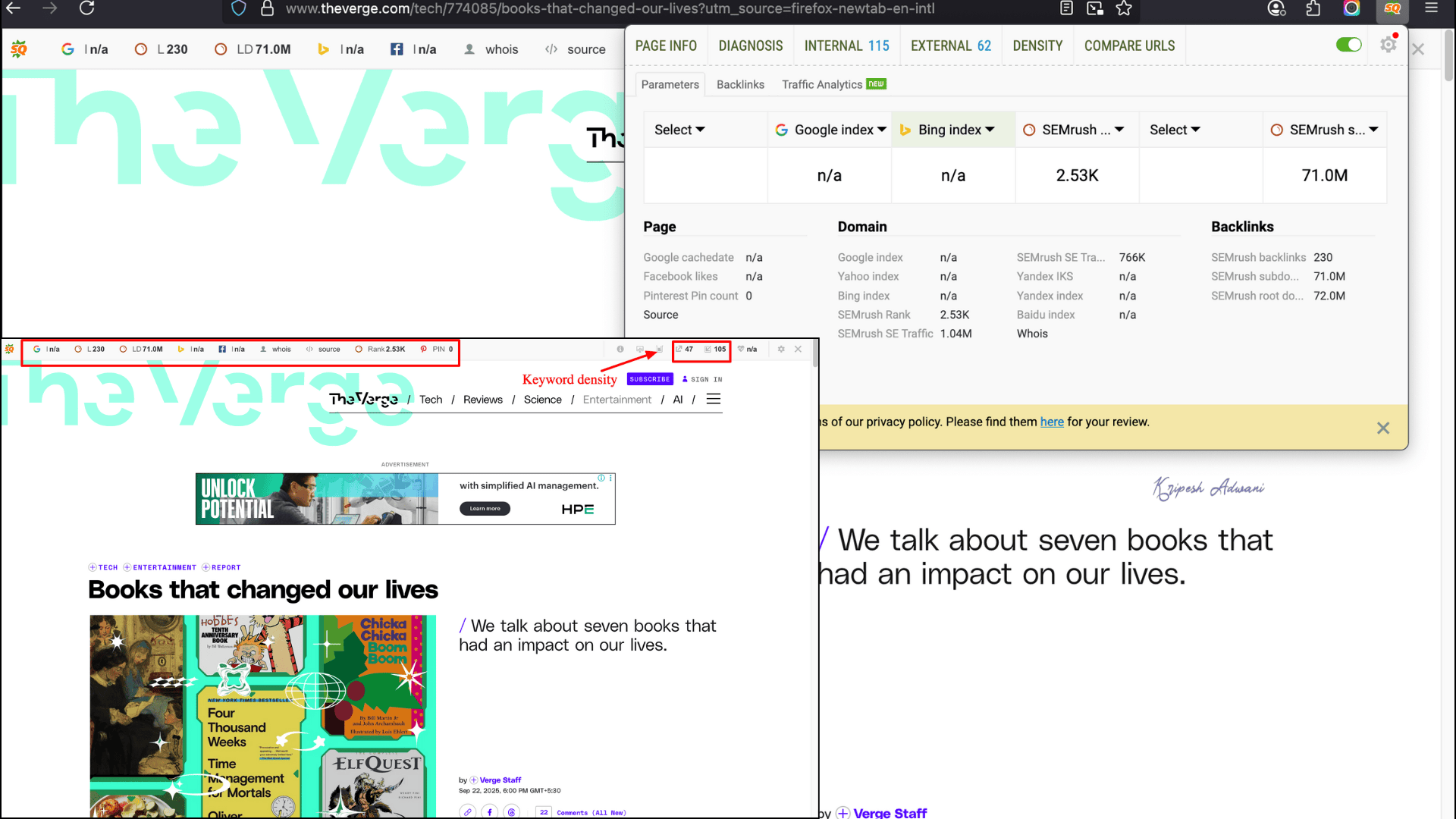
You can check the Google index, Semrush rank, and other SERP parameters. By connecting it with Semrush, you can also perform traffic and backlink analysis. The extension comes with handy tools such as SEO Audit and Keyword Density Report.
If you’re running a WordPress site, pairing SEOquake with SEO plugins can significantly improve your on-site SEO analysis.
While browsing, SEOquake also provides display ad data and competitor insights—all in one place. And if you need to keep records, you can export results in CSV format.
Limitations
- Beginners may find the large amount of SEO data overwhelming at first
Ideal Users
Bloggers, SEO beginners, and freelance marketers who need quick on-page SEO insights
9) Tranquility Reader – Best for Readability
| Downloads | 42397+ |
| Ratings | 4.6 |
| Browser Extensions | Chrome, Firefox |
| Official Website | Visit Website |
Tranquility Reader is a must-have Firefox extension for avid readers. It’s a game-changer for online reading, especially when you’re battling autoplay videos, intrusive ads, and distracting widgets. The extension removes everything except the text—helping you focus on what matters most.
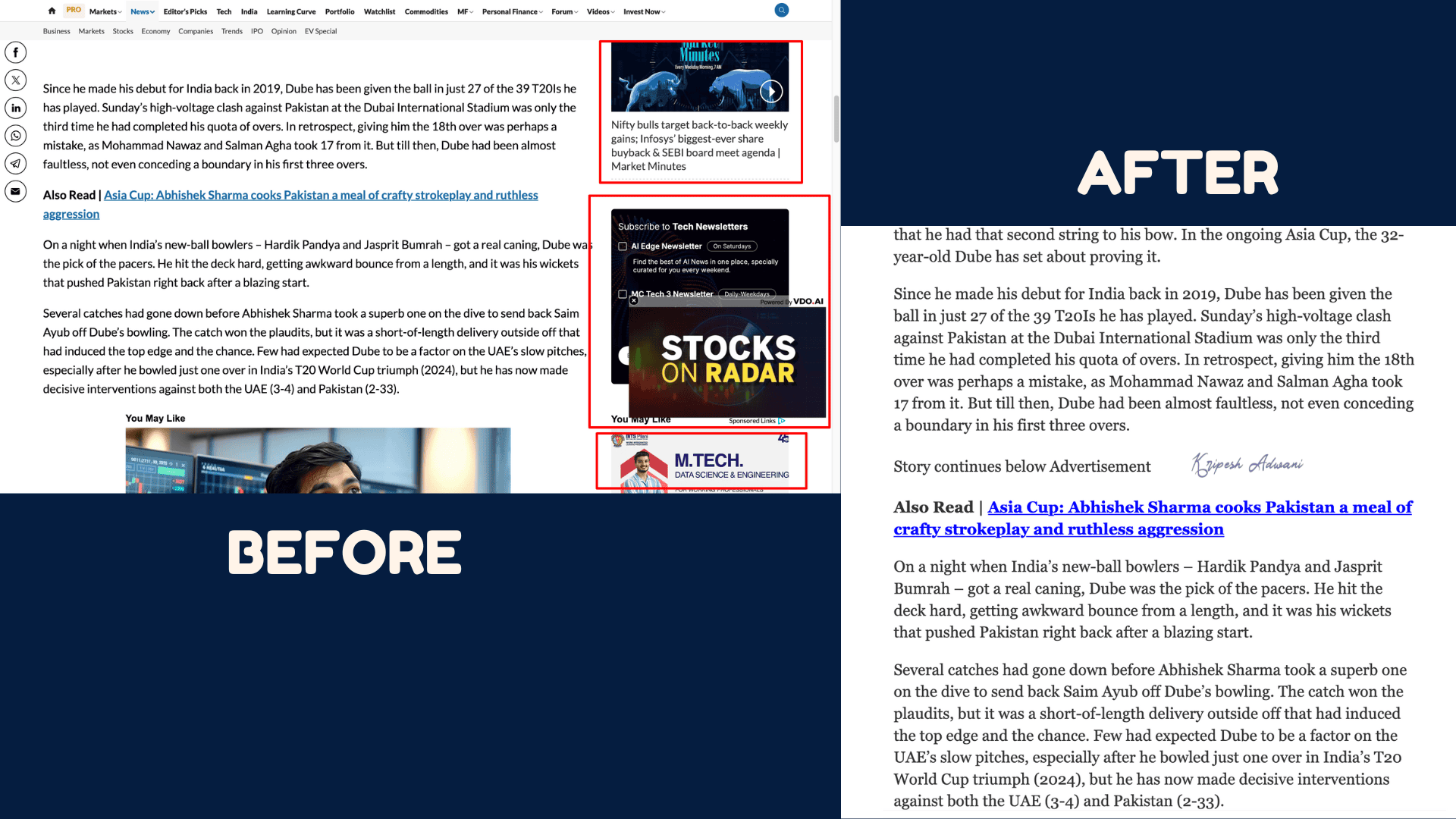
It clears out distractions such as ads, images, and social media widgets, leaving you with a clean, clutter-free reading space.
You can also customize your reading experience to match your preferences. If small text or distracting backgrounds bother you, Tranquility Reader allows you to adjust font sizes, colors, and backgrounds.
One of its standout features is the ability to add notes, annotations, and save/import/export settings. If you’re serious about uninterrupted online reading, this extension is a perfect companion.
Limitations
- Customization presets may not be beginner-friendly
Ideal Users
Avid readers and researchers wanting a distraction-free reading experience.
10) Dark Reader – Best for Eye Protection
| Downloads | 1284614+ |
| Ratings | 4.5 |
| Browser Extensions | Chrome, Edge, Firefox, Safari |
| Official Website | Visit Website |
Do white backgrounds strain your eyes during long browsing hours? Then, Dark Reader will be a really helpful extension for you even if a website doesn’t offer night mode.
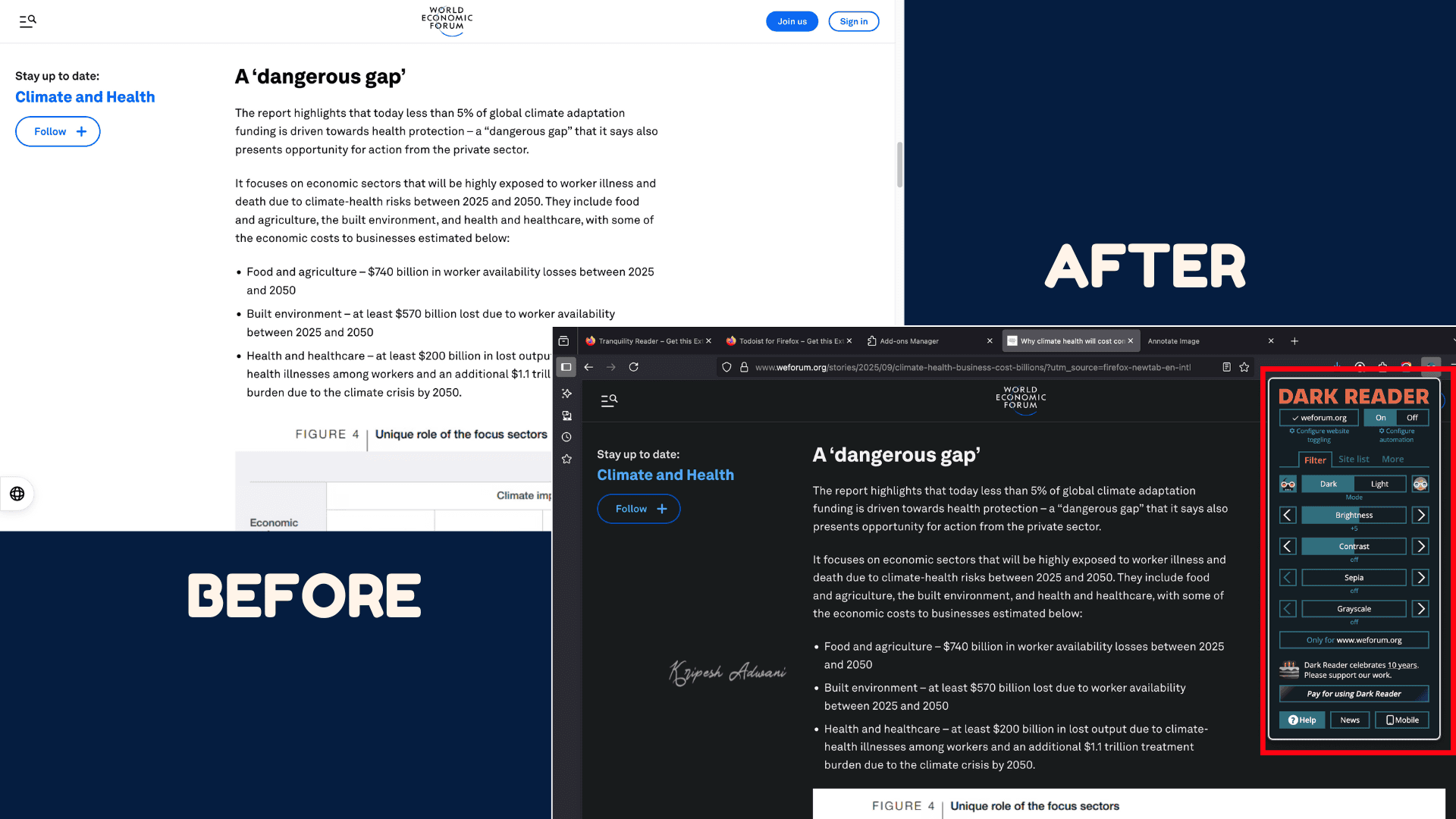
This open-source Firefox add-on enables dark themes on almost any website. It intelligently inverts bright colors and provides a much more comfortable nighttime reading experience.
Beyond just dark mode, you can fine-tune brightness, contrast, sepia, and grayscale to match your preference. It also offers customizable filters and automatic theme generation for smoother browsing.
Limitations
- Some users report a brief “flash” effect when switching between pages.
Ideal Users
Individuals want to reduce eye strain during long browsing sessions.
11) Tree Style Tab – Best for Tab Management
| Downloads | 180764+ |
| Ratings | 4.5 |
| Browser Extensions | Chrome and Firefox |
| Official Website | Visit Website |
We often need to keep multiple tabs open in a single window. Managing them in the horizontal view can quickly become a hassle. Here, Tree Style Tab Manager simplifies the task.
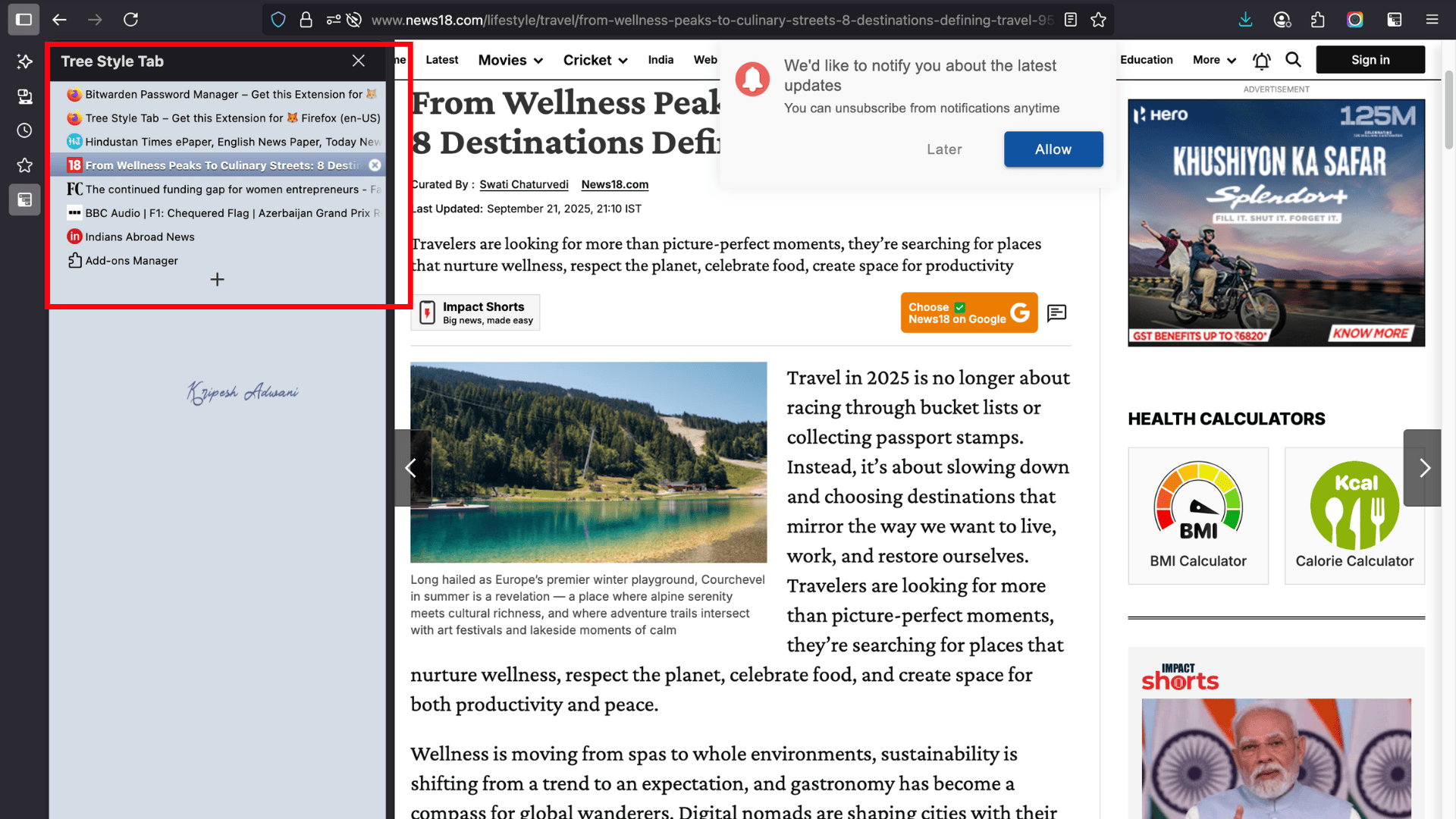
Once installed on the Firefox browser, it displays all tabs in a vertical view by default. You can easily drag and drop tabs to restructure their order. Tabs can also be organized into categories such as Personal, Work, Banking, Shopping, and more.
Tree Style Tab also offers a toolbar where you can create tab groups, close multiple tabs at once, Duplicate tabs, pin important tabs, and more. It’s a must-have extension while researching or working online.
Limitations
- Slight learning curve for first-time users
Ideal Users
Power users, researchers, and marketing professionals who want advanced vertical tab management.
12) Cookie AutoDelete – Best for Cookies Management
| Downloads | 180764+ |
| Ratings | 4.5 |
| Browser Extensions | Chrome and Firefox |
| Official Website | Visit Website |
We all know that cookies track our browsing behavior across different websites. Some cookies even contain sensitive information, which is why deleting them from time to time is a good practice.
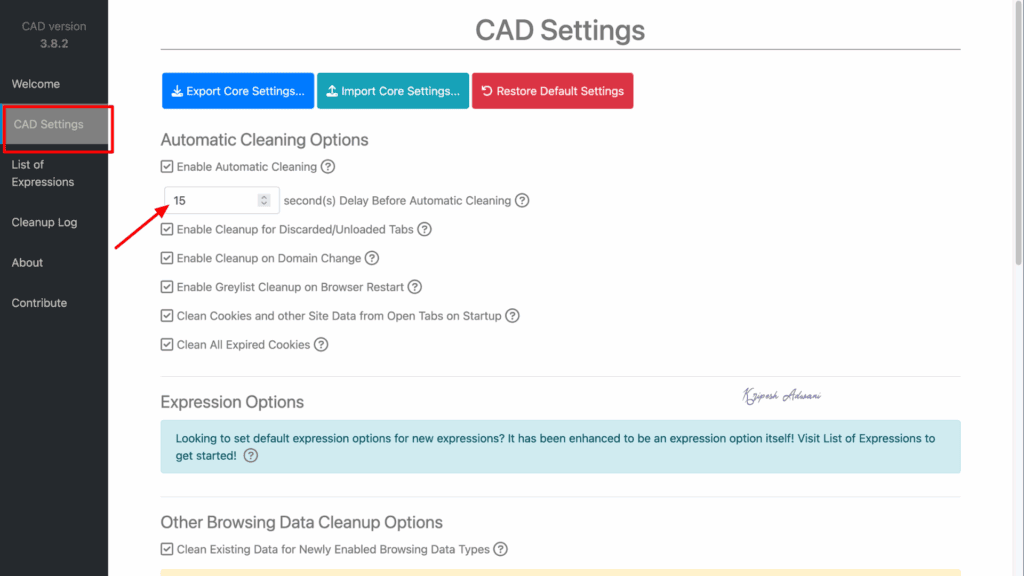
However, many of us forget to do it manually. That’s where Cookie AutoDelete helps us. It automatically deletes cookies from closed tabs. It can also clear all cookies and site data for a specific domain.
To use it, simply install the extension on the Firefox browser. Then, set the timer for automatic cookie deletion. From the settings tab, you can choose which types of cookies to delete, such as those from discarded tabs, expired cookies, and more.
The extension even provides greylist cleanup, ensuring the removal of any sensitive information from suspicious websites.
Limitations
- Requires a bit of technical know-how to configure settings properly
Ideal Users
Privacy-conscious users who want more control over cookies and better protection against online tracking.
13) Todoist for Firefox – Best for Productivity
| Downloads | 14169+ |
| Ratings | 4.7 |
| Browser Extensions | Chrome and Firefox |
| Official Website | Visit Website |
If you struggle with task management, a to-do list can be a lifesaver. Now, you can manage your daily tasks directly from your Firefox browser without installing any heavy apps. The Todoist for Firefox extension is a trusted tool, used by over 47 million users.
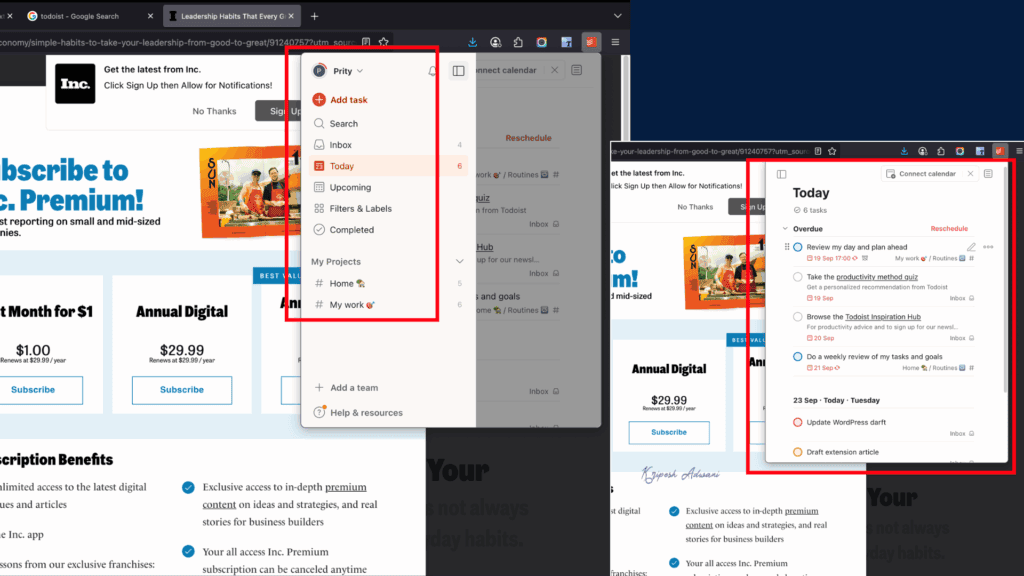
Simply download the extension and enable it. To add a new task, click the “+” button, then enter a description, set the date and time, add labels, locations, and press enter. The software also lets you categorize tasks with different priority levels.
Beyond actions, you can even add websites as tasks. Paid users can set reminders with specific dates and times. There are also quick ‘#’ options to label tasks for different projects. From the navigation bar, you can view both upcoming tasks and your daily to-do list.
It’s very simple to use. Once your tasks are done, just check them off without breaking your workflow.
Limitations
- Requires a Todoist account to use.
Ideal Users
Busy professionals, students, and individuals who need fast, browser-based task management.
Conclusion
Firefox is pretty cool on its own, but sometimes you need an extra boost. That’s where extensions step in and that gives you the power. With thousands of customization options to pick from, you can make your browsing experience flawless.
The list of the top 13 extensions to Firefox we’ve compiled is just the tip of the iceberg. The browser offers thousands of them for different needs. Hopefully, our suggestions gave you some ideas on how to amp up your browsing.
To be honest, Awesome Screenshot, Dark Reader, Tranquility Reader, Grammarly, and SEOQuake top my list of personal favorites! Whether for content creation or personal use, our recommended extensions offer astounding benefits that will truly amaze you. And we can’t deny that the content creation industry has been revolutionized by the inclusion of AI. If you want to save your time and effort, don’t miss out on these fantastic AI Chrome extensions. For bloggers, we have also a specially curated list of the best extensions for blogging.
These Firefox add-ons aren’t just for fun—they can seriously level up your online game, from safety to efficiency. Have we missed any awesome Firefox extensions? We’re all ears, so feel free to drop a comment below! Your suggestions are valuable to us.