AI-generated content is getting smarter, but AI detectors are evolving just as fast. Tools like GPTZero, Turnitin, and Originality.ai can now easily flag robotic or predictable AI-written text.
That’s where AI humanizers help by making your content sound more natural, authentic, and human-like. After testing dozens of tools, I’ve shortlisted the 11 Best AI Humanizers for 2026. Let’s dive in!
- 11 Best AI Humanizers for 2026 (Table)
- What are AI Humanizers?
- 11 Best AI Humanizers for 2026
- 1) StealthGPT – Best For Natural-Sounding AI Content
- 2) Humanize AI – Best for Multi-Detector AI Scanning
- 3) Hix Bypass – Best for Advanced Humanization Modes
- 4) Quillbot – Best for Simplifying Complex Writing
- 5) Humanize AI Text – Best for Academic Content
- 6) Phrasly AI
- 7) AI Humanizer by AskYourPDF
- 8) Walter Writes AI
- 9) AI Humanize
- 10) AI Text Tools
- 11) BypassGPT
- How Did We Test the Best AI Humanizers?
- Why Should You Trust Me?
- Conclusion
- FAQs
11 Best AI Humanizers for 2026 (Table)
| Tool Name | AI Detection | Key Features | Free Plan Details |
| StealthGPT | No | Natural human-like output, simple UI, strong readability | 1 free use every 7 days |
| Humanize AI | Yes | Multiple modes, detector integrations, detailed reports | 200 words/day |
| HIX Bypass | Yes | Multiple rewrite modes, AI detector integrations | 300 words total |
| QuillBot | No | Natural paraphrasing, readability improvement, multiple languages | 125 words/input |
| Humanize AI Text | Yes | Writing-level selection, academic modes, detector checks | 1000 free words |
| Phrasly AI | Yes | AI detector, AI editor, multi-platform AI scanning | 300 words at a time |
| AI Humanizer | Yes | Readability controls, humanization levels, simple UI | 2000-word limit |
| Walter Writes AI | Yes | AI detection, readability & purpose settings | 300 one-time credits |
| AI Humanize | Yes | Falcon models, AI scanning, detector integrations | 400 free words |
| AI Text Tools | Yes | AI detection, DOCX/PDF uploads, TXT export | 7k detection + 5k humanization words/month |
| BypassGPT | Yes | Multiple humanization modes, detector checks | 150 words total |
What are AI Humanizers?
AI Humanizers are tools that convert AI-generated text into more natural, human-like content. They do so by modifying the AI text’s tone, structure, and style and replacing any artificial elements with words and phrases that feel more realistic.
AI Humanizers can help you evade AI detection tools, personalize your content, and improve readability. However, also note that these tools may not remove all traces of AI and may introduce errors in your content.
Thus, you should carefully edit your humanized content before publishing it. Some popular examples of AI humanizer tools are BypassGPT, Quillbot, StealthGPT, Humanize AI, and more.
Want the Best AI Tools?
Check My Favourite AI Tools 🖤
ElevenLabs
Elevenlabs and Adam AI Voice are my go-to choices. ElevenLabs is incredibly versatile, and you get 10 mins free every month.
Gamma AI
Gamma App is my top choice for ai ppt generation. You can easily create your ppt for FREE. It’s a must have AI Tool.
HOSTinger AI
I love Hostinger AI Website Builder for how easy and affordable it is. 1 click AI website creation, perfect for websites.
11 Best AI Humanizers for 2026
1) StealthGPT – Best For Natural-Sounding AI Content
StealthGPT is a pretty simple and straightforward tool. All you need to do is paste your AI content. It has a 350-word input limit. It generates a shorter and more natural, human-like text.
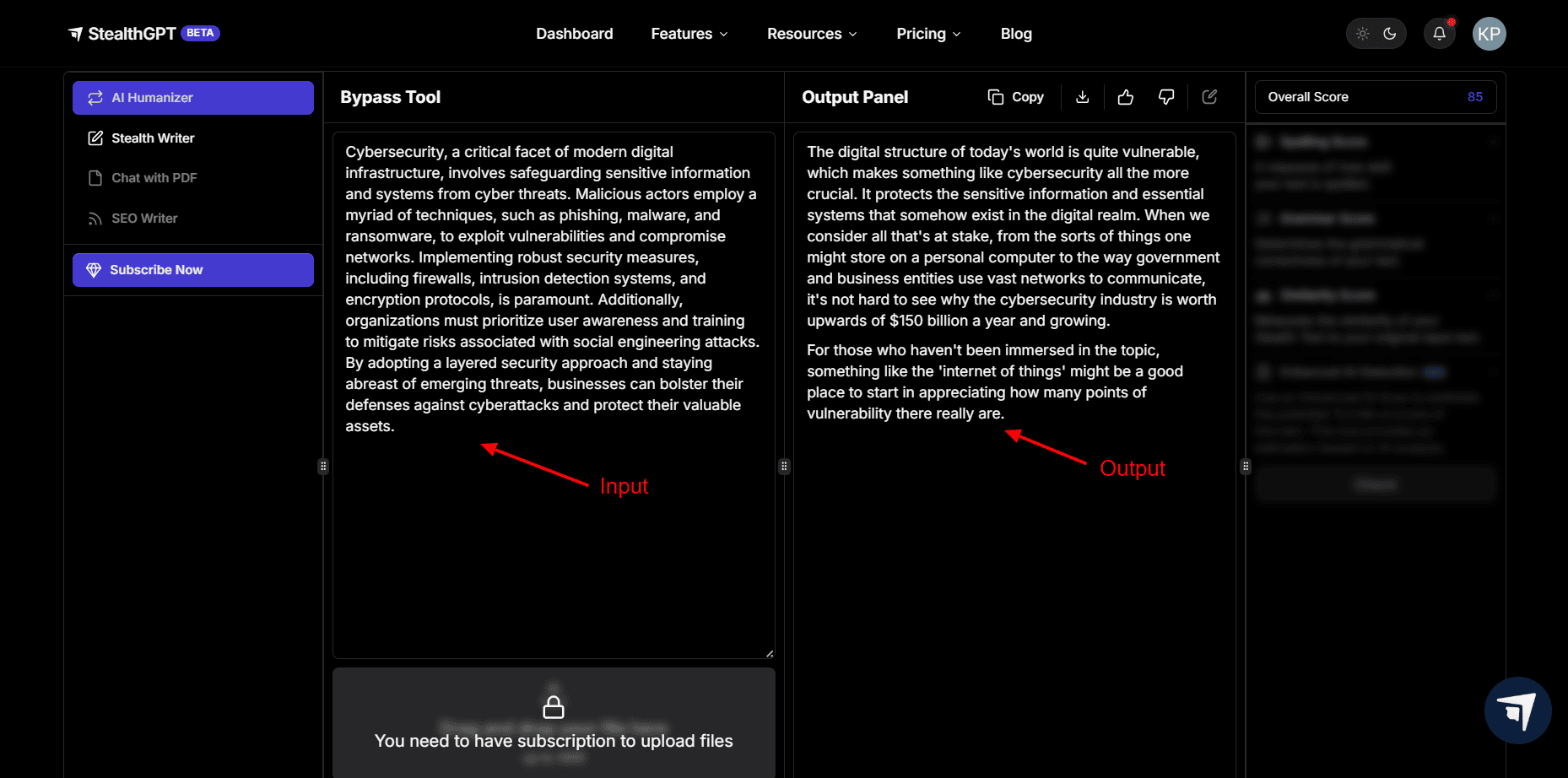
Though it lacks advanced tools like AI detection or options to pick a tone, mode, or AI model, I still love its output. When I checked with GPTZero, it detected a 2% probability of the content being generated with AI. This is pretty good.
The best part is that upon reading, it actually feels like it’s written in natural language. Bloggers, students, and professionals can all use it to make their text more friendly and human-like!
Cons:
- No built-in AI detection
- No tone selection
- No mode selection
Free Plan: They have discontinued the free plan now. Its paid plans start from $1/day on a monthly subscription, where you get 50 daily requests and 1,000 words per request.
2) Humanize AI – Best for Multi-Detector AI Scanning
Humanize AI is a platform for converting AI content into human-like content for free! It doesn’t require you to create an account, and it also doesn’t impose any word limits on the input.
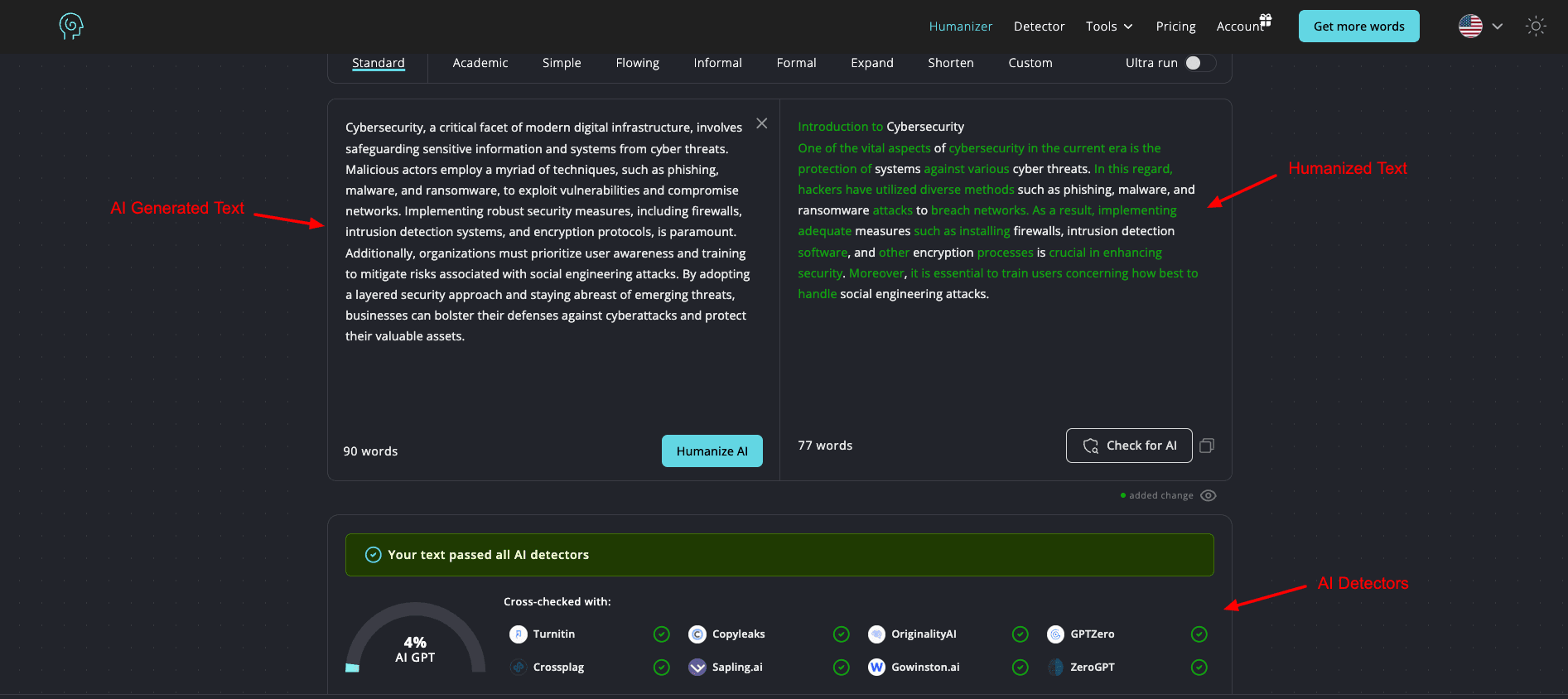
It features multiple modes like Standard, Academic, Simple, Formal, Informal, etc. However, in order to use them, you will need to log in to your account. Simply paste your text and click the Humanize button. It highlights newly added or changed words in green.
The AI Detector also cross-checks your humanized text with popular AI detectors like Turnitin, Copyleaks, OriginalityAI, GPTZero, Crossplag, Sapling.ai, Gowinston.ai, and ZeroGPT and gives the percentage of AI found.
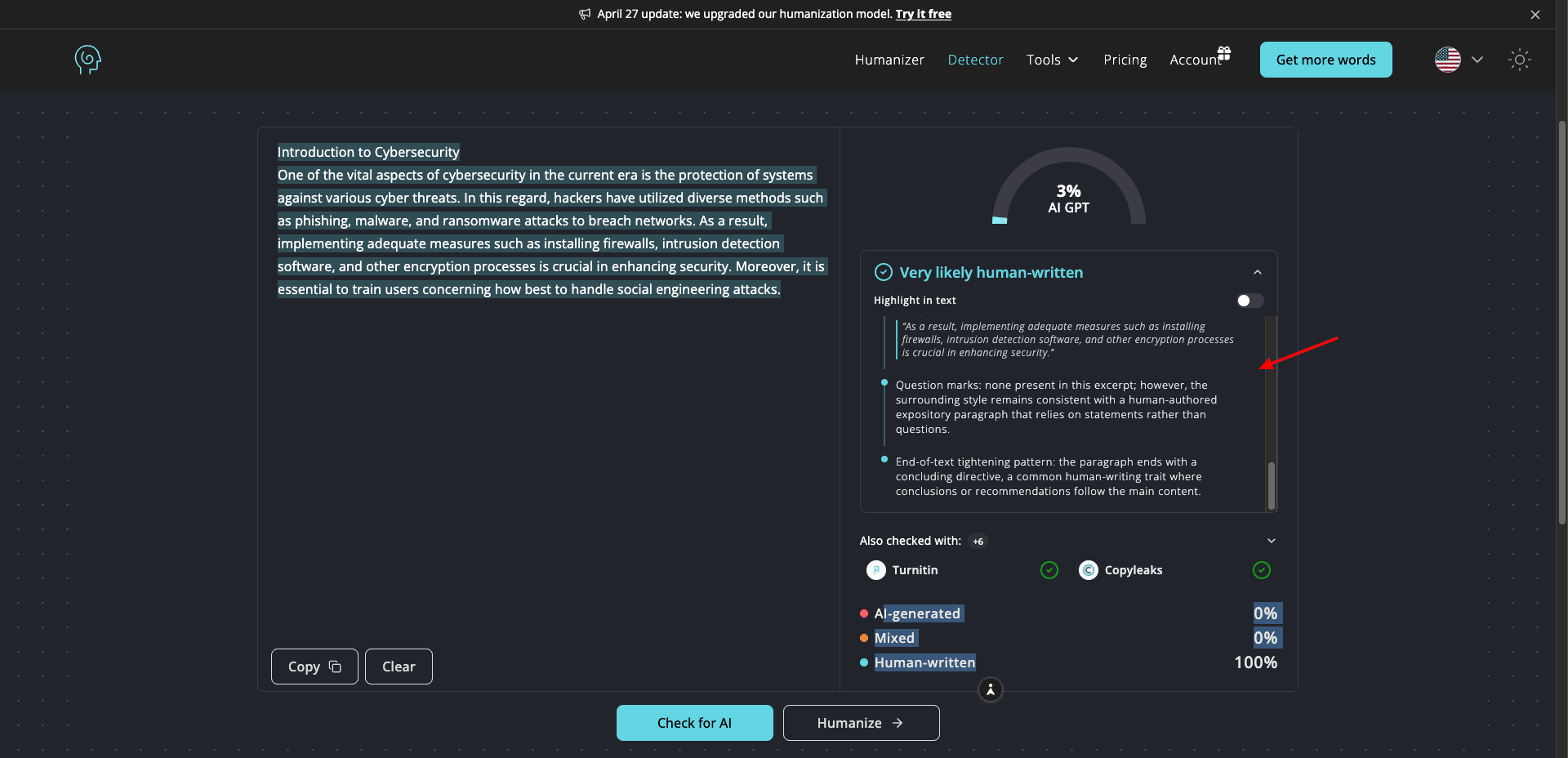
If you want in-depth insights, it also offers a detailed report, where you can check the line-by-line analysis of each sentence and get the AI percentage. Overall, I’d recommend this to anyone who works with multiple types of content.
Free Plan: You can check up to 200 words per day for free.
3) Hix Bypass – Best for Advanced Humanization Modes
Hix Bypass is a well-known AI content detector and humanizer. It’s trained on extensive human-written content and employs advanced algorithms to replicate human-like patterns and evade AI detection.
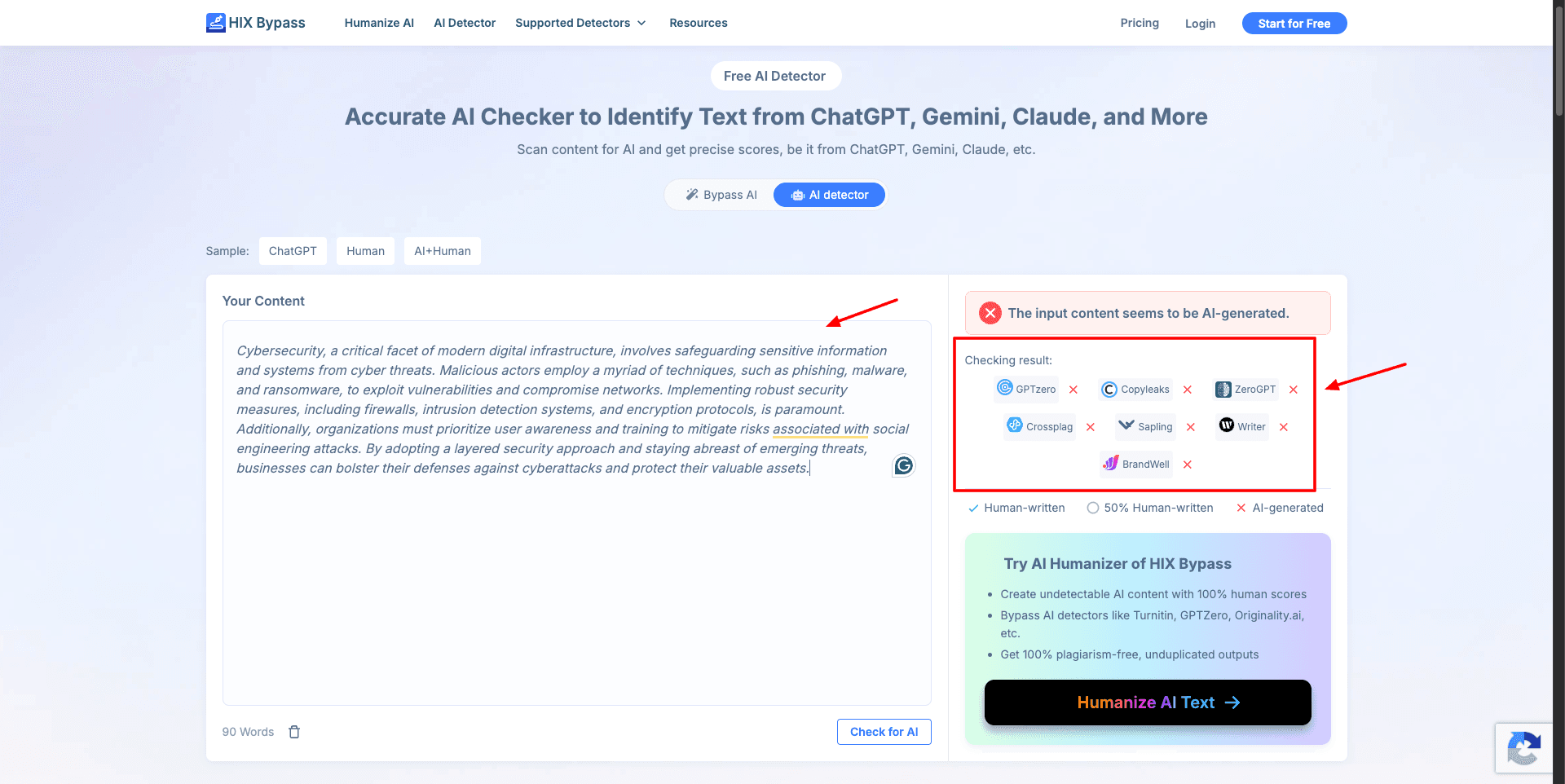
To start with AI Detection, you need to paste your AI content in its text field or upload a document. It imposes no word count limits. It checks your content through popular AI detection platforms and shares a comment if the content is AI-generated.
Next, you can run the content with its AI humanizer, choosing one of the following modes for humanization: Fast, Balanced, Aggressive, and Latest.
- Fast Mode: For quick content generation
- Balanced Mode: For moderate changes.
- Aggressive Mode: For stronger edits.
- Latest Mode: For using their most recent model.
It instantly converts the AI text into humanlike text and also checks with 7 AI detection platforms, including GPTzero, Copyleaks, ZeroGPT, Crossplag, etc.
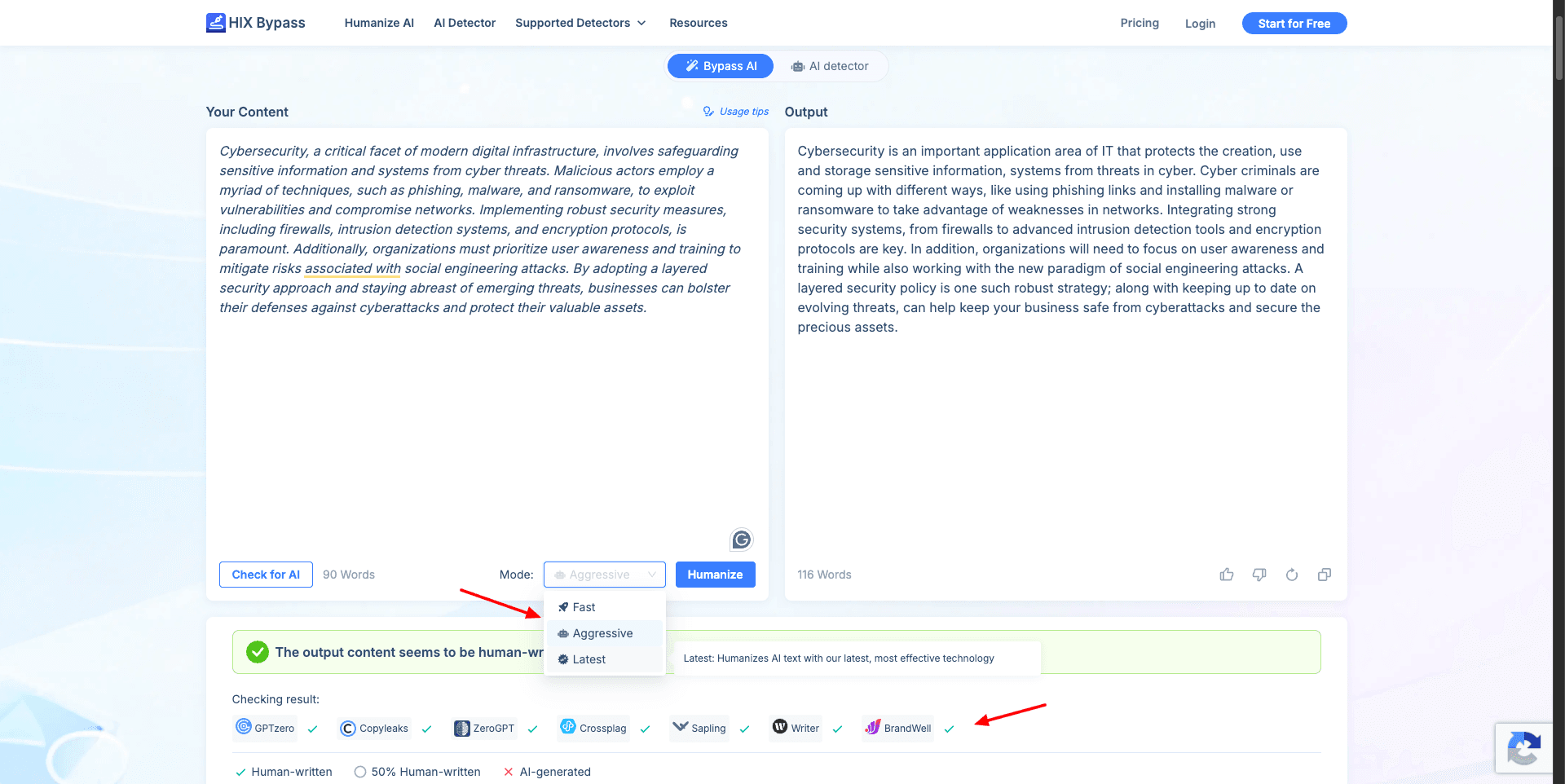
In my opinion, the output produced by different modes of Hix Bypass was pretty decent. The Balanced Mode produced good results, though. If you wish to convert your AI content into an easily readable format, go with Hix Bypass!
Cons:
- AI Detector doesn’t share the percentage of AI found.
- Limited free plan.
Free Plan: You can check 300 words in total on the free plan.
4) Quillbot – Best for Simplifying Complex Writing
Quillbot is a popular paraphrasing tool used by over 4.3 million users globally! Though it’s not a focused AI Humanizer as such, you can use it to paraphrase your AI content into 100% human-like text.
To start with Quillbot, you simply need to paste your content into the text window. It has a limit of 125 words for the input. Next, you can select a mode. Though it features multiple modes, only Standard and Fluency modes are available on the free version.
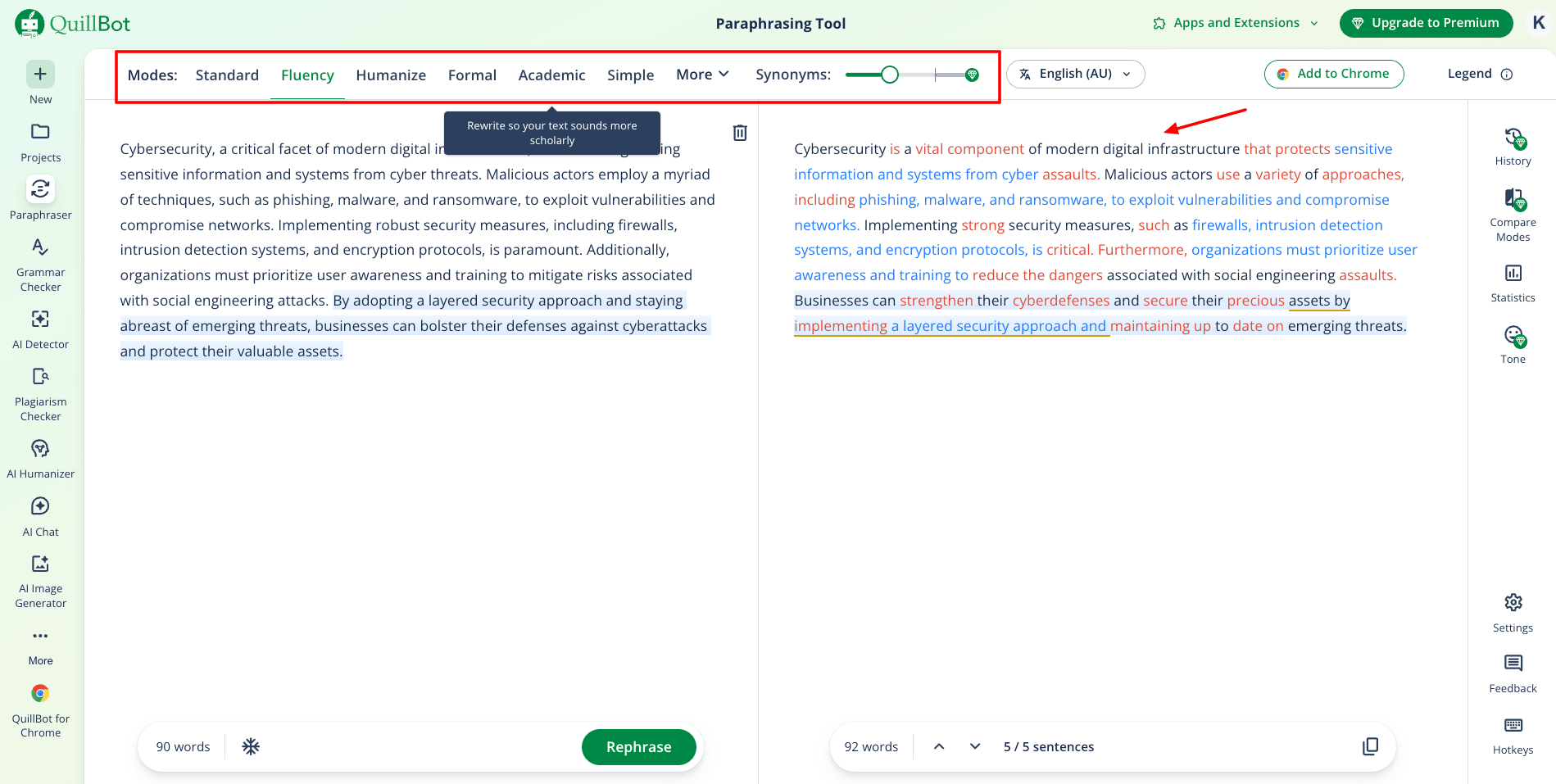
You can also choose a language of your choice for the output. It swiftly generates the paraphrased content. The specialty of Quillbot is that it transforms your text into an easy-to-understand format. I personally like using Quillbot to simplify complex writing as well.
It doesn’t have an in-built AI checker. Upon checking the output with GPTZero, it detected a mere 2% chance of AI content. Thus, if you want to simplify your complex documents, you should definitely use Quillbot.
Cons:
- No in-built AI detection
- Limited modes on the free version
Free Plan: You can paraphrase up to 125 words at a time on the free plan.
5) Humanize AI Text – Best for Academic Content
Humanize AI Text is a platform that adds a human touch to your AI content. You can start by pasting your AI text into the editor under the AI Detector. After analyzing, it depicts the percentage of your content that is likely AI.
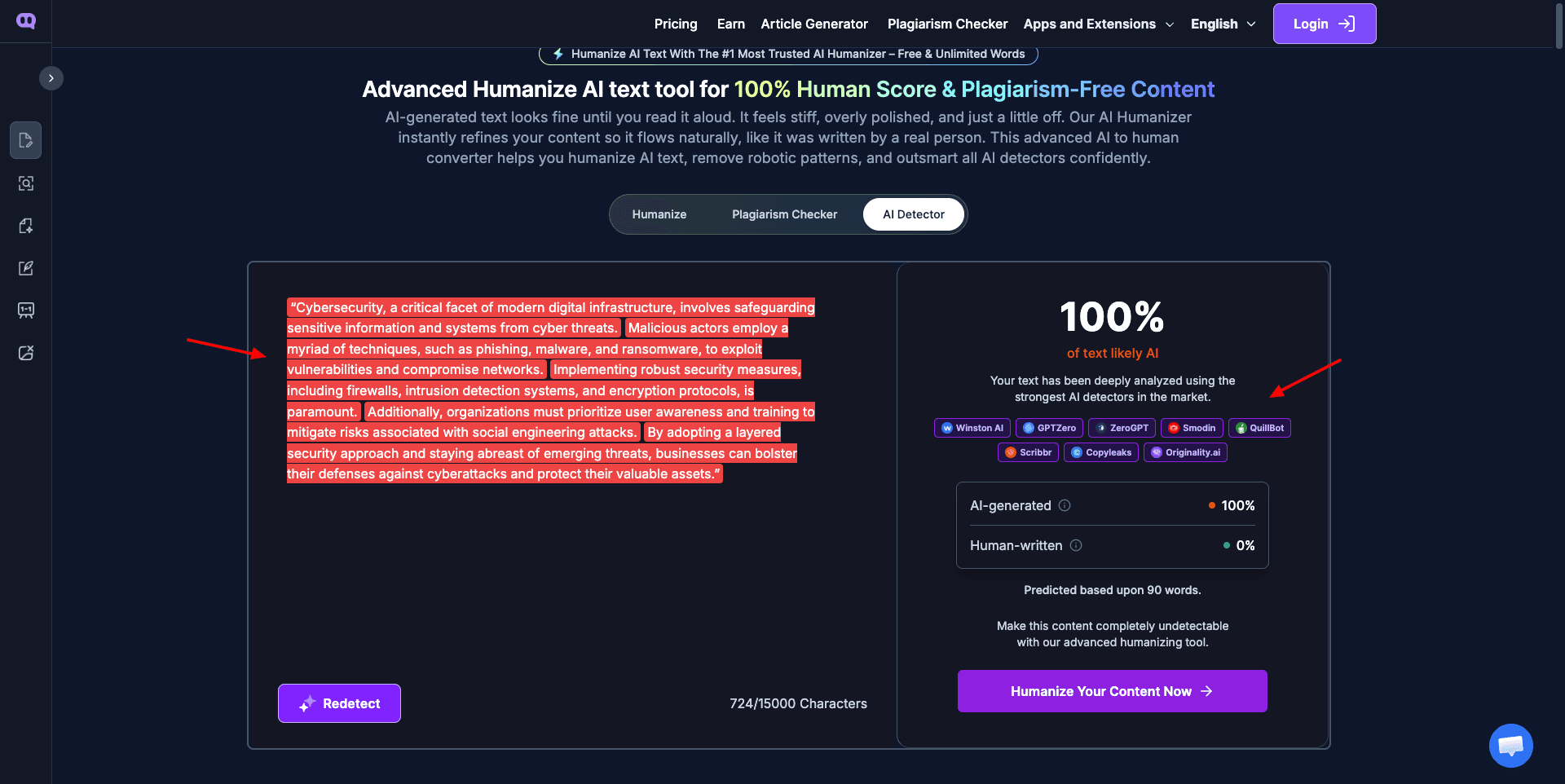
Then, for humanizing your content, go to the Humanize tab and paste your content. It lets you select a writing level (High School or University) and a writing type (Academic, General Writing, Essay).
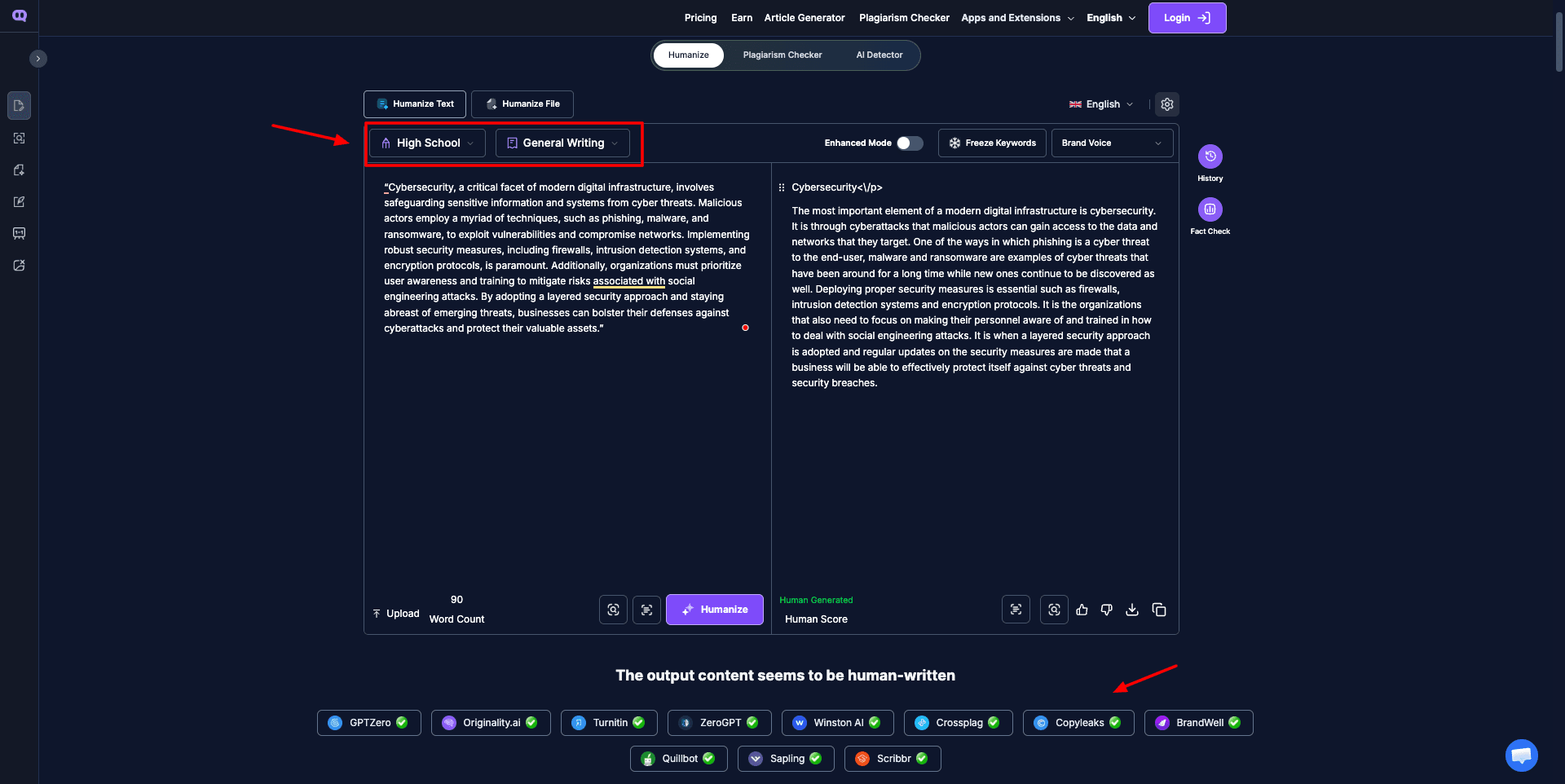
It also runs the humanized content through detection platforms like GPTzero, Originality, Copyleaks, Quillbot, etc., to ensure it’s free from AI. Overall, the content feels human-like, but it could’ve been more concise. It expanded my word count significantly to convey the same message.
Free Plan: You get 1000 words to humanize on the free plan.
6) Phrasly AI
Phrasly AI is a popular AI writing tool that is designed to humanize content generated by AI models. It essentially rewrites the AI content to feel more human-like and natural, and prevents getting flagged by AI detectors.
It has an in-built AI detector where you can paste your text and check if it’s getting flagged. It highlights the AI content in red and shares the percentage of AI found in your content.
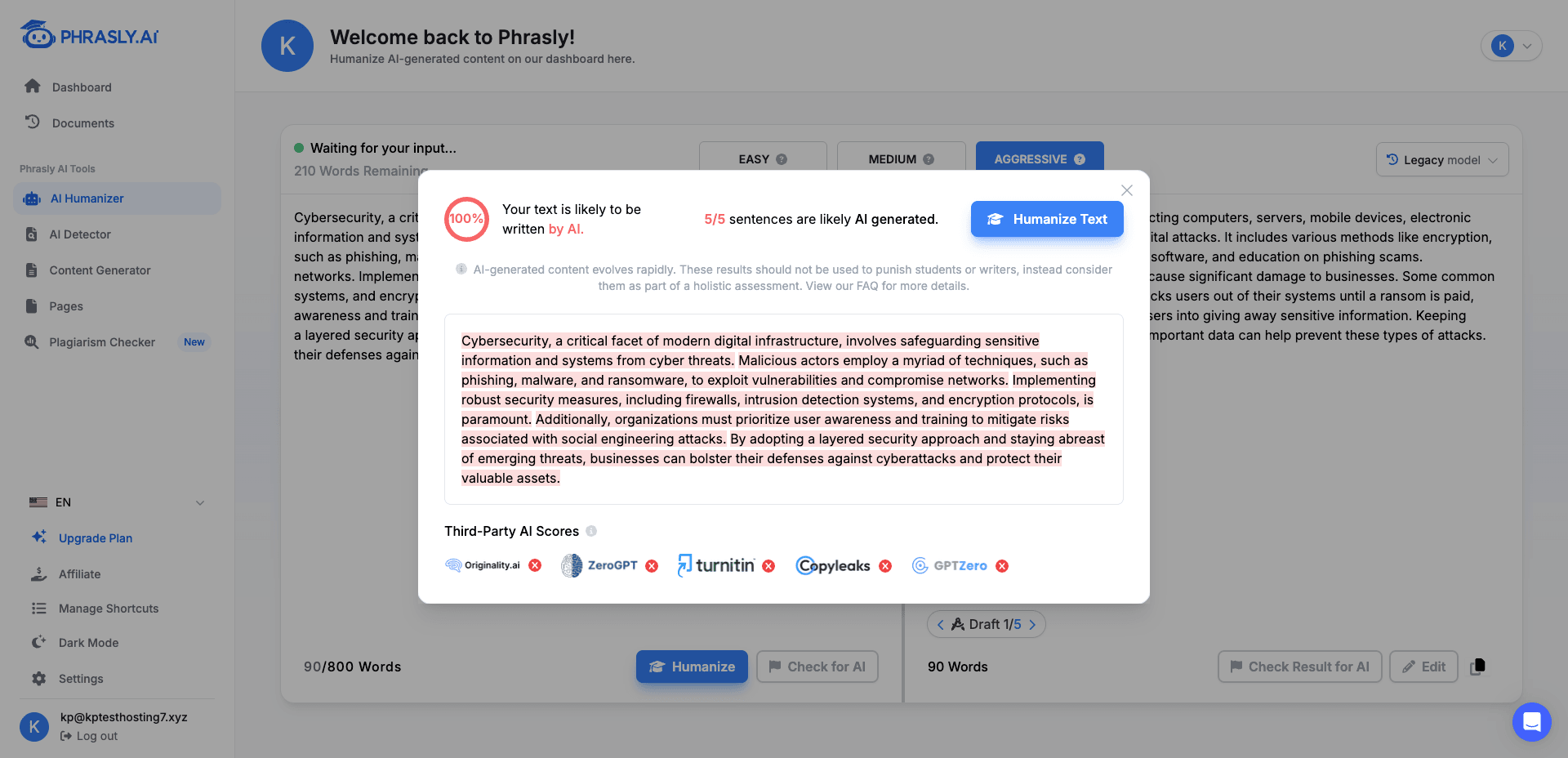
It also runs the text through AI detection platforms like Originality AI, ZeroGPT, Turnitin, Copyleaks, and GPTZero, and shares their verdict.
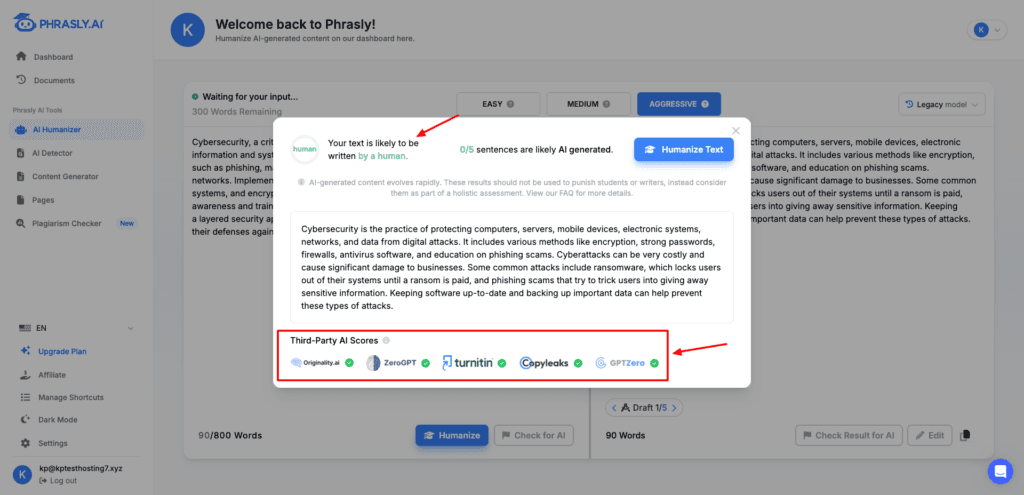
Next, you can run your AI content through its AI Humanizer tool. Within seconds, it generates a humanized version that is 100% cleared for AI and even validated with the above 5 AI detection platforms.
Interestingly, Phrasly also features an AI Editor. It’s an editing dashboard similar to Docs, where you can format and edit your content along with chatting with the AI to brainstorm ideas, get summaries, etc.
So, if you need an all-in-one tool for detection, humanizing, and editing AI content, go with Phrasly!
Cons:
- 300-word limit on detection and humanization.
- Doesn’t show the percentage of AI detected.
Free plan: Its free plan lets you check 300 words at a time.
7) AI Humanizer by AskYourPDF
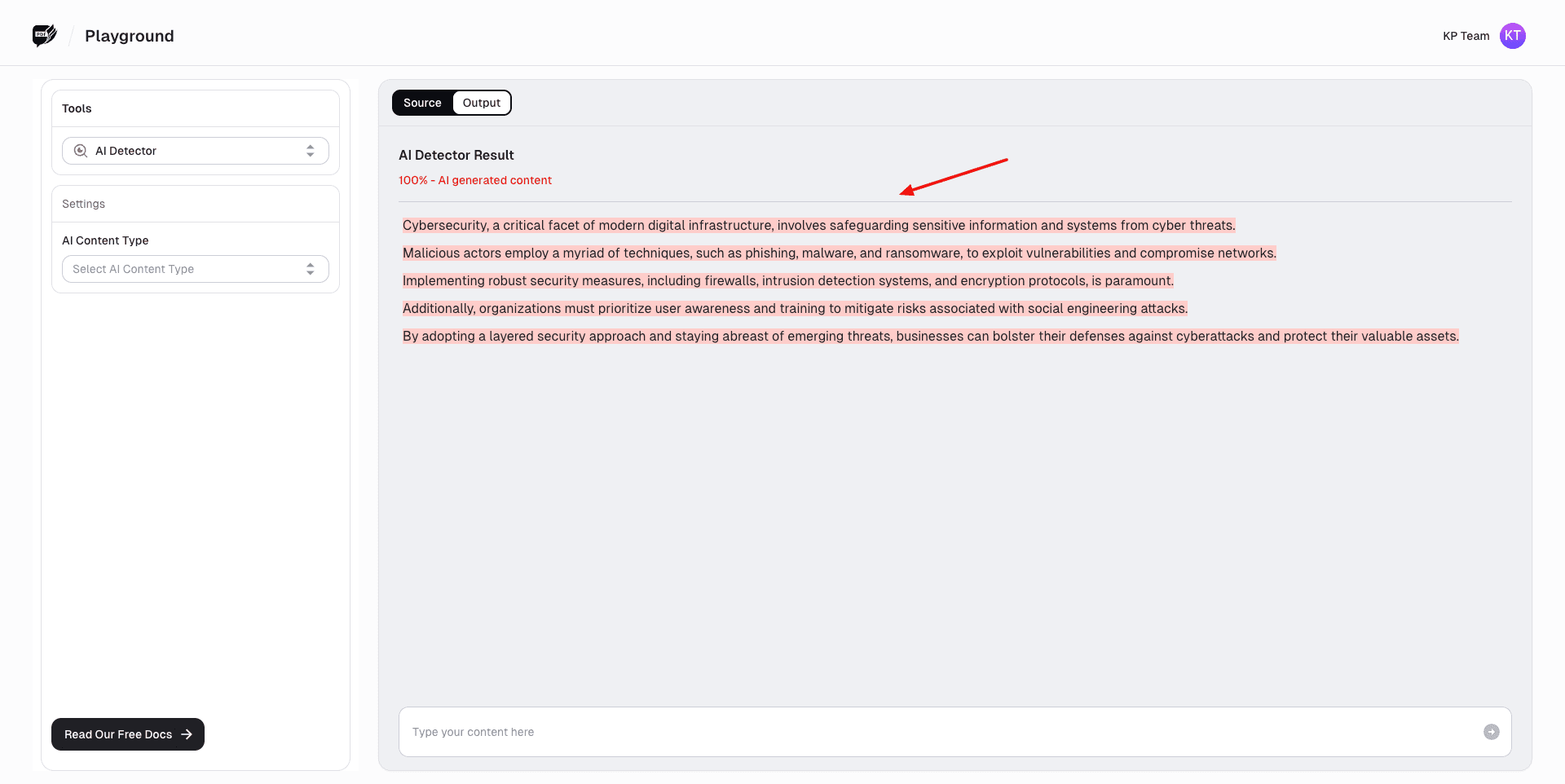
AI Humanizer by AskYourPDF lets you transform your content into a more human-friendly form. To start with AI detection, we will first paste our AI content into the editor. It simply gives you the percentage of AI found in your content.
Next, for humanizing content, paste your AI text in the editor and choose a purpose, readability, and human level. It transforms the text into a humanized form that is AI-proof. I checked it with Quillbot and found 0% AI in the output.
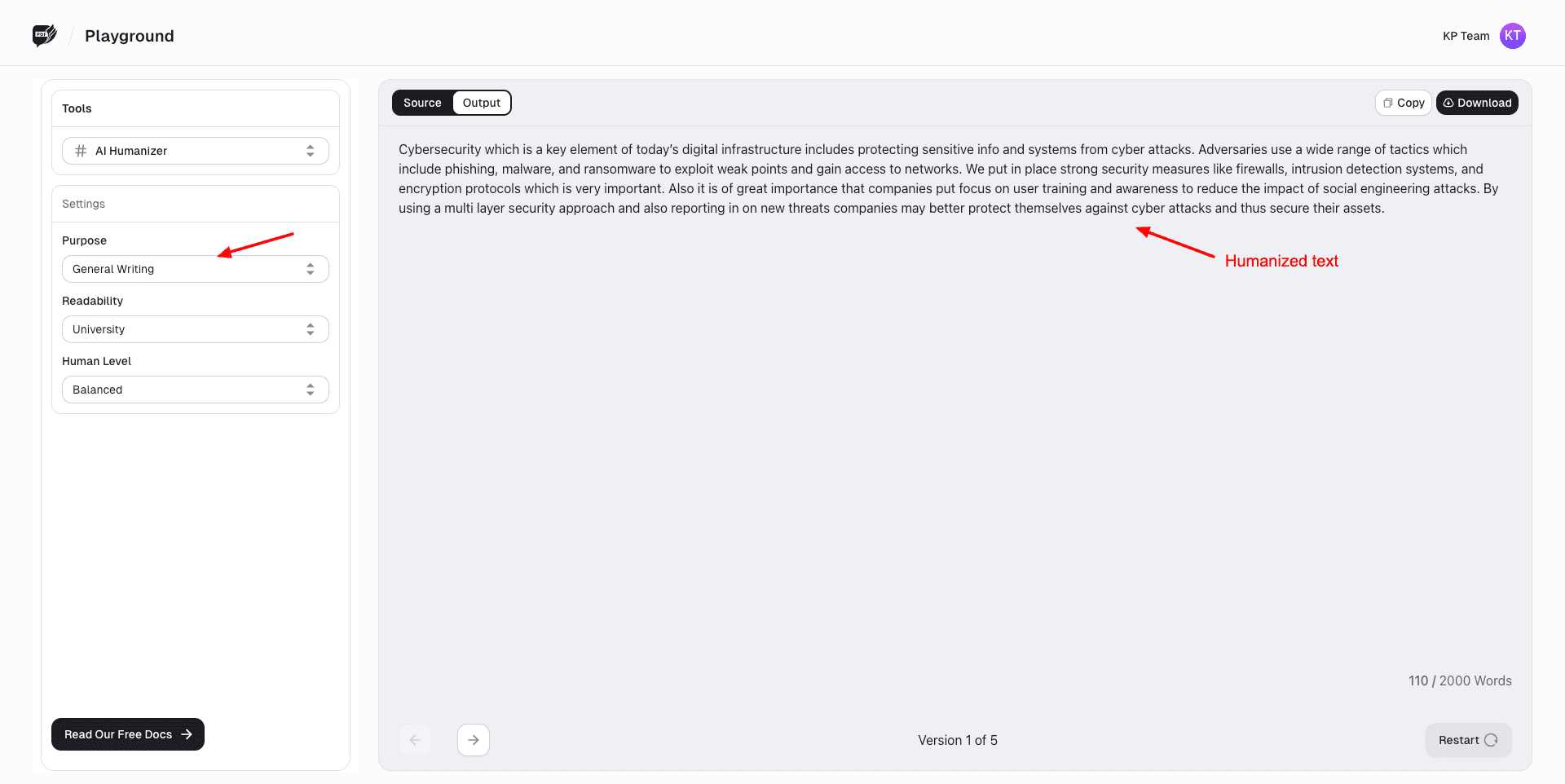
However, it doesn’t run the humanized output with different detector platforms to verify the text. Overall, it’s a pretty decent tool with basic features. I wish they had more customization options than the default ones, though.
Cons:
- Lack of customization options
- Doesn’t check for AI through popular AI detectors.
Free Plan: You get a 2000-word limit on the input, along with default setting options on the free plan.
8) Walter Writes AI
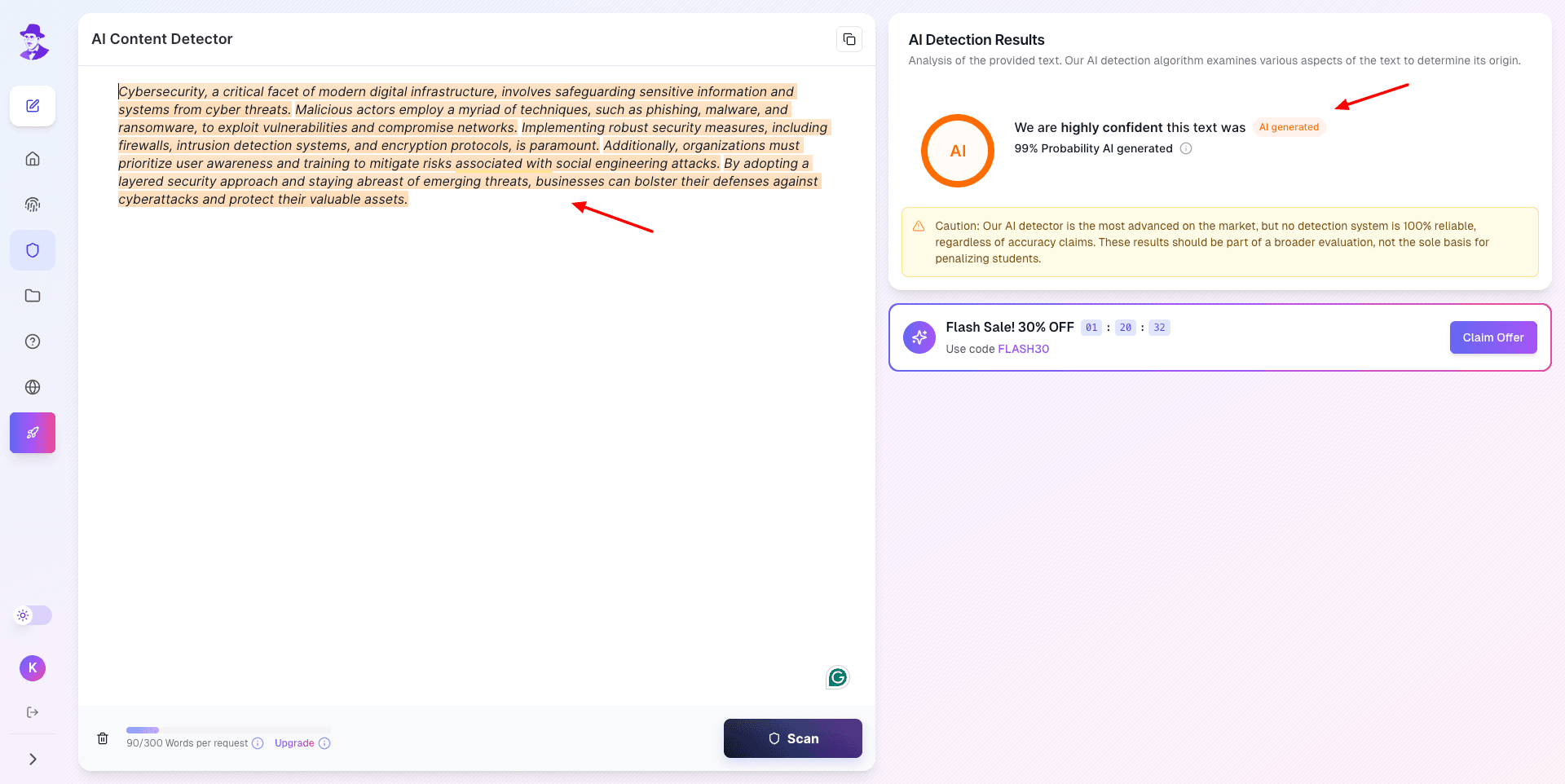
Walter Writes AI is a platform that helps humanize AI-generated content. To get started, simply go to the AI Detector and paste your content. It instantly gives you the percentage of AI content detected in your text.
Next, paste the same AI-generated content into the AI Humanizer. It also features advanced options like readability level, purpose, and detection bypass level. But on the free plan, you only get the default version of these settings.
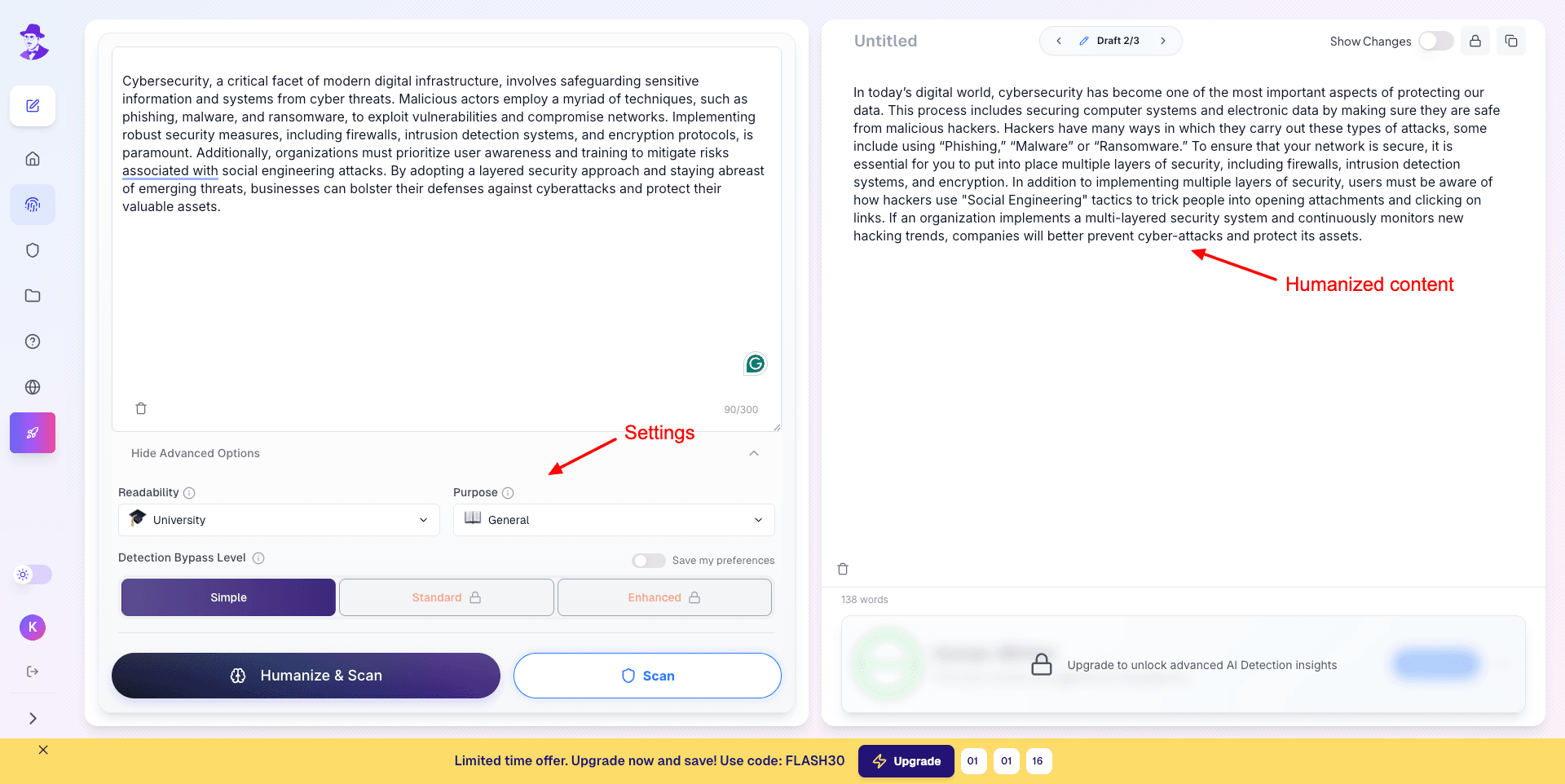
Finally, it gives you a humanized version of your content that is cleared for AI detection. I found 0% AI in the generated text when I checked it with Quillbot! So, if you need sureshot AI detection and humanization, you should definitely try out Walter Writes AI.
Cons:
- Dashboard buttons don’t work.
- The ‘Humanize & Scan’ button doesn’t scan for AI.
- Doesn’t scan for AI with popular detection tools.
- Limitations on the free plan.
- No advanced settings on the free version.
Free Plan: You get 300 words as one-time credits on the free version. Once you humanize 300 words, you’ll need a paid subscription to continue.
9) AI Humanize
AI Humanize is another AI tool that helps you evade AI detectors successfully. It requires you to sign up with your email or Google account. Next, you can paste your content and choose an AI model fromFalcon 1.0 and Falcon 2.0.
First, you can paste your text in the input field and hit the ‘Check for AI’ button. It scans your input text and detects the percentage probability of it being AI-generated. Your content is checked with AI detectors like GPTzero, Copyleaks, Crossplag, etc and the AI percentage is displayed.
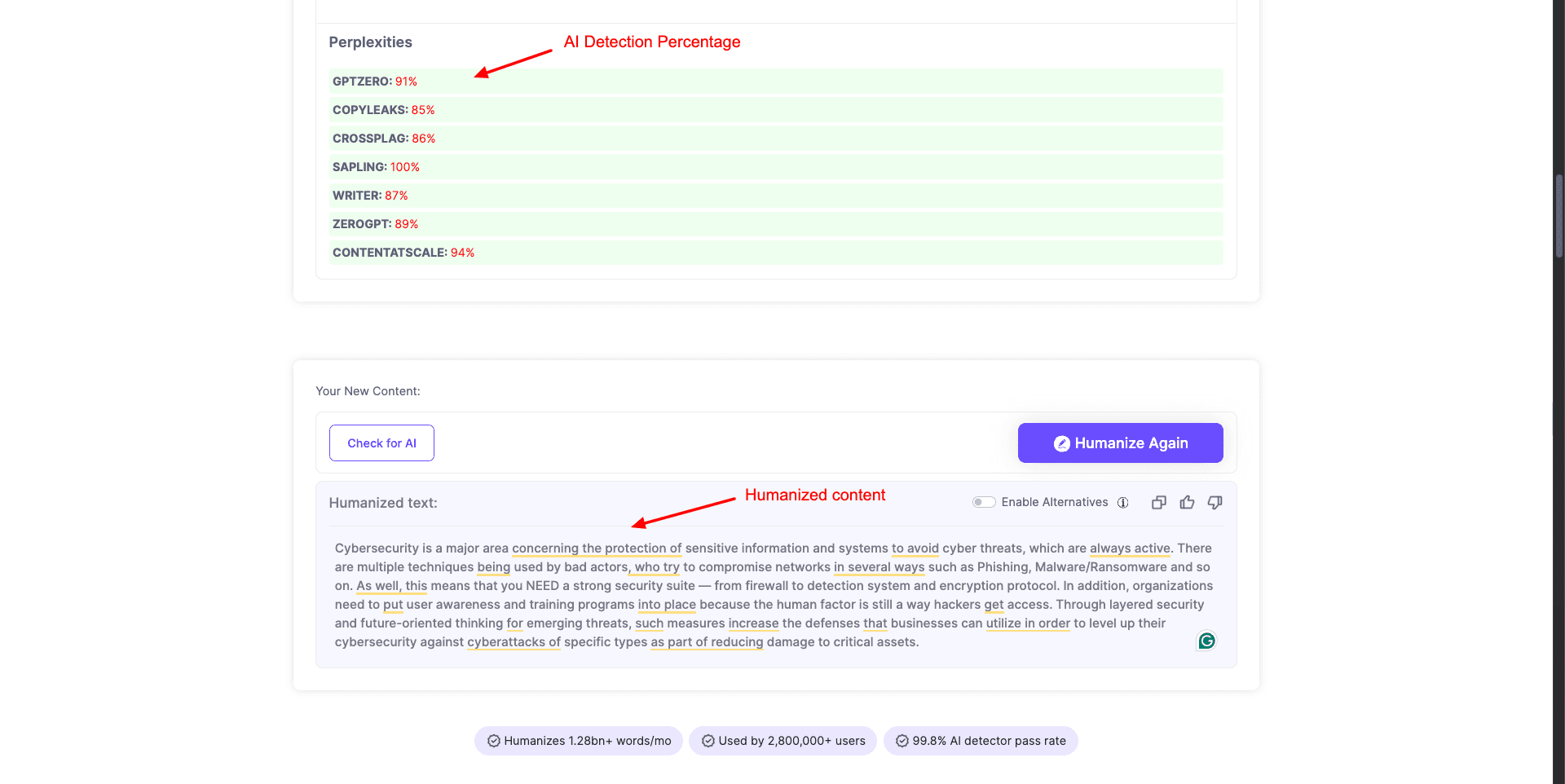
Next, you can hit the Humanize button to generate a more human version of the content. Overall, AI Humanize is a decent tool you can use for making your text sound more human-like.
Free Plan: The free plan lets you rewrite 400 words for free.
10) AI Text Tools
AI Text Tools is a free AI content detector and humanizer that’s used in 20+ universities. To get started, simply sign up using your Google account and go to the Detect AI section.
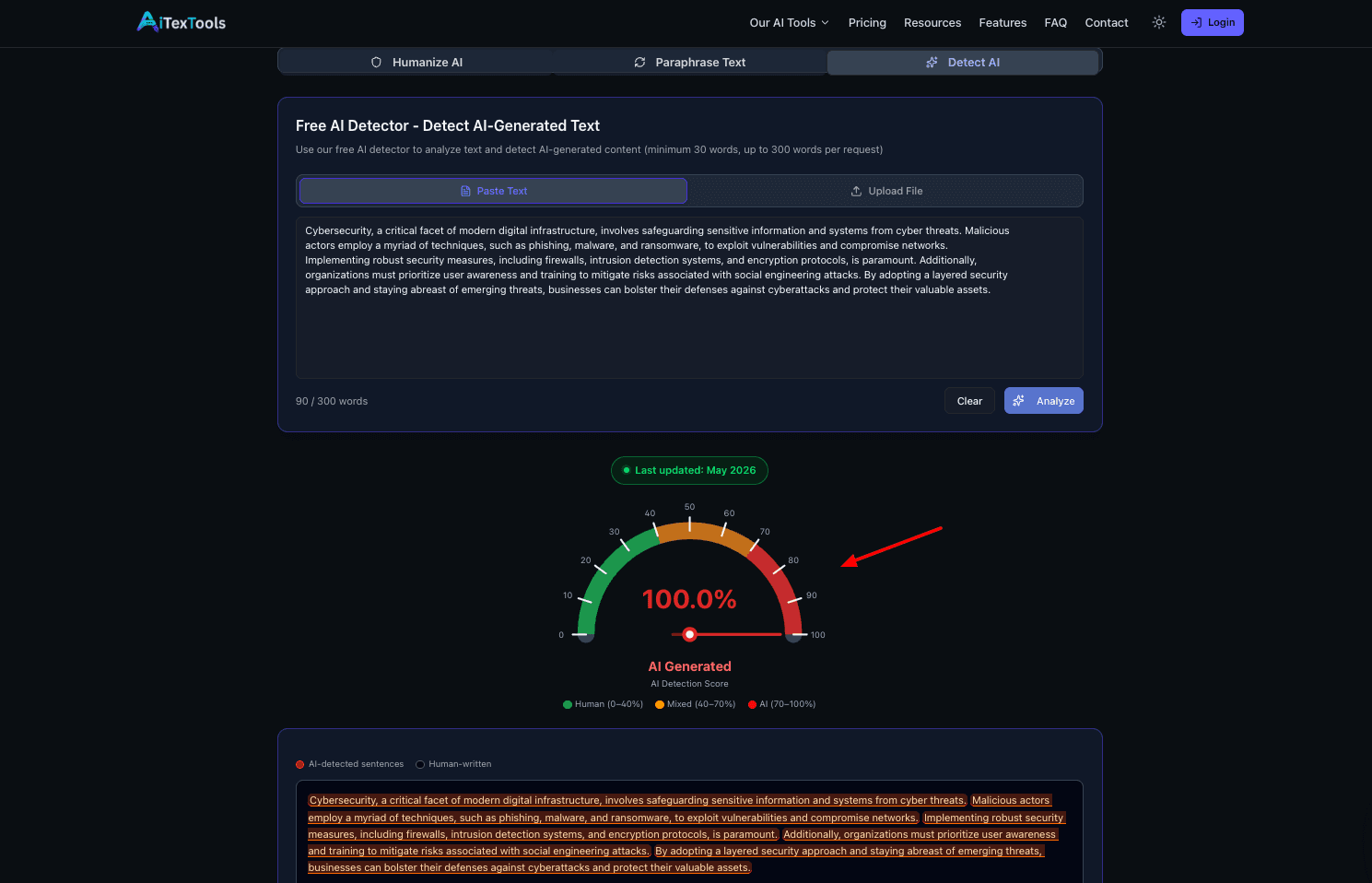
Paste your text or upload it as a PDF or DOCX file. It instantly gives you the percentage of AI detected. Next, paste your content in the ‘Humanize AI’ section, and you get a humanized version. You can copy all the humanized text together or download it as a TXT file.
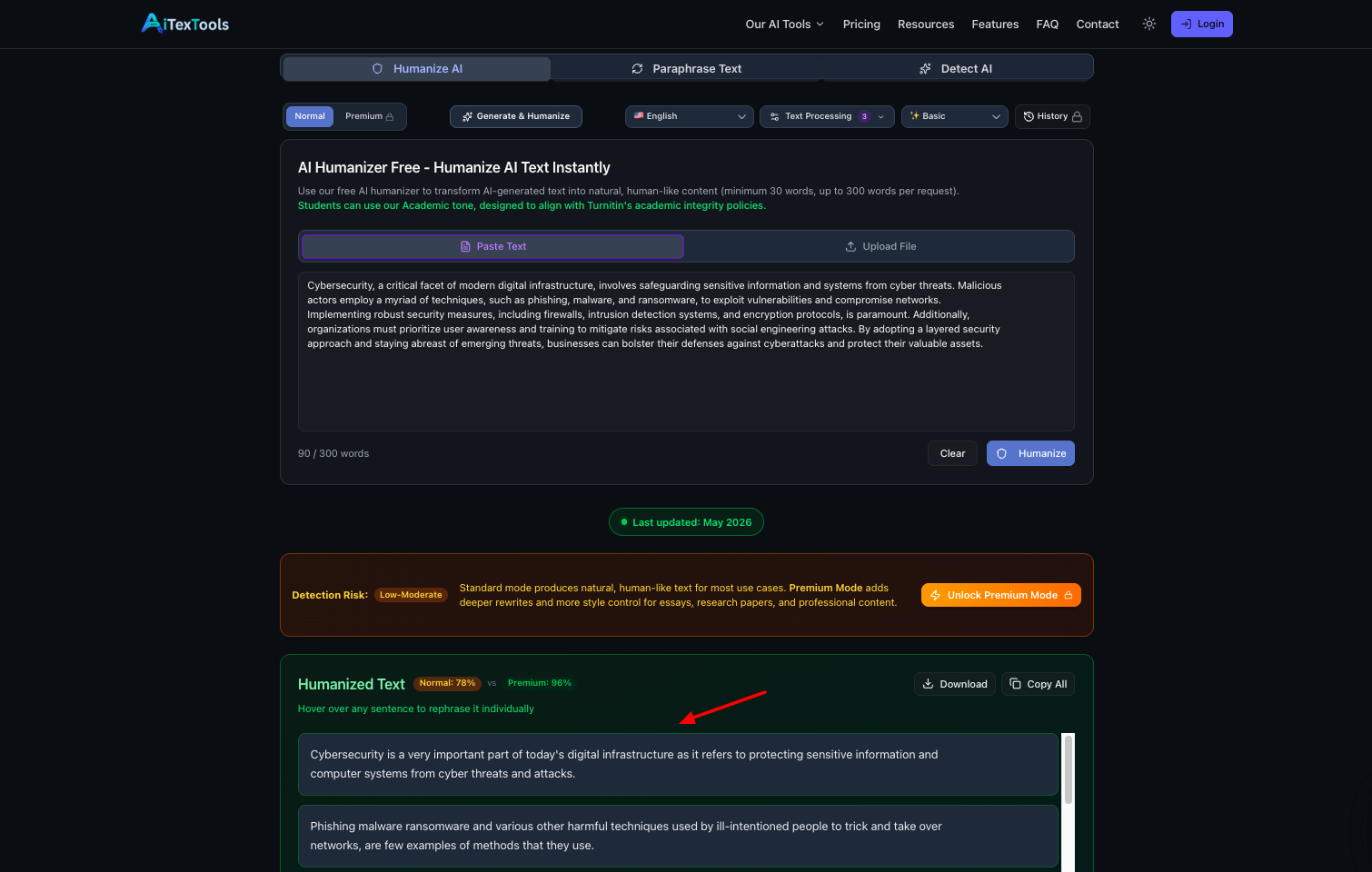
However, I spotted a few grammatical errors in the humanized version. So you’ll have to proofread your final content before submitting or publishing it on the web.
Cons:
- Only Google signups are allowed.
- Doesn’t highlight changed words.
- Doesn’t scan for AI with popular detection tools.
Free Plan: On the free plan, you get 7k detection words/mo, 5k humanization words/mo, and 3k AI generation words. You can use 300 words per request.
11) BypassGPT
BypassGPT is an AI humanizer and AI detection tool trusted by big names like Techradar, Business Insider, PC World, The Economic Times, and more. It lets you create human-like content within seconds.
To start with BypassGPT, all you have to do is paste your AI content into the text window. The free plan has an 80-word limit. So, you can only humanize small blocks of text at a time. Next, you can hit the ‘Check for AI’ button to analyze the AI detectors flagging your input.
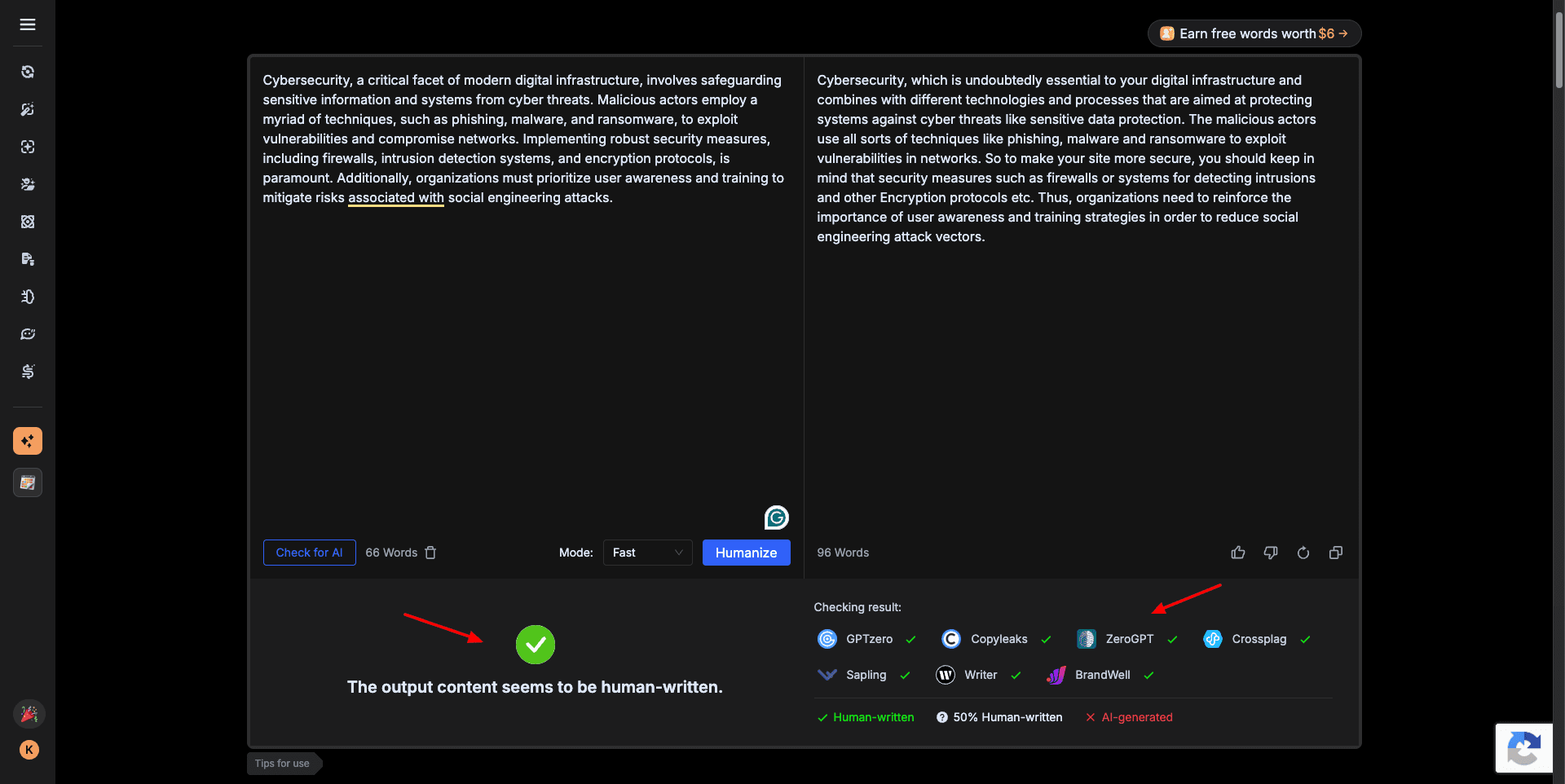
It checks your text with multiple AI detectors like GPTZero, Copyleaks, Sapling, etc. You can also select a mode from Fast, Creative, or Enhanced. Fast mode makes basic changes to the text, Creative mode adds interesting edits, and Enhanced mode bypasses the strictest content detectors.
I personally used the Enhanced mode. However, the results were quite disappointing. 3 of the AI Detectors flagged it as 50% AI-generated. Whereas, 4 of the AI detectors flagged the output as 100% AI generated.
It also has a Daily Check-In system, where you can earn 20 words every day by just logging in to your BypassGPT account. Overall, BypassGPT didn’t succeed in humanizing AI content. But it makes your text more readable. You can edit it manually to make it more human-like.
Cons:
- Limited free plan. (150 words in total)
- Output doesn’t pass AI detection.
Free Plan: The free plan offers a total of 150 words, where you can humanize up to 80 words at a time.
How Did We Test the Best AI Humanizers?
In order to test the AI Humanizer tools, I first generated a sample AI text through an AI chatbot and manually made a few edits to it. Then, I ran the text through all the AI humanizers and compared their outputs.
I also took other factors into account, such as word limit, free plan, percentage of AI detected, unique features, etc. Finally, I processed the output generated by each tool through Quillbot’s AI Detector. After analyzing the tools on all the above factors, I ranked them in my article.
Why Should You Trust Me?
I have been working full-time in the digital industry since 2015. In all these years, I have tested and reviewed hundreds of digital tools, including web hosting, password managers, cloud storage, VPN, website builders, and more.
In the last 2 years, I’ve specifically focused on AI tools and covered all the popular categories like AI writers, AI image generators, AI voice generators, AI video generators, AI website builders, and more.
I have extensively worked on reviewing AI writers like Copy AI, Jasper, Writesonic, WordHero, etc. I have also tested AI content detectors & published tips to detect AI-generated content. All of this has given me the knowledge and expertise to recommend the Best AI Humanizer tools.
Conclusion
In this article, we explored the 11 Best AI Humanizers for 2026. With these tools, you don’t need to worry about AI flagging your content. My personal favorites are StealthGPT and Humanize AI. You should definitely test out their free versions.
Have you tried any free AI humanizer tools before? How was your experience, and were you able to bypass AI detectors successfully? Would you like to recommend any other tools not on this list? Do share them in the comments section below.
This is Kripesh signing off. I’ll be back with more interesting tools. Till then, cheers and keep learning. If you’re interested in exploring more AI tools, follow my newsletter to discover a new free AI tool every week.
FAQs
Which is the best AI humanizer for 2026?
My recommendation is StealthGPT because it generates the most natural-sounding output with very low AI detection rates. If you want more customization options and detailed AI detection reports, Humanize AI is another excellent option.
Do AI humanizers actually work?
Yes, AI humanizers can make AI-generated text sound more natural and reduce the chances of getting flagged by AI detectors. However, no tool can guarantee 100% undetectability, so manual editing is still recommended.
Which is the best free AI humanizer?
Humanize AI is one of the best free AI humanizers because it doesn’t require a sign-up and supports multiple humanization modes. AI Text Tools is also a good option if you need generous monthly limits.
Which AI humanizer is best for academic writing?
Humanize AI Text is best for academic writing because it offers writing-level selection, academic-focused modes, and checks content across multiple AI detection platforms.
Which AI humanizer is best for bloggers and SEO content?
StealthGPT and HIX Bypass are great for bloggers and SEO writers because they generate highly readable content while maintaining a natural writing flow.
Which AI humanizer has the best AI detection features?
Humanize AI and Phrasly AI offer the best AI detection features because they scan content across multiple AI detectors while also providing detailed detection reports.


Thank you very much for a well-researched article.
I like the fact that you did test the AI HUMNIZERS yourself
Keep up the good work
Humanize AI is not a good reference. Turnitin can still read that it is AI generated.
The 1st one is good. Stealthgpt worked for me..
Please add RewriteAI to you list. It’s really good.
You can add Deceptioner and Stealthwriter. Both of them works great.
Thanks for the suggestion. Will check them out.