With businesses rapidly moving online, choosing the right web host has never been more important. Hosting.com is a popular hosting provider known for its speed-focused infrastructure. Having used it for several years, I wanted to see how it performs today.
In this Hosting.com Review, we’ll test Hosting.com on key metrics like speed, uptime, and load handling. We’ll also examine its interface, security, backups, migration process, customer support, pricing, and refund policy.
By the end, you’ll know whether Hosting.com is worth your investment and which alternatives you should consider before making a decision. Let’s dive in.
Hosting.com Review 2026
Summary
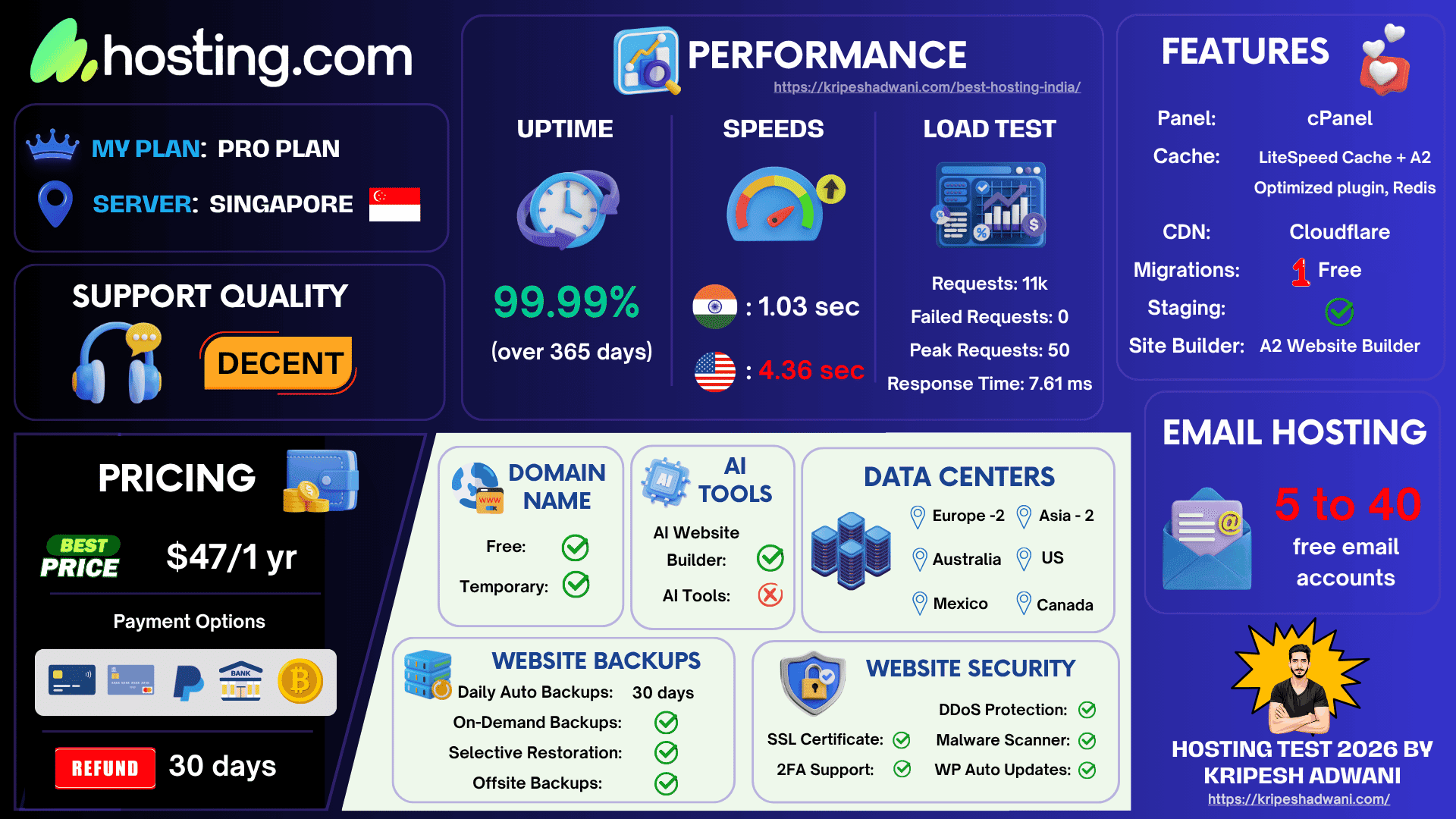
Hosting.com delivers excellent speeds, reliable uptime, and a developer-friendly hosting experience that has remained consistently strong over the years. The main drawback is its renewal pricing, which can feel expensive compared to competitors.
Overall, it’s a great choice for bloggers, small businesses, and developers who want a dependable cPanel-based hosting provider with proven performance.
- What is Hosting.com?
- Hosting.com Overview
- Hosting.com Review Video
- Hosting.com User Interface
- Hosting.com Testing Parameters
- Hosting.com Speeds
- Hosting.com Uptime
- Hosting.com Load Test
- Hosting.com Cache Plugins
- Hosting.com Data Centers
- Hosting.com Domains
- Hosting.com Security
- Hosting.com Backups
- Hosting.com Customer Support
- Hosting.com Inode Count
- Hosting.com Pricing
- Hosting.com cPanel Migrations
- Hosting.com Website Builder
- Hosting.com CDN
- Hosting.com Staging
- Hosting.com Applications
- Hosting.com Developer Tools
- Hosting.com Pros
- Hosting.com Cons
- Hosting.com Alternatives
- Why Should You Trust Me?
- Conclusion
- FAQ
Disclaimer : I strongly believe in transparency. If you buy using the links on our site, we may earn a small commission without any extra cost to you. This helps me to keep producing honest reviews. Read More >>
What is Hosting.com?
Hosting.com is a popular and reliable web hosting provider founded back in 2003 by Bryan Muthig. It is headquartered in Wilmington, North Carolina. It has hosted over 3 million websites in 10+ locations around the world.
It offers multiple types of hosting, including web hosting, WordPress hosting, VPS hosting, and dedicated servers. In Jan 2025, A2 Hosting was acquired by World Host Group and rebranded to Hosting.com to expand global reach and the company’s growth.
Hosting.com Overview
| ⭐ Rating | 4/5 |
| 💲 Price | Starts From $2.99/mo |
| ⚡ Speed | 1.03 sec |
| 🕒 Uptime | 99.99% |
| 🔗 Free Domain | ✅ Yes |
| 🌎 Data Centers | Europe, USA, Australia, Mexico, Canada, Asia |
| ➡️ Migrations | 1 free |
| 👨💻 Support | Live Chat, Phone, Email |
| 🛡️ Security | Free SSL, Malware Protection, DDoS Protection, 2FA, Firewall |
| 🔄 Backups | 30 days |
| 💰 Money-back Guarantee | 30 days |
| 🔥 Coupon Code | Extra discount with my link |
Hosting.com Review Video
If you are a video person, you can watch my video review of Hosting.com here. It’s in the Hindi language with English subtitles. Hope you enjoy watching it!
Hosting.com User Interface
After its rebranding, the user interface of Hosting.com has undergone a complete makeover. It now features an attractive dark theme with colorful buttons and an intuitive design.
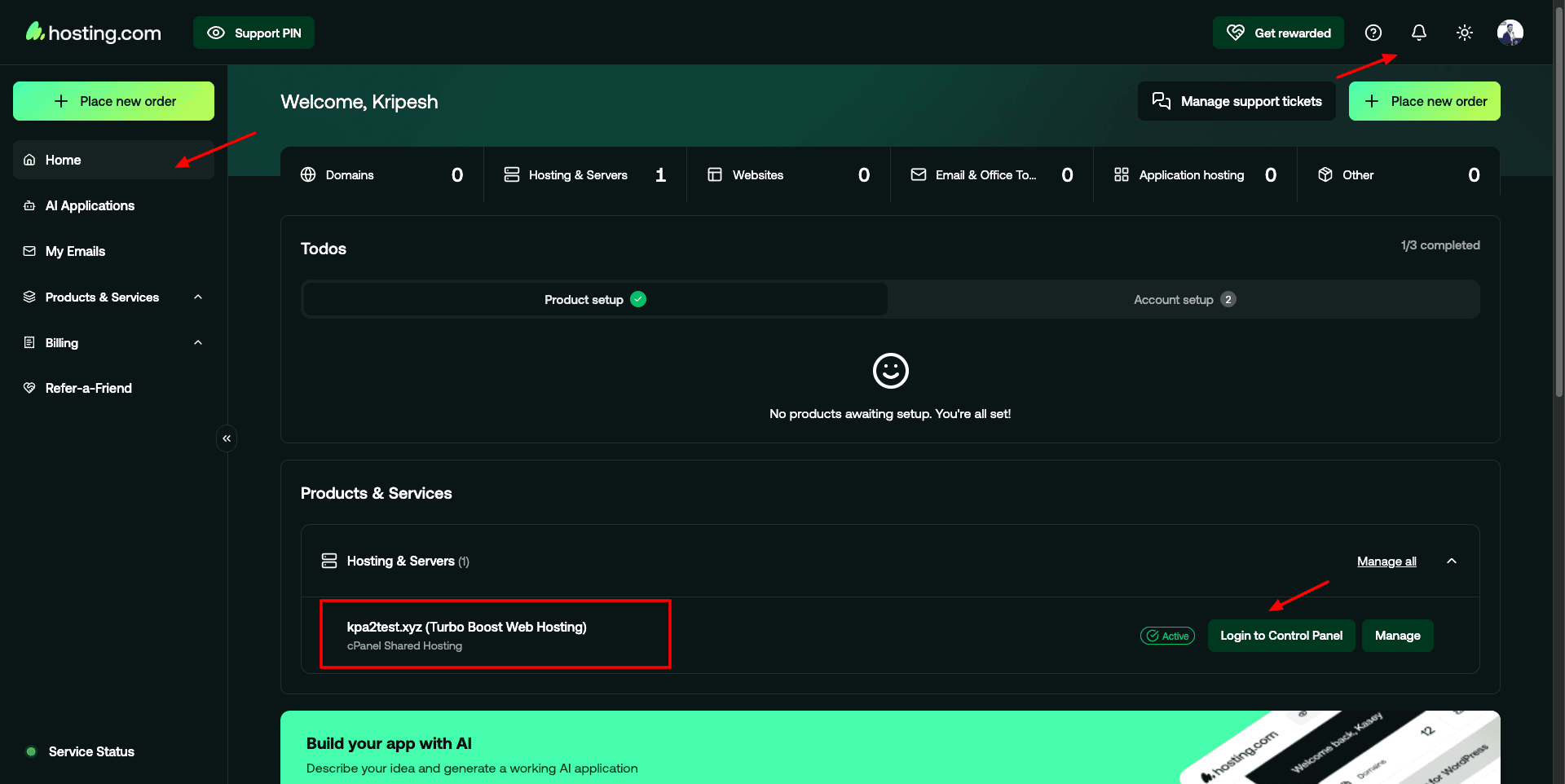
As you log in, you get a list of your active products and services. You can also manage your support tickets, access the help centre, etc. The left panel lets you manage your email, AI applications, products, billing, referrals, etc.
From the top right corner, you can access support, check notifications, toggle the theme to light or dark, and access your profile. For managing your hosting service, you get cPanel. Overall, the user interface of Hosting.com is now responsive, easy to use, and friendly for all users.
Hosting.com Testing Parameters
For this review, I have purchased the Pro shared hosting plan, which comes for $6.99/month when purchased for 1 year.

I have used this hosting plan with the following settings.
- Singapore servers
- Ocean WP Theme (Elementor based)
- Gym Template (Elementor based)
- Litespeed Cache Plugin (with default settings)
Hosting.com Speeds
Hosting.com exhibits super-fast page load speeds, especially in the Indian region. Let’s look at the results in detail.
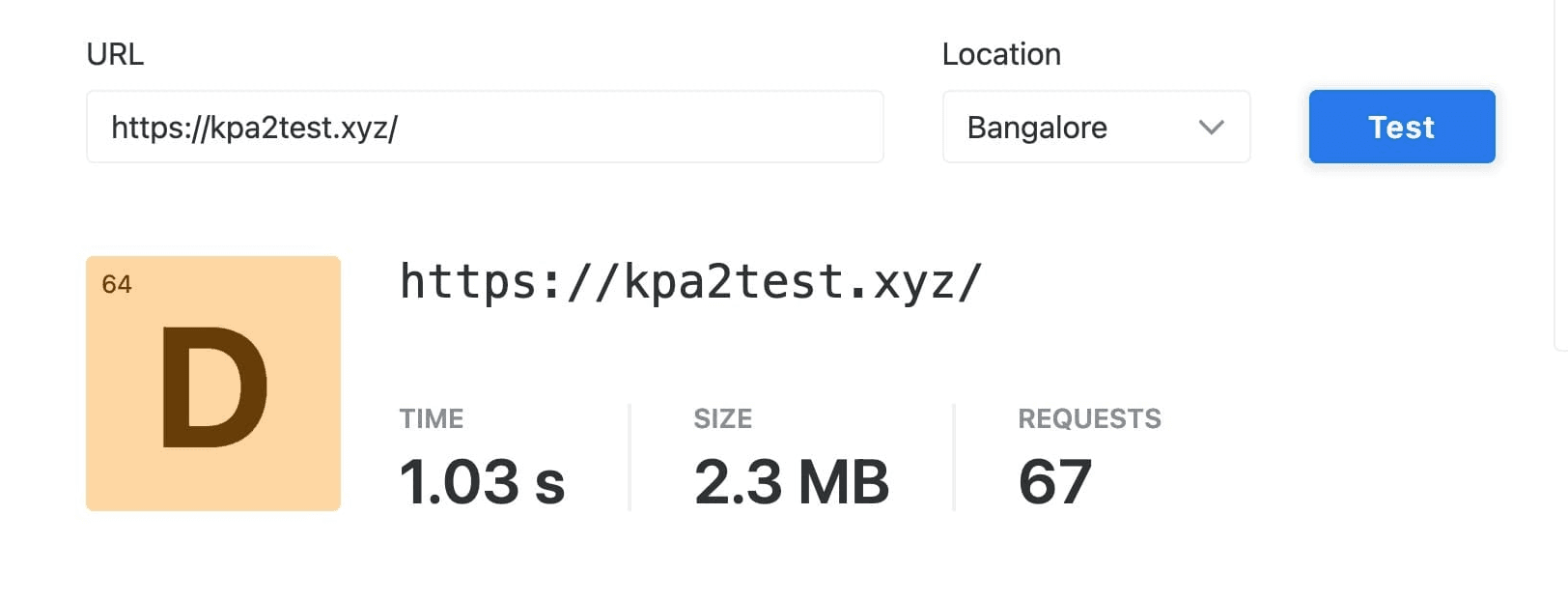
When I tested my website’s speeds from India, it loaded in merely 1.03 sec, which is pretty fast considering I didn’t tune the LiteSpeed cache plugin settings.
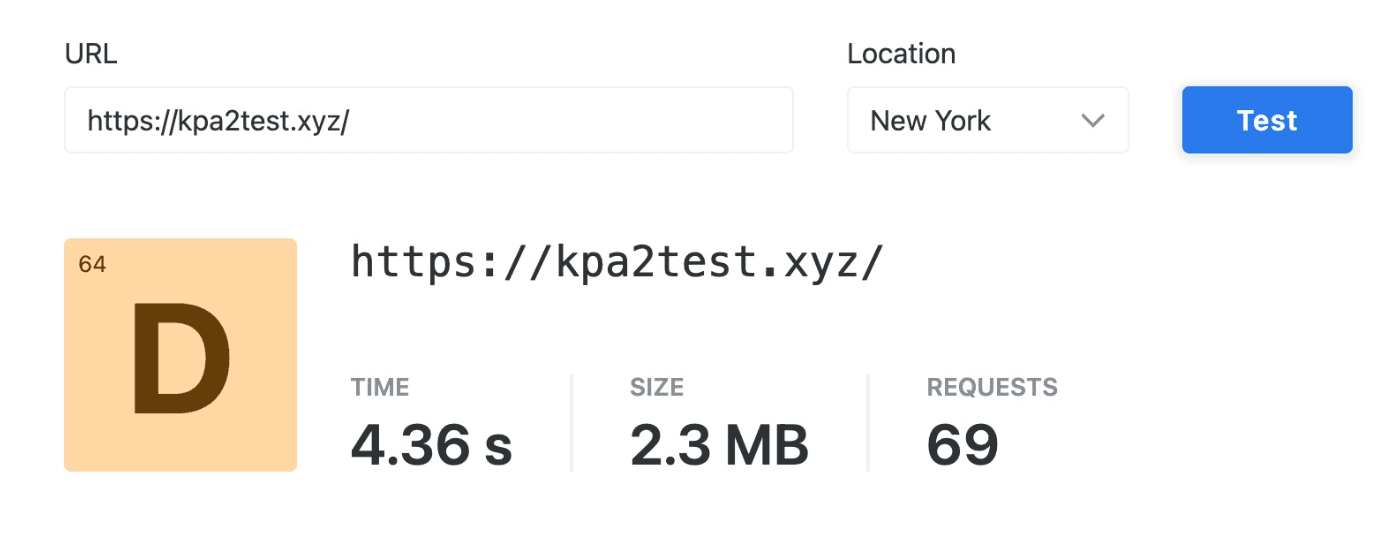
However, when I tested my website speeds from the US servers, it took 4.36 sec to load completely. Speeds beyond 3 seconds may have a negative impact on your SEO.
Overall, Hosting.com performs exceptionally well for Indian servers. Whereas with US servers, you will experience sluggish speeds. If you need lightning-fast speeds, check out Cloudways, FastComet, or ChemiCloud.
Hosting.com Uptime
Hosting.com delivers solid uptime, ensuring your website always stays available to your audience. I’ve been testing the uptime of my website for the last 365 days using the Better Uptime tool. It monitors the uptime of my website every 30 seconds.
Hosting.com Uptime Status Report (Last 12 Months)
Here’s the Uptime Status Report for Hosting.com Pro Plan (Singapore servers) for the last 365 days.
| September 2026 | 98.32% |
| August 2026 | 99.79% |
| July 2026 | 99.96% |
| June 2026 | 99.08% |
| May 2026 | 99.75% |
| April 2026 | 99.76% |
| March 2026 | 99.86% |
| February 2026 | 100% |
| January 2026 | 99.98% |
| December 2025 | 99.08% |
| November 2025 | 99.45% |
| October 2025 | 100% |
| September 2025 | 99.99% |
| August 2025 | 100% |
| July 2025 | 100% |
| June 2025 | 99.99% |
| May 2025 | 99.81% |
| April 2025 | 99.96% |
| March 2025 | 99.98% |
| February 2025 | 100% |
| January 2025 | 100% |
| December 2024 | 99.92% |
| November 2024 | 100% |
| October 2024 | 100% |
| September 2024 | 100% |
| August 2024 | 100% |
| July 2024 | 100% |
| June 2024 | 99.94% |
| May 2024 | 100% |
| April 2024 | 99.92% |
| March 2024 | 99.99% |
| February 2024 | 100% |
| January 2024 | 99.96% |
| December 2023 | 100% |
| November 2023 | 99.97% |
| October 2023 | 99.96% |
| September 2023 | 99.98% |
| August 2023 | 100% |
| July 2023 | 99.96% |
| June 2023 | 100% |
| May 2023 | 98.76% |
| April 2023 | 99.98% |
| March 2023 | 99.99% |
The average uptime in the past year has been 99.99%, which is decent. Whereas, the uptime of my website in the last 30 days has been an unbeatable 100%.
Note: I have an active plan of the Hosting.com Pro plan with Singapore Servers. Every month, the uptime will be updated here.
So, if your preference is website availability, Hosting.com is an excellent choice. You can also check out HostArmada, Cloudways, and Kinsta for unmatched uptime.
Hosting.com Load Test
Hosting.com performed surprisingly well in my load handling tests. It was able to handle large amounts of traffic while keeping a stable response time. Let’s get into the details.
For this load test, I sent 50 virtual users to my website hosted on Hosting.com. They made a total of 11k requests. It’s interesting to note that none of the requests failed!
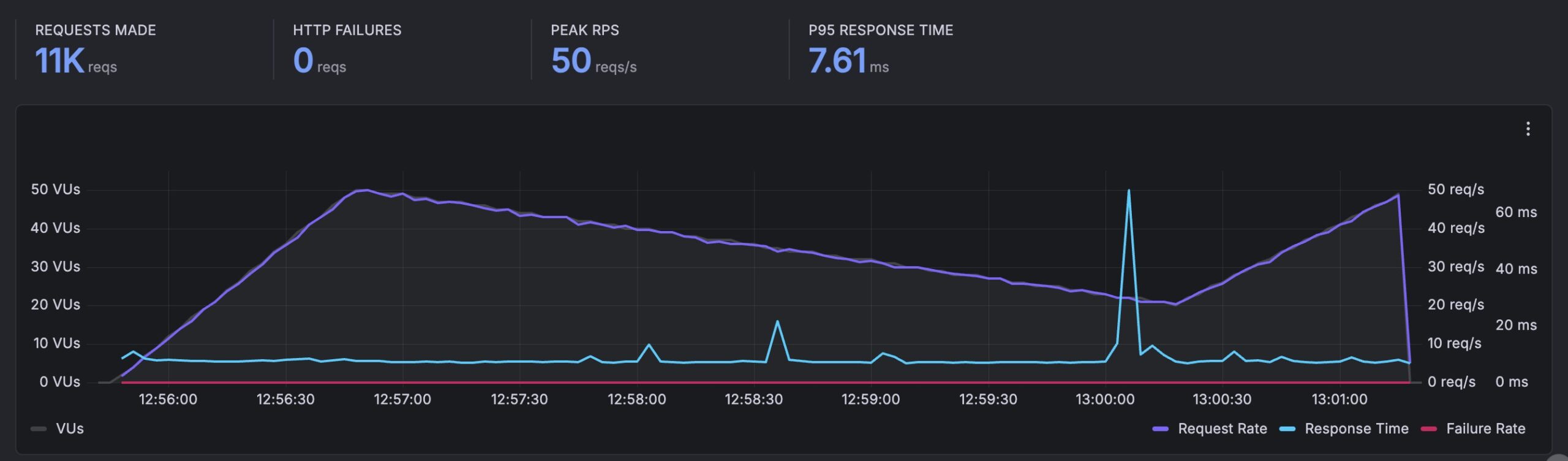
The P95 response time stood extremely low at 7.61 ms, and the peak requests reached 50 req/sec. Overall, the average response time looks stable, and I did not observe any major spikes in its graph.
If you want to host high-traffic websites, Hosting.com will be a reliable choice.
Hosting.com Cache Plugins
On all plans of Hosting.com, you get the A2 Optimized Cache plugin within the cPanel interface. However, if you opt for the higher plans that use LiteSpeed servers, you get two options for cache plugins.
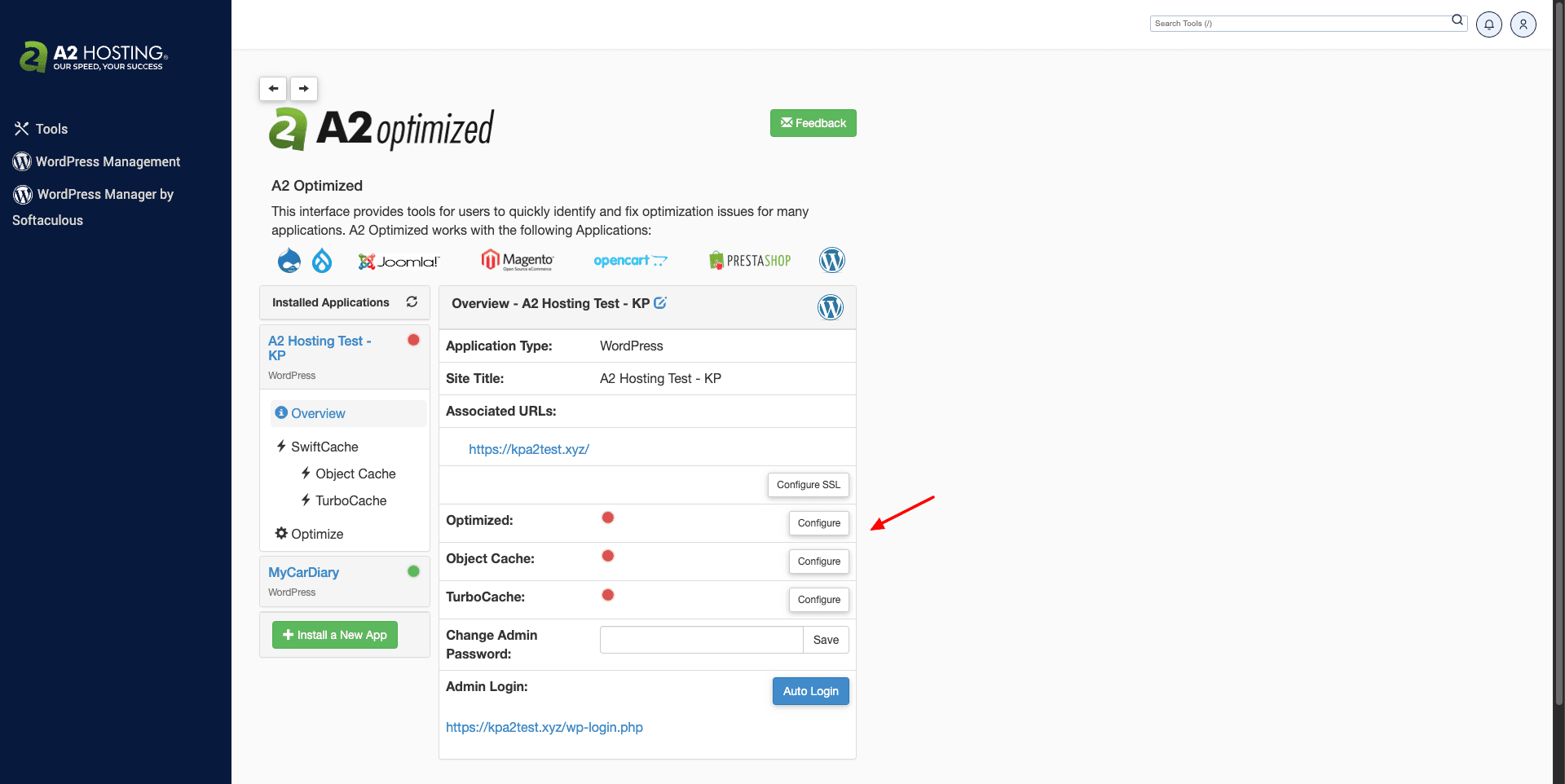
You can either use their proprietary ‘A2 Optimized’ cache plugin or the official Litespeed Cache plugin for WordPress, Magento, Joomla, OpenCart, etc. I would recommend using the LiteSpeed Cache plugin with LiteSpeed servers for best performance.
Hosting.com Data Centers
Talking about data centers, Hosting.com has 8 data centers spread around the globe.

- North America (Dallas, Toronto, Mexico)
- Europe (London, Frankfurt)
- Asia (Singapore, Mumbai)
- Australia (Sydney)
If you have an Indian or Asian audience, you will experience better speeds by opting for the Singapore Data centers.
Hosting.com Domains
Just like Hostinger, HostArmada, and other popular web hosts, Hosting.com now offers a free domain on all its hosting plans. However, this only applies to annual purchases and is limited to the following TLDs: .com, .net, .org, .us, .info, .pro, .digital, .online, .site, and .store.
New Domain Pricing
Hosting.com also offers domain registration services to its customers. It supports a variety of domain extensions. The major ones, along with their yearly pricing, are mentioned below.
| TLD | Annual Pricing |
| .com | $11.99 |
| .net | $14.99 |
| .org | $15.99 |
| .xyz | $18.99 |
| .tech | $6 |
If you are still in the process of finding the right domain name for your blog, business, or online store, these domain name generators might help you out! You can also use these AI domain name generators for some creative ideas!
Preview URL
Hosting.com offers a preview URL or temporary domain service. With this feature, you can test how your website appears to your audience without connecting a custom domain name to your hosting.
Hosting.com Security
Hosting.com offers the following security features.
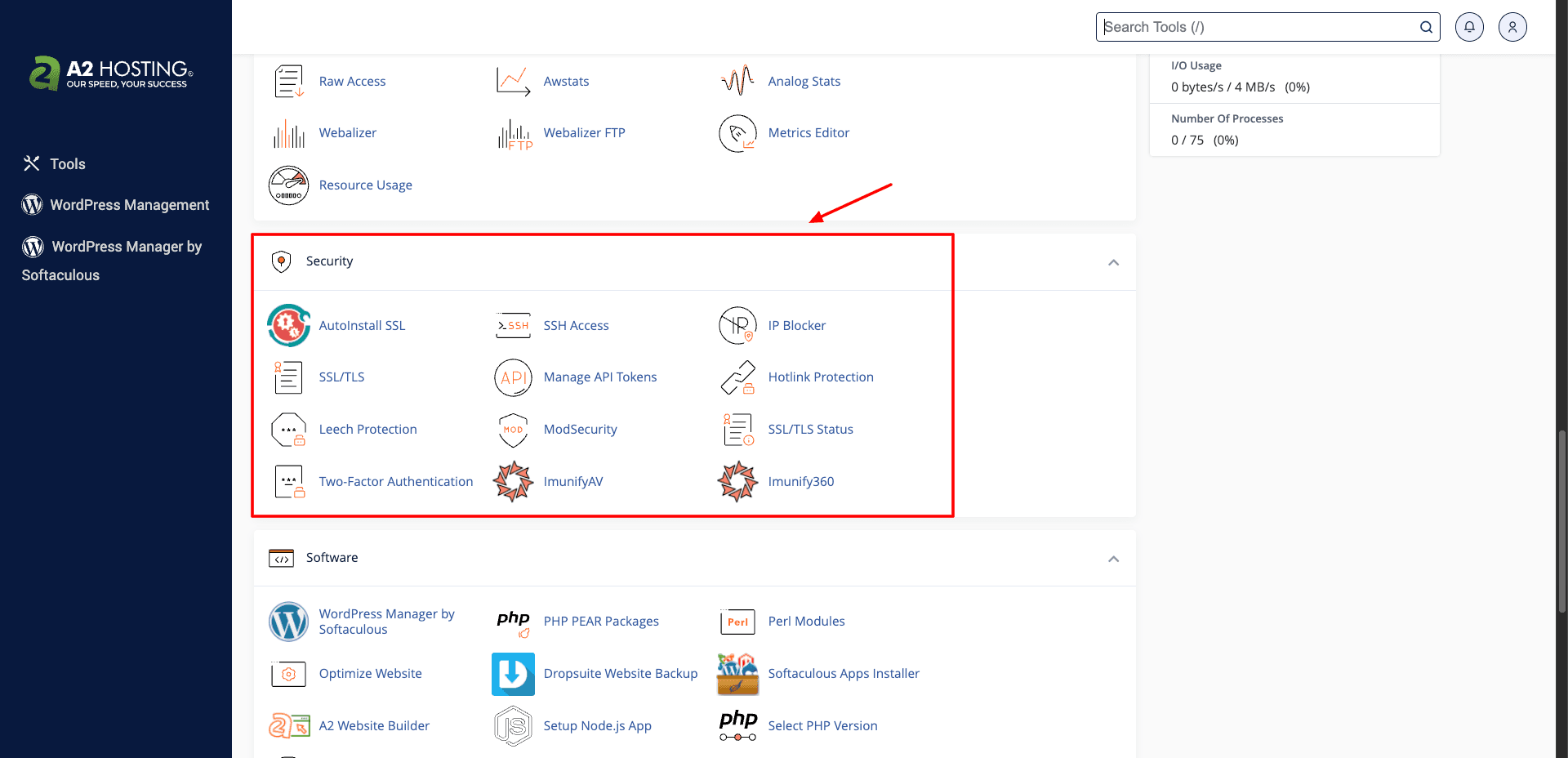
- SSH Access: This feature is for tech geeks who want to securely send files over the internet or log in remotely to make modifications to the server!
- Two-Factor Authentication: 2FA is available through an authenticator app. It suggests using Google Authenticator, Microsoft Authenticator, and Duo Mobile apps.
- SSL Certificates: You get free Sectigo SSL Certificates on all hosting plans, claiming they are easier to renew than Let’s Encrypt certificates.
- Monarx Security: This AI-powered security service helps in caching, blocking, and removing PHP-based malware. It works on the server level.
- Imunify360: This works as a firewall service for your web server. It scans for malware and viruses and protects your server from malicious attacks, like brute force attacks, etc.
- Website Backups: With Hosting.com, your website is automatically backed up daily. Backups are retained for up to 30 days.
- ModSecurity & WAF: These services detect and block malicious online traffic and common hacking attempts made on your website.
- IP Blocker: It helps you restrict your site from being accessed from certain IP addresses.
- Hotlink Protection: It prevents others from using web links to display images from your website. It restricts users from taking up your bandwidth, as every time someone clicks on the web link, the image is fetched from your server.
Hosting.com Backups
You can manage your backups using the JetBackup5 app on cPanel. They use the RAID 10 configuration for creating backups, meaning data is striped in half and then copied onto multiple hard drives.
This provides ultimate protection against data loss. So, even if a drive gets corrupted, your data is stored on other hard drives, and the damaged one can be replaced.
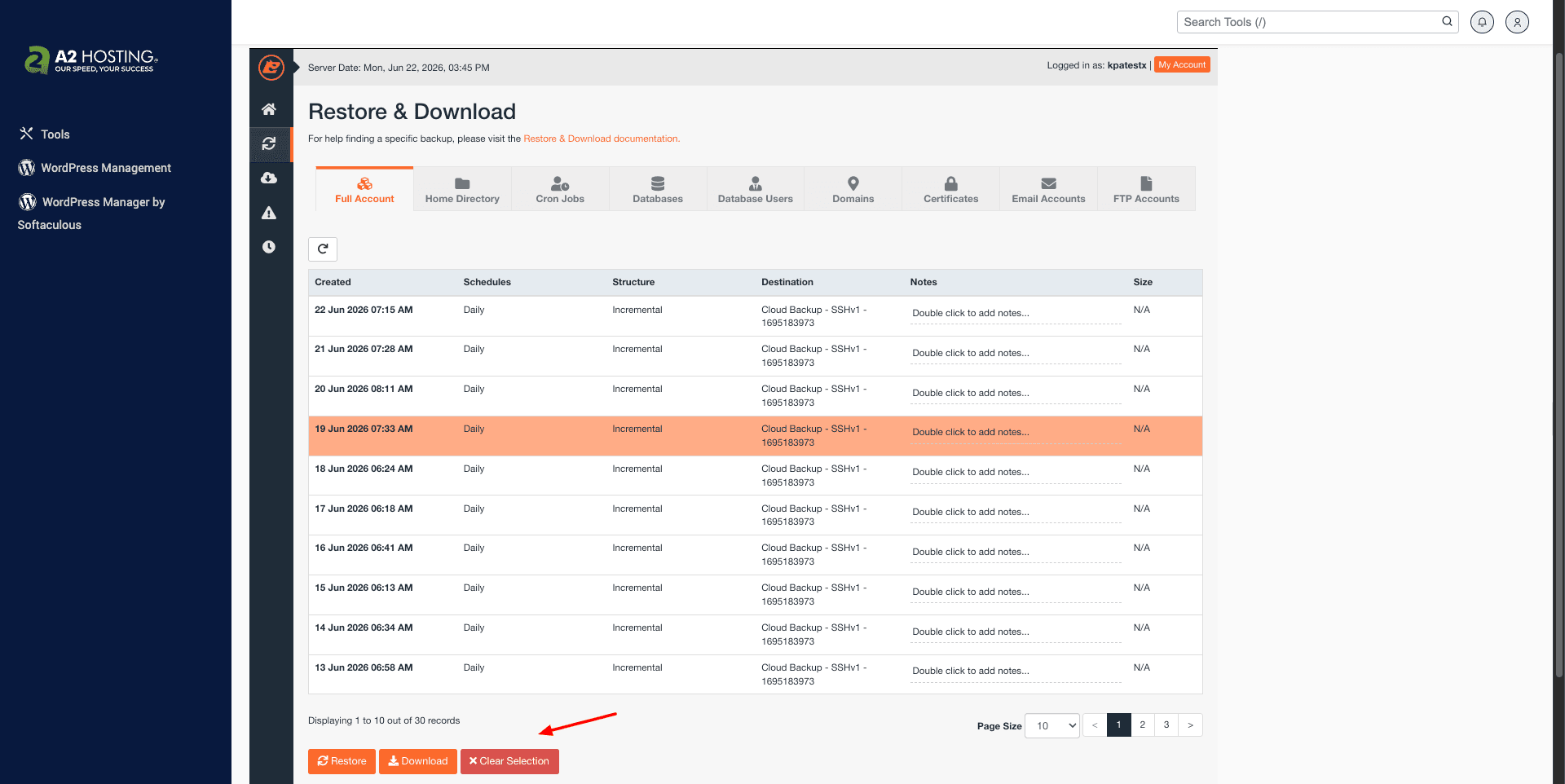
Hosting.com supports automatic daily backups that are stored on its servers for 30 days. These backups can be restored with a single click. Manual backups can be created using cPanel’s backup wizard. Overall, the backup options on Hosting.com are quite impressive.
Hosting.com Customer Support
Hosting.com features helpful email, live chat, and 24/7/365 call support. They also have a decent knowledge base of support articles where you can find solutions to most of your queries.
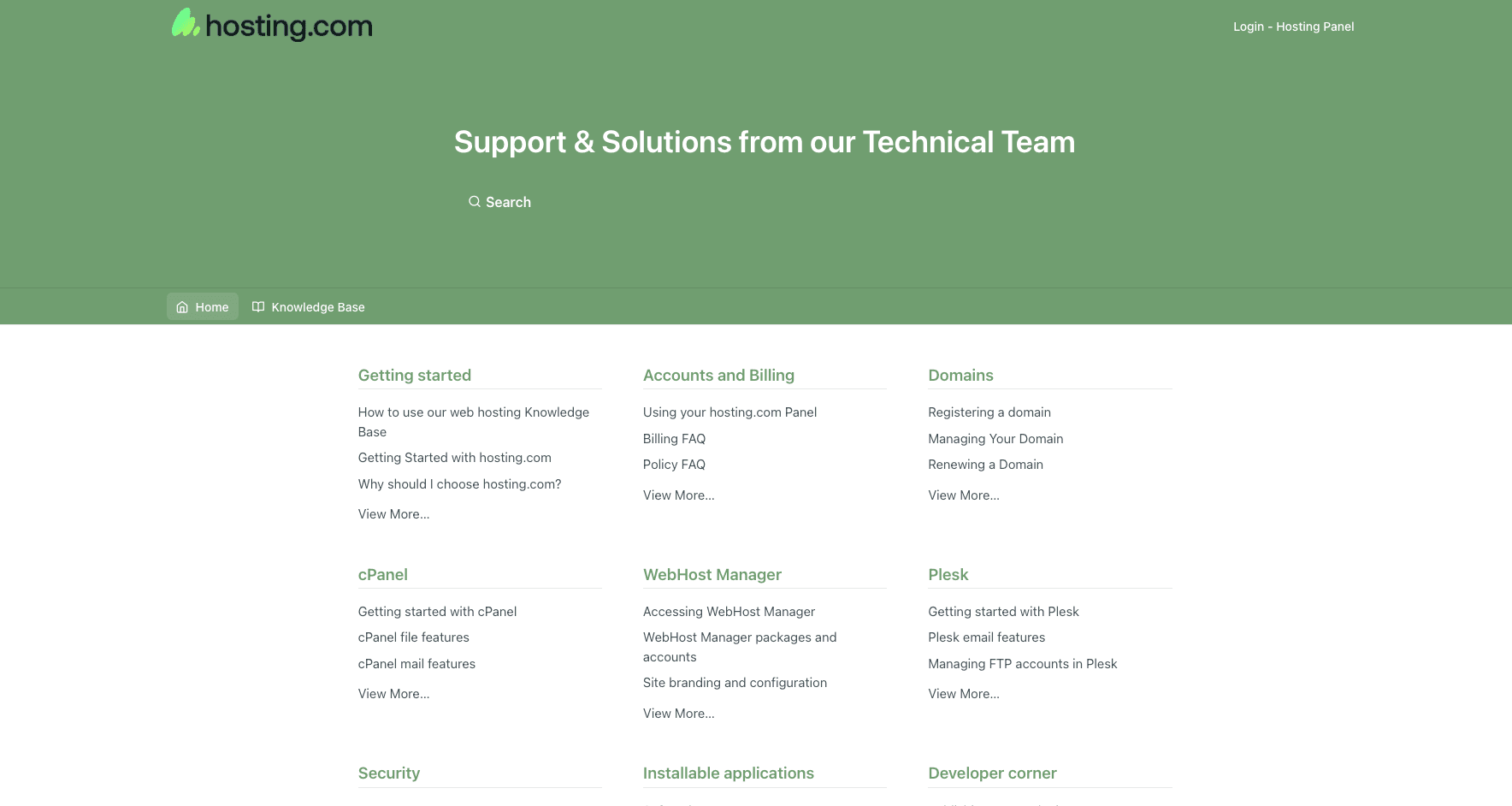
Their knowledge base is detailed. However, it lacks annotated images on some articles. Their Live Chat support was decent as well. They have employed their AI support agent called ‘Orbi’, which answers most of the queries instantly.

However, I was not impressed with the speed of their human support. The frequency of replies was inconsistent, and sometimes they even provided wrong answers to the queries posed.
For instance, upon inquiring about the hardware used on Hosting.com, the support agent replied with the details of backups and retention. Overall, the human support of Hosting.com can be improved.
Hosting.com Inode Count
As per their support, Hosting.com has a limit of 600k inodes per account on their shared hosting plans. Inode count refers to the total number of files and folders stored on a user’s account. If you use up the inode limit on your plan, you will need to upgrade your plan.
For unlimited inodes, you can try out Rocket.net.
Hosting.com Pricing
Hosting.com features 4 shared hosting plans. The maximum discount can be seen on its 1-year plans. The following table compares the pricing and features of its shared plans.
| Starter | Plus | Pro | Max | |
| Pricing | $2.99/mo | $3.99/mo | $6.99/mo | $8.99/mo |
| Websites | 1 | 2 | 10 | 100 |
| Storage | 15 GB | 30 GB | 50 GB | 100 GB |
| RAM | 2 GB | 3 GB | 6 GB | 8 GB |
| Email Accounts | 10 | 10 | 20 | 40 |
| Bandwidth | Unlimited | Unlimited | Unlimited | Unlimited |
Best Plan
In my experience, their Plus plan is the most value-for-money option right now. The Plus plan would cost you $47 for 1 year. However, its renewal price is quite high at $180 for 1 year.
Payment Methods
Hosting.com accepts the following methods of payment: Credit or debit cards, PayPal, Bank transfer and cryptocurrency (BTC).
Refund Policy
You get a standard 30-day money-back guarantee with Hosting.com. If you are not satisfied with your purchase, you can cancel your subscription and get a full refund.
Hosting.com cPanel Migrations
You get 1 free cPanel migration with the shared hosting plans of Hosting.com. cPanel migration refers to the process of transferring your website from your previous cPanel hosting provider to the current one.
To start the migration, you simply need to provide your cPanel details to their support team, and it’ll be done within 24 to 48 hours!
Hosting.com Website Builder
You get the ‘A2 Website Builder’ within the cPanel interface. It is their proprietary website builder that supports drag and drop of elements. So you can use it to design your website quickly and easily.
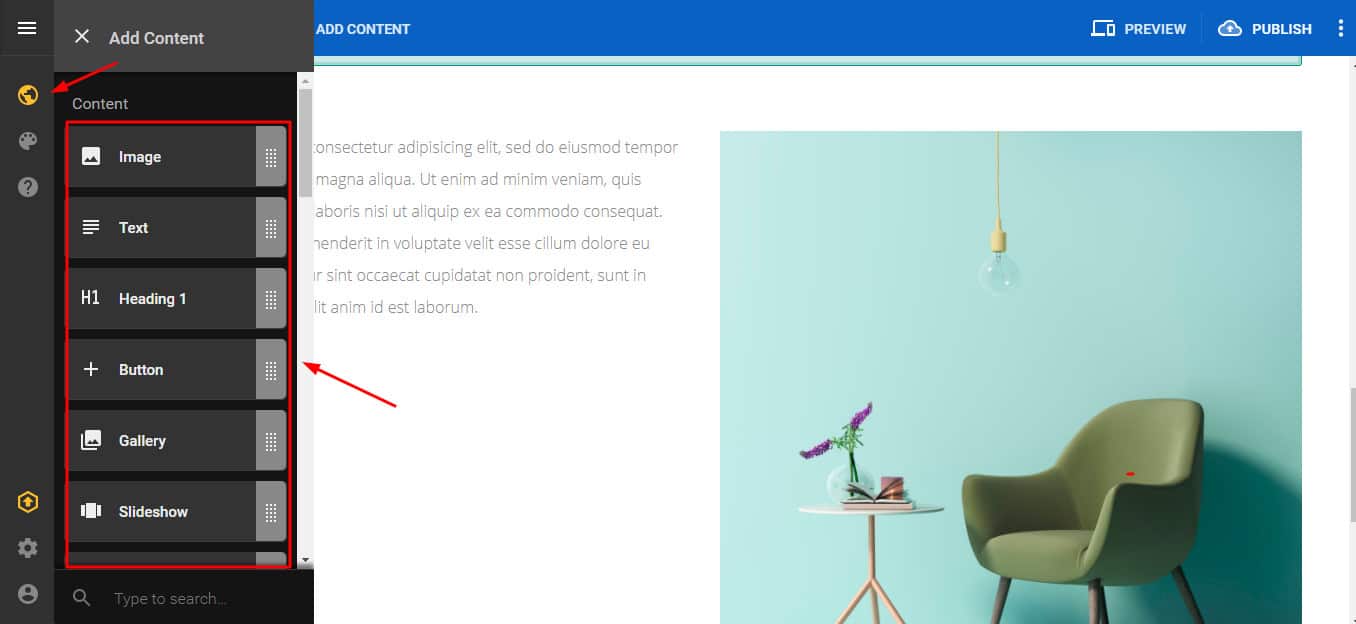
However, I did not like using it. It’s average in performance and has limited features. If you wish to unlock advanced functionality, you need to pay an additional amount for it! Check out Hostinger and ChemiCloud for more intuitive and feature-rich website builders.
Hosting.com CDN
Hosting.com doesn’t come equipped with a built-in CDN. However, you get Cloudflare CDN support on all plans.
To enable Cloudflare CDN on your site, all you need to do is create a Cloudflare account and point your domain to it. Alternatively, you can also get help from their technical team. They will help you with the CDN configuration.
Hosting.com Staging
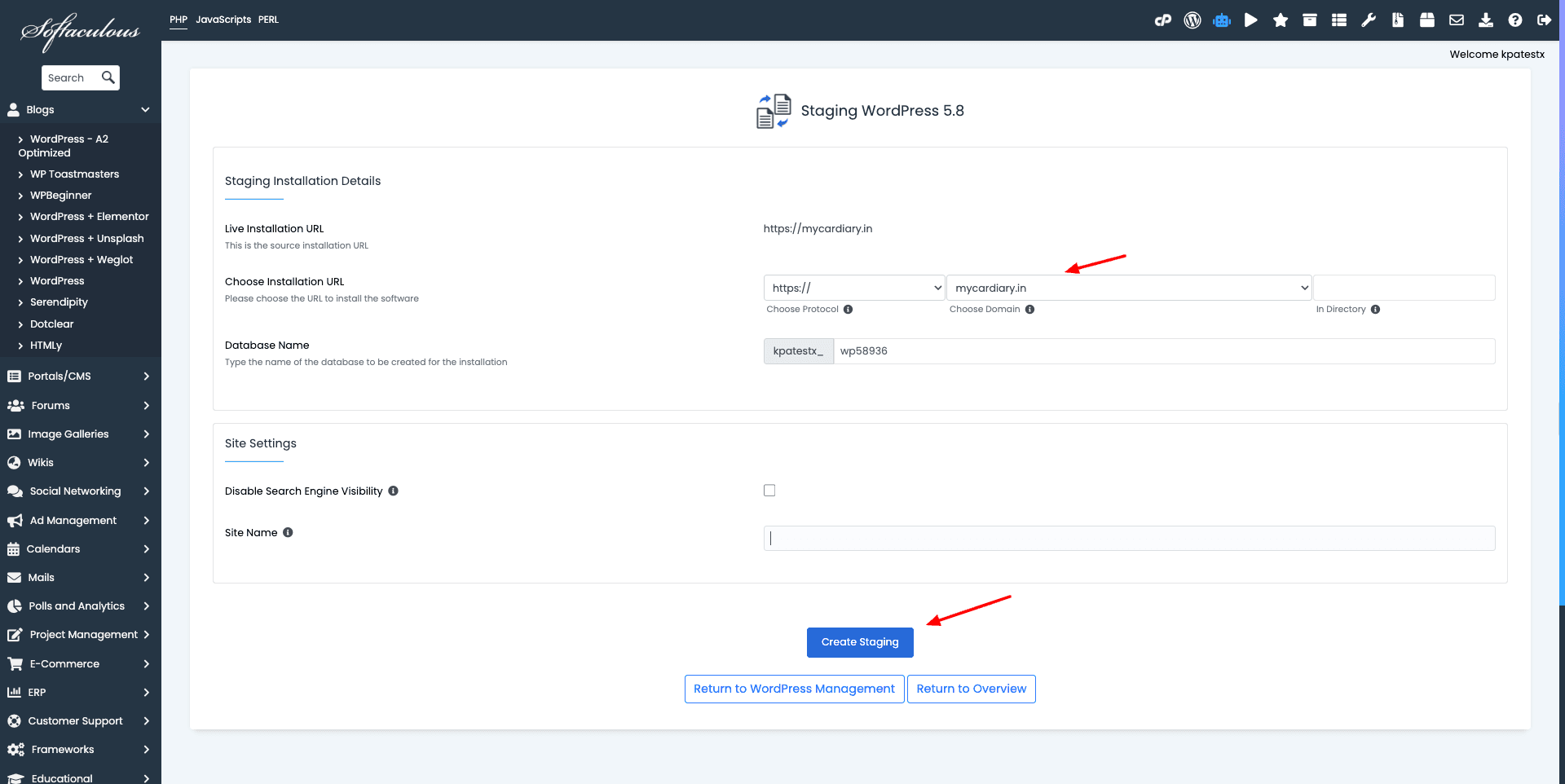
Hosting.com provides website staging on all of its plans, even on the Starter Shared plan. You can access it through the Softaculous App Installer and create a test version of your website within minutes!
Hosting.com Applications
Hosting.com offers quick, automatic, and safe installation of apps through its Softaculous service. It works well with all popular CMS platforms like WordPress, Joomla, Drupal, Magento, etc. But here’s the impressive part.
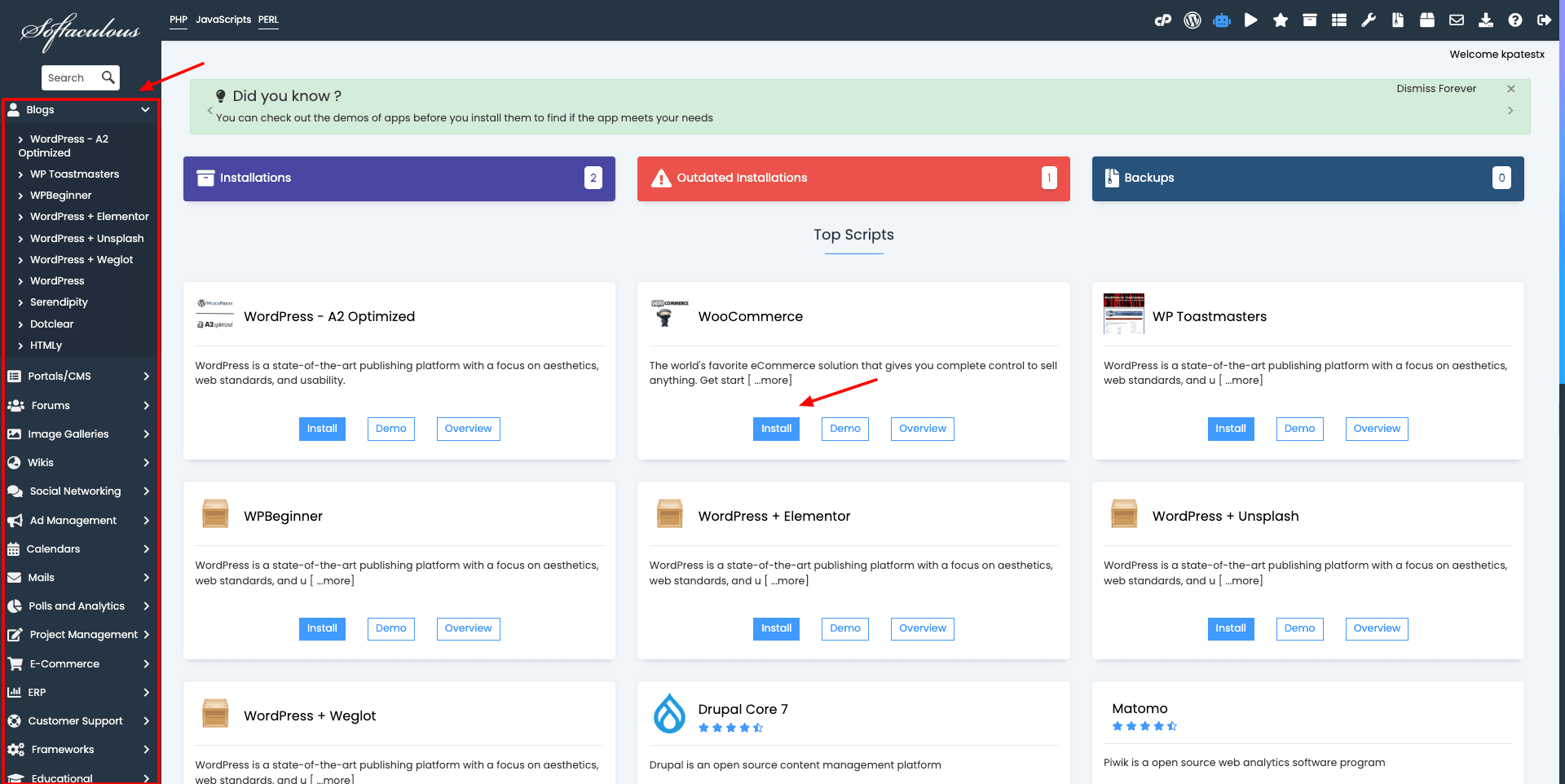
If you are an e-commerce owner, you’ll absolutely love its library of 30+ e-commerce apps, including WooCommerce, Magento, OpenCart, CS-Cart, Zen Cart, and more!
Hosting.com Developer Tools
The Software support of Hosting.com is highly impressive. You get top-notch, developer-friendly, and modern tools in their cPanel. So, if you are a developer, you can get better access to resources and manage websites with more control.
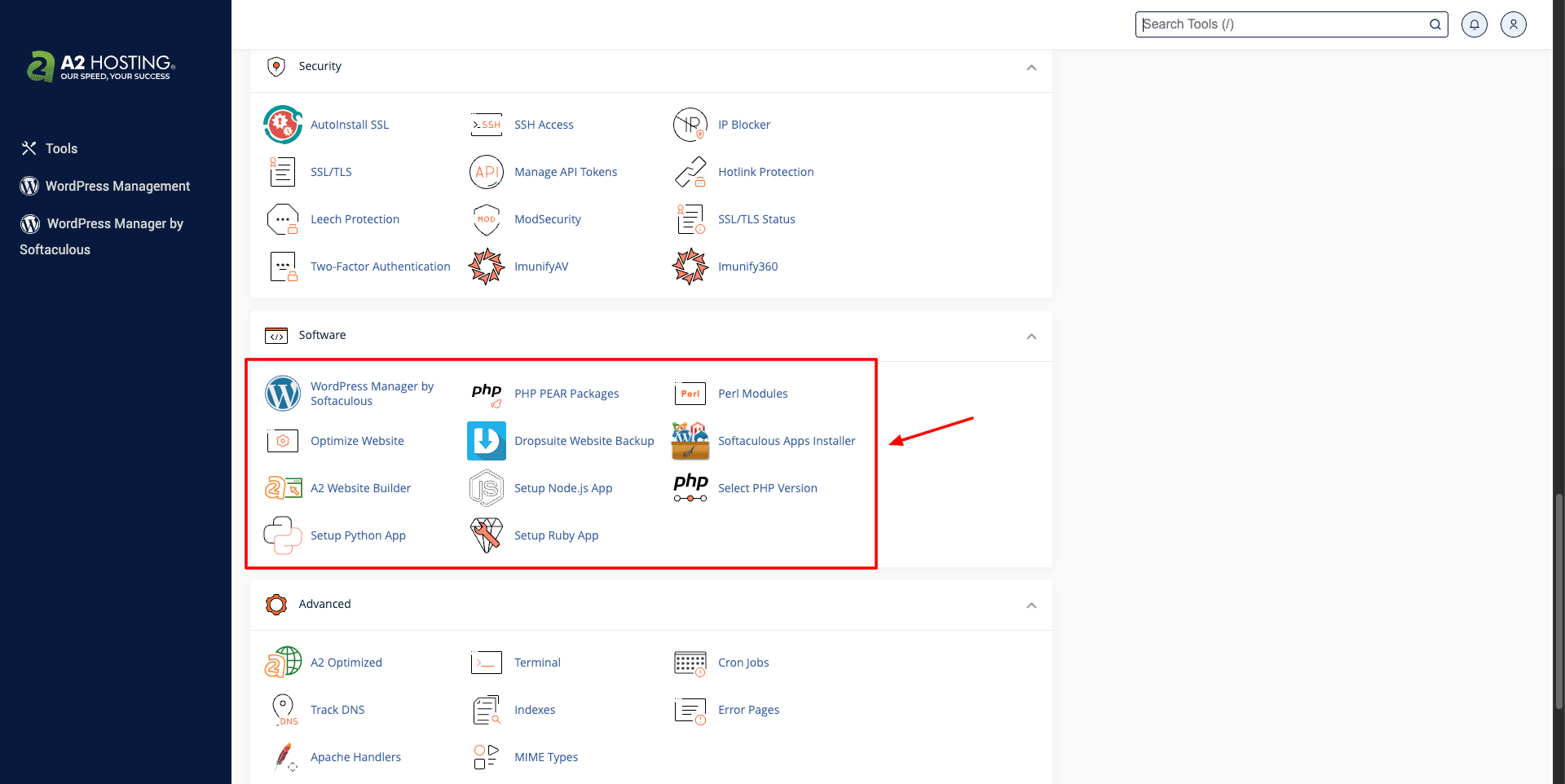
It offers loads of tools like PHP 8.5, MariaDB, PostgreSQL, NodeJS, phpMyAdmin, Python, Ruby, and Litespeed servers. These software options are a goldmine for developers!
Hosting.com Pros
1) Swift Speeds
After its recent acquisition, you get Litespeed servers on all plans of Hosting.com. Thus, you’ll get to experience exceptionally fast page load speeds. I noticed speeds of 1.03 sec in India, with Singapore-based Litespeed server.
2) Excellent Uptime
I observed a consistent uptime of 99.99% on my website hosted on Hosting.com in the last 365 days.
3) Good Load Handling
Hosting.com comes with powerful servers that handle heavy traffic. Even with numerous requests, the response time was quite low at 7.61 ms, with zero request failures and minimal spikes.
4) Free Domain
Now, Hosting.com offers a free domain for the first year along with all its shared plans. However, it is limited to a few TLDs.
5) Developer Friendly Hosting
Hosting.com is a great choice for developers who need to work with Node.js, Python, Ruby, PHP, etc, on a shared hosting plan.
6) Reliable Backups
Hosting.com offers daily automatic backups with a 30-day retention period. These backups are stored off-site. You can also create on-demand backups and selectively restore them.
7) Free Website Staging
You get website staging on all shared plans of Hosting.com. With this feature, you can create a test version of your website and safely experiment with updates before pushing them live.
8) Strong Security Features
Hosting.com comes packed with enterprise-grade security tools like Monarx, Imunify360, WAF, SSL, and daily backups to ensure your website remains safe.
9) Global Data Center Network
It features 8 data center locations around the globe. So, you can host your website closer to your target audience for better performance.
Hosting.com Cons
1) Limited Resources
Hosting.com used to offer unlimited website and storage space. After their acquisition, they have limited the number of websites and storage space on their shared plans.
2) Poor Support Quality
After their acquisition, the support quality of Hosting.com has significantly degraded. The replies are slow and sometimes irrelevant. I hope they work on improving it.
3) Renewals are Pricey
The initial pricing of their hosting plans is quite affordable. However, the renewal prices are quite high, making it less desirable for beginners.
4) No Built-in CDN
Unfortunately, it doesn’t offer a built-in CDN service. You will need to configure a third-party CDN like Cloudflare manually to improve global content delivery.
5) Average Website Builder
The website builder offered by Hosting.com feels basic and lacks many advanced features available with modern competitors.
6) Slower US Performance
While speeds are excellent in Asia, loading times from US locations were noticeably slower in my tests.
Hosting.com Alternatives
1) Hosting.com vs Hostinger
Just like Hosting.com, Hostinger offers fast LiteSpeed-powered servers, excellent uptime, strong security features, free domains, and website staging. Both are suitable for blogs, business websites, online stores, and growing projects that need reliable performance.
However, Hostinger stands out with its beginner-friendly hPanel, AI-powered features, and India-focused offerings like UPI payments, GST invoices, and local data centers. It also includes a more advanced website builder and innovative tools like Hostinger Horizons and AI Agents.
If you’re looking for a feature-rich hosting platform with a modern interface and strong value for money, Hostinger is a compelling alternative. Its hosting plans start at $2.99/month.
2) Hosting.com vs Chemicloud
ChemiCloud is focused on speed, security, and reliability, just like Hosting.com. Both services use LiteSpeed servers, offer free domains, strong security features, developer-friendly environments, website staging, and excellent performance for WordPress websites, blogs, etc.
The biggest advantage of ChemiCloud is its outstanding customer support, generous migration policy, and more flexible resource allocation. You get free migrations up to 200 cPanel websites, unlimited websites on higher plans, and a longer 45-day refund policy.
If customer service and hassle-free website migrations are your priorities, ChemiCloud is a strong alternative to Hosting.com. Its hosting plans start at $2.49/month.
3) Hosting.com vs Scala Hosting
Scala Hosting is a reliable hosting provider that offers excellent uptime, strong load handling, developer-friendly features, free website migrations, and a beginner-friendly interface. Just like Hosting.com, it’s suitable for blogs, business websites, and growing online projects.
The key difference is that Scala Hosting focuses heavily on managed hosting and infrastructure control. It comes with its proprietary SPanel control panel, AMD EPYC-powered servers, unlimited website migrations, and responsive human-only support.
If you prefer a cPanel alternative and want a hosting provider that excels in customer support and server management, Scala Hosting is a worthy alternative to Hosting.com. Its hosting plans start at $2.95/month.
Why Should You Trust Me?
I’ve been working full-time in the digital industry since 2015. In these years, I’ve used and tested all the popular hosting services on my personal and client websites. Cloudways, FastComet, Hostinger etc, are some examples. Detailed reviews are on my blog and YouTube.
For this review, I have been testing the Pro plan of Hosting.com for the last few years. I even have an active subscription to it. Testing dozens of hosts in the past few years has given me the knowledge and expertise to compare them and recommend the best one for your requirements.
Conclusion
Hosting.com has consistently ranked among the better-performing web hosts in my tests over the years. It still continues to deliver strong speeds, reliable uptime, and solid load-handling capabilities. While its pricing is quite high, the overall value proposition remains compelling.
You’re getting a well-established hosting provider with dependable performance, essential hosting features, and a developer-friendly environment. It becomes especially attractive during promotional sales when discounts are available.
If you’re looking for a reliable hosting solution for a 1-year term, Hosting.com is definitely worth considering. I would particularly recommend it to developers and advanced users who prefer cPanel and need the flexibility to work with multiple applications and scripts.
Anyway, I hope you found this Hosting.com review helpful. Which hosting company are you currently using? Would you prefer switching to Hosting.com? Let me know your views in the comment box below.
This is Kripesh signing off. Take care and keep learning. I’ll see you in the next post! 🙂
FAQ
Is Hosting.com the same as A2 Hosting?
Yes. A2 Hosting was acquired by World Host Group in early 2025 and rebranded to Hosting.com. The hosting services, infrastructure, and existing customer accounts were migrated under the new Hosting.com brand.
Is Hosting.com good for WordPress?
Yes, Hosting.com is an excellent choice for WordPress websites. It offers LiteSpeed servers, automatic backups, website staging, and one-click WordPress installation.
Do you get a free domain with Hosting.com?
Yes, Hosting.com now includes a free domain for the first year with its annual hosting plans. However, the offer is limited to selected TLDs only.
Does Hosting.com use cPanel?
Yes, Hosting.com uses the feature-rich cPanel control panel for managing websites, domains, databases, email accounts, and backups.
How many websites can I migrate for free?
Hosting.com provides one free cPanel website migration with its shared hosting plans. The migration is usually completed within 24-48 hours.
Does Hosting.com offer daily backups?
Yes, Hosting.com automatically creates daily backups and retains them for up to 30 days. You can restore backups directly from the JetBackup interface.
Is Hosting.com good for developers?Is Hosting.com good for developers?
Yes, Hosting.com is one of the more developer-friendly shared hosting providers. It supports PHP, Python, Node.js, Ruby, SSH access, Git, MariaDB, PostgreSQL, and other advanced tools.
Which Hosting.com data center is best for India?
For Indian websites, I recommend choosing the Singapore or Mumbai data center. In my tests, the Singapore server delivered excellent speeds and reliable performance.
Does Hosting.com offer website staging?
Yes, website staging is available on all shared hosting plans through Softaculous, allowing you to test changes before publishing them to your live website.

Hosting.com Pros (+)
- Swift Speeds
- Excellent Uptime
- Good Load Handling
- Free Domain
Hosting.com Cons (-)
- Limited Resources
- Poor Support Quality
- Renewals are Pricey
- No Built-in CDN




A2 Hosting is the fastest hosting provider among shared services. It is true, no doubt. But I think
the internal system is quite as low quality as other cheap reseller providers. It should be upgraded.
BTW, thank you so much for this nice review. It helps me to be more clear about it.
That’s a genuine review about the A2 Hosting company, I’m also thinking about switching to A2 Hosting after my current host will expire.
1. My hosting service was suspended due to extreme incompetence on the part of their billing department which claimed non-payment of an invoice that did not exist.
2. After the invoice was created and immediately paid; 24 hours later, the service has still not been restored nor has any update been provided.
3. This is the second time in as many years that my hosting got disrupted and all my sites were down for more than 24 hours for no fault of mine.
4. The promise of “99.9% uptime committment” appears to be just an advertisement gimmic.
5. I’ve been their customer for 6 years now but it seems to mean nothing to this hosting company.
6. They have a service number that just keeps you on hold and plays music for 6 minutes before informing you that no one is available to take the call (despite it being regular office hours).
7. Words fail me to describe my extreme disappointment at the quality of service offered.
8. They just leave the customer hanging!!
Thanks for sharing your experience.
This is one of the best web hosting. I am using this hosting by your recommendation.
Thank you for sharing, Now I’m thinking about switching to A2 Hosting after my current host will expire.