Artificial intelligence has been revolutionizing the world. The content creation industry is no exception either! AI has been integrated into thousands of digital tools, software, and even browser extensions!
Today, I’m going to introduce you to some useful AI Chrome extensions. These extensions cover a range of categories. For example, AI writing, SEO, emails, summarization, content editing, productivity, etc.
They would be useful for bloggers, content creators, businessmen, researchers, students, etc. So, are you ready to simplify your life with some useful Chrome extensions powered by AI? Let’s get right into it!
- 11 Best AI Chrome Extensions for 2026 (Quick Overview)
- What are AI Chrome Extensions?
- 11 Best Useful AI Chrome Extensions
- 1. Monica – Best All-in-One AI Assistant
- 2. Perplexity AI – Best for Research
- 3. AI Blaze – Best for Writing Automation
- 4. QuillBot – Best for Paraphrasing and Grammar Check
- 5. Fireflies – Best for Meeting Summary & Notes
- 6. Glasp – Best for Summarization
- 7. Compose AI – Best Email Writing Assistant
- 8. Speechify – Best Document Reader
- 9. Scribe – Best for AI Documentation
- 10. Copyleaks – Best AI Content Detector
- 11. AnswerAI – Best for Quick Answer Search
- Testing Parameters
- Why Should You Trust Me
- Conclusion
11 Best AI Chrome Extensions for 2026 (Quick Overview)
| Extension | Use case | Key Features | Free Plan Limits | Who Should Use |
| Monica | AI assistant | Summary, Screenshot & Ask AI, Topic Trend Analysis, AI Image Generator | 40 chats a day | Any individuals |
| Perplexity AI | Research | Real-time AI answers, Verified sources | 5 Pro searches per day | Educators and researchers |
| AI Blaze | Writing automation | AI writing, Quick shortcut button, Easy copy-paste | Free | Bloggers, Beginners |
| QuillBot | Paraphrasing | AI rewrite, Grammar check | 125 words per month | Content writers, Freelancers |
| Fireflies | Meeting assistant | AI transcription, Meeting highlights, Notes | Unlimited transcription | Sales professionals, Remote workers |
| Glasp | Summarizer | Webpage Highlights, YouTube video summaries, Glasp reader | Unlimited webpage and 3 YouTube summary per day | Learners, Researchers, Content creators |
| Compose AI | Email writing assistant | AI writing, Smart autocomplete, Quick shortcut | 1500 words per month | Freelancers, Bloggers, Busy professionals |
| Speechify | Document reading | Text-to-speech tool, Playback speed control, Lifelike voice | 10 AI voice | Multitaskers, People with special accessibility needs |
| Scribe | Process documentation | AI-generated guides, Screen recordings, Step annotations | Limited | Sales operations teams, HR professionals, customer-facing team |
| Copyleaks | AI content detection | AI plagiarism detection, Detailed report | 2500 words at a time | Content moderators, editors, publishers |
| AnswerAI | Knowledge assistant | AI-powered answer retrieval, Chatbot-style interaction | 3 questions per day | Students, educators, and researchers. |
What are AI Chrome Extensions?
Chrome extensions are programs or software that can be installed on your Google Chrome browser through the Chrome Web Store. These programs are coded with web technologies like HTML, JavaScript, and CSS to enhance the functionality of your browser.
AI Chrome Extensions are plugins for Chrome that are powered by artificial intelligence. They employ AI in order to streamline and simplify your tasks. Some popular functions AI-powered Chrome extensions perform are content generation, content research, web scraping, etc.
11 Best Useful AI Chrome Extensions
1. Monica – Best All-in-One AI Assistant
| Rating | 4.9/5 |
| Downloads | 3M+ |
| Official website | Visit Monica |
Monica AI is an amazing AI assistant packed with tons of powerful features. It integrates advanced LLMs such as GPT-4, DeepSeek V3 & R1, Claude 3.5 Haiku, Flux Pro & Dev, Kling, Nano Banana, and more. The extension is already saving time and effort for millions of users with consolidated access to innovative AI capabilities.
Why Use
- Summarize Content: Open any article or YouTube video and click the “Summarize” button in Monica AI. It instantly provides a detailed summary with all key points without writing a single prompt.
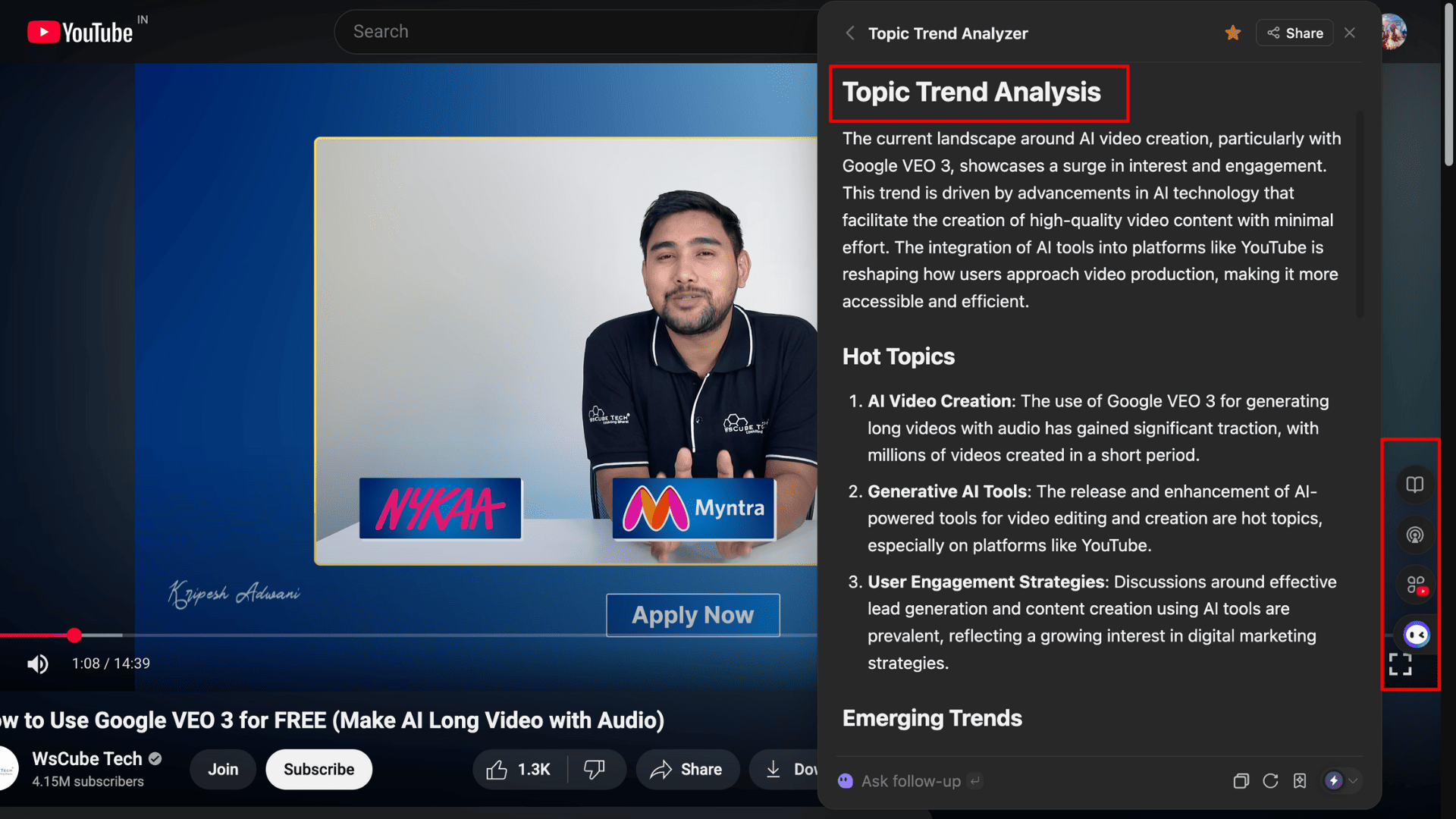
- Topic Trends Analyzer: If you’re a content creator, simply enter a topic or open a related YouTube video. Monica AI generates an in-depth report highlighting hot topics, emerging trends, key insights, and actionable recommendations based on the content.
- Recommend Websites: When I used this feature on an article titled “11 Best AI Photo Editors for Android”, Monica AI perfectly analyzed the topic and suggested several competitor articles that were directly or indirectly related. It’s very useful for research.
- Translation: Whether you’re reading in Hindi, Spanish, or any other language, Monica AI accurately translates the content into English. You can easily change the translation language in the settings.
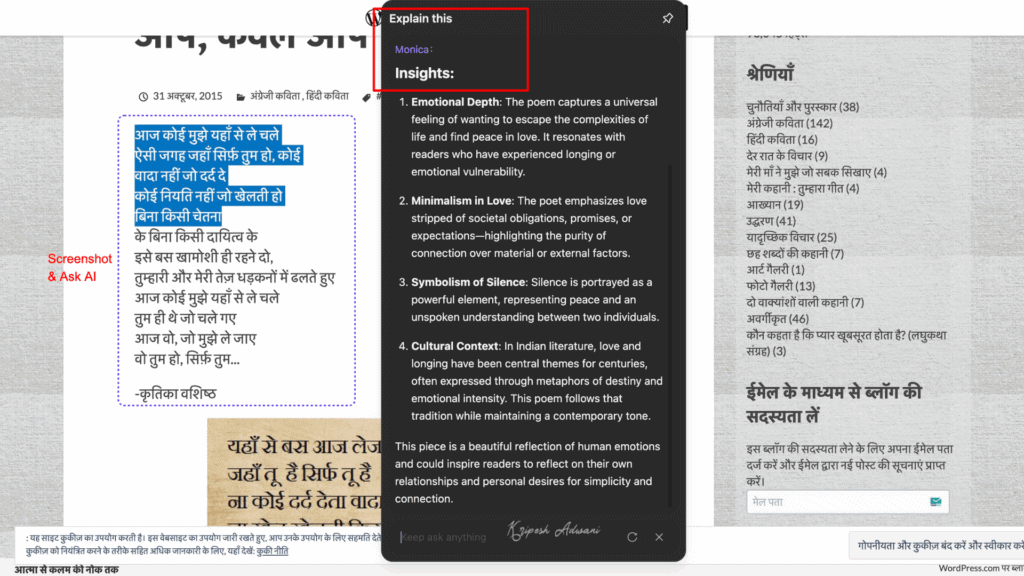
- Screenshot & Ask AI: You can take a screenshot of any content and ask the AI to explain it. For example, I asked it to interpret a Hindi poem, and the tool clearly explained the poem in English.
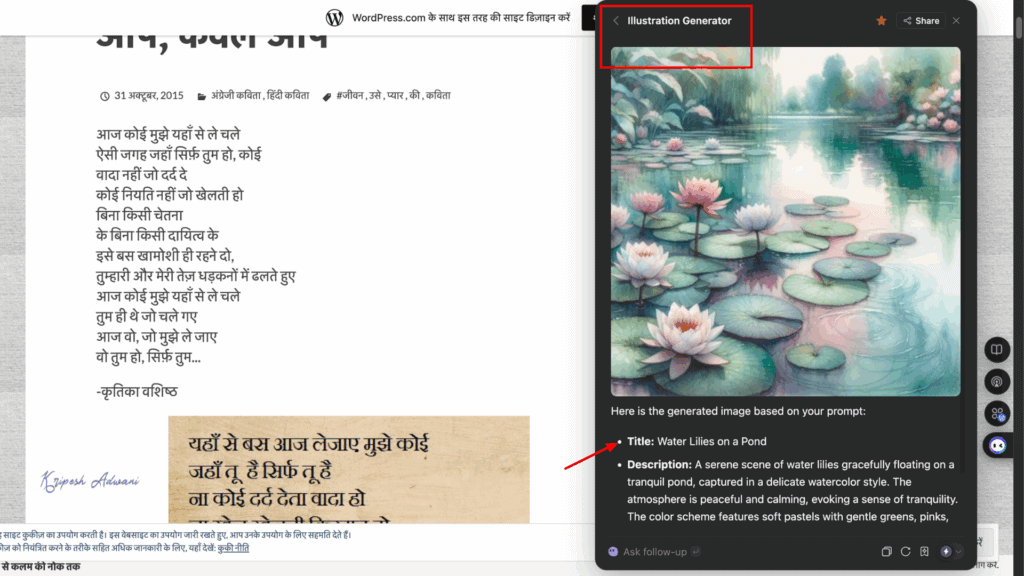
- Illustration Generator: Monica AI can even generate AI illustrations. Just choose the style (watercolor, sketch, retro, etc.), describe the theme, and optionally specify the mood or color tone. The results are impressively high quality.
These are some of the standout features I really liked. But Monica AI can do much more. It can generate mind maps, clip web pages, simplify articles, create AI podcasts from articles, and more.
Free Plan Limits
Free users get 40 access GPT-4o mini, Claude 3.5 Haiku, and DeepSeek V3 & R1 models. They also get limited trials for image generation, video generation, ChatPDF, and basic translation tools.
Best For
Anyone looking to boost productivity, whether a content creator, researcher, student, or casual user.
2. Perplexity AI – Best for Research
| Google Playstore Rating | 4.0/5 |
| Downloads | 500K+ |
| Official website | Visit Perplexity AI |
Perplexity AI is a powerful AI-powered conversational search engine. It was launched in 2022 and is already being used by millions of users worldwide. This chatbot is considered more advanced than ChatGPT or Gemini, with continuous upgrades. Recently, Perplexity introduced Comet, an agentic AI browser.
Why Use
- Multiple AI models: Perplexity isn’t limited to a single model like GPT. It integrates advanced large language models such as Gemini, Claude, Grok, and its own models (Sonar and R1 1776).
- Deep search: Its Sonar Deep Research model is trained for in-depth analysis. The model scrutinizes multiple sources for advanced query analysis.
- Faster results: Compared to ChatGPT’s deep research or Gemini, Perplexity delivers answers faster.
- High accuracy: For factual and statistical queries, it provides reliable data with proper source citations.
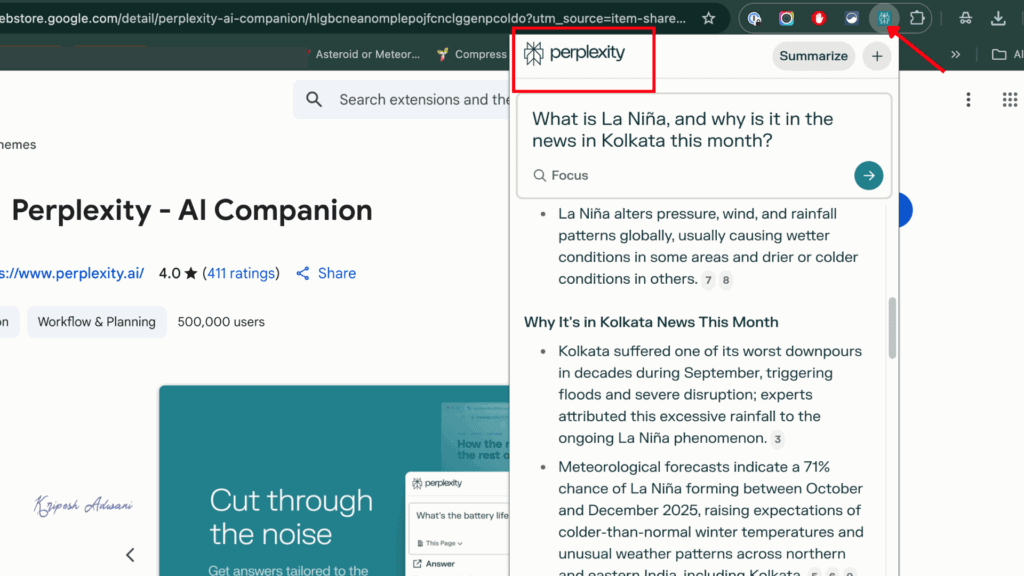
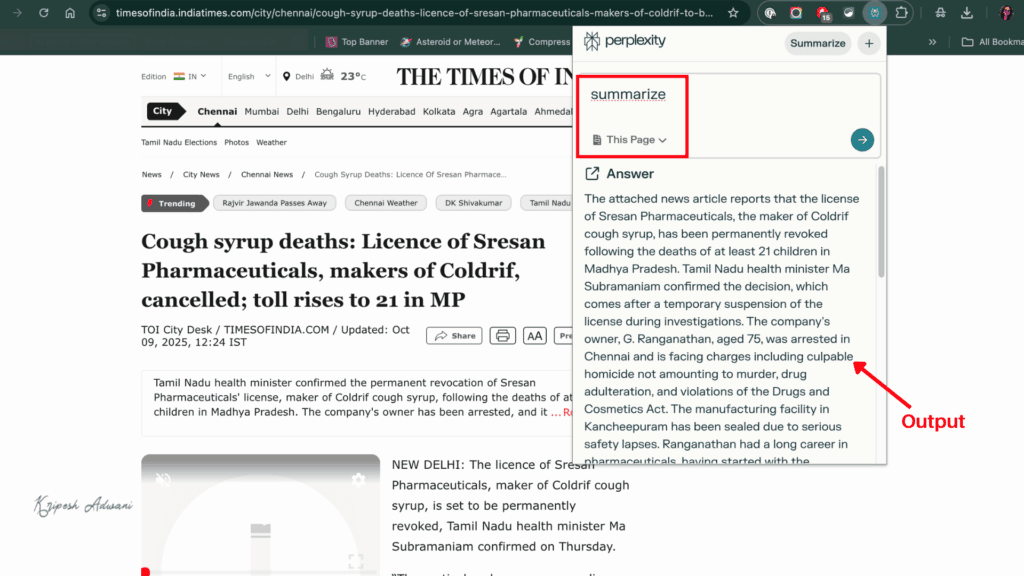
- Summarization feature: You can summarize any news article or web page instantly. Just click the Perplexity extension icon and tap Summarize.
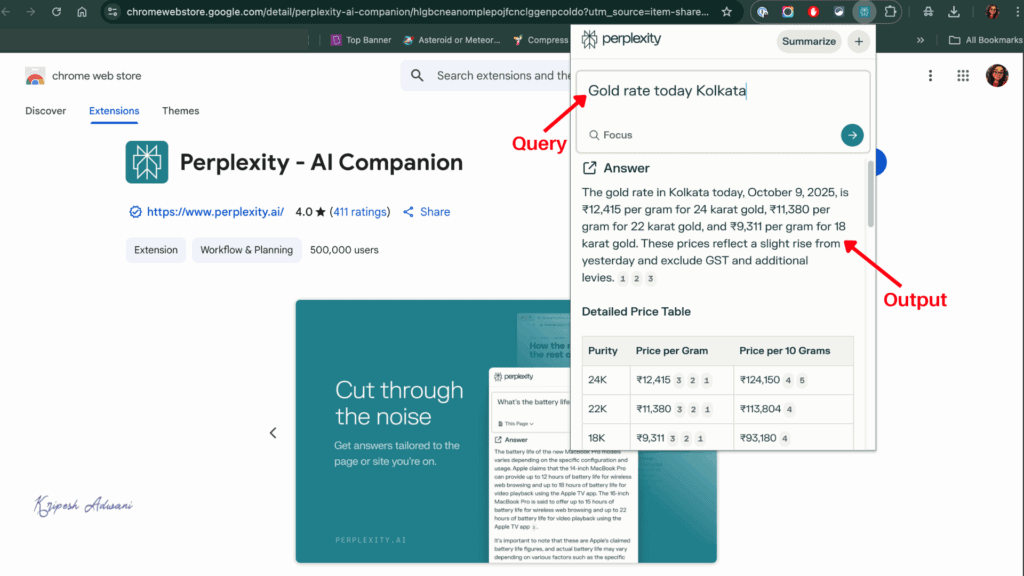
I personally use the Perplexity extension for asking quick questions while working. You don’t need to open the Perplexity AI dashboard or search on Google.
Free Plan Limits
Perplexity Standard (free) users will get 5 pro searches per day, basic support, standard data privacy, and no image generation or file uploads options. But if you’re an Airtel user, you can get the Perplexity Pro subscription worth ₹17000 free.
Best For
Students, educators, academics, and individuals who want factually correct, quick information.
3. AI Blaze – Best for Writing Automation
| Google Playstore Rating | 5.0/5 |
| Downloads | 60K+ |
| Official website | Visit AI Blaze |
AI Blaze is an AI writing copilot developed by the San Francisco–based organization Text Blaze. The company currently offers three core products: Text Blaze for writing snippets and creating keyboard shortcuts, AI Blaze for writing automation, and Data Blaze for managing tables and data. Among these, AI Blaze stands out as my favorite, as it helps me avoid repetitive typing and boosts productivity.
Why Use
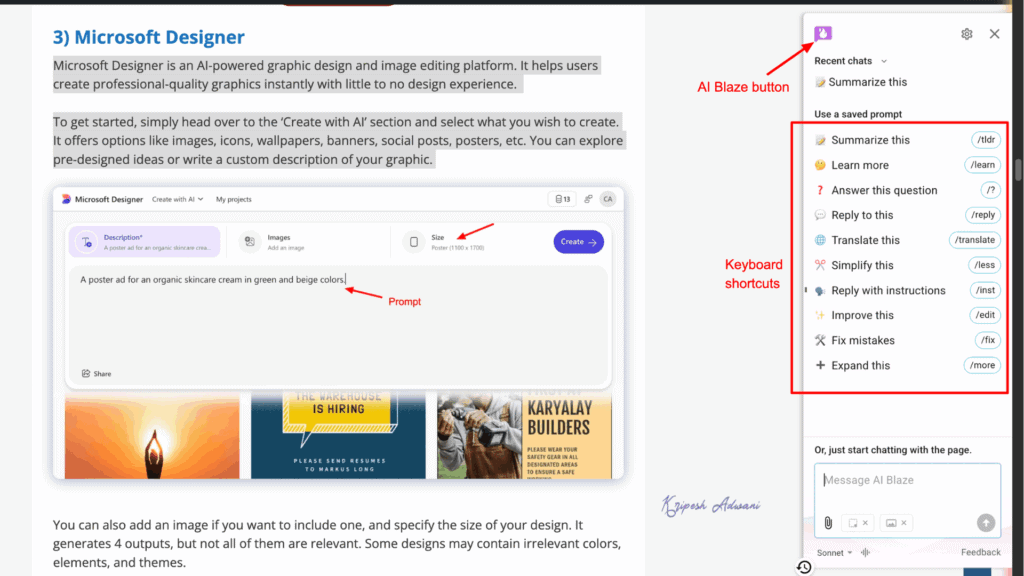
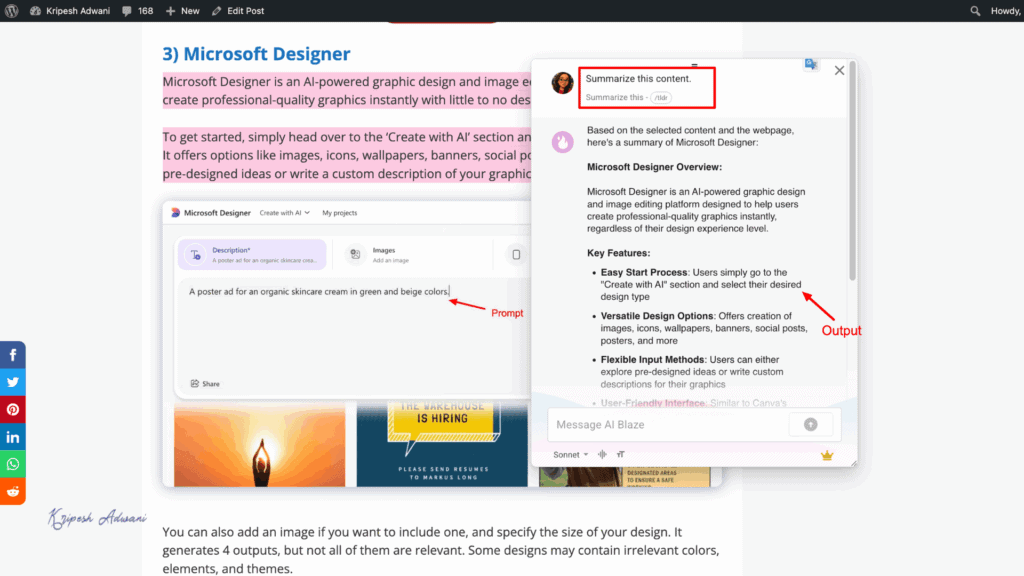
- AI Writing: AI Blaze is trained to assist with emails, summaries, simplify paragraphs, translations, and more. Each feature comes with pre-set prompts, so you get AI-generated output in seconds.
- Keyboard Shortcuts: All features are paired with simple commands. For example, you can type ‘/fix’ to correct mistakes or ‘/tldr’ to summarize text.
- Easy Copy-Paste: Once AI Blaze generates the output, a single tap copies it with proper punctuation and formatting.
- Cross-Platform Integration: I can use AI Blaze across Google Docs, Gmail, social media, news sites, and more. Just click the AI Blaze button visible on the screen.
- Best AI Models: It integrates Sonet, GPT-5, and GPT-5 Nano (for reasoning). So, the tool offers some of the most advanced writing models available today.
- Style and Tone Control: You can personalize responses by choosing writing styles (warm, inspirational, energetic, etc.) and levels of formality (informal, balanced, or formal).
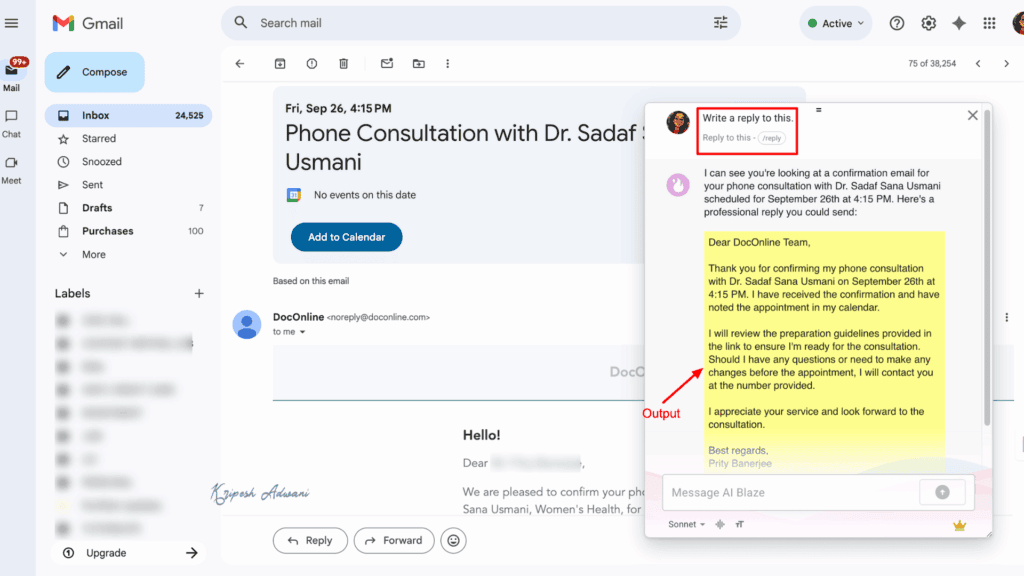
I will definitely recommend AI Blaze for improving writing skills. From beginners to professionals, anyone can fix typo errors, generate multiple writing variations, reply to emails quickly or simplify technical topics all without switching apps.
Free Plan Limits
AI Blaze is currently in beta mode and free to access for all. No usage limits were clearly mentioned on their official website.
Best For
Beginner writers, freelancers, copywriters, and Professionals looking for fast writing support.
4. QuillBot – Best for Paraphrasing and Grammar Check
| Google Playstore Rating | 4.7/5 |
| Downloads | 5M+ |
| Official website | Visit QuillBot |
QuillBot is already popular among professional writers. It’s a trusted tool for quick paragraphing, grammar checks, and other writing assistance. The tool first came onto the market in 2017. And its extension now comes with multiple AI-powered features.
Why Use
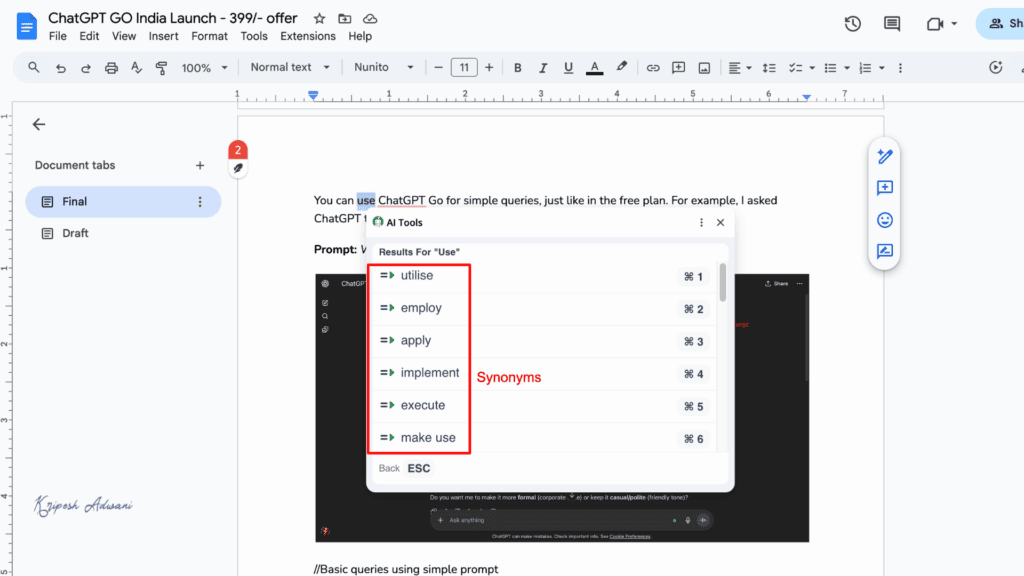
- Quick Proofreading: QuillBot automatically checks grammar in Google Docs. It highlights spelling and grammar mistakes in real time.
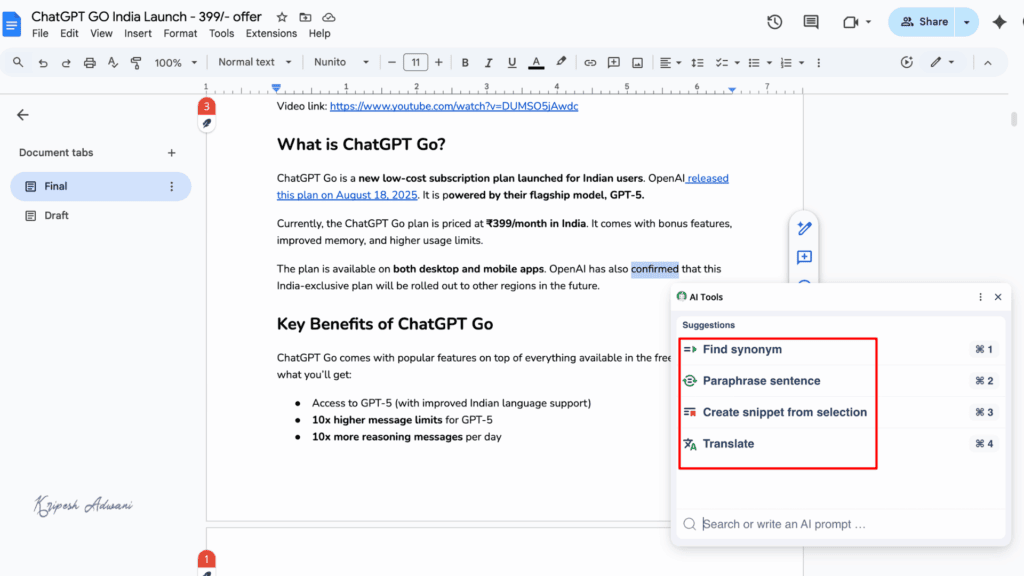
- Paraphrasing Text: If you want to rephrase any sentence, just select the text and click the Paraphrase button. You’ll get multiple suggestions within seconds.
- Rewrite with Prompts: The tool allows you to rewrite text using prompts. For example, I asked it to make a paragraph more formal, and it generates high-quality output.
- Shortcut Button: You don’t need to open the extension menu every time. A shortcut button appears on your screen for quick access.
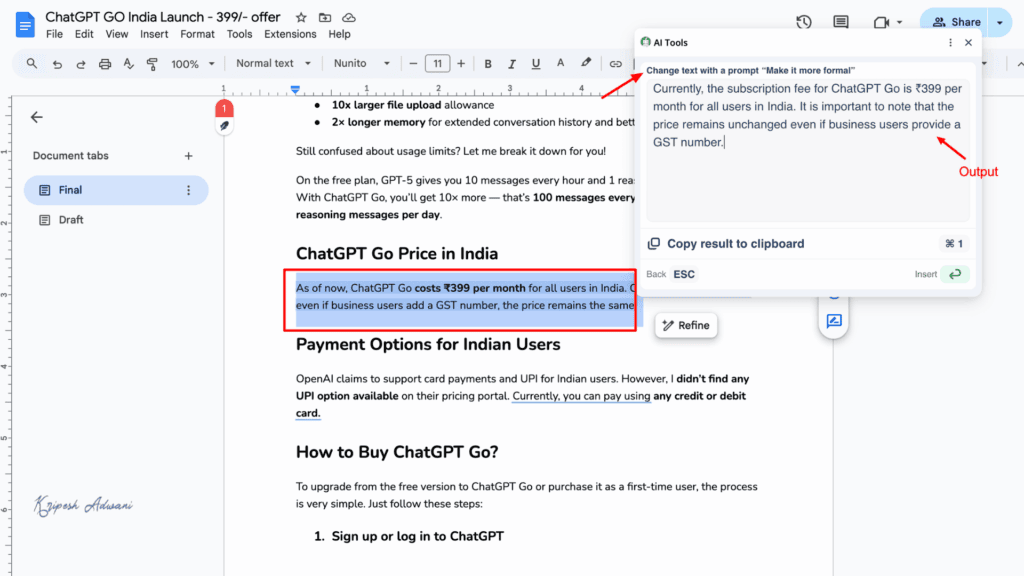
QuillBot is especially useful for proofreading your writing if you don’t use Grammarly. Compared to Grammarly, it’s lighter yet offers added features like paraphrasing, finding synonyms, refining text, and grammar correction.
Free Plan Limits
QuillBot free users get access to paraphrases in two models (Standard and Fluency), 6 languages. You can paraphrase 125 words maximum in a month.
Best For
Content writers, freelancers, students
5. Fireflies – Best for Meeting Summary & Notes
| Rating | 4,5/5 |
| Downloads | 100K+ |
| Official website | Visit Fireflies |
Fireflies AI is a popular AI meeting assistant. Krish Ramineni and Sam Udotong have launched the app to simplify note-taking and meeting management for professionals. You don’t even need to install a separate app anymore; the browser extension is all you need to automate your meeting notes.
Why Use
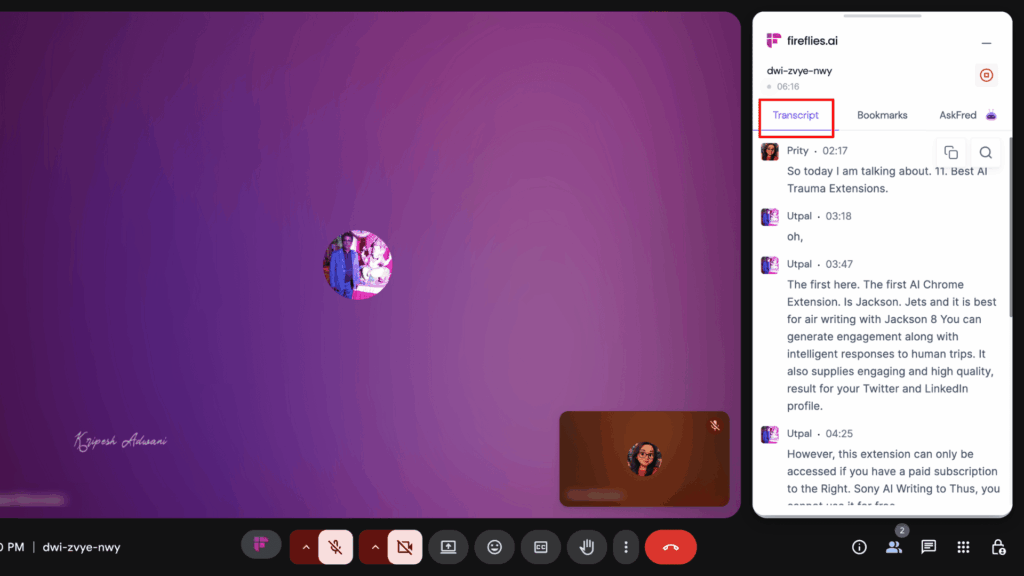
- Instant Meeting Transcription: Fireflies AI automatically connects to your meetings and provides accurate, real-time transcriptions. Each transcript includes timestamps and speaker labels for easy reference.
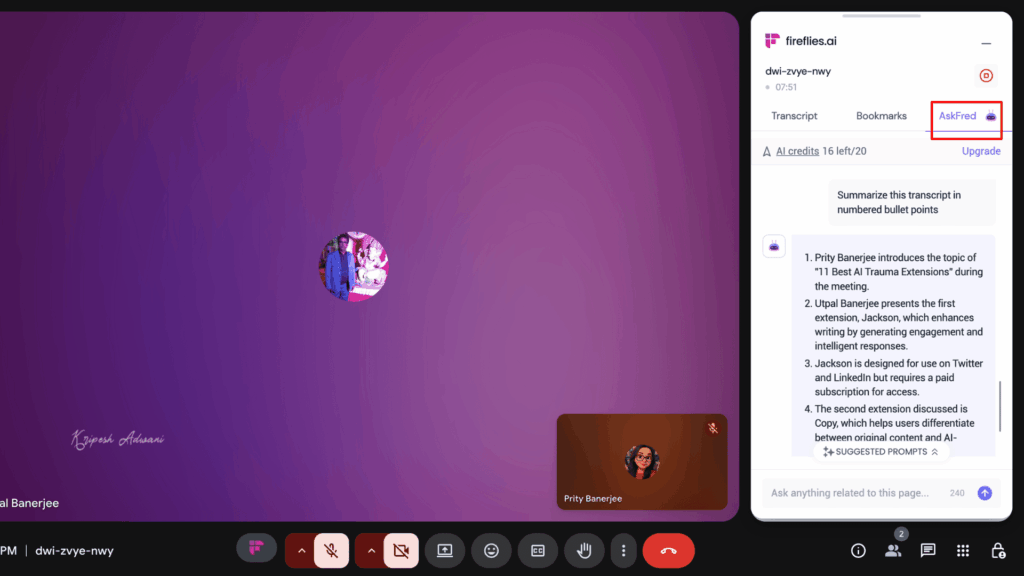
- AskFred AI Assistant: It’s an integrated chatbot that lets you ask anything related to your meetings. You can request a quick summary, find key highlights, or even clarify action items, throughout simple prompts.
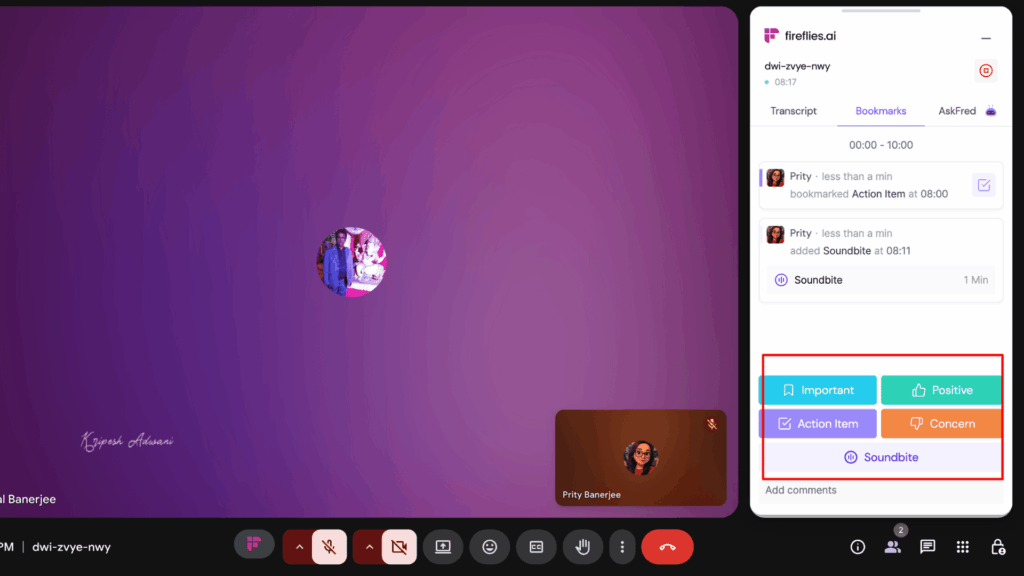
- Magic Soundbite: This feature highlights the most important sections of your meetings. The tool automatically trims key audio snippets, which you can share with your team.
- Action Items: Fireflies lets you inform next steps, tasks, and deadlines. You can organize them into actionable checklists through the extension.
- AI Notes: This feature automates the entire note-taking process, letting you stay focused on the conversation while Fireflies records, summarizes, and organizes everything for you.
Fireflies is one of my favorite AI note-taking tools for meetings. The extension is especially handy for back-to-back meetings, saving tons of time. However, you might need to review the transcription for minor spelling errors, especially if you or others have strong accents or are non-native speakers.
Free Plan Limits
Free users get unlimited meeting transcriptions, 800 minutes of storage per seat, limited AI summaries, and restricted access to the AskFred AI assistant.
Best For
Sales professionals, customer support teams, and remote workers who want to automate meeting documentation.
6. Glasp – Best for Summarization
| Google Playstore Rating | 4.5/5 |
| Downloads | 500K+ |
| Official website | Visit Glasp |
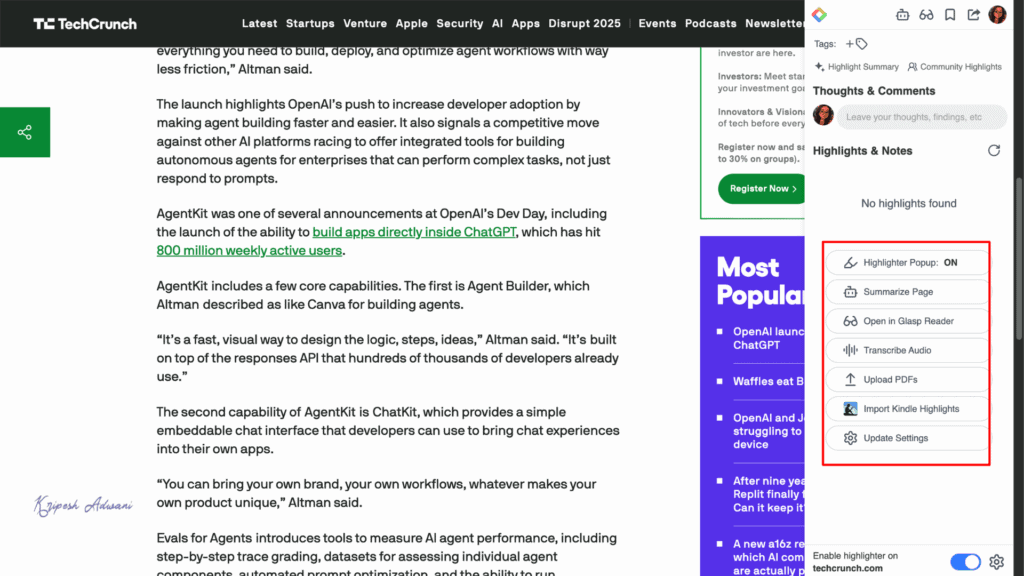
If you’re looking for an extension focused only on summarization, Glasp is a perfect choice. When you visit the official website, you can access their multiple products, like Glasp reader, highlighter, transcriber, and AI summarizer tool. To get the full experience at one click, the extension is a must-have.
Summarising and highlighting are the easy wins with AI at work. The harder part is knowing which parts of your job are worth handing over in the first place. AI For Working Professionals is a paid course built around exactly that question, using situations from real office work.
Why Use
- Highlight & Take Note: On any webpage, Glasp’s highlighter is visible on-screen. You can highlight in different colors and add notes for future reference.
- Glasp Reader: Reading news articles is difficult due to display ads. Hence, I switch to Glasp Reader, which opens a clean dashboard view of the same article for a distraction-free reading experience.
- Multiple AI Models: To summarize a webpage or YouTube video, you can choose from different LLMs such as Claude, ChatGPT, and more.
- YouTube Video Summarizer: While watching YouTube, Glasp adds a summary button for both on-page and off-page summaries. Free users can only access the off-page summary via the AI tools dashboard.
- Video Transcription: Glasp also offers accurate, time-stamped transcriptions of YouTube videos.
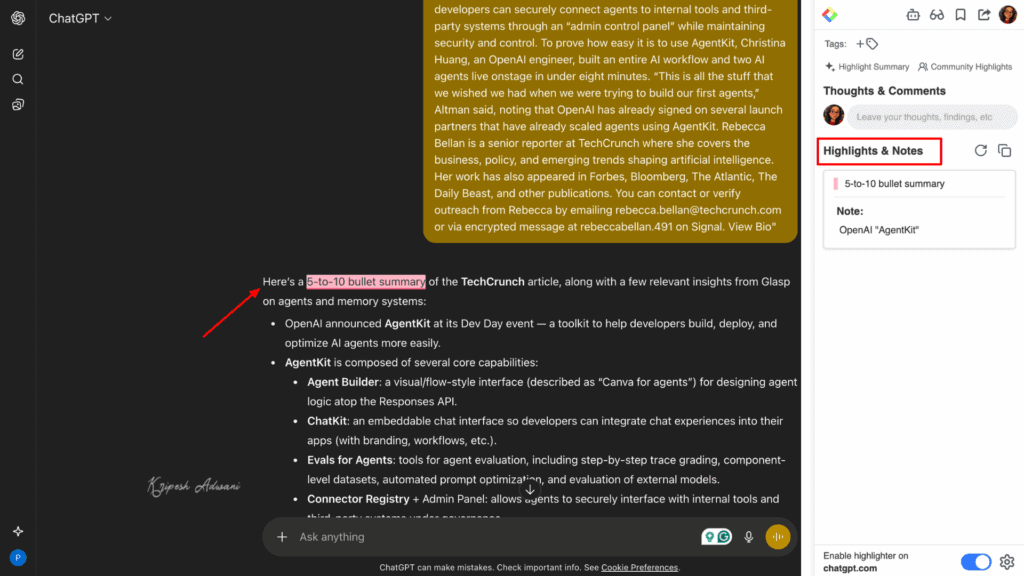
If you consume multiple YouTube content or articles for research, this extension is extremely useful. You can even generate quote shots from articles and share them directly on social media.
Free Plan Limits
Glasp lets you highlight unlimited webpages for free. However, free users are limited to 3 YouTube summaries per day and 30 minutes of audio file transcription and summarization per month.

Best For
Learners, researchers, content creators
7. Compose AI – Best Email Writing Assistant
| Google Playstore Rating | 4.1/5 |
| Downloads | 300K+ |
| Official website | Visit Compose AI |
Compose AI is an AI-powered auto-completion and text-generation tool that helps you write faster and more efficiently. If you struggle to write or reply to emails on time, this Chrome extension can automate the task for you. It’s also useful for creating bullet lists, blog ideas, stories, and more.
Why Use
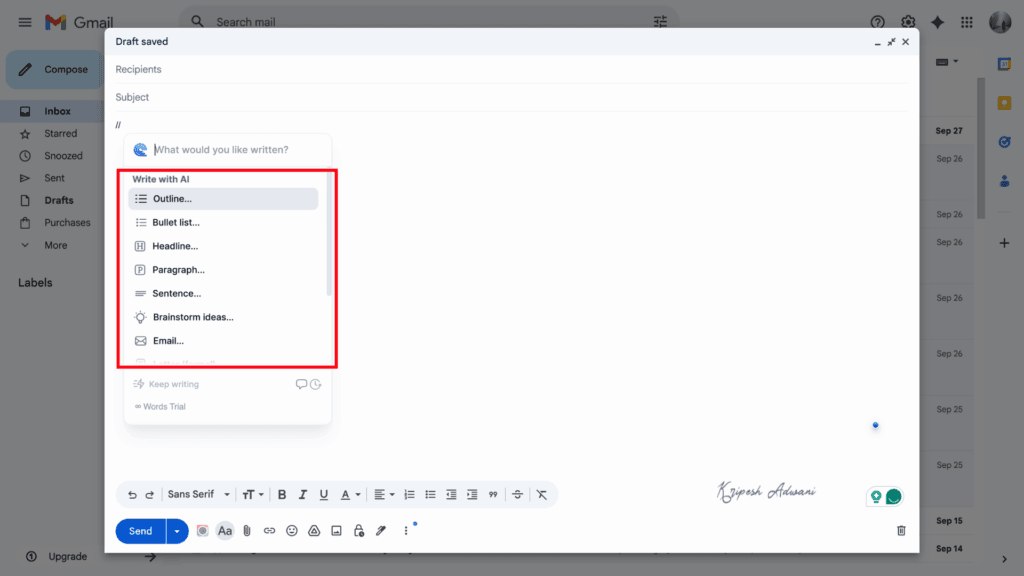
- Automate Content Writing: Compose AI assists with email writing, outlining, brainstorming, and content creation. You can get blog ideas, write social posts, formal letters and bullet lists.
- Easy Reply: When you open an email, scroll down to see the Compose AI dashboard with preset options like “Say Yes,” “Say No,” or “Say Thanks.” You can also draft a custom reply using a simple AI prompt.
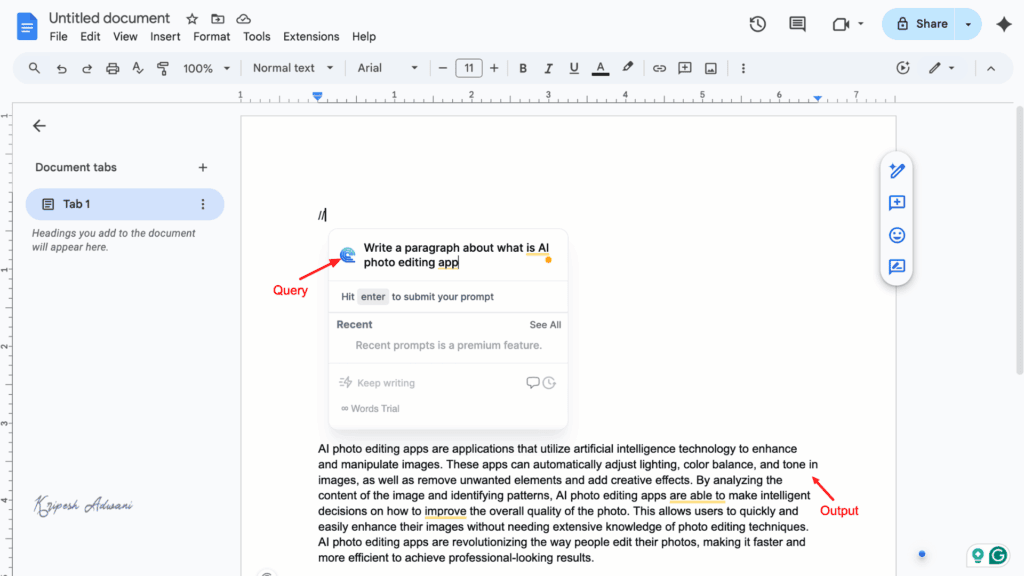
- Quick Shortcuts: After installing the extension on Chrome, just type “//” anywhere, and it will show you different options for a variety of use cases — instantly generating or refining your text.
- Auto Edit Text: Highlight any paragraph and click the Compose AI button. The tool can auto-complete, expand, shorten, or fix grammar and spelling errors in seconds.
- Integration with Multiple Platforms: Compose AI works across Gmail, Google Docs, Facebook, and other social media platforms.
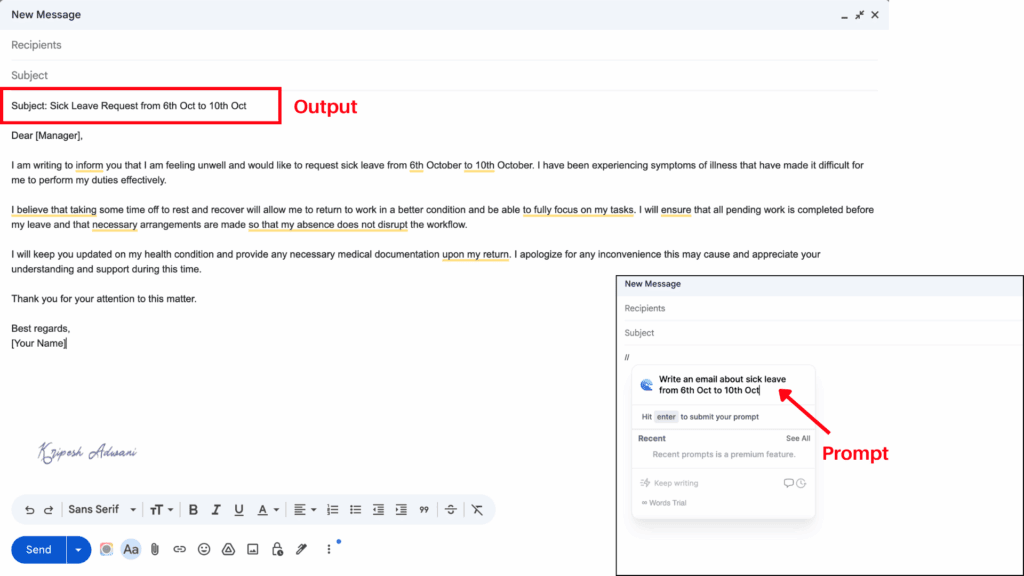
I’d primarily recommend Compose AI for email writing. However, it can also support other writing needs if you’re not fully satisfied with tools like AI Blaze.
Free Plan Limits
Free users can generate 1,500 AI-written words per month, use 5 rephrases, create 10 AI-written emails, and access 50 auto-completions each month.
Best For
Freelancers, bloggers, and busy marketing professionals who need to reply to emails quickly or generate short-form content.
8. Speechify – Best Document Reader
| Rating | 4.6 |
| Downloads | 1M+ |
| Official website | Visit Speechify |
Speechify is a text-to-speech AI tool launched in 2017. It was founded by Cliff Weitzman and Tyler Weitzman to help primarily people facing dyslexia challenges. With its amazing features and AI-powered functionalities, the app has been awarded “Chrome Extension of the Year” and is helping millions of users worldwide.
Why Use
- Document Reading: Speechify can read any document, including webpages, long PDFs, and news articles. Just install the extension and click the play button to listen.
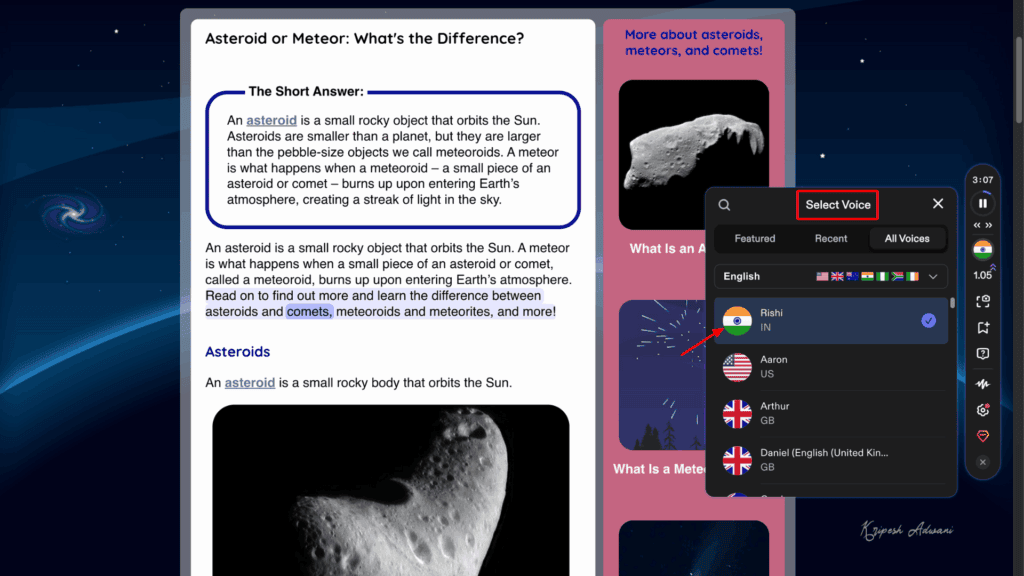
- Multiple Voices: Both free and paid users can choose from a variety of male and female AI voices. The tool offers over 1,000 human-like voices for a natural listening experience.
- Multilingual Support: Speechify lets you listen to documents in your native language. The tool offers 60+ languages, including English (Indian accent), Hindi, and Bengali.
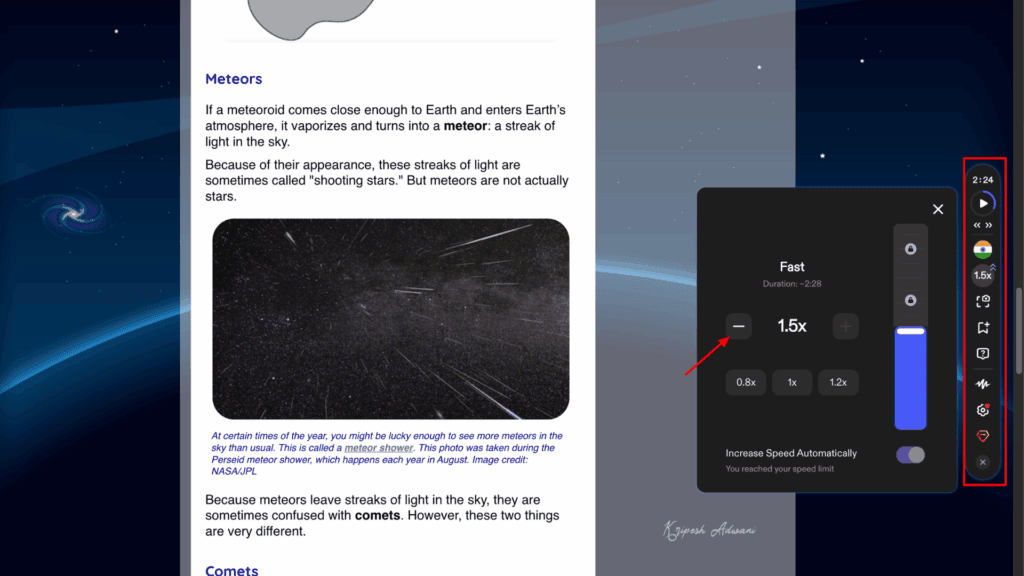
- Playback Speed Control: You can reduce or increase the playback speed depending on your comfort level. Speechify lets you listen 4.5× faster.
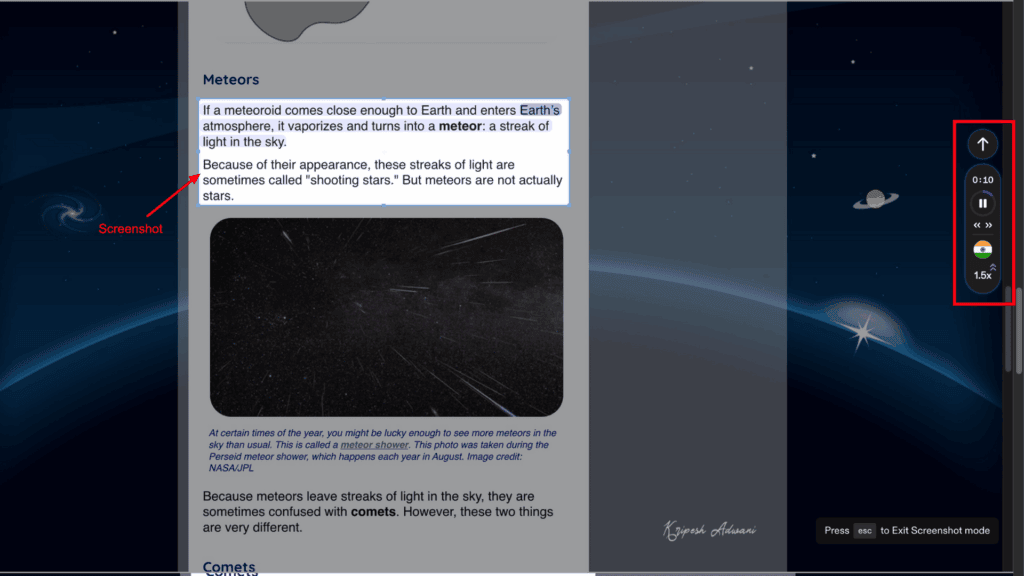
- Listen to Selected Areas: You can highlight or take a screenshot of any section, and Speechify will read only that specific portion aloud.
- AI Summary: Paid users can generate AI-powered summaries that extract key points and important highlights from long articles or documents.
Speechify’s AI reader is incredibly helpful for me when I have to read multiple articles for research. It saves time. I can listen to news articles while doing other work or even while traveling.
Free Plan Limits
Free users of Speechify can listen to any document at a maximum speed of 1.5×. They get access to 10 AI voices, the text-to-speech feature, and can store up to 5 files in their library.
Best For
Multitaskers and people with special accessibility needs.
9. Scribe – Best for AI Documentation
| Rating | 4.8 |
| Downloads | 1M+ |
| Official website | Visit Scribe |
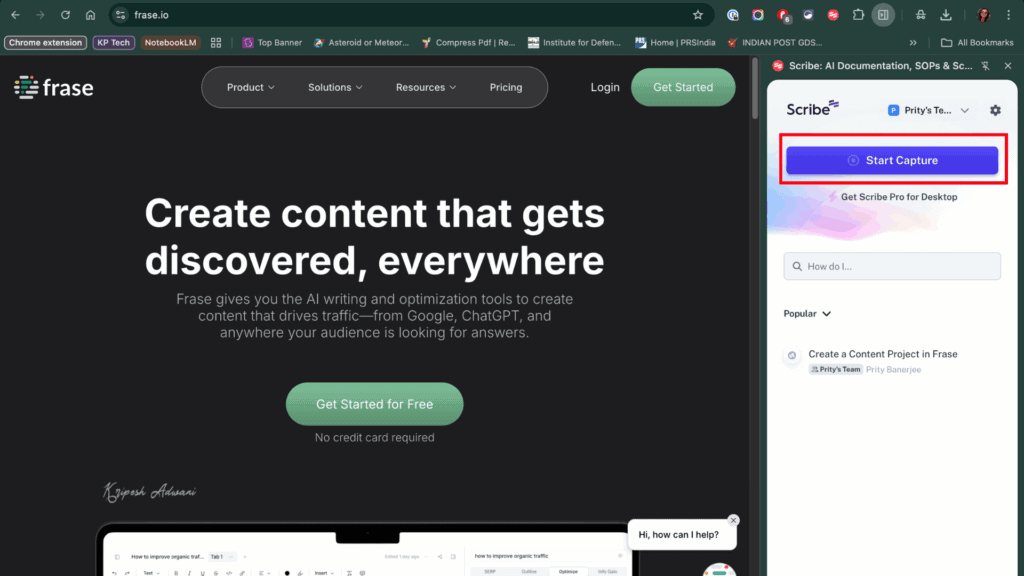
Do you often need to train your coworkers? Tired of creating step-by-step manuals during busy hours? Scribe is the perfect AI assistant for you. It automatically creates step-by-step guides from your screen recordings.
Why Use
- Automatic Step-by-Step Documentation: Scribe captures every step you perform through screenshots or screen recordings. It converts them into a clear, written guide.
- AI-Generated Titles and Descriptions: You don’t need to explain anything manually. Scribe’s AI writer automatically generates titles and descriptions for each step.
- GIFs from Multiple Steps: You can combine multiple steps into a single GIF to make explanations even easier for your team.
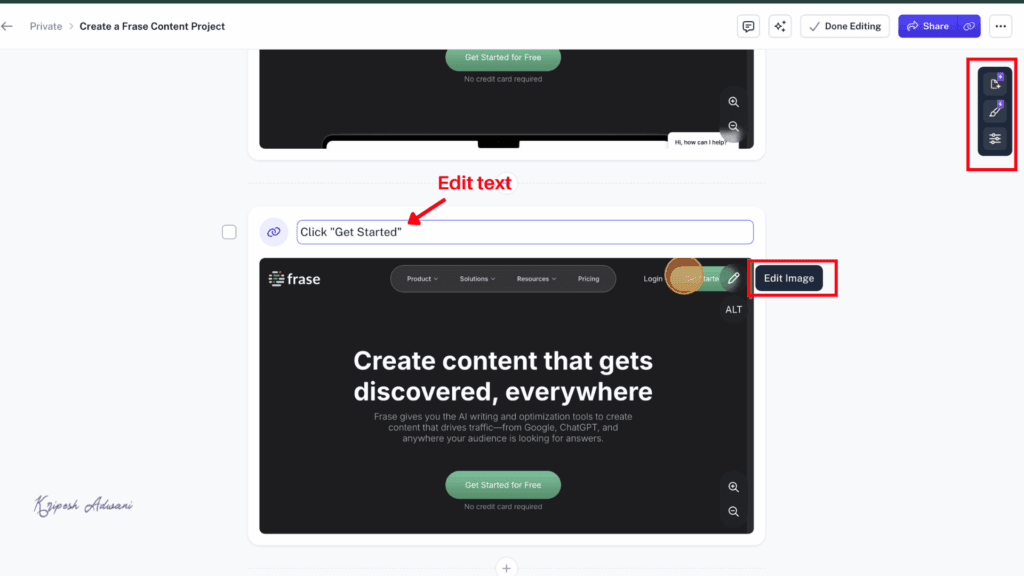
- Easy Editing: Once Scribe generates the document, you can delete, add, or edit any part. It also allows text formatting for better readability.
- Multiple Export Options: You can export your guides as PDF, Markdown, Word, or other formats. (Note: Exporting is available only for paid users; free users can share guides via links.)
- Smart Blur: If your SOPs contain sensitive information, you can use Smart Blur to automatically or manually redact it.
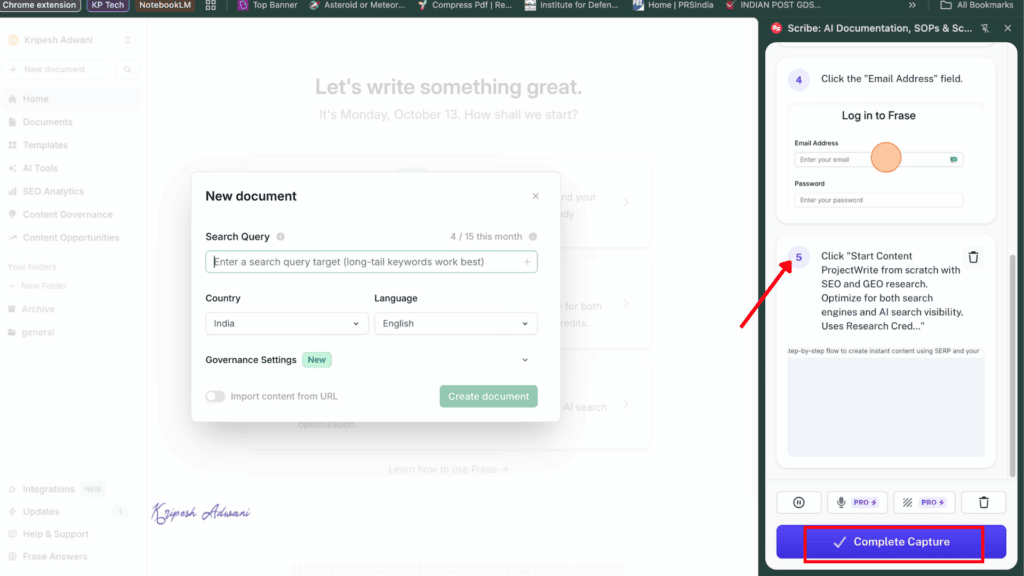
I personally use Scribe to create SOPs for my teammates. It makes it so much easier to guide them through software installations or provide instructions to remote new joiners without repeatedly explaining everything over video calls.
Free Plan Limits
Scribe’s free plan lets users access AI-powered automatic capture, on-screen walkthroughs, web process capture, and the ability to edit text and steps. However, you can only share your guides via video, link, or embed them into other tools; downloading is not available in the free plan.
Best For
Sales operations teams, HR professionals, customer-facing teams, and startup owners.
10. Copyleaks – Best AI Content Detector
| Rating | 4.1 |
| Downloads | 200K+ |
| Official website | Visit Copyleaks |
It’s becoming increasingly difficult to tell real content apart from AI-generated text these days. Copyleaks can help! It’s an advanced AI content detector that analyzes text and identifies whether it was written by humans, bots, or tools like ChatGPT.
Why Use
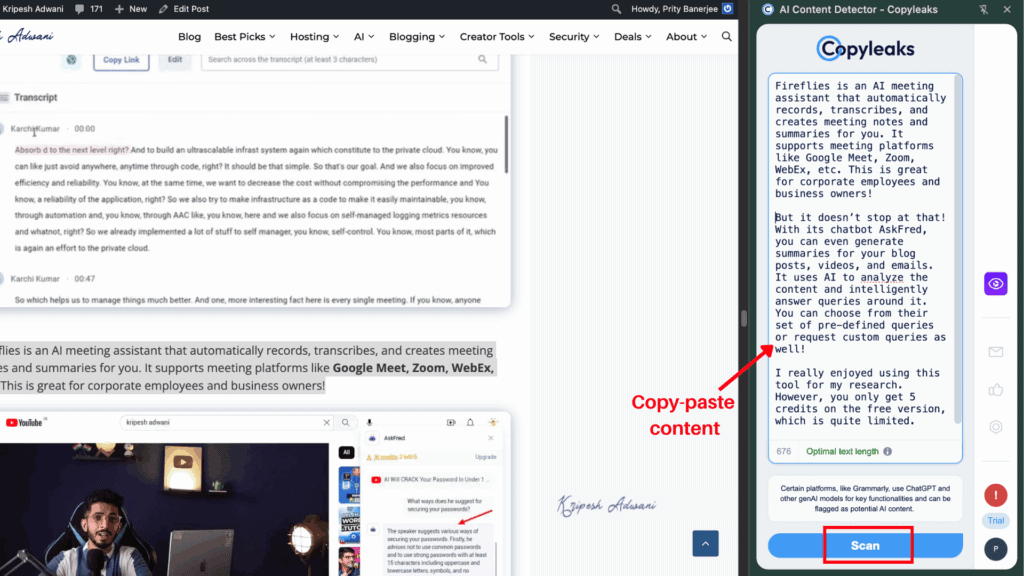
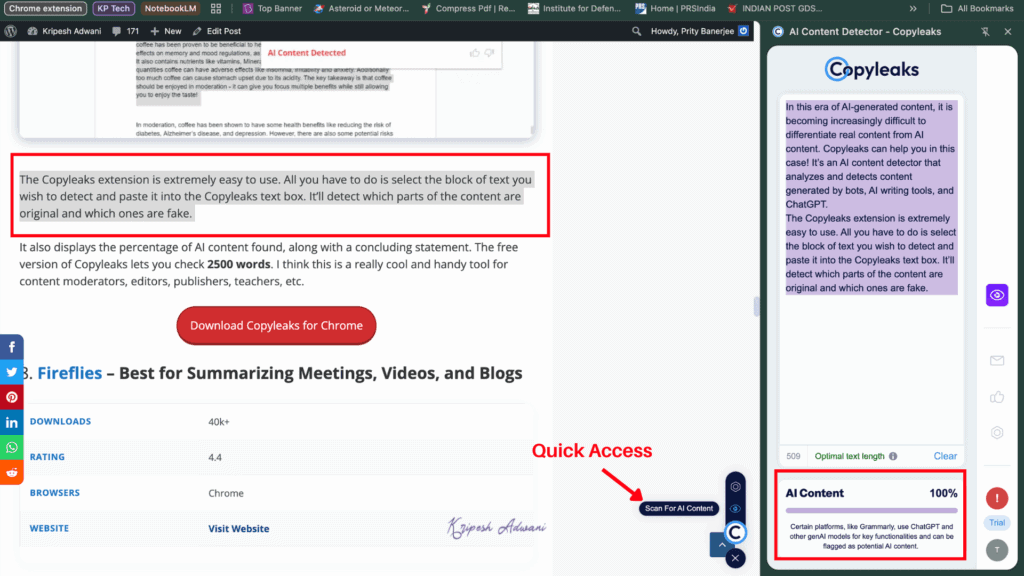
- Easy-to-use Interface: Copyleaks is very simple to use. Just paste the block of text you want to check into the text box. The tool will instantly highlight which parts are human-written and which are AI-generated.
- Detailed Report: Copyleaks provides a clear breakdown, showing the percentage of AI and original content, along with a downloadable report.
- Detects Content from Any Model: Copyleaks is trained to recognize content generated by multiple AI models, including ChatGPT, Gemini, Claude, and more.
- Quick Access: You can enable the Quick Access feature from the settings to scan any paragraph instantly. So, you don’t need to do manual copy-pasting.
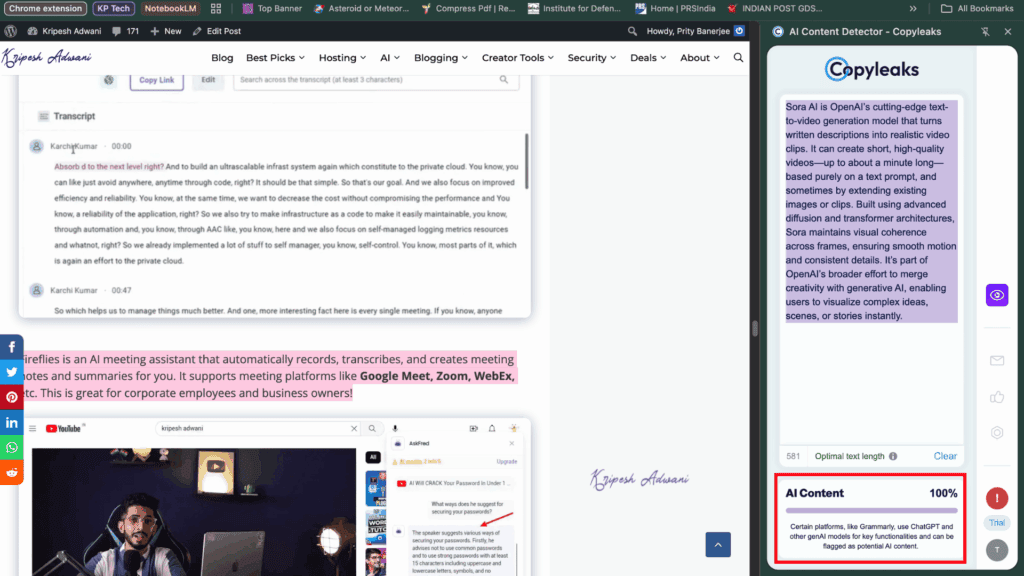
Among all AI content detectors, Copyleaks stands out for its accuracy and reliability. It claims up to 99% detection accuracy, even on the free plan.
Free Plan Limits
The free version lets you check up to 2,500 words and a few documents.
Best For
Content moderators, editors, publishers, teachers, and anyone who needs to verify content authenticity.
11. AnswerAI – Best for Quick Answer Search
| Rating | 4.9/5 |
| Downloads | 100K+ |
| Official website | Visit AnswerAI |
If you’re looking for a browser extension that provides quick answers, AnswerAI is the perfect choice. The extension is simple to use and comes with an AI summary generator, AI writer, and its most impressive feature, AskAI.
Why Use
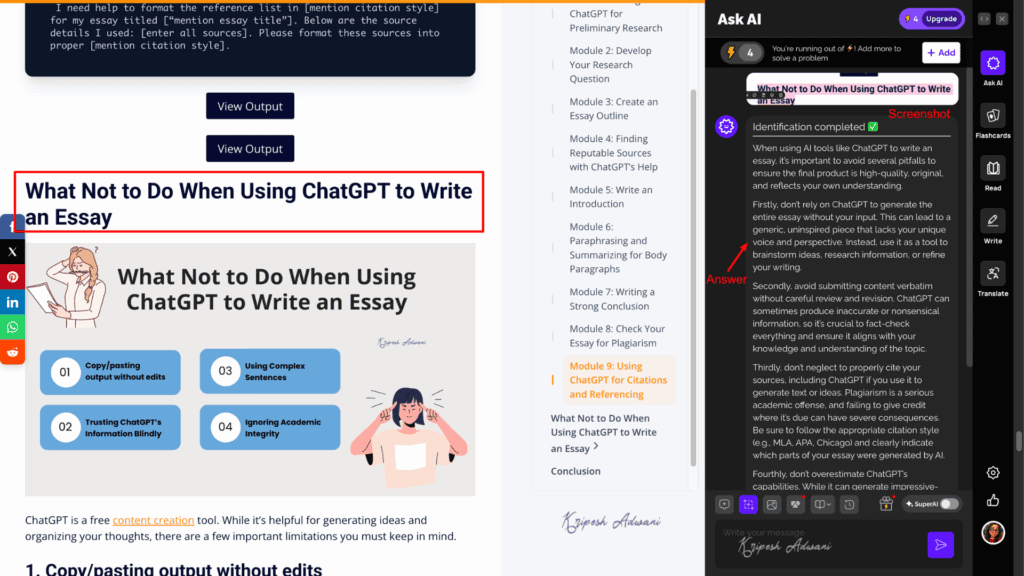
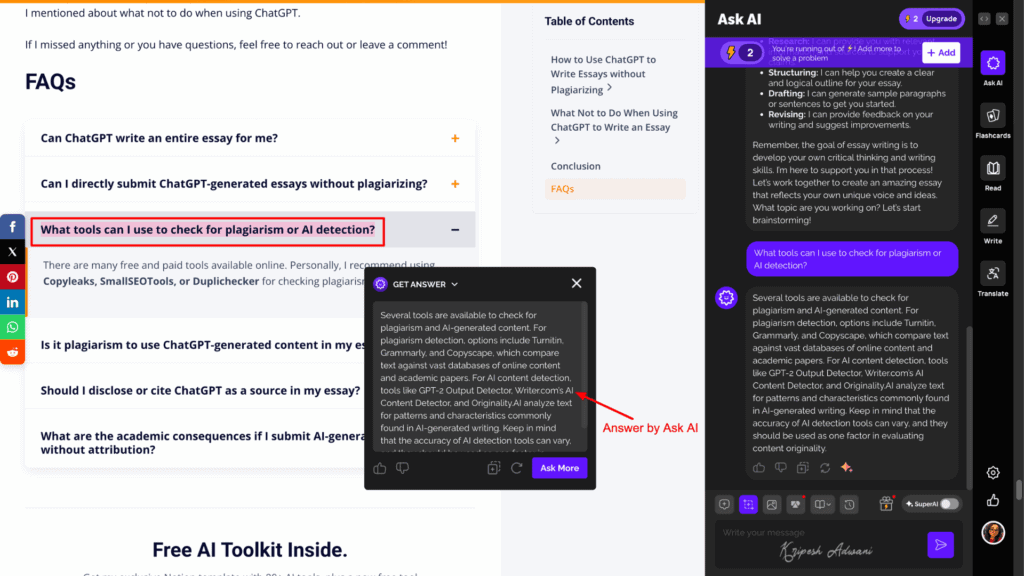
- Instant Answers: You can take a screenshot of any portion of a document or upload a file, then tap the Ask AI button. The tool automatically analyzes the image and provides an instant answer to your query.
- Chat with AI: Highlight any paragraph in your document and start a side-by-side chat. This feature helps clarify concepts while reading or researching.
- Solves Numerical Queries: AnswerAI can interpret graphical and numerical problems too. Just upload/scan the image, and it quickly solves the equations or data-based queries.
I find AnswerAI especially helpful when clearing doubts during research or self-study. It’s also great for students who need quick homework help. However, the extension can occasionally glitch or take time to respond.
Free Plan Limits
For free, you get 5 AI credits. You can ask up to 3 queries per day using AskAI and scan 3 questions per day. You’ll also get limited trial access to PDF uploads, the SuperAI assistant, and AI-generated flashcards.
Best For
Students, educators, and researchers.
Testing Parameters
I use multiple AI browser extensions in my daily work to boost productivity, so I shortlisted some of the most useful ones for you. While testing these extensions, I focused primarily on their free features, so beginners can easily try them out before making a purchase.
I included only those extensions that have at least a 4-star rating and a decent user base. Each of these tools is packed with AI features that actually automate manual tasks. During testing, I also checked whether the extension includes all the key features available in its web or app version.
Why Should You Trust Me
I’ve been working with digital tools since 2015. Over the years, I’ve explored countless free software solutions designed to help freelancers, content creators, bloggers, and small teams work more efficiently.
Recently, AI tools have caught my attention, and I’ve started testing and reviewing the best ones across various categories, like AI tools for design, AI-powered video editing software, AI chatbots, free AI resume builders, AI email assistants, and more.
While reviewing individual AI tools such as Perplexity or Text Blaze, I discovered their browser extensions that offer similar functionality without requiring heavy software installations. After using these tools for months, I’ve gained the confidence to recommend only the best AI extensions that genuinely simplify your workflow and save you valuable time.
Conclusion
In this article, we looked at the 11 best AI-powered extensions for Chrome. These tools can help you enhance your productivity and simplify your work.
Monica AI, Perplexity, Compose AI, QuillBot, and AI Blaze are my top favorite extensions. I hope you found this article helpful and discovered a few new tools to make your work faster and easier!
Have you used any of these AI Chrome extensions before? Which ones are you going to try? Do you have any recommendations? Let me know in the comments box below and I’ll try to include them in this list.
Anyway, this is Kripesh signing off. I’ll be back with more insightful content soon. Cheers, and keep learning! 🙂


Hi thanks alot for helpful article ,
What extension or other program would you recommend for rewriting the texts?
ChatGPT Deutsch is leveraging the powerful OpenAI GPT 3.5 API to provide users with a seamless experience without the need for login or registration.
Hey, have you seen Chat2docs? Give it a try, it’s amazing.
Hey,
Thanks for this amazing list. Chat2docs is another great AI Chrome extension. It is great for productivity since it simplifies the process of gathering information from AI chatbots like ChatGPT and Bard.
Find below the link:
https://chromewebstore.google.com/detail/chat2docs/badapebhjdmiohmfigjjefpfnnilghgf?pli=1